Our Top Picks


What's inside
As an Amazon Associate I earn from qualifying purchases. This post may contain affiliate links at no extra cost to you.
A depth camera gives a robot something an ordinary color camera cannot: a measurement of how far away surfaces are, organized pixel by pixel across the image. Instead of seeing only brightness and color, the robot receives a depth map in which nearby objects, walls, floors, people, and obstacles occupy different distance values. When that depth map is aligned with color imagery and with the robot’s own pose estimate, it becomes the raw material for mapping a room, avoiding a chair leg, planning a grasp, or building a three-dimensional model of an object. For builders working in ROS, the Robot Operating System, the question is rarely whether depth is useful. The question is which sensing technology, form factor, and platform fit a particular robot, budget of computing power, and working distance.
This guide compares eight depth and depth-capable options sold for robotics, research, and embedded vision: two Intel RealSense models, the D435i and the D415; an Astra Pro 3D depth camera whose listing explicitly names ROS1 and ROS2, SLAM, and 3D scanning; the Yahboom Nuwa-HP60C, listed for ROS robot 3D vision mapping and navigation with ROS2, Raspberry Pi, Jetson, and PC compatibility; an Arducam time-of-flight camera module for Raspberry Pi and Nvidia Jetson boards; two Luxonis OAK-D robotics cameras, the Lite and the Pro, both in auto focus versions; and a Waveshare binocular stereo module built around dual IMX219 sensors for Raspberry Pi 5. Those are not eight versions of the same product. Some are complete depth cameras. Two are camera modules that become part of a system you assemble around a single-board computer. The OAK-D models are robotics cameras that derive depth from stereo vision. Keeping those distinctions clear matters more than any single headline specification, because a camera that is perfect on a Jetson-based research platform may be the wrong starting point for a compact Raspberry Pi build, and the reverse is also true.
Our research for this guide focused on what each product listing actually states, on the general principles that govern stereo, structured, and time-of-flight sensing, and on the practical ROS workflow that turns a stream of depth frames into something a navigation or manipulation stack can use. Where a listing names ROS support, we say so. Where it does not, we do not claim it. Where a product is a module rather than a finished USB camera, we describe it as a module. That honesty is not a footnote here; it is the basis for choosing well, because depth data is only valuable when the hardware, the driver path, and the robot’s computer all match.
Why robots need depth in the first place
A wheeled robot moving through a home or laboratory has to answer three questions continuously: where am I, what is around me, and where can I safely go? Wheel encoders help with the first question but drift over time. A color camera helps with recognition but struggles to turn a flat image into reliable distances, especially when lighting changes or when a white wall offers few visual features. Depth sensing attacks all three questions at once. A dense depth map can be projected into a point cloud, point clouds can be registered against each other to estimate motion, and the same geometry can be accumulated into an occupancy map that a planner uses to steer around obstacles.
That family of techniques is usually grouped under SLAM, simultaneous localization and mapping. In a typical ROS setup, depth frames feed nodes that publish point clouds, convert depth into laser-like scans for a two-dimensional navigation stack, or supply a three-dimensional mapping package. The quality of the result depends less on a single frame than on consistency: depth that is stable from frame to frame, timestamps that line up with inertial or odometry data, and a field of view that matches the robot’s speed and turning behavior. A camera with a wide view can catch a doorway edge early, while a narrower, more precise view can be better for inspecting an object on a table.
Obstacle avoidance is the most immediate use. Even a simple system benefits when it can tell the difference between a shadow on the floor and a box sitting on the floor. Depth makes that distinction geometric rather than purely visual. For a robot arm or a mobile manipulator, depth also supports grasping: the system needs the position and orientation of a target object in three dimensions, the shape of the surface around it, and enough clearance information to approach without collision. For 3D scanning, depth frames taken from many viewpoints are fused into a model, so range, noise, and minimum working distance shape the final result as much as color resolution does.
Depth is not a magic substitute for good system design. Sunlight, reflective surfaces, transparent objects, and very dark materials challenge every consumer depth technology in different ways. Fast motion can blur or desynchronize frames. A powerful sensor paired with an overloaded computer still produces late, dropped, or unusable data. The right way to read this guide is therefore as a matching exercise: match the sensing principle to the environment, match the range to the task, match the interface and form factor to the computer on the robot, and match the software path to the version of ROS you actually run.
How to choose a depth camera for ROS
Start with the sensing technology
Stereo depth cameras estimate distance by comparing two views of the same scene, much as human eyes do. Software or dedicated hardware finds corresponding points in the left and right images and converts their displacement into depth. Stereo works with ordinary scene texture, can operate at a range of distances, and produces depth that is naturally aligned with the cameras that captured it. Its weakness is texture: blank walls, repetitive patterns, and low light give the matcher little to work with, and accuracy falls off with distance because a small matching error becomes a larger distance error far away. Several products in this guide use stereo in one form or another, from the RealSense models to the OAK-D robotics cameras and the Waveshare binocular module.
Time-of-flight, usually shortened to ToF, measures how long light takes to return from a surface. That direct timing approach can produce depth in scenes where stereo matching struggles, and ToF modules are often compact, which is why the Arducam option in this guide is built as a board-level module for embedded computers. ToF has its own limits, including interference between multiple sensors, reflections that create multipath errors, and range limits set by the illumination and sensor design. Structured and active pattern approaches project or use known patterns to give the scene artificial texture, improving matching in otherwise plain areas, at the cost of more difficulty outdoors or at longer distances. No technology wins everywhere; the environment decides.
Match range and accuracy to the task
A robot navigating a room needs useful depth at distances where decisions happen: close enough to catch low obstacles near the wheels, far enough to plan a path through a doorway rather than reacting at the last moment. A scanning or tabletop manipulation setup cares more about the near end, about minimum distance and about fine accuracy over a short span. In this guide, only one listing states a specific accuracy and maximum range in its title: the Astra Pro, described as offering plus-or-minus 3mm accuracy indoors and an 8m maximum range. Treat that as a claim tied to that product and to indoor conditions as stated, not as a benchmark that can be transferred to the other cameras. For the other models, our research notes the absence of a comparable headline figure and recommends judging them by technology, platform fit, and the role they will play, rather than by invented numbers.
Check ROS version and driver path honestly
ROS is not one single target. A lab may run ROS1 for a legacy stack, ROS2 for a current robot, or a bridge between the two. A camera is only as useful as the path that carries its frames into your graph of nodes, with correct topics, frames, and calibration information. The Astra Pro listing explicitly names ROS1/2, and the Yahboom Nuwa-HP60C listing explicitly names ROS2 along with Raspberry Pi, Jetson, and PC use. Those statements are part of why both models appear in a ROS-focused guide. For the RealSense cameras, the OAK-D cameras, and the board-level modules, the product titles in our research set do not make the same ROS claim, so this guide does not present ROS support as a stated title feature for them. Builders should confirm the current driver and wrapper situation for their exact ROS distribution before committing a design, and should plan time for calibration and frame configuration regardless of which camera they choose.
Decide between a finished camera and a module
A finished depth camera arrives as a single unit with its optics and sensing elements already aligned in a housing. That reduces mechanical work and usually simplifies mounting, cable routing, and replacement. A module, by contrast, is a component: it expects a host board, a compatible connection, a case or mounting arrangement that you manage, and software running on that host. The Arducam ToF camera in this guide is explicitly a camera module with a case for Raspberry Pi and Nvidia Jetson boards, and the Waveshare option is explicitly a binocular camera module compatible with Raspberry Pi 5. Neither should be bought with the expectation of a standalone USB depth camera. Both can be excellent choices precisely because they are modules, since a compact robot or a custom enclosure may have no room for a finished camera, but the integration work is real and should be counted in the project plan.
Consider the computer as part of the camera
Depth processing consumes bandwidth and compute. Stereo matching, point cloud generation, visual odometry, and mapping can saturate a small single-board computer if everything runs in one place. Some robotics cameras shift part of that work onto the camera itself, while a raw module leans on the host for almost everything. When you compare options, compare systems: camera plus computer plus power plus mounting. A Raspberry Pi build values low power and compact size. A Jetson build offers more headroom for neural networks and heavier perception. A PC-based research rig offers the most flexibility for recording data, running larger SLAM configurations, and iterating quickly. The Yahboom listing’s mention of PC alongside Raspberry Pi and Jetson reflects that spread, and it is a useful reminder that the same depth stream can serve very different development styles.
The eight depth options, product by product
1. Intel RealSense Depth Camera D435i
The Intel RealSense Depth Camera D435i, in silver, is the first of two RealSense models in this guide, and its listing highlights 1080p video capture resolution. That color capture figure matters because depth work rarely happens in isolation: a robot that maps a room also benefits from clear color imagery for recognizing objects, reading markers, documenting a scene, or aligning visual features with geometry. The D435i name itself carries the extra letter that distinguishes it within the D400 family, and the model has long been a familiar reference point in robotics discussions precisely because so many research platforms, tutorials, and existing robot designs were built around this class of device.
For a ROS builder, the appeal is breadth of use. A single D435i can serve a mobile base exploring a room, a scanning rig capturing objects from multiple angles, or a perception bench where algorithms are developed before being moved to a smaller robot. Its finished-camera form factor means the sensing unit arrives assembled rather than as a bare board, which suits teams that want to spend their integration time on software, calibration, and behavior rather than on constructing a camera. Mounting a finished unit above a robot’s base, on a mast, or on a tripod for data collection are all natural roles.
Who should choose it? Builders who want a widely recognized depth camera with strong color capture as stated in the listing, and who plan to confirm the current software path for their ROS distribution as part of setup. It is a sensible default candidate for general-purpose indoor robotics and research, especially when the same camera may move between navigation, mapping, and scanning experiments over the life of a project. Builders whose primary constraint is the smallest possible embedded module should instead look at the board-level options later in this guide, which trade the finished-camera convenience for compact integration.
2. Intel RealSense Depth Camera D415
The Intel RealSense Depth Camera D415 is the second RealSense model here, with its listing stating 720 pixels for its imaging. Where the D435i is often discussed as the generalist, the D415 occupies a complementary place in the family: a finished depth camera from the same line, suited to setups where the working distances are more controlled and the scene is comparatively orderly. A bench, a fixed inspection station, a scanning turntable, or a robot that operates in a defined indoor area are the kinds of environments where a camera in this class is commonly considered.
Who should choose it? Researchers and builders who want a RealSense depth camera for controlled indoor work, scanning, or a defined navigation area, and who are comfortable verifying the driver path for their ROS version during setup, since the product title in our research set does not itself state ROS support. For a lab that already standardizes on RealSense accessories, mounts, and workflows, the D415 keeps that consistency while filling a different role from its sibling. For outdoor use, very long range, or a Pi-only embedded build, look elsewhere in this list.
3. Astra Pro 3D Depth Camera
The Astra Pro 3D depth camera is the most explicitly specified listing in this guide. Its title states indoor accuracy of plus-or-minus 3mm, a maximum range of 8m, multi-camera sync, and support described as a ROS1/2 robot part for robotics research, AI vision, SLAM, and 3D scanning. Each of those phrases maps to a real project need. Fine stated accuracy matters for scanning and measurement-oriented research. An 8m stated maximum range matters for room-scale mapping, where a sensor that gives up after a short distance forces more movement and more registration work. Multi-camera sync matters when several cameras must observe the same event or cover a larger volume without their frames drifting apart in time.
The explicit ROS1/2 wording is equally important. Many laboratories maintain older ROS1 systems alongside newer ROS2 robots, and a camera whose listing addresses both generations reduces one source of friction when hardware moves between projects. The listed application areas, robotics research, AI vision, SLAM, and 3D scanning, are broad but coherent: all four depend on trustworthy geometry, and all four benefit when depth, timing, and software support are treated as one package rather than as separate purchases.
Who should choose it? Research groups that need the stated indoor accuracy and range, teams running mixed ROS1 and ROS2 environments, and builders planning multi-camera setups for scanning or for covering a larger space than one viewpoint allows. The indoor qualifier in the listing should be respected: plan around indoor conditions as stated, and do not assume the same figures under strong outdoor light. For a single small robot that needs only basic obstacle depth, this model’s research-oriented feature set may be more than the project requires, and a simpler option below may fit better.
4. Yahboom Nuwa-HP60C Depth Camera
The Yahboom Nuwa-HP60C is presented in its listing as a depth camera for a ROS robot, aimed at 3D vision mapping and navigation, and compatible with ROS2, Raspberry Pi, Jetson, and PC. That combination tells a clear story about its intended audience: hobbyists, students, and robot builders working with the popular single-board and embedded platforms that dominate educational and maker robotics. Instead of assuming a laboratory workstation, the listing names the computers that small robots actually carry, plus the PC that developers use at the desk.
Mapping and navigation are the right headline tasks for this class of robot. A small differential-drive base does not need to reconstruct museum-grade models; it needs dependable geometry for building a map, localizing within it, and avoiding obstacles while it moves. A depth camera positioned for that job, paired with a ROS2 stack, can supply point cloud or scan-like data to the navigation layer while the same robot’s other sensors handle odometry and safety. The platform list also supports a sensible development workflow: prototype and record on a PC, deploy on a Jetson when more compute is needed, or keep the build light on a Raspberry Pi when the task allows.
Who should choose it? Builders whose robot already centers on ROS2 and one of the named platforms, especially educational and maker projects where the camera, the computer, and the robot kit evolve together. It is also a natural candidate for someone learning ROS2 navigation who wants the camera purchase itself to reflect that goal, rather than adapting a general camera after the fact. Builders on ROS1 should note that the listing names ROS2, not both generations, and should plan their software version accordingly rather than assuming coverage that the title does not state.
5. Arducam ToF Camera Module
The Arducam option requires the clearest framing in this guide: it is a time-of-flight camera module, described as a 0.43MP color rolling shutter camera module with a case, for Raspberry Pi and Nvidia Jetson boards, offered as a depth sensing solution using ToF technology. It is not a finished USB depth camera, and presenting it as one would mislead a buyer. What you are choosing here is a component that integrates with a host board you supply, in a build where size, mounting, and the direct relationship between camera and computer are part of the design.
That module nature is a strength for the right project. A compact robot, a custom sensor head, or an embedded vision enclosure can use a board-level ToF module where a larger finished camera would not fit. ToF sensing also brings a different depth character from stereo: because distance comes from timing returning light, the approach can be attractive in compact, near-to-mid-range embedded applications where stereo matching hardware or a wide stereo baseline is impractical. The stated host platforms, Raspberry Pi and Jetson, cover the two most common paths in this space, from low-power experimentation to a Jetson build with more processing headroom.
Who should choose it? Builders who are comfortable with module-level integration, who already plan around a Raspberry Pi or Jetson host, and who specifically want ToF depth in a small form factor. Expect to handle mounting, connection, configuration, and the software path on the host as part of the project, and do not budget the purchase as if a host computer were included, because the listing describes a module for those boards. Builders who want a single finished unit to mount and connect should choose one of the complete cameras above instead.
6. Luxonis OAK-D Lite Robotics Camera, Auto Focus
The Luxonis OAK-D Lite is listed as a robotics camera in an auto focus version. The OAK-D family approaches depth through stereo vision within a robotics-focused camera platform, a design philosophy that treats the camera as an active perception component for a robot rather than as a passive webcam. The Lite model is the more accessible entry in the pair included here, which makes it the natural starting point for builders who want the OAK-D approach without moving straight to the Pro.
Auto focus, as named in the listing, is relevant to color imaging quality across varying subject distances, which matters when the same camera supports recognition, tracking, or documentation alongside depth. In a robotics workflow, the color stream and the depth stream reinforce each other: detection finds the object, depth places it in space. A camera designed for robotics also invites a different mounting and system mindset, since it is meant to live on a moving platform, observe dynamic scenes, and feed perception pipelines rather than sit on a desk for occasional capture.
Who should choose it? Builders who want a robotics camera with stereo-derived depth and who prefer to start with the Lite tier of the OAK-D line. A note of honesty applies here and to the Pro below: the product titles in our research set do not state ROS support for the OAK-D models, so this guide does not claim it. A ROS builder considering either model should verify the current integration path for their distribution before purchase, and should treat that verification as a normal step in system design rather than as an afterthought.
7. Luxonis OAK-D Pro Robotics Camera, Auto Focus
The Luxonis OAK-D Pro is the step-up robotics camera in this guide, also listed in an auto focus version. Placing the Lite and the Pro side by side reflects how robotics projects actually grow: a team proves a perception idea on the more accessible model, then moves to the Pro tier when the robot’s role, environment, or performance demands expand. Both share the OAK-D premise of a robotics camera using stereo vision for depth, so skills, mounts, and system thinking transfer between them more readily than they would across unrelated platforms.
The Pro is the model to consider when the camera is a central, long-lived part of the robot rather than an experiment. Outdoor-adjacent work, more demanding perception pipelines, and robots that operate for longer sessions place greater stress on a sensing platform, and choosing the higher tier is often a decision about headroom and longevity rather than about any single feature. Because the listing provided for our research states the model, its robotics camera role, and auto focus, and does not enumerate further specifications, this guide deliberately avoids inventing additional figures for it. The honest comparison is positional: Lite as the entry point, Pro as the step up within the same family.
Who should choose it? Teams building a robot where the camera will remain a core perception component through several iterations, and builders who already know the OAK-D stereo approach fits their environment. As with the Lite, the title in our research set does not name ROS, so confirm the integration path for your ROS version before committing. Builders on a tight budget who are still validating whether stereo depth suits their scene should start with the Lite and preserve the option to step up once the requirements are proven.
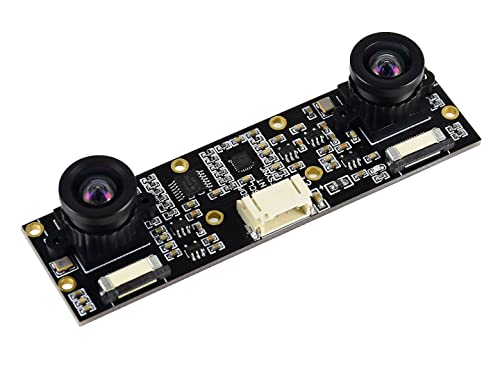
8. Waveshare Binocular Camera Module for Raspberry Pi 5
The Waveshare option is a binocular camera module compatible with Raspberry Pi 5, built with dual IMX219 sensors at 8 megapixels, and described for stereo vision and depth vision. Like the Arducam entry, it is a module, not a complete USB depth camera. Its depth comes from the classic binocular principle: two imagers separated by a baseline observe the same scene, and depth is computed from the differences between the two views. The builder supplies the Raspberry Pi 5 host, the mounting, and the processing that turns two image streams into depth.
This is the most hands-on option in the guide, and for the right builder that is the point. A student learning how stereo depth actually works, a researcher who wants direct access to both camera streams, or a maker designing a custom Pi 5 sensor head can do things with a dual-sensor module that a sealed camera does not invite. The stated 8 megapixel sensors speak to the color imaging side of the module, while the depth quality in practice will depend on calibration, baseline geometry, scene texture, lighting, and the stereo algorithm running on the Pi. That dependence is not a flaw; it is the nature of a module, and it should be embraced with eyes open.
Who should choose it? Raspberry Pi 5 builders who specifically want a binocular stereo module and who are prepared to own the calibration and computation steps. It is a poor match for anyone expecting plug-in depth from a finished camera, and a strong match for learning, experimentation, and custom enclosures. If your project timeline is short and the robot simply needs depth data flowing into ROS with the least camera-level work, choose a finished camera and spend your time on the robot’s behavior instead.
Side-by-side: how the eight options differ
Reading the eight products as a group reveals a simple structure. There are finished depth cameras for general and research use: the RealSense D435i, with 1080p video capture resolution stated, and the RealSense D415, with 720 pixels stated. There are depth cameras whose listings speak directly to ROS builders: the Astra Pro, naming ROS1/2, multi-camera sync, stated indoor accuracy and range, SLAM, and scanning; and the Yahboom Nuwa-HP60C, naming ROS2 with Raspberry Pi, Jetson, and PC for mapping and navigation. There are robotics cameras based on stereo vision: the Luxonis OAK-D Lite and OAK-D Pro, both auto focus. And there are modules for embedded builders: the Arducam ToF module for Raspberry Pi and Jetson, and the Waveshare binocular module with dual IMX219 sensors for Raspberry Pi 5.
That structure suggests a practical shortlisting method. First, eliminate by form factor: if you cannot take on module integration, the Arducam and Waveshare options should drop off the list no matter how appealing their size or learning value may be. Next, eliminate by stated software alignment: a ROS1 and ROS2 mixed lab will look first at the Astra Pro’s explicit wording, while a ROS2 educational robot on a named Yahboom platform has a direct candidate in the Nuwa-HP60C. Next, consider the family you want to grow with: RealSense offers two related finished cameras for different roles, and OAK-D offers a Lite-to-Pro progression within one robotics camera line. Finally, weigh the environment: indoor research, a classroom floor, a tabletop scanning area, and a custom Pi enclosure each reward different strengths.
- General finished camera with higher stated color capture: Intel RealSense D435i.
- Finished RealSense option for more controlled setups: Intel RealSense D415.
- Stated accuracy, range, sync, and ROS1/2 in one listing: Astra Pro 3D depth camera.
- ROS2 mapping and navigation on Pi, Jetson, or PC: Yahboom Nuwa-HP60C.
- Compact ToF depth as a board-level module: Arducam ToF camera module.
- Entry point to the OAK-D robotics camera line: Luxonis OAK-D Lite, auto focus.
- Step-up OAK-D robotics camera: Luxonis OAK-D Pro, auto focus.
- Hands-on binocular stereo for Raspberry Pi 5: Waveshare dual IMX219 module.
Getting depth data into a ROS workflow
Whichever camera you choose, the ROS workflow follows a recognizable pattern, and planning it early prevents the common disappointment of owning good hardware that never becomes good robot behavior. The camera driver or vendor software publishes image and depth streams. Calibration information describes the optics so that pixels can be interpreted as rays in space. Depth frames are converted into point clouds or scan-like messages. Those messages enter mapping, localization, obstacle avoidance, or manipulation nodes, all tied together by the transform tree that records where the camera sits relative to the robot base, wheels, and any arm.
Calibration deserves respect. Stereo systems depend on the geometric relationship between their imagers; module builders in particular should expect calibration to be part of the project, not an optional refinement. Even with a finished camera, verify the camera frame placement in your robot description, because a point cloud that is geometrically excellent but published in the wrong frame will steer a robot into the furniture with great precision. Time synchronization matters for the same reason: when a robot moves, depth, odometry, and inertial data captured at different moments describe different worlds, and fusing them carelessly produces smeared maps and unstable pose estimates.
Frequently asked questions
Do I need a depth camera if my robot already has a color camera?
For navigation, mapping, obstacle avoidance, and grasping, depth adds geometric information that a color camera alone does not directly provide. A color camera can support visual odometry and recognition, but a depth camera supplies per-pixel distance that feeds point clouds and occupancy maps in a straightforward way. If your robot only needs to follow a line or detect a colored marker, depth may be unnecessary. If it must move through cluttered space or interact with objects, depth is usually the missing sense.
Which option states ROS support directly in its listing?
Two listings in this guide do. The Astra Pro is described as a ROS1/2 robot part for robotics research, AI vision, SLAM, and 3D scanning. The Yahboom Nuwa-HP60C is described as compatible with ROS2, alongside Raspberry Pi, Jetson, and PC. The other products’ titles in our research set do not state ROS support, so builders should verify the current driver or integration path for those models against their own ROS distribution before purchasing.
Are the Arducam and Waveshare products complete cameras?
No, and that distinction is central to choosing them correctly. The Arducam product is a ToF camera module with a case, made for Raspberry Pi and Nvidia Jetson boards. The Waveshare product is a binocular camera module compatible with Raspberry Pi 5, using dual IMX219 sensors for stereo and depth vision. Both require a host board and integration work. They are components for a system you build, not standalone USB depth cameras.
What is the difference between the OAK-D Lite and the OAK-D Pro?
Both are Luxonis robotics cameras in auto focus versions, and both belong to the OAK-D family that derives depth from stereo vision. Within this guide’s research, the Lite is positioned as the accessible entry point and the Pro as the step-up model in the same line. Their listings do not state ROS support, so a ROS builder should confirm the integration path for either model. Choose the Lite to start and validate your approach; choose the Pro when the camera is a long-term core component and you want the higher tier from the outset.
How should I choose between stereo, ToF, and the Astra Pro approach?
Choose by environment and project shape rather than by fashion. Stereo, represented here by the RealSense models, the OAK-D cameras, and the Waveshare module, depends on scene texture and matching, and it scales from finished cameras down to a bare dual-sensor module. ToF, represented by the Arducam module, measures returning light directly and suits compact embedded designs. The Astra Pro listing emphasizes stated indoor accuracy, an 8m maximum range, and multi-camera sync, which speaks to research, scanning, and multi-camera work. The right answer is the technology whose strengths match your lighting, distances, and form factor.
Check prices on Amazon
Live listings for the shortlist in this guide are pulled from Amazon below, so prices and availability are always current at the moment you look.

Conclusion
The best depth camera for ROS is not a single model; it is a match. Choose the Intel RealSense D435i for a recognized finished camera with 1080p video capture resolution stated in its listing, or the D415 for a related RealSense option in more controlled work. Choose the Astra Pro when stated indoor accuracy, 8m maximum range, multi-camera sync, and explicit ROS1/2 wording matter to a research, SLAM, or scanning program. Choose the Yahboom Nuwa-HP60C when a ROS2 robot on Raspberry Pi, Jetson, or PC needs depth aimed at mapping and navigation. Choose the Arducam ToF module for compact time-of-flight depth integrated with a Pi or Jetson host, and the Waveshare binocular module for hands-on stereo learning and custom builds on Raspberry Pi 5. Choose the Luxonis OAK-D Lite to enter a robotics camera line built around stereo depth, or the OAK-D Pro as its step-up counterpart, verifying the software path for your setup in either case.
Whichever direction you take, keep the planning principles from this guide close: respect the difference between a camera and a module, read ROS claims only where they are actually stated, match range and technology to the environment, budget the host computer as part of the sensor, and bring the system up in stages from a stationary point cloud to full navigation. A robot that can measure its world reliably becomes a platform for everything else, from safer movement to better maps to more capable manipulation, and that journey starts with choosing depth sensing honestly.
As an Amazon Associate, this site earns a commission from qualifying purchases made through links on this page, at no additional cost to readers.
Related guides
- Best Canon Point and Shoot Digital Cameras: PowerShot Picks From Pocket Compacts to Travel Zooms
- Best Barn Cameras: 4G LTE, Long-Range Wi-Fi and Hub Systems Compared
- Best 400 FPS High Speed Cameras: The Honest Truth About Burst Slow Motion
- Best Airbnb Security Cameras: Compliant Outdoor Cameras and Noise Sensors for Hosts


