Our Top Picks
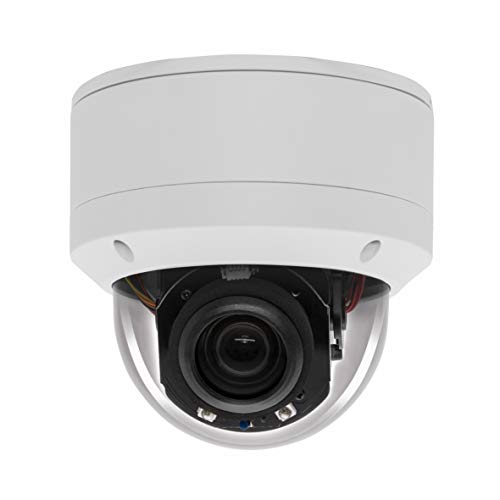 H.265 HD 1080P Security POE PTZ Dome Camera1 Count (Pack of 1)4.7 x 4.7 x 4.4 inches1.1 poundsCheck on Amazon
- IP Security 5.0MP H.265 POE PTZ Dome Camera1 Count (Pack of 1)4.7 x 4.7 x 4.4 inches1.15 poundsCheck on Amazon
 8CH 1080P 5-in-1 HD Analog Hybrid DVR&NVR Supports8CH+No HDD10.23 x 8.74 x 1.77 inchesCheck on Amazon
 Hikvision KAMERA IP DS-2CD2387G2-LU170 x 170 x 150 (BxHxT)10 x 2 x 2.7 inches2.3 poundsCheck on Amazon


What's inside
- How a Hikvision NVR accepts a third-party camera
- The add-camera workflow, at a factual level
- What keeps working: the dependable core
- What typically breaks or degrades
- PoE budgeting: the arithmetic that decides whether channels stay up
- Matching resolution and frame rate to the recorder’s decoding ceiling
- Main stream and sub-stream: configuring the pair properly
- Firmware caveats on both sides of the pairing
- RTSP as a fallback, and its limits
- What to prioritise when buying specifically for ONVIF duty
- Troubleshooting a pairing that will not come online
- Retention planning when codecs differ across the estate
- Commissioning checklist for a mixed channel
- Choosing by viewpoint: three worked patterns
- Audio, alarm connections and the smaller interfaces
- When staying single-brand is the right answer
- Reading a camera listing like an integrator
- Check prices on Amazon
- Security hygiene for a mixed estate
As an Amazon Associate I earn from qualifying purchases. This post may contain affiliate links at no extra cost to you.
A Hikvision network video recorder does not require Hikvision cameras, but it does require cameras that speak a language the recorder genuinely understands. That language, for third-party hardware, is usually ONVIF — a set of open interface standards maintained for exactly this kind of cross-brand work — and the gap between a camera that lists ONVIF on its box and a camera that behaves well on a Hikvision recorder for years is where most mixed-brand systems succeed or disappoint. This guide explains how the connection actually works, what survives the translation between brands and what quietly does not, and how to choose cameras whose strengths are the ones that still function after the pairing.
The intended reader already owns, or is about to buy, a Hikvision NVR and wants camera choice beyond a single catalogue: perhaps a wider lens range, a particular form factor, a camera already owned from an earlier system, or simply competitive pressure on price and availability. Our research for this guide drew on ONVIF profile specifications, Hikvision recorder documentation across its value and professional series, and camera manufacturers’ conformance listings, and it keeps one principle in view throughout: buy for the features that ONVIF carries, not for the features a camera advertises in its own ecosystem.
Please read this before following any link from this page: a number of the links here are affiliate links, and the site may receive a commission on qualifying purchases made through them, with no change to the price you pay. Recommendations below are ordered by compatibility reasoning rather than by any commercial arrangement, and the site’s full disclosure page explains the arrangement in formal terms.
Expectations deserve calibration at the start. A well-chosen third-party camera on a Hikvision NVR delivers live view, continuous and scheduled recording, and playback that feel entirely native, because those core functions are what the standard was built to carry. The losses appear at the edges — brand-specific analytics, special codecs and two-way conversations through the camera — and they are predictable rather than random. A buyer who knows in advance which edges their site actually uses can mix brands with confidence; a buyer who assumes everything transfers is the one who ends up surprised.
How a Hikvision NVR accepts a third-party camera
Hikvision recorders talk to their own cameras using a private protocol that carries the full feature set: configuration, events, analytics and firmware management in one channel. For other brands, the recorder offers an ONVIF protocol option in its camera management screens, alongside in some firmware versions a generic RTSP option. Selecting the ONVIF option tells the recorder to discover the camera using the standard’s device services, authenticate with a username and password, query the camera’s capabilities, and then subscribe to its video streams and basic events using standardised requests rather than private ones.
Profile S and Profile T: the two profiles that matter here
ONVIF organises its requirements into profiles, and two dominate this conversation. Profile S, the older and most widely implemented, covers the essentials of a video source: discovery, stream configuration, H.264 video over RTSP, PTZ basics where applicable, and event handling for simple inputs such as motion. A very large installed base of cameras implements Profile S, and for fixed cameras recording to a schedule it remains sufficient in many installations. Profile T is the successor for advanced video streaming: it adds H.265 support, more modern stream configuration, improved event handling including analytics events in standard form, and requirements around secure communication and image settings that Profile S left loose.
The practical reading of the distinction is straightforward. A Profile T camera is the safer purchase for a modern Hikvision recorder expected to run H.265 and to live for years, because the profile matches the recorder’s own direction of travel. A Profile S camera is a reasonable purchase for basic duty — a fixed view, H.264 recording, motion events — provided its firmware implements the profile completely, which is a question of the individual model rather than the logo on the listing. ONVIF maintains a public database of conformant products, and a camera that appears there with a declaration covering the relevant profile has at least been through the organisation’s conformance process; a camera whose maker merely prints the word ONVIF in marketing copy has made a weaker claim, and the difference shows up in the field.
For a sense of what the recorder will be asked to decode at the sharper end of the market, readers can compare the models in our survey of best 4k ip cameras, keeping in mind that resolution is only usable up to the decoding ceiling discussed later in this guide.
The add-camera workflow, at a factual level
Adding a third-party camera follows a consistent pattern across Hikvision recorder generations, whether the work is done on the recorder’s local display, its web interface or its client software. First, the camera itself is prepared: it is powered, given its own administrator credentials, and set to an IP address that fits the network plan — either on the camera subnet behind the recorder’s PoE ports or on the local network for non-PoE models. ONVIF access is enabled in the camera’s own settings where the maker separates it, and on many cameras an ONVIF user must be created explicitly, distinct from the web login, because the camera treats protocol access as its own account type.
Second, the channel is configured on the recorder. In the camera management list, the installer selects a free channel, chooses the ONVIF protocol option rather than the default private protocol, and enters the camera’s IP address, its ONVIF device port — port 80 is the conventional ONVIF service port on most cameras, though some makers use alternatives that their documentation states — and the ONVIF username and password created in the first step. The recorder then queries the camera, negotiates the stream profiles it offers, and brings the channel online if the credentials and capabilities line up.
Third, the streams are set deliberately rather than accepted blindly. The recorder pulls a main stream and a sub-stream from the camera, and the installer confirms resolution, frame rate, bitrate control and codec for each, within the limits the recorder series supports. Skipping this step is the most common cause of the classic mixed-brand symptoms: a channel that shows in the small grid view but fails in full-screen, because the sub-stream is fine while the main stream exceeds what the recorder can decode, or a camera recording at a frame rate the channel was never set to expect.
Address management underlies all of it. Cameras behind the recorder’s own PoE ports typically live on an internal subnet the recorder manages, often in a 192.168.254.x style range in Hikvision documentation, isolated from the office or home LAN. Cameras on the LAN instead need addresses that do not collide with the DHCP pool’s habits: either reservations in the router or static addresses outside the dynamic range, recorded in the site documentation. Most ‘camera keeps dropping’ stories in mixed systems are address stories — a camera that rejoins after a power cut with a different address than the channel expects — and they are prevented at this step, not at the troubleshooting stage.
What keeps working: the dependable core
Live view is the first dependable function. Once the streams are negotiated, the recorder displays third-party cameras in the same grids, sequences and full-screen views as its own, and the client applications and phone access follow the recorder rather than the camera brand, so remote viewing behaves uniformly across a mixed estate. Sub-stream based grid views keep multi-camera screens fluid, and switching to the main stream on selection works as owners expect, subject to the decoding limits covered below.
Scheduled and continuous recording are equally solid, because they are recorder-side functions: the NVR writes the stream it receives according to its own timetable, storage policy and overwrite rules, indifferent to which factory made the sensor at the other end of the cable. Playback, search by time, and export of recorded footage likewise live in the recorder and survive mixing completely. For the large class of installations whose real requirements are exactly these — watch live, record everything or to a schedule, find and export an incident — a third-party camera chosen well is not a compromise at all.
Basic motion detection generally works, with a nuance about where the detection happens. Where the camera implements ONVIF event services, its motion events can be delivered to the recorder and used for event recording and alarms. Where event delivery is unreliable on a particular model, the fallback is recorder-side or camera-side continuous recording with motion marking handled differently, and installers verify this per model rather than assuming. Pan, tilt and zoom control for PTZ cameras is covered by the profiles and works for mainstream movements on many models, though the more specialised reaches of PTZ behaviour are discussed among the degradations below.
Buyers whose sites are mostly this dependable core — warehouses, car parks, perimeters, retail floors — can shop the wider market freely, and our overview of best 1080p ip cameras is a useful starting shelf for the fixed-camera end of that shopping, since a well-implemented 1080p ONVIF camera remains the easiest load a recorder can be given.
What typically breaks or degrades
The functions that fail in mixed systems share a trait: they were never part of the common standard, or they sit in parts of it that implementations handle unevenly. Proprietary smart events lead the list. A camera maker’s own line-crossing, intrusion, loitering or face-related analytics are computed inside the camera using its private logic, and while Profile T provides standard forms for some analytics events, the rich configuration — drawing the line on the image, setting sensitivity per rule, classifying objects — lives in the camera’s private interface and generally does not transfer to the Hikvision recorder’s event menus. The recorder may receive a generic motion event where its own camera would have delivered a labelled intrusion, or nothing usable at all.
The practical consequence shapes buying strategy. If a site’s design depends on recorder-managed smart events — tripwires driving alarms, intrusion zones triggering notifications through the NVR — those specific channels are the ones to keep on same-brand cameras. If instead the analytics live and are configured inside the camera, with the recorder asked only to record and perhaps react to a basic event or an alarm input, a third-party camera can still serve an analytics role, but the installer manages two interfaces and accepts that the recorder’s event search will not index the camera’s private event types. Sites should decide per viewpoint which pattern applies rather than discovering it channel by channel.
Smart codecs are the second casualty. Hikvision’s H.265+ is a proprietary enhancement that varies bitrate aggressively based on scene content using brand-specific techniques, and third-party cameras cannot produce it, just as other makers’ equivalent smart codecs cannot be produced by Hikvision cameras. A mixed channel therefore records in standard H.265 or H.264, which is entirely workable but consumes more storage than an equivalent H.265+ channel on a quiet scene. Capacity planning should cost mixed channels at their standard-codec bitrates, and owners comparing retention figures across a fleet should not be surprised that the third-party channels fill disks faster per day of retention.
Two-way audio degrades frequently. A camera’s microphone usually survives — audio in the recorded stream is part of the normal negotiation on many models — but speaking back through the camera’s speaker from the recorder or its app depends on audio backchannel support that implementations handle inconsistently, and on some pairings it simply never establishes. Sites that need genuine talk-down capability at a door or gate should verify that exact function on the exact camera and recorder pairing, or plan a separate intercom path, rather than treating a camera’s built-in speaker as a promise.
PTZ behaviour beyond the basics is the fourth soft spot. Core pan, tilt, zoom and often preset recall work through the profile, but preset configuration, patrols, auto-tracking and privacy masks may be configurable only in the camera’s own interface, may not survive a reboot on some models, or may map imperfectly to the recorder’s controls. A PTZ bought for ONVIF duty should be commissioned with its patterns and presets set in the camera interface where necessary and then verified from the recorder, and auto-tracking — usually a camera-private intelligence — should be assumed camera-managed unless the specific pairing documents otherwise.
Smaller degradations accumulate around the edges: in-camera image settings such as wide dynamic range and day-night switching are adjusted in the camera’s interface rather than the recorder’s; firmware updates for the camera are never pushed through the NVR; time synchronisation needs the camera pointed at the same time source as the recorder to keep timestamps honest; and edge recording to a camera’s own memory card, where fitted, is orchestrated privately and not back-filled into the recorder’s timeline in the seamless way same-brand systems advertise. None of these is disqualifying. All of them belong in the commissioning checklist so the finished system is the one the owner thinks they have.
PoE budgeting: the arithmetic that decides whether channels stay up
Power over Ethernet failures masquerade as camera failures, so the budget deserves the same rigour as the protocol choice. Two IEEE standards dominate. 802.3af, the original, delivers up to 15.4 watts at the switch or recorder port, of which about 12.95 watts is assured at the device after cable losses. 802.3at, often called PoE+, raises those figures to 30 watts at the port and about 25.5 watts at the device. Most fixed bullet and turret cameras — sensor, processor and a ring of infrared LEDs — live comfortably within the af envelope. Cameras with heaters, powerful infrared arrays, motorised varifocal lenses used frequently, or PTZ mechanics can exceed it, especially at night when infrared and heating coincide with the highest draw of the day.
Two budgets must both hold. The per-port budget asks whether a single port can supply the hungriest camera attached to it: a camera needing at-class power on an af-only port may boot in daylight and reset after dark, a signature fault that wastes hours if the budget is not the first suspect. The total budget asks whether the recorder’s PoE supply — a finite wattage stated in its documentation, varying by series and channel count — can feed the sum of all attached cameras at their simultaneous worst case, which again is the night case, not the showroom case. A recorder whose total budget is consumed by six cameras on paper may brown-out the seventh only when every infrared array in the car park switches on together.
Cable length taxes the budget further, because resistance in long runs converts delivered power to heat along the way; the standards account for a full-length channel, but poor-quality or copper-clad aluminium cable eats margin that the arithmetic assumed was there. Installers mixing brands should total the worst-case draw from each camera maker’s own documentation, keep a sensible reserve below the recorder’s stated total, and treat cameras with heaters in cold climates as their documented maximum, not their typical figure. Where the budget cannot stretch, the remedies are ordinary: power the hungriest camera from a separate injector or midspan, move a PTZ to its own supply, or choose the recorder series whose PoE budget matches the estate rather than hoping the estate will sip.
Readers planning the outdoor end of a mixed estate will find the weatherproofing and infrared discussion in our guide to best 4k outdoor security cameras relevant here, because the same cameras that promise the longest night ranges are usually the ones pressing hardest against a per-port power ceiling.
Matching resolution and frame rate to the recorder’s decoding ceiling
Every NVR series publishes decoding capability: the total video throughput it can decode for display and the maximum per-channel and aggregate resolutions it handles, often expressed as a number of channels at a given resolution. This ceiling, not the camera’s headline resolution, decides what a mixed system can actually show and in some cases record smoothly. A recorder rated to decode a set number of 1080p streams does not gain the ability to display eight 4K main streams because the cameras were a bargain; the grid view survives on sub-streams while full-screen main-stream viewing and multi-channel playback expose the limit.
Frame rate multiplies the load in the same direction. A camera set to its maximum frame rate at maximum resolution and a generous bitrate may be entirely within its own specification and entirely beyond the channel plan the recorder was sized for. Sensible commissioning sets each camera’s main stream to the resolution and frame rate the viewpoint genuinely needs — full rate for a till or a gate where motion detail matters, a reduced rate for a corridor or a yard where presence matters more than fluidity — and checks the sum against the recorder series’ published incoming bandwidth as well as its decoding figures. Incoming bandwidth, stated in megabits per second in recorder documentation, is the other hard wall: the aggregate of all main-stream bitrates must sit beneath it with headroom, or the recorder drops what it cannot ingest.
Resolution matching has a subtler failure mode with third-party cameras: aspect and resolution steps the recorder does not expect. Most pairings negotiate standard resolutions cleanly, but a camera offering an unusual native resolution may be recorded at a fallback or displayed with distortion until its stream is set to a standard size in the camera’s own interface. The commissioning habit that prevents most of these stories is boring and effective — set the camera’s streams explicitly, confirm each channel full-screen as well as in grid, and play back a minute of recorded main stream from every channel before signing the job off.
Main stream and sub-stream: configuring the pair properly
Almost every IP camera offers at least two streams, and a recorder uses them for different jobs. The main stream is the record: full resolution, the evidence copy, the stream whose settings determine storage consumption and court-grade usefulness. The sub-stream is the utility copy: low resolution, low bitrate, used for multi-camera grid display, for phone viewing on thin connections, and on many systems for motion-analysis assistance. A third mobile or tertiary stream exists on some models and can be ignored for most NVR pairings, or used for a separate lightweight consumer if the camera allows.
For ONVIF pairings the important discipline is that stream settings are made in the camera and verified in the recorder, because the recorder’s ability to change a third-party camera’s stream parameters through the standard is uneven across models. Set the main stream’s codec to one the recorder series accepts for that resolution — H.265 where Profile T and the recorder agree, H.264 where anything in the chain is older — choose constant or variable bitrate understanding the storage trade: variable bitrate saves space on still scenes and complicates retention prediction, constant bitrate makes retention arithmetic honest. Set the sub-stream low enough that a full grid of them stays within decoding comfort, typically a standard-definition-class resolution at a modest frame rate, and confirm the recorder is actually mapped to it for grid view rather than pulling mains and downscaling under strain.
Keyframe interval is the setting mixed-system owners most often meet only after a problem. A long interval saves bitrate but makes playback seeking coarse and can produce a visible pulse of softness as each new keyframe arrives; a short interval costs bitrate and smooths both. Matching the interval to the frame rate — a keyframe roughly every one to two seconds of video is a common documented pattern — keeps recorder playback and export behaviour predictable. After any change, record and review: the verification step is what separates a configured system from an assumed one.
Firmware caveats on both sides of the pairing
Mixed systems have two firmware stories instead of one, and both can move. On the recorder side, Hikvision has historically shipped firmware branches that differ in their handling of third-party cameras, and owners of older recorders will find forum lore — and some release notes — describing versions in which ONVIF behaviour changed, generic-protocol options moved, or defaults around protocol security tightened. The careful practice is to note the recorder’s current firmware, read the release notes for any proposed update with third-party behaviour specifically in mind, and avoid updating a stable mixed system on the day before it is needed most.
On the camera side, firmware updates from other makers can reset ONVIF enablement, retire a separate ONVIF account, change default ports, or alter stream defaults, any of which presents at the recorder as a channel suddenly offline. Updates also fix real problems, including security vulnerabilities and genuine ONVIF conformance bugs, so the answer is not to freeze cameras forever but to update deliberately: one camera first, verify the channel, its events and its streams, then proceed across the estate with a note of the versions that were proven together. Keeping a written pairing record — recorder model and firmware, camera model and firmware, protocol, port and stream settings per channel — turns a future outage from archaeology into lookup.
A related caveat concerns features that depend on time. Certificates, secure protocol variants and licence checks can behave differently as firmware ages, and a camera that paired happily when installed may object after a recorder update introduces stricter defaults. Where a recorder offers a choice between a secure and a standard variant of a protocol setting, mixed-system installers generally commission on the setting the camera demonstrably supports and document the choice, rather than pursuing the most secure label into a channel that will not stay online.
RTSP as a fallback, and its limits
When ONVIF negotiation fails or a camera predates usable ONVIF support, most Hikvision recorders offer a generic RTSP path: the installer supplies the camera’s stream URL — a path whose exact syntax is maker-specific and stated in the camera’s documentation — and the recorder records that stream as a custom-protocol channel. As a rescue for an otherwise stranded camera, this is valuable, and for a fixed viewpoint that only needs recording it can serve for years.
Its limits define it as a fallback rather than a strategy. RTSP alone carries video and audio; it carries no discovery, no event channel, no PTZ control and no configuration, so motion events from the camera do not arrive, presets cannot be recalled, and every setting change means visiting the camera’s own interface. The recorder cannot report the camera’s health in any meaningful way, and stream parameters are whatever the URL points at, which makes main and sub-stream management cruder. A system designed on RTSP is a system that records, and a buyer planning a new purchase should treat ‘works via RTSP’ as a consolation, not as compatibility — the camera to buy is the one that pairs over ONVIF properly.
There is also a wireless corner of the market where expectations need the same discipline, and readers considering battery or Wi-Fi cameras for recorder duty can use our notes on best 1080p wireless surveillance cameras to see why most wireless-first models are designed around their own apps and clouds rather than around continuous recorder ingestion.
What to prioritise when buying specifically for ONVIF duty
Start with conformance you can verify. A listing in the ONVIF conformant products database, naming the profile and the firmware version tested, is the strongest pre-purchase evidence available, and makers who submit products for listing tend to maintain their implementations afterwards. Next, favour makers who publish real documentation: an integration guide, a stated ONVIF device port, a description of their ONVIF user model and release notes that mention protocol fixes. That paper trail predicts the ownership experience far better than a lens specification does.
Lens choice should follow the viewpoint, not the brochure. A fixed lens in the right focal length is simpler, cheaper and often sharper at its design point than a varifocal set carelessly, and for the majority of fixed viewpoints — a door, a till, a stretch of fence — the right fixed lens exists once the mounting position and required width of view are known. Varifocal earns its place where the mounting position is approximate, where one camera model must cover several different viewpoints across a site, or where the view will be reframed after installation as furniture and shelving settle. Motorised varifocal adds remote adjustment at a power and price cost that the PoE budget section above has already warned about; manual varifocal, set once on a ladder, covers most real needs.
Infrared range claims deserve the same scepticism as resolution claims. A stated IR distance assumes a cooperative scene; pale walls return infrared generously and dark foliage swallows it, and the useful range for identifying a person is always shorter than the range at which something is merely visible. Buy IR for the distance the viewpoint actually spans, prefer cameras whose infrared intensity adjusts automatically so near subjects are not blown white, and remember that an external illuminator on its own supply is sometimes the honest fix for a long dark yard — one that also keeps the camera’s own draw inside the af envelope.
Beyond those three, the checklist is short: a sensor and dynamic range suited to the viewpoint’s contrast, an ingress rating matched to the mounting exposure for outdoor positions, a metal housing where vandalism is plausible, and a maker whose firmware support for the model is current rather than historical. A camera bought for ONVIF duty is bought as a long-lived stream source; everything that makes it a good appliance — support, documentation, standards hygiene — outranks everything that makes it a good advertisement.
Troubleshooting a pairing that will not come online
When a third-party channel refuses to appear, method beats guesswork, and the order of checks matters because the common causes are unglamorous. Begin at the camera alone: open its own web interface from a computer on the same network and confirm it produces a picture, that its clock is right and that the firmware version is the one its documentation describes. A camera that is unhappy by itself will not become happy inside a recorder, and this step separates camera faults from pairing faults in minutes.
Next, verify the ONVIF layer specifically, because a working web interface proves nothing about the protocol service. Confirm ONVIF is enabled, confirm the ONVIF user exists and that its password is the one entered in the recorder, and confirm the device port. Passwords deserve suspicion out of proportion to their simplicity: characters that a camera accepts in its web form may be handled differently by its ONVIF service, and a credential that works in a browser can still fail protocol authentication. Setting a clean, strong password using letters and digits for the ONVIF account, then re-entering it in the recorder, resolves a surprising share of stubborn pairings.
Then check the network facts the recorder is using: the address it holds for the channel must be the address the camera actually has now, the channel must be set to the ONVIF protocol rather than the private default, and any camera sitting behind the recorder’s PoE ports must be reachable on the internal subnet the recorder expects. If the channel shows an error state, change one variable at a time and retest; changing the port, the password and the address in a single pass leaves no way to learn which one mattered, and the lesson is the valuable part because estates grow one camera at a time.
If the picture arrives but misbehaves — grid view fine, full-screen blank; live fine, playback broken; day fine, night resetting — the earlier sections hold the suspects in order: main-stream settings beyond the decoding or bandwidth ceiling, then PoE headroom at night load, then a stream parameter the recorder tolerates live but not in recording. Reduce the main stream to a modest 1080p, moderate frame rate, standard codec as a diagnostic posture. A channel that stabilises there has told you the problem is capacity or stream shape, and settings can be raised step by step from a working base instead of debated in the abstract.
Retention planning when codecs differ across the estate
Storage is where mixed systems quietly diverge from their single-brand equivalents, and a retention plan built from a catalogue figure will disappoint. The recorder’s disks are shared by every channel, and each channel consumes space at the rate its own bitrate dictates. A same-brand channel using a proprietary smart codec on a quiet corridor may average a fraction of its configured bitrate, while a third-party channel on standard H.265 at the same nominal setting writes closer to its ceiling all day. Multiply that difference across several cameras and a promised month of retention becomes three weeks, discovered — as storage shortfalls always are — on the day someone asks for the oldest footage.
The remedy is arithmetic done per channel at commissioning. Note each camera’s configured bitrate, convert it to storage per day, and sum across the estate with a margin for busy periods, because variable bitrate channels spend more on a delivery day than on a Sunday. Where retention must be guaranteed for compliance or insurance reasons, set the important third-party channels to constant bitrate so their consumption is a promise rather than an estimate, and accept the modest inefficiency as the price of certainty. Where space is tight, reduce frame rate before resolution on overview cameras: a yard reviewed at a moderate frame rate keeps its identifying detail, while a yard reduced to a small image loses the faces and plates that justified recording it.
Disk health belongs in the same conversation. Recorders writing a mixed estate at higher aggregate bitrates work their drives harder, and surveillance-rated drives — built and warranted for continuous multi-stream writing — are the correct inhabitants of the bays. A recorder that reports drive warnings is not being fussy; in a system whose entire purpose is to have footage when asked, the drives are the product, and replacing a flagged drive promptly is cheaper than explaining an absent recording.
Commissioning checklist for a mixed channel
| Step | What is verified |
|---|---|
| Camera alone | Picture, clock, firmware and ONVIF user all correct in the camera interface |
| Channel setup | ONVIF protocol selected, correct address and device port, credentials accepted |
| Streams | Main and sub-stream resolution, frame rate, codec and bitrate set deliberately |
| Views | Channel checked in grid, full-screen and on the phone route |
| Recording | Schedule active, a minute of main-stream playback reviewed, export tried once |
| Events | Motion behaviour confirmed in the pattern the site expects |
| Power | Worst-case night draw inside per-port and total PoE budgets |
| Record | Versions, addresses and settings written into the pairing record |
The checklist looks bureaucratic on a single-camera job and indispensable on the tenth. Its real function is to make each channel’s acceptance a decision rather than an impression, because the failures of mixed systems are almost never present at installation — they are latent in a setting nobody verified, and they surface weeks later as an absent event, an unplayable hour or a channel that was never recording the stream everyone assumed it was. Fifteen minutes per channel at commissioning is the cheapest insurance in the whole design.
Choosing by viewpoint: three worked patterns
Abstract compatibility becomes concrete at the viewpoint. Consider a small warehouse adding two cameras to an existing Hikvision recorder: a wide overview of the racking and a closer view of the dispatch door. The overview is the ideal third-party channel — fixed lens chosen for the aisle width, standard codec, motion events sufficient, nothing proprietary required of it. The door camera, if the business wants the recorder to raise a labelled intrusion event after hours and notify through its usual route, is the channel where same-brand discipline may still earn its keep, or where the installer deliberately accepts camera-managed analytics and documents the difference. Splitting the decision by viewpoint, rather than by brand loyalty, is the whole method in miniature.
A second pattern is the inherited estate: a business moves premises or acquires a site with serviceable cameras from another maker already cabled. Here the ONVIF route converts stranded hardware into working channels at the cost of commissioning time, and the sensible order is to pair the cameras whose viewpoints matter most, verify event behaviour honestly, and replace only the units whose private features were load-bearing. The recorder becomes the continuity layer while the camera fleet evolves underneath it — one of the strongest practical arguments for learning the material in this guide at all.
A third pattern is the deliberate specialist: a viewpoint that needs something the recorder’s own catalogue does poorly, such as an unusually wide lens for a compact retail unit, a discreet form factor for a listed interior, or a camera rated for a corrosive or very cold environment. Specialist cameras bought against the ONVIF checklist — verified conformance, published documentation, stream discipline, honest power figures — integrate as well as any generalist, because the recorder never asked what the camera was for, only how it speaks.
Audio, alarm connections and the smaller interfaces
Audio deserves a fuller treatment than its usual footnote, because sites ask more of it than they admit at design time. A camera microphone feeding the recorded stream is the common requirement — the ability to hear a gate forced or a till dispute while reviewing footage — and on many pairings this works through the standard negotiation, provided the camera’s audio is enabled in its own interface, its codec is one the recorder accepts for the channel, and the stream profile the recorder subscribes to is the one carrying audio. When recorded audio is absent on a mixed channel, the cause is usually one of those three quiet facts rather than a deep incompatibility, and they should be checked in that order before the pairing is declared incapable.
Alarm inputs and outputs form the other small interface with outsized practical value. Many recorders and some cameras expose physical terminals — a door contact or a panic button in, a sounder or a gate relay out — and these wired paths are brand-blind in a way network events are not. A site that needs a guaranteed reaction, such as a beam break triggering recording on several channels, can often achieve it through the recorder’s alarm terminals even where a third-party camera’s own smart events do not transfer. Designing one or two critical triggers as wired events, rather than as software hopes, is a hallmark of mixed systems that age well.
Edge storage in the camera — a memory card recording locally as a safety net — also behaves independently of brand politics. The camera records to its card by its own rules; the recorder records the stream by its rules; and the two copies simply coexist. What does not automatically happen is reconciliation: a network outage gap in the recorder’s timeline is not back-filled from the card in the seamless manner of same-brand marketing, and retrieving card footage means the camera’s interface or the card itself. As a resilience layer it is still worth having on the most important viewpoint, provided nobody mistakes it for an integrated archive.
When staying single-brand is the right answer
Honesty about the alternative strengthens every recommendation above. A site whose design leans heavily on recorder-orchestrated analytics across most channels, whose operators live in one interface and notice every inconsistency, or whose support contract assumes a single throat to choke, may rationally stay within one catalogue and treat this guide as a description of a road not taken. The savings from mixing are real but they are not enormous per camera, and they are paid for in commissioning attention and in the permanent, low-level discipline of managing two firmware stories.
The balanced position most experienced installers land on is a mixed estate with a same-brand spine: the recorder and the handful of analytically important channels from its own catalogue, surrounded by third-party cameras wherever the dependable core — live view, scheduled recording, playback — is all the viewpoint requires. That shape captures the wider market’s choice and value where they are safe, keeps the proprietary features where they are load-bearing, and leaves every future camera purchase open to the same per-viewpoint reasoning rather than to habit. It is also the shape that makes the recorder purchase itself more valuable, because a recorder that can host many brands gracefully is worth more to its owner every year the estate evolves.
Reading a camera listing like an integrator
Product listings compress compatibility into a single reassuring word, and the buyer’s defence is to read for the specifics that word conceals. A listing that names a profile and a version — stating that the camera supports Profile T, or Profile S with a stated firmware baseline — is making a checkable claim. A listing that names the standard with no profile, no version and no documentation link is making an atmospheric one. Between those poles sit the useful secondary signals: a downloadable integration or interoperability guide, a support page describing the camera’s behaviour with third-party recorders, and release notes that treat protocol behaviour as a feature worth maintaining. Makers who invest in those artefacts are telling you, in advance, what ownership will feel like when something needs diagnosing at a ladder’s height.
The same reading applies to the recorder side of a listing. Channel count is the headline, but the numbers that govern a mixed estate are the incoming bandwidth, the decoding capability and the PoE budget, all of which appear in the full specification rather than the summary. A buyer comparing two recorder series for a planned mixed fleet should line those three figures up against the estate’s arithmetic from the earlier sections and let the sums decide, because a recorder bought one size too small does not fail loudly — it fails as a grid that stutters, a playback that drops, and a suspicion that the third-party cameras are somehow at fault for a ceiling the recorder always had.
Returns and support windows matter more in mixed purchases than in single-brand ones, for a practical reason: the only complete proof of a pairing is the pairing itself. Buying a first camera of a new model as a single unit, commissioning it fully against the checklist in this guide, and only then ordering its siblings converts an unknown into a known at the cost of a few days. Fleets bought in one gesture, on the strength of a listing’s reassurance, are how installers acquire a shelf of cameras that almost work. The discipline sounds slow and is in fact the fastest route to an estate that stays finished.
Time, finally, is an underrated compatibility factor, because a mixed system is a small network of clocks as much as a set of lenses. Footage from several brands is only mutually intelligible if every device agrees what o’clock the incident happened at, and small drifts that nobody notices in a single-brand estate — where one vendor’s defaults quietly align — become visible seams when an event crosses from one maker’s camera to another’s a few seconds apart on paper. Pointing the recorder and every camera at the same network time source at commissioning, and re-checking synchronisation after any firmware change, keeps the timeline one timeline. It costs nothing, it is forgotten constantly, and it is the detail investigators and insurers notice first when footage from two viewpoints must be woven into a single account of a night.
Documentation, in the same spirit, is a feature of the system rather than paperwork about it. The pairing record described earlier — models, firmware versions, addresses, ports, stream settings and the date each channel was verified — is what allows a mixed estate to be maintained by whoever comes next, whether that is the owner in three years or an installer meeting the system for the first time during an outage. Estates that live only in one person’s memory degrade at the speed of forgetting; estates with a record degrade at the speed of hardware, which is slower and far more honest.
Growth should be planned with the same arithmetic. An estate that begins with four cameras and a recorder sized exactly for four has no home for the fifth viewpoint that every site eventually discovers — the blind corner, the new gate, the yard extension — and a mixed fleet makes that fifth camera easy to source and hard to power and decode if the ceilings were consumed at the start. Leaving headroom in bandwidth, decoding and PoE budget at the first purchase is therefore not waste; it is the difference between an estate that absorbs growth gracefully and one that must be re-founded around a larger recorder at the least convenient moment.
Check prices on Amazon
Live listings for the shortlist in this guide are pulled from Amazon below, so prices and availability are always current at the moment you look.


Security hygiene for a mixed estate
Mixing brands multiplies default settings, and defaults are where camera systems are weakest. Every camera should have its factory password replaced before it is connected to anything, its unused services disabled in its own interface — many cameras ship with features such as peer-to-peer cloud access, extra protocol servers or discovery helpers enabled — and its firmware brought current at commissioning. The ONVIF account in particular deserves a strong, unique password, because it is a full viewing and configuration credential for the camera, and it is entered into the recorder where anyone with recorder access may be able to retrieve or reuse it; treat recorder administrator access accordingly.
Network shape is the second layer. The recorder’s own PoE ports already isolate their cameras on a private subnet, which is one of the underappreciated virtues of recorders with built-in PoE: those cameras are not reachable from the general LAN at all. Cameras that must live on the LAN — across a building’s existing cabling, on a separate switch — should sit on a dedicated camera VLAN or subnet where the network equipment allows, with rules that let the recorder reach the cameras and the cameras reach little else, and with no direct inbound access from the internet. Remote viewing should arrive through the recorder’s sanctioned remote access route or a VPN into the network, never through a port forwarded casually to a camera’s web interface.
Housekeeping completes the posture: keep the pairing record mentioned in the firmware section with credentials stored in a proper password manager rather than in the document itself, review the recorder’s user accounts and remove ones that have outlived their owner, and let the recorder synchronise time from a reliable source with cameras pointed at the same source so that footage from mixed brands lines up when an incident crosses between them. None of this is exotic, and that is the point — a mixed estate secured with ordinary discipline is a harder target than a single-brand estate running on defaults.
In the end, the cameras that serve longest on someone else’s recorder are rarely the ones with the longest feature lists; they are the ones whose makers respected the standard carefully enough that, years later, the recorder still greets them each morning like family.
Related guides
- Best Barn Cameras: 4G LTE, Long-Range Wi-Fi and Hub Systems Compared
- Best 400 FPS High Speed Cameras: The Honest Truth About Burst Slow Motion
- Best Airbnb Security Cameras: Compliant Outdoor Cameras and Noise Sensors for Hosts
- Best 1080p IP Cameras: PoE Domes, Turrets, Bullets and a PTZ That Earn Their Cable


