What's inside
- Where to buy
- Key Takeaways
- Quick Picks
- How We Chose These Picks
- How Does a Card Printer Put a Face on Plastic?
- Bundles, Kits and Bare Professionals: the Six Offers Compared
- What Should You Decide Before Buying Plastic ID Card Printers?
- How Do You Produce a First Batch of Badges That Looks Professional?
- Which Mistakes Undermine a Badge Programme?
- How Do Encoding and Access Control Fit Around the Printer?
- How Do a School, a Gym and a Contractor Run Badges Differently?
- What Does a Badge Actually Cost Across a Year?
- How Should Lost, Damaged and Expired Badges Be Handled?
- What Maintenance Keeps Card Quality From Drifting?
- How Does a Badge Programme Grow Without Replacing Everything?
- Final Recommendation
- Frequently Asked Questions
- Related Guides
As an Amazon Associate I earn from qualifying purchases. This post may contain affiliate links at no extra cost to you.
gizmoverdict.com is reader-supported. When you buy through links on our site, we may earn an affiliate commission.
Where to buy
The best plastic ID card printers turn a blank PVC card into a credential in under a minute: a photograph, a name, a role, a barcode, sometimes a magnetic stripe or a chip, printed in colour that survives a wallet, a lanyard and a year of door readers. The best plastic ID card printers share one core technology, dye sublimation with thermal transfer, in which a ribbon panel lays colour into the card’s surface and a clear overlay seals the result, yet the six machines here serve very different badge operations. Two Bodno packages bracket the range, a single-sided Seaory bundle at the accessible end and a dual-sided Magicard bundle at the ambitious end. Between them sit an IDP starter kit with its consumables counted out in the title, an Evolis Badgy100 sold as a complete badge solution, a Fargo desktop printer from HID’s professional line and a Zebra from the ZC300 series built for organisations that live on credentials.
The distinctions that matter are visible in the titles, provided a reader knows the vocabulary. Simplex means one side printed in a pass; duplex or dual-sided means the machine flips the card and prints the reverse automatically, the difference between a badge with a plain back and a badge carrying emergency details, a barcode or a second design. Bundles differ in what the box contains: design software in every package here, but cards and ribbon counted explicitly in one title and left implicit in others. Blank PVC cards and cleaning cards are consumables in this category, essential supplies that are not printers, and neither appears as a pick.
A badge printer is a small factory with a security officer’s responsibilities, and the purchase should be made with both hats on. The factory questions are throughput, sidedness and supply cost per card. The security questions are who may print, how designs and data are controlled, and what happens to misprints. The reviews below keep both sets of questions in view for each machine.
Key Takeaways
- Sidedness is the first decision: three picks print one side per pass, two print both sides automatically, and each bundle’s title says which.
- Every pick here is a package or a professional desktop unit; design software is named in four titles and is the real workflow for beginners.
- The IDP SMART-21S kit is the most explicit bundle, counting its 100-print ribbon and 100 PVC cards in the title.
- Fargo and Zebra bring institutional product lines, where the printer is one part of a larger credential system.
- Blank cards and cleaning cards are supplies, not printers, and appear in this guide only as running costs to plan.
Quick Picks
| Pick | Badge | Why it earns its place |
|---|---|---|
| Bodno Seaory S25 Bundle | The single-sided starter package | A complete single-sided printer and supplies package with Bronze edition software. |
| IDP SMART-21S Kit | The counted-out starter kit | Simplex printer with PC software, a 100-print colour ribbon and 100 PVC cards in the box. |
| Badgy100 Plastic Card Printer | The badge solution in a box | Evolis’s entry package with Badge Studio design software for instant badges. |
| Bodno Magicard 400X Bundle | The dual-sided package | Dual-sided Magicard printing with a complete supplies package and Bronze software. |
| Fargo DTC1250e | The professional desktop | HID Fargo dye sublimation printing in a single-sided desktop unit with USB. |
| Zebra ZC32 (ZC300 Series) | The institutional dual-sider | Double-sided printing with USB and Ethernet from Zebra’s credential line. |
How We Chose These Picks
The first filter was category discipline in both directions. A pick must be a printer that produces plastic ID cards, which excluded the blank PVC cards, cleaning cards, ribbons and lanyard hardware that crowd search results for this keyword; those are the factory’s groceries, not the factory. It also excluded paper badge printers and label machines wearing ID vocabulary, because a credential that must survive a year on a lanyard is a different object from a visitor sticker that must survive an afternoon.
The second filter was spread across the category’s real decision axes. Sidedness: single-sided machines for front-only badges, dual-sided machines for credentials carrying data on the reverse. Packaging: full bundles with software and supplies for organisations starting from an empty desk, against bare professional printers for organisations with software and supply chains already in place. Pedigree: consumer-friendly badge brands against the institutional lines from Fargo and Zebra, with machines assuming a managed environment. A shortlist that ignored any of those axes would mislead the very different buyers this keyword attracts.
The third filter was the evidence rule applied to every claim. Sidedness, software editions, ribbon and card counts, connection types and printing technology are quoted only where a listing title states them. The Fargo title, for instance, names its technology and its single-sided nature with professional precision, while the Bodno titles name their software edition and package nature instead; each review builds on what its own title actually offers and records the significant silences in the standard form.
How Does a Card Printer Put a Face on Plastic?
The mechanism explains both the results and the running costs. A dye-sublimation ribbon carries panels of colour, classically yellow, magenta, cyan and black, followed by a clear overlay panel, the YMCKO sequence named in the IDP title. The print head heats each panel in turn, vaporising dye into the card’s surface for photographic colour, laying a resin black panel for crisp text and barcodes, then sealing everything under the overlay. That overlay is why a printed card resists fading and abrasion far beyond an inkjet attempt on plastic, and why ribbons, rated in prints per roll, are the category’s true fuel gauge.
A third technology note separates the informed buyer from the disappointed one: retransfer printing, a higher-end process that prints onto a film and then transfers the film to the card, exists above this desktop class and delivers true edge-to-edge results and tolerance for uneven card surfaces such as embedded chips. None of the six titles here claims retransfer, and none should be bought expecting it. The direct-to-card process these machines use is the right tool at their scale and price class, provided designs respect its narrow unprinted border rather than fighting it.
Two consequences follow for buyers. First, edge behaviour: most desktop card printers leave a hairline unprinted border, because the head cannot print past the card’s edge, so designs are composed inside the margin rather than bleeding off it. Second, card quality matters mechanically: warped, dirty or bargain-bin PVC feeds badly and prints worse, which is why the bundles that include matched cards remove a variable from a beginner’s first month. The printer is only half the imaging system; the ribbon and the card are the other half, and they arrive as consumables forever.

Bodno Seaory S25 Single Sided ID Card Printer & Complete Supplies Package ID Software – Bronze Edition — The single-sided starter package
Bodno’s Seaory S25 package is assembled for the organisation printing its first hundred badges: a school office tired of laminated paper, a gym replacing handwritten membership cards, a small firm with a receptionist doubling as a part-time badge bureau. The title’s grammar tells the story in order: single sided ID card printer, complete supplies package, ID software in the Bronze edition. The promise is that one box converts an empty desk into a working badge station, with the printer, the design software and the starting supplies arriving as one decision.
Single-sided printing defines the workflow honestly. The card’s face carries the photograph, the name and the design; the reverse stays blank, or carries whatever a second pass, a sticker or a separate process adds. For a great many real badges that is entirely sufficient, because the information density of a credential lives overwhelmingly on its face. An organisation should choose simplex on purpose, having listed what the reverse would carry, rather than discovering a duplex requirement after the first print run, and this package suits organisations answering honestly: nothing.
The Bronze edition software is the package’s quiet centre. Badge design software governs templates, photo capture, database fields and print queues, and a beginner’s experience of card printing is mostly an experience of that software. A starter edition trades advanced features for approachability, which is the correct trade at this scale. The questions to confirm in Bodno’s documentation are the package’s exact supply counts and the upgrade path if the badge count grows, because the title promises a complete package without enumerating its contents the way the IDP title below does.
- Sidedness: single sided, per the listing title
- Package: complete supplies package included, per the listing title
- Software: ID software, Bronze edition, per the listing title
- Base printer: Seaory S25, per the listing title
- Supply counts in box: Not stated in the listing title — verify with Bodno documentation
- Connectivity: Not stated in the listing title — verify with Bodno documentation
Strengths
- One purchase assembles the entire badge station for a beginner.
- Single-sided focus keeps cost and complexity proportional to simple badges.
- Included design software removes the template-building burden.
Trade-offs
- Reverse-side data requires a second process or a different machine.
- Box contents are promised as complete without counts in the title.
- A starter software edition may ceiling a growing badge programme.
Best for: schools, gyms and small firms issuing their first professional badges. Not suited for: credentials designed around information on both faces.

IDP SMART-21S ID Card Simplex Printer Kit — The counted-out starter kit
The SMART-21S kit distinguishes itself with arithmetic. Its title counts everything: a simplex printer kit with PC-only software, a 100-print YMCKO colour ribbon, 100 PVC plastic cards, and a free trial of IDP’s EasyCapture photo capture tool. A buyer knows, before the box arrives, exactly how many finished badges the purchase contains, and that transparency makes this the easiest starter in the guide to budget honestly. The first hundred cards are the kit; the hundred-and-first card is the moment the supply conversation begins, and it can be planned from day one.
The YMCKO ribbon named in the title deserves its sentence, because it certifies the full colour-plus-overlay process described earlier in this guide: photographic colour, resin black for text and barcodes, and the protective overlay that makes a badge durable. A kit built around a monochrome ribbon would be a different, lesser product; this one prints proper colour credentials from its first card. The PVC cards in the box are matched supplies, removing the warped-card lottery from a beginner’s setup week.
The stated limits are equally informative. PC-only software excludes a Mac-based office from the design desk, or assigns the badge station to a Windows machine permanently, which should be decided before purchase rather than after. Simplex printing carries the same reverse-side caveat as the Seaory package. And the EasyCapture element is a trial, an invitation to evaluate photo capture tooling rather than a permanent inclusion. None of these are flaws; they are the kit’s shape, stated plainly enough for a buyer to match against an office’s shape in return.
- Sidedness: simplex (single-sided), per the listing title
- Ribbon included: 100-print YMCKO colour ribbon, per the listing title
- Cards included: 100 PVC plastic cards, per the listing title
- Software: PC only software, per the listing title
- Photo tool: EasyCapture photo capture tool free trial, per the listing title
- Connectivity: Not stated in the listing title — verify with IDP documentation
Strengths
- Every starter quantity is stated, making the true entry cost calculable.
- A full YMCKO ribbon prints proper colour credentials from card one.
- Matched cards in the box remove a beginner’s commonest feed problems.
Trade-offs
- PC-only software excludes Mac design desks.
- Single-sided output leaves the reverse to other processes.
- The photo capture tool is a trial rather than a permanent licence.
Best for: a Windows-based office seeking a fully counted, no-surprises first kit. Not suited for: a Mac-only workplace or a dual-sided badge design.
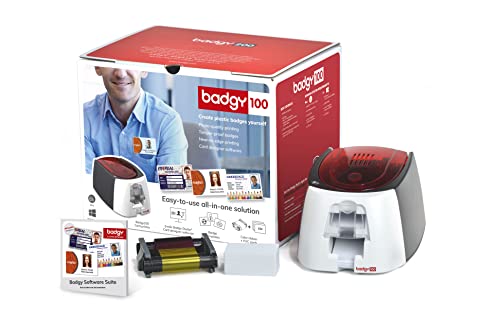
Badgy100 Plastic Card Printer with Badge Studio — The badge solution in a box
Badgy is Evolis’s answer to a specific insight: most small organisations do not want a card printer, they want badges, and the distance between those two desires is where products fail. The Badgy100’s title therefore sells the outcome, a plastic card printer with Badge Studio, design software for full-colour, custom, tamper-proof ID badges in seconds. The vocabulary is a receptionist’s rather than an engineer’s: no ribbon chemistry, no sidedness terminology, just the promise that the box produces the object the office actually needs.
Consider the texture of the work this machine is bought for. A sports club’s registration Saturday produces forty badges between nine and noon, each with a photograph taken against the clubhouse wall and a name typed by a volunteer. A boutique hotel’s new starter needs a badge before the first shift ends, produced by a manager with a day containing no slack for a printing seminar. In both scenes the winning feature is not a specification at all; it is the absence of hesitation between opening the box and issuing the first credible badge, and the Badgy concept is engineered around exactly that absence.
That positioning has real substance behind it. Evolis is a card-printing specialist, and the Badgy line packages that expertise for offices without a print room: the school secretary, the sports club administrator, the small hotel issuing staff cards between check-ins. Badge Studio’s templates matter more in that world than any engine specification, because the badge is designed once, by a non-specialist, and then printed by whoever is on duty. Software that makes the template hard to break is a security feature wearing a usability costume.
The title’s silences define the homework. Sidedness is not stated, supply counts are not stated, and connectivity is not stated, so a buyer should confirm all three in Evolis documentation before assuming the box covers a particular badge design or office layout. The tamper-proof phrase in the title describes the printed badge’s resistance to alteration relative to paper and laminate, a fair claim for dye-sublimated, overlay-sealed printing, rather than a promise of cryptographic security. Read with those calibrations, the Badgy100 is the most approachable door into this category, held open by a maker that builds nothing else.
- Software: Badge Studio ID design software, per the listing title
- Promise: full colour, custom, tamper-proof ID badges in seconds, per the listing title
- Maker: Evolis’s Badgy line for small organisations
- Sidedness: Not stated in the listing title — verify with Evolis documentation
- Supply counts in box: Not stated in the listing title — verify with Evolis documentation
- Connectivity: Not stated in the listing title — verify with Evolis documentation
Strengths
- The most beginner-facing package concept in the guide.
- Template-driven software suits rotating, non-specialist operators.
- A specialist maker’s entry line brings card-printing pedigree.
Trade-offs
- Key specifications are absent from the title and require verification.
- Entry positioning caps the badge programme’s growth headroom.
- Outcome-led marketing asks the buyer to do the spec homework.
Best for: small organisations seeking badges without a printing learning curve. Not suited for: a credential programme with formal dual-sided or encoding requirements.

Bodno Magicard 400X Dual Sided ID Card Printer & Complete Supplies Package ID Software – Bronze Edition — The dual-sided package
The second Bodno package answers the question the first one leaves open: what if the badge needs both faces? The Magicard 400X bundle centres on a dual sided printer, again wrapped in a complete supplies package and the Bronze edition software, so the upgrade from the Seaory bundle is architectural rather than conceptual. The same one-box philosophy now delivers a credential with a reverse able to carry the elements real programmes accumulate: emergency contact details, a barcode for the door or the till, terms of issue, a second language, or the return-to address that brings lost badges home.
Dual-sided printing changes production rhythm as much as design space. The machine flips each card internally, so an operator loads blanks and collects finished two-sided badges without a manual re-feeding step, and without the registration errors and fingerprints that manual flipping introduces. At enrolment-day volumes, a new school year or a conference check-in, that automation is the difference between a queue that moves and a queue that watches someone turn cards over. Magicard, the printer brand inside this bundle, builds for that credential market specifically, which shows in the bundle’s positioning even where the title stays spare with engineering detail.
The verification list mirrors the Seaory’s: exact supply counts, connectivity and any encoding options are matters for Bodno’s documentation rather than for this title, and the Bronze software’s ceiling should be tested against the programme’s ambitions before the badge count grows teeth. What the title does establish is the complete shape of the offer, a dual-sided printer, supplies and design software as one purchase, and for an organisation that already knows its badges need two faces, that shape is the shortlist’s centre of gravity.
- Sidedness: dual sided, per the listing title
- Package: complete supplies package included, per the listing title
- Software: ID software, Bronze edition, per the listing title
- Base printer: Magicard 400X, per the listing title
- Supply counts in box: Not stated in the listing title — verify with Bodno documentation
- Encoding options: Not stated in the listing title — verify with Bodno documentation
Strengths
- Automatic two-sided printing suits information-dense credentials.
- The bundle philosophy keeps setup to one purchase and one learning curve.
- A credential-market printer brand anchors the package.
Trade-offs
- Dual-sided capability costs more than the simplex packages here.
- Box contents and connectivity need documentation to confirm.
- Bronze-tier software may ceiling an ambitious badge programme.
Best for: organisations with a badge design genuinely using both faces. Not suited for: a front-only badge programme watching its budget.

Fargo DTC1250e Single Sided Desktop Dye Sublimation/Thermal Transfer Printer — The professional desktop
The Fargo DTC1250e’s title reads like a specification plate, and that is its charm. Single sided, desktop, dye sublimation and thermal transfer, colour, tabletop, card print, USB: every phrase is a fact an IT or security manager can file. Fargo is HID Global’s printer line, a name embedded in institutional credential programmes worldwide, and the DTC1250e is its compact desktop expression, a machine bought by organisations with badges forming one output of a managed identity system rather than a standalone craft project.
That context reframes the absence of bundle language. No software edition is trumpeted and no supplies are counted, because the expected buyer already runs card management software, already orders ribbons and cards through a supply chain, and needs the printer to join that system predictably. USB connection, stated in the title, suits the dedicated badge workstation pattern: one desk, one trained operator, one machine, with enrolment data arriving from the organisation’s systems rather than being typed at the printer.
Single-sided output is the stated ceiling, and in institutional use it is often a deliberate architecture: the reverse of the credential may be reserved for a separate encoding or printing process, or the programme’s design simply lives on the face. Buyers should nonetheless confirm the wider system questions, encoding options, software compatibility and supply part numbers, in HID’s documentation, since the title’s precision about printing invites equal precision about everything it omits. As the professional’s simplex desktop, the DTC1250e trades the bundles’ hand-holding for institutional manners, and many security offices will call that the correct trade.
- Sidedness: single sided, per the listing title
- Technology: dye sublimation and thermal transfer, per the listing title
- Form: desktop, tabletop card printer, per the listing title
- Connectivity: USB, per the listing title
- Software included: Not stated in the listing title — verify with HID documentation
- Encoding options: Not stated in the listing title — verify with HID documentation
Strengths
- Institutional pedigree suits managed credential programmes.
- The title’s precision makes system planning straightforward.
- A dedicated workstation pattern fits trained-operator environments.
Trade-offs
- No bundle contents means software and supplies are separate decisions.
- Single-sided output is a hard ceiling for two-face designs.
- USB-only connection in the title limits placement flexibility.
Best for: organisations adding a printer to an existing credential system. Not suited for: a first-time badge setup seeking an all-in-one box.
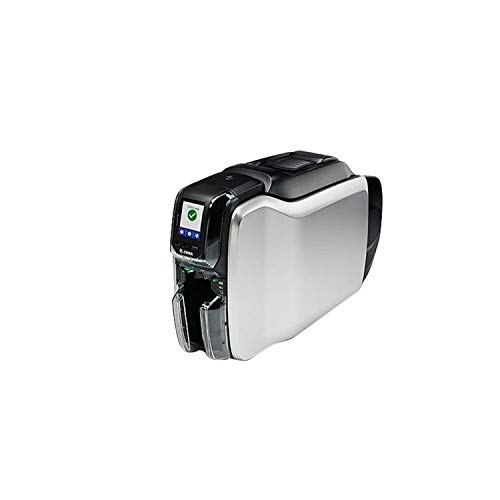
Zebra ZC32 ZC300 Series Double-Sided USB Ethernet ID Card Printer ZC32-000C000US00 — The institutional dual-sider
Zebra closes the list from the enterprise side. The ZC32, identified in its title as a ZC300 series machine with its full part number printed, offers double-sided printing with USB and Ethernet connection, and that combination describes a networked credential appliance: a printer that can live where the enrolment happens, accept jobs from more than one desk, and produce two-sided badges as a shared institutional service. Zebra’s wider business is identification at scale, and the ZC300 series carries that DNA into the card format.
Ethernet is the detail that reorganises the workflow. A USB printer belongs to one workstation; a networked printer belongs to the building. Human resources can enrol a starter in the morning, facilities can print a contractor badge at noon, and the machine’s queue absorbs both without a printer being carried between desks or a design file travelling on a memory stick. For organisations where badge issuance is a recurring, multi-department act, that placement freedom outweighs most engine specifications, and it is unique among the six titles here, none of which pairs dual-sided printing with a network connection.
The professional framing brings professional homework. No software, ribbon or card bundle is claimed in the title, so the credential software decision stands separately, and Zebra’s ecosystem and third-party platforms should be matched deliberately. Encoding options, often the deciding feature in institutional tenders, are likewise unstated and belong to the documentation check. What the title guarantees is the chassis of a serious programme: double-sided output, two connection modes and a series pedigree built for volume. Organisations graduating from the bundles above will recognise this machine as the direction of travel.
- Sidedness: double-sided, per the listing title
- Series: ZC300 series, model ZC32, part ZC32-000C000US00, per the listing title
- Connectivity: USB and Ethernet, per the listing title
- Software included: Not stated in the listing title — verify with Zebra documentation
- Encoding options: Not stated in the listing title — verify with Zebra documentation
- Supply counts in box: Not stated in the listing title — verify with Zebra documentation
Strengths
- Dual-sided printing plus Ethernet suits shared, multi-desk issuance.
- An enterprise identification pedigree supports volume programmes.
- USB remains available for a dedicated workstation setup.
Trade-offs
- Software and supplies are separate purchases to plan.
- Institutional capability exceeds a small office’s real needs.
- Encoding and integration details require documentation homework.
Best for: organisations issuing two-sided credentials from several desks. Not suited for: a single-operator starter setup seeking a counted kit.
Bundles, Kits and Bare Professionals: the Six Offers Compared
| Pick | Sidedness in title | Software in title | Supplies in title | Connection in title |
|---|---|---|---|---|
| Bodno Seaory S25 | Single sided | Bronze edition | Complete package, uncounted | Not stated |
| IDP SMART-21S | Simplex | PC only | 100-print ribbon, 100 cards | Not stated |
| Badgy100 | Not stated | Badge Studio | Not stated | Not stated |
| Bodno Magicard 400X | Dual sided | Bronze edition | Complete package, uncounted | Not stated |
| Fargo DTC1250e | Single sided | Not stated | Not stated | USB |
| Zebra ZC32 | Double-sided | Not stated | Not stated | USB and Ethernet |
The table exposes the category’s two sales philosophies at a glance. The left-hand packages sell completeness, software and supplies wrapped around the printer; the right-hand professionals sell the printer as a component in a system the buyer assembles. Neither philosophy is a trick, and the correct one is decided by what already exists on the buyer’s desk.
What Should You Decide Before Buying Plastic ID Card Printers?
Decide the badge before the printer, in writing, on one page. List what the face must carry: photograph, name, role, expiry, logo, barcode. Then list what the reverse must carry, and let that second list settle the sidedness question with evidence instead of instinct. A reverse list of zero items buys a simplex machine and saves real money; a reverse list containing a barcode, emergency details or terms buys a dual-sided machine and saves a re-purchase. Most badge programmes get this decision wrong by imagining the badge instead of specifying it.
Decide the operator next. A badge station run by one trained person tolerates professional software and a bare printer like the Fargo or the Zebra. A badge station run by whoever is free, in a school office or a club, needs the template discipline and guided software the bundles sell. The operator decision also settles the connection question: one desk means USB suffices, several desks argue for the Zebra’s Ethernet, and a design desk on a Mac rules the IDP kit’s PC-only software in or out instantly.
Decide the volume honestly, in badges per month and badges per busiest day. Monthly volume sets the ribbon and card budget, the category’s real running cost, while peak-day volume tests the workflow: enrolment morning at a school, registration at a conference, a new site opening for a contractor. A machine and software pairing that handles the average month yet collapses on the peak day will be remembered for the collapse, so the peak belongs in the purchase conversation from the start.
Photograph policy deserves its own small decision, because it outlives the hardware. Consent, retention and deletion rules for staff and student photographs are set by the organisation’s obligations, not by the printer, yet the badge desk is where those rules become files on a computer. Deciding where enrolment photographs live, how long they persist after a person leaves, and who may open the folder is part of buying the machine, even though no part of it appears on the invoice.
Finally, decide the security posture before the first badge prints. Misprints carry live personal data and must be destroyed, not binned. Design files and staff databases deserve the same access control as any personnel record. Replacement badges for lost cards need a policy, because a printer that can reissue a credential in a minute can also duplicate one in a minute, and the difference is entirely procedural. The machines in this guide print what they are told; the organisation decides what they are told.
How Do You Produce a First Batch of Badges That Looks Professional?
Production begins with photography, the element beginners most often improvise and most visibly regret. A consistent background, a fixed camera position and even light turn a hundred portraits into a uniform badge set; a corridor snapshot lottery makes the same set look like a ransom collage. The photo capture tools and trials named in the bundles exist to impose that consistency, and a dedicated enrolment corner, however humble, pays for itself in the first batch.
Design comes second, and restraint is its whole secret. One typeface family, a strict hierarchy of name over role over detail, generous margins inside the printer’s unprintable border, and a logo placed where the lanyard slot or clip will not amputate it: those five decisions separate a credential from a collage. Print one badge, clip it to a lanyard, and read it at arm’s length and at door distance before printing the second, because badges are read in motion, at gates, by people glancing rather than studying.
Data preparation is the invisible half of the run. Names arrive misspelled in spreadsheets, photographs arrive named by camera counters, and roles change between the list’s export and the print morning. A fifteen-minute data pass, sorting the list, matching each photograph to its person, and freezing the file before the first card prints, prevents the particular misery of a beautiful badge bearing a stranger’s face. Enrolment veterans treat that pass as sacred, because every error it catches costs seconds, and every error it misses costs a card, a ribbon panel and a small piece of the programme’s credibility.
The run itself deserves a checklist rhythm. Verify the ribbon and card count against the batch size, print a single proof and inspect it for colour and alignment, then run the batch while logging any misprints for destruction. Finish by reconciling the count: blanks consumed should equal good badges plus destroyed misprints, exactly, every time. That small arithmetic, borrowed from the check-printing world, is what makes a badge programme auditable rather than anecdotal.
Which Mistakes Undermine a Badge Programme?
The commonest mistake is treating the printer as the programme. A badge system includes enrolment data, photographs, design templates, supplies, issuance policy and destruction habits, and a failure in any one presents as a printer problem. Blurry badges are usually a photography problem; inconsistent badges are a template problem; a stranger wearing a valid badge is a policy problem. Buying the machine is the easiest step in the chain, and programmes stumble by acting as if it were the only one.
Supply improvisation is the second failure class. Unmatched cards warp and jam, refilled or off-brand ribbons shift colour and void the overlay’s protection, and a cleaning schedule skipped for a year presents as a print-quality mystery. The category’s consumables are engineered as a system, printer, ribbon and card, and the bundles in this guide exist partly to teach that lesson gently at the start. Cleaning cards, to be explicit, are maintenance supplies in that system, never a product category of their own.
The third mistake is designing for the screen instead of the card. Hairline type, pale colours, edge-to-edge artwork bleeding into the unprintable margin and photographs cropped for a monitor all disappoint in plastic. The proof-badge habit in the production section is the cure, applied early, while the design is still a file rather than a tradition.
How Do Encoding and Access Control Fit Around the Printer?
A printed badge is a visual credential; an encoded badge is a functional one, and the distance between them should be understood before purchase. Magnetic stripes, contact and contactless chips, and printed barcodes or QR codes each connect the card to a system, a door controller, a time clock, a library or point-of-sale account. The titles in this guide speak almost entirely about printing, with encoding options largely unstated, so an organisation with doors that must open must treat encoding as a separate specification, confirmed in each maker’s documentation and matched to the access system already installed.
Barcodes deserve a special note because they are the one functional element every printer here can produce unaided, printed in the resin black panel with ordinary design software. A barcode badge can drive library loans, gym check-ins and asset lending without any encoding hardware at all, which is why so many small programmes thrive on the bundles alone. The step to chip or stripe encoding is a step into a different budget and a different vendor conversation, and it should be taken because a system requires it, not because a brochure glitters.
Whatever the technology, the printer’s place in the security architecture stays constant: it is the mint. Access to it, to its software and to its misprints should be governed like access to the keys cabinet, because functionally that is what a badge printer is.
How Do a School, a Gym and a Contractor Run Badges Differently?
The school’s badge year has a cliff edge: enrolment week, when hundreds of students and a term’s worth of staff changes arrive together. Its printer spends the rest of the year nearly idle, printing replacements and visitor passes, so the school’s true specification is a peak it meets for five days and a simplicity its rotating office staff can operate for the other two hundred. Template discipline matters more than engine speed, because five different operators will run the enrolment queue, and the bundle packages, with their guarded software, were practically designed for that office.
The gym’s rhythm is the opposite: a steady daily trickle of new members, renewals and replacements, each badge printed one at a time at a reception desk while a conversation continues. Its specification is immediacy and desk manners, a compact machine, a design the receptionist can complete in under a minute, and a card that survives being clipped to a kit bag and sweated on for a year. The gym also lives on its replacement rate, since members lose cards the way umbrellas get lost, which makes per-card supply cost a first-order number rather than a footnote.
The contractor’s badges carry legal weight. Site access credentials record who was inducted, which certifications a worker holds and when an authorisation expires, and they are checked by people with the power to turn a worker away. Expiry dates printed prominently, colour coding by trade or zone, and a reverse carrying emergency and verification details push this world toward dual-sided printing and toward the professional machines, with issuance logged like the safety record it effectively is.
What Does a Badge Actually Cost Across a Year?
The honest unit of this category is the finished badge, and its cost is a small sum with several terms: a card, a ribbon fraction, a lanyard or clip, and the operator minutes at the desk. The printer’s purchase price amortises across every badge it will ever print, which is why volume transforms the comparison between the picks. At fifty badges a year, the printer dominates the arithmetic and the starter bundles win by costing least to own. At five thousand badges a year, the ribbon and card terms dominate, and supply pricing, print speed and reliability decide the economics while the hardware price fades into rounding.
Two hidden terms belong in the same ledger. Misprints and reprints are a percentage of every run, smaller with matched supplies and trained operators, larger without either, and they consume the same ribbons and cards as good badges. And design time, the hours spent building the first template and rebuilding it when the logo changes, is a real cost that good software reduces and poor software multiplies across every operator who touches it.
A buyer comparing the six picks should therefore model three numbers before choosing: expected badges in year one, expected badges at the busiest peak, and the supply cost per finished badge for each candidate’s ribbon family, taken from the makers’ documentation. The model will rarely crown the same winner for a school and for a conference bureau, which is precisely why this guide refuses to crown one in the abstract.
How Should Lost, Damaged and Expired Badges Be Handled?
A badge programme is judged, in the end, by its exceptions. The lost badge is the dangerous one: somewhere in the world is a valid-looking credential attached to no authorised person. The programme’s defence is procedural speed, a loss reported easily, a record flagged immediately, and, where the badge connects to a system by barcode or encoding, a revocation that takes effect before the replacement prints. A replacement fee, set kindly but firmly, teaches care without punishing honesty, and the pattern of losses by department is data a security review should actually read.
Damaged badges are simpler and still instructive. A card cracked at the lanyard slot argues for slot placement away from the design’s weak points or for a rigid holder; a card faded beyond legibility argues for the overlay’s protection and against off-brand ribbons; a card delaminating argues for matched card stock. Each failure mode is the supply system reporting on itself, and a programme that logs its damage learns its own lessons in a term instead of a decade.
Expired badges close the cycle. A printed expiry date only works if someone checks it, so the design should make expiry the most legible element after the name, and the reissue calendar should be driven by the database rather than by badge-holders’ memories. Expired stock, returned cards and misprints all meet the same end, destruction that renders the personal data unreadable, logged with the same care as their creation.
What Maintenance Keeps Card Quality From Drifting?
Card printers drift quietly. Dust on the print head becomes a white line down every photograph; a dirty feed roller becomes a misfeed blamed on the cards; ribbon residue becomes a colour cast that staff unconsciously design around. The category’s defence is a cleaning rhythm: a cleaning card run through the machine at each ribbon change, the exterior wiped before dust migrates inward, and cards stored in their wrapping until loading, because a blank card handled loose in a drawer arrives at the head pre-dirtied. Cleaning cards are supplies in this system, purchased like ribbons, and the programme that budgets them never meets the mystery-quality month.
Environment sets the second term. Card printers dislike the two places offices most often put them, the sunny windowsill that warms ribbons unevenly and the cupboard with dust and still air settling into every slot. A shaded, ventilated desk position, with supplies stored beside the machine in their packaging, removes most environmental variance. The third term is firmware and software currency: driver and template updates, applied deliberately and tested on a proof badge, keep the system aligned with the computers it serves, while an update applied casually on enrolment morning is a small act of self-sabotage every experienced operator learns to schedule around.
How Does a Badge Programme Grow Without Replacing Everything?
Growth arrives in predictable disguises: a second site, a merger, a new regulation demanding expiry dates, a door system that suddenly wants encoded cards. A programme survives growth when its early choices were documented rather than improvised: the template files kept in a shared location with version notes, the supply part numbers recorded, the issuance log maintained from the first week. With those records, a second printer, even of a different model, joins a system instead of starting a rival one.
The hardware path through this guide maps the growth curve honestly. A bundle that serves the first site can move to the smaller site when the flagship location graduates to a networked dual-sided machine; the software habits and design files travel with the staff’s experience even when the editions differ. The expensive failure is the opposite pattern, three departments independently buying three starter bundles with three incompatible templates, discovered only when a transferred employee’s badge matches nothing. Coordination, like cleaning, is cheap early and dear late.
Final Recommendation
Start from the badge’s two faces and the desk it will be printed at. A first programme with front-only badges belongs to the Bodno Seaory S25 package for its completeness, or to the IDP SMART-21S kit where a counted box and a Windows desk make its transparency the safer arithmetic. A beginner seeking the gentlest design experience should examine the Badgy100 once its unstated specifications are confirmed. A programme with badges carrying data on the reverse belongs to the Bodno Magicard 400X bundle at package scale, or to the Zebra ZC32 where several desks share one networked, dual-sided machine. The Fargo DTC1250e stands apart as the professional simplex desktop for an existing credential system. A badge is a promise an organisation makes at its own door, checked a hundred times a day by glances too quick to forgive a faded photograph or a peeling corner, and the right printer is the one with a complete package, software, supplies and discipline, keeping that promise legible for years, through enrolment cliffs, lost-card Mondays and every ordinary Tuesday in between.
Frequently Asked Questions
What is the difference between simplex and duplex card printing?
Simplex printers print one side of the card in a pass; the reverse stays blank unless it is printed in a separate operation, with the card removed, turned and fed again by hand, a workable improvisation for five badges and a genuine chore at fifty. Duplex, or dual-sided, printers flip the card internally and print both faces in one job. Three picks here are single-sided by title, two are dual-sided, and the Badgy100’s title leaves the question to its documentation.
How long does a printed ID card last?
A dye-sublimated card sealed under its overlay panel is built for everyday credential life: wallets, lanyards, door readers and outdoor use across a typical badge’s service period. Lifespan depends on handling and environment, and programmes usually replace badges on a schedule, for photo currency and role changes, before the printing itself wears out.
What supplies does a card printer consume?
Colour or monochrome ribbons, rated in prints per roll, and blank PVC cards, plus cleaning supplies for routine maintenance. The IDP kit counts its starter quantities in its title, 100 prints of ribbon and 100 cards, while the Bodno packages promise complete supplies without counts, so their documentation carries the numbers.
Can these printers encode magnetic stripes or chips?
The listing titles here focus on printing and leave encoding options largely unstated, so this guide claims no encoding capability for any pick. Organisations seeking stripe or chip encoding should confirm the exact options in each maker’s documentation and match them to the access or payment system the cards must serve.
Is a photo required on an ID badge?
Not mechanically, but identification is the badge’s purpose, and a photograph is what lets a human verify the bearer at a glance, across a lobby, in poor light, during the half-second a door decision actually takes, which is the moment the entire badge programme was built to serve and the moment a text-only card serves worst. Programmes skipping photographs usually compensate with barcodes or encoding checked by a system. The bundles’ design software and photo tools assume a photo-led badge, which reflects how most credentials are actually built.
Can I print visitor badges on the same machine?
Yes, and many programmes do, issuing a distinctively designed temporary card from the same printer, often in a colour reserved across the whole organisation for visitors alone, so that any staff member can read a stranger’s status from across a corridor without approaching, asking or creating the small social friction that makes people skip checks. The design should differ unmistakably from staff credentials in colour and layout, carry the visit date prominently, and be collected or expired at day’s end, since a visitor badge that circulates indefinitely has quietly become an unvetted credential.
Do I need special software, or will any design program work?
Card printing depends on templates matched to the printer, card size and database fields, which is why four of the six titles here name their design software explicitly. General graphics tools can prepare artwork, yet the enrolment workflow, names, photos, barcodes and print queues, belongs to card software, and the bundles exist to supply exactly that layer.
Related Guides
Badge programmes connect to a wider security and office setup, and the neighbouring equipment is covered in our guides to the best label printers for asset tags, the best printers for small office documents and the best webcams for enrolment and ID photos.


