What's inside
- Key Takeaways
- Quick Picks
- How We Chose These Picks
- What Does Reliability Mean for a Portable Drive, Realistically?
- What Happened to the 3TB Portable — and What It Teaches Buyers
- Three Sizes, Three Arguments: Laying the List Out Honestly
- How Do You Make a Portable Drive Last — and Prove Its Backups Work?
- Which Habits Kill Portable Drives and Their Archives?
- Final Recommendation
- Frequently Asked Questions
- Related Guides
As an Amazon Associate I earn from qualifying purchases. This post may contain affiliate links at no extra cost to you.
gizmoverdict.com is reader-supported. When you buy through links on our site, we may earn an affiliate commission.
Where to buy: Follow any pick’s name to reach its Amazon listing. Read the capacity labels in this guide with unusual care: two picks are true 3TB drives, three are 4TB step-ups sitting at the capacity the market moved to, and one is a 2TB rugged drive included for its durability rather than its size. Each review states its pick’s real capacity and format in its first lines, so nothing here is quietly rounded into something it is not.
Honesty has to lead this guide, because the product named in its title has nearly vanished. The best reliable 3tb portable external hard drives were once a standard shelf item — every major maker sold one — but the portable market has since consolidated around 1TB, 2TB, 4TB and 5TB, and the 3TB portable survives mainly as remaining stock of older models and a handful of niche listings. A guide that pretended otherwise, padding its list with drives mislabelled by implication, would fail its readers at the first click. So this list is built truthfully from what can actually be bought: the genuine 3TB portables that remain, the 4TB step-ups that are their honest modern successors, and one smaller rugged drive whose reliability argument earns it a hearing.
Why did buyers love the 3TB size? It was the capacity that held a whole household’s photographs, documents and music with room to spare, at a size and price below the flagship models — the backup drive for a family machine, the archive for a photographer’s first years, the shuttle for a small office. Those errands still exist, and they are the standard each pick below is judged against. Where a pick exceeds the errand at 4TB, the review says the extra terabyte is a step up and prices the difference in bulk and expectation; where a pick serves it at 2TB with armour instead of room, the review says that too.
Reliability, the keyword’s other promise, needs defining before it can be judged. No portable hard drive is immortal, and no listing here is credited with durability figures it does not state. What separates a reliable portable in practice is a mature product line, handling that respects its mechanics, stated warranty or recovery cover where offered, and — above all — an owner’s routine that never lets one drive hold the only copy of anything. The picks and the advice below are organised around that realistic definition.
Key Takeaways
- The 3TB portable is nearly discontinued: the market consolidated at 2TB, 4TB and 5TB, and this guide is built honestly from what remains genuinely buyable today.
- Two true 3TB picks remain — the WD Elements Portable 3TB and the OSENTRiX GX200 3TB — and their reviews distinguish their formats and their fittings carefully.
- Three picks are 4TB step-ups — UnionSine, Toshiba Canvio Basics and WD My Passport — the capacity the market actually moved to, not silent substitutes.
- The LaCie Rugged 2TB is smaller than the keyword asks and is included for stated drop and crush resistance and AES encryption, not for capacity.
- The WD My Passport 4TB carries the strongest stated feature set of the six: backup software with ransomware defence and password protection.
- Reliability in this category is a routine before it is a product: no single portable should ever hold the only copy of precious data.
- A new drive of any size should be burned in during its first week — filled with the real library and verified — while its data still exists elsewhere and returns are painless.
Quick Picks
| Pick | Badge | Why it earns its place |
|---|---|---|
| WD 3TB Elements Portable | The true 3TB portable | The genuine article: 3TB, portable, USB 3.0, from the Elements line, with PC, Mac, PS4 and Xbox compatibility stated. |
| OSENTRiX GX200 3TB | 3TB on USB-C | A true 3TB capacity with USB 3.2 over USB-C, sold for desktop PC and laptop use on Windows and macOS. |
| UnionSine 4TB Ultra Slim Portable | Slim step-up | A 4TB ultra-slim portable — the size the market moved to — with wide device compatibility stated. |
| Toshiba Canvio Basics 4TB | Step-up workhorse | Toshiba’s plain Basics formula at 4TB, for the buyer replacing a 3TB drive with its modern equivalent. |
| WD 4TB My Passport | Protected step-up | Four terabytes with backup software, ransomware defence and password protection stated in the listing. |
| LaCie Rugged USB-C 2TB | Armoured alternative | Two terabytes with AES encryption and stated drop and crush resistance — durability over capacity. |
How We Chose These Picks
The first decision was editorial rather than technical: this list would not counterfeit its subject. Candidates were sorted into three honest groups — true 3TB drives still listed, 4TB portables representing the size the market adopted instead, and smaller drives with a stated reliability distinction — and only products whose listings support their group were admitted. A desktop 3TB drive, for instance, would be labelled a desktop drive requiring its own power arrangements and never dressed as a portable; in the event, the verified listings for this guide produced the six below, and each review opens by declaring its pick’s group.
Specification discipline followed the same rule as every guide on this site: capacities, interfaces and features come only from the listings. The WD Elements 3TB states USB 3.0 and its platform compatibility; the OSENTRiX states USB 3.2 and USB-C with its desktop-and-laptop positioning, and its review is careful about what that positioning does and does not claim regarding portability; the LaCie states its encryption, its resistance claims and a modern USB generation. Nothing is credited with a speed, a warranty or a ruggedness rating its own title does not print.
Reliability was weighed as evidence rather than as adjectives. Mature lines — Elements, Canvio, My Passport, LaCie’s Rugged family — carry the weight of long production runs. Stated extras count where printed: the My Passport’s protection software, the LaCie’s encryption and resistance. And the guide’s own reliability advice, in the sections after the reviews, applies to every pick equally, because the strongest determinant of a portable drive’s lifespan is the routine wrapped around it.
What Does Reliability Mean for a Portable Drive, Realistically?
It begins with an admission: a portable hard drive is a precision mechanical instrument — platters spinning at thousands of revolutions, heads flying over them at microscopic distance — carried in bags, set on café tables and occasionally dropped. Reliability in this category cannot mean indestructibility. It means a drive from a mature line, free of early-life defects by the time it has survived its first months, handled with ordinary care, and embedded in a routine where its eventual failure is an inconvenience rather than a catastrophe. Every part of that definition except the first is the owner’s contribution, which is why this guide spends as much space on routine as on products.
The early months deserve emphasis, because portable drives obey the same bathtub curve as most hardware: failures cluster at the beginning of life and at the end, with a long, quiet middle. The practical consequence is a burn-in habit — put a new portable to real work early, copy the library across, verify the copies, and let any infant defect declare itself while returns are painless and the data still exists elsewhere. A drive that has carried a household’s archive faithfully for a year has given the best evidence of reliability available anywhere, better than any specification.
Stated protection divides into two kinds, and the list contains both. The My Passport’s is electronic: backup software, ransomware defence and password protection guarding the data’s integrity and privacy. The LaCie’s is physical and cryptographic: a resistant shell and AES encryption guarding against the drop and the loss. Neither kind substitutes for the other, and neither substitutes for a second copy — the theme this guide will keep sounding, because at 3TB and 4TB the quantity of life a single drive can hold has outgrown the risk any single drive should carry.
Finally, reliability includes the maker’s behaviour when things go wrong: a stated warranty, a stated recovery service, a product line with a support apparatus behind it. The listings here vary in what they print, and the spec boxes record exactly what each one offers, so the comparison can be made on evidence rather than on the warmth of a brand’s reputation.
One more realistic factor deserves naming: consistency of supply for the routine itself. A household running the rotation strategy needs to buy the same drive twice, possibly months apart, and a current line at a current size — the 4TB models here — can be reordered with confidence that the twin will match. A discontinued 3TB bought singly is a fine archive drive; bought as the foundation of a multi-year rotation, it asks the owner to gamble that a second unit will still be findable when the rotation begins. That gamble, stated plainly, is part of the step-up case, and honest buyers should weigh it alongside the terabyte difference.
WD 3TB Elements Portable — The true 3TB portable
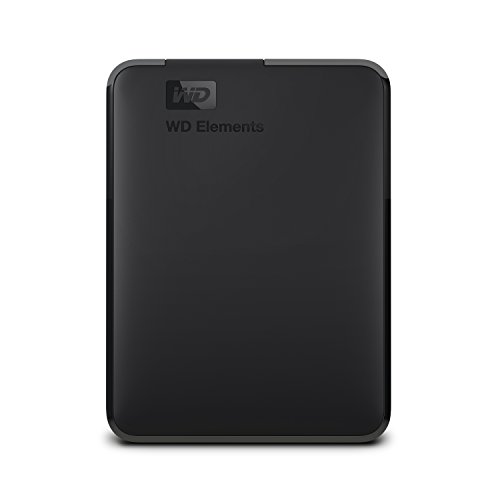
Here is the genuine article, and its listing is admirably plain: a WD 3TB Elements Portable external hard drive on USB 3.0, compatible with PC, Mac, PS4 and Xbox, model WDBU6Y0030BBK-WESN. Three terabytes, portable format, bus-powered by its cable — the exact product this keyword describes, from the portable line that defined the category’s mainstream. For a buyer seeking literally the product this guide’s title names, this is where the search ends.
The Elements philosophy suits the reliability errand particularly well. There is no software layer to configure or to fail, no account, no companion application — the drive presents storage to Windows, macOS or a console and leaves the routine to the owner’s chosen tools. A household standardising on the operating system’s own backup gets a drive that cooperates silently; a photographer shuttling between machines gets a volume every platform in the listing welcomes. Three terabytes holds the classic household estate — photographs, documents, music and a working video shelf — with the headroom the size was loved for.
The honest cautions are about era and expectations. The 3TB portable is a discontinued size class in the wider market, so this model represents remaining availability of an older line rather than a current flagship; buyers should confirm stock and seller when ordering, and should not expect the newest interface generations — the listing states USB 3.0, which serves a spinning drive’s pace completely. There is also no password protection stated, so sensitive contents want platform-level encryption. None of this dents the central fact: if a true 3TB portable is the requirement, this is the most defensible way to buy one.
Ownership advice specific to this pick: buy it, burn it in with the full library copy in its first week, verify the copies, and then treat it as the mature product it is. Drives of this class, treated gently and ejected properly, commonly serve for years — and because its size class is vanishing, owners may sensibly regard it as the last of a breed and give it the padded sleeve its rarity deserves.
There is a collector’s logic available here too, stated without romance: because the size is discontinued, a buyer certain that a 3TB portable is the perfect fit for a particular machine — an older laptop whose backup routine is already built around it, a console shelf arranged for it — may reasonably buy while verified listings remain rather than redesigning around 4TB later. Scarcity is not a virtue in itself, but a known-good fit, available now, is worth more than a hypothetical restock.
- Capacity: 3TB (true 3TB portable)
- Type: Portable external hard drive
- Interface: USB 3.0
- Compatibility named in the listing: PC, Mac, PS4 and Xbox
- Model named in the listing: WDBU6Y0030BBK-WESN
- Transfer speed: Not stated in the listing title — verify with Western Digital documentation
Strengths
- The exact product the keyword names: a true 3TB portable from a defining line.
- Platform compatibility is stated across computers and both console families.
- Nothing intervenes between the owner and the storage: no software layer at all.
Trade-offs
- A vanishing size class; availability reflects an older line’s remaining stock.
- USB 3.0 is stated, with no newer interface generation claimed.
- No password protection is named in the listing.
Best for: a buyer seeking an actual 3TB portable drive, exactly as specified. Not suited for: a buyer seeking current-generation interfaces or bundled security software.

OSENTRiX GX200 3TB — 3TB on USB-C
The second true 3TB in this guide arrives from a smaller maker with a modern connector: the OSENTRiX GX200, whose listing states a 3TB external hard drive with USB 3.2 over USB-C, for desktop PC and laptop, on Windows or macOS. That positioning deserves precise reading. The listing sells the drive for use with desktop and laptop computers and gives it a current-generation interface; it does not use the word portable in its title, so this review does not either — the spec box records the omission, and certified pocket-format seekers should weigh the Elements above, whose portable status is printed in its name.
What the GX200 offers the 3TB seeker is the capacity itself on a USB-C connection, which suits the current laptop generation directly — no adapter, no legacy port hunt — and a USB 3.2 interface generation stated outright. For a desk-based 3TB archive that moves between a desktop and a laptop rather than living in a coat pocket, that combination answers the keyword’s capacity requirement with the most modern connection in this list’s 3TB group.
The cautions follow from its maker’s scale. A smaller brand’s long-term support apparatus is less proven than the big lines’, and the listing states no warranty period, recovery service or protection software for this guide to record — the spec box notes the portability and support silences rather than filling them. Buyers choosing the GX200 should therefore lean harder on the routine this guide prescribes for every pick: burn the drive in early, verify copies, and keep the second copy that makes any single drive’s fate a manageable event. Judged with that discipline, it is a legitimate route to a true 3TB on a modern connector.
There is also a simplicity argument in its favour. Nothing in its listing promises an ecosystem, an application or a subscription of any kind; it is a drive, a cable and a capacity figure, sold for the two computer platforms most households run. Owners fatigued by storage products that behave like software platforms will recognise the appeal immediately.
Its buyer should also plan the physical arrangement with a little more care than a pocket portable demands. A drive sold for desktop and laptop use may live a semi-stationary life — cabled to the desk, occasionally travelling with the laptop — and semi-stationary drives die the semi-stationary death: knocked by a elbow, slid off a stack of papers, unplugged by a chair wheel over its cable. Give it a fixed, low, uncrowded spot and a cable routed out of harm’s way, and its modern connection can do its quiet work for years.
- Capacity: 3TB (true 3TB)
- Type: External hard drive for desktop PC and laptop
- Interface: USB 3.2, USB-C (stated in the listing title)
- Compatibility named in the listing: Windows or macOS
- Portability: Not stated in the listing title — verify with the seller’s documentation
- Model line named in the listing: GX200
Strengths
- A true 3TB capacity on a current USB-C connection.
- Interface generation is stated plainly in the listing.
- No ecosystem or software layer attached to the purchase.
Trade-offs
- Portable format is not claimed in its listing and should not be assumed.
- No warranty or recovery terms are stated for this guide to record.
- A smaller maker’s long-term support is less proven than the major lines’.
Best for: a buyer seeking a genuine 3TB drive with a USB-C connection for desk and laptop use. Not suited for: a buyer requiring a certified pocket portable from a major line.

UnionSine 4TB Ultra Slim Portable — Slim step-up
The first of the step-ups declares itself in its name: an ultra slim portable external hard drive at 4TB, on USB 3.0, whose listing names compatibility with PC, Mac, laptop, PS4, Xbox One and Xbox 360, in black. Four terabytes is where the market went when it left 3TB behind, and this pick represents the value end of that destination — the extra terabyte over the keyword’s ask, in the slimmest format in this guide, with the widest console compatibility stated anywhere in the list.
Who is the step-up right for? A buyer with a 3TB requirement that was really a library estimate rather than a specification. Libraries grow into their containers, and a household estimating three terabytes today is a household shopping again within a couple of years; the 4TB drive postpones that day at a modest premium in size and cost. The ultra-slim format keeps the portable promise fully — this is a bag drive, bus-powered, moving between the computers and consoles its listing names — so the step-up costs nothing in portability, which cannot be said of every way to gain a terabyte.
The brand consideration must be faced as plainly as with the OSENTRiX. UnionSine is a smaller name than the category’s giants, its listing states no warranty or recovery terms for this guide to record, and the reliability case therefore rests on the owner’s routine more than on the maker’s apparatus. That is an acceptable bargain at the value end when it is chosen knowingly — burn-in, verification, second copy — and a poor one when the buyer assumes a flagship support structure that was never promised. This review’s verdict is written for the knowing buyer.
Its console breadth deserves a final practical note. A portable that a PS4, an Xbox One and an older Xbox 360 all welcome — each after its own formatting, with the usual rule that a drive belongs to one master at a time — is a flexible household citizen, able to retire from computer duty into console extended storage or the reverse. Flexibility across a long working life is its own form of reliability, and on that measure this slim step-up argues well.
The slimness itself deserves one practical remark. Thin portable drives travel better — they share a laptop sleeve without bulging it, stack neatly in a drawer of drives, and present less leverage when a cable is tugged. None of that appears in a specification table, yet in the daily physics of a carried drive these are real durability factors, and they partly explain why the market’s surviving portables have converged on exactly this shape.
- Capacity: 4TB (step-up from 3TB)
- Type: Ultra slim portable external hard drive
- Colour named in the listing: Black
- Interface: USB 3.0
- Compatibility named in the listing: PC, Mac, laptop, PS4, Xbox One, Xbox 360
- Warranty terms: Not stated in the listing title — verify with the seller’s documentation
Strengths
- The slimmest format here, at the capacity the market standardised on.
- The widest stated console compatibility in the guide.
- The extra terabyte postpones the outgrowing-the-drive purchase for years.
Trade-offs
- A smaller maker’s support structure is less proven than the major lines’.
- No warranty or recovery terms are stated in the listing.
- It answers the keyword with a step up, not with the exact 3TB size.
Best for: a buyer seeking a slim 4TB portable, with a library estimate pointing at 3TB. Not suited for: a buyer set on the exact 3TB capacity from a major product line.
Toshiba Canvio Basics 4TB — Step-up workhorse
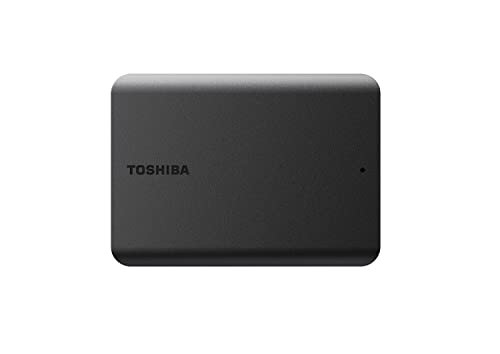
Toshiba’s Canvio Basics at 4TB — USB 3.0, black, model HDTB540XK3CA — is the step-up for a buyer replacing an old 3TB drive from the plain-workhorse school, one that served honourably. The Basics proposition is unchanged by the larger size: a mature line’s portable storage with no software story, recognised instantly by Windows and Mac machines, bought to be filled and forgotten about. If the 3TB era had continued, this is the drive it would have produced at the next size; the market simply skipped the intermediate stop.
The reliability argument here is lineage. The Canvio range has been Toshiba’s portable mainstay through several capacity generations, and a Basics model inherits that accumulated refinement — the enclosure, the cable, the behaviour on connection — rather than experimenting with any of it. For the replacement purchase, where the old drive has often just failed and the household’s mood is not adventurous, that continuity is worth real money: the new drive feels like the old one, only roomier, and the backup routine resumes without a single changed habit.
Its silences are the Basics line’s usual ones, recorded in the spec box rather than papered over: no password protection, no bundled software, no transfer figure is stated in the listing. Owners carrying sensitive data should apply platform-level encryption; a buyer seeking a managed routine should look at the My Passport below. What the Basics offers instead is the strongest version of the plain case at the modern capacity — and for the rotation strategy this guide recommends, a pair of identical Basics 4TB drives is arguably the most sensible purchase in the entire list, since identical, unremarkable units are exactly what a monthly swap routine wants.
One more consideration favours the step-up at replacement time specifically. The archive arriving from a full 3TB drive lands on a 4TB successor with a terabyte of breathing room, so the new drive begins its life at three-quarters full rather than at the brim — a healthier starting point for the file system and for the owner’s peace of mind, and a small, concrete way the forced upgrade becomes an improvement.
Owners migrating from a dead 3TB drive should hear one more reassurance from this pick’s corner: nothing about the routine needs to change. The same backup settings, the same schedule, the same folder structure all resume on the Canvio, because the plain-drive contract is identical across generations. In a week when a household has just lost its archive drive, that continuity — the new device asking nothing new of anybody — is a genuine mercy, and it is the Basics line’s whole reason for existing.
- Capacity: 4TB (step-up from 3TB)
- Type: Portable external hard drive
- Colour named in the listing: Black
- Interface: USB 3.0
- Model named in the listing: HDTB540XK3CA
- Transfer speed: Not stated in the listing title — verify with Toshiba documentation
Strengths
- A mature line’s plain formula at the capacity the market settled on.
- The natural like-for-like successor to an ageing 3TB workhorse.
- Identical pairs suit the rotation strategy this guide recommends.
Trade-offs
- No software, protection or speed figures are stated in its listing.
- It is a step up in size, not the exact 3TB the keyword names.
- Its plainness offers little to the buyer who enjoys features.
Best for: a buyer seeking the dependable modern replacement for a 3TB portable. Not suited for: a buyer seeking bundled backup software and password protection.
WD 4TB My Passport — Protected step-up
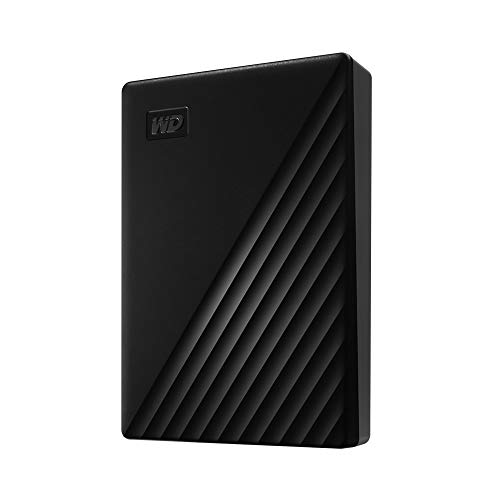
The My Passport at 4TB is the step-up with a security staff: its listing states a portable drive in black with backup software that includes defence against ransomware, password protection, and USB 3.1/USB 3.0 compatibility, model WDBPKJ0040BBK-WESN. When the 3TB search is really a search for a trustworthy home for a large archive, this is the pick that answers the underlying need most completely — the modern capacity, from a major line, wrapped in the strongest stated feature set in this guide.
Each stated feature maps to a real failure mode. The backup software addresses the forgotten routine, running the archive on a schedule rather than on intentions. The ransomware defence addresses the attached-drive problem, in which malware encrypting a computer reaches for its backup next. The password protection addresses the lost drive, rendering a mislaid portable unreadable to a finder. Together they form the most considered single-drive protection story available here — with the guide’s standing caveat, repeated because it matters, that an attached drive still shares its machine’s fate in fire, flood and theft, and a second copy elsewhere remains the final layer no feature list replaces.
The costs of the armour are management and commitment. The software must be installed and kept; the password must be recorded somewhere recoverable, because it locks the owner out with the same indifference it shows a thief; and the household standardising on an operating system’s own tools may find the maker’s routine a duplicate to think about. Owners who accept those terms get the flagship answer. Owners who prize emptiness should take the Elements or the Canvio and impose their own discipline — the guide’s loyalty is to the routine, not to the badge.
Capacity completes the case. At 4TB this drive holds the classic 3TB household estate and the growth that estate was always going to have, which makes it the step-up least likely to be repeated. Buyers replacing a failed 3TB drive under time pressure — the archive homeless, the household anxious — will find in this pick the single purchase that restores the situation and improves it in the same gesture.
It is also the pick that best survives being bought for someone else. A parent, a relative starting a small business, a student leaving home — recipients unlikely to maintain a manual routine — can be handed a My Passport whose software maintains the archive for them and whose password prompt teaches its own security lesson at every connection. Reliability given as a gift has to be self-administering, and among these six, this is the drive that administers itself.
- Capacity: 4TB (step-up from 3TB)
- Type: Portable external hard drive
- Colour named in the listing: Black
- Interfaces named in the listing: USB 3.1 / USB 3.0 compatible
- Features named in the listing: Backup software with defence against ransomware, password protection
- Model named in the listing: WDBPKJ0040BBK-WESN
Strengths
- The strongest stated protection set in this guide, at the modern capacity.
- Automation suits an archive that must maintain itself.
- A major line’s flagship portable, sized to end the capacity question for years.
Trade-offs
- The software layer is a commitment minimalists will decline.
- A forgotten password is unrecoverable by design.
- It answers the keyword a size up, at the flagship end of the list’s intent.
Best for: a buyer seeking a protected, automated 4TB archive to replace or succeed a 3TB drive. Not suited for: an owner committed to an empty drive and the operating system’s own tools.

LaCie Rugged USB-C 2TB — Armoured alternative
The final pick breaks the capacity pattern deliberately, and its review must say so in its first breath: this LaCie Rugged holds 2TB, not 3TB. What its listing offers instead is a different reliability dialect — AES encryption and stated drop and crush resistance, model STFR2000800, with USB 3.2 Gen 2 connection and compatibility with USB4 and Thunderbolt 3, 4 and 5 named, plus a note that the range reaches up to 5TB with recycled materials in its construction. It is in this guide for data that travels — the photographer on location, the field engineer, the journalist — where the drive’s survival of the journey is a likelier question than its last terabyte.
LaCie’s Rugged line is the portable category’s famous armour, and its presence reframes the keyword’s promise honestly: for data that moves through the physical world, reliability is a shell and a cipher before it is a capacity. The AES encryption stated in the listing protects the archive if the drive is lost in transit — the scenario its owners actually fear — while the resistance claims address the drops and compressions of bag life. Its modern interface generation, the only one of its level in this list, suits current laptops directly over USB-C.
The trade must be stated without flinching: two terabytes is two-thirds of the keyword’s capacity, and a household archive that needs three will not fit, full stop. This pick is therefore an alternative for a different errand — the working drive, the location drive, the drive whose contents are backed up elsewhere nightly — rather than a substitute for the 3TB and 4TB picks above. A library fitting within 2TB, in a life spent mobile, may find it the most reliable product in the guide by the only definition that matters there; a home archive should pass it by with respect.
A closing note on its range: the listing itself observes that the Rugged family reaches larger capacities, so a buyer persuaded by the armour but not by 2TB can investigate the line’s bigger members with eyes open about price class. Within this guide’s verified picks, the 2TB model is the representative, and it is recommended strictly inside the role described above.
One more of its stated details deserves a sentence: the recycled-materials note in its listing. It changes nothing about the drive’s function, but it signals a current-generation product from a maker investing in the line’s future — which, in a guide preoccupied with discontinued sizes and remaining stock, is a quietly relevant form of reassurance about support and continuity.
- Capacity: 2TB (below the keyword’s 3TB — see review)
- Type: Rugged portable hard drive
- Interface named in the listing: USB-C, USB 3.2 Gen 2; compatible with USB4 and Thunderbolt 3/4/5
- Features named in the listing: AES encryption, drop and crush resistance
- Model named in the listing: STFR2000800
- Construction note in the listing: 25% recycled materials
Strengths
- Stated drop and crush resistance for a life spent travelling.
- AES encryption protects the archive if the drive is lost.
- The most modern interface generation stated in this guide.
Trade-offs
- 2TB does not meet the keyword’s capacity; it is an alternative, not a match.
- Rugged engineering sits in a higher price class than plain portables.
- Its virtues are wasted on a drive that will never leave a desk.
Best for: a buyer seeking an encrypted, travel-hardened portable for data in motion. Not suited for: a home archive that genuinely needs 3TB or more in one drive.
What Happened to the 3TB Portable — and What It Teaches Buyers
The disappearance was arithmetic, not conspiracy. Portable drive lines are built around platter configurations, and as capacities per platter grew, the natural sizes for a slim two-platter portable settled at round numbers the whole industry could share: 1TB, 2TB, then 4TB and 5TB as density allowed. A 3TB model required its own configuration in a market that rewards standardisation, and one by one the major makers let it lapse — first from the flagship lines, then from the value lines, until the size existed mainly in warehouse stock and in the catalogues of smaller brands assembling drives to order.
The lesson generalises beyond this one size, and it is worth learning while it is cheap. Any storage purchase is a bet on an ecosystem: cables, formatting, backup routines and replacement availability all assume the category continues. Buyers serve themselves best by choosing sizes and lines with a future — which is the deepest argument for this guide’s 4TB step-ups — or, when a vanishing size is genuinely the perfect fit, by buying it deliberately, verifying it thoroughly, and keeping the second copy that makes its eventual irreplaceability a non-event. The owners stranded by the 3TB disappearance were never the ones who bought the drives; they were the ones who assumed a like-for-like replacement would wait on a shelf forever.
There is a final, consoling observation. The data does not care about the size printed on its home. A library that lived on a 3TB portable moves to a 4TB successor in an afternoon’s copying and loses nothing in the translation — the photographs, the documents and the archive arrive identical. Capacity generations are a market story; the household’s story is continuity, and continuity is preserved by copies, not by any particular number of terabytes.
Three Sizes, Three Arguments: Laying the List Out Honestly
This guide’s table cannot pretend to a single capacity column without lying, so it prints the truth instead: two drives at the keyword’s size, three a step above it, one a step below with armour. Read it as the market’s actual answer to the search, organised so each row’s bargain is visible at a glance.
| Pick | Real capacity | Format | Interface as listed | The bargain it offers |
|---|---|---|---|---|
| WD Elements Portable | 3TB | Portable | USB 3.0 | The exact product, from a major line |
| OSENTRiX GX200 | 3TB | External for desktop/laptop | USB 3.2, USB-C | True capacity on a modern connector |
| UnionSine Ultra Slim | 4TB | Ultra slim portable | USB 3.0 | Slimmest step-up, widest console welcome |
| Toshiba Canvio Basics | 4TB | Portable | USB 3.0 | Plain successor from a mature line |
| WD My Passport | 4TB | Portable | USB 3.1 / USB 3.0 | Protection software and password |
| LaCie Rugged | 2TB | Rugged portable | USB 3.2 Gen 2, USB-C | Armour and encryption over size |
Price behaviour across the three groups is worth one honest paragraph, without figures. The surviving true 3TB drives occupy an odd market position — old enough to be discounted by some sellers, scarce enough to be priced firmly by others — so their cost per terabyte swings more than the current sizes do. The 4TB step-ups, being current production, price predictably and compete with each other in the open. A buyer comparing across the groups should therefore compare actual listings on the day rather than assuming the smaller drive is the cheaper one; in this category’s twilight, the step up sometimes costs less than the exact size, which removes the last argument against it for everyone except the true 3TB loyalist.
The decision the table supports is sequential. If the requirement is exactly 3TB in a portable, the Elements is the list. If 3TB matters but the connector matters more, the OSENTRiX argues its case. If the library estimate was approximate — as most are — the three 4TB picks divide by philosophy: slim value, plain lineage, or managed protection. And if the data travels for a living, the LaCie stands apart, answering a question the others were never asked.
How Do You Make a Portable Drive Last — and Prove Its Backups Work?
Start with the burn-in this guide keeps prescribing, because portable drives reward it more than any other class. In the first week, copy the full intended library across, then verify it — open files from the copy, compare folder sizes, restore one photograph and one document to a different location. Infant defects declare themselves under exactly this load, while the data still lives elsewhere and the returns window stands open. A drive that survives its first month of real work has passed the most informative test available.
Then build the handling habits that decide the long middle of the drive’s life. Eject properly before every unplug, without exception; carry the drive in a padded sleeve rather than loose among keys and bottles; keep it out of hot cars and damp bags; and let it come to room temperature before use if it has travelled through cold. None of this is exotic, and all of it together is the difference between the portables that serve six years and the ones that fail in their second winter.
Finally, arrange the second copy and the quarterly check. The second copy can be a rotated twin, a desktop drive at home, or a cloud tier for the irreplaceable subset — its form matters less than its existence in a different place from the portable. The quarterly check is five minutes: confirm the backup routine ran recently, restore one file at random, glance at free space against the library’s growth. Reliability, in the end, is this rhythm performed without drama for years, and it is available to the owner of every pick in this guide at no additional cost.
Storage temperature and rest deserve a closing word in this section, because portables spend much of their lives doing nothing in drawers and bags. A drive stored cool, dry and undisturbed ages slowly; a drive stored above a radiator or in a damp garage ages in secret and presents the bill at its next connection. Owners keeping a rotated twin should store it with the same care as the working drive — in its sleeve, in a labelled place, away from heat — and should spin it up at each rotation to confirm it still reads, since a backup that cannot be read is a rumour rather than a copy.
Which Habits Kill Portable Drives and Their Archives?
The leading killer is the casual unplug — the cable pulled mid-write, the laptop closed and the drive yanked in one motion — which corrupts file systems quietly and announces the damage later. Second is the sole-copy archive: the portable promoted from backup to only home of the photographs because it was bigger than the laptop, a promotion that converts every risk the drive faces into a risk to the family’s history. Third is physical neglect — the loose drive at the bottom of the bag, the sunny dashboard, the spilled drink — against which only the LaCie in this list claims any stated defence, and even it prefers not to be tested.
The quieter killers are administrative. A backup routine configured once and never verified, discovered empty on the day of need. A password set on a protected drive and recorded nowhere, locking the archive against its owner. A drive borrowed for a console or a television and returned reformatted, its contents a memory. And the capacity mistake in both directions — the 2TB bought for a 3TB library and filled in a panic, or the household that never replaced its failing 3TB because the exact size had vanished from the shelves, when a 4TB successor was waiting. This guide exists largely to prevent that last one.
A word should also be said about counterfeit and grey-market risk, because discontinued sizes attract it. A vanished capacity sold at a suspiciously gentle price by an unknown seller may not contain the drive its label claims, and the defence is the burn-in this guide prescribes: fill the drive toward its stated capacity with real data in the first week and verify the copies. A genuine drive of any brand in this list will pass that test without drama; a fraudulent one announces itself exactly there, while the purchase can still be unwound.
Final Recommendation
If the requirement is truly a 3TB portable, buy the WD Elements Portable 3TB and buy it knowingly — a mature, exact answer from a defining line, in a size class the market has retired, so verify the copy and keep the second copy this guide prescribes. Take the OSENTRiX GX200 when the capacity must be 3TB but the connection must be USB-C, accepting its desk-and-laptop framing. Where the 3TB figure was a library estimate, step up without regret: the Canvio Basics 4TB for plain continuity, the UnionSine for slim value, and the My Passport 4TB when the archive deserves software, ransomware defence and a password standing guard over it. Let the LaCie Rugged serve the data that travels, at its honest 2TB. The size on the box mattered less than the market’s disappearance act suggested — what makes any of these drives the reliable one is the verified copy, the padded sleeve and the twin stored somewhere else — a routine so ordinary that its absence, rather than any drive’s failure, is what future regret is actually made of.
Frequently Asked Questions
Why is it so hard to find a 3TB portable drive now?
Because the market consolidated. Makers concentrated portable production on 1TB, 2TB, 4TB and 5TB, and the 3TB size — once a standard shelf item — was dropped from current lineups, leaving remaining stock of older models and a few smaller brands. That is why this guide lists the genuine survivors, labels the 4TB models as step-ups, and refuses to mislabel anything to fill the page. Readers who remember when every electronics shelf carried a wall of 3TB portables are not imagining it; the size had a long, popular life before the consolidation, and the drives sold in those years are the ageing fleet now coming due for replacement.
Is a 4TB drive a sensible replacement for a failed 3TB?
It is the sensible replacement. The archive lands with a terabyte of headroom, the backup routine resumes unchanged, and the new drive begins life three-quarters full instead of at the brim. Among this guide’s picks, the Canvio Basics 4TB is the like-for-like successor in spirit, and the My Passport 4TB is the upgrade that adds protection in the same purchase.
What makes one portable drive more reliable than another?
Evidence, in order: a mature product line with a long production history; stated warranty or recovery terms in the listing; survival of an early burn-in period under real load; and the owner’s handling and backup routine. No portable is immune to failure, which is why the last factor — never letting one drive hold the only copy — outweighs the other three combined.
Can these drives work with a games console as well as a computer?
Several listings say so: the WD Elements 3TB names PC, Mac, PS4 and Xbox; the UnionSine names PS4, Xbox One and Xbox 360 alongside computers. The standing rule applies — a drive formatted by a console belongs to that console until reformatted, which erases it — so a drive can serve different masters across its life, but only one at a time.
Does the LaCie Rugged’s smaller capacity disqualify it?
For a home archive requiring 3TB, yes, and its review says so plainly. For data that travels — location photography, field work, a working drive backed up elsewhere — its stated drop and crush resistance and AES encryption answer the reliability question in the terms that matter there. It is included as an honestly labelled alternative, not as a capacity match.
Is a desktop 3TB drive a good substitute for a portable one?
Only if the job is stationary. A desktop external holds the same capacity but needs its own power supply and is built to live on a desk, so calling it a portable substitute fails the moment the drive must travel in a bag or run from a laptop’s battery-powered port. This guide’s list contains no desktop model dressed as a portable; the OSENTRiX is labelled by its own listing’s desktop-and-laptop framing, and a buyer requiring true pocket portability at 3TB should take the Elements pick.
Should a replacement drive be the same brand as the one that failed?
Loyalty is not a reliability strategy. A single failure says little about a mature line — every maker’s drives fail sometimes, which is the premise of this entire guide — and the replacement decision should be made on the same evidence as the original: the listing’s stated terms, the line’s maturity, and the fit for the household’s routine. Owners who switch brands after a failure and owners who stay both do fine, provided the second copy exists either way; the brand on the replacement matters far less than the routine wrapped around it.
How should a new portable drive be treated in its first week?
Work it. Copy the full intended library across, verify the copies by opening and restoring sample files, and confirm the backup routine runs on schedule. Early failures cluster at the start of a drive’s life, and a defect that declares itself during the burn-in — while the data exists elsewhere and returns are simple — is a bullet dodged rather than a disaster suffered.
Related Guides
Readers rethinking a whole storage shelf after this guide will find the neighbouring questions answered in depth on this site. The full portable landscape, across every current capacity, is compared in our guide to the best portable external hard drives; the larger stay-at-home capacities live in our roundup of desktop external drives; and the routine that makes any of them trustworthy is laid out in our guide to backup habits that survive real life. Taken together, those three guides cover the shelf this purchase belongs on: the portable for the bag, the desktop drive for the desk, and the habits that keep both honest for the years the data needs them.