What's inside
- Key Takeaways
- Quick Picks
- What makes a laptop survive clinic work specifically?
- Should a clinic choose touchscreens or avoid them?
- How much storage and memory does practice software actually consume?
- Which machine belongs at the front desk, in treatment, and out in the kennels?
- The six clinic routes, examined one at a time
- How do the six routes compare side by side?
- What mistakes do clinics make when buying laptops?
- How should a clinic roll a new laptop fleet out without chaos?
- What about carts, spare chargers and the accessories that decide daily friction?
- Final Recommendation
- Frequently Asked Questions
- Related Guides
As an Amazon Associate I earn from qualifying purchases. This post may contain affiliate links at no extra cost to you.
gizmoverdict.com is reader-supported. When you buy through links on our site, we may earn an affiliate commission.
Where to buy: Each linked machine below leads to its live Amazon listing; confirm the configuration in the cart before paying, because the rugged and semi-rugged families in this guide sell near-identical names with different memory, storage and processors underneath. Two respected clinic fleets appear without links, and the reason is stated plainly where they appear.
A veterinary clinic is a hostile posting for a computer. The laptop on the treatment-room counter gets wiped down between patients, nudged by elbows in scrubs, carried into kennels for records, splashed near sinks and bathing stations, and used by three different people across a shift with three different logins. The best laptops for vet techs are therefore chosen the way a practice manager would choose them: for cleanability, for sign-in discipline, for a screen that stays readable under hard fluorescent light, and for survival in a building where the floor is hosed down more often than the desk is dusted. These are office and clinic computers, chosen for records, scheduling, imaging review and client communication — they are not medical devices, and nothing in this guide treats them as such.
One discipline runs through every judgement below. Wipe-down tolerance, spill behaviour and glove use are assessed only where a listing title actually speaks to them, and most titles stay silent on ratings. Where a title is silent, the spec box says so in the standard line rather than dressing the machine in an invented certification. What the titles do state — smartcard readers, backlit keyboards, non-touch panels, one printed brightness figure, one dual-battery design — turns out to map surprisingly well onto clinic life, and the ranking follows those printed facts.
Key Takeaways
- Both Durabook picks carry smartcard readers as titled, which suits clinics where several staff share machines and the practice software supports card-based sign-in — the reader is hardware, and the habit it enables is the real security feature.
- Storage splits the linked field: the Dell Pro Rugged 14 and the ONERugged N15M carry 512GB, while both Durabooks stop at 256GB, a figure a clinic archiving years of imaging and records on the machine will feel.
- The ONERugged N15M is the only linked pick that prints a brightness figure — 1000 nits — and the only one describing a dual-battery arrangement, which speaks to long shifts away from a desk.
- Both Durabook titles specify non-touch FHD panels; in a workplace where screens get wiped constantly and gloves are routine, a keyboard-and-trackpad machine is a deliberate design choice rather than a missing feature.
- The classic clinic fleets — Dell’s Latitude Rugged 5424 and Panasonic’s Toughbook CF-54 — verified as renewed-only stock, so they are covered as refurbished routes with that condition stated, never as new purchases.
- Every linked pick runs Windows 11 Pro, which keeps drive encryption and account management consistent across a mixed fleet of treatment-room, kennel and front-desk machines.
Quick Picks
| Pick | Badge | Why it earns its place |
|---|---|---|
| Durabook S15 | Largest screen of the linked picks | A 15.6-inch FHD panel with a smartcard reader and backlit keyboard, sized for the treatment-room counter where records and imaging share one display. |
| Durabook S14I | Newer processor, smaller chassis | The Core Ultra generation in a 14-inch semi-rugged body, keeping the smartcard reader for shared-staff sign-in discipline. |
| Dell Pro Rugged 14 (Ultra 5) | Double the Durabook storage | Dell’s current rugged line with 512GB of NVMe storage and a twelve-core Ultra 5, for clinics that archive heavily on the machine itself. |
| ONERugged N15M | Only stated brightness, dual batteries | A 15-inch industrial build printing 1000 nits and a two-battery design, aimed at mobile work around large-animal and shelter sites. |
| Dell Latitude Rugged 5424 | Renewed fleet route | The long-serving rugged Latitude appears in renewed listings only; a known refurbished buy for practices comfortable grading used hardware. |
| Panasonic Toughbook CF-54 | Renewed semi-rugged route | The CF-54’s semi-rugged design suits clinic corridors, but current stock verified renewed, so it is framed as a refurbished purchase throughout. |
What makes a laptop survive clinic work specifically?
Start with the cleaning ritual, because it happens several times a day and consumer laptops are not designed around it. Keyboards get wiped, screens get wiped, the cloth is damp with whatever the clinic’s protocol uses, and the machine is back in service before it is fully dry. A rugged or semi-rugged chassis tolerates that rhythm better than a thin consumer shell — seams, port covers and keyboard construction in this class assume a wetter, rougher life. This guide does not assign any pick an invented liquid rating; it credits the design class and the facts the titles print, and it treats any specific resistance claim as a documentation question for the maker.
The second clinic pressure is shared use. A treatment-room laptop is not one person’s machine; it is a station. Assistants, technicians and veterinarians sign in and out across the day, and the security failure mode is not hacking — it is the session left logged in under the previous person’s name, with records entered under the wrong account. That is why the smartcard readers titled on both Durabooks matter beyond their spec-sheet modesty: card-tap sign-in makes the correct login the fastest login, and fast habits are the ones that survive a busy Saturday. The same logic drives interest in the best laptops and notebooks for nursing students, where shared clinical workstations teach the same lesson in human healthcare settings.
Noise and interruption shape the work more than clinics admit. A tech entering records is interrupted mid-note as a matter of routine — a question from the desk, an animal that will not wait, a phone that will not stop — and returns to a screen that must make the half-finished entry obvious. That is a software virtue more than a hardware one, but the hardware contributes: a machine that wakes instantly, signs its user back in without a password typed one-handed, and holds its place in the application is a machine whose records get finished. Slow wake and clumsy sign-in are not inconveniences in this environment; they are how notes end up reconstructed from memory at the end of a shift, which is to say, slightly wrong.
The third pressure is the building itself.
Clinics are bright, wet and loud, with long corridors and rooms that share machines between them. Screens compete with fluorescent light and windows; batteries compete with shifts that outlast a charge when a machine spends its day on a cart rather than a desk; keyboards compete with gloves, haste and the occasional paw. The picks below are ordered by how completely their titled facts answer those three pressures — cleaning rhythm, shared sign-in, building conditions — rather than by processor bragging rights.
Should a clinic choose touchscreens or avoid them?
The two Durabook titles settle their own answer by specifying non-touch FHD panels, and there is a defensible clinic logic in that. A non-touch screen is a simpler surface to wipe down, presents no phantom-input surprises when a damp cloth crosses it, and pushes all interaction to the keyboard and trackpad, which is where records work happens anyway. Nobody enters a treatment note by tapping a wall of small on-screen keys with gloved hands. For the charting, imaging review and scheduling that fill a tech’s day, the traditional input pairing is not a compromise; it is the tool.
The counter-case belongs to specific corners of practice. A touchscreen earns its place where the software is genuinely tap-driven — some imaging viewers and intake kiosks are built that way — and where the machine is a fixed station rather than a wiped-down shared counter unit. If your practice software’s daily screens are designed around touch, weight that heavily and read the Dell and ONERugged sections with it in mind, noting that their titles do not claim touch either; the honest summary for this whole group is that touch is unclaimed everywhere, so a touch-critical clinic must verify panel type in the maker’s documentation for any pick before ordering. Do not let a product photograph make a promise the title never did.
How much storage and memory does practice software actually consume?
Less than gaming, more than the brochures imply, and unevenly across roles. The records and scheduling core of a practice system is light work; any pick here handles it. The weight arrives with imaging. Radiographs, dental images, ultrasound clips and the scanned paperwork of a decade of patients accumulate on whichever machine the clinic treats as the archive, and that accumulation is why the 256GB figure on both Durabooks deserves a hard look. A front-desk or treatment-room station that reads its records from a server or cloud system will never notice 256GB. The machine that is the archive will notice it in year two.
Memory is the calmer question. Sixteen gigabytes, the figure every linked pick shares, covers the realistic clinic stack — practice software, a browser carrying the lab portal and the pharmacy, imaging viewer, email — without the swapping slowdowns that make shared machines feel broken. What makes shared clinic machines feel slow is rarely the processor; it is five accounts’ worth of startup clutter and a drive nearly full. The practical buying rule follows: choose the storage for the archive role honestly, keep one machine as the designated archive if the practice is small, and let the 256GB picks serve as the stations they are well shaped to be. Clinics standardising across roles will find the same tiering logic in our guide to the best 13 inch business laptops, where desk fleets split by role in a similar way.
Which machine belongs at the front desk, in treatment, and out in the kennels?
Walk the building and the fleet designs itself. The front desk runs scheduling, payments, phone triage and the client-facing screen; its laptop lives a gentle, plugged-in life where the screen size serves conversations across the counter and the keyboard serves speed. Almost any pick in this guide is overbuilt for the desk, which is precisely why the desk is where a clinic can economise — or where a renewed machine, inspected and graded, can serve honourably for years. The desk’s real requirement is not toughness; it is that the machine never be the reason a queue forms.
The treatment rooms are the opposite posting: shared, wiped, splashed, borrowed, and loaded with the day’s clinical records. That is the Durabooks’ home ground, and the choice between them is a floor-plan question — a fixed counter with two-person imaging conversations points to the S15’s larger screen, while rooms that hand machines back and forth through the day point to the S14I’s smaller body. The kennels and wards add distance and damp: records entered where the animals are, on a machine that travels a wet corridor and gets set down on whatever surface exists. There the sealed, rugged end of the range earns its premium, and the sign-in discipline matters most, because ward machines are the ones most often found still logged in.
The fourth location is not in the building at all. The vehicle, the farm visit, the shelter contract — mobile practice inverts every priority, putting brightness and battery above screen size and sign-in hardware, which is the ONERugged’s argument stated as geography. A clinic that maps its machines to these four territories before shopping will find the buying decision mostly made; a clinic that shops first and maps later will own four identical laptops, two of which are wrong for their rooms. The map is the method. Draw it on the whiteboard, count the stations honestly, and let the count — not a bundle offer — decide how many of each pick the practice actually orders.
The six clinic routes, examined one at a time

Durabook S15 — Largest screen of the linked picks
The S15 is built around the treatment-room counter, and its title reads like a checklist for that station. The 15.6-inch FHD panel is the largest screen among the linked picks, which matters when a radiograph and the patient’s record need to share one display during a conversation with the veterinarian. The panel is specified as non-touch, the keyboard is backlit for the dimmed room during imaging review, and a webcam covers the telehealth follow-up and the supplier call. Underneath sits an Intel Core i5-1235U with 16GB of memory — proven, unglamorous silicon that runs practice software without becoming the story.
The detail that lifts the S15 above ordinary business machines for shared clinic duty is the smartcard reader in its title. In a practice where the same counter machine serves the whole team, card-based sign-in turns correct account discipline into the path of least resistance, and records end up attributed to the person who actually wrote them. Durabook’s rugged positioning suits the wipe-down rhythm of clinic cleaning without this guide inventing a rating the title never prints. The honest weakness is storage: 256GB is a station’s allowance, not an archive’s, and a clinic that keeps imaging locally should either designate a different machine as the archive or treat this figure as the deciding factor against the S15.
Picture the S15 across one ordinary Tuesday. Morning rounds: the machine rides to the kennels for weights and notes, keyboard coping with gloved, hurried typing under the backlit keys. Midday: a dental case, images on the big screen beside the record, two staff reading the same display without crowding. Evening: the wipe-down, the last records checked, the next day’s schedule confirmed. Nothing in that day tests the processor. Everything in it tests size, sign-in and cleanability, which is the order this pick was chosen in.
One more consideration belongs to the S15’s size: counter depth. Treatment rooms are designed around the animals, not the furniture, and a 15.6-inch machine claims real estate that competes with the chart, the clippers and the patient. Measure the counter it will live on, in the room it will live in, before the size that looks generous in a photograph becomes the size that gets the machine exiled to a shelf. Clinics that have done this measurement sometimes conclude the S14I is the counter machine and the S15 belongs in the office or the imaging room, where its screen serves review rather than workflow. Either conclusion is respectable; the unmeasured purchase is the mistake.
- Display: 15.6-inch FHD, non-touch
- Processor: Intel Core i5-1235U
- Memory: 16GB RAM
- Storage: 256GB SSD
- Sign-in hardware: smartcard reader
- Keyboard and camera: backlit keyboard, webcam
- Operating system: Windows 11 Pro
- Not stated in the listing title — verify with the maker’s documentation
Strengths
- The largest display among the linked picks for imaging and records side by side
- Smartcard reader fitted for shared-staff sign-in discipline
- Non-touch panel that suits constant wipe-down cleaning
Trade-offs
- 256GB of storage, the joint-smallest here, which local imaging archives will outgrow
- The i5-1235U is an older processor generation than the S14I’s Core Ultra chip
- The 15.6-inch chassis is the one to carry least often between rooms
Best for: the fixed treatment-room or imaging station where one shared machine carries the day’s records and pictures. Not suited for: serving as the clinic’s only imaging archive, because the titled 256GB drive sets a hard ceiling on local storage.
Counter space is worth measuring before ordering, and it is worth checking the current price on Amazon for this exact smartcard-equipped build.

Durabook S14I — Newer processor, smaller chassis
The S14I takes the S15’s formula — semi-rugged Durabook construction, smartcard reader, backlit keyboard, webcam, non-touch FHD panel — and moves it into a 14.0-inch body with a newer brain. The Core Ultra i5-125U replaces the older i5, which buys headroom for the clinic that keeps its imaging viewer, practice system and a wall of browser tabs open from first appointment to last. In a shared-machine environment, that headroom reads as manners: the station stays responsive at 5 p.m. with three accounts’ worth of work still open.
Size is the real argument. Fourteen inches is the format that moves — between treatment rooms, out to the isolation ward, along to the office for the end-of-day accounts — without the small ceremony a 15.6-inch machine demands. The trade is the mirror of the S15’s: two people reading one screen feel the smaller panel, and imaging conversations gather closer. Storage repeats the family compromise at 256GB, so the S14I is a station and a roamer, not the archive. A clinic choosing between the two Durabooks is really choosing a posture: fixed and shared at the counter, or carried and personal across the building.
There is a purchasing subtlety worth naming. Because the S14I and S15 share a maker, a feature list and a naming pattern, they are easy to confuse at ordering time, and the wrong one arriving is a plausible clinic mistake. Check the screen size in the cart the way you would check a dosage: twice, against the listing, before paying. The machines are siblings, not substitutes, and the difference between them is the whole point of buying either.
The S14I also suits the practice’s float role — the machine that covers whichever room is short-handed, sits in on the consult, and goes home with the on-call veterinarian for the weekend records catch-up. Float machines accumulate the widest variety of users, which circles back to the smartcard reader: on the laptop everybody touches, the fastest correct login is the difference between a record attributed properly and a note typed under a colleague’s still-open session. If a clinic buys only one premium habit-forming feature across its fleet, sign-in speed on the float machine is a strong candidate for the honour.
- Display: 14.0-inch FHD, non-touch
- Processor: Intel Core Ultra i5-125U
- Memory: 16GB RAM
- Storage: 256GB SSD
- Sign-in hardware: smartcard reader
- Keyboard and camera: backlit keyboard, webcam
- Operating system: Windows 11 Pro
- Not stated in the listing title — verify with the maker’s documentation
Strengths
- Core Ultra processor, the newer generation, in the more portable 14-inch body
- Smartcard reader retained for shared sign-in habits
- Backlit keyboard for dim imaging rooms and evening finishes
Trade-offs
- The same 256GB storage ceiling as the S15
- A 14-inch screen crowds two-person imaging review more than the S15’s panel
- Non-touch input only, which tap-driven practice software will feel
Best for: the technician or veterinarian whose machine travels the building all day and still anchors shared sign-in discipline. Not suited for: tap-first intake or imaging software built around touch, because the titled panel is explicitly non-touch.
Sibling models sit one click apart in this family, so check price on Amazon with the 14.0-inch size confirmed in the listing.
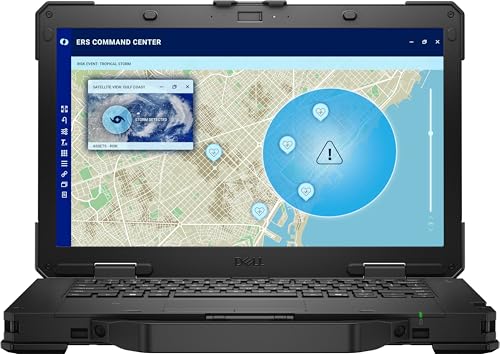
Dell Pro Rugged 14 (Ultra 5) — Double the Durabook storage
Dell’s entry answers the Durabooks’ weakness directly. The Pro Rugged 14 in this Ultra 5 build pairs a twelve-core Intel Core Ultra 5 135U with 16GB of DDR5 memory and a 512GB NVMe drive — twice the storage of either Durabook, in Dell’s current rugged line, with the service depth that line carries into fleets far larger than a veterinary practice. For the clinic that does keep its imaging and records on the machine, that 512GB figure is not a luxury; it is the difference between a five-year archive and a year-two crisis.
The rest of the title fits clinic duty quietly. A backlit keyboard and webcam are present, Windows 11 Pro carries the encryption and account management story, and AI Boost headlines a processor with headroom for the imaging viewer’s heavier moments. What the title does not carry is a smartcard reader, so a practice standardising on card sign-in should note the omission rather than discover it; Dell’s sign-in story here runs through the operating system and whatever the practice layers onto it. Nor does the title print a sealing or brightness figure, so the rugged claim rests on the family name and Dell’s documentation, a point this guide states rather than papers over. The same Dell rugged family serves the ramp in our guide to the best laptops for pilots, where its Ultra 7 sibling leads on processor rather than storage.
Think of this machine as the clinic’s anchor: the one that lives longest, holds the archive, and absorbs the heaviest software stack, while lighter stations orbit it. Anchor machines justify their specification differently from roamers — nobody thanks an archive for being thin — and on that accounting the Dell’s combination of current silicon, doubled storage and an established maker’s support organisation is the most complete in this guide.
There is a staffing angle to the anchor role that deserves a sentence. The machine holding the archive becomes the machine the whole practice depends on during the practice-software conversation with the vendor, the insurance review, the year-end accounts. Downtime there is not one room’s inconvenience; it is the practice standing still. That is the context in which Dell’s service organisation stops being a spec-sheet abstraction: the anchor is the one purchase where the support story should be priced into the comparison from the start, even when a rival’s headline specification looks similar on the day of ordering.
- Display: 14-inch FHD panel
- Processor: Intel Core Ultra 5 135U, 12-core, AI Boost
- Memory: 16GB DDR5 RAM
- Storage: 512GB NVMe SSD
- Graphics: Intel Graphics
- Keyboard and camera: backlit keyboard, webcam
- Operating system: Windows 11 Pro
- Not stated in the listing title — verify with the maker’s documentation
Strengths
- 512GB of NVMe storage, double either Durabook, for on-machine archives
- Twelve-core Ultra 5 processor with DDR5 memory for heavy multitasking
- Dell’s current rugged line and its established service organisation
Trade-offs
- No smartcard reader named in the title, unlike both Durabook picks
- No brightness or sealing figure printed, so outdoor and wet-room claims rest on documentation
- Integrated Intel Graphics only, which caps graphics-heavy imaging extras
Best for: the practice’s anchor machine — archive, imaging review and the heaviest daily software stack in one rugged Dell. Not suited for: a clinic standardising on smartcard sign-in across every station, because this title names no card reader.
Anchor purchases reward exactness, so it is worth checking the current price on Amazon against the Ultra 5 and 512GB specification described here.

ONERugged N15M — Only stated brightness, dual batteries
The N15M is the outsider pick, from an industrial-computer maker rather than a clinic-familiar brand, and its title argues in numbers the famous names avoid. It prints 1000 nits of brightness — the only such figure among the linked picks — and describes a dual-battery arrangement, 4700mAh plus 1300mAh, which reads as a main pack supported by a secondary cell. Translate that into practice life: a screen that stays readable in a sunlit yard during large-animal work, and a power story designed for a machine that spends the day away from one desk, on farm visits, shelter rounds and mobile clinic duty.
The computing core is current: an Intel Core Ultra 5 125H, 16GB of memory and 512GB of storage, with Wi-Fi 6 and Bluetooth 5.1 named in the title. That is the same storage tier as the Dell and a stronger processor designation than the Durabooks carry, inside a 15-inch industrial chassis. The cautions are about ecosystem rather than specification. ONERugged’s service and parts story is thinner in most regions than Dell’s or Durabook’s, the title names no smartcard reader or backlit keyboard, and a practice buying several should weigh who answers the phone in year three. As a single mobile unit for the vet tech whose workplace is a vehicle and a yard as often as a room, though, its printed facts answer questions the other titles leave open.
Consider where this machine sits in a mixed practice. The Durabooks hold the counters, the Dell holds the archive, and the N15M is the one that leaves the building — herd checks with records updated on the tailgate, shelter intake processed in a bright hall, a satellite clinic day where the outlet situation is theoretical. Purchases like this fail when they are asked to be everything; they succeed when the role is named first. Name this one mobile, and its title’s two unusual numbers become the whole justification.
The dual-battery wording deserves a careful reading rather than a celebration. The title gives two capacities, which suggests a main battery supported by a smaller secondary cell — an arrangement typically used to keep the machine alive through a battery change or to extend a long day — but the title does not explain the mechanism, and this guide will not invent one. A mobile practice should treat the exact behaviour as a pre-purchase question for the maker: whether the secondary cell is hot-swappable, what the combined real-world runtime looks like, and how replacements are sourced in three years. Asked before ordering, those questions take ten minutes; discovered on a farm call, they take the day.
- Display: 15-inch panel, 1000 nits stated
- Processor: Intel Core Ultra 5 125H
- Memory: 16GB RAM
- Storage: 512GB
- Battery: dual batteries, 4700mAh plus 1300mAh as titled
- Wireless: Wi-Fi 6, Bluetooth 5.1
- Operating system: Windows 11 Pro
- Not stated in the listing title — verify with the maker’s documentation
Strengths
- The only stated brightness figure among linked picks, at 1000 nits for yard and field reading
- Dual-battery design as titled, suiting long mobile shifts
- 512GB storage paired with a Core Ultra 5 125H processor
Trade-offs
- A thinner service and parts ecosystem than Dell or Durabook in most regions
- No smartcard reader or backlit keyboard named in the title
- The title does not state the panel resolution, so confirm it before ordering
Best for: mobile and large-animal work — farm calls, shelter days, satellite clinics — where brightness and battery design decide the day. Not suited for: a multi-unit fleet standardised on one maker’s service contract, because this industrial brand’s support network is the shallowest here.
Mobile roles forgive little, so check the price on Amazon while confirming the dual-battery configuration in the listing.
Dell Latitude Rugged 5424 — Renewed fleet route
For years the Latitude Rugged 5424 was the default answer when a workplace with wet floors and hard knocks bought laptops, and veterinary practices were part of that story: the 5424 sat in treatment rooms and ambulances alike because it was built for exactly that weather. The design judgement has not expired. What has changed is the stock. At verification for this guide, the 5424’s Amazon listings carried renewed status, and that fact reorganises the purchase from choosing a model to grading a unit.
A renewed 5424 bought deliberately can still make sense for a practice — a second machine for the kennel block, a spare for the isolation ward, a low-stakes station where a refurbished unit’s remaining life is well matched to the duty. The conditions are the familiar ones: read the seller’s grading language literally, confirm the battery policy, use the return window as an inspection period, and put the machine through a real week of clinic work before the window closes. What this guide will not do is dress that transaction as a new purchase or print specifications for a unit whose configuration varies by listing. Judge each renewed 5424 by its own stated build and its seller’s terms, the way the parallel renewed routes are handled in our coverage of the best laptops for automotive technicians, where the same Dell family serves workshops under the same stock conditions.
One practical grading tip applies to the 5424 above all: test it in the wettest role first. A renewed unit destined for the kennel block should spend its inspection week there, not at the clean front desk, because the seals, port doors and keyboard are exactly what its previous life has been spending. Machines that pass a gentle week and fail a real one are the renewed market’s classic disappointment, and the return window is only useful while the test is honest. Grade the machine against the job it will actually do, at the sink it will actually sit beside.
- Class: fully rugged 14-inch class fleet notebook
- Market status at verification: renewed listings on Amazon
- Not stated in the listing title — verify with the maker’s documentation
Strengths
- A long fleet record in wet, rough workplaces, clinics included
- Renewed pricing suits secondary stations and spare-machine roles
- A familiar platform for practices that already run Dell rugged hardware
Trade-offs
- Condition and battery health vary by individual refurbished unit
- Configuration differs between listings and must be verified one by one
- The seller’s return terms replace a new-unit warranty as the safety net
Best for: a secondary or spare station bought knowingly as refurbished stock and inspected hard on arrival. Not suited for: the practice’s sole records machine, because a renewed unit’s unknown history is the wrong foundation for the archive.
Panasonic Toughbook CF-54 — Renewed semi-rugged route
The CF-54 occupies the semi-rugged middle ground that suits clinics particularly well in principle: tougher than a business laptop, slimmer than the fully rugged tanks, designed to be carried down corridors and set down on wet counters without ceremony. Panasonic’s Toughbook line built its reputation in exactly these in-between workplaces, and a CF-54 in good order is a genuinely pleasant clinic machine — the right size, the right toughness, the right seriousness.
The qualification is the same one this guide has applied throughout: the CF-54’s current Amazon presence verified as renewed-only stock. Semi-rugged machines live a carrying life, so hinges, latches and port doors carry their history visibly, and a renewed CF-54 should be inspected with that in mind — screen play, latch action, port condition, battery behaviour across a full shift. None of that makes the route wrong; it makes the inspection the product. A practice with the time and confidence to grade refurbished hardware can land a well-judged machine here. A practice buying in a hurry for a critical station should take one of the new linked picks above and leave the renewed market to a calmer week.
The CF-54’s semi-rugged positioning also makes it the renewed pick most likely to be confused with a new purchase, because its slimmer profile reads as a modern business laptop in photographs. That resemblance cuts both ways: it is why the model suits a clinic aesthetically, and why buyers must read the listing’s condition language rather than its pictures. A practice that wants the CF-54’s shape without the grading homework should take the hint the market is giving — the shape is available new in spirit from the linked semi-rugged picks above — and reserve this route for a deliberate, inspected, refurbished buy.
- Class: semi-rugged notebook, Toughbook line
- Market status at verification: renewed-only stock on Amazon
- Not stated in the listing title — verify with the maker’s documentation
Strengths
- Semi-rugged balance of toughness and carry weight for corridor work
- Toughbook design heritage in demanding shared workplaces
- Renewed availability at refurbished rather than new pricing
Trade-offs
- Hinge, latch and port-door wear varies with each unit’s previous life
- No new-unit warranty; grading and returns carry the risk
- Individual listings differ in configuration, so comparisons take homework
Best for: a corridor-and-counter station for a practice comfortable grading refurbished hardware on arrival. Not suited for: a critical single machine bought under time pressure, because a renewed purchase needs an inspection window a rushed week cannot give it.
How do the six routes compare side by side?
| Route | Screen as titled | Memory and storage | Distinguishing fact |
|---|---|---|---|
| Durabook S15 | 15.6-inch FHD non-touch | 16GB, 256GB SSD | Smartcard reader, largest screen |
| Durabook S14I | 14.0-inch FHD non-touch | 16GB, 256GB SSD | Smartcard reader, Core Ultra chip |
| Dell Pro Rugged 14 (Ultra 5) | 14-inch FHD | 16GB DDR5, 512GB NVMe | Double storage, Dell service depth |
| ONERugged N15M | 15-inch, 1000 nits stated | 16GB, 512GB | Dual batteries, brightest claim |
| Dell Latitude Rugged 5424 | Rugged fleet class | Varies by renewed unit | Renewed listings only |
| Panasonic Toughbook CF-54 | Semi-rugged class | Varies by renewed unit | Renewed-only stock |
What mistakes do clinics make when buying laptops?
The expensive mistake is buying the archive and the station as if they were the same machine. A practice orders five identical 256GB laptops, discovers in year two that the imaging lives wherever it lands, and spends a weekend migrating records off full drives. Decide which machine holds the archive before ordering anything; the answer reorganises the whole purchase. The second mistake is treating sign-in as an IT detail. On shared machines, sign-in is the records-integrity system: the practice whose staff share one always-open account cannot say who wrote a note, and no software upgrade fixes a habit the hardware made inconvenient. Card readers and fast sign-in are clinical governance wearing a spec sheet’s clothes.
Third, clinics buy touchscreens from photographs. A glossy product shot implies a tap-friendly panel that the title never claimed; every linked pick here is either explicitly non-touch or silent on the subject. Verify panel type against your practice software’s real input habits. Fourth, buyers skip the cleaning conversation: the machine will be wiped daily with the clinic’s actual products, so ask the maker what the chassis and screen tolerate rather than learning from a fogged display. Fifth, renewed machines get bought as if they were new, or dismissed as if they were junk; both errors come from skipping the grading homework. And sixth, practices forget the unglamorous accessories — the spare charger for the kennel block, the cart mount, the second battery where the design allows one — and discover the omissions during the busiest week of the year. The keyboard point generalises beyond clinics, incidentally; our roundup of the best laptops backlit keyboard makes the case for the evening-shift details that spec sheets bury.
How should a clinic roll a new laptop fleet out without chaos?
Stage it by role, not by enthusiasm. Set up the anchor machine first — the archive holder — with the practice system, the imaging viewer and the backup routine proven end to end before any station depends on it. Then bring the stations online one room at a time, each with its accounts enrolled, its sign-in method tested by the staff who will actually use it, and its cleaning place in the room’s routine agreed with the people who clean. A laptop introduced without a cleaning agreement gets cleaned by improvisation, and improvisation is where screens die.
Training deserves a line in the plan, because a clinic’s laptop habits are set in the first fortnight and then defended for years. Show every user the sign-in routine on the actual machine, in the actual room, rather than by email; show the cleaning staff where the laptop sits in each room’s sequence; and show the whole team where records live so nobody invents a desktop folder system out of urgency. Fifteen minutes of demonstration per room, done once, prevents the slow drift into shared passwords and local copies that no later memo ever fully reverses. The rollout is a clinical-governance exercise disguised as an IT task, and practices that treat it that way keep the benefits.
Build the shared-use habits into the rollout week.
Every staff member signs in with their own credentials from day one; the smartcard enrolment, where the hardware supports it, happens at setup rather than eventually; the machine’s lock behaviour is set short enough to matter and long enough to tolerate. Keep the old machine running in parallel for a fortnight if the role allows it, because the file someone forgot to migrate always surfaces on the busiest morning, and a calm retrieval beats a rescue. Finally, write down what was bought — model, configuration, seller, date — in the practice’s equipment record. Clinics keep immaculate records for patients; the laptops that hold those records deserve one page of the same discipline.
What about carts, spare chargers and the accessories that decide daily friction?
No laptop in this guide works alone, and the accessories around it decide more daily friction than the processor does. Start with the cart or stand question. A treatment-room machine that lives at one height on a rolling cart gains a stable home, a cable path that stays plugged, and a screen position two people can read; a machine that migrates between counters gains none of that and pays for its freedom in chargers left in the wrong room. Decide each station’s mobility honestly — fixed stations deserve fixed infrastructure, and the money is better spent on the cart than on a processor tier nobody will feel.
Chargers are the second accessory truth. Shared clinic machines fail socially before they fail electrically: the charger walks to another room, the battery dies mid-shift, and the next user concludes the laptop is unreliable. The cure is dull and total — a charger married to every station, labelled, plus one spare in the office — bought at fleet time when it is cheap, rather than one at a time at emergency prices. The same logic covers mice for the imaging station, a spare keyboard for the front desk, and a labelled shelf where the mobile machine’s kit lives between farm calls. None of this appears in a listing title, and all of it appears in the practice’s daily mood.
Finally, protect the screens you have bought. The non-touch panels on the Durabooks and the FHD panels elsewhere all share one enemy: the abrasive wipe and the gritty cloth. The clinic’s cleaning protocol should name the cloth as well as the product — soft, clean, replaced often — because a screen clouded by a year of harsh wiping cannot be unclouded by any setting. Pair that with a simple rule about food and drink at shared stations, enforced with humour and total consistency, and the fleet will look professional at the age when most clinic laptops look archaeological. The machines in this guide are built for the building; the accessories and habits decide whether the building is kind back.
Final Recommendation
Buy by station, not by spec sheet.
The treatment-room counter belongs to the Durabook S15, whose big non-touch screen and smartcard reader fit shared, wiped-down, record-heavy work; the roaming version of the same idea is the S14I. The archive and the heaviest stack belong to the Dell Pro Rugged 14, the only linked pick pairing current silicon with 512GB of storage and a major maker’s service depth. The machine that leaves the building belongs to the ONERugged N15M, whose printed brightness and dual batteries answer the yard and the farm call. And the renewed 5424 and CF-54 belong to practices that grade refurbished hardware with open eyes. A clinic runs on trust recorded accurately; the right laptop is simply the one that makes the accurate record the easy one, shift after shift, patient after patient, in rooms that were never designed with computers in mind and days that never run to the schedule on the wall.
Frequently Asked Questions
Are these laptops medical devices?
No, and this guide does not present them as such. They are office and clinic computers for records, scheduling, imaging review and communication. The clinical judgements in a practice belong to its professionals and its regulated equipment; the laptop’s job is to hold the paperwork reliably and survive the building it works in.
Can these machines be disinfected like clinic equipment?
They can be wiped down as part of a cleaning routine, but the safe products and methods are the maker’s to specify, and no title in this guide prints a chemical-resistance claim. Ask the manufacturer what the chassis, screen and keyboard tolerate, and write the answer into the room’s cleaning protocol rather than improvising with the strongest product on the shelf.
Why does a smartcard reader matter in a veterinary practice?
Because shared machines fail at sign-in before they fail at anything else. A card reader makes the correct personal login the fastest login, which keeps records attributed to the person who wrote them across a day of handovers. The reader is only hardware — the practice still has to enrol its staff and insist on the habit — but hardware that makes the right habit easy is worth real money in a clinic.
Is 256GB enough for a vet tech’s laptop?
For a station that reads records and imaging from a server or cloud system, yes, comfortably. For the machine a practice treats as its local archive, no — imaging accumulates for years and the drive becomes the ceiling. The deciding question is the machine’s role, which is why this guide separates the station picks from the 512GB anchor picks instead of declaring one figure universally right.
Should a small practice buy renewed rugged laptops to save money?
For secondary stations and spares, a graded renewed rugged machine can be a sound buy — the class was built for fleet refurbishment. For the sole records machine or the archive, the unknown history cuts the wrong way. Either way, buy renewed knowingly: read the grading, confirm the battery and return terms, and inspect the unit through a real working week inside the return window.
How many laptops does a small practice actually need?
Count stations, not staff. Most small practices land on one front-desk machine, one per treatment room, one for the ward or kennel block, one anchor for records and imaging, and a spare — which is also the natural home for a graded renewed unit. Staff share stations across shifts, so the count follows the rooms and roles. Buying one per employee usually overbuys hardware and underbuys the chargers, carts and setup time that make shared stations work smoothly.
What should a clinic do with the old laptops being replaced?
Wipe them properly, then demote them honestly. A retired station machine with its drive securely erased can serve as a label-printing terminal, a waiting-room display or a training unit, roles where its remaining life is well matched to its condition. What it should not do is drift into a corner still holding patient records under a password nobody remembers. The replacement week is the one moment when the practice knows exactly where every old machine is; use it to record serial numbers, erase drives and assign each retired unit a named fate, rather than letting them accumulate as unrecorded storage for confidential data.
Does Windows 11 Pro matter for a veterinary clinic?
It matters for management rather than medicine. The Pro edition carries the drive encryption and account controls a practice holding client and patient records should treat as standard, and it keeps a mixed fleet consistent to administer. Every linked pick in this guide includes it, which removes one variable from the comparison and lets the decision rest on screens, storage and sign-in hardware instead.
What should a mobile or large-animal practice prioritise?
Brightness and battery, in that order, because the workplace is a yard as often as a room. That is the ONERugged N15M’s entire case in this guide: the only stated brightness figure and a dual-battery design. Pair it with disciplined syncing back at the clinic so the mobile machine never becomes the only copy of a day’s records.
Related Guides
Clinics thinking about the privacy side of shared machines will find a kindred discussion in our guide to the best laptops for counselors, where confidential records on everyday laptops raise many of the same sign-in and screen questions in a quieter consulting-room setting across town every single day.


