What's inside
- Key Takeaways
- Quick Picks
- How Did We Choose These 360mm Coolers?
- Which 360mm Coolers Deserve a Detailed Look?
- What About the Hydroshift II LCD-S 360?
- Where Does a 360 Radiator Actually Fit?
- How Do You Live With a 360 Loop Day to Day?
- Comparison Table
- What Mistakes Do 360 Buyers Keep Making?
- What Changes Around a 360 in the Rest of the Build?
- How Do the Six Behave Differently Under a Long Load?
- When Is a 360 the Wrong Answer?
- What About Side-Mount Cases and the New Geometry?
- How Should You Think About the End of a Loop’s Life?
- What Does Three-Fan Acoustics Actually Sound Like?
- What Should You Keep From the Box?
- A Note on Transporting a Liquid-Cooled Build
- One Sentence of Perspective Before You Decide
- Final Recommendation
- Frequently Asked Questions
- Related Guides
As an Amazon Associate I earn from qualifying purchases. This post may contain affiliate links at no extra cost to you.
gizmoverdict.com is reader-supported. When you buy through links on our site, we may earn an affiliate commission.
Where to buy: Each cooler below links to its current Amazon listing. With 360mm hardware the listing’s radiator dimensions are a contract between you and your case — read them with the case manual open beside you, because this is the size class where optimism goes to be measured.
The best 360mm cpu coolers are what liquid cooling looks like when it stops compromising. Three 120mm fans across a full-length radiator give an all-in-one the surface area to hold a flagship processor’s sustained load without its fans ever entering the frantic register, and the format has become the default choice for high-end builds in cases designed around it. The six coolers in this guide divide the territory by character rather than by fractions of a degree: the engineering-first ARCTIC with its pump-mounted VRM fan, Corsair’s twin offers at the ecosystem and minimalist poles, NZXT’s flagship display piece, Lian Li’s design-led ARGB loop, and ID-COOLING’s value entry wearing its patterned pump cover.
Everything in this category begins with a gate, and the gate is your case. A 360mm radiator needs three adjacent 120mm mounts with room for the radiator’s own length beyond them — end tanks and tube fittings extend past the fan span — plus thickness clearance for the radiator-and-fan stack, plus a home for the tubes’ arc. Cases that advertise 360 support sometimes mean it at the front only, sometimes at the top only, and sometimes in a position that then evicts something else you own. The happiest 360 owners measured first and chose their cooler second; this guide is written in that order deliberately.
Two honest framings run through the reviews. A pump-block LCD, however lovely, is a display and not a cooling feature — we assess screens as pleasures, priced as pleasures. And the Liquid Freezer’s little VRM fan, which sounds like a gimmick until you think about it, is a genuine engineering answer to a genuine problem, so it gets treated as one. Between those poles — decoration honestly labelled, engineering honestly credited — the six picks below should resolve into one obvious answer for your build.
Key Takeaways
- Confirm your case swallows a 360mm radiator in a specific position — top, front or side — including stack thickness and tube room, before falling for any pick here.
- ARCTIC’s pump-mounted VRM fan is a real differentiator: it restores airflow over the motherboard’s power delivery that liquid cooling usually removes.
- An LCD pump block, as on the Kraken Elite, is a pleasure feature. Buy it for the glance through the glass, never as a cooling argument.
- The Nautilus 360 RS proves the format does not require a software suite: daisy-chained fans and motherboard headers run the whole loop.
- Lian Li’s Galahad II Lite states a 27mm radiator and a high pump speed in its listing — slim-stack friendliness is its quiet headline.
Quick Picks
| Pick | Badge | Why it earns its place |
|---|---|---|
| ARCTIC Liquid Freezer III Pro 360 | Engineering first | A pump housing with its own VRM fan, from the maker that treats the motherboard as part of the cooling problem. |
| CORSAIR iCUE Link Titan 360 RX | Ecosystem flagship | FlowDrive pump engineering inside Corsair’s single-cable Link system, with RX120 RGB fans. |
| NZXT Kraken Elite 360 RGB | The display piece | A 2.36-inch LCD on the pump and a single-frame F360 fan, for builds arranged around a glowing centre. |
| LIAN LI Galahad II Lite 360 | Design-led ARGB | A slim 27mm radiator, three ARGB fans and a fast-spinning pump, from the case maker’s own cooling line. |
| CORSAIR Nautilus 360 RS | Suite-free scale | The full 360 format run from motherboard headers, with daisy-chained RS fans and no lighting regime. |
| ID-COOLING FX360 PRO | Value in the big class | Triple high-efficiency fans and the CD-pattern pump cover, at the friendliest station in this guide. |
A seventh design, Lian Li’s Hydroshift II LCD-S 360, is discussed in prose after the main six. Its party trick — tubes routed to hide along the radiator’s edge for an almost tubeless look — makes it one of the most interesting objects in the category, but its listing variants are complicated enough that it did not come through this round’s verified pool as a linkable pick. Interesting and linkable are different virtues, and this guide’s links follow the second.
How Did We Choose These 360mm Coolers?
Fit came first, as it must at this size. We favoured coolers whose listings state radiator dimensions, fan arrangements and socket coverage plainly, because a 360 purchase made on vibes ends in a return label. All six cover current Intel and AMD platforms in their listings — LGA1851/1700 and AM5/AM4 are the working vocabulary here — and all six assume a case built with radiators in mind. If your case predates that design era, the honest advice precedes the shortlist: the 240mm format, covered in our companion guide, is the liquid size your case was probably drawn for.
Character came second. At 360mm, raw capacity is abundant across the board — three fans on a long radiator is a lot of cooling however it is arranged — so the meaningful differences migrate to the pump’s design, the fans’ behaviour, the control regime and the object’s presence in a windowed case. We therefore spread the six across philosophies: one engineering-led, two Corsairs at opposite ends of the software question, one display flagship, one design-house ARGB entry, one value play. A reader who knows their own philosophy can stop reading at their pick; a reader still forming one gets the whole argument.
What we refused to do is rank them by borrowed numbers. This guide prints no laboratory temperatures and repeats no decibel claims as fact, because at this level the test bench’s case, ambient and curve choices move results more than the coolers do. What survives every bench is structure: radiator size, pump design, fan count and control regime. Judge on those, and on fit, and the purchase will still look wise when the benchmarks of the month are forgotten.
Which 360mm Coolers Deserve a Detailed Look?

ARCTIC Liquid Freezer III Pro 360 — Engineering first
Start with the detail that separates this cooler from everything else in the guide: a small fan built into the pump housing, aimed at the motherboard’s voltage regulation circuitry. To see why it matters, picture what a liquid conversion does to a motherboard’s neighbourhood. A tower air cooler, whatever else it does, stirs the air around the socket as a by-product, and board designers quietly rely on that stirring — VRM heatsinks are sized assuming some airflow passes. Replace the tower with a slim pump block and the neighbourhood goes still, precisely around components that work hard whenever the processor does. ARCTIC noticed, and built the airflow back in. It is the kind of unglamorous, system-level thinking that never wins a beauty contest and frequently wins an argument.
The rest of the Pro 360 is the same philosophy at scale: a full-length radiator with three 120mm fans, socket coverage across LGA1851, LGA1700, AM4 and AM5, and a presentation that spends its budget inside the loop rather than on its surfaces. In a build, it reads as equipment — purposeful, dark, indifferent to applause. The tubes and radiator ask the standard 360 questions of your case, and the pump’s VRM fan adds one small cable consideration of its own, but the install is otherwise the class routine performed without theatre.
Who is it for? The builder whose PC works for a living: long renders, big compiles, simulation runs, the workloads where a processor sits at full draw for hours and the motherboard around it shares the shift. That builder does not need a screen, does not want a suite, and measures a cooler by whether the whole system — chip, board, memory — stays composed in hour six. On that brief the Liquid Freezer III Pro 360 is not merely this guide’s first pick; it is close to a category of one, because no rival in this list even attempts its signature trick.
- Format: 360mm all-in-one, three 120mm radiator fans
- Pump detail: integrated fan cooling the VRM area
- Sockets: Intel LGA1851/1700, AMD AM4/AM5 per listing
- Temperament: function-led, lighting modest
- Best habitat: sustained-load workstations in radiator-ready cases
Strengths
- VRM fan answers a real problem no rival here addresses.
- Full-length radiator holds long loads without fan drama.
- Budget spent on the loop rather than on decoration.
Trade-offs
- Presentation is utilitarian beside the display and ARGB picks.
- The pump housing’s extra fan adds a cable to manage.
- Like every AIO, its horizon is set by the pump’s service life.
Best for: sustained professional workloads and builders who think in systems. Not suited for: showcase builds whose centrepiece was meant to glow.

CORSAIR iCUE Link Titan 360 RX — Ecosystem flagship
The Titan 360 RX is Corsair’s argument that a high-end loop should also be a tidy one. Its fans are RX120 RGB units in the iCUE Link system, where each device connects to the next with a short, reversible cable and the whole chain reports back through a single hub — so a three-fan radiator becomes one clean cable run instead of a small wiring loom with lighting leads of its own. Inside the pump sits Corsair’s FlowDrive cooling engine, the company’s current pump and coldplate design, and the listing promises low-noise manners alongside the flagship presentation.
Link’s tidiness is easy to underrate until you have built both ways. A conventional lit radiator means fan power leads, lighting leads, a splitter or hub, and a route for all of it through the case’s most cramped neighbourhood. The Titan reduces that to a chain you can plan on one hand, and in a windowed build the difference reads as intent: the radiator edge becomes a clean line of light rather than a cable story. The cost of admission is the ecosystem itself — iCUE software runs the lighting and monitoring, and the system’s elegance fully flowers only when the rest of the build speaks Link too.
Judge it, then, as a platform purchase. A builder already running Corsair fans, case and memory gets a cooler that joins an existing regime and makes the whole machine feel designed at one desk. A builder with no other Corsair parts gets a very good 360mm loop whose neatest trick they will only partly use, at a flagship’s price of entry. Neither verdict is a contradiction; ecosystems are like that. The cooling underneath the cabling story is Corsair’s current best in this size, sized for LGA1851/1700 and AM5/AM4, and ready for the hottest mainstream chips a 360 should serve.
- Format: 360mm all-in-one in the iCUE Link system
- Pump: FlowDrive cooling engine per the listing
- Fans: three RX120 RGB, chained on single-cable links
- Sockets: Intel LGA1851/1700 and AMD AM5/AM4
- Control: iCUE software and the Link hub regime
Strengths
- Chained cabling makes a lit radiator genuinely tidy.
- Flagship pump design from Corsair’s current generation.
- Joins a wider Corsair build into one lighting regime.
Trade-offs
- The elegance assumes buy-in to the Link ecosystem.
- iCUE becomes a permanent resident of your system tray.
- Flagship entry price buys platform as much as cooling.
Best for: Corsair-centred showcase builds that prize cable discipline. Not suited for: mixed-brand minimalists or software-suite refuseniks.

NZXT Kraken Elite 360 RGB — The display piece
The Kraken Elite 360 RGB carries a 2.36-inch LCD on its pump block, and everything about the product is arranged in service of that circle of light. The screen is wide enough to show a temperature readout you can actually read from your chair, a system graph, or an image that makes the build unmistakably yours. Below it sits NZXT’s current pump hardware, the radiator wears the F360 RGB Core single-frame fan — three fans in one frame, one connection — and the whole object is finished to be photographed. If the Titan is a tidy loop, the Elite is a portrait with a cooling system attached, and it knows exactly who it is for.
This guide’s standing rule applies with full force: the screen cools nothing. Its honest value is awareness and theatre — the glance through the glass that tells you the machine is healthy, the desk setup photos where the pump’s glow anchors the composition, the small daily pleasure of an object that reports back beautifully. Buyers who feel that value will feel it every day, which is more than can be said for many premium features. Buyers who do not should walk past the Elite to the same brand’s plainer coolers, or to the Nautilus below, without a backward glance; NZXT’s own range is built on the assumption that both customers exist.
The supporting engineering keeps the flagship honest. A single-frame fan unit makes the long radiator’s mounting a one-piece placement rather than a three-fan negotiation, CAM software conducts screen, lighting and monitoring as one regime, and the 360 format gives the loop the sustained-load composure a flagship processor expects. White-glove caveats are the familiar ones at this altitude: the screen’s content lives in software, the premium is a premium, and a closed case wastes the entire proposition. As the centrepiece of a glass showcase, though, nothing else in this guide does the Elite’s particular job.
- Format: 360mm all-in-one, flagship presentation
- Display: 2.36-inch LCD on the pump block
- Fans: F360 RGB Core single-frame triple unit
- Control: NZXT CAM for screen, lighting and monitoring
- Sockets: current Intel and AMD platforms per the listing
Strengths
- The pump screen is the class’s most readable centrepiece.
- Single-frame fan keeps a long radiator install civilised.
- Flagship fit and finish throughout the object.
Trade-offs
- Premium pricing pays for display and finish, not degrees.
- Screen features depend on the CAM suite staying installed.
- Entirely wasted inside a windowless case.
Best for: glass-panel showcases, streamers and desk-setup photographers. Not suited for: closed cases or buyers counting value in cooling alone.

LIAN LI Galahad II Lite 360 — Design-led ARGB
Lian Li comes to cooling from case design, and the Galahad II Lite shows it: this is a loop styled by people who think about how objects sit in a chassis. Its listing states the numbers plainly — a pump rated at 3800 RPM, a 27mm-thick aluminium radiator, three 120mm ARGB fans — and the middle figure is the one to linger on. A 27mm radiator is slimmer than the class’s chunkier offerings, and in the tight arithmetic of a top mount, a few millimetres of stack can be the difference between clearing a VRM heatsink and planning a different build. The Lite’s slimness is not a compromise it apologises for; it is a fit feature.
The pump speed figure deserves its honest frame: it is the maker’s stated rating, a description of how fast the pump’s impeller turns, not a promise about temperatures, and this guide treats it as design information rather than a league position. What it signals is intent — a pump built to move coolant briskly around a long loop — and the rest of the package follows that intent with ARGB fans that sync through standard motherboard control, keeping the Galahad out of proprietary-hub territory. Lian Li’s own cases, unsurprisingly, tend to welcome it like family, with radiator positions drawn by the same hand.
In a build, the Lite’s personality is light and line: the ARGB fans give the radiator edge a glow, the pump block keeps a low, designed profile, and the whole loop looks considered rather than assembled. It suits the builder whose case is already a piece of industrial design and who wants the cooling to match that standard without paying a display flagship’s toll. The standing 360 discipline applies — measure the position, mind the tubes, set a curve — but among the six, this is the pick whose specification sheet most clearly thought about your case before you did.
- Format: 360mm all-in-one with ARGB fans
- Radiator: 27mm aluminium, slimmer than class rivals
- Pump: stated 3800 RPM rating in the listing
- Fans: three 120mm ARGB units, board-synced lighting
- Model code: GA2L36RB, black finish
Strengths
- Slim radiator stack eases the tightest top-mount fits.
- Design coherence from a case maker’s own cooling line.
- Standard ARGB sync avoids another proprietary hub.
Trade-offs
- Pump speed is a rating, not a cooling guarantee.
- No pump display for builders who wanted a screen.
- Lite positioning trims some flagship ceremony from the box.
Best for: design-led cases, especially Lian Li’s own, with tight top mounts. Not suited for: screen seekers or buyers who equate radiator bulk with quality.
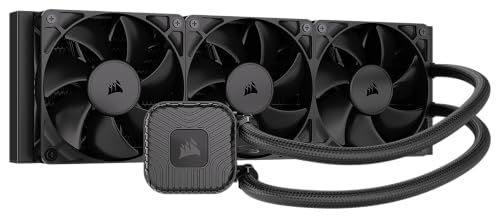
CORSAIR Nautilus 360 RS — Suite-free scale
The Nautilus 360 RS answers a question the rest of this guide raises by implication: must a big loop come with a software regime attached? Corsair’s answer is a 360mm radiator, three RS120 fans daisy-chained into a single run to a motherboard header, a pump that connects directly, and no lighting system whatsoever. It is the same philosophy as its 240mm sibling reviewed in our companion guide, scaled to the full format — and at 360mm the philosophy becomes more distinctive, because almost every rival at this size assumes you want light, screens or a hub, and the Nautilus assumes you want cooling.
That assumption serves a recognisable builder. The workstation under a desk that renders overnight does not need its radiator to glow. The Linux dual-booter’s lighting suite does not exist. The IT-minded home builder who tunes fan curves in the BIOS and resents every background process experiences the Titan’s ecosystem as a cost and the Nautilus as a relief. For those owners, the RS fans’ low-noise intent and the total absence of proprietary connectors are not missing features; they are the feature list, printed in negative space.
Practically, the daisy-chain matters more at three fans than at two: one cable run along the radiator instead of a loom, no hub to mount, nothing to configure after a Windows reinstall because there is nothing to reinstall. Socket coverage matches the class standard — AMD AM5/AM4 and Intel LGA1851/1700 — and the black finish disappears into a case’s top or front. The trade is absolute: if any part of your brief involves light, this cooler has none to give, today or ever. Buy it for the silence of its software page, which is blank, and it will be the least demanding flagship-format hardware you own.
- Format: 360mm all-in-one, black, unlit
- Fans: three RS120 units, daisy-chained to one run
- Control: motherboard headers and BIOS curves only
- Sockets: AMD AM5/AM4 and Intel LGA1851/1700 per listing
- Character: low-noise intent with zero software footprint
Strengths
- Full 360 capacity with no suite, hub or account-shaped extras.
- One cable run for three fans keeps big-case routing simple.
- Survives OS reinstalls and platform swaps without reconfiguration.
Trade-offs
- No lighting or display options exist at any price here.
- Restraint reads as plainness in a windowed showcase.
- Monitoring niceties live in your board’s tools, not Corsair’s.
Best for: workstations, dual-booters and BIOS-curve traditionalists at full scale. Not suited for: any build whose brief includes the word “glow”.

ID-COOLING FX360 PRO — Value in the big class
Every size class needs its reality check, and in this guide the FX360 PRO provides it: a 360mm radiator, three 120mm fans the listing calls high-efficiency, a pump cover in the CD pattern that catches light in fine rings, and a price position that assumes the buyer is also funding a graphics card. ID-COOLING’s larger FX follows the same logic as its 240mm sibling — spend on the loop, decorate with texture instead of electronics — and at 360mm that logic buys the format’s full sustained-load composure for builders who would otherwise have to step down a size.
That last point is the real argument. The jump from 240 to 360 is where marathon workloads stop negotiating with fan speed, and it is a jump many budgets skip because flagship 360s price it as a luxury. A value 360 redraws the decision: the builder with a hot chip and a big case no longer chooses between the right radiator size and the rest of the parts list. The FX360 PRO’s fans and pump are specified for the class’s work rather than its theatre, the patterned cover gives a windowed build something to look at, and the socket list covers the current Intel and AMD platforms a new build will use.
Ownership expectations should be set in the same honest register. Fit and finish are tidy rather than jewelled, the box contains a cooler rather than an experience, and the pump — as with every AIO ever made — sets the horizon in a way no air tower’s does. Within those truths, this is the pick we would hand to a builder whose spreadsheet is tight and whose processor is hot: the format’s substance, bought without the format’s ceremony. In a guide full of flagships, the reality check earns its place by making the right size affordable.
- Format: 360mm all-in-one liquid cooler
- Fans: three 120mm high-efficiency units per the listing
- Pump cover: CD-pattern finish that shifts with light
- Sockets: current Intel and AMD platforms per the listing
- Intent: the format’s capacity at a value station
Strengths
- Makes the 240-to-360 step affordable for hot-chip builds.
- Textured pump cover gives a window something to catch.
- No software or hub demands accompany the loop.
Trade-offs
- Presentation is plain beside the display and Link flagships.
- No lighting ecosystem to grow into later.
- Budget station means the unboxing is purely functional.
Best for: hot processors in big cases on disciplined budgets. Not suited for: showcase builds planned around light or screens.
What About the Hydroshift II LCD-S 360?
Lian Li’s Hydroshift line pursues the most radical aesthetic idea in this category: make the tubes disappear. The LCD-S design routes its tubing along the radiator’s flank so a side-mounted loop presents an almost clean face to the case window, with an LCD on the pump completing the illusion that the cooling happens by magic. As industrial design it is genuinely striking, and as a buying proposition it is genuinely complicated — the range’s variants and mounting requirements are specific enough that its listing did not come through this round’s verified pool as a clean, linkable pick. It therefore stands here as a prose mention, in the guide’s usual discipline: admire it, research it with the same dimension-and-socket checks applied to every pick above, and understand that its beauty is inseparable from a very particular kind of case and mounting position. For the right showcase, that specificity is the point; for a general recommendation, it is exactly why the linked six are the linked six.
Where Does a 360 Radiator Actually Fit?
Three positions compete, and your case has opinions about all of them. The top mount is the classic: exhaust straight out, no competition with the graphics card, heat leaving by the shortest route. Its limits are vertical — the stack hangs over the motherboard’s top edge, where memory, VRM heatsinks and the EPS cable all live — and cases with generous top clearance are drawn that way on purpose. The front mount trades length for height: the radiator stands where intake fans lived, drinking the coolest air and paying for it by warming the interior and shortening the space a graphics card can occupy. Long flagship cards and front radiators must be measured against each other, not assumed compatible.
The side mount, offered by the current generation of dual-chamber cases, is the showcase position: the radiator becomes part of the interior’s architecture, visible through the glass, with its own chamber airflow. It suits the display-led picks in this guide particularly well, and it is the position the tube-hiding Hydroshift was dreamed for. Whichever position your case offers, the measurement ritual is identical: radiator length including end tanks, stack thickness including fans, tube arc from radiator to socket without strain or kink. A 360 is a commitment of space before it is a purchase of cooling, and the cases that welcome one say so in their manuals with diagrams worth reading twice.
How Do You Live With a 360 Loop Day to Day?
Set the control split correctly at birth: pump on the header its manual names, at the steady speed it asks for; radiator fans on a curve that follows the processor, with a calm floor through desktop temperatures and a firm climb reserved for real load. Three fans sharing work can stay in their quiet register through most gaming, which is the format’s everyday gift — the machine sounds unbothered because, thermally, it is. In the BIOS, give the curve a few seconds of delay if the option exists, so the processor’s brief spikes do not become audible punctuation all day long.
Then adopt the AIO owner’s two small habits. Listen once a week, in passing, for changes: a new gurgle that persists, a tick from the pump, a fan note that was not there in spring. And glance at temperatures under a familiar load every few months, the way you would check tyre pressures — not from anxiety, but because a loop announces its ageing gradually and early knowledge is cheap. Dust the radiator’s face when you dust the case; a 360’s broad fin area collects a broad amount of dust, and a soft brush restores what neglect slowly taxes. Do those things and the format’s bargain holds: flagship cooling, quietly, for years, with the socket area of your board left clear for everything else.
Comparison Table
| Cooler | Control regime | Defining trait | Watch out for |
|---|---|---|---|
| ARCTIC Liquid Freezer III Pro 360 | Board headers | Pump fan cooling the VRM zone | Utilitarian looks beside the flagships |
| CORSAIR iCUE Link Titan 360 RX | iCUE Link hub | Chained single-cable fans, FlowDrive pump | Ecosystem buy-in is the real price |
| NZXT Kraken Elite 360 RGB | CAM software | 2.36-inch LCD as the build’s centrepiece | Screen is a pleasure, not performance |
| LIAN LI Galahad II Lite 360 | Board ARGB sync | 27mm radiator for tight top mounts | Pump rating is a spec, not a promise |
| CORSAIR Nautilus 360 RS | Board headers | Full format with a blank software page | No light exists here at any setting |
| ID-COOLING FX360 PRO | Standard headers | Value entry wearing a CD-pattern cover | Plain finish, functional presentation |
What Mistakes Do 360 Buyers Keep Making?
Assuming the case’s “360 supported” badge settles the question leads the list. Support in one position is not support in yours; a front-only case plus a long graphics card plus a thick radiator is an arithmetic problem that ends in a return. The second mistake is spiritual rather than spatial: buying the display flagship for a closed case, or the ecosystem flagship with no ecosystem, because a ranking somewhere crowned it. At this size every pick cools well; the regrets are all about fit and philosophy, which no ranking can decide for you.
Installation has its own classics. Screws long enough to wound the radiator, used because they were in reach. A pump left on a header the BIOS slows to a whisper. Tubes forced into a photogenic route that strains the pump fittings every hour of the machine’s life — route tubes for the loop’s comfort, not the camera’s. And the quietest mistake: never shaping a fan curve, so three fans on an aggressive default profile make a flagship loop sound like a vacuum with a processor attached. Ten minutes in the BIOS is the difference between the cooler you bought and the cooler you hear.
What Changes Around a 360 in the Rest of the Build?
A 360mm loop is not an isolated purchase; it rearranges the build’s internal politics. Begin with airflow direction, because the radiator is now the case’s largest single vent and everything else must negotiate with it. A top-mounted 360 exhausting air asks the case’s intakes to feed both it and the graphics card, and a case with a restrictive front panel may starve the pair of them — the build’s temperatures then blame the cooler for the case’s manners. A front-mounted 360 as intake gives the processor the first drink of cool air and hands the graphics card the warmed remainder, a trade GPU-heavy builds should make knowingly. There is no universal correct answer, only a correct answer per case, and the case manual’s airflow diagrams deserve the same careful reading as the radiator’s dimensions.
Then consider the components the loop liberates. With no tower above the socket, memory becomes a free choice again — the tallest, most sculpted kits fit without negotiation — and the first expansion slot stands clear for thick graphics cards and their backplates. Motherboard servicing changes character too: a CMOS battery swap, a header reseated, an M.2 drive changed — small jobs that a dual tower turns into surgery become fingertip work around a pump block. Owners who tinker feel this dividend monthly. Owners who never open the case after build day should discount it and weigh the pump’s service horizon more heavily instead.
Finally, plan the loop’s own neighbourhood. Tubes need a route that avoids the rear exhaust fan’s blades and the graphics card’s hottest surfaces; cables from the pump need headers chosen before the radiator hides the board’s top edge; a display or Link hub needs its USB and power arranged while everything is still reachable. The 360 rewards the builder who sequences the whole build around it — radiator offered up early, routes rehearsed, board connections made in the order the hardware allows — and mildly punishes the builder who treats it as the last box to open. At this size, installation order is not a preference. It is the design.
How Do the Six Behave Differently Under a Long Load?
Hold the workload constant in your mind — a processor at full draw for two hours, in a warm room, in a case that fits them all — and the differences that remain are matters of character rather than capacity. Every cooler here has the radiator area to do the job; what varies is how each chooses to do it. The Liquid Freezer’s answer is systemic: hold the chip, and keep the board’s power delivery ventilated while doing so, so the whole platform ages the afternoon equally. The Titan’s answer is composure through its pump design and chained fans, the loop as a single coordinated instrument. The Kraken Elite does the same work while reporting on itself beautifully, which changes nothing thermally and everything about how the owner experiences hour two.
The Galahad’s slim radiator gives up a little thermal mass for its fit, and under the longest loads its fans may work a fraction harder to hold the same line — the honest price of the millimetres it saves at the top mount, and a price its target builds gladly pay. The Nautilus pair — for there are really two philosophies wearing one name across this site’s guides — holds its line with board-controlled fans and no intermediaries, its behaviour exactly as predictable in hour two as in minute two. The FX360 PRO, the value entry, simply does the work: three fans, a long radiator, no commentary. A buyer reading carefully will notice that none of these characters is a failure mode. They are temperaments, and the right one is the one that matches the machine’s working life.
One variable towers over all six temperaments, and it is yours: the fan curve. Set firmly, with a calm floor and a decisive top, any of these loops holds a long load in a civilised voice. Left on an excitable default, the finest radiator in this guide will spend the afternoon surging at shadows. The two hours of your workload will be scored by the curve you wrote in ten minutes — which is why this guide keeps returning to it, and why the last step of any install here is not closing the panel but opening the BIOS.
When Is a 360 the Wrong Answer?
A guide that only sells its category is a brochure, so let the counter-case be made properly. A 360 is the wrong answer when the workload never asks its question: a gaming PC built around a mid-range processor will spend its life using a third of the radiator, and the same money in a graphics card, a quieter case or a superb air tower would be felt every day instead of admired in principle. It is the wrong answer when the case fits it only by eviction — the front mount that shortens graphics card clearance below the card you already own, the top mount that presses a cable into a fan’s path — because a loop installed under protest stays under protest. And it is the wrong answer when the machine must be forgotten: a PC deployed to a relative’s house, a cupboard server, a workstation in another city. Those machines want the air tower’s immortal simplicity, and sending them a pump with a service life is a gift that becomes a phone call.
It is also, sometimes, the wrong answer for noise — not because 360s are loud, for at their best they are the quietest cooling in this site’s coverage, but because their quiet depends on tuning the owner may never do. Three fans and a pump under an aggressive default curve make a busier sound than one large fan on a tower doing the same work. The format rewards the engaged owner disproportionately, which is a fine trait in a hobby and a poor one in an appliance. Know which of the two you are building. If it is the hobby — measured, tuned, glass-sided, alive to its own temperatures — the six picks above are your shortlist and this paragraph was a formality. If it is the appliance, close this guide with our blessing and buy the biggest air tower your case accepts.
What About Side-Mount Cases and the New Geometry?
The current generation of dual-chamber cases has quietly rewritten where a 360 belongs. In these designs the motherboard sits in one chamber and the power supply and drives in another, and the radiator often mounts on the side wall between them, facing the glass — a position that turns the loop into interior architecture and gives its fans their own supply of outside air through the case’s flank. For the display-led picks in this guide, the Kraken Elite above all, the side mount is the natural stage: the pump’s screen faces the room, the radiator’s lit edge frames the build, and the tubes take the short, photogenic route the Hydroshift’s designers dreamed in.
The geometry has practical consequences beyond the photograph. A side radiator does not compete with the graphics card for length, does not hang its stack over the memory, and exhausts or intakes through a panel the case maker designed for exactly that duty — which means the fit question, while never skippable, is more often answered kindly. The costs are a case drawn around the concept, which you either own or are buying, and tube routes that assume the layout; a loop transplanted later into a conventional tower may find its tubes long or short for the new geography. If you are choosing case and cooler together — the happiest way to enter this category — choose them as a pair, from the same design conversation, and the 360 will feel less like hardware installed and more like a room furnished.
How Should You Think About the End of a Loop’s Life?
Every AIO in this guide will one day be replaced, and the owners who fare best are the ones who planned that day at a distance. The signs of an ageing loop arrive gradually and this guide has scattered them through its pages: a pump voice that changes character, temperatures under your noted baseline load creeping upward across seasons, a gurgle that returns and stays. None of these is an emergency the day it appears. Together, over months, they are the loop writing its retirement letter, and the correct response is to schedule the replacement rather than to be ambushed by it — ideally in the same planned hour as another upgrade, so the machine is opened once for both.
The warranty printed on your pick is the manufacturer’s own map of that timeline, and keeping the receipt and the box’s mounting hardware is the cheapest insurance in the category: a pump that fails inside its warranty is a conversation, while the same pump without paperwork is a purchase. When the day comes, the old loop leaves the machine cleanly — it is a sealed unit, with no draining ritual and no coolant to dispose of beyond treating the whole object as the electronic waste it now is, through whatever recycling route your area provides. The mounting holes it leaves behind fit its successor, whatever family that successor comes from, because the radiator positions belong to the case rather than to the brand.
There is a final, quieter consideration: what the loop’s years bought. A flagship processor cooled calmly through its whole working life, a socket left clear for every upgrade around it, a machine whose loudest years were spent being quiet. Judged as a rental of excellent cooling rather than a purchase of a permanent object, a 360’s service life reads fairly — and the owner who understood the bargain from the first page of this guide will sign it again, knowingly, when the next build begins.
What Does Three-Fan Acoustics Actually Sound Like?
Three fans change the arithmetic of noise in a way worth understanding before you buy, because it explains the format’s reputation. A single fan asked to move a given amount of air must spin at a given speed, and its sound is that speed’s sound. Divide the same work among three fans and each turns slower, and since fan noise grows much faster than fan speed, the trio’s combined voice sits well below the soloist’s — this is the entire acoustic case for the 360 format, and it is a strong one. Under a long load, where a smaller cooler is working at its ceiling and speaking in its highest register, the 360 is still in its middle gears, and the difference is not subtle.
The trio has its own failure mode, though, and it is synchronisation. Three identical fans at nearly identical speeds can beat against each other, producing a slow pulsing as their tones drift in and out of phase — a sound some owners find more noticeable than a steady wash at the same volume. The cures are simple and known: let the fans share one curve so they track together honestly, or offset one fan’s curve slightly so the trio never quite agrees on a single tone. Either takes two minutes in the same BIOS session this guide keeps sending you to. Add the pump’s faint constant note underneath, and a well-tuned 360 settles into the acoustic character its owners praise — not silence, exactly, but a low, even weather that the ear files under the room rather than under the machine.
What Should You Keep From the Box?
A small, unglamorous habit separates owners who glide through a loop’s life from owners who improvise badly at its end: keep the box’s paper and hardware. The spare mounting parts for the socket you did not use are the loop’s passport to its next machine, and they weigh nothing in a drawer. The receipt and warranty card are its service contract. The manual — or a photograph of its wiring page — is the answer to the question you will ask at midnight in three years, when a reseat has you wondering which header the pump called home. Store them together, labelled, in the case box if it survives, and the 360 you bought as a flagship will be supported like one for its entire service. Hardware this considered deserves paperwork kept with the same consideration, and the five minutes it takes is the cheapest option in this entire guide.
A Note on Transporting a Liquid-Cooled Build
Sooner or later a flagship build travels — a house move, a LAN weekend, a sale to its next owner — and a 360 loop changes the packing list. The radiator is the case’s largest single component and its screws deserve a check before the journey, as does every fitting along the tube route; a loop that has hung happily for a year can still resent being carried by one hand at an angle. Transport the case upright, in its original box if it survives, with the interior supported the way the case maker intended, and never ship a liquid-cooled machine by a carrier who will treat orientation as a suggestion without removing the loop first — a service some builders perform and document, coolant sealed and all, because the loop was designed to travel as a unit in a box rather than as plumbing in a tower. At the destination, give the machine the first-week courtesy again: a listen, a load, a look at the fittings. Journeys end well for loops whose owners inspect them at both ends.
One Sentence of Perspective Before You Decide
At this size, the radiator is no longer the decision — your case, your workload’s patience for sustained loads, and your honest appetite for light, screens and software are, and a buyer who answers those three truthfully will find that one of the six names above has been waiting for exactly that answer all along.
Final Recommendation
Match the philosophy and the fit, in that order, and this category resolves quickly. The Liquid Freezer III Pro 360 is the engineer’s answer and this guide’s choice for work that lasts all day. The Titan 360 RX rewards the Corsair-committed with the tidiest lit radiator here, the Kraken Elite crowns a showcase that wants a face, and the Galahad II Lite slips a designed loop into the tightest top mounts. The Nautilus 360 RS is the big loop for people who want nothing but the loop, and the FX360 PRO makes the size honest on a budget. Measure your case like you mean it, install like the loop has to live there — because it does — and the loudest part of your flagship build can go back to being the story the game is telling.
Frequently Asked Questions
Does my case really need to be checked for a 360mm radiator?
Yes — it is the single most important step in this guide. A 360 needs three adjacent 120mm positions plus end-tank length, stack thickness and tube room, in one specific position. Case manuals state which positions qualify; “360 supported” somewhere is not support everywhere.
Is the Liquid Freezer’s VRM fan a gimmick?
No. Motherboard power delivery is designed expecting some airflow around the socket, which tower coolers provide accidentally and most AIOs remove. A small fan in the pump housing restores it deliberately. It is a modest feature with a real job, which is more than most pump-block extras can claim.
Does a bigger LCD or faster-rated pump mean better cooling?
Neither. A screen reports the system; it does not cool it. A pump’s stated RPM describes impeller speed, not temperatures. Cooling at this level comes from radiator area, fan behaviour and fit — judge those, and treat displays and ratings as the secondary information they are.
360 at the top or the front — which is better?
Top mounting exhausts heat directly and never troubles the graphics card, but must clear the board’s top edge. Front mounting feeds the radiator the coolest air while warming the interior and sharing length with the graphics card. Your case’s clearances and your workload’s balance decide; both are legitimate when measured.
How much quieter is a 360 than a 240 in practice?
The extra radiator area lets three fans share work at lower speeds, so under sustained load a 360 generally holds a calmer register than a 240 working at its ceiling. At idle and light loads they are indistinguishable — both can be effectively silent with a sane curve.
Can a 360 AIO go in any case with three fan mounts?
No. Three mounts are necessary but not sufficient: the radiator is longer than its fan span, its stack needs depth, and its tubes need a route. Fan mounts behind a solid panel or in a row interrupted by drive cages do not make a radiator position. The manual’s radiator diagram is the authority.
Related Guides
Compare sizes with best 240mm aio cpu coolers if your case argues for the smaller format, survey the whole field in best 10 cpu coolers, and consider best 120mm cpu air coolers for the builds where a simple tower is still the wisest money. You may also want our guide to best CPU coolers overall.
Related guides
- Best 4K UHD HDR HDMI Extenders: 4K60, Long-Run and 4K120 Kits Compared
- Best 25–35 Inch Monitors With Lowest Display Lag: An Honest Ranking Without Invented Numbers
- Best Enterprise SATA SSDs: Endurance Classes, Power-Loss Protection and Fleet Sense
- Best Color Product Label Printers: Six Desktop Machines for Short-Run Product Labels



[…] going with best 360mm cpu coolers for the next radiator size up, best 10 cpu coolers for the air-versus-liquid landscape in one […]