What's inside
- Where to Buy, and Why 42 Megapixels Changes the Card Conversation
- Key Takeaways
- Quick Picks
- How Did We Choose These Picks?
- Which of the Best SD Cards for A7RIII Bodies Goes in Which Slot, and Why?
- How Do All Six Cards Stack Up Against Each Other?
- What Should Slot 2 Actually Do All Day?
- How Do You Plan Capacity at Forty-Two Megapixels?
- Why Does CFexpress Keep Appearing in Searches for This Camera?
- How Does Buffer Clearing Actually Feel Across These Two Classes?
- What Changes When You Run Two Bodies, or Shoot Tethered?
- How Long Should a Card Stay in an A7R III’s Service?
- What Should Video-Led Owners of This Body Prioritise?
- How Do Weather, Travel and Time Treat These Cards?
- Does Your File Format Choice Change the Card You Need?
- What Mistakes Do A7R III Owners Make With Cards?
- Final Recommendation
- Frequently Asked Questions
- Related Guides
As an Amazon Associate I earn from qualifying purchases. This post may contain affiliate links at no extra cost to you.
gizmoverdict.com is reader-supported. When you buy through links on our site, we may earn an affiliate commission.
Where to Buy, and Why 42 Megapixels Changes the Card Conversation
All six cards below are sold through Amazon, and each linked listing leads to the capacity and series its section describes — with Sony’s TOUGH cards especially, check the letter in the listing, because the G and M series look alike in photographs and are built to different speed classes. Shoppers comparing the best sd cards for a7riii bodies are really shopping for one moment: the burst. The A7R III’s sensor captures roughly forty-two megapixels per frame, and its uncompressed raw files are correspondingly enormous, so a determined burst does not trickle data to the card — it arrives as a flood that the buffer must drain before the camera feels responsive again. How quickly that flood clears is a card property. So is the camera’s 4K video appetite, steadier but unrelenting. This body gives you two slots to manage both appetites, and — the fact that organises this entire guide — they are not equal: one slot is wired for UHS-II and full flagship speed, the other is a UHS-I slot that treats every card, however grand, as a UHS-I card. Every pick below is UHS-II, because slot 1 deserves them; the strategy sections explain what honest work the second slot can still do.
One correction must land before any shopping, because search results for this camera push it hard: the newer CFexpress cards you will see advertised for Sony bodies do not fit this camera. The A7R III predates Sony’s adoption of that format; its slots take SD cards, full stop, and no adapter changes that. Money spent there is money stranded. What follows is the whole honest market for this body: six UHS-II cards, two speed classes, three capacity tiers, and a slot strategy to match.
Key Takeaways
- Slot 1 is the UHS-II slot and should hold the fastest card you own; slot 2 is UHS-I only, so its card should be chosen for capacity and backup duty rather than speed you cannot use.
- V90 cards clear the A7R III’s big raw bursts fastest and shrug off its 4K modes; V60 cards remain entirely credible for this body and cost less per gigabyte.
- Sony’s TOUGH construction — a one-piece, sealed build — is a genuine differentiator for photographers who work in weather, not a marketing garnish.
- At forty-two megapixels, capacity evaporates faster than intuition suggests; 128GB is the working floor, and wedding or event shooters should think in 256GB terms.
- CFexpress does not fit this body, whatever the search results imply; SD UHS-II is the flagship format here, and it is a good one.
Quick Picks
| Pick | Badge | Why it earns its place |
|---|---|---|
| Sony TOUGH-G 128GB UHS-II V90 | The native flagship | Sony’s own toughest, fastest card, with quoted write figures at the top of the class and a sealed one-piece body. |
| Sony TOUGH-G 256GB UHS-II | Same flagship, double room | The capacity rung of the same G series for event days when swapping cards is not on the schedule. |
| Sony TOUGH-M 128GB UHS-II V60 | Toughness at V60 | The TOUGH build at the calmer speed class — the landscape and travel photographer’s sweet spot in this pool. |
| Lexar 256GB 2000x UHS-II V90 | The V90 alternative | A professional-line V90 card at 256GB from the other great memory name, for owners standardising outside Sony’s own line. |
| SABRENT Rocket V90 512GB UHS-II | The vault | Half a terabyte of V90 storage for video-heavy and multi-day work where offloading is not guaranteed. |
| SanDisk 128GB Extreme PRO UHS-II V60 | V60 with the default name | SanDisk’s Extreme PRO line at the V60 class, with recovery software named in the listing and availability everywhere. |
How Did We Choose These Picks?
The pool was specified from the body’s two appetites outward. For bursts, the deciding figure is write behaviour under a flood: how fast the card accepts the buffer’s contents determines how soon the camera is wholly yours again, so every pick carries either a V90 mark or a V60 mark with a quoted write figure that respects the sensor’s output. For video, the same cards’ sustained floors cover the camera’s 4K modes with room to spare — this body is demanding but not extreme, and honest V60 is a legitimate flagship answer here, which is why two V60 cards stand in the pool without apology. Capacity was the third axis: at this resolution, 64GB cards fill with an enthusiasm that turns card management into a hobby, so the pool starts at 128GB and climbs to 512GB for the video-heavy.
Construction earned a seat at the table too. The A7R III is a working photographer’s camera, used in rain, dust, cold and haste, and three of the six picks are Sony’s TOUGH series, whose one-piece moulded design removes the fragile ribs and write-protect switch of ordinary cards — the parts that actually break in the field. The remaining three give owners who prefer other houses — Lexar’s professional line, SABRENT’s rocket series, SanDisk’s ubiquitous Extreme PRO — an equally specified alternative. Readers comparing across the mirrorless landscape will find the sibling logic in our guide to the best sd cards panasonic gh5, a body with the same two-speed slot arrangement, and the broader field in the best full frame mirrorless digital cameras roundup.
Which of the Best SD Cards for A7RIII Bodies Goes in Which Slot, and Why?
The arrangement this guide recommends is simple to state: your fastest card lives in slot 1 and takes the recording; slot 2 holds a card chosen for the overflow and backup strategies detailed later. All six picks below can serve slot 1. Their sections say, for each, what its second-slot life would look like too — because on this body, a card’s career usually includes both.
Read them with your own shooting in mind rather than in the abstract: the burst shooter and the landscape shooter are about to be offered some of the same cards for entirely different reasons, and both will be right. That is not indecision in the guide; it is the honest shape of a pool where construction, class and capacity each lead somewhere different.

Sony TOUGH-G 128GB UHS-II V90 — The native flagship
There is a particular satisfaction in the manufacturer’s own flagship, and in this case it is earned twice over. The TOUGH-G’s listing quotes maximum read figures of 300MB/s and write figures of 299MB/s alongside its V90, U3 and Class 10 marks — the write number is the one to savour, because on paper it is effectively the fastest sustained story in this pool, and bursts from the big sensor drain into it with an eagerness the photographer feels in the hand: hold the shutter down, release, and the camera is ready again before the moment has finished changing. For the A7R III’s 4K video the card is not merely sufficient but bored, which is exactly where you want a recording medium to live.
Then there is the construction, which is the TOUGH line’s real argument. Ordinary SD cards are a shell of pieces — thin ribs between the contacts, a tiny write-protect slider, seams that flex. The TOUGH design moulds the card as one sealed piece, removing the ribs and the switch entirely, and Sony rates the result against bending, drops, dust and water in ways ordinary cards do not claim. For a landscape photographer pulling cards with cold fingers on a wet hillside, or a wedding shooter swapping at speed in a dark venue, the failure mode this design deletes — the snapped rib, the lost slider, the card the camera suddenly cannot read — is worth more than a few megabytes per second. At 128GB it is the pool’s reference card: the one against which the others are measured.
Its honest limitation is the mirror of its virtue: it is a premium object, priced like one, and owners equipping four slots across two bodies will feel the multiplication. The 256GB sibling below answers the capacity question, not the price one. For a single-body A7R III owner who wants slot 1 settled with the best card Sony makes for it, this is the purchase, and it is not close.
A word about living with the switchless design, since it startles some owners: the write-protect slider on ordinary cards exists to guard against accidental erasure, and its absence means the TOUGH card’s protection is procedural — your offload discipline, your formatting ritual, your labelling. Most professionals already work procedurally and never touch the slider from one year to the next; owners who genuinely use it as a safety catch should weigh the Lexar’s conventional body more heavily. Design is always a trade, and this one trades a rarely used catch for a card with no moving parts at all.
- Capacity: 128GB SDXC
- Bus and class: UHS-II, V90
- Listing figures: up to 300MB/s read, up to 299MB/s write
- Construction: TOUGH one-piece sealed design, no write-protect switch
- Home slot: slot 1, for bursts and video alike
Strengths
- The strongest quoted write figure in the pool, and bursts clear with palpable speed.
- One-piece sealed construction deletes the physical failure modes of ordinary cards.
- The maker’s own flagship for its own camera — compatibility is not a question that arises.
Trade-offs
- Premium pricing, felt keenly when equipping multiple bodies or a deep rotation.
- 128GB fills quickly at this resolution on an event day; heavy shooters should look at its sibling.
- No write-protect switch, by design — owners who use the slider as a safety ritual lose it.
Best for: the A7R III owner’s slot 1, full stop — especially working photographers in weather and haste. Not suited for: equipping a whole fleet on a budget, where the V60 picks stretch further.

Sony TOUGH-G 256GB UHS-II — Same flagship, double room
This is the card above, grown. Same G series, same TOUGH one-piece construction, same class of quoted figures — its listing cites speeds up to the 299–300MB/s territory and names the water-resistant design explicitly — at twice the capacity. The reason to want it is best understood at a wedding. A 42-megapixel raw file is a large object; a ceremony, a reception and a portrait session produce them by the thousand, and every card swap is a small negotiation with a moment that will not wait. A 256GB flagship in slot 1 stretches the interval between negotiations across the heart of the day, and paired with the camera’s backup or overflow arrangements it lets the photographer think about light instead of logistics.
Capacity has a shadow side that professionals manage rather than deny: a bigger card concentrates more of the day in one object, so the value of the second slot’s backup mode rises with it, and the offload at day’s end becomes a longer, more deliberate ceremony. Those are workflow facts, not flaws, and they are the same facts at work in the SABRENT vault pick below. What this card adds over that one is the TOUGH body and Sony’s own pedigree; what it asks in return is flagship money at a flagship capacity. For the event professional whose A7R III is a primary body, it is the pool’s most defensible large purchase. For the landscape shooter who offloads nightly to a laptop by a campfire, the 128GB G above remains the proportionate choice, and the saving buys a spare battery or a better strap — both of which that photographer will use more.
Note, for owners building a matched pair, that this card in slot 2 performs at UHS-I pace like any card there. Some owners accept that happily for the interchangeability — any card can move up to slot 1 in an emergency — and it is a legitimate system choice, as long as it is made knowingly.
- Capacity: 256GB SDXC
- Bus and class: UHS-II (series class V90)
- Listing figures: up to 299MB/s write, up to 300MB/s read territory
- Construction: TOUGH design; water-resistant design stated in the listing
- Home slot: slot 1 for long event days
Strengths
- Flagship G-series speed and TOUGH construction at event-day capacity.
- Fewer swaps during unrepeatable moments — the real luxury a big card buys.
- Interchangeable with its 128GB sibling for a tidy two-card system.
Trade-offs
- The pool’s premium tier at a premium capacity; the multiplication is real.
- Concentrates more of a day’s work in one object, raising the stakes on backup discipline.
- Its speed is wasted in slot 2 beyond the UHS-I ceiling, like every card there.
Best for: wedding, event and production stills shooters whose slot 1 must last the day. Not suited for: nightly-offload travellers, for whom the 128GB G is the proportionate flagship.

Sony TOUGH-M 128GB UHS-II V60 — Toughness at V60
The M series is the TOUGH idea at a calmer speed, and for a large class of A7R III owners it is the cleverest money in this pool. Its listing quotes reads up to 277MB/s and writes up to 150MB/s with a V60 mark — figures that translate, on this body, into bursts that clear a touch more slowly than the G’s and 4K video that is every bit as secure, because the camera’s video appetite lives comfortably below the V60 floor. What you keep, undiminished, is the construction: the same one-piece sealed philosophy, the same deleted ribs and switch, the same indifference to weather and rough handling. What you give up is burst-clearing pace at the extreme end and a measure of future-proofing for faster bodies.
Who should give it up gladly? The landscape photographer, whose bursts are bracketing sets rather than ten-second floods. The travel shooter, whose A7R III lives in a bag that gets rained on, dropped in sand and frozen at altitude — environments where cards die physically long before their speed matters. The studio owner, whose tethered or tripod pace never stresses a buffer. For all of them, the M buys the TOUGH line’s actual genius — survivability — at the class their shooting uses, and the saving against the G is meaningful across a rotation. The honest boundary is burst sport and wildlife work at the camera’s fastest rates, where the G’s write figure stops being a luxury. Know your own histogram of shooting styles, and this card either fits it perfectly or clearly does not.
It also makes an unusually good second-slot citizen for owners who value interchangeability: as a UHS-II card it can step up to slot 1 without disgrace whenever the G is full or forgotten, a flexibility a UHS-I backup card cannot offer.
Consider, finally, who photographs with this body in the places where cards suffer most: mountain guides shooting client summits, surf photographers working from boats, researchers in deserts and ice. Their card failures in the field are legend precisely because the environment always wins eventually against ordinary construction. The M is the pool’s answer priced for mortals — the same sealed philosophy as the flagship, at the speed class their methodical shooting actually uses. For that constituency it is not the compromise pick. It is the correct one, and the G is the extravagance.
- Capacity: 128GB SDXC
- Bus and class: UHS-II, V60
- Listing figures: up to 277MB/s read, up to 150MB/s write
- Construction: TOUGH one-piece design, as per the M series
- Home slot: slot 1 for most shooting; a credible understudy from slot 2
Strengths
- Full TOUGH survivability at a friendlier class and price than the G series.
- V60 floor covers this body’s 4K video with room to spare.
- Can understudy in slot 1 without embarrassment, unlike a UHS-I backup card.
Trade-offs
- Long raw bursts clear measurably slower than on the V90 picks.
- Less headroom for a future, faster body than the G or Lexar V90s.
- Still a premium object next to ordinary-bodied V60 cards like the SanDisk below.
Best for: landscape, travel and studio A7R III owners who value survival over sprinting. Not suited for: sustained burst specialists, for whom the G series exists.

Lexar 256GB 2000x UHS-II V90 — The V90 alternative
Lexar’s Professional 2000x line has been the other name in fast SD cards for as long as the format has had a fast tier, and this 256GB V90 card is its representative here: a listing quoting 300MB/s reads, the V90 and U3 marks, and a cinema-video framing that reflects the line’s working clientele. Against the Sony G at the same capacity, the contest is pedigree versus pedigree with different flavours — Lexar’s card is a conventional-bodied professional card rather than a sealed one-piece design, so it keeps the familiar construction (and the write-protect switch the TOUGH cards delete) while matching the flagship speed class. Owners whose card wallets already run on Lexar, or whose other bodies standardised on the 2000x line years ago, can extend that system to the A7R III without a weak link.
In the camera, expect flagship behaviour: bursts draining at V90 pace, 4K modes unconcerned, and a 256GB runway suited to event days. The card’s listing also notes backwards compatibility with UHS-I devices, which matters for slot 2 duty and for older bodies in a mixed bag — the card will serve anywhere, at the local ceiling, like all UHS-II media. The choice between this and the TOUGH-G 256GB is genuinely about construction philosophy and household standardisation rather than performance: sealed and switchless, or conventional and familiar. Photographers who work gloved in bad weather tend to land on the Sony; photographers with a decade of Lexar wallets tend to land here. Both are defensible, and neither will be the reason a photograph does or does not happen.
One more consideration sometimes decides it: readers and workflow. Lexar’s professional ecosystem is deep, and owners already running its hubs and cards will feel at home. Storage is a system, and the best card is often the one that belongs to yours.
There is also a resale-and-reassignment argument that quietly favours this card. A 256GB V90 remains a front-line card for a generation of cameras beyond this one — cinema bodies, newer stills bodies, a second shooter’s kit — so its working life is unlikely to end with the A7R III. Cards bought at the pool’s lower tiers retire into drawers; cards at this tier retire into other cameras. Owners who think of storage as a rolling fleet rather than a per-body purchase will find the Lexar’s arithmetic persuasive on exactly those grounds.
- Capacity: 256GB SDXC
- Bus and class: UHS-II, V90
- Listing figure: up to 300MB/s read
- Construction: conventional professional card body, write-protect switch retained
- Home slot: slot 1 for event and production work
Strengths
- Full V90 flagship class at 256GB from the other great professional memory line.
- Conventional construction keeps the write-protect switch some owners rely on.
- Backwards-compatible with UHS-I hosts, so it serves every slot and older body in the bag.
Trade-offs
- No TOUGH-style sealed construction; physical abuse tolerance is ordinary-professional.
- The listing leads with its read figure, so its burst story rests on the V90 class rather than a quoted write peak.
- Flagship capacity from a flagship line — the price is in the same tier as Sony’s G.
Best for: Lexar-standardised professionals and event shooters wanting V90 at 256GB. Not suited for: photographers whose priority is surviving weather and drops, where the TOUGH cards argue better.

SABRENT Rocket V90 512GB UHS-II — The vault
Every pool has one pick that answers a scale question, and here it is a half-terabyte V90 card quoting reads up to 280MB/s and writes up to 250MB/s. The SABRENT Rocket’s natural habitat is the A7R III used as a video camera on a schedule that does not respect offload opportunities: multi-day documentary work, a wedding weekend shot across two towns, a production where the camera doubles as its own archive until the team gets home. At this body’s file sizes, 512GB is the difference between storage as a daily chore and storage as a solved problem — days of 4K and thousands of raw frames between ceremonies at the computer. The V90 class means the capacity never comes at the cost of the camera’s manners; bursts and video behave as they do on the flagships.
The cautions scale with the capacity. A 512GB card is a vault, and a vault concentrates: loss, theft or failure touches days of work at once, which makes the second slot’s backup mode and nightly partial offloads — even just the selects — a professional obligation rather than a virtue. The offload itself, when it comes, is a long sit even at UHS-II reader speeds. And SABRENT, though a real and growing name in fast storage, does not carry the decades-deep card pedigree of Sony or Lexar; buyers are trading a measure of that pedigree for capacity per money at the V90 class. For the shooter whose constraint is genuinely runway — the expedition, the festival, the long production — that is the right trade, made with open eyes and a backup habit. For a day shooter, it is a solution shopping for a problem.
Position it honestly and it completes the pool: the card for owners whose A7R III works in places where the laptop is a rumour and the next card swap might be on a boat.
There is a psychological effect to name, because crews report it consistently: a vault card changes how freely people shoot. Knowing the runway is days long, photographers roll on moments they might otherwise ration — the extra take, the speculative angle, the scene allowed to breathe. On a stills-led body that freedom is a luxury; on a documentary production it can be the difference between coverage and regret. If the card’s size buys creative courage, it has earned its place on more than arithmetic — provided the backup discipline in its trade-offs is honoured with equal seriousness.
- Capacity: 512GB SDXC — the pool’s largest
- Bus and class: UHS-II, V90
- Listing figures: up to 280MB/s read, up to 250MB/s write
- Construction: conventional card body
- Home slot: slot 1 for multi-day video and production work
Strengths
- V90 class at half a terabyte — runway no other pick approaches.
- Quoted write figure sits in flagship territory, so capacity never slows the camera.
- Ends card management as a daily concern on long productions.
Trade-offs
- Maximum concentration of work in a single object; backup discipline becomes mandatory.
- A shorter card-making pedigree than the Sony and Lexar lines it undercuts on capacity.
- Full offloads are long even with a UHS-II reader — plan them, don’t improvise them.
Best for: documentary, expedition and multi-day production shooters whose offload chances are scarce. Not suited for: day shooters, who pay for runway they will never use and concentration they do not need.
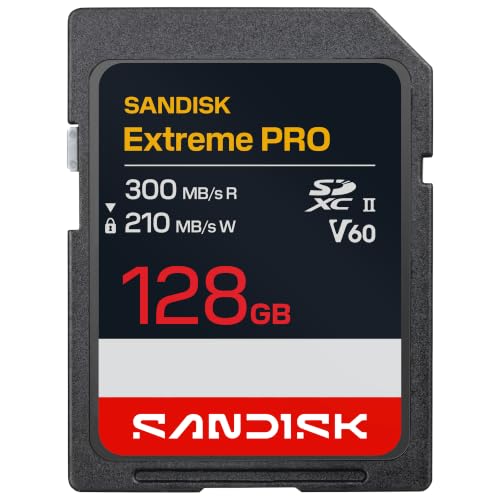
SanDisk 128GB Extreme PRO UHS-II V60 — V60 with the default name
The final pick pairs the pool’s friendliest speed class with its most familiar name. SanDisk’s Extreme PRO UHS-II card carries a V60 mark, and its listing quotes reads up to 300MB/s and writes up to 210MB/s — a write figure that on paper outruns the TOUGH-M’s, in a conventional body, with the line’s customary extras: the listing names RescuePRO recovery software among its features, a small but real comfort for a card whose contents are a day’s work. On the A7R III it behaves as the V60 analysis predicts: video entirely secure, bursts clearing briskly if a shade behind the V90 flagships, and availability that no rival matches — this is the card a travelling photographer can replace in almost any city on earth.
Set against the TOUGH-M, its fellow V60 at the same capacity, the choice is construction versus ecosystem. The Sony buys survivability and pays a premium for the sealed body; the SanDisk buys the industry’s default support network, the recovery software and usually a friendlier price, in a card body with the ordinary ribs and switch. Neither is the other’s inferior — they are the same speed class wearing different philosophies, and owners will divide by temperament exactly as they do between the G and the Lexar at V90. As a system choice, the SanDisk also pairs tidily with the brand’s UHS-I cards for owners who run a cheaper second-slot strategy, keeping one maker’s behaviour across both slots.
For the A7R III owner who shoots bursts socially rather than professionally — the enthusiast whose camera sees weekends, holidays and the occasional event — this may be the pool’s most proportionate slot-1 card: flagship format, honest class, famous name, nothing bought that the shooting cannot use.
It is also the natural gift-and-second-body card of the pool: the one to hand a second shooter, to keep in the spare body, to buy at an airport-adjacent shop in a foreign city when the wallet was left in another hotel. Systems thinking again — a card’s value includes the ease of its own replacement, and by that measure the industry default is never a foolish purchase, merely an unglamorous one. Glamour, in storage, is a cost centre.
- Capacity: 128GB SDXC
- Bus and class: UHS-II, V60
- Listing figures: up to 300MB/s read, up to 210MB/s write
- Extras named in the listing: RescuePRO recovery software
- Home slot: slot 1 for enthusiast and mixed shooting; tidy brand match with UHS-I slot-2 cards
Strengths
- V60 class with a quoted write figure that leads its class in this pool.
- The most replaceable card here — SanDisk’s retail footprint is unmatched.
- Recovery software named in the listing adds a small, real safety net.
Trade-offs
- Conventional construction; no TOUGH-style sealing against the field’s abuses.
- V90 flagships still clear the longest bursts faster — burst specialists should step up.
- 128GB remains event-day tight at this resolution without rotation discipline.
Best for: enthusiast and mixed-use A7R III owners wanting the flagship format at a sane class. Not suited for: weather-beaten field work where the TOUGH-M’s construction earns its premium.
How Do All Six Cards Stack Up Against Each Other?
| Card | Class | Capacity | Listing write figure | Defining trait |
|---|---|---|---|---|
| Sony TOUGH-G | V90 | 128GB | 299MB/s | Sealed flagship, fastest quoted write |
| Sony TOUGH-G 256 | V90 | 256GB | 299MB/s territory | Event-day capacity, same construction |
| Sony TOUGH-M | V60 | 128GB | 150MB/s | TOUGH build at the calmer class |
| Lexar 2000x | V90 | 256GB | Class figure | Professional alternative pedigree |
| SABRENT Rocket | V90 | 512GB | 250MB/s | The capacity vault |
| SanDisk Extreme PRO | V60 | 128GB | 210MB/s | Default name, recovery software |
Two contests are running in this table and they should not be confused. The V90 contest is about burst clearing and flagship headroom; the V60 contest is about value within a class this body fully respects. Construction runs across both as a third axis, and capacity as a fourth. A buyer who knows which contest they are in, and how their camera treats them in the field, has effectively already chosen.
One pattern in the table deserves a final look: capacity and class do not rise together in any tidy way, and that is deliberate. The pool’s largest card is not its fastest-quoted, its toughest card is not its largest, and its cheapest class contains its most famous name. Real product lines are like that, and a guide that ironed the pool into a single ascending ladder would be lying about the market to make the page simpler. The mess is the truth; the sections above exist to make the mess navigable.
What Should Slot 2 Actually Do All Day?
The A7R III’s second slot is UHS-I, and the camera offers it real work — just not fast work. In backup arrangement, every frame is written to both cards, and the pair’s pace is set by the slower path, which is the honest price of a mirror copy of an unrepeatable day; wedding photographers pay it gladly. In overflow arrangement, the camera fills slot 1 and rolls to slot 2, turning the pair into one long runway — the event and travel pattern. In allocation arrangements, stills and video can be sent to different cards, tidying a hybrid shoot before it reaches the computer. Each mode reframes what slot 2’s card should be: backup wants a card as trustworthy as the primary, sized to match the day; overflow wants capacity above all; allocation wants the video card to be the serious one if the video matters.
The buying consequence is liberating. Slot 2 does not need a UHS-II card at all, and a large, honest UHS-I card — the class of card examined in our best sd cards 4k roundup — often serves it better per money than a small flagship would. Owners who nonetheless run UHS-II in both slots, as several picks above allow, are buying interchangeability: any card can be promoted to slot 1 mid-day without changing the camera’s behaviour. That is a legitimate professional preference. It is simply a preference, not a requirement, and this guide declines to bill anyone for it unknowingly. Whichever strategy you choose, carry the cards in a case that distinguishes full from fresh at a glance — the classic A7R-series fumble is formatting the wrong card in a hurry, and it is a workflow failure, never a card failure. Owners building a full Sony kit may also want our guide to the best backpacks for sony mirrorless cameras, where card wallets earn their pockets honestly.
How Do You Plan Capacity at Forty-Two Megapixels?
Do the arithmetic in photographs rather than gigabytes and the tiers name themselves. This sensor’s raw files are large enough that a thousand frames — an unremarkable event day, a modest wildlife morning — constitutes a serious pile of data, and compressed versus uncompressed choices swing the total widely. A 128GB card is therefore best understood as a session card: a portrait shoot, a landscape outing, a half-day of events. The 256GB cards are day cards. The SABRENT’s 512GB is a trip card, sized for the multi-day pattern where offloading is occasional. Video rewrites the units but not the logic: 4K footage at this body’s bitrates consumes its card in tens of minutes per generous handful of gigabytes, so a video-led day should be planned from the 256GB tier upward.
Two habits keep the arithmetic kind. Shoot compressed raw unless a client or a conscience demands uncompressed — the practical difference is debated endlessly and the storage difference is not. And offload nightly even when the card is not full, because a card that starts each day empty is a card whose capacity you actually own; a card carrying three days of work is a vault you happen to be shooting on. The photographers whose work appears in our best sony full frame cameras for astrophotography guide live by the nightly version of this rule, since a night sky session’s files are too precious to sleep unbacked-up.
Why Does CFexpress Keep Appearing in Searches for This Camera?
Because Sony’s later full-frame bodies adopted it, and search engines are careless about generations. CFexpress Type A — often sold in combination slots alongside SD on newer cameras — is a different physical format with a different interface, and the A7R III’s slots were machined for SD cards years before that format entered Sony’s line. There is no adapter, no firmware and no workaround; the card simply does not fit the body. This guide raises it at length because the mistake is expensive and increasingly common as the newer format’s marketing grows louder: an owner equips for a flagship Sony experience, buys the flagship Sony card of the current generation, and discovers the generations do not interlock. The A7R III’s flagship format is UHS-II SD — a mature, fast, widely supported standard in which every pick in this pool competes. Buy within it, and the body’s considerable talents are entirely available to you.
How Does Buffer Clearing Actually Feel Across These Two Classes?
Abstract classes become concrete the first time you hold this camera’s shutter down. A long burst fills the buffer; the camera keeps shooting at a reduced pace while the card drains the backlog; and the photographer’s lived experience is the seconds between releasing the shutter and the camera feeling entirely unburdened again. On the V90 flagships that interval is short enough to disappear into the rhythm of a shoot — the next play, the next expression, the next bird’s return all arrive after the camera has recovered. On the V60 cards the interval stretches noticeably at the extreme end: not a failure, not a missed shot by itself, but a texture the burst-heavy shooter feels dozens of times a day, and which accumulates into either contentment or irritation depending on temperament. For everyone else — the bracketing landscapist, the portraitist shooting deliberate frames, the traveller — the interval hides inside pauses the shooting already contains, and the classes feel identical, which is precisely why this guide can recommend V60 without a blush to most owners.
Video inverts the emphasis. Recording is a steady negotiation rather than a flood, and both classes hold this body’s 4K modes with the same composure; the differentiator becomes capacity and the offload, where the read figures — strong across the whole pool — set the evening’s pace when paired with a proper UHS-II reader. Judged across a whole working day rather than a single burst, the pool’s real spread is not speed at all. It is construction, capacity and pedigree, arranged differently by each pick, and the wise buyer shops those axes first.
What Changes When You Run Two Bodies, or Shoot Tethered?
Dual-body shooters — the wedding pair, the production stills unit — should standardise ruthlessly. One card model, one capacity, one labelling system across both cameras turns card management into a single habit instead of two, and makes any card in the wallet legal tender in any slot that matters. The TOUGH-G 256GB and the Lexar 256GB are this pool’s natural standards, chosen by construction philosophy; a wallet of either, rotated evenly, will outlast the bodies it serves. Mixed-model wallets are how cards get formatted in the wrong camera at the wrong hour, and the discipline of sameness is worth more than any single card’s edge over another.
Tethered studio work moves the card’s role again: with frames flowing to a computer, the card becomes the backup rather than the destination, and its virtues reorder themselves — reliability first, capacity second, speed a distant third, since the buffer drains at the session’s pace rather than a stadium’s. Studio owners can therefore run the V60 picks with a clear conscience and spend the difference on lighting, where it will be visible in every frame. The general principle travels well beyond this camera: the card should be specified by the workflow’s hungriest moment, and workflows differ more than cameras do.
How Long Should a Card Stay in an A7R III’s Service?
Cards in professional stills service live hard lives measured in full writes rather than years: a card filled and formatted weekly accumulates wear at a rate a hobbyist’s card never approaches. The practical rules mirror the video world’s, adjusted for stills. Retire any card that produces a corrupt frame without an innocent explanation, immediately and permanently, however fond of it you are. Rotate a set evenly rather than riding a favourite to death. Format in camera, in the body that will shoot on the card, as part of the pre-shoot ritual. Offload before formatting, verify the copies, and keep the day’s work in two places before any card returns to the wallet. And refresh the front-line set on a schedule — a season for a working professional, a few years for an enthusiast — treating the retired cards as emergency spares rather than binning them, because a retired flagship in the bag has rescued more shoots than any other object in photography.
None of this is superstition; it is the arithmetic of a component whose replacement cost is trivial and whose failure cost is total. The A7R III will likely outlive several generations of its cards. Plan for that, and the relationship stays what it should be: the camera famous, the cards forgotten.
What Should Video-Led Owners of This Body Prioritise?
The A7R III is bought for stills and kept, often, for its video — a hybrid life that reorders card priorities in a specific way. Video’s demand is duration at a steady rate, so the video-led owner shops capacity first and class second: the SABRENT’s runway and the 256GB pair exist for them, and the V60 floor already covers the recording itself, which makes the SanDisk and TOUGH-M legitimate video cards rather than stills cards moonlighting. Where video shooters do feel class is the turnaround — cards cycling between camera and reader across a production day — and there the V90s’ all-round pace keeps a small crew moving. Audio, lighting and support gear will eat the rest of a video budget loudly; the card’s job is to be the quiet line item that never appears in the day’s problems, and every pick here, correctly slotted, achieves it.
One video-specific habit deserves emphasis: format discipline between setups. A card that recorded the morning’s interviews should not be asked to also hold the afternoon’s without an offload and a verified copy in between, however much room it reports. Capacity tempts consolidation; production experience teaches separation. The 512GB vault pick exists for the shoots where that discipline is impossible — expeditions, festivals, one-person crews in far places — and its size should be read as an exception’s tool, not a new normal.
How Do Weather, Travel and Time Treat These Cards?
Cards fail in the field for physical reasons more often than electronic ones, and the field is where this camera earns its living. Cold thickens everything and makes plastic brittle; a conventional card flexed by numb fingers at a winter sunrise is a card at risk, which is the TOUGH construction’s home argument. Heat in a parked car, dust on a rally stage, the damp of a coastal dawn — the sealed one-piece design treats all of it with a shrug that ordinary cards cannot honestly offer. Travellers face a second axis: separation. Working photographers split their cards across bags, pockets and people, so that no single loss contains the whole trip, and they offload to a laptop or drive each night in the hotel, turning the day’s cards into the third copy rather than the only one. That choreography matters more than the difference between any two picks in this pool, and it costs nothing but attention.
Time is the slowest hazard. A card kept as an archive — shot once, shelved for years — is flash memory asked to do a job it is not designed for, since stored charge fades; archives belong on drives and in clouds, with cards returning to circulation. Treat every pick here as a working tool with a service life, refresh the set as the service-life section advises, and the A7R III’s storage will remain what it should be: the least interesting part of a very interesting camera.
Does Your File Format Choice Change the Card You Need?
More than most owners expect, because the camera’s file settings are effectively a dial on the card’s workload. Uncompressed raw is the maximum setting: every frame leaves the sensor at full size, bursts become torrents, and cards fill at the rate the capacity section computed pessimistically. Compressed raw halves the burden at a quality cost that generations of professionals have examined and most have accepted, and it is the single cheapest speed upgrade available to a V60 owner — the same card, the same camera, a flood reduced to a river. JPEG shooting transforms the picture entirely: files shrink to a fraction of raw’s size, bursts lengthen, buffers clear in a blink on any pick here, and a 128GB card becomes a weekend rather than a session. None of these choices is a compromise to be ashamed of; they are the photographer’s prerogative, exercised per assignment. But they should be exercised knowingly, because the owner who shoots uncompressed raw at a wedding on 128GB cards has not bought the wrong card — they have set the wrong dial for the cards they bought, and the fix is a menu, not a purchase.
The same dial logic governs the video side, where the body’s recording formats and frame rates set the appetite the card must feed. Choose the format for the delivery the work needs — the client screen, the archive, the edit — and the card classes in this pool will all keep their promises. Choose it by habit or by maximum, and even a vault fills early.
What Mistakes Do A7R III Owners Make With Cards?
The expensive mistake is the CFexpress purchase described above. The commonest is symmetry: two identical flagship cards, bought because matching feels professional, while slot 2 quietly caps the second card at UHS-I pace forever. The third is under-capacity — discovering at a reception that 128GB was a morning’s worth of 42-megapixel enthusiasm. Fourth is treating backup mode as an offload strategy: two copies in the same camera, in the same bag, in the same car, are one incident from being no copies. Fifth is neglecting the reader: flagship cards deserve a UHS-II reader, or the evening offload runs at yesterday’s pace. And the quietest mistake is keeping a card in service after it has produced one unexplained corrupt frame. Cards are the cheapest component in this system and the only one whose failure is total; retire them on suspicion.
Final Recommendation
Put the Sony TOUGH-G 128GB in slot 1 if you want this body’s storage settled at its best, or its 256GB sibling if your days are long and unrepeatable. Choose the Lexar if your wallet already speaks its language, the SABRENT if your work measures runway in days, and either V60 — the TOUGH-M for the field, the SanDisk for the ecosystem — if your bursts are civilised and your budget has other plans. Give slot 2 a strategy rather than a twin. Keep a UHS-II reader in the bag and a labelling system on the wallet, and retire any card that ever gives you a reason to wonder about it. Do those things and the A7R III’s storage disappears from your thinking entirely, which is the highest compliment a card can earn on a camera this good — the files simply accumulate, the buffer simply clears, the card simply never becomes the story of the day, and the photographs get all of your attention, as they should have had it all along, from the first frame of the morning to the last frame of the night, without interruption or apology at all.
Frequently Asked Questions
Can I use CFexpress cards in the A7R III with an adapter?
No. The body’s slots are SD slots, built before Sony adopted CFexpress Type A in later models, and no adapter bridges the formats. Every pick in this guide is UHS-II SD, which is this camera’s flagship format and serves it completely.
Is V60 fast enough for this camera, or do I need V90?
V60 is genuinely enough for the camera’s 4K video and for most stills work; the V90 advantage appears in long, fast raw bursts, which clear sooner, and in headroom for future bodies. Burst-led professionals should buy V90; landscape, studio and travel shooters lose little with V60.
Why does my second card record slowly even though it is a fast card?
Because slot 2 is a UHS-I slot. Any card placed there performs at that interface’s pace, whatever its own class. That is why this guide assigns slot 2 to overflow and backup strategies and suggests capacity, rather than speed, as its buying axis.
How many raw photos fit on a 128GB card?
At this sensor’s file sizes, think in terms of a session rather than a day — roughly the low thousands of frames, varying with your compression choices. Event shooters should plan on the 256GB tier or a rotation of 128GB cards, and video-led days start at 256GB.
Are the TOUGH cards worth it over ordinary professional cards?
If your camera works outdoors, in weather, or in hurried hands, the sealed one-piece construction deletes failure modes — snapped ribs, lost switches, flexed seams — that genuinely end cards. If your work is studio-based and gentle, ordinary professional cards like the Lexar serve identically in speed, and the premium buys little.
Should both of my cards match?
Only if you value mid-day interchangeability enough to pay flagship prices for a slot that cannot use flagship speed. Most owners are better served by a flagship in slot 1 and a capacity-led card in slot 2, with the money difference spent on a UHS-II reader or a spare battery — two accessories that will each save more shooting time in a year than a matched second flagship ever could.
Related Guides
The Panasonic body in our best sd cards panasonic gh5 guide shares this camera’s two-speed slot philosophy and makes an instructive comparison, while the removable-storage thinking in our best chromebook sd cards roundup shows the opposite end of the seriousness spectrum, where the card is a shelf rather than a lifeline.


