What's inside
- Key Takeaways
- Quick Picks
- How Did We Choose These Picks?
- What Does a Tablet Actually Do Aboard?
- How Does Weather Work Aboard a Tablet?
- What About Entertainment and Crew Life at Anchor?
- How Do You Care for a Rugged Tablet in a Marine Environment?
- How Do the Six Boating Tablets Compare Side by Side?
- How Good Is Tablet GPS, Really?
- What Connectivity Can You Expect Away From the Marina?
- How Do You Rig a Tablet for the Helm?
- Which Size Fits Which Boat?
- What App Stack Should a Boating Tablet Carry?
- Which Mistakes Do Boaters Make With Tablets?
- How Much Should a Boater Budget Beyond the Tablet?
- Final Recommendation
- Frequently Asked Questions
- Related Guides
As an Amazon Associate I earn from qualifying purchases. This post may contain affiliate links at no extra cost to you.
gizmoverdict.com is reader-supported. When you buy through links on our site, we may earn an affiliate commission.
Where to buy: Follow any pick’s link to its Amazon page. Check the listing’s storage and cellular variant carefully — rugged lines sell several configurations under one name, and the differences matter on the water.
First, the seamanship, because the best android tablets for boating come with a duty of honesty: a tablet is not a chartplotter replacement, and it must never be the only navigation device aboard. It is the second screen — a superb one — running chart apps that need their own subscriptions (Navionics and its rivals are not free), plus weather, tides, marina guides, manuals and media. Your boat’s fixed plotter, your compass, your paper charts where you carry them, and your own eyes remain the navigation system; the tablet is the flexible, readable, updatable layer on top of it. Every recommendation below is written inside that boundary, and any guide that skips it is selling you something.
Within that boundary, the case for a rugged Android tablet at the helm is strong. The real spec sheet on the water is sunlight, spray and GPS: a screen bright enough to read in full sun with polarised glasses half-on, sealing that laughs at spray and the occasional green wave over the bow, a battery that outlasts the longest day trip, and a GPS receiver accurate enough for chart apps to trust. Ordinary tablets fail that spec sheet in an afternoon — glare, overheating, a dead battery by the return leg. The six picks below are rugged Android machines built for exactly this abuse, from four specialist makers, spanning helm-sized 11 and 12-inch screens down to an 8-inch unit for small cockpits and kayaks. Choose by your boat and your cockpit, and rig the tablet properly — mount, power, offline charts — with the help of the sections after the picks.
Key Takeaways
- A boating tablet is a second screen, never the only navigation device aboard — the fixed plotter and your seamanship stay primary.
- Chart apps such as Navionics require their own paid subscriptions and offline downloads; the tablet is the display, not the chart.
- Sunlight readability, IP68/IP69K sealing, battery endurance and GPS quality are the real spec sheet on the water.
- Every pick here is a rugged Android tablet from a specialist maker — AGM, HOTWAV, Blackview, OUKITEL and Ulefone — because consumer slates do not survive cockpits.
- Samsung’s Tab Active line would belong here, but its current Amazon listing is a Renewed unit, so it is mentioned without a link and excluded from the picks.
- Download charts, weather and media before casting off; offshore, your connection is whatever you brought with you.
Quick Picks
| Pick | Badge | Why it earns its place |
|---|---|---|
| AGM PAD P2 Active | Best all-round helm pick | An 11-inch 90Hz screen, a proper protective case in the box and GMS certification with Widevine L1. |
| HOTWAV R9 Pro | Endurance pick | A huge 20080mAh battery, IP68/IP69K sealing and 4G dual SIM for week-long legs away from shore power. |
| HOTWAV R12 Pro | Big-screen helm pick | A 12-inch FHD+ canvas, stylus included and very loud speakers for chart work at a flybridge or nav table. |
| Blackview 9-Inch Rugged Tablet | Compact performance pick | A fast 180Hz 9-inch screen with MIL-STD-810H shockproofing for smaller cockpits that still want speed. |
| OUKITEL RT3 Plus | Small-boat pick | An 8-inch waterproof unit sized for kayaks, dinghies and centre consoles where space is measured in centimetres. |
| Ulefone Rugking Pad Pro 4G | Sunlight pick | An 860-nits Corning display and built-in eSIM 4G — the brightest screen here, built for open cockpits. |
How Did We Choose These Picks?
We restricted the field to rugged Android tablets with genuine ingress ratings, because boating is an ingress sport. Each pick carries IP68 or better sealing as listed, a battery sized for long days, and a GPS receiver — the three non-negotiables — and the six then spread across the size and endurance axes real boats present: two endurance-first HOTWAV models at 11 and 12 inches, AGM’s balanced helm tablet, Blackview’s compact speedster, OUKITEL’s small-boat specialist and Ulefone’s sunlight champion. All six come from the rugged-specialist makers who dominate this niche; the mainstream brands’ rugged lines are largely absent from Amazon’s shelf in new condition, a point the Samsung note below handles honestly.
We weighted the traits skippers feel: screen brightness and refresh for chart panning, speaker volume for alarms and calls in an open cockpit, storage for offline chart regions and media, and cellular options for coastal data. We treated maker claims the way sailors treat a forecast — respectfully, but verified where possible and hedged where the listing is the only source. Battery figures and brightness numbers below are the listings’ own; the judgements about what they mean on the water are ours.
One more filter deserves naming: every pick had to run a current or near-current Android, because chart and weather apps are living software whose makers drop old versions without sentimentality. A rugged tablet that survives the sea but loses its chart app to software ageing in year two has failed by the calendar instead of the wave. The Android versions in this guide — 14 through 16 as listed — give each pick a reasonable runway, and buyers planning a five-season service life should weight that runway as heavily as the sealing.
What Does a Tablet Actually Do Aboard?
Chart work comes first: apps like Navionics render detailed charts with tides, currents, marina information and community edits, and on a 10 or 12-inch sunlight-readable screen they are genuinely excellent — as the second display beside the fixed plotter, as the planning screen at the nav table the night before, and as the cockpit repeater that saves trips below. Weather is the second job: GRIB files, radar loops and forecasts checked at anchor over a coffee, with the tablet’s bigger canvas making a weather window legible at a glance. Tides, anchor alarms, logbooks, engine manuals in PDF, the marina’s berth map, the crew’s films at anchor — the tablet absorbs them all.
There is a third job, growing each season: the tablet as the boat’s library and logbook combined. Passage logs with photographs pinned to positions, maintenance records with the engine manual open beside them, provisioning lists, harbour reviews written while the memory is honest — the tablet’s permanence aboard makes it the natural keeper of the boat’s memory, and skippers who keep that log find the tablet becoming the first thing consulted when selling, insuring or simply reminiscing. None of that requires navigation-grade anything, which is precisely why it flourishes on a second screen.
Two disciplines make it trustworthy. Subscriptions and downloads happen ashore: chart regions, weather and media are downloaded over marina or home Wi-Fi before departure, because offshore data is a rumour. And redundancy stays sacred — the tablet supplements the plotter, the compass and the mark-one eyeball; it never replaces them, and the day it dies (a dropped unit, a flat battery, a software sulk) must be an inconvenience, never an emergency. Skippers who hold those two lines get a flexible, updatable, genuinely delightful second screen. The picks below are judged by how well they serve exactly that role.

AGM PAD P2 Active — Best all-round helm pick
The AGM PAD P2 Active is the balanced helm tablet of this guide: an 11-inch FHD display with a 90Hz refresh and 480 nits of brightness per its listing, a MediaTek G99 processor, Android 14, waterproof and drop-proof construction, and — a detail skippers will appreciate — a proper protective case included rather than sold as an afterthought. The 90Hz refresh is not a gaming vanity here; chart apps pan and zoom constantly, and the smoother redraw makes following a coastline with a wet finger noticeably less seasick-making. Widevine L1 and GMS certification mean the streaming services and the full Google Play store behave properly, which covers both the chart apps and the anchor-time films with one device.
AGM builds for the outdoor trades, and the P2 Active’s brief shows it: this is a tablet designed to be grabbed with wet hands, mounted at a helm, and rained on without ceremony. Brightness at the listed level is adequate rather than class-leading — the Ulefone below is the sunlight specialist — so open-cockpit skippers in fierce latitudes should weigh that honestly, while covered helms, pilothouse boats and nav-table duty will find it ample. As the single recommendation for a boater who wants one rugged tablet that does everything well — charts, weather, media, video calls from the marina — the AGM is the guide’s centre pick, the one against which the specialists define themselves.
- Display: 11-inch FHD, 90Hz, 480 nits (per listing)
- System: Android 14, GMS certified
- Processor: MediaTek G99
- Protection: Waterproof and drop-proof; case included
- Streaming: Widevine L1
- Role: Helm and nav-table all-rounder
Strengths
- The most balanced package here — screen, speed, sealing and software all in order.
- Included case and 90Hz chart panning show a maker who understands the use.
- GMS and Widevine L1 keep apps and streaming honest, unlike many rugged rivals.
Trade-offs
- Listed brightness trails the Ulefone for the harshest open-cockpit sun.
- No headline mega-battery — endurance is good, not expedition-class.
- Rugged-specialist brand; dealer networks are online rather than local.
Fishing crews will find a second AGM talent: as the boat’s shared utility screen — tide tables at dawn, the catch log, the weather check, the photograph that proves the story — it tolerates being everyone’s tool rather than the skipper’s instrument, and the included case shrugs off the fish-box knocks that accumulate in a working cockpit. Charter fleets buy in this spirit too: one consistent, replaceable, certified unit per boat, with the apps standardised across the fleet.
Best for: most boaters wanting one rugged tablet for helm, nav table and anchor. Not suited for: unsheltered cockpits in tropical noon sun, where maximum brightness rules.

HOTWAV R9 Pro — Endurance pick
The R9 Pro’s headline is a number that rewrites the day’s planning: a 20080mAh battery, per its listing — roughly two to three times the cell in a consumer tablet. On the water that translates into weekends. A full day’s charter work, an anchor watch with the alarm app running, a second day’s cruising, all without the charger hunt that defines ordinary tablet ownership aboard. Around that battery sits an 11-inch Android 14 tablet with IP68 and IP69K sealing — the higher-pressure, higher-temperature water rating included — 4G dual SIM cellular, generous storage with expansion to 2TB, and cameras that will document a fish, a fault or a harbour sunset adequately.
The trade for endurance is heft: big batteries are heavy, and the R9 Pro is a two-handed, mount-it-properly device rather than a casual one-hander. That is the right trade for its buyers — passage-makers, fishing crews, charter skippers, anyone whose tablet works multi-day legs away from shore power. The dual-SIM 4G keeps coastal data and harbour information flowing where coverage exists, and the storage swallows whole chart regions plus a season of media. If your boating is measured in days rather than hours, this is the pick whose spec sheet was written by someone who has watched a screen die at the wrong moment and decided never again.
- Display: 11-inch
- System: Android 14
- Battery: 20080mAh (per listing)
- Protection: IP68 and IP69K
- Connection: 4G dual SIM
- Storage: 256GB + expansion to 2TB (per listing)
Strengths
- Expedition-class battery removes charging from multi-day planning.
- IP69K joins IP68 — the strongest sealing story in this guide.
- Dual-SIM 4G and huge storage suit self-sufficient cruising.
Trade-offs
- Heavy — it wants a proper mount, not a casual grip.
- Memory headline blends virtual RAM, as rugged listings often do.
- Overkill for afternoon sailors who charge nightly at the marina.
Liveaboards make a distinct case for the R9 Pro: aboard a boat that is also a home, the tablet is office, television and telephone exchange in one, and shore power is a sometimes thing. A battery measured in days rather than hours changes the texture of that life — the tablet simply stops being a power negotiation. Paired with its dual-SIM data, the R9 Pro is the closest thing in this guide to a liveaboard’s primary screen, with the chartplotter still, as ever, holding the navigation authority above it.
Best for: cruisers, charter crews and anglers on multi-day legs. Not suited for: paddlers and minimalists counting grams.

HOTWAV R12 Pro — Big-screen helm pick
The R12 Pro takes the R9’s endurance formula and stretches it across a 12-inch FHD+ display: the same class of 20080mAh battery, the same waterproof rugged brief, now with Android 16 as listed, a stylus pen in the package, DTS audio and speakers the listing rates at a very loud 130 dB. Size is a navigation feature on a boat. A 12-inch chart shows the harbour approach and the marina in one view; split-screen puts the chart beside the tide table or the weather radar; and at a nav table, the big canvas doubles as the planning desk where tomorrow’s leg gets drawn. The stylus, an unusual guest in the rugged class, suits exactly that — annotating a screenshot of a tricky entrance, marking up a berth plan, signing the charter paperwork.
Those speakers deserve their sentence: in an open cockpit with wind and engine competing, volume is safety equipment — anchor alarms, timer alerts and a crew call that can actually be heard. The R12 Pro is, predictably, the biggest and heaviest commitment in this guide, and its natural homes are a flybridge, a pilothouse helm or a nav table rather than a small centre console. Boats with the space get the most complete big-screen rugged package here; boats without it should take the hint from the smaller picks below rather than crowding the helm for the sake of inches.
- Display: 12-inch FHD+
- System: Android 16 (per listing)
- Battery: 20080mAh (per listing)
- Protection: Waterproof rugged build
- Extras: Stylus pen included; very loud speakers (130 dB per listing), DTS audio
- Storage: 256GB + expansion (per listing)
Strengths
- The biggest chart canvas here, with split-screen room for tides and weather.
- Endurance battery plus serious speaker volume suit open-helm duty.
- Included stylus makes it a planning desk, not just a display.
Trade-offs
- Largest and heaviest pick — mounting is a project, not an afterthought.
- Too much tablet for small cockpits and portable use.
- Listing figures for memory blend virtual RAM; judge accordingly.
Motor-yacht crews add a use the sailing world underrates: the R12 Pro as the boat’s roaming information panel — engine-room camera feeds where fitted, the guest briefing screen, the marina-approach chart carried to whichever helm is in use. Its size, an encumbrance on a dinghy, is precisely what makes information legible to a group standing around it, and groups are how bigger boats actually make decisions.
Best for: larger boats with a flybridge, pilothouse or proper nav table. Not suited for: small open boats where helm space is scarce.

Blackview 9-Inch Rugged Tablet — Compact performance pick
Blackview’s entry shrinks the rugged formula to 9 inches and spends the savings on speed: the listing leads with a 180Hz display — chart panning and scrolling at a fluidity the rest of this guide does not attempt — inside a body carrying IP68/IP69K sealing and MIL-STD-810H shockproof certification, running Android 15 with storage expansion to 2TB. The size is the strategy. Nine inches fits centre consoles, smaller helms and the grab-bag that moves between boat and car, while still showing a chart legibly — the cockpit equivalent of the recipes guide’s small-counter problem, solved the same way: by respecting the space.
The listing also mentions Gemini AI features, part of the current Android story, useful ashore for planning and summaries rather than anything safety-critical underway. Cameras and performance sit comfortably in the modern mid-tier, which for chart apps, weather and media is more than sufficient. The honest trade is canvas: harbour approaches demand more zooming at 9 inches, and split-screen chart-plus-tides is a squeeze. Skippers whose boating is coastal day-sailing from a compact helm will find that trade priced correctly — this is the performance pick for boats where the R12’s acreage simply has nowhere to live.
- Display: 9-inch, 180Hz (per listing)
- System: Android 15
- Protection: IP68/IP69K, MIL-STD-810H shockproof
- Storage: 128GB + expansion to 2TB (per listing)
- Extras: Gemini AI features (per listing)
- Role: Compact helm and portable duty
Strengths
- 180Hz screen makes chart work feel fluid in a way rivals do not match.
- Full rugged certification in a genuinely portable size.
- Modern Android and big expansion keep it current for seasons ahead.
Trade-offs
- Nine inches means more zooming on detailed harbour charts.
- Split-screen navigation-plus-data is cramped.
- Battery is conventional for the class, not expedition-sized.
Trailer-sailer owners may be this pick’s perfect match: the boat lives on a trailer, the electronics live in a bag, and setup at the ramp is measured in minutes. A 9-inch rugged tablet that mounts fast, survives the tow vehicle’s floor and the cockpit’s spray, and comes home at night for charging and chart updates fits that rhythm exactly — no installed electronics to winterise, no plotter to leave in an unguarded boat.
Best for: compact helms, centre consoles and skippers who value speed and portability. Not suited for: passage planning, where the big screens earn their keep.

OUKITEL RT3 Plus — Small-boat pick
The RT3 Plus is the pick for the boats the others cannot board: an 8-inch HD rugged tablet, waterproof, running Android 15, sized for kayaks, dinghies, SUPs, tenders and the smallest centre consoles. At this scale the tablet’s jobs change shape — a chart for the creek exploration, a tide table for the beach landing, a camera and communication lifeline in a dry bag — and the RT3 Plus is built for exactly that grab-and-go life. Its listing’s battery figure appears to carry a typo in the source (printed as 1100mAh, implausible for the class), so this guide declines to quote a capacity and advises checking the listing’s specification section directly; the design brief, a compact day unit, implies a cell sized for outings rather than expeditions.
OUKITEL’s rugged line is established in this niche, and the RT3 Plus’s appeal is proportion: full waterproofing without the bulk that makes bigger rugged tablets absurd on a kayak deck. Storage at 128GB with expansion covers offline charts for a cruising ground and a season of photos. It will not run a flybridge and does not pretend to; it is the second screen for small craft, and for the tender that ferries between anchor and shore. Small-boat sailors routinely get left out of electronics guides written for yachts — this pick, and this guide’s respect for it, is the correction.
- Display: 8-inch HD
- System: Android 15
- Protection: Waterproof rugged build, IP68/IP69K class (per listing)
- Storage: 128GB + expansion to 1TB (per listing)
- Form: Compact, portable
- Role: Kayaks, dinghies, tenders, small consoles
Strengths
- The only pick sized honestly for small craft and paddle sports.
- Waterproofing without expedition bulk — it fits a dry bag and a life.
- Modern Android and ample storage for offline charts of a home cruising ground.
Trade-offs
- Small screen limits chart detail and split-screen use.
- Battery is day-trip class; passage-makers should look up the list.
- The listing’s printed battery figure looks erroneous — verify specifications before ordering.
Expedition paddlers add one more RT3 Plus virtue: as the in-camp screen — weather copies reviewed in the tent, the next day’s tidal gates calculated, photographs backed up from the day’s camera — a small rugged tablet consolidates jobs that otherwise scatter across a phone, a notebook and a prayer. Its size is what lets it ride in the kit at all; the bigger picks, for all their virtues, would be left at the car by any paddler counting litres.
Best for: kayakers, dinghy sailors and small-boat owners. Not suited for: helm duty on larger vessels or multi-day legs.
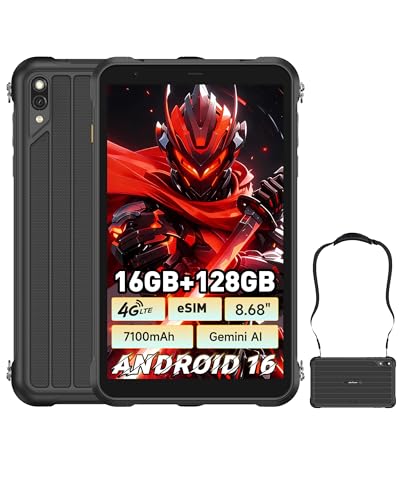
Ulefone Rugking Pad Pro 4G — Sunlight pick
The Rugking Pad Pro’s argument is a single number that matters more at sea than any other: 860 nits of brightness from its 8.68-inch Corning-glass display, per the listing — the brightest screen in this guide by a wide margin, aimed at the open cockpit under a hard sun. Brightness is not a luxury underway; it is the difference between reading the chart and shading the screen with your body while the boat wanders. Around that panel, Ulefone fits Android 16 as listed, an octa-core processor, a 7100mAh battery, 4G with a built-in eSIM — coastal data without a physical card to fumble with wet hands — and the rugged construction its Rugking line is named for.
The size, just under nine inches, pairs with the brightness into a specific sweet spot: the open centre-console or RIB helm where the screen must be both compact and fierce. The eSIM detail deserves emphasis for boaters who cross between coastal coverage and marina Wi-Fi — data arranged digitally, no tray, no paperclip, no lost nano-SIM in the bilge. Endurance is day-class rather than expedition-class, so passage-makers should pair it with helm power, which the setup section covers. For sun-drenched day boating, fishing and open cockpits generally, this is the pick whose headline spec is the one your eyes would have chosen.
- Display: 8.68-inch Corning, 860 nits (per listing)
- System: Android 16 (per listing)
- Battery: 7100mAh (per listing)
- Connection: 4G with built-in eSIM
- Memory/Storage: 128GB (per listing)
- Role: Open-cockpit sunlight duty
Strengths
- Class-leading brightness built for unsheltered helms and hard sun.
- Built-in eSIM makes coastal data a settings task, not a hardware fumble.
- Compact size suits RIBs and centre consoles where space is tight.
Trade-offs
- Day-class battery wants helm power on longer legs.
- Smaller canvas than the 11 and 12-inch picks for planning work.
- eSIM data depends on carrier support in your cruising area.
Ski-boat and wake crews, who boat in blazing sun with music loud and spray frequent, are this pick’s sleeper audience: brightness for the driver, ruggedness for the environment, and a screen the whole crew can read for the playlist and the lake map alike. The Rugking’s brief reads like it was written on such a boat, and its eSIM data keeps the music streaming wherever the coast allows.
Best for: open-cockpit day boats, fishing and sun-belt coastal cruising. Not suited for: multi-day passages without a charging routine.
How Does Weather Work Aboard a Tablet?
Before the weather, a note on tides, because they govern more boating days than storms do: a tablet that shows the tidal curve for the home port, the gate times for the race you cross and the drying heights for the anchorage you love — all downloaded, all glanceable — quietly removes the almanac arithmetic that used to eat the first coffee of every cruising day. Skippers cite this, not the charts, as the second screen’s most-used page by the end of a season.
Weather is where the second screen earns its berth most quietly. Ashore or in harbour, the tablet pulls full forecast models, animated radar and wind maps over marina Wi-Fi or coastal 4G, and the big picks render them at a size where a front’s timing can be judged rather than squinted at. Offshore, the discipline from earlier applies: GRIB files and forecast packages are downloaded before departure, sized to the passage, and the tablet becomes the reader of that stored weather — with satellite messengers and onboard instruments feeding updates where the boat carries them. The tablet does not create offshore connectivity; it makes whatever connectivity exists legible.
The daily rhythm that develops aboard cruising boats is worth copying: forecast review at breakfast with the chart app open beside it, the day’s leg adjusted while coffee is still an option rather than after the anchor is up. Anchor-watch apps add the night shift — position alarms that wake the crew if the boat drags — and here the endurance picks justify themselves again, since an anchor alarm that dies at 3 a.m. is worse than none, breeding confidence it cannot keep. Set alarms conservatively, keep the tablet on power or on a big battery, and test the whole arrangement at the dock on a calm night before trusting it in a blow.
What About Entertainment and Crew Life at Anchor?
A cruising tablet works two shifts, and the evening shift matters to crew morale more than spec sheets admit. Films and series downloaded ashore play on screens that put a boat’s television to shame for power draw; the R12 Pro’s loudspeakers fill a cockpit for a film night under the stars, and the AGM’s Widevine L1 keeps streaming quality honest where harbour Wi-Fi allows. Books, games, music, the day’s photographs reviewed at proper size, video calls home from the marina — the tablet is the boat’s lounge, and on a wet third day in harbour it is not a trivial one.
Children aboard deserve their sentence in this section, because a rugged tablet is the first boat electronics a young crew member can be trusted with: sealed against their accidents, loaded with the trip’s films and the bird and fish guides, and tough enough that teaching them the chart app becomes an invitation rather than a risk. More than one sailing family traces a teenager’s navigation competence to exactly that trust, extended early on hardware that could survive being learned on.
Crew harmony argues for treating the tablet as shared infrastructure with light rules: downloads agreed before departure so the library serves everyone, a charging rota on power-poor boats, and the understanding that the navigation tablet’s battery is spoken for by its day job first. Boats that run two tablets — one helm-dedicated, one social — report the cleanest arrangement, and this guide’s price spread makes that pairing plausible: an endurance pick at the helm and a compact pick below decks is a system many yachts would envy, assembled for less than one premium consumer slate.
How Do You Care for a Rugged Tablet in a Marine Environment?
Rugged is a rating, not immortality, and salt is patient. Rinse the tablet with fresh water after salt-spray days — the ratings permit it — and dry the charging port fully before power touches it, since a damp port and a live cable corrode each other enthusiastically. Inspect seals and port covers monthly; a nicked gasket is the difference between the rating on the box and the reality in the cockpit. Screens get a sacrificial protector, because sand is an abrasive that no glass marketing survives, and the protector is cheaper than the lesson.
Storage ashore matters as much as use afloat. A tablet wintering aboard in damp cold ages its battery and invites condensation; bring it home, store it at partial charge in a dry room, and wake it monthly to check for updates and battery health. Before each season, run the recommissioning ritual: updates installed, charts re-downloaded for the home cruising ground, subscriptions confirmed live, mount and helm power tested at the dock. An hour in April is what stands between a trusted second screen and a device the crew quietly stops believing in — and belief, once lost underway, is not regained by any firmware.
How Do the Six Boating Tablets Compare Side by Side?
| Pick | Screen | Battery (listing) | Sealing | Character |
|---|---|---|---|---|
| AGM PAD P2 Active | 11-inch FHD 90Hz | Standard class | Waterproof, drop-proof | Balanced helm all-rounder |
| HOTWAV R9 Pro | 11-inch | 20080mAh | IP68/IP69K | Multi-day endurance, 4G |
| HOTWAV R12 Pro | 12-inch FHD+ | 20080mAh | Waterproof | Big canvas, stylus, loud audio |
| Blackview 9-Inch Rugged | 9-inch 180Hz | Standard class | IP68/IP69K, MIL-STD-810H | Compact speed |
| OUKITEL RT3 Plus | 8-inch HD | Day class — verify listing | Waterproof | Small-craft specialist |
| Ulefone Rugking Pad Pro 4G | 8.68-inch, 860 nits | 7100mAh | Rugged build | Sunlight and eSIM |
The forks are physical: how big is your helm, how long are your legs, how hard is your sun? Endurance sailors take a HOTWAV; open-cockpit day boats take the Ulefone’s brightness; small craft take the OUKITEL; everyone else starts at the AGM and argues from there. No row of this table replaces a chartplotter — each one earns its place beside it.
Weights follow the same physical logic and deserve a glance before ordering: the endurance and big-screen picks are instruments you mount, the compact picks are tools you carry, and confusing the two categories is the most common sizing regret in the rugged class. A tablet that lives on a mount can be as heavy as its battery wants; a tablet that rides in a dry bag earns every gram of scrutiny. Match the category to the carriage and the table above stops being a comparison and becomes a packing list.
How Good Is Tablet GPS, Really?
Chart apps stand or fall on position, so the question deserves a straight answer: the GPS receivers in modern rugged tablets are genuinely good — multi-constellation in the better models, quick to fix, and accurate to a few metres in open sky, which is the sky boats sail under. In open water that accuracy is indistinguishable from the plotter’s for practical navigation support. Where tablets can wobble is under metal roofs, inside steel wheelhouses and in the shadow of harbour cranes, where any receiver struggles; the helm-mount position that serves your eyes usually serves the antenna too, and a tablet that loses fix at the dock will tell you before the stakes rise.
Two habits keep position honest. Give the tablet a clear sky view for its first fix of the day rather than demanding instant precision from a cold start below decks, and cross-check its position against the plotter and the world outside at the start of every leg — a ritual that takes ten seconds and embodies the whole philosophy of this guide: two independent sources, agreeing, before trust is extended. A tablet treated that way is a reliable witness. A tablet treated as an oracle is a liability wearing a bright screen.
What Connectivity Can You Expect Away From the Marina?
Marina Wi-Fi deserves its sceptical sentence: harbour networks are famously oversubscribed at the evening hour when every boat streams at once, so the tablet’s downloads — charts, films, updates — belong to the quiet hours or the home connection before departure. Crews who learn this once stop blaming their tablets for a network shared with three hundred neighbours.
Coastal cruising lives in a patchwork: strong 4G in harbour towns, a fading bar or two along headlands, silence in the anchorages that make cruising worthwhile. The cellular picks here — the R9 Pro’s dual SIM, the Ulefone’s eSIM — exploit the lit stretches for weather updates, harbour bookings and crew communication, and their real value is opportunistic: grab the forecast when the signal visits, rather than planning around its presence. Data roaming and local SIM strategies matter for boats crossing borders; the dual-SIM and eSIM designs exist precisely to make a local data card a five-minute job instead of a hardware negotiation.
Beyond the patchwork lies the satellite tier — messengers and terminals that are separate devices with separate subscriptions, feeding the tablet as their display. Skippers fitting out for offshore work should understand the tablet’s role in that stack clearly: it is the screen and the chart library, while the satellite hardware is the pipe. Budgeted and understood that way, the system is coherent. The failure mode is expecting the tablet alone to conjure offshore internet, a misunderstanding this guide would rather correct at the dock than read about in a forum afterwards.
How Do You Rig a Tablet for the Helm?
Gloves and wet fingers deserve a rigging note of their own: capacitive screens and sailing gloves are old enemies, so test your actual gloves against the mounted tablet, enable any glove or touch-sensitivity mode the device offers, and keep the chart app’s key controls on its largest buttons underway. A stylus tethered at the helm — the R12 Pro includes one — solves fine input without bare fingers in cold weather, and more than one skipper has adopted it as standard kit after a single February delivery trip.
Mounting is where good intentions meet gravity and vibration. Use a proper marine tablet mount — suction for smooth pilothouse surfaces, clamp or bolted for open cockpits — positioned where the helm can glance without turning from the wheel, out of the direct spray line where the boat’s design allows, and never where it masks the compass or the plotter. Power follows: a fused USB outlet at the helm, wired to the house bank, with the cable routed so it cannot chafe, snag a sheet or dangle into the bilge. A tablet on helm power is a tablet whose battery anxiety ends, which changes how freely you use its brightness — the setting that eats batteries and saves eyes.
Software rigging happens ashore: chart app installed and subscribed, your cruising ground’s charts downloaded, weather sources bookmarked, anchor alarm configured and tested at the dock, screen timeout set long, brightness set manual-high for helm duty. Fit a tether or lanyard point if the mount allows — the sea collects unsecured electronics with centuries of practice. Finally, brief the crew: everyone aboard should know the tablet is the second screen, where the primary plotter is, and what to do if either goes dark. Rigged this way, the tablet becomes part of the boat’s systems rather than a passenger’s gadget, and that integration is worth more than any single spec in this guide.
Night mode is a rigging detail skippers forget until it blinds them: set the chart app and the tablet’s display to their night palettes for any after-dark work, because a full-brightness screen at the helm destroys the night vision the watch has spent twenty minutes earning. Most chart apps offer a red-shifted or dark theme for exactly this; enable it, test it on a night passage in calm conditions, and add it to the crew brief. The best helm electronics are the ones that respect the human senses they serve, and darkness is a sense too.
Which Size Fits Which Boat?
Size follows the vessel with unusual strictness in this category. Paddle craft and dinghies take the 8-inch class and nothing larger — the OUKITEL exists because a 10-inch tablet on a kayak is not a tool but a sail. Open day boats and centre consoles split by helm layout: a single compact console favours the 9-inch Blackview or the bright Ulefone, while a dual-console with a proper dash can carry the 11-inch AGM and reward the skipper daily for the canvas. Cruising yachts and motor boats with nav tables graduate to the endurance and big-screen HOTWAVs, where the tablet’s second career as planning desk and lounge screen justifies every inch.
The test that cuts through indecision is embarrassingly physical: cut a cardboard template of the tablet’s footprint and tape it where the mount will go, then sail a day with it aboard. Sightlines, sheet leads, the helm’s elbow room and the crew’s traffic all vote immediately, and their verdict is more reliable than any review — including this one. Boats are measured in centimetres of usable space, and the right tablet is the one whose template survives that day without being cursed once.
What App Stack Should a Boating Tablet Carry?
Keep the stack short and seaworthy. One chart app, subscribed and downloaded for your ground, is the anchor tenant. One weather source you have learned to read — its models’ habits, its update rhythm — beats three you dabble in. A tides app, an anchor alarm, a logbook or notes app, the marina and harbour guides for your coast, and the boat’s manuals in a documents folder complete the working set. Entertainment rides below decks in priority: streaming apps with downloaded films, an e-book library, music offline. Every app beyond that set must argue for its battery and its distraction.
Two configuration rules protect the stack’s purpose. Notifications are silenced underway except for alarms and calls — a chart screen that hosts social pop-ups at a harbour entrance is a hazard wearing a feature’s clothes. And the home screen is arranged for gloves-off, wet-finger use: the chart app largest and first, weather second, everything else a deliberate tap away. A boating tablet set up this way feels less like a gadget and more like an instrument, which is the highest compliment this guide pays any electronics.
Which Mistakes Do Boaters Make With Tablets?
The dangerous mistake is the premise error this guide opened with: treating the tablet as the navigation system — no subscription charts downloaded, no backup, one device between the crew and the rocks. The second is connectivity optimism: assuming offshore data will carry the charts, then watching the signal die with the coastline. Downloads happen ashore, always. Third is the unsecured tablet — no mount, no tether, balanced on the chart table — which the first wake crossing will educate about expensively.
Fourth, skippers buy brightness-blind: a dim consumer tablet that was legible in the shop becomes a mirror at sea, which is why this guide’s field is rugged and brightness-led. Fifth, nobody tests the anchor alarm or the chart app at the dock, so the first live use is the first real use, in the dark, in weather. Sixth, the tablet lives aboard through winter damp and summer heat without a thought for battery care, and dies in its second season. Seventh — the quiet one — a crew lets the tablet’s charts lapse: subscriptions expire, regions go un-updated, and the second screen’s information quietly becomes last year’s harbour depths and last decade’s buoyage. Charts are perishables. Renew them with the same discipline as flares and lifejackets, because stale information delivered confidently is worse than no information at all. Every one of these is a habit, not a purchase — which means every reader of this section is now equipped to avoid the whole list.
How Much Should a Boater Budget Beyond the Tablet?
The tablet’s price is the entry ticket, not the voyage cost, and honest budgeting prevents the resentments that sour good gear. The chart subscription is an annual line — modest beside marina fees, but real. The mount is a one-off that should not be economised, since it holds the tablet over a moving deck. Helm power, if the boat lacks a fused USB outlet at the station, is a small electrical job worth doing properly. A spare charging cable that lives aboard, a screen protector or two, and a dry bag for the tender transfers complete the honest list.
Totalled generously, the rigging typically adds a fraction of the tablet’s own price — and skippers should hear the comparison that puts it in proportion: the complete second-screen system in this guide, tablet and rigging and first year’s charts, commonly lands below the cost of a mid-range fixed plotter alone, while adding weather, planning and entertainment the plotter never attempts. That is not an argument against plotters, whose authority this guide has defended throughout. It is the arithmetic of why the second screen has become standard equipment on well-found boats, and why choosing it from the rugged shelf — rather than gambling a consumer slate against the sea — is the decision the whole category turns on.
Final Recommendation
A word for the skipper still deciding whether the second screen is worth having at all: sail one season with a borrowed tablet rigged as this guide describes, charts downloaded, alarm tested, crew briefed. The boats that try it properly do not go back — not because the tablet navigates, but because information at the helm, at the nav table and at anchor stops being a trip below and becomes a glance. That glance — at the chart, the tide, the weather, the harbour plan — is the entire product, and it is available in every price row of this guide, from the smallest paddler’s unit to the largest helm canvas.
Start at the AGM PAD P2 Active if your boat has a helm with any shelter and your trips are measured in days with marina nights: it is the most complete second screen here. Passage-makers and charter crews should take the HOTWAV R9 Pro’s battery as the gift it is, and larger boats with a real nav station should stretch to the R12 Pro’s canvas and stylus. Open-cockpit and fishing skippers, buy the Ulefone’s brightness and never shade a screen again; compact-helm sailors, the Blackview’s speed in a small body; paddlers and small-boat owners, the OUKITEL, sized for your world. Whichever rides with you, rig it as this guide describes, download before you cast off, and keep the plotter’s authority absolute — because the best boating tablet is the one that makes a good seaman’s information richer season after season, and the worst is the one that ever persuades a crew it can replace one.
Frequently Asked Questions
Can a tablet replace my chartplotter?
No. A tablet with a chart app is an excellent second screen, planning tool and cockpit repeater, but it is not a chartplotter replacement and must never be the only navigation device aboard. Fixed instruments, compass and seamanship remain the primary system.
Do chart apps cost extra?
Yes — the major chart apps, such as Navionics, run on their own subscriptions, and detailed chart regions are downloaded within the app. Budget the subscription alongside the tablet, and download your cruising ground over Wi-Fi before departure.
Why is there no Samsung tablet in the picks?
Samsung’s Tab Active line is built for this work, but its current Amazon listing is a Renewed unit, and this guide does not recommend condition-lottery hardware for safety-adjacent duty. The line exists and suits boaters who buy it new through other channels.
Will these tablets survive salt water?
Their IP ratings are tested in fresh water; salt spray should be rinsed off with fresh water after exposure, and charging ports checked dry before plugging in. Sealing buys survival of spray and splashes, not a licence to submerge the tablet in the sea.
How long will a rugged tablet last in marine service?
With the rinse-dry-store care this guide describes, the hardware commonly serves four or more seasons; software support from the rugged specialists is the shorter clock, which is why the picks favour current Android versions. Budget for the tablet as a four-season instrument and any year beyond that is a dividend.
Do I need a cellular model for boating?
Not for navigation — charts and GPS work fully offline once downloaded. Cellular earns its keep for weather updates, harbour communication and crew contact along covered coasts. Offshore it goes silent regardless, so buy cellular for the coastal life you actually lead, not for the passage you imagine.
How do I stop glare on the helm screen?
Start with brightness — the Ulefone’s 860-nit panel exists for this — then angle the mount to kill reflections, consider a matte screen protector, and use the chart app’s high-contrast palette. Polarised sunglasses interact with some screens oddly, so test your actual glasses against the mounted tablet at the dock.
Can I use a normal tablet in a waterproof case instead?
You can, and many do for a season. The honest ledger: a consumer tablet in a pouch gains splash protection but keeps its dimmer screen, smaller battery, heat sensitivity in sun and a touch experience muffled by plastic. The rugged picks cost more because they solve those four problems natively. Occasional fair-weather sailors may accept the pouch; regular crews graduate to this guide’s field.
How do I keep a tablet charged on a multi-day trip?
Helm power from the house bank for underway use, the endurance picks’ large batteries for legs away from power, and a disciplined brightness-and-download routine. The HOTWAV picks exist precisely for boats whose charging opportunities are rare.
Related Guides
Back on dry land, browse the best samsung tablets, the best lte tablets, the best fire tablets, the best tablets for recipes and the best android tablets with hdmi.


