What's inside
- Key Takeaways
- Quick Picks
- Why Is This Category So Dominated by iPad Cases?
- What Does “Android 10” Have to Do With Keyboards? Almost Nothing — Happily
- The Six Options, Sorted by What They Can Actually Do for an Android Tablet
- How Do You Pair a Bluetooth Keyboard With an Android Tablet, Step by Step?
- What Trips Android Tablet Owners Up When Buying a Keyboard?
- Standalone Keyboard or Fitted Case: How Do You Know Which Life Is Yours?
- What About Trackpads, Backlights and the Features Cases Advertise?
- How Long Will a Good Keyboard Outlast Your Tablet?
- What Should You Do in the First Week With a New Keyboard Setup?
- Final Recommendation
- Frequently Asked Questions
- Related Guides
As an Amazon Associate I earn from qualifying purchases. This post may contain affiliate links at no extra cost to you.
gizmoverdict.com is reader-supported. When you buy through links on our site, we may earn an affiliate commission.
This guide about the best android 10 tablet keyboards begins with a confession that most roundups in this category bury, because the confession changes what you should buy. When we verified products for this page — checking real listings, one by one, the way this site’s pool works — the overwhelming majority of polished, well-reviewed tablet keyboard cases turned out to be made for iPads. Apple’s tablets dominate the accessory market so thoroughly that case makers design for them first and often only. An Android tablet owner searching for a keyboard therefore faces a shelf that looks abundant and is, on inspection, mostly labelled for somebody else’s tablet. Rather than pretend otherwise, this guide is built around the truth: two of its picks are universal Bluetooth keyboards that genuinely serve Android tablets, three are the iPad cases themselves, included and clearly labelled so you can see exactly what does not fit your Samsung or Lenovo, and one is the generic Android keyboard case described honestly without a link, because no verified listing for it exists in our pool.
Now the reassuring part, because the situation is better than that opening suggests. A keyboard is one of the most standardised objects in computing. Any Bluetooth keyboard pairs with any Android tablet — Samsung, Lenovo, Google, Xiaomi, a budget brand from a marketplace — and types exactly as it should, because Bluetooth’s keyboard profile does not care which logo is on the tablet. The “Android 10” in your search is a red herring of the friendliest kind: Android 10 is an older release of the operating system, and keyboard compatibility does not depend on it. A Bluetooth keyboard that paired with a tablet running Android 10 pairs with the same tablet on Android 13, and with its replacement running whatever comes next. Keyboards outlive operating systems; that is their charm.
What actually decides your purchase is the shape of your typing life. Do you want a case that turns the tablet into a small laptop, keys and protection in one object? That is the category where Android owners are worst served by named brands and best served by universals or carefully chosen generics. Do you type at a desk, in long sessions, with the tablet propped in a stand? Then a proper standalone Bluetooth keyboard — the Logitech picks below — is not a compromise but the best typing experience in this entire guide, better than any case keyboard at any price. Read the six picks with that question in hand, and the iPad cases will make sense as what they are: a clearly marked exhibit of what to admire and not order.
Key Takeaways
- Most verified tablet keyboard cases are iPad-only; this guide labels them as such instead of dressing them as Android picks.
- Any Bluetooth keyboard works with any Android tablet — compatibility is a Bluetooth question, not an Android-version question.
- Android 10 is an old OS release; your keyboard will pair with it and with every Android version after it.
- The Logitech K780 and K480 are the genuinely recommendable Android picks here: universal, multi-device, and excellent to type on.
- Generic Android keyboard cases exist and can serve well, but buy them by dimensions and return policy, not by brand promises.
- Check your tablet’s exact size and model before ordering any fitted case — a centimetre of difference defeats the whole product.
Quick Picks
| Pick | Badge | Why it earns its place |
|---|---|---|
| Logitech K780 Multi-Device | The real Android answer | A full-size Bluetooth keyboard with a tablet cradle, pairing with three devices — Android included, properly. |
| Logitech K480 Multi-Device | The budget universal | The same universal idea for less: a dial switches between tablet, phone and computer, with a built-in stand slot. |
| Logitech Combo Touch (iPad 10th gen) | iPad-only — do not buy for Android | A superb keyboard case that fits one iPad generation and no Android tablet; included as the category’s benchmark and warning. |
| ZAGG Pro Keys (iPad) | iPad-only — do not buy for Android | A detachable iPad keyboard case with a holder for a stylus Android tablets do not use the same way. |
| ESR Rebound Keyboard Case (iPad) | iPad-only — do not buy for Android | A magnetic iPad case whose fit, magnets and cut-outs are all shaped around Apple’s tablet. |
| Generic Bluetooth keyboard cases for Android tablets | Prose-only — no verified listing | The fitted-case route that actually exists for Android, bought carefully by size and seller. |
Why Is This Category So Dominated by iPad Cases?
The economics are unsentimental. Accessory makers design a fitted case for a specific device, which means tooling, moulds and inventory for every model they serve. Apple’s tablet line is small, long-lived and enormous in sales, so one case design fits millions of identical tablets for years. The Android tablet world is the opposite: dozens of makers, hundreds of models, dimensions that shift yearly, and individual models selling in numbers that rarely justify dedicated tooling. The rational case maker serves the iPad and lets Android owners be served by universal products — standalone keyboards, adjustable stands, and generic cases built around size bands rather than exact models.
This is why a search for Android tablet keyboards returns a page of iPad products with hopeful titles: the listings are not lying about being keyboard cases, they are simply answering a neighbouring question, and the shopper who orders by photograph discovers the difference when the case’s camera cut-out, magnets and charging port alignment describe a tablet they do not own. The three iPad picks in this guide are presented as a labelled exhibit precisely so you can learn their shapes safely. If a listing’s compatibility line names an iPad generation — “10th generation”, “Air 11”, “A16” — it fits that iPad, and its presence in your Android search results is the marketplace’s optimism, not the maker’s promise.
The Android ecosystem’s answer, when it comes from the tablet makers themselves, is first-party keyboard covers for flagship models — Samsung’s Book Cover Keyboard for Galaxy Tabs is the famous example — sold at flagship prices through the maker’s own channels. Those exist and can be excellent, but they sit outside this guide’s verified pool, so they are mentioned here as a route to investigate on the maker’s site for your exact model rather than recommended with a link we could not verify. Everything linked below, by contrast, was checked: two universals that will serve you, and three iPad cases that will not.
What Does “Android 10” Have to Do With Keyboards? Almost Nothing — Happily
Android 10 dates from 2019, which makes it a senior citizen among operating systems, and searches built around it usually come from owners of older tablets wondering whether modern accessories still speak to their machines. Keyboards are the happiest possible case. The Bluetooth Human Interface Device profile that keyboards use was standardised long before Android 10 and has not changed its essentials since; a keyboard pairing is one of the most conservative handshakes in consumer technology. If your tablet runs Android 10 and has Bluetooth — it does — every standalone keyboard in this guide pairs with it in under a minute, and the same keyboard will pair with the tablet’s eventual replacement without ceremony.
Two practical notes ride along with that reassurance. First, layout: an Android tablet will offer on-screen settings for the keyboard’s language layout, and a few keys — the search key, the launcher shortcuts — map to Android functions slightly differently from a Windows machine’s expectations; a day of typing makes the mapping familiar. Second, age: a tablet still running Android 10 is old enough that its own battery and performance, not its keyboard compatibility, are the realistic limits on a writing setup. A good Bluetooth keyboard is therefore a particularly safe purchase for such a machine, because the keyboard is the one part of the setup guaranteed to transfer to whatever replaces the tablet. Buy the keyboard for your next tablet as much as for this one.
Logitech K780 Multi-Device — The real Android answer
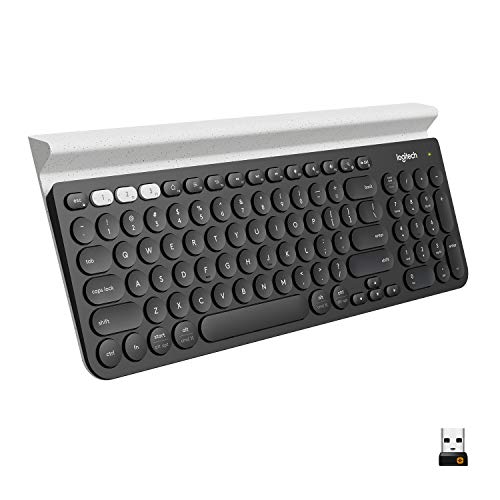
If this guide may only make one unqualified recommendation, it is this keyboard. The K780 is a full-size, desktop-class Bluetooth keyboard with a long, weighted cradle running along its top edge, sized to hold a tablet upright at a comfortable reading angle while you type. It pairs with three devices at once — your Android tablet, your phone, your computer — and moves between them with a tap of its Easy-Switch keys. For the Android tablet owner, that combination dissolves the category’s central frustration: instead of hunting for a fitted case that may not exist for your model, you get the best typing experience available to any tablet, full stop, in a device that also serves the rest of your desk.
The typing itself is the argument. Case keyboards, including the excellent iPad ones exhibited below, compress their keys into a tablet’s footprint and ask your hands to adapt. The K780’s keys are full-size, sculpted and quiet, with the travel of a proper desktop board, and a long document written on it feels like work done on a computer rather than an accessory endured. The cradle holds tablets in landscape at the angle long sessions want, the keyboard’s own battery life is measured in the kind of spans that make charging an occasional errand, and a USB receiver in the box covers computers whose Bluetooth is elderly or absent.
What it does not do is protect your tablet or travel as one object with it; the K780 is a desk citizen, happiest where the writing happens, carried between rooms rather than commuted with. Owners whose typing life is a desk, a kitchen table or a studio corner will find that no sacrifice at all. Owners who type on trains should read the K480’s section and the generic-case discussion before deciding, because portability is the one axis on which this otherwise complete answer concedes ground.
- Connection: Bluetooth plus USB receiver, three paired devices
- Compatibility: Android, iPadOS, Windows, macOS, ChromeOS — genuinely universal
- Stand: integrated cradle holds tablets and phones upright
- Layout: full-size keys with number pad
- Sweet spot: desk-based long-form typing on an Android tablet
Strengths
- The best typing feel available to an Android tablet, without contest.
- Three-device switching makes it the whole desk’s keyboard.
- The cradle fits virtually any tablet, ending the model-matching hunt.
Trade-offs
- A desk keyboard, not a case: no protection, less portable.
- Larger and heavier than any case keyboard.
- The tablet still needs its own cover for travel.
Best for: Android tablet owners who write seriously at a desk or table. Not suited for: commuters who need keyboard and tablet to travel as one object.

Logitech K480 Multi-Device — The budget universal
The K480 is the K780’s idea translated for a tighter budget and a more mobile life, and it has been quietly solving the Android keyboard problem for years. A deep slot across its top holds a tablet or phone upright, a large dial on the left switches the connection between three paired devices — turn it, and the same keys are suddenly typing on your phone instead of your tablet — and the whole board is compact and light enough to live in a bag. It is not a case and offers no protection; it is a keyboard that assumes the tablet has its own cover and that typing happens wherever a table appears.
Its keys are smaller and its action less refined than the K780’s, which is the honest price of its size and cost, and its chunky, rounded design divides opinion until the first time it survives a drop that would have embarrassed a sleeker board. For students, journalists and anyone whose writing happens in cafés, libraries and kitchen tables in rotation, the trade is well judged: the K480’s portability gets it used, and a keyboard that gets used beats a finer one that stays home. Android pairing is the same sub-minute ritual as its sibling’s, and the dial makes it the natural partner for the common two-screen habit of drafting on the tablet and messaging on the phone.
Between the two Logitechs, the decision is a self-portrait. Fixed desk, long documents, full-size expectations: the K780. Moving around, shorter sessions, a bag that already has opinions about weight: the K480. Either way, the Android owner escapes the fitted-case hunt entirely, and the keyboard remains useful when the tablet is replaced — a longevity no model-specific case can offer.
- Connection: Bluetooth, three devices via switch dial
- Compatibility: Android, iPadOS, Windows, macOS, ChromeOS
- Stand: integrated slot for tablet or phone
- Layout: compact, no number pad
- Sweet spot: portable typing for students and mobile writers
Strengths
- Universal compatibility at the guide’s friendliest Logitech cost.
- The device dial is genuinely delightful in daily use.
- Compact and tough enough for a bag-based life.
Trade-offs
- Smaller keys and a less refined action than the K780.
- No protection for the tablet; a cover is still needed.
- The chunky styling is functional rather than elegant.
Best for: mobile Android typists and students on a budget. Not suited for: all-day desk writing, where the K780’s full-size keys earn their keep.

Logitech Combo Touch (iPad 10th generation) — iPad-only, included as the benchmark
Read this section as a museum label, because the Combo Touch is a wonderful product that you, the Android owner, must not buy. Logitech’s case wraps the 10th-generation iPad in a protective shell with a detachable backlit keyboard and a trackpad, connecting through the iPad’s Smart Connector so it never needs charging or pairing. As an object it is close to perfect: the keys are excellent for a case, the trackpad is the best in its class, the kickstand adjusts widely, and the whole thing turns its tablet into a convincing small laptop. It is included in this guide because it defines what the fitted-case category looks like when it is done properly — and because its listing is exactly the kind that surfaces in Android searches, waiting to disappoint a hurried buyer.
The incompatibility is total, and it is worth understanding why no adapter or cleverness bridges it. The case is moulded to the 10th-generation iPad’s exact dimensions, button positions and camera shape; an Android tablet of nominally similar screen size differs in every one of those measurements. The keyboard draws power and data from Apple’s Smart Connector, a physical interface no Android tablet carries. Even the trackpad’s gestures speak iPadOS. There is no partial credit: on an Android tablet, this product is a well-made case for a tablet you do not own, attached to a keyboard that cannot connect.
Why devote a pick to it at all? Because the Android owner’s realistic fitted-case alternatives — the generic route described in the final pick — are best judged against a known standard, and the Combo Touch is that standard. It also serves the household with both ecosystems: if an iPad lives in your home alongside the Android tablet, this is a superb purchase for that machine. Just let the label on this section do its job, and keep it out of the Android basket.
- Connection: Apple Smart Connector — no Bluetooth, no pairing
- Compatibility: iPad 10th generation ONLY
- Features: backlit detachable keyboard, trackpad, kickstand
- Fit: moulded precisely to that iPad’s body and camera
- Sweet spot: iPad owners; Android owners should admire and move on
Strengths
- The finest keyboard-case experience in its category, for its tablet.
- Trackpad and backlighting that case keyboards rarely match.
- No charging or pairing, thanks to the Smart Connector.
Trade-offs
- Completely incompatible with every Android tablet, by design.
- Fits one iPad generation; even other iPads need other versions.
- Its excellence makes its listings’ appearance in Android searches genuinely treacherous.
Best for: owners of the 10th-generation iPad. Not suited for: any Android tablet, under any circumstances — this is the guide’s clearest warning.

ZAGG Pro Keys (iPad) — iPad-only, included for contrast
The ZAGG Pro Keys takes a different route to the same iPad-only destination, and the contrast is instructive for Android shoppers learning to read this category. Where the Combo Touch is a single fitted system, the Pro Keys is a protective case plus a detachable Bluetooth keyboard that can be positioned apart from the tablet, with a holder for Apple’s stylus and a design aimed at people who type in varied places. Detachability sounds universal — Bluetooth is Bluetooth, after all — and it prompts the sharpest question in this guide: if the keyboard half connects by Bluetooth, could it not type on an Android tablet while the case half goes unused?
Technically, a Bluetooth keyboard can pair with many things, and this guide will not pretend otherwise. But buying the Pro Keys for that purpose means paying the full price of a fitted system for its keyboard alone — a keyboard whose layout, shortcut keys and stylus holder are all designed around an iPad — while the case, which is half the product and all of its protection, fits nothing you own. The Logitech universals above exist precisely to sell you the keyboard without the stranded case, better shaped for the job and honestly priced for it. The Pro Keys is a good product being asked the wrong question, and the answer protects your money rather than the product’s feelings.
For an iPad household, the calculus reverses completely: the Pro Keys’ detachable flexibility, its protective case and its stylus storage make it a legitimate rival to the Combo Touch, trading the trackpad for freedom of arrangement. That is its section’s real purpose here — to show Android readers what questions to ask of any fitted case (what does it fit, how does it connect, what becomes of the parts that do not fit me?) and to give the iPad owners who land on this page a fair signpost before they leave.
- Connection: Bluetooth keyboard, detachable from its case
- Compatibility: designed and fitted for specified iPad models ONLY
- Features: detachable keyboard, stylus holder, protective case
- Fit: the case half fits its iPad and nothing else
- Sweet spot: iPad owners who value detachable flexibility
Strengths
- Detachable arrangement suits varied typing positions, on its iPad.
- A protective case and stylus storage in one system.
- Well-regarded keys for a case-class keyboard.
Trade-offs
- The case fits iPads only; Android buyers would strand half the purchase.
- Its keyboard alone is worse value than the universal picks above.
- Shortcut layout is designed around iPadOS, not Android.
Best for: iPad owners wanting a detachable keyboard system. Not suited for: Android owners, despite the Bluetooth keyboard half — buy a universal instead.

ESR Rebound Keyboard Case (iPad) — iPad-only, the magnetic mirage
The ESR Rebound is the most seductive of the iPad cases for an Android shopper to misread, because its marketing language — magnetic, floating, effortless — sounds like it might adapt to anything. It cannot. The Rebound’s magic is a precisely engineered magnetic attachment to specific iPad models, whose magnets are placed to meet corresponding magnets inside Apple’s tablets, holding the device in a cantilevered, laptop-like pose above a backlit keyboard with a trackpad. It is a genuinely elegant piece of design, frequently praised as a lighter, friendlier alternative to Apple’s own Magic Keyboard, and every gram of that elegance is calibrated to an iPad’s body.
Android tablets do not carry that magnetic array in those positions, and their dimensions differ besides, so a Rebound bought for a Galaxy Tab or a Lenovo would fail at the first step: there is nothing for it to hold. This is the deepest version of the category’s lesson. The more sophisticated a fitted case becomes — Smart Connectors, magnetic levitation, model-specific cut-outs — the more completely it belongs to its one device. Universality lives at the simpler end of the technology, in plain Bluetooth and a passive stand, which is why this guide’s Android recommendations look less magical than its warnings. Simplicity is not the consolation prize here; it is the mechanism by which a keyboard can serve any tablet at all.
As with its fellow exhibits, the Rebound earns a fair word for its own audience: iPad owners seeking the floating-keyboard experience without Apple’s pricing will find this among the most considered options in its class, and its presence in this guide is a compliment to its design as much as a caution to Android readers. Just let the compliment be where the relationship ends.
- Connection: Bluetooth, powered by the case’s own battery
- Compatibility: specified iPad models ONLY, via model-specific magnets
- Features: magnetic floating stand, backlit keys, trackpad
- Fit: requires the matching iPad’s magnetic array and dimensions
- Sweet spot: iPad owners wanting the floating keyboard experience
Strengths
- An elegant magnetic design that iPad owners rightly enjoy.
- Backlit keys and a trackpad in a slim, light system.
- Often friendlier pricing than Apple’s own equivalent.
Trade-offs
- Physically cannot attach to any Android tablet.
- Each version fits only its named iPad models.
- Its listings’ polish makes it the easiest case here to buy by mistake.
Best for: owners of the iPad models it names. Not suited for: Android tablets in the most literal sense — there is nothing for it to hold.
Generic Bluetooth Keyboard Cases for Android Tablets — The fitted route that actually exists
The final pick has no link, and the absence is the information. Fitted keyboard cases for Android tablets do exist — sold by smaller brands and marketplace sellers, organised by screen size and sometimes by popular model — but none passed this site’s verification pool, and this guide does not attach purchase links it cannot stand behind. What it can do is tell you how to buy one well, because for the Android owner who truly wants the one-object, laptop-like experience, this generic route is the only fitted road there is.
Buy by measurement, not by hope. These cases are typically built around a size band — a 10.1-inch class, an 11-inch class — with the tablet held by elastic corners, clips or a simple shell, and the keyboard connecting by ordinary Bluetooth, which is why they work across brands where the iPad cases cannot. Measure your tablet’s height, width and thickness and compare them against the case’s stated inner dimensions with a sceptic’s care; check the camera position, because a generic shell’s cut-out may sit a centimetre from your lens; and confirm the charging port remains reachable with the case closed. A seller who publishes exact inner dimensions and names the models they have tested is telling you something good about themselves. A seller whose listing promises compatibility with every tablet ever made is telling you something else.
Expectations, set honestly, are these: the typing will be serviceable rather than delightful, the materials a step below the iPad exhibits, the fit good rather than moulded — and the combination, for many owners, entirely sufficient. A student whose Galaxy Tab becomes a homework laptop, a traveller whose Lenovo gains a keyboard for the price of a checked bag’s snack budget, has made a rational purchase. Buy from a seller with a painless returns policy, test the fit and every key within the return window, and the generic case becomes what this category has been promising Android owners all along: a fitted keyboard, for their actual tablet, at a fair price for what it is.
- Connection: Bluetooth (the reason it can serve many brands)
- Compatibility: by size band and inner dimensions — measure your tablet
- Features: varies by seller; typically a shell or clip fit with a removable keyboard
- Fit: good, not moulded; camera and port alignment must be checked
- Sweet spot: Android owners who want the one-object laptop experience
Strengths
- The only fitted-case route genuinely available to most Android tablets.
- Bluetooth connection means the keyboard outlives the case and the tablet.
- Usually the lowest-cost path to a laptop-like setup.
Trade-offs
- No verified listing in this guide’s pool — the homework is yours.
- Typing feel and materials trail the named brands.
- Fit quality varies by seller; the returns window is part of the product.
Best for: Android owners set on a fitted case, who will measure carefully and test promptly. Not suited for: buyers who want a guaranteed fit without checking dimensions.
The Six Options, Sorted by What They Can Actually Do for an Android Tablet
| Pick | Works with Android? | Form | The one-line truth |
|---|---|---|---|
| Logitech K780 | Yes, fully | Standalone keyboard with cradle | The best typing your Android tablet can get |
| Logitech K480 | Yes, fully | Standalone keyboard with slot | The portable, budget universal |
| Logitech Combo Touch | No | Fitted iPad case | Superb — for the 10th-gen iPad only |
| ZAGG Pro Keys | No (case); keyboard alone is poor value | Fitted iPad case | Buy the system for an iPad or not at all |
| ESR Rebound | No | Magnetic iPad case | Nothing on an Android tablet for it to hold |
| Generic Android cases | Yes, by size | Fitted generic case | The real fitted route; measure before ordering |
That table is the guide’s whole argument in six rows: two universals that serve you today, three exhibits that serve somebody else, and one unlinked route that serves the determined. Any other roundup that shows you six fitted cases as Android picks without these distinctions is selling you a returns process.
How Do You Pair a Bluetooth Keyboard With an Android Tablet, Step by Step?
The ritual takes under a minute and is the same for every standalone keyboard in this guide. Put the keyboard into pairing mode — on the Logitechs, holding the relevant device key until its light blinks is the usual gesture; check the keyboard’s quick-start card for its exact signal. On the tablet, open Settings, then Connections or Connected devices, then Bluetooth, and confirm Bluetooth is on. The keyboard’s name appears in the list of available devices; tap it. Some pairings ask you to type a short code shown on the tablet’s screen onto the keyboard and press Enter — a small ceremony that proves the right keyboard is connecting. That is the whole procedure, and it is remembered: tomorrow, switching the keyboard on near the tablet reconnects them without any of it.
Two refinements reward a further minute. In the tablet’s keyboard or language settings, select the physical keyboard’s layout to match the legends printed on your keys, so that punctuation lands where your fingers expect; a mismatched layout is the commonest cause of “the keyboard types the wrong symbols” complaints, and it is a setting, not a defect. And if the keyboard serves several devices, as both Logitechs do, pair the tablet to the first slot and your phone to the second while the ritual is fresh, because the multi-device magic only exists once the pairings do. Your future self, switching between a document and a message with one key, will be glad the minute was spent.
What Trips Android Tablet Owners Up When Buying a Keyboard?
The first trap is the subject of this entire guide: ordering a fitted case by photograph and screen size, without reading its compatibility line, and receiving a beautiful object moulded for an iPad. The defence is a single habit — find the sentence that names the exact models the case fits, and believe it over the title, the photos and the search results that delivered you there. The second trap is subtler: assuming a keyboard case for one Android tablet fits another of the same screen size. Android dimensions wander by millimetres and centimetres between makers and generations, camera bumps sit in different corners, and a case is a physical object that cares about all of it. Screen size is a category, not a measurement.
Third comes the version anxiety this guide opened with, in reverse: owners of newer tablets worrying that a keyboard described as compatible with older Android releases will somehow not work, or owners of Android 10 tablets fearing the opposite. Bluetooth keyboards are beneath such concerns entirely — if it pairs, it types, across every Android version you will meet. Fourth is neglecting the stand question with standalone keyboards: a tablet typing setup needs the screen held at an angle, by the keyboard’s cradle, a case’s fold, or a separate stand, and the owner who forgets this spends the first session propping a tablet against a mug. Decide where the angle comes from before the keyboard arrives, and the first session is a pleasure instead of an improvisation.
Standalone Keyboard or Fitted Case: How Do You Know Which Life Is Yours?
The decision deserves more than a shrug, because it is really a question about where your sentences get written. Picture your last month of typing. If it happened mostly at one or two tables — a desk, a kitchen counter, a studio bench — the standalone keyboard wins outright: better keys, better posture, a screen angle you control, and no fit gamble whatsoever. The tablet travels in its own simple cover and meets the keyboard where the work is. Most long-form writers, students with a base of operations, and home workers live this life, whether or not they have ever described it that way, and for them the K780 and K480 are not the fallback option in this guide. They are the destination.
If your typing happened in motion — trains, waiting rooms, a different café each day, the sofa’s arm — the fitted case’s appeal is real: one object, no forgotten half, a laptop shape that opens and works on a lap. Android owners pursuing that life accept the generic route’s homework, or the maker’s own cover at its premium, and in exchange get the only version of portability that includes the keyboard by default. There is no shame in either portrait and no hybrid that fully satisfies both, which is why this guide refuses to crown one. It crowns the Logitechs for the desk majority and hands the commuters a measuring tape and a returns policy, and considers both outcomes a successful piece of advice.
What About Trackpads, Backlights and the Features Cases Advertise?
Fitted cases compete on features that standalone keyboards mostly skip, so Android owners deserve a translation of what those features are worth. A trackpad in a case matters if your work is cursor-heavy — spreadsheets, precise text selection, desktop-style interfaces — and matters little for writing, where Android’s touch screen is already under your hand and arguably faster. Notice that Android itself supports mice and trackpads well; an owner who wants a pointer can add any Bluetooth mouse to a standalone keyboard setup and gain the trackpad’s benefit without the case. Backlighting is the feature writers underrate until the first dim room: neither Logitech pick in this guide offers it, and in a dark cabin or a lamplit study that absence is felt. If you type in the dark regularly, it becomes a legitimate reason to examine backlit universals or the maker’s own cover for your model.
Shortcut rows and platform keys are the quiet third feature. Keyboards designed for one ecosystem print its functions on the keys — iPad cases speak iPadOS, universals print a diplomatic mixture — and Android’s own conventions, the search and notification shortcuts, are best served by keyboards that acknowledge Android exists, as Logitech’s multi-device boards do. None of these features overturns the guide’s order of operations — compatibility first, form second, features third — but once the first two are settled, they are exactly the right grounds on which to choose between the survivors.
How Long Will a Good Keyboard Outlast Your Tablet?
Long enough to change how you should budget for it. A tablet is typically replaced every three to five years; a well-made Bluetooth keyboard has no battery chemistry ageing as aggressively, no software support window closing, and no performance curve to fall behind — the K480’s design has been sold, essentially unchanged, for around a decade, and units from its early years still pair with tablets that did not exist when they were made. The standalone picks in this guide should therefore be priced in your head across two or three tablets, not one, which transforms their value arithmetic completely: the K780 spread across a decade of devices is among the cheapest per-year purchases in this entire category.
The fitted case sits at the opposite pole: its life is exactly its tablet’s life, and its resale value departs with the model’s popularity. That is not an argument against fitted cases — protection and portability are real services, consumed in the present — but it is an argument for buying them with present-tense expectations and for letting the standalone keyboard be the purchase you allow yourself to make properly, once, at quality. In a category warped by one ecosystem’s abundance, the universal keyboard is the Android owner’s one chance to buy the best object rather than the available one. This guide suggests taking it.
What Should You Do in the First Week With a New Keyboard Setup?
Treat the first week as a fitting, whatever route you chose. Generic-case owners should test the fit like a tailor: every key struck, the tablet seated and reseated, the case opened and closed a dozen times, the charger connected with the case on — all inside the returns window, while a disappointment is still free. Standalone owners should set up the pairings properly, tablet and phone and computer each in their slot, and set the on-screen layout to match the physical legends before the first wrong-symbol frustration teaches the lesson less kindly. Both groups should then write something long. A keyboard setup reveals itself across a thousand words, not across a search query, and the week’s real assignment is a document you actually needed to produce.
By the week’s end, two habits decide whether the setup becomes furniture or clutter. Give the keyboard a home — the same shelf, the same end of the desk — because equipment that must be hunted before use stops being used. And if the tablet is shared, pair it for the second person too, while the ritual is fresh. None of this is technical. It is the ordinary domestication of a tool, and it is the difference between the keyboard that transforms a tablet’s life and the one that attends a drawer.
Final Recommendation
For almost every Android tablet owner reading this, the answer is the Logitech K780 if your writing lives at a desk, and the K480 if it lives in a bag — two universal keyboards that pair in a minute, type better than any case, and will still be serving you when the tablet beneath them has been replaced twice. If what you truly want is the fitted, one-object experience, the honest road is a generic Android case bought by exact measurement from a seller whose returns policy you have read, or your tablet maker’s own keyboard cover bought for your precise model. And the three beautiful iPad cases in this guide? Leave them to the iPads, with respect for their design and none for their listings’ habit of wandering into Android searches. The right keyboard for your tablet was never the one shaped like somebody else’s — it was the one that pairs in a minute, fits the way you actually write, and keeps working long after the search that found it has been forgotten.
Frequently Asked Questions
Will a Bluetooth keyboard work with my tablet running Android 10?
Yes. Keyboard pairing uses the standard Bluetooth HID profile, which Android 10 supports completely, as does every later version. The operating system’s age does not enter into keyboard compatibility at all — if the tablet has Bluetooth, any standalone keyboard in this guide will pair and type.
Why do iPad keyboard cases appear when I search for Android ones?
Because marketplaces match words loosely and the iPad case market is enormous, so its listings crowd every neighbouring search. The products themselves are honestly labelled in their compatibility lines; the search results are the optimistic part. Always read the line that names the fitted models before ordering any case.
Can I use an iPad keyboard case if I only use the keyboard part?
With a Bluetooth model like the ZAGG, pairing may technically be possible, but you would be paying for a fitted system whose case fits nothing you own, with shortcuts arranged for iPadOS. The universal Logitechs give you a better keyboard for the purpose at a fairer price, which is why this guide recommends them instead.
What should I check before ordering a generic Android keyboard case?
Your tablet’s exact height, width and thickness against the case’s stated inner dimensions; the camera’s position against the case’s cut-out; the charging port’s accessibility when closed; and the seller’s returns policy. Then test every key and the fit itself within the return window, because generic quality varies by seller.
Does my tablet maker’s own keyboard cover beat these options?
For flagship Android tablets, the maker’s fitted cover — Samsung’s Book Cover Keyboard is the best-known — can be excellent, with a perfect fit and sometimes a trackpad. It sits outside this guide’s verified pool, so investigate it on the maker’s site for your exact model, and weigh its flagship pricing against the K780’s universality before deciding.
Will these keyboards also work with my phone and computer?
The Logitech picks will — that is their defining feature, with three pairings each and a key or dial to move between them. It is worth more than it first appears: the keyboard you buy for the tablet becomes the keyboard for the whole desk, and it remains useful across every device replacement in the house.
How do I stop my tablet sliding in a standalone keyboard’s cradle?
Most cradles, including the K780’s, grip a bare tablet or a slim case securely at a natural typing angle; a very thick rugged case can defeat the slot, which is worth checking if your tablet wears one. A thin non-slip mat under the setup solves the rare sliding setup on a polished desk. If your tablet lives permanently in a bulky case, the K480’s deep slot or a separate adjustable stand will serve you better than a shallow cradle.
Can one keyboard serve my Android tablet and my child’s iPad?
Yes — this is the multi-device keyboards’ party trick, and the honest answer to mixed-ecosystem households. Pair the Android tablet to one slot and the iPad to another on a K780 or K480, and the same full-size keys serve both, which is more than any fitted case in this guide can claim for either machine. Households with both platforms are exactly who universals were designed for.
Is a keyboard worth it for a tablet used mostly for video?
For pure viewing, no — a stand alone is cheaper and simpler. The keyboard earns its place the moment the tablet becomes a place where text is produced: messages longer than a sentence, documents, study notes, email that matters. Many owners discover that threshold only after buying the keyboard, because a tablet with real keys invites writing that a glass keyboard suppresses; but buy for the writer you are, not the one an accessory promises to make you.
What if my Android tablet is an unusual size, like a small 8-inch model?
Standalone keyboards care even less about tablet size than about brand — the K480’s slot suits small tablets particularly well — while fitted generics thin out at the size extremes, since sellers concentrate on the popular 10-to-11-inch band. Small-tablet owners should treat that as one more vote for the universal route, and should check a generic case’s minimum dimensions as carefully as its maximum.
Do keyboard cases drain the tablet’s battery?
Cases that connect through a proprietary connector draw their power from the tablet, but the amounts are small and, in the iPad world this guide exhibits, well managed. Bluetooth keyboards — every Android-relevant option here — carry their own batteries and cost the tablet only its Bluetooth radio’s modest draw. In practice, the screen consumes so much more than either arrangement that keyboard power is the last battery question worth asking.
Can I type in another language or layout on these keyboards?
Yes. Android lets you assign the physical keyboard’s layout in its settings, independently of the on-screen keyboard’s language, so a keyboard printed for one market can type another’s layout once your fingers learn the positions. Owners who regularly write in two languages can switch layouts with a shortcut, a small superpower of standalone boards that fitted bilingual households appreciate.
What is the cheapest honest way to type on an Android tablet?
The K480 is this guide’s answer among verified products, and below it lies a long tail of unbranded Bluetooth keyboards that this pool did not verify. Many are perfectly serviceable; the buying method matters more than the brand at that level — choose a standard layout, a seller with painless returns, and test every key on arrival. Cheap Bluetooth is a solved technology; cheap cases are where the risk lives.
Should students choose a keyboard or a cheap laptop instead?
It depends on what the tablet already does for them. A student whose tablet handles their reading, notes and school platform gains a genuine writing machine from a K480-class keyboard at a fraction of a laptop’s cost. A student whose coursework needs desktop software was never served by the tablet in the first place, and the keyboard merely decorates that problem — the student-laptop guide elsewhere on this site is the honest destination for them. Let the software list, as always, cast the deciding vote.
How do I clean and care for a tablet keyboard?
Keyboards collect the evidence of every working snack, so a weekly shake over a bin, a pass with a soft brush, and an occasional wipe with a barely damp cloth will keep any board in this guide honest. Keep liquids in their own postcode — the single commonest keyboard death — and a standalone board should outlast several tablets. Case keyboards deserve the same care plus a check that crumbs are not trapped between case and screen when it closes.
Why does my keyboard type the wrong symbols on some keys?
Almost always a layout mismatch: the tablet is interpreting the physical board using a different country’s layout from the one printed on the keys. Open the tablet’s keyboard settings, find the physical keyboard entry, and set its layout to match the legends. It is a thirty-second fix for the commonest complaint in this entire category, and it needs doing once per keyboard, not once per session.
Is it worth buying a keyboard for an old Android 10 tablet, or should the money go toward a new tablet?
Both, in sequence, is often the smartest answer — and the keyboard is the safe first step precisely because it transfers. If the old tablet’s screen and battery still serve, a K480-class board gives it a second career as a writing machine for very little. When the tablet is eventually replaced, the keyboard simply pairs with its successor, and not a penny of the purchase is stranded. Few accessories in this catalogue can promise that, and fewer still can keep the promise across two or three generations of tablets without asking for anything in return.
Related Guides
The tablet shelf continues nearby, and these companions assume the honesty rules you have just read: our guide to the best 10 inch tablets covers the machines themselves across every platform, our Android tablet accessories roundup takes stands, styluses and covers in turn, and our cheapest student laptops guide answers the related question of when a small laptop beats a tablet-plus-keyboard altogether.


