What's inside
- Key Takeaways
- Quick Picks
- How Did We Choose These Picks?
- What Is Fire OS, and Why Does the App Store Matter?
- How Well Does This Family Work as a Smart-Home Hub?
- What Is It Like to Read on These Tablets?
- How Do Downloads and Storage Work Across the Family?
- How Do the Six Fire Family Tablets Compare Side by Side?
- Why Does This Family Own the Travel-Tablet Niche?
- How Do Parental Controls Actually Work Day to Day?
- How Do You Set Up a Fire Family Tablet for a Household?
- Why Buy Amazon’s Tablet Instead of a No-Name Android One?
- How Long Do These Tablets Stay Useful?
- Which Mistakes Do Fire Tablet Buyers Make Most?
- Which Model Fits Which Household Member?
- Final Recommendation
- Frequently Asked Questions
- Related Guides
As an Amazon Associate I earn from qualifying purchases. This post may contain affiliate links at no extra cost to you.
gizmoverdict.com is reader-supported. When you buy through links on our site, we may earn an affiliate commission.
Where to buy: The linked picks go straight to their Amazon product pages, and with this family the listing name deserves a slow read — Amazon currently brands its newest models “Alexa Tablet” rather than Fire, so the names below are the names you will actually see on the product pages.
Shopping for the best fire tablets in 2026 begins with a naming puzzle, so let us solve it before anything else. Amazon built its tablet reputation on the Fire line: inexpensive slates running Fire OS, sold in 7, 8 and 10-inch sizes, plus Kids editions wrapped in chunky cases. The newest models in Amazon’s own listings, however, are badged “Alexa Tablet” — an 11-inch and an 8.7-inch model whose listings describe an Android OS with Google Play and design centred on Alexa+. These are the Fire line’s successors in everything but the badge, and this guide treats them that way: the Fire family as it is actually listed today, classic Fire HD models and Alexa-badged newcomers side by side, with the differences explained rather than smoothed over. Six picks cover the range, including the Fire HD 10 in prose, because no clean listing for it could be verified when this guide was assembled.
What unites the family, whatever the badge, is the value proposition: a screen for streaming, reading, video calls and smart-home control at prices that treat a tablet as an appliance rather than an heirloom. What divides it is software. Classic Fire models run Fire OS, Amazon’s fork of Android, with the Amazon Appstore instead of Google Play — a distinction this guide will repeat until it sticks, because it decides which apps you can install. The Alexa-badged models’ listings claim a different arrangement, and their sections say exactly what the listings claim and what to verify. Kids editions add a third axis: same hardware family, wrapped in a kid-proof case and a Kids+ content subscription whose included year eventually ends. Keep those three axes in mind and the six picks below sort themselves.
Key Takeaways
- Amazon’s newest models are listed as “Alexa Tablet”, not Fire — the Fire line’s current form wears a new badge, and this guide uses the listing names.
- Classic Fire tablets run Fire OS with the Amazon Appstore; they do not ship with Google Play, and any buying decision should start from that fact.
- Kids editions are the same hardware family in a kid-proof case with Kids+ content included for a year — after that year, the subscription is a paid renewal unless cancelled.
- The Fire HD 8 (2020 release) remains the budget benchmark of the classic line: cheap, portable and honest about its limits.
- The Fire HD 10 is covered in prose only, because no clean listing could be verified for this guide — beware third-party listings with inflated claims.
- Every model here is a streaming-and-reading appliance first; none is a laptop replacement, and none pretends to be.
Quick Picks
| Pick | Badge | Why it earns its place |
|---|---|---|
| Amazon Alexa Tablet 11 (128GB) | Best overall | The line’s new flagship form: an 11-inch 2.5K display, 8GB of RAM and a listing that promises Google Play access. |
| Amazon Fire HD 8 (64GB) | Classic budget pick | The 2020 Fire HD 8 without lockscreen ads — the cheap portable streamer this family became famous for. |
| Amazon Alexa Tablet 8 | Compact newcomer | An 8.7-inch Alexa-badged model with 64GB of storage for readers and travellers wanting the new software story. |
| Amazon Kids Tablet 11 | Best for ages 6–12 | The big kids’ edition: STEM and homework-friendly content, parental controls and a protective case in the box. |
| Amazon Kids Tablet 8 | Best for ages 3–5 | The little kids’ edition with a year of Kids+ early-learning content and a case built for drops and juice. |
| Amazon Fire HD 10 | Prose-only pick | The classic line’s big screen, covered honestly because no clean listing is available to link. |
How Did We Choose These Picks?
One scope note before the criteria: this guide covers Amazon’s house family only, because the keyword is the family’s name — the wider Android and iPad worlds live in this cluster’s companion guides, linked at the end, for readers whose app needs outgrow what is sold here.
We built the list from Amazon’s own current listings for its house tablet family, because this is a one-brand category where the manufacturer’s storefront is the market. Two slots went to the Alexa-badged newcomers, since they are where the line is heading and their listings make the boldest software claims in the family’s history. Two went to the kids’ editions, which are genuinely distinct products in use — case, content bundle and controls — rather than colour variants. One went to the classic Fire HD 8, the value benchmark against which the newcomers must justify themselves, in its 64GB, ads-free configuration. The sixth slot is the Fire HD 10 in prose: the classic big screen belongs in the conversation, but with no clean listing verified, it gets words rather than a link.
Judging criteria were the ones owners actually live with: screen quality for video and text, storage headroom for downloads, how the software story affects the apps a household uses, battery endurance for travel, and — for the kids’ models — the real cost picture after the included Kids+ year ends. We treated every listing claim as a claim, especially the newcomers’ Google Play language, and the sections below separate what Amazon’s pages assert from what the classic line’s history establishes.
What Is Fire OS, and Why Does the App Store Matter?
Fire OS is Amazon’s version of Android, skinned around Amazon’s services: Prime Video, Kindle, Amazon Music, Alexa and the Amazon Appstore. On classic Fire tablets — the Fire HD 8 and HD 10 in this guide — that Appstore is the only official app source. It carries the major streaming services, social apps and a solid game selection, but it is not Google Play: some Google apps are absent, some Android apps arrive late or never, and anything that depends on Google’s services layer can behave differently. Millions of owners never notice, because their tablet life is video, books and browsing, all of which Fire OS does natively and well. Buyers whose lives run through specific Google or niche Android apps notice within the first day.
The Alexa-badged newcomers complicate this picture, and honesty requires precision: their listings describe an “Android OS with Google Play” and design centred on Alexa+. If that holds as listed, it removes the classic line’s biggest caveat. This guide reports the claim as a listing claim — verify it on the product page and in the first days of ownership, while returns are easy — and refuses to blur the two software stories into one. A classic Fire is an Amazon-services tablet. The newcomers present themselves as something broader. They are shelved together because Amazon sells them as one family, not because their software is identical.

Amazon Alexa Tablet 11 (128GB) — Best overall
The Alexa Tablet 11 is the family’s new flagship shape: an 11-inch 2.5K display, 8GB of RAM, 128GB of storage and an all-day battery claim, in a listing that describes an Android OS with Google Play and design for Alexa+. The screen is the headline in person — 2.5K resolution at 11 inches is sharp enough that text stops looking like tablet text and starts looking like print, and video gains the crispness the classic HD models approximate. The RAM figure matters as much as the resolution: 8GB is proper multitasking headroom by this family’s standards, so the tablet can hold a browser, a book, a video call and a smart-home dashboard in rotation without reloading each into existence.
Alexa+ design means the voice assistant is the interface’s centre of gravity: hands-free queries, smart-home control, routines and media requests from across the room, with the tablet doubling as a household hub when docked or propped on a counter. The software claim — Google Play on an Amazon tablet — is the boldest sentence in this guide, and we present it exactly as the listing presents it; confirm it on the product page before ordering and test your essential apps in the first week. If it holds, this is the first Amazon house tablet that answers the classic “but my apps” objection, wrapped around the best screen the family has shipped. That combination makes it the default recommendation for buyers who want Amazon’s value without the classic line’s app-store asterisk.
- Display: 11-inch 2.5K
- Memory/Storage: 8GB RAM, 128GB
- System: Listing describes Android OS with Google Play, designed for Alexa+
- Battery: All-day claim
- Colour: Amethyst (per listing)
Strengths
- The sharpest, largest screen in the family, with RAM to match its ambitions.
- Listing promises Google Play access — the classic line’s biggest caveat, addressed head-on.
- Alexa+ centring makes it the best smart-home control surface in this guide.
Trade-offs
- The software claim is new and listing-based — verify your must-have apps early.
- Flagship of this family still means value-tier pricing beside premium rivals, with build to match.
- Alexa-first design suits Amazon households; Google Assistant loyalists get less from it.
Consider the household this flagship newcomer serves best: the kitchen-counter family whose tablet shows the weather at breakfast, controls the lights, runs a video call with grandparents at lunch, streams a film after dinner and reads the household’s shared cookbook on Sundays. That breadth — not any single benchmark — is the 11’s case, and the Alexa+ centring plus the claimed app breadth are pitched exactly at it. It is the first Amazon house tablet designed to be the home’s screen rather than a person’s, and judged on that ambition it is the most interesting product this family has produced in years.
Best for: Amazon households wanting the family’s best screen and its new software story. Not suited for: buyers who need the proven, known quantity of the classic Fire OS experience.
Amazon Fire HD 8 (64GB) — Classic budget pick
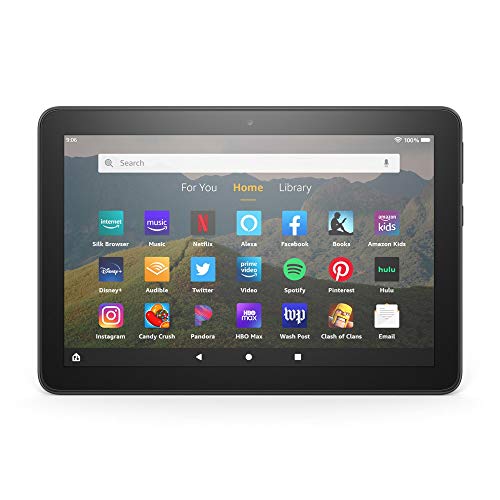
The Fire HD 8 is the tablet that built this family’s reputation, and this 2020-release configuration — 64GB of storage, black, without lockscreen ads — is the sensible way to buy it. The formula is unchanged because it works: an 8-inch HD display in a body sized for one hand and any bag, Fire OS with the Amazon Appstore, and a price that makes the purchase decision closer to choosing a paperback than choosing a computer. It streams every major service, runs the Kindle app beautifully, handles video calls and browsing, and survives being the household’s most borrowed object.
The honest limits are the classic ones. Fire OS means the Amazon Appstore, not Google Play — check your essential apps exist there before ordering. The 2020 hardware is leisurely beside the newcomers: apps open at a stroll, and demanding games should look elsewhere. The 64GB storage in this configuration is the right call over smaller tiers, since downloaded films and kids’ content fill space faster than anyone predicts, and the ads-free variant removes the lockscreen advertising that subsidises the cheapest versions. Buy it as what it is — the benchmark cheap tablet from the company that defined cheap tablets — and it will do its quiet job for years.
- Display: 8-inch HD
- Storage: 64GB
- System: Fire OS with Amazon Appstore (no Google Play)
- Release: 2020 model
- Variant: Without lockscreen ads
- Colour: Black
Strengths
- The proven budget formula: every major streaming service, Kindle and Alexa in a pocketable body.
- 64GB and ads-free is the configuration owners wish they had bought, offered here directly.
- Cheap enough to be a second, third or travel tablet without a family meeting.
Trade-offs
- Fire OS app selection excludes some Google and niche Android apps entirely.
- 2020 performance is patient — multitaskers will feel the pauses.
- HD resolution is fine for video, merely adequate for dense text.
There is a reason you will find this exact tablet in so many rental properties, grandparents’ spare rooms and site cabins: it asks nothing of its owner. No accounts maze beyond the one Amazon sign-in, no app-store research project, no anxiety when a guest’s child carries it to the pool. Owners describe it the way they describe a good kettle — it does the job, it was cheap, it is still doing the job years later. In a guide full of software caveats, that plain reliability is the HD 8’s enduring headline, and it is why the classic keeps its slot against newer, cleverer siblings.
Best for: streamers, readers and travellers wanting the classic Fire value in its best configuration. Not suited for: buyers dependent on Google Play apps or fast performance.

Amazon Alexa Tablet 8 — Compact newcomer
The Alexa Tablet 8 shrinks the newcomer formula to 8.7 inches: 4GB of RAM, 64GB of storage, a compact vivid display and the same listing language as its big sibling — Android OS with Google Play, designed for Alexa+. The size is the argument. At 8.7 inches this is a reader’s and traveller’s tablet, one hand on the train, light in a tote, at home on a nightstand as an Alexa surface that happens to have a beautiful screen. The 4GB of RAM halves the flagship newcomer’s headroom, and the experience reflects it honestly: single apps and light switching feel brisk, while heavy multitasking queues up.
Who should choose it over the cheaper classic Fire HD 8? The buyer who wants the new software story — that Google Play claim and Alexa+ design — in the portable size, and who values app breadth over the classic’s rock-bottom price. Who should not? The buyer whose apps all live happily in the Amazon Appstore already, for whom the HD 8 delivers the same evenings for less. As with the 11, treat the listing’s software description as the thing to verify in week one: install your five essential apps on day one, and let the result, not the badge, settle whether the newcomer premium was money well spent for your household.
- Display: 8.7-inch
- Memory/Storage: 4GB RAM, 64GB
- System: Listing describes Android OS with Google Play, designed for Alexa+
- Battery: All-day claim
- Form: Compact, one-hand friendly
Strengths
- The newcomer software story in the family’s most portable body.
- 64GB is generous for the size class and suits downloaded travel media.
- Doubles as a nightstand or kitchen Alexa surface better than any phone.
Trade-offs
- 4GB of RAM makes it a light-switching tablet, not a multitasker.
- Costs more than the classic HD 8 for a similar-sized screen — the premium is software.
- Listing claims deserve the same week-one verification as its big sibling’s.
Its nightstand mode deserves a specific mention, because compact Alexa-centred tablets quietly excel there: alarm and morning briefing by voice, the day’s calendar and weather on a glanceable screen, a book for the last twenty minutes of the day, and a white-noise or podcast player that does not involve handing your phone the night shift. Owners who buy the 8 for travel often find it emigrates to the bedroom within a month and has to be re-bought for the bag — a compliment disguised as a logistics problem, and a fair summary of this pick’s charm.
Best for: readers and travellers who want the new app story in a compact tablet. Not suited for: buyers content with the Amazon Appstore, who should save with the classic.

Amazon Kids Tablet 11 — Best for ages 6–12
The Kids Tablet 11 is the school-age edition: an 11-inch screen, a protective case, parental controls, and a content bundle pitched at ages 6–12 — books, apps and videos for STEM and hobbies, with the ability to add popular school apps for homework. Understand what a kids’ edition is and the purchase makes sense: it is the same hardware family as the standard models, wrapped in a case engineered for drops, fronted by a child profile with parent-set limits, and bundled with a Kids+ subscription included for the first year. The 11-inch screen suits this age band specifically — homework documents, chapter books, drawing apps and two-player games all breathe at this size in a way the little kids’ 8 cannot match.
The subscription reality must be stated as plainly in this section as in the takeaways: the included Kids+ year ends, and the service then renews at its paid rate unless a parent cancels, so diarise the anniversary the day the tablet arrives. The parental-control dashboard is the product’s quiet core — time limits, content age filters, educational goals before entertainment unlocks — and it deserves the twenty minutes of setup that turns it from a marketing line into a working system. For a child moving from picture books to projects, this is the family’s most complete package: big screen, real controls, content that grows with them, and a case that assumes the tablet will be dropped, because it will be.
- Display: 11-inch
- Audience: Ages 6–12 (per listing)
- Content: Kids+ included for a year — books, apps, videos for STEM and hobbies; school apps can be added
- Case: Kid-proof protective case included
- Controls: Parent dashboard with limits and filters
- After year one: Kids+ renews as a paid subscription unless cancelled
Strengths
- The big screen genuinely suits homework, reading and creative apps for this age band.
- Case, controls and content arrive as one considered package, not three separate purchases.
- Parents can add school apps, so the tablet grows from entertainment into schoolwork.
Trade-offs
- Kids+ becomes a paid subscription after the included year — budget or cancel deliberately.
- Same hardware family as standard models; the premium buys case, content and controls, not speed.
- An 11-inch cased tablet is a two-hand device for smaller children in this band.
One practical ritual separates satisfied kids’-edition households from frustrated ones: the monthly ten-minute dashboard review. Check what the controls caught, adjust age filters as the child grows, look at the educational goals together and refresh the approved apps each term. The tablet then ages with the child instead of freezing at the age on the box, and the Kids+ library — which spans far beyond the band printed on the listing when filters are widened thoughtfully — keeps pace. Bought and then ignored, any kids’ tablet decays into either a locked box or an open door; bought and lightly managed, this one stays neither.
Best for: children roughly six to twelve whose tablet must serve homework as well as play. Not suited for: toddlers, or families who will not manage the subscription after year one.

Amazon Kids Tablet 8 — Best for ages 3–5
The Kids Tablet 8 is aimed where tablets meet their hardest use: ages three to five, the years of drops, spills, sticky fingers and forty-minute attention spans. The formula mirrors its big sibling at a scale small hands can hold — a compact tablet in a thick kid-proof case, a child profile with parent controls, and a year of Kids+ included, stocked here with early-learning content about letters, numbers and shapes alongside books, apps and videos for the very young. At this age the case is not an accessory but the product’s premise: the tablet inside is a member of the same hardware family as the standard line, and the case is what lets it survive being a toddler’s prized possession.
Parents should go in with the same two facts stated plainly. The Kids+ subscription renews at a paid rate after the included year unless cancelled — set the reminder now, while the box is open. And the controls reward setup: age filters keep the catalogue appropriate, time limits end the evening without a negotiation, and approving content in advance beats auditing it afterwards. For its actual job — a durable, fenced, content-filled first screen for a preschooler, at a price that does not make a cracked screen a family tragedy — this little tablet is the most thoughtfully assembled product in the guide, and the one whose limitations matter least to its audience.
- Display: Compact kids’ size
- Audience: Ages 3–5 (per listing)
- Content: 1 year of Kids+ included — early-learning books, apps and videos
- Case: Kid-proof case included
- Controls: Parent dashboard with age filters and time limits
- After year one: Kids+ renews as a paid subscription unless cancelled
Strengths
- Purpose-built for the drop-and-spill years, with a case that assumes the worst.
- Early-learning content is curated for the age band rather than merely filtered.
- Parent controls are strong enough to make screen time a policy, not a daily argument.
Trade-offs
- The subscription clock starts at purchase; the renewal decision arrives faster than expected.
- Children outgrow the content band — expect a two-to-three-year service life in role.
- Performance matches the family’s value tier, which toddlers will never notice and parents might.
Grandparents buying this tablet as a gift should hear the one piece of advice that decides whether it delights: set it up with the parents before wrapping it, or hand it over with the setup offered. A preschool tablet that arrives configured — child’s profile built, content downloaded, limits agreed between the adults — starts its life as a joy. The same tablet handed over raw can spend its first month as a household argument in a colourful case. The hardware is identical either way; the adults’ twenty minutes is the difference, and it is the best-value upgrade in this entire guide.
Best for: preschoolers getting a first tablet that must survive them. Not suited for: older children, who will chafe at the content band and the chunky case.
Amazon Fire HD 10 — Prose-only pick
The Fire HD 10 is the classic line’s big screen and, for years, its best argument: a 10-inch display that made films and magazines feel at home, Fire OS with the Amazon Appstore, and pricing that undercut every name-brand 10-inch rival. For a streaming household that wanted one generous screen for the kitchen counter or the bedroom, the HD 10 was the default Fire recommendation, and its formula — big, cheap, cheerful, app-store asterisk and all — defined what buyers expected from the family. It earns its place in this guide on that merit, and many owners reading this are reading it on one.
It appears in prose for a procedural reason this guide will not fudge: no clean Amazon US listing for the Fire HD 10 could be verified when this guide was assembled, so there is no link we can stand behind. The listings that surface under its name through third-party sellers vary in configuration, condition and claim, and linking one would gamble your money on our guesswork. The practical path for buyers who want this exact model is to shop Amazon’s own storefront directly and check the seller is Amazon itself — or to take the Alexa Tablet 11 above as the family’s current big-screen answer, which is plainly where Amazon’s own shelf space now points. If you buy the HD 10 through a marketplace seller, verify storage, ads configuration and return terms with extra care.
- Display: 10-inch (classic line)
- System: Fire OS with Amazon Appstore (no Google Play)
- Role: Classic big-screen value model
- Availability: No clean listing verified for this guide — prose-only
Strengths
- The classic formula at the size films and magazines prefer.
- Years of owner history make its behaviour, limits and accessories well understood.
- Still the value big-screen Fire for buyers who find a genuine Amazon-sold unit.
Trade-offs
- Not linkable from this guide; marketplace listings demand seller scrutiny.
- Fire OS app-store limits apply in full — no Google Play.
- Amazon’s own spotlight has moved to the Alexa-badged 11-inch model.
Owners upgrading from an HD 10 to the newcomer 11 will feel the generational story in one evening: the sharper screen on the same-sized content, the snappier return to a half-finished film, the broader app shelf the listing promises. That upgrade path — classic to newcomer, same account, same library, nothing repurchased — is the quiet strength of staying inside one family, and it is available to HD 10 households whenever their classic finally retires, with no urgency imposed by this guide.
Best for: Fire loyalists who want the classic big screen and will verify the seller themselves. Not suited for: one-click buyers, who should take the linked 11-inch newcomer instead.
How Well Does This Family Work as a Smart-Home Hub?
Every pick in this guide moonlights as a smart-home surface, and for many households that becomes the primary job within a month. Propped on a kitchen stand or a hallway shelf, a Fire family tablet shows camera feeds, answers the doorbell, runs routines — lights, locks, thermostats — and takes voice commands hands-free while your hands are in the washing-up. The Alexa-badged newcomers lean hardest into this role by design, with Alexa+ as their stated centre, but the classic models have carried Alexa for years and handle the dashboard duties happily. A retired-from-personal-use Fire, demoted to permanent hub duty on a counter, is one of the best second lives in consumer tech.
Set the role up deliberately and it shines: a dedicated home-screen layout of device tiles, the doorbell and camera apps signed in, a stand that angles the screen at standing eye height, and a charger that lives at that station permanently. Households should also decide the privacy posture — camera and microphone toggles exist on these devices, and a hub in a hallway deserves the same thought as any always-listening hardware. Done thoughtfully, the family’s cheapest tablet can run the visible layer of a smart home more gracefully than a phone passed hand to hand, which is a remarkable sentence to write about the budget end of any category.
What Is It Like to Read on These Tablets?
Reading built this family’s second reputation, and the picks divide by how seriously they take it. The classic HD 8 is a fine casual reader — Kindle app, adjustable warmth and brightness in the app, a size that mimics a paperback — but its HD resolution shows on dense text and long sessions favour a dedicated e-reader’s e-ink. The Alexa Tablet 11’s 2.5K panel is the family’s first genuinely print-like screen: magazines, comics, cookbooks and PDFs with fine print all gain from the resolution, and the 11-inch page suits two-column layouts that cramp smaller slates. The compact Alexa Tablet 8 sits between, sharper in spirit than the classic and sized for novels on the move.
The honest hierarchy for book-first buyers runs: dedicated e-reader for novels, the 11-inch newcomer for mixed reading with colour and layout, the 8-inch models for casual and travel reading. Where the tablets beat any e-reader is everything around the book — looking up a reference mid-chapter, switching to the audiobook, reading a recipe with photos, or handing the device to a child for a picture book in full colour. Households that read across formats, rather than novels alone, will find the family’s reading case stronger than its resolution figures suggest, provided long novel sessions get the brightness and warmth settings tuned on day one.
How Do Downloads and Storage Work Across the Family?
This family lives on downloaded media — films for flights, kids’ content for car journeys, books and music for offline days — so storage behaviour matters more than processor bragging. The rule across the range is to buy more storage than your streaming life suggests, because downloads accumulate silently: a season of a children’s show, a holiday’s worth of films and a shelf of Kindle books can halve a small drive before anyone notices. The 128GB newcomer and the 64GB configurations in this guide are sized with that reality in mind, and buyers choosing between storage tiers on any model should take the larger one whenever the step is modest.
Management habits keep a Fire family tablet breathing. Set video apps to download at standard quality for travel rather than maximum, since tablet screens forgive the difference and storage does not. Review the downloads shelf monthly and evict finished series. Keep photos and documents in cloud storage rather than local folders where the app allows it. And teach every household member the difference between streaming and downloading — the single most common cause of a “full” tablet is a well-meaning relative downloading an entire catalogue for a weekend trip. Storage discipline is unglamorous, and it is the difference between a tablet that feels new in year three and one that nags from month six.
How Do the Six Fire Family Tablets Compare Side by Side?
| Pick | Screen | Software | Storage | Character |
|---|---|---|---|---|
| Amazon Alexa Tablet 11 (128GB) | 11-inch 2.5K | Listing: Android with Google Play, Alexa+ | 128GB | New flagship form |
| Amazon Fire HD 8 (64GB) | 8-inch HD | Fire OS, Amazon Appstore | 64GB | Classic budget benchmark |
| Amazon Alexa Tablet 8 | 8.7-inch | Listing: Android with Google Play, Alexa+ | 64GB | Compact newcomer |
| Amazon Kids Tablet 11 | 11-inch | Kids profile + Kids+ year | — | Ages 6–12, cased |
| Amazon Kids Tablet 8 | Compact | Kids profile + Kids+ year | — | Ages 3–5, cased |
| Amazon Fire HD 10 | 10-inch | Fire OS, Amazon Appstore | — | Prose-only classic big screen |
Prices are deliberately absent from the table because this family is promoted so relentlessly that any printed figure would be stale within the week; the tiers, however, are stable — classics at the floor, kids’ editions a step up for their bundles, newcomers at the family’s ceiling, which still sits below rival brands’ entry points.
Two forks decide everything in this table. Software first: Fire OS and its Appstore on the classics, the newcomers’ broader listing claim on the Alexa-badged pair. Audience second: standard models for general use, kids’ editions whose value is case, content and controls rather than hardware. A buyer who answers those two forks honestly has effectively chosen their row before price enters the conversation.
Why Does This Family Own the Travel-Tablet Niche?
Ask frequent travellers what tablet rides in their bag and this family answers out of all proportion to its price, for reasons that compound. The hardware is cheap enough that loss, theft or a cracked screen ruins a trip’s afternoon rather than its budget. The content ecosystem is download-friendly — films, shows, books and music load at home and play in airplane mode without negotiation. The battery endurance suits long-haul days. And the compact models fit tray tables and one hand in a departure lounge in a way flagship slates, with their price tags and their owners’ anxiety, never quite do.
Prepare one properly and the niche makes even more sense. Download before you leave: two films per flight hour is the household rule that prevents both boredom and storage panic. Fit the case, pack the charger in the same pouch every trip, and sign the streaming apps in at home where the passwords live. Parents add the child’s profile check — content downloaded, limits set, headphones paired — to the packing list. The family’s value pricing also makes the two-tablet travel strategy viable: one for the adult, one for the child, each loaded with its own library, for less than a single premium slate that everyone would have to share and someone would have to guard.
How Do Parental Controls Actually Work Day to Day?
The kids’ editions live or die on their controls, so here is the working reality rather than the brochure. A parent account holds the keys: from the dashboard you set the child’s age so content filters pitch correctly, draw daily time limits and a bedtime window after which the tablet simply stops for the night, and choose whether web browsing exists at all. Educational goals can require a block of learning apps before entertainment unlocks — the feature parents cite most, because it converts the daily screen-time negotiation into a rule the tablet enforces neutrally. Every app and video outside the Kids+ catalogue needs a parent’s approval to install, which keeps the library intentional.
The controls are strong but not magic, and the honest caveats belong in a buying guide. A determined older child will find the seams of any filter, which is why the 6–12 edition pairs its controls with addable school apps and a path toward a normal profile as the child matures. Filters occasionally block the innocent and pass the questionable, so the monthly review ritual mentioned earlier is maintenance, not paranoia. And controls govern the tablet, not the household’s other screens — a point worth remembering before blaming this little device for a problem that lives on an unfiltered phone. Set up with open eyes, the system is the most complete offered at this price anywhere in tablets.
How Do You Set Up a Fire Family Tablet for a Household?
Begin with accounts, because this family is built around them: sign in with the household’s Amazon account so Prime Video, Kindle books and purchased apps appear without repurchasing, then run every system update before judging performance — these tablets often ship a version behind. Classic Fire owners should open the Amazon Appstore and install their streaming and reading essentials, confirming each must-have app exists before the return window becomes a memory. Newcomer owners should do the same through the app source their listing describes, treating day one as the verification the listings invite.
Profiles deserve their thirty seconds of fame in the setup hour: standard models support separate profiles so a parent’s library and a teenager’s games need not collide on one home screen, and switching profiles is how a shared Fire stays civilised. Set them up while the tablet is new and empty, because retrofitting profiles onto a year of accumulated downloads is the kind of chore households postpone forever. While you are in settings, choose the household’s stance on lockscreen advertising where the variant allows, set the sleep timer to something shorter than the factory default, and register the device warranty details somewhere findable — value tablets get replaced on memory of purchase dates more often than any owner expects.
Then shape the tablet to its station. A kitchen tablet gets a stand, a recipe and video home screen, and Alexa routines for timers and shopping lists. A child’s tablet gets its profile built properly: age filters set, time limits agreed while everyone is calm, and the Kids+ renewal date written into the family calendar. A travel tablet gets its films and books downloaded over home Wi-Fi, not airport Wi-Fi. Every tablet in the family rewards the same final step — a case or its included one fitted before first use, because value pricing is not the same as invulnerability, and the family’s whole charm is being cheap to own, not free to replace.
Why Buy Amazon’s Tablet Instead of a No-Name Android One?
The sharpest competition for this family is not Apple or Samsung — it is the swarm of unbranded Android tablets undercutting even Fire prices, promising bigger numbers on every line of the spec sheet. Some are adequate. The differences that matter are the ones listings cannot photograph: software updates that actually arrive, an app store curated rather than merely present, a return and warranty path that begins with a company you can name, and performance claims measured against reality. Amazon’s tablets are built by a company whose reputation rides on them, sold through its own storefront, and supported with updates for years — a discipline the swarm, whatever its spec sheets say, structurally cannot match.
The newcomers complicate the old trade in an interesting way: if their listings’ Google Play claim holds, the classic reason to endure a no-name tablet — app breadth — weakens considerably, leaving price as the swarm’s only argument, at tiers where the saving buys a pizza rather than peace of mind. None of this makes the Fire family luxurious; it makes it accountable. In the cheapest corner of the tablet market, accountability is the premium feature, and it is the reason this guide’s budget recommendation wears Amazon’s badge rather than a string of capital letters no one can pronounce.
How Long Do These Tablets Stay Useful?
Value tablets age on two clocks. The hardware clock is kind: screens, batteries and speakers in this family routinely serve four or five years of media duty, because streaming and reading do not demand more power each year the way games do. The software clock is the sterner one — app stores eventually leave old operating versions behind, and security updates taper. The classic HD 8’s 2020 vintage means its app runway, while still serviceable today, is the shortest in this guide; the newcomers, with current software, start their clocks now. Buyers should match the model to the intended service length: a travel spare or a child’s first tablet can happily be a classic, while the household’s main screen deserves the newest software on the shelf.
Care habits stretch both clocks. Keep the battery out of permanent full-charge heat where a hub-duty tablet allows it, clear downloads before storage squeezes performance, and let system updates install rather than deferring them into a backlog. When a tablet finally ages out of front-line duty, this family has a graceful retirement ladder — smart-home hub, kitchen recipe screen, guest-room streamer, child’s hand-me-down — that keeps hardware useful long after a premium tablet’s owner would have traded up. Total lifetime value, measured in years of small daily services, is where the Fire family’s arithmetic quietly beats almost everything else with a screen.
Which Mistakes Do Fire Tablet Buyers Make Most?
Start with the mistake that hides inside a success: buying one tablet for a whole household’s conflicting jobs, then watching it live in one person’s hands. This family is priced for plurality — the shared hub, the child’s cased edition, the traveller’s classic — and households that embrace that, rather than rationing a single screen, report the highest satisfaction per pound spent in the entire tablet market.
The canonical mistake is buying a classic Fire for an app that lives only on Google Play, then blaming the tablet. Check the Appstore first; it takes two minutes and decides the purchase. The second is forgetting the Kids+ renewal — the included year is generous, but the household that never diarised it meets the subscription as a surprise charge. Third, buyers compare the kids’ editions against standard models on hardware alone and conclude the case is overpriced, missing that the bundle is case, content, controls and warranty of mind in one box.
Fourth, shoppers buy the smallest storage tier to save a little and spend years deleting downloads; on a family built around downloaded media, storage is the one upgrade that always pays. Fifth, buyers of the prose-only HD 10 grab the first marketplace listing under its name without checking the seller, configuration or condition. And sixth, owners expect laptop behaviour from any of these — they are media appliances with browsers, not office machines, and the household that buys them for what they are stays fond of them for years.
Which Model Fits Which Household Member?
Match the person to the pick and the family logic clicks. The household’s shared screen — the one that lives in the kitchen and answers to everyone — is the Alexa Tablet 11, whose size, speakers and hub design suit communal duty. The commuter and the novel-reader get the Alexa Tablet 8, light enough to hold for a chapter or a whole journey. The grandparent who wants video calls and the news without a computing hobby gets the classic Fire HD 8, whose simplicity is a feature money usually cannot buy. The schoolchild gets the Kids Tablet 11 with its homework-ready screen; the preschooler gets the Kids Tablet 8 and its armour. And the Fire loyalist with a beloved big-screen classic in mind hunts the HD 10 carefully, seller by seller.
Households buying two should pair across the forks rather than doubling one model: a newcomer for the adults and a kids’ edition for the child covers more life than two of either. Notice, too, what no member of the household needs — a premium flagship. This family’s whole thesis is that tablet jobs at home are media, reading, calls and control, and that a device specced honestly for those jobs, at these prices, leaves money for the things a household notices more: the stand, the case, the second charger, the subscription chosen deliberately instead of by surprise.
Final Recommendation
A closing thought on value, since this family invites the word: cheap is a price, value is a ratio, and the ratio here is years of daily small services — the timer set by voice, the grandchild’s face on a call, the film that made a flight vanish — divided by a price most households spend on a single celebration dinner. Measured that way, even the family’s flagship newcomer is inexpensive, and its classics are close to free.
For most Amazon households, the Alexa Tablet 11 is the family’s present and future in one box: the best screen it has shipped, real multitasking headroom and a software claim that, as listed, removes the classic caveat — verify your apps in week one and enjoy it. The Alexa Tablet 8 is the same idea for readers and travellers. The Fire HD 8 in its 64GB ads-free form remains the unbeatable cheap classic for Appstore-content lives, and the two kids’ editions are the right answers for their age bands provided the subscription anniversary goes in the calendar today. The HD 10 stands as the respected elder, available to those who shop carefully. Buy the standard Fire for the sofa, the kids’ edition for the child, and the newcomer for the future — and know, as you tap order, exactly which app store your evenings will live in, because that single piece of self-knowledge is worth more than any specification in this guide.
Frequently Asked Questions
Do Fire tablets have Google Play?
Classic Fire models do not — they run Fire OS with the Amazon Appstore. The newest Alexa-badged models’ listings describe an Android OS with Google Play; that is a listing claim to verify on the product page and with your essential apps in the first week of ownership.
What happens to Kids+ after the first year?
The included year ends and Kids+ renews as a paid subscription unless you cancel. The content library remains the product’s core value, so many families keep it deliberately — the mistake is letting the renewal happen by accident rather than by decision.
Are the kids’ editions different hardware?
They are the same hardware family as the standard models, wrapped in a kid-proof case with a child profile, parental controls and the Kids+ bundle. You are paying for protection, content and controls — which, for a child’s tablet, are the features that matter.
Why is the Fire HD 10 not linked?
No clean Amazon US listing for it could be verified when this guide was assembled, and marketplace listings under its name vary too much in seller and configuration to recommend blindly. Buy it only from a listing you have checked carefully, or choose the linked Alexa Tablet 11.
Can I video-call on these tablets?
Yes — the family supports video calling through its built-in apps and major services available in its app sources, and the newcomers’ Alexa centring makes drop-in calls to other Alexa devices in the household especially simple. Front cameras across the range are built for calls rather than photography, which is the right priority for how these tablets are actually used.
With or without lockscreen ads — which variant should I choose?
The ads-supported variants cost less because lockscreen advertising subsidises them; the ads-free versions, like the Fire HD 8 configuration linked in this guide, remove the interruptions. Households buying for children or for a shared hub usually find the ads-free variant worth it; a personal travel tablet is where the savings version makes its best case.
Can these tablets replace a laptop?
Not honestly. They stream, read, browse, call and control a smart home beautifully, and light email and documents are fine — but their processors, storage and software are appliance-grade. Buy them as media and household screens and they excel.
Related Guides
Compare the wider tablet world through the best samsung tablets, the best lte tablets, the best tablets for recipes, the best android tablets for boating and the best android tablets with hdmi.


