What's inside
- Where to buy
- Key Takeaways
- Quick Picks
- How did we police the ink counts in this guide?
- Which five-plus ink printer deserves your desk?
- What does the extra ink actually do to a photograph?
- How do you keep a multi-ink printer printing like new?
- Why are there two kinds of black in one small printer?
- How do you print black-and-white photographs on a colour machine?
- What paper makes a five-ink photograph look its best?
- How do you archive a family’s photographs with one of these?
- What does a photograph actually cost on each system?
- How do you choose between Epson’s Premium and Photo families?
- How far can you enlarge a phone photograph on these machines?
- Why do these machines own the greeting-card and craft economy?
- How do the six compare side by side?
- What mistakes do five-ink shoppers keep making?
- Final Recommendation
- Frequently Asked Questions
- Related Guides
As an Amazon Associate I earn from qualifying purchases. This post may contain affiliate links at no extra cost to you.
gizmoverdict.com is reader-supported. When you buy through links on our site, we may earn an affiliate commission.
Where to buy
All six printers below are linked to their Amazon listings. In this category more than most, read the listing’s ink description before ordering — the difference between a five-colour machine and a six-colour one is the entire subject of this guide, and sellers do not always headline it accurately.
The best 5 ink cartridge inkjet printers live in the most misunderstood aisle of home printing. Four inks — black, cyan, magenta, yellow — print a perfectly decent document and a recognisably mediocre photograph. The fifth ink is where photographs stop being documents with pictures on them: an extra photo black that deepens shadows without muddying them, or a grey that walks a gradient down gently instead of dropping it off a cliff. Buyers sense the difference in a side-by-side print instantly and struggle to name it, which is why this category collects confused reviews — people praising or damning machines for an ink architecture they never knew they had bought.
This guide names it, machine by machine, with a discipline the listings themselves blur. Two of the six picks are true five-colour printers, exactly as the category promises. Three are six-ink machines included deliberately and labelled as such, because they are what five-ink shoppers actually cross-shop and often should buy. One is a tank printer wearing the family’s colours without a cartridge in sight. We will not blur the counts to make the title tidier — the honest map of this shelf has five-PLUS written across it, and each pick below states its number in plain figures and explains what the extra channel does for your photographs.
Key Takeaways
- The fifth ink is a photo specialist — usually a photo black or grey — and it improves photographs specifically, not documents.
- Only the two Epson Expression Premium models here are strictly five-colour; the Canon TS8820 and the two Expression Photo models are six-ink, and this guide labels them so.
- Individual cartridges matter as much as the count: you replace the colour that emptied, not a tri-colour block with two colours still full.
- The XP-970 stretches the idea to wide format, printing six-colour photographs at 11×17 from a home all-in-one.
- Canon’s G620 is the exception that proves the category: six inks, zero cartridges, refillable tanks for photo printing at volume.
- Document-heavy households gain little from the fifth ink — its budget belongs to people who print photographs they intend to keep.
Quick Picks
| Pick | Badge | Why it earns its place |
|---|---|---|
| Epson Expression Premium XP-7100 | Best true 5-colour | The category’s textbook answer: five individual inks, an auto document feeder and borderless photos in a compact all-in-one. |
| Epson Expression Premium XP-6100 | Best compact 5-colour | The same five-ink architecture in a smaller, simpler body for desks that print photos and paperwork in equal measure. |
| Canon PIXMA TS8820 | Best 6-ink all-rounder | Six individual inks with Canon’s photo polish — the six-ink upgrade five-ink shoppers should honestly consider. |
| Epson Expression Photo XP-970 | Best wide 6-colour | Six-colour photo printing stretched to 11×17, for home photographers whose pictures outgrew the standard frame. |
| Epson Expression Photo XP-8800 | Best everyday 6-colour | The newer Expression Photo all-in-one: six inks, friendly pace, and photo quality with household manners. |
| Canon PIXMA G620 MegaTank | Best tank exception | Six inks delivered from refillable tanks — the photo printer for people who print photographs by the hundred. |
How did we police the ink counts in this guide?
By counting, out loud, per model, from the makers’ own descriptions — and by refusing the category’s favourite euphemism. Manufacturers market “5-colour” systems that include a pigment document black alongside four dye colours, and “6-colour” systems that add a photo black to that arrangement; both claims are true and neither means what a casual reader assumes. Our rule for this guide: the count in a pick’s section is the count of ink cartridges or channels the machine actually carries, named individually, with the document black and the photo black treated as the different tools they are. A pigment black exists to make text crisp and water-resistant on plain paper. A photo black exists to give glossy and matte photographs their shadow depth. Machines with both are not cheating — they are better equipped — but they are six-ink machines, and this guide calls them that.
Selection then followed the photograph. Every pick had to print borderless photos, accept individual ink replacements, and come from a line whose photo output we could stand behind at normal viewing distances. Four-ink machines with a marketing badge were excluded regardless of price, as were five-ink machines whose fifth cartridge was a cleaning fiction. What survived is the honest shelf: two true fives, three sixes that shoppers will meet anyway, and one tank that rewrites the running-cost side of the same conversation.
We also checked the unglamorous ownership details that decide year two: whether high-capacity versions exist for the colours that empty first, whether the machines accept prints from phones without a wrestling match, and whether their scanning halves are honest all-in-one tools or decorative lids. A photo printer lives in a household, not a laboratory, and several technically interesting models were set aside because their domestic manners — noise, waking speed, app behaviour — would have made them resented long before their ink architecture could be appreciated.
Which five-plus ink printer deserves your desk?
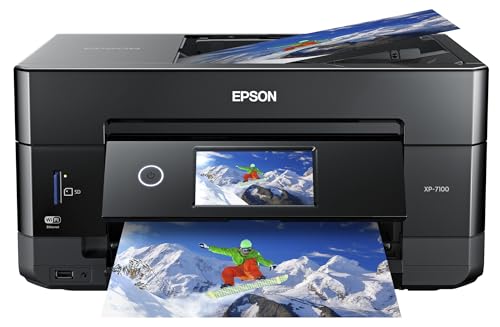
Epson Expression Premium XP-7100 — Best true 5-colour
The XP-7100 is the machine this category’s name describes without an asterisk. Its five-colour system — the standard photographic trio plus two blacks with separate jobs, a pigment black for documents and a photo black for images — is the classic Expression Premium architecture, and it prints photographs with the shadow depth and tonal calm that four-ink machines visibly lack. Around that ink set sits a complete small all-in-one: an automatic document feeder for the household’s paperwork, automatic two-sided printing, borderless photo output, and a touchscreen that keeps the whole arrangement approachable.
In a home that prints school projects, holiday photographs and the occasional framed enlargement, the XP-7100’s balance is its genius. Documents emerge with the crisp, water-tolerant text the pigment black exists for; photographs emerge with the glossy depth the photo black exists for; and because every colour is an individual cartridge, a month of printing blue-heavy seascapes costs you a cyan cartridge, not a tri-colour block. It is not the fastest or the widest machine here, and it makes no claim to be. It is the five-ink idea executed completely, in the body size most homes actually have room for.
Its party trick for families is the feeder-plus-photo combination: the same machine that digitises a term’s worth of school paperwork on Monday enlarges Friday’s football photograph without a personality change. Households underestimate how much that dual citizenship matters until they have owned a specialist that does one job beautifully and the other grudgingly. The XP-7100 does both with the same set of inks, which is the entire Expression Premium proposition stated in one sentence.
Its document feeder quietly changes the household’s paperwork physics, too. The stack of forms, receipts and school letters that accumulates on a flatbed-only machine — each sheet a small appointment nobody keeps — moves through the 7100 in one attended minute, and the resulting files are searchable, shareable and, at last, actually filed. Buyers often choose this model for its photographs and end up citing the feeder in their recommendations to friends, which tells you something true about how all-in-ones are actually lived with.
- Inks: 5 individual — pigment black, photo black, cyan, magenta, yellow
- Functions: print, scan, copy with document feeder
- Two-sided printing: automatic
- Speed: up to 15.8 ppm per the listing
- Connections: wireless, USB
Strengths
- True five-colour architecture with both blacks doing their proper jobs.
- Feeder, duplex and photo quality in one compact footprint.
- Individual cartridges keep colour-heavy months affordable.
Trade-offs
- Standard sizes only — wide ambitions belong to the XP-970 below.
- Cartridge capacities suit households, not print businesses.
- The touchscreen-led controls assume a phone-era comfort level.
Best for: families and home offices wanting the genuine five-ink experience without bulk. Not suited for: wide-format photographers, or high-volume photo sellers.
The textbook pick is easy to shop for: see the XP-7100’s Amazon listing and note the XL cartridge options for the colours your household burns fastest.

Epson Expression Premium XP-6100 — Best compact 5-colour
The XP-6100 takes the same five-ink architecture as its sibling and trims the furniture around it. What you keep is everything photographic: the pigment black for documents, the photo black for images, borderless output, and individual cartridges throughout. What you surrender is the document feeder and some of the flagship’s physical polish — scanning and copying happen one sheet at a time on the flatbed, and the body is the smaller, lighter expression of the idea. For a desk that prints photographs weekly and paperwork occasionally, that is not a compromise; it is the correct allocation of money.
The XP-6100 suits the second-desk and small-apartment reality of much home printing. It connects by Wi-Fi and USB, accepts prints from memory cards, and produces the same family resemblance in its photographs as the XP-7100 — because the ink system writing them is the same. Buyers choosing between the siblings should count their scanning, not their printing: stacks of documents argue for the feeder model, while a life of single sheets and photographs argues for saving the difference and spending it on paper and a spare photo black.
There is a quiet virtue in its simplicity worth naming: fewer moving parts in the paper path means fewer ways for a household machine to be defeated by a child’s enthusiastic loading. The XP-6100 is the printer relatives cannot easily break and cannot easily outgrow either, because its photographs remain honestly good long after its paperwork manners have been forgiven. Longevity in this class is mostly a story of not being hated, and nobody hates this machine.
Students discover its other talent in their first term: the coursework print. A photography assignment printed at home, at midnight, at the size the tutor demanded, without a lab’s timetable or a print shop’s queue, is worth more than the grade it earns — it teaches the student that printing is part of photography rather than a service performed elsewhere. The XP-6100’s price of admission puts that lesson within a student loan’s conscience, which is why it keeps appearing in halls of residence like a rite of passage.
- Inks: 5 individual — the Expression Premium arrangement
- Functions: print, scan, copy, flatbed only
- Borderless photo printing at household sizes
- Inputs: wireless, USB, memory card
- Speed: up to 15.8 ppm per the listing
Strengths
- The full five-ink photo benefit in the smaller body and budget.
- Simple, robust paper handling that households cannot confuse.
- Same ink family as its sibling — supplies knowledge transfers.
Trade-offs
- No document feeder; multi-page scanning is a manual ritual.
- Plainer finish and smaller presence than the XP-7100.
- Standard sizes only, like its sibling.
Best for: small desks, students and photo-printing households with light paperwork. Not suited for: anyone who scans documents in stacks.
Compact-desk shoppers can check the XP-6100 on Amazon — the saving against its sibling buys a respectable first paper library.

Canon PIXMA TS8820 — Best 6-ink all-rounder
Now the honest upgrade. The TS8820 carries six individual inks — Canon adds a photo blue to the five-ink arrangement, a channel dedicated to smoothing the skies, seas and skin-adjacent gradients where banding first appears — and the result is the most polished photographic output in this guide at household sizes. It prints, scans and copies with Canon’s customary interface grace, produces borderless photographs with a finish that flatters beginners, and does all of it in a body styled to live visibly in a home rather than hide in a study.
Why is a six-ink machine in a five-ink guide? Because this is the comparison every real shopper makes, and pretending otherwise would make the guide useless at the exact moment of decision. The five-ink Epsons answer the category’s title; the TS8820 answers the shopper standing beside them wondering whether one more channel is worth it. For photographs, measurably, it is — the photo blue’s gradient work is visible in exactly the images families print most. For documents, the sixth ink is a passenger. Decide which output your household frames, and the Canon’s presence here justifies itself.
Canon’s software manners complete the case. The TS8820’s setup, its phone printing and its maintenance guidance are the friendliest in this guide, which matters in a category bought by households rather than print technicians. A six-ink machine that a teenager can operate and a grandparent can refill correctly is a machine whose ink architecture will actually be used — and unused sophistication is the only true waste in home printing.
Watch it print a summer sky and the photo blue justifies its cartridge slot in public. Lesser machines build that gradient from cyan alone and the steps show like contour lines on a map; the TS8820’s extra channel halves the step size, and the sky goes back to being weather instead of topography. It is a small, specific magic, performed on the exact subject — holiday skies — that fills more family albums than every other subject combined.
- Inks: 6 individual, including photo blue
- Functions: print, scan, copy
- Positioned by Canon for home photo printing
- Body: styled, home-visible design in white
- Connections: wireless, USB
Strengths
- Photo blue delivers the smoothest gradients in this guide.
- Interface and app manners the whole household will actually use.
- Six individual inks keep replacement honest and proportional.
Trade-offs
- Six cartridges to stock — the running shelf is wider than a five’s.
- Document pace is domestic rather than office-grade.
- Standard sizes only; wide work belongs to the XP-970.
Best for: photo-first households wanting the gradient quality six inks buy. Not suited for: paperwork-heavy home offices, or wide-format ambitions.
If gradients are your weakness, look at the TS8820’s Amazon page and price its six-cartridge set beside the five-ink Epsons’ five.

Epson Expression Photo XP-970 — Best wide 6-colour
The XP-970 asks what happens when the five-plus idea grows up and goes wide, and the answer is the most capable photo all-in-one in this guide. Its six-colour Expression Photo ink set — the photographic colours plus the light channels that smooth skin and sky — drives a machine that prints borderless photographs up to 11×17, scans and copies, and accepts work from USB and memory cards like a photo kiosk that happens to live in your house. For the home photographer whose prints kept hitting the ceiling of standard sizes, this is the door in that ceiling.
Wide output changes the household’s relationship with its own photographs. An 11×17 of a landscape stops being an enlargement and becomes the room’s focal print; a family portrait at that size, from a six-colour machine with light inks in its gradients, holds a wall without embarrassment. The trade is pace and appetite: the XP-970 prints at a photographer’s tempo rather than an office’s, and six cartridges feeding wide pages empty with a rhythm that rewards keeping spares. Neither fact diminishes it. This is a photo machine that also does paperwork, and it should be bought in that order of priorities.
Its scanning side deserves the photographer’s attention too, because a wide-bed all-in-one digitises the oversize originals — the child’s A3 drawing, the vintage print too large for a letter scanner — that standard machines refuse. The XP-970 thereby closes a loop the other picks leave open: big originals in, big photographs out, one machine, one ink family, no lab in the middle taking a fortnight and a fee.
Its light inks earn a portraitist’s footnote. Skin is the hardest gradient in photography — a cheek turning from light to shadow crosses a dozen tones that banding loves to interrupt — and the six-colour set’s pale channels are essentially a dedicated budget for exactly that journey. Family photographers who print faces large will see the XP-970’s advantage in the first enlargement, in the place they look first, which is how a machine becomes the household’s portrait printer for a decade.
- Inks: 6-colour Expression Photo set
- Maximum print: wide format to 11 x 17 in.
- Functions: print, scan, copy
- Inputs: wireless, USB, memory card
- Speed: up to 8.5 ppm per the listing
Strengths
- Six-colour quality at 11×17 — the widest photographic reach here.
- Light inks give portraits and skies their smoothest treatment.
- Wide scanning completes the big-original, big-print loop.
Trade-offs
- Photographer’s pace; paperwork queues will feel it.
- Six cartridges across wide pages is a real consumables rhythm.
- The largest footprint among the cartridge picks.
Best for: home photographers ready to print and scan beyond standard sizes. Not suited for: speed-first offices, or strict five-ink purists.
Wide-format households should examine the XP-970 on Amazon and measure the desk first — it earns space, but it takes it.

Epson Expression Photo XP-8800 — Best everyday 6-colour
The XP-8800 is the newer Expression Photo all-in-one, and it represents the six-ink idea in its most domesticated form: six-colour photo printing, scanning and copying, memory card and USB inputs, and a pace and interface tuned for a household that prints photographs the way it makes tea — regularly, unceremoniously, and with an expectation it will simply work. Its colour output carries the family signature, smooth and willing, with the light-ink gradient manners that separate six-ink photographs from four-ink ones at a glance.
Choose it over the XP-970 when your photographs live at standard sizes and your premium is on everyday ease; choose it over the five-ink Premiums when the photographs outnumber the documents and gradients matter more than feeder capacity. The XP-8800’s honesty is its positioning: it does not pretend to be an office machine with a photo hobby, nor a photo lab with a scanning sideline. It is a home photo all-in-one of the current generation, priced and paced accordingly, and households that match that description will find it the least argumentative machine in this guide.
Newer-generation details accumulate in its favour over a year of ownership: quicker waking, tidier wireless behaviour, and maintenance prompts that arrive before problems rather than after them. None of those will ever headline a listing, and all of them decide whether a printer is loved in year two. The XP-8800 is built to be loved in year two, which is a rarer design goal than it should be.
It also inherits the family’s quiet talent for the school-run economy: permission slips scanned before breakfast, a birthday invitation designed at lunch and printed by three, a science-fair poster board’s photographs produced the night before without a single trip to a shop. Six inks sound like a photographer’s luxury until a household discovers they were buying uptime — the absence of errands — and the XP-8800 delivers that absence with better photographs than the errand ever produced.
- Inks: 6-colour Expression Photo set
- Functions: print, scan, copy
- Inputs: wireless, USB, memory card
- Speed: up to 10 ppm per the listing
- Position: current-generation home photo all-in-one
Strengths
- Six-ink photo quality in the friendliest everyday package here.
- Current-generation connectivity and waking manners.
- Balanced pace for a household’s mixed photo and paper life.
Trade-offs
- Standard sizes only — the XP-970 owns the wide brief.
- Six-cartridge running costs exceed the true fives’ five.
- No document feeder for stack scanning.
Best for: photo-leaning households wanting current, easy six-ink printing. Not suited for: wide-format work, or document-stack households.
Everyday photo printers can view the XP-8800’s Amazon listing and compare its footprint with the XP-6100 if desk space is the tiebreaker.

Canon PIXMA G620 MegaTank — Best tank exception
The G620 breaks this guide’s title cheerfully and on the record: it is a six-ink photo all-in-one whose inks arrive in bottles and live in refillable tanks, so the “cartridge” count is zero and the colour count is the joint-highest here. It exists in this guide because the five-ink shopper’s real question — how do I get better photographs without punitive running costs — finds its most radical answer in a machine that abandons cartridges entirely. Its six-ink set, including a grey and a red that flatter portraits and warm tones, produces photographs of genuine quality at standard sizes, in volumes no cartridge machine in this guide can economically follow.
The MegaTank bargain is by now familiar: a higher shelf position, then ink so inexpensive that printing a proof stops requiring a decision. For photo printing that behavioural change is transformative — test prints, duplicates for grandparents, the third version of the holiday card, all become free of the small financial flinch that cartridge owners perform unconsciously. The G620’s compromises are the tank family’s usual ones: it rewards regular use, its pace is unhurried, and refilling, while clean when done carefully, asks for a steady hand and a covered desk the first time.
It also speaks to a specific household economy: the one that prints photographs as a love language, in quantity — school years documented monthly, family history distributed to every relative, a grandparent’s archive reprinted for the whole clan. Cartridge machines tax that generosity per page; the G620 makes it a rounding error. If your photo printing has a distribution list, the tank exception stops being an exception and becomes the recommendation.
Grandparents, specifically, are its power users. The G620 in a grandparent’s house becomes a one-person publishing house — every school photograph reprinted for every aunt, every new great-grandchild’s portrait on every fridge in the family — and the bottle economics are what make that generosity sustainable rather than a monthly act of financial courage. Machines are usually bought for specifications; this one is bought, in the end, for the size of the family it can afford to keep in pictures.
- Inks: 6, delivered as refillable MegaTank bottles
- Functions: print, copy, scan
- Ink colours include grey and red photo channels
- Position: high-volume home photo printing
- Connections: wireless, works with voice assistants per the listing
Strengths
- Six-ink photo quality at bottle-ink running costs.
- Proofing and duplicating become decisions of taste, not money.
- Generous included ink starts the habit without a second purchase.
Trade-offs
- No cartridges at all — purists of the category title may look away.
- Unhurried pace, and idle months invite maintenance cycles.
- Refilling is a small ceremony that deserves a steady hand.
Best for: prolific photo printers, family archivists and generous duplicators. Not suited for: occasional printers, or anyone who wants cartridges specifically.
Prolific households, see the G620 on Amazon and compare a year of your photo volume against the cartridge maths one final time.
What does the extra ink actually do to a photograph?
It works where photographs fail first: the shadows and the gradients. A four-ink machine builds a dark tone by layering its colours densely, and the result in a shadowed face or a night sky is a muddy congestion — detail drowns in ink. A dedicated photo black gives the printer a native way to be dark, so shadows keep their separation and their secrets. Gradients fail differently: a sky stepping from deep blue to pale must be built from dots of a few colours, and with only strong colours available the steps show as bands. Light inks — light cyan, light magenta, photo blue, grey — let the machine mix paler tones natively, and the bands dissolve into weather.
Hold two prints side by side and the fifth and sixth inks announce themselves in exactly those places: the shadow under a chin that still shows a collar’s edge, the dawn sky that fades instead of stripes, the black-and-white print whose greys walk down in a staircase instead of falling off a landing. Documents gain nothing from any of it, which is why this guide keeps insisting the category is a photographic purchase. Buy the extra ink for the pictures you keep, and it pays you every time you look at them.
There is a corollary worth stating for the document-minded reader who has wandered this far: none of this makes four-ink printers bad. It makes them specialists of the opposite kind, optimised for text and graphics where the fifth channel would sit unemployed. The sin this category corrects is not the four-ink machine’s existence but the photograph’s quiet demotion inside households that print pictures weekly and paperwork rarely, yet bought the paperwork machine because its ink count was never explained to them. Consider it explained.
How do you keep a multi-ink printer printing like new?
Use it, briefly and weekly, because inkjet nozzles are happiest in motion and every machine here will spend ink on cleaning if you let idleness make the decision for it. Print photographs on the paper they were profiled for, with the media type set to match — half the “my photo printer faded” stories in this category are a glossy sheet printed on a matte setting, starved or flooded by a driver guessing wrong. Keep one spare of your fastest-emptying colour, which in photo households is usually a light ink or the photo black, so a Sunday print is never hostage to a delivery van.
Store cartridges and bottles upright, in the room’s temperate middle, and never in the garage’s seasonal extremes. When a colour starts banding, run the machine’s own nozzle check before the deep clean — the check costs a whisper of ink and tells you whether the problem is a nozzle, a setting or a nearly empty cartridge pretending to be a fault. These are small liturgies, but a five-plus ink machine is a small orchestra, and orchestras stay in tune by being played.
One more habit separates the contented owners: keep the printer’s environment boring. A shelf away from radiators and sunny windows, paper stored flat and bagged, cartridges kept out of the garage’s temperature swings — ink is a chemical with opinions about weather, and it expresses them in your shadows and skies. The machines in this guide are tolerant creatures, but tolerance is a budget, and a calm room spends none of it.
Why are there two kinds of black in one small printer?
Because text and photographs ask opposite things of black ink. A document black should sit on plain paper’s surface, dry instantly, resist a highlighter’s swipe and a raindrop’s insult — pigment particles do all of that, which is why the Epson Premiums carry a pigment black for paperwork. A photograph’s black should sink into a glossy coating and disappear into the image’s shadows without a texture of its own — dye-based photo black does that, and pigment black on photo paper can sit visibly proud, greying under raking light in a flaw called bronzing. One black cannot be both, so honest machines carry both, and the five-ink architecture is born.
This is also why the count alone misleads shoppers who stop at arithmetic. A five-ink machine with the right two blacks will out-print a hypothetical six-ink machine whose extra channel duplicates a colour, on every photograph that matters. Read ink sets the way you would read a recipe’s ingredients — by what each contributes to the dish — and the marketing fog around this category lifts entirely. The table in this guide is written in that spirit: counts first, because honesty starts there, and jobs second, because that is where quality lives.
How do you print black-and-white photographs on a colour machine?
Through the grey and photo-black channels, with the driver’s help and a little restraint. Every pick here can produce a neutral monochrome print whose greys step smoothly — the six-ink models, with their light channels, do it most gracefully — provided you use the maker’s black-and-white or greyscale mode rather than simply desaturating and hoping. Those modes restrict the palette to the channels that behave neutrally, avoiding the colour casts that creep in when cyan and magenta are asked to improvise a grey. Print monochrome on matte or luster paper rather than high gloss while you learn; the gentler surface forgives the small tonal steps a home machine still makes.
Judge the print the next day, under the room’s real light. Monochrome is the most light-sensitive of prints — a neutral grey under noon daylight can lean warm under evening lamps, an effect called metamerism that even professional machines negotiate rather than abolish. Households that print family history in black-and-white, which is half the reason this category sells, learn to pick their neutrality for the room the print will live in. That is not a flaw in a five-ink machine. It is photography, continuing by other means.
What paper makes a five-ink photograph look its best?
Start with the maker’s own premium glossy or luster in the standard sizes, because the printer’s profiles were tuned on exactly those surfaces and the first prints should show you the machine at its intended best. Luster, with its fine pebbled finish, is the household diplomat — it hides fingerprints, tames reflections and flatters portraits — while full gloss delivers the saturation that landscapes and product shots enjoy. Matte photo paper is the third household surface, kinder to framing without glass and to the monochrome work described above.
Then observe the category’s iron law: the paper is half the print. A five-ink machine on bargain uncoated stock produces photographs that look like documents with ambitions, and owners blame the ink count for the paper’s crime with depressing regularity. Budget one good pack before you budget a spare cartridge set; learn what your machine does on a surface it respects; and only then experiment outward into the art papers, knowing the reference point your experiments are departing from.
How do you archive a family’s photographs with one of these?
Slowly, and in the right order. Scan the originals at a resolution generous enough to print from — the scanner halves of these all-in-ones are entirely capable of that for standard prints — and save the untouched scans as your masters before any restoration begins. Work on copies: lift the faded colour, heal the crease, crop the stranger’s elbow out of the wedding. Then print the restored version at the size the original never achieved, on the good paper, and let the five or six inks make their case in the shadows of a sixty-year-old photograph that finally has some.
Distribution is where this category quietly outperforms every lab. The restored portrait needs six copies for six households, in two sizes, by Sunday — a job that is a pleasant afternoon on a G620 or a manageable one on the cartridge machines, and a small fortune in lab fees with a fortnight’s wait. Family history is the five-ink printer’s most emotional use case, and the one its owners cite when the machine finally retires: not the specifications it met, but the relatives it reached.
What does a photograph actually cost on each system?
Count a standard borderless photo honestly: the sheet, the ink the image drinks — which varies with the picture, a night scene sipping where a beach scene gulps — and a share of the cleaning and the spoiled prints every household produces. On the cartridge fives and sixes, that arithmetic lands at a figure that makes each print a small decision; on the G620’s tanks, it lands at a figure that makes printing a habit instead. Neither number is printed here, because ink and paper prices move, but the shape of the difference is permanent and every shopper should reproduce it with live prices before choosing.
The hidden variable is waste discipline. A household that proofs on plain paper, checks the media setting before the good sheet, and keeps nozzles exercised will halve its effective cost per keeper on any machine in this guide. A household that prints first and inspects later will double it on the cheapest tank ever sold. In this category, the operator is a line item — which is good news, because the operator is the one part of the system you can upgrade for free.
How do you choose between Epson’s Premium and Photo families?
By the ratio of your life. The Expression Premium machines — the two true fives — were designed for households where documents and photographs share the printer and neither may embarrass the other: pigment black for the paperwork, photo black for the pictures, feeders and duplex for the working week. The Expression Photo machines — the XP-970 and XP-8800 — were designed for households where the photograph is the point and the document is the guest: light inks for gradients, photo papers courted properly, paperwork handled politely at domestic pace. Count last month’s output honestly. If the pages were mostly words, Premium. If they were mostly pictures, Photo. The families’ names are the most honest labelling in this entire category, and this guide wishes the ink counts were labelled half as clearly.
Canon’s two entries straddle the same divide from the other side: the TS8820 is the photo-leaning all-rounder with household manners, the G620 the photo machine for households whose volume broke the cartridge model entirely. A shopper who maps the four philosophies — dual-life five, photo six, wide photo six, tank six — will find the decision has quietly made itself by the time the models are priced. That is what a buying guide is for: not to rank machines in a vacuum, but to hand you the question your own household answers.
How far can you enlarge a phone photograph on these machines?
Further than the megapixel argument suggests, with one honest caveat. A modern phone photograph, well lit and un-cropped, prints beautifully at the standard sizes all six machines share, and respectably at the XP-970’s 11×17 if the light was kind. What defeats enlargement is rarely resolution — it is the low-light noise and aggressive processing that phones hide on their own bright screens and paper exposes without mercy. Print your phone work at household sizes with confidence; reserve the wall sizes for the photographs where the light, the lens and the moment all showed up together. The printers in this guide will not be the limiting factor in that judgement, which is the highest compliment a five-ink machine can be paid.
Why do these machines own the greeting-card and craft economy?
Because a card is a photograph with an occasion attached, and this category prints photographs at card sizes beautifully while also — in the all-in-one models — scanning the artwork that goes on them. The home card economy runs on exactly these machines: a child’s drawing scanned on Monday, printed as a folded card by Friday, in a run of twenty for the family list, at a per-card cost no print shop will match and a personal value no shop can stock. Craft sellers extend the same loop to art prints, bookmarks and journal cards, where the five and six-ink sets’ gradient manners turn a home printer into a small manufacturing partner.
The craft deserves its one technical commandment: respect the fold. Print card designs on stock rated for your machine’s feed, score before folding so the ink layer never cracks along the crease, and let a finished card cure before it is stacked or enveloped — the same overnight patience this guide preaches for photographs, applied at the size where impatience is most tempting. Masters of the home card trade are not using secret machines. They are using these machines, with the settings right and the drying respected, which is available to anyone reading this paragraph.
How do the six compare side by side?
| Model | True ink count | Extra channel | Wide print | Scans |
|---|---|---|---|---|
| Epson XP-7100 | 5 | Photo black | No | Yes, with feeder |
| Epson XP-6100 | 5 | Photo black | No | Yes, flatbed |
| Canon TS8820 | 6 | Photo blue | No | Yes |
| Epson XP-970 | 6 | Light photo inks | Yes, 11×17 | Yes |
| Epson XP-8800 | 6 | Light photo inks | No | Yes |
| Canon G620 | 6, tank | Grey and red | No | Yes |
What mistakes do five-ink shoppers keep making?
The founding mistake is trusting the box’s arithmetic — buying a “5-colour” machine whose fifth cartridge is a second document black and wondering why photographs did not transform, or dismissing a six-ink machine as extravagance without learning what its extra channel paints. Count the inks, name them, and ask what each one is for; this guide’s table exists because that ten-second discipline prevents the category’s commonest regret. Second, owners feed photo printers a diet of plain paper and judge them by it, when a single pack of proper photo paper would have revealed the machine they actually bought. Third, households replace a tri-colour habit with individual cartridges and then let one empty colour ride for weeks, printing photographs through a missing channel and blaming the survivors. And fourth, the printer is bought for photographs and then starved of them — parked for months, woken for a deadline, and punished with cleaning cycles that drink the savings the category promised.
A fifth mistake is subtler and sadder: printing the good photographs at draft quality to save ink, forever, so the machine’s whole purpose is perpetually postponed to an occasion that never quite qualifies. The fifth ink exists to be spent. Set the quality properly for the pictures you keep, and let the drafts be drafts — the economy of a photo printer is measured in keepers, not in cartridges stretched past their talent.
Final Recommendation
If the title of this guide is your exact question, the XP-7100 is its exact answer — true five-colour printing with a feeder and duplex in a body any home can house — and the XP-6100 is the same answer at a smaller size and gentler budget for flatbed households. Let the six-ink machines tempt you only with open eyes: the TS8820 for the smoothest gradients at standard sizes, the XP-970 when your photographs need 11×17 of room, the XP-8800 for the current everyday balance. And if your photo printing has a mailing list, let the G620’s tanks end the cartridge conversation entirely. Count the inks, name their jobs, feed the machine photographs weekly — a five-ink printer kept in work will out-print its specifications for years, in shadows that keep their detail and skies that fade like weather.
If the choice still feels tangled, simplify it to a single evening’s experiment in imagination: picture the last photograph you printed, or wished you had. Was it a document with a picture on it, or a picture you would frame? The first answer buys the Premiums, the second buys the Photos or the Canon, and the household that prints that picture by the dozen buys the tank. The machines have done their part by being honestly different from one another; the rest is knowing your own album.
Frequently Asked Questions
Is five inks really better than four for photographs?
Yes, in the specific places photographs are judged: shadow detail and smooth gradients. The fifth channel — typically a photo black — gives the printer a native dark and finer tonal steps, and the difference is visible in portraits, night scenes and black-and-white work, most of all when the print is large enough or the light honest enough for shadows to be examined rather than glanced at. For documents and casual snapshots, four inks remain honestly sufficient, and this guide will not pretend your homework printouts need a photo black. The fifth ink is a specialist, and specialists should be hired for the work they specialise in — the kept photograph, the framed enlargement, the portrait a family will still be passing around when the printer that made it is a fond memory.
Why do some “5-colour” printers have two black cartridges?
Because the two blacks do different jobs, and the jobs are opposites. A pigment black makes text on plain paper crisp and water-tolerant, sitting on the surface like toner with manners; a photo black makes photographic shadows deep and clean on coated papers, sinking in like a stain with intentions. A machine carrying both, plus the three colours, is the classic true five — and a machine adding a photo colour beyond that is a six, whatever the shelf talk says or the badge implies.
Are individual cartridges cheaper than tri-colour blocks?
Over any real household’s life, yes, and the margin grows with every year of ownership. Photographs consume colours unevenly — skies eat cyan, portraits eat the light inks, autumn eats the yellows and reds — and individual cartridges let you replace the empty colour alone, at the moment it empties, in the capacity that suits its appetite. Tri-colour blocks retire two living colours with every dead one, which is the quiet tax this whole category exists to abolish, one honest cartridge at a time, in household after household that got tired of paying it.
Can these printers handle my office documents too?
The Epson Premium pair were designed for exactly that dual life, with pigment blacks that keep text professional and feeders that keep it moving. The photo-first models print documents perfectly respectably, at domestic pace, and their text will fool any reader who is not comparing it side by side with a dedicated office machine. If paperwork outnumbers photographs ten to one, though, buy an office printer and let this category serve the households it was built for — the photograph will still be there, waiting, when the paperwork machine cannot print it properly.
Should I buy standard or high-capacity cartridges?
High-capacity, for whichever colour your household empties first — in photo homes that is usually the photo black or a light ink — because the per-page cost falls and the mid-print empty-cartridge incident, this category’s most preventable heartbreak, recedes to a rarity worth avoiding. Standard capacities make sense only for colours that sip; running a mixed shelf, XL for the thirsty and standard for the patient, is the experienced household’s quiet optimisation, learned once, written on a note inside the supply drawer, and applied without further thought for the machine’s whole working life.
How long do the prints from these machines last?
On proper photo papers, displayed framed and out of harsh direct sun, prints from all six hold their colour for a very respectable span — long enough for the family archive’s working life, for the album to be handed down once, and for the framed portrait to outlast the room’s next two paint colours. Pigment machines in our other guides carry the true archival banner; this class promises keeping-quality, and kept sensibly, in albums and frames rather than on sunny fridges, it delivers it without fuss, without special storage rituals, and without asking the family archivist to become a conservator or buy a single piece of specialist equipment.
Related Guides
For the cartridge-free philosophy taken further, see the best 2 cartridge printers for the opposite extreme, browse the best affordable printers for the wider budget shelf, or step up in size with the best 8.5 x 11 photo printers for dedicated photo machines. The production end of the pigment world lives in the best 44 fine art printers. The value end of art printing is rounded up in the best affordable art printers.


