What's inside
- Where to buy
- Key Takeaways
- Quick Picks: Two Thermal Machines and Four Inkjet Travellers
- How Did We Choose These Portable Printers?
- Thermal or Inkjet: Which Portable Printer Travels With You?
- Thermal Paper or Plain Paper: Which Does Your Job Actually Need?
- How Do You Build a Portable Printing Kit That Actually Works?
- When Is Portable Printing the Wrong Tool Entirely?
- How Do You Print Confidential Documents While Travelling?
- What Paper Should a Traveller Actually Carry?
- How Does Portable Printing Fit a Hybrid Worker’s Two-Desk Life?
- How Do You Handle Printing at a Client’s Site With Grace?
- What Should a Field Team Standardise Across Its Printers?
- How Do You Decide What a Portable Printer Is Worth to Your Work?
- How Do You Choose Between Carrying a Printer and Borrowing the World’s?
- What Does the First Working Trip Teach That No Review Can?
- How Do the Six Portable Printers Compare?
- What Do Portable Printer Buyers Get Wrong?
- Final Recommendation
- Frequently Asked Questions
- Related Guides
As an Amazon Associate I earn from qualifying purchases. This post may contain affiliate links at no extra cost to you.
gizmoverdict.com is reader-supported. When you buy through links on our site, we may earn an affiliate commission.
Where to buy
Portable printing splits into two technologies that share a suitcase and nothing else, and confusing them is the costliest mistake in this category. Thermal portables — Brother’s PocketJet and Phomemo’s M08F here — print without ink on special thermal paper: silent, instant, monochrome, perfect for documents that must exist now. Inkjet portables — HP’s OfficeJet 250, Canon’s PIXMA TR150 and TR160, Epson’s WorkForce WF-110 — print real colour on ordinary paper from built-in or optional batteries. Shoppers hunting the best portable bluetooth printers need to decide which of those machines their working life actually describes before any model comparison makes sense.
The field worker’s day explains the thermal case. A service engineer leaving a signed work order, an inspector printing a report in a van, a delivery operation that cannot return to base for paperwork — these need letter-size pages, printed anywhere, with no ink to leak, freeze or run dry in a hot vehicle. The travelling professional’s day explains the inkjet case: a contract with a colour chart, a presentation handout, a photograph for a client — output that must look like it came from an office, produced in a hotel room.
Six verified machines cover both worlds, all connecting wirelessly with Bluetooth in the mix. Read the profiles technology-first: two thermal machines that never need ink, four inkjets that trade a little bulk for real colour and ordinary paper. Your paper tells the truth about your job — thermal paper in the van, plain paper in the briefcase — and the right pick follows from it without argument.
Channel advice for this category carries one specific warning: portable printers are frequently listed by sellers who blur generations and battery configurations into a single attractive headline. Confirm the exact model against our profiles, confirm whether a battery is inside the box or sold separately where the design makes it optional, and confirm which paper — thermal or plain — the listing’s machine actually eats. A portable printer bought wrong is not merely disappointing; it is disappointing at a client’s site, in public, which is the most expensive place for a specification error to surface.
Key Takeaways
- Thermal picks — PocketJet PJ-883 and Phomemo M08F — use no ink ever, but print only in monochrome on thermal paper.
- Inkjet picks — OfficeJet 250, PIXMA TR150, TR160 and WF-110 — print colour on plain paper, with batteries built in or optional.
- The PocketJet’s 300 dpi thermal output is the sharpest document quality available without ink.
- The OfficeJet 250 is the only portable here that also scans and copies, a true all-in-one with its battery included.
- Battery arrangements differ honestly: included on the HP and Epson, optional on the Canon TR150 — check each profile before comparing.
Quick Picks: Two Thermal Machines and Four Inkjet Travellers
| Pick | Badge | Why it earns its place |
|---|---|---|
| Brother PocketJet PJ-883 | Professional Thermal Document Printer | 300 dpi thermal printing at letter size over Bluetooth — the field professional’s inkless document machine. |
| HP OfficeJet 250 Mobile | The Battery All-in-One Traveller | Inkjet print, scan and copy with its battery included — a complete mobile office in one carried case. |
| Canon PIXMA TR150 | Canon’s Compact Colour Traveller | Wireless portable inkjet printing in a compact body, with battery available as an option for full freedom. |
| Epson WorkForce WF-110 | Lightweight Inkjet With Built-In Battery | Portable colour inkjet rated up to 6.7 ppm with a rechargeable battery built in and USB charging flexibility. |
| Phomemo M08F | Inkless Thermal Value With Case | Bluetooth thermal letter printing bundled with a case and starter paper — portable documents without ink or ceremony. |
| Canon PIXMA TR160 | The TR150’s Successor, Refined | Successor portable inkjet with a 50-sheet tray and a 1.44 inch display, in a lightweight print-on-the-go body. |
How Did We Choose These Portable Printers?
Portability claims were audited against the working day rather than the product photograph. A portable printer must connect wirelessly — Bluetooth or Wi-Fi — to the phone or laptop that travels with it, must run from a battery or be honest that its battery is an accessory, and must survive being carried: weight, footprint and the absence of fragile paper trays all counted. Listings were verified for each of the six, and the thermal-versus-inkjet distinction was treated as the primary sort, because no specification matters if the technology is wrong for the job.
We also separated document portables from snapshot toys. Everything here prints full letter-size pages — contracts, reports, invoices, boarding passes — because the buyers in this category carry paperwork, not party photos. Within that serious frame, the six divide by ink philosophy, battery arrangement and whether scanning joins the trip. The profiles follow that order deliberately.
Thermal or Inkjet: Which Portable Printer Travels With You?
Read the two thermal profiles first if your paperwork is monochrome and your vehicle is your office. Read the four inkjet profiles if colour or plain paper is non-negotiable. The comparison is not quality against quality — it is two definitions of ready, and your working week already knows which one it lives by.

Brother PocketJet PJ-883 — Professional Thermal Document Printer
The PocketJet is what portable printing looks like when an industry, not a gadget market, designs it. Emergency services, field inspectors, mobile sales forces and service fleets have carried PocketJets for generations of the line because the proposition never changes: letter-size documents, printed anywhere, at a sharp 300 dpi, with no ink system to leak in a hot van, freeze in a cold one, or expire between jobs. The PJ-883 connects by Bluetooth and prints only — the listing says so plainly — because its users carry laptops and tablets for everything else.
Thermal paper is the technology’s honest price, and professionals pay it gladly. The paper costs more per sheet than plain stock and its print is monochrome, but it is also the reason the printer itself is nearly maintenance-free: a print head and a paper path, nothing else to service across years of vehicle life. Work orders, citations, delivery documents, inspection reports — the monochrome paperwork of the physical world — emerge identical in a depot, a driveway or a ditch-side cab.
Judge it as professional equipment and its shape makes sense: compact, dense, unglamorous, built for a bag that gets thrown rather than placed. Hobbyists will find it expensive for its single talent. Professionals will recognise the cheapest tool they own, measured per year of never once failing to print when the job required a document.
Professionals who carry the PocketJet tend to standardise its whole ecosystem, and the standardisation is worth copying. One paper format, carried the same way in every vehicle; one mounting or bag position, so the printer is found by muscle memory in the dark; one cable coiled in the same pocket. Fleets do this because a tool that is always in the same place, fed the same stock, effectively disappears — and disappearance is the professional compliment. Solo field workers can borrow the entire philosophy at single scale: decide the PocketJet’s home in your bag once, and let every working day inherit the decision without renegotiation.
- Method: direct thermal — no ink, toner or ribbons
- Resolution: 300 dpi for sharp document text
- Paper: letter and A4 thermal sheets and rolls by configuration
- Connectivity: Bluetooth wireless printing; print only
Strengths
- Inkless reliability in any vehicle temperature
- Sharpest thermal document output in this guide
- Professional build for daily field carrying
Trade-offs
- Thermal paper costs more than plain paper
- Monochrome only — no colour, ever
- Print-only: no scanning or copying
Best for: a field professional — inspector, engineer, mobile sales or service — whose signed paperwork must print at the kerb, not the office.
Not suited for: a travelling presenter who needs colour handouts; the inkjets below exist because your documents speak in charts.

HP OfficeJet 250 Mobile — The Battery All-in-One Traveller
The OfficeJet 250 is the maximalist answer to portable printing: a genuine all-in-one — print, scan and copy — that runs on a battery included in the box and connects wirelessly to the laptop or phone travelling with it. For the auditor, the insurance assessor, the consultant whose hotel room becomes an office by evening, it collapses the hotel business centre, the copy shop and the home printer into one machine that was in the car all along.
Battery inclusion is its quiet argument against the Canons below. The travelling kit either works from its own power or it negotiates with every room it enters, and HP chose self-sufficiency: charge it overnight, print and scan through the working day, and let wall sockets be a convenience rather than a requirement. Colour output on plain paper completes the office illusion — a scanned, signed, reprinted contract never reveals it was produced in a serviced apartment.
The costs of completeness are size and ink. It is the largest carry here, and it drinks cartridges like any inkjet, with inkjet manners: print regularly or meet the cleaning cycle. Professionals whose travel is weekly will find both costs trivial against the capability. Occasional travellers should look at the lighter inkjets and ask whether scanning truly travels with them.
The OfficeJet 250’s scanning changes hotel-room workflow in a way worth designing around. The travelling professional can run a complete paper loop each evening: scan the day’s signed documents to the laptop before they can be lost, copy the identity page a client forgot to bring, print tomorrow’s revised schedule with the day’s corrections already in it. That loop is the machine’s true product — not printing, but the impossibility of being stopped by paper. Keep its ink plan equally loopy: cartridges checked on the same evening rhythm, a spare black riding in the case, because an all-in-one that cannot print is merely a scanner with ambitions.
- Functions: print, scan and copy — a full all-in-one
- Power: rechargeable battery included in the box
- Method: colour inkjet on plain paper
- Connectivity: wireless printing for laptops and phones
Strengths
- Only portable here that scans and copies
- Battery included — no accessory purchase to plan
- Real colour office output anywhere
Trade-offs
- Largest and heaviest carry in this guide
- Inkjet cartridges and their regular-use manners
- Capability surplus for print-only travellers
Best for: a travelling professional whose work includes other people’s paper — scanning, copying and signing on the road.
Not suited for: a minimalist packer counting grams; the thermal pair and the WF-110 travel far lighter for print-only lives.

Canon PIXMA TR150 — Canon’s Compact Colour Traveller
The TR150 is Canon’s portable proposition in its purest form: a compact wireless inkjet that prints real colour on plain paper, slips into a bag beside the laptop, and asks only that you decide one question at purchase — battery or no battery. Canon sells the battery as an optional accessory, which is either a discount for travellers who always work near sockets or an extra line item for those who do not. Decide honestly, because the machine’s portability story changes completely with the answer.
With power settled, the TR150’s working life is simple and pleasant. Hotel desks, client offices, the kitchen table of a hybrid worker who prints at two addresses — it produces documents and colour graphics that look office-born, from a body that travels without negotiation. Canon’s portable line has served this exact niche across generations, and the TR150’s refinement is of the unglamorous kind: reliable wireless, predictable output, no drama in a bag.
It does not scan, and it does not pretend to. Travellers who need copies should be reading the HP profile above; travellers who print and go will find the TR150 the balanced middle of this guide — more capable than thermal, lighter than the all-in-one, and honest about its one accessory decision.
The TR150’s optional battery deserves a decision framework rather than a shrug. Count last month’s printing locations. If every one had a socket within reach — offices, hotels, your own two desks — skip the battery and enjoy the smaller purchase with a clear conscience. If even two locations were vehicles, site cabins or clients’ floors, the battery is not an accessory but the product itself, and it should be bought with the printer, because the trip that needs it will not announce itself in time for a delivery. Owners who decide by evidence rather than optimism report no regrets in either direction, which suggests the framework matters more than the answer.
- Method: colour inkjet on plain paper
- Power: battery available as an optional accessory
- Design: compact portable body for laptop bags
- Connectivity: wireless portable printing
Strengths
- Compact colour printing that travels easily
- Socket-based travellers skip the battery cost
- Office-quality output from a hotel desk
Trade-offs
- Battery costs extra for untethered work
- No scanning or copying at any configuration
- Inkjet habits: regular printing keeps it happiest
Best for: a hybrid professional printing colour documents at two or three regular locations, mostly within reach of power.
Not suited for: a field worker printing in vehicles — between the optional battery and the ink system, the PocketJet serves that life better.

Epson WorkForce WF-110 — Lightweight Inkjet With Built-In Battery
The WF-110 makes the opposite battery decision to Canon’s: the rechargeable battery is built in, and the machine is ready to travel the day it arrives. Epson rates it up to 6.7 ppm, connects it wirelessly, and charges it by USB — a detail road warriors appreciate, because the same charging ecosystem that feeds the laptop and phone can keep the printer alive in a vehicle or a departure lounge.
Its natural owner is the professional whose printing is occasional but unpredictable: the surveyor who prints one report a week from wherever the week ended, the trainer who discovers at the venue that handouts are short, the salesperson whose proposal needs a colour page the client can keep. For that rhythm, built-in power and inkjet colour on plain paper beat thermal’s monochrome certainty, and the WF-110’s compact body keeps the bargain portable.
Occasional use carries the inkjet caveat in its sharpest form. A WF-110 left in a drawer for two silent months may greet its next urgent job with a cleaning cycle, so owners should print something small whenever the machine is charged — a boarding pass, a test page, anything. Travellers who build that habit find the Epson the lightest full-colour answer in this guide.
USB charging gives the WF-110 a travel superpower that deserves deliberate exploitation: the printer can live off the same power bank and vehicle sockets as the rest of the kit. Travellers should test that chain at home — printer charging from the actual power bank they carry, printing while charging, recovering from a flat start — because a charging ecosystem verified in the kitchen works in the field, while one assembled from assumptions fails in a layby. Pair the habit with the WF-110’s other ritual, the weekly small print, and Epson’s little machine becomes the rare inkjet that occasional users describe as simply always ready.
- Method: colour inkjet on plain paper
- Power: built-in rechargeable battery, USB charging
- Engine class: rated up to 6.7 ppm
- Connectivity: wireless mobile printing
Strengths
- Battery built in — travels without accessories
- USB charging matches vehicle and laptop power
- Colour on plain paper in a compact body
Trade-offs
- Slowest rated pace among the inkjets here
- Inkjet nozzles dislike long silent drawers
- No scanning for paperwork received on the road
Best for: an unpredictable traveller whose colour printing erupts at venues, vehicles and clients’ offices without warning.
Not suited for: a daily-volume mobile office — its pace and inkjet design serve bursts, not a dispatch queue.
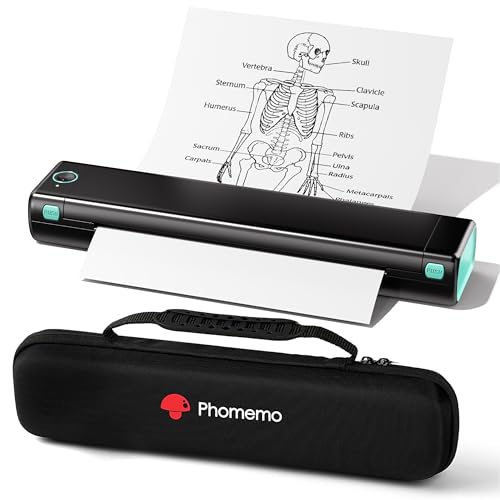
Phomemo M08F — Inkless Thermal Value With Case
The M08F brings the PocketJet’s inkless idea to a friendlier shelf. It prints letter-size pages — 8.5 by 11 inches — by thermal transfer of heat onto thermal paper, connects by Bluetooth to phone, tablet and laptop, and arrives with a carrying case and a starter supply of paper in the box. For students, home workers and occasional field users, that bundle is the whole argument: open it, pair it, print a document, all in one afternoon and one purchase.
Its working personality suits the document emergencies of ordinary life. The form that must be signed and returned today, the homework printed at a grandparent’s house, the invoice produced at a market stall — monochrome, legible, immediate, with no ink to have dried out since the printer was last needed. Thermal’s immunity to neglect is the feature: this machine can wait in a drawer for the month between needs and print its next page like the first.
The boundaries match its price of admission. Output is monochrome on thermal paper that costs more than plain stock and dislikes heat and sunlight over time, and its build serves bags and desks rather than the thrown-into-trucks life the PocketJet endures. Buyers who print occasionally and value readiness over ruggedness will find it the most sensible thermal here.
The bundled case is a design statement worth honouring: this printer is meant to be carried assembled, paper loaded, ready to print within a minute of opening. Owners should keep it that way — case stocked with a modest paper supply, the charging cable in its pocket, the printer paired to the phone before the journey rather than during it. Students in particular build a small superpower around this readiness: the form printed in the library, the assignment page produced at a friend’s flat, the ticket that exists on paper when a phone battery dies. The M08F’s value is not any single print; it is the absence of the phrase ‘I have no way to print that here’ from its owner’s vocabulary.
- Method: inkless thermal printing on thermal paper
- Paper: letter size, 8.5 by 11 inches
- In the box: carrying case and starter paper included
- Connectivity: Bluetooth for phone, tablet and laptop
Strengths
- Bundle includes case and paper to start
- Neglect-proof: no ink to dry between uses
- Phone-first Bluetooth suits casual workflows
Trade-offs
- Monochrome thermal output only
- Thermal paper fades under heat and time
- Build suits bags, not industrial field duty
Best for: a student, home worker or occasional traveller needing letter-size documents anywhere, without maintaining an ink system.
Not suited for: an archivist printing records to keep for decades — thermal paper is a medium for the present tense, not the permanent file.

Canon PIXMA TR160 — The TR150’s Successor, Refined
The TR160 succeeds the TR150 with the kind of refinements that come from watching travellers actually travel. A 50-sheet paper tray means the machine arrives at the hotel desk ready for a real document rather than a page-by-page feed, and a small 1.44 inch display gives the printer a voice of its own — status, settings and warnings without opening a laptop. The body stays lightweight and compact, because a successor that grew would have misunderstood its own assignment.
For buyers choosing between the Canon siblings, the TR160 is the considered present and the TR150 the proven past. The newer machine’s tray and display remove the two frictions portable users mention most — feeding paper constantly and guessing what the printer wants — while the core proposition stays Canon’s: real colour inkjet output on plain paper, wirelessly, from a bag-friendly body.
It shares the family caveats, which this profile states rather than inherits silently: printing only, no scanning; inkjet manners that reward regular use; and a battery conversation to settle at purchase if untethered work is planned. Travellers for whom those terms fit will find the TR160 the most polished expression of the portable inkjet idea in this guide.
The 50-sheet tray quietly changes what jobs the TR160 can accept. A twenty-page agreement with exhibits is a tray load, not a feeding performance, and the display’s presence means the traveller watches progress rather than hovering. Professionals who present from printed material should build the TR160 into the pre-meeting ritual: arrive, connect, print the final version — the one incorporating the morning’s changes — while coffee is poured, and hand over documents whose freshness quietly advertises competence. That ritual, repeated across a territory, is how a portable printer stops being equipment and becomes part of a professional’s reputation.
- Method: colour inkjet on plain paper
- Paper: 50-sheet tray for real documents
- Display: 1.44 inch screen for status and settings
- Design: lightweight, compact print-on-the-go body
Strengths
- Tray capacity suits genuine document runs
- On-device display ends status guesswork
- Refined successor to a proven portable line
Trade-offs
- Print-only, like its Canon sibling
- Newest model: shortest track record here
- Inkjet economy trails thermal for pure documents
Best for: a travelling professional choosing a portable inkjet today, who prints multi-page colour documents at each stop.
Not suited for: a scanner-needing road worker — Canon’s portables print only, and the OfficeJet 250 remains the travelling all-in-one.
Thermal Paper or Plain Paper: Which Does Your Job Actually Need?
Follow the document’s afterlife. A thermal print is superb for the present tense — the signed work order handed over today, the receipt, the report delivered at inspection — and a poor citizen of the archive, because heat, sunlight and time fade it, and it cannot be highlighted or written on as freely as plain paper. A plain-paper inkjet print files, annotates and survives like any office page, at the price of carrying an ink system that demands regular exercise and careful packing.
Cost runs opposite to intuition. Thermal printers have no ink budget at all, then charge rent through their paper; inkjets sip cheap plain paper and charge through cartridges. A field user printing twenty pages a week often finds thermal cheaper in total and infinitely cheaper in reliability. A traveller printing two hundred pages on a trip finds plain paper’s arithmetic irresistible. Count your pages, then choose your technology — in that order, always.
How Do You Build a Portable Printing Kit That Actually Works?
The printer is the middle of the kit, not the whole of it. Around it belong: the paper, carried flat and dry in a rigid folder because a bent sheet jams in any machine ever built; the charging cable the printer actually uses, labelled, because hotel rooms eat unlabelled cables; and a small ritual — print one page the night before any day the printer must perform, so a flat battery or a sleepy inkjet announces itself at a fixable hour rather than at a client’s door.
Digital readiness matters as much as hardware. Keep the printer’s app installed and paired on both phone and laptop before travelling, keep one essential document — the contract template, the inspection form — stored locally on each device, and know whether your printer joins hotel Wi-Fi or prefers a direct connection, because captive-portal networks defeat many portable printers and a direct Bluetooth or Wi-Fi Direct route is the professional’s workaround. The kit that works is the kit rehearsed at home.
When Is Portable Printing the Wrong Tool Entirely?
Volume is the honest boundary. A portable printer asked to produce a conference’s worth of handouts will do it slowly, expensively and with visible resentment; hotel business centres and local print shops exist for that day, and the professional move is to send the big job to them and keep the portable for the pages that change after arrival. Confidentiality cuts the other way: the contract revision, the medical form, the unreleased figures should never meet a shared hotel printer, and those pages are precisely the portable’s reason to exist.
Photographs are the second boundary. None of these six is a photo printer; the inkjets produce pleasing colour graphics and acceptable snapshots, and the thermals produce none at all. Travellers whose work is images should pair a portable document machine with the photo guides’ machines at home base, and let each device be judged on the work it was built to carry.
How Do You Print Confidential Documents While Travelling?
The portable printer’s least advertised virtue is privacy. A document printed in your own hotel room, from your own machine, never queues on a shared device in a business centre where the previous guest’s boarding pass still sits in the tray. For contracts under negotiation, medical and legal paperwork, and anything carrying personal data, that privacy is not paranoia but professional hygiene — and it alone justifies a portable for many consultants, whatever the colour or battery debates conclude.
Complete the hygiene with habits. Pair your devices to the printer directly rather than through venue networks where the design allows it, delete the printer from any network you joined at a venue before leaving, and carry printed confidential waste home rather than leaving it in a hotel bin. None of this requires expertise; it requires deciding that the document’s journey ends with you, which is the same decision that put a printer in your bag in the first place.
What Paper Should a Traveller Actually Carry?
Carry less paper, better organised. Twenty sheets of your standard stock, kept in a rigid document wallet that doubles as your printed-output folder, serve most trips better than a ream loose in a bag — because portable printing fails on bent, damp and dog-eared sheets far more often than it fails on quantity. Replenish from any office supplier at the destination rather than flying with bulk; plain paper is the world’s most available office commodity, which is precisely the inkjet traveller’s logistical advantage.
Thermal travellers carry differently: their paper is the consumable and the medium, so stock is planned like ink. Keep the working supply in the vehicle or bag and the reserve supply at base, rotate stock so the oldest prints first, and store both away from the dashboard’s heat. In both technologies the rule is one: the paper’s condition is the print’s destiny, and a traveller who guards the paper has solved most of portable printing before switching anything on.
How Does Portable Printing Fit a Hybrid Worker’s Two-Desk Life?
Not every portable travels far. The hybrid worker with a home desk and an office desk, neither fully equipped, is this category’s quiet majority — and for that life the portable is not a travel gadget but the second desk’s entire print department. The buying questions change accordingly: battery matters less, because both desks have sockets; size matters more, because the machine rides a commuter bag twice a week; and durability is judged in commutes rather than expeditions.
That worker should choose by the commute’s realities. A thermal machine suits a documents-only second desk and forgives the quiet weeks when the office desk does the printing. A compact inkjet suits colour work split evenly between desks, provided it is exercised at whichever desk it currently inhabits. Either way, the winning arrangement is the one where printing exists at both desks without a negotiation — because hybrid work fails in the small frictions, and a missing printer is a friction with a paper trail.
How Do You Handle Printing at a Client’s Site With Grace?
Printing at a client’s site is a small performance, and professionals choreograph it. Arrive with the printer already paired, already charged, already loaded — the client’s time should contain the document, not the setup. Ask once where you may set up, place the machine on a surface that is not the client’s own paperwork, and print a first page that is a genuine document rather than a test, because confidence is communicated by output, not by fiddling.
Leave the site cleaner than the performance found it: misprints leave with you, especially confidential ones, and the printed set handed over should be complete, ordered and counted aloud as it changes hands. Clients remember these small competences disproportionately, because paperwork at their own premises is where a professional’s organisation becomes visible. The portable printer, carried well, is less a device than a demonstration — and demonstrations, unlike brochures, are believed.
What Should a Field Team Standardise Across Its Printers?
A team that issues portables to several field workers should standardise ruthlessly, because variety in the field is paid for in support calls. One model where possible; where two technologies genuinely divide the work — thermal for documents, inkjet for colour — one model of each. One paper format per technology, one bag layout, one page in the team handbook showing the pairing steps and the three faults that cover nine tenths of field problems: flat battery, wrong paper, lost connection, each with its one-line remedy.
Then hold a spares pool at base like a small library: one charged battery where the design allows swapping, one spare printer per handful of workers, and a checkout habit that records who carries what. Field printing fails socially before it fails mechanically — the printer nobody booked, the cable everybody assumed — and a library system for printers, dull as it sounds, is what separates a fleet from a pile of individual good intentions.
How Do You Decide What a Portable Printer Is Worth to Your Work?
Price a portable printer against the incidents it prevents rather than against desktop machines it resembles. One contract signed on the day instead of posted and prayed over; one inspection closed at the kerb instead of reopened at the office; one client handed a corrected document while the correction still mattered. Professionals who list their own last three such incidents usually find the machine’s cost recovered inside a single one of them — and the incidents they cannot list are the ones where the missing printer quietly cost them work they never knew was theirs to lose.
The calculation also runs in reverse, and honesty demands it: a worker whose paperwork can always wait for the office is buying a portable for reassurance, and reassurance is a legitimate purchase only when priced as one. Buy the simpler machine, carry it without resentment, and let the rare use be enough. What neither calculation supports is the middle error — the expensive machine bought for incidents that never occur, resented in the bag for a decade. Count the incidents first; the models in this guide will sort themselves afterwards.
How Do You Choose Between Carrying a Printer and Borrowing the World’s?
The world’s printers are everywhere — hotel business centres, client offices, copy shops on every high street — and a fair case exists for owning none of them. Borrowed printing wins when documents are public, schedules are loose and destinations are predictable. It fails, with remarkable consistency, on the same three occasions: the document is confidential, the hour is impossible, or the place is a layby, a site cabin or a client’s kitchen table where the nearest public printer is a rumour. A worker’s honest diary of the last year contains some number of those occasions, and that number is the entire market research this purchase requires.
If the number is zero, spend the money elsewhere with this guide’s blessing. If the number is two or three, the value thermal or the lighter inkjets cover the debt cheaply. If the number is monthly, a portable printer is not an accessory but a professional instrument, and it should be bought, carried and maintained with the same seriousness as the tools the incidents were about. The models in this guide divide precisely along the lines those diaries draw, which is why no single pick here is called the best: best is a property of diaries, not of printers.
Revisit the diary yearly, because working lives migrate. The office-bound professional who starts travelling inherits incidents their old diary never contained; the field worker promoted to a desk inherits a bag they no longer need to fill. A portable printer bought for one life and carried into another becomes either dead weight or an heirloom for a colleague — and passing it on, paired and rehearsed, to the person whose diary now matches it is the most professional ending its story can have.
What Does the First Working Trip Teach That No Review Can?
The first trip with a portable printer is an examination the machine sets its owner, and its syllabus is personal. Which document did you actually print — the one predicted, or a stranger nobody imagined? Where did the machine live in the bag, and was that place findable in the rain, in the dark, in the hurry? What did the battery’s real behaviour teach that its specification only promised? Owners who debrief that first trip honestly, and adjust the kit by its evidence, own a system by the second trip; owners who skip the debrief carry the first trip’s frictions for years.
Make the adjustments physical and immediate. Move the printer’s pocket while the memory of fumbling is fresh. Add the cable whose absence was improvised around. Delete the paper quantity that proved theatrical and carry the amount the trip actually consumed, plus its modest margin. These are five-minute corrections with working-life consequences, and they share one trait: they can only be specified by your trip, your bag and your documents, which no reviewer has ever seen.
From the second trip onward, the portable printer’s story should become boring in the specific way of all good tools: present, ready, unmentioned. The incidents it serves will still be vivid — the signature captured, the report delivered, the client impressed — but the machine’s part in them will have shrunk to a line. That shrinkage is the purchase completing itself, and it is available to every pick in this guide whose technology was matched, at the start, to the diary of the person carrying it.
How Do the Six Portable Printers Compare?
Read the table technology-first: two inkless thermal machines for monochrome certainty, four inkjets for colour on plain paper, separated by batteries and by whether scanning travels along.
| Pick | Role | Defining trait |
|---|---|---|
| Brother PocketJet PJ-883 | Pro thermal portable | 300 dpi inkless letter printing over Bluetooth |
| HP OfficeJet 250 Mobile | Mobile all-in-one inkjet | Print, scan and copy with battery included |
| Canon PIXMA TR150 | Compact Canon inkjet | Portable colour printing; battery optional |
| Epson WorkForce WF-110 | Built-in battery inkjet | 6.7 ppm class colour with USB-rechargeable power |
| Phomemo M08F | Value thermal portable | Inkless letter printing with case and paper bundled |
| Canon PIXMA TR160 | Refined Canon inkjet | 50-sheet tray and display on the portable inkjet formula |
What Do Portable Printer Buyers Get Wrong?
Choosing inkjet for a vehicle life leads the regrets. Ink systems dislike heat, cold, vibration and neglect — a fair description of a van in August — and the field user who buys colour they never needed spends the year fighting cleaning cycles. The mirror error is choosing thermal for a presenter’s life, then handing a client a grey, curling page where a colour chart was promised. Technology first, model second; this guide’s structure exists because that order is so often reversed.
Battery assumptions run third. A portable bought without its battery — where the battery is an accessory — is a small desktop printer with ambitions, and the discovery belongs at purchase, not at a client’s site. Fourth, travellers skip the rehearsal: first pairing attempted in a hotel, first print attempted at a deadline, first paper jam attempted in a panic. One quiet evening at home with the machine — pair it, print from every device, change the paper, find the power settings — converts all of those firsts into non-events.
One final error is forgetting the printer in the story told to insurers and employers. A portable printer carried for work is work equipment: photograph it, record its serial number with the rest of the kit list, and confirm whether the employer’s policy or the traveller’s own covers it in vehicles and hotels. The machine’s whole purpose is to be where the office is not; its paperwork should acknowledge that geography before a loss makes the argument for you.
Final Recommendation
Decide by paper, then by power. Field lives lived in monochrome belong to thermal: the PocketJet PJ-883 for professional duty that cannot fail, the Phomemo M08F for occasional documents with a case and starter paper included. Colour lives on plain paper belong to inkjet: the OfficeJet 250 when scanning travels too and its battery comes included, the WF-110 when built-in power and lightness lead, and Canon’s TR150 or tray-and-display TR160 when a compact colour traveller is the whole brief.
Whichever machine joins the bag, rehearse it at home, carry its paper flat, and print one page the night before it must perform. Portable printing succeeds in the preparation, not the moment — and when the moment comes, in a van or a hotel room or a client’s doorway, the quiet production of exactly the page the job required is a small professional triumph that everyone present remembers longer than the meeting itself.
Record the printer’s serial number with the rest of your carried kit, keep its pairing instructions photographed in the phone that travels with it, and give it one quiet evening of rehearsal before its first working trip. Portable printers repay preparation more completely than almost any tool in the bag — because their moment of need is always public, always timed, and always, with that one evening behind you, entirely uneventful.
If one principle must survive this guide, let it be the diary test: incidents counted, technology chosen, model matched, kit rehearsed. Portable printing fails in the imagination far more often than in the field — bought for a fantasy traveller, specified for a fantasy document, packed for a fantasy trip. The six machines here are all, in their different dialects, excellent answers to real diaries. Yours is the only text they cannot read for you, and it is short: a year of working days, honestly remembered, with the printing incidents marked in the margin where they always belonged.
Mark them, choose, rehearse once at home — and then go and be the person in the room, at the site, at the kerbside, who can simply print the page.
A final image to carry into the purchase: the professional at the end of a long day, in a place with no office for miles, producing the one page the day was missing — unhurried, because the kit was rehearsed; unremarkable, because the machine simply worked. Every pick in this guide can be that page’s author. The only remaining task is the honest one of deciding, from your own diary, which author your working life has been waiting for.
Pack it tonight, if the decision is made, rather than on the morning of the first trip. A printer packed calmly — charged, loaded, paired, its paper flat in its folder — is a different instrument from the same printer packed at dawn, and the difference will be visible in the first document it is ever asked for. Preparation is the whole profession here; the printing is merely where it becomes visible.
There is a particular quiet that follows a page printed exactly where it was needed: the signature dries, the folder closes, and the day continues without a detour. That quiet is what is actually for sale in this category, in six different machines and two different technologies. Choose the one your diary described, and the quiet becomes a habit your working life gets to keep.
The road will provide the occasions. The bag, now, provides the answer every single time it is asked.
Frequently Asked Questions
Do thermal portable printers really need no ink at all?
Correct — the PocketJet and the Phomemo M08F darken thermal paper with heat from the print head, so there are no cartridges, tanks or ribbons to carry, leak or replace. The trade is that they print only in black, only on thermal paper, and that paper fades with heat and time. For documents whose life is the working week, that trade is the foundation of their reliability.
Can a portable inkjet print on ordinary paper from the office?
Yes — ordinary plain paper is exactly what the four inkjets here are built for, which is their great advantage for contracts, handouts and anything destined for a file. Load the same stock you use at the office, keep it flat and dry in a rigid folder while travelling, and output quality will match a desktop machine’s closely enough that clients never ask where a page was printed.
How long do the batteries last on a working trip?
Battery life varies with page type — colour and coverage drink faster than plain text — and every traveller’s honest answer is a rhythm rather than a number: charge nightly, print opportunistically, and treat a low battery warning as a same-evening task. The HP and Epson include their batteries; Canon’s TR150 offers its battery as an accessory, so confirm your configuration before the first trip depends on it.
Will these printers connect to a phone without Wi-Fi?
Bluetooth models pair directly with phones and tablets, which is why this guide’s category carries Bluetooth in its name — no network, no hotel portal, no infrastructure. Several models also offer direct wireless connections for laptops. The professional habit is to establish the pairing at home and test one print from each device you travel with, before the trip makes the lesson expensive.
Can a portable printer replace my office printer?
For a solo professional with modest volume, one of the inkjets genuinely can — the OfficeJet 250 even scans and copies. For shared or high-volume offices, portables are specialists: slower, smaller-trayed and costlier per page than desktop machines. Most owners run both, the desktop for the week’s bulk and the portable for the road, and each machine’s strengths cover the other’s compromises.
Is thermal paper safe to store in a hot car?
The paper itself tolerates storage reasonably, but printed thermal pages fade faster with heat, and a printed document left on a dashboard can lighten within days. File important thermal prints promptly, photograph or scan signed copies as a backup habit, and store blank stock out of direct sun. Field professionals treat the paper copy as the handover and the scan as the record — a division of labour worth copying.
Can I print boarding passes and tickets on a thermal portable?
Yes, and field and travel users do exactly this — a thermal letter page carries a boarding pass, an itinerary or a ticket with its barcode legible to scanners. Remember the medium’s manners: keep the printed pass out of dashboard heat and direct sun, and keep the digital original on your phone as the backup it naturally is. For a document whose entire life is one journey, thermal’s impermanence is no disadvantage at all.
Do portable printers work during flights or in remote areas?
They work wherever their battery and your device’s battery work, because the printing conversation is local — Bluetooth or a direct wireless link needs no internet, no venue network and no signal. That independence is the category’s founding promise. Pack the printer in hand luggage where airline rules require lithium batteries to travel, confirm the carrier’s current rules for your specific journey, and the printer is as ready at a remote site as at a desk.
Can I print from a Chromebook or tablet on the road?
Tablets travel naturally with these machines — the Bluetooth and wireless models pair with phones and tablets as readily as with laptops, and for many field workers the tablet is the primary device. Chromebooks print through their standard wireless printing routes where a model supports them; the reliable method is the rehearsal rule this guide keeps returning to: pair and print from the exact device you travel with, at home, before the trip makes the experiment public.
How should I pack a portable inkjet for a flight?
Remove or secure the paper, close every tray and cover, and carry the printer in a padded case in hand luggage where airline battery rules require its power source to travel — checking the carrier’s current rules for your journey, since they change. A sheet of plain paper left loaded can cushion the mechanism’s journey, and the first print after landing should be a low-stakes page, letting the machine settle before the document that matters asks for it.
Related Guides
Guides for the desk these travellers return to: best label printers small business for the shipping bench at base best aio monochrome laser printers for office paperwork best refillable ink tank printers for colour printing at home


