What's inside
- Where to buy
- Key Takeaways
- Quick Picks
- How did we judge machines at this level?
- Which production printer earns the floor space?
- What does a 44-inch print actually cost to produce?
- How does delivery day actually go?
- Why is canvas the 44-inch machine’s second career?
- How do you manage rolls like a production studio?
- How do galleries judge a 44-inch print?
- What should the service conversation cover before you sign?
- How do you know you have outgrown 24 inches?
- How do sheets and borderless work behave at this width?
- What does the room owe the machine?
- How do you price a 44-inch commission without guessing?
- How do the six compare side by side?
- What mistakes do 44-inch buyers keep making?
- Final Recommendation
- Frequently Asked Questions
- Related Guides
As an Amazon Associate I earn from qualifying purchases. This post may contain affiliate links at no extra cost to you.
gizmoverdict.com is reader-supported. When you buy through links on our site, we may earn an affiliate commission.
Where to buy
Three machines in this guide carry the Amazon listings linked below — including, deliberately, one 60-inch printer that shows where the class’s ceiling sits. The other three are covered in prose: two are the previous generation whose remaining stock moves through mixed channels, and one is an HP line sold as much through graphics dealers as through retail, so check any listing for it with a dealer’s scepticism.
The best 44 fine art printers are not bigger versions of the printers in our other guides; they are a different species of purchase. A 44-inch machine is capital equipment. It arrives by freight, lives on its own stand, drinks ink from tanks measured in hundreds of millilitres, and earns its floor space by producing gallery prints, exhibition pieces and canvas at a scale no desktop machine can imitate. The buyers are working artists, photography studios, galleries printing in-house, and print-for-pay shops — people for whom a single sale can justify a month of the machine’s keep, and for whom a ruined 44-inch sheet is a line item, not a disappointment.
Because the stakes are different, this guide writes about different things: roll handling and media switching, ink tank sizes and what they do to your cost per print, the physical ceremony of loading a 44-inch roll without wounding it, and the delivery day itself — pallet, doorway widths, and the friend you will need. Three linked listings anchor the class: Canon’s current flagship, Epson’s newest generation, and Canon’s 60-inch step-up included so you can see the price of the next size before a salesperson shows you. Three prose picks complete the honest map: the two predecessors those flagships replaced, and HP’s alternative architecture.
Key Takeaways
- At 44 inches you are buying a production system — stand, rolls, tanks in the hundreds of millilitres — not a printer with accessories.
- Canon’s PRO-4600 and Epson’s P9370 are the current flagships; they differ in ink architecture and media handling philosophy more than in print quality.
- The linked PRO-6000 is a 60-inch machine, included deliberately as the ceiling: buy it only when your work or your clients already demand the width.
- Ink economics invert at this scale — tank size and cost per millilitre matter more than the machine’s headline price over any three-year view.
- Freight delivery, doorway clearance and a dedicated, level patch of floor are purchasing criteria, not afterthoughts.
- The prose picks — P9570, PRO-4100 and HP’s Z9+ — are the cross-shop set every serious buyer prices before signing anything.
Quick Picks
| Pick | Badge | Why it earns its place |
|---|---|---|
| Canon imagePROGRAF PRO-4600 | Best overall 44-inch | Canon’s current flagship with LUCIA PRO II inks, intelligent media handling and the polish of a mature production line. |
| Epson SureColor P9370 | Best Epson 44-inch | The newest SureColor generation at this width, built for studios that live on roll-fed production. |
| Canon imagePROGRAF PRO-6000 | The 60-inch ceiling | Canon’s larger flagship for work that has genuinely outgrown 44 inches — included so you can price the temptation honestly. |
| Epson SureColor P9570 | Prose pick — previous flagship | The P9370’s predecessor; a proven production machine whose remaining and used stock tempts studios on a budget. |
| Canon imagePROGRAF PRO-4100 | Prose pick — PRO-4600’s ancestor | The prior Canon generation, sharing the line’s manners with a shorter support runway. |
| HP DesignJet Z9+ 44-inch | Prose pick — the HP route | HP’s graphics-arts alternative with its own ink and workflow philosophy, sold heavily through dealers. |
How did we judge machines at this level?
Not by the standards of a home office. At 44 inches the evaluation runs on production criteria: how the machine handles roll changes and media calibration, whether it tracks remaining paper honestly, how its ink system prices a square metre of coverage, and how gracefully it recovers from the errors that are inevitable when humans load heavy rolls at deadline o’clock. We weighted the unglamorous systems — media-type databases, automatic roll switching where fitted, borderless retention of margins, and the quality of each maker’s colour utilities — because at this width, output quality between flagships is close enough that workflow decides ownership happiness.
We also refused to pad. The 44-inch fine-art shelf is genuinely small — two current flagships, their two predecessors, HP’s alternative, and the 60-inch step above — and a guide that invented a seventh and eighth contender from signage printers or technical plotters would be lying about the category’s shape. Signage and CAD machines print wide, but their inks, media paths and colour priorities serve other masters. What follows is the whole honest shelf, with the prose picks included because every real negotiation in this class involves at least one of them.
Which production printer earns the floor space?

Canon imagePROGRAF PRO-4600 — Best overall 44-inch
The PRO-4600 is Canon’s current statement at 44 inches, and its argument is intelligence in service of uptime. The LUCIA PRO II pigment ink set delivers the gamut and black density gallery work requires, while the machine around it works to remove the small frictions that cost production studios real money: media loading that recognises what you have fed it, remaining-roll tracking that ends the guessing game, and a colour calibration routine that keeps today’s canvas matching last month’s. In a class where a single ruined sheet can cost more than a desktop printer’s ink set, that operational calm is not a luxury feature — it is the product.
Canon’s dual-roll capability on this line deserves its sentence, because it changes a studio’s week: two media loaded, switching without a roll change, means the matte cotton job and the canvas job stop queuing behind each other’s setup. The build is unapologetically industrial — a stand-mounted production tool that expects a permanent home and a level floor. Studios stepping up from 24-inch machines will find the learning curve gentle, because Canon’s utilities scale their habits rather than replacing them, and the print quality step will justify the freight bill the first time a 44-inch face looks back at them from the drying rack.
Consider the machine’s relationship with colour consistency, the quiet obsession of anyone selling editions. A 44-inch print sold in March must match its twin sold in October, across ink batches and paper lots, and the PRO-4600’s built-in calibration sensor exists for exactly that anxiety — it measures and corrects itself against its own standard rather than trusting that nothing drifted. Studios can promise reprints with a straight face. That promise, more than any gamut figure, is what separates a production flagship from a merely wide printer.
Picture its natural habitat at full stretch: an exhibition deadline, fourteen large prints across two media, one operator. The Canon’s contribution is the absence of incident — rolls recognised as they load, remaining lengths reported truthfully, calibration quietly current, and the operator’s attention free to do the one job machines cannot, which is looking at the prints. Production veterans measure flagships by the attention they return to the human, and by that ledger the 4600 is a generous machine.
- Format: 44-inch roll and sheet, stand-mounted
- Ink family: LUCIA PRO II pigment
- Tanks: high-capacity, sized in hundreds of millilitres
- Media: intelligent loading with remaining-roll tracking
- Roll setup: dual-roll capability on this line
Strengths
- Self-calibration keeps edition work consistent across months and ink batches.
- Media intelligence removes the expensive little errors of roll production.
- Dual-roll working turns media changes from events into keystrokes.
Trade-offs
- Capital pricing, freight delivery and a permanent floor commitment.
- Consumables economics only make sense at genuine production volumes.
- Its capabilities are wasted on occasional printing — it wants a workload.
Best for: galleries, artists and studios printing 44-inch work weekly or daily. Not suited for: occasional large prints, where a print service remains cheaper forever.
Studios ready for the step can review the PRO-4600’s Amazon listing — then measure the doorway before the freight call, not after.

Epson SureColor P9370 — Best Epson 44-inch
Epson’s P9370 is the newest generation of a line that has anchored professional print shops for decades, and it arrives with the confidence of that heritage. The SureColor production architecture — precision media transport, a printhead built for sustained industrial duty, and Epson’s mature colour ecosystem — is aimed at studios whose 44-inch output is not an event but a schedule. Where Canon emphasises media intelligence, Epson’s pitch is the depth of its production bench: paper partnerships, profile libraries and a service network that print shops already have on speed dial.
For a buyer choosing between the two flagships, the honest differences are philosophical. Epson’s UltraChrome lineage carries the proofing world’s DNA — colour managed, documented, predictable — and the P9370 inherits a generation of studio folklore about settings for every canvas and cotton on the market. Its predecessor, the P9570, set the template this machine refines, so upgraders will find their habits honoured. Output at this level is not a contest with a loser; it is a choice between two mature dialects of excellent, and the deciding factors are usually the ink system your studio already stocks and the dealer relationship you already trust.
Roll handling is where the Epson earns its daily keep. Long production runs — a canvas edition, a run of exhibition panels — punish any wobble in media transport, because an error discovered at metre nine costs nine metres. The SureColor transport’s reputation for tracking straight and feeding evenly is the product of generations of shops betting their deadlines on it. Pair that with Epson’s media installer ecosystem, which keeps paper settings synchronised between printer and driver, and the P9370 presents itself as the conservative choice in the best sense: the machine a studio buys when surprises are the one luxury it cannot afford.
There is a staffing argument folded inside that reputation. Print shops hire operators who arrive already fluent in Epson’s production manners, because the line has trained a workforce across decades. A studio buying its first 44-inch machine is also buying into that labour pool and its habits — the shared vocabulary of media settings, maintenance rituals and troubleshooting folklore that a new hire brings through the door. Equipment decisions are quietly workforce decisions, and the P9370’s continuity is worth money to anyone who plans to employ the person standing at the roll.
- Format: 44-inch wide-format production printer
- Ink family: UltraChrome pigment line
- Tanks: production capacities in hundreds of millilitres
- Media: roll and sheet with managed media settings
- Ecosystem: deep third-party paper and profile support
Strengths
- Production transport with a generation-deep reputation for straight feeding.
- The industry’s deepest bench of paper profiles and studio documentation.
- Refines a proven predecessor rather than experimenting on its buyers.
Trade-offs
- Same capital, freight and floor commitments as its Canon rival.
- Newest-generation pricing carries no introductory mercy.
- Shops invested in Canon inks face a full ecosystem switch to come here.
Best for: established print shops and studios standardised on Epson’s ecosystem. Not suited for: first-time wide-format buyers who would benefit from Canon’s hand-holding media intelligence.
Production buyers can inspect the P9370’s listing on Amazon and compare its ink capacities against your studio’s monthly coverage.
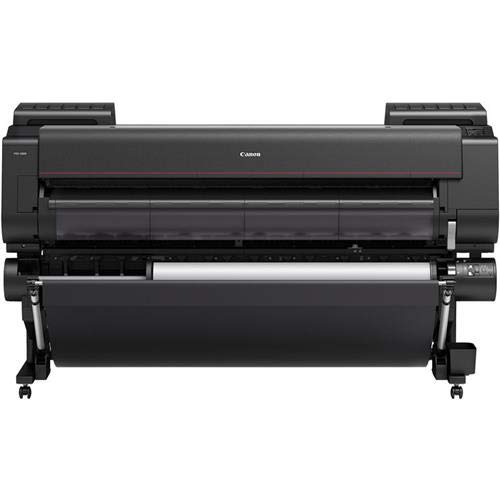
Canon imagePROGRAF PRO-6000 — The 60-inch ceiling
The PRO-6000 is in this guide as an act of honesty about temptation. It is a 60-inch printer — sixteen inches wider than the class under discussion — and it earns its place because every 44-inch buyer eventually stands in a showroom, looks at the bigger machine, and wonders. Wonder with numbers in hand: the 6000 takes the same LUCIA PRO philosophy to a width where single prints become wall coverings, trade-show backdrops and canvas pieces that dominate rooms. Its output quality is the family standard; what changes is the scale of everything else — the rolls, the floor, the freight, the price of a mistake.
Buy it when the work demands it: when clients are already ordering beyond 44 inches, when your own art is composed at that scale, when a gallery contract specifies sizes the 4600 cannot reach. Do not buy it as insurance against hypothetical futures, because an idle 60-inch machine is the most expensive sculpture a studio can own, and its ink system expects the regular exercise only real work provides. Read this pick as the guide’s ceiling marker — the point at which the category’s logic (buy for the work you have) either holds or becomes a story you tell yourself in a showroom.
There is one production scenario where the 60-inch width pays even a 44-inch studio: ganging. Two 20-inch prints side by side, an edition run laid out across the web, proofs riding the margins of production sheets — width is flexibility when the work is planned in batches. Studios with that batching discipline and the floor to match will find the PRO-6000 a rational machine wearing an extravagant badge. Studios printing one-offs should let the 44-inch flagships keep the crown and spend the difference on a year of canvas.
Stand in front of one at work and the appeal needs no advocate: a print emerging at sixty inches wide has a physical authority that changes a room’s temperature, and artists whose work is conceived at architectural scale are not indulging themselves — they are meeting their medium. The discipline this guide asks is only that the demand be documented before the delight. Show the orders, the commissions, the gallery’s size requirements, and the PRO-6000 stops being the ceiling and becomes the correct floor.
- Format: 60-inch — the step above this class
- Ink family: LUCIA PRO pigment
- Role: ceiling marker and batch-production tool
- Delivery: freight, stand, serious floor planning
- Buy condition: existing demand beyond 44 inches
Strengths
- Prints at a scale that turns single pieces into environments.
- Width enables ganged, economical batch layouts for organised studios.
- Same Canon colour discipline as the 44-inch flagship.
Trade-offs
- Every cost — machine, media, mistakes — scales with the width.
- Floor and freight demands exceed the already-serious 44-inch class.
- Idle time punishes it; hypothetical demand is not demand.
Best for: studios with proven work beyond 44 inches or disciplined batch production. Not suited for: anyone buying width as insurance against a future that has not ordered anything yet.
If the ceiling tempts you, price the PRO-6000 on Amazon beside the 4600 and let the difference argue with your order book.
Epson SureColor P9570 — Prose pick, the previous flagship
The P9570 built the reputation the P9370 now inherits, and thousands of studios run their businesses on it daily. Its UltraChrome PRO12 pigment set — a twelve-ink architecture — set the gamut standard of its generation, and its production transport is the same straight-feeding school the new model graduated from. As the predecessor, it now lives in the interesting pricing territory where remaining new stock, dealer demonstrators and used machines circulate together, each wearing a different level of risk.
The buying discipline for this pick is verification. A used 44-inch printer’s value lives in its printhead and its maintenance history, neither of which photographs well; insist on a live demonstration or a nozzle check, count the cost of a full fresh ink set into any used price, and ask who serviced it. A clean P9570 at the right number is a production studio for a fraction of flagship money. A tired one is a very large repair bill with a stand. Studios already running Epson inks and profiles will find it the path of least resistance into 44-inch work — which is exactly why it stays in this guide despite its successor holding the linked slot.
There is also a fleet logic here that mirrors smaller categories: a studio whose clients’ editions were printed on a P9570 has a colour-consistency reason to keep that exact machine fed and calibrated rather than migrating mid-edition to a new generation. Back-catalogue obligations are real contracts in the art world, and the previous flagship often remains the correct machine for honouring them.
Its twelve-ink set also keeps a specific promise worth naming: the extra channels were Epson’s gamut maximalism of their era, and certain saturated subjects — theatrical lighting, tropical flora, the violent end of a sunset — still show what those channels were for. A studio whose back catalogue leans on such subjects is not clinging to the past by keeping a P9570 calibrated; it is protecting the exact colours its reputation was printed in.
- Format: 44-inch, previous Epson flagship generation
- Ink family: UltraChrome PRO12 pigment
- Status: replaced by the P9370 generation
- Stock: new-old, demonstrator and used, in mixed channels
- Buy condition: verified head health and service history
Strengths
- Proven production record across thousands of working studios.
- Generation-change pricing opens 44-inch work to smaller budgets.
- Twelve-ink gamut remains genuinely competitive.
Trade-offs
- Used examples vary enormously; verification is non-negotiable.
- Support and parts horizon shortens with each passing year.
- A fresh full ink set can quietly erase the used discount.
Best for: budget-conscious studios that can verify a machine’s health in person. Not suited for: remote buyers purchasing unseen, or anyone needing a warranty’s sleep quality.
Deliberately unlinked — this is a machine to buy through dealers and demonstrable listings, with a nozzle check witnessed before money moves.
Canon imagePROGRAF PRO-4100 — Prose pick, the PRO-4600’s ancestor
The PRO-4100 is the Canon counterpart to the P9570’s story: the previous 44-inch flagship, superseded by the PRO-4600, still printing at a standard that shames lesser categories. Its LUCIA PRO ink set and Canon’s media handling manners made it a gallery favourite, and its remaining stock and used examples now price the entry into Canon’s 44-inch world lower than the current flagship’s door. For a studio standardised on Canon — inks in the cupboard, profiles on the workstation, habits in the hands — it is the natural budget route upward.
The cautions rhyme with its Epson counterpart’s. Verify condition as if the warranty depends on it, because at this age it may not exist; price a full ink set into used examples; and weigh the support horizon honestly against the discount. Where the PRO-4100 wins is continuity: editions begun on Canon’s previous generation match on it effortlessly, and operators need no retraining. Where it loses is time — every year narrows parts availability and dealer familiarity. Buy it as a calculated bridge, and it will earn like a flagship while it lasts.
One more honest scenario: the gallery that prints in-house for its own walls, on a season’s rhythm rather than a daily one. That workload forgives an older machine’s manners and rewards its price, because the prints are the product and the machine’s remaining years comfortably cover the gallery’s planning horizon. Match the machine’s remaining life to your own plans, not to an abstract fear of last year’s model.
Operators, notably, rarely lobby against it. The PRO-4100’s loading manners and menu logic are the ones a generation of Canon studio hands learned on, and a machine the staff already trusts gets fed better media, calibrated more often and forgiven its few dated habits. Morale is not a specification, but at production scale it behaves like one.
- Format: 44-inch, previous Canon flagship generation
- Ink family: LUCIA PRO pigment
- Status: succeeded by the PRO-4600
- Stock: remaining new and used through mixed channels
- Buy condition: condition verified, ink costs counted
Strengths
- Canon’s 44-inch quality at generation-change prices.
- Shares ink behaviour and habits with Canon-standardised studios.
- Gallery-grade output that time has not diminished.
Trade-offs
- Condition varies; unseen purchases are gambles at this size.
- Support runway is the shortest on the Canon side of this guide.
- Lacks the newest media-intelligence refinements of the 4600.
Best for: Canon studios stepping up on a budget, and in-house gallery printing. Not suited for: buyers who need the longest support horizon or the newest automation.
Kept link-free for the same reason as its Epson counterpart — buy it where you can see it run, and let the PRO-4600’s price set your ceiling.
HP DesignJet Z9+ 44-inch — Prose pick, the HP route
HP approaches this class from the graphics-arts world rather than the photo-studio one, and the Z9+ carries that accent proudly. Its ink architecture and embedded colour tools were designed for environments where the printer must calibrate itself into a managed workflow and stay there — design studios, in-house marketing departments, and print rooms serving clients who speak in brand colours. The 44-inch Z9+ is the alternative architecture in this guide: not a worse Canon or Epson, but a machine answering a slightly different set of questions.
Why prose? HP sells this line substantially through graphics dealers and channel partners, and retail listings fluctuate in completeness — a listing might be the printer alone, a bundle, or a configuration missing the stand your floor plan assumed. The correct way to buy a Z9+ is the dealer way: a written configuration, the ink set itemised, installation discussed like adults. Buyers already inside HP’s ecosystem — plotters down the hall, HP colour management in the workflow — will find that diligence rewarded with a machine that integrates like family. Everyone else should cross-shop it in person before letting a listing’s price do the talking.
The Z9+ also raises the guide’s most useful general lesson: at production level, the service relationship is part of the product. A 44-inch printer down in exhibition week is a business emergency, and the dealer who answers the phone is worth more than a specification point. HP’s channel strength in many regions is precisely that phone being answered — factor your local reality into the decision, because the best machine is the one your city can keep running.
Design-led studios add one more appreciation: the Z9+ was conceived for rooms where the printer serves architects of brand worlds as much as makers of pictures, and its colour discipline shows a bureaucrat’s virtue — documented, repeatable, auditable. A campaign image printed in January must match its sibling printed for a different continent in June, and HP’s managed approach treats that as an engineering requirement rather than an artistic hope. If your 44-inch work answers to brand managers as well as to your own eye, that temperament is not a compromise. It is the brief.
- Format: 44-inch graphics-arts production
- Ink family: HP’s pigment system for the DesignJet Z line
- Colour tools: embedded calibration for managed workflows
- Sales channel: graphics dealers as much as retail
- Buy condition: written configuration, itemised ink and stand
Strengths
- Self-calibrating colour discipline suits managed, brand-critical workflows.
- Dealer network strength in many regions is a genuine operational asset.
- Integrates naturally where HP plotters already run the technical work.
Trade-offs
- Retail listings vary in completeness — configuration diligence required.
- Photo-studio folklore and paper documentation run thinner than Epson’s.
- Its graphics accent suits design rooms more than darkroom temperaments.
Best for: design studios and print rooms already living in HP’s workflow. Not suited for: buyers wanting a simple retail purchase with everything in one box.
No link attached on principle: get a dealer’s written configuration for the Z9+, then compare its completeness against the linked flagships before signing.
What does a 44-inch print actually cost to produce?
Run the arithmetic the way studios do — per square metre, fully loaded. The sheet or roll media is the visible cost: a 44-inch-wide metre of fine cotton or canvas is a serious piece of paper. Ink follows, and here tank size rewrites the story — production tanks in the hundreds of millilitres price ink per millilitre far below desktop cartridges, which is why high-volume studios can sell large prints profitably while a desktop machine’s owner cannot. Then the invisible costs: the proof you printed first, the calibration sheet, the final metre of every roll that the machine cannot use, and the one print in twenty that a speck of dust assassinates. Professionals price with all of it in the number.
The lesson for buyers is that volume is not vanity in this class; it is the mechanism that makes the economics true. A studio printing daily spreads the machine’s cost across hundreds of square metres and buys ink at production rates. A studio printing monthly pays the same machine price and never reaches the volume where the per-print maths turns kind. This is why the guide keeps asking about your order book — at 44 inches, the workload is not a detail of the purchase. It is the purchase.
Keep the studio’s own ledger from day one: machine hours, metres by media, ink by colour, spoiled prints and their causes. Within a quarter, that notebook prices your work more truthfully than any calculator a vendor hands you, and it exposes the patterns — which paper wastes, which client reprints, which size actually carries the profit — that turn a printer from a cost centre into the studio’s most honest employee. The flagships will even help, reporting consumption from their own counters; the discipline of writing it down is yours.
How does delivery day actually go?
It begins before the truck: measure the route, not just the room. Doorway widths, corridor turns, the lift’s honest capacity, the step at the threshold — a 44-inch printer on its pallet has the turning circle of a small car, and freight drivers deliver to the kerb or the dock, not to the third-floor studio. Most studios hire the install or recruit two strong friends and a furniture dolly, and the wise ones clear the route the day before, photographing the path the way movers do. The machine then needs its stand assembled, its head unlocked from transit restraints, and its first ink charge — a ceremony that fills the tanks’ lines and takes the time it takes.
Budget the first week, not the first day. Calibration, media profiling, test prints at increasing sizes, and the sacrificial first roll section are the tuition every studio pays, and rushing them produces the expensive mistakes — the full-width print on the wrong media setting — that haunt group chats. By the second week the machine disappears into the studio’s rhythm, which is the entire point: a production tool should become boring, and the measure of a good installation is how quickly the drama is forgotten.
Photograph the unboxing and keep the transit restraints, the pallet bolts and the manual’s first pages in a labelled box. If the machine ever moves studios — and successful machines do, because success relocates — those restraints are the difference between a move and a casualty. Future you, standing in a new doorway with a tape measure, will be grateful that present you treated delivery day as the first act of ownership rather than an inconvenience between purchase and printing.
Why is canvas the 44-inch machine’s second career?
Because the economics finally close. A gallery-wrapped canvas at 40 inches wide is a product with a retail life — hotels, offices, homes with one big empty wall — and printing it in-house turns a week of lab waiting into an afternoon of production. Canvas also forgives what paper punishes: its texture swallows minor banding, its matte surface needs no glazing, and its stretch over bars hides the small handling sins that would retire a paper print. Most 44-inch studios discover that canvas pays the machine’s rent while the fine-art paper work builds the reputation, and the two product lines share rolls, inks and the same calibration discipline.
The craft has its own commandments. Leave mirror-edge or gallery-wrap margins in the file, because the image must turn the corner of the bars without amputating its subject. Coat the finished canvas if it will live in sunlight or a kitchen’s weather — the makers of liquid coatings have strong opinions and most of them are right. And stretch a test piece before an edition: canvas relaxes and tightens with humidity in ways paper never taught you, and the tension that sings in a dry studio can drum loosely in a damp gallery. None of this is difficult; all of it is cheaper learned on a test metre than on a client’s commission.
How do you manage rolls like a production studio?
With a label maker and a notebook, unglamorously. Every roll that enters the studio gets its identity on the core — media, width, date, supplier — because a roll’s memory of itself ends the moment it leaves its box, and two white rolls on a shelf are a guessing game with money inside. Track remaining length the way the better machines in this guide do automatically, and where the machine cannot, the notebook does: metres in, metres printed, metres remaining. Studios that skip this ritual eventually unroll the last metre of the edition’s paper somewhere in the middle of the edition, and the replacement roll — different lot, fractionally different mood — finishes the run under gallery light, where differences go to be discovered.
Storage is the other half. Rolls live upright or in their boxes, never leaning against a wall where their own weight ovalises the core and teaches the media a curl it will rehearse in the printer. The studio’s climate is the roll’s climate: stable, dry, out of direct sun. And the first metre of any roll that has travelled is a sacrificial offering — dust, handling and freight live there. Cut it away without sentiment. Experienced shops build these habits into the price of every print, which is why their waste percentage looks like discipline and everyone else’s looks like luck.
How do galleries judge a 44-inch print?
At three distances, and a studio learns to inspect at all of them. From across the room, the print must hold together as an image — no banding in the skies, no gloss patchiness breaking the surface into weather systems. At reading distance, the craft shows: shadow detail that separates instead of clotting, highlights with information still in them, blacks that are a colour and not a hole. Under the raking light of a final check, the physical truth appears — dust specks printed into pale areas, a faint roller line, the edge where a borderless cut drifted. Galleries reject on the third distance prints that passed the first two, which is why the inspection ritual in this guide is performed under angled light, every time, without being hurried by the courier’s knock.
Consistency is the gallery’s second language. A body of work must hang as a family — same paper character, same black point, same surface mood — and that is a printing discipline before it is an artistic one. The calibration systems in the linked flagships exist because galleries made consistency a condition of representation. A home printer can be forgiven a wandering mood; a production machine is paid to have none. When you evaluate the six machines above, you are really evaluating which of them you trust to forget nothing between March and October.
What should the service conversation cover before you sign?
Ask who comes, how fast, and carrying what. A production printer’s downtime is priced in missed deadlines, so the service arrangement deserves the same scrutiny as the ink system: response times in your postcode, whether printheads and transport parts are stocked regionally or shipped from a distant warehouse, and whether the dealer’s technicians know fine-art media or only office machines. Get the warranty’s exclusions in writing — printheads are the classic carve-out — and price the first out-of-warranty year while you are still a prospect with leverage, because that conversation is never cheaper later.
Installation is the second half of the same conversation. A proper install includes stand assembly, levelling, initial ink charge, calibration and a media profile session on your actual papers — not a kerbside drop and a wave. If a quote’s installation line looks thin, it is describing the kerbside. Studios that have been through one bad delivery become connoisseurs of this paragraph; studios on their first 44-inch machine should borrow that experience cheaply by insisting on the full ceremony in writing.
How do you know you have outgrown 24 inches?
The evidence arrives as a pattern, not an event. Your lab or print-service invoices for oversize work start rivalling a machine payment. Clients ask for sizes you keep declining. Your own compositions crop themselves tighter than your eye intended, because some part of your brain has started shooting for the printer you own rather than the wall you imagine. And the 24-inch machine’s queue becomes the studio’s bottleneck in exhibition season, with canvas orders waiting behind paper editions. Any two of those, sustained across a season, are the order book’s way of filing the purchase request for you.
The step itself is gentler than feared. Files, profiles and habits scale; what changes is the physical liturgy — rolls instead of sheets, a stand instead of a desk, prints that two hands carry like glass. Studios routinely report the surprise is not the size but the economics: the first month a 44-inch machine’s ink bill arrives, itemised by the millilitre across real jobs, is the month the per-print maths of large work stops being folklore and becomes a price list the studio can sell against with confidence.
How do sheets and borderless work behave at this width?
Rolls get the glory, but sheets do the proving. Every studio workflow in this class runs on cut sheets for tests, small editions and the papers too precious or too rigid for a roll — and a 44-inch machine’s sheet path deserves the same scrutiny as its roll transport. Loading a full-width sheet square is a two-handed skill with consequences: a degree of skew invisible at the feed becomes a centimetre of drift at the far end, which is why the flagships’ sheet guides, vacuum hold-downs and skew detection matter. Learn the ritual on cheap stock; the expensive cotton will thank you for the rehearsal.
Borderless printing at 44 inches is its own negotiation. True borderless on rolls is a flagship party trick that consumes a sacrificial margin and asks the machine to catch overspray gracefully — marvellous for canvas destined for stretching, where the edge is hidden anyway, and wasteful for paper prints that will be trimmed or matted regardless. Studios develop a house rule: borderless for wraps, bordered for frames, proofs always bordered because the white edge is where notes and signatures live. The machines support all three tempers; the discipline is choosing before the roll starts moving, not after.
What does the room owe the machine?
Stability, mostly. A production printer is a measuring instrument that happens to make pictures, and it asks its room for the courtesies measuring instruments require: a floor that does not bounce when the adjacent door slams, a climate that stays in the temperate band where paper neither curls nor crackles, and power clean enough that a compressor kicking on down the hall does not write its signature into a gradient. None of this requires a laboratory — it requires choosing the calmest corner rather than the leftover one, and resisting the urge to store the solvent shelf above the media rack.
Ventilation deserves a plain word. These are pigment machines, not solvent printers, and their working emissions are modest; a normally ventilated studio is sufficient, and no one should let a salesperson sell them industrial extraction for an aqueous inkjet. What the room does need is dust discipline — a door that closes, a no-sanding rule during printing, and media stored bagged — because at 44 inches every airborne speck is a potential white crater in a dark sky, magnified by scale into a defect with its own postcode.
How do you price a 44-inch commission without guessing?
Start from the studio ledger this guide keeps recommending: media per metre, ink per millilitre at your real coverage, minutes of operator time, and a waste allowance earned from your own history rather than optimism. Add the finishing the piece actually needs — coating, stretching, mounting, the rigid packaging that lets a large print travel — and the delivery or hanging if your studio offers it. The number that emerges is defensible in a way a round figure plucked from a competitor’s website never is, because every line of it happened in your room, on your machine, last month.
Then notice what the exercise teaches about the machines themselves. A flagship whose calibration holds and whose transport wastes nothing quietly lowers the waste line; a bargain used machine whose head is ageing raises it. Studios that price from ledgers discover that the cheapest printer is occasionally the most expensive one they own — which is the entire argument of this guide compressed into a spreadsheet, and the reason the prose picks’ discounts must survive contact with a nozzle check before they are believed.
How do the six compare side by side?
| Model | Width | Status | Ink family | Standout trait |
|---|---|---|---|---|
| Canon PRO-4600 | 44-inch | Linked | LUCIA PRO II | Media intelligence, self-calibration |
| Epson P9370 | 44-inch | Linked | UltraChrome line | Production transport, profile depth |
| Canon PRO-6000 | 60-inch | Linked | LUCIA PRO | The width ceiling |
| Epson P9570 | 44-inch | Prose | UltraChrome PRO12 | Previous flagship value |
| Canon PRO-4100 | 44-inch | Prose | LUCIA PRO | Canon continuity at lower cost |
| HP DesignJet Z9+ | 44-inch | Prose | HP pigment system | Dealer channel, managed colour |
What mistakes do 44-inch buyers keep making?
The foundational mistake is measuring the room and forgetting the route — a machine that fits its corner beautifully and cannot pass the corridor’s turn is a warehouse problem wearing a studio’s clothes. Second comes buying width for imaginary clients: the order book justifies 44 inches or it does not, and the 60-inch temptation should be interrogated with invoices, not hopes. Third, new owners under-order media, then feed the machine whatever the local shop stocks mid-edition, and discover that paper lots and substitutes do not match under gallery light. Fourth, studios skip the calibration ritual after the honeymoon, and six months later a reprint betrays the drift in front of the client who commissioned the original. And fifth — the quiet one — nobody budgets the floor’s opinion: a production printer on an uneven surface feeds like it, so level the stand as if the warranty were watching.
A sixth mistake belongs to the paperwork: throwing away the machine’s first calibration prints and media test charts as scrap. Those early sheets are the baseline every future drift is measured against, and studios that file them — dated, labelled, with the media named — own a diagnostic archive worth more than its shelf space. When a colour question arises in month nine, the answer is usually hanging in that file, printed in week one, waiting for someone to compare honestly.
Final Recommendation
Choose Canon’s PRO-4600 if you are building a 44-inch practice now and want the current flagship’s media intelligence and self-calibration guarding your editions. Choose Epson’s P9370 if your studio already speaks UltraChrome and values the deepest bench of paper knowledge in the business. Let the PRO-6000 stay a ceiling until your invoices — not your ambitions — ask for sixty inches, and shop the prose three with a verifier’s eye: the predecessors for value and continuity, the HP for its dealer-served workflow. Measure the route, price the ink by the millilitre, order media before the truck comes, and the machine you install will stop being equipment and start being the room your biggest work is born in.
One last discipline for the undecided: visit a studio running your finalist and watch a roll change and a calibration with your own eyes. Brochures cannot show you the machine’s manners at the exact moments money is spent — loading, correcting, recovering — and ten minutes of watching is worth a month of specifications. Dealers who welcome that visit are telling you something about the ownership that follows; dealers who resist it are telling you something too.
Frequently Asked Questions
How much floor space does a 44-inch printer really need?
More than its footprint: the stand’s rectangle, plus working room in front for roll loading, plus clearance to walk a finished print away without bending it, plus a staging surface nearby where a curing print can lie flat and undisturbed — the piece of furniture every studio improvises badly until it plans for it properly. Plan a dedicated bay rather than a gap between furniture, and keep the floor level — media transport notices slopes that humans forgive.
Can one person load a 44-inch roll alone?
Yes, and experienced operators do it daily — modern loading aids, spindle designs and the machines’ own guidance have turned a two-person lift into a practiced one-person routine. But the first month deserves a second pair of hands while the choreography becomes habit, and heavy canvas rolls earn assistance at any month, because their weight is honest even when your confidence is not. A dropped or creased roll edge can write off the outer metres, so learn the maker’s loading aids, keep the roll’s end protected, and never wrestle a roll at arm’s length above the machine.
Why do the ink tanks matter so much at this size?
Coverage, in a word. A 44-inch print lays ink across an area measured in square metres — one full-width metre of canvas holds more image than an entire desktop print run — so the price per millilitre, set by tank capacity, flows straight into your cost per print and from there into every quote your studio writes. Production tanks in the hundreds of millilitres are what make selling large prints a business rather than a gesture.
Is a used 44-inch printer a sensible buy?
It can be the smartest buy in this guide or the most expensive machine you ever own, and the difference is verification: a witnessed nozzle check performed in front of you, a service history with names and dates, and a full fresh ink set priced into the deal before anyone calls it a bargain. Studios that can inspect in person should absolutely shop the previous flagships; everyone else should buy the warranty’s sleep quality instead.
How long does a 44-inch fine-art print take to dry and finish?
Pigment on matte paper is handleable quickly and truly settled overnight; canvas wants its coating window respected, typically after a full day’s cure, before stretching, and a stretched piece then needs its own settling day before it is judged, because canvas tension and coating cure keep negotiating after the bars are on. Build the finishing day into client promises — a print sold for Friday that was printed Thursday night is a negotiation with chemistry, and chemistry does not attend meetings. Studios schedule backwards from the hanging date, and the diary, not the printer’s speed, is what clients experience as your reliability.
Do I need a RIP or special software?
Many studios print happily through the makers’ professional utilities, which handle layout, nesting and media settings well, and which have the decisive virtue of being supported by the same company that built the machine when a deadline and a driver update collide. Dedicated RIP software earns its place when you gang multiple jobs, manage queues across machines, or need certified proofing — a workflow decision to make after the first month of real production, not before the machine arrives.
Related Guides
The size below this class is covered in the best 16×20 printers, the full-width shelf is surveyed among the best 24×36 printers, and square-format specialists should see the best 12 x 12 pigment photo printers. Desktop proofing for these big prints runs through the best 5 ink cartridge inkjet printers. Every studio starts somewhere, and the best affordable art printers mark the sensible first step.


