What's inside
- Where to Buy a Printer That Has to Work Every Single Sunday
- Key Takeaways
- Quick Picks
- How Did We Choose These Printers for Church Work?
- What Should a Church Actually Print on Pre-Printed Bulletin Shells?
- How Do the Six Church Picks Compare Side by Side?
- Which Paper, Tray and Duplex Habits Make Bulletin Day Boring?
- How Should a Church Set Up a New Printer So Volunteers Trust It?
- What Are the Most Common Mistakes Churches Make Buying a Printer?
- How Should a Church Budget for Toner and Paper Across a Whole Year?
- What Can the Scanner Half of an All-in-One Do for a Church Archive?
- Why Do Large-Print Bulletins and Accessibility Copies Change the Calculation?
- Final Recommendation
- Frequently Asked Questions
- Related Guides
As an Amazon Associate I earn from qualifying purchases. This post may contain affiliate links at no extra cost to you.
gizmoverdict.com is reader-supported. When you buy through links on our site, we may earn an affiliate commission.
Where to Buy a Printer That Has to Work Every Single Sunday
The best printers for church offices are not chosen the way a home printer gets chosen. Nobody in a church office prints occasionally. The machine in the corner of the parish office prints the Sunday bulletin run on Friday afternoon, the choir anthem copies on Wednesday evening, the finance committee packet on Tuesday, the funeral service leaflet with almost no notice at all, and the children’s ministry worksheets that somebody remembered at 8:40 on Sunday morning while the coffee was still brewing. It does all of that in the hands of people who did not apply for a printing job: a part-time secretary, a rotating cast of volunteers, a pastor printing sermon notes at midnight, and a treasurer who appears twice a month and expects the tray to simply be full.
That pattern of use decides everything in this guide. A church printer needs colour, because a bulletin printed in grey reads like an apology and because ministry flyers compete for attention on a corkboard full of other paper. It needs automatic two-sided printing, because a four-page bulletin folded from single-sided sheets doubles the paper bill and quadruples the collating complaints. It needs enough paper capacity that the Friday run does not stop halfway through for a refill while the copier-minded volunteer is also trying to answer the phone. Above all, it needs to be volunteer-proof: a machine whose screen a first-time user can read, whose toner a nervous helper can change without a YouTube video, and whose wireless connection does not quietly drop off the network every time the router restarts after a storm.
Where you buy one matters in a few practical ways. Buy from a seller whose return window covers at least one full Sunday cycle, because the real test is a complete bulletin run plus a week of office traffic, not a test page in the parking lot. Keep the invoice with the church’s equipment records rather than in a volunteer’s email inbox, since warranty questions two years from now will land on whoever is secretary then. Order the printer before you order spare toner or extra trays, and confirm the exact model letters on the box when it arrives, because the Canon range below contains two all-in-one models whose names differ by a single digit and whose speeds differ enough to matter on a Friday deadline. Churches that print offering envelopes and the occasional cheque run may also want to read our guide to best printers for printing checks qbo before assuming one machine should do both jobs; MICR cheque printing is a separate discipline, and the colour lasers here are bulletin machines first.
Key Takeaways
- Colour laser, not inkjet, is the honest default for a church office: toner does not dry out during a quiet August week, and a Friday bulletin run does not wait for printheads to clean themselves.
- Duplex printing is a budget feature disguised as a convenience — a folded bulletin printed two-sided uses half the sheets and lands in the usher’s hands already collated by the machine.
- Two of the six picks are print-only models, and that is a deliberate recommendation: a church that already owns a copier may not need to pay for a second scanner it will never lift the lid on.
- Volunteer-proofing is mostly about the screen, the toner door, and a wireless connection that reconnects by itself; raw speed differences of a few pages a minute matter far less than a machine nobody is afraid to touch.
- Paper capacity is the quiet spec that decides whether the bulletin run is one job or three; loading a tray once on Friday beats babysitting a small tray through the whole run.
- Running costs should be judged qualitatively — high-yield toner, duplex savings, and no dried-out cartridges — rather than by any single cost figure, because weekly volume swings wildly between Easter and an ordinary October Sunday.
Quick Picks
| Pick | Badge | Why it earns its place |
|---|---|---|
| Canon imageCLASS MF753Cdw II | Best all-round church office machine | The fastest Canon here at 35 ppm, with scanning, copying, fax and an auto document feeder for the office that does everything on one device. |
| Canon imageCLASS MF662Cdw | Best mid-tier all-in-one | Print, scan and copy at 26 ppm with a three-year limited warranty, sized for the single-office parish rather than a multi-staff campus. |
| Canon imageCLASS LBP646Cdw | Best print-only bulletin press | A duplex colour laser at 26 ppm that spends the whole budget on printing and nothing on a scanner lid your church may never open. |
| HP Color LaserJet Pro MFP 3301sdw | Best HP all-in-one for a small office | Wireless colour printing with scan and copy in the LaserJet Pro family, for offices already comfortable with HP’s way of doing things. |
| HP Color LaserJet Pro 3204dw | Best compact print-only HP | A single-function duplex colour laser for the small church office desk where floor space, not features, is the scarce resource. |
| Xerox C245 Color All-in-One | Best alternative-brand all-in-one | Print, scan and copy at 26 ppm in a compact body with simple wireless setup, from the company that taught offices to copy in the first place. |
How Did We Choose These Printers for Church Work?
We started from the bulletin, because the bulletin is the job that breaks weak printers. A typical Sunday run for a mid-sized congregation means a few hundred copies of a multi-page, two-sided, colour document, produced in one sitting, usually on the last working day before it is needed. Any machine that cannot hold enough paper for that run, cannot turn the pages over by itself, or slows to a crawl when colour graphics appear on the page will make Friday miserable. So every pick here is a colour laser with automatic duplex, and every pick comes from a listing whose title confirms the functions we credit to it — print-only models are labelled print-only, and the all-in-ones are credited only with the scan, copy and fax functions their titles actually name.
Speed was judged as a deadline tool, not a bragging right. The gap between 26 pages a minute and 35 pages a minute is invisible when a volunteer prints a two-page agenda; it is very visible when four hundred bulletins have to exist before the office closes. We therefore placed the 35 ppm Canon at the top for larger offices while keeping three 26 ppm machines in the list for congregations whose runs are shorter, because paying for speed you never use is its own kind of waste. Readers comparing wider office categories may find our roundup of best color laser printers with duplex printing and document feeder useful background, since the same duplex-and-feeder logic that serves a business serves a parish office almost unchanged.
We also weighted the human interface heavily, and we make no apology for it. Church offices run on goodwill labour. A printer that a confident secretary loves but three volunteers avoid is a printer that will sit idle while people drive to a copy shop. Screens that speak plainly, toner cartridges that slide in one obvious way, and trays that announce their size settings instead of hiding them were treated as first-order virtues. Finally, we kept running-cost discussion honest: toner economics differ by cartridge yield, duplex use, and how much colour coverage your bulletin design carries, so this guide compares those levers qualitatively instead of printing cost-per-page figures that would not survive contact with your actual bulletin.
What Should a Church Actually Print on Pre-Printed Bulletin Shells?
One honest note before the picks. Many churches buy pre-printed bulletin shells — heavyweight covers with seasonal artwork already on them — and run only the inside text through the office printer. Shells are paper goods, not printers, so they are never picks in this guide, but the practice shapes what your printer must do. A shell workflow means your machine spends much of its life printing black text on the inside of a folded cover, which lowers colour demand on bulletin day while raising it for everything else: flyers, posters, Vacation Bible School handouts, and the stewardship mailing. It also means paper handling matters more than raw colour quality for the Sunday run, because shells are thicker than office paper and a machine that jams on them will jam in front of an audience of volunteers. If your church uses shells, test any new printer with a stack of them during the return window, on the exact tray and paper-type setting you plan to use weekly, before the old machine leaves the building.

Canon imageCLASS MF753Cdw II — Best all-round church office machine
Picture the Friday this machine is built for. The secretary has the bulletin file open by nine, the pastor’s sermon title changes at nine-forty, the treasurer drops off a giving update that has to be inserted as a half-sheet, and somewhere around eleven a funeral leaflet from last month needs twenty fresh copies for a family that lost theirs. The MF753Cdw II is the pick that treats that morning as routine. Its listing states 35 pages a minute, which is the fastest figure in this guide, and at bulletin scale that speed is not luxury: a long colour run finishes meaningfully sooner, and the office gets its afternoon back. Around that engine Canon builds the full office set — scanner, copier, fax, and an auto document feeder — so the same machine that prints the bulletin can also digitise the signed council minutes, copy the choir’s licensed anthem pages within your licence terms, and send the occasional fax to an institution that still insists on one.
The feeder deserves its own sentence of praise, because church offices drown in loose paper. A stack of registration cards from a youth event, a multi-page contract from the hall hire, a pile of permission slips: feeding those through an auto document feeder while making coffee is a different life from lifting a flatbed lid forty times. The three-year limited warranty named in the listing matters for the same reason budgets do — a church council approving a purchase like this wants to know the machine is backed for longer than a single budget year, and three years of cover is a genuinely easier motion to pass at a finance meeting than a machine warranted for twelve months. Wireless with mobile readiness means the pastor can print the order of service from a phone in the vestry without emailing it to the office first, a small mercy that happens more often than anyone planned.
- Print function: colour laser, print, scan, copy and fax as one device
- Stated speed: 35 ppm in the listing title
- Document handling: auto document feeder for multi-page scanning and copying
- Two-sided work: duplex printing named in the listing
- Cover: three-year limited warranty stated by the maker
- Connections: wireless, described as mobile ready
Strengths
- Fastest engine in this roundup, which shortens the Friday bulletin run more than any other single feature here.
- The feeder turns stacks of forms, slips and minutes into one unattended scanning job instead of forty lid lifts.
- A three-year warranty gives a finance committee a calmer approval conversation than a one-year promise.
Trade-offs
- The largest capability set here is wasted on a church that already owns a good copier and scanner elsewhere in the building.
- More functions mean more screen menus for a nervous volunteer to wander into on a Sunday morning.
- As the flagship of this list, it asks the biggest slice of an equipment budget that may also need a new laptop this year.
Best for: a mid-sized or larger congregation whose single office machine must print bulletins, scan forms, and copy music without calling for backup. Not suited for: the tiny chapel with one part-time secretary who prints thirty bulletins and would never touch half of its talents.
Canon imageCLASS MF662Cdw — Best mid-tier all-in-one
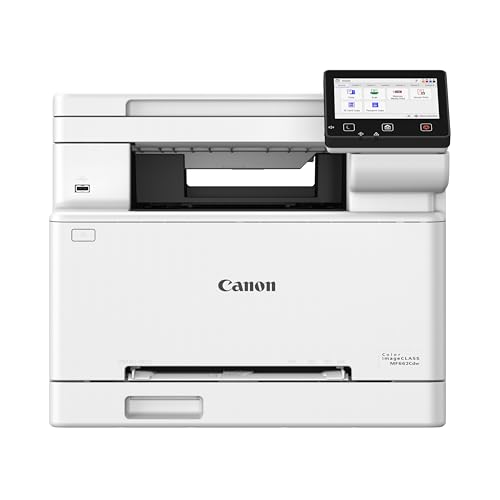
Most church offices are not the Friday war room described above. They are one room, one desk, one person who is there three mornings a week, and a door that everyone in the congregation feels free to knock on. The MF662Cdw fits that room. It prints, scans and copies in colour at 26 pages a minute according to its listing, which is a pace that handles a modest bulletin run without drama and keeps up with the ordinary week: council agendas, a baptism certificate, the rota, the food bank shopping list, fifty copies of a Lent study sheet. It carries the same three-year limited warranty as its faster sibling, and for many churches that warranty, not the speed gap, is the deciding fact, because the question at the council table is rarely how fast the machine is and almost always how long it will be looked after.
What this model gives up against the MF753Cdw II is the fax line and the headline speed, and most small churches will miss neither. Fax in a parish office survives mainly as an obligation to one or two outside organisations, and a nine-page-a-minute difference only becomes real money when runs stretch into the hundreds every single week. What it keeps is the essential trio — print, scan, copy — in a wireless duplex machine, which means the bulletin still folds from two-sided sheets, the signed hall-booking form still gets scanned to the shared drive, and the last-minute hymn sheet still gets copied at 9:52 on Sunday with the congregation already parking outside. For a church stepping up from a wheezing inkjet, this is the step that changes daily life without requiring a treasurer’s apology.
- Print function: colour laser all-in-one — print, scan and copy
- Stated speed: 26 ppm in the listing title
- Two-sided work: duplex printing named in the model description
- Cover: three-year limited warranty stated by the maker
- Connections: wireless for office and mobile printing
- Fax: not claimed in the listing title — treat this as a no-fax machine
Strengths
- Keeps the three functions a small parish actually uses weekly, in colour, with duplex as standard behaviour.
- The three-year warranty matches the flagship Canon, so choosing it is not choosing weaker backing.
- Its pace suits ordinary bulletin runs, leaving budget room for paper, toner and the other things offices consume.
Trade-offs
- No fax is named in its listing, so an office still faxing a presbytery or a hospital chaplaincy should look at the model above.
- At 26 ppm, a growing congregation’s Easter run will take noticeably longer than on the 35 ppm machine.
- Churches wanting a document feeder should confirm the current listing, since the feeder is not part of this title’s claims.
Best for: the single-office parish that needs colour printing, scanning and copying in one dependable box with long warranty cover. Not suited for: a multi-staff campus office juggling several long runs a week, where the faster Canon earns its keep by Thursday.
Canon imageCLASS LBP646Cdw — Best print-only bulletin press
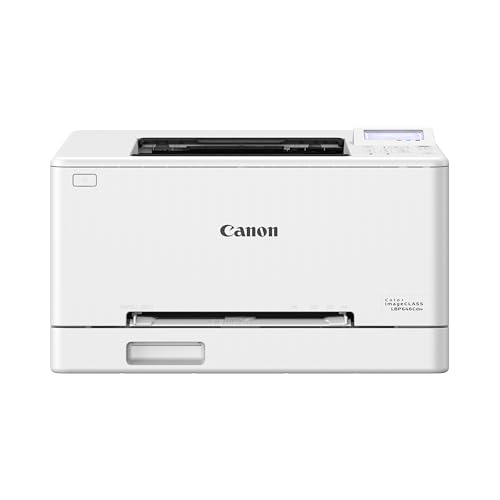
There is a kind of church office wisdom in buying a machine that does one job. The LBP646Cdw prints — colour, duplex, wireless, at 26 pages a minute per its listing — and it does not scan, copy or fax, and for a surprising number of churches that is exactly the right purchase. These are the buildings where a separate copier already stands in the corridor, where the secretary scans with a phone app out of long habit, and where every pound or dollar spent on a scanner lid would be a pound or dollar spent twice on a function the parish already owns. Stripping the machine down to printing also strips down the ways a volunteer can get lost in it. There is no copy menu to misread at 9:52 on a Sunday. There is paper, toner, and a print queue, and that is the whole machine.
As a bulletin press it is properly equipped. Duplex is the feature that turns loose sheets into a foldable booklet workflow, colour is what makes the notices page look like something worth taking home, and laser output is what survives being left on a car dashboard in July without the text feathering at the first hint of damp. The white finish named in the listing sounds like a trivial detail until you picture the pale, bright corner of a small vestry office where a hulking black machine would visually swallow the desk; appearances are not everything, but a machine people are pleased to sit beside gets treated better. Pair this Canon with the corridor copier and a phone for scanning, and a small church has covered its real workload with two simple devices instead of one complicated one — a division of labour that also means a breakdown in one function never takes the other down with it on the busiest morning of the week.
- Print function: colour laser, print only — no scan or copy claims in the listing
- Stated speed: 26 ppm in the listing title
- Two-sided work: duplex named directly in the model title
- Connections: wireless printing for office computers and phones
- Finish: white body, as stated in the listing
- Consumable logic: toner only — no scanner glass, feeder rollers or fax parts to maintain
Strengths
- Every part of the purchase price works on printing, the one job this machine will do ten thousand times.
- A print-only control surface is the hardest kind for a first-time volunteer to get wrong.
- It pairs gracefully with an existing copier, letting each device be simple at its own task.
Trade-offs
- The first time somebody needs a signed form scanned, this machine has nothing to say — another device must exist.
- No copying at all means the emergency hymn-sheet copy still depends on whatever else stands in the building.
- Its 26 ppm pace is shared with two all-in-ones here, so its case rests on simplicity and focus, not speed.
Best for: a church with scanning and copying already covered elsewhere that wants a dedicated, uncomplicated colour press for bulletins and flyers. Not suited for: a one-machine office where the printer must also be the scanner, the copier and the archive’s front door.

HP Color LaserJet Pro MFP 3301sdw — Best HP all-in-one for a small office
Some church offices run on familiarity. The secretary learned HP menus a decade ago, the treasurer’s laptop already knows HP’s print dialogs by heart, and the volunteer who covers holidays once kept an older LaserJet alive for years with nothing but patience and a spare cartridge in the drawer. For that office, the MFP 3301sdw is the natural citizen. Its listing describes a wireless colour all-in-one with duplex printing in the Color LaserJet Pro line — print, scan and copy under one lid, in the design language that office has been reading for years. Familiarity is not a soft benefit in a volunteer-run building. It is the difference between a jam being cleared in two minutes by whoever is standing there and a jam becoming a phone call to the one person who knows the machine, who is, inevitably, on holiday that week.
Within the week, this HP handles the same mixed diet as the Canons: the bulletin run, the copied worksheet, the scanned safeguarding form that has to reach the diocese office today. Wireless all-in-one machines earn their keep in churches partly because church offices are rarely wired the way businesses are — the desk is where the desk has always been, the router is two rooms away behind a stone wall, and a printer that joins the network cleanly and stays joined saves a kind of aggravation that never appears on a spec sheet. Churches whose offices also serve a home-working administrator will recognise the pattern in our guide to best printers for home and small office, because a parish office is really a small office with a steeple: same mixed printing, same part-time staffing, same need for a machine that forgives irregular use. Where the Canon flagship wins on stated speed and feeder hardware, this HP wins the argument in offices that would rather not retrain every helper they have.
- Print function: colour laser all-in-one — print, scan and copy per the listing
- Two-sided work: duplex named in the listing title
- Connections: wireless as the headline connection in its title
- Family: Color LaserJet Pro line, aimed at home-office and small-office desks
- Speed note: no ppm figure is claimed in the title, so judge it by class rather than a headline number
- Form: single desktop unit combining the three daily functions
Strengths
- HP’s familiar menus shorten the learning curve for offices staffed by whoever is available that morning.
- Scan and copy under the same lid cover the form-heavy paperwork that surrounds ministry administration.
- Wireless-first design suits old buildings where the desk and the router were never introduced.
Trade-offs
- Its title states no speed figure, so a church with long weekly runs should weigh the Canons’ stated pace carefully.
- Offices that have standardised on Canon toner and drivers gain nothing from brand loyalty in the other direction.
- Like every all-in-one, a scanner fault can sideline a machine whose print engine is perfectly healthy.
Best for: the HP-fluent small church office that wants colour printing, scanning and copying in one wireless unit its volunteers already half know. Not suited for: a high-volume bulletin operation that shops by stated pages-per-minute and feeder capacity first.

HP Color LaserJet Pro 3204dw — Best compact print-only HP
Not every church office is a room. In plenty of smaller congregations the office is a desk in the corner of the hall, a cabinet in the vestry, or a borrowed corner of the minister’s study, and the printer competes for surface with the hymn books, the collection plates and a kettle. The 3204dw is built for that desk. HP’s listing calls it a single-function colour laser with duplex — print only, deliberately — aimed at home-office use, which in practice means a footprint and a control scheme sized for one person working within arm’s reach of everything. It will not scan the hall-hire contract. It will print the bulletin, the poster for the harvest supper, and the sixty copies of the carol service sheet, in colour, on both sides of the page, without asking the desk to grow.
Print-only machines have a second virtue in borrowed spaces: there is almost nothing to configure wrongly. A helper who has never used this printer can still send a document to it, because the relationship between a computer and a print-only laser is the oldest and simplest one in office life. Duplex keeps the paper stack for a folded bulletin at half height, which matters when the finished pile has to be carried down a corridor in one trip by somebody also carrying a handbag, a Bible and a set of keys. For the smallest churches — the ones where the print run is forty bulletins and the office party is one person — the faster and fuller machines in this guide are answers to questions nobody in the building is asking. This one answers the question that desk actually poses, and it leaves money in the account for the paper and toner the year will certainly consume.
- Print function: colour laser, single function — print only, as the listing states plainly
- Two-sided work: duplex named in the title
- Intended setting: home-office class, per the maker’s own framing
- Connections: wireless model in the LaserJet Pro family — confirm the exact listing before ordering
- Speed note: no ppm figure is claimed in the title; treat pace as small-office class
- Maintenance shape: toner and paper are the whole consumable story
Strengths
- The smallest commitment of money and desk space that still buys colour, duplex and laser permanence.
- Nothing to misconfigure: a print-only box is the easiest machine in this guide for a stranger to use well.
- Leaves budget headroom for the consumables a year of Sundays will definitely burn through.
Trade-offs
- Scanning and copying must live somewhere else — a phone, a volunteer’s home machine, or nowhere.
- A growing congregation will outgrow a small-office-class engine sooner than the bigger picks here.
- No stated speed in the title means long runs should be tested inside the return window, not assumed.
Best for: the small congregation printing modest runs from a corner desk, where space and simplicity outrank every other virtue. Not suited for: any office that needs one machine to print, scan and copy for a staff team across a busy week.

Xerox C245 Color All-in-One — Best alternative-brand all-in-one
There is a particular comfort in buying office machinery from the company whose name became the verb. The Xerox C245 arrives as a compact colour all-in-one — print, scan and copy at 26 pages a minute, per its listing — with wireless setup described as simple, and it is positioned as the successor to the C235 model, which means it belongs to a line Xerox has been refining for small offices rather than a one-season experiment. For a church office, the pitch is steadiness. Twenty-six pages a minute is the same stated pace as the two mid-tier Canons, the function set covers the weekly trio of printing, scanning and copying, and the compact body respects the reality that parish desks are measured in inches of clearance, not square metres of IT suite.
The C245 also earns its place as the diversity pick, and that is not a token virtue. Offices that have been burned by one maker’s driver habits or toner pricing often do better choosing the machine whose ecosystem they have not yet quarrelled with, and a church buying its first serious colour laser has no legacy to protect at all. Its listing frames it for hybrid offices and small businesses, a workload that maps closely onto parish life: some days silent, some days frantic, several different people driving. One caution belongs here, and it applies to the whole guide: the C245 is sold as an Amazon exclusive configuration per its title, so a church that prefers buying through a local office supplier should check channel availability early rather than discovering it at the moment the old printer dies. For a congregation happy to order online, that is a footnote; the machine itself covers the bulletin, the scan pile and the copy job with the calm of a brand that has been doing exactly this since before most of its users were born.
- Print function: colour all-in-one — print, scan and copy, three-in-one per the listing
- Stated speed: 26 ppm in the listing title
- Connections: wireless, with setup described as simple in the title
- Lineage: replaces the C235 model, per the maker’s listing
- Channel note: described as an Amazon exclusive configuration
- Form: compact body aimed at hybrid offices and small businesses
Strengths
- Matches the mid-tier Canons on stated speed and core functions while coming from a different maker’s ecosystem.
- Compact shape respects the small, shared desks that parish offices actually have.
- Successor-model status suggests a maintained product line rather than a disposable listing.
Trade-offs
- No fax is claimed in the title, so fax-dependent offices should treat it as print, scan and copy only.
- An exclusive sales channel can complicate a church that must buy through an approved local supplier.
- It shares the 26 ppm tier, so it wins on fit and feel rather than on any headline performance gap.
Best for: a small-to-mid church office wanting a compact colour all-in-one from outside the Canon and HP duopoly, with simple wireless setup. Not suited for: buyers who need fax on the same device, or whose procurement rules require a local dealer invoice.
How Do the Six Church Picks Compare Side by Side?
| Model | Functions | Stated speed | Duplex | Church-office character |
|---|---|---|---|---|
| Canon imageCLASS MF753Cdw II | Print, scan, copy, fax, feeder | 35 ppm | Yes | The full office: fastest run, deepest paperwork bench |
| Canon imageCLASS MF662Cdw | Print, scan, copy | 26 ppm | Yes | The one-room parish all-in-one with long warranty cover |
| Canon imageCLASS LBP646Cdw | Print only | 26 ppm | Yes | A dedicated bulletin press beside an existing copier |
| HP Color LaserJet Pro MFP 3301sdw | Print, scan, copy | Not stated in title | Yes | The familiar HP route for offices that already speak HP |
| HP Color LaserJet Pro 3204dw | Print only | Not stated in title | Yes | The corner-desk minimum: colour and duplex, nothing else |
| Xerox C245 | Print, scan, copy | 26 ppm | Yes | The compact alternative brand with simple wireless setup |
Read the table by workload, not by rank. A church whose office prints two hundred duplex bulletins and scans a shoebox of forms every week lives in the top row. A church whose entire administration happens on one desk, by one person, in a hall that is also a toddler group on Thursdays, lives nearer the bottom — and will be happier there, because unused capability is not a blessing, it is just money that could have bought paper. The middle rows are where most congregations honestly belong, and the honest question to ask of each is not which is best in the abstract but which one’s omissions your building will never notice. Offices expecting to grow into heavier paper handling should also glance at best 2 tray laser printers, since a second tray — one for plain paper, one loaded with bulletin shells or card — is the upgrade that busy parish offices feel most often.
Which Paper, Tray and Duplex Habits Make Bulletin Day Boring?
Boring is the goal. A bulletin process that nobody talks about any more is a bulletin process that works, and most of its secrets are habits rather than hardware. Load the tray the day before the run, not during it, and fan the stack once so sheets do not travel in pairs. Keep one paper type per tray and label the tray with a strip of tape naming what lives inside it; the single most common church printing failure is a beautiful colour bulletin emerging on the back of last month’s leftover card stock because nobody knew the tray had been repurposed. Set duplex as the driver default on every office computer, so two-sided printing is what happens when a tired volunteer simply presses print, and single-sided becomes the deliberate exception rather than the expensive accident. Print one proof copy, fold it, and read it the way a visitor in the back pew will, checking that page two follows page one in the fold and that the notices page has not landed upside down inside the booklet.
Colour discipline saves more money than any toner negotiation. Design the bulletin so colour carries meaning — a masthead, a photo, a highlighted notice — instead of flooding every page with full-bleed backgrounds that drink toner to produce a slightly warmer shade of expensive. Keep a black-only draft habit for internal documents: agendas, minutes and rotas gain nothing from colour and lose nothing in grey. Churches that run pre-printed shells should store them flat, in their wrapper, away from the radiator, because a curled shell stock is a jam waiting for the worst possible Friday. And write the office’s printing routine down — tray labels, the duplex default, who orders toner, at what warning level — on one sheet taped inside the cupboard door. The routine that lives in one secretary’s head leaves the parish when she does; the routine on the cupboard door trains every successor for free. Families printing at home face a smaller version of the same discipline, which is why our companion guide to best homeschool printers scanners keeps returning to defaults and routines rather than hardware alone.
How Should a Church Set Up a New Printer So Volunteers Trust It?
Setup day decides whether the machine becomes the office’s servant or its resident mystery. Place it where the person printing can stand in front of it comfortably, with the output tray reachable without leaning across a desk, and with enough clearance above the scanner lid of an all-in-one that the lid actually gets used. Connect it by wireless if the building’s signal is honest at that spot, and then test it from every computer and phone that will ever send it a job — including the laptop that only appears when the treasurer visits — before declaring the installation finished. Name the printer on the network in words a human would say out loud, so that the print dialog offers something recognisable instead of a string of letters and numbers that invites people to print to the wrong device entirely.
Then do the three things almost nobody does. First, run a training print: gather whoever helps in the office, print a real bulletin together, clear a deliberate paper jam together, and change nothing about the toner yet but show everyone where the cartridge door is and how it opens. Second, tape a short card to the wall beside the machine covering the four events of its life — how to load paper, what the flashing light usually means, where spare toner lives, and whose phone number solves the rest. Third, schedule the boring supplies before they are urgent: toner ordered when the low warning first appears, paper bought by the box when the shelf drops to the last ream. A printer trusted by volunteers is not the cleverest machine; it is the one whose surprises have all been rehearsed on a quiet Tuesday instead of discovered on a frantic Sunday.
What Are the Most Common Mistakes Churches Make Buying a Printer?
The classic error is buying for the quiet week and meeting Easter. A machine that cruises through forty ordinary bulletins can spend a festival morning gasping through five hundred colour copies while a queue forms, so size the purchase for the three biggest Sundays of your year, not the average one. The second error is paying for a scanner twice — an all-in-one beside a perfectly good copier — or, its mirror image, buying print-only to save money and then spending the savings on a separate scanner within the year because nobody checked how much form-scanning the office really does. Count a month of actual jobs before choosing the function set.
Third comes the consumables surprise: judging two machines by their shelf prices while ignoring that one sips from high-yield cartridges and the other drinks from small ones, a difference that compounds across thousands of pages in a way the purchase price never will. Fourth, churches forget the building — thick walls, a router in another wing, a hall that doubles as a polling station — and discover the wireless dream needs a cable run nobody budgeted for. Finally, there is the single-person trap: one gifted volunteer configures everything beautifully, tells nobody, and moves away. Every setting that matters should be written on that cupboard-door sheet, because a congregation’s memory must live in the building, not in a person.
How Should a Church Budget for Toner and Paper Across a Whole Year?
Budget by season, not by month, because church printing has a climate. Advent and Christmas bring carol services, extra bulletins and the parish magazine’s biggest issue. Lent builds slowly toward a Holy Week where every service seems to need its own leaflet. Easter lands like a festival. Summer, in many congregations, goes quiet enough that an inkjet would dry out — one more reason the laser engine suits this calendar, since toner sits patiently through the August lull and prints the first September page as cleanly as the last July one. A finance team that averages the year into twelve identical months will feel rich in August and ambushed in December; a team that maps the peaks can order paper by the box ahead of them and hold toner money in reserve for the seasons that actually spend it.
Keep the accounting qualitative but disciplined. Track three numbers in a notebook by the machine: reams opened, cartridges changed, and the rough size of each Sunday run. After two quarters those notes tell you more truth about your office than any manufacturer’s yield claim, because they describe your bulletin, your coverage, your volunteers’ duplex habits. If colour cartridges empty in lockstep while black lasts twice as long, your design is colour-heavy and a masthead redesign will save more than a supplier switch. If one cartridge colour always dies first and holds up a Friday run, stock that colour singly instead of learning the lesson during Holy Week. And agree the reorder trigger in advance — the day the low-toner warning appears, a named person orders — because a warning that everyone assumes somebody else saw is functionally the same as no warning at all.
What Can the Scanner Half of an All-in-One Do for a Church Archive?
Churches are accidental archivists. The filing cabinet holds baptism registers’ photocopies, decades of council minutes, hall-hire agreements, signed gift-aid declarations, rotas, risk assessments and at least one folder nobody can identify. An all-in-one’s scanner, used steadily rather than heroically, turns that cabinet from a fire risk into a searchable memory. The practical method is unglamorous: one folder per ministry, one naming habit that puts the year first so files sort themselves, and a standing fifteen minutes in the secretary’s week where the newest paper gets scanned before it joins the pile. The document feeder on the Canon MF753Cdw II makes that habit nearly painless for stacks; a flatbed-only machine makes it a page-at-a-time discipline, which is still worth keeping for bound or fragile items that should never be forced through rollers.
Scanning also serves the living congregation, not just its history. A signed permission slip scanned the day it arrives can be found in seconds when a parent phones; a rota scanned and shared ends the era of photographing the noticeboard with a phone and squinting at the result. Two cautions keep the habit honest. First, decide what must remain paper — some registers, deeds and legal originals carry obligations that a scan supports but does not replace. Second, back the scans up somewhere that is not the same building as the cabinet, because a digital archive that burns in the same fire as the paper one is merely a more modern way to lose everything twice.
Why Do Large-Print Bulletins and Accessibility Copies Change the Calculation?
Every congregation includes readers for whom the standard bulletin is a struggle: small type, tight spacing, grey text on cream paper chosen for looks rather than legibility. Producing a handful of large-print copies each week is one of the cheapest acts of welcome a church performs, and it quietly raises the bar for the printer. Large-print editions mean more pages per copy, which means duplex stops being a thrift feature and becomes the thing that keeps a swollen document foldable. They also reward a machine whose driver makes scaling and booklet options easy to find, because the volunteer producing them may be doing so for the first time, minutes before the service, from a file designed for ordinary eyes.
The same logic extends to the family who needs the service sheet emailed as a scanned attachment for a screen reader at home, and to the visitor whose first language is not the congregation’s and who follows the service from a translated sheet printed that morning. None of these needs appears in a speed figure, yet together they explain why this guide favours capable, forgiving machines over bare-minimum ones. A printer in a church is not office equipment in the ordinary sense. It is part of how the building says that everybody was expected, and everybody’s copy was printed with them in mind.
Final Recommendation
If your church can only take one recommendation from this guide, take the Canon imageCLASS MF753Cdw II for a busy multi-purpose office, the MF662Cdw for the ordinary one-room parish, and the print-only LBP646Cdw or HP 3204dw when a copier already covers the rest; choose the HP MFP 3301sdw where familiarity rules the office, and the Xerox C245 where a compact alternative brand fits the desk and the supplier rules. Whichever name ends up on the invoice, judge it after one full Sunday cycle, keep duplex as the default, write the routine on the cupboard door, and let the machine become unremarkable — because in a church office, the highest praise a printer can earn is that by the third Sunday, nobody in the building can remember what printing the bulletin used to feel like, and the only thing anyone notices on a Sunday morning is the service itself.
Frequently Asked Questions
Does a church really need colour, or is monochrome enough?
Monochrome survives if your bulletin is purely text and your notices live elsewhere. Most congregations, though, communicate in colour everywhere else — screens, posters, social posts — and a grey bulletin increasingly looks like the one document the church did not care about. Colour also does practical work: it separates the notices from the liturgy, makes children’s pages findable, and lets a visitor scan the sheet quickly. Every pick in this guide prints colour for that reason.
How much paper capacity should a church printer have?
Enough to hold the largest regular run without a mid-job refill, with a little left over. A tray that swallows the whole bulletin run turns printing into a single unattended job; a tray that needs topping up twice turns it into a vigil. Count your biggest ordinary Sunday, add the midweek office traffic, and treat any capacity figure on a listing as a claim to test during the return window with your own paper.
Can one printer serve both the office and the youth group?
It can, and often should, but set expectations in writing: whose jobs take priority on a Friday, who may print in colour, and where the line sits between church work and personal pages. The machine will not enforce your policy; the cupboard-door sheet and a named person who owns the supplies will. Offices that share one device across groups benefit most from the all-in-ones here.
What should we do with the old printer?
Keep it, briefly. Run the new machine through one full Sunday cycle before the old one leaves, because the return window is exactly when a tray that hates your bulletin shells or a driver that sulks on the treasurer’s laptop will announce itself. Once the new printer has survived Easter rehearsal — or at least a full ordinary week — pass the old machine to a ministry that prints less, recycle its cartridges through a proper scheme, and wipe any stored documents from an all-in-one’s memory before it changes hands.
Should the printer live in the office or in the hall?
Put it where the Friday work happens, not where it looks tidy in August. A machine exiled to a distant hall cupboard adds a corridor walk to every proof, every jam and every forgotten page, and those walks are where good printing habits go to die. If two rooms genuinely share the work, choose the room with the secretary’s desk, the flatter wireless signal and a door that locks, because toner and paper walk away from unlocked hall cupboards at a rate no budget line survives. The one exception is noise: a printer sharing a wall with a prayer room should move, out of respect for the people on the other side of that wall during a long colour run.
Is fax worth paying for in a church office in this decade?
Only if a specific institution in your life still demands it — a hospital chaplaincy, a denominational office, a government formality. Among these picks, only the Canon MF753Cdw II claims fax in its listing, which is itself a sign of where the technology now sits. If nobody has faxed anything from your office in a year, let the feature go without mourning it.
How do we keep running costs under control without a finance degree?
Three habits do most of the work: duplex as the default so paper use halves on folded documents, colour reserved for pages where it communicates something, and high-yield toner bought before the emergency rather than small cartridges bought during it. Review the pattern once a year at budget time, in pages and cartridges rather than in blame, and adjust the bulletin design before blaming the machine.
Related Guides
One last piece of housekeeping belongs in any honest buying conversation: agree, before the machine arrives, who may declare it broken. Church printers suffer a peculiar fate in which every paper jam becomes a rumour of death and every rumour becomes a reason somebody almost buys a replacement at a supermarket. A named owner, a short fault card, and a rule that no new machine is discussed until the owner has seen the fault will save a congregation more money over five years than any single feature compared in the tables above.
Plenty of church offices double as weekday classrooms, so our guide to the best homeschool printers scanners is worth a look for the scanning half of the job.
Church administrators who moonlight as artists ask us the reverse question as well, and our roundup of the best printers for tattoo covers the transfer-paper side of small-studio printing.
Church offices sit inside a wider family of demanding print jobs. Work that must be signed, carried and recorded has its own mobile logic in best printers for notary work, while large-format colour work for displays and teaching posters follows the wide machines in best printers for transparencies for screen printing. Read those alongside this guide and the pattern repeats: match the machine to the document’s real destination, and the purchase tends to take care of itself.
Related guides
- Best 1440p 165Hz Monitors: One Native 165Hz Pick, Three 180Hz Upgrades, an Overclock Headline and a 160Hz Ultrawide
- Best 13×19 Professional Printers
- Best 3rd Party MacBook Chargers: 96W-Class Alternatives, the 100W Cable Rule, and the Apple Benchmark
- Best Built PC: Six Prebuilt Gaming PCs Judged on Parts, Power and Upgrades


