What's inside
- Where to Buy a Tattoo Stencil Printer Without the Guesswork
- Key Takeaways
- Quick Picks
- How Did We Choose These Tattoo Stencil Printers?
- Why Is Thermal the Right Technology for Stencils?
- What Actually Separates One Stencil Printer From Another?
- The Six Stencil Printers, Examined One at a Time
- How Do the Six Compare Side by Side?
- How Do You Print a Stencil That Transfers Cleanly, Step by Step?
- What Mistakes Ruin Stencils and Waste Paper?
- What Does a Studio Day With a Stencil Printer Actually Look Like?
- How Should You Judge the App That Comes With Each Printer?
- What Hygiene and Studio Habits Belong Around Stencil Printing?
- Should a Shop Buy One Printer per Chair, or One to Share?
- What Do You Do When a Stencil Print Comes Out Wrong?
- What Should You Understand About Transfer Paper Itself?
- Final Recommendation
- Frequently Asked Questions
- Related Guides
As an Amazon Associate I earn from qualifying purchases. This post may contain affiliate links at no extra cost to you.
gizmoverdict.com is reader-supported. When you buy through links on our site, we may earn an affiliate commission.
Where to Buy a Tattoo Stencil Printer Without the Guesswork
The best printers for tattoo work do one narrow job beautifully: they turn a design on a phone or tablet into a transfer stencil that lands on skin cleanly, holds its lines through a session, and lets the artist tattoo instead of redraw. Every machine in this guide is a thermal stencil printer — no ink, no toner — that works with standard tattoo transfer paper, because that is the honest technology for stencils. None of them prints a finished tattoo, none prints in colour, and any listing that blurs that line is selling you a misunderstanding. What separates these six near-identical-looking machines is the stuff around the print: the companion app’s editing tools, how gracefully each one feeds stencil paper, battery life for guest spots and conventions, and how wide a design each can handle.
Where to buy deserves a sentence of its own in this category, because stencil printers are a white-label-heavy corner of the market where the same hardware shape appears under many names. Buy against the listing details, not the brand story: confirm the model name, what paper is bundled, and whether the app is the maker’s own. Most of these printers include a starter set of transfer sheets — several below list ten pieces in the box — which is enough to learn the machine and not enough to run a studio, so order your usual transfer paper at the same time and learn the printer on the paper you will actually use. If you tattoo professionally, buy from a seller whose return window covers your first convention or guest spot, because that is where a stencil printer either becomes kit or becomes clutter.
A word on expectations before the picks. A stencil printer replaces the hand-tracing and the aging thermal copier in the corner; it does not replace drawing. The artists who get the most from these machines treat them as the faithful middle step between a finished design and the skin — the design still has to be good, the contrast still has to be set by a human, and the stencil still has to be applied with the same care as a hand-drawn one. The printer’s job is to make that middle step fast, repeatable, and identical on the tenth print as on the first.
Key Takeaways
- All six picks are thermal stencil printers: inkless, made for standard transfer paper, and strictly for stencils — never colour, never finished tattoos.
- The companion app is half the product, because mirroring, contrast, and image cutting happen there before anything reaches the paper.
- Stencil-paper handling is where cheap-feeling machines betray themselves: a stencil that wrinkles or slips mid-print is a design you redraw by hand.
- Battery and size decide who each printer serves — the studio desk, the guest-spot kit, and the convention floor are three different briefs.
- Every pick here ships with some starter transfer paper, but ten sheets is a lesson, not a supply; stock your studio’s usual paper alongside.
- Mirror the design before printing, every time — the transfer process flips the image once, and the app flip is what makes it land correctly.
Quick Picks
| Pick | Badge | Why it is here |
|---|---|---|
| Phomemo M08F Tattoo Stencil Printer | Best all-round stencil printer | The established name in this class, with a smart app, large-image cutting, and ten sheets of tattoo paper in the box. |
| Itari Tattoo Stencil Printer | Best for beginners | Aimed squarely at artists starting out, with ten pieces of transfer paper and a phone-first Bluetooth workflow. |
| YIRIGUI 2-in-1 Tattoo Stencil Printer | Best stencil-plus-documents | A 2026 two-in-one that prints stencils and ordinary paperwork, pitched at artists, shops, and travel alike. |
| Tatouhom Tattoo Stencil Printer | Best rechargeable all-rounder | A two-in-one transfer printer with a rechargeable Bluetooth design for artists and beginners who move around. |
| Sacnahe Tattoo Stencil Printer | Best for saved templates | Stands out for saving custom templates and handling multiple sizes up to A4 across phone, tablet, and PC. |
| Bagana Tattoo Stencil Printer | Best mini for conventions | The compact, rechargeable option pitched at artists, hobbyists, conventions, and home studios alike. |
How Did We Choose These Tattoo Stencil Printers?
Honesty about the field first: these six machines resemble each other because they are built on the same thermal idea, and several come from the white-label ecosystem where housings and chipsets are shared. We refused to invent differences the listings do not state. Instead we ranked on the four axes the listings themselves support and that studio experience says matter: the app’s editing features, since the app is where mirroring and contrast live; stencil-paper handling, including what paper is bundled and what sizes the machine accepts; battery and portability, judged by whether the design is rechargeable and how the maker positions it; and print width, in the practical sense of whether full A4-class sheets and larger designs are within the machine’s stated reach.
We also held every pick to the class rules. A stencil printer must work with standard transfer paper, must connect to the devices artists actually design on — phones and tablets first, PCs second — and must be honest about being a stencil tool. Machines that hinted at colour printing or finished-tattoo output would have been excluded; none here does, and this guide will not claim it for them either. Artists whose wider studio printing needs run to reference photos and paperwork can compare the general-purpose field in our guide to the best direct thermal printers, and those curious about the smallest end of thermal printing can browse the best mini pocket thermal printers — though neither replaces a proper stencil machine for transfer work.
Finally, we weighted the unglamorous: what arrives in the box. A printer bundled with ten sheets of the right paper can be evaluated the evening it lands; one that arrives alone waits for a second delivery while the old copier keeps wheezing. In a category this close, the complete first week is a real difference.
Why Is Thermal the Right Technology for Stencils?
Tattoo transfer paper is a layered thing: a sheet that carries a carbon-like transfer layer, tissue, and backing, designed so that heat and pressure move the design from the paper to the skin via stencil solution. Thermal printers speak that paper’s native language. Their print heads heat in fine lines, the transfer layer responds, and the design emerges on the sheet ready to be cut out and applied — no ink to smear, no wet medium to dry, nothing between the digital design and the stencil except the paper itself. It is the same principle as the thermal copiers studios have used for decades, miniaturised and connected to a phone.
The contrast with inkjet is instructive. An inkjet can print a design on plain paper beautifully, but plain paper is not transfer paper; artists historically traced through it by hand, which is the labour the stencil printer exists to remove. Thermal printing on genuine transfer stock produces a stencil whose lines carry the transfer medium itself, so what lands on skin is the design, in the medium meant to hold it there while the needle works. That is why every serious entry in this category is thermal, and why “inkless” in these listings is a credential rather than a limitation.
Thermal’s limits are the familiar ones from elsewhere in this batch of guides, wearing different clothes. The stencil is a working tool with a short intended life — it needs to survive the session, not the archive — so the fading that disqualifies thermal for recorded documents is irrelevant here. What matters is line integrity on the day: solid blacks, unbroken fine lines, and no dropouts in the middle of a piece’s most important curve. Judge every print as it comes off the machine, against the screen, before it ever touches skin.
What Actually Separates One Stencil Printer From Another?
Start with the app, because you will spend more time in it than touching the printer. The app receives the design, flips it, sets its contrast, sizes it to the body placement, and sends it to print. Good app features named in these listings include large-image cutting — splitting an oversized design across sheets so a back piece or a full sleeve stencil can be printed in sections and reassembled on the skin — and saved templates, which let a studio reprint a recurring design, a logo, or a set of flash staples without rebuilding the file each time. When an app is clumsy, every stencil costs minutes of fiddling in front of a client; when it is good, the printer feels like an appliance.
Paper handling is the second separator, and it is physical. Transfer paper is flimsier and more layered than office stock, and a machine that feeds it straight and flat produces stencils that lie flat on skin. Loading style, the straightness of the path, and the sizes accepted — several picks state support up to A4, and the class standard is full letter/A4 width — decide whether large, ambitious stencils are routine or a wrestling match. Practise feeding with the bundled sheets before a client is in the chair; every machine has a preferred way in, and the time to learn it is a quiet Tuesday.
Battery and build form the third axis. A rechargeable machine untethers the stencil step from the wall, which matters at conventions where outlets are contested ground, at guest spots where you are a visitor in someone else’s station layout, and in studios where the printer moves between chairs. The fourth axis is honesty about role: the two-in-one models below also print ordinary documents, which is genuinely handy for consent forms and aftercare sheets, while the dedicated stencil machines put all their design effort into the one job. Neither is superior in the abstract; your studio’s day decides.
The Six Stencil Printers, Examined One at a Time

Phomemo M08F Tattoo Stencil Printer — Best all-round stencil printer
The M08F is the name most artists will have heard, and its listing earns the flagship spot here on stated features rather than reputation: a Bluetooth wireless thermal printer with a smart app, large-image cutting, and ten pieces of tattoo paper in the box, compatible with phone, tablet, and PC. The large-image cutting deserves the spotlight. Big work — back pieces, chest designs, full wraps — does not fit on one sheet, and an app that slices a design into printable sections with sensible overlaps turns a manual jigsaw into a procedure. Artists who do large-scale work should weight that feature heavily; it is the difference between printing the stencil you designed and compromising the design to fit the printer.
Phomemo’s broader portable-printing ecosystem also means the app is a mature piece of software rather than an afterthought, and the M08F’s workflow — design on phone or tablet, adjust in app, print, apply — is the reference flow the other picks here are measured against. The black finish and portable format suit both a fixed station and a travelling kit. Where it asks something of you is the usual thermal discipline: it prints stencils only, in black, on transfer paper you keep stocked, and its output quality lives or dies on the contrast decisions you make in the app before printing. Feed it a muddy, low-contrast design and it will faithfully reproduce the mud; the machine’s honesty about your file is total.
- Class: thermal stencil printer, Bluetooth wireless
- App features named: smart app with large-image cutting
- In the box: printer plus 10 pieces of tattoo paper
- Compatibility: phone, tablet, and PC per the listing
- Output: black stencils on standard transfer paper — stencils only
Strengths
- Large-image cutting opens up big-format work that single-sheet machines cannot attempt cleanly.
- A mature app flow shortens the distance between finished design and stencil on skin.
- Bundled starter paper means the first evening’s learning curve happens on the right stock.
Trade-offs
- Ten bundled sheets run out fast in a working studio; your paper supply is your own problem from week one.
- Stencil-only, like everything here — paperwork needs another solution or a two-in-one pick.
- Shared-ecosystem hardware means rivals feel similar in the hand; the app is the real difference.
Best for: working artists who want the most complete stencil workflow, especially those printing large designs. Not suited for: anyone expecting a general-purpose printer that also happens to do stencils.

Itari Tattoo Stencil Printer — Best for beginners
Itari pitches its machine without embarrassment at people starting out: the listing calls it a stencil printer for beginners, wireless and Bluetooth, portable, supplied with ten pieces of transfer paper, and compatible with phone, tablet, and PC for professional studio use as skills grow. That positioning is more useful than it sounds. A first stencil printer is a learning tool as much as a production tool — the beginner needs to discover how contrast settings change line weight, how paper orientation works, how a stencil behaves on skin — and a machine bought for that stage should be simple to connect, forgiving to load, and cheap in spirit to experiment with, using the bundled sheets as tuition.
The listing’s mention of use alongside a tattoo gun is worth translating plainly: this is studio equipment for the whole beginner setup, the printer that sits beside the first machine and produces the stencils the apprentice practises with. Nothing about it prints a tattoo; it prints the guide the tattoo follows. For mentors, that makes it a sensible shop purchase for the apprentice station, where its output will be judged daily by an experienced eye and its simplicity keeps the lesson on tattooing rather than on IT. Experienced artists with established workflows will find the feature story thinner than the M08F’s — no headline image-cutting here — but beginners rarely need the advanced features before they need reliability at the basics.
- Class: thermal stencil printer, wireless Bluetooth, portable
- Positioning: built and bundled for beginners, per the listing
- In the box: printer plus 10 pieces of transfer paper
- Compatibility: phone, tablet, and PC
- Output: black transfer stencils only
Strengths
- A beginner-first design keeps setup and first prints unintimidating.
- Bundled transfer paper lets a new artist learn on correct stock from the first print.
- Phone-first Bluetooth suits the way new artists already design and store work.
Trade-offs
- The advanced app story is thinner than the flagship’s — large-piece workflows are not its pitch.
- Skills may outgrow it; treat it as the right first machine rather than the last one.
- Like all picks here, it depends on your contrast judgement in the app for line quality.
Best for: apprentices, students, and new artists building their first complete stencil workflow. Not suited for: high-volume studios needing advanced image handling for large custom pieces daily.

YIRIGUI 2-in-1 Tattoo Stencil Printer — Best stencil-plus-documents
The YIRIGUI’s listing announces a 2026 two-in-one: a wireless Bluetooth thermal printer for tattoo stencils and documents, promising HD fast transfer, in a portable format addressed to tattoo artists and shops as well as travel, home, and office use. The two-in-one idea deserves a fair hearing rather than a purist’s shrug. A small studio produces a steady trickle of ordinary paper — consent forms, aftercare instructions, appointment cards, price lists — and a machine that prints both the stencil and the aftercare sheet removes a second printer from a small station. Thermal document printing carries the usual caveat that output is not archival, and for aftercare sheets and day forms, archival is not the requirement; legibility today is.
The “HD fast transfer” language is the maker’s own claim and we repeat it as a claim, not a measurement; what can be said from the listing is that the machine positions transfer quality and speed as its headline, in a current-generation model. For a travelling artist the combination is attractive: one rechargeable-format unit covering stencils at the guest station and paperwork at the hotel desk. Studios with a settled office printer gain less from the second function and should weigh the dedicated stencil machines’ app features more heavily. As with every white-label-adjacent model here, buy it on the stated feature list — two-in-one function, Bluetooth, portability — and let your first week’s prints confirm the rest.
- Class: thermal two-in-one — stencils plus documents
- Connection: wireless Bluetooth
- Maker’s headline: HD fast transfer (their claim, repeated as such)
- Audience per listing: artists, shops, travel, home, and office
- Output: black stencils on transfer paper; documents on thermal paper
Strengths
- Two jobs in one travelling unit — stencils at the chair, forms at the desk.
- A current model year suggests an up-to-date app and connection stack.
- Portability serves guest spots where station space and outlets are negotiated.
Trade-offs
- Document output is thermal — fine for day forms, not for records you must keep for years.
- Jack-of-two-trades design means the stencil app story is less specialised than the flagship’s.
- Headline quality claims are the maker’s; verify with your own first-week prints.
Best for: travelling artists and small studios wanting one machine for stencils and daily paperwork. Not suited for: artists who already run a separate office printer and want stencil features above all.

Tatouhom Tattoo Stencil Printer — Best rechargeable all-rounder
Tatouhom’s listing describes a thermal tattoo stencil printer machine — Bluetooth, portable, wireless — built as a two-in-one for stencils and paperwork, with a rechargeable Bluetooth design addressed to tattoo artists and beginners. The rechargeable point is the one to underline. A stencil printer that carries its own power stops caring where the outlet is, and in real studios outlets are exactly where the autoclave, the lights, and two phone chargers already live. Rechargeability also makes the machine a natural shared resource: it can live on a shelf and be carried to whichever chair needs a stencil, rather than belonging to the one station with a free socket.
Its two-in-one character mirrors the YIRIGUI’s logic — stencils plus paperwork from one thermal unit — and the same honest caveat applies to the paperwork half: thermal documents serve the day, not the archive. For the stencil half, the buying questions are the class questions: how the app handles mirroring and contrast, how the feed treats transfer paper, and whether the first week’s prints come out with lines you would trust on skin. The Tatouhom’s stated audience, spanning artists and beginners, suggests an interface pitched at simplicity; artists with large-format ambitions should compare the M08F’s image-cutting story before deciding, while artists whose work is mostly palm-to-A4 scale will find this machine’s brief — portable, rechargeable, dual-purpose — squarely aimed at them.
- Class: thermal two-in-one stencil and paperwork printer
- Power: rechargeable design, per the listing
- Connection: Bluetooth wireless, portable format
- Audience per listing: tattoo artists and beginners
- Output: black stencils on transfer paper; thermal documents
Strengths
- Rechargeable power frees the stencil step from outlet geography.
- Two-in-one coverage suits small stations with no room for a second printer.
- A shared, shelf-to-chair machine fits multi-artist studios’ actual habits.
Trade-offs
- Paperwork output is thermal and temporary, as with all thermal document printing.
- No headline large-image feature; big-piece artists should compare the flagship first.
- Battery convenience still means a charging habit — a flat printer prints nothing.
Best for: artists and small studios wanting a rechargeable, dual-purpose machine that moves between chairs. Not suited for: large-format specialists whose stencils routinely exceed single-sheet planning.

Sacnahe Tattoo Stencil Printer — Best for saved templates
The Sacnahe’s listing leads with a feature the others do not name: saving custom templates. Around it sit the class essentials — Bluetooth thermal printing, multiple sizes up to A4, compatibility with iOS and Android phones, iPad, and PC — addressed to professionals and beginners alike. Template saving sounds like a small thing until you run a studio with recurring elements: the shop’s logo for packaging, a set of standard aftercare layouts, flash designs that sell every week, lettering alphabets an artist returns to constantly. Rebuilding those files in an app every time is a tax on every stencil; a printer whose ecosystem remembers them removes the tax.
The multi-size support up to A4 matters for a subtler reason: stencil size discipline. A design placed on a forearm, a sternum, and a calf in the same week is three sizes of one file, and a workflow that handles resizing cleanly — with the app doing the scaling and the printer accepting the sheet sizes involved — keeps line weights consistent across placements. Judge the Sacnahe the way you would judge the others in your first week: print your most-used design at two sizes, check that fine lines survive the smaller one, and save it as a template to see whether the recall flow is genuinely faster than rebuilding. If it is, this machine has a workflow argument none of the others state as plainly.
- Class: thermal stencil printer with template saving
- Sizes: multiple sizes up to A4, per the listing
- Compatibility: iOS and Android phones, iPad, and PC
- Audience per listing: professional and beginner friendly
- Output: black transfer stencils only
Strengths
- Saved custom templates remove repeated setup for a studio’s recurring designs.
- Size flexibility up to A4 covers the placements most studios print daily.
- Broad device compatibility fits mixed phone, tablet, and PC studios.
Trade-offs
- Template value only materialises if your studio actually reprints designs — one-off custom artists gain less.
- No bundled-paper headline in its listing pitch; confirm the box contents when ordering.
- The advanced large-image story belongs to the flagship pick, not this one.
Best for: studios with recurring flash, logos, and lettering that get reprinted at several sizes. Not suited for: artists whose every piece is a one-off and who would never open the template library.
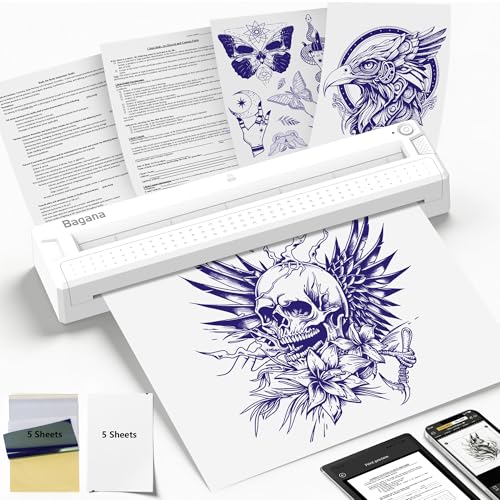
Bagana Tattoo Stencil Printer — Best mini for conventions
The Bagana is the mini of the group: a thermal tattoo printer described as wireless, Bluetooth, and portable — a stencil machine for stencils and documents in a rechargeable compact format, pitched at artists, hobbyists, conventions, and home studios. Conventions are the use case that explains it. Convention tattooing is a discipline of small footprints and fast turnarounds: your whole station ships in cases, your table space is measured in inches, and the artist who can produce a clean stencil at the table without a trip to a shared copier keeps the queue moving. A compact rechargeable printer is not a compromise in that environment; it is the correct shape of tool.
Home studios and hobbyists are the other half of its pitch, and for them the mini format lowers the commitment of entering the stencil-printer world: less shelf, less fuss, the same thermal transfer fundamentals. Its documents capability follows the two-in-one pattern — useful for the day’s forms, thermal and therefore temporary. What the mini asks in return is scale realism: artists whose bread and butter is large work should treat the flagship’s image cutting as the relevant feature and this machine as the travel companion, while artists working small-to-medium pieces may find the Bagana is simply the printer they reach for most, because it is the one that is always charged, always nearby, and always ready.
- Class: compact thermal stencil and document printer
- Power: rechargeable, per the listing
- Connection: wireless Bluetooth
- Audience per listing: artists, hobbyists, conventions, home studios
- Output: black stencils on transfer paper; thermal documents
Strengths
- The convention-shaped pick — small, rechargeable, and quick to deploy at a rented table.
- A gentle entry point for home studios and hobbyists building a first setup.
- Dual stencil-and-document duty covers a small station’s whole paper load.
Trade-offs
- Mini format means large-piece workflows are not its home ground.
- Document printing is thermal, with the usual temporary-output caveat.
- Heavy daily studio volume will outgrow a compact machine’s rhythm.
Best for: convention artists, travelling guests, and home studios wanting the smallest complete stencil setup. Not suited for: a busy fixed studio’s main stencil station for large custom work.
How Do the Six Compare Side by Side?
| Printer | Headline feature from its listing | Paper in the box | Documents too? | Natural home |
|---|---|---|---|---|
| Phomemo M08F | Large-image cutting in a smart app | 10 tattoo sheets | No — stencil specialist | The working studio’s main station |
| Itari | Beginner-first design | 10 transfer pieces | No — stencil specialist | The apprentice station |
| YIRIGUI 2-in-1 | Stencil plus document printing, 2026 model | Check listing contents | Yes | The travelling artist’s single case |
| Tatouhom | Rechargeable two-in-one design | Check listing contents | Yes | The shared shelf between chairs |
| Sacnahe | Saved custom templates, sizes to A4 | Check listing contents | No — stencil specialist | The flash-heavy studio |
| Bagana | Compact rechargeable mini | Check listing contents | Yes | The convention table |
Because these machines share so much underlying technology, the table’s honest message is that lifestyle, not lineage, should choose between them. Ask where the printer will live, whose phone it will pair with, and what a typical week’s stencils look like in size and repetition. The answers point at one row fairly reliably. Artists comparing label-style thermal gear for shop organisation can also look at the best bluetooth label printers, and those equipping a fully mobile setup may cross-check the best portable bluetooth printers for the paperwork side of the kit.
How Do You Print a Stencil That Transfers Cleanly, Step by Step?
Prepare the design. Finish the artwork first — the printer reproduces, it does not improve. Convert the design to clean black line work, remove greys that will print as mush, and check the finest lines at the actual size the tattoo will be: a line that is elegant at A4 and hair-thin at palm size will not hold as a stencil or as a tattoo. Bold the lines that carry the design’s structure; stencil printing rewards decisiveness.
Mirror it in the app. The transfer process flips the image when the stencil goes from paper to skin, so the print itself must be mirrored for the tattoo to read correctly — lettering makes this non-negotiable, since backwards text is the classic beginner’s disaster. Every workflow in this guide’s apps includes a flip or mirror step; make it a checkbox in your head, performed consciously even when the app remembers your last setting.
Set contrast and size. Raise contrast until the design is unambiguous black on white, and size the print to the placement, measuring the body area rather than guessing. Print a test on a bundled sheet if the design is new to you, and inspect the output against the screen: lines unbroken, corners sharp, no dropouts in dense areas. A test sheet costs little; a stencil applied wrong costs a client’s confidence.
Load the paper correctly. Transfer paper has a right side and a right direction, and each machine has its preferred feed. Load per the maker’s instructions, keep the sheet flat and uncreased, and let the printer pull it rather than pushing it through. A stencil that emerges wrinkled or skewed gets binned, not applied — skin is not the place to discover that a line drifted.
Apply and verify. Cut the stencil out, apply stencil solution to the skin, place the stencil once — repositioning smears — and peel to reveal the transfer. Check the transferred image against the design with the client: orientation, size, and every word of any lettering, read aloud if necessary. Only then does the tattooing begin, with the stencil as a trustworthy map rather than an approximation.
What Mistakes Ruin Stencils and Waste Paper?
Forgetting the mirror is the rite of passage nobody wants. It survives every generation of stencil technology because it happens at the one moment the artist is thinking about the tattoo instead of the print. Build the flip into a physical routine — a beat in the workflow where you say it or tap it deliberately — rather than trusting that you will remember during a busy Saturday.
Skipping contrast work is the quieter failure. A design that looks rich on a backlit screen can print as a grey fog on transfer paper, because the printer renders what the file contains, not what you meant. Artists who print foggy stencils often blame the machine; the fix lives in the file, in the two minutes of contrast and line-bolding that should precede every print.
Third, feeding good paper badly. Transfer paper stored bent, loaded creased, or pushed through by an impatient hand produces stencils with drifted lines and patchy transfer layers. Store the paper flat, load it the maker’s way, and bin any sheet that comes out wrong rather than hoping the skin application will forgive it — it will not, and the client watches you decide whether their tattoo is worth a fresh sheet.
Fourth, printing the only copy. Sessions run long, stencils get wiped, sweat and work erase sections mid-piece. Print a spare for any design of size or complexity and keep it at the station; the cost is one sheet, and the benefit is that a fading stencil at hour three is an inconvenience instead of a freehand emergency. And fifth, letting the battery die at a guest spot because the printer was “probably charged.” Charge it the night before, like every other professional tool you own.
What Does a Studio Day With a Stencil Printer Actually Look Like?
The first appointment sets the pattern. The design was finished and approved the night before — every experienced artist insists on this, because a stencil printer makes it dangerously easy to print a half-approved design quickly. The file comes off the tablet, gets mirrored and contrast-checked in the app, and prints while the station is being set up. The client checks placement in the mirror, the stencil goes on, and the machine’s contribution to the appointment is over in minutes, which is precisely the point: the printer’s value is measured in how completely it disappears.
Between appointments is where the class earns its keep against the old ways. A walk-in flash client picks a design from the wall or the book; with a template-friendly machine or a well-organised app library, that design is a stencil in two minutes, at the size the placement needs. Hand-tracing the same flash piece would take longer and introduce a human wobble into a design whose whole appeal is its cleanliness. Multiply that by a Saturday of walk-ins and the printer has quietly bought the studio an extra appointment’s worth of tattooing time.
The end of the day has its own small rituals. The printer gets charged or plugged in, the paper stock gets counted — running out of transfer paper mid-week is the stencil-studio equivalent of running out of needles — and any design that earned a reprint gets saved or filed where tomorrow’s self can find it. None of this is glamorous, and all of it is the difference between a tool that serves the studio and a gadget that merely visited it.
How Should You Judge the App That Comes With Each Printer?
Since the hardware converges, the app is where your daily experience is decided, and it deserves the same scrutiny you would give a drawing program. The essentials are non-negotiable: importing from the sources you actually use, a clear mirror function, contrast or threshold adjustment you can preview honestly, and sizing that works in real measurements rather than percentages of an unknown original. If an app cannot show you, before printing, approximately what the stencil will look like — blacks solid, fine lines present, nothing essential lost to grey — it is asking you to waste paper learning what a preview should have told you.
Beyond the essentials, features sort themselves by studio type. Image cutting matters to large-piece artists. Template and library functions matter to flash and repeat-design studios. Multi-device support matters where the design lives on a shop tablet but the consultation happened on a phone. When comparing the picks in this guide, we weighted the features their listings actually name — the M08F’s large-image cutting, the Sacnahe’s saved templates — because an app feature that exists in a listing can be verified on day one, while a rumoured one cannot. Do exactly that in your first week: test the headline feature with a real design before the return window closes, since the app is the half of the product you will touch ten thousand times.
Also consider the failure mode. Apps update, phones update, and occasionally the two disagree on a morning when a client is already numbing. The studios that cope keep the printer’s workflow documented — a note in the station drawer with the connection steps — and keep one older device, a shop tablet that changes slowly, as the stencil station’s dedicated controller. A printer is only as reliable as the least reliable link in its chain, and in this category that link is almost never the print head.
What Hygiene and Studio Habits Belong Around Stencil Printing?
A stencil printer sits in an interesting hygiene position: it never touches the client, but everything it produces does. Treat the paper path accordingly. Handle transfer paper with clean hands, store it sealed and flat away from the splash and aerosol zones of the studio, and never let printed stencils wait around on shared surfaces gathering the day. A stencil that has sat out through two other appointments is not the crisp, clean guide you printed; print fresh for the session in front of you.
The printer itself wants a defined home. Studios that assign it a shelf or a spot — ideally in the design area rather than the tattooing area — find that it stays cleaner, stays charged, and stays findable, three virtues that wander when a device floats. Wipe the exterior as part of the station routine your studio already keeps, and keep food, drink, and the general archaeology of a busy desk away from the paper feed, because transfer paper picks up every crumb and crease it meets on the way through.
Finally, keep the human checks human. The stencil approval moment — client in front of the mirror, design on skin, artist asking “exactly there?” — is a professional ritual the printer should never rush you past. The machine made the stencil fast; the placement still deserves the slow minute. Studios are remembered for the tattoos, and the tattoos begin at that mirror, not at the print button.
Should a Shop Buy One Printer per Chair, or One to Share?
The arithmetic of sharing depends on rhythm. Stencil printing is bursty: several artists finish designs at similar times — the morning setup hour, the post-lunch walk-in wave — and a single shared printer becomes a small queue with a client attached to each person in it. A one-artist studio never meets this problem and should buy one good machine, full stop. A two-to-four-artist shop usually lands on one main station printer plus the understanding that a second, smaller machine — a Bagana-class mini, or an artist’s own — absorbs the collisions. Large shops tend to standardise: the same model at the design desk and a spare, so paper, app knowledge, and habits are uniform and nobody’s stencil depends on remembering which printer flips automatically.
Standardising has a subtler benefit: shared troubleshooting. When every artist uses the same app, the person who solved the contrast problem last month can solve it for the new apprentice in a sentence. Mixed fleets fragment that knowledge. If your shop does standardise, buy the spare at the same time if the budget allows, because models in this fast-moving category change names and app pairings with a speed that can leave a later purchase oddly incompatible with the fleet’s habits.
Guest artists complicate the picture pleasantly. A guest arrives with their own designs and often their own printer expectations; a shop machine with a straightforward phone connection — any pick here — is a hospitality asset, letting the guest print from their own device without adopting the shop’s whole system. Keep the guest workflow written down near the printer, and the visit starts with tattooing instead of tech support.
What Do You Do When a Stencil Print Comes Out Wrong?
Diagnose in the order the workflow runs. If the design is reversed, the mirror step was missed or an app setting reset — reprint with the flip consciously set, and check any lettering twice. If lines are missing or broken, look first at the file: zoom into the screen version at print size and see whether those lines were ever bold enough to survive. Most “printer dropped my lines” cases are “the file’s lines were whispers” cases, and the fix is in the drawing, not the machine. If the lines exist in the file but print patchily, suspect the paper — a creased, damp, or wrong-side-loaded sheet — and try a fresh sheet from the middle of the pack before suspecting hardware.
If the print is skewed or the paper wrinkles on its way through, stop feeding and inspect the path: transfer paper’s layers separate when manhandled, and a partially delaminated sheet will never feed straight. Load a fresh sheet exactly as the maker directs, let the machine take it at its own pace, and resist the tug that every impatient hand wants to apply. If the printer will not connect, the liturgy is boring and effective: Bluetooth off and on, forget and re-pair, restart the app, restart the printer — in that order — and only then conclude something is genuinely wrong.
Keep a small log if problems recur. Studios are busy and memories are kind; a note that says “Tuesday, faint left edge, new paper pack fine” turns a mysterious pattern into a solvable one within a fortnight. And hold onto perspective: a stencil printer’s failures cost a sheet of paper and two minutes, which is the cheapest failure mode in the entire studio. That cheapness is a reason to test boldly — new paper brands, new app settings, new sizes — during quiet hours, so the busy hours run on knowledge instead of hope.
What Should You Understand About Transfer Paper Itself?
The printer gets the attention, but the paper does the transferring, and a little paper literacy pays off across every machine in this guide. Thermal transfer paper is a small sandwich: a top sheet that receives the print, a transfer layer carrying the pigment that will move to the skin, a protective tissue, and a backing sheet. The layers you use and the order you load them depend on the paper type and the machine’s instructions — some workflows print through the full set, others use the master sheet alone — which is why the maker’s loading diagram, unglamorous as it is, deserves one careful read before your first client print rather than a skim during it.
Paper quality varies more than printer quality in this category. Sheets from reputable tattoo suppliers feed flatter, transfer more evenly, and hold finer lines than the cheapest bundles, and since the stencil is the tattoo’s foundation, paper is a strange place to economise. The starter sheets bundled with several picks here are best treated as calibration stock: learn the machine on them, form your contrast and feeding habits, and then run a comparison against your studio’s usual paper to see which your machine handles better. Some printers visibly prefer one paper’s stiffness over another’s, and discovering that preference in a quiet week is free knowledge.
Storage closes the lesson. Transfer paper hates heat, humidity, and being stored under a pile of other supplies that slowly bends it into a permanent curl. Keep it flat, sealed, and in the design area’s driest drawer, and rotate stock so the oldest pack is used first. A stencil printed on well-kept paper, from any of these six machines, will outperform a stencil printed on abused paper from the finest machine ever sold — a sentence worth remembering whenever a print disappoints and the printer is the first suspect.
Final Recommendation
For most working artists, the Phomemo M08F is the stencil printer to build around: its app’s large-image cutting and the complete in-box start make it the strongest all-round workflow here. Beginners should start where Itari aims — simple, bundled, forgiving — and let their ambitions, not their first purchase, grow. Studios that reprint designs constantly will feel the Sacnahe’s template saving in their weekly rhythm; artists who travel, guest, and work conventions should look hardest at the two-in-one and mini machines — YIRIGUI for the full stencil-plus-paperwork kit, Tatouhom for rechargeable flexibility between chairs, Bagana for the smallest convention footprint. Whichever you choose, remember that the printer only ever makes the map: the tattoo is still drawn by you, judged by you, and inked by you, and the best stencil in the world is the one your client forgets was ever a separate step, because the work on their skin looks exactly like the art they fell for.
Frequently Asked Questions
Do these printers print in colour or print the tattoo itself?
Neither. Every machine in this guide is a thermal stencil printer: it prints a black transfer stencil onto tattoo transfer paper, and that stencil is applied to skin as the guide for tattooing. The tattoo itself is created by the artist with a tattoo machine. Any product suggesting it prints finished tattoos or colour stencils is describing something other than this class of device.
What paper do stencil printers use?
Standard tattoo transfer paper — the layered thermal transfer stock the industry has used for years with thermal copiers. Several picks include a starter set of around ten sheets; after that you supply your studio’s usual brand. Ordinary office paper does not carry the transfer layer, so it cannot produce an applicable stencil in these machines. Keep the two stocks physically separate in the studio — transfer paper in the design drawer, office paper wherever the paperwork printer lives — because they look similar at a glance and a hurried grab wastes both a sheet and a client’s waiting time.
Why must the design be mirrored before printing?
Because applying the stencil to skin flips the image once. If you print the design as it should finally appear, the transfer will land reversed — most disastrously with lettering. Mirroring in the app before printing makes the transferred result read correctly. Build the flip into your routine so it happens on the hundredth print, not just the careful first ones.
Can a stencil printer handle a large back-piece design?
A single sheet has a physical size limit, so large work is printed in sections. The Phomemo M08F’s app names large-image cutting for exactly this: the design is sliced into sheet-sized parts that are printed separately and assembled on the skin. Without that feature, artists divide the design manually in their editing software — possible, but slower and easier to misalign.
Is a two-in-one stencil and document printer worth it?
For small stations and travelling artists, often yes: consent forms, aftercare sheets, and appointment cards are a real paper load, and one thermal machine can carry it. Remember that thermal documents are temporary — fine for a client to take home, wrong for records you must retain — and that a studio with a proper office printer already owns the second half of the two-in-one.
Can I use a stencil printer for freehand-style work?
Yes, in the way many artists already blend methods: print the structural elements — the symmetry-critical shapes, lettering, geometric foundations — and freehand the organic parts directly on skin around them. The stencil guarantees the parts that must be exact, and your hand keeps the parts that should breathe. Several artists also print a design at reduced opacity settings where the app allows, using the print as a faint guide rather than a full map, though that depends on the file preparation more than the machine.
How long does a printed stencil last?
Print stencils when you need them, ideally the day of the session. The printed transfer sheet is a working tool, not an archive; stored flat and dry it keeps for a reasonable while, but freshness gives the cleanest transfer. The stencil’s real lifespan test is on skin during the session, which is why printing a spare for large pieces is cheap insurance. Artists who do print ahead for a convention weekend should keep the sheets flat, separated, and out of the heat of a parked car, and should still expect to reprint any sheet that arrives looking tired — a fresh stencil is always cheaper than a compromised tattoo.
Related Guides
Artists organising a whole station can pair this guide with the direct thermal roundup linked above for label and receipt duties, and with the portable Bluetooth roundup for paperwork printing away from the studio. Taken together, those three corners of the thermal world — stencils at the chair, labels at the counter, documents in the travelling case — cover nearly every sheet of paper a modern studio produces in a week, and each guide keeps the same discipline this one does: the right technology for the job, described as it actually is.
A studio that also teaches weekend classes prints a different mix again, which our roundup of the best homeschool printers scanners handles from the worksheet side.
Artists who take commissions at signing-heavy day jobs ask about the travelling half of this desk too, and our guide to the best printers for notary work covers the secure, portable end of document printing.
Studios that print their own screens as well as stencils should also read our roundup of the best printers for transparencies for screen printing, where film density is the whole game.
Related guides
- Best 3rd Party MacBook Chargers: 96W-Class Alternatives, the 100W Cable Rule, and the Apple Benchmark
- Best Built PC: Six Prebuilt Gaming PCs Judged on Parts, Power and Upgrades
- Best Affordable Wireless Printers
- Best Hard Drives for Mac Backups: Time Machine Drives From a Slim 2TB to an 8TB Household Vault


