What's inside
- Where to Buy a Printer for Screen Printing Film Positives
- Key Takeaways
- Quick Picks
- How Did We Choose These Printers for Transparencies?
- What Makes a Black “Opaque Enough” for Exposing a Screen?
- How Do the Printers Divide by Format and Ink System?
- The Six Printers, Examined One at a Time
- How Do the Six Compare Side by Side?
- How Do You Print and Burn a Clean Positive, Step by Step?
- What Mistakes Do Screen Printers Make With Film Positives?
- What About Halftones, Fine Lines, and Photographic Work?
- How Do You Manage Film, Presets, and Supplies Like a Shop?
- What Changes as a Shop Grows From Occasional to Production Printing?
- How Do Multi-Colour Jobs Change the Positive Workflow?
- How Do You Keep an Inkjet Healthy When Its Job Is Heavy Blacks?
- Which Film Sizes Should a Shop Actually Stock?
- Final Recommendation
- Frequently Asked Questions
- Related Guides
As an Amazon Associate I earn from qualifying purchases. This post may contain affiliate links at no extra cost to you.
gizmoverdict.com is reader-supported. When you buy through links on our site, we may earn an affiliate commission.
Where to Buy a Printer for Screen Printing Film Positives
The best printers for transparencies for screen printing are not really transparency printers at all — they are good inkjet printers asked to do one demanding trick: lay down a black so dense and opaque that ultraviolet light cannot pass through it, so a screen coated with emulsion exposes cleanly everywhere except where your artwork sits. That printed sheet is called a film positive, and its blacks are a physical barrier, not a picture. A black that looks rich to your eye can still leak enough UV to ruin an exposure, which is why this category has its own rules and why ordinary “it prints nicely” advice fails screen printers so completely.
Where to buy follows from what the machine must be. You are shopping for dye-ink inkjets with wide-format capability and honest paper handling, from makers whose machines the screen printing community actually uses — the six below are Epson-heavy for a reason, with one Canon professional model in the mix. Buy the printer wherever you like, but buy your film separately and deliberately: waterproof inkjet film made for positives is a consumable, as are any specialist UV-blocking inks, and neither is ever a pick in this guide. The printer is the engine; the film and the ink settings are the fuel mixture, and we will teach all three honestly — including the plain fact that no printer here ships as a screen printing machine out of the box, whatever a marketplace listing implies.
Size is the other buying decision, and it is made by your screens, not by ambition. If your largest designs fit comfortably on letter or legal film with margins for registration marks, a standard-width machine serves you and saves the wide-format premium. If you print chest pieces, posters, or all-over designs, the 13 by 19 inch class — three of the picks below — stops being a luxury and becomes the tool the work requires. Measure your biggest real design, add room for registration marks and handling edges, and buy for that sheet.
Key Takeaways
- A film positive works by blocking UV light, so what matters is dense, opaque black on waterproof inkjet film — not how pretty the print looks on paper.
- Dye-ink machines and all-black printing approaches are the known route to that density; the printer alone, on factory photo settings, is rarely the whole answer.
- Films and specialist inks are consumables, never printers — budget for waterproof film as a running cost of every screen you burn.
- Format is decided by your largest design plus registration marks: the 13 by 19 inch class exists for artwork that letter-size film cramps.
- The two big EcoTank Photo models differ mainly in width — the ET-8550 prints 13 by 19, the ET-8500 is the letter-width sibling.
- Test your exposure with a step test before blaming the printer: film, ink settings, and exposure time are one system, tuned together.
Quick Picks
| Pick | Badge | Why it is here |
|---|---|---|
| Epson EcoTank Photo ET-8550 | Best overall for film positives | A six-colour cartridge-free wide-format machine printing to 13 by 19 inches — the community’s reference point for positives. |
| Epson EcoTank Photo ET-8500 | Best letter-width photo tank | The same six-colour EcoTank Photo idea in the standard width, for shops whose designs live on smaller film. |
| Epson EcoTank ET-15000 | Best wide-format workhorse | Prints, scans, copies, and faxes at up to 13 by 19 inches with Ethernet, for a shop office that also burns screens. |
| Epson Expression Photo HD XP-15000 | Best cartridge wide-format | A six-colour 13 by 19 inch photo printer with auto two-sided printing, for lower-volume shops content with cartridges. |
| Canon PIXMA PRO-200S | Best Canon route | Canon’s professional 13-inch, eight-colour dye-ink machine with a colour LCD, for printers loyal to the other badge. |
| Epson EcoTank ET-4950 | Best small-format budget tank | A standard-width EcoTank with ADF and auto two-sided printing for shops whose positives never exceed letter film. |
How Did We Choose These Printers for Transparencies?
We applied the film-positive test to every candidate: can this machine, fed waterproof inkjet film and driven with sensible settings, plausibly deliver the dense black a screen exposure demands? That test favours dye-based ink systems, because dye inks are the community’s known route to deep, even blacks on film, and it favours machines with enough colour channels and driver control to run rich or all-black approaches. It also favours honest paper handling — film is slippery, expensive per sheet, and unforgiving of skewed feeds that waste a positive and the time it took to print.
Format came second. Three picks print to 13 by 19 inches because screen printing’s interesting work often lives there; three stay at standard widths because plenty of shops — left-chest prints, labels, small-format art prints — never need more, and a smaller machine is cheaper to feed and house. Ink economics came third: four of the six are tank machines, because a shop burning screens weekly prints positives constantly, and cartridge costs at that rhythm stop being a detail. The Canon earns its place as the badge alternative with an eight-colour dye system of its own.
What we did not do is pretend any of these is a turnkey screen printing product. The printer is one third of the system; film choice and exposure discipline are the other two thirds, and the how-to section below treats them that way. Printers whose main life is artwork rather than positives are compared in our guide to the best ecotank photo printers, and the wider wide-format field is surveyed in the best 13 x 19 professional printers roundup.
What Makes a Black “Opaque Enough” for Exposing a Screen?
Hold a freshly printed positive up to a bright light and you will learn the category’s central lesson in five seconds: blacks that look identical on a desk behave very differently against the light. A screen exposure unit floods the coated screen with UV; wherever the positive is truly opaque, the emulsion stays soft and washes out to become the open mesh your ink passes through. Wherever the “black” leaks UV — because the ink layer is thin, or printed in a composite of colours that UV partially penetrates, or laid on film that clouds the result — the emulsion hardens in speckles and half-tones you never drew, and the stencil fails in ways that look like everything except a printer problem.
Density is therefore a physical property you manage, not a hope. The levers are the ink itself — dye-based blacks are prized because they absorb UV strongly and lay down evenly — the amount of ink the driver is told to deposit, which is why screen printers live in their printer’s quality and paper-type settings rather than accepting defaults, and the film, whose coating must accept a heavy ink load without pooling, cracking, or turning milky. Specialist shops go further with all-black cartridge setups and RIP software that drives every channel with black; this guide’s machines can serve shops from the first serious positives up to that level of obsession, but we will not pretend a stock setup equals a RIP-driven one. The honest ladder is: good dye printer, waterproof film, tuned settings, verified by a step test — then, if your work demands it, the specialist ink and software layer on top.
Judge your own positives the way the light does. The backlight test — positive against a window or light box — should show blacks you cannot see light texture through, edges that stay crisp, and no banding stripes across large filled areas. Banding on film usually means the printer’s feed or head needs attention, or the quality setting is too low for a heavy fill; either way, the time to discover it is at the light box, not at the washout booth with a ruined screen.
How Do the Printers Divide by Format and Ink System?
The cleanest split in this guide is width. The ET-8550, ET-15000, and XP-15000 print up to 13 by 19 inches; the ET-8500, PRO-200S class at 13 inches wide, and ET-4950 work at standard widths — with the Canon’s 13-inch professional format sitting between the camps, wide enough for many poster-ish jobs while the Epson trio takes the largest sheets. Width buys design freedom and costs machine size, film price per sheet, and storage space for both. Shops should buy width for the work they actually sell: a left-chest and sleeve-print business gains nothing from 13 by 19 except bigger film bills, while a poster printer cramped onto letter film is paying in split designs and registration headaches every single week.
The ink split is tank versus cartridge. The EcoTank models carry their ink in refillable reservoirs, which suits the positive-printing rhythm — frequent, sometimes heavy-coverage printing where a cartridge’s cost per sheet would sting. The XP-15000 and the Canon PRO-200S use cartridges, trading running economy for a lower-commitment machine that suits lower volumes or studios where the printer divides its time between positives and photographic work. Neither system changes the fundamental requirement — dye-based black, densely laid — but they change how a shop budgets: tank owners think in bottles and months, cartridge owners in sets and jobs, and both should keep a spare supply sealed on the shelf because a positive cannot wait for a delivery.
The third split is temperament. The two EcoTank Photo models and the Canon are photo machines first, with six- and eight-colour systems tuned for image quality; the ET-15000 and ET-4950 are office-bred all-in-ones that also print positives, bringing scanners, fax, and document feeders to a shop that wants one machine for the business’s paper and its screens alike. A dedicated print room favours the photo machines’ focus; a one-room shop favours the all-in-ones’ breadth. Both temperaments produce good film in the right hands — the hands, and the settings, are the deciding equipment.
The Six Printers, Examined One at a Time

Epson EcoTank Photo ET-8550 — Best overall for film positives
If this category has a default answer, the ET-8550 is it. Epson’s listing describes a cartridge-free, six-colour wide-format all-in-one printing up to 13 by 19 inches at up to 16 pages per minute, with scan and copy alongside — a specification that maps almost suspiciously well onto a screen printer’s needs. The six-colour dye system gives the driver a rich palette to compose blacks from, the tank system makes heavy-coverage positives an affordable habit rather than a per-sheet anxiety, and the wide format swallows poster and all-over designs with room for registration marks and handling margins. It is the machine a shop buys when positives are a weekly production task and excuses are not on the menu.
Its all-in-one functions earn their keep in a print shop’s office corner: scanning client artwork that arrived on paper, copying order forms, printing the occasional invoice on the same machine that burns the screens. The honest caveats are the class caveats. It does not ship as a screen printing system — your film, your settings, and your exposure tests complete it — and its talents are wasted on a shop whose designs never leave letter size, where its smaller sibling below does the same work in less space. For the shop it fits, though, the ET-8550 is the rare pick that is simultaneously the ambitious choice and the safe one, which is why it leads this guide.
- Ink system: cartridge-free six-colour EcoTank, refillable
- Maximum sheet: 13 by 19 inches per the listing
- Functions: print, scan, copy
- Pace: up to 16 pages per minute per the listing
- Role: the wide-format positive printer for production shops
Strengths
- Wide format plus tank economics is exactly the combination weekly positive printing rewards.
- Six-colour dye system gives rich, even blacks the driver can be tuned to exploit.
- Scanning covers the paper artwork clients still bring through the door.
Trade-offs
- A big machine that earns its footprint only if your designs use the width.
- Still a general printer at heart — film, settings, and exposure testing are on you.
- Tank systems reward regular use; a shop that prints monthly keeps heads happier with effort.
Best for: screen printers producing positives weekly, with designs that use wide film. Not suited for: small-format-only shops that would pay for width they never load.

Epson EcoTank Photo ET-8500 — Best letter-width photo tank
The ET-8500 is the ET-8550’s idea at standard width: a cartridge-free six-colour EcoTank Photo all-in-one, listed at up to 16 pages per minute with USB and memory card support, printing at letter and legal class sizes rather than 13 by 19. Everything the previous section praised about ink economics and dye-black potential applies unchanged; only the sheet shrinks. For a large tribe of screen printers — garment shops printing chest and back designs that fit standard film, label and sticker producers, art-print studios working small — that sheet is not a compromise at all. Their positives never needed the extra width, and the smaller machine leaves money and desk for the exposure unit, the washout booth, and the screens themselves.
The distinction between this and its wide sibling is the one the pool notes insist on, and it is genuinely the whole decision: 13 by 19 versus letter-width class. Buyers should make it with a tape measure on their largest current design, registration marks included, rather than with optimism about future work — future work can justify a second machine later, while an oversized machine taxes every week until then. The memory card and USB paths are small conveniences for a photo-oriented machine that a shop may also use for reference prints and client proofs, rounding out a printer that serves a small studio broadly while doing its one critical job — dense positives — with the same ink system as the flagship.
- Ink system: cartridge-free six-colour EcoTank, refillable
- Maximum sheet: standard letter-width class (not 13 by 19)
- Functions: print, scan, copy
- Extras per listing: USB and memory card support
- Role: the photo-tank positive printer for standard-size work
Strengths
- The same six-colour dye and tank economy as the wide flagship, in a smaller footprint.
- Standard-width film is cheaper per sheet and easier to store and handle.
- Photo talents double for client proofs and reference prints between positives.
Trade-offs
- Designs beyond its width must be split and registered by hand — plan artwork accordingly.
- Like its sibling, it needs your film and settings work to become a positives system.
- Shops that later grow into poster work will buy twice.
Best for: garment and small-format printers whose designs live comfortably on standard film. Not suited for: poster, all-over, or wide-format artwork of any regular kind.

Epson EcoTank ET-15000 — Best wide-format workhorse
The ET-15000 comes from the office side of Epson’s family and brings that breed’s virtues to the darkroom: a cartridge-free wide-format all-in-one printing up to 13 by 19 inches and up to 17 pages per minute, with scan, copy, fax, and Ethernet per its listing. The Ethernet line is the tell — this is a machine meant to be shared infrastructure, sitting on the shop network where the person designing, the person selling, and the person burning screens can all reach it. In a small print business, that shared reach is worth real money: artwork printed from the front computer, positives from the back, invoices from whoever is free.
As a positives engine it offers the same essential kit as the photo models — tank ink in a dye-based system, wide sheets, Epson’s driver control — wrapped in a workhorse rather than a gallery temperament. Shops whose positive volume is steady but whose printer also carries the business’s paperwork will find the balance right. The comparison to make before buying is against the ET-8550: the photo model is the specialist for image-critical work, while the 15000 is the generalist that also scans stacks and shares politely. Screen printing sits comfortably in both briefs; let the rest of your paper life cast the deciding vote, and if you also print watercolour or art reproductions, our guide to the best printers for watercolor explores the photo side more deeply.
- Ink system: cartridge-free EcoTank, refillable
- Maximum sheet: 13 by 19 inches per the listing
- Functions: print, scan, copy, fax, with Ethernet networking
- Pace: up to 17 pages per minute per the listing
- Role: shared wide-format machine for a working shop office
Strengths
- Wide-format positives plus full office all-in-one duty in one networked machine.
- Ethernet sharing suits multi-person shops better than a personal printer’s habits.
- Tank economics keep both positives and paperwork cheap to run.
Trade-offs
- Office-bred rather than photo-bred — image purists will prefer the Photo models’ colour systems.
- A substantial footprint that a tiny studio must plan around.
- Fax and feeder hardware is dead weight if the shop’s paperwork is fully digital.
Best for: small print businesses wanting one shared wide-format machine for positives and office work. Not suited for: solo artists who need neither networking nor office functions.

Epson Expression Photo HD XP-15000 — Best cartridge wide-format
The XP-15000 is the wide-format route for shops that prefer cartridges: a six-colour wireless inkjet printing up to 13 by 19 inches at up to 9.2 pages per minute, with automatic two-sided printing, per its listing — and a long-standing reputation in the photo world that screen printers have borrowed for years. Its six-colour dye set is the point for positives: rich blacks are available to a tuned driver, and the machine’s photo pedigree means fine, even coverage on demanding media, which is precisely what a heavy black fill on film asks for.
Why choose cartridges in a tank world? Volume honesty. A studio burning a few screens a month prints positives occasionally, and a cartridge machine’s lower commitment — no tanks to keep exercised, a smaller purchase to justify — fits that rhythm, especially when the same printer earns its desk with photographic and art printing between screen jobs. The running-cost maths invert at volume, which is why the tank models lead this guide for production shops; but the XP-15000’s buyers are not failed tank owners, they are lower-volume printers making a rational trade. Keep spare cartridges on the shelf, because a positive run interrupted by an empty channel is a screen delayed by a day, and mind the auto two-sided feature not at all for film — positives are a one-sided art.
- Ink system: six-colour cartridge inkjet, dye-based photo set
- Maximum sheet: 13 by 19 inches per the listing
- Pace: up to 9.2 pages per minute per the listing
- Extras per listing: automatic two-sided printing for paper work
- Role: wide-format positives for lower-volume and photo-leaning shops
Strengths
- Proven six-colour photo engine with the even coverage film fills demand.
- Wide format without the tank machine’s size or commitment.
- Doubles beautifully as the studio’s photo and art printer.
Trade-offs
- Cartridge costs punish high positive volumes — the tanks win that arithmetic quickly.
- Slower listed pace than the EcoTank models, felt on multi-positive jobs.
- Cartridges that sit for weeks between jobs need the usual inkjet care and test prints.
Best for: lower-volume screen printers and photo-leaning studios wanting wide format. Not suited for: production shops burning screens daily, where cartridge costs compound.

Canon PIXMA PRO-200S — Best Canon route
Canon’s entry is a professional statement: the PIXMA PRO-200S, a 13-inch wireless inkjet photo printer with an eight-colour dye ink system and a 3-inch colour LCD, per its listing. The eight-colour dye set is the relevant fact for this guide — more dye channels give the driver more ways to compose a deep, even black, and Canon’s dye blacks have their own loyal following among film-positive printers who built their workflow on this badge. The colour LCD, a small thing in a spec list, matters at the machine itself: settings for media type and quality are the screen printer’s daily bread, and adjusting them on a readable screen beats spelunking a driver menu.
Its 13-inch width places it between the letter-class machines and the 13 by 19 Epsons: many poster and garment designs fit its sheets, the largest do not, and buyers should measure with the same registration-mark honesty advised throughout this guide. As a cartridge machine it shares the XP-15000’s economics — right for moderate volumes and for studios whose printer splits time with photographic output, where this Canon’s eight-colour talents are the main event and positives are the second job. Shops standardised on Canon colour for their art prints will find the PRO-200S the natural positives companion; shops starting cold should compare it directly against the ET-8550’s tank-and-width proposition and decide which currency — running cost or colour system — their work spends.
- Ink system: eight-colour dye ink cartridges
- Maximum sheet: 13-inch professional format per the listing
- Interface: 3-inch colour LCD on the machine
- Connection: wireless
- Role: Canon-badge positives plus professional photo printing
Strengths
- Eight dye channels compose deep blacks and serve photo work superbly.
- On-machine colour screen makes media and quality settings painless to reach.
- The natural choice for studios already invested in Canon colour.
Trade-offs
- Cartridge economics at production positive volumes, as with any cartridge pick.
- Thirteen-inch width stops short of the 13 by 19 class’s largest sheets.
- Print-only focus — no scanner for the paper artwork that walks into the shop.
Best for: Canon-loyal studios and photo-first shops adding serious positive capability. Not suited for: the widest-format work, or shops wanting scanning in the same machine.
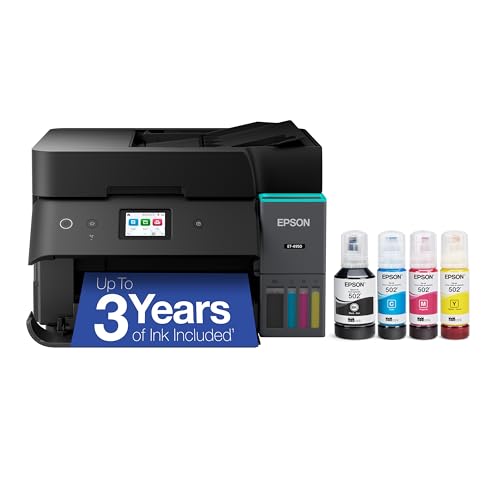
Epson EcoTank ET-4950 — Best small-format budget tank
The ET-4950 closes the list at the practical end: a cartridge-free EcoTank all-in-one with print, scan, copy, and fax, an automatic document feeder, auto two-sided printing, and a listed pace of up to 18 pages per minute — the fastest figure in this guide, attached to its smallest format. Its positives story is the small-format one told well. A shop whose designs live on letter-size film — labels, left-chests, caps, small art prints, craft-scale screens — needs density and economy, not width, and this machine’s tank system delivers the economy while its dye-based inks do the density work under tuned settings.
Its office features are not decoration for its likely buyer. The feeder-equipped scanner and two-sided printing describe a one-person business machine: the same unit that prints the morning’s positives scans the afternoon’s supplier invoices. That dual life is the ET-4950’s argument against the photo models — less colour sophistication, more everyday usefulness — and for a small screen operation run from a spare room, everyday usefulness is often the deciding spec. What it cannot do is grow with your ambitions: the day a client asks for a poster-sized design, this printer watches from the corner. Buy it with clear eyes about your format ceiling, and it will be the hardest-working modest machine in the building. Tank care applies as ever — regular small print jobs keep any inkjet honest, and a positives-only machine that sits for a month should get a nozzle check before the next screen depends on it.
- Ink system: cartridge-free EcoTank, refillable
- Maximum sheet: standard letter-width class
- Functions: print, scan, copy, fax, with ADF and auto two-sided printing
- Pace: up to 18 pages per minute per the listing
- Role: small-format positives plus one-person-business office duty
Strengths
- Tank economy and the guide’s briskest listed pace for standard-size work.
- Feeder scanning and duplexing make it a complete small-business machine.
- The honest, sufficient choice for shops whose film never exceeds letter size.
Trade-offs
- No wide format, ever — growing into bigger designs means a second machine.
- Office colour system rather than a photo colour system for the richest blacks.
- Its breadth invites office queues ahead of your positives at busy moments.
Best for: small-format screen printers who want one economical machine for positives and paperwork. Not suited for: any shop with wide-format ambitions or poster clients.
How Do the Six Compare Side by Side?
| Printer | Ink system | Widest sheet | Scans? | Natural buyer |
|---|---|---|---|---|
| Epson EcoTank Photo ET-8550 | Six-colour tank | 13 by 19 in | Yes | Production shop, wide designs |
| Epson EcoTank Photo ET-8500 | Six-colour tank | Letter class | Yes | Standard-size garment work |
| Epson EcoTank ET-15000 | Tank | 13 by 19 in | Yes, plus fax | Shared shop office |
| Epson Expression Photo HD XP-15000 | Six-colour cartridges | 13 by 19 in | No | Lower-volume, photo-leaning |
| Canon PIXMA PRO-200S | Eight-colour dye cartridges | 13 in class | No | Canon-colour studios |
| Epson EcoTank ET-4950 | Tank | Letter class | Yes, with feeder | Small-format one-machine shop |
Two questions sort the table. How wide is your largest design, honestly measured? And how many positives do you print in a month, honestly counted? Width picks your row’s left half; volume picks tank or cartridge. Everything else — scanners, fax, screens — is the garnish of a particular shop’s daily life. However you choose, keep the consumables straight: the waterproof films and any UV-blocking inks you adopt are supplies you will reorder forever, and building a small stock of film alongside the printer is the mark of a shop that has understood the system. Our guide to the best refillable ink tank printers compares the tank field beyond the screen-printing brief.
How Do You Print and Burn a Clean Positive, Step by Step?
Prepare the artwork as a positive. Work in pure black on white, at the final size, with registration marks placed outside the design area. Convert any greys in the artwork deliberately — halftones are a technique with their own settings, not an accident to leave in the file — and check the design at full size for stray marks, since every speck in the file becomes a speck in the stencil.
Set the driver for density. Choose the media and quality settings your film maker recommends for their stock — typically a premium photo or matte presentation class of setting at the highest quality — and print one test positive of a design with a large solid area. Defaults are tuned for saving ink on paper; positives want the opposite temperament, and the settings you settle on should be saved as a named preset so every future positive starts from the proven recipe.
Inspect against the light. Hold the dried positive to a light box or bright window. The blacks should be uniformly light-proof, the edges crisp, the fill free of banding. Let the sheet dry fully before judging or stacking it — film that feels dry can still mark its neighbour — and handle positives by their edges, because a fingerprint in a filled area prints into the stencil as faithfully as the artwork does.
Run an exposure step test. With a new printer, film, emulsion, or exposure unit — any change in the chain — expose a test screen with a stepped series of times and wash it out. The step that holds fine lines while clearing open areas cleanly is your working exposure, and it belongs in the shop notebook next to the printer preset’s name. Skipping the step test saves twenty minutes once and costs screens indefinitely.
Burn, wash out, and read the result. The stencil tells you which third of the system to adjust. Speckled hardening in open areas points back to positive density or light leak; lines washing away points to underexposure or a positive whose fine lines were never opaque; a stencil that will not clear suggests overexposure through a weak positive. Change one variable at a time, and let the printer-film-exposure triangle be tuned as the single system it is.
What Mistakes Do Screen Printers Make With Film Positives?
Printing positives on the wrong film leads the list. Office transparency sheets and inkjet film are different products; the waterproof inkjet film made for positives has a coating engineered to receive heavy ink loads and hold them, while generic transparency stock pools, beads, and dries into a leaky grey. Every beginner has a story about saving money on film and spending it on ruined screens — buy the right consumable and the category’s central problem gets much smaller.
Trusting the screen preview is the second mistake. A design that looks solid black on a monitor may be a rich composite that UV partially penetrates, or a near-black that the driver renders economically. The light box is the only honest preview a positive gets; use it on every new design, not just the first.
Third, changing two variables at once during troubleshooting — new film and new settings, new emulsion and new exposure — which guarantees you will never learn which one fixed or broke the result. The step test and the shop notebook exist to make troubleshooting a science instead of a mood. Fourth, storing printed positives stacked face to face in a warm room, where they offset onto each other; sleeve them or separate them with plain sheets, flat and cool. And fifth, blaming the printer for an exposure problem: the printer is one third of the system, and the disciplined shop checks film and exposure before it shops for a new machine.
What About Halftones, Fine Lines, and Photographic Work?
Spot-colour work — bold shapes, lettering, logos — is the forgiving end of positive printing, and every machine here handles it once density is dialled in. Halftones raise the stakes. A halftone positive is a field of dots, and every dot must be opaque enough to hold its tiny island of emulsion while the space around it clears. Weak density does not fail a halftone gracefully; it erodes the smallest dots first, which are the highlights of the image, so the print loses its light end and nobody can see why from the screen alone. Shops moving into photographic and simulated-process work should expect a longer tuning season: smaller test areas, more step tests, and a notebook that records dot behaviour alongside exposure times.
Fine lines obey the same physics at the opposite scale. A hairline in the artwork is a narrow wall of emulsion that must survive exposure and washout, fenced on both sides by areas the UV must fully clear. If the positive’s black leaks even slightly, the fence gets undercut from both sides and the line washes away or prints ragged. This is why line-weight discipline in artwork preparation — nothing thinner than the mesh and exposure can hold — is a printer topic as much as a drawing topic, and why the light-box inspection of a fine-line positive should be done with a loupe, not a glance.
The printers here support this work to different depths. The photo-bred machines — the two EcoTank Photo models and the Canon — render smooth gradients and fine detail with the most finesse, because that is what their colour systems were built for. The office-bred tanks produce excellent spot-colour positives and honest halftones within a small shop’s needs. Match the machine to the most demanding work you actually sell, and let the step test, repeated whenever the work changes character, be the referee between ambition and equipment.
How Do You Manage Film, Presets, and Supplies Like a Shop?
Professional positive printing is a small logistics system, and the shops that run it well share three habits. The first is the named preset. Every printer in this guide lets you save driver configurations; the day your step test succeeds, save that exact combination — media type, quality, colour handling — under a name like the film brand it was tuned for, and never print a positive from an unnamed default again. When a new film stock arrives, it gets its own test and its own preset, because coatings differ enough between brands that yesterday’s recipe can print today’s film a half-shade lighter.
The second habit is film stock management with the seriousness of a perishable. Keep film flat, in its box, away from the heat of the exposure unit and the damp of the washout area, and use oldest stock first. Note the date a box was opened on the box itself. Film that has lived a year in a hot room can coat-check and cloud in ways that masquerade as printer failure, and the box date is the clue that solves the mystery in one glance.
The third habit is the positive archive. A screen that sells gets reprinted — a torn mesh, a second press, a repeat order next season — and the positive is the cheapest form of insurance a shop owns. Sleeve successful positives, label them with the job, the screen mesh, and the exposure that worked, and file them flat. The archive turns next season’s repeat order into a re-burn instead of a re-creation, and its labels become the shop’s real technical library, more valuable than any manual because every entry was proven on your own equipment.
What Changes as a Shop Grows From Occasional to Production Printing?
At one or two screens a month, almost any pick here succeeds, because time forgives everything: a cartridge machine’s running cost is a rounding error, a reprinted positive is an errand, and the step test is a pleasant afternoon’s experiment. The system’s weak points only announce themselves under rhythm. At several screens a week, the cartridge bill becomes a line item worth eliminating — the argument that moves shops to the tank models — and the cost of a failed exposure stops being one screen and becomes a delivery date, which is when presets, archives, and notebooks stop looking like fussiness.
Production also changes what “the printer” means in the shop. It becomes shared infrastructure with a queue, and the all-in-one and networked models — the ET-15000 with its Ethernet, the shared EcoTanks — start to outrank a marginally finer personal machine, because a positive that can be sent from the design desk and collected at the darkroom door saves the walking that eats a production day in slices. Shops at this stage often dedicate one machine to positives alone, even if it is the same model as the office printer, because a dedicated machine’s settings never get borrowed for a quick invoice on the wrong preset.
None of this growth changes the fundamentals this guide opened with: dense black, the right film, a tested exposure. Growth only raises the price of forgetting them. The shops that scale gracefully are the ones that wrote the fundamentals down while they were small — which is to say, the notebook is not a beginner’s crutch but the business’s memory, and the printer you choose today should be bought as the first entry in it.
How Do Multi-Colour Jobs Change the Positive Workflow?
A one-colour job needs one honest positive. A four-colour job needs four positives that agree with each other geometrically, and that agreement is a printing discipline before it is an exposure one. Registration marks must be generated by the artwork file, identically placed on every separation, and the printer must reproduce each sheet at exactly the same scale. Inkjet printers occasionally scale output by a percent or two when a fit option is enabled, and a one-percent difference between separations is a registration failure no press skill can rescue. The rule follows: positives are always printed at actual size, from the same preset, on the same machine, and the first sheets of a multi-colour job get checked against each other on the light box — marks stacked, edges compared — before any screen is coated.
Film stability enters here too. A sheet printed in a humid morning and its sibling printed on a dry afternoon can differ by enough to matter on a tight job, which is why production shops print a job’s separations in one session, from one box of film, and burn the screens promptly rather than letting positives wander the shop for a week. Choke and spread — the deliberate tiny overlaps between colours — are artwork decisions that assume the positives are dimensionally truthful; keep them truthful and the artwork’s intentions survive contact with the press.
Label every separation the moment it leaves the printer: job name, colour, and position. Four near-identical black sheets on clear film are the most confusable objects in any print shop, and the cost of a swapped pair is discovered at the press, in ink, in front of a deadline. A pencil note on the handling margin — never across the artwork — takes five seconds and has saved more jobs than any feature in this guide.
How Do You Keep an Inkjet Healthy When Its Job Is Heavy Blacks?
Positive printing is unusually demanding duty for an inkjet: large areas of maximum ink coverage, printed on a schedule dictated by orders rather than by the printer’s preferences. The maintenance habits that follow are simple and cumulative. Run a nozzle check before any session whose screens matter, because a single blocked nozzle writes a light stripe through a filled area that the light box will catch — if you look — and that the exposure will faithfully reproduce as a defect. Better to catch it with the check pattern than with a ruined positive.
Respect the machine’s rhythm between jobs. Inkjets that sit idle for weeks and then face a heavy fill are the ones that band and clog; a small weekly print — a test pattern, a shop document, anything that moves every colour — keeps the system exercised at trivial cost, and tank models in particular reward this regular light use. Keep the paper path clean of the dust that print shops generate in industrial quantities, since film shows every speck the path deposits, and store the machine’s environment as steady as the film’s: heat and damp are enemies of both.
Finally, know when a problem is the printer and when it is the system. A positive that degrades gradually over months usually tracks a consumable story — ageing film, a changed preset, a nozzle slowly failing — rather than a sudden mechanical death. The shop notebook’s dated entries turn that slow story into a visible trend, and a visible trend gets fixed at the cheap stage. The printers in this guide are durable tools; treated as one third of a system and maintained like it, the one you choose should burn clean positives for years of orders.
Which Film Sizes Should a Shop Actually Stock?
Stock the sizes your printer eats and your designs need, and resist the sprawl of keeping every size “just in case,” because film ages and capital sleeps in unopened boxes. Most shops settle on two: the everyday size that carries the majority of jobs, and the large size for the wide designs — in a 13 by 19 shop, that usually means standard sheets for chest prints and small work, and the full wide sheets reserved for posters and all-over pieces. Printing a small design on a large sheet and trimming is always possible; printing a large design on small film is a redesign. When in doubt, the wide sheet is the flexible stock, and the waste from trimming is the price of never splitting a design that deserved one sheet.
Handle cut sheets like the precision material they are. Cut on a clean surface with a sharp blade, away from the washout area, and return offcuts to the box only if they are genuinely usable sizes — a drawer of mysterious film slivers helps no one. Keep one box as the working box and the rest sealed as reserve, so the stock in daily use is always the oldest and the reserve stays fresh. And when a new film brand tempts you with a better price, trial it on a non-critical job with its own step test before it touches a client’s screen: film is the cheapest place in the system to experiment and the most expensive place to assume.
Final Recommendation
Most screen printers reading this should buy the Epson EcoTank Photo ET-8550 and build their positives workflow around it: wide format, six-colour dye ink, and tank economics are the combination this job rewards, and its smaller sibling the ET-8500 serves shops whose film never grows past standard width. The ET-15000 is the right answer when the printer must also be the shop’s shared office machine, the XP-15000 when wide format matters but volumes stay cartridge-sane, the Canon PRO-200S when your colour loyalty and photo work point that way, and the ET-4950 when small format and one-machine economy define the business. Whichever you choose, the printer is only the beginning of the system — film, settings, and a step-tested exposure finish it — and the first time a screen washes out to reveal your artwork standing in clean, open mesh exactly as you drew it, you will understand that a great positive is not printed so much as engineered, one honest variable at a time.
Frequently Asked Questions
Can I use any inkjet printer for screen printing transparencies?
In principle many inkjets can print on inkjet film, but a usable positive needs dense, UV-opaque black, and that is where printers divide. Dye-ink machines with good driver control — the class every pick in this guide belongs to — are the known route. A random office inkjet on default settings usually produces blacks that leak UV and spoil exposures, which is why this category exists as its own discipline. If you already own an inkjet, the honest experiment is cheap: print your boldest design on proper waterproof film at the machine’s richest quality settings, light-box it, and step-test it — the result, not the badge on the machine, decides whether it joins this class.
What film should I buy for positives?
Waterproof inkjet film made for film positives, in the largest size your printer and your designs require. It is a consumable, not an accessory: its coating is what lets a heavy ink load sit evenly and dry into an opaque layer. Generic office transparency sheets are the false economy behind many failed screens. Order film in the sizes your printer takes and your designs need, keep one box working and the rest sealed in reserve, and when you trial a new brand, give it its own step test on a forgiving job before it is trusted with a client’s screen — coatings differ enough between brands that a film change is a system change, and the test is how a careful shop proves the new combination before production depends on it.
Do I need special ink or a RIP to start?
No. A good dye-ink printer, the right film, tuned quality settings, and a step-tested exposure will produce working positives, and that is the correct place to start. All-black cartridge setups and RIP software are the specialist layer shops add later when volume and fine halftone work justify them; they refine a working system rather than rescuing a broken one.
How can I tell if my positive is dense enough?
Hold it against a bright window or light box. The black areas should block light uniformly — no visible texture, streaks, or banding — and edges should stay sharp. Then let the exposure step test be the final judge: a dense positive gives you a working exposure window where fine lines hold and open areas clear, while a weak one fails at every time you try.
Why are most of the picks Epson machines?
Because the screen printing community’s positives workflow grew up on wide-format dye-ink machines with deep driver control, and Epson’s EcoTank Photo and related lines are where that combination currently lives — with Canon’s PRO-200S as the credible badge alternative. The list follows the workflow’s requirements, not a brand preference.
How long do printed positives keep?
Sleeved, flat, and stored cool and dry, a well-printed positive keeps for a long time — long enough that shops archive successful jobs’ positives as their re-burn insurance, as this guide recommends. What ages a positive is handling, heat, and stacking face to face, all of which are avoidable with sleeves and a flat file. Inspect an archived positive at the light box before reusing it; a minute’s checking protects a screen, and any positive that has picked up scratches or offset marks should be reprinted from the file while the printer preset that made it is still saved.
Can these printers also print my shop’s ordinary work?
Yes — that is partly the point of the all-in-one picks. The EcoTank models scan and copy, the ET-15000 and ET-4950 add office features like feeders and fax, and the photo models produce excellent art and photo prints. A positives printer that also carries the shop’s daily paper earns its desk space twice.
Related Guides
Shops equipping the whole print room can continue with the EcoTank photo roundup linked above for artwork printing, and with the refillable tank guide for the wider economics of cartridge-free machines. Between them, those guides cover the machines a growing studio accumulates around its darkroom — the art printer for the gallery side of the business, the office machine for its paper — while this guide’s six remain the ones whose output has to stand between a UV lamp and a coated screen and be found, quite literally, solid.
Print shops that run client invoices through QuickBooks will also want our guide to the best printers for printing checks qbo, where MICR discipline matters more than film density.
Stencil work sits one bench over from screen printing in most small studios, and our guide to the best printers for tattoo compares the machines artists use for that side of the craft.


