What's inside
- Where to buy
- Key Takeaways
- Quick Picks
- How did we choose these two-tray laser printers?
- What does “two trays” really mean before we start?
- Which of the best 2 tray laser printers fits your paper life?
- How do you set up two-paper printing so it actually gets used?
- What paper belongs in which tray?
- How does toner economics work at two-tray volumes?
- How do labels, envelopes and letterhead behave in each path?
- What changes when a printer is shared by a whole office?
- How do you prevent jams across two paper paths?
- When should a household step up to the business class?
- How do you organise paper supplies around a two-tray machine?
- What does a two-tray setup change about everyday printing?
- How long do these machines serve, and what wears first?
- Can a two-tray laser anchor a paper-heavy hobby or side business?
- How do you choose between the four linked Brothers?
- What should you check in the first week with a two-tray machine?
- How does paper size fit into the two-tray decision?
- Comparison table
- What mistakes do two-tray printer buyers keep making?
- What is the one-week paper audit that settles the choice?
- Final Recommendation
- Frequently Asked Questions
- Related Guides
As an Amazon Associate I earn from qualifying purchases. This post may contain affiliate links at no extra cost to you.
gizmoverdict.com is reader-supported. When you buy through links on our site, we may earn an affiliate commission.
Where to buy
Four of the six printers below — Brother’s current wireless mono lasers — are linked to verified Amazon US listings, so the machine in the cart is the machine in the review. Two further picks, a heavier-duty Brother and an HP LaserJet Pro configuration, are covered in prose only: they are business-channel machines most often bought through office suppliers, and this guide will not pretend otherwise. One vocabulary warning before you shop anywhere: listings use “tray” loosely. Read this guide’s definitions in the next section before comparing any retailer’s claims, because the difference between a true second tray and a manual feed slot is the difference between the printer you want and the printer you will return.
People search for the best 2 tray laser printers for one practical reason: paper logistics. A second tray means letterhead in one and plain in the other, or plain in one and labels in the other, or — most commonly of all — enough plain paper loaded that the “out of paper” interruption stops governing the office’s week. Mono laser is the natural home of the idea because mono laser is where volume lives: invoices, statements, coursework, contracts, the black-and-white river that small offices and busy households actually print. This guide covers the class with an honesty rule stated up front: each pick’s paper handling is described as it actually is — main tray, multipurpose slot, optional second tray — and no pick is allowed to borrow a configuration it does not have.
Key Takeaways
- “Two trays” means two different things in the wild: a true second cassette that holds a ream, or a main tray plus a multipurpose slot that feeds special media sheet by sheet — both useful, not interchangeable.
- Brother’s four linked mono lasers here all follow the second pattern: a generous main tray plus a multipurpose/manual feed for envelopes, labels and letterhead moments.
- A true dual-cassette setup usually arrives via an optional lower tray on a business model, as with the prose-only Brother HL-L6200DW and HP LaserJet Pro configurations described below.
- Choose by paper behaviour, not print engine: if you switch media daily, the multipurpose slot matters most; if you simply run out of paper too often, capacity — main tray size or a real second tray — is the fix.
- All four linked Brothers are wireless mono lasers with duplex on the DW models, which covers the overwhelming majority of home-office two-tray needs without business-channel prices.
Quick Picks
| Pick | Badge | Why it is here |
|---|---|---|
| Brother HL-L2460DW | Best tray-plus-slot all-rounder | A wireless duplex mono laser whose main tray and multipurpose feed cover the classic two-paper household. |
| Brother MFC-L2820DW | Two-tray thinking, all-in-one | The same paper logic plus scanning, copying and fax for offices that live on paper in both directions. |
| Brother DCP-L2640DW | Print, scan, copy version | A multifunction mono laser for households that need documents digitised as often as printed. |
| Brother HL-L2405W | Simplest tray setup | The entry Brother laser: one honest tray, one toner, wireless printing for text-first homes. |
| Brother HL-L6200DW | True second tray path (prose-only) | A business mono laser built to accept an optional lower tray, turning capacity into a non-event. |
| HP LaserJet Pro with Tray 3 | Alternative dual-tray route (prose-only) | HP’s Pro line with its optional third tray fitted — the other ecosystem’s answer to the same brief. |
How did we choose these two-tray laser printers?
We began by refusing the marketing definition. A pick qualified for this guide if its paper handling genuinely serves the two-paper life: either a main tray plus a usable multipurpose path — the configuration most home offices actually mean — or a true second cassette, standard or as a designed-for optional tray. Every pick’s section states which pattern it follows, in its specification list, so no reader has to decode our prose for the fact that matters most to them.
Within that rule, we favoured mono lasers with the modern baseline a home office should insist on: wireless networking, automatic two-sided printing where the model offers it, and a toner ecosystem with high-yield options, because a two-tray conversation is a volume conversation and volume is where toner arithmetic lives. Brother dominates the linked picks for a defensible reason — its current home-office mono line is coherent, widely stocked and built around exactly this tray-plus-slot pattern — while the prose picks represent the step up to genuine dual cassettes in both major ecosystems. If your brief is truly “two reams, two papers, always loaded”, the prose picks are your shortlist and the linked Brothers are the honest approximation most households end up delighted with.
What does “two trays” really mean before we start?
Three configurations hide under the phrase, and the guide uses them precisely. A main tray (Tray 1) is the cassette that holds your everyday paper in quantity. A multipurpose or manual feed slot is a straight-through path, usually at the front, that accepts envelopes, labels, card or a different paper for a single job without unloading the main tray — capacity of a sheet or a small handful, purpose: flexibility. An optional lower tray (often sold as Tray 2 or Tray 3 depending on the maker’s counting) is a second full cassette that clicks under the printer, holds another stack, and can be assigned its own paper type in the driver, so applications choose paper the way they choose a printer. True two-tray printing, in the strict sense, is configuration one plus three. Most home offices, in the honest sense, need one plus two — and discover, reading guides that blur the distinction, that they nearly bought the wrong machine for the right reason.
Which of the best 2 tray laser printers fits your paper life?

Brother HL-L2460DW — Best tray-plus-slot all-rounder
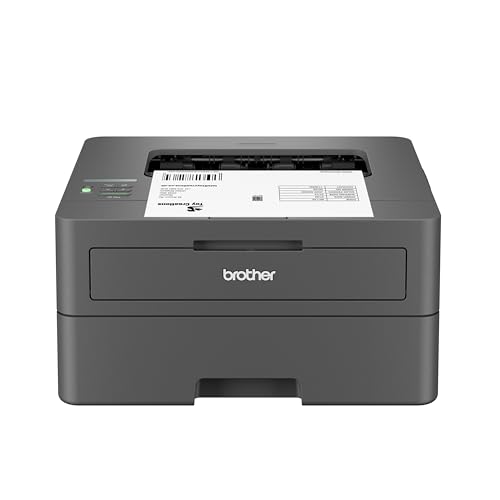
The HL-L2460DW is the linked pick we would hand to the median reader of this guide: a wireless mono laser with automatic duplex, a proper main tray for the everyday stack, and a multipurpose feed for the moments that make two-tray shoppers of us all — the envelope, the label sheet, the single page of letterhead that must not come from the plain tray. Brother’s current home-office line is engineered around exactly this rhythm, and the 2460 sits at its sensible centre: fast enough for household bursts, quiet enough for a desk, and fed by a toner ecosystem with the high-yield options that volume quietly requires.
Its limits are the class’s honest limits, stated plainly. The multipurpose path is a slot, not a cassette: it will not hold your second paper in readiness all week, and if your office prints letterhead daily by the dozen, you belong with the prose picks below and their true second trays. But for the overwhelmingly common pattern — plain paper always, special media sometimes — the slot is not a compromise at all; it is the correct tool, because it also gives thick and awkward media a straighter path than any cassette can. Buy the 2460 for that pattern and the two-tray itch is scratched completely.
- Type: wireless mono laser printer
- Paper handling: main tray + multipurpose/manual feed slot (not a second cassette)
- Duplex: automatic two-sided printing per the DW designation
- Functions: print only
- Audience: home offices with two-paper moments
Strengths
- The tray-plus-slot pattern matches real household paper behaviour
- Duplex and wireless are standard, not upsells
- High-yield toner options suit growing volume
Trade-offs
- Second paper is fed per job, not stored loaded
- Print only — no scanning for paper-heavy workflows
- Mono only, as with every pick in this guide
Best for: home offices printing plain paper daily and special media weekly. Not suited for: daily dual-paper production — see the prose picks.

Brother MFC-L2820DW — Two-tray thinking, all-in-one
The MFC-L2820DW takes the same paper philosophy — main tray plus multipurpose feed, wireless, duplex mono laser — and builds the rest of a paper office around it: scanning, copying and fax, with a document feeder’s convenience for the multi-page paperwork that still governs small businesses, practices and busy households. Its inclusion in a two-tray guide is deliberate, because in real offices the second-tray question rarely travels alone; it arrives attached to “and we still fax the accountant” or “and the scanner must handle a stack, not a page”.
As a printer it behaves like its HL sibling: the tray holds the everyday supply, the slot handles the exceptions, and the driver lets you assign media so the exceptions stop interrupting the rule. The premium over the print-only models buys the document lifecycle in both directions — paper in via the feeder, paper out via the trays — and for an office whose paperwork is cyclical (forms arrive, are signed, are copied, are filed, are faxed) that completeness is worth more than a marginal speed difference would be. Choose it when your two-tray need lives inside a paper workflow rather than beside one.
- Type: wireless mono laser all-in-one
- Paper handling: main tray + multipurpose/manual feed slot
- Duplex: automatic two-sided printing
- Functions: print, scan, copy, fax per the listing
- Audience: small offices with two-way paper flow
Strengths
- Full document lifecycle in one footprint
- Same sensible tray-plus-slot paper logic as the HL line
- Document feeder suits multi-page scanning and copying
Trade-offs
- Larger and costlier than the print-only Brothers
- Still a slot, not a second cassette, for paper two
- Fax hardware is dead weight for offices that never fax
Best for: small offices and practices whose paper moves in both directions. Not suited for: pure print stations or strict dual-cassette briefs.

Brother DCP-L2640DW — Print, scan, copy version
The DCP-L2640DW is the MFC’s sibling with the fax left behind and the household brought forward: a wireless mono laser multifunction — print, scan, copy — with duplex printing and the same main-tray-plus-multipurpose-slot paper arrangement. It suits the home whose paper life is domestic-administrative: school documents, medical forms, the household archive being digitised a drawer at a time. In that life, the slot earns its keep on envelopes and the occasional card or label sheet, while the scanner earns its keep weekly, which is more than can be said for most all-in-one features.
Brother’s DCP line has a long reputation as the sensible multifunction choice, and this model’s place in the guide is as the balanced default for readers who know they need scanning but not fax, laser economy but not business hardware. Its paper handling is described exactly as its siblings’ — because it is the same arrangement, and consistency on this point is the guide’s promise — so the decision between the DCP, the MFC and the HL models is about functions and budget, not about trays. That is a compliment to the line: the paper logic is settled, and you are free to choose the rest of the machine on its merits.
- Type: wireless mono laser multifunction
- Paper handling: a main cassette, supplemented by the multipurpose feed slot
- Duplex: automatic two-sided printing
- Functions: print, scan, copy per the listing
- Audience: households digitising as much as printing
Strengths
- Scanning and copying without fax-era extras
- Same dependable tray-plus-slot arrangement
- Balanced price-to-function position in Brother’s line
Trade-offs
- No fax for the rare office that still needs it
- Second paper remains a per-job feed, not a loaded tray
- Mono scanning suits documents, not photo archives
Best for: home offices and families with two-way document traffic. Not suited for: fax users or strict two-cassette requirements.

Brother HL-L2405W — Simplest tray setup
The HL-L2405W closes the linked Brother line at its simplest point: a wireless mono laser with one main tray, one toner cartridge, and no ambitions beyond printing black text beautifully cheaply for years. It appears in a two-tray guide as the honest baseline — the machine for readers whose investigation concludes that their second-paper need is actually rare enough to be served by swapping the main tray’s contents on the day, or by feeding the occasional special sheet through the standard path. Not every two-tray search ends in two trays, and a guide that cannot say so is a sales brochure.
What the 2405 offers in place of paper flexibility is the lowest-friction laser ownership in this article: toner that tolerates months of idleness, a footprint that fits the shelf the bigger machines cannot, and running costs that make it the default recommendation for text-first households in our other guides as well. If your paper life is one paper, this is your printer, and the money saved against the models above buys a great deal of the toner it will spend its life converting into documents.
- Type: wireless mono laser printer
- Paper handling: single main tray (no multipurpose second path emphasised in the listing)
- Duplex: check the listing — this is the line’s entry model
- Functions: print only
- Audience: one-paper, text-first households
Strengths
- The simplest, cheapest laser ownership here
- Toner patience suits intermittent printing perfectly
- Compact footprint for shelves and small desks
Trade-offs
- One tray means media changes are manual events
- No scanning, copying or frills of any kind
- Outgrown quickly if an office’s paper life diversifies
Best for: text-only homes that want laser economics at minimum complexity. Not suited for: genuine two-paper workflows — that is what the rest of the guide is for.
Brother HL-L6200DW — True second tray path (prose-only)
Here is the strict answer to the strict brief. The HL-L6200DW is Brother’s business-class mono laser: a faster, heavier-duty engine than the home line, with a substantial standard tray — and, crucially, designed to accept an optional lower tray unit that adds a true second cassette beneath the machine. Fit that tray and the configuration this guide’s introduction defined is complete: two papers loaded simultaneously, each assigned in the driver, applications and users choosing between them without touching the printer. Letterhead below, plain above; plain below, labels above; or simply a second stack of plain, doubling the distance between refills in an office that measures interruptions in billable minutes.
It is covered in prose because business models and their tray accessories move through office channels with configurations that vary by bundle and region, and the tray itself is a separate purchase whose compatibility must be confirmed for the exact unit — the kind of transaction a good office supplier handles in one phone call. The ownership character is departmental: higher duty expectations, larger toner options, a machine that treats a busy office’s month as a light workout. If your two-tray need is literal, daily and shared by several people, this is the class’s correct answer in Brother’s ecosystem, and the linked home models above are the approximation you buy only when the approximation genuinely suffices.
- Type: business mono laser printer
- Paper handling: main tray + optional lower tray (true second cassette, sold separately)
- Duty character: departmental, high-volume
- Channel: office suppliers — confirm tray compatibility per unit
- Audience: shared offices with literal two-paper workflows
Strengths
- Genuine dual-cassette printing when the optional tray is fitted
- Business duty cycle and large toner options
- Driver-level paper assignment for shared use
Trade-offs
- Second tray is an extra purchase, not in the base box
- Business size, weight and channel complexity
- Over-specified for a single household’s needs
Best for: offices where two papers must both be loaded, always. Not suited for: home buyers whose second paper is a weekly guest.
HP LaserJet Pro with optional Tray 3 — Alternative dual-tray route (prose-only)
HP’s ecosystem answers the same brief in its own dialect. The LaserJet Pro mono line — the office models sold through business channels — offers an optional additional tray (HP counts it as Tray 3, after the main cassette and the multipurpose slot) that converts a Pro printer into a true dual-cassette machine. The pattern is identical in spirit to the Brother business route: buy the engine for its duty class, fit the tray for your paper reality, assign papers in the driver, and let a shared office stop thinking about loading. HP’s management software and security features are its ecosystem’s traditional strengths, and offices already standardised on HP will find this the path of least institutional resistance.
It is described generically and in prose, deliberately: Pro configurations, tray part numbers and bundle arrangements vary enough by model and region that naming one precise configuration here would risk sending you after the wrong accessory — the exact failure this guide’s definitions section exists to prevent. Take the pattern to an HP business supplier with your paper list in hand. And note the symmetry the guide ends on: in both ecosystems, true two-tray printing is a business-class feature reached by an accessory, while the home class answers the same human need with the tray-plus-slot pattern. Knowing which answer your office actually requires is the entire purchase.
- Type: business mono laser line (LaserJet Pro class)
- Paper handling: main tray + multipurpose slot + optional Tray 3 (true second cassette)
- Duty character: shared office, managed environments
- Channel: HP business suppliers — confirm tray part per model
- Audience: HP-standardised offices needing dual cassettes
Strengths
- True dual-cassette configuration within HP’s ecosystem
- Management and security tooling for shared offices
- Scales across a fleet of identical machines
Trade-offs
- Tray is a separate, model-specific accessory purchase
- Configuration complexity belongs to business channels
- Home buyers pay for management features they will not use
Best for: HP offices formalising a two-paper workflow. Not suited for: households — the linked Brothers serve them better.
How do you set up two-paper printing so it actually gets used?
Hardware is the easy half; the driver is where two-tray intentions go to die. On the true dual-cassette machines, assign each tray its paper type and size in the printer’s settings, then set your applications’ defaults to match the documents they produce — accounting prints to plain, correspondence to letterhead — so the choice happens by document rather than by a dialogue box nobody reads. On the tray-plus-slot Brothers, set the multipurpose slot’s media type before the job that needs it, and teach the household the one physical habit that matters: special paper goes in the slot face as the manual’s diagram shows, because a label sheet fed backwards is a cleaning job, not a print job.
Then label reality. A small note on each tray naming its paper — unglamorous, decisive — prevents the classic two-tray failure in which a helpful person refills the letterhead tray with plain paper and the month’s invoices go out on the good stock. In shared offices, add the paper itself to the supplies order by tray name, so “Tray 2 is low” is a sentence the ordering process understands. Two-tray printing succeeds as a system of small agreements, and offices that write the agreements down on the machine itself are the ones still enjoying them in year three.
What paper belongs in which tray?
Convention exists and is worth following: the paper you print most lives in the main tray, because that is the path the printer is happiest repeating ten thousand times; the paper you print with intent lives in the second tray or arrives via the slot. Beyond that, match media to path physics. Envelopes and labels prefer the slot’s straighter journey and should rarely be asked to bend around a cassette’s rollers. Heavy stock likewise. The second cassette, where fitted, earns its place with flat, cooperative papers — letterhead, coloured stock for section dividers, the pre-printed forms a practice runs on — that load once and feed kindly for weeks.
Seasonal papers deserve a policy too. The household that prints holiday cards in December and nothing special until tax season should let the slot serve both, rather than dedicating a cassette to a paper that spends eleven months as furniture. Offices with a genuine seasonal second paper — term-time forms, annual statements — can swap a cassette’s contents on a calendar note, which is the two-tray equivalent of changing the clocks: a small ritual that keeps the system honest.
How does toner economics work at two-tray volumes?
A two-tray buyer is, by definition, thinking about volume, and volume is where toner choices compound. Every machine in this guide lives in an ecosystem with standard and high-yield cartridges; at two-tray volumes the high-yield option is not an upsell but the default rational choice, because its cost per page is structurally lower and its replacement rhythm matches an office that already thinks in reams. No figures are printed here — cartridge prices move — but the structural advice is permanent: price the printer with its high-yield cartridge, not its starter, because the starter is a sample and the high-yield is the marriage.
The second economic lever is duplex, which the linked DW Brothers all provide: paper is a real cost at volume, and automatic two-sided printing quietly halves it for the document classes — drafts, statements, internal records — where two sides are acceptable or even preferred. The third lever is behavioural and worth more than the other two combined: a shared office that sets its defaults to mono (already guaranteed here), duplex-on and draft-quality-for-internal will spend a fraction of what the same office spends on defaults nobody chose. Two-tray hardware organises paper; defaults organise money, and the offices that thrive attend to both in the same afternoon.
How do labels, envelopes and letterhead behave in each path?
Envelopes are the slot’s home fixture: they feed one or a few at a time, travel straighter than any cassette path allows, and emerge uncurled when the media type is set so the printer adjusts its heat and speed. Labels demand the same straight path and one extra discipline — a label sheet goes through once, never twice, because a sheet that has been heated can shed a label inside the machine, converting a printing task into a service call. Letterhead is the flexible citizen: a sheet or two via the slot for correspondence, or a loaded second cassette for the practice that writes daily, with the printed side’s orientation checked once, carefully, against the manual’s diagram and then never thought about again.
Card and heavy stock follow the slot for the same mechanical reasons, within the weight limits each model states. The general law is simple enough to tape beside the printer: flat and ordinary goes in trays, awkward and precious goes through the slot, and the driver is told the truth about which is which. Offices that internalise that sentence stop having paper-path mysteries, because nearly all of them were the same mystery — the wrong media on the wrong path with the wrong setting — wearing different costumes.
What changes when a printer is shared by a whole office?
Sharing multiplies everything this guide has discussed. Paper disagreements become political: whose job emptied the letterhead, whose labels are in the slot, whose fifty-page draft is ahead of your one-page letter. The two-tray machines help structurally — assigned trays end the letterhead wars by giving each paper a legal home — and the rest is etiquette with a settings page: print queues everyone can see, a house rule that special media jobs are announced or scheduled, and a supplies shelf where toner and both papers are stocked by name. The business picks add the management layer — usage visibility, user codes on some configurations — for offices large enough that etiquette needs instrumentation.
Placement becomes an office decision too. A two-tray machine with its lower cassette fitted is taller and heavier than it looks in photographs; it wants a stand that does not wobble, clearance to open every path for the inevitable jam, and a location where its fan and feed noises serve the room’s least sensitive corner. Put the shared printer where the paper is — near the supplies, near the filing — and the office’s walking patterns organise themselves around it within a week, which is facilities management at its most honest.
How do you prevent jams across two paper paths?
Most jams are storage and loading failures wearing a mechanical disguise. Paper that lives in a damp room, a opened ream left to curl at the edges, a tray filled past its line or fanned carelessly — each manufactures the misfeeds later blamed on the printer. The two-path machines double the surface area for these small sins, so their owners benefit doubly from the boring liturgy: store paper sealed and flat, load to the line and no further, square the stack against the guides without forcing them, and keep the slot’s path clear of the dust that front openings invite. When a jam does happen, remove the sheet by the path’s own direction, slowly, with both hands, and check for the torn corner — the fragment left behind is next week’s jam, pre-scheduled.
Media honesty is the other half. A printer told it is feeding plain paper will run its rollers and heat for plain paper; heavy stock sent through under that description slips, skews and occasionally wraps. The two-tray discipline — each tray and the slot carrying a truthful media setting — is therefore not bureaucratic fuss but the machine’s operating instructions to itself. Offices that set media types once, when a tray’s paper changes, and never otherwise touch them, report the printer equivalent of a quiet life.
When should a household step up to the business class?
Three signals, any one of which suffices. The refill signal: the main tray empties often enough that refilling has become someone’s recurring complaint rather than a monthly triviality. The collision signal: two papers are needed on the same days often enough that the slot’s per-job feeding has started to cost real time and real temper. And the audience signal: the printer’s users have multiplied beyond the household into staff, clients or a practice, for whom paper failures are professional events rather than domestic ones. A household showing none of these signals that buys business hardware anyway has purchased height, weight and a channel relationship it did not need; a household showing two of them that stays with home hardware is paying for its frugality in interruptions, which is the most expensive currency an office has.
The step itself should be taken completely: printer, tray, high-yield toner and the driver configuration, commissioned in one project rather than assembled by accretion. Half-fitted two-tray systems — the business printer awaiting a tray that is always about to be ordered — are a recognisable office purgatory, and this guide’s prose picks are written to be bought as configurations, not as intentions.
How do you organise paper supplies around a two-tray machine?
Give every paper a home and a name that matches the driver’s. The shelf beside the printer should hold the current ream of each loaded paper, opened reams stored flat in their wrappers, and the special media — labels, envelopes, card — in a single labelled box that the whole office can find. When a tray’s paper changes, the ritual is threefold and takes a minute: change the paper, change the tray’s media setting, change the note on the tray. Offices skip the second and third steps and then hold inquiries into mysteries that were never mysterious.
Ordering deserves the same system. Track consumption by the ream stack’s height rather than by crisis, and reorder when the shelf — not the tray — runs low, because a printer that empties mid-run has usually been announcing it for a week through an empty shelf nobody glanced at. In households the same logic shrinks gracefully: one spare ream, one spare toner, and the two-tray machine’s promise — that paper stops being an event — is kept by the cupboard as much as by the printer.
What does a two-tray setup change about everyday printing?
It removes a category of small friction so completely that owners forget it existed. The letter that prints on letterhead without a preliminary expedition; the label sheet that no longer requires emptying the tray and then restoring it; the long statement run that no longer pauses halfway for a refill while its owner is making tea. None of these moments is large. Their sum, across a working year, is the difference between a printer regarded as infrastructure and a printer regarded as a colleague with needs. That is the entire case for the category, and it is why the buyers who benefit most are not those with the most paper but those with the most varied paper — variety, not volume, is what the second path is for, with volume a welcome second beneficiary where the true cassettes are fitted.
There is a subtler change worth naming: documents get better. When letterhead is effortless, correspondence uses it; when labels are easy, the filing actually gets labelled; when a second paper costs no friction, the coloured divider and the pre-printed form return to the office’s repertoire. Tools shape output by shaping effort, and the two-tray printer’s real product is a household or office whose paperwork looks considered — because, at last, considering it costs nothing.
How long do these machines serve, and what wears first?
Mono lasers are the marathon runners of home printing, and the tray mechanisms are built to the same philosophy: cassettes and rollers rated for years of ordinary office life. What wears is predictable — feed rollers polish and begin to slip, usually announcing themselves as occasional misfeeds on the last sheets of a stack — and what saves money is knowing that rollers are service items, replaceable or cleanable, rather than symptoms of a dying printer. The slot’s path, used less, ages less; the main tray’s rollers do the decade’s heavy lifting and deserve the decade’s small maintenance courtesies: an occasional wipe, paper that is not dusty, and a jam never cleared by force.
Toner patience, again, is the laser’s household superpower: a two-tray machine in a seasonal office — a tax practice’s quiet months, a school household’s summer — wakes from idleness ready, where any inkjet would begin with negotiations. For the two-tray buyer specifically, that reliability compounds the category’s promise. The machine’s whole purpose is to be forgotten between paper events, and a laser forgets beautifully.
Can a two-tray laser anchor a paper-heavy hobby or side business?
Shipping labels and invoices are the side business’s paper river, and they are this category’s home water. The pattern repeats across sellers, crafters and consultants: plain paper for invoices and packing slips in the tray, label stock through the slot or the second cassette, and a mono laser converting both into a dispatch routine that no longer involves swapping paper six times a day. At hobby volumes the linked Brothers carry this easily; at the volume where the dispatch routine becomes a production line, the business picks’ duty class and true cassettes stop being luxuries. The guide’s step-up signals apply verbatim — count the collisions between your two papers for one honest week, and let that count, not optimism or frugality, choose the machine.
How do you choose between the four linked Brothers?
Since their paper logic is shared, the decision is a short decision tree about everything else. Do you need to scan? If never, the HL models are your branch: the 2460DW if special media visits weekly, the 2405W if it barely visits at all. If scanning is real, the multifunction branch asks one further question — does anything in your life still fax? The MFC answers yes with its full communications suite; the DCP answers no with the cleaner, cheaper toolset most households actually use. Every branch ends at a machine with the same tray-plus-slot honesty, which is the line’s quiet virtue: you cannot choose wrongly on the dimension this guide cares about, only on the functions around it.
Budget enters last and should stay last, because the price steps between these siblings are small beside the years they will serve and the toner river they will share. Buy the functions your paperwork demonstrably uses, resist the ones it merely might, and spend the difference on the high-yield toner and the spare ream that turn a good purchase into a settled system.
What should you check in the first week with a two-tray machine?
Run the experiments while returns are still easy and the office’s patience is fresh. Print each paper from its assigned path and confirm the driver’s idea of the trays matches the physical machine’s — a swapped assignment discovered in week one is a settings fix; discovered in month three, it is a grievance with a history. Feed the thickest, most awkward media you own through the slot and watch it travel. Print a long duplex run and check the last pages as carefully as the first. And deliberately empty the main tray mid-job once, to learn how the machine behaves and how gracefully it resumes, because that behaviour — not the specification — is what your office will experience for years.
Write the results where the office can find them: media settings that worked, the slot’s orientation for envelopes, the label brand that fed kindly. A two-tray system is a small body of local knowledge, and the offices that thrive are the ones that write theirs down before the person who learned it goes on holiday.
How does paper size fit into the two-tray decision?
Most two-tray lives are lived at one size — letter in North America, A4 in most of the world — with the second path existing for type rather than dimensions. But some offices genuinely run two sizes: legal and letter in a practice, A4 and A5 in a clinic’s prescription-and-correspondence rhythm. Cassettes earn extra credit there, because a tray can be adjusted and assigned to a size as well as a type, while a slot handles the occasional different size without commitment. If your second paper is a second size used daily, weight the true-cassette picks more heavily than this guide’s general ranking does; if it is a second size used monthly, the slot remains the proportionate answer and the cassettes are capacity you will re-adjust so rarely that each use becomes a small research project.
Whichever pattern you choose, set the size in the driver per tray and resist the temptation to let the printer auto-detect its way through life — auto-detection is charming until the day it confidently prints a legal document across letter paper’s first page and the slot’s envelope setting at once, which is the kind of sentence only a printer can write.
Comparison table
| Printer | Paper configuration | Functions | Availability | Choose it when |
|---|---|---|---|---|
| Brother HL-L2460DW | Main tray + multipurpose slot | Linked | Plain daily, special weekly, one user or a family | |
| Brother MFC-L2820DW | Main tray + multipurpose slot | Print, scan, copy, fax | Linked | Paper flows in both directions in a small office |
| Brother DCP-L2640DW | Main tray + multipurpose slot | Print, scan, copy | Linked | A household digitises as much as it prints |
| Brother HL-L2405W | Single main tray | Linked | One paper, text only, minimum fuss | |
| Brother HL-L6200DW | Main tray + optional true second tray | Prose-only — office channel | Two papers must be loaded simultaneously, daily | |
| HP LaserJet Pro + Tray 3 | Main tray + slot + optional Tray 3 | Print (line varies) | Prose-only — office channel | An HP office needs the dual-cassette pattern |
What mistakes do two-tray printer buyers keep making?
The first is the vocabulary mistake this guide opened with: buying a tray-plus-slot machine while picturing two loaded cassettes, or — the expensive mirror — buying a business machine and its second tray for a household whose second paper appears twice a month. Both errors come from shopping the phrase instead of the pattern, and both are prevented by the definitions section, which is why it sits where it sits. The second mistake is forgetting the accessory: a business printer ordered for its two-tray promise, delivered without the optional tray that constitutes the promise, because the listing’s photograph showed a configuration the base price did not include. Confirm, in writing where possible, exactly which trays are in the box.
The third mistake is assigning papers by hope rather than by driver, so the dual trays exist physically while every application still prints to the default and the second tray becomes a storage drawer with a feed mechanism. The fourth is loading both trays with the same plain paper “for capacity” and then discovering the office actually needed the flexibility it just spent — capacity problems are solved by a bigger main tray or a refill habit, at a fraction of a second tray’s cost. Buy the pattern your paper life describes, configure it the day it arrives, and the machine will disappear into the office’s routine, which is the highest praise paper hardware can earn.
What is the one-week paper audit that settles the choice?
If you have read this far and still cannot name your pattern, measure it. For one ordinary week, keep a tally by the printer: every job, its paper, and whether feeding that paper required unloading another paper first. Most households discover the tally is lopsided in a direction they did not expect when they began the week with a firm opinion and a shopping list already half written — either the special-media jobs are so rare that the whole two-tray question dissolves into the HL-L2405W’s simplicity, or they are so frequent and so irritating that the business class stops looking like an extravagance. Offices should run the audit for a month, across a payroll or billing cycle, because office paper has seasons and a quiet week lies with a straight face while a month, containing the invoicing run and the statement day and the new starter’s paperwork, cannot help telling the truth.
The audit has a second use after purchase: run it again, briefly and without ceremony, in the machine’s first month and compare the two tallies side by side. If the collisions the audit predicted have vanished, the configuration is right, the purchase is settled, and the guide has done its work. If they persist in a new costume — the slot is right but the letterhead lives in the wrong room, the trays are right but the driver defaults are not, the papers are assigned but nobody told the new starter — the fix is almost always organisational rather than mechanical, and it is far cheaper in month one, while habits are still wet cement, than in year two.
Final Recommendation
For most readers, the two-tray life they actually lead is the HL-L2460DW’s life: plain paper in a proper tray, special media through a willing slot, duplex and wireless removing the other frictions, and toner economics that keep the arrangement cheap for years. Add scanning and the DCP-L2640DW or MFC-L2820DW extends the same logic across the whole document cycle. If your investigation ends at one paper, the HL-L2405W is the honest minimum. And if your office truly runs two papers daily, buy the real thing — the HL-L6200DW with its tray fitted, or HP’s Pro-plus-tray route — and enjoy the peculiar luxury of an office that never discusses paper loading at all.
Frequently Asked Questions
Is a multipurpose slot the same as a second tray?
No, and the distinction is this guide’s founding one — the sentence, if you read nothing else, to carry into the shop, the listing page and the conversation with the salesperson, because every disappointment in this category is born in the gap between those two objects. A second tray is a cassette that stores a stack of its own paper, loaded and ready for weeks. A multipurpose slot feeds special media for a job — an envelope, labels, letterhead for one letter — and stores nothing. Both are valuable; they solve different problems, and confusing them is the most common disappointment in this category.
Can I add a second tray to the home Brother models later?
The home-office models in the linked picks are built around the tray-plus-slot pattern and do not accept the business line’s lower tray units — their paper architecture is fixed at purchase, which is precisely why this guide spends so many words helping you choose the architecture before the machine. The upgrade path to a true second cassette is the business class itself — the HL-L6200DW pattern — which is why deciding your pattern before purchase matters more than any other choice in this guide.
Why are all the picks monochrome?
Because the two-tray need lives where volume lives, and volume printing — invoices, forms, statements, coursework, the paperwork by which households and small offices actually run — is overwhelmingly black on white, produced in runs, on deadlines, by people who regard the printer as plumbing and want it to behave that way. Colour laser exists and offers trays too, but its running costs answer a different brief; households needing colour are usually better served by the inkjet guides on this site alongside a mono laser for the river of text.
How much paper should a main tray hold for a home office?
Enough that refilling is a weekly-or-rarer event at your true volume — which is a question about your ream consumption, not a specification to maximise for its own sake in a shop where the largest number on the shelf is rarely the one your office will ever test. An office that refills daily has a capacity problem a second plain tray can solve; an office that refills monthly and still wants two trays actually wants flexibility, and should buy the slot pattern instead.
Does duplex printing interact with trays?
Only benignly, and mostly helpfully, since the offices that need two trays are usually the offices drowning in single-sided paper and glad of the rescue. Duplex units handle standard papers from any tray; very heavy or special media from the slot is usually printed single-sided, which the driver manages when the media type is set honestly. Tell the printer what the paper is, and its paper paths will treat it accordingly.
What should a small office check before ordering a business model with a tray?
Three things: that the optional tray’s part number matches the exact printer model rather than a near-identical sibling, that the quoted price includes the tray if the two-tray configuration is the point of the purchase, and that the desk or stand can take the machine’s height with the tray fitted — a second cassette adds inches below, and more than one office has discovered its shelving arithmetic afterwards.
Can I use the multipurpose slot for regular paper to gain capacity?
You can feed plain paper through it, and for a one-off overflow job that is a legitimate trick — but as a capacity strategy it defeats itself, since the slot holds a sheet or a small handful rather than a stack and exists for media variety, not volume. If capacity is the recurring problem, the honest fixes are a larger main tray, a true second cassette from the business class, or a refill rhythm that matches your ream consumption.
Do these printers print from phones and tablets?
The linked Brothers are wireless network printers and handle phone and tablet printing through the usual household routes — the maker’s app and the platforms’ built-in print services. In a two-tray office, set the tray defaults on the printer itself rather than per device, so a phone’s casual print job lands on plain paper and not, in a moment of inattention, on the letterhead.
Related Guides
More from the printer desk: the best two-cartridge printers and when they still make sense, mono laser printers for text-heavy households and setting up a home office paper workflow that runs itself.