What's inside
- Key Takeaways
- Quick Picks
- How Did We Build This Shortlist?
- What Separates a Digital Notebook From a Tablet With a Pen?
- What Should the Note App Itself Be Able to Do?
- How Do the Six Picks Compare at a Glance?
- How Do You Turn a New Note Tablet Into a Working System?
- Which Mistakes Do Note-Takers Make When Buying?
- Final Recommendation
- Frequently Asked Questions
- Related Guides
As an Amazon Associate I earn from qualifying purchases. This post may contain affiliate links at no extra cost to you.
gizmoverdict.com is reader-supported. When you buy through links on our site, we may earn an affiliate commission.
Where to buy: each model below is sold on Amazon under the title quoted in its spec box, and the names in the Quick Picks table and the detailed headings link to those listings. With pen devices, read the listing’s bundle description carefully before ordering — whether the pen and the case are inside the box or sold as separate line items is exactly the kind of detail that decides whether a good price is actually a good price.
The hunt for the best note taking tablets with stylus conceals a fork that most roundups blur, so this guide draws it in the first paragraph: two of the six picks are digital notebooks, built to do handwriting superbly and very little else, while four are full Android tablets that happen to ship with a pen. The XPPen Magic Note Pad and XPPen Note Plus belong to the notebook family. The two Lenovos and the two Samsungs are general tablets whose titles name an included pen. Neither family is the “real” answer — they serve different relationships with paper. A reader replacing a stack of legal pads wants the notebook’s focus. A reader whose notes live beside email, documents and video calls wants the tablet’s breadth. Every verdict below is written inside the pick’s own family, so the comparison stays honest.
Pen claims get the same discipline here as radio claims got in a cellular guide. Only one title in this pool states a pressure figure — the XPPen Magic Note Pad’s 16,384 levels — so that is the only pressure number in the article. No title here uses the words palm rejection, so this guide does not promise it for anyone; where a pen’s behaviour matters to your hand, the maker’s documentation and the listing’s full text are the authorities. What the titles do establish is concrete enough to build on: which pens are named, which bundles include a folio, which screens carry resolution and refresh figures, and which devices position themselves as paper replacements rather than computers. That is the ground this shortlist stands on.
One more expectation to set before the picks: handwriting quality is only partly hardware. The app you write in, the way it handles search across handwritten pages, and how your notes leave the device — exported, synced, searchable — shape the daily experience as much as the pen does. The guide returns to that in the how-to section, because the commonest disappointment in this category is a good pen paired with a notebook app that strands the notes on the device. Hardware first, as the titles allow; workflow always in view.
Key Takeaways
- Two picks are digital notebooks (both XPPen), four are full Android tablets with a pen in the box as titled — the fork matters more than any single specification.
- The XPPen Magic Note Pad is the only title stating a pressure figure: 16,384 levels, with its X3 Pro Pencil named in the title.
- Both Lenovo picks name a pen and a folio case as included; both Samsung picks name the S Pen in their titles.
- The Lenovo Idea Tab Pro carries the largest, sharpest titled screen here: 12.7 inches at 3K resolution.
- The Samsung Galaxy Tab S10 FE is the only pick whose title claims water resistance — IP68.
- No title in this pool mentions palm rejection, so no pick is credited with it anywhere in this guide.
Quick Picks
| Pick | Badge | Why it earns its place |
|---|---|---|
| XPPen Magic Note Pad 10.95″ | Colour digital notebook | A 3-in-1 colour note pad whose title states 16,384 pressure levels and names its X3 Pro Pencil. |
| XPPen Note Plus Digital Notebook | Phone-syncing notebook | A wireless smart notebook whose title leads with pen sync to your phone. |
| Lenovo Idea Tab 11″ | College all-rounder | An 11-inch 2.5K tablet with the Tab Pen and a folio case named as included in the title. |
| Samsung Galaxy Tab S10 Lite (S Pen) | S Pen value route | A 10.9-inch Samsung with the S Pen in the title and storage expandable to 2TB as titled. |
| Samsung Galaxy Tab S10 FE | Weather-sealed note taker | An S Pen tablet whose title adds IP68 water resistance and a 90Hz refresh rate. |
| Lenovo Idea Tab Pro 12.7″ | Big-canvas student tablet | A 12.7-inch 3K screen with pen and folio in the title, and the most memory of the Lenovo pair. |
How Did We Build This Shortlist?
The entry ticket was a pen in the title — named, included, part of the product as sold. Loose stylus pens sold as accessories were excluded entirely, because a pen you must research and buy separately is a different purchase from a device designed around its pen, and mixing the two corrupts every comparison that follows. Bundles counted as titled: where a title names a folio case alongside the pen, that is recorded as part of the pick’s value, since a note device without a case is a device travelling unprotected in the very bag it was bought for.
Beyond the ticket, the judging split by family. The notebooks were weighed on their paper-replacement credentials as titled — pressure levels where stated, colour where stated, sync behaviour where stated. The tablets were weighed on the screens and systems surrounding the pen: resolution and refresh where titled, memory and storage, expansion, sealing. Cross-family comparisons are made only where a reader genuinely faces the fork — focus versus breadth — and are labelled as such. Readers whose note-taking leans toward longhand typing hybrids may also want the best tablets for writing and typing shortlist open beside this one, since the pen-versus-keyboard decision often resolves differently once both are priced.
What Separates a Digital Notebook From a Tablet With a Pen?
The price structures of the two families tell the same story from the wallet’s side. A notebook’s cost is concentrated in its writing surface and pen, because there is little else to pay for; a tablet’s cost is spread across processor, cameras, speakers and radios that a note-taker may rarely exercise. Neither structure is better value in the abstract — value lives in the match between the spend and the use. A buyer whose hours are ninety percent handwriting pays, in the tablet family, for a great deal of machinery that idles; a buyer whose hours are evenly spread across media, mail and meetings pays, in the notebook family, for a focus they will keep escaping from. Reading your own hours honestly is once again the cheapest research in the category.
Intent, mostly. A digital notebook is designed around a single verb — write — and everything not serving that verb is deliberately absent or subdued. The reward is a device that opens onto a page rather than a home screen, that carries none of the gravitational pull of notifications and feeds, and that treats battery life as a writing resource rather than a media budget. The cost is equally deliberate: when the meeting ends and you need the spreadsheet, the browser and the video call, the notebook steps aside and another device steps in. People who thrive with notebooks tend to describe the constraint as the feature. People who return them tend to describe the same constraint as a wall.
A tablet with a pen makes the opposite trade. The pen is one input among several — touch, keyboard, voice — and the note app is one app among many. The writing experience is asked to share the device with everything else the owner does, and in exchange the notes live where the rest of life lives: attachable to email, backed up by the same account, readable on the phone. The two Samsung picks add a further consideration in their titles — the S Pen is an established pen platform with a long software history behind it — while the Lenovos compete on screen size and bundle completeness. Which family suits you is a question about your day, not about specifications, and the detailed sections are written to help you locate your own day in each pick.
There is a hybrid truth worth stating: many committed note-takers own both shapes across a year — the notebook for the desk and the seminar, the tablet for travel and everything else. This guide will not sell you two devices. But it will insist that choosing the family first, and the model second, is the order that prevents returns, because a notebook bought by a tablet person disappoints in a way no specification upgrade can repair, and the reverse is equally true.
What Should the Note App Itself Be Able to Do?
Hardware reviews end at the pen tip; note-taking lives beyond it. The app layer decides whether your handwriting is a filing system or a pile. Four capabilities separate the serious note apps from the decorative ones. First, handwriting search — the ability to find a word inside your own scrawl months later — which converts an archive from a memory test into a database. Second, clean export: pages and notebooks leaving the device as standard files, in bulk, without a subscription ransom. Third, organisation that matches how you think — folders, tags, or links between pages — because a notebook of four hundred undifferentiated pages is a drawer, not a system. Fourth, backup that happens without being asked, so a lost device is an inconvenience rather than an amputation of a semester’s work.
Notice that none of those four is a pen specification. A buyer can choose the finest pressure figure in this guide and still strand their notes in an app that exports badly; another can choose the humblest hardware and build an archive that outlives three devices because the app discipline was right. This is why the guide keeps returning to workflow: the device is bought once, but the app is used ten thousand times. Before committing to any pick here, spend an evening with its note ecosystem on paper — read how pages are organised, exported and searched — and treat that reading as part of the product, because functionally it is.
There is a smaller, tactile layer beneath the software: how the pen behaves at the start of a stroke, whether the screen’s surface gives the nib something to bite on, how the device feels after forty minutes of continuous writing. Titles cannot tell you these things, and this guide will not invent them. They are the legitimate territory of hands-on reviews and return windows — buy from a listing whose returns policy lets your own hand cast the final vote, and use the first week deliberately: write longhand daily, annotate a dense document, and let any mismatch surface while returning is still a formality.

XPPen Magic Note Pad 10.95″ — Colour digital notebook
The Magic Note Pad’s title is the most information-dense in this guide, and it rewards a slow read: a 3-in-1 colour digital notebook at 10.95 inches, described as a paper note-taking tablet, stating 16,384 pressure levels, naming its pen as the X3 Pro Pencil (PD04D), including a magnetic folio, and carrying 6GB of memory with 128GB of storage, aimed at writing and reading. Start with the colour, because it divides the notebook world. Most paper-replacement devices are monochrome; a colour e-paper-style canvas changes what a page can hold — annotations in a second colour, diagrams that separate their layers, highlights that survive the trip from margin to memory. For students annotating charts and professionals marking up documents, colour is not decoration; it is information.
The pressure figure is the other headline, and it is stated here because the title states it: 16,384 levels is the number this maker prints, the highest class of figure in the pen world, and it speaks to line nuance — the thickening of a stroke as you lean, the feathering as you lift — that matters most to people who sketch as well as write. Pure handwriting uses a fraction of that range, and this guide will not pretend otherwise; but a notebook that also serves drawing, diagramming and annotation benefits from a pen that can register intention at fine grain. The “3-in-1” wording in the title positions the device across note-taking, reading and a third role the listing spells out — read the full text to see exactly which three jobs the maker claims, because that trio defines the device’s ambitions.
Colour deserves a second paragraph, because its value is easy to underestimate from a specification list. In monochrome note-taking, emphasis is carried by underlining, boxing and handwriting size — a private shorthand that decays as the months pass and the context fades. Colour carries emphasis structurally: the red annotation remains visibly an annotation, the blue layer remains the diagram’s second system, and a page reviewed after a year still explains its own organisation at a glance. Teachers marking work, clinicians sketching explanations, engineers redlining drawings and students separating a lecturer’s words from their own questions all exploit the same property. A monochrome notebook asks the writer to build that structure by hand on every page; this one’s canvas supplies a channel of it for free, and across hundreds of pages the saving in effort and ambiguity is the real feature hiding inside the word “colour”.
The bundle completes the picture: a magnetic folio named in the title means the device travels protected without a second purchase, and 128GB of storage is generous for a notebook-class device whose files are pages rather than films. What the title does not state — battery endurance, the exact display technology, the sync ecosystem — belongs on your listing checklist, because a notebook lives or dies by how its pages move to the rest of your digital life. When you reach the listing, check price on Amazon for the Magic Note Pad bundle as titled, pen and folio included, rather than comparing it against bare-device figures elsewhere.
- Device type: 3-in-1 colour digital notebook, as titled
- Display: 10.95 inches, colour, as titled
- Pen: X3 Pro Pencil (PD04D), 16,384 pressure levels, as titled
- Memory and storage: 6GB plus 128GB, as titled
- Included: magnetic folio, as titled
- Battery life: Not stated in the listing title — verify with the maker’s documentation
- Sync and export options: Not stated in the listing title — verify with the maker’s documentation
Strengths
- Colour note-taking at 10.95 inches separates annotations and diagrams in a way monochrome pages cannot.
- The titled 16,384 pressure levels give sketchers and annotators fine-grained line control.
- Pen and magnetic folio are both named in the title — the working kit is in the box.
Trade-offs
- It is a notebook, not a general tablet: the app breadth of the Android picks is not its game.
- The title states no battery figure for a device class where endurance is a headline virtue.
- Its sync and export story is unstated in the title and must be researched before committing a note archive to it.
Best for: annotators, sketch-note takers and students whose pages carry diagrams and colour coding.
Not suited for: workflows that combine notes, streaming, browsing and video calls on a single device.

XPPen Note Plus Digital Notebook — Phone-syncing notebook
The Note Plus leads its title with a behaviour rather than a specification: a digital notebook with a pen that syncs to your phone. That ordering tells you the design’s centre of gravity. The notebook is the writing surface; the phone is the destination. Pages written in a meeting, a lecture or a site visit are meant to travel — into the device you already carry everywhere, where they can be forwarded, filed and found again. The title goes on to describe a wireless smart notebook for sketching, note-taking, digital art and meetings, and to call it a drawing tablet as well, which positions it as the more mobile, more connected sibling in XPPen’s pair.
There is a discipline the sync habit teaches that deserves naming: the daily close. Writers on paper finish a day with pages scattered across a notebook’s geography; writers on a syncing notebook finish with the day’s pages already resident on the phone, which quietly enforces a review moment — the pages pass before your eyes once more as they file themselves. Researchers and field workers describe that pass as where connections get noticed: the figure from Tuesday’s meeting sitting beside Thursday’s, the recurring phrase in a client’s answers. A device whose design nudges that habit is selling something subtler than convenience, and buyers who recognise the pattern in their own work will understand why this pick leads its title with a behaviour instead of a number.
That positioning suits a recognisable working pattern: the person whose notes are worthless if they stay in the notebook. Sales staff writing up a client visit in the car park, students moving between seminar rooms, journalists and researchers capturing interviews — for all of them, the sync is not a feature bolted onto the writing; it is the reason the writing happened on this device rather than on paper. Paper, after all, syncs to nothing, and its pages are searchable only by memory. A notebook that hands its pages to the phone closes the last gap between handwriting’s pleasure and digital filing’s practicality.
The title’s restraint must be honoured in the other direction: it states no pressure figure, no screen size in its headline, no storage number. This guide therefore credits the Note Plus with none of those numbers, and a buyer comparing it against the Magic Note Pad should notice the difference in what the two titles are willing to claim — the larger sibling specifies, this one emphasises behaviour. Neither approach is a verdict; they are different sales arguments, and the listing’s full text is where the Note Plus’s specifications live. Read them there, confirm the sync mechanism suits your phone, and when the configuration is clear, check the current price on Amazon for the Note Plus before deciding whether its mobility argument outweighs its sibling’s specification sheet.
- Device type: digital notebook with pen, syncs to phone, as titled
- Connectivity: wireless smart notebook, as titled
- Positioned for: sketching, note-taking, digital art and meetings, as titled
- Pen pressure levels: Not stated in the listing title — verify with the maker’s documentation
- Display size: Not stated in the listing title — verify with the maker’s documentation
Strengths
- Phone sync is the title’s lead claim — pages are built to travel to the device you always carry.
- Wireless design suits the meeting-to-meeting, room-to-room pattern of mobile work.
- Its titled scope spans sketching and digital art as well as straight note-taking.
Trade-offs
- The title withholds the specification sheet — pressure, size and storage all require listing research.
- A sync-centred design makes the phone companion part of the product; the pairing must suit your handset.
- As a notebook-family device, it shares the family’s narrowness beyond writing and drawing.
Best for: mobile note-takers whose pages must land on their phone the same hour they are written.
Not suited for: archivists building a long-term note library on the device itself rather than through the phone.

Lenovo Idea Tab 11″ — College all-rounder
Lenovo sells this one without ambiguity: the title calls it a college tablet, and the specification reads like a semester’s requirements list. An 11-inch 2.5K IPS touchscreen at 90Hz, a MediaTek Dimensity 6300, 4GB of memory, 128GB of storage, an integrated Mali-G57 MC2 graphics part — and, decisive for this guide, the Tab Pen and a folio case named in the title as part of the package. The pen is not an accessory quest here; it arrives in the box with its case, which is precisely how a student device should be sold, because the pen bought “later” is so often the pen bought never.
The screen deserves its sentence. 2.5K resolution across 11 inches renders handwriting and text at a crispness that makes long reading sessions and dense lecture slides comfortable, and the 90Hz refresh figure in the title speaks to pen and scroll smoothness — the interface keeps up with the hand rather than trailing it. For note-taking specifically, refresh behaviour shapes how connected the pen feels to the page; a title that prints the figure is a title willing to be judged on it. The 4GB of memory is the specification to read with clear eyes: it is adequate for the note app, the browser and the document suite running in student rotation, and it is the ceiling that heavy multitaskers will meet first. Lenovo’s own positioning — college — is the honest frame: this is a study machine, and its specification is tuned to a study workload and a study budget.
There is a timetable realism to this pick worth spelling out. A student’s note device is used in bursts separated by transit — fifty minutes of writing, ten minutes of corridor, fifty more of writing — and it is judged in the bursts and forgiven in between. What the bursts punish is slow waking, fiddly pen pairing and cases that fight the desk. A bundle designed as one product, pen and folio included from the same box, is Lenovo’s answer to that rhythm: the kit behaves as a unit from the first morning, with no accessory research project standing between the student and the semester. That out-of-box completeness, more than any single figure in its title, is the Idea Tab’s real pitch to its stated audience.
The folio case in the bundle does quiet double duty, protecting the screen in a bag full of chargers and water bottles, and propping the tablet at writing and reading angles on library desks. Students comparing routes into this category should also weigh the handwriting-recognition question — how handwritten pages become searchable text — which our best tablets with handwriting recognition guide examines across the wider field. On the listing, check price on Amazon for the Idea Tab bundle exactly as titled, pen and folio included, because the included accessories are a material part of this pick’s value argument.
- Display: 11-inch 2.5K IPS touchscreen, 90Hz, as titled
- Processor: MediaTek Dimensity 6300, as titled
- Memory and storage: 4GB memory, 128GB storage, as titled
- Graphics: integrated Arm Mali-G57 MC2, as titled
- Included: Tab Pen and folio case, as titled
- Pen pressure levels: Not stated in the listing title — verify with the maker’s documentation
Strengths
- Pen and folio case are in the title — the complete study kit arrives in one box.
- The 2.5K, 90Hz screen is specified for both reading crispness and pen-follow smoothness.
- Its college positioning is honest: the specification matches a study workload rather than overselling.
Trade-offs
- 4GB of memory is the first ceiling a heavy multitasker will hit.
- No pressure figure is titled for the Tab Pen, so drawing nuance is unquantified.
- Expansion is unstated in the title; media-heavy students must confirm before relying on it.
Best for: students whose day rotates between lecture notes, slides and reading on one device.
Not suited for: power users running many heavy apps side by side through a full working day.
Samsung Galaxy Tab S10 Lite (S Pen) — S Pen value route
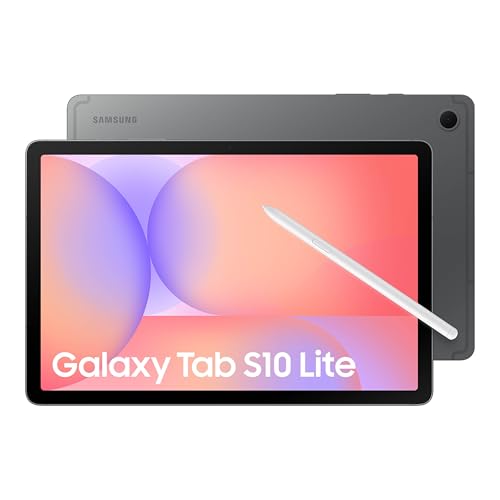
The S10 Lite is Samsung’s argument that the S Pen experience should not begin at flagship money, and its title assembles the case plainly: 6GB of RAM, 128GB of storage expandable to 2TB, a 10.9-inch LCD in grey, a long battery life claim, the S Pen named for note-taking, an Exynos 1380 processor, Circle to Search and AI tools. The pen is the headline — Samsung’s pen platform carries years of note-app development behind it, and the Lite puts that platform in a mid-priced body. For a note-taker, the maturity of the surrounding software is not a soft consideration: the app that organises, searches and exports your handwriting is where you will live, and this pick’s ecosystem is its deepest asset.
Consider the three-year arc of a student who buys this tablet in their first autumn. Year one is lectures and the novelty of searchable handwriting. Year two adds placements, society commitments and a part-time job’s worth of meeting notes, and the archive starts being consulted rather than merely accumulated — last year’s diagrams resurface in this year’s revision. Year three is the dissertation or the final project, where the note library becomes a genuine research asset. A device survives that arc by having storage headroom, an app ecosystem that is still being maintained, and a pen that has not become an orphan accessory. The Lite’s titled expansion ceiling and Samsung’s pen platform speak directly to that arc, which is why this pick is framed as a value route rather than a cheap one — the saving is real, but so is the staying power it is buying.
The expansion figure deserves emphasis because note archives grow quietly. 128GB of internal storage sounds ample in September; by the third year of annotated PDFs, recorded lectures and exported notebooks, the 2TB expansion ceiling named in the title is the difference between a device that ages gracefully and one that starts deleting its own history. The 10.9-inch LCD is the mainstream size for a reason — large enough for a page-like writing posture, small enough for a bag — and the long battery claim in the title, while unquantified there, aligns with the Lite line’s efficiency-first positioning. Buyers should still look for the quantified figure in the listing and the maker’s documentation rather than taking the adjective as a measurement.
Position this pick against its own sibling below and the choice sharpens: the FE adds water resistance and a stated refresh figure; the Lite counters with expansion headroom and the value argument. Neither is the “better” Samsung in the abstract — they are tuned for different hazards, one for weather and the other for archives. Students weighing Samsung’s pen against the wider school market will find the campus-specific comparison in our best android tablets for school notetaking guide useful. On the listing itself, check the current price on Amazon for the S10 Lite in the titled configuration, and confirm the S Pen is the included unit the title describes.
- Display: 10.9-inch LCD, as titled
- Processor: Exynos 1380, as titled
- Memory and storage: 6GB RAM, 128GB storage, expandable to 2TB, as titled
- Pen: S Pen for note-taking, as titled
- Features named: Circle to Search and AI tools, as titled
- Battery: described as long battery life in the title; no figure stated
- Pen pressure levels: Not stated in the listing title — verify with the maker’s documentation
Strengths
- The S Pen platform brings a mature note-taking software ecosystem at a mid-tier position.
- Expansion to 2TB, as titled, gives a growing note archive somewhere to live.
- 6GB of memory clears the multitasking bar its Lenovo rival at this size does not.
Trade-offs
- The battery claim in the title is an adjective, not a figure.
- No refresh rate is titled for the LCD, so pen-follow smoothness is unquantified.
- No water resistance is claimed — the sibling FE owns that argument.
Best for: committed note-takers building years of archives inside the S Pen ecosystem.
Not suited for: field and campus use in wet weather, where the untitled sealing leaves the risk with you.

Samsung Galaxy Tab S10 FE — Weather-sealed note taker
The S10 FE’s title adds the two words that change where a tablet can be used: IP68 water-resistant. Around that claim it assembles 128GB of storage in a WiFi Android tablet, US version, in silver, with a large display, a long battery life claim, an Exynos 1580 processor, a 90Hz refresh rate and the S Pen named for note-taking. The sealing is the differentiator in this whole shortlist — no other pick’s title claims a water-resistance rating — and it redraws the map of note-taking locations: the poolside lecture review, the field notebook in drizzle, the kitchen-counter recipe annotation, the site walk in weather that sends unsealed devices into bags.
The 90Hz figure matters to the pen specifically. Handwriting feels analogue when the line keeps pace with the hand, and refresh rate is one of the titled levers on that feeling; the FE states its figure where the Lite leaves it unstated, which lets a buyer weigh the two Samsungs on evidence rather than adjectives. The Exynos 1580 sits a step above the Lite’s 1380 in Samsung’s own numbering, and the pairing of a stated refresh with a stated sealing makes this the more specified of the two Samsung picks — the one whose title is willing to be checked. Its storage, though, is stated without the Lite’s expansion headline, so archive-heavy buyers should confirm the expansion story in the listing before assuming parity between the siblings.
Sealing also changes a habit most owners never articulate: where the device is allowed to be put down. An unsealed tablet lives a careful life — lifted off the wet counter, kept from the poolside table, wiped before it is touched after gardening. A sealed one joins the environment it is working in. That sounds trivial across a single afternoon and compounds across a working year into a device that is simply present more often, capturing the note that the careful device missed because fetching it felt like a risk. Buyers weighing the FE’s premium over its sibling are really pricing that presence, and people whose work is genuinely outdoors usually find the arithmetic easy.
Think of the FE as the note tablet for people whose notes happen outdoors or in transit: the geography student, the site engineer, the coach on a wet touchline, the commuter whose reading happens on platforms in all seasons. The S Pen keeps the Samsung software argument intact, and the sealing removes the weather asterisk from every plan. Readers torn between this and a dedicated drawing surface should note the boundary — this is a note-first tablet that draws, a distinction our best drawing tablets for note taking guide explores from the other direction. When you reach the listing, check price on Amazon for the S10 FE as titled, and read the IP68 wording’s conditions in the full text, since every water-resistance claim carries its test conditions with it.
- Storage: 128GB, WiFi, US version, as titled
- Processor: Exynos 1580, as titled
- Display: large display with 90Hz refresh, as titled (exact size not stated in the title)
- Sealing: IP68 water-resistant, as titled
- Pen: S Pen for note-taking, as titled
- Battery: described as long battery life in the title; no figure stated
- Storage expansion: Not stated in the listing title — verify with the maker’s documentation
Strengths
- IP68 in the title makes this the only pick here cleared for wet-weather note-taking.
- The stated 90Hz refresh supports the pen-follow feel handwriting depends on.
- It keeps the S Pen ecosystem while adding the sealing its sibling lacks.
Trade-offs
- The exact display size is not stated in the title — “large display” is the maker’s wording.
- Expansion is untitled here, unlike the Lite’s stated 2TB ceiling.
- The battery claim remains an adjective rather than a number.
Best for: note-takers whose pages are written outdoors, in transit and in working weather.
Not suited for: archives planned around a 2TB expansion ceiling — that titled figure belongs to the Lite.

Lenovo Idea Tab Pro 12.7″ — Big-canvas student tablet
The Idea Tab Pro scales the Lenovo formula up, and its title says so in numbers: a student tablet with Google Gemini named in the headline, a 12.7-inch 3K LCD display, 8GB of memory, 128GB of storage, a MediaTek Dimensity 8300, and a pen and folio case included. The screen is the argument. At 12.7 inches with 3K resolution, this is the canvas for the note-taking styles that smaller tablets squeeze: the split view with the lecture PDF on one side and the notebook on the other, the full-page diagram annotated without zooming, the sheet-music and technical-drawing work where the page is the unit of thought. Students in subjects with visual density — engineering, medicine, architecture, mathematics — will feel the extra inches as working room rather than luxury.
The supporting specification is a step up from the smaller Lenovo across the board: double the memory at 8GB, a Dimensity 8300 in place of the 6300, and the same bundle logic of pen plus folio in the box. That memory figure matters specifically for the split-view habit this screen invites, because two substantial apps side by side is precisely the workload that exposes a 4GB ceiling. The Gemini naming in the title places the device in the current AI-assistant generation of student hardware; what that means for your notes in practice — summarisation, transcription, organisation — depends on the software services available in your region and account, and the listing’s full text is the place to confirm which of those services the bundle actually includes.
There is a study-habit argument for the big canvas that goes beyond any single subject. Notes taken at full-page scale preserve the spatial layout the writer created — the margin comment sits beside the paragraph it answers, the worked example keeps its steps in their visual order. Shrinking a page to fit a small screen, or splitting it across scrolls, dissolves that geography, and with it a layer of memory: many writers recall where on the page something lives before they recall what it says. A 12.7-inch page keeps the geography intact, which is a quiet cognitive argument for size that no refresh figure can substitute for. It is also why this pick’s natural home is the desk where revision happens, even if a smaller device handles the capturing elsewhere in the day.
Size cuts both ways, and the trade should be faced squarely: a 12.7-inch tablet is a desk-and-bag device, not a one-handed reader, and its folio-equipped footprint will dominate a small seminar desk. The student whose day is a sequence of lectures at proper desks gains a workstation; the student whose day is trains, corridors and laps may find the smaller Idea Tab the wiser carry. That is a timetable question, and your own timetable answers it better than any review can. On the listing, check the current price on Amazon for the Idea Tab Pro bundle as titled, pen and folio included, and set it against the smaller Lenovo’s figure with the size trade-off priced in honestly.
- Display: 12.7-inch 3K LCD, as titled
- Processor: MediaTek Dimensity 8300, as titled
- Memory and storage: 8GB memory, 128GB storage, as titled
- Assistant: Google Gemini named in the title
- Included: pen and folio case, as titled
- Pen pressure levels: Not stated in the listing title — verify with the maker’s documentation
Strengths
- The 12.7-inch 3K canvas is the only screen here sized for true split-view note work.
- 8GB of memory supports the two-apps-side-by-side habit the screen invites.
- Pen and folio in the title keep the complete-kit-in-one-box virtue of the smaller Lenovo.
Trade-offs
- The footprint rules out one-handed reading and dominates small desks.
- No refresh figure is titled, despite the pen-centred purpose.
- 128GB of storage is shared with the smaller model while the screen invites heavier media use.
Best for: students in visually dense subjects who annotate full pages and split their view.
Not suited for: commuters whose note-taking happens on laps, trays and crowded trains.
How Do the Six Picks Compare at a Glance?
| Pick | Family | Screen, as titled | Pen, as titled |
|---|---|---|---|
| XPPen Magic Note Pad 10.95″ | Digital notebook | 10.95-inch colour | X3 Pro Pencil, 16,384 levels |
| XPPen Note Plus | Digital notebook | Size not stated in title | Pen with phone sync |
| Lenovo Idea Tab 11″ | Tablet | 11-inch 2.5K, 90Hz | Tab Pen included |
| Samsung Galaxy Tab S10 Lite | Tablet | 10.9-inch LCD | S Pen included |
| Samsung Galaxy Tab S10 FE | Tablet | Large display, 90Hz | S Pen included |
| Lenovo Idea Tab Pro 12.7″ | Tablet | 12.7-inch 3K | Pen included |
How Do You Turn a New Note Tablet Into a Working System?
Protect the pen routine as carefully as the filing routine. A stylus lives in its loop, its slot or its magnetic perch — always the same place, so the hand finds it without a search. Charge or check it on the same weekly rhythm as the archive review. The commonest way a note system dies is not software failure; it is the pen left in another bag on the morning of the important meeting, after which the owner quietly reverts to paper for a week and the archive splits in two. Systems survive on these small fidelities, and the first month is when they are set.
Begin with the archive, not the pen. Decide, before the first lecture or meeting, where your notes will live in a year: which app holds them, how they are backed up, how they leave the device as PDF or text, and how handwriting becomes searchable. Set that system up on day one, while the archive is five pages and mistakes are free. Then standardise the small things that compound — one notebook per subject or project, a naming habit for pages, a weekly ten-minute review where loose pages are filed and flagged items are acted on. The hardware differences in this guide are real, but the gap between a note-taker whose system compounds and one whose pages pile up in a single undifferentiated notebook is larger than any gap between these six devices. Students building the full study setup should pair this guide with the best tablets for college note taking and text book reading shortlist, which weighs the reading half of the same workload.
Which Mistakes Do Note-Takers Make When Buying?
The first is buying the pen and forgetting the exit. Notes that cannot leave the device — exported, synced, printed, searched — become a hostage archive, and the disappointment arrives months later when the first migration is attempted. Every pick here should be interrogated on its export story before purchase, especially the notebooks, whose titles emphasise the writing surface over the filing system. The second mistake is chasing the pressure number as if handwriting consumed it: the titled 16,384 levels serve sketching nuance, and a pure writer gains little beyond the mid-range — while the same buyer may badly need the refresh rate or the sealing they traded away. Buy for the verb you perform most.
Third, buyers forget the bag test: the device, its folio, its pen looped or magnetised, travelling daily among chargers and bottles. Bundles that include the folio, as both Lenovo titles and the Magic Note Pad’s do, quietly remove a cost and a risk that bare-device prices conceal. Fourth, the battery adjective trap — “long battery life” appears in titles as a claim of character, not a measurement, and a buyer whose day is three lectures and a library evening should find the quantified figure in the maker’s documentation. Fifth, and most human: purchasing the notebook family’s focus while living a tablet life, or the reverse. The fork described at the top of this guide is the decision; the model choice is merely its consequence.
A last word on trialling. Whichever family you choose, give the device a genuine fortnight of your real work before judging it — handwriting adapts to a new surface over days, not minutes, and first impressions of pen feel are notoriously poor predictors of the third week’s comfort. Write daily, file honestly, and let the archive you have built by day fourteen make the argument. If the pages are accumulating in one searchable place and the device reaches for itself in your bag without deliberation, the choice has already been ratified by the only reviewer whose verdict matters.
Final Recommendation
Choose the family first. If your notes are your work’s centre and distraction is the enemy, the XPPen Magic Note Pad is the deepest notebook here — colour pages, a titled pressure figure, pen and folio in the box — while the Note Plus serves the writer whose pages must reach the phone within the hour. If your notes live inside a wider digital day, the tablets take over: the S10 Lite for the S Pen ecosystem with archive room to grow, the S10 FE when your writing happens in weather, the Idea Tab for the complete student kit at 11 inches, and the Idea Tab Pro when your subjects demand a full page at a glance. The hand that writes every day will forgive a modest processor long before it forgives the wrong family of device.
Frequently Asked Questions
Do I need a screen protector on a note-taking tablet?
Opinions divide, and the honest answer is that it depends on the writing feel you prefer and the environment the device travels in. Some writers add a matte protector to give the nib more bite and to take the scratches that bags inflict; others write on the bare screen to keep the pen’s glide and the display’s clarity exactly as designed. Try the device unprotected at a desk first, and let your own hand — not a forum consensus — settle it.
Are the XPPen picks full tablets or something else?
Something else, deliberately. Both XPPen picks are digital notebooks — devices built around handwriting, sketching and reading rather than the full app breadth of a general tablet. Their titles say so, and this guide labels them as notebooks throughout so the distinction survives into your decision.
Does a higher pressure level make handwriting better?
Only marginally. Pressure range expresses itself in line nuance — the swell and taper of a stroke — which sketchers and annotators feel daily and pure writers rarely use beyond a fraction of the scale. The Magic Note Pad’s titled 16,384 levels are a drawing credential first and a handwriting credential second.
Which pick handles wet conditions?
The Samsung Galaxy Tab S10 FE, on the strength of the IP68 water-resistance claim in its title — the only sealing claim in this shortlist. Read the claim’s conditions in the listing’s full text, as every such rating is defined by its test.
Is a folio case worth insisting on?
For a device that travels daily, yes — and the cheapest way to own one is in the bundle. Both Lenovo titles and the Magic Note Pad’s title name a folio as included; where a title is silent, price the case into the comparison rather than discovering it afterwards.
Can a digital notebook replace paper entirely?
For structured work — lectures, meetings, study, field notes — the two XPPen notebooks are designed to try. Paper still wins a few honest contests: it never needs charging, it tolerates being lent, lost and rained on without financial pain, and a single sheet can be pinned, posted or handed over in a way no screen matches. Most converts end up hybrid, with the notebook carrying the archive and paper carrying the ephemeral — and that is a success state, not a failure of commitment.
How do handwritten notes become searchable?
Through the note app’s recognition features, which vary by platform and are a software question rather than a pen question. The wider field is compared in the handwriting-recognition guide linked earlier in this article; whichever device you choose, test the recognition on your own handwriting during the first week, while habits are still cheap to change.
Related Guides
Pen-first readers comparing the smaller end of this market can continue with the best 10 12 inch tablets with stylus shortlist, which gathers the size class most note-takers eventually settle into.
Related guides
- Best Basic Phones Camera Buyers Can Trust: Flip Phones and Simple Handsets That Still Take a Photograph
- Best Sony Full Frame Cameras for Astrophotography: Sensitivity vs Resolution
- Best Affordable Android Tablets: Five True Android Slates and One Fire OS Specialist, Clearly Labelled
- Best 400 FPS High Speed Cameras: The Honest Truth About Burst Slow Motion


