What's inside
- The Second-Screen Question: What Should a Tablet Do When a Laptop Already Exists?
- Key Takeaways
- Quick Picks
- How Did We Choose Companions Rather Than Computers?
- What Jobs Does a Companion Tablet Actually Win?
- Reading on a Companion: What Separates the Pleasant From the Tolerable?
- The Travel Playbook: Leaving the Laptop Behind on Purpose
- Sharing the Companion Without Surrendering It
- How Do the Six Companions Compare?
- Charging, Battery and the One-Cable Household
- Can a Companion Tablet Serve the Laptop Directly?
- How Do You Set Up a Companion Tablet in the First Evening?
- Accessory Restraint: What a Companion Actually Needs
- When the Laptop Dies: How Far Can the Companion Cover?
- Which Mistakes Do Companion Buyers Make?
- Final Recommendation
- Frequently Asked Questions
- Related Guides
As an Amazon Associate I earn from qualifying purchases. This post may contain affiliate links at no extra cost to you.
gizmoverdict.com is reader-supported. When you buy through links on our site, we may earn an affiliate commission.
The Second-Screen Question: What Should a Tablet Do When a Laptop Already Exists?
Owning a good laptop changes the tablet question completely, and most buying advice ignores the change. The search for the best tablets when you already have a laptop is not a search for a weaker laptop. It is a search for the things a laptop does badly: reading in an armchair without a hinge in the way, annotating a PDF at the distance a book would sit, travelling for a weekend without a charger brick and a protective sleeve ritual, propping recipes and reference material beside the main screen, and handing a device to a child, a guest or a meeting without handing over your entire digital life in the same gesture.
That reframing demotes the specifications other guides worship. Raw power matters less, because the heavy work already has a home. Keyboard ecosystems matter less, because typing marathons already have a desk. What rises instead is everything about the in-between moments: how fast the tablet wakes, how kind its screen is at midnight, how gracefully it extends your laptop’s display or mirrors your notes, how little it weighs in the bag that already carries the laptop, and how completely it can be a media, reading and sketching companion without demanding to become your primary computer in a fit of ambition.
Ecosystem gravity is the one strategic decision hiding inside this otherwise relaxed purchase. An iPad beside a Mac extends the desk with Apple’s continuity tricks and shares its app purchases with an iPhone. An Android tablet beside a Windows laptop pairs through each maker’s link software and the universal solvent of cloud services. Cross those streams carelessly and the tablet still works — files move by cloud, media plays anywhere — but the small magics of handoff, shared clipboards and second-screen ease belong to matched pairs. The picks below include both Apple machines and four Android machines precisely so the matched pair is available whichever laptop you already own.
Budget logic also inverts in this category, in a way worth stating before the picks. A companion tablet bought too cheaply becomes a drawer resident: slow enough to reach past, dim enough to ignore. A companion tablet bought at flagship level duplicates money the laptop already spent. The sweet spot is the competent middle — a bright screen, a current processor, years of updates — and that is exactly where this list concentrates, with one premium outlier for readers whose laptop is old enough that the tablet will quietly become the favourite screen in the house.
Key Takeaways
- A companion tablet should be bought for reading, annotating, media and second-screen work — the jobs a laptop performs worst.
- Match the tablet’s ecosystem to your laptop and phone where you can; handoff and second-screen features reward matched pairs.
- The base iPad (A16) and the Lenovo Idea Tab Plus cover the companion brief at the gentlest commitment, pen and folio included on the Lenovo.
- The Galaxy Tab S9’s AMOLED screen and bundled S Pen make it the strongest all-round Android companion here.
- The Xiaomi Pad 7 and OnePlus Pad 3 bring high-refresh, sharp screens for readers and media travellers who live outside the big two ecosystems.
- Storage needs shrink beside a laptop: buy for the trips and the sofa, not for an archive that already lives on the main machine.
Quick Picks
| Pick | Badge | Why it earns its place |
|---|---|---|
| Apple iPad 11-inch (A16) | Best companion for most people | The default iPad does every companion job well — reading, media, notes, calls — and pairs seamlessly with a Mac or stands alone happily. |
| Apple iPad Air 11-inch (M3) | Best premium Apple companion | M3 power and Apple Intelligence headroom for owners whose tablet will outlive their current laptop and absorb heavier work over time. |
| Samsung Galaxy Tab S9 | Best Android companion | An 11-inch AMOLED screen, Snapdragon 8 Gen 2 pace and an S Pen in the box cover media, notes and second-screen duty in one machine. |
| Xiaomi Pad 7 | Best screen-per-commitment | A 3.2K 144Hz display and quad speakers at a companion-friendly tier, for readers and streamers outside the Samsung orchard. |
| OnePlus Pad 3 | Best big-screen traveller | A 13.2-inch canvas with 12GB of memory for split-screen travel work, films and documents beside a laptop that stays home. |
| Lenovo Idea Tab Plus | Best complete companion kit | Pen and folio case included with a 12.1-inch 2.5K screen — the armchair-and-meeting companion that arrives fully dressed. |
How Did We Choose Companions Rather Than Computers?
The judging inverted the usual order. Screen quality came first, because a companion lives as a reading and viewing surface: resolution, refresh behaviour and panel type were weighed the way a book’s paper would be. Weight and wakefulness came second — a companion that sleeps in a drawer because it is heavy or slow to start has failed its only exam. Pen support counted where it was included or painless, since annotation is the companion’s signature trick, but no pick was required to be a drawing studio. Raw benchmark power was deliberately last, present in healthy amounts everywhere and decisive nowhere.
Second-screen behaviour got its own examination. Apple’s tablets extend a Mac’s desktop through Sidecar and mirror an iPhone’s life through continuity. Samsung’s tablets pair with Windows machines through link software and with Galaxy phones natively. The Xiaomi, OnePlus and Lenovo machines lean on cloud and casting, which is less magical and entirely workable. This guide scores the magic where it exists without pretending the workable route is a failure — a companion that opens your cloud documents flawlessly beside the laptop has done the job, whether or not the clipboard is shared.
Update policy was weighed as a companion virtue in its own right, because a second device that stops receiving security updates becomes a liability wearing a reading light. Apple’s long support for its iPads and Samsung’s improved commitments for the Galaxy line both scored well here; the Tab S9’s 2023 birth certificate was noted against it in its own section rather than hidden. Xiaomi, OnePlus and Lenovo have all strengthened their update promises in recent generations, though buyers for whom a five-year horizon is sacred should confirm the current policy for the exact model before ordering, as with any connected device that will hold accounts.
Finally, every pick was asked the drawer question: in month eight, when novelty has evaporated, what weekly moment still reaches for this device? Reading in bed, the Sunday papers, the annotated PDF, the film on the train, the recipe screen, the child’s supervised hour — each pick below names its surviving moment honestly, because a companion is a habit with a battery, and habits are the only specification that never depreciates.
What Jobs Does a Companion Tablet Actually Win?
Reading is the first and largest. Articles saved for later, ebooks, magazines, long reports — all of them sit better on a fanless slate held at book distance than on a laptop balanced on knees, and the high-resolution screens in this list render text with a calm that encourages finishing things. Annotation is the second: the pen-equipped picks turn reading into marking, and the marked document syncs back to the laptop’s world for the work that follows. A laptop can do both jobs; it does them the way a family car does a school run in a snowstorm — capably, and with more ceremony than the moment wants.
The third job is the second screen itself, in both directions. Beside the laptop, the tablet holds the reference document, the call window, the chat thread or the dashboard while the main screen does the producing. Away from the laptop, the tablet becomes the only screen — hotel rooms, trains, gardens — and the question flips from what it extends to what it replaces for an evening. Media is the fourth job and the least apologetic: films and series on an AMOLED or a sharp high-refresh panel, in a tent or a bath-adjacent armchair, are a legitimate purchase reason that this guide refuses to dress up as productivity.
A sixth job hides inside the workday and deserves daylight: the tablet as the meeting’s second participant. Propped beside the laptop, it holds the agenda, the shared document or the other party’s presentation at reading distance while the laptop takes the notes and runs the call — or the arrangement reverses, the tablet takes the call with its better-placed camera and the laptop becomes the desk. Either way, the two-screen meeting is calmer than the one-screen shuffle of windows that single-machine workers perform, and colleagues on the other end simply see someone who seems organised.
The fifth job is delegation. A companion tablet can be handed — to a child for a supervised film, to a guest for the photo album, to a colleague for the document under discussion — without the small surrender involved in handing over the laptop that holds your accounts, your files and your half-written everything. Households consistently underestimate this job when buying and consistently name it first when asked, a year later, what the tablet is for.

Apple iPad 11-inch (A16) — Best companion for most people
The base iPad is the companion category’s centre of gravity, and the A16 generation keeps it there. An 11-inch Liquid Retina display, Touch ID, Wi-Fi 6, 128GB of storage in the verified configuration and 12MP cameras front and back cover the companion brief without a single flourish wasted: reading is crisp, video calls are centred and sane, media plays all day on the battery claims Apple makes for the line, and the whole thing wakes instantly in the hand like a book that remembers its page. Beside a Mac it extends the desk through Sidecar and shares the iPhone’s ecosystem; beside a Windows laptop it remains a superb self-contained slate that syncs through the cloud.
Its companion virtues are partly negative, and they matter. It does not demand a keyboard purchase to justify itself, does not run hot with ambition, and does not cost enough to make its owner protective of it — a tablet you will lend, prop in a kitchen and take to the beach house is a tablet fulfilling the companion contract. Apple Pencil support exists for the annotation habit, with the Pencil as the usual separate decision, and the accessory universe around the base iPad is the deepest and cheapest in this guide because the model line sells in such volume.
The ceiling is equally clear. The A16 is a fine processor wearing last generation’s crown, the display lacks the Air’s lamination refinements and anti-reflective treatment, and heavy creative apps will notice the difference between this and the M3 machine long before email does. For the stated job — second screen, reading chair, travel media, household delegation — none of that reaches the user. This is the pick to buy when the laptop is healthy and the tablet’s role is honestly supportive.
- Display: 11-inch Liquid Retina, per the listing title
- Processor: A16 chip, per the listing title
- Storage: 128GB in the verified configuration
- Features: Wi-Fi 6, Touch ID, 12MP front and back cameras
- Battery: all-day life claimed in the listing title
Strengths
- Every companion job done well, with the deepest accessory shelf in the guide.
- Sidecar and continuity make it a natural extension of a Mac desk.
- Unprecious enough to lend, prop and travel with as a companion should be.
Trade-offs
- The Pencil is a separate purchase for annotation habits.
- The display trails the Air’s refinement in glare and lamination.
- Storage at 128GB assumes the laptop keeps the archive, which is the point — mostly.
Best for: a Mac or mixed household wanting the default, dependable second screen.
Not suited for: a creative professional expecting the companion to moonlight in heavy production apps.

Apple iPad Air 11-inch (M3) — Best premium Apple companion
The iPad Air exists for the owner whose laptop is ageing faster than their ambitions. Its M3 chip is genuine laptop silicon, the same class that powered recent MacBook Airs, so the companion brief expands quietly: heavier photo and video apps run properly, Apple Intelligence features have their headroom, and the tablet can absorb real work during the laptop’s eventual replacement gap without blinking. The Liquid Retina display, Wi-Fi 6E and Touch ID complete a package that is an iPad Pro’s understudy in every department except price positioning and the fanciest screen technology.
As a companion specifically, the Air’s argument is time. Buyers who replace laptops every three years can buy the base iPad and never think again; buyers who keep a laptop for six should look at the Air, because in years four to six the tablet’s extra power stops being a luxury and becomes the household’s fastest screen. Pencil Pro support deepens the annotation story for professionals who mark documents daily, and the Magic Keyboard compatibility leaves a door open — not recommended as a companion purchase, but present if the laptop dies at the wrong moment and the understudy must go on stage.
Restraint is the counter-argument, and it is a good one. If the laptop is new and the tablet’s life will be reading, media and notes, the Air’s premium buys performance that will spend its life idling, and the base iPad’s savings fund a case, a Pencil and a holiday’s worth of books. The Air is the right answer to a specific forecast — long laptop life, growing tablet duties — and an indulgence under any other forecast, albeit an extremely pleasant one.
- Display: 11-inch Liquid Retina, per the listing title
- Processor: M3 chip, built for Apple Intelligence, per the listing title
- Storage: 128GB in the verified configuration
- Features: Wi-Fi 6E, Touch ID, 12MP front and back cameras
- Battery: all-day life claimed in the listing title
Strengths
- Laptop-class M3 power gives the companion a genuine second career as workloads grow.
- Apple Intelligence headroom future-proofs the purchase across software generations.
- Pencil Pro and keyboard compatibility keep every upgrade door unlocked.
Trade-offs
- The premium idles if the tablet’s life stays reading-and-media simple.
- Still 128GB at this configuration, so media archives belong on the laptop.
- ProMotion-class screen smoothness remains the iPad Pro’s territory.
Best for: a long-laptop-life household whose tablet duties will grow year by year.
Not suited for: a new-laptop owner whose companion will honestly only read and stream.

Samsung Galaxy Tab S9 — Best Android companion
The Tab S9 is the Android companion with no apologies left to make. Its 11-inch AMOLED screen is the finest panel in this list for the companion’s core jobs — films gain the contrast only AMOLED gives, text sits on true blacks at midnight, and outdoor reading survives bright rooms. The Snapdragon 8 Gen 2 keeps every interface instant, 256GB of storage in the verified configuration doubles the Apple pair’s allowance, and the S Pen is included in the box, so annotation begins on the first evening without an accessory negotiation.
Beside a Windows laptop, the S9 plays the companion role through Samsung’s link software and the ordinary cloud, holding reference material, calls and notes while the laptop produces. Beside a Galaxy phone it becomes family, sharing continuity tricks of its own. The durable design Samsung advertises suits the companion’s actual life — kitchen counters, garden chairs, the floor beside the sofa — better than a fragile flagship would, and the graphite US-version hardware keeps support straightforward.
Age is its one honest debit: this is a 2023 model in a guide of newer machines, which shortens its remaining update runway compared with the freshest releases, and buyers planning a five-year companionship should weigh that calendar. Against it stands the reality that its screen, pen and performance still outclass most newer mid-range rivals at the companion jobs. As a second screen and first-rate media slate for an Android-and-Windows household, it remains the name to beat.
- Display: 11-inch AMOLED, per the listing title
- Processor: Snapdragon 8 Gen 2, per the listing title
- Storage: 256GB in the verified configuration
- Pen: S Pen included, per the listing title
- Design: durable design, US version, per the listing title
Strengths
- AMOLED contrast makes films and midnight reading the best in this list.
- The included S Pen completes the annotation kit with no extra purchase.
- Generous storage holds a serious offline media library for travel.
Trade-offs
- A 2023 release means a shorter remaining software runway than the newest picks.
- Samsung’s desktop ambitions may tempt owners to duplicate the laptop unnecessarily.
- The companion sweet spot is media and notes; heavy creation belongs elsewhere.
Best for: an Android-and-Windows household wanting the finest all-round second screen.
Not suited for: a five-year update runway counted as the first specification on the list.

Xiaomi Pad 7 — Best screen-per-commitment
Xiaomi’s Pad 7 makes a single argument with great confidence: the companion’s screen is the product, so spend there. The 11.2-inch display runs at 3.2K resolution and 144Hz, a combination none of the bigger names match at this tier, and text, photographs and film all inherit the benefit — scrolling stays composed, fine print stays legible, and the whole device feels more expensive than its positioning whenever it is awake. Four speakers handle the media half of the brief with unusual generosity, and an 8850mAh battery backs the travel claims.
The verified configuration is a global Wi-Fi version, and the listing says plainly that it takes no calls or texts — irrelevant for a companion, which lives on Wi-Fi beside a phone and a laptop, but worth printing because clarity is this guide’s religion. Storage is 256GB with 8GB of memory, the camera is a 13MP unit for document duty, and Xiaomi’s software has matured into a competent Android dialect with split-screen habits that suit reference-and-notes work beside the main machine.
What the Pad 7 does not sell is ecosystem magic. There is no Sidecar romance and no Galaxy continuity; the companion connects to your laptop’s world through cloud accounts, casting and cables, which works perfectly and sparkles never. Pen support exists in Xiaomi’s accessory line as a separate consideration rather than a bundled story. Buyers whose companion life is reading, streaming and documents will find the screen-per-commitment ratio unbeatable here; buyers who dream of seamless handoffs should pay one of the two big ecosystems for the dream.
- Display: 11.2-inch 3.2K, 144Hz, per the listing title
- Battery: 8850mAh, per the listing title
- Audio: four speakers, per the listing title
- Memory and storage: 8GB RAM, 256GB storage in the verified configuration
- Note: global Wi-Fi version; no calls or texts, per the listing title
Strengths
- The sharpest, fastest screen in the companion class at this tier.
- Quad speakers give films and calls a presence small tablets rarely manage.
- Storage and battery are both sized generously for travel libraries.
Trade-offs
- No first-party second-screen magic with your laptop; cloud does the connecting.
- The pen is an accessory story rather than part of this listing.
- Xiaomi’s update cadence trails Samsung’s and Apple’s long commitments.
Best for: a reader-streamer who wants the finest screen without ecosystem rent.
Not suited for: a Mac owner dreaming of Sidecar and shared clipboards.

OnePlus Pad 3 — Best big-screen traveller
Sometimes the companion’s job is to let the laptop stay home. The OnePlus Pad 3, with a 13.2-inch screen, 12GB of memory and 256GB of storage, is sized and powered for the trip where the tablet must hold the whole fort for a weekend: split-screen documents beside email, films at a scale that feels like an event, video calls that frame a hotel desk properly, and enough performance headroom that nothing in the travel workload asks permission. It is the premium outlier promised in the introduction, aimed at owners whose companion occasionally gets promoted.
The verified listing is an international version in Storm Blue, Wi-Fi and Bluetooth only, and the same warranty diligence advised elsewhere in this batch applies: confirm regional support arrangements before ordering, and keep the paperwork. Inside those borders, OnePlus’s software is clean, quick and increasingly good at the split-screen choreography travel work demands, and the big canvas makes two apps side by side feel like a desk rather than a compromise.
Its companion debits are size and ecosystem. Thirteen inches travels in a real bag, not a tote’s side pocket, and OnePlus offers no second-screen sorcery with your existing laptop beyond the cloud’s honest labour. Owners who travel light and often may find the 11-inch class more faithful to the companion idea. Owners who travel for work with documents in tow will find this the one Android pick that never makes them miss the machine they left behind.
- Display: 13.2-inch screen, per the listing title
- Memory and storage: 12GB RAM, 256GB storage in the verified configuration
- Connectivity: Wi-Fi and Bluetooth; international version, per the listing title
- Colour: Storm Blue, per the listing title
- Note: verify regional warranty and support before ordering
Strengths
- A near-laptop canvas for weekends when the tablet must hold the fort alone.
- Memory headroom keeps split-screen travel work fluid for years.
- Clean, fast software that respects the user’s time.
Trade-offs
- International-version status asks for warranty homework before purchase.
- Thirteen inches is a committed travel companion, not a pocket one.
- No proprietary second-screen features for your existing laptop.
Best for: a travelling professional whose companion doubles as the away-game laptop.
Not suited for: a minimalist packer whose tablet must vanish into a small tote.
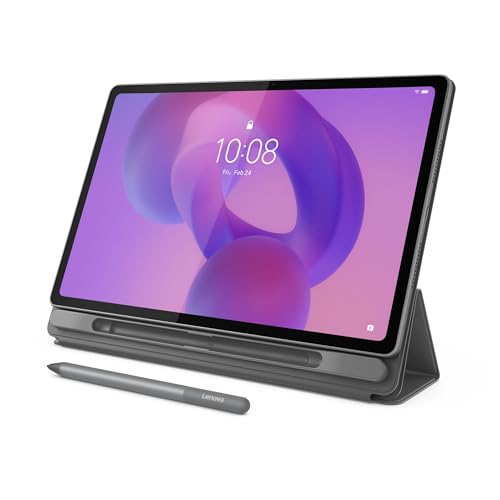
Lenovo Idea Tab Plus — Best complete companion kit
Lenovo bundles the companion brief into one box with unusual completeness: a 12.1-inch 2.5K IPS screen at 90Hz, a Tab Pen and a folio case included in the listing, 8GB of memory, 128GB of storage and a MediaTek Dimensity 6400 keeping the whole arrangement light in hand and light in commitment. The folio matters more than it photographs: a companion lives propped — on kitchen counters, café tables, the arm of a sofa — and a case that stands the tablet up and protects it in the bag is the difference between a device that is present and a device that is stored.
The pen completes the meeting-and-margin story. Beside a laptop, this is the tablet that takes the handwritten notes, marks the PDF and sketches the diagram while the main screen holds the document and the call. Lenovo’s lightweight positioning is honest: this is not a powerhouse and does not pretend otherwise, and for the companion’s actual workload — reading, notes, media, reference — the performance on offer is matched to the job with nothing wasted on benchmarks nobody will run.
Buyers should set two expectations plainly. The Dimensity 6400 will age sooner than the flagship silicon elsewhere in this list if duties grow, and 128GB asks the laptop to keep the family archive, which in this category is a design decision rather than a flaw. Within the companion contract — arrive complete, prop anywhere, annotate everything, cost no anxiety — the Idea Tab Plus is the most thoughtfully assembled package here.
- Display: 12.1-inch 2.5K IPS touchscreen, 90Hz, per the listing title
- Extras: Tab Pen and folio case included, per the listing title
- Processor: MediaTek Dimensity 6400, per the listing title
- Memory and storage: 8GB RAM, 128GB storage
- Graphics: integrated Arm Mali-G57 MC2, per the listing title
Strengths
- Pen and folio in the box make the companion complete on day one.
- The 12.1-inch screen splits the size difference between reading and reference work.
- Lightweight build and positioning suit being carried around the house all day.
Trade-offs
- Mid-range silicon will feel its years first if the tablet’s duties expand.
- Storage assumes the laptop remains the household archive.
- Lenovo’s ecosystem extras are thinner than Samsung’s or Apple’s.
Best for: a note-taking companion for meetings, margins and kitchen-counter reference.
Not suited for: an owner planning to promote the tablet into primary creative duty later.
Reading on a Companion: What Separates the Pleasant From the Tolerable?
Reading is where refresh rates stop being gaming trivia. A 144Hz panel like the Xiaomi’s, or the 120Hz-class smoothness in the premium tier, keeps a long article’s scroll composed instead of smeared, and over a Sunday paper’s worth of scrolling that composure is the difference between a device that feels like paper and one that feels like a screen doing an impression of paper. Resolution works the same quiet shift: the 2.5K and 3.2K panels in this list render small serif text with edges that let the eye relax, which is why readers finish things on tablets that they abandon on laptops.
Typography controls are the reader’s secret settings menu, and every ecosystem here hides a good one. Widen the margins, set the line spacing your eyes prefer, choose the serif face for long reads and the clean sans for documents, and store those choices per app so the novel and the annual report each open in their own correct dress. Ten minutes of typographic housekeeping in the first week pays out across thousands of pages, because reading comfort is mostly the absence of a hundred small irritations nobody can name afterwards.
Weight and balance decide the second half of the reading experience, and they argue for the 11-inch class as the armchair standard. A book-weight slate in one hand, propped at a natural angle, disappears into the text; a 13-inch canvas is a two-handed, lap-propped commitment better suited to documents and films than to a novel in bed. Night readers should also learn their screen’s warmest settings in the first week — every ecosystem here offers night and reading modes that soften the panel after dark — because a companion that is kind at midnight is a companion that gets carried to bed, and bedside is where reading habits are actually kept.
The Travel Playbook: Leaving the Laptop Behind on Purpose
The companion’s finest hour is the trip it takes alone. The playbook is simple and worth rehearsing before the first attempt: load the tablet with the journey’s documents in the cloud folder both machines share, download the films and the reading library over home Wi-Fi, save the boarding passes and the hotel details somewhere that works offline, and pack the small charger rather than the laptop’s brick. Arrive, and the tablet handles the weekend — navigation on a big screen, documents for the meeting or the family event, media for the train home — while the laptop rests at home, unmissed, like a senior colleague who finally took a holiday.
Luggage physics favour the companion in ways that compound across a year of trips. The tablet rides in the personal item rather than demanding its own case, survives security trays without the laptop’s ceremony, and comes out for the departure lounge while the laptop stays packed until the desk at the destination. Frequent travellers describe the shift in almost emotional terms: the machine they use most on the road is the one that asks least of them, and a companion tablet asks for a pocket, a cable and nothing else.
Two details separate smooth trips from improvised ones. The first is the aeroplane-mode rehearsal borrowed from this batch’s toddler guide: open everything you will need with the radios off, at home, while failure is still free. The second is knowing the tablet’s limits before the trip rather than during it — the form that needs the desktop program, the archive file that never synced — because a companion promoted beyond its brief should be promoted by decision, not by surprise. Trips inside the brief are so pleasant that many owners quietly stop taking the laptop anywhere under three nights, and that, more than any benchmark, is the companion category’s real victory condition.
Sharing the Companion Without Surrendering It
A companion tablet lives in a household, and households share. The graceful way to share is structural: a separate profile or a curated guest shelf for children, the family photo album synced and visible, the media apps signed in, and the work accounts — mail, documents, password vault — behind the owner’s biometric lock rather than sprawled across the home screen. Apple’s and Samsung’s multi-user and kids’ arrangements handle this with the most polish; on any pick, a folder discipline and a lock screen achieve ninety percent of the same peace.
Set the fences with the same honesty used for the toddler tablets elsewhere in this batch, adjusted for older residents: a child’s profile with approved apps and sensible time boundaries, a guest’s access that reaches photographs and media without reaching mail, and an owner’s lock that takes one glance or one fingerprint. Ten minutes of structure in the first week prevents the two household failures that kill companions — the device nobody may touch, and the device nobody should have touched — and leaves only the success in between.
The sharing dividend is larger than the security chore. A tablet that grandparents can pick up to see photographs, that a partner can prop for a recipe, that a child can watch a downloaded film on under the house rules, becomes woven into the home in a way a second laptop never does. That woven-in status is also practical protection: shared devices get charged, updated and noticed when they misbehave, while a strictly personal second device slowly fossilises in a drawer. Buy the companion for yourself, by all means — then set it free enough to be loved by the house.
How Do the Six Companions Compare?
| Tablet | Screen | Pen story | Pairs best with | Companion strength |
|---|---|---|---|---|
| Apple iPad (A16) | 11-inch Liquid Retina | Pencil available separately | Mac and iPhone | The default second screen |
| Apple iPad Air (M3) | 11-inch Liquid Retina | Pencil Pro available separately | Mac and iPhone | Power headroom for years |
| Samsung Galaxy Tab S9 | 11-inch AMOLED | S Pen included | Windows and Galaxy phones | Media and annotation polish |
| Xiaomi Pad 7 | 11.2-inch 3.2K, 144Hz | Accessory pen story | Any laptop, via cloud | Screen quality per commitment |
| OnePlus Pad 3 | 13.2-inch | Accessory pen story | Any laptop, via cloud | Weekend laptop substitution |
| Lenovo Idea Tab Plus | 12.1-inch 2.5K, 90Hz | Tab Pen and folio included | Any laptop, via cloud | Complete kit, ready to prop |
A note on the two accessory-pen rows: Xiaomi and OnePlus both sell pens for their ecosystems, and owners who discover an annotation habit after purchase can add one later without changing tablets. The companion contract tolerates that sequence perfectly well — pen second, once the habit is proven — and it is kinder to the budget than buying every accessory against hypothetical futures.
Read the pairings column first, because ecosystem decides the texture of ownership, then the pen column, because annotation is the companion’s signature. Everything after that is preference, and preference is a legitimate way to choose among six machines this competent.
Charging, Battery and the One-Cable Household
A companion’s battery life should be measured in days of its actual rhythm, not in hours of a benchmark’s. Reading, notes and an evening film sip where production software gulps, so most owners of these six settle into a twice-or-thrice-weekly charging habit rather than a nightly one — and that looseness is precisely why the charging station matters. A tablet that lives beside its cable, in the room where it spends its evenings, is always ready; a tablet charged opportunistically at the desk competes with the laptop for the same socket and loses, quietly, until the evening it is wanted flat.
USB-C across this entire list simplifies the household arithmetic beautifully. One good charger and a couple of cables can serve the tablet, the phone and often the laptop itself, which turns packing for a trip into a single handful rather than a drawer excavation. Keep the tablet’s own cable at its home station and a second in the travel bag, and the companion’s power story becomes the least interesting part of owning it — which, for a device bought to remove friction, is the highest praise available.
Can a Companion Tablet Serve the Laptop Directly?
Beyond second-screen duty, a good companion performs smaller services that add up across a working week. It is the always-on display for the dashboard, the calendar or the music controls that would otherwise steal a window from the main screen. It is the test device for the document, the presentation or the website that must be checked the way a reader on a tablet will actually see it. It is the signing surface for the contract, the sketch surface for the idea that a mouse would strangle, and the call screen that frees the laptop’s camera from its unflattering hinge angle. None of these services justifies the purchase alone; together they describe a working partnership that owners consistently rate as the purchase’s real return.
Notifications deserve one line in that same treaty, because a companion that buzzes with every message the laptop already announced becomes a second interruption rather than a second screen. Silence the companion’s duplicates, let it keep only the alerts that belong to its own jobs — the finished download, the reading reminder, the call it is hosting — and the device’s presence in the room turns restful. Calm is a configuration, and in this category calm is most of the product.
There is one service to refuse, and naming it protects the whole arrangement: do not let the companion become the backup laptop by policy. The moment it must carry the full software stack, the full archive and the full security burden of the main machine, it stops being the calm screen and becomes a second job with a battery. Keep the division of labour — production there, living here — and both machines stay good at their work for years.
How Do You Set Up a Companion Tablet in the First Evening?
Resist installing your whole digital life. A companion earns its place by being the calm screen, so begin with the short shelf: the reading apps, the media services, the note and PDF tools, the video-call app your people actually use, and the cloud drive that connects it to the laptop’s files. Sign in, sync one document in each direction to prove the bridge works, and download a travel library while the home connection is fast. The tablet that starts lean stays fast, and its home screen becomes a menu of pleasures rather than a second inbox demanding management.
Then configure the pair relationship deliberately. Mac owners should test Sidecar with the laptop at the desk and learn the gesture that summons it before a deadline does. Windows owners pairing a Samsung should install the link software on both machines and rehearse moving one file each way. Everyone else should standardise on the cloud folder that both machines treat as the shared desk, and pin it in both places. Five rehearsed minutes in the first evening are the difference between a companion and a coincidence.
One last setup choice pays quietly for years: the wallpaper of the thing. A companion dressed in the same alerts, widgets and work badges as the laptop will be treated as the laptop’s annex and opened with the same reluctance. Give it the household photograph, the reading queue and the weather instead, and the hand learns within a week which device means business and which one means the good part of the day.
Finish with the physical stations. Decide where the tablet charges, where it lives during the day — kitchen, desk edge, bedside — and fit the case or folio that lets it prop itself at those stations. A companion with a home gets used; a companion that migrates randomly gets forgotten in whichever room it last slept in, and its battery will be flat on the one evening it was wanted.
Accessory Restraint: What a Companion Actually Needs
The companion’s accessory list should be as disciplined as its app list. A case or folio that props the tablet at reading and reference angles is essential — it is the furniture of the companion’s working life — and the Lenovo’s included folio shows the shape of the thing. A pen is essential for owners who annotate, optional for pure readers, and pointless as a drawer ornament bought from guilt. A screen cloth, a second cable and perhaps a simple stand for the desk complete the honest inventory for most households.
Everything beyond that list should have to argue its way in. The keyboard case is the usual suspect: bought in a flush of laptop-replacement ambition, used for one trip, and then carried as dead weight that makes the tablet thicker, heavier and less likely to be picked up for the reading it was bought for. If a genuine typing-away-from-the-laptop need exists, buy it gladly and use it proudly; if the need is imaginary, the money funds a year of books instead, and the companion stays slim enough to remain a companion. Restraint is a feature in this category, and the accessory shelf is where it is practised.
When the Laptop Dies: How Far Can the Companion Cover?
Sooner or later, usually the evening before a deadline, the laptop will fail, and the companion gets its emergency audition. The prepared owner discovers the audition is survivable: documents live in the shared cloud folder, the browser carries the web tools, mail and calls never notice the change, and the tablet holds the line for days while a repair or replacement is arranged. The unprepared owner discovers that the one essential file existed only on the dead machine, and learns the sync lesson at the traditional tuition rate.
That asymmetry is the practical argument for two habits recommended throughout this guide: keep the shared folder genuinely shared from the first evening, and choose a companion with enough headroom — the iPad Air and OnePlus Pad 3 most obviously — if your work cannot pause for a repair. A companion that can understudy for a week is insurance you enjoy daily, which is the best kind of insurance there is.
Which Mistakes Do Companion Buyers Make?
The first mistake is buying a second laptop by accident: flagship power, keyboard case, pen, dock — a full duplicate of the machine already owned, which then competes with it instead of complementing it and loses on hinge geometry. The companion brief rewards the middle of every range and punishes both extremes. The second mistake is the opposite poverty: a bargain tablet so slow and dim that reaching for the laptop is always easier, teaching the household within a month that the tablet is furniture.
The third mistake is ecosystem carelessness — an Android tablet bought for a Mac desk with dreams of Sidecar, or an iPad bought for a Windows workflow that lives in one desktop program. The cloud forgives much, but the daily texture of a mismatched pair is a hundred small frictions, and friction is what companions exist to remove. The fourth mistake is storage theatre: paying for archive-grade capacity on a device whose entire purpose is to leave the archive on the laptop. Buy the screen, the pen and the battery; let the laptop keep the vault.
A final mistake is forgetting the household. A companion will be borrowed — by partners, children, guests and colleagues — and the owners who set up a guest-friendly profile, a shared photo album and a media library in the first week enjoy a device that serves the house. The owners who keep it as a locked annex of their work identity own a second job. Set it free, within the fences you choose, and it becomes the most-loved screen you own.
Final Recommendation
Most laptop owners should buy the base iPad if their desk runs Apple, and the Galaxy Tab S9 if it runs Windows and Android — the two picks whose ecosystems, screens and pens cover the companion brief without a wasted feature. Choose the iPad Air when your laptop’s long remaining life argues for a tablet with years of growing room, the Xiaomi Pad 7 when the screen itself is the treat you are buying, the OnePlus Pad 3 when weekends away need a near-laptop stand-in, and the Lenovo Idea Tab Plus when you want the whole kit — pen, folio, generous screen — in a single uncomplicated box. A laptop already does the heavy lifting in your house; let the tablet do the light living, and it will earn its place beside the armchair long after the laptop that inspired it has been replaced.
Frequently Asked Questions
Should my tablet match my laptop’s brand?
It should match its ecosystem where the pairing features matter to you. Mac owners gain Sidecar and continuity from an iPad; Galaxy phone and Windows owners gain Samsung’s link features from a Tab; everyone else loses nothing essential, because cloud storage, casting and browsers make any of these six a functional companion to any laptop. Buy the pairing when you will use it weekly; otherwise buy the screen and pen you prefer.
How much storage does a companion tablet need?
Less than a primary machine, because the laptop holds the archive. The 128GB configurations here cover apps, books, notes and a rotating travel library of downloaded films comfortably. Owners who download entire series for long trips, or who shoot lots of tablet photography, should take the 256GB models — the Tab S9, Xiaomi Pad 7 and OnePlus Pad 3 — and treat the extra room as travel insurance rather than as a vault.
Can a tablet really work as a second monitor?
Yes, with the right pairing. Apple’s Sidecar turns an iPad into a Mac’s second display with pen input intact. Samsung tablets offer second-screen features with Windows machines. The other picks contribute through apps, casting or simply by holding the reference material as an independent device, which many owners discover they prefer — a second screen that survives the laptop’s reboot is a genuinely useful thing.
Is a pen worth it if I do not draw?
For annotation, yes. Marking a PDF, signing a document, sketching a room layout, circling the paragraph under discussion — these are pen jobs that non-artists do weekly, and they are the companion tablet’s signature advantage over a second laptop screen. The Tab S9 and the Lenovo include their pens, which settles the question at no extra cost; on the iPads and the other Android picks, treat the pen as the one accessory worth adding.
Will a mid-range tablet feel slow beside a good laptop?
Not at companion work. Reading, media, notes, calls and reference duty are light loads, and every pick here handles them instantly. Slowness appears when a companion is promoted into production — heavy creative apps, giant multitasking stacks — which is why the iPad Air and OnePlus Pad 3 exist in this list for owners whose forecast includes promotion. Buy for the job the tablet will actually do, and mid-range feels like exactly enough.
Is it wasteful to own both a laptop and a tablet?
Only if one of them gathers dust. The division of labour this guide describes — production on the laptop, reading, annotation, media and delegation on the tablet — keeps both machines in weekly use for most owners, and a device in weekly use is the opposite of waste. The genuinely wasteful purchase is the tablet bought to duplicate the laptop, because duplication creates a competition one machine must lose. Buy complementarity and the pair justifies itself; buy redundancy and the drawer decides.
Which size suits a companion best?
Eleven inches is the companion’s centre of gravity: large enough for documents, split-screen reference and films, light enough for one-handed reading and small bags. The 12.1-inch Lenovo stretches that centre gracefully for note-takers. The 13.2-inch OnePlus serves owners whose companion regularly substitutes for the laptop on trips. Buyers torn between sizes should weigh their reading chair against their travel bag, because those two locations, not the desk, are where a companion spends its life.
What happens to the tablet when I replace my laptop?
Usually, it inherits a promotion or a new partner. A companion bought in the competent middle — the iPad Air, the Tab S9, the OnePlus Pad 3 — can carry more of the load while the new laptop settles, and pairs with the replacement through the same cloud bridges. This is the quiet argument against the cheapest companions: the tablet often outlives the laptop it was bought beside, so buy the one you would still respect in its second partnership.
Related Guides
Readers deciding how the tablet fleet fits together may also want best tablets that function like laptops for machines that aim at the main job itself, best android tablets that support active pen for the annotation-first shortlist, and best art tablets for comic book lettering for the desk-bound pen displays at the far end of the creative shelf.
Related guides
- Best Basic Phones Camera Buyers Can Trust: Flip Phones and Simple Handsets That Still Take a Photograph
- Best Sony Full Frame Cameras for Astrophotography: Sensitivity vs Resolution
- Best Affordable Android Tablets: Five True Android Slates and One Fire OS Specialist, Clearly Labelled
- Best 400 FPS High Speed Cameras: The Honest Truth About Burst Slow Motion


