What's inside
- Where to buy
- Key Takeaways
- Quick Picks
- How Did We Judge Writing Tools That Refuse to Be One Category?
- The Six Writing Tools, Compared Directly
- How Do You Choose Between Handwriting Feel and Typing Power?
- How Do Subscriptions, Sync and File Formats Affect Writers Over Years?
- What Does a Week of Real Writing Look Like on Each Kind of Device?
- How Should You Set Up a Writing Tablet for the First Month?
- Which Mistakes Do Writing-Tablet Buyers Keep Making?
- Final Recommendation
- Frequently Asked Questions
- Related Guides
As an Amazon Associate I earn from qualifying purchases. This post may contain affiliate links at no extra cost to you.
gizmoverdict.com is reader-supported. When you buy through links on our site, we may earn an affiliate commission.
Where to buy
All six picks below are sold through Amazon, and shoppers hunting for the best tablets for writing and typing are really hunting for two different writing experiences that happen to share a search term. Typing means a keyboard, a cursor and documents that behave like documents; handwriting means a pen, a page and the quiet friction of forming letters. Four picks here are full tablets that pair with keyboards and pens inside rich app ecosystems. Two families — BOOX and reMarkable — are e-note devices: e-paper notebooks built almost exclusively for handwriting, which are not general-purpose tablets at all and should never be bought by accident. This guide keeps that boundary bright, because the most expensive mistake in this category is expecting an e-note to behave like an iPad, or expecting an iPad to feel like paper.
The Apple entries need a word of orientation as well. The iPad Air appears twice below, at 11 inches and at 13 inches, because for writers the size is not a trim level but a different working posture: the 11-inch is the portable notebook that travels, the 13-inch is the desk page that stays. They share the M4 chip, the cameras and the software in their listings, so the comparison between them is honestly about canvas and carry, and we treat them as the distinct tools they are rather than as one pick with a footnote.
Lenovo’s Tab P12 Pro (2nd Gen) completes the linked set as the Android representative with pen in the bundle, while the second BOOX — the palm-sized Note Mini C — closes the list as the pocket notebook of the group. Judge each pick against the writing you actually do: the novel drafted in documents, the lectures captured by hand, the journals kept for sanity. The tools diverge because the writing does.
A word about keyboards, since typing is half the keyword and half the disappointment in this category when it is handled carelessly. No pick below includes a keyboard in its listing, and that absence is the market’s normal state rather than a defect of these six: tablets are sold as slates, and the keyboard is a marriage you arrange yourself. Arrange it deliberately. The quality of the keyboard accessory — its key travel, its stability on a lap, the honesty of its trackpad — will shape your typed output more than any difference between the processors in this list, all of which are faster than prose.
Key Takeaways
- Writers who type should start with the iPad Air models or the Lenovo: full operating systems, mature keyboard accessories and document apps that handle long manuscripts without complaint.
- The iPad Air 11-inch and 13-inch are genuinely different tools — one optimised for carrying everywhere, the other for a desk-bound page — despite sharing the M4 platform in their listings.
- reMarkable Paper Pro and the BOOX Note Air 5 C are e-notes, not tablets: peerless for handwriting feel and focus, deliberately incapable of the app sprawl a tablet offers.
- The BOOX Note Mini C shrinks the e-note idea to pocket-notebook size, trading page room for the likelihood of actually being in your coat when an idea arrives.
- Pen and keyboard costs decide real budgets: the Lenovo bundles its pen, while Apple’s Pencil and keyboard accessories are separate purchases to plan for.
Quick Picks
| Pick | Badge | Why it earns its place |
|---|---|---|
| Apple iPad Air 11-Inch M4 | Portable writer’s tablet | The travelling author’s pick: M4 power, the deepest writing-app bench and a size that disappears into a day bag. |
| Apple iPad Air 13-Inch M4 | Desk-page writer’s tablet | The same platform stretched to a manuscript-sized page, with 256GB for writers whose drafts and research live locally. |
| BOOX Note Air 5 C | Colour e-note | A 10.3-inch colour e-paper notebook with an open Android base, for handwriting with colour annotation. |
| reMarkable Paper Pro | Purest handwriting focus | An 11.8-inch colour e-ink notebook with Marker Plus included and a reading light, engineered to do one thing quietly. |
| Lenovo Tab P12 Pro 2nd Gen | Android pen bundle | A 12.7-inch 3K Android tablet with pen included and 256GB of storage, for writers who live outside Apple’s garden. |
| BOOX Note Mini C | Pocket e-note | An 8.52-inch colour e-note of roughly 300 grams that treats every coat pocket as a notebook drawer. |
How Did We Judge Writing Tools That Refuse to Be One Category?
We split the judging into the two crafts. For typing, the tests were document depth and keyboard life: can the platform run a serious writing app with proper file handling, version history and export; does a good keyboard accessory exist with a trackpad and sensible key travel; and does the screen hold a manuscript page plus research without turning either into a postage stamp. For handwriting, the tests were pen latency and texture, the quality of the notebook software — templates, handwriting search, conversion to typed text, export — and whether the device respects the writer’s attention by staying out of the way.
E-notes were judged as e-notes, not as failed tablets. Their refresh slowness, absent app stores and muted or absent colour are design positions, and we scored them on the purity of the writing experience they buy with those sacrifices: paper-like feel, weeks of battery, and an interface that never suggests a video when you opened it to draft a paragraph. Conversely, the tablets were not penalised for being distracting by nature; they were scored on how well their focus modes, split-screen and accessory ecosystems can be bent toward writing by a user who sets them up deliberately.
One cross-cutting factor was honesty about total cost. A writing tablet is a system — slate, pen, keyboard, case, and sometimes a subscription for the software layer — and the picks below are described as systems, with bundled items and separate purchases named as such. A cheaper slate that needs three accessories can cost more, in money and in friction, than a pricier bundle that arrives complete.
We also weighed repairability of the writing experience itself — how gracefully each system absorbs a lost pen, a worn tip, a dead battery in the keyboard, a forgotten charger. Writing tools fail at inconvenient moments by definition, and the platforms differ in how small those moments stay: a pencil that charges from the tablet versus one that needs its own cable, a pen that needs no charge at all, a notebook that sips power so slowly that forgetting its charger for a fortnight is a non-event. These unglamorous continuities decide whether a device is trusted daily or merely admired.
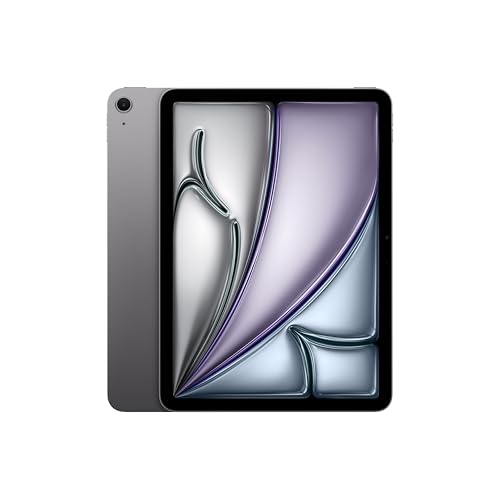
Apple iPad Air 11-Inch M4 — Portable writer’s tablet
The 11-inch iPad Air on the M4 chip is the default recommendation for writers who move. It is the tablet that fits the café table beside a coffee, the train tray, the conference-room margin — the places where writing actually happens between other obligations. The M4 is far more processor than prose requires, which is precisely the point: a manuscript, a research browser, a reference PDF and a notes app can all stay open across a working day without the device ever entering the writer’s consciousness. The listing specifies a Liquid Retina display, 128GB of storage, Wi-Fi 7 with Apple’s N1 networking, 12MP front and rear cameras, Touch ID and all-day battery life, in Space Gray.
For typing, the Air’s case rests on its accessory and app ecosystems. Apple’s keyboard cases turn it into a small, serious writing machine, and iPadOS hosts the strongest bench of writing software in this guide — dedicated long-form writing apps with proper compile and export, distraction-free editors, and every major cloud document suite. For handwriting, the Apple Pencil (a separate purchase, as always with Apple) delivers the low-latency ink that makes margin notes and longhand drafting feel natural, and the best iPad note apps convert and search handwriting with genuine sophistication.
The size deserves its own honest paragraph, because it is both the virtue and the limit. Eleven inches is a notebook page, not a manuscript spread: split-screen shows a draft and one reference comfortably, but research-heavy writers will shuffle windows more than they would on the 13-inch. The compensation is carry. This is the iPad Air that gets taken to the library, the reading, the residency — the one present for the unscheduled twenty minutes in which real progress often happens. Writers whose output depends on seizing fragments of time should value that presence above screen area.
Costs to plan around are the familiar Apple ones: pencil and keyboard are separate purchases, and 128GB asks cloud habits of writers who keep audio interviews, scanned research and photo references on the device. Neither cost is hidden in this guide’s accounting, and neither dents the verdict for the mobile writer: this is the most complete portable writing system in the list.
Consider the working day it enables. Morning pages in a notebook app before the house wakes; a train ride spent editing yesterday’s draft with the pencil, margins filling with the second thoughts that keyboards discourage; a meeting where the same device is both the agenda and the minutes; an evening paragraph typed on the keyboard case while dinner cooks. No single moment is spectacular, and that is the design triumph — the Air disappears into the rhythm of a writing life conducted in motion, which is why so many working writers end up here even after auditioning more exotic tools.
- Display: 11-inch Liquid Retina display
- Processor: M4 chip
- Storage: 128GB
- Connectivity: Wi-Fi 7 with Apple N1, per the listing title
- Cameras: 12MP front and 12MP rear cameras
- Battery: All-day battery life as described in the title; Apple prints no capacity figure in the listing title
Strengths
- The deepest writing and note-app ecosystem of any pick here, for both keyboard and pen work.
- M4 headroom keeps manuscript-plus-research multitasking invisible all day.
- The most carryable full writing system in the guide — present for unscheduled writing time.
Trade-offs
- Pencil and keyboard are separate purchases; budget the system, not the slate.
- Eleven inches crowds split-screen research beside a full manuscript page.
- 128GB is the listed tier, so media-heavy research archives live in the cloud.
Best for: travelling writers, journalists and students who draft and annotate wherever the day puts them. Not suited for: desk-bound long-form writers who want a manuscript page at full size, or buyers who need the pen included in the initial price.
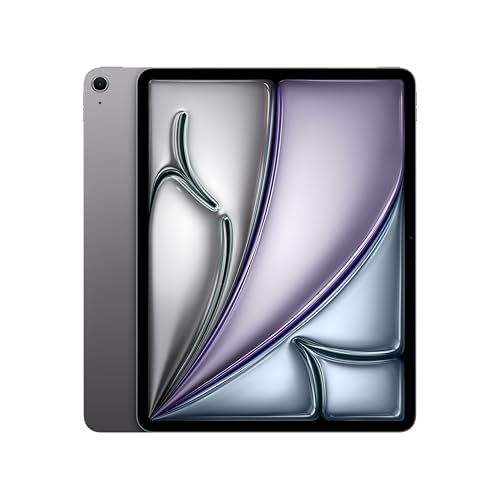
Apple iPad Air 13-Inch M4 — Desk-page writer’s tablet
The 13-inch iPad Air is not a bigger version of the pick above so much as a different answer to the same question. Where the 11-inch optimises for presence, the 13-inch optimises for the page: a manuscript displayed at something close to A4 presence, research pinned beside it at readable size, and handwriting room that lets a full page of longhand breathe with margins wide enough for the second thoughts that editing is made of. Writers who think spatially — who spread chapters, timelines and character sheets across their field of view — feel the difference within an hour.
The platform is shared with its sibling: M4 chip, Liquid Retina display, Wi-Fi 7 with Apple N1, 12MP cameras front and rear, Touch ID and all-day battery life in the title’s accounting, in Space Gray. The listing’s configuration carries 256GB of storage, double the 11-inch entry here, which suits the desk role — research libraries, scanned sources, audio and draft histories accumulate on a machine that is not asked to be light. Paired with a keyboard case, the 13-inch Air is the closest thing in this guide to a dedicated writing desk that folds shut: document on the left, notes on the right, and nothing in the workflow apologising for the screen it was given.
Handwriting on the larger canvas changes character too. A page of longhand at natural size, annotated in a second colour during revision, reviewed at arm’s length like paper on a desk — the 13-inch supports the full editorial loop on one surface, where the 11-inch supports capture better than review. The Apple Pencil remains a separate purchase, and at this size the keyboard case is a more serious accessory in both price and weight; the complete desk system should be priced as a system before the slate is ordered.
The cost of the page is the carry. A 13-inch tablet with a keyboard case is a bag decision, not a coat decision, and writers who compose in fragments across a moving day will feel its absence in the moments the 11-inch would have been present. Choose the 13-inch when your writing has a home base — a desk, a studio, a favourite library carrel — and the page matters more than the portage.
Editors feel the 13-inch difference most sharply during revision, the phase of writing that is really reading with intent. A full page at natural size, the pencil striking through a clause and writing the replacement in the margin at the same scale a printed proof would allow, the next page already half-visible in the scroll — the loop between eye and hand stays tight. Writers who revise on paper and transcribe will recognise the workflow and its savings; writers who revise on screen will find the larger Air the first tablet that stops feeling like a compromise against a monitor.
- Display: 13-inch Liquid Retina display
- Processor: M4 chip
- Storage: 256GB in this listing
- Connectivity: Wi-Fi 7 with Apple N1, as titled
- Cameras: 12MP front and 12MP rear cameras
- Battery: Described in the title as all-day battery life; the underlying capacity is not printed in the listing title
Strengths
- A manuscript page at near-paper size, with research genuinely usable beside it.
- 256GB gives local room for research archives and draft histories.
- Handwriting review and editing at natural scale, not just capture.
Trade-offs
- With keyboard case attached, the system is a deliberate carry rather than an everyday one.
- Pencil and keyboard remain separate purchases on top of a premium slate.
- Desk writers gain the page; mobile writers lose the spontaneous sessions.
Best for: long-form writers, editors and researchers whose work happens mainly at a desk and spreads across the page. Not suited for: writers who compose in transit and fragments, or anyone counting the complete system cost tightly.

BOOX Note Air 5 C — Colour e-note
Crossing to the BOOX Note Air 5 C means crossing the category boundary this guide keeps pointing at: this is an e-note, a writing notebook with an e-paper screen, not a tablet that happens to write. Its 10.3-inch colour e-paper display forms text the way print does, from reflected light, and the writing surface is tuned for pen friction rather than finger glide. The result is the closest sensation to a good notebook that digital ink currently offers — strokes that feel placed rather than skated, in a device that will not once suggest a video, a game or a feed while you are mid-sentence.
Colour is the Note Air 5 C’s distinction within the e-note family. E-paper colour is muted — a pencil-and-wash palette — but for writers it carries real information: edits in one colour, queries in another, structure marks in a third, all visible on the page without a glowing screen. Lecture capture, manuscript markup and language study with colour-coded grammar all benefit. The listing names 64GB of storage in its compact title (printed as “6G 64G”, which pairs a memory figure with storage — confirm the exact memory specification in the full listing), and BOOX’s open Android base means the notebook can also carry reading apps and cloud sync, within e-paper’s deliberate pace.
Typing exists here only as an accessory story: a Bluetooth keyboard can pair for occasional text entry, but nobody should buy a Note Air as a typing machine, and this guide will not pretend otherwise. Its craft is handwriting — notebooks with templates, handwriting that stays searchable in the system, documents annotated directly in ink — sustained by e-paper battery behaviour measured in weeks of writing rather than hours of screen time. Buy it as the notebook that never runs out of pages, and it is superb; buy it as a cheap iPad, and it will disappoint you completely.
The Note Air’s daily texture rewards a mention, because e-paper changes habits in ways specifications cannot announce. The screen is already on when you pick it up — the page simply waits, like paper — so the threshold between thinking of a note and taking it collapses to the time it takes to lift the pen. There is no wake-up ritual, no glance at a battery percentage, no ambient guilt from unread badges. Writers who keep one beside the keyboard, as a thinking annex to a computer, often report that the annex becomes where the real drafting happens, the computer demoted to a typesetting machine for words born on e-paper.
- Display: 10.3-inch colour e-paper (E Ink) screen
- Storage: 64GB, per the listing title
- Memory: The title prints a “6G” figure without a label — verify the memory specification in the full listing
- Stylus: InkSight stylus support is a family feature; confirm the pen included or required in the listing contents
- Operating system: Open Android base is BOOX’s platform approach; confirm the shipped version in the full listing
- Battery: No rating appears in the title — e-paper endurance varies with writing and light use, so rely on the maker’s documentation
Strengths
- Paper-feel handwriting with colour ink for editing and annotation systems.
- E-paper calm: no backlight glare, no app clamour, weeks-scale battery rhythm.
- Open Android base lets reading and cloud apps join the notebook when needed.
Trade-offs
- Not a typing machine; keyboard use is an occasional accessory, not the craft.
- Muted e-paper colour and slow refresh rule out media and fast browsing.
- The terse listing title leaves several specifications to confirm before ordering.
Best for: handwriters, annotators and lecture-note takers who want colour ink on a paper-like page. Not suited for: typists, app-driven writers, or anyone expecting tablet speed from an e-paper device.

reMarkable Paper Pro — Purest handwriting focus
The reMarkable Paper Pro is the most single-minded writing device in this guide, and its listing says so plainly: a digital notebook with Marker Plus included, an 11.8-inch colour e-ink paper display with a reading light, made “for writing, reading, and better thinking”. That last phrase is marketing, but the product discipline behind it is real. reMarkable builds hardware and software for exactly one activity — putting words and sketches on a page — and declines, on principle, to build anything else. There is no app store to wander, no browser worth the name, no notification that has ever interrupted a paragraph on this device.
The 11.8-inch canvas is the largest handwriting surface among the e-notes here, close enough to a sheet of A4 that longhand pages, sketched diagrams and annotated documents feel un-cropped. Colour e-ink adds the same informational palette as the BOOX — editing marks, highlights, structure — rendered softly, like coloured pencil rather than print. The included Marker Plus removes the accessory guessing that dogs the tablet picks, and the reading light extends the notebook’s day into dim rooms and night trains, where its larger BOOX sibling concept also works but with a more generalist’s soul.
Typing on reMarkable exists through its folio keyboard accessory, and it is honest, focused typing — a document, your words, nothing else — which some novelists genuinely prefer for drafting. But the ecosystem is deliberately closed: files move through reMarkable’s own sync services, some conveniences sit behind its subscription, and integration with the wider app world is minimal by design. Writers who live inside that simplicity call it freedom. Writers whose process spans research apps, browsers and cloud suites will feel the walls — and should choose the BOOX or a tablet instead, with no hard feelings on either side.
What the Paper Pro asks in return for its purity is trust in a single company’s stewardship of your notebooks. Your pages live in its formats and its cloud, exported as documents when you ask, and for most writers that arrangement has proven durable and uneventful. It is still worth stating in a guide, because handwriting is the least replaceable data a person owns — a decade of journals cannot be re-downloaded from anywhere. Writers who choose reMarkable should export finished notebooks to ordinary files on a schedule, not from suspicion but from the same prudence that makes photographers keep a second copy of the negatives.
- Display: 11.8-inch colour e-ink paper display with reading light
- Pen: Marker Plus included in the package, per the listing title
- Purpose: Described in the title as a digital notebook for writing and reading
- Storage: Not stated in the listing title — confirm the capacity in the full listing
- Typing: A keyboard folio is the brand’s accessory route; it is not named in this listing’s title, so treat it as a separate purchase
- Battery: No figure is printed in the title; consult the maker’s documentation for rated endurance
Strengths
- The most focused handwriting environment available — distraction is excluded by design.
- A near-A4 colour e-ink page with the premium Marker Plus in the box.
- Reading light and paper texture make longhand sessions easy in any room.
Trade-offs
- A closed ecosystem; research apps and open file workflows live elsewhere.
- Some sync conveniences depend on the maker’s subscription services.
- Typing is a focused accessory experience, not a full document workstation.
Best for: longhand writers, journalers and thinkers who want a notebook that cannot become anything else. Not suited for: writers whose process needs browsers, research apps and open ecosystems on the same surface as the page.

Lenovo Tab P12 Pro 2nd Gen — Android pen bundle
The Lenovo Tab P12 Pro (2nd Gen) is the answer for writers who want a real tablet — apps, browsers, cloud suites, media when the work is done — but refuse to leave the Android ecosystem or to pay Apple’s accessory tolls. Its 12.7-inch 3K LTPS touchscreen is a manuscript-sized canvas in the same class as the 13-inch iPad Air, and the listing includes the pen with the tablet, alongside 8GB of RAM and 256GB of storage. That bundle arithmetic matters to writers: the handwriting half of the craft works on delivery day, and the storage swallows research archives that would push the 128GB picks into cloud dependence.
For typing, Android’s document world is more capable than its reputation suggests. The major cloud office suites run fully, dedicated writing apps exist with proper export, and a Bluetooth keyboard turns the P12 Pro into a perfectly serviceable drafting station — with the honest caveat that keyboard cases purpose-built for this model are scarcer than iPad equivalents, so many owners pair a standalone keyboard and a stand instead. File handling is Android’s traditional strength: drafts, references and submissions move between apps and services without the friction that still occasionally marks iPadOS.
Handwriting is competent and well-supported rather than class-leading. The included pen handles notes, markup and longhand drafting with the low latency modern writers expect, and cross-platform note apps keep handwriting searchable and synced to a laptop. Where the Lenovo cannot match Apple is the depth of specialist writing software — the most polished long-form writing apps are iPad-first — and where it cannot match the e-notes is feel: this is ink on glass, excellent ink, but glass nonetheless. Writers who want one flexible machine for drafting, research and reading, with a pen already in the box, will find the trade well judged.
The P12 Pro also quietly suits writers who publish across platforms — the blogger drafting in a browser, the researcher whose sources live in five different services, the student whose university mixes Google, Microsoft and a homegrown portal. Android’s share sheet and file system treat all of them as neighbours rather than embassies. Add a stand and the keyboard already owned for a desktop, and the Lenovo becomes the writing desk of the spare room and the kitchen table, assembled from parts a household already has. That improvisational quality is a genuine ecosystem virtue, even if it photographs less neatly than a matching aluminium keyboard case.
- Display: 12.7-inch 3K LTPS touchscreen
- Memory and storage: 8GB RAM, 256GB storage
- Pen: Included with the tablet, per the listing title
- Connectivity: WiFi 6 and Bluetooth 5.1, as titled
- Model code: ZACH0165US, printed in the listing title
- Battery: Endurance is not quantified in the title — check Lenovo’s documentation for the rated figure
Strengths
- Pen included and 256GB on board: the complete writing bundle without accessory orders.
- A 12.7-inch 3K canvas in the same working class as the big iPad Air.
- Android’s open file handling suits research-heavy, multi-service workflows.
Trade-offs
- Purpose-built keyboard cases are scarcer; many writers pair a separate keyboard and stand.
- Specialist long-form writing apps are thinner on Android than on iPadOS.
- Ink on glass cannot reproduce the e-notes’ paper friction.
Best for: Android-committed writers who draft, research and annotate on one machine and want the pen in the box. Not suited for: writers devoted to iPad-only writing apps, or handwriting purists chasing a paper surface.

BOOX Note Mini C — Pocket e-note
Every writing guide needs one pick judged by a different metric, and the BOOX Note Mini C’s metric is presence. At 8.52 inches and roughly 300 grams, per its listing, this colour e-note is the size of a paperback notebook — the size that lives in a coat pocket, a jacket, a small bag — and notebooks that are present get written in. Its larger siblings win on page room; the Mini C wins on the Tuesday-afternoon idea that would otherwise have been typed into a phone’s notes app and buried under notifications by Friday.
The specification in the title is unusually informative for BOOX: 64GB of storage with a 6GB memory figure, an 8.52-inch colour E Ink screen described as easy to read with paper-soft colours, an open Android 16 operating system, and support for the InkSight stylus. Colour at this size serves the notebook uses — colour-coded lists, sketched diagrams with a second ink for corrections, highlighted reading in miniature — rather than documents at full scale. The open Android base means the pocket notebook can still check the cloud folder or open the reading app, at e-paper pace, without pretending to be a phone replacement.
Be clear about what shrinks with the size. A page this small is for capture, not composition: journal entries, meeting notes, outlines, lists, diagrams in embryo. Longhand essays belong on the Note Air or the reMarkable’s broad pages, and typing belongs to the tablets entirely. The Mini C’s craft is the first five minutes of an idea — getting it out of your head and onto a page that will still be there, calm and uncharged, when you sit down at a bigger surface to develop it. Writers whose best material starts as pocket scribbles will understand the pick instantly.
There is a discipline the Mini C teaches that its bigger siblings cannot: brevity at the point of capture. A pocket page does not invite the essay; it invites the sentence the essay will need — the overheard line, the fix for chapter three, the name you must not forget. Writers who carry one develop a commonplace-book habit that larger devices, with their implication that every session should be substantial, subtly discourage. Paired with a weekly review in which pocket pages are promoted into real projects, the smallest pick in this guide can end up feeding more finished work than the largest.
- Display: 8.52-inch colour E Ink screen, described in the title as easy to read with paper-soft colours
- Memory and storage: 6GB memory figure and 64GB storage, as printed in the title
- Weight: Approximately 300 grams, per the listing title
- Operating system: Open Android 16, as titled
- Stylus: Supports the InkSight stylus; confirm whether a stylus is included in the listing contents
- Battery: No rating appears in the title — e-paper endurance should be confirmed in the maker’s documentation
Strengths
- Pocket-notebook presence: the e-note most likely to be with you when ideas arrive.
- Colour ink and open Android in a 300-gram device that asks almost nothing of a bag.
- Shares the BOOX notebook ecosystem with its larger siblings for later development.
Trade-offs
- Capture-sized page; long-form handwriting belongs on the bigger e-notes.
- E-paper pace governs its Android apps as firmly as on the large models.
- Stylus inclusion needs confirming in the listing before the order is placed.
Best for: journalers, list-keepers and idea-catchers who want a real pen page in a coat pocket. Not suited for: writers drafting long documents by hand, or anyone who needs a typing device first and a notebook second.
The Six Writing Tools, Compared Directly
Read the kind column first. It divides the list into the two crafts more honestly than any specification can, and a writer who knows which kind they need has effectively shortlisted three devices before reading another word. Within each kind, the remaining columns then do useful work: screen size for posture, pen arrangements for budget, and the personality line for the flavour of days the device will produce.
| Device | Kind | Screen | Pen situation | Writing personality |
|---|---|---|---|---|
| Apple iPad Air 11-Inch M4 | Full tablet | 11-inch Liquid Retina | Pencil sold separately | Portable drafting and annotation system |
| Apple iPad Air 13-Inch M4 | Full tablet | 13-inch Liquid Retina | Pencil sold separately | Desk-page manuscript workstation |
| BOOX Note Air 5 C | E-note | 10.3-inch colour e-paper | Stylus — confirm listing contents | Colour handwriting notebook with open apps |
| reMarkable Paper Pro | E-note | 11.8-inch colour e-ink | Marker Plus included | Closed, focused longhand sanctuary |
| Lenovo Tab P12 Pro 2nd Gen | Full tablet | 12.7-inch 3K LTPS | Pen included | Android all-rounder, bundle-complete |
| BOOX Note Mini C | E-note | 8.52-inch colour E Ink | InkSight support — confirm inclusion | Pocket capture notebook |
How Do You Choose Between Handwriting Feel and Typing Power?
Audit your last month of writing honestly. If most of it arrived as typed documents — essays, articles, reports, emails that grew — the tablets are your shortlist, and the only remaining questions are size and ecosystem. If most of it began as handwriting — notes, journals, outlines, marginalia that later became documents — the e-notes deserve to win, and the tablets become the second device that develops what the notebook captured. Mixed writers, the majority, should ask which half of their process currently suffers: the drafter whose typed workflow is smooth but whose ideas evaporate before capture needs the Mini C’s presence; the note-taker drowning in paper needs an e-note’s archive; the student whose essays and notes are equally digital needs a tablet with a pen.
Then test the surfaces if you possibly can. Pen feel is the most personal specification in this guide — friction, latency and tip texture read as wonderful to one writer and wrong to another, and no review can settle it for your hand. Ten minutes writing a real page, not a signature scribble, on any candidate surface teaches more than an hour of comparison tables. Keyboard feel deserves the same realism: type a full paragraph on the accessory you are considering, including punctuation and shortcuts, because keyboards are bought by the hour of use, not by the spec sheet.
Budget the trial honestly as well. Every platform here can be tested against your real material within a normal returns window: load your current manuscript, your messiest notebook, your reference library, and work a genuine day on the device rather than an admiring hour. Writing tools reveal themselves under workload — in the third hour of editing, in the lecture that runs long, in the export that must not fail — and a device that survives your worst ordinary day will serve the good ones without discussion.
There is one more audit, unfashionable but decisive: your existing desk. Writers who already live inside one company’s cloud, calendar and laptop ecosystem will feel every crossing of that border as a small daily tax, and should weight the matching platform accordingly — the iPads for the Apple-anchored, the Lenovo and BOOX for everyone else. Ecosystems are not cages, but they are weather: you can write in any climate with enough determination, yet the work goes easier in the one you are already dressed for. Let the audits accumulate — last month’s writing, the surface test, the system budget, the ecosystem weather — and they will name a winner with very little romance left in the decision, which is exactly how durable purchases get made.
How Do Subscriptions, Sync and File Formats Affect Writers Over Years?
A writing device is a landlord for your words, and the lease terms deserve reading before the furniture moves in. The tablets rent the most open space: documents live in standard formats inside services that exist independently of any hardware maker, so leaving an iPad or a Lenovo behind strands nothing. The BOOX devices sit in the middle — their notebooks export to common formats, and their Android openness means your words can also live in third-party apps you choose — while reMarkable’s notebooks live most natively inside its own system, with exports available and some sync conveniences tied to its subscription. None of these arrangements is a trap; all of them reward a writer who exports finished work to ordinary files on a schedule, keeping a personal archive that no company’s roadmap can revise.
Handwriting conversion deserves the same long view. Every platform here can turn ink into typed text with varying grace, and the feature matters most to writers who draft longhand but deliver type. Test it with your own worst handwriting during the first week — the scrawl you produce when tired, not the careful hand you perform for a demo — because conversion that only understands your best penmanship will fail exactly when the writing was most urgent. Search across handwriting follows the same rule: the archive you can search is the archive you own, and the one you cannot is merely stored.
Finally, consider the household question nobody puts in reviews: what happens when the device is shared, borrowed or handed down. Tablets with proper user accounts and cloud sign-outs pass between family members cleanly; e-notes, being personal notebooks by temperament, pass like diaries — which is to say, they should be wiped with the same ceremony. Writers buying for a household of students should weight the tablets’ account systems; writers buying a private thinking tool should weight the e-notes’ beautiful indifference to anyone else’s login.
What Does a Week of Real Writing Look Like on Each Kind of Device?
Abstractions settle arguments poorly, so consider two working weeks. The tablet writer’s week is integrated: research gathered in a browser on Monday flows into an outline in a notes app, the draft grows in a writing app through Wednesday with the reference library a swipe away, revisions happen with the pencil on Thursday, and Friday’s submission exports to whatever format the editor demanded, all on one charge-managed, cloud-synced machine. The system’s strength is continuity — nothing is ever in the wrong place, because there is only one place — and its weakness is gravity: every other demand on a modern life also lives in that same place, one badge away from the manuscript.
The e-note writer’s week is separated by design. Capture and drafting happen on the quiet page, which holds notebooks for each project and asks nothing else of the writer’s attention; typed development happens at a computer, where exported pages and converted text arrive as raw material rather than as a second home. The system’s strength is depth — writing sessions on e-paper routinely run longer and stranger than sessions on glass, because nothing interrupts the drift of thought — and its weakness is the seam: work must be carried across devices deliberately, and writers who resent the carrying should not buy into the separation. Neither week is the correct one. They are different theories of attention, and the devices in this guide are those theories made physical.
How Should You Set Up a Writing Tablet for the First Month?
Begin by choosing one home for words. Writers scatter drafts across notes apps, cloud documents and email drafts, then lose the thread of every project; pick the primary app for each kind of writing — long-form, notes, journal — and let the others go. Set up the folder or notebook structure before the first real session, with one project per container and an archive for finished work, because structure added later must be rebuilt under pressure. Sync everything to an account you control, and test retrieval from a second device in week one, while the stakes are imaginary.
Shape the device against distraction in proportion to your honesty about yourself. Tablet writers should move entertainment off the home screen, silence notifications during writing hours and use the platform’s focus modes as scheduled furniture rather than emergency measures. E-note writers get this discipline free, but owe a different setup debt: templates. Load or create the page templates your work actually uses — ruled, dotted, storyboard, meeting agenda — and set the export path for finished notebooks, so pages can reach an editor, a team or a printer without archaeology. Finally, schedule the unglamorous ritual both crafts share: a weekly backup and review, ten minutes in which drafts are exported, notebooks are synced, and the coming week’s writing has a page already waiting for it.
Protect the ritual of starting, too. Leave the device where writing begins — the desk corner, the bedside, the coat pocket for the Mini C — with the right notebook or document already open, so the first action of a session is a sentence rather than a setup. Writers underestimate how much output is decided by these thresholds: every unlock, search and sync that stands between an intention and a page taxes the intention, and the best-configured writing tablet is the one whose tax has been prepaid by a thoughtful first month.
Which Mistakes Do Writing-Tablet Buyers Keep Making?
The category’s signature mistake is buying across the boundary without noticing: an e-note purchased by someone who needed email, research and document apps, returned in frustration at a device that was never broken — merely honest about its purpose. Its mirror image is the tablet bought for handwriting by someone who never priced the pencil, leaving the craft that justified the purchase unpractised for months. Size errors follow: the 13-inch bought for portability, the 11-inch bought for manuscript spreads, each blaming the device for a decision made against its nature. Writers also neglect the system budget — keyboard, pen, case and sometimes a software subscription — and discover the true price in instalments. And nearly everyone underestimates templates, shortcuts and setup: the writers who flourish on any of these six are rarely the ones with the best hardware, but the ones who spent one quiet hour arranging the device around their habits before the first deadline arrived.
One more error is subtler and worth naming because it afflicts careful buyers: researching the category for so long that the writing waits for the tool. Every device in this guide can carry a serious writing practice starting this week, and none of them will be the reason a manuscript succeeds or stalls. Set a decision deadline, apply the audits in this article — last month’s writing, the surface test, the system budget — and then let the chosen tool recede into the background where productive tools belong.
Final Recommendation
Let the writing choose. Typists and mixed writers should start with the iPad Air — 11 inches for a life in motion, 13 inches for a life at a desk — and budget the pencil and keyboard as part of the machine. Android writers who want the bundle complete should take the Lenovo Tab P12 Pro and its included pen. Handwriters should follow feel: the reMarkable Paper Pro for the purest, quietest page, the BOOX Note Air 5 C for colour ink inside a more open system, and the Note Mini C for the pocket, where ideas are caught or lost. Buy the surface your hand trusts, and the words will follow it home — one honest page at a time, which is the only way they have ever arrived.
One closing observation from years of watching writers adopt these tools: the device disappears fastest for the writers who commit. Six months of daily use on any one of these six will teach your hand its surface, your memory its shortcuts and your projects its filing logic, until the tool becomes as invisible as a favourite pen. Switching platforms resets that apprenticeship to zero, which is why the wisest purchase in this guide is rarely the theoretically best device — it is the one whose trade-offs you can live with long enough to stop noticing them entirely.
Frequently Asked Questions
Can an e-note really not handle typing at all?
It can handle some: reMarkable offers a keyboard folio for focused drafting, and BOOX devices can pair Bluetooth keyboards. But e-paper refresh and minimal software make typing a side capability on both. If documents are your main output, buy a tablet and let the e-note do handwriting.
Is the 13-inch iPad Air worth it over the 11-inch for writing?
For desk-based writers, yes: the manuscript page and split-screen research space change daily comfort. For writers who work in transit and fragments, the 11-inch’s presence is worth more than the page. The chip and software are shared, so the choice is purely posture and carry. Writers who genuinely split their time between desk and travel should weight the desk more heavily than instinct suggests, because travel writing sessions tend to be shorter and more forgiving of a smaller page than the long revision days at home.
Do I need a paper-feel screen protector for handwriting?
Many longhand writers prefer the added friction on glass tablets; it slows the stroke and makes letterforms feel deliberate. The trade-offs are slightly softened screen clarity and faster pen-tip wear. E-note devices are textured by design and need no such accessory. If you try one, give it a full week of real pages before judging, because the first hour on any new surface feels strange regardless of merit.
Which pick is best for handwritten lecture notes?
The BOOX Note Air 5 C and reMarkable Paper Pro are purpose-built for it, with the BOOX adding colour and open apps, the reMarkable adding size and focus. Tablet owners are well served too — the Lenovo’s included pen makes it the lecture-ready tablet bundle here.
Can these devices share notes with my laptop?
Yes, each in its own dialect: the tablets through cloud apps and standard file sync, the BOOX through its open Android services, reMarkable through its own sync system. Verify the export formats your workflow needs — PDF is universal — before committing years of notebooks to any one system.
How long do pen tips and e-note styli last?
Tips are consumables on every system here: heavy handwriters replace tablet pen tips on a rhythm of months, faster with matte screen protectors fitted, while e-note markers wear more slowly on their textured surfaces. Spares are inexpensive and platform-specific, so confirm the tip type for your device and keep a small stock with the charger rather than discovering the wear mid-deadline.
Related Guides
Writers rarely stop at one surface; see also our guide to tablets for college note taking and textbook reading, the large-screen reading tablet roundup for manuscript review sessions, and our picks of rugged tablets for writing work in the field.


