What's inside
- Key Takeaways
- Quick Picks
- What Should a Business Actually Check Before Buying an LTE Tablet?
- What Does LTE Change About How a Work Tablet Gets Used?
- Why Does the Rugged Class Dominate This Keyword?
- How Do the Six Picks Compare at a Glance?
- Which Buying Mistakes Cost Businesses the Most Here?
- How Should an IT Team Roll Out a Fleet of LTE Tablets?
- Final Recommendation
- Frequently Asked Questions
- Related Guides
As an Amazon Associate I earn from qualifying purchases. This post may contain affiliate links at no extra cost to you.
gizmoverdict.com is reader-supported. When you buy through links on our site, we may earn an affiliate commission.
Where to buy: every linked model in this guide is sold on Amazon under the listing title quoted in its spec box, and the product names in the tables and headings take you to those listings. For business hardware the listing page deserves more than a glance — it is where the exact configuration, the warranty wording and the regional variant are confirmed, and with cellular tablets the variant question decides whether the machine connects at all.
The search for the best business windows tablets with lte leads into a corner of the market where honesty about radios matters more than almost any other specification. A tablet can carry a beautiful screen, a fast processor and a rugged shell, yet still be the wrong purchase if the cellular claim in its marketing dissolves on inspection. This guide therefore judges each pick first on what its own listing title actually states about connectivity, and it flags two uncomfortable facts early. Four of the five linked titles name their cellular radios outright. One linked pick — the Fusion5 — states no cellular radio in its title at all, and the Surface Pro for Business title is likewise silent about LTE, so both are treated here as verify-before-you-buy propositions on the very feature this keyword is about. The sixth pick, the Surface Pro 8 LTE, exists on Amazon as renewed stock, and it is covered prose-only with that stated plainly.
That discipline shapes the whole shortlist. The rugged field tablets from MUNBYN and CENAVA put their radios in their titles because their buyers — warehouse teams, field engineers, delivery operations, site inspectors — purchase connectivity before they purchase anything else. The mainstream business convertible at the end of the list plays a different game, selling processor class and storage, and leaving the cellular question to configuration research. Neither approach is dishonest; they are answers to different briefs. What would be dishonest is blending them into one ranking that pretends every pick answers the LTE question equally, and this guide refuses to do that. Each verdict below tells you, in terms tied to the title, whether the radio is a titled fact or a research task.
Windows is the other half of the keyword, and it is not a decorative half. Businesses standardise on Windows tablets because their line-of-business software, their domain policies, their peripheral drivers and their IT support habits already live there. A field tablet that runs the same build as the office desktops can be imaged, managed and repaired inside existing routines. That is why this shortlist contains no consumer entertainment slates wearing a keyboard case as a costume: every linked pick runs Windows 11 Pro as titled, which is the edition business deployment actually uses, with the management and security tooling that edition carries.
Key Takeaways
- Four linked titles state their cellular radios outright: the MUNBYN IRT08 and the CENAVA 8 name 4G LTE or 4G, and the CENAVA W30U names unlocked 4G LTE.
- The Fusion5 title states no cellular radio, and the Surface Pro for Business title is silent on LTE too — for both, cellular is a question to settle in the listing and the maker’s documentation, not a titled fact.
- The CENAVA W30U is the performance outlier: an i7-1255U, 16GB of DDR5 and hot-swappable dual batteries as titled, in a 13.3-inch rugged frame.
- The CENAVA 8 is the only pick whose title names a barcode scanner and NFC, and the only one stating a brightness figure — 700 nits.
- The Surface Pro 8 LTE route is renewed-only stock on Amazon, so it appears prose-only with no link.
- Every linked pick runs Windows 11 Pro as titled — the business edition, not a home build in a rugged costume.
Quick Picks
| Pick | Badge | Why it earns its place |
|---|---|---|
| MUNBYN Rugged Tablet IRT08 | Field-ready LTE workhorse | A 10.1-inch Windows 11 Pro tablet whose title puts 4G LTE, GPS and sunlight readability up front. |
| CENAVA W30U 13.3″ Rugged | Desktop-class power, unlocked LTE | An i7-powered 13.3-inch rugged tablet with unlocked 4G LTE in the title and hot-swappable dual batteries. |
| Fusion5 10.1″ Windows 11 Pro Rugged | Storage-heavy, warranty-led | 512GB of SSD and a two-year accidental-damage warranty as titled — but no cellular radio named, so verify. |
| CENAVA 8″ Rugged (scanner, NFC) | Scanner-in-hand specialist | An 8-inch IP67 tablet with a titled scanner, NFC, Ethernet and a 700-nit sunlight-readable claim. |
| Microsoft Surface Pro for Business (2025) | Executive convertible | A 13-inch Copilot+ PC with a Core Ultra 7 and 1TB of storage as titled; its title makes no LTE claim. |
| Microsoft Surface Pro 8 LTE | Prose-only, renewed route | The previous-generation cellular Surface, present on Amazon as renewed stock — discussed without a link. |
What Should a Business Actually Check Before Buying an LTE Tablet?
One preliminary deserves stating because it silently shapes every later decision: decide who owns the connection. In some firms the tablet’s line belongs to the mobile estate, pooled with the phones; in others it sits with the device’s department. The choice sounds administrative and is actually operational, because it decides whose budget absorbs the overage month and whose phone rings when a route’s data dies. Settle it in the same meeting that settles the hardware shortlist.
Start with the radio, and be literal about it. “LTE” in a title is a claim you can hold the seller to; “cellular-ready”, a SIM-shaped tray, or a product photograph showing signal bars are not claims at all. Then check the bands against your carrier, because a radio that speaks the wrong frequencies is furniture. The MUNBYN title states 4G LTE and GPS. The big CENAVA states unlocked 4G LTE, and that word “unlocked” is doing genuine work — it promises carrier freedom rather than a single-network marriage. The small CENAVA states 4G alongside its scanner and NFC. Where a title is silent, as with the Fusion5 and the Surface Pro for Business, the buyer’s job is to find the radio in the maker’s documentation for the exact configuration on sale, or to accept that the configuration may be WiFi-only and plan accordingly.
Next, check the deployment story. A business tablet is rarely bought singly; it is bought as a fleet, imaged once, and handed to people who will not treat it gently or configure it patiently. Windows 11 Pro across this shortlist means the fleet plugs into the same management habits as the rest of the estate. Battery strategy matters at fleet scale too: the W30U’s hot-swappable dual batteries, stated in its title as 8300 plus 300 mAh units, describe a machine designed to keep working through a shift change rather than visit a charger, while the small CENAVA’s removable battery and titled 6H runtime describe a shorter, scanner-led work pattern. Neither is better in the abstract — they are different shift lengths wearing different hardware.
Finally, check the physical contract. Rugged in these titles comes with specifics worth reading: the W30U claims IP65, the small CENAVA claims IP67, and the Fusion5 leans on a two-year warranty that explicitly includes accidental damage. Those are three different philosophies of risk — sealed against jets of water, sealed against immersion, or insured against the drop instead of sealed against it. A business should choose the philosophy that matches its accident history, not the biggest number. Readers comparing the wider cellular field before narrowing to Windows should also work through the best 4g lte tablets for business shortlist, which sets these machines in their broader competitive context.
What Does LTE Change About How a Work Tablet Gets Used?
A WiFi tablet lives in sessions: it connects at the depot, works offline or on a phone’s hotspot in between, and syncs when it returns. An LTE tablet lives continuously. Jobs arrive while the previous job is still being finished. A photograph taken at a gate is visible to the office before the driver is back in the cab. A form that will not submit is a carrier problem rather than a building problem. That continuity changes supervision, dispatch and customer communication all at once, which is why businesses pay the radio premium and the monthly line rental that follows it. It also changes the failure list: a continuous device needs a data plan with headroom, a policy for what happens when the allowance runs out mid-month, and a carrier whose coverage map matches the actual geography of the work rather than the geography of the head office.
There is a security dimension that cuts in LTE’s favour and surprises people. A tablet on its own cellular connection is not joining strange WiFi networks in cafés, client sites and hotel lobbies to get its work done. The connection is the company’s, the route is predictable, and the device spends less of its life negotiating with networks nobody manages. Set against that, a cellular fleet is a fleet of phone bills, and the business that forgets to govern them discovers the cost in the first roaming month. The mature position is boring and correct: LTE as the default route, WiFi as the depot accelerator for imaging and bulk updates, and a data policy written before the second invoice arrives.
Why Does the Rugged Class Dominate This Keyword?
History explains the shape of this shelf. A decade ago the business tablet conversation was dominated by consumer devices in protective cases, pressed into service with mixed results. The rugged Windows class exists because those experiments taught hard lessons: cases crack, consumer batteries fade by the second winter, and a device that cannot be imaged like the rest of the estate becomes an IT orphan. The machines in this guide are the industry’s answer, built from the start for sign-out sheets and depot benches. Their titles read like equipment manifests because their buyers read them like equipment manifests, comparing scanners and seals the way a facilities manager compares load ratings.
Because the jobs that genuinely need a Windows tablet with its own data connection mostly happen away from desks. The warehouse has WiFi dead zones the size of tennis courts. The delivery route, the inspection circuit, the construction site and the agricultural run have no WiFi at all. In those places a tablet is not a smaller laptop; it is the office, carried. Ruggedisation follows the work rather than fashion — a device that lives on a forklift dashboard or a site manager’s hi-vis pocket earns its seals and straps honestly. That is also why so many of these titles read like equipment manifests rather than consumer advertising: handle, stand, hand strap, stylus, Ethernet port. Each listed item answers a scar some field team collected.
The Surface Pro for Business sits in this list as the counterweight — the reminder that “business” also means the consultant on a train and the manager in a client meeting, whose hazards are presentation rooms rather than puddles. Its titled strengths are a Core Ultra 7 processor, 16GB of memory and a full terabyte of storage in a 13-inch touchscreen convertible. Placing it beside the rugged class clarifies both: the field tablets trade raw computing for survival and radios, the Surface trades survival for computing polish, and a business with both kinds of staff may legitimately buy both kinds of machine. The mistake is forcing either class to do the other’s job.

MUNBYN Rugged Tablet IRT08 — Field-ready LTE workhorse
The IRT08’s title reads like a field deployment checklist, and that is its charm. A 10.1-inch Windows tablet running Windows 11 Pro, with 8GB of memory and 128GB of storage on an Intel N5100, described as sunlight readable, carrying 4G LTE and GPS, with Bluetooth 5.1 and Wi-Fi, aimed squarely at heavy-duty industrial outdoor work, and backed by two years of protection. Nothing in that string is decorative. The LTE and GPS pairing is the signature of a device meant to be located and reached wherever it goes: the office can see where the machine is, the machine can pull its next job from wherever it stands. Sunlight readability, claimed in the title, addresses the oldest field complaint there is — a screen that surrenders at noon.
There is a deployment rhythm this class of machine settles into that is worth describing for buyers new to it. The IRT08 does not live in a drawer; it lives in a vehicle cradle, a warehouse cage or a site cabin, signed out in the morning and accounted for at night. Its value is measured in completed jobs per shift rather than in any specification, and its specification makes sense only in that light. GPS in the title is not a navigation flourish — it is how a dispatcher proves a visit happened, how a lost device is found, how a route is audited after a customer queries it. LTE is not a convenience — it is the difference between paperwork that closes itself and paperwork that waits for a return to base. A business speccing this tier for the first time should write the shift first and the purchase order second.
Judge the computing honestly. The N5100 with 8GB of memory is a line-of-business processor, not a workstation: it runs the forms, the scanning workflows, the browser-based dashboards and the mail that constitute field work, and it will not thank you for CAD or heavy multitasking. That is the correct trade for this class, because field software is usually undemanding while field conditions are brutal. The 128GB of storage suits a managed device holding apps and job data rather than a media library. Businesses rolling these out should picture the actual software the device will run at 7 a.m. on a wet Tuesday, and by that picture the specification is coherent rather than cheap.
The two-year protection named in the title deserves attention at fleet scale, because the economics of field tablets are dominated by breakage and downtime rather than purchase figures. A protection term printed in the title is a starting point — the listing’s full wording decides what it covers — but its presence signals the maker’s expectation that these machines will be worked hard and occasionally dropped. When you reach the listing, check price on Amazon for the exact IRT08 configuration your fleet standardises on, and read the protection terms with the same care as the radio specification.
- Display: 10.1 inches, described as sunlight readable in the title
- Operating system: Windows 11 Pro, as titled
- Processor: Intel N5100, as titled
- Memory and storage: 8GB plus 128GB, as titled
- Radios: 4G LTE, GPS, Bluetooth 5.1, Wi-Fi, as titled
- Protection: 2Y protection stated in the title; coverage detail lives in the listing
- Ingress rating: Not stated in the listing title — verify with the maker’s documentation
Strengths
- 4G LTE and GPS both named in the title — the field-connectivity pairing is a stated fact, not a hope.
- Sunlight readability is claimed in the title, aimed at the noon-glare problem field screens face.
- Two years of protection is printed in the title, matching fleet economics.
Trade-offs
- The N5100 and 8GB of memory cap the machine at line-of-business workloads.
- No ingress rating figure appears in the title despite the rugged framing.
- 128GB of storage fills quickly if the device is asked to hoard media or offline maps.
Best for: field teams whose work is forms, dashboards and job data under open sky.
Not suited for: engineers planning to run CAD or heavy design software on the same device.

CENAVA W30U 13.3″ Rugged — Desktop-class power, unlocked LTE
If the IRT08 is the checklist, the W30U is the argument that a rugged tablet no longer has to apologise for its computing. Its title specifies a 13.3-inch rugged Windows 11 Pro tablet with unlocked 4G LTE, an Intel i7-1255U, 16GB of DDR5 memory and a 256GB SSD — a specification that would not embarrass a mainstream office laptop — wrapped in a body with a detachable carrying handle, a folding stand, IP65 sealing and hot-swappable dual batteries listed at 8300 plus 300 mAh. The “extra large” wording in the title is honest: at 13.3 inches this is a screen you spread drawings, spreadsheets and inspection photographs across, not a device you palm.
The battery arrangement is the detail that reveals the intended user. Hot-swappable dual batteries describe a machine that changes shifts without going dark: one pack carries the work while the other charges, and the small secondary cell bridges the swap. Site managers, plant inspectors and survey teams who run a tablet from the morning briefing to the evening upload will recognise their own day in that design. The handle and folding stand complete the picture of a device that is carried between locations and then stood up as a temporary workstation — on a tailgate, a site cabin table, a warehouse bench. It is less a tablet in the consumer sense than a portable desk that happens to have a touchscreen.
Consider the drawing-review test, because it separates this machine from everything else in the list. A site engineer opens a full drawing set on the 13.3-inch screen, marks a discrepancy with the work in front of them, photographs the as-built condition, and sends both over the unlocked LTE connection before leaving the floor. On the 8-inch scanner tablet that workflow is a squint and a compromise; on the N5100 machines the software patience runs out first. The W30U’s proposition is that the field device and the review device can be the same device, and for senior field staff — the people whose judgement is the product — that consolidation is worth the weight in the bag and the figure on the order.
The unlocked LTE claim in the title is the other headline. Unlocked means the business chooses its carrier and can change its mind, which matters for fleets operating across regions where coverage maps differ by postcode. WiFi 6E in the title covers the office end of the week. The compromises are physical rather than electronic: a 13.3-inch rugged body with this battery system will be the heaviest bag item most users carry, and the i7’s performance arrives with cooling and power demands that the dual-battery design exists to feed. On the listing, check the current price on Amazon carefully against the exact configuration, since machines in this class are often listed in several memory and storage variants under near-identical names.
- Display: 13.3 inches, described in the title as extra large
- Operating system: Windows 11 Pro, as titled
- Processor: Intel i7-1255U, as titled
- Memory and storage: 16GB DDR5, 256GB SSD, as titled
- Radios: unlocked 4G LTE, WiFi 6E, as titled
- Batteries: hot-swappable dual batteries, 8300 plus 300 mAh, as titled
- Sealing and carry: IP65, detachable carrying handle and folding stand, as titled
Strengths
- An i7-1255U with 16GB of DDR5 gives this rugged tablet genuine office-class computing.
- Unlocked 4G LTE is stated in the title, freeing the fleet from a single carrier.
- Hot-swappable dual batteries fit shift-length work away from chargers.
Trade-offs
- The 13.3-inch rugged body with dual batteries is a deliberate carry, not a casual one.
- IP65 sealing stops at water jets; it is not the immersion rating of the smaller CENAVA.
- 256GB of storage is modest beside the processor’s ambitions for media-heavy work.
Best for: site-based professionals running one machine as both field tablet and temporary desk.
Not suited for: one-handed scanning rounds through a full warehouse shift.
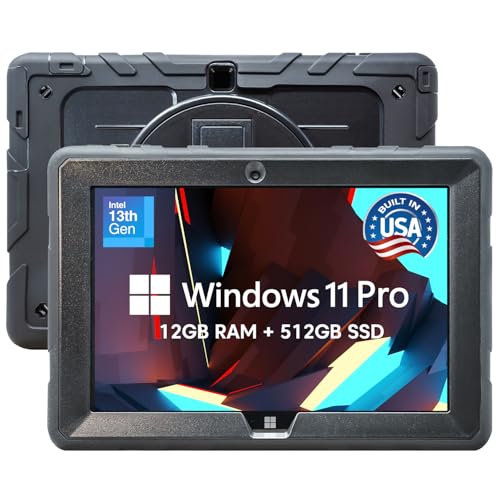
Fusion5 10.1″ Windows 11 Pro Rugged — Storage-heavy, warranty-led
The Fusion5 makes its pitch on capacity and cover rather than radios, and this guide will be as plain about that as the title is. The listing describes a 10.1-inch Windows 11 Professional rugged tablet PC, built in the USA, with 12GB of RAM, a 512GB SSD, an Intel 13th-generation processor, a Full HD display, HDMI and USB-C ports, and a two-year full warranty that explicitly includes accidental damage. Half a terabyte of storage is the largest figure in this shortlist, and for a business whose field work generates photographs, scanned documents and offline records, that headroom is a real operational virtue. The accidental-damage warranty, printed in the title, is the other virtue: it converts the commonest field disaster from a budget event into a paperwork event.
Now the caveat that this keyword makes unavoidable: the Fusion5 title names no cellular radio. No LTE, no 4G, no SIM language of any kind. In an article about business Windows tablets with LTE, that silence must be reported rather than smoothed over. The machine may exist in configurations with cellular, or it may be a WiFi tablet entirely — the title does not say, and this guide does not guess. A buyer whose requirement is a titled, contractual LTE claim should treat the MUNBYN and the two CENAVAs as the picks that answer it, and treat the Fusion5 as the pick for a different problem: the business whose sites have dependable WiFi, whose data lives on the device rather than in the cloud, and whose breakage history makes that warranty worth more than a radio.
Picture the deployment this machine suits. A housing association’s surveyors work floor by floor through blocks where the tenant WiFi is not theirs to use and the stairwell signal is a rumour; their records are photographs and structured forms that accumulate locally all day and sync at the office. A facilities firm photographs plant rooms and meter readings across a hospital estate. In both cases the data is born on the device and the device is the archive until the evening, which is precisely the life a 512GB drive and a damage-inclusive warranty are shaped for. The Fusion5’s bet is that for a large class of business work, storage and survivability outrank a radio — and the bet is coherent, provided the buyer places it knowingly rather than discovering it at the first dead zone.
Judged on that honest basis, the package is coherent. The 13th-generation Intel processor with 12GB of memory sits a clear step above the N5100-class machines for everyday responsiveness, the Full HD panel is the resolution a 10.1-inch business screen should carry, and HDMI plus USB-C cover the desk-docking and presentation moments. The built-in-USA wording will matter to some procurement policies and not at all to others; it is reported here because the title states it. When you open the listing to check price on Amazon for the Fusion5, let the cellular question be the first thing you settle in the full text — everything else about the machine is already on the table.
- Display: 10.1 inches, Full HD, as titled
- Operating system: Windows 11 Professional, as titled
- Processor: Intel 13th generation, as titled (specific model not named)
- Memory and storage: 12GB RAM, 512GB SSD, as titled
- Ports: HDMI and USB-C, as titled
- Warranty: two-year full warranty including accidental damage, as titled
- Cellular radio: Not stated in the listing title — verify with the maker’s documentation
Strengths
- 512GB of SSD storage is the most in this shortlist, suiting record-heavy field work.
- The titled warranty explicitly includes accidental damage — the field disaster that actually happens.
- A 13th-generation Intel processor and 12GB of memory give it everyday speed the N5100 machines cannot match.
Trade-offs
- No cellular radio is named in the title, in an article where that is the headline feature.
- The specific processor model is not named in the title, only its generation is given.
- No ingress rating or sunlight figure appears in the title despite the rugged label.
Best for: WiFi-covered sites generating large local records, with a breakage history to insure against.
Not suited for: routes and sites with no WiFi, where the tablet’s own radio is the only connection.

CENAVA 8″ Rugged (scanner, NFC) — Scanner-in-hand specialist
The smallest machine in this guide is the most specialised, and its title is a roll-call of warehouse and logistics hardware: an 8-inch Windows 11 Pro rugged tablet with 4G, a scanner, NFC, a removable battery, an N5100 processor, IP67 sealing, a hand strap, a stylus, a stated 6H runtime, GPS, a 700-nit sunlight-readable screen, Ethernet, WiFi 6 and Bluetooth 5.2, with 8GB of memory and 128GB of storage. Read that list slowly and a working day assembles itself — scan the pallet, tap the tag, sign on the screen, dock into Ethernet at the bench, stay readable under the yard lights and the midday sun alike.
The 700-nit figure matters because it is the only brightness number any linked title in this article commits to. It gives buyers a concrete claim to test the machine against, and it signals that this maker expects the screen to work outdoors rather than merely survive there. The scanner and NFC pairing covers the two gestures of logistics work — reading the barcode at arm’s length and tapping the credential or asset tag up close — without bolting a separate sled or reader onto the device. Ethernet, a port consumer tablets abandoned years ago, earns its place in depot and plant environments where the reliable network is still a cable, and where a fleet is imaged and updated at a bench rather than over the air.
Watch a trained operator use this class of device and the design logic becomes obvious. The hand strap turns the tablet into something held like a clipboard rather than gripped like a tray, freeing the other hand for the box, the gate or the rail. The stylus in the title covers the signature and the form annotation — the two moments a fingertip does badly through a glove. The scanner sits where the workflow’s eyes already are. None of these details photographs well or headlines a consumer launch, and all of them compound across a thousand repetitions a week. That compounding is the real specification of a working tablet, and it is why this small machine, with the humblest processor in the guide, may process more business per day than the most powerful pick on the list.
The constraints are as titled as the virtues. The 8-inch screen that makes one-handed, strap-secured work possible also makes spreadsheets and drawings cramped, and the stated 6H runtime describes a half-shift pattern with a removable battery as the answer to longer days — carry the spare, swap, continue. The N5100 platform is the same line-of-business tier as the MUNBYN’s: right-sized for scanning workflows and web dashboards, wrong-sized for anything heavier. Businesses whose day is scanning-led will find this the most purpose-built pick in the guide; the listing’s current figure is the one to trust, so check price on Amazon for the CENAVA 8 before comparing it against general-purpose machines it was never trying to be.
- Display: 8 inches, 700-nit sunlight readable, as titled
- Operating system: Windows 11 Pro, as titled
- Processor: Intel N5100, as titled
- Memory and storage: 8GB plus 128GB, as titled
- Data capture: built-in scanner and NFC, as titled
- Radios and ports: 4G, GPS, WiFi 6, Bluetooth 5.2, Ethernet, as titled
- Battery: removable, with a stated 6H runtime, as titled
- Sealing and carry: IP67, hand strap and stylus included, as titled
Strengths
- Scanner plus NFC in one titled package covers the two core gestures of logistics work.
- The 700-nit claim is the only concrete brightness figure in this shortlist.
- IP67 sealing and a removable battery suit wet yards and swap-and-continue shifts.
Trade-offs
- An 8-inch screen cramps documents, drawings and anything spreadsheet-shaped.
- The titled 6H runtime plans around battery swaps rather than all-day endurance.
- The N5100 ceiling rules out heavier software beyond the scanning workflow.
Best for: warehouse, logistics and asset teams whose day is scan, tap, sign, repeat.
Not suited for: drawing review or spreadsheet work that needs a wide canvas.

Microsoft Surface Pro for Business (2025) — Executive convertible
The Surface Pro for Business is the pick that walks into a boardroom rather than a loading bay, and its title sells the boardroom virtues: a 2025 two-in-one laptop/tablet for business, running Windows 11 Pro as a Copilot+ PC, with a 13-inch touchscreen, an Intel Core Ultra 7 (Series 2), 16GB of RAM and 1TB of SSD storage, in platinum. That terabyte is double the Fusion5’s figure and four times the rugged machines’, and the processor is the strongest in this guide. For the consultant whose tablet is also their only computer — documents on the train, presentation at the client, markup with a pen in the meeting — this is the configuration that asks for no compromises on capacity or speed.
The LTE question must be handled with the same plainness applied to the Fusion5. This listing’s title states no cellular radio. Surface Pro lines have historically included cellular configurations in some variants, but a title is a claim about the specific item on sale, and this title does not make the claim. A business buying this exact listing for a mobile workforce must confirm the radio in the listing’s full specification and Microsoft’s documentation for the configuration, and should not let the product family’s reputation substitute for that check. Readers whose shortlist is specifically the Microsoft branch of this market will find the wider landscape in our best microsoft windows tablets guide, and those weighing the convertible format itself should compare the best detachable windows tablets shortlist before deciding.
There is also a status economy in this class that a candid guide should name. The machine a consultant carries into a client’s office is part of the firm’s presentation, and a slim current-generation Surface signals something a battered field tablet does not. That is not a frivolous consideration; professional services are bought partly on signals. The error is letting the signal choose the tool for the wrong job — the polished convertible sent onto a wet site because it looked right in the meeting where the purchase was approved. Match the machine to the terrain first, and let the signal follow from a tool that visibly belongs where it is working.
What the machine unquestionably offers is the polished end of Windows tablet computing: a 13-inch touchscreen in a slim convertible body, business-edition Windows, and the Copilot+ PC designation that marks it as part of Microsoft’s current AI-labelled generation. Its hazards are the hazards of its class — it is built for bags and desks rather than drops and downpours, and no rugged claim appears in its title. Deployed to office-based staff who travel, it is the strongest computer in this article. Deployed to a wet site, it would be the most expensive mistake in this article. When you check the current price on Amazon for this Surface Pro for Business configuration, let the cellular confirmation and the configuration details share the top of your checklist.
- Display: 13-inch touchscreen, as titled
- Operating system: Windows 11 Pro, Copilot+ PC, as titled
- Processor: Intel Core Ultra 7 (Series 2), as titled
- Memory and storage: 16GB RAM, 1TB SSD, as titled
- Finish: Platinum, as titled
- Cellular radio: Not stated in the listing title — verify with the maker’s documentation
- Rugged rating: Not stated in the listing title — verify with the maker’s documentation
Strengths
- The strongest titled computing in the guide: Core Ultra 7, 16GB of memory, a full terabyte of storage.
- A 13-inch touchscreen convertible serves as a travelling professional’s only computer.
- Windows 11 Pro in a business-specific Surface line fits managed IT estates directly.
Trade-offs
- The title makes no LTE claim, in the one article where that claim is the headline.
- No rugged or sealing claim appears in the title; this is bag-and-desk hardware.
- Its polish is priced for executives, not for fleets handed out by the dozen.
Best for: travelling professionals whose tablet doubles as their sole business computer.
Not suited for: wet, dusty or drop-prone sites where a sealed rugged body is the entry ticket.
Microsoft Surface Pro 8 LTE — Prose-only, renewed route
The Surface Pro 8 in its LTE configuration is the machine many businesses actually went looking for when they typed this keyword — a cellular Surface from a recent generation, at a gentler point in its price life. The honest obstacle is the market’s current shape: the listings for it on Amazon were verified as renewed stock when this guide’s pool was checked, so the model is covered here without a link, in words only. That is not a dismissal. Renewed business hardware is a legitimate procurement route with its own economics — lower acquisition cost, a shorter assurance horizon, and condition that varies by seller — and for a business equipping a team for a defined project, a renewed cellular Surface can be the rational buy. It simply has to be bought as what it is, with eyes open about grading, battery history and return terms, rather than as a new machine at a suspiciously kind figure.
Renewed stock also changes how a sensible business sequences the purchase. Rather than a single fleet order, the renewed route rewards a rolling one: a first batch to prove the imaging and the accessories, a pause to read the actual condition spread of what arrived, then the balance. Battery health is the variable to interrogate hardest, because a tablet’s working day is its battery’s biography, and grading language about cosmetics tells you nothing about charge cycles. Ask the seller directly, test the pilot unit across a genuine shift, and let that result — not the listing photograph — set the size of the second order.
What the route offers, qualitatively, is the Surface formula a generation back: the slim two-in-one body, the touchscreen-and-pen working style, and the cellular configuration that the current model’s listing title, in this pool, does not claim. A business that standardised on this generation’s accessories and docks will find continuity here that the newer model breaks. The discipline is in the sourcing: buy from a seller whose renewed grading and returns process you have read in full, confirm the LTE configuration in writing before a fleet order, and pilot a single unit through your imaging process before committing the team to it.
Best for: businesses standardising on this Surface generation, buying renewed stock deliberately with grading and returns checked.
Not suited for: procurement policies that require factory-new hardware with full manufacturer warranty terms.
How Do the Six Picks Compare at a Glance?
| Pick | Screen | Cellular, as titled | Defining trait |
|---|---|---|---|
| MUNBYN Rugged Tablet IRT08 | 10.1 inches | 4G LTE plus GPS | Field checklist machine with 2Y protection |
| CENAVA W30U 13.3″ Rugged | 13.3 inches | Unlocked 4G LTE | i7 power, hot-swappable dual batteries |
| Fusion5 10.1″ Windows 11 Pro Rugged | 10.1 inches, Full HD | Not stated in title | 512GB storage, accidental-damage warranty |
| CENAVA 8″ Rugged | 8 inches, 700 nits | 4G | Scanner and NFC built in |
| Microsoft Surface Pro for Business (2025) | 13-inch touchscreen | Not stated in title | Core Ultra 7 with 1TB storage |
| Microsoft Surface Pro 8 LTE | Previous-generation Surface class | LTE configuration, renewed stock | Prose-only renewed route |
Which Buying Mistakes Cost Businesses the Most Here?
The flagship mistake is assuming the radio. Two of the five linked listings in this very guide carry titles that never mention cellular, and both sit in search results for LTE tablets because search engines match intent loosely while contracts match titles exactly. A fleet order placed on an assumption arrives as WiFi-only hardware and a very uncomfortable meeting. The defence costs ten minutes: find the radio in the title or the maker’s documentation for the exact configuration, and get the band list checked against your carrier before the order, not after the unboxing.
The second mistake is buying the processor for the wrong war. Businesses overspend on i7-class rugged machines for staff who run a browser form, and underspend N5100 machines onto staff who keep six applications open. Both errors come from skipping the same step — watching the actual work for a day. Third comes the sealing mix-up: IP65 and IP67 are different promises, and neither is a promise about drops; a business with a drop problem and no drop cover should be reading warranty wording, as the Fusion5’s title foregrounds, rather than IP digits. Fourth, fleets forget the swap economy: batteries, straps and styli are consumables in field service, and the machines designed for them — removable packs, replaceable straps — cost less across three years than sealed machines replaced whole. Finally, renewed stock gets bought as if it were new, or refused as if it were worthless; both are failures to read grading and returns terms that take minutes to read.
One more cost belongs in the open before the rollout section: the subscription tail. Every LTE tablet in a fleet carries a monthly line, and across fifty devices and a three-year life that tail can rival the hardware spend it serves. Businesses that negotiate the data estate with the same energy as the hardware estate — pooled allowances, alerts at thresholds, a quarterly cull of lines attached to devices that left service — keep the tail proportionate. Businesses that do not end up paying rent on tablets sitting in a drawer, which is the least defensible line in any IT budget.
How Should an IT Team Roll Out a Fleet of LTE Tablets?
Before the pilot, settle the identity questions that fleets always postpone: whose name is on the carrier account, which cost centre absorbs the lines, what happens to a device and its number when a staff member leaves. These sound like paperwork, and they are — but a fleet of connected devices is a fleet of subscriptions with screens attached, and the businesses that treat the subscription register as seriously as the asset register are the ones whose three-year costs hold no surprises. Write the leaver process while the fleet is five units, not fifty.
Pilot small and pilot honestly: five units, given to the five people whose work is hardest on hardware, running the real software on the real routes for two full weeks. Image the pilot units the way the fleet will be imaged, enrol them in the same management tooling as the laptops, and test the unglamorous events — a battery swap mid-shift, a SIM change, a reimage at the depot bench over Ethernet, a lost device being locked and located through its GPS and cellular radios. Record where the friction lives. It will not be where the brochure pointed; it will be in a strap that fights a glove, a form that hates an 8-inch screen, a dead zone in the warehouse that only the LTE radio saves. Then buy the fleet against that record. Businesses still deciding whether the tablet or the laptop shape suits a role should read the best tablets that function like laptops comparison, and those speccing for tighter budgets can cross-check the best mid range windows tablets shortlist before the pilot order goes in.
Accessories deserve one paragraph of fleet thinking before the recommendation, because the titles themselves keep pointing at them — handles, stands, straps, styli. Budget the carry system with the device, not after it. A rugged tablet without its vehicle cradle is a tablet sliding around a cab; a scanner tablet without spare straps is a device one torn strap away from a bench. The makers listing these items in their titles are telling you the machine was designed as a system. Fleets that buy the system get the working life the design promised; fleets that buy the bare unit and improvise the rest spend the difference in breakage and grumbling.
Final Recommendation
For a business whose requirement is literally the keyword — Windows, tablet, LTE, working outdoors — the MUNBYN IRT08 is the default answer: its title states the radio, the GPS and the sunlight claim, and its protection term fits fleet life. Step up to the CENAVA W30U when the work needs real computing and shift-length battery strategy on a bigger canvas, and reach for the small CENAVA when the day is built from scans and taps. The Fusion5 earns its place for WiFi-covered, record-heavy sites that value its storage and accidental-damage warranty — bought with open eyes about its silent title on cellular. The Surface Pro for Business is the executive machine, superb as a computer, unproven as an LTE purchase until its configuration is confirmed. A fleet bought against those distinctions will still be earning its keep when the second battery cycle comes around.
Frequently Asked Questions
Does every tablet in this guide actually have LTE?
No, and the guide says so at each pick rather than once. The MUNBYN and both CENAVA titles state their radios. The Fusion5 and Surface Pro for Business titles do not mention cellular at all, so their LTE status must be confirmed for the exact configuration before purchase. The Surface Pro 8 LTE is a cellular model, but its Amazon listings are renewed stock, hence its prose-only treatment.
What does “unlocked” mean on the CENAVA W30U?
As the word is used in its title, the tablet is not tied to a single carrier, so the business can choose its network and change networks later. Band compatibility with the chosen carrier still needs checking, since unlocked describes freedom of contract, not universality of frequencies.
How long should a business expect one of these tablets to serve?
Plan around the battery and the software calendar rather than the shell. A rugged body can survive years of site work, but the practical service life is set by how long the battery holds a shift and how long the operating system and the line-of-business software remain supported on the hardware. Fleets that budget a mid-life battery refresh — easy on the machines here with removable or swappable packs — routinely stretch a deployment well past the point where a sealed consumer tablet would have been retired.
Is renewed business hardware a sensible buy?
It can be, when it is bought as renewed: grading read, battery expectations set, return terms understood, and a pilot unit tested through your imaging process first. It becomes a poor buy when it is purchased accidentally, under the assumption that a familiar model name means factory-new condition.
Which pick suits a full day of warehouse scanning?
The CENAVA 8 was designed around that day — scanner and NFC in the title, a hand strap for one-handed rounds, a removable battery for swap-and-continue working. Its titled 6H runtime means the spare battery is part of the plan, not an accessory afterthought.
What should a small business buy first: the tablet or the data plan?
The pilot unit and the plan should be specced together, because the two mistakes mirror each other — capable hardware strangled by a tiny allowance, or a generous pooled plan feeding devices whose titles never promised a radio in the first place. Run the pilot on the real plan tier you intend to deploy, watch a month of genuine usage, and let that consumption figure, rather than a sales estimate, size the fleet contract.
Can these Windows tablets replace laptops for office staff?
For field and task roles, that is exactly their purpose. For desk-based staff, the answer depends on the software and the hours; the broader cellular-tablet field deserves its own comparison before the shape of the purchase is settled.
Related Guides
Readers standardising a mixed fleet may also want the best microsoft windows tablets overview for the wider Microsoft range beyond the two Surface routes covered here.
Related guides
- Best 3D Art Tablets
- Best Canon Point and Shoot Digital Cameras: PowerShot Picks From Pocket Compacts to Travel Zooms
- Best Balancing Stabilizers for Mirrorless Cameras: Payload, Balancing and Native Vertical Shooting
- Best Basic Phones Camera Buyers Can Trust: Flip Phones and Simple Handsets That Still Take a Photograph


