What's inside
- Where to Buy a Note-Taking Tablet That Survives the School Year
- Key Takeaways
- Quick Picks
- How Did We Judge Pens, Paper Feel and Battery?
- Lining Up the Six Notebooks by How They Take Notes
- What Should a Student Decide Before Choosing a Note System?
- How Do You Build a Note Workflow That Survives Revision Week?
- Which Note-Taking Buying Mistakes Cost Students Most?
- How Does Each Pick Handle a Full Term, Not Just a Good Week?
- What About Eyes, Posture and the Library at Midnight?
- How Should Parents and Schools Choose Differently From Students?
- What Happens to These Notes After the Course Ends?
- How Do the Pens Themselves Compare in the Hand?
- What Does a School Day Actually Ask of the Battery and the Bag?
- How Should a Student Test a Note Tablet in the First Week?
- Which Subjects Bend Toward Which Pick?
- What Is the Total Cost of a School Note System, Honestly Counted?
- Final Recommendation
- Frequently Asked Questions
- Related Guides
As an Amazon Associate I earn from qualifying purchases. This post may contain affiliate links at no extra cost to you.
gizmoverdict.com is reader-supported. When you buy through links on our site, we may earn an affiliate commission.
Where to Buy a Note-Taking Tablet That Survives the School Year
Notes are a student’s second memory, and the best android tablets for school notetaking are the ones that treat handwriting as the main event rather than a feature bullet. That means the pen has to feel right at lecture speed, the screen has to stay readable through a long library evening, the battery has to outlast the timetable, and the whole system — capture, organise, revise — has to hold together in October the way it promised in September. Six picks follow, and they divide into three honest families: Android slates with proper pens, e-ink notebooks that imitate paper, and one keyboard-carrying crossover for students whose notes are typed as much as written.
The e-ink family needs its label read before its badges. The Kindle Scribe and the BOOX Note Air 5 C are not general Android tablets, whatever their shelves in the shop suggest. They are writing instruments with screens that behave like paper — no glare, no notifications clamouring, weeks of battery in the Kindle’s case — and in exchange they give up the colour, speed and app breadth of a true tablet. For a student whose problem is distraction or eye strain, that trade is the entire point. For a student who needs video, colour diagrams and a dozen apps, it is the wrong trade, and both reviews below say so in plain terms.
The Android family splits by budget and ambition. Samsung’s two S Pen tablets — the newer Tab S10 Lite and the veteran Tab S6 Lite — include the pen and the mature notes software. Lenovo’s college Idea Tab bundles a pen and folio at the friendliest tier in the list. And the Chromebook Duet Gen 9 closes the set as the typing route, with a detachable keyboard and a USI pen for the student whose notes live in documents. Match the family to the student’s actual habit first; the model choice inside the family is the easy part.
Key Takeaways
- The Galaxy Tab S10 Lite is the balanced default: a current S Pen tablet with a 10.9-inch screen, expandable storage and Samsung’s notes ecosystem.
- The Tab S6 Lite (2024) remains the value benchmark for pen notes — S Pen included, a student-friendly size and a price tier built for school budgets.
- The Kindle Scribe is an e-ink notebook, not a tablet: unbeatable paper feel and focus, in exchange for apps, colour and speed.
- The BOOX Note Air 5 C adds colour e-ink and a more open notebook system for students who annotate readings in colour.
- Lenovo’s college Idea Tab bundles pen and folio at the lowest commitment in this guide, with a sharp 2.5K screen for readings.
- The Chromebook Duet Gen 9 serves typed notes best — keyboard included, USI pen supported, ChromeOS rather than Android.
Quick Picks
| Pick | Badge | Why it earns its place |
|---|---|---|
| Samsung Galaxy Tab S10 Lite | Best overall | The current-generation S Pen package: balanced size, expandable storage and notes software that organises a whole course. |
| Samsung Galaxy Tab S6 Lite (2024) | Best value pen tablet | Years of student goodwill behind it — pen in the box, honest performance and the friendliest Samsung tier. |
| Amazon Kindle Scribe | Best paper feel | An 11-inch e-ink notebook with the pen included, for students who think best on something that behaves like paper. |
| BOOX Note Air 5 C | Best colour e-ink notebook | Colour e-paper for annotated readings and diagrams, in a focused notebook that still runs a flexible system. |
| Lenovo Idea Tab (College) | Best budget Android | Pen and folio bundled, a 2.5K screen for readings and the lowest-friction start in the Android family. |
| Lenovo Chromebook Duet Gen 9 | Best keyboard route | Detachable keyboard, USI pen support and 8GB of memory for students whose notes are documents first. |
How Did We Judge Pens, Paper Feel and Battery?
Handwriting quality came first, and it is a chain of small things: pen latency low enough that ink appears under the nib rather than behind it, a tip with enough friction to keep letterforms controlled at speed, and palm rejection that lets a hand rest on the glass like paper. Screen comfort came second — size for a full page of notes, finish for library lighting, and in the e-ink cases the absence of glare and glow entirely. Organisation came third, because notes that cannot be found in revision week might as well not exist: notebooks, search, handwriting recognition and export all counted. Battery and build closed the scoring, since a school tablet is carried daily, charged opportunistically and expected to survive being dropped into bags for years.
We also scored honesty of category. The e-ink picks were judged as notebooks, not failed tablets; the Duet was judged as a ChromeOS machine, not an Android slate with an accent; and the budget picks were judged against student workloads — lectures, readings, revision — rather than against flagship multitasking they were never priced for. A guide that grades every device against the same imaginary student serves none of the real ones.
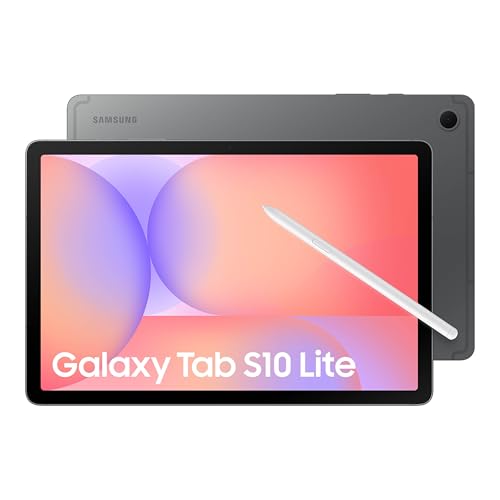
Samsung Galaxy Tab S10 Lite — Best overall
The Tab S10 Lite is what a school tablet looks like when a manufacturer stops decorating and starts prioritising. The 10.9-inch screen is the size a notebook page wants to be — large enough for a full page of handwriting with a reference open beside it in split view, small enough to live in a school bag without negotiating. The S Pen is included, needs no charging and writes with the low latency that makes fast lecturers survivable; Samsung Notes then does the unglamorous work that decides whether notes get used — organising by subject, searching handwriting, converting ink to text, syncing to the phone in a student’s pocket. Circle to Search and the Galaxy AI tools help with the homework side of the same habits.
Performance is calibrated rather than thrilling, and that is the right calibration. The Exynos 1380 keeps notes, readings, browsing and classroom apps fluid, the 6GB of memory holds the school day’s rotation, and the storage story is the generous one: 128GB inside with expansion headroom that swallows years of photographed whiteboards and downloaded textbooks. Battery life stretches across a school day of mixed note-taking without the charger becoming part of the kit. The limits appear only when the brief changes — heavy games and demanding multitasking belong to more expensive machines — but the brief here is school, and for school this is the most complete answer in the guide.
Parents and students choosing between this and the S6 Lite below should think in school years. The Lite is the current model with the longer support runway and the larger screen; the S6 Lite is the proven veteran at the friendlier tier. A student starting a multi-year course gets more from the newer machine’s calendar. A student equipping for a single year, or a household buying for a younger child, can take the veteran and spend the difference on a case and a spare pen.
- Display: 10.9-inch LCD
- Processor: Samsung Exynos 1380
- Memory and storage: 6GB RAM, 128GB, expandable up to 2TB class
- In the box: S Pen included, no charging required
- Extras: Circle to Search, Galaxy AI tools
- Finish: Gray
Strengths
- S Pen and Samsung Notes form the most practised handwriting system here
- Expandable storage removes the textbook-and-photos space anxiety
- Current model with the support runway a long course needs
Trade-offs
- Performance is school-calibrated, not gaming-flagship
- LCD screen cannot offer the e-ink picks’ glare-free paper calm
- Keyboard accessories are separate purchases for essay-heavy terms
One classroom reality favours this tablet over every rival: the mixed day. A morning of handwritten mathematics, a midday of typed-up coursework on an accessory keyboard, an afternoon of video revision and an evening of reading — the S10 Lite crosses all four without changing devices, and its split-screen habits are the most practised in this list. Students whose courses refuse to sit in one medium, which is most courses, will feel that versatility weekly. It is the safest pair of hands in the guide, and for a purchase that has to be right for years, safety is a specification.
Best for: students starting a course who want one pen tablet to carry all of it. Not suited for: households equipping a single school year on the tightest budget.

Samsung Galaxy Tab S6 Lite (2024) — Best value pen tablet
Few education products earn a reputation the slow way, but the S6 Lite line has: classroom by classroom, it became the pen tablet schools and families recommend to each other, and the 2024 edition keeps the formula intact. The 10.4-inch screen is a touch smaller than its sibling’s, which some students will honestly prefer — it is the more one-handed, bag-friendly size — and the S Pen is again in the box, writing in the same Samsung Notes ecosystem with the same organisational depth. For the core school workload of lectures, homework, readings and revision, the experience is recognisably the same family experience at a friendlier commitment.
The economies are visible where you would expect. Storage starts at 64GB, which is workable only with the microSD expansion treated as part of the purchase rather than an afterthought, and the processor is a generation’s worth of calm behind the newer Lite — fine for notes and classroom apps, noticeable in heavy multitasking. The 2024 refresh keeps the model current in software terms, but a buyer should still count it as the value route with a shorter runway than the S10 Lite, not as its equal wearing a discount.
There is a colour note in this listing — Chiffon Pink, an Amazon-exclusive configuration — which sounds trivial until you remember that a school tablet is a personal object carried for years, and students use the devices they like the look of. Practicality aside, the S6 Lite’s real charm is risk removal: it is the known quantity of this entire category, the pick a parent can buy on another parent’s word, with an accessory and case market as deep as the category offers.
- Display: 10.4-inch touchscreen
- Storage: 64GB internal, expandable storage
- Pen: S Pen travels in the carton
- Market note: US model in an Amazon-exclusive colour
- Positioning: student tablet with gaming-ready performance per listing
- Ecosystem: Samsung Notes handwriting and organisation
Strengths
- The proven classroom formula with the pen in the box
- Friendly size for bags, desks and one-handed carrying
- Deep accessory market and years of accumulated student know-how
Trade-offs
- 64GB starting storage makes a memory card effectively mandatory
- Performance trails the newer S10 Lite in heavy multitasking
- Shorter remaining update runway than the current model
Younger students deserve a specific word in this review. The S6 Lite’s size, price and pen make it the tablet most often chosen for the transition years, when handwriting is still being formed and a forgiving, capable tool matters more than a fast one. Samsung’s parental controls and the sheer number of cases built for this model complete the picture. A device bought for a twelve-year-old’s homework can still be serving revision notes at sixteen, which is a lifespan few school purchases achieve — and a large part of why this veteran keeps its badge against newer rivals.
Best for: families and schools buying the known quantity on a sensible budget. Not suited for: students who keep every file on-device and never expand storage.

Amazon Kindle Scribe — Best paper feel
The Scribe should be introduced by what it refuses to do. It will not play video worth watching, will not run the classroom app ecosystem, will not glow, buzz or tempt its owner with a single notification — because it is an e-ink notebook that reads books and takes notes, and its 11-inch paper-like display is the closest surface in this guide to the page students have written on for centuries. The included pen writes in notebooks, in documents and in the margins of books themselves, and the front light makes the page readable in a dim dorm room without turning it into a screen. Battery life is measured in weeks, which quietly changes behaviour: the Scribe is simply always ready, the way paper is.
For the right student this focus is a feature with a capital F. Revision from handwritten notes, annotation of set texts, distraction-free reading of long readings — the Scribe serves the deep-work parts of a course better than any glowing tablet in this list, and its large page shows textbooks and PDFs at a scale the smaller Kindles cannot. The 32GB holds a library and a degree’s worth of notebooks without strain, because ink and text are light cargo.
The wrong student, however, will feel the walls within a week. Colour diagrams arrive in greyscale, web research is an exercise in patience, lecture videos are not an option, and any course that distributes materials through apps will route around the Scribe entirely. Most Scribe owners in education pair it with a laptop or a conventional tablet rather than replacing one. Buy it as the paper half of a two-device system and it may become the most loved object in the school bag; buy it as the only device and the brief will defeat it.
- Display: 11-inch e-ink, front-lit, paper-like
- Storage: 32GB
- In the box: pen included
- Focus: notebooks, documents and in-book annotation
- Battery character: weeks between charges
- Category note: e-ink reader and notebook — not a general tablet
Strengths
- The most paper-like writing and reading surface in this guide
- Zero-distraction design protects long reading and revision sessions
- Weeks of battery make charging a monthly thought, not a daily one
Trade-offs
- No colour, no video, no classroom app ecosystem
- PDFs and readings in colour lose their diagrams’ meaning
- Works best as one half of a two-device setup
Literature and law students keep emerging as the Scribe’s natural constituency, and the pattern makes sense: their courses are marathons of text, their annotation is marginal and constant, and their revision is rereading with a pen in hand. The Scribe’s large page holds a novel’s spread or a case’s pages at a scale that invites that work, and its library holds the whole reading list without a shelf. For a student whose degree is measured in thousands of pages, the absence of everything else is not a limitation to forgive but the very mechanism of the degree getting done.
Best for: reading-heavy students who revise from handwriting and crave focus. Not suited for: courses delivered through apps, video and colour materials.

BOOX Note Air 5 C — Best colour e-ink notebook
The Note Air 5 C is the e-ink notebook for students who loved the Scribe’s premise but live in colour: anatomy plates, highlighted readings, charts whose meaning is carried by a red line against a blue one. Its 10.3-inch colour e-paper display renders those materials in muted, paper-appropriate colour — not the saturated glow of an LCD, and that restraint is precisely what makes it comfortable for hours. The notebook system is the most flexible in the e-ink family here, built for organising handwritten work, annotating documents and arranging a personal library of readings, and the underlying system is more open than Amazon’s walled garden.
That openness cuts both ways, and a school buyer should hear both edges. The BOOX can do more — more formats, more organisation styles, more app-shaped possibilities — and it asks more of its owner in return: settings to learn, a less hand-held setup, and the self-discipline not to turn a focus tool back into a distraction machine. Its 6GB of memory and 64GB of storage are sized for documents and ink rather than media. Students who are comfortable configuring their tools will find the most capable paper notebook in this guide; students who want the device to disappear will find the Scribe’s simplicity kinder.
Positioned against the Android slates, the Note Air 5 C shares the e-ink family’s honest limits: no lecture video, no fast app ecosystem, no gaming worth the name. Positioned against the Scribe, it is the scholar’s upgrade — colour for the readings, flexibility for the filing system, a slightly smaller page as the price. Courses in medicine, law, engineering and design, where annotation is dense and colour carries meaning, are where this machine earns its badge.
- Display: 10.3-inch colour e-paper
- Memory and storage: 6GB RAM, 64GB storage
- System: BOOX notebook and reading platform
- Focus: colour annotation of readings and documents
- Category note: e-ink digital notebook
- Build: slim notebook form
Strengths
- Colour e-ink preserves diagrams and highlighting without screen glare
- Flexible notebook organisation suits dense, multi-subject annotation
- Open system handles more document formats than the Kindle route
Trade-offs
- Setup and settings ask more of the owner than the Scribe does
- Same e-ink limits on video and fast apps as its category
- Smaller page than the Scribe for textbook PDFs
There is a study-technique argument unique to this pick: colour as a memory system. Students who annotate in a personal colour code — definitions in one hue, counterarguments in another, exam flags in a third — build revision material while they read, and colour e-ink is the only paper-like surface that preserves the code without a glowing screen. The Note Air 5 C’s notebook tools are built for exactly that layered reading. It asks for a methodical owner, and methodical owners are precisely the students who extract the most from it.
Best for: students in colour-heavy subjects who annotate everything they read. Not suited for: anyone wanting a set-it-and-forget-it notebook with no configuration.

Lenovo Idea Tab (College) — Best budget Android
Lenovo names this one without embarrassment — a college tablet — and builds the bundle a student budget actually needs: the tablet, the Tab Pen and a folio case in one box, behind an 11-inch 2.5K screen that renders readings sharply and refreshes at 90Hz so handwriting and scrolling feel responsive. For lectures, seminars and library sessions, that is the whole requirement list, and meeting it at the lowest commitment in this guide is a genuine achievement rather than a compromise to apologise for. The folio matters more than it sounds: a student’s tablet lives propped at angles in lecture halls and beds, and the case that does the propping is included instead of upsold.
The budget shows in the specification’s quieter corners. Four gigabytes of memory is the floor for comfortable multitasking — notes beside a reading is fine; a dozen apps in rotation will reload — and the Dimensity 6300 is a classroom processor, not a gaming one. Storage at 128GB is adequate for documents and downloads with ordinary tidiness. None of this will trouble the student the tablet was designed for, and all of it will trouble a buyer secretly shopping for a flagship. Buy it for lectures and it will feel well-judged for years; buy it for everything and the ceiling will introduce itself by Christmas.
Against the S6 Lite, the Lenovo trades Samsung’s notes ecosystem and update reputation for a sharper screen, a folio in the box and a keener bundle price. Students already inside Samsung’s world — phone, notes sync, familiarity — may rationally pay for the veteran. Students starting fresh, especially those whose colleges live in Google documents, will find the Lenovo’s kit the more complete first purchase.
- Display: 11-inch 2.5K IPS touchscreen, 90Hz
- Processor: MediaTek Dimensity 6300
- Memory and storage: 4GB RAM, 128GB storage
- In the box: Tab Pen and folio case included
- Positioning: college tablet per listing
- Graphics: integrated Arm Mali-G57 MC2
Strengths
- Pen and folio bundled make the sticker the whole story
- 2.5K screen renders readings and handwriting crisply
- 90Hz keeps pen strokes and page turns feeling responsive
Trade-offs
- 4GB of memory reloads apps in heavy rotation
- Classroom processor, not a gaming or multitasking flagship
- Notes ecosystem less developed than Samsung’s
First-year students, in particular, should weigh what this bundle prevents: the September accessory spiral. A tablet bought alone in freshers’ week tends to acquire a pen in October, a case in November and a folio by the second term, each at single-item prices. The Idea Tab’s box closes that spiral before it opens, leaving the budget for the things a first year actually runs out of. It is a modest virtue and an extremely student-shaped one, and it is why this tablet’s badge says budget without saying compromise.
Best for: students equipping for lectures on the tightest sensible budget. Not suited for: power users who multitask across a dozen demanding apps.

Lenovo Chromebook Duet Gen 9 — Best keyboard route
Some students’ notes are not handwriting at all — they are documents, built at typing speed in lectures, organised in folders, shared with a tap. The Duet Gen 9 is this guide’s answer for them, and it is a ChromeOS 2-in-1 rather than an Android tablet: an 11-inch FHD+ touchscreen with a detachable keyboard in the box, a USI Pen 2 for the diagrams and equations that typing handles badly, and in this configuration a healthy 8GB of memory with storage split between internal eMMC and an included card. The result is a small laptop that can shed its keyboard and become a reading tablet on the train home.
ChromeOS suits school administration the way it suits schoolwork: the browser is desktop-class, so learning platforms behave exactly as their designers intended; updates are quick and automatic; and the device wipes and re-enrols cleanly, which is why schools deploy its relatives by the trolley-load. Android apps are available through the Play Store for the gaps, but the honest centre of gravity is the web. A student whose course lives in Google Workspace, web platforms and documents will find this the most efficient note machine in the guide — typed notes, searchable from birth, backed up by default.
The trade-offs mirror the platform. Handwriting here is a supporting act — competent with the USI pen, but the software ecosystem for ink is thinner than Samsung Notes — and students in pen-first subjects should take one of the slates above. Offline behaviour also deserves a thought: ChromeOS works offline in its core apps, but the habit of the platform is cloud-first, and a student with unreliable connectivity should test their workflow before committing. Within its brief, though, the Duet is the most complete typing answer a school budget can buy in tablet form.
- Display: 11-inch FHD+ touchscreen
- Platform: ChromeOS — 2-in-1 laptop and tablet
- Processor: MediaTek Kompanio 838, 8-core
- Memory and storage: 8GB RAM, 256GB total (128GB eMMC plus 128GB card)
- In the box: detachable keyboard, USI Pen 2 support
- Camera: 8MP webcam per listing
Strengths
- Keyboard included makes typed notes a day-one capability
- Desktop-class browser runs school platforms exactly as designed
- 8GB configuration keeps multitasking comfortable for a Chromebook
Trade-offs
- Handwriting ecosystem thinner than Samsung Notes for ink-first work
- Cloud-first platform habits assume decent connectivity
- Not an Android tablet — app expectations must be reset
Group projects quietly belong to this machine. Typed notes in shared documents are the currency of coursework collaboration, and the Duet produces them natively — no conversion from ink, no photographed pages, no version chaos in a shared drive. The student who becomes their group’s organised note-taker, the one whose documents everyone revises from, is disproportionately often the student with a keyboard in the lecture hall. The Duet sells that role at a tablet price, and for socially-organised courses it may be the most academically productive pick in this entire guide.
Best for: students whose notes are typed documents in a Google-centred school. Not suited for: handwriting-first subjects that live in ink.
Lining Up the Six Notebooks by How They Take Notes
| Pick | Surface | Pen | Storage | Platform | Note style |
|---|---|---|---|---|---|
| Galaxy Tab S10 Lite | 10.9-inch LCD | S Pen included | 128GB + expansion | Android | All-round ink |
| Galaxy Tab S6 Lite | 10.4-inch LCD | S Pen included | 64GB + expansion | Android | Value ink |
| Kindle Scribe | 11-inch e-ink | Pen included | 32GB | Kindle | Paper notebooks |
| BOOX Note Air 5 C | 10.3-inch colour e-ink | Stylus system | 64GB | BOOX | Colour annotation |
| Lenovo Idea Tab | 11-inch 2.5K LCD | Tab Pen included | 128GB | Android | Budget lectures |
| Chromebook Duet Gen 9 | 11-inch FHD+ | USI Pen 2 | 256GB total | ChromeOS | Typed documents |
The organising question of the table is not size or price but medium: ink on glass, ink on e-paper, or keys. Students rarely switch mediums mid-course, because their archives accumulate in one system — which is why this guide treats the medium decision as the purchase. Everything else, including the badge order, is refinement.
What Should a Student Decide Before Choosing a Note System?
Decide the medium by watching your own hands for one school day. If your notes are diagrams, equations, margin comments and arrows, you are an ink student and the pen picks are your shortlist. If your notes are paragraphs, lists and shared documents, you are a typing student and the Duet deserves its place at the top of yours. If your problem is not capture but attention — the tablet that was bought for notes and became a cinema — the e-ink family is not a compromise but a cure, and it should be considered first rather than last.
Then decide the archive. Notes are only as good as their revision-week retrieval, so ask where this year’s work will live: Samsung Notes, the Kindle library, BOOX’s notebooks, Google Drive. A student already invested in one of those worlds should weight it heavily, because migrating a year of notes between systems is the kind of chore that simply does not happen. Finally, decide the support structure: a school-managed environment points to the Duet or the Samsungs; a self-managed student can roam wider, including the BOOX’s open system.
How Do You Build a Note Workflow That Survives Revision Week?
Structure beats effort. Create one notebook or folder per subject before the first lecture, name files by date and topic in a format your future self can search, and spend two minutes after each class tidying titles while the material is fresh — that tiny habit is worth more at revision than any pen technology. Photograph whiteboards and handouts into the same subject notebook the same day, so the archive is complete rather than scattered between a camera roll and a notes app. On the e-ink picks, star or tag the pages you already know are exam material; future you is the audience for every one of these decisions.
Back the system up weekly. Notes are the one category of student data that cannot be re-downloaded, and every platform here offers a route — cloud sync on the Android slates and Duet, Amazon’s library for the Scribe, file export on the BOOX. Set it once, verify it once, and the lost-tablet scenario degrades from catastrophe to inconvenience. Finish with a revision ritual: a monthly pass that converts the month’s ink into a typed summary document. Students who do this discover their gaps in October, when they can still be closed, rather than in May.
Which Note-Taking Buying Mistakes Cost Students Most?
A smaller mistake with outsized consequences is skipping the five-minute setup of the notes app itself — the default notebook, the backup toggle, the pen shortcut — because a system that starts disorganised tends to stay disorganised, and September’s chaos becomes May’s unsearchable archive. Every pick here rewards that first five minutes for years.
The first is buying a tablet without the pen, on a budget that then never quite stretches to the pen — the note-taking brief dies quietly and the tablet becomes a screen. Every pick here includes its pen or supports one credibly; keep it that way in your own shortlist. The second is buying e-ink for an app-driven course, or a glowing tablet for a distraction problem: both are category errors that no accessory fixes, and both are avoidable by reading the honest labels in this guide before checkout rather than after.
Third, students underbuy storage in photograph-heavy courses — whiteboards, lab books, field photos — and meet the ceiling mid-term; the expandable Samsungs exist partly to forgive exactly this. Fourth, do not ignore the bag test: a tablet that is annoying to carry gets left at home, and a note system left at home is a notebook made of paper with extra steps. Finally, beware buying for a friend’s course. Subjects differ in medium more than in difficulty, and the right tablet for a law student’s typed briefs is the wrong one for a medic’s annotated diagrams.
How Does Each Pick Handle a Full Term, Not Just a Good Week?
A term is where small virtues compound. The S10 Lite’s organisation and expansion mean the archive grows without friction from September to June, and its battery still ends long days with margin. The S6 Lite’s term is the same story at a smaller scale, with the memory card earning its place by mid-term. The Scribe’s term is measured in reading: hundreds of pages consumed without eye strain or a single charge-related thought, its notebooks quietly becoming the revision asset their owner hoped for. The BOOX’s term is denser — more annotation, more colour, more filing — for the student willing to maintain the system that produces it.
The Lenovo’s term tests its ceilings honestly: by the heavy multitasking weeks of group projects, its 4GB of memory will ask for patience, while its screen and pen keep the core job excellent. The Duet’s term is the administrator’s dream — nothing to maintain, everything backed up, the keyboard absorbing essay season without complaint. None of these is a failure narrative. They are six different terms, and the student who recognises their own in advance is the one this guide was written for.
What About Eyes, Posture and the Library at Midnight?
School is a long-exposure activity, and the comfort differences in this set are educational outcomes in disguise. E-ink’s advantage is real and specific: no glare under library lighting, no emitted light pushing at tired eyes, a page that behaves like the books it sits beside. Students who read for four-hour stretches — law, literature, medicine — feel that advantage as retained concentration, and it is the strongest argument the Scribe and BOOX make. The LCD picks answer with versatility and with comfort settings of their own: warm night modes, matte protectors that cut reflections, and brightness discipline that most students never bother to configure.
Posture is the unglamorous half. A tablet flat on a desk forces a hunched neck whether its screen is e-ink or LCD; the folio stands bundled with the Lenovo and available for every other pick are ergonomic equipment, not accessories, and a student who writes for hours should treat a raised angle as part of the purchase. Weight matters the same way: the tablet carried all day is held, bagged and balanced constantly, and the lighter picks here earn goodwill that never appears in a specification table. Buy for the body as honestly as for the brain and the device will still be welcome in the third term.
How Should Parents and Schools Choose Differently From Students?
An adult buying for a student is buying for a system, not a person, and the priorities reorder themselves. Manageability comes first: the Duet’s clean administration and the Samsungs’ parental controls and account structure serve households and schools in ways a student shopping alone would never rank. Durability and repairability of the everyday kind — cases available, pens replaceable, chargers standard — come second, because the device will be dropped, lent and lost-to-a-locker at least once. Total cost of the kit, not the tablet, is the honest budget line: pen, case, expansion card and a spare charger belong in the arithmetic from the start.
Students choosing for themselves can weight the daily feel more heavily — the pen’s friction, the screen’s calm, the bag’s weight — because they are the ones who will live inside the decision for years. Both perspectives are legitimate; the mistake is mixing them, buying a student’s device by an administrator’s checklist or a school’s fleet by one student’s taste. This guide’s reviews were written to serve both readers, with the medium and ecosystem questions — the ones that outlast any model year — given the prominence they deserve.
What Happens to These Notes After the Course Ends?
Every September purchase contains a June question: what becomes of the archive? On the Android slates, notes export to PDF and sync to accounts that outlive the device, so a course’s work can graduate into a reference library on a laptop or a shelf of PDFs. The Duet’s documents are already in the cloud ecosystem where adult work lives, which makes its archive the most naturally permanent. The Scribe’s notebooks live in Amazon’s world — readable, exportable in the ways Kindle allows, and most valuable to owners who stay in that library for their reading generally. The BOOX, true to its open character, offers the most file-level control over exports for students who think in folders.
The practical advice is to decide the archive’s destination in the first month, not the last: pick the export format, run one test export, and confirm the files open where your future self will look for them. Students who do this own their notes for decades. Students who do not own a pile of proprietary files and a vague hope — and the difference between those outcomes is fifteen minutes of foresight that this guide is happy to nag about, because lecturers retire, platforms change and the notes from a good course are worth keeping longer than any tablet.
How Do the Pens Themselves Compare in the Hand?
Pen feel is personal, but its components are not mysterious. The S Pen in both Samsungs is battery-free, light and tipped with a soft nib that drags pleasantly on glass — the closest sensation here to a pencil’s give — and its years of refinement show in how little attention it asks for. The Lenovo’s Tab Pen serves the same school purposes with a slightly firmer character that some writers prefer for fast, small handwriting. The Scribe’s pen is built for long-form writing comfort on a matte e-ink surface, where friction is natural rather than simulated, and the BOOX’s stylus serves a similar paper-first philosophy with its own ecosystem of nibs and settings.
The Duet’s USI pen operates in a different economy: USI is a cross-device standard, so a lost pen is a cheap, generic replacement rather than a brand-specific order — a small, very school-shaped advantage. Whichever pick a student chooses, one habit protects the experience: keep a spare nib, and on glass screens consider the tip’s wear a consumable like a pencil’s point. Pens are the interface of this entire category; treating them as maintenance items rather than magic wands is what keeps handwriting pleasant in year two.
What Does a School Day Actually Ask of the Battery and the Bag?
Run the timetable honestly. Notes in four classes, readings between them, a photographed worksheet, a video at lunch, messages all day — that is a moderate day, and every pick here finishes it. The differences appear on the heavy days: the field trip, the exam-week library marathon, the day the charger stayed home. The e-ink pair simply leave the conversation, their batteries measured in weeks making the question comic. Among the glowing screens, the Samsungs’ stamina and the Lenovo’s classroom sizing hold up well, while the Duet’s efficiency in browser work stretches its day further than its size suggests.
The bag has opinions too. A tablet plus its case, pen and charger is the real carried unit, and the picks separate by how gracefully they pack: the S6 Lite and Duet disappear into a school bag’s flat pocket; the S10 Lite and Lenovo ask for the main compartment; the e-ink pair travel like the books they imitate. Students who walk or cycle to school feel these grams daily. None of this decides a purchase alone, but a tablet that is resented by the bag gets left behind on exactly the days it was bought for — and a note system only works on the days it is present.
How Should a Student Test a Note Tablet in the First Week?
Write a full lecture by hand, at real speed, and read it back the next day: legibility after speed is the pen system’s true grade. Photograph a whiteboard from the back row and file it into the right notebook before the next class starts — the workflow, not the camera, is being tested. Take one long reading in the student’s real environment, library glare or dorm lamplight, and note the eyes’ verdict at hour two. Then export one notebook and open it somewhere else entirely, because an archive that cannot leave its app is a loan, not a possession.
Students who run those four tests in week one know their machine by the time it matters. The picks in this guide will pass them in different proportions — the Samsungs on workflow, the e-ink pair on reading, the Duet on documents, the Lenovo on value — and the student’s own results, not this guide’s badges, should make the final call while returns are still easy. That is not a hedge; it is how tools that must last years ought to be chosen.
Which Subjects Bend Toward Which Pick?
Subjects have mediums, and a quick tour settles many arguments. Mathematics, physics and engineering live in ink — symbols, sketches, derivations — and belong to the S Pen pair or the Lenovo, with the BOOX as the paper-purist’s route. Medicine and the life sciences live in annotated colour — diagrams, plates, highlighted pathways — which is the Note Air 5 C’s home ground, with the S10 Lite as the full-tablet alternative. Law and literature live in text volume: typed briefs point to the Duet, marginal annotation points to the Scribe, and many students in these fields end up happiest with one of each across a degree.
Languages reward handwriting for script practice and audio for listening, splitting their students between the pen slates and any pick with good speakers and a browser. Business and social sciences live in documents and slides, the Duet’s and the big Android screens’ shared territory. The tour’s lesson is that “school” is not one workload, and a guide that ranked these six without asking the subject would be ranking them for a student who does not exist. Find your subject above, and the shortlist has probably already formed.
What Is the Total Cost of a School Note System, Honestly Counted?
Count the system, not the sticker. For the Android slates: the tablet, a case if one is not bundled, a memory card where the internal storage is small, and a spare charger for the bag. For the e-ink pair: the device, a cover that protects a paper-like screen in a bag of textbooks, and in the BOOX’s case the patience to configure it, which is a cost paid in time rather than money. For the Duet: the device and very little else, its keyboard and cloud habits making it the most complete single purchase here. Counted this way, the gaps between these picks narrow considerably, and the Lenovo’s bundled kit and the Duet’s keyboard look even better than their listings suggest.
Count also the cost of the wrong system, because students pay it in the currency of abandoned notes. A pen bought late, an archive that cannot be searched, a device left at home — each is a small tax levied weekly for years. The cheapest tablet in this guide, bought in the right medium with its kit complete, will outperform the most expensive one bought in the wrong medium, and that sentence is the whole economics of school note-taking in one line.
Final Recommendation
Start at the Galaxy Tab S10 Lite for the complete ink system with a long runway, and step to the S6 Lite when the budget is the argument. Choose the Kindle Scribe when focus and reading are the course’s real demands, the BOOX Note Air 5 C when those readings live in colour, the Lenovo Idea Tab when the lectures must be equipped for the least money, and the Chromebook Duet when the notes are documents and the keyboard is the pen. Decide the medium first and the model second, and the tablet you buy in September will still be earning its place in the bag when the exams arrive. That durability — of the notes, of the habit, of the device itself — is what a school purchase is really for, and every pick above can deliver it to the student whose medium it matches.
Frequently Asked Questions
Is handwriting on a tablet really as good as paper for learning?
For capture and organisation, modern pen tablets are close enough that the organisational gains — search, backup, one device for every subject — usually outweigh the small difference in feel. Students who revise by rewriting may still prefer the e-ink picks’ paper-like surface. The honest answer is that the system around the handwriting matters more than the surface beneath it.
Can an e-ink notebook like the Kindle Scribe be my only school device?
Only if your course is genuinely reading-and-writing based, with materials distributed as documents rather than apps or video. Most students pair a Scribe or BOOX with a laptop or a conventional tablet. The e-ink picks are superb at their half of school life and deliberately absent from the other half.
How much storage do school notes actually need?
Ink and documents are light; photographs, recorded lectures and downloaded textbooks are not. A document-only student can live in 64GB with expansion; a student photographing every whiteboard should start at 128GB or take an expandable model. The S10 Lite and S6 Lite accept cards, which makes their storage the most forgiving here.
Typed or handwritten notes — which does this guide recommend?
Neither universally. Handwriting suits diagrams, mathematics and annotation, and tends to slow capture in a way that aids memory; typing suits volume, sharing and search. Many students do both — ink in class, typed summaries in revision — which is why the Duet carries pen support and the pen tablets accept keyboards. Choose the primary medium honestly and let the secondary one be the accessory.
Do I need Wi-Fi at school for these to work?
Note-taking itself is offline work on every pick here — ink, documents and readings stored on the device function without a connection. Wi-Fi matters for syncing backups, downloading readings and the Duet’s cloud-first habits, so a student with patchy school connectivity should download materials at home and treat sync as an evening routine. The e-ink pair are the least connection-dependent devices in the guide, one more way their paper imitation is faithful.
Will these tablets last a whole degree or school career?
The current Samsung and the Duet have the support stories best matched to multi-year ownership, and all six picks are built for daily carrying. Battery wear is the usual end-of-life factor rather than performance for note workloads, which are light by design. A case and a backup habit will do more for longevity than any specification.
Related Guides
Keep building the school kit with our guide to the best tablets for college students on a budget, our round-up of e-readers for textbooks and long readings, and our comparison of stylus tablets for handwritten study notes.
Related guides
- Best Basic Phones Camera Buyers Can Trust: Flip Phones and Simple Handsets That Still Take a Photograph
- Best Sony Full Frame Cameras for Astrophotography: Sensitivity vs Resolution
- Best Affordable Android Tablets: Five True Android Slates and One Fire OS Specialist, Clearly Labelled
- Best 400 FPS High Speed Cameras: The Honest Truth About Burst Slow Motion


