What's inside
- Where to buy
- Key Takeaways
- Quick Picks
- How did we choose these laptops for construction projects?
- What makes a screen readable on a building site?
- How do the eight construction picks compare side by side?
- How should a project team set up and care for rugged laptops?
- What mistakes do construction laptop buyers keep making?
- Final Recommendation
- Frequently Asked Questions
- How do you choose between fourteen and fifteen inches for site work?
- What about connectivity where the site has no infrastructure?
- What does a rugged laptop really cost across a whole project?
- How should you brief a crew on a shared site laptop?
- Related Guides
As an Amazon Associate I earn from qualifying purchases. This post may contain affiliate links at no extra cost to you.
gizmoverdict.com is reader-supported. When you buy through links on our site, we may earn an affiliate commission.
Where to buy
Amazon carries the six linked machines in this guide, and each link lands on the exact listing we checked. The final two picks are prose only because their verified listings are renewed units, and we flag that in their sections rather than link you to a grade of machine we have not seen. If you are choosing among the best laptops for construction projects, forget everything office reviews taught you: the contest here is not benchmark scores but survival and usability in the places building work actually happens — a scaffold platform in full sun, a site cabin full of dust, a pickup cab at dawn, a half-finished floor with no mains power and a foreman waiting on a drawing revision.
A construction laptop earns its money through a specific set of traits, and this guide judges every pick against them in the same order. First, the screen: it must stay readable in daylight, which is a brightness and finish question, not a resolution one. Second, input: trackpads and keyboards must work for gloved, cold, or dirty hands, or at least not punish them. Third, sealing and structure: dust is the site contaminant that never takes a day off, and drops onto concrete are a schedule, not an accident. Fourth, power away from the wall: swappable or generous batteries matter when the nearest socket is two floors away. Fifth, the ports that site peripherals — scanners, label printers, older instruments, a client’s USB stick of drawings — actually plug into. A machine that wins on office criteria and fails on these five is a liability wearing a warranty.
One honesty rule governs everything below: we never invent a durability rating. Where a listing title does not state a military-standard or ingress-protection figure, the pick’s spec box says so in the exact words the verification deserves, and the article discusses the machine’s rugged design in the class terms the evidence supports. Rugged is a spectrum in this market — fully sealed machines built for deliberate abuse, semi-rugged machines armoured for knocks and weather, and hardened business laptops at the edge — and the picks span it deliberately, because a project manager’s site rounds and a surveyor’s fieldwork are different exposures wearing the same keyword.
Key Takeaways
- Judge construction laptops by sunlight readability, gloved input, dust sealing, battery strategy, and site ports — in that order — and let office benchmarks trail far behind.
- The Dell Pro Rugged 14 is the current-generation anchor: a fourteen-inch fully rugged design from the maker whose Latitude Rugged line defined the category for fleets.
- Getac’s S510 and the two Durabook machines give project teams larger fifteen-inch canvases for drawings, with the Durabook pair splitting by processor generation and price of entry.
- The ONERugged N15M and MUNBYN IRX18 state thousand-nit screens in their listings — the daylight figure that matters most on an open site — and dual-battery arrangements aimed at long shifts.
- The previous rugged generation circulates as renewed stock: the Latitude Rugged 5430 and Toughbook CF-33 in this guide are legitimate routes if battery health and grading are checked properly.
- No rating is claimed for any pick beyond what its listing states; where the title is silent, the spec box says so and points you to the manufacturer’s datasheet.
Quick Picks
| Pick | Badge | Why it earns its place |
|---|---|---|
| Dell Pro Rugged 14 Ultra 5 | Current-generation anchor | Dell’s present rugged flagship formula at fourteen inches, with modern internals for project software. |
| Getac S510 Rugged Laptop | Big-screen field machine | A fifteen-point-six-inch rugged canvas with the memory and storage to live on drawings and project files. |
| Durabook S14I Rugged Laptop | Newer silicon, fourteen inches | The newer-processor Durabook, with a smartcard reader for secured project environments. |
| Durabook S15 Rugged Laptop | Value entry to the rugged class | Fifteen-point-six inches of semi-rugged practicality on an earlier processor generation. |
| ONERugged N15M Rugged Laptop | Daylight screen, dual batteries | A thousand-nit display stated in the listing and a two-battery arrangement for long site days. |
| MUNBYN IRX18 Rugged Laptop | Stated IP65 sealing | The listing states IP65 and a thousand-nit screen, with a replaceable SSD for serviced fleets. |
| Dell Latitude Rugged 5430 | Renewed route — Dell | The previous generation of Dell’s rugged line, circulating renewed at a fraction of its fleet cost. |
| Panasonic Toughbook CF-33 | Renewed route — detachable | The two-in-one Toughbook with a digitizer touchscreen, for marking up drawings at the point of work. |
How did we choose these laptops for construction projects?
We filtered for machines designed, not merely marketed, for field conditions: rugged and semi-rugged lines from makers who sell to fleets, utilities, and public services, plus the renewed previous generation of those same lines. Ordinary business laptops with a tough-sounding name were excluded, because a construction site can tell the difference even when a listing cannot. Within the filter, we balanced screen size against portability — fourteen inches for people who move between sites daily, fifteen and above for people whose laptop lives on a cabin desk or a vehicle mount and opens drawings all day — and we weighted stated screen brightness heavily, because a manufacturer willing to print a nit figure in its title is answering the first question a site worker asks.
We also kept the article in its own territory. This keyword is construction projects: general contractors, project managers, site engineers, estimators walking a floor, and the crews who support them. The software lens is project software — drawings and BIM viewers, estimating and scheduling tools, document control, email measured in hundreds — not diagnostic or automotive work, which has its own guides elsewhere. Every pick below is assessed against that workload and those environments, and where a machine’s strength belongs to a different trade, we say so rather than borrowing credit.
What makes a screen readable on a building site?
Sunlight is the harshest display critic ever devised. A typical office laptop screen, designed for a room with the blinds drawn, washes to a grey ghost outdoors; the drawing is technically on the screen and practically invisible, and the worker’s response — cupping hands, hunting shade, tilting the lid — costs the minutes the machine was bought to save. The counters are brightness, measured in nits, and a finish that does not mirror the sky. This is why the stated thousand-nit figures in two listings below matter more than any resolution number in this guide: they represent screens engineered to remain legible where the work is, at midday, in July.
Size plays its part differently outdoors. A drawing at fourteen inches is a document you consult; at fifteen-point-six it is a document a small group can stand around, which is a real mode of construction work — the foreman, the engineer, and the subcontractor reading the same detail at the same time. Touch divides the field further: a touchscreen with a digitizer, like the renewed Toughbook’s, lets a gloved or stylus hand mark a drawing at the point of inspection, while the non-touch screens most picks here carry ask for a mouse or an ungloved finger and reward a cabin desk instead. Neither is superior in the abstract; the question is whether your site work happens standing at the workface or seated at the project office, and the picks are labelled so you can match the machine to the posture.
Finally, protect whatever screen you buy. Site dust is abrasive, and a screen wiped with a work glove accumulates a fine frost of scratches over a season. A sacrificial screen protector, replaced when it clouds, and a cloth kept in the laptop bag for the purpose, extend the readable life of any panel in this guide more cheaply than any specification upgrade. Contractors who also run their estimating from a home office may find the wider context in best affordable laptops for cad useful, but the screen discipline starts here: brightness first, size for the posture, protection always.
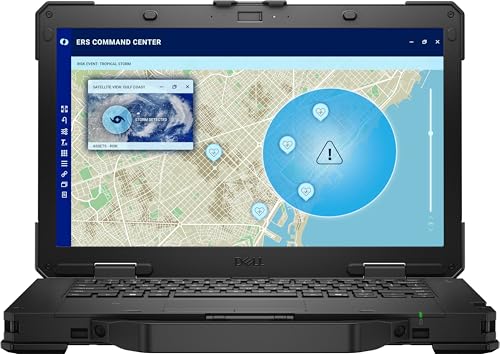
Dell Pro Rugged 14 Ultra 5 — Current-generation anchor
Dell’s rugged line is the one fleet managers reach for by reflex, and this Pro Rugged 14 is its current statement: a fourteen-inch full-HD machine built around Intel’s Core Ultra 5 135U with sixteen gigabytes of DDR5 memory and a half-terabyte NVMe drive, wrapped in a chassis whose entire design brief is the world outside the office. The backlit keyboard matters at dawn starts and in dim plant rooms; the webcam covers the progress call with the office; Windows 11 Pro carries the management and security tooling project IT departments standardise on. As the anchor pick, it is the machine against which the rest of this guide’s value arguments are measured.
Its size is its strategy. Fourteen inches travels — between sites, up stairs, into a cab — in a way fifteen-inch rugged machines do not, and for the project engineer whose laptop opens on tailgates and temporary benches rather than a fixed cabin desk, that mobility is the feature everything else serves. The listing title does not state a military or ingress rating, so we do not print one; Dell publishes the certification details for this line in its datasheets, and a buyer whose tender specifies a rating should match the exact configuration there. What the design class itself guarantees is the intent: sealed, reinforced, and built to be serviced in fleets — the opposite philosophy from a glued consumer ultrabook.
- Panel: 14-inch FHD
- Rugged rating: Not stated in the listing title — verify in the manufacturer datasheet
- Processor: Intel Core Ultra 5 135U, 12-core
- Memory and storage: 16GB DDR5 RAM, 512GB NVMe SSD
- Input: backlit keyboard; webcam fitted
- Operating system: Windows 11 Pro
Strengths
- Current-generation internals mean project software, BIM viewers, and a hundred browser tabs run without the machine feeling its environment is its only trick.
- The fourteen-inch rugged format is the most mobile in this guide, suiting multi-site days.
- Dell’s rugged service network and fleet documentation are the deepest in this class, which matters at year three.
Trade-offs
- The listing states no durability rating, so tender-driven buyers must verify certification in the datasheet before ordering.
- Sixteen gigabytes of memory is adequate rather than generous for heavy BIM models; check configuration options.
- Fourteen inches is a consultation screen, not a gather-round screen, for group drawing reviews.
Best for: project engineers and managers who move between sites daily and want the current rugged generation from the category’s default maker. Not suited for: desk-bound drawing review in a site cabin, where a fifteen-inch pick serves better, or buyers who need a stated rating in the listing itself.

Getac S510 Rugged Laptop — Big-screen field machine
Getac builds machines for the industries that break laptops professionally, and the S510 brings that lineage to a fifteen-point-six-inch full-HD canvas with serious working specification: an Intel Core Ultra 5, thirty-two gigabytes of memory, and a terabyte of storage. That memory and storage pairing is the tell of a machine meant to live on project files — drawing sets, models, photo documentation of progress — rather than visit them. The listing specifies a non-touch screen, which in this class is a deliberate posture: a glove-and-mouse machine for the cabin desk and the vehicle mount, prioritising the big legible canvas over fingertip interaction at the workface.
For a site-based project team, this is the hub machine: the one that holds the current drawing set, runs the estimating review, and hosts the video call where three trades argue over a detail everyone can actually see. Its size argues for a semi-fixed life — cabin, office container, or a proper vehicle dock — rather than a daily climb, and buyers should honour that honestly rather than discover it on a scaffold. Getac publishes the S510’s rugged certifications in its own documentation; the listing title does not state them, so the spec box below follows this guide’s rule and sends certification shoppers to the datasheet.
- Panel: 15.6-inch FHD, non-touch
- Rugged rating: Not stated in the listing title — verify in the manufacturer datasheet
- Processor: Intel Core Ultra 5
- Memory and storage: 32GB RAM, 1TB storage
- Extras: webcam fitted
- Operating system: Windows 11 class business configuration — confirm exact edition on the listing
Strengths
- Thirty-two gigabytes and a terabyte is the most work-ready specification among the new picks, sized for drawing sets and models.
- The fifteen-point-six-inch screen supports the stand-around review that construction decisions actually happen in.
- Getac’s entire business is rugged fleets, and the support culture shows in documentation and parts availability.
Trade-offs
- Non-touch input rules out stylus markup at the workface; this is a desk-and-mount machine.
- Its size and class make it the guide’s least portable new pick, whatever the handle suggests.
- Certification figures are not in the listing title and must be verified in Getac’s datasheet for tender use.
Best for: site cabin and project-office duty, where a rugged hub holds the drawings and hosts the reviews. Not suited for: workers who carry a laptop up structures daily, or anyone whose inspection workflow needs a touchscreen and stylus.

Durabook S14I Rugged Laptop — Newer silicon, fourteen inches
Durabook is the specialist name buyers meet when they look past the two giant rugged brands, and the S14I is its fourteen-inch argument: a full-HD non-touch screen, Intel’s Core Ultra i5-125U generation, sixteen gigabytes of memory, and a quarter-terabyte drive, with a smartcard reader fitted — a detail that signals the secured environments, government-adjacent projects, and controlled sites where card-based sign-in is part of the working day. The backlit keyboard and webcam cover the ordinary business duties, and the whole machine sits in the semi-rugged-to-rugged territory Durabook has occupied for years: armoured for the knocks, dust, and weather of field life rather than sealed for deliberate submersion games.
Against the Dell anchor, the S14I’s case is specialisation and value within the class: a newer processor generation than its S15 sibling below, the smartcard provision the Dell listing does not mention, and a maker’s entire catalogue aimed at this one job. Its storage figure is the specification to interrogate — a quarter-terabyte fills quickly under drawing sets and site photography, so buyers should confirm whether the configuration they order can grow, or plan the machine as a viewer and terminal over network storage rather than the project’s archive. As with every pick here, the listing states no rating figure, and the datasheet is where certification claims live.
- Panel: 14.0-inch FHD, non-touch
- Rugged rating: Not stated in the listing title — verify in the manufacturer datasheet
- Processor: Intel Core Ultra i5-125U
- Memory and storage: 16GB RAM, 256GB SSD
- Extras: smartcard reader, backlit keyboard, webcam
- Operating system: Windows 11 Pro
Strengths
- The smartcard reader suits secured sites and projects where card sign-in is mandated.
- A newer processor generation than the value Durabook below keeps project software responsive.
- Fourteen inches keeps a rugged machine genuinely portable between sites and floors.
Trade-offs
- The 256GB drive is the tightest storage in this guide and will discipline your file habits.
- Non-touch screen means no stylus markup workflow at the point of inspection.
- No rating is stated in the listing title; certification must be confirmed in Durabook’s datasheet.
Best for: field staff on secured or card-controlled projects who want a portable rugged machine from a specialist maker. Not suited for: holding a whole project’s archive locally, or buyers whose workflow is built on touchscreen drawing markup.

Durabook S15 Rugged Laptop — Value entry to the rugged class
The S15 is the Durabook for the cabin desk: fifteen-point-six inches of full-HD non-touch screen on Intel’s Core i5-1235U, with sixteen gigabytes of memory, a quarter-terabyte drive, a smartcard reader, and the same backlit-keyboard, webcam-equipped business completeness as its smaller sibling. The processor is a generation older than the S14I’s, and in this class that trade is often the right one to accept: the work — drawings open all day, documents, estimating sheets, video calls — does not tax either chip, while the larger screen serves the S15’s actual station in life every hour it is switched on.
Position it honestly in the guide’s spectrum. This is the entry point to purpose-built rugged hardware for a project team equipping a cabin or a small fleet of site machines, where the alternative at similar money is an ordinary office laptop that the site will educate harshly within a season. The smartcard reader keeps it eligible for controlled environments, and the fifteen-inch canvas keeps it eligible for the group review. Storage remains the discipline item, as with its sibling: run it as a window onto project storage, not as the project’s only filing cabinet, and its specification stops being a limitation and becomes a workflow.
- Panel: 15.6-inch FHD, non-touch
- Rugged rating: Not stated in the listing title — verify in the manufacturer datasheet
- Processor: Intel Core i5-1235U
- Memory and storage: 16GB RAM, 256GB SSD
- Extras: smartcard reader, backlit keyboard, webcam
- Operating system: Windows 11 Pro
Strengths
- The big screen serves cabin-desk drawing review better than any fourteen-inch pick here.
- It brings purpose-built rugged construction to the guide’s most accessible Durabook tier.
- Smartcard support keeps it valid on secured projects where lesser machines are turned away.
Trade-offs
- An older processor generation than the S14I, noticeable only in heavier model work.
- Storage is again a quarter-terabyte, so project files should live on shared storage.
- Size and rugged build make it a station machine, not a climbing companion.
Best for: equipping a site cabin or small fleet with rugged big-screen machines at the class’s entry tier. Not suited for: solo field workers carrying a machine all day, or local storage of entire project archives. Teams speccing several cabins at once may also want the planning context in best laptops for autocad and 3ds max for the heavier design workstations back at head office.

ONERugged N15M Rugged Laptop — Daylight screen, dual batteries
The N15M’s listing leads with the two numbers a site worker would choose for it: a thousand-nit screen on a fifteen-inch panel, and a dual-battery arrangement — a main 4700mAh pack plus a secondary 1300mAh unit — of the kind that keeps a machine alive through the gap between the cabin’s power and the workface’s demands. Around those headlines sit an Intel Core Ultra 5 125H, sixteen gigabytes of memory, a half-terabyte drive, Wi-Fi 6, and Windows 11 Pro, in a machine its maker positions unapologetically as an industrial outdoor computer. Of the new picks, this is the one whose listing reads as if it were written by someone who has stood in the sun trying to read a drawing.
The dual-battery idea deserves its moment, because it changes site logistics rather than merely extending a graph. A secondary battery that keeps the machine running while the main pack is swapped — the architecture this arrangement implies — turns power into a relay rather than a countdown, and pairs naturally with a spare pack in the cabin charger. Confirm the exact swap behaviour in the maker’s documentation before building a workflow on it, and note, per this guide’s rule, that the listing states no ingress or military rating: the datasheet carries those figures, and a tender that names them should be matched there, not assumed from the word rugged in a product name.
- Panel: 15-inch, 1000 nits as stated in the listing title
- Rugged rating: Not stated in the listing title — verify in the manufacturer datasheet
- Processor: Intel Core Ultra 5 125H
- Memory and storage: 16GB RAM, 512GB storage
- Power: dual batteries, 4700mAh + 1300mAh, per the listing title
- Connectivity: Wi-Fi 6, Bluetooth 5.1
- Operating system: Windows 11 Pro
Strengths
- The stated thousand-nit screen answers the midday-readability question directly.
- Dual batteries suit long shifts far from a socket, especially with a spare pack in rotation.
- Fifteen inches balances drawing legibility against a size one person can still move around a site.
Trade-offs
- The maker is a smaller industrial brand, so support depth should be checked against your fleet’s expectations.
- No durability rating is stated in the listing title; certification shoppers go to the datasheet.
- Battery figures are capacities, not shift guarantees — load and screen brightness decide the real day.
Best for: outdoor-heavy project work where the screen must read at noon and the socket is a rumour. Not suited for: buyers who need a global brand’s service network, or tenders requiring a rating verified at listing level.

MUNBYN IRX18 Rugged Laptop — Stated IP65 sealing
The IRX18 is the one new pick whose listing states its sealing outright: IP65, printed in the title, alongside a thousand-nit high-brightness fourteen-inch screen, an Intel i5-1235U, sixteen gigabytes of memory, and a half-terabyte drive that the listing describes as replaceable — a serviceability note that fleet buyers read with genuine appreciation. Its battery arrangement mirrors the ONERugged’s dual-pack pattern, and its maker adds a two-year protection promise in the title. For a buyer whose tender or insurer asks the ingress question directly, a listing that answers it in writing has an obvious head start over rivals whose figures live only in datasheets.
Read the IP65 claim precisely, because precision is what the code is for: it describes dust-tight sealing and resistance to water jets, which is site weather, washdown-adjacent work, and dusty plant — not immersion, and not a licence to hose the machine down for entertainment. The replaceable SSD deserves equal precision: it means storage can be swapped or upgraded by service rather than being entombed, which suits fleets that standardise images and replace drives on a cycle. MUNBYN’s background is in rugged devices for logistics and field work rather than in office laptops, and in this category that heritage is a recommendation, not a caveat.
- Panel: 14-inch, 1000 nits high brightness as stated in the listing title
- Sealing: IP65 stated in the listing title; drop/military rating not stated in the listing title — verify in the manufacturer datasheet
- Processor: Intel i5-1235U
- Memory and storage: 16GB RAM, 512GB replaceable SSD
- Power: dual batteries, 4700mAh + 1300mAh, per the listing title
- Connectivity: Wi-Fi 6
- Operating system: Windows 11 Pro
Strengths
- IP65 stated in the listing gives dust-and-weather buyers a written answer, not a datasheet errand.
- A thousand-nit screen and dual batteries address the two classic site failures: glare and power.
- The replaceable SSD suits serviced fleets and simplifies storage upgrades over the machine’s life.
Trade-offs
- The processor generation trails the Dell and Getac picks, which heavier model work will feel.
- Fourteen inches is a personal screen; group drawing review wants the fifteen-inch picks.
- Drop and military figures are not in the title, so full certification still requires the datasheet.
Best for: dusty, wet-weather site work where stated sealing and screen brightness decide the purchase. Not suited for: heavy BIM performance as a first priority, or buyers who need the largest service network behind the badge.
Dell Latitude Rugged 5430 — Renewed route, Dell (prose only)
This pick is renewed. The Latitude Rugged 5430 — Dell’s fourteen-inch rugged machine of the previous generation, with a Core i5-1145G7, sixteen gigabytes of memory, and a half-terabyte drive in the renewed listing — reaches today’s buyers as renewed stock, and we cover it in prose, without a link, as the refurb route into a proven fleet design. Its logic is the logic of all ex-fleet rugged hardware: machines built to be serviced, dropped, and kept for years do not become useless when a fleet refreshes; they become affordable, and a contractor equipping several hands can put genuine rugged hardware on every site for the cost of one new flagship.
The renewed checks for rugged machines have their own emphases. Batteries first, always, and doubly so here, because a rugged laptop whose battery has faded to an hour is a machine that has lost half its purpose; ask for the health position in writing. Then the sealing’s evidence: port covers present and supple rather than torn or missing, latches closing with conviction, a screen free of the pressure marks that betray a hard life in a vehicle mount. Grading language varies by refurbisher, so buy the described unit and the return window, not the model name. Done properly, this is the smart-money route into the category’s most proven fourteen-inch design.
- Panel: 14-inch 1920×1080 FHD
- Rugged rating: Not stated in the listing title — verify in the manufacturer datasheet
- Processor: Intel Core i5-1145G7
- Memory and storage: 16GB RAM, 512GB SSD
- Condition: renewed — verify battery health, port covers and latches, and refurbisher warranty and grading
- Operating system: Windows 11 Pro
Strengths
- A proven fleet rugged design at renewed money lets small contractors ruggedise several workers at once.
- Memory and storage in the listing are honestly sized for project work, not stripped for the refurb market.
- Dell’s documentation and parts ecosystem for this line remain extensive, aiding long ownership.
Trade-offs
- Renewed condition varies; battery health and sealing hardware must be verified unit by unit.
- The processor generation is older, adequate for project duties but not for heavy models.
- No link is provided here by design; sourcing and grading judgement sit with the buyer.
Best for: contractors equipping a crew with real rugged hardware on a renewed budget, checked carefully. Not suited for: buyers who need factory warranty cover, or a single flagship machine expected to serve untouched for many years.
Panasonic Toughbook CF-33 — Renewed route, detachable (prose only)
This pick is renewed. Panasonic’s Toughbook CF-33 is the two-in-one of the rugged world — a twelve-inch QHD touchscreen with a digitizer that detaches from its premium keyboard base — and the verified listing sells it as a renewed unit, so it appears here in prose with no link. Its configuration in that listing pairs a Core i5-7300U with eight gigabytes of memory and a quarter-terabyte drive, plus 4G LTE connectivity, which dates the machine honestly while missing the point of it entirely: the CF-33’s value was never its silicon. It is the form — a tablet that walks the workface with a stylus for marking up drawings and capturing sign-offs, then docks back into a keyboard for the report — that no other pick in this guide offers at any age.
Renewed discipline applies with form-specific additions. Beyond battery health — here there are two batteries’ worth of questions, in tablet and base — inspect the docking connector and latch, the digitizer’s accuracy across the screen, and the touchscreen’s response in the corners, because those are the parts this design exercises hardest. Confirm the keyboard base is the premium one the listing describes and that the stylus is included or budgeted. A well-kept CF-33 bought renewed is the cheapest honest entry into stylus-driven site documentation that exists; a worn one is a tablet with a loose hinge and a lesson attached. Judge the unit in front of you, and this pick rewards judgement like few others.
- Panel: 12-inch QHD touchscreen with digitizer, detachable from keyboard base
- Rugged rating: Not stated in the listing title — verify in the manufacturer datasheet
- Processor: Intel Core i5-7300U
- Memory and storage: 8GB RAM, 256GB SSD
- Connectivity: 4G LTE in the listed configuration
- Condition: renewed — verify both batteries, dock latch and connector, digitizer accuracy, and stylus inclusion
Strengths
- The detachable tablet form with a digitizer is unique in this guide and ideal for markup and sign-off at the workface.
- Built-in LTE in the listing suits sites where the cabin network is aspirational.
- Toughbook construction has the longest field-service pedigree in the entire rugged category.
Trade-offs
- It is renewed and the oldest platform here; performance suits documentation, not models.
- Eight gigabytes of memory limits multitasking by current project-software standards.
- The two-part design has two-part wear: dock, latch, and stylus all need unit-level checks.
Best for: inspectors and supervisors whose day is markup, photographs, and sign-off on the move, bought renewed with care. Not suited for: heavy project software, buyers needing a new-machine warranty, or anyone who will never detach the tablet and would be paying for a hinge they ignore. Field staff who also spend days on the road between projects may cross-shop the machines in best laptops for truck drivers, though those serve the cab rather than the workface.
How do the eight construction picks compare side by side?
| Pick | Screen | Power and portability note | Route to buy |
|---|---|---|---|
| Dell Pro Rugged 14 Ultra 5 | 14-inch FHD | Most mobile new pick, current generation | New, linked |
| Getac S510 Rugged Laptop | 15.6-inch FHD non-touch | Cabin hub; 32GB and 1TB specification | New, linked |
| Durabook S14I Rugged Laptop | 14.0-inch FHD non-touch | Smartcard reader for secured sites | New, linked |
| Durabook S15 Rugged Laptop | 15.6-inch FHD non-touch | Big-screen entry tier to the class | New, linked |
| ONERugged N15M Rugged Laptop | 15-inch, 1000 nits stated | Dual batteries for long shifts | New, linked |
| MUNBYN IRX18 Rugged Laptop | 14-inch, 1000 nits stated | IP65 stated; dual batteries; replaceable SSD | New, linked |
| Dell Latitude Rugged 5430 | 14-inch FHD | Previous generation, renewed grading decides value | Renewed, prose only |
| Panasonic Toughbook CF-33 | 12-inch QHD touch + digitizer | Detachable tablet form; LTE in listing | Renewed, prose only |
Choose from the table by posture first. Standing and moving with a stylus points at the Toughbook; moving between sites with a laptop bag points at the fourteen-inch Dell, Durabook S14I, or MUNBYN; sitting at a cabin desk with drawings points at the Getac or the S15; living outdoors in glare points at the two thousand-nit listings. Then choose by generation and warranty appetite: new machines for the flagship roles, renewed machines — checked the way their sections describe — for equipping crews and spares. The wrong way to use this table is to pick by processor alone, which is the office habit this entire guide exists to break.
How should a project team set up and care for rugged laptops?
Deployment decides whether rugged hardware pays. Issue each machine with its screen protector already fitted, its carry handle or strap actually attached, and a spare battery in the cabin charger if the model supports swapping — the accessories left in a cupboard protect nothing. Standardise the desktop: the drawing viewer, the project document system, and the photo-upload route pinned where a gloved hand and a tired brain can find them, with font sizes set generously for outdoor reading. Photographs are the site’s memory, so give the machine an upload ritual — end of shift, on cabin Wi-Fi, into the project folder — before cards and cables begin their inevitable migration.
Care is mostly dust discipline. Blow out vents and ports with dry air on a schedule rather than after a failure, wipe screens with a proper cloth and never with a sleeve that has been near a grinder, and inspect port covers monthly, because a perished cover silently retires the sealing the machine was bought for. Keep one machine in the fleet as the configured spare, imaged and ready, so a failure mid-project is a swap rather than a procurement. None of this is glamorous, and all of it is the difference between rugged laptops as an asset and rugged laptops as an expensive anecdote. Crews planning the office end of the same workflow can round out the picture with best laptops with upgradeable ram, since the cabin machines that survive the project often retire to desk duty where memory decides their second career.
What mistakes do construction laptop buyers keep making?
The classic mistake is buying an office laptop and a rugged case, and discovering that the case protects the machine from the drop it survives and nothing from the dust, glare, and vibration it does not. The second is shopping by processor and screen resolution while ignoring brightness, then holding the midday drawing review in the shade of a container like a ritual. Third, buyers believe the word rugged in a product name and never ask which rating, tested by whom, the datasheet actually claims — the discipline this guide’s spec boxes model. Fourth, fleets forget the batteries: a rugged machine with no spare pack and a faded main battery is a desktop that resents its location. Fifth, project teams buy one flagship and three consumer machines to save money, and spend the savings on replacements by the second phase. The site always collects its tuition; the only choice is whether you pay it in specification or in downtime.
Final Recommendation
Anchor the fleet on the Dell Pro Rugged 14 if your people move, on the Getac S510 if your drawings live on a cabin desk, and let the Durabook pair fill the ranks where secured access and screen size matter more than the newest silicon. Where glare and shift length are the enemies, the ONERugged and MUNBYN listings answer with stated thousand-nit screens and dual batteries, and the MUNBYN adds the written IP65 that weather-exposed work asks for. Then do what smart contractors have always done with the previous generation: buy the renewed Latitude Rugged 5430 and Toughbook CF-33 units that pass your battery, sealing, and grading checks, and put proven hardware in more hands than the new budget alone allows. Match each machine to a posture, verify every rating in the datasheet that a tender depends on, and deploy them with the protectors, spares, and rituals that let rugged hardware keep its promises.
On a building site the best laptop is not the fastest one in the review — it is the one still open, readable, and working when the pour runs late and the light is failing.
Frequently Asked Questions
Do I need a fully rugged laptop, or is semi-rugged enough?
It depends on exposure, not on pride. Work that lives in cabins, vehicles, and supervised floors — most project management and engineering rounds — is honestly served by the semi-rugged tier, which armours against knocks, dust, and weather. Work at the open workface in all seasons, around water, dust processes, and drops onto concrete, justifies the fully rugged tier and its sealing. Buy for the worst ordinary week of the machine’s life, not for the worst imaginable day.
Why do several spec boxes here refuse to state a durability rating?
Because the listing titles do not state one, and inventing certification figures is how buyers end up with the wrong machine on a tender that required a specific test standard. The makers publish ratings in their datasheets by exact configuration; where a pick’s listing does state a figure — the MUNBYN’s IP65, the thousand-nit screens — we print it gladly and precisely.
How important is screen brightness really?
It is the difference between a screen and a suggestion of one. Outdoor legibility is governed by brightness against ambient light, and the stated thousand-nit panels in this guide exist because ordinary screens wash out in direct sun. If your work is outdoors at midday, brightness outranks every other screen specification, including resolution.
Are renewed rugged laptops a false economy?
Not when bought by the checks: battery health in writing, port covers and latches intact, grading and warranty from the refurbisher stated plainly. Rugged machines were designed to be serviced and to outlast fleet cycles, which makes them the best renewed candidates in all of computing. Bought casually, by badge alone, they can indeed be tired machines at hopeful prices — the inspection is the entire difference.
Can these laptops run BIM and CAD software?
They run viewers, mark-up tools, and moderate models comfortably, which covers most site usage; heavy authoring of large models remains head-office workstation work. Memory is the figure to watch — the Getac’s thirty-two gigabytes is the guide’s most comfortable — and project teams should treat site machines as windows onto the model rather than its birthplace.
What should I check before issuing a rugged laptop to a crew?
Fit the screen protector, confirm the battery strategy (spare pack charged, swap behaviour understood), set the desktop and text sizes for outdoor use, verify the port covers are present, and record the machine’s asset details against the project. Ten minutes of issue discipline prevents most of the failures that later get blamed on the hardware.
How do you choose between fourteen and fifteen inches for site work?
The size question on a building site is really a question about where the machine spends its open hours. Fourteen-inch rugged laptops — the Dell, the smaller Durabook, the MUNBYN — are carried machines: they go up in the lift, across the slab, and into the cab, dozens of times a week, and every one of those journeys is a small argument for the smaller chassis. Their screens serve one reader at arm’s length, which matches inspection, snagging, and document-checking work exactly. Fifteen-inch machines — the Getac, the larger Durabook, the ONERugged — are placed machines: they travel to the site once a day and then preside, and their extra canvas serves the standing group, the drawing comparison, and the spreadsheet with forty columns that a project commercial team refuses to shrink.
Weight interacts with ruggedness in a way office buyers never meet. A rugged fourteen-incher can weigh what a consumer fifteen-incher does, because its mass is armour rather than screen; a rugged fifteen-incher is a serious object that nobody carries one-handed up a stair tower for fun. Neither is wrong, but the purchase should be made by the person who will carry it, or at least with their arms consulted. Fleets that ignore this end up with the large machines living permanently in cabins — where, to be fair, they excel — while the field staff improvise with their phones, which excel at nothing in this guide’s territory.
The detachable Toughbook reframes the question entirely for the inspection role: its twelve-inch tablet is the carried screen, and its keyboard base waits in the cabin, so the size decision splits into a walking size and a typing size chosen independently. Teams whose supervisors genuinely mark up drawings at the workface should weigh that split heavily, because no conventional laptop of any size offers it. Everyone else should decide by the honest census of their week: count the carries, count the group reviews, and let the larger number pick the screen.
What about connectivity where the site has no infrastructure?
Early-phase sites are connectivity deserts with excellent views: no cabin network yet, a router promised for next month, and a hundred decisions that cannot wait for either. A construction laptop earns its keep in that desert through layers of fallback. The first layer is the phone hotspot, which every pick here can join, adequate for document sync and mail when the signal cooperates. The second is built-in cellular, which the renewed Toughbook’s listing includes and which dedicated field teams should treat as a first-class requirement on any machine bought for pre-infrastructure phases: a laptop that carries its own connection does not care whether the cabin exists yet.
The third layer is the discipline of working offline by design. Project document systems and drawing viewers worth their licence fees all offer an offline mode; the deployment ritual from the care section should include syncing the current drawing set to the machine each morning, so the day’s work never depends on a signal the site has not built yet. Photographs sync back at day’s end by the same ritual. Teams that build this habit find the connectivity question shrinking to its proper size — an inconvenience at the margins — while teams that assume a permanent connection discover, usually during a client’s visit, exactly which of their processes were standing on air.
Ports are the forgotten half of connectivity on site. The scanner that inventories deliveries, the label printer in the cabin, the older instrument that still speaks serial through an adapter, the client’s memory stick with the revised drawings: a rugged laptop’s generous, old-fashioned port selection is a working feature, not a spec-sheet embarrassment, and it is one of the quiet reasons this class of machine keeps full-size connectors that consumer laptops abandoned. When you compare picks, count the ports your site’s actual peripherals need, and let that count — not elegance — arbitrate.
What does a rugged laptop really cost across a whole project?
The purchase price of a rugged machine shocks office buyers and bores site managers, because the two groups are counting different things. The office buyer counts the laptop. The site manager counts the laptop plus the replacements, the downtime, and the small chaos of a machine dying during a pour, a client walkthrough, or the week the drawings changed daily. A consumer machine on a hard site often lives a year; a rugged machine is bought to live through the project and the next one. Spread across that honest lifespan, the rugged premium narrows to something a project budget absorbs without theatre — and the renewed picks in this guide narrow it further, which is why experienced contractors so often run a mixed fleet: new flagships for the leads, graded renewed units for the wider crew.
The costs nobody lists deserve a sentence each. Batteries are consumables in this class, and a fleet budget should carry spares and eventual replacements as a line item rather than a surprise. Screen protectors, straps, and vehicle mounts are small money that protects large money. Insurance and accidental-damage arrangements should be compared against the machine’s own armour with clear eyes — a fully rugged machine may need less of the paperwork kind of protection, and the saving belongs in the same spreadsheet as the purchase. Finally, residual value: rugged business machines hold a second-hand market precisely because the renewed route exists, so a fleet that sells its retired units into that market recovers a meaningful slice of the original outlay.
None of this argues for buying rugged where rugged is not needed; the estimator who never leaves the office is honestly served by an ordinary machine, and this guide’s discipline cuts both ways. It argues for counting a construction laptop the way construction counts everything else — across the whole programme, including the failures — rather than by the figure on the listing. Judged that way, the picks above are not the expensive way to put computers on a building site. They are, for most real projects, the cheap way that merely looks expensive in the first column.
How should you brief a crew on a shared site laptop?
A shared rugged machine fails socially before it fails mechanically, so the two-minute briefing at issue is part of the deployment. Say what the machine is for — drawings, photographs, the project system — and what it is not for, which prevents the slow drift into personal storage and mystery software. Show the port covers and ask for them closed, show the strap and ask for it used on stairs, and name the person who receives the machine when something seems wrong, because damage reported early is maintenance and damage reported late is archaeology. Agree the photograph ritual and the charging shelf, in the cabin, where batteries rotate. Crews look after equipment whose rules are few, stated, and visibly sensible; they neglect equipment governed by a binder. Keep the rules to what this paragraph contains, repeat them at the toolbox talk when a new phase starts, and the fleet’s condition at project end will tell you the briefing worked. Add one small mercy to the system: a laminated card in the laptop bag with the cabin Wi-Fi details, the document system’s address, and the name of the human to call before improvising. Most field improvisation with computers is born from a missing password at an inconvenient hour, and a card that costs nothing abolishes the largest single cause of locked accounts, borrowed logins, and photographs stranded on a machine nobody can open. The card, the strap, the spare battery, and the two-minute briefing together cost less than any single repair the fleet will ever need, which is the most construction sentence in this entire guide. When a phase ends and the machines come back to the yard, run the same honesty in reverse: photograph each unit’s condition, log the battery’s state, and record what the site taught you about that model — which covers perished, which screens scratched, which keyboards filled with dust — because that log, written once, is the specification sheet your next project’s purchase should actually be made from, and no manufacturer’s datasheet knows your sites the way your own returning fleet does. Contractors already keep exactly this kind of record for plant and vehicles without thinking twice about it; the laptop fleet deserves the same unglamorous respect, because on the next project it will be asked to perform in the same dust, the same glare, and the same weather that wrote the log.
Related Guides
For the design-office end of the same projects, continue with best high end cad laptops for the workstations that author the models these field machines only view — and for the field-to-office bridge, best laptops with thunderbolt explains the one-cable cabin desk these machines plug into at day’s end.
The household version of this durability question is answered in best laptops for seniors without computer experience.


