What's inside
- Key Takeaways
- Quick Picks
- How Did We Grade VR Readiness for This Guide?
- Why Does VR Punish a Graphics Card Differently From a Monitor?
- What Does SteamVR Itself Ask of a Graphics Card?
- How Do the Three Generations in This Guide Differ?
- How Do Supersampling and Refresh Rate Trade Against Each Other?
- The Six Steam VR Picks in Detail
- Three Generations at the Headset: Comparing the Six Steam VR Picks
- What Else in the Machine Decides the VR Experience?
- How Do You Set Up a SteamVR Machine So the Card Can Prove Itself?
- What Mistakes Make a Capable VR Card Feel Inadequate?
- Final Recommendation
- Frequently Asked Questions
- Related Guides
As an Amazon Associate I earn from qualifying purchases. This post may contain affiliate links at no extra cost to you.
gizmoverdict.com is reader-supported. When you buy through links on our site, we may earn an affiliate commission.
Where to buy: All six cards are linked to live Amazon listings in the Quick Picks table and again in their detailed sections. Three listings print the words “VR Ready” in the title and three do not; the sections and spec boxes keep that distinction visible, because a headset purchase deserves evidence rather than inference.
The best graphics cards for Steam VR are chosen against the least forgiving workload in consumer graphics. A virtual-reality headset asks a GPU to render two viewpoints at once, at high resolution, at a frame rate that must not falter — because in VR a dropped frame is not a stutter on a screen but a lurch in the world around the player’s head. SteamVR, the platform these cards serve, spans everything from gentle seated experiences to racing and flight simulators that punish weak hardware without mercy. The six cards gathered here are the ones whose listings and silicon genuinely belong in that conversation, arranged across three generations: the GTX 1660 family that carried VR’s first mainstream wave, the RTX 3060 cards that brought 12GB of memory to the middle of the market, and an RTX 2070 Super standing at the roundup’s performance ceiling.
The guide’s discipline is printed evidence. A card earns the description “VR Ready” in these pages when its own listing title carries the claim, as three of these do. The other three — both RTX 3060 variants and the compact ZOTAC 1660 Super — are graded on their silicon’s generation and memory instead, with their spec boxes recording that the title itself does not carry the VR Ready wording. That distinction matters because VR readiness is a threshold claim, not a vibe: below the floor, headsets reproach the player with reprojection and discomfort; above it, the conversation becomes about settings, supersampling and headroom. Cards below the floor — the GT 730s and RX 550s of the display world — were excluded from this guide entirely, as were headsets and accessories, which are purchases of a different kind.
Key Takeaways
- Three picks state “VR Ready” in the listing title; the other three are graded on silicon generation with the title’s silence flagged.
- The ladder runs GTX 1660 Ti and Super at the foundation, RTX 3060 in the middle, RTX 2070 Super at the ceiling.
- Memory splits the field: 6GB across the 1660 family, 8GB on the 2070 Super, 12GB on both RTX 3060 cards.
- Every pick is a 192-bit card, a coincidence of the generations that carried mainstream VR.
- VR punishes inconsistency more than modest settings; a card that holds its frame rate beats a stronger card that drops frames.
- Headsets, link cables and accessories are not picks here — this guide is graphics cards only.
Quick Picks
| Pick | Badge | Why it earns its place |
|---|---|---|
| msi Gaming GeForce GTX 1660 Ti Graphics Card | VR Ready in the title, Ti tier | MSI’s Gaming X 1660 Ti with VR Ready printed in the title, 6GB of GDDR6 and a dual-fan cooler. |
| MSI Gaming GeForce GTX 1660 Super Graphics Card | The Super twin with the badge printed | The Gaming X 1660 Super, also VR Ready by its title, the value heart of the 1660 generation. |
| ZOTAC Gaming GeForce GTX 1660 Super Graphics Card | Compact Super, badge unstated | ZOTAC’s super-compact 1660 Super for small cases; its title omits the VR Ready wording. |
| GIGABYTE GeForce RTX 3060 Gaming OC 12G Graphics Card | 12GB Ampere with triple fans | A 12GB RTX 3060 with a three-fan WINDFORCE cooler, the memory-rich middle of the roundup. |
| GIGABYTE GeForce RTX 3060 WINDFORCE OC 12G Graphics Card | The twin-fan 3060 variant | The rev. 2.0 WINDFORCE OC with two fans and the same 12GB of GDDR6, a cooler-running alternative. |
| ASUS GeForce RTX 2070 Super EVO Graphics Card | The roundup’s performance ceiling | An overclocked 2070 Super with VR Ready in its title and 8GB of GDDR6, the strongest card here. |
How Did We Grade VR Readiness for This Guide?
The first rule was evidentiary. The phrase “VR Ready” is a claim a listing either prints or does not, and this guide repeats it only where it is printed — in the titles of the two MSI Gaming X cards and the ASUS 2070 Super. The remaining picks were admitted on a different, stated basis: their GPU generations sit at or above the level SteamVR’s ecosystem treats as its working floor, and their memory configurations suit headset resolutions. Their spec boxes carry the flag that the title omits the badge, so a reader can weigh printed claims and generational reasoning separately, exactly as the guide did.
The second rule was exclusion, applied without nostalgia. Cards below the VR floor — display-class silicon of the GT 730 or RX 550 kind — do not become VR cards by being inexpensive or available, and none appears here. Headsets, facial interfaces, link cables and tracking accessories were likewise excluded: they belong to the headset purchase, not the graphics purchase, and mixing the two lists serves neither. What remains is a clean ladder of six genuine contenders across three generations.
The third rule was generational honesty. VR hardware aged in dog years during these cards’ era: a headset generation’s comfortable card became the next generation’s floor. Each pick is therefore placed against the headsets of its own moment and the ones that followed, with its section stating plainly whether it is a foundation card for mainstream SteamVR libraries, a memory-rich middle option, or the ceiling pick for players pushing resolution and refresh. No pick is described as future-proof, because in VR that word has a short and well-documented half-life.
A fourth consideration shaped the final ordering: the second-hand reality of this market. Several of these generations now change hands as used or remaining-stock cards, and a VR buyer’s diligence includes the individual unit — its cooler condition, its history, its seller’s returns policy — in a way a sealed current product does not demand. The guide’s per-pick notes flag where that diligence matters most, particularly at the enthusiast tier, where prior ownership was often knowledgeable but never gentle by definition.
Why Does VR Punish a Graphics Card Differently From a Monitor?
A monitor forgives. A frame that arrives late on a desktop is a momentary hitch the eye files under “stutter” and forgets. A headset cannot forgive the same event, because the display is strapped to the player’s head and the rendered world is expected to behave like the real one: when the head turns, the world must already be there. Late frames force the runtime to reproject — to warp the previous frame into the new viewpoint — and a diet of reprojection is the classic recipe for the queasiness that ends VR sessions early. This is why VR buying advice obsesses over consistency: the floor of the frame rate matters more than its average, and a card’s ability to hold its pace through a busy scene outranks a higher peak achieved in an empty one.
Resolution compounds the demand. A headset renders two eye buffers at resolutions that, combined, rival or exceed a 4K monitor’s pixel count, then asks for those pixels at 90 frames per second or beyond on many models. Memory bandwidth and capacity both feel that load — which is why this guide tracks the 192-bit bus these six cards share and the memory ladder from 6GB to 12GB so carefully. Texture-heavy VR titles, simulators especially, fill frame buffers with scenery that must stream smoothly as the player moves; a card short on memory announces the shortage as hitching at exactly the moments immersion can least afford it.
The third difference is latency’s long chain. Motion-to-photon time — head movement to updated light — runs through tracking, the CPU, the GPU and the panel, and the GPU’s share grows when it is saturated. A card working at its absolute limit adds queueing delay to every frame. Headroom, in VR, is therefore not a luxury statistic; it is part of the comfort specification, and it is the honest argument for stepping one tier above the floor whenever the budget allows.
Comfort has a learning curve that belongs in any honest buying guide. New VR players often attribute early discomfort to their own constitution when the true author is a marginal system reprojecting a third of its frames. The same player, on a card with headroom and settings tuned by the graph, frequently discovers the constitution was innocent. That is why this guide presses the frame-consistency argument so hard: in VR the difference between tiers is not graphical vanity but physical ease, and it is the rare upgrade whose benefit is felt in the stomach as much as seen by the eye.
What Does SteamVR Itself Ask of a Graphics Card?
SteamVR is a platform rather than a single game, and its demands arrive in layers. At the base sits the runtime’s own readiness tradition: Valve’s ecosystem has long published minimum and recommended GPU tiers, and the cards in this guide were chosen from the generations those tiers made familiar — the GTX 1660 family at the working floor of its era, the RTX 3060 as the mainstream recommendation of the next, the 2070 Super as the enthusiast step of its generation. Individual titles then set their own bars within the platform: a gentle puzzle experience asks little, a racing simulator with a full grid asks a great deal, and a flight simulator asks the most of all.
The platform also gives the player instruments. SteamVR’s performance overlay and frame-timing tools show exactly where a system stands — GPU frame times against the headset’s budget, reprojection counts, dropped frames — which makes VR the rare gaming domain where a card’s adequacy can be measured at home rather than argued about. This guide’s how-to section walks through that measurement, because a card chosen with the overlay’s evidence is a card whose settings can be tuned intelligently afterwards: resolution scale first, then the title’s own heavy effects, with reprojection treated as the symptom that reports both.
Finally, SteamVR’s breadth means the headset matters as much as the card. A first-generation headset at its native refresh is a lighter load than a current high-resolution model, and the same GPU can be generous in one pairing and marginal in the other. Each pick below is therefore discussed against headset classes rather than a single imaginary device, and the verdicts name the pairing each card suits.
The platform’s longevity deserves a closing word in this section. SteamVR’s library is now deep enough that its earlier strata constitute a permanent collection — titles designed for the 1660 generation will never be patched into demanding a flagship, and they remain as playable, and as worth playing, as the day they shipped. A card matched to that stratum is not a compromise purchase; it is a key cut for a specific, enormous library, and the guide’s foundation picks should be read in that light.
How Do the Three Generations in This Guide Differ?
The GTX 1660 family represents VR’s democratisation. Built on Turing architecture without the RTX line’s ray-tracing hardware, the 1660 Ti and 1660 Super delivered the frame rates mainstream headsets required at prices that built VR’s installed base. Their 6GB of GDDR6 on a 192-bit bus was the era’s standard envelope, and their efficiency made them favourites in compact machines. As foundation cards they remain coherent purchases for the headsets and libraries of their generation, with the understanding that newer, denser headsets tax them harder.
The RTX 3060 generation answered with memory and features. Twelve gigabytes — double the 1660 family’s allowance — addressed the texture and resolution growth of newer headsets and simulators, while the RTX feature set added DLSS, whose upscaling has become a genuine VR tool in titles that support it, buying frame-rate headroom with intelligence. The two GIGABYTE variants here differ in cooling philosophy rather than silicon, a distinction their sections treat as the real choice between them.
The RTX 2070 Super stands as the previous enthusiast tier, and its presence tests a useful question: does an older flagship beat a newer mainstream card for VR? Its raw throughput and 8GB of memory made it the stronger card of its moment, and for many SteamVR libraries it remains the roundup’s ceiling. The counterweight is generational: the 3060’s larger memory and newer feature support argue for it in the newest titles. The guide’s verdicts keep that tension visible rather than resolving it by slogan.
How Do Supersampling and Refresh Rate Trade Against Each Other?
Every headset offers two dials that spend the same GPU budget. Supersampling raises the rendered resolution above the panel’s native figure, sharpening the image — text becomes legible, edges stop crawling, distant scenery resolves — at a cost that grows with the square of the setting. Refresh rate raises the frame budget’s tempo: a headset at a higher refresh demands each frame sooner, which buys motion smoothness and comfort for players sensitive to it. A card with headroom can fund both dials modestly; a card at its floor must choose, and the right choice depends on the title. Simulators with dense cockpits reward resolution, because the instruments must be read. Rhythm and action titles reward refresh, because the world moves faster than the eye reads.
The practical method is incremental and evidence-led. Set the refresh the headset and the player’s comfort prefer, hold it fixed, then walk the resolution scale upward in small steps while watching frame times in a representative scene — not a menu, not an empty room, but the workload’s ordinary worst. The step where reprojected frames begin appearing regularly is the card’s honest ceiling in that title, and the setting just below it is the configuration the machine should keep. Tuning this way ends the argument about tiers, because the graph has already stated which tier the machine owns.
The Six Steam VR Picks in Detail

msi Gaming GeForce GTX 1660 Ti Graphics Card — VR Ready in the title, Ti tier
MSI’s Gaming X treatment of the GTX 1660 Ti is the foundation pick with its credentials printed: the title states VR Ready outright, alongside the 192-bit bus, 6GB of GDDR6, HDMI and DisplayPort outputs, HDCP support, DirectX 12 and a dual-fan cooler. The 1660 Ti was the top of NVIDIA’s 1660 line — the Turing generation’s value flagship — and in its era it was the card that made mainstream SteamVR feel properly funded rather than barely tolerated. The Gaming X variant wraps that silicon in MSI’s premium cooler and factory overclock, the version of the card a careful buyer of the time chose when the budget stretched one step.
Against today’s headsets the placement needs its honest frame. For the large library of SteamVR titles built in the platform’s first mainstream years, and for headsets of that generation at native settings, the 1660 Ti remains a coherent card: its frame rates sit above the floor with the consistency VR demands, provided settings are tuned with the overlay’s evidence rather than optimism. Paired with a newer high-resolution headset, the same card becomes a floor case — playable with resolution scaling and restraint, no longer generous. The guide states that boundary because VR purchases are so often made across generations, an older card meeting a newer headset at the checkout.
The dual-fan Gaming X cooler earns its mention in a VR context specifically: sustained headset sessions are sustained full-load sessions, and a card that holds its clocks quietly through a two-hour sim race is worth more than a marginally faster card that throttles and sings. MSI’s cooler was the era’s reference for that behaviour in this class. As the entry point to this guide’s ladder, the 1660 Ti is the card whose VR Ready claim is printed, proven by its generation, and bounded honestly by the headsets that came after it.
Its second life deserves a note. Cards of this class circulate into second machines and first VR rigs constantly, because the SteamVR back catalogue is enormous and largely written for exactly this hardware tier. A buyer assembling a dedicated VR box for that catalogue, at sensible cost, is making a rational match rather than a compromise — provided the headset chosen belongs to the same generation’s resolution class.
- Memory: 6GB GDDR6, 192-bit bus
- VR Ready: stated in the listing title
- Cooling: dual fan, Gaming X design, factory overclocked (OC)
- Outputs: HDMI and DisplayPort, HDCP support, DirectX 12
- Model: GTX 1660 TI Gaming X 6G, per the listing title
Strengths:
- The VR Ready claim is printed in the title, the strongest evidence this guide grades.
- The Ti is the 1660 family’s top silicon, with the Gaming X cooler sustaining its clocks.
- Its generation matches the SteamVR back catalogue’s design target almost exactly.
Trade-offs:
- 6GB bounds texture-heavy simulators and newer headsets’ resolutions.
- Newer high-resolution headsets reduce it to a floor case that requires scaled settings.
- No RTX feature set means no DLSS assistance in supported titles.
Best for: a mainstream headset and the classic SteamVR library, with the VR Ready claim printed in the title. Not suited for: a current high-resolution headset expected to run at native settings.

MSI Gaming GeForce GTX 1660 Super Graphics Card — The Super twin with the badge printed
The 1660 Super’s story is one of the great value corrections in graphics history: NVIDIA took the 1660, fitted GDDR6 memory in place of GDDR5, and produced a card that chased the Ti’s performance closely enough to reorganise the whole tier. MSI’s Gaming X version carries the same printed credentials as its Ti sibling — VR Ready in the title, 192-bit, 6GB of GDDR6, dual fans, factory overclock — and for SteamVR purposes the two cards are near-twins, the Super distinguished by its memory bandwidth and the Ti by a modest core advantage. A buyer choosing between them is choosing within a rounding error of VR experience, and should let condition, cooler and availability decide.
That near-parity is worth dwelling on, because VR buying is full of tier anxiety the hardware does not justify. The frame-time consistency a headset demands is a property both cards share at their settings level; the overlay’s graph, not the box’s tier, is where the truth lives. The Super’s GDDR6 — the upgrade that defined it — serves VR’s texture streaming directly, and in memory-sensitive moments the Super can feel the Ti’s equal or better. The guide lists both because both listings print the badge, and because the second-hand and remaining-stock market for this generation rewards flexibility between the two.
Placement matches the Ti’s with the same honesty: a foundation card for mainstream headsets and the classic library, tuned with evidence, bounded by the newest headsets’ resolutions. The Gaming X cooler again brings sustained-load manners that VR sessions reward. If the Ti is the generation’s flagship of value, the Super is its people choice — the card the era’s VR rigs were actually built around, in numbers that keep its driver and community knowledge rich today.
One practical distinction does survive scrutiny: because the Super sold in such volume, its listings, spares and community tuning guides are the deepest of the 1660 family. For a buyer assembling a VR machine from this generation, that ecosystem is a real if unglamorous asset, and it tips an otherwise even comparison.
- Memory: 6GB GDDR6, 192-bit bus
- VR Ready: stated in the listing title
- Cooling: dual fan, Gaming X design, factory overclocked (OC)
- Outputs: HDMI and DisplayPort, HDCP support, DirectX 12
- Model: GTX 1660 Super Gaming X, per the listing title
Strengths:
- VR Ready printed in the title, with GDDR6 bandwidth serving texture streaming.
- Near-Ti VR performance made it the era’s default SteamVR building block.
- The deepest community and tuning knowledge of the 1660 family.
Trade-offs:
- Shares the family’s 6GB ceiling and its consequences for newer headsets.
- High-resolution current headsets push it toward scaled resolutions.
- No DLSS or RTX features to stretch its later life.
Best for: a buyer seeking the classic mainstream SteamVR card with its readiness printed on the title. Not suited for: a premium headset purchase planned around native-resolution play.
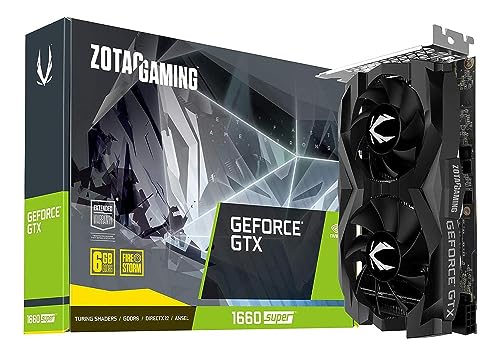
ZOTAC Gaming GeForce GTX 1660 Super Graphics Card — Compact Super, badge unstated
ZOTAC’s 1660 Super makes a different promise from MSI’s: the same GPU and the same 6GB of GDDR6 on a 192-bit bus, compressed into a super-compact frame, as its title states. That framing is the pick’s entire identity — this is the 1660 Super for small cases, for the living-room VR machine built into a compact chassis beside the television, for the small-form-factor rig that travels to the room with the play space. VR, uniquely among gaming workloads, often dictates the machine’s location rather than merely its power, and a compact card serves the room-scale reality of the hobby.
The documentary flag must fly here exactly as the guide promised: this listing’s title does not print “VR Ready”. The silicon is the same GTX 1660 Super graded as VR-capable in its MSI form above, and the generational reasoning is identical; but the badge is a claim, the claim is absent from this title, and the spec box records the absence rather than borrowing the sibling listing’s words. That distinction carries weight at the decision point; reasoning from silicon alone finds the same GPU wearing a smaller cooler.
The cooler is the honest trade inside the pick. Compact dual-fan designs of this class move less air than the Gaming X’s larger shroud, and in a small case the card’s sustained behaviour depends on the chassis’s cooperation. VR sessions are long full-load sessions, so the small-case builder should treat airflow as part of this purchase — a case with a real intake path, cables dressed clear, and the overlay’s frame-time graph checked during the first long session. Arranged that way, the compact Super delivers the family’s VR experience from a machine half the size, which for many living rooms is the difference between a VR rig that exists and one that remains a plan.
ZOTAC’s specialisation in compact performance cards is the pick’s supporting credential: the maker built its name on exactly this compression, generation after generation. The card asks more of its case than its siblings do and gives back the room the hobby needs. In VR, that exchange is often the right one.
- Memory: 6GB GDDR6, 192-bit bus
- VR Ready: Not stated in the listing title — verify with ZOTAC documentation
- Form factor: super compact, as stated in the listing title
- Model: ZT-T16620F-10L, per the listing title
Strengths:
- Full 1660 Super silicon in a super-compact frame for small VR rigs.
- Same GDDR6 memory system as the larger 1660 Super cards.
- ZOTAC’s compact-card specialisation stands behind the design.
Trade-offs:
- The title omits the VR Ready wording its MSI sibling carries.
- Compact cooling leans on the small case’s airflow during long sessions.
- The family’s 6GB ceiling applies unchanged.
Best for: a buyer seeking 1660 Super VR performance inside a compact living-room machine. Not suited for: a sealed small case with no real intake path.
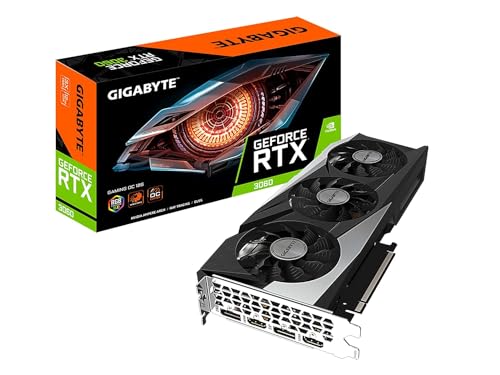
GIGABYTE GeForce RTX 3060 Gaming OC 12G Graphics Card — 12GB Ampere with triple fans
The RTX 3060 changed VR’s middle class by doubling its memory. GIGABYTE’s Gaming OC variant states its configuration plainly: 12GB of GDDR6 on a 192-bit bus, a three-fan WINDFORCE cooler, factory overclock, revision 2.0. Twelve gigabytes is the specification that matters most for the headsets that arrived after the 1660 generation — higher-resolution panels whose frame buffers and texture loads treat 6GB as a ration. In simulators especially, where scenery streams constantly, the 3060’s memory converts directly into smoothness: fewer hitches, higher sustainable settings, and supersampling headroom the older cards cannot offer.
Its title, like the ZOTAC’s, does not print “VR Ready”, and the spec box flags that in the guide’s consistent manner. The generational case is nonetheless the strongest in the middle of this ladder: Ampere architecture, the RTX feature set including DLSS for the VR titles that support it, and a memory configuration that became the mainstream VR recommendation of its era. The guide grades it exactly so — a card whose VR standing rests on its architecture and memory, stated openly, rather than on a badge its seller did not print.
The triple-fan cooler is the variant’s argument against its own sibling below. Three fans moving air across a long heatsink give the Gaming OC the thermal headroom to hold its factory overclock through marathon sessions with the least acoustic effort of the 3060 pair — a property VR rewards, because the player is often in the same room as the machine, wearing headphones that leak the room’s noise into the experience’s edges. Length is the counter-consideration: a three-fan card needs a case that swallows it, and compact builds should read the next pick instead.
Placed on the ladder, this is the roundup’s sweet spot for a current mainstream headset: memory for its resolution, features for its newest titles, cooling for its longest sessions. The 2070 Super above it is faster in raw terms; the 3060’s case rests on the whole package’s modernity, and for a buyer pairing a card with a headset bought in the same era, that modernity usually wins the argument.
- Memory: 12GB GDDR6, 192-bit bus
- VR Ready: Not stated in the listing title — verify with GIGABYTE documentation
- Cooling: 3X WINDFORCE fans, factory overclocked (OC), revision 2.0
- Model: GV-N3060 Gaming OC 12G (REV2.0), per the listing title
Strengths:
- 12GB is the memory figure newer headsets and simulators actually reward.
- Triple-fan cooling sustains clocks quietly through long VR sessions.
- DLSS support in compatible titles buys frame-rate headroom intelligently.
Trade-offs:
- The title omits the VR Ready wording, leaving the case to architecture and memory.
- Three-fan length excludes compact cases.
- Raw throughput sits below the 2070 Super at the ladder’s top.
Best for: a buyer seeking a memory-rich card for a current mainstream headset and simulator libraries. Not suited for: a compact case, or a purchase that requires the badge printed on the listing.

GIGABYTE GeForce RTX 3060 WINDFORCE OC 12G Graphics Card — The twin-fan 3060 variant
Two RTX 3060s in one guide require the difference to be worth a section, and it is: this WINDFORCE OC rev. 2.0 carries the same 12GB of GDDR6 on the same 192-bit bus behind a two-fan cooler, in a shorter, more case-friendly frame. Everything said about the generation above — the memory’s value to newer headsets, DLSS in supported titles, the Ampere feature set — applies identically, because the silicon and its memory system are the same purchase. The choice between the GIGABYTE pair is a choice about the case and the cooler, not about VR capability, and this guide treats it with that clarity rather than inventing a performance gap.
The twin-fan design’s virtues are fit and simplicity. Shorter cards clear drive cages and front radiators that stop triple-fan designs, and mid-tower cases — the majority of VR machines, parked beside desks and televisions — accept this variant without a tape measure’s anxiety. Its cooling remains a proper dual-fan WINDFORCE arrangement, factory overclocked like its sibling; the thermal difference appears at the margins of sustained load in warm rooms, where the triple-fan card breathes easier, rather than in ordinary sessions where both hold their pace.
The title’s silence on VR Ready is flagged here as it was for its sibling — the same documentation note, the same generational reasoning in answer. A buyer comparing the two GIGABYTE listings is really comparing photographs of coolers and a dimension line, and should decide on exactly those grounds: measure the case, consider the room’s warmth and the session lengths the machine will serve, and let the silicon’s identity make the rest of the decision easy.
There is a fleet echo worth mentioning for households and clubs running more than one VR machine: standardising on one 3060 variant simplifies drivers, spares and tuning notes across rigs. The twin-fan card’s broader case compatibility makes it the easier standard to adopt — a small, practical argument that has decided many real purchases between identical twins.
- Memory: 12GB GDDR6, 192-bit bus
- VR Ready: Not stated in the listing title — verify with GIGABYTE documentation
- Cooling: 2X WINDFORCE fans, factory overclocked (OC), revision 2.0
- Model: GV-N3060WF2OC-12GD Rev2.0, per the listing title
Strengths:
- The full 12GB Ampere package in a shorter, case-friendly frame.
- Identical silicon and memory to the triple-fan variant.
- Dual-fan cooling suits the mid-tower cases most VR machines use.
Trade-offs:
- The title omits the VR Ready wording, as its sibling’s does.
- Two fans leave less thermal margin in warm rooms during marathon sessions.
- Still a mainstream card; the ladder’s ceiling sits one pick above.
Best for: a buyer seeking the 12GB RTX 3060 experience in a standard mid-tower VR machine. Not suited for: a hot room and marathon simulator sessions, where the triple-fan sibling breathes easier.

ASUS GeForce RTX 2070 Super EVO Graphics Card — The roundup’s performance ceiling
The RTX 2070 Super closes the ladder from above. ASUS’s Dual-Fan EVO edition states its credentials in the title — overclocked, 8GB of GDDR6, VR Ready printed outright, HDMI and DisplayPort — and the silicon beneath them was the enthusiast tier of the Turing generation: a card that, in its moment, represented VR without meaningful compromise, driving the era’s best headsets at native settings with headroom to supersample. That headroom is the pick’s continuing argument. Supersampling — rendering above the headset’s native resolution for a cleaner image — is the first luxury VR players reach for, and it is purchased purely with spare GPU capacity of exactly the kind this card holds over the rest of the roundup.
The generational cross-examination belongs in this section, because the 3060 pair contests this pick’s throne from below. The 2070 Super’s raw throughput exceeds theirs; the 3060’s memory exceeds its 8GB, and its DLSS generation is newer. For the classic and middle-era SteamVR library, throughput rules and this card leads. For the newest texture-heavy titles on high-resolution headsets, the memory argument gains weight. The guide’s honest summary is that the ceiling depends on the library: players devoted to the platform’s established catalogue will find this card the strongest here, while players buying for the newest releases should weigh the 3060’s memory with equal seriousness.
ASUS’s EVO execution is the sensible enthusiast pattern — a dual-fan cooler of honest proportions, a factory overclock, no theatrical excess — and its VR Ready title gives it the printed credential three of its companions lack. As a used and remaining-stock proposition it also benefits from the enthusiast tier’s ownership pattern: cards of this class were typically housed well and monitored by their owners. Verification of the individual unit’s condition is the buyer’s ordinary duty with any card of its age.
As the ladder’s top, it defines what the others are measured against: the frame-time headroom that turns reprojection from a resident into a stranger. Stepping up from a floor-tier card to this one, the difference is best described as calm — the world simply stops arguing. That calm is what the ceiling pick sells, and for the library it suits, nothing below it quite counterfeits the sensation.
- Memory: 8GB GDDR6
- VR Ready: stated in the listing title
- Cooling: dual-fan EVO edition, factory overclocked
- Outputs: HDMI and DisplayPort named in the title
- Model: DUAL-RTX-2070S-O8G-EVO, per the listing title
Strengths:
- The roundup’s highest raw performance, with VR Ready printed in the title.
- Supersampling headroom is the luxury this tier uniquely affords here.
- Enthusiast-tier build and ownership patterns suit the used market.
Trade-offs:
- 8GB trails the 3060 pair’s 12GB for the newest texture-heavy titles.
- Its generation’s efficiency asks more of the power supply than the 3060’s.
- Age makes per-unit condition part of the purchase decision.
Best for: a buyer seeking the strongest printed-credential VR card for the established SteamVR library. Not suited for: a library of the newest releases played on the highest-resolution headsets.
Three Generations at the Headset: Comparing the Six Steam VR Picks
| Pick | Memory | VR Ready in title | Cooling | Generation |
|---|---|---|---|---|
| MSI GTX 1660 Ti Gaming X | 6GB GDDR6 | Yes, stated | Dual fan | Turing value flagship |
| MSI GTX 1660 Super Gaming X | 6GB GDDR6 | Yes, stated | Dual fan | Turing mainstream |
| ZOTAC GTX 1660 Super | 6GB GDDR6 | Not stated in the listing title | Compact design | Turing mainstream, small frame |
| GIGABYTE RTX 3060 Gaming OC | 12GB GDDR6 | Not stated in the listing title | 3X WINDFORCE fans | Ampere mainstream |
| GIGABYTE RTX 3060 WINDFORCE OC | 12GB GDDR6 | Not stated in the listing title | 2X WINDFORCE fans | Ampere mainstream |
| ASUS RTX 2070 Super EVO | 8GB GDDR6 | Yes, stated | Dual fan | Turing enthusiast |
The table’s middle column is the guide’s conscience: printed claims on one side, generational reasoning on the other, never blended. The memory column tells the era’s story in numbers — VR’s appetite doubled between the 1660 generation and the 3060’s — while the generation column reminds the reader that the oldest flagship and the newest mainstream card are, in VR terms, close relatives with different strengths.
What Else in the Machine Decides the VR Experience?
The processor is the silent partner in every frame. VR’s draw-call and physics loads are CPU-hungry in the simulator genres especially, and a graphics card waiting on a saturated processor produces the same reprojection as a weak GPU, with the frame-timing graph as the only witness able to tell the two apart. That graph separates CPU frame time from GPU frame time, and a buyer should read it before upgrading either component. Memory follows the same logic: a system starved of RAM swaps at the moments VR can least forgive, and dual-channel configuration remains the cheapest frame-time insurance in the whole machine.
The USB and tracking side completes the chain for headsets that depend on it, and the play space itself is a system component in room-scale VR — lighting that tracking cameras can read, boundaries set honestly, a cable path or wireless arrangement that does not intrude. None of this diminishes the graphics card’s centrality; it locates it. The card is the largest single contributor to VR comfort, inside a chain whose other links this guide refuses to pretend away.
How Do You Set Up a SteamVR Machine So the Card Can Prove Itself?
Begin with the unglamorous foundations. Seat the card, connect the headset to its outputs directly — the DisplayPort or HDMI on the card itself, never the motherboard’s — and install the current driver before SteamVR’s own setup. In the machine’s power settings, choose the performance plan; in the driver panel, leave the card’s power management at its default high-performance behaviour for the VR executables. A surprising share of “weak card” reports are actually a headset plugged into integrated graphics or a driver two years old, and both faults are free to fix.
Then measure before tuning. SteamVR’s frame-timing display, watched during a representative title, shows GPU frame time against the headset’s budget and counts reprojected frames honestly. Establish the baseline at the headset’s native resolution scale. If frame times sit comfortably inside budget, spend the surplus on supersampling in small steps. If they spill, reduce the resolution scale first — it is the single most powerful lever — then the title’s shadow and effects settings, checking the graph after each change rather than changing everything at once and learning nothing.
Room and thermals complete the setup. A VR machine works at full load for hours in a room whose player is also generating heat and motion; give the case its intake air, keep the play space’s boundaries honest, and re-check frame times on a warm evening rather than only on a cool morning. The goal of the whole exercise is a machine whose performance the player never thinks about — in VR, the highest compliment a system can earn is invisibility.
One further ritual separates reliable VR machines from temperamental ones: the five-minute pre-flight. Before a long session, confirm the headset’s firmware and the graphics driver are the versions the setup was tuned on, close the background applications that compete for the GPU, and glance at the frame-timing baseline in a familiar scene. Updates to any layer of the stack can shift performance quietly, and catching the shift in the ritual — rather than mid-race, mid-flight, mid-match — is the difference between maintaining a system and debugging one.
What Mistakes Make a Capable VR Card Feel Inadequate?
The first is plugging the headset into the wrong socket — the motherboard’s output, driven by integrated graphics — and concluding the new card is broken. The second is supersampling by enthusiasm: raising the resolution scale because the menu offers it, then blaming the card for the reprojection that follows. The third is judging VR by a benchmark’s average frame rate, a statistic that conceals exactly the frame-time spikes headsets punish; the overlay’s graph is the only honest judge in the room.
The fourth mistake is cross-generational pairing without adjustment — a floor-tier card of an older generation meeting a current high-resolution headset, expected to run native settings because both boxes say VR in their marketing. This guide’s generational placement exists to prevent that pairing’s disappointment. The fifth is neglecting the rest of the chain: an ageing processor, a single stick of memory, or a thermally throttled compact case can each starve a capable card, and VR’s latency chain reports the weakest link without naming it. Diagnose with the frame-timing tools, which separate GPU time from CPU time, before spending on either.
The sixth mistake is buying the card before the headset decision settles. The headset’s resolution and refresh are the workload’s definition; a card chosen in the abstract is a guess wearing a specification. Decide the headset — or at least its class — first, then read this ladder against that class. The seventh is quieter: leaving the machine’s other displays and streaming software running during VR sessions, taxing the same GPU the headset needs. A dedicated VR machine, or a disciplined pre-flight closure of background loads, protects the frame budget the whole purchase was made to buy.
Final Recommendation
Choose by headset and library, in that order. A mainstream headset and the classic SteamVR catalogue belong to the 1660 pair — the Ti and the Super are near-twins, both carrying the printed badge, with the ZOTAC serving the compact machine on generational reasoning. A current headset and a living library belong to the RTX 3060, whose 12GB is the middle of this ladder’s real argument; take the triple-fan Gaming OC for long sessions and large cases, the twin-fan WINDFORCE for standard towers. The established library played at its best belongs to the 2070 Super, the ceiling pick with the badge printed and supersampling headroom in hand.
Notice that every verdict in that paragraph pairs a card with a headset class and a library, never with an abstract ranking. That is the guide’s method in miniature, and it is worth carrying into any VR purchase beyond this page: the workload is a headset, a room and a shelf of titles, and the correct card is the one whose generation matches all three.
Whichever rung is chosen, tune it with the frame-timing graph rather than with hope, and the headset will repay the discipline the only way VR can — by disappearing, and leaving the player alone inside the world it renders.
That disappearance is a measurable thing, counted in reprojected frames avoided and sessions that end from satisfaction rather than from strain. It is also, not coincidentally, the sensation every card in this guide was originally sold to produce — the generations differ in how much world they can hold steady, never in what the steadiness is for. Choose the generation that matches the headset on the desk, verify the result in the frame-timing graph during the first week, and the machine settles into the background of the hobby where it belongs.
Frequently Asked Questions
What is the minimum graphics card tier for SteamVR?
The working floor of the platform’s mainstream era is the class represented here by the GTX 1660 family: cards of that generation were the standard recommendation for the headsets of their time and remain coherent for that library. Below that floor — display-class cards such as the GT 730 or RX 550 — SteamVR becomes an exercise in reprojection, which is why no such card appears in this guide. The floor should be read as a pairing, though: it assumes a headset from the same era, at its native settings, with the frame-timing graph as the final arbiter for any individual machine.
Does VR Ready on a listing guarantee a good experience?
It guarantees the maker’s claim that the card meets the VR bar of its era, which is meaningful evidence — three picks here carry it in their titles. The experience itself still depends on the headset’s resolution, the title’s demands and the settings chosen. Treat the badge as admission to the conversation, then tune with SteamVR’s frame-timing tools for the verdict that matters.
Why do two picks lack the VR Ready wording if their silicon is capable?
Because listing titles are written by sellers with different habits, and the badge’s absence is not evidence of incapacity — the RTX 3060 pair are the clearest example, their 12GB and Ampere architecture making the generational case plainly. This guide flags the absence in each spec box so the reader can weigh printed claims and architectural reasoning as the separate things they are.
Is 6GB of memory enough for VR?
For the headsets and library of the 1660 generation, yes, with settings tuned by evidence. For newer high-resolution headsets and texture-heavy simulators, 6GB becomes the binding constraint, and the 12GB of the RTX 3060 picks is the roundup’s direct answer. Memory in VR is spent on frame buffers and streamed scenery, and its shortage appears as hitching rather than as a clean reduction in quality. The simulator genres — flight above all — are where the shortage announces itself first, because their scenery never stops arriving.
RTX 2070 Super or RTX 3060 for SteamVR?
The 2070 Super brings more raw throughput and the printed VR Ready claim; the 3060 brings 12GB against 8GB and a newer feature generation including its DLSS. Established libraries favour the Super’s strength; the newest releases on dense headsets increasingly favour the 3060’s memory. The guide’s ladder places the Super at the ceiling for the classic catalogue and the 3060 as the modern mainstream choice, and either is a defensible purchase argued from the library actually played.
Can a compact PC run SteamVR properly?
Yes, with the ZOTAC 1660 Super as this guide’s example: full mainstream silicon in a super-compact frame, provided the case gives it air. Compact VR machines are common because the play space often lives in the living room. The conditions are airflow, a power supply sized for the card, and frame-time verification during the first long session — the same discipline as any VR build, applied in a smaller box.
How long will a card from this guide stay comfortable in VR?
As long as the headset paired with it stays current in the player’s own setup — VR hardware ages as a pair, not as separate components. A 1660-class card with a headset of its generation remains a coherent system indefinitely for that library; the discomfort arrives when a newer, denser headset joins an older card. Buy the card and headset as a matched generation, and the system’s useful life is set by the player’s curiosity rather than by a specification expiring.
Related Guides
VR sits at the performance end of this programme’s graphics coverage. For the opposite constraints, see our guides to the best graphics cards that take board power, the best passively cooled graphics cards and the best graphics cards for machine learning — the last of which follows these same GPU generations into far heavier work. Read together, the four guides trace one continuous question — how much graphics a machine needs — from a card that sips power through a slot to cards that hold entire virtual worlds steady at ninety frames a second.


