What's inside
- Key Takeaways
- Quick Picks
- How Did We Choose Cards for a Guide About Silence?
- Why Does Removing the Fan Cap a Card’s Power So Firmly?
- How Does a Fanless Heatsink Actually Move Heat?
- Where Does a Fanless Card Earn Its Silence?
- How Old Is Too Old for a Fanless Card?
- What Does Silence Cost, and What Does It Save?
- The Six Passively Cooled Picks in Detail
- Six Silent Designs, Three Generations: the Fanless Lineup Compared
- How Do You Give a Passive Card the Air It Needs?
- What Mistakes Spoil a Fanless Build?
- Final Recommendation
- Frequently Asked Questions
- Related Guides
As an Amazon Associate I earn from qualifying purchases. This post may contain affiliate links at no extra cost to you.
gizmoverdict.com is reader-supported. When you buy through links on our site, we may earn an affiliate commission.
Where to buy: Each card below links to its Amazon listing. Because several of these designs are older models still circulating through sellers, read the condition and the exact model string on the listing before ordering — with fanless cards of a certain age, the precise variant matters more than the headline name.
The best passively cooled graphics cards make a promise no fan can make: silence that cannot wear out. A passive card carries no fan at all, moving its heat into a finned heatsink and letting the case’s ambient air carry that heat away. There is no bearing to grow rough, no fan curve to tune, no small whine arriving in the third year of ownership. For a living-room media PC, a recording-room workstation, a bedroom machine or any computer that shares space with sleep and conversation, that absence is not a minor specification. It is the entire point of the purchase.
Honesty must walk beside the romance from the first paragraph. Passive cooling caps a card’s power appetite at what a heatsink can shed, and that cap has kept the category at the frugal end of graphics for a decade. The six picks here are display and light-duty designs — several of them genuinely old, built on GPU generations whose driver support has narrowed to legacy status. This guide says so under each pick, plainly, because a silent card bought for the wrong workload is not a bargain at any price. What these cards do superbly is the quiet work: driving monitors, decoding video, and disappearing into a machine’s life without ever announcing themselves. Where a listing title states the passive design outright, the guide reports it; where a title leans on a product-line name instead, the spec box records exactly that distinction.
Key Takeaways
- Passively cooled means no fan anywhere on the card — a heatsink and the case’s airflow do all the work.
- The category lives at low power by physical necessity, so every pick here is a display-class or light-duty design.
- Three picks state passive or silent design directly in the title; the others carry it in a product-line name or leave cooling unstated.
- Several picks are old silicon with legacy driver support, a fact stated openly under each one rather than discovered later.
- A passive card still needs moving air somewhere in the case; a sealed, fanless-everything box starves it.
- The newest design here is a GT 1030; the oldest are Radeon HD 5000-series cards from the start of the last decade.
Quick Picks
| Pick | Badge | Why it earns its place |
|---|---|---|
| EVGA GeForce GT 1030 SC 2GB GDDR5 Passive Graphics Card | Newest silicon on the silent shelf | A low-profile GT 1030 with GDDR5 memory and passive cooling stated in the name — the most modern design here. |
| ASUS GeForce GT 730 2GB GDDR5 Graphics Card | Single-slot silence from ASUS | Passive cooling and a single-slot design stated in the title, with boosted energy efficiency in the maker’s own words. |
| ZOTAC GeForce GT 730 Zone Edition 4GB DDR3 Graphics Card | The 4GB fanless-line variant | ZOTAC’s Zone Edition name marks its fanless range, carrying the largest memory figure among the GT 730 picks. |
| HIS Radeon HD 5450 Silence 1GB DDR3 Video Card | Silence in the name, legacy in the silicon | An HD 5450 with HDMI, DVI and VGA for older displays, written about here with its age in full view. |
| XFX AMD Radeon HD 5450 1GB GDDR3 Graphics Card | Low-profile legacy display card | A 1GB low-profile HD 5450 with VGA, DVI and HDMI; its title leaves the cooling design unstated. |
| ASUS HD 6450 Silent Video Card EAH6450 SILENT | 0dB silent heat sink, half a gigabyte | ASUS’s silent-heatsink HD 6450 with 512MB of DDR3, the smallest and oldest-spirited pick in the roundup. |
How Did We Choose Cards for a Guide About Silence?
The first test was definitional and strict: the card’s design had to centre on fanless operation. Titles stating “Passive” or a silent-heatsink design passed on their own words. ZOTAC’s Zone Edition passed on the strength of the maker’s own naming, since that line exists for fanless designs, with the distinction recorded in its spec box. The XFX pick was admitted with its title’s silence on cooling flagged rather than resolved by assumption, because a reader building for silence deserves to see which listings prove the property and which leave it to the product page. Replacement fans, aftermarket heatsinks with fans fitted, and actively cooled variants of these same GPUs were excluded throughout — a fan wearing a passive card’s name is not a passive card.
The second test was candour about generation. This category’s shelf is old, and pretending otherwise would corrupt every recommendation built on it. Each pick’s era is named in its section, along with the practical consequences: legacy driver branches, display standards of their time, and workloads matched to what the silicon can still do gracefully. A card can be old and correctly recommended when the job is old too — driving a monitor, feeding a signage screen, decoding video — and several of these picks are exactly that.
The third test was the honesty of the whole proposition. A passive card trades performance for silence at a fixed exchange rate set by physics, and the guide refused picks whose listings dressed that trade in gaming language the hardware could not honour. What survived is a ladder of quiet: the newest and most capable at the top, the legacy designs below, each placed where its silence is worth most.
Why Does Removing the Fan Cap a Card’s Power So Firmly?
A fan is a heat pump’s best friend: it forces air across fins at a rate still air never matches, multiplying the heatsink’s effective capacity. Remove it, and the heatsink must shed heat at the pace of natural convection and whatever gentle current the case provides. The mathematics settles quickly — a fanless card must live on a small power budget, typically the sort of draw a display-class GPU produces, because every watt becomes heat that has nowhere hurried to go. That is why this category’s membership has barely changed in a decade: the physics admitted entry-level silicon in 2012, and the physics admits roughly the same class today.
Designers answer with fin area and placement. Passive heatsinks grow tall, wide or cleverly folded to present more surface to the air, and the best of them orient their fins so rising warm air draws cooler air behind it — a chimney the card builds for itself. Case airflow completes the circuit. A passive card in a case with one slow fan moving air past the slots lives comfortably; the same card in a sealed box with no air movement at all slowly cooks, throttling or misbehaving despite having no fault of its own. Silence, in other words, is a system property, and the card is only its most visible contributor.
The reward for respecting those limits is a peculiar kind of reliability. Fans are the moving part that ages loudest in a graphics card; bearings dry, blades accumulate dust unevenly, and a card silent at purchase can hum by its third year. A passive heatsink has no such biography. Cleaned of dust occasionally, it performs in year six exactly as it did in week one, which is why fanless cards persist in signage, industrial and media machines long after their silicon’s fashion has passed.
There is a design corollary worth noticing when the six picks are compared side by side: the heatsink is the product. On an actively cooled card the visible shroud is packaging around a fan; on these cards the finned block is the entire cooling engineering, exposed to view and to judgement. Makers known for the class — and ZOTAC’s Zone Edition line and ASUS’s silent models are the guide’s examples — treat that block with a care usually reserved for flagship coolers, because there is nothing else to hide behind. A well-made passive heatsink is a small piece of honest industrial design, and it tends to be the last part of the machine still performing exactly to specification.
How Does a Fanless Heatsink Actually Move Heat?
The mechanism is quiet in every sense. Heat flows from the GPU die into a metal base, spreads through heat pipes or a vapour plate on the better designs, and arrives in a forest of thin fins whose combined surface area dwarfs the card’s footprint. Air touching those fins warms, rises, and pulls cooler air in behind it — convection doing the work a fan would otherwise be hired for. Fin spacing is the design’s central compromise: fins packed tightly multiply surface area but resist the gentle air currents passive designs depend on, while fins spaced widely breathe easily and shed less. The heatsinks on these six cards are period answers to that compromise, sized to GPUs whose heat output a fin forest can genuinely handle.
Orientation quietly decides how well the trick works. Fins aligned with the case’s airflow — typically front to back in a tower, upward in a vertical arrangement — let the stream pass through the forest rather than against a wall of metal. This is why two installations of the same card can report different temperatures with both owners telling the truth: the card is half the system, and the case’s air path is the other half. Treating the heatsink and the airflow as one design, rather than as a product and an afterthought, is what earns the silence the category promises.
Where Does a Fanless Card Earn Its Silence?
The media PC is the canonical home. A machine feeding a television sits in a room arranged for listening, and its graphics card’s fan would be the loudest component in it during quiet scenes. A passive card removes that voice entirely, leaving only the processor’s cooling to manage — and in a well-planned media build, that too is quiet. Add the low-profile framing most of these picks carry, and the result is a small, silent box that drives a large screen without ever entering the room’s soundscape.
Studios and bedrooms make the second case. A recording space treats every decibel as contamination, and a machine that must sit in the room while microphones are open cannot carry a fan with opinions. Bedroom and study machines make the gentler version of the same argument: a computer used at night, in a shared house, owes its household a quiet operation that a passive card guarantees structurally rather than by a fan curve’s good behaviour.
The third home is the unattended display — signage, kiosk, dashboard, reception screen. Such machines run for years in public or semi-public view, serviced rarely, and their ideal graphics card is the one with nothing to wear out. The legacy picks in this guide persist in exactly that service across the world, and their continued availability is the market’s testimony that the job is real.
A fourth home has become common as households accumulate screens: the second machine. A spare desktop in a guest room, a workshop computer, a homework station — each spends its life doing light work in rooms where a fan’s drone would be the loudest thing present. A passive card suits these machines out of proportion to its specification, because their workloads are exactly the category’s workloads and their rooms are exactly the category’s rooms. Silence, in a house with several computers, is a form of courtesy that scales.
How Old Is Too Old for a Fanless Card?
Age matters through three channels, and each deserves separate judgement. The first is drivers: GPU vendors move old architectures to legacy branches and eventually stop updating them, so a card from the HD 5000 generation runs on drivers frozen years ago. For a fixed display job on a stable operating system that freeze is tolerable; on a current operating system expecting current driver models, it can become a hard incompatibility rather than a mere lack of polish. The second channel is display standards: older cards carry the HDMI and DVI revisions of their era, which cap resolutions and refresh rates below what current monitors offer. The third is video formats: hardware decode support belongs to generations, and a card from 2010 decodes the web’s current codecs in software, leaning on the processor.
None of those channels forbids the purchase; together they define its correct shape. A legacy fanless card belongs in a machine with a settled job — a specific monitor at a specific resolution, a signage loop, an older system kept alive — where its limits never intersect the work. It does not belong in a new build expected to grow. The GT 1030 pick sits at the category’s young end precisely because its driver and decode story remains current enough for a media machine bought today, while the HD-series picks are presented as what they are: veterans for veteran assignments.
What Does Silence Cost, and What Does It Save?
The cost side of the ledger is performance headroom, paid once and visibly: the fanless shelf tops out where its heatsinks do, and no pick in this guide will be mistaken for gaming hardware. The saving side compounds quietly. A passive card draws little power, so it suits weak power supplies and always-on machines whose electricity bill is a real line item. It has no fan to replace, no bearing to fail at year four, no acoustic character that changes as it ages. In an unattended installation — the signage player above a shop counter, the kiosk in a lobby — the saving is measured in service visits that never happen.
There is also a subtler saving in attention. A quiet machine leaves its owner’s mind alone; a machine with a developing fan noise taxes it daily, in the background, at the level of mood rather than money. Builders of living-room and bedroom systems understand this instinctively, and it is why the category survives every prediction of its death: the demand for a computer that cannot be heard is not a niche preference but a permanent feature of putting machines where people live.
The Six Passively Cooled Picks in Detail
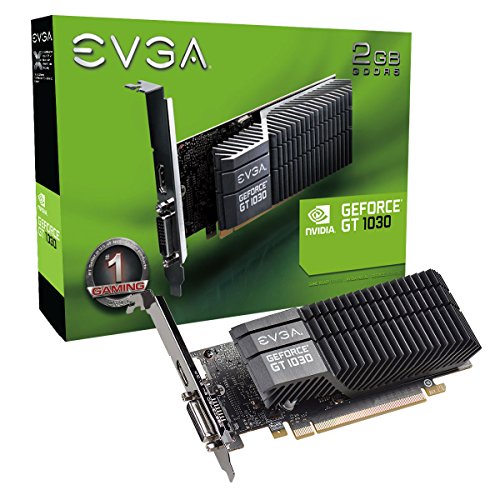
EVGA GeForce GT 1030 SC 2GB GDDR5 Passive Graphics Card — Newest silicon on the silent shelf
EVGA’s GT 1030 SC is the pick that lets a silent build stay reasonably current. The title states the essentials without flourish — GT 1030 SC, 2GB of GDDR5, passive, low profile, and the model string 02G-P4-6332-KR for exact identification. GDDR5 matters here: the GT 1030 exists in a slower DDR4 variant elsewhere in the market, and this listing’s memory is the proper graphics memory, which keeps the card’s light-duty performance honest. The SC designation marks EVGA’s factory-tuned tier within its range, a modest distinction on a modest GPU, but the passive heatsink wrapped around it is the real specification — a full fanless design from a maker whose support operation was long a byword in this industry.
Its working territory is the modern desktop done quietly: dual-display office work, 4K-era video playback with the generation’s hardware decode, photo handling, and the lighter end of casual gaming at restrained settings. In a media PC it is the strongest silent option in this guide, the one pick whose video and driver story a buyer in the present tense can adopt without checking the calendar twice. EVGA’s exit from the graphics-card business adds a practical note — support runs through remaining channels and the seller rather than a living product line — which the guide records rather than hides, while noting that a passive card’s lack of moving parts is itself a form of longevity insurance.
Fit is the final virtue. Low-profile framing suits the slim cases media and office machines inhabit, and the heatsink’s appetite for a gentle stream of case air is the only installation condition attached. Give it that, and this card performs the category’s trick at its highest level: a machine that gains modern display behaviour and loses an entire category of noise.
A word about expectations for its gaming fringe: the GT 1030’s generation plays older and lighter titles credibly at modest settings, and in a silent build that fringe is a bonus rather than a brief. The card was not bought to chase frame rates; it was bought so the machine could sit in a quiet room. Judged by that brief — the brief printed in its own name — it is the most complete pick in this guide.
- Memory: 2GB GDDR5
- Cooling: passive, as stated in the listing title
- Form factor: low profile
- Model: 02G-P4-6332-KR, as printed in the listing title
- Outputs: Not stated in the listing title — verify with EVGA documentation
Strengths:
- The newest GPU generation in this roundup, with GDDR5 rather than the slower DDR4 variant.
- Passive and low profile together suit slim media and office cases exactly.
- EVGA’s model string in the title makes the exact variant easy to verify.
Trade-offs:
- 2GB of memory confines it to light-duty work and modest settings.
- EVGA no longer sells graphics cards, so support runs through remaining channels.
- Outputs go unnamed in the title and need a documentation glance before purchase.
Best for: a buyer seeking the most current fanless card for a quiet media or office machine. Not suited for: a gaming build expecting modern titles at generous settings.

ASUS GeForce GT 730 2GB GDDR5 Graphics Card — Single-slot silence from ASUS
ASUS’s GT 730 entry states its design in the fullest terms of any pick here: PCIe 2.0, single-slot design, passive cooling, and boosted energy efficiency, all printed in the title beside 2GB of GDDR5. That completeness lets the section spend its words on placement rather than verification. The GT 730 generation is a display GPU of the previous decade, reissued across the years because the job it does — driving screens quietly — never went away. ASUS’s version adds the maker’s fanless heatsink practice and the efficiency framing the title advertises, in a card one slot thick that leaves its neighbour free.
The age accounting must be done plainly. GT 730 drivers live on NVIDIA’s legacy branch: stable, finished, and no longer evolving. On a machine with a settled workload that is a description of reliability; on a machine expected to chase new software it is a boundary. The card’s display behaviour belongs to its era as well, suiting mainstream resolutions and refresh rates rather than the current extremes. Within those borders the proposition is sound and even attractive — a silent, single-slot card from a major maker, feeding displays for office, signage or media work, at the category’s characteristically modest cost of ownership in power and heat.
Its pairing of properties deserves a final emphasis, because it is rarer than it sounds: passive and single-slot together mean the card asks the host machine for nothing — no fan header of consequence, no second slot, no airflow heroics. In a crowded small case or a signage player, that triple modesty is the specification that matters, and this pick states all of it on its own title.
Signage players deserve the specific mention, because this card reads like a specification written from maintenance experience: one slot, no fan, a major maker’s documentation, displays driven without fuss for years at a stretch. A player bolted behind a screen in a public place is serviced on a ladder, at a cost per visit that dwarfs the card’s price — the strongest economic argument in this entire guide for buying the design with nothing to wear out.
- Memory: 2GB GDDR5
- Cooling: passive cooling, as stated in the listing title
- Slot design: single-slot design, as stated in the listing title
- Interface: PCI Express 2.0
- Maker’s framing: boosted energy efficiency
Strengths:
- The title states the passive design, the slot width and the interface without omission.
- Single-slot framing preserves the neighbouring slot in crowded small cases.
- ASUS documentation and support give an older design a proper paper trail.
Trade-offs:
- Legacy driver status means stability without further development.
- Display standards belong to its generation, capping resolution ambitions.
- 2GB of GDDR5 serves desktops and video, not games of any recent vintage.
Best for: a buyer seeking a silent single-slot display card from a major maker. Not suited for: a machine expected to keep pace with current software and displays.

ZOTAC GeForce GT 730 Zone Edition 4GB DDR3 Graphics Card — The 4GB fanless-line variant
ZOTAC’s Zone Edition name carries the meaning here: the maker reserves that label for its fanless designs, cards built around a heatsink rather than a fan for silent operation. This GT 730 Zone Edition pairs the concept with the largest memory figure among the guide’s GT 730 picks — 4GB — though the memory is DDR3 rather than GDDR5, a distinction the next sentences weigh honestly. The interface is PCI Express 2.0 x16 running at x8 lanes, as the title states, a limitation that display work will never notice and that belongs in the open anyway.
About that memory: 4GB of DDR3 offers capacity without bandwidth. For a desktop composited across screens, for video, for the ordinary furniture of a working machine, capacity is the relevant half of the bargain and the card performs its job in silence. For anything that leans on memory speed, the DDR3 figure should temper expectations the 4GB headline inflates. This guide places the pick accordingly — a quiet display card with generous capacity for its class, from the one maker that built an entire named line around fanless design.
The documentation note is recorded in the spec box rather than buried: the title communicates the fanless design through the Zone Edition name instead of the word “passive”, and a buyer planning around silence can confirm the design on ZOTAC’s page for the ZT-71115-20L in a moment. That is the whole of the caveat. The card itself is a specialist from a specialist line, and specialists deserve to be read in their own vocabulary.
Its heatsink, in the Zone Edition manner, is the card’s visual identity — a finned block where a fan would sit on the standard model, sized generously because ZOTAC’s silent line never had to share the thermal budget with a fan’s noise. In a case with the gentle airflow this guide prescribes, that block keeps the modest GT 730 die in comfortable territory through long desktop days, which is the entire engineering assignment and one the design has been completing for years.
- Memory: 4GB DDR3
- Cooling: Zone Edition fanless-line design; the word passive does not appear in the listing title — verify with ZOTAC documentation
- Interface: PCI Express 2.0 x16 (x8 lanes), as stated in the listing title
- Model: ZT-71115-20L, as printed in the listing title
Strengths:
- ZOTAC’s Zone Edition line exists specifically for fanless, silent designs.
- 4GB is the largest memory capacity among this guide’s GT 730 picks.
- The x8-lane interface is stated openly and costs display work nothing.
Trade-offs:
- DDR3 memory trades bandwidth for capacity, limiting anything speed-sensitive.
- The fanless claim travels under a line name rather than the word passive in the title.
- The GT 730 generation’s legacy drivers apply to this pick as to its siblings.
Best for: a buyer seeking a fanless display card with extra memory capacity for multi-screen desktop work. Not suited for: a workload where memory bandwidth decides the experience.

HIS Radeon HD 5450 Silence 1GB DDR3 Video Card — Silence in the name, legacy in the silicon
The HIS HD 5450 Silence is the roundup’s elder statesman, and this guide introduces it with its birth certificate showing. The Radeon HD 5450 belongs to the opening of the last decade; the listing title pairs 1GB of DDR3 on a 64-bit bus with HDMI, dual-link DVI with HDCP, and VGA, over PCI Express 2.1 x16. That output trio is a museum of display history in a single bracket — and also, for a machine still driving a VGA monitor or an older DVI screen, a genuinely useful one. The word “Silence” in the product name states the cooling design in the maker’s own vocabulary: a fanless heatsink card from the era when such designs were a standard catalogue item.
The driver conversation must be exact. AMD moved this generation to legacy support long ago, which means the drivers that exist are final; current operating systems may carry basic display support for the card, and a period-correct system will run it as intended, but nobody should buy an HD 5450 expecting a living driver relationship. Video decode likewise belongs to its time. What remains — and it is not nothing — is a silent card that lights older displays reliably, sips power, and costs the host machine no noise and no slot drama. Retirement-home computing, legacy industrial displays, and the faithful old tower in the corner are its parish.
HIS built its name on thoughtful variants of AMD designs, and the Silence line was among its signatures. Buying one today is buying a preserved artefact that still works, with the artefact’s terms: verify the exact variant, expect the packaging and channel of a legacy product, and match it to a job from its own era. Matched that way, it will do the job quietly for as long as the host machine lives.
There is a small community dimension to cards of this vintage: they circulate through second-hand channels, spare-parts drawers and the upgrade piles of long-serving machines, because a fanless heatsink card almost never dies of its cooling. A buyer entering that circulation should check the bracket, the outputs and the card’s cleanliness, then install it with the same confidence the design has earned across a decade of quiet service.
- Memory: 1GB DDR3, 64-bit bus
- Cooling: fanless design under the maker’s Silence name
- Outputs: HDMI, dual-link DVI (HDCP), VGA
- Interface: PCI Express 2.1 x16
- Generation: Radeon HD 5000 series, legacy driver status
Strengths:
- VGA, DVI and HDMI together serve displays from three different eras.
- Fanless Silence design suits unattended legacy machines perfectly.
- Power draw is minimal even by this frugal category’s standards.
Trade-offs:
- Legacy drivers are final; current operating systems offer no evolving support.
- 1GB of DDR3 on a 64-bit bus is the guide’s most modest memory system.
- Video decode predates the formats the modern web prefers.
Best for: a buyer seeking silent display output for an older machine with VGA or DVI screens. Not suited for: a current operating system expected to receive modern driver support.

XFX AMD Radeon HD 5450 1GB GDDR3 Graphics Card — Low-profile legacy display card
XFX’s HD 5450 arrives with the plainest title in the roundup: 1GB of GDDR3, VGA, DVI and HDMI outputs, low-profile framing, PCI Express. Notably absent from that title is any word about cooling, and this guide handles the absence the way it handles every silence — by printing it. The spec box below records that the listing title does not state the cooling design, and a buyer shopping specifically for fanless operation should confirm the arrangement on the product page or XFX’s documentation for the HD545XZQH2 before ordering. The wider HD 5450 family is thick with fanless variants, but family resemblance is not evidence, and silence about silence would be a poor standard for a guide on this subject.
What the title does establish is a coherent legacy display card. Low-profile framing fits the slim desktops of its era and ours; the output trio covers the VGA monitor in the storeroom, the DVI screen on the second desk and the HDMI television alike; and the HD 5450 silicon underneath carries the same legacy-driver story as the HIS pick — final drivers, period video decode, and a desktop competence that persists as long as the job stays within its generation’s borders. XFX was a substantial board partner in that era, and its model string in the title gives the buyer an exact thread to follow into documentation.
Placed honestly, this pick serves the same parish as its HIS sibling — older machines, older displays, quiet undemanding work — with one extra step — a cooling verification, when fanless operation is the reason for the purchase. Take that step, and the card’s remaining story is as settled as any in the guide.
The low-profile bracket question belongs in this pick’s closing note, because slim legacy desktops are its natural destination and brackets are their dialect. Confirm the card ships with, or already wears, the bracket the target case needs; legacy listings vary on the point, and a two-minute message to the seller prevents the classic half-height disappointment at the workbench.
- Memory: 1GB GDDR3
- Cooling: Not stated in the listing title — verify with XFX documentation
- Outputs: VGA, DVI, HDMI
- Form factor: low profile
- Generation: Radeon HD 5000 series, legacy driver status
Strengths:
- Low-profile frame fits the slim legacy desktops that dominate this niche.
- The VGA/DVI/HDMI trio covers the display generations an old machine meets.
- XFX’s model string gives an exact documentation trail to follow.
Trade-offs:
- The title’s silence on cooling makes verification a required step for silence-seekers.
- Legacy drivers and period decode bound it to settled, older workloads.
- 1GB of memory leaves no headroom beyond desktop duty.
Best for: a buyer seeking a low-profile display card for an older machine, with the cooling check done first. Not suited for: a purchase that must be fanless on the evidence of the title alone.

ASUS HD 6450 Silent Video Card EAH6450 SILENT — 0dB silent heat sink, half a gigabyte
ASUS named this card with a measurement: 0dB. The EAH6450 SILENT’s title advertises its silent heat sink directly, alongside HDMI support and the model string EAH6450 SILENT/DI/512MD3(LP) — whose embedded figures tell the memory story for readers fluent in ASUS part numbers: 512MB of DDR3, in a low-profile design. Half a gigabyte is the smallest memory allowance in this roundup, and the guide will not dress it as anything else. The HD 6450 was the entry card of its generation, one step above the HD 5450 picks, and its assignment was always the same: silent, basic display output for machines that asked nothing more.
That assignment still exists, which is the only reason the card appears here. A kiosk refreshing a menu, a workshop machine showing documentation, a legacy desktop driving one modest monitor — these jobs need a card that lights a screen, makes no sound, and never asks for attention again. The HD 6450’s legacy driver status, period display standards and software-decoded modern video all apply, exactly as they do to the other veterans in this guide, and the buyer should hold the same settled expectations. Within them, ASUS’s silent-heatsink execution was a reference design of its kind, and the 0dB claim in the name is the rare marketing line that physics confirms for free.
Consider this pick the category’s floor, stated without condescension: below this level of capability there is no reason to buy a card at all, and at this level there remain real jobs priced accordingly. Match it to one of those jobs and it will outlast, in silence, several generations of louder hardware.
Its frugality deserves the last word in its section. A card drawing a handful of watts can live in machines whose power supplies are themselves antiques, and its heatsink asks the case for the merest suggestion of moving air. In the economy of keeping old machines useful, those are the two currencies that matter, and this smallest pick is rich in both.
- Memory: 512MB DDR3, per the model string in the listing title
- Cooling: 0dB silent heat sink, as stated in the product name
- Outputs: HDMI support named in the title; full arrangement in ASUS documentation
- Form factor: low profile, per the model string
- Generation: Radeon HD 6000 series, legacy driver status
Strengths:
- The silent-heatsink design is stated as a 0dB claim in the name itself.
- ASUS’s fanless execution of this era was a reference for the class.
- Minimal power and heat suit always-on, unattended display duty.
Trade-offs:
- 512MB is the smallest memory figure in the roundup by a wide margin.
- Legacy drivers freeze its relationship with modern operating systems.
- Its generation’s display standards cap resolution and refresh ambitions.
Best for: a buyer seeking a silent card for a single modest display on an older machine. Not suited for: multi-screen work or any workload with a future.
Six Silent Designs, Three Generations: the Fanless Lineup Compared
| Pick | Memory | Cooling evidence in title | Outputs named | Generation |
|---|---|---|---|---|
| EVGA GT 1030 SC | 2GB GDDR5 | Passive, stated | Not stated in the listing title | GT 1030 era, newest here |
| ASUS GT 730 | 2GB GDDR5 | Passive cooling, stated | Not itemised in the listing title | GT 730 era, legacy drivers |
| ZOTAC GT 730 Zone Edition | 4GB DDR3 | Zone Edition fanless line name | Not itemised in the listing title | GT 730 era, legacy drivers |
| HIS HD 5450 Silence | 1GB DDR3 | Silence line name | HDMI, DL-DVI, VGA | HD 5000 era, legacy drivers |
| XFX HD 5450 | 1GB GDDR3 | Not stated in the listing title | VGA, DVI, HDMI | HD 5000 era, legacy drivers |
| ASUS HD 6450 Silent | 512MB DDR3 | 0dB silent heat sink, stated | HDMI support named | HD 6000 era, legacy drivers |
The generation column is the table’s honest spine. Silence is available at every age, and the price of the older silence is paid in drivers and display standards rather than in decibels. Choose the youngest card the budget and the job allow, and the fanless bargain keeps its side of the deal longest.
Read the outputs column with the desk in mind rather than the spec sheet. The veterans carry the connectors of their eras — VGA and DVI beside HDMI — which reads as obsolescence on paper and as compatibility in a room full of older screens. The younger picks assume a more current desk. Neither column is wrong; they are inventories of two different rooms, and the correct pick is the one whose inventory matches the room the machine actually sits in.
How Do You Give a Passive Card the Air It Needs?
Start by accepting the partnership: the card provides the heatsink, the case provides the weather. One case fan moving air along the expansion slots is the standard arrangement, and in most small cases the existing fan already does this once cables are tidied out of its path. Orient the build so air travels across the heatsink’s fins rather than around them, and keep the slot beside a tall passive heatsink empty where the design expects breathing room — a neighbouring card pressed against the fins turns a chimney into a wall.
Position matters in the small. A media PC lying flat in a cabinet gives its passive card horizontal fins and still air unless the cabinet itself breathes; leave the cabinet’s back open or its door vented, and stand the machine so its exhaust has somewhere to go. Dust is the slow variable: a heatsink’s fins clog gradually, and a passive card’s temperatures creep with them. A twice-yearly pass with compressed air restores the original silence bargain in minutes.
Verify with a thermometer’s honesty. Run the machine’s ordinary heaviest job — the longest video, the fullest desktop — for half an hour and check the card’s temperature in the driver utility or a monitoring tool. A passive card running warm but stable within its maker’s range is healthy; one climbing steadily is asking for airflow, and the request should be answered with a fan’s repositioning rather than with worry. The category rewards this small husbandry with years of literally silent service.
Seasonal honesty belongs in the same paragraph. A room that is cool in January is warm in August, and a passive card’s margin shrinks with the ambient temperature around the case. The half-hour check is worth repeating on the first hot week of the year, particularly for machines in sunlit rooms or enclosed cabinets. Builders of always-on signage learn this rhythm from experience; a home builder can borrow it for the price of one thermometer reading.
What Mistakes Spoil a Fanless Build?
The first mistake is buying silence for a workload that was never quiet-compatible: expecting a display-class fanless card to game, to drive a high-refresh monitor at its native glory, or to decode every modern format in hardware. The picks here state their generations openly, and a disappointment purchased against those statements was printed in advance. The second mistake is the sealed box — assembling an entirely fanless machine with no air movement at all, then blaming the card for physics. Passive describes the card, never the system; something in the build must move air, however slowly.
The third mistake is shopping by family resemblance. Fanless variants sit beside fanned variants under nearly identical names across this whole category, and a replacement fan or a fanned sibling is not a passive pick no matter how the listing’s photograph is angled. Read the exact model string, confirm the cooling in the maker’s words, and let the XFX pick’s flagged silence stand as the guide’s worked example of the habit. The fourth mistake is forgetting the neighbours: a tall heatsink can claim the adjacent slot’s airspace as surely as a dual-slot cooler claims its width, so measure the fin stack’s reach before assuming the next slot survives.
The fifth mistake is quieter and sadder: installing a legacy silent card in a brand-new machine and expecting a modern relationship. The card will light the screen — that much its generation guarantees — and then the new operating system’s driver expectations, the new monitor’s refresh ambitions and the new web’s codecs will each file their complaints in turn. Legacy silence belongs with legacy systems, where every one of those complaints is already settled. The sixth mistake is neglecting the dust: a fanless card has no fan to announce its clogging with noise, so its fins must be inspected on a schedule the owner sets deliberately, or its temperatures will deliver the news instead.
Final Recommendation
Buy the youngest silence the job allows. The EVGA GT 1030 SC is the roundup’s present tense — GDDR5, low profile, passive by its own title — and it is the default recommendation for a media or office machine bought today. The ASUS GT 730 serves the single-slot silent desk with every fact stated, and the ZOTAC Zone Edition serves the multi-screen desktop that values capacity, with its fanless lineage carried in its name. The HIS Silence, the XFX card after its cooling check, and the ASUS HD 6450 Silent are the veterans’ bench: legacy machines, legacy displays, settled jobs, honest terms.
The through-line of the six is a discipline of matching: match the card’s generation to the machine’s generation, its outputs to the screens actually owned, its heatsink to the case’s actual airflow. Every disappointment available in this category comes from breaking one of those matches, and every success story — and the category is full of decade-long success stories — comes from keeping all three.
Silence this complete is never an accident; it is a heatsink, a breath of moving air, and a workload matched to both — arrange those three, and the machine simply never raises its voice again. That is the whole craft of this category, and it is learnable in a single careful installation. Keep the fins clean, keep the job within the card’s generation, and the quietest component in the room will also be the one forgotten soonest — which, for a graphics card, is the highest available praise.
Frequently Asked Questions
Are passively cooled graphics cards completely silent?
The card itself is: with no fan, it has no moving part and produces no mechanical noise, which is what names like “0dB” and “Silence” in these listings describe. The machine around it may still carry a processor fan or a case fan, so a fully silent system plans every component’s noise, with the graphics card simply being the easiest one to silence completely.
Can a passive card overheat?
Yes, if the case gives it no moving air. A heatsink sheds heat into surrounding air, and air that never moves saturates. One case fan drawing air past the slots, an unobstructed position, and fins kept free of dust keep a passive card in its comfort zone indefinitely. Cards protect themselves by throttling when hot, which shows up as sluggishness rather than damage in ordinary cases.
Why are all the passive cards here older or entry-level designs?
Physics. A fanless heatsink can shed only a modest amount of heat, so passive designs must use frugal GPUs, and frugal GPUs are entry designs in every generation. Makers have little commercial reason to build fanless flagships the physics would throttle, so the category’s shelf concentrates where the heat budget allows — display and light-duty silicon, much of it from earlier generations that remain in circulation.
Will these cards work with a current operating system?
The GT 1030 pick carries the most current driver story and is the safest answer. The GT 730 cards run on NVIDIA’s legacy branch — stable on supported systems, no longer developed. The Radeon HD 5000 and 6000 picks rely on final legacy drivers or basic system support, which suits a settled machine and should be verified against the exact operating-system version before purchase.
Do passive cards fit small cases?
Most picks here are low profile, which suits slim cases in height. The dimension to check is the heatsink: fanless fins can stand tall or wide beyond the card’s bracket, and a heatsink that touches the case panel or a neighbouring card loses its airflow. Measure the fin stack’s reach from the maker’s dimensions, not the board’s, before ordering for a tight case.
Is a passive card a good choice for a recording studio?
It is the classic choice, provided the workload is display and playback rather than heavy processing. A fanless card removes one noise source entirely and permanently, with no fan curve to misbehave mid-session. Pair it with quiet processor cooling and the machine can share a room with open microphones — the exact duty several of these designs were originally sold into.
How long does a passively cooled card last?
Cooling-wise, effectively as long as its electronics: the heatsink cannot wear out, and the absence of a fan removes the component that most often ends a graphics card’s quiet life. The practical lifespan is set instead by relevance — drivers, display standards and the host machine’s own survival. The veterans in this guide still circulating after a decade are the evidence: fanless cards tend to be retired by their ecosystems, not by their heatsinks.
Can a passive card drive two monitors?
Display-class passive cards routinely drive two screens, because desktop composition across a pair of mainstream monitors sits well inside their heat and capability budgets. The checks are the outputs fitted to the exact variant and the resolutions involved: two modest displays are the natural assignment, while a pair of high-resolution, high-refresh panels belongs to younger hardware. Confirm the output arrangement on the maker’s page for the specific model, since variants of the same card differ.
Related Guides
Silence pairs naturally with the other small-machine constraints. See our guides to the best graphics cards that take board power, the best single slot graphics cards and the best graphics cards for Steam VR for the neighbouring questions of power, width and performance. The contrast with the last of those is instructive by itself: virtual reality sits at the opposite pole of graphics from everything in this guide, and reading the two shelves together maps the whole territory between a card that cannot be heard and a card that cannot be ignored.


