What's inside
- Key Takeaways
- Quick Picks
- How Did We Judge What Counts as a Single-Slot Card?
- What Does One Slot of Width Actually Measure?
- How Does a Blower Cooler Spend One Slot of Width?
- Where Does a Single Slot Earn Its Keep?
- How Can a Card Look Slim and Still Eat Two Slots?
- Why Do Professional Cards Dominate the One-Slot Shelf?
- The Six Single-Slot Picks in Detail
- One Slot, Six Philosophies: Reading the Lineup by Cooling and Purpose
- What Happens to the Neighbouring Slot Over the Life of the Machine?
- How Do You Measure a Case Before Ordering a Single-Slot Card?
- What Mistakes Turn a One-Slot Plan Into a Two-Slot Problem?
- Final Recommendation
- Frequently Asked Questions
- Related Guides
As an Amazon Associate I earn from qualifying purchases. This post may contain affiliate links at no extra cost to you.
gizmoverdict.com is reader-supported. When you buy through links on our site, we may earn an affiliate commission.
Where to buy: The six cards below each link to a live Amazon listing, and each was admitted to this guide on the evidence of its own listing title — the words “single slot” printed there, or a documentation flag where the title leaves the card’s thickness unproven. Slot width is a physical fact that can be checked before money moves, and this page treats it that way throughout.
The best single slot graphics cards answer a constraint measured in millimetres rather than watts. A modern graphics card typically occupies two expansion slots, its cooler swelling past the bracket it mounts on, and in a crowded workstation or a slim server that second slot is not empty space — it holds a network card, a capture device, a storage controller, or the neighbouring GPU in a multi-card build. A true single-slot card keeps its entire body, heatsink and fan included, within the width of one bracket, so the slot beside it stays available for the machine’s other work.
That discipline produces a strange and wonderful spread of hardware. This roundup contains a passive datacenter accelerator, two generations of professional workstation cards, a four-display trading-desk card, and a fanless card carrying four HDMI ports — silicon from opposite ends of the market united by one measurement. It also contains a warning that runs through every section: a card is single-slot only when its cooler respects the bracket’s width, and some blower-style cards wear a slim photograph while quietly occupying two slots. Where a listing title states the single-slot design outright, this guide reports it. Where a title leaves thickness unaddressed, the spec box under that pick records the silence rather than laundering it into a claim.
Key Takeaways
- Single-slot describes physical width: the whole card, cooler included, fits inside one expansion bracket’s space.
- Four of these picks state the single-slot design directly in the listing title; the professional flagships rely on their model names and need a dimension check.
- The category spans passive datacenter silicon, workstation cards across three GPU generations, and multi-display office cards.
- A blower cooler is not automatically single-slot; thickness, not fan style, decides the question.
- Low profile and single slot are different measurements — height versus width — and a build can need either or both.
- Every pick here drives at least the displays its title names, with the multi-monitor cards reaching four screens from one slot.
Quick Picks
| Pick | Badge | Why it earns its place |
|---|---|---|
| PNY NVIDIA RTX A400 4GB GDDR6 Professional Graphics Card | Compact professional four-display card | Single slot and low profile together, with 768 CUDA cores, four Mini DisplayPort 1.4a outputs and a stated 50W. |
| PNY NVIDIA Tesla T4 Datacenter Card 16GB GDDR6 | Passive datacenter accelerator | A 16GB inference card with passive cooling in a single slot, built for servers with chassis airflow. |
| NVIDIA RTX 4000 Ada Generation Workstation Graphics Board | Ada workstation in one slot | The RTX 4000 Ada professional board in a single-slot frame, the design-led pick of the roundup. |
| NVIDIA RTX PRO 4000 Blackwell Graphics Card | Blackwell flagship of the one-slot class | 24GB of GDDR7 ECC memory, PCIe 5.0 and four DisplayPort 2.1b outputs in a single-slot full-height AI workstation card. |
| VisionTek AMD Radeon RX 550 4GB GDDR5 Graphics Card | Four DisplayPorts on one slot | A full-height single-slot card with four DisplayPort outputs, four-monitor support and a stated 50W bus-powered design. |
| ASUS NVIDIA GeForce GT 730 Graphics Card | Four HDMI ports, fanless | A passive single-slot design carrying four HDMI ports, aimed at quiet multi-screen desks. |
How Did We Judge What Counts as a Single-Slot Card?
The definition came first, and it is stricter than marketing departments prefer. A card qualifies when the entire installed thickness — bracket, board, heatsink, fan, shroud — remains within one slot’s width, leaving the adjacent slot genuinely usable rather than merely unblocked on paper. Listings stating the single-slot design in the title passed on their own words. Professional cards whose titles name the model and the architecture but leave width unstated were admitted with the gap flagged, because the RTX workstation line’s single-slot members are well documented by their maker, yet a buyer deserves to see which claims a listing prints and which it leaves to documentation.
The second test was purpose. Single-slot design is a means, and the guide weighed what each card does with its narrow allowance: how many displays it drives, whether its cooling is passive or active, and which professional or domestic workload its silicon serves. A narrow card that wastes its discipline on weak outputs earns less than a narrow card that turns the constraint into four display connections or a silent accelerator. The six survivors divide into clear trades — compact professional, server inference, two workstation generations, and two multi-display specialists — so the reader’s real question becomes which trade matches the machine on the desk.
Availability shaped the final list more than purists might like. The single-slot shelf is thin by nature, and several theoretically ideal cards circulate only through channels with no stable listing to link. A guide that recommends unbuyable hardware performs a literature exercise rather than a service, so every pick here corresponds to a listing a reader can actually open — with its title quoted as evidence and its silences flagged rather than filled.
The third test was candour about neighbours. A single-slot card earns its premium in systems where slots are scarce, so each pick was considered in its crowded context: a workstation whose other slots hold capture and audio hardware, a server whose chassis moves air front to back, a small desktop with exactly one usable slot beside the card. Picks whose cooling assumed an empty neighbouring slot for intake were marked down in spirit even when their brackets measured honestly, because a slot saved and then suffocated is a bargain kept in the letter only.
What Does One Slot of Width Actually Measure?
An expansion slot’s pitch — the spacing between one bracket and the next — is a fixed distance in the ATX standard, roughly twenty millimetres of width per slot position. A dual-slot cooler overhangs into the neighbouring position by design, which is why gaming cards are described by the slots they consume rather than the slot they plug into. A single-slot card is engineered so its cooler, however cleverly folded, never crosses that boundary line. The engineering shows in the designs gathered here: dense fin stacks, vapour-chamber plates on the professional cards, blower fans that exhaust through the bracket, and on the passive picks, heatsinks sized to the exact allowance.
Height is the separate measurement shoppers confuse with width. Low profile describes a card’s height against the bracket — half-height cards fit slim cases — while single slot describes thickness. The PNY RTX A400 in this guide is both, a half-height card one slot thick, which is why it fits machines that reject almost everything else. The RTX PRO 4000 Blackwell is the opposite pairing: full height, one slot thick, built for tower workstations where vertical room is plentiful and horizontal room is the scarce resource. Reading the two measurements independently is the whole skill of shopping this category.
Cooling is where the width budget gets spent. Air needs volume, and a one-slot cooler has half the volume of its dual-slot rivals, so designers compensate with faster blower fans, exotic materials, or — on the passive cards — by choosing silicon frugal enough to shed its heat through fins alone. Each approach carries a personality: blowers are audible under load and exhaust heat outside the case; passive cards are silent and depend on the chassis to move their air. The picks below state their cooling plainly so the trade can be chosen rather than discovered.
Length, the third dimension, rarely appears in the category’s name yet decides real installations. Professional single-slot cards run long, because their boards carry the circuitry their tier demands, and a compact case can refuse a card on length while applauding its width. The maker’s dimension line gives all three figures together; a careful buyer reads the trio as one fact. This guide’s spec boxes surface the dimensions a title prints and flag the ones it omits, keeping that trio visible for every pick.
How Does a Blower Cooler Spend One Slot of Width?
The blower is the professional cards’ answer to a geometry problem. A conventional open-air cooler spreads several fans across a wide heatsink and dumps the heated air inside the case, trusting the chassis to remove it. A blower inverts the arrangement: one centrifugal fan draws air along the card and drives it out through vents in the bracket, beyond the case’s rear wall. The design fits naturally inside a single slot because its airflow runs lengthwise rather than sideways, and it behaves politely in crowded machines because each card exports its own heat instead of donating it to a neighbour’s intake.
The costs are acoustic and thermal at the extremes. A single small fan working against a dense fin stack spins faster than the wide fans of a gaming shroud, and its note under sustained load is a purposeful whoosh rather than a whisper. In exchange, the card’s temperature barely notices how many siblings surround it, which is why render towers and workstations standardise on the pattern. The passive picks in this guide sit at the opposite pole of the same negotiation — no fan, no noise, and a total dependence on air the chassis provides — while the display cards split the difference with small conventional fans sized to their modest heat.
Understanding which negotiation a pick has made matters at installation time. A blower card wants its rear exhaust clear of cable bundles; a passive card wants a fan somewhere upstream aimed along the slots; a small active card wants a finger’s width of intake room. None of these is a defect. Each is a design speaking its requirements plainly, and the builder’s job is simply to listen before the case closes.
Where Does a Single Slot Earn Its Keep?
In workstations, the neighbouring slot is rarely empty by accident. A video editor’s machine holds a capture card and a high-speed network adapter beside the GPU; an engineer’s tower adds a dedicated storage controller; a developer’s build parks a second accelerator for testing. In each machine a dual-slot graphics card does not merely sit in the case — it evicts something. The single-slot workstation cards in this guide exist for those towers, delivering professional silicon while leaving the rest of the build’s population undisturbed.
In servers and dense chassis, the arithmetic multiplies. A rack unit that fits four single-slot accelerators fits two dual-slot ones, and for inference serving the card count is the throughput. That is the Tesla T4’s native country: passive, narrow, designed to be packed shoulder to shoulder in moving chassis air. The same logic governs small-form-factor desktops at the domestic end, where a slim case may offer two slot positions in total and a dual-slot card would consume the machine’s entire expansion future in one purchase.
There is also a quieter domestic case: the multi-display desk. Four monitors from one card, in one slot, without a second card or a daisy-chain of adapters — that is the proposition of the VisionTek and ASUS picks here, aimed at trading desks, control rooms and home offices whose walls have become dashboards. For those desks the single-slot discipline is not about scarcity at all; it is about achieving the display count with one device, one driver and one slot’s worth of heat.
Compact virtualisation hosts make a fourth case that has grown with the home-lab hobby. A small server running several virtual machines benefits from an accelerator that can be shared, passed through or simply present for media duties, and it benefits even more when that accelerator leaves the remaining slots for the network and storage cards a serious host accumulates. The narrow cards in this guide slide into such machines without rearranging their populations — a modest-sounding virtue, priced correctly by every builder with a fat GPU wedged into a host once.
How Can a Card Look Slim and Still Eat Two Slots?
The disguise is usually a blower. A blower-style cooler photographs narrow — a flat shroud, a single fan, clean lines — and many genuinely are single-slot designs, including professional cards built that way on purpose. But a blower shroud can just as easily stand a few millimetres proud of the bracket line, enough to foul the neighbouring card’s components or block its installation entirely. Product photographs rarely show the card edge-on against a ruler, and titles do not always volunteer thickness, which is how a dual-slot card in blower clothing ends up in a build planned around one slot.
The defence is documentary. The maker’s specification sheet lists slot width in plain terms — “single slot” or a thickness in millimetres — for every professional model in this guide. Where a pick’s title states the design, the listing and the sheet agree, and the matter closes. Where the title is silent, this guide’s spec boxes send the reader to that sheet before purchase, because a two-minute check is cheaper than a return. Treat any card whose width cannot be confirmed in writing as a dual-slot card for planning purposes; optimism is not a measurement.
Why Do Professional Cards Dominate the One-Slot Shelf?
Walk the category and a pattern emerges: workstation and datacenter designs fill most of it, with consumer display cards at the edges. The reason is economic as much as technical. Professional buyers pay for slot discipline because their machines’ other slots carry revenue-earning hardware, and vendors respond by engineering narrow coolers, certifying the result, and printing the slot count in the specification. Gaming buyers, by contrast, reward the largest cooler a case can swallow, so consumer performance cards drift ever wider and the narrow consumer shelf thins to display-class models like the two multi-monitor picks here.
That pattern has a practical consequence for shoppers. A single-slot search crosses market boundaries, and the cards on either side of the boundary behave differently as purchases: professional models bring certified drivers, longer support horizons and channel pricing; consumer models bring retail packaging and gaming branding their silicon may not cash. Reading each pick in its own market’s terms — as this guide does, pick by pick — prevents the category error of judging a workstation card by frame rates or a display card by certification lists.
The Six Single-Slot Picks in Detail
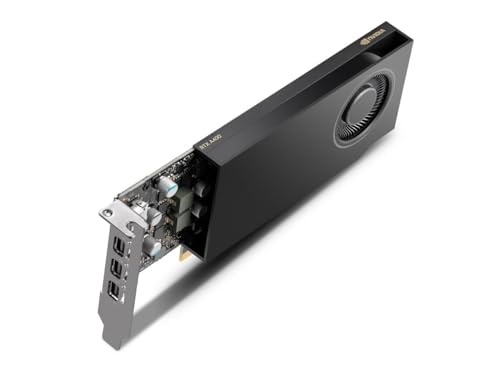
PNY NVIDIA RTX A400 4GB GDDR6 Professional Graphics Card — Compact professional four-display card
The RTX A400 is the roundup’s most complete answer to a small machine’s constraints, because it wins on both measurements at once: single slot in width, low profile in height, exactly as its title states. Under that compact frame sits NVIDIA’s professional entry silicon with 768 CUDA cores and 4GB of GDDR6 memory, four Mini DisplayPort 1.4a outputs, PCI Express 4.0 and a stated power draw of 50 watts. Read as a whole, the specification describes a card designed for the professional desktop that has no room and no wattage to spare — the small workstation driving several displays for CAD viewing, signage control, financial work or multi-screen office duty.
Four displays from a card this size is the headline capability, and it reframes what a compact workstation can be. A half-height tower under a desk can run a proper multi-monitor array without a second card, without a dock, and without surrendering its remaining slot. The professional driver branch is the quieter benefit: the RTX line carries the certified drivers and stability tuning that distinguish workstation cards from gaming silicon in a work setting, and PNY’s VCNRTXA400-SB naming is the channel through which that support flows. This is not a rendering powerhouse and does not pretend to be; it is a display-and-design professional in the smallest honest packaging in the guide.
Its limits are the honest shadows of its size. Four gigabytes of memory bounds the complexity of scenes it can hold, and the entry CUDA count means heavy compute belongs to the larger RTX picks below. Buyers outfitting a rendering node should keep reading. Buyers outfitting a cramped professional desk with four screens and one free slot have found the pick the rest of the guide is measured against for fit.
There is a deployment pattern where this card quietly excels: fleets. An office standardising on small workstations can fit the same A400 into every machine regardless of which case variant purchasing selected, because low profile and single slot together describe the intersection of nearly all of them. Uniformity simplifies spares, imaging and support — unglamorous virtues that decide real procurement, and virtues a larger card cannot offer a mixed fleet at any price.
- Memory: 4GB GDDR6
- Slot design: single slot, low profile, as stated in the listing title
- Compute: 768 CUDA cores
- Outputs: 4x Mini DisplayPort 1.4a
- Power: 50W, as stated in the listing title
- Interface: PCI Express 4.0
Strengths:
- Single-slot width and low-profile height together fit the most restrictive professional cases.
- Four Mini DisplayPort outputs drive a full multi-monitor desk from one small card.
- A stated 50W keeps it compatible with modest workstation power supplies.
Trade-offs:
- 4GB of memory caps the size of models and scenes it can hold comfortably.
- Mini DisplayPort outputs mean adapters or suitable cables for HDMI-only monitors.
- Entry professional silicon leaves heavy rendering to the larger picks in this guide.
Best for: a buyer seeking four displays and professional drivers inside a half-height workstation. Not suited for: a rendering workload built around large, memory-hungry scenes.
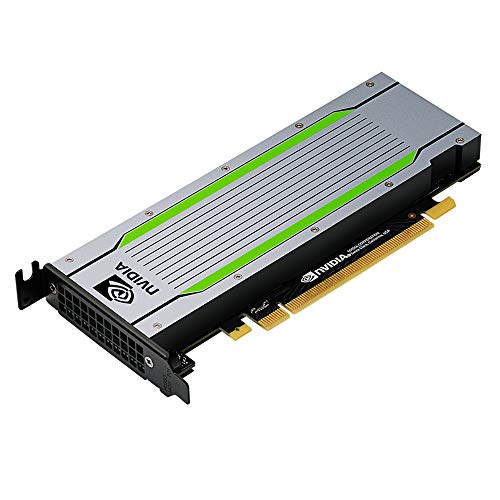
PNY NVIDIA Tesla T4 Datacenter Card 16GB GDDR6 — Passive datacenter accelerator
The Tesla T4 is the pick that explains why this category exists at industrial scale. Its title is a model of datacenter plainness — 16GB of GDDR6, PCI Express 3.0 x16, single slot, passive cooling — and every term earns its place. The T4 was designed as an inference accelerator: a card that serves trained models, transcodes video and accelerates virtual desktops in servers that run around the clock. Passive cooling in that world is not a silence feature; it is a reliability decision, removing the fan as a failure point and trusting the server’s engineered front-to-back airflow to carry the heat away.
That trust is the condition attached to this pick, and it must be read carefully. A passive datacenter card installed in a still-air desktop case will overheat, because the card was never given a fan of its own and the case provides no directed stream across its fins. In a server chassis, a workstation with ducted airflow, or a build that adds deliberate air movement across the slot, the T4’s design makes complete sense — silent, dense, and sipping power by datacenter standards. Home-lab builders prize these cards for exactly those traits, running inference and media transcoding in compact servers where a gaming card’s bulk and appetite would be absurd.
Sixteen gigabytes on an inference card also dates the design generously: model sizes that strain smaller cards fit whole here, and the T4’s software support through NVIDIA’s datacenter stack remains its professional backbone. It offers no display ambition worth discussing and wants none. Judged as what it is — a narrow, silent accelerator for machines with moving air — it is one of the most purposeful designs in this entire roundup.
Second-hand circulation keeps these cards prominent in home labs, and that market has its own literacy: confirm the card’s exact variant, expect datacenter packaging rather than retail presentation, and plan the airflow before the card arrives rather than after the first thermal alarm. Prepared that way, a T4 settles into a compact server and disappears into years of unattended work — the highest compliment datacenter hardware can earn.
- Memory: 16GB GDDR6
- Slot design: single slot, as stated in the listing title
- Cooling: passive, dependent on chassis airflow
- Interface: PCI Express 3.0 x16
- Intended home: datacenter and server chassis
Strengths:
- Passive single-slot design packs densely into servers and compact lab machines.
- 16GB of memory holds inference models that overflow smaller accelerators.
- No fan means one less moving part in machines expected to run continuously.
Trade-offs:
- Passive cooling fails in still air; a desktop case without directed airflow is the wrong home.
- It is an accelerator, not a display card, and should not be bought for monitors.
- Datacenter support channels assume datacenter buyers, so home users self-support.
Best for: silent inference acceleration inside a server or home lab with real airflow. Not suited for: a sealed desktop case expecting the card to cool itself.

NVIDIA RTX 4000 Ada Generation Workstation Graphics Board — Ada workstation in one slot
The RTX 4000 Ada is the design-professional pick: a full workstation board built on NVIDIA’s Ada Lovelace architecture, presented in a single-slot professional frame. Its listing title names the model, the architecture and the single-slot professional positioning — and stops there, leaving memory capacity and output counts to the maker’s documentation, where the spec box below directs the reader accordingly. That restraint in the title should not be mistaken for modesty in the hardware. The RTX 4000 tier sits in the middle of NVIDIA’s professional range, aimed at CAD, product design, visualisation and content creation workloads that need certified drivers and serious throughput in equal measure.
What the single-slot frame buys a design workstation is population freedom. A tower rendering with this card keeps its remaining slots for the capture card, the fast network adapter and the storage controller the workflow also needs — the exact eviction problem this category exists to solve. Ada-generation silicon adds the modern rendering stack, including current ray-tracing and AI-assisted features in professional applications, delivered through the driver branch that software vendors certify against. For a studio standardising on compact towers, this class of card is frequently the whole argument for the tower’s size.
The purchase homework is the documentation check the title’s silence imposes: confirm the memory figure, the output arrangement and the card’s stated slot width on NVIDIA’s specification for the exact board before ordering, particularly since professional boards travel through several channel variants. That done, the pick stands as the roundup’s balanced professional — newer than the entry cards, narrower than any dual-slot rival of its tier, and aimed squarely at design work rather than display duty.
Studios considering this tier should also weigh the software side of the Ada generation: current versions of the major CAD and visualisation packages are built and certified against this architecture now, which means the card arrives aligned with the tools’ present rather than their past. A workstation purchase is really a five-year software decision wearing hardware clothing, and the Ada board’s documentation check is the only homework standing between the reader and that decision.
- Architecture: Ada Lovelace, workstation class
- Slot design: single slot professional board, as stated in the listing title
- Memory: Not stated in the listing title — verify with NVIDIA documentation
- Outputs: Not stated in the listing title — verify with NVIDIA documentation
- Channel note: board reference 900-5G190-2570-000 in the listing title
Strengths:
- Current-generation professional silicon in a frame that leaves neighbouring slots free.
- Certified workstation drivers suit CAD and design applications better than gaming branches.
- The RTX 4000 tier balances throughput and size for compact studio towers.
Trade-offs:
- The title omits memory and outputs, so specification homework precedes any purchase.
- Professional pricing reflects the certification and driver programme behind the card.
- Full-height framing excludes the half-height cases the A400 serves.
Best for: a buyer seeking Ada-generation workstation performance without surrendering adjacent slots. Not suited for: a half-height small-form-factor case.

NVIDIA RTX PRO 4000 Blackwell Graphics Card — Blackwell flagship of the one-slot class
If the RTX 4000 Ada is the balanced professional, the RTX PRO 4000 Blackwell is the maximal one. The title is unusually forthcoming for a flagship: 24GB of GDDR7 memory with ECC, PCIe 5.0 x16, four DisplayPort 2.1b outputs, single-slot full-height design, AI workstation positioning, retail packaging. Every element of that list pushes against the assumption that narrow means weak. ECC memory guards long renders and large datasets against silent corruption; GDDR7 and PCIe 5.0 place the card on the newest interconnect and memory standards; and Blackwell silicon brings the current generation of NVIDIA’s AI and rendering architecture into a frame one slot wide.
The natural home is the AI workstation that must also remain a workstation — local model development and fine-tuning beside CAD and visualisation, in a tower whose other slots are spoken for. Twenty-four gigabytes is the threshold figure for serious local AI work, holding models and batches that spill out of smaller cards, and holding them in a machine that sits under a desk rather than in a rack. The four DisplayPort 2.1b outputs keep the display side equally current, ready for the high-resolution, high-refresh professional monitors arriving with that standard.
Two cautions complete the picture honestly. A flagship’s price reflects its generation, and the value calculation only closes for workloads that genuinely use the memory and the architecture. And a single-slot card of this power class moves its heat through a blower-style design philosophy, which trades acoustic softness for exhaust discipline — in a working studio that trade is normal, in a quiet home office it deserves a thought. Neither caution dents the achievement: this is the strongest specification that one slot of width currently holds in this guide.
It also reframes the category’s future. A generation ago, one slot of width meant display cards and modest accelerators; this pick runs the newest professional architecture with error-correcting memory at the width of a network card. Builders planning a tower today can reasonably expect the machine’s graphics to remain current for years without consuming the expansion room the rest of the workflow will claim — the single-slot discipline promoted from compromise to strategy.
- Memory: 24GB GDDR7 with ECC
- Slot design: single slot, full height, as stated in the listing title
- Interface: PCIe 5.0 x16
- Outputs: 4x DisplayPort 2.1b
- Positioning: AI workstation, retail packaging
Strengths:
- 24GB of ECC GDDR7 is flagship capacity delivered inside a single slot.
- PCIe 5.0 and DisplayPort 2.1b put every interface on the current standard.
- Blackwell architecture serves AI development and professional rendering in one card.
Trade-offs:
- Flagship pricing demands a workload that truly uses the memory and cores.
- Full-height framing rules out half-height cases despite the narrow width.
- Blower-style exhaust discipline is audible under sustained load.
Best for: a buyer seeking maximum AI and rendering capacity from a single slot in a tower workstation. Not suited for: a quiet-room build sensitive to fan character under load.

VisionTek AMD Radeon RX 550 4GB GDDR5 Graphics Card — Four DisplayPorts on one slot
VisionTek built its reputation in exactly this niche — multi-display productivity — and this RX 550 states the whole proposition in its title: 4GB of GDDR5, four DisplayPort outputs, four-monitor support, full height, single slot, 50W bus powered, with financial trading and digital signage named as intended work. There is no ambiguity to manage here, and that clarity is the pick’s charm. A desk that needs four screens fed from one card, in one slot, on slot power alone, has its answer printed on the box.
The DisplayPort choice deserves a note, because it distinguishes this card from its HDMI-carrying sibling in the multi-monitor category. DisplayPort is the professional desk’s native standard: monitors built for trading and control-room work offer it directly, cables lock, and resolutions stay honest across all four outputs. Four matched DisplayPort monitors on one of these cards is the classic trading-desk and operations-wall arrangement, and the card’s 50W bus-powered design means the host machine needs no power cable and no supply upgrade to run it — a meaningful mercy in the ageing office towers these desks often use.
The RX 550 silicon underneath is display-class, and the guide keeps it in that register: spreadsheets, charts, dashboards, signage loops and browser windows across four screens are its fluent territory, while 3D workloads are not. VisionTek’s productivity framing in the title says the same thing in the maker’s own words. Bought for the job printed on its box, this is one of the most exactly specified picks in the roundup.
Signage deserves a sentence of its own in this card’s story. A digital-signage player driving menu boards or information displays runs long hours in public view, where reliability and a modest power draw matter more than any benchmark. A bus-powered card with no auxiliary cable, sized to one slot, suits the small player PCs bolted behind those screens — another room where this pick’s plain specification turns out to be the whole requirement.
- Memory: 4GB GDDR5
- Slot design: single slot, full height, as stated in the listing title
- Outputs: 4x DisplayPort, four-monitor support
- Power: 50W bus powered, as stated in the listing title
- Named duties: multi-display productivity, financial trading, digital signage
Strengths:
- Four DisplayPort outputs from one slot is the trading desk’s exact requirement.
- Bus-powered 50W design installs in office towers without power-supply changes.
- The title states every relevant fact, leaving nothing to verify elsewhere.
Trade-offs:
- HDMI-only monitors need adapters, since every output is DisplayPort.
- Display-class silicon excludes 3D and gaming ambitions.
- Full-height framing will not fit half-height slim cases.
Best for: a buyer seeking four DisplayPort monitors driven from one slot on slot power. Not suited for: a desk built around HDMI-only consumer monitors.

ASUS NVIDIA GeForce GT 730 Graphics Card — Four HDMI ports, fanless
ASUS’s GT 730 takes the same four-display idea and turns it toward the HDMI world: four HDMI ports on a single-slot, passively cooled card with 2GB of GDDR5 memory over PCI Express 2.0, every one of those facts stated in the title. Where the VisionTek pick speaks the trading desk’s DisplayPort language, this one speaks the language of televisions, consumer monitors and presentation screens — the displays that arrive with HDMI and nothing else. A passive heatsink replaces the fan, so the card adds four screens to a machine while adding no noise at all.
The honesty paragraph matters more for this pick than for any other in the guide. The GT 730 is an old GPU design, and its comfort zone is the desktop itself: multiple screens of documents, browsers, video and dashboards, driven quietly and reliably. It is not a gaming card in any modern sense, and its PCIe 2.0 interface announces its generation plainly. Within its register, though, the proposition is coherent and even elegant — one silent card, four HDMI displays, one slot. Reception desks, monitoring walls, classroom machines and home offices built from consumer monitors are its fluent territory.
ASUS’s execution adds the usual big-vendor comforts: documentation that exists, a support channel, and a passive design from a maker with a long fanless line. The card’s age also means its driver story is one of mature stability rather than new features, which for a display appliance is the correct priority. Buy it as the appliance it is, and it will do its quiet job for years.
One practical note completes this pick: four HDMI outputs invite a desk of mixed consumer screens, and mixed screens invite a settings session — matching refresh rates, arranging the layout to mirror the physical desk, and disabling displays the card should not drive. That half hour is the whole of the card’s demands. After it, the arrangement simply persists, which is precisely what a display appliance owes its owner.
- Memory: 2GB GDDR5
- Slot design: single-slot design, as stated in the listing title
- Cooling: passive cooling
- Outputs: 4x HDMI ports
- Interface: PCI Express 2.0
Strengths:
- Four HDMI ports match consumer monitors and televisions without adapters.
- Passive cooling adds four displays in complete silence.
- ASUS backing brings proper documentation for an older design.
Trade-offs:
- The GT 730’s generation confines it to desktop and video duty.
- 2GB of memory is the smallest allowance in this roundup.
- PCI Express 2.0 dates the platform, even though display work barely notices.
Best for: a buyer seeking four silent HDMI displays from a single slot. Not suited for: any workload involving modern 3D or gaming.
One Slot, Six Philosophies: Reading the Lineup by Cooling and Purpose
| Pick | Memory | Cooling | Outputs named in title | Frame |
|---|---|---|---|---|
| PNY RTX A400 | 4GB GDDR6 | Active, professional shroud | 4x Mini DisplayPort 1.4a | Single slot, low profile |
| PNY Tesla T4 | 16GB GDDR6 | Passive | Accelerator; display duty not its purpose | Single slot |
| RTX 4000 Ada | Not stated in the listing title | Professional workstation design | Not stated in the listing title | Single slot professional board |
| RTX PRO 4000 Blackwell | 24GB GDDR7 ECC | Blower-style workstation design | 4x DisplayPort 2.1b | Single slot, full height |
| VisionTek RX 550 | 4GB GDDR5 | Active, single-slot shroud | 4x DisplayPort | Single slot, full height |
| ASUS GT 730 | 2GB GDDR5 | Passive | 4x HDMI | Single slot |
The table’s real lesson sits in the cooling column. Two passive cards bookend the lineup — one a datacenter accelerator that borrows the server’s airflow, one a desktop card that needs almost none — while the professional cards spend their width on blower discipline and the display cards on compact active shrouds. Width is the shared constraint; cooling is where each design’s personality negotiates with it.
What Happens to the Neighbouring Slot Over the Life of the Machine?
The slot a single-slot card preserves tends to get used, and usually sooner than its owner predicted. Builds accrete hardware: a faster network adapter when the studio upgrades its switching, a capture card when the work turns toward video, a second accelerator when a project grows. Each addition is a small argument for the narrow card bought earlier, because the alternative history — a dual-slot card installed in year one — turns every later addition into a replacement decision instead of an expansion. Machines that live a decade, as workstations routinely do, repay slot discipline many times over.
There is a resale and reuse echo as well. A single-slot professional card fits the next machine too, whatever its size, because one slot of width is welcome everywhere from a tower to a compact lab box. Dual-slot cards migrating between machines meet cases that cannot take them; narrow cards meet only the question of drivers. Longevity in hardware is often just compatibility repeated over years, and on that measure the narrow designs in this guide are built to keep being useful after their first machine retires.
How Do You Measure a Case Before Ordering a Single-Slot Card?
Begin with the slot map. Open the case, identify the x16 slot the card will occupy, and inventory its neighbours: what sits beside it today, and what the build plan expects to sit there later. The neighbouring slot’s usefulness is the entire prize, so confirm that a card one slot thick truly clears the adjacent card’s components — tall capacitors and backplate screws have ended more single-slot plans than cooler shrouds have. Photograph the area; the picture settles arguments memory loses.
Measure height and length as separate questions. Height asks whether the case takes full-height or half-height brackets, and whether a low-profile card ships with the bracket the case needs. Length asks what the card meets on its way in — drive cages, front-panel cabling, a radiator — and professional cards run longer than display cards as a rule. The maker’s dimension line answers both questions in numbers; compare them against the tape measure’s numbers rather than against hope.
Finish with air. A blower card wants its bracket exhaust unobstructed; a passive card wants a defined stream across its fins, which in a desktop means a case fan aimed along the slots or a ducted path. Seat the card, run the heaviest ordinary workload for twenty minutes, and watch temperatures before closing the case for good. A single-slot installation done carefully disappears into the machine’s life; done carelessly, it becomes the machine’s recurring complaint.
One more measurement belongs in the notebook: the distance from the slot to the case’s side panel is irrelevant for width, but the clearance behind the bracket matters for cables. Four display cables leaving a single bracket form a thick bundle, and a case whose rear sits close to a wall can strain the outermost connector. Route the bundle with slack, support its weight rather than letting it hang from the ports, and the installation will still be sound when the machine is moved for cleaning two years later.
What Mistakes Turn a One-Slot Plan Into a Two-Slot Problem?
The classic mistake is trusting a photograph. Slim-looking shrouds overhang, and the only trustworthy evidence of width is a stated slot count or a measured thickness from the maker’s documentation. The second mistake is confusing the two dimensions — ordering a low-profile card for a width problem, or a single-slot card for a height problem, and discovering at the workbench that the measurements were never interchangeable. The third is forgetting the neighbour: installing the narrow card proudly, then finding the adjacent slot’s card suffocated because the new card’s intake sits flush against it. Single-slot design preserves the neighbour’s existence, not automatically its comfort.
The fourth mistake belongs to the passive picks. A fanless card in a case without directed airflow is not a silent build; it is a slow thermal incident, and the Tesla T4 in particular was engineered for chassis that move air as a system. The fifth is buying display count without checking connector type — four DisplayPorts do not serve four HDMI-only monitors without adapters in the budget, and four HDMI ports do not serve a DisplayPort desk either. The outputs printed in each title are part of the pick, not fine print beneath it.
A sixth mistake is subtler and increasingly common: assuming a card’s slot width from its product family. Families span generations, and a model’s narrow edition can sit beside a wider sibling sold under a nearly identical name — the workstation market is especially fond of such pairs. The exact model string, matched against the exact specification sheet, is the only safe unit of planning. This guide’s insistence on documentation for the title-silent figures is the same habit applied consistently: in a category defined by a measurement, every claim should be measurable.
Final Recommendation
Order the decision by the slot’s neighbours. A compact professional desk belongs to the RTX A400, the only pick here that is narrow and short at once while driving four displays. A tower doing design work belongs to the RTX 4000 Ada after its documentation check, and a tower doing AI development belongs to the RTX PRO 4000 Blackwell, whose 24GB of ECC memory is the strongest argument one slot can make. The Tesla T4 serves the server and the lab, the VisionTek RX 550 serves the DisplayPort trading desk, and the ASUS GT 730 serves the silent HDMI wall — each pick sovereign in its own room of the same narrow house.
Notice what the lineup never asks for: a bigger case, a sacrificed slot, a rebuilt machine. That restraint is the category’s contract with its buyers, and every pick above honours it in a different dialect — professional, passive, or display-bound. Choose the dialect the machine speaks, verify the one or two figures its title leaves open, and the purchase closes cleanly.
Measure the case, read the title, check the sheet where the title falls silent, and the slot will hold exactly what the plan promised — no more width than that, and no less capability.
Frequently Asked Questions
What makes a graphics card single-slot?
Its total installed thickness stays within one expansion slot’s width, cooler and shroud included, so the neighbouring slot remains free for another card. The bracket alone being narrow proves nothing; the heatsink and fan decide the question. Listings that state the design in the title, and makers’ sheets that state it in dimensions, are the evidence worth trusting.
Is single-slot the same as low profile?
No. Single-slot measures thickness; low profile measures height. A card can be either, both, or neither — the RTX A400 in this guide is both, while the RTX PRO 4000 Blackwell is single-slot but full height. A build constrained by a slim case may need both properties, and a tower constrained by crowded slots may need only the width.
Can a single-slot card be powerful?
The RTX PRO 4000 Blackwell answers that directly: 24GB of GDDR7 ECC memory and current-generation architecture inside one slot of width. The constraint disciplines cooling rather than capability, and professional designs spend money on dense heatsinks and blower engineering to prove it. What the width genuinely excludes is the oversized multi-fan cooler, not performance itself.
Why is the Tesla T4 passive, and is that safe in a desktop?
Datacenter cards omit the fan because servers provide engineered airflow and because a fan is a failure point in machines run continuously. In a desktop without directed air across the slot, a passive T4 will run hot and throttle; in a chassis or workstation with a deliberate air stream, its design works exactly as intended. The card is safe where its assumption about airflow is true.
How many monitors can one single-slot card drive?
Four, on several picks here: the RTX A400 through Mini DisplayPort, the VisionTek RX 550 through full DisplayPort, the ASUS GT 730 through HDMI, and the RTX PRO 4000 Blackwell through DisplayPort 2.1b. The connector type matters as much as the count, so match the card’s outputs to the desk’s monitors before ordering.
What should be verified when a title does not state slot width?
The maker’s specification sheet for the exact model, which lists slot width or card thickness in plain terms. The RTX 4000 Ada’s title names the model and its single-slot professional positioning while leaving memory and outputs to documentation; that sheet is a two-minute read and settles every open figure at once. Plan around any card whose width cannot be confirmed in writing as though it were dual-slot.
Does a single-slot card run hotter than a dual-slot one?
It runs with less cooling volume, which is a different statement. Professional blower designs hold their temperatures by exporting heat through the bracket, and their rated behaviour assumes a workstation’s ordinary airflow. A narrow card in a well-kept case is not a thermal compromise; a narrow card in a sealed, dusty case is — but so, eventually, is any card. Judge temperatures after installation under the real workload rather than by the cooler’s silhouette.
Can two single-slot cards run together in one machine?
Yes, and dense builds do exactly that — it is the arrangement the Tesla T4 was designed for, and the reason slot discipline compounds in value as card counts rise. The practical checks are power headroom for the pair, airflow that reaches both cards’ intakes or fins, and driver support for the combination in the intended software. A machine planned around narrow cards from the start absorbs the second card as an expansion; a machine planned around a wide card experiences it as a renovation.
Related Guides
Width is one axis of a constrained build; power and silence are the others. Continue with our guides to the best graphics cards that take board power, the best passively cooled graphics cards and the best workstation multi monitor graphics cards for the companion constraints. Each of those guides applies the same discipline used here — claims graded on the evidence printed in the listing, silences flagged in the open, and dimensions treated as facts to be measured rather than impressions to be trusted at a glance.


