What's inside
- Key Takeaways
- Quick Picks
- How Did We Build a Gen4-Only Shortlist?
- The Six Drives in Detail
- Gen4 in Laptops, Small Builds and Second Slots
- Installing a Gen4 Drive Well: Slots, Armour and Firmware
- Why a Mature Generation Rewards the Buyer
- Sustained Writes, Caches and the Truth About Big Transfers
- The Gen4 Field on One Page
- Reading a Gen4 Listing Like Someone Who Has Been Burned Before
- Two Flagships, One Generation: Settling the 990 PRO and SN850X Question
- Endurance and Warranty: The Mature Generation’s Quiet Advantage
- What Trips Up Gen4 Shoppers?
- Game Loading, Streaming Assets and What Gen4 Pace Feels Like in Play
- Final Recommendation
- Frequently Asked Questions
- Related Guides
As an Amazon Associate I earn from qualifying purchases. This post may contain affiliate links at no extra cost to you.
gizmoverdict.com is reader-supported. When you buy through links on our site, we may earn an affiliate commission.
Where to buy: Every drive below was checked on 26 November 2026 against this site’s verified pool of product listings, and the figures in each review come from that drive’s own listing — read and write speeds where the listing states them, and a deliberate silence where it does not. Gen4 models have long model histories with several capacity variants, so check the capacity in the listing title against the review before ordering: five picks here are 2TB drives, and the Seagate is reviewed at its listed 1TB heatsink configuration.
The best gen 4 ssds occupy the most enviable position in storage: a mature generation at the top of its development, priced by competition rather than by novelty. PCIe Gen4 doubled the bandwidth of the generation before it, and the drives built on it have had years to be refined — controllers matured, firmware polished, prices pressed down by rivals who all know each other’s products intimately. A newer interface exists, and this guide’s companion NVMe article covers it, but Gen4 is where the overwhelming majority of motherboards, laptops and consoles actually live, and a drive bought for the machine you own beats a drive bought for the machine in a brochure.
Six drives map the generation’s character. Crucial’s T500 leads on the strength of its TLC design and creative-work positioning. Seagate’s FireCuda 530R brings a factory heatsink and an endurance-led brief at 1TB. Kingston’s KC3000 is the veteran Phison-powered workhorse. SABRENT’s Rocket 4 Plus carries its line’s enthusiast heritage. And the generation’s two defining flagships — Samsung’s 990 PRO and WD’s SN850X — close the list, reviewed here for their place in the Gen4 story specifically: what they mean to a buyer choosing within this generation, rather than within the whole NVMe landscape our companion guide surveys.
That distinction in framing is worth one sentence of honesty. Two of these drives appear in both guides because they genuinely anchor both conversations, but the reviews are written from different questions — there, which NVMe for which machine and role; here, what the Gen4 generation’s best drives say about buying maturity over novelty — and no sentence has been carried across. Readers of both will find the same facts and different judgements, which is what two guides are for.
Key Takeaways
- Gen4 is the mature, best-value interface generation: flagship pace, polished firmware and prices set by years of competition.
- Crucial’s T500 pairs up to 7,400 MB/s with TLC memory, making it the creative-work anchor of this list.
- Seagate’s FireCuda 530R, in its listed 1TB heatsink form, is the endurance-and-cooling pick for sustained workloads and consoles.
- Kingston’s KC3000 is the Phison E18 veteran: a proven controller platform with a long service record.
- SABRENT’s Rocket 4 Plus states up to 7,100 MB/s read and 6,600 MB/s write, the strongest write figure in this guide.
- The 990 PRO and SN850X remain the generation’s defining pair; within Gen4, the choice between them is ecosystem and write character, not speed class.
Quick Picks
| Pick | Badge | Why it earns its place |
|---|---|---|
| Crucial T500 2TB | TLC Gen4 anchor | Up to 7,400 MB/s on TLC memory, positioned for creative and gaming loads alike. |
| Seagate FireCuda 530R 1TB (Heatsink) | Endurance with cooling | A heatsink-fitted Gen4 drive built around sustained work and console duty. |
| Kingston KC3000 2TB | Phison veteran | The E18-platform workhorse with years of service history behind it. |
| SABRENT Rocket 4 Plus 2TB | Enthusiast line pick | Up to 7,100 MB/s read and 6,600 MB/s write from SABRENT’s Rocket family. |
| Samsung 990 PRO 2TB | The Gen4 reference | Up to 7,450 MB/s and the generation’s benchmark name, revisited on Gen4 terms. |
| WD_BLACK SN850X 2TB | Gen4 gaming standard | Up to 7,300 MB/s read and 6,300 MB/s write in the generation’s gaming flagship. |
How Did We Build a Gen4-Only Shortlist?
Every drive here was matched to a live listing through the verified pool, and its review uses that listing’s own figures. Within the Gen4 generation, selection weighed the qualities maturity makes visible: controller pedigree, memory type, sustained behaviour, cooling arrangements and the length of the model’s service record. A young interface’s drives are bought on promise; a mature generation’s drives can be bought on evidence, and this shortlist is deliberately built from evidence — models whose behaviour across years of ownership is a matter of record rather than projection.
Coverage was the second criterion. The list spans the generation’s constituencies: creators, gamers, console owners, endurance shoppers and enthusiasts, with capacities at the 2TB centre of the market and one 1TB specialist whose heatsink and brief justify its smaller size being reviewed as listed. Two drives overlap with our NVMe guide by design, because a Gen4 guide without the generation’s flagships would be a map missing its capitals; their reviews here are written from the Gen4 angle, as the introduction promised.
One more selection note, because Gen4’s abundance makes it necessary: this guide capped itself at six drives in a generation that could honestly fill twelve slots, and the omissions were made on coverage rather than quality. A drive absent here is not a drive condemned; it is a drive whose brief duplicates a pick already serving it, or whose listing in the verified pool belonged to another of this batch’s guides. Readers cross-shopping beyond the six should apply the guide’s own filters — memory type, sustained record, cooling plan, maker support — and they will land on defensible drives by the same road this shortlist travelled.
Finally, the list excludes the generation’s budget QLC tier — not from snobbery, but because our NVMe guide already gives that tier its honest hearing in the P3 Plus, and this guide’s question is narrower: what does Gen4 offer the buyer who wants the generation’s best rather than its cheapest? Readers whose budget leads the decision should start there; readers whose workload leads it belong here.
The Six Drives in Detail

Crucial T500 2TB — TLC Gen4 anchor
The T500 is Crucial’s statement that the company’s Gen4 range is not only a budget shelf. Its listing states the essentials: PCIe Gen4 NVMe, up to 7,400 MB/s, TLC NAND, 2TB, compatible with laptops and desktops, and positioned for creative workloads. The TLC designation is the specification that matters most in that list. Triple-level cell memory is the mainstream performance standard — faster and hardier under sustained writing than the QLC in budget drives — and its presence at this pace puts the T500 in direct conversation with the flagships rather than in the tier below them.
Creative positioning is more than a label here. Content work punishes a drive in a specific rhythm: huge ingests, constant cache traffic, exports that write for minutes at a time. A drive that holds its pace through that rhythm, on memory built for it, earns the creative badge in the only way that counts. The T500’s figure of up to 7,400 MB/s sits within a breath of the generation’s ceiling, so the practical difference between this drive and the 990 PRO in a working machine is measured in ecosystem and price rather than in any speed an editor will feel at the timeline.
Crucial’s ownership layer supports the brief: Acronis cloning software has traditionally accompanied the company’s performance drives, firmware support is steady, and the maker’s position as Micron’s consumer arm means the memory inside is the company’s own. For a buyer building a creator workstation around Gen4 — still the rational platform for most creative budgets — the T500 is the drive that lets the storage line be closed early and the money argued over elsewhere, where arguments change outcomes.
Laptop owners should note the compatibility its listing claims, with the usual flagship caveat: a drive of this class in a thin chassis deserves a check of the machine’s thermal design, because Gen4 flagships of every brand run warm under sustained load. In desktops with motherboard heatsinks, no such conversation is needed. Judged as this guide’s anchor — the Gen4 drive for people whose work is the point — the T500 holds the position on specification, memory type and maker, which is to say on evidence.
There is a pricing observation that belongs in this review because it shapes the whole guide: the T500’s position demonstrates what maturity does to value. A drive with this memory type and this stated pace would have commanded the flagship’s full premium earlier in the generation’s life; competition among equals has pressed it into a friendlier tier without pressing the specification down with it. Buyers who waited out Gen4’s early years — deliberately or by accident — are collecting that patience here, in the form of a drive that asks creator money for what used to be flagship money’s exclusive territory.
- Interface: PCIe Gen4 NVMe
- Stated peak speed: up to 7,400 MB/s
- NAND type: TLC
- Capacity reviewed: 2TB
- Positioning: creative workloads, laptops and desktops
Strengths
- Flagship-class stated pace on TLC memory rather than budget NAND.
- Creative-work brief matched by sustained-write design.
- Micron’s own memory and Crucial’s support infrastructure behind it.
Trade-offs
- Shares the flagship class’s warmth in thin laptop chassis.
- Crucial’s gaming ecosystem is thinner than WD’s or Samsung’s flagship theatre.
- The generation’s ceiling is a ceiling: no Gen5 headroom story to tell.
Best for: creators and all-round power users building on Gen4 who want TLC endurance at flagship pace. Not suited for: buyers chasing the newest interface for its own sake, whose question belongs to the Gen5 section of our NVMe guide.

Seagate FireCuda 530R 1TB (Heatsink) — Endurance with cooling
The FireCuda 530R is the specialist of this list, and its listing defines the specialism: an internal M.2 drive on PCIe Gen4 x4 with NVMe 1.4, fitted with a heatsink, at 1TB. Seagate’s FireCuda line has always been built around sustained, console-and-workstation duty, and the 530R’s identity in this guide rests on the two features its listing puts forward — the factory cooling and the endurance-led positioning of the line — rather than on a headline speed figure, which the truncated listing does not state and this review therefore does not invent.
The heatsink is not an accessory but the product. A factory-fitted cooler, matched to the drive’s dimensions and thermal character, serves two homes above all: the PlayStation 5’s expansion bay, where the drive must bring its own cooling, and sustained-write workstations where an unarmoured drive would throttle through the long transfers that are the machine’s whole purpose. Seagate’s gaming-and-creator line has courted exactly those homes for years, and the 530R arrives pre-dressed for them in a way bare drives cannot imitate with a third-party slab of aluminium and hope.
Endurance is the second half of the brief, and it suits a particular buyer: the one whose drive writes constantly — capture rigs, render nodes, heavy download-and-process workflows, consoles whose libraries churn weekly. Such buyers should read endurance as the specification that decides whether a drive is a tool or a consumable, and Seagate’s positioning of this line speaks directly to them. The 1TB capacity is the honest limit of the pick as listed: this is a drive for a defined, hard-working role, not for the household’s whole library, and buyers needing room should take the hint from the 2TB picks around it.
Within a Gen4 guide, the 530R represents the generation’s depth: beyond the flagship race, mature platforms develop specialists — drives tuned for a duty rather than a chart. That is a sign of a healthy generation, and the buyer whose duty matches this one’s will find no substitute elsewhere in the list, because no other pick was designed from the heatsink outward.
Seagate’s presence in this guide also corrects a lazy assumption of the SSD era: that the old hard-drive giants would fade as storage turned to flash. Seagate instead built the FireCuda identity directly on its storage heritage — endurance, duty cycles, machines that work for a living — and the 530R is that identity in M.2 form. Buyers who kept data on Seagate drives for decades are not being nostalgic when they shortlist this drive; they are applying the same actuarial logic this guide applied in its shortlist, one brand history at a time.
- Interface: PCIe Gen4 x4, NVMe 1.4
- Cooling: factory-fitted heatsink
- Capacity reviewed: 1TB as listed
- Line: Seagate FireCuda
- Brief: sustained and console duty
Strengths
- Factory heatsink matched to the drive, ready for PS5 and sustained work.
- Endurance-led line positioning for write-heavy roles.
- Gen4 x4 interface at the generation’s standard.
Trade-offs
- 1TB is half the room of this guide’s other picks.
- Its listing summary states no headline speed, so chart-shoppers cannot rank it by one.
- The fitted heatsink fixes its height for tight bays.
Best for: PS5 expansion and write-heavy workstations wanting factory cooling and an endurance brief. Not suited for: library builders who need 2TB, for whom the flagships below are the correct spend.

Kingston KC3000 2TB — Phison veteran
The KC3000 is this guide’s veteran: Kingston’s PCIe 4.0 NVMe M.2 drive at 2TB, built on the Phison E18 controller platform that powered a whole wave of Gen4 flagships. That platform heritage is the review’s headline, because in a mature generation the known quantity is a feature. The E18’s behaviour — its sustained pace, its thermal character, its firmware maturity — has been mapped by years of service across many brands’ drives, and a buyer choosing the KC3000 is choosing a platform whose surprises have already happened to other people.
Kingston’s own position adds a second layer of sense. The company is one of the largest independent memory makers, with a distribution and warranty reach that follows its products everywhere; a KC3000 bought today is supported by infrastructure that has outlived several of the brands that once shared its shelf. For a workstation or a family machine expected to serve half a decade, that institutional durability is worth real money, and it rarely appears in benchmark tables.
Performance expectations should be set at the generation’s flagship class, where the E18 platform made its name, with the veteran’s caveat that its design priorities date from the generation’s earlier years: it is a known, strong quantity rather than the newest refinement of one. Buyers who value the latest controller thinking have the T500 and the flagships; buyers who value a platform with a service record longer than some companies’ existence have this. Neither is a wrong instinct, and a guide’s job is to honour both by naming which drive serves which.
Practically, the KC3000 suits the builder who specs a machine once and maintains it for years: install under the motherboard heatsink, update firmware occasionally, and let the drive become invisible. Its 2TB capacity matches the guide’s centre, and its role in this list is to prove that in a mature generation, the wisest purchase is sometimes the one whose story is already written.
A maintenance note suits the veteran’s review: platform maturity includes the update path. A drive whose controller family has been in the field for years has a firmware history that can be read like a service log — issues found, addressed and documented across a long production run. Owners of newer platforms buy that log’s future volumes unwritten; KC3000 owners inherit the completed set. For a machine whose owner intends to install storage and think about it again at replacement time, that inheritance is not a consolation prize. It is the product.
- Interface: PCIe 4.0 NVMe M.2
- Controller platform: Phison E18
- Capacity reviewed: 2TB
- Maker: Kingston
- Character: veteran flagship platform
Strengths
- A controller platform with years of mapped, mature behaviour.
- Kingston’s distribution and warranty infrastructure behind it.
- Flagship-class Gen4 brief at a veteran’s position in the range.
Trade-offs
- An earlier platform design than the newest Gen4 refinements.
- Kingston’s owner software is plainer than Samsung’s ecosystem.
- No factory heatsink variant in this listing for console shoppers.
Best for: long-service desktops and workstations valuing a proven platform and maker reach. Not suited for: console owners needing factory cooling, who should take the FireCuda or the heatsinked WD route in our NVMe guide.
SABRENT Rocket 4 Plus 2TB — Enthusiast line pick
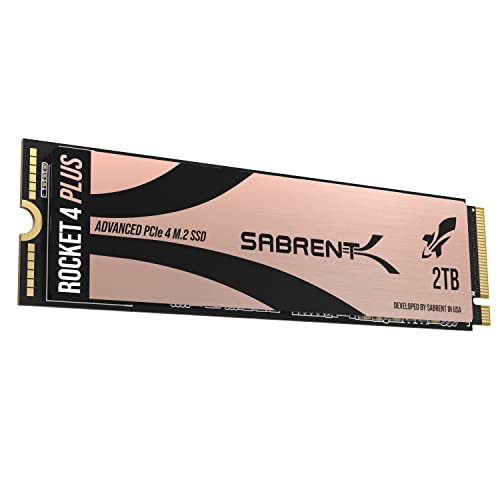
SABRENT’s Rocket 4 Plus carries the enthusiast scene’s affection into this guide, and its listing publishes the pair of figures that explain why: up to 7,100 MB/s read and up to 6,600 MB/s write — the strongest stated write figure among the six. The Rocket line built its name by courting builders who read datasheets for pleasure, and the Plus model was its Gen4 flagship statement: a drive specified to satisfy the audience least likely to be satisfied, which is a design brief with honour in it.
The write figure deserves its moment. Most Gen4 listings lead with reads because reads flatter; a drive that states a write pace above its rivals’ is declaring where its engineering went. Installs, captures, project saves and VM images are writes, and a workstation or gaming rig that lives on those operations will feel this drive’s priorities daily. Paired with a motherboard heatsink — SABRENT also made its name on cooling accessories, though this listing is the bare drive — the Rocket 4 Plus settles into sustained work with the composure its numbers promise.
SABRENT’s enthusiast positioning cuts one way commercially: the brand’s community is vocal, its product iterations are frequent, and its drives are bought by people who compare. That scrutiny is a quality mechanism in itself, and the Rocket 4 Plus’s longevity in the line suggests a model that survived it. Buyers new to the brand should weigh that community record alongside the specification, because in the enthusiast tier the record is part of the specification.
Against the guide’s anchors, the Rocket’s case is character: the T500 offers the creative brief and Micron’s vertical integration, the flagships offer ecosystems, and the Rocket offers the strongest stated writes and an enthusiast pedigree. In a mature generation, character is a legitimate basis for choice, because the performance class has converged — and on that basis this drive earns its place without needing to win a chart.
The Rocket’s audience deserves one more paragraph, because enthusiasts buy differently and this drive knows it. They read the controller and memory configuration before the price, they populate forums with thermal photographs of their builds, and they replace drives for the pleasure of the upgrade as much as for need. A line that serves that audience survives a scrutiny no marketing can simulate, and the 4 Plus’s continued place in SABRENT’s range is the market’s verdict delivered in the only currency enthusiasts accept — repeat purchase by people who had every alternative open to them.
- Interface: NVMe 4.0 Gen4 PCIe, M.2 2280
- Stated peak read: up to 7,100 MB/s
- Stated peak write: up to 6,600 MB/s
- Capacity reviewed: 2TB
- Line: SABRENT Rocket
Strengths
- The strongest stated write figure in this guide.
- An enthusiast line with a scrutinising, vocal owner community.
- Flagship-class reads to match its writes.
Trade-offs
- Bare drive: budget a motherboard heatsink for sustained work.
- Brand ecosystem is enthusiast-led rather than suite-led like Samsung’s.
- Its read ceiling sits a step below the two flagships’.
Best for: enthusiasts and write-heavy builders who read datasheets and enjoy doing so. Not suited for: buyers wanting the deepest owner-software suite, where the 990 PRO’s ecosystem leads.

Samsung 990 PRO 2TB — The Gen4 reference
Within a Gen4-only conversation, the 990 PRO changes meaning: it stops being one flagship among several and becomes the generation’s reference point, the drive whose figures — PCIe 4.0, up to 7,450 MB/s — describe what the interface itself can do. Every other pick in this guide is implicitly measured against it, including by their own makers. Revisiting it on Gen4 terms, the salient fact is maturity: this drive has been the default answer long enough that its firmware, its software and its behaviour under every common workload are known quantities, and in a generation bought on evidence, known is the highest grade available.
The Gen4 angle also clarifies who should still buy it now that a newer interface exists. A Gen5 motherboard owner building for bandwidth-hungry work has a different guide; everyone else — the vast installed base of Gen4 desktops, laptops and upgrade projects — faces a simpler question: within the interface their machine speaks, what is the best-executed drive? The 990 PRO’s claim is that it is that drive, and the claim rests less on its ceiling than on the absence of asterisks beneath it: no workload where it embarrasses itself, no ecosystem gap, no cooling drama beyond the heatsink every flagship assumes.
Samsung’s vertical integration is the structural reason. The company makes the memory, the controller and the drive, and supports them with the Magician software that has become the category’s owner-experience standard. In a mature generation, where headline speeds have converged across brands, that integration is precisely the kind of difference that remains — visible not in a benchmark but in the fifth year of ownership, when firmware support and diagnostic tools are the product.
So the Gen4 verdict on the 990 PRO is almost boring, and deliberately so: it is the generation’s safest pair of hands, priced at the flagship position it earned, recommended here for the same reason it is recommended everywhere — because the case against it has never been assembled. Buyers whose brief matches the T500’s creative value or the Rocket’s writes can defect happily; buyers with no brief beyond “the best Gen4 drive” have their answer, and it is this one.
One Gen4-specific virtue of this drive rarely gets its sentence: because it defines the interface’s ceiling, it is the safest possible answer to the upgrade question owners ask when a Gen4 machine feels slow for non-storage reasons. Installing the reference drive removes storage from the list of suspects permanently — every subsequent bottleneck is honestly elsewhere — and that diagnostic certainty has saved more owners from pointless platform upgrades than any benchmark ever published. A drive that ends arguments is worth something beyond its throughput, and in Gen4 systems this is that drive.
- Interface: PCIe 4.0, M.2 2280
- Stated peak read: up to 7,450 MB/s
- Size reviewed: 2TB
- Maker position: vertically integrated flagship
- Software: Samsung Magician
Strengths
- The generation’s reference performance with no asterisks beneath it.
- Maker-made memory and controller with the deepest owner software.
- Years of service record across every common workload.
Trade-offs
- Flagship pricing in a generation full of near-flagship value.
- Gen5 platform owners may rationally look to the newer interface.
- Its very completeness offers enthusiasts little to tinker with.
Best for: Gen4 buyers who want the generation’s reference drive and an end to research. Not suited for: value hunters, for whom the T500 delivers the class experience at a friendlier position.

WD_BLACK SN850X 2TB — Gen4 gaming standard
If the 990 PRO is Gen4’s reference, the SN850X is its gaming standard — the drive a generation of gaming builds standardised on, with its listing’s figures of up to 7,300 MB/s read and 6,300 MB/s write stating the class plainly. Reviewed on Gen4 terms, its significance is what it did to the generation’s centre of gravity: it proved a gaming-branded drive could stand at the flagship table on merit, and it gave gaming machines a storage identity of their own rather than a borrowed workstation part. The BLACK line’s gaming brief — readiness, write pace for installs and updates, software that speaks to players — reads, in hindsight, like the generation learning who its keenest customers were.
The write figure is again the tell. Gen4 gaming is a write-heavy life: hundred-gigabyte installs, patch cycles, captures and clips. A flagship that publishes its write pace and builds its line around gaming’s rhythm fits that life measurably better than a read-optimised rival, and owners who have lived with both will recognise the difference in the patch-day minutes nobody benchmarks. Within this guide, only the Rocket states a higher write figure, and the SN850X counters with the deeper gaming ecosystem and the heatsink sibling our NVMe guide reviews for console duty.
Maturity flatters this drive as it does the Samsung. Years in flagship gaming builds have mapped its behaviour completely — thermal expectations under motherboard armour, sustained install performance, firmware stability — and a Gen4 buyer today purchases that map along with the drive. For a gaming machine being built or refreshed on the interface it will keep for years, the SN850X is not the daring choice or the value choice; it is the standard, and standards become standards by surviving contact with everyone’s library.
The Gen4 framing also settles its rivalry with the 990 PRO into its final form: within this generation, the two are peers separated by ecosystem and emphasis — Samsung’s all-round polish and software depth against WD’s gaming brief and write character — and the buyer’s own machine should arbitrate. A creator-gamer hybrid can defend either; a pure gaming build has the clearer signal, and it points here.
The console thread completes this drive’s Gen4 portrait. A generation’s gaming standard inevitably becomes its console-expansion standard too, and while this bare listing is the desktop form, the SN850X family’s heatsinked sibling — reviewed in our NVMe guide — made the drive a default PS5 answer as well. That dual citizenship matters to households whose gaming lives on both sides of the desk: one drive family, one set of expectations, whether the bay is in a tower or under a television. Standardisation is a quiet luxury, and Gen4’s maturity is what makes it available at all.
- Interface: NVMe M.2 2280, Gen4 class
- Stated peak read: up to 7,300 MB/s
- Stated peak write: up to 6,300 MB/s
- Size reviewed: 2TB
- Family: WD_BLACK gaming range
Strengths
- The generation’s gaming standard, with write pace for install-heavy life.
- A completely mapped service record in flagship gaming builds.
- Gaming software ecosystem and a heatsink sibling for consoles.
Trade-offs
- Bare drive assumes motherboard cooling in a desktop.
- Its gaming theatre adds nothing for a pure productivity machine.
- Read ceiling sits just below its Samsung rival’s, however little that shows.
Best for: Gen4 gaming builds and refreshes wanting the generation’s gaming standard. Not suited for: buyers who prize owner-software depth above gaming character, where the 990 PRO’s suite is the stronger hand.
Gen4 in Laptops, Small Builds and Second Slots
Not every Gen4 home is a flagship desktop, and the generation’s maturity shows in how completely it covers the smaller rooms. In laptops, Gen4 flagships deliver their pace inside thermal envelopes that must be respected — a thin machine under sustained load will govern any drive in this list, which is why laptop upgraders should value the class’s efficiency refinements and fit drives with whatever thermal pad or shield the manufacturer provides. The reward for that care is a machine whose storage stops ageing: a Gen4 flagship in a three-year-old laptop makes it feel younger than its replacement cycle intended.
Small-form-factor desktops write the same story in a tighter hand. Space for cooling is scarce, neighbouring components donate their heat, and the mature generation’s known thermal characters — mapped across years of builds documented by their owners — let a small-case builder predict behaviour instead of discovering it. Second slots, finally, are where Gen4’s value compounds: a desktop’s secondary M.2 populated with a T500 or KC3000 as a games or projects drive is the cheapest large performance-and-capacity upgrade in modern computing, and it is available precisely because the generation’s prices matured while its performance did not expire.
Installing a Gen4 Drive Well: Slots, Armour and Firmware
The installation itself is minutes of work, described fully in our NVMe guide; the Gen4-specific judgements are three. First, slot choice: many boards wire their fastest slot directly to the processor and later slots through the chipset, and a flagship belongs in the processor’s slot when the manual offers the choice. Second, armour: fit the motherboard’s heatsink over any bare flagship in this list, with the thermal pad’s film removed, or choose a factory-cooled drive like the FireCuda where the board provides nothing. Third, firmware: a mature generation’s drives still receive refinements, and one update after installation — through the maker’s own tool — puts the drive on its best behaviour for the years ahead.
After installation, resist the urge to benchmark the drive against its listing’s ceiling and call the difference a defect. Real systems mix workloads, share bandwidth and run warm; a drive delivering its class in that company is performing exactly as the mature generation promises. The correct verification is experiential and takes a week: boots, loads, installs and transfers should all feel like the machine you meant to build. In Gen4’s case, they reliably do — which is, in the end, the entire argument of this guide compressed into a sentence.
Why a Mature Generation Rewards the Buyer
There is a rhythm to interface generations that storage buyers can set their watches by. A new interface launches with expensive, hot, brilliant drives and a thin choice of models; the smart money waits; the generation matures into variety, refinement and competitive prices; and just as it becomes the obvious purchase, its successor launches and the cycle’s noise begins again. Gen4 sits today at the maturity peak of that rhythm. Its best drives are fully debugged, its prices reflect years of rivalry, its compatibility spans the largest installed base in the category, and its performance ceiling remains, for nearly every real workload, indistinguishable from the point of diminishing returns.
Buying maturity is not settling. It is choosing the moment in a technology’s life when the buyer’s money purchases the most verified performance per unit, with the fewest unknowns attached. The six drives in this guide are that moment’s exhibits, and the reader who buys any of them is not behind the curve — they are standing exactly where the curve pays best.
Sustained Writes, Caches and the Truth About Big Transfers
Every drive in this guide quotes its best behaviour, so this section exists to describe the rest of the behaviour honestly. NVMe drives write at full pace into a fast cache region and slow when a transfer outlasts it; how large that region is and how gracefully the drive continues afterwards separate the mature flagships from the rest more reliably than any headline. The drives assembled here were chosen with that continuation in mind — TLC designs and flagship platforms whose pace after the cache is a known, respectable quantity rather than a cliff discovered during a 400-gigabyte install.
The buyer’s practical test is workload-shaped. If your largest regular transfer is a game install, every drive in this guide will feel instant in the ways that matter and the differences will hide inside download time anyway. If your work moves footage, disk images or virtual machines in bulk, sustained behaviour becomes the specification, and the endurance-led picks — the FireCuda’s brief, the Rocket’s stated writes, the flagships’ platforms — justify themselves in minutes saved weekly. Maturity helps here too: the sustained character of every drive in this list is a matter of long public record, which is a kind of specification no launch review can offer.
The Gen4 Field on One Page
| Drive | Stated figures | Capacity | Defining trait |
|---|---|---|---|
| Crucial T500 | Up to 7,400 MB/s | 2TB | TLC creative anchor |
| Seagate FireCuda 530R | Not stated in listing summary | 1TB | Heatsink and endurance brief |
| Kingston KC3000 | Platform-class figures | 2TB | Phison E18 veteran |
| SABRENT Rocket 4 Plus | 7,100 read / 6,600 write | 2TB | Strongest stated writes |
| Samsung 990 PRO | Up to 7,450 MB/s read | 2TB | The generation’s reference |
| WD_BLACK SN850X | 7,300 read / 6,300 write | 2TB | The generation’s gaming standard |
Reading a Gen4 Listing Like Someone Who Has Been Burned Before
Mature generations attract mature marketing, and a few reading skills protect the Gen4 shopper. First, bind every figure to its capacity: a model’s headline speed often belongs to its largest variant, and the 1TB or 500GB version on the same listing may run slower — the reason this guide reviews each drive at the capacity its listing was verified in. Second, separate the interface claim from the drive claim: “Gen4” describes the ceiling of the conversation, not the pace of the participant, and the budget end of this generation speaks it at half the flagships’ speed. Third, look for the memory type in the specification rather than the adjectives; TLC in a listing is information, while “blazing” is weather.
Fourth, treat the heatsink question as part of the price. A bare flagship plus the aftermarket cooler a console or bare board requires may cost what the factory-fitted drive cost all along, with fit uncertainty as a surcharge. Fifth and finally, weigh the maker’s name as a specification in itself: firmware support across a long service life is delivered by companies, not by controllers, and every drive in this guide was admitted partly on the strength of the institution standing behind its listing. Read listings that way and the mature generation’s abundance stops being a maze and becomes what it should be — a buyer’s market with the evidence left in.
Two Flagships, One Generation: Settling the 990 PRO and SN850X Question
Because both flagships appear in this guide, their head-to-head deserves a direct treatment on Gen4 terms. On stated figures they are peers: the Samsung claims the higher read ceiling, the WD publishes the fuller write story, and in any real machine the difference between them dissolves into workload, cooling and chance. What does not dissolve is everything around the silicon. Samsung brings vertical integration and the deepest owner software in the category; WD brings the gaming line’s identity, its software dialect and the heatsinked sibling that consoles use. A buyer choosing between them is choosing an ecosystem and an emphasis, and should make that choice consciously rather than by the third decimal of a benchmark.
The tiebreakers that actually work are biographical. Whose software already runs on your machine? Which brand’s previous drive served you without incident? Does the build game first or create first? Is a console bay in the same household likely to standardise the family? Each question points at one drive or the other, and none of them appears in a specification table — which is precisely what a mature generation means. When the hardware converges, the ownership decides, and both ownerships on offer here are honourable. The only losing move is to agonise: within Gen4, this is a choice between two right answers, and the time saved by accepting that is better spent on the capacity decision, where wrong answers still exist.
Endurance and Warranty: The Mature Generation’s Quiet Advantage
A young interface’s drives carry warranties that are promises; a mature generation’s drives carry warranties that are statistics. Every model in this guide has a field population large enough that its failure behaviour is a matter of record, and the makers behind them have had years to refine both the hardware and the support process that stands behind a claim. For a component entrusted with the only copy of things, that actuarial depth is worth more than a few hundred megabytes per second, and it is available only at this point in a generation’s life — one more dividend of buying maturity that no launch-day review can quote.
Endurance expectations follow the same pattern. The TLC designs and flagship platforms assembled here were built for the write loads of primary drives in busy machines, and their years in that service constitute the strongest evidence available that they will continue to do it. Owners can assist any drive’s longevity with the unglamorous habits — free space left free, firmware kept current, heat kept managed — but the foundation is the drive’s design brief, and this guide chose its six from the briefs written for the long term rather than the launch window.
Keep the paperwork, as our NVMe guide advises in its own dialect: invoice saved, purchase date recorded, health checks run occasionally through the maker’s tool. A mature drive in a maintained machine is one of computing’s most reliable arrangements, and the small clerical rituals are how owners convert that statistical reliability into a personal guarantee. The generation will not ask much of you; ask that little of yourself.
What Trips Up Gen4 Shoppers?
The first trap is generational restlessness: abandoning a Gen4 plan because a newer interface exists, then discovering the new platform’s cost consumed the budget that would have bought capacity, memory or a better graphics card. Interfaces are means; machines are ends. The second trap is the reverse — assuming every Gen4 drive is interchangeable because the generation is mature. The spread in this guide, from QLC-adjacent value to the flagships, is real, and memory type plus sustained behaviour still separate the drives that feel fast in year three from the ones that felt fast in the review.
The third trap is cooling complacency, the mature generation’s signature sin: flagship Gen4 drives run warm under sustained load, motherboards vary wildly in the heatsinks they provide, and a drive throttling in a closed case will be blamed on everything except the missing aluminium. Check the board, fit the armour, or buy a drive that brings its own — the FireCuda in this list exists for exactly the machines whose owners skip the first two steps.
Game Loading, Streaming Assets and What Gen4 Pace Feels Like in Play
Gamers evaluating this generation deserve a translation of its figures into the moments they will actually notice. The first is the install and patch cycle, where Gen4’s write pace — the Rocket’s and SN850X’s stated territory — converts the modern hundred-gigabyte download from an evening’s occupation into a coffee break’s. The second is the load screen, which Gen4 reduced from a paragraph of lore to a breath, and which no further interface has yet reduced to nothing; the difference between this generation and the next, in a loading screen, is measured in fractions of that breath. The third is asset streaming inside open worlds, where the drive feeds the game continuously and the mature flagships’ sustained character — the quality this guide keeps returning to — is what keeps the world seamless at speed.
Modern loading technologies built around fast NVMe storage were designed against this generation’s capabilities, which is another way of saying Gen4 is not the compromise platform for current games but the reference one. A gaming build specced around any flagship in this list is specced around the storage its games were built expecting. Owners tempted to overspend on interface futures should price that sentence honestly: the games of the next several years were designed by people whose test machines look like the builds this guide recommends.
Final Recommendation
Within Gen4, the choice resolves by character. The Samsung 990 PRO remains the generation’s reference and the safest single recommendation for a machine that does everything. The SN850X is its gaming standard, the T500 the creator’s value flagship on TLC memory, the Rocket 4 Plus the enthusiast’s write-strong alternative, the KC3000 the veteran platform for long-service builds, and the FireCuda 530R the heatsinked specialist for consoles and sustained duty. A buyer who picks from this list by the job in front of them is buying the most verified performance in storage at the moment it costs the least — and when the machine is finally replaced years from now, the Gen4 drive inside it will very likely be carried forward, still fast, into whatever comes next. That is what a mature generation is for. If one recommendation must stand for the whole guide, let it be the T500 for the creator, the SN850X for the gamer and the 990 PRO for everyone who would rather not categorise themselves — three doors into the same well-built house, each opening onto a drive that will still be earning its place when the interface debate has moved on twice more and the machine around it has been upgraded around the one component nobody felt the need to replace.
Frequently Asked Questions
Is Gen4 still worth buying now that Gen5 exists?
For the overwhelming majority of machines, yes — and this guide is the argument. Gen4’s best drives saturate what games, systems and most creative work can use, they fit the largest installed base of motherboards and laptops, and their prices reflect maturity rather than novelty. Gen5 earns its premium in the specific, transfer-heavy workloads our NVMe guide identifies; everywhere else, Gen4 is not the budget compromise but the rational specification.
What separates these drives if their speeds look so similar?
Memory type, sustained behaviour, cooling arrangements, controller pedigree and the maker’s software and support — the qualities that decide year three rather than minute one. The reviews above are organised around exactly those separators: TLC in the T500, the factory heatsink on the FireCuda, the E18 platform in the KC3000, the Rocket’s stated writes, and the two flagships’ ecosystems. Peak figures converged in this generation; ownership did not.
Can a Gen4 drive go into a PlayStation 5?
Yes, provided it meets the console’s speed requirements and carries a heatsink, as Sony’s expansion design expects cooling attached to the drive. In this guide that brief belongs to the FireCuda 530R as listed; the bare flagships here would need the console’s requirements checked and cooling arranged, and our NVMe guide reviews a factory-heatsinked SN850X variant built for the same bay.
Does the motherboard matter for a Gen4 drive?
Two of its details do: the slot must be wired for PCIe 4.0 at four lanes to give the drive its full interface — most modern boards qualify, but older or budget boards occasionally wire a second slot at reduced speed — and its heatsink provision decides whether a bare flagship needs help. Both facts are printed in the board’s specification, and thirty seconds there prevents the two disappointments this category still produces.
Will a Gen4 drive hold back a new graphics card or processor?
No. Storage pace and rendering pace are separate budgets, and a Gen4 flagship feeds a modern GPU and CPU everything they ask for in gaming and creative work alike. The components that age a build’s feel are capacity and sustained behaviour, both of which this guide’s picks were chosen on. If a Gen4 machine feels slow, the honest suspects are memory, thermals and software — the drive is the last place the evidence will point, provided it was bought from a list like this one rather than from the generation’s bargain basement.
How much capacity should a Gen4 build start with?
Two terabytes, for the same reason our NVMe guide standardised on it: it is the size at which a drive stops being managed and starts being used. The FireCuda’s 1TB listing is the exception that proves the rule — a specialist drive for a defined role, bought by owners whose library lives elsewhere. Everyone else should let the capacity outlast the interface debate, because it will.
Related Guides
A closing word on timing, since mature generations reward it: Gen4’s best drives will not be meaningfully improved within their interface, because the interface is the limit and they already touch it. A buyer waiting for a better Gen4 drive is waiting for a finished book to gain a chapter. Buy when the machine needs the drive, buy the capacity the library demands, and let the next interface generation mature at its own pace — by the time it reaches the position Gen4 occupies today, the drive you are about to install will have paid for itself in years of unconsidered speed.
Readers placing these drives in a wider build may also want our guide to the best M.2 NVMe SSDs for the full interface landscape including Gen5, our picks for the best external SSDs for the portable half of a storage system, and our graphics card picks for photo and video editing for the workstation these drives so often feed.



[…] storage usually arrives alongside an internal upgrade, so readers may also want our guide to the best M.2 NVMe SSDs for the drive inside the machine, our roundup of the best Gen 4 SSDs for desktop storage in depth, […]