What's inside
- Key Takeaways
- Quick Picks
- How Did We Choose These Portable Drives?
- The Six Drives in Detail
- Where Will the Drive Live? Choosing by Carrier
- The Port Question, Answered Once and Properly
- Game Libraries, Consoles and the Portable Drive as Furniture
- Building a Two-Drive System That Actually Protects You
- Six Drives, Six Briefs
- Security: The Copy You Carry Is the Copy You Can Lose
- Handling, Cables and the Small Physics of Portable Storage
- What Do Portable Drive Buyers Regret Most?
- Final Recommendation
- Frequently Asked Questions
- Related Guides
As an Amazon Associate I earn from qualifying purchases. This post may contain affiliate links at no extra cost to you.
gizmoverdict.com is reader-supported. When you buy through links on our site, we may earn an affiliate commission.
Where to buy: All six drives below were matched to live listings through this site’s verified product pool on 26 November 2026, and each speed figure in a review is the one that drive’s own listing publishes. Portable SSD listings frequently span several capacities under one model name, so confirm the capacity in the listing title — 2TB for five picks here, 4TB for the Crucial X9 — before the drive goes in the basket.
The best external ssds have changed what a portable drive is for. The spinning portables of a decade ago were archives you tolerated; a modern external SSD is working storage you can edit from, play from and back up to at speeds that rival the drive inside the machine. USB-C connections, flash memory with no moving parts and enclosures the size of a credit card have collapsed the distance between “internal” and “portable” until the remaining differences are the ones this guide is organised around: interface speed, ruggedness, capacity and the small print of what your computer’s ports can actually deliver.
That last point deserves emphasis at the start, because it governs every pick below. A portable SSD’s headline speed is a negotiation between the drive and the host port. Drives built on USB 3.2 Gen 2×2 — several here — need a Gen 2×2 port to reach their stated pace; plugged into the far more common Gen 2 port, they run at that port’s ceiling instead, still fast but not the figure on the box. This guide states each drive’s interface and stated speed from its listing, and returns to the port question in every review where it changes the recommendation, because a drive bought for a port you do not own is a disappointment with a receipt.
A word about capacities before the reviews begin, because portable drives are so often bought one size too small. The working rule among professionals is to buy for the library you will have at the drive’s second birthday, not the one on today’s disk: footage accumulates, photo catalogues never shrink, and game installs have grown every year of the category’s existence. Every pick here starts at 2TB for that reason, and the one 4TB drive in the list exists for the buyers whose second birthday is easiest to predict — it looks exactly like their first, only fuller.
The six picks divide the portable landscape into its real territories: two Samsung drives covering speed and ruggedness respectively, two Crucial drives splitting the difference between pace and capacity, a SanDisk flagship whose listing claims the highest read figure here, and a slim Lexar built for bags and phones. Between them they cover the photographer’s field kit, the videographer’s shuttle drive, the traveller’s backup and the household’s everything drive — the four jobs portable storage actually does.
Key Takeaways
- Samsung’s T9 is the mainstream speed anchor: USB 3.2 Gen 2×2 with up to 2,000 MB/s in a pocketable 2TB drive.
- The T7 Shield trades peak pace for an IP65 rugged build, at up to 1,050 MB/s on the more widely supported Gen 2 interface.
- Crucial’s X10 Pro is the compact 2×2 alternative, with a 2,100 MB/s read figure in its listing.
- SanDisk’s Extreme PRO (new model) claims up to 4,000 MB/s read in its listing — the fastest figure here, and one this guide reports without borrowing claims from anywhere else.
- Lexar’s SL500 pairs a 2,000 MB/s read figure with a slim metal build and iPhone compatibility named in its listing.
- The Crucial X9’s 4TB at up to 1,050 MB/s is the capacity play: the household archive that is also fast enough to work from.
Quick Picks
| Pick | Badge | Why it earns its place |
|---|---|---|
| Samsung T9 Portable SSD 2TB | Mainstream speed anchor | Gen 2×2 pace up to 2,000 MB/s in Samsung’s pocketable flagship portable. |
| Samsung T7 Shield 2TB | Rugged field pick | IP65 water resistance and a shock-ready build at up to 1,050 MB/s. |
| Crucial X10 Pro 2TB | Compact 2×2 alternative | A small, light Gen 2×2 drive with a 2,100 MB/s read figure in its listing. |
| SanDisk Extreme PRO Portable SSD 2TB (new model) | Fastest claimed reads | Up to 4,000 MB/s read per its listing, for hosts that can feed it. |
| Lexar SL500 2TB | Slim metal traveller | 2,000 MB/s read pace in a slim design that also suits iPhone-era workflows. |
| Crucial X9 4TB | Capacity value pick | 4TB at up to 1,050 MB/s for archives and libraries that outgrew 2TB. |
How Did We Choose These Portable Drives?
The pool process came first, as always on this site: each drive was matched to a live listing, and its review reports only what that listing states — interface, stated speeds, capacity, and features such as the T7 Shield’s IP65 rating that the listing itself names. Portable storage attracts some of the loosest marketing in technology, including speed claims borrowed across product generations, so the discipline matters doubly here: where a listing gives one figure, the review uses one figure, and the SanDisk review in particular is built strictly on its own listing’s words.
Selection then followed the jobs. A shuttle drive for video work needs sustained pace; a field drive for photography needs to survive the field; a backup drive needs capacity and calm reliability; a phone companion needs size and compatibility above all. The six picks were chosen so that each job has a first-class answer rather than a compromise borrowed from another job’s list, and the reviews are written from the job outward — what the drive will carry, where it will live, and what will actually plug into it.
Readers should also know what this guide did not do: it did not rank these drives by a single synthetic score, because portable storage refuses to collapse into one. A drive can be simultaneously the fastest here and the wrong purchase for a Gen 2 laptop, the toughest here and the wrong purchase for a laptop sleeve. Rankings that hide those conditionals serve the ranking, not the reader, which is why every review in this guide carries its conditions in its verdict line — the port, the carrier, the library size — stated as plainly as the speed figure that attracted the click.
One filter deserves naming because readers rarely see it applied: host realism. A drive whose stated speed requires a rare port is not a worse drive, but it is a narrower recommendation, and this guide scores that honestly. Two of the six drives run on the widely supported Gen 2 interface and will deliver their full stated pace into almost any modern computer; the 2×2 drives reward owners whose machines have the matching port. Both groups earn their places, labelled clearly enough that no reader buys a ceiling their desk cannot reach.
The Six Drives in Detail

Samsung T9 Portable SSD 2TB — Mainstream speed anchor
The T9 is Samsung’s flagship portable and the natural anchor for this guide: a 2TB drive on USB 3.2 Gen 2×2, rated in its listing at up to 2,000 MB/s, in the compact, rubberised enclosure the T-series has refined across generations. Its role is the generalist’s summit — fast enough to edit video from, small enough to live in a laptop sleeve, and backed by the ecosystem maturity of the maker whose internal drives anchor this site’s NVMe guide as well. For a buyer who wants one portable drive and wants the research to end, this is usually where it ends.
The Gen 2×2 interface is the specification to understand before buying. On a host with a matching port — found on many recent desktops and a minority of laptops — the T9 delivers its stated class of pace, and transfers that took minutes over older portables take seconds. On a Gen 2 port it remains a fast drive at that interface’s ceiling, which is still several times a spinning portable’s speed, but the flagship premium buys less there. The review’s advice is therefore conditional in a way flagship reviews rarely are: check your machine’s ports first, and let the answer decide whether the T9 or the T7 Shield below is your Samsung.
Working editors will appreciate what the pace is for. A day’s footage copied at the hotel, a project opened directly from the portable in the editing suite, a game library carried between machines — these are the workflows the T9’s class exists to serve, and its sustained behaviour under large transfers is the quality that separates it from cheaper drives quoting similar ceilings. Samsung’s bundled software for password protection and firmware care adds the ownership layer, and the drive’s build — grippy, dense, pocketable — suits the bag it will actually live in.
Capacity honesty completes the picture: 2TB is the working size for a shuttle and media drive, and photographers with deep archives or videographers with long projects will fill it on a schedule they can predict. Those buyers should read the X9 review below before deciding that speed outranks room. For everyone else — the broad centre of portable buyers — the T9 is the reference against which this guide’s other drives justify their differences.
Longevity planning suits this drive well, because flagship portables tend to outlive the machines they first serve. A T9 bought for today’s desktop becomes tomorrow’s laptop companion and the day after’s console-adjacent library drive, and its interface headroom means each successive host is more likely to unlock its pace rather than less. Buyers who rotate hardware on a two- or three-year rhythm should count that forward compatibility as part of the flagship premium’s return — the drive is one of the few components that reliably survives a platform change with its usefulness intact and its ceiling unapproached.
- Interface: USB 3.2 Gen 2×2
- Stated peak speed: up to 2,000 MB/s
- Capacity reviewed: 2TB
- Line: Samsung T-series portable flagship
- Intended roles: shuttle, editing and carry drives
Strengths
- Flagship portable pace on hosts with a Gen 2×2 port.
- Sustained large-transfer behaviour suits footage workflows.
- Compact, grippy enclosure and mature maker software.
Trade-offs
- Full pace needs the less common Gen 2×2 host port.
- Not the rugged pick; the T7 Shield owns that brief.
- 2TB fills quickly for archive-scale libraries.
Best for: editors and power users whose machines have the port to feed it, wanting one flagship portable. Not suited for: buyers whose computers top out at Gen 2 and who would pay for speed they cannot reach — the Shield or X9 will serve them better.
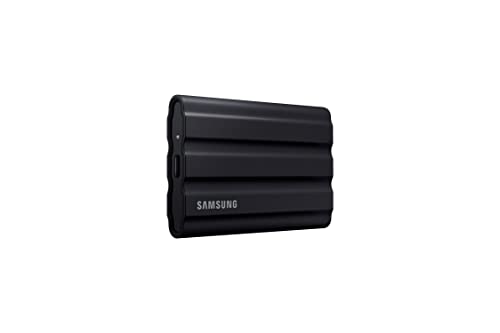
Samsung T7 Shield 2TB — Rugged field pick
The T7 Shield answers the question the T9 does not ask: what happens to the drive outside? Its listing states the essentials — USB 3.2 Gen 2, up to 1,050 MB/s, 2TB, rugged construction with IP65 water resistance. IP65 means sealed against dust and protected against water jets, which in field language translates to rain, dust storms of the ordinary kind, damp camera bags and the general hostility of locations that are not desks. Wrapped around that sealing is a shock-absorbing exterior built for drops onto hard ground, because the field’s other constant is gravity.
The interface choice is part of the rugged brief rather than a compromise beneath it. Gen 2 ports are everywhere — every modern laptop, desktop, tablet and console-era machine — so the Shield delivers its full stated pace into essentially anything it will ever meet, including the ageing field laptop whose ports were specified years ago. A drive bought to be the backup at a wedding, a shoot or a site survey should optimise for certainty: certainty it survives the day, and certainty it runs at full speed on the machine at hand. The Shield is engineered, specification by specification, for that certainty.
Photographers are its natural constituency, and the workflow writes itself: cards copied to the Shield at the location, the Shield sealed in the bag, the cards formatted only when a second copy exists at home. Videographers working documentary-style in uncontrolled environments share the same logic. Even non-field buyers with accident-prone desks — drives knocked off tables by cables, toddlers, cats — will recognise the value of a drive whose failure modes have been designed against rather than merely warranted.
What it gives up is the flagship’s ceiling, and on a Gen 2 host it gives up nothing at all, because the T9 would be capped at the same interface pace. That symmetry makes the Shield the quietly rational Samsung for most real-world port combinations, with the ruggedness arriving as a bonus rather than a trade. Buyers with Gen 2×2 hosts and desk-bound drives should take the T9; everyone whose drive leaves the building should start here.
One field habit multiplies this drive’s value and costs nothing: treat it as the second copy, never the only one, while travelling. Cards stay unformatted until the Shield’s contents are duplicated at base; the Shield itself rides in a different bag from the camera; and the day’s work therefore exists twice, in two places, before anyone sleeps. Rugged hardware invites complacency precisely because it survives so much, and the professionals who swear by this class of drive are the ones who pair its armour with that discipline rather than substituting one for the other. The IP65 seal handles the weather; the habit handles everything else.
- Interface: USB 3.2 Gen 2
- Stated peak speed: up to 1,050 MB/s
- Protection named in listing: IP65 water resistance, rugged build
- Capacity reviewed: 2TB
- Intended roles: field backup and travel duty
Strengths
- IP65 sealing and shock-ready construction for real locations.
- Full stated pace on the Gen 2 ports almost every machine has.
- Samsung’s portable ecosystem and software behind a tougher shell.
Trade-offs
- Half the T9’s ceiling on hosts that could feed the flagship.
- Rugged build is bulkier than the slim picks in this guide.
- Gen 2 interface caps its future headroom as ports evolve.
Best for: photographers, field workers and travellers whose drives live in bags and weather. Not suited for: desk-bound editors with Gen 2×2 hosts who would use the T9’s extra pace daily.

Crucial X10 Pro 2TB — Compact 2×2 alternative
Crucial’s X10 Pro is the connoisseur’s alternative in the 2×2 class: a notably compact 2TB drive on USB 3.2 Gen 2×2 whose listing states a 2,100 MB/s read figure — marginally above the T9’s headline — in one of the smallest enclosures in this guide. Size is a specification with consequences: a drive this small lives on a keyring’s dignity rather than in a padded pouch, disappears into a camera bag’s smallest pocket, and gets carried on the days a bulkier drive would be left behind. For backup discipline, the drive you have with you is the only one that counts, and the X10 Pro is engineered to be had with you.
The host caveat applies identically to the T9’s: Gen 2×2 pace requires the matching port, and on Gen 2 hosts the drive runs at that ceiling. Crucial’s buyer is therefore the same informed buyer, choosing between the two on size, price position and brand ecosystem rather than on a meaningful performance gap. Where the Samsung offers its software suite and flagship lineage, the Crucial offers Micron’s storage pedigree and a form factor that wins pockets. Both are defensible; the pocket test is a legitimate way to decide between near-equals.
Sustained work suits it as well. A compact enclosure has less surface to shed heat, yet the X10 Pro’s class of work — footage shuttles, project moves, library syncs — sits comfortably within its design brief, and owners using it as a working drive rather than an archive will find the pace holds where it matters. It is also a natural second drive in a two-drive system: the fast, tiny shuttle that pairs with a larger archive like the X9 below, each doing the job its specification describes.
Smallness does impose one domestic caution: a drive this size is easy to misplace, and its cable becomes its leash and its lifeline. Owners should adopt the boring habits — a fixed pocket, a labelled case, a cable that lives with the drive — because the failure mode of a tiny drive is rarely technical. Judged on its brief, the X10 Pro is the 2×2 drive for people whose bags are already full and whose standards are not.
There is a traveller’s arithmetic that favours this drive beyond its specification: weight and volume are currencies on any trip, and a shuttle drive that occupies the corner of a wash bag rather than the centre of a tech pouch changes packing decisions downstream — one less pouch, one less cable brick, one less object to inventory at hotel departures. Creators who work from carry-on luggage alone will understand that the X10 Pro’s dimensions are not a styling choice but an itinerary feature. Its pace then does at the destination what pace is for, and its size does on the journey what no benchmark measures.
- Interface: USB 3.2 Gen 2×2, USB Type-C
- Stated read figure: 2,100 MB/s per the listing
- Capacity reviewed: 2TB
- Form factor: compact portable design
- Maker: Crucial (Micron)
Strengths
- Top-tier stated read pace in one of the smallest bodies here.
- Size makes it the drive most likely to actually be carried.
- Micron-backed support and firmware infrastructure.
Trade-offs
- Same Gen 2×2 host requirement as the T9 for full pace.
- Tiny drives are easier to misplace than to break.
- Less enclosure surface for heat on the longest transfers.
Best for: mobile creators and minimalists wanting 2×2 pace in the smallest practical body. Not suited for: the chronically misplacing, or hosts without Gen 2×2 where its premium buys headroom they cannot open.
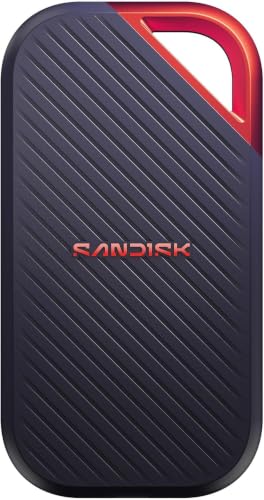
SanDisk Extreme PRO Portable SSD 2TB (new model) — Fastest claimed reads
This review is deliberately narrow, because its source is. The listing for SanDisk’s new-model Extreme PRO 2TB states a read figure of up to 4,000 MB/s — double the 2×2 class that fills most of this guide — and this guide reports exactly that, from that listing, without importing specifications or claims from other models, other generations or other sources. What can responsibly be said is that SanDisk positions this drive at the top of its portable range, that a read ceiling of that class implies a host interface and workflow able to feed it, and that buyers should confirm their machine’s ports against the listing’s own requirements before expecting the headline in their transfers.
The Extreme PRO name carries a long history in professional portable storage — photographers and videographers have trusted the line’s earlier generations as shuttle and field drives — and the new model’s stated figure continues that positioning at the performance end. For a working professional whose transfers are measured in hundreds of gigabytes and whose host machine is specified to match, a read pace of this class compresses the dead time between shooting and editing, which is the time this entire product category exists to delete.
The buyer’s homework is correspondingly specific. Read the listing’s stated requirements, match them against your machine’s ports, and treat any gap between the two as the real specification of your purchase — because a drive’s pace in your hand is the pace of the slowest link you connect it with. Owners of current high-end workstations are the audience the figure addresses; owners of ordinary laptops should weigh the T9 and X10 Pro, whose ceilings their machines can actually reach, and pocket the difference.
SanDisk’s professional channel presence is the soft factor in its favour: the brand’s drives are stocked, warranted and replaced through the same retail paths as the cameras they serve, which matters to working photographers far from home. Within the discipline this review has set itself — its own listing’s figure, its own line’s role — the Extreme PRO is the speed ceiling of this guide, offered to the buyers whose hosts and workloads can cash the cheque its headline writes.
A note on how to read listings like this one, offered because this guide’s discipline may look unusual: portable drive marketing has a history of figures migrating between models — a flagship’s numbers quoted in a lesser drive’s advertisement, a previous generation’s tests attached to a new enclosure. The defence is the one applied here, which is to bind every claim to the specific listing of the specific model and to say plainly when a review is doing so. Readers shopping beyond this guide should apply the same rule to any drive they meet: the figure belongs to the listing in front of you, or it belongs to nobody.
- Stated read figure: up to 4,000 MB/s per the listing
- Capacity reviewed: 2TB
- Model: new-model Extreme PRO portable
- Line: SanDisk professional portable series
- Note: specifications taken from this listing only
Strengths
- The highest stated read figure in this guide by a wide margin.
- A professional line with a long field-work pedigree.
- Built for hosts and workflows specified to feed it.
Trade-offs
- Realising the headline depends entirely on the host’s ports.
- This guide reports its read figure only, as its listing states it.
- Ordinary laptops will see it run far below its ceiling.
Best for: professionals with high-end hosts whose transfer volumes justify the fastest stated reads here. Not suited for: buyers on ordinary Gen 2 machines, where the T7 Shield delivers its full pace for less money and more protection.

Lexar SL500 2TB — Slim metal traveller
Lexar’s SL500 is the aesthete’s entry in this guide: a slim metal-bodied 2TB drive on USB 3.2 Gen 2×2 with a stated 2,000 MB/s read figure, whose listing also names compatibility with recent iPhones among its Type-C hosts. That phone compatibility is the detail that defines its modern niche. Creators shooting on phones — now a professional class of device in its own right — need somewhere for footage to go that is faster and roomier than the phone itself, and a slim drive that slips into the same pocket answers the workflow directly: record, offload, keep recording.
The slimness serves laptop travellers equally. A metal sliver of a drive rides in a sleeve without the lump a rugged drive makes, pairs with an ultrabook aesthetically as well as electrically, and presents no embarrassment on a client’s desk. Lexar’s long history in professional memory cards gives the brand standing with the photography community in particular, and the SL500 extends that card-case credibility into the portable SSD shelf.
Performance positioning mirrors the T9’s class on paper — same interface family, same stated read neighbourhood — with the same host condition attached: Gen 2×2 pace needs the port, and Gen 2 hosts cap it at their ceiling. The choice between them is therefore made on form, ecosystem and the phone workflow rather than on a benchmark. Buyers whose drives live in laptop sleeves and phone kits will feel the SL500’s thinness daily; buyers whose drives live in camera bags may prefer the Shield’s armour or the T9’s flagship brief.
Metal enclosures carry one honest caveat: they show their travels. A slim aluminium drive will collect the scratches its plastic and rubber rivals shrug off, and owners who value pristine kit should house it accordingly. It is a small price schedule for the format, and for the traveller this drive addresses — phone in one pocket, drive in the other, laptop in the sleeve — the exchange is obviously worth it.
The phone workflow deserves its own closing detail, because it reverses the usual direction of portable storage. Traditionally the drive served the computer and the phone was a camera that occasionally connected; for a growing class of creators the phone is the production device and the computer is where footage rests between edits. A slim drive specified with phones in its listing’s own compatibility line is built for that reversed world — quick offload at the location, direct review on a bigger screen later, and a pocket footprint that matches the device it serves. Buyers living in that workflow should weight the SL500’s design intent above small differences in anyone’s benchmark table.
- Interface: USB 3.2 Gen 2×2, Type-C
- Stated read figure: 2,000 MB/s
- Capacity reviewed: 2TB
- Compatibility named in listing: Type-C laptops and recent iPhones
- Build: slim metal enclosure
Strengths
- Slim metal design that travels like a phone accessory, not luggage.
- Phone-era compatibility for creators shooting on mobile devices.
- Full 2×2-class stated read pace for matching hosts.
Trade-offs
- Metal shows scratches that rubberised rivals hide.
- No rugged rating to rival the Shield’s field brief.
- Headline pace still depends on a Gen 2×2 host port.
Best for: phone-shooting creators and slim-kit travellers wanting fast offload in minimal bulk. Not suited for: field abuse or certified-ruggedness requirements, which are the T7 Shield’s department.

Crucial X9 4TB — Capacity value pick
The X9 closes the guide by inverting its values: capacity first, pace second, and no apology for the order. Its listing states 4TB at up to 1,050 MB/s on USB 3.2 Type-C — double the room of every other pick here, at the Gen 2 pace the T7 Shield also runs. For the buyer whose problem is not speed but space — the household archive, the photographer’s decade, the game library that travels, the backup that must hold everything — this is the drive the rest of the guide was quietly pointing at.
Context rescues the speed figure from sounding modest. At up to 1,050 MB/s the X9 still moves data several times faster than any spinning portable and fast enough to work from directly: documents, photo libraries and media collections open from it without the waiting that defined external storage for a generation. What it will not do is match the 2×2 drives in a footage-shuttle race, and its buyers are not entering that race; they are ending the weekly negotiation about what to delete, which is a more valuable victory for most households than a faster copy progress bar.
As a backup drive it has a particular virtue worth naming: a single device that holds the whole backup removes the fragmentation that kills restore discipline. Two half-backups on two small drives are, in practice, no backup with extra steps. Four terabytes in one pocketable object lets a household keep its entire digital life duplicated in a drawer, a relative’s house or a fireproof box — the off-site copy that backup advice always demands and small drives always complicate.
Crucial’s value positioning makes the arithmetic friendlier still, and the X9 pairs naturally with a faster sibling in a two-drive system: the X10 Pro or T9 as the working shuttle, the X9 as the deep store they both answer to. Owners building that system should buy the archive first if forced to choose, because data protected slowly beats data lost quickly — the oldest sentence in storage, and the one this guide is happiest to end its reviews on.
Ownership of a large archive drive settles into a rhythm the fast drives never experience: it is plugged in on schedule, filled methodically, and stored deliberately, and its health checks become a household ritual on the order of changing a filter. Crucial’s software support makes those checks simple, and owners who adopt the rhythm — verify the backup quarterly, refresh the oldest copies, keep the drive somewhere that is not the same room as the computer it mirrors — will find the X9 the least dramatic object they own. For an archive, undramatic is the highest available praise, and this drive earns it in the currency of years.
- Interface: USB 3.2, Type-C
- Stated peak speed: up to 1,050 MB/s
- Capacity reviewed: 4TB
- Maker: Crucial (Micron)
- Intended roles: archive, backup and library duty
Strengths
- Double the capacity of every other pick at a working pace.
- The single-drive backup that households actually maintain.
- Crucial value positioning and support behind the archive.
Trade-offs
- Gen 2 pace leaves the 2×2 drives ahead in transfer races.
- A single large drive concentrates risk if it is the only copy.
- Less pocketable in spirit than the slim picks, despite its size class.
Best for: households, archivists and library owners whose binding constraint is room, not pace. Not suited for: footage shuttles chasing the fastest copy window, where the 2×2 picks earn their premiums.
Where Will the Drive Live? Choosing by Carrier
It sounds whimsical and is actually diagnostic: name the place the drive will spend its life, and the shortlist rearranges itself. A camera bag’s drive meets weather, knocks and other equipment’s hard corners, and it must be findable by feel in the dark of a venue — the Shield’s sealed, grippy bulk is designed for exactly that hand. A laptop sleeve’s drive meets nothing harsher than a zip, but it shares millimetres with a machine that costs twenty times its price, so slimness and a smooth profile become protective features in their own right — the SL500’s and X10 Pro’s territory, where the drive’s kindness to its neighbours is the specification.
A desk drawer’s drive — the household backup — meets neither weather nor travel, and its enemies are time and forgetfulness instead. For that drive, capacity and the maker’s health tools matter most, because the failure it must survive is neglect: months between plug-ins, during which its owner assumes its contents are safe. The X9’s brief again. And a pocket’s drive, the daily-carry shuttle of the phone-era creator, meets lint, keys and the daily drop risk of small objects everywhere, which argues for the compact drives with a cable discipline and, ideally, a case that gives the hand something to find.
None of this replaces the port check or the capacity arithmetic; it sequences them. Carrier first, because it eliminates drives no specification can rehabilitate; ports second, because they price the survivors’ speed honestly; capacity third, because by then the remaining question is merely how much of the right drive to buy. Readers who run that sequence will find the six reviews above read less like a ranking and more like a set of labelled doors, each with the room it opens onto described on the front.
The Port Question, Answered Once and Properly
Everything in this category reduces to a matching exercise, so here is the matching table in prose. USB 3.2 Gen 2 — the interface on the T7 Shield and X9 — delivers up to roughly the 1,050 MB/s class these drives state, and it is present on effectively every modern computer. USB 3.2 Gen 2×2 doubles that class, and it is present on a smaller, desktop-leaning subset of machines; the T9, X10 Pro and SL500 are built for it and fall back gracefully without it. Thunderbolt and USB4 ports, common on recent laptops, accept these drives readily but run USB-mode drives at Gen 2 pace unless the drive itself speaks their protocol — none of the six here is a Thunderbolt drive, and their listings do not claim otherwise.
The practical ritual takes thirty seconds: find your machine’s port specification, compare it with the drive’s interface in the reviews above, and buy the drive whose ceiling your desk can reach — or knowingly buy headroom for the next machine, which is a legitimate choice when made with open eyes. What this guide exists to prevent is the third outcome, the accidental one, where a flagship portable spends its life at half pace because nobody performed the thirty-second check.
Port names, admittedly, conspire against the buyer: Gen 2, Gen 2×2, USB4 and Thunderbolt share connectors and differ in everything else, and manufacturers print the flattering version largest. The defence is to read the transfer-rate line in your machine’s specification rather than the port’s label, and to treat any seller who cannot state a drive’s interface generation plainly as a seller whose other claims deserve the same discount. Every drive in this guide had its interface taken from its own listing, which is the standard readers should hold the rest of the market to as well.
Game Libraries, Consoles and the Portable Drive as Furniture
One large constituency buys these drives for a job the photography framing undersells: carrying a game library. Modern titles are enormous, internal console and PC storage is finite, and a fast portable turns the library portable — the whole rotation on one drive, moved between a desktop and a laptop, or kept as the overflow a console’s internal drive cannot hold. Buyers should check each platform’s rules before assuming a game can play from external storage rather than merely live there, because current-generation consoles restrict which titles run from USB drives; as an archive and transfer medium, though, any pick in this guide serves, and the X9’s 4TB is the library-keeper’s obvious candidate.
There is also the furniture use, unglamorous and universal: the drive that lives permanently behind a desk, a television or a router, extending a machine that cannot be opened. Media servers, smart-TV recording, a family computer’s overflow — a portable SSD does these jobs silently for years, and for that duty the deciding factors reorder again toward capacity, reliability and a cable long enough to reach a shelf. Owners buying for a fixed post should say so to themselves before shopping, because the slim traveller and the rugged field drive both pay for virtues a shelf will never use, while the X9’s room is spent every single day.
Building a Two-Drive System That Actually Protects You
Readers who own none of these drives yet often ask whether one purchase can cover working speed and backup safety together, and the honest answer is that it cannot — not because any drive here is deficient, but because the two jobs have opposite travel patterns. The working drive goes where the work is and risks what the road risks; the backup drive stays somewhere safe and risks nothing but time. A single drive asked to do both will eventually be in the wrong place on the wrong day, and the day chooses itself.
The system this guide’s picks assemble naturally is a fast shuttle — T9, X10 Pro or SL500 by host and taste — paired with the X9 as the deep store, with the T7 Shield substituting for the shuttle wherever the work happens outdoors. Data flows downhill through the system: created on the shuttle, edited from it, archived to the X9 on a schedule, and verified rather than assumed. Owners who build that flow once find that storage stops being a recurring anxiety and becomes plumbing — invisible when it works, which, with these drives in these roles, is nearly always.
Six Drives, Six Briefs
| Drive | Interface | Stated figure | Capacity | Brief |
|---|---|---|---|---|
| Samsung T9 | USB 3.2 Gen 2×2 | Up to 2,000 MB/s | 2TB | Flagship all-rounder |
| Samsung T7 Shield | USB 3.2 Gen 2 | Up to 1,050 MB/s | 2TB | Rugged field drive |
| Crucial X10 Pro | USB 3.2 Gen 2×2 | 2,100 MB/s read | 2TB | Compact pace |
| SanDisk Extreme PRO | Per its listing | Up to 4,000 MB/s read | 2TB | Fastest claimed reads |
| Lexar SL500 | USB 3.2 Gen 2×2 | 2,000 MB/s read | 2TB | Slim phone-era traveller |
| Crucial X9 | USB 3.2 Gen 2 class | Up to 1,050 MB/s | 4TB | Capacity and archive |
Security: The Copy You Carry Is the Copy You Can Lose
A portable drive concentrates risk in a way an internal one never does: it holds a working library in an object designed to be carried, which means designed to be losable. The professional response is encryption by default. Every modern operating system offers volume encryption, and the maker software bundled with drives like Samsung’s adds password protection of its own; either layer turns a lost drive from a data breach into an insurance claim. The time to enable it is before the first file lands, because retrofitting encryption onto a full drive is an afternoon nobody schedules voluntarily.
The second layer is procedural. Label the drive with a return address or phone number that is not the data’s owner in any identifying way, keep an inventory of what the drive holds so a loss can be assessed honestly, and never let the travelling drive be the sole copy of client work — a rule this guide has repeated in several dialects because it is the one whose violation produces the stories professionals tell each other as warnings. Hardware fails rarely; bags are left in taxis on a schedule as old as taxis.
Handling, Cables and the Small Physics of Portable Storage
Flash storage has no moving parts, which tempts owners to treat portable SSDs as indestructible in ways their connectors are not. The USB-C port on a small drive is a mechanical component with a finite tolerance for side-loading, and the commonest physical failure in this category is a port worried loose by a heavy cable hanging off a laptop on a café table. Support the drive, keep cable runs short and unstressed, and prefer the short lead the maker supplied for desk work — it was chosen with the port’s leverage in mind.
Eject before unplugging, every time, and teach the habit to anyone who borrows the drive. Operating systems cache writes, and a cable pulled mid-cache can corrupt the very transfer the drive’s speed was bought to complete; the two-second eject ritual is the cheapest data insurance in computing. Heat, finally, is a minor character for portables but not an absent one: a drive copying for an hour on a sunny windowsill or atop a warm laptop exhaust will slow to protect itself, and the cure is placement, not panic. Treat the little drive as an instrument rather than a pebble and it will return the courtesy in years.
What Do Portable Drive Buyers Regret Most?
The regrets in this category are remarkably consistent. First, buying speed the host cannot serve — the flagship idling at Gen 2 pace for its whole life. Second, buying capacity for the library of today and meeting the library of next year unprepared; portable drives fill with the same certainty as internal ones, and the X9’s existence in this guide is the standing reminder. Third, treating a portable drive as a backup by itself: a single copy that travels is a single point of failure with a handle, and the drive that holds your only copy of anything should be the one that never leaves the desk.
A fourth regret is quieter: losing the cable. Portable SSDs live and die by their USB-C leads, and a drive separated from its cable at the moment of need is a paperweight with memories inside. Keep the cable with the drive, keep a spare where the drive works most, and let that small discipline be the last thing this guide’s mistake section asks of you.
Final Recommendation
Start with your ports, because they decide more than preference does. On a Gen 2×2 machine, the Samsung T9 is the flagship all-rounder this guide leads with, the X10 Pro its pocket-sized rival, and the SL500 the slim choice for phone-era kits. On the Gen 2 machines most people actually own, the T7 Shield is the recommendation with the fewest conditions attached — full stated pace anywhere, sealed against the weather, ready for the bag. The X9 is the archive every household eventually needs, and the SanDisk is the specialist’s ceiling for hosts built to feed it. Buy the drive your ports can honour and your bag can protect, keep a second copy of anything irreplaceable somewhere else entirely, and portable storage will do for you what it did for everyone in this guide’s workflows: disappear, at speed, into the work itself. And if the choice has narrowed to two and the specifications will not separate them, choose the one whose size and shape fit the bag you actually carry — because the best external drive, on the day the work happens away from home, is never the fastest one in the drawer. It is the one that came with you.
Frequently Asked Questions
Why does my fast portable drive run slower than its box promised?
Almost always, the port. A Gen 2×2 drive in a Gen 2 port runs at Gen 2 pace by design, and Thunderbolt ports without a Thunderbolt drive behave the same way. Check the host’s specification before blaming the drive; the reviews above state each drive’s interface so the comparison takes seconds. Cable quality and length can also trim pace, which is why the supplied cable is the first suspect after the port itself.
Can you edit video directly from an external SSD?
Yes — that is the working premise of the faster picks here. A Gen 2 drive already feeds 4K timelines comfortably for most editing, and the 2×2 class adds headroom for multicam and high-bitrate work. Keep the project and its cache on the same fast drive, eject properly rather than pulling cables, and treat the portable as working storage with a backup elsewhere, not as the footage’s only home.
Is IP65 enough protection for field work?
For the conditions field work actually presents — rain, dust, splashes, damp bags — IP65 sealing plus a shock-ready build, as on the T7 Shield, covers the realistic risks. It is not a licence to submerge the drive or leave it in a puddle; ingress ratings describe tested conditions, not invincibility. Combined with the discipline of copying cards early and often, it makes the Shield the field pick of this guide on evidence rather than on adjectives.
Should a backup drive be the fastest or the largest?
The largest, and it is not close. A backup’s job is to exist, complete and current, on the day it is needed; pace merely decides how long the copying took on an ordinary day. That is the X9’s entire argument — 4TB that holds the whole backup in one device — and why this guide recommends buying the archive before the shuttle whenever a household must choose between them.
How long will a portable SSD last?
Years of ordinary service is the honest expectation: flash storage wears by writing, and portable workloads — even an editor’s daily shuttling — write modestly compared with an internal system drive’s lifetime total. The realistic killers are the physical ones this guide has dwelt on: lost drives, worried connectors, drowned bags. Buy from a maker whose warranty process you trust, keep the health tools’ occasional check on your calendar, and expect the drive to be retired for capacity or interface reasons long before its memory wears out — the happiest ending storage hardware gets.
Do these drives work with phones and tablets?
USB-C phones and tablets can use portable SSDs for storage and offload, subject to the device’s file system and power delivery; the Lexar SL500’s listing names recent iPhones explicitly among its compatible hosts. Phone workflows are the fastest-growing use of this category — footage offloaded in the field, libraries carried between devices — and any drive here will serve a tablet or phone at the pace the host allows, with the slim picks suiting the kit best.
Related Guides
A parting calibration for buyers torn between the fast tier and the roomy one: count your transfers honestly for a week. If large copies happen daily and someone waits on them, speed is a working tool and the 2×2 class earns its premium in reclaimed hours within the year. If large copies happen monthly and the waiting is done by a progress bar overnight, capacity is the tool and the X9’s room will still be serving when the fast drive’s interface has been superseded twice. Both are respectable answers; the disreputable one is buying either without the count, on the strength of a headline written for somebody else’s week.
One last calibration, offered to the reader who has reached this line still undecided between the T9 and the Shield, the pair most buyers ultimately face: imagine the drive’s worst plausible day in your service. If that day is a deadline transfer at a desk, take the flagship and its pace. If that day is rain, a dropped bag and a laptop borrowed in a hurry, take the Shield and its certainty. The worst day, honestly imagined, has settled more storage purchases correctly than any benchmark in this guide’s research — because drives, like the work they carry, are judged in the end by how they behave when conditions stop cooperating.
Portable storage usually arrives alongside an internal upgrade, so readers may also want our guide to the best M.2 NVMe SSDs for the drive inside the machine, our roundup of the best Gen 4 SSDs for desktop storage in depth, and our graphics card picks for photo and video editing for the workstation these drives so often serve.
Related guides
- Best 1440p 165Hz Monitors: One Native 165Hz Pick, Three 180Hz Upgrades, an Overclock Headline and a 160Hz Ultrawide
- Best 13×19 Professional Printers
- Best 3rd Party MacBook Chargers: 96W-Class Alternatives, the 100W Cable Rule, and the Apple Benchmark
- Best Built PC: Six Prebuilt Gaming PCs Judged on Parts, Power and Upgrades



[…] decisions travel with the rest of the build, so readers may also want our guide to the best Gen 4 SSDs for the wider Gen4 field, our picks for the best external SSDs for portable capacity, and our […]
[…] placing these drives in a wider build may also want our guide to the best M.2 NVMe SSDs for the full interface landscape including Gen5, our picks for the best external SSDs for the […]