What's inside
- Where to buy
- Key Takeaways
- Quick Picks
- How did we choose ten laser printers worth listing?
- Which laser printer fits your workload?
- How do the ten positions compare by workload?
- What should you check before buying any laser printer?
- How do you set up a laser printer for years of quiet service?
- What mistakes do laser printer buyers repeat?
- How does a laser printer age across a decade of ownership?
- Final Recommendation
- Frequently Asked Questions
- How do paper choices change a laser printer’s results?
- What does scanning add to a laser all-in-one’s real value?
- How should an office choose between one strong laser and several small ones?
- Why do laser printers suit intermittent users better than any rival?
- How do you troubleshoot the three classic laser complaints?
- What should be written down on the day a laser printer arrives?
- How does a printer choice echo through a home office’s other decisions?
- What is the kindest way to retire a laser printer eventually?
- Related Guides
As an Amazon Associate I earn from qualifying purchases. This post may contain affiliate links at no extra cost to you.
gizmoverdict.com is reader-supported. When you buy through links on our site, we may earn an affiliate commission.
Where to buy
Linked names below open listings verified through this site’s own product feed, and the best 10 laser printers deserve an explanation of their own arithmetic before the list begins. The best 10 laser printers are presented here as ten positions rather than the usual six, because the keyword asks for ten and the category can honestly fill ten chairs. Four chairs carry verified links, all of them Brother monochrome machines, because Brother’s laser range is what this batch’s pool verified. Six chairs are prose-only, occupied by real laser classes from HP, Canon, Lexmark and Xerox, plus Brother’s own heavier and colour branches, each described without invented speeds or running-cost figures. No page-per-minute number appears in this guide unless a verified title carried it, and none did, so print speeds are discussed in the honest currency of class and workload instead.
Why choose laser at all in an inkjet century? Because a laser printer’s virtues compound quietly: pages that emerge dry and smudge-resistant, toner that does not dry out between uses, text sharpness that survives photocopying, and a cost rhythm based on cartridges that last months or years in ordinary homes rather than weeks. For households that print schoolwork, forms, labels, contracts and the occasional boarding pass, a monochrome laser is close to a solved problem. For photographs it is the wrong tool entirely, and this guide says so wherever the temptation might arise, because a laser bought for photo duty disappoints everyone involved.
The ten positions divide by workload rather than by brand loyalty. Light home duty, busy home offices, small teams, duplex devotees, colour document needs and fax-holding traditionalists each get a chair, and the sections explain which workload each machine class serves. Readers should find their workload first and their brand second, because a laser printer is a ten-year appliance whose daily manners, its warmup behaviour, its tray capacity, its wireless temperament, matter more than the badge on its front. Badges decide ties here, never shortlists.
Key Takeaways
- Four verified Brother monochrome lasers are linked: the DCP-L2640DW, HL-L2405W, HL-L2460DW and MFC-L2820DW, covering print-only through fax-equipped all-in-one duty.
- Six prose positions cover the wider laser market honestly, including HP and Canon rivals, a Lexmark small-team class, a Xerox entry class and colour laser options.
- Duplex printing is the feature that divides this list most usefully, present in three of the four linked Brothers and worth prioritising for document-heavy homes.
- Monochrome laser remains the value answer for text; colour laser and photo printing are separate purchases with separate logic.
- No print-speed figures are quoted, because the verified titles carried none and this guide does not invent specifications.
Quick Picks
| Pick | Badge | Why it earns its place |
|---|---|---|
| Brother DCP-L2640DW | The home all-in-one | Wireless monochrome multifunction with duplex printing, for homes that print, scan and copy in roughly equal measure. |
| Brother HL-L2405W | The simple printer | Wireless monochrome laser printing without the all-in-one apparatus, for desks that only ever print. |
| Brother HL-L2460DW | The duplex printer | Wireless monochrome printing with automatic two-sided output, the paper-saving upgrade in print-only form. |
| Brother MFC-L2820DW | The complete office box | Wireless monochrome all-in-one with fax, for home offices that still live partly on paper workflows. |
| HP LaserJet Pro 4001dw class | The rival print-only class | Prose-only: HP’s small-office monochrome line, for buyers standardised on HP management and supplies. |
| Canon imageCLASS MF465dw class | The rival all-in-one class | Prose-only: Canon’s monochrome all-in-one branch, with its own scan and copy manners. |
| Lexmark MB2236adw class | The small-team compact | Prose-only: a compact monochrome multifunction class aimed at very small workgroups. |
| Xerox B230 class | The entry business class | Prose-only: Xerox’s small monochrome printer class for buyers who value its business lineage. |
| Brother HL-L6415DW class | The heavy-duty Brother branch | Prose-only: Brother’s higher-volume monochrome class for offices that print all day. |
| HP Color LaserJet Pro 4201dw class | The colour document class | Prose-only: colour laser for offices whose documents genuinely need colour, never for photographs. |
How did we choose ten laser printers worth listing?
The method started with verification and admitted its boundary in public. This batch’s pool, checked through the site’s own product feed, verified four laser printers, all Brother monochrome models spanning the main home and small-office shapes: a compact all-in-one, two print-only machines divided by duplex, and a full MFC with fax. Those four became the linked picks because links require evidence. The remaining six positions were then assigned to real, recognisable laser classes that a buyer cross-shopping this category will genuinely meet, described in prose at the class level, with no fabricated speeds, yields or prices attached to any of them.
Workload coverage governed the prose choices. A list of ten that contained only home machines would fail the small offices reading it, so team and higher-volume classes were included. A list with no colour position would fail the offices whose charts and branded documents need it, so one colour class closes the ten, fenced with warnings about photographs. Brand breadth mattered for a practical reason as well: supplies ecosystems and driver habits tie offices to a maker, and a guide that pretends one brand is the whole market sends half its readers away misinformed about their own preferences.
Specification discipline shaped every section. Laser marketing loves a page-per-minute figure, yet those numbers are measured under conditions no home reproduces, and since the verified titles in our pool printed none, this guide quotes none, for linked or prose picks alike. What the sections compare instead are the durable facts a buyer can verify on any maker’s page: whether duplex is automatic, whether the machine prints only or also scans and copies, whether fax survives in its design, how its trays and wireless are arranged as a class, and which workload its maker built it to serve. Those facts age slowly and decide satisfaction completely.
One more filter deserves naming: toner reality. A laser printer is a cartridge relationship lasting years, so classes were favoured whose supplies are widely stocked, whose models accept high-yield options as a class, and whose drums and cartridges are arranged in ways a buyer can understand before committing. Exact yields are deliberately not printed here, because they vary by cartridge and coverage and belong on the maker’s current page for the exact model. The principle, though, is universal: price the printer’s appetite, not just the printer.
Which laser printer fits your workload?

Brother DCP-L2640DW — The home all-in-one
The DCP line is Brother’s answer to the household that prints, scans and copies without ever faxing, and this model’s verified title confirms the recipe: wireless, monochrome laser, multifunction, with duplex printing. That combination maps almost perfectly onto family administration, school forms that must be signed and returned, insurance documents, recipes, labels and the steady drip of paper modern life still produces. The scanner earns its keep in short bursts across years, which is exactly how home scanning happens, and duplex quietly halves the paper pile for any household that prints readings, drafts or manuals.
Choose it when the machine will live as shared family infrastructure, on the home network, woken from phones and laptops alike. Its compromises are the class’s honest ones: monochrome only, so colour school projects still belong to another device, and all-in-one size exceeds a pure printer’s footprint. Within those bounds it is the most complete single purchase among the linked four, and the one most households should price first.
- Functions: print, scan, copy, per its multifunction class
- Colour: monochrome laser
- Duplex: automatic two-sided printing, per the verified title
- Connectivity: wireless, per the title
Strengths
- Print, scan and copy coverage answers nearly every household paper task in one machine.
- Automatic duplex trims paper use on the long documents homes increasingly print.
- Wireless placement frees it from the computer desk entirely.
Trade-offs
- Monochrome output leaves colour projects to another device by design.
- No fax, which a small number of paper-bound offices still require.
- All-in-one hardware is larger than the print-only picks below.
Best for: families and home administrators who print, scan and copy in rotation. Not suited for: colour printing, fax workflows or the smallest desks.

Brother HL-L2405W — The simple printer
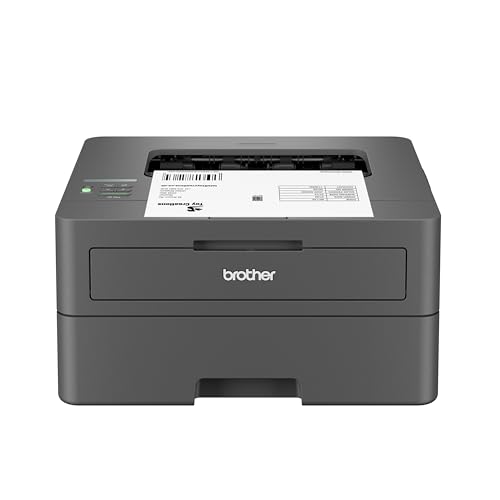
There is a desk, in many homes, that needs exactly one thing from a printer: printed pages, on demand, without ceremony. The HL-L2405W’s verified title is correspondingly plain, a wireless monochrome laser printer, and its plainness is the product. No scanner lid to bulk the silhouette, no fax heritage, no document feeder to maintain, just a tray, a toner cartridge and a wireless radio waiting for the next form, label or letter. For students, remote workers with digital filing habits and households whose scanning happens on a phone camera, that subtraction is a feature.
Its examination is equally plain. Without duplex in its title, long documents print one-sided unless the driver is asked to orchestrate manual flipping, which most owners do a handful of times before developing opinions. Buyers who print readings or drafts regularly should step to the duplex model below. Buyers who print a few pages a week, each urgently and singly, will never miss it, and will enjoy the simplest machine in this entire list every time it simply works.
- Functions: print only
- Colour: monochrome laser
- Duplex: not stated in the verified title
- Connectivity: wireless, per the title
Strengths
- The simplest ownership proposition among the linked picks, with the fewest parts to manage.
- Wireless printing from every device in the house without a host computer.
- Compact print-only form suits small desks and shelves.
Trade-offs
- No scanning or copying at all, which some households discover they needed.
- No automatic duplex named, so two-sided documents take manual effort.
- Monochrome only, like every linked pick in this guide.
Best for: print-only desks, students and digitally organised households. Not suited for: scanning households or habitual two-sided printing.

Brother HL-L2460DW — The duplex printer
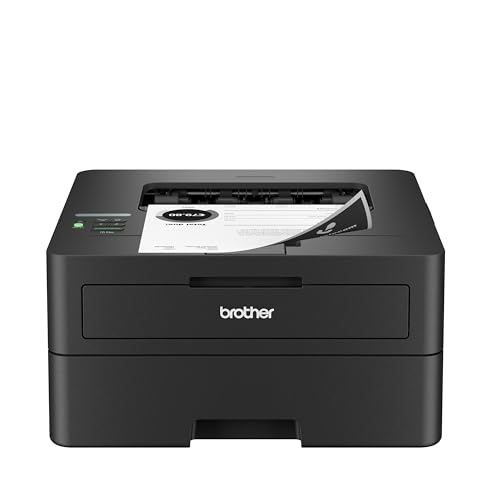
One letter’s difference in the badge, one decisive feature in the title: where its sibling above stops at wireless, this model’s verified title adds duplex, and with it a different daily life. Automatic two-sided printing changes how a household treats long documents, because the cost in paper and shelf thickness halves without any effort after the driver setting is chosen once. Course readings, draft manuscripts, meeting packs and manuals all become lighter objects, and the printer that produces them stays as simple as a print-only machine should.
It shares the HL line’s discipline otherwise: monochrome laser output, wireless connectivity, no scanning apparatus. The comparison with the DCP all-in-one above is therefore the cleanest decision in this guide. A household that scans chooses the DCP; a household that prints long and never scans chooses this one; a household that does both in volume should read the MFC section next and consider whether its fuller office specification is the honest answer. Clarity of that kind is what a ten-position list is for.
- Functions: print only
- Colour: monochrome laser
- Duplex: automatic two-sided printing, per the verified title
- Connectivity: wireless, per the title
Strengths
- Automatic duplex in a simple print-only body, the paper-saver’s ideal form.
- Wireless operation from phones, laptops and desktops alike.
- No scanner hardware to bulk or maintain for households that never scan.
Trade-offs
- Scanning and copying require a separate solution entirely.
- Monochrome output, as with all four linked Brothers here.
- Print-only focus means offices with paper intake workflows should look higher.
Best for: readers, students and draft-heavy home workers who print long documents. Not suited for: scan-and-file households or colour needs of any kind.

Brother MFC-L2820DW — The complete office box
The MFC badge is Brother’s fullest office formula, and this model’s verified title completes the set: wireless monochrome all-in-one laser, with fax named outright. Print, scan, copy and fax in one wireless machine is the specification of a home office that still participates in paper institutions, medical forms, legal documents, school administrations and the other fax-holding corners of modern life. An automatic document feeder class habit and duplex printing round out a machine designed to process paper, not merely to emit it.
Its audience should be honest about the fax question, because fax is the feature that justifies stepping up from the DCP above. Households that have not sent a fax in years are buying a larger, more complex machine for a ceremony they will never perform, while offices that fax monthly will find this the only linked pick that respects their reality. Either way the MFC represents the ceiling of the verified pool: the most complete laser appliance in this guide, priced and sized accordingly, and happiest where its completeness is exercised weekly rather than admired.
- Functions: print, scan, copy and fax, per the verified title
- Colour: monochrome laser
- Duplex: included in this model’s office specification class
- Connectivity: wireless, per the title
Strengths
- The only linked pick covering fax, completing the traditional office quartet.
- All-in-one depth suits document-processing workflows, not just printing.
- Wireless networking lets a whole small office share one paper appliance.
Trade-offs
- The largest and most complex machine among the linked four.
- Fax hardware is dead weight for households that will never use it.
- Monochrome laser still, so colour documents remain another device’s job.
Best for: home offices and small practices with genuine scan, copy and fax traffic. Not suited for: simple print-only desks or colour document production.
HP LaserJet Pro 4001dw class — The rival print-only class
No honest laser list can pretend Brother is the only badge in the aisle. HP’s LaserJet Pro print-only class is the default monochrome choice inside countless small offices, valued for its driver ecosystem, its management tools and an administrative familiarity that IT-minded buyers accumulate over years. It is prose-only here because this batch’s pool verified no HP laser, and its section therefore speaks at class level: expect a wireless, duplex-capable monochrome printer aimed at small workgroups, with supplies and service arranged through HP’s extensive channels. Buyers already standardised on HP will find their habits honoured by this class in a way no Brother can match, and that is a legitimate reason to choose it.
- Functions: print only, as a class
- Colour: monochrome laser
- Positioning: small-office workgroup class
- Pool status: no checked listing behind this class
Strengths
- HP’s driver and management ecosystem suits offices with several machines to administer.
- Supplies and service channels are extensive in most markets.
- Workgroup orientation brings sturdier duty expectations than home classes.
Trade-offs
- Print-only form leaves scanning to a separate device.
- Exact specification varies across the class and must be checked per model.
- Prose-only status means pricing and stock checks rest with the buyer.
Best for: HP-standardised small offices needing a shared monochrome printer. Not suited for: scan-heavy workflows or buyers wanting a verified link from this guide.
Canon imageCLASS MF465dw class — The rival all-in-one class
Canon’s imageCLASS line is the other great all-in-one tradition, and its monochrome multifunction class stands as the natural rival to the Brother MFC above. Prose-only for the same pool reason, it is described at class level: wireless monochrome printing with scanning, copying and office document handling, aimed at small teams whose paper intake matters as much as their output. Canon’s scan software habits and control-panel manners have their own loyalists, and offices that learned them rarely switch casually. Cross-shoppers should compare this class against the MFC on feeder capacity, scan-to destinations and the control panel’s temperament, the daily surfaces where all-in-ones are actually judged.
- Functions: print, scan, copy class, with office document handling
- Colour: monochrome laser
- Positioning: small-team all-in-one class
- Listing status here: prose coverage, unverified in the pool
Strengths
- Full all-in-one coverage for teams that scan as much as they print.
- Canon’s document handling lineage suits paper-heavy small offices.
- Wireless sharing across a workgroup is the class’s home territory.
Trade-offs
- Class-level description requires per-model verification before purchase.
- Larger and costlier than home all-in-ones as a class.
- No verified listing here, so seller diligence belongs to the buyer.
Best for: small teams weighing Canon’s all-in-one ecosystem against Brother’s. Not suited for: print-only desks or strict minimalists.
Lexmark MB2236adw class — The small-team compact
Lexmark’s compact multifunction class occupies a niche the home brands underserve: a monochrome all-in-one sized and priced for very small workgroups that need business manners, security-minded firmware and a small footprint simultaneously. Prose-only in this guide, it represents the proposition that a three-person office does not need a machine built for thirty, yet deserves better than a home appliance stretched upward. Buyers in that exact crevice, a clinic desk, a site office, a retail back room, should have this class on their personal shortlist and verify its current specification on Lexmark’s page.
- Functions: monochrome multifunction class
- Colour: monochrome laser
- Positioning: compact workgroup appliance
- Pool status: discussed in prose, absent from the verified set
Strengths
- Business firmware and security habits in a compact body.
- All-in-one coverage sized for very small teams rather than homes or departments.
- Lexmark’s supplies channel serves managed offices well.
Trade-offs
- Business positioning prices it above home all-in-ones of similar headline shape.
- Consumer retail presence is thinner, so shopping takes more intent.
- Exact features must be confirmed per model on the maker’s page.
Best for: very small workgroups wanting business-grade manners in compact form. Not suited for: casual home use, where its strengths go unexercised.
Xerox B230 class — The entry business class
Xerox’s name carries the longest shadow in copying and printing, and its entry monochrome printer class offers that lineage in a small wireless machine for offices that buy on institutional trust. Prose-only here, the class is print-focused, aimed at small teams that want a business badge, straightforward wireless operation and supplies through Xerox’s channels. It will not out-feature the linked Brothers at their own game, and it does not need to: its buyer is purchasing an ecosystem and a service story as much as a printer, which is a rational purchase when downtime costs more than hardware.
- Functions: print-focused class
- Colour: monochrome laser
- Positioning: entry business printer
- Listing status here: no pool listing supports this class
Strengths
- Business lineage and service channels reassure offices that buy on support.
- Simple print-focused design keeps daily operation uncomplicated.
- Wireless operation suits shared small-team placement.
Trade-offs
- Print focus leaves scanning households unserved.
- Home buyers gain little from its institutional strengths.
- Per-model verification is required, as with every prose position here.
Best for: small offices that value Xerox’s business ecosystem for a shared printer. Not suited for: all-in-one needs or home desks.
Brother HL-L6415DW class — The heavy-duty Brother branch
Brother’s own catalogue continues above the linked picks, into a higher-volume monochrome class built for offices that print throughout the day and measure trays in reams. This prose position exists so that a busy reader does not force a home-class machine into departmental service: the heavy branch brings larger paper handling ambitions, sturdier duty expectations and enterprise-flavoured networking habits as a class. We hold no verified listing for it in this pool, so the guidance is directional: if the MFC above sounds almost sufficient but the daily page count keeps growing, this branch, verified on Brother’s own pages, is where the conversation should move.
- Functions: print-focused, high-volume class
- Colour: monochrome laser
- Positioning: departmental and busy-office duty
- Pool status: prose-only treatment, nothing verified
Strengths
- Built for sustained daily volume beyond home and small-office classes.
- Larger paper handling ambitions reduce refill interruptions.
- Brother supplies familiarity carries upward from the linked picks.
Trade-offs
- Oversized and over-specified for ordinary homes by design.
- Print focus means scanning still needs its own solution.
- Class pricing belongs to office budgets, not household ones.
Best for: busy offices whose monochrome volume outgrows home-class machines. Not suited for: homes, students or any desk that prints weekly.
HP Color LaserJet Pro 4201dw class — The colour document class
The tenth chair belongs to colour, with fences around it. The colour LaserJet Pro class serves offices whose documents use colour as information: charts whose lines must differ, branded letters, training materials, proposals. For those pages, colour laser delivers dry, sharp, office-appropriate output with toner economics that suit text-with-graphics far better than ink systems do. It is prose-only here, and its fence is absolute: colour laser is not a photo printer, its glossy paper manners and colour character serve documents, and any household dreaming of family photographs should buy an inkjet photo machine instead and let this class serve the offices it was drawn for.
- Functions: colour print class for offices
- Colour: colour laser, four toner cartridges as a class
- Positioning: colour document production
- Listing status here: covered in prose without a pool link
Strengths
- Colour documents emerge dry, sharp and ready for a meeting.
- Toner does not dry out between busy periods, suiting intermittent office use.
- Professional paper handling exceeds presentation needs of most small firms.
Trade-offs
- Four cartridges make its appetite the largest in this list when colour is used heavily.
- Photographs are outside its competence, however the marketing arranges them.
- Larger, heavier and costlier than every monochrome position here.
Best for: small firms whose documents genuinely require colour as information. Not suited for: photo printing, home budgets or monochrome workloads in colour clothing.
How do the ten positions compare by workload?
| Position | Functions | Colour | Status |
|---|---|---|---|
| Brother DCP-L2640DW | Print, scan, copy | Mono | Linked |
| Brother HL-L2405W | Mono | Linked | |
| Brother HL-L2460DW | Print, duplex | Mono | Linked |
| Brother MFC-L2820DW | Print, scan, copy, fax | Mono | Linked |
| HP LaserJet Pro 4001dw class | Mono | Prose-only | |
| Canon imageCLASS MF465dw class | All-in-one | Mono | Prose-only |
| Lexmark MB2236adw class | All-in-one | Mono | Prose-only |
| Xerox B230 class | Mono | Prose-only | |
| Brother HL-L6415DW class | Print, high volume | Mono | Prose-only |
| HP Color LaserJet Pro 4201dw class | Colour | Prose-only |
Read the table by the functions column and let the brand column wait its turn. The distance between print-only and all-in-one shapes a decade of daily use more than any badge does, and the distance between mono and colour shapes the supplies budget just as completely. Once the workload row is chosen, brand preference becomes a sensible tiebreaker rather than a superstition, and the linked rows offer the shortcut of verification for readers whose workload they match.
What should you check before buying any laser printer?
Duty rhythm comes first, estimated honestly in pages per week rather than in aspirations. A home that prints twenty pages weekly and an office that prints two hundred daily are shopping in different classes even when their pages look identical, because trays, drums and feed mechanisms are built to rhythms. Match the class to the rhythm and the machine will feel unhurried for years; mismatch them and even a good printer becomes a complaint with a power cord. The ten positions above were arranged along exactly this axis, from the simple HL at the quiet end to the heavy Brother branch at the relentless one.
Running costs deserve the second check, conducted qualitatively on the maker’s current pages. Look at whether a high-yield cartridge option exists for the exact model, whether the drum is separate or integrated, and how many cartridges the machine eats, one for mono and four for colour. Those structural facts predict the supplies budget more reliably than any single yield figure, because they describe the shape of the appetite rather than one meal. A cheap printer with a small, frequently replaced cartridge can outspend a dearer printer with a high-yield option inside two years of ordinary use.
Connectivity and placement close the trio. Wireless printing is only as good as the network where the printer will live, so a machine destined for a far corner deserves a thought about signal, and an office that prints from many machines deserves a thought about wired networking as a class feature. Physical placement matters too: laser printers want ventilation, a surface that tolerates warmth and vibration, and access to the tray without furniture rearrangement. The best printer in this list, installed in a cupboard, becomes the worst printer in this list by Friday.
How do you set up a laser printer for years of quiet service?
Place it first and plug it in second. Give the machine a firm, ventilated home within honest reach of its users, load the tray without overfilling it, and let the initialisation complete without interruption. Connect it to the network by the method its manual prefers, then add it to each computer and phone deliberately, printing one test page from each, because discovering a missing driver during a deadline is a tradition nobody needs to uphold. Set duplex as the default on any model that offers it, while the intention is fresh, since defaults are where paper savings actually live.
Supplies housekeeping belongs to the first week too. Note the cartridge model the machine uses, in the same document where its network name and placement are recorded, and consider keeping one spare cartridge once the machine has proven itself, because toner announces its end at the least convenient moment in the calendar with remarkable consistency. Register the warranty, save the maker’s support page, and learn where the manual’s jam-clearing diagrams live before the first jam, which will otherwise introduce them under pressure.
Finally, teach the household or the office the machine’s manners: what paper it likes, how its tray adjusts, which button wakes it, and why photographs are not its department. A laser printer shared by several people accumulates folklore, and accurate folklore, spread early, prevents the bent trays and mystery settings that fill support calls. Ten minutes of teaching in the first week is the cheapest service contract in the category.
What mistakes do laser printer buyers repeat?
Buying an all-in-one for a print-only life, and its mirror, buying print-only for a scanning household, lead the list because both errors are invisible in the shop and obvious by the second week. Second comes ignoring the cartridge relationship and pricing only the box, the mistake the buying section’s appetite metaphor exists to prevent. Third is placing the machine where its wireless cannot reach or its vents cannot breathe, then blaming its engineering for geography. Each mistake is a planning failure rather than a product failure, which is the good news: all three are preventable with the workload honesty this guide keeps requesting.
A fourth mistake is specific to laser: expecting inkjet tricks from it. Photographs, glossy party invitations and fabric transfers belong to other technologies, and a laser asked to perform them produces the particular disappointment of a capable machine judged on a foreign examination. The reverse snobbery also exists, dismissing laser because a first cheap unit was slow to warm or loud in a quiet house, when the class has modern members with far better manners. Judge the technology on the workload it claims, documents, and it rarely puts a foot wrong.
How does a laser printer age across a decade of ownership?
Gracefully, when its rhythm was matched at purchase. The consumables cycle becomes a familiar calendar: toner at long intervals, a drum eventually on the models that separate them, paper constantly. Rollers and feed parts wear in proportion to pages rather than years, which is why a lightly used home laser can serve a second decade while a busy office machine earns retirement in five hardworking years. Firmware and driver support are the ageing factors buyers forget, and they favour the major makers whose classes fill this list, since their support pages remain maintained long after a model leaves the shelves.
The wireless story ages fastest of all. Network standards and security expectations move during a printer’s life, and a machine that joined a home network easily in its first year may need a wired connection or a patient setup in its eighth. Offices should therefore value models whose class offers both connection paths, and homes should keep the USB cable that came in the box, labelled, in the drawer beneath the machine. That cable, kept for a decade against a ten-minute need, summarises laser ownership at its best: unglamorous foresight, rewarded exactly once and completely.
Final Recommendation
Most households should buy the Brother DCP-L2640DW, because its print, scan and copy coverage with duplex answers the widest range of real paper life among the verified picks. Print-only homes should choose between the HL-L2405W for simplicity and the HL-L2460DW for duplex, by the honest test of how often long documents cross the desk. Offices with fax in their bloodstream should take the MFC-L2820DW without nostalgia or apology. Beyond the linked four, let the prose classes guide ecosystems and volumes: HP or Canon loyalty, Lexmark or Xerox business manners, Brother’s heavy branch for volume, and colour laser only where documents truly speak in colour. Match the machine to the rhythm of your paper, and a laser printer becomes what it should be, the appliance nobody in the house ever has to think about again.
Frequently Asked Questions
Is a laser printer better than an inkjet for home use?
For text-heavy home use, usually yes: pages emerge dry and sharp, toner survives long idle gaps without drying, and the machines are built for years of intermittent duty. For photographs and colour crafts, inkjet remains the correct technology, and many homes sensibly keep the laser for documents and use a photo service or a second machine for images.
Do I need an all-in-one or a print-only laser?
Count your scanning honestly across a month. Households and offices that scan forms, receipts or signed pages regularly should buy the all-in-one, since a scanner used weekly justifies its lid many times over. Desks that print only, with scanning handled by a phone, save money and space with a print-only model and lose nothing.
Why does this guide quote no print speeds?
Because the verified listings held for this batch printed no speed figures, and this guide does not invent specifications for linked or prose picks. Speed classes are discussed by workload instead, and any buyer comparing two finalists should read the current figures on the makers’ own pages, measured under the same standard.
Is duplex printing worth prioritising?
For anyone who prints documents longer than a few pages regularly, yes. Automatic duplex halves paper consumption and produces lighter, tidier documents with no effort after the default is set. Occasional single-page printers will never notice its absence, which is why this list contains respected models on both sides of the line.
How long does laser toner last in a home?
Far longer than ink in typical intermittent use, because toner is a dry powder that does not evaporate or clog during idle months. Exact page counts depend on the cartridge fitted and what is printed, so consult the maker’s page for the exact model and cartridge rather than trusting any general figure, including one printed here, which is why none is.
Can a laser printer print photographs?
Not well, and it should not be asked to. Colour laser serves documents that use colour as information, charts, letters and proposals, while photographs need inkjet’s droplet control and glossy media handling. Buying a laser for photo duty disappoints both the buyer and the machine’s real talents.
How do paper choices change a laser printer’s results?
Laser printers are less fussy than inkjets about paper and more opinionated than their owners expect. Ordinary office paper of decent weight produces the sharp, dry text the technology is famous for, while very thin bargain paper can curl under the fuser’s heat and very thick stock can challenge the feed path of a home-class machine. Labels deserve specific respect: only sheets rated for laser use belong inside, because the fuser’s heat can loosen unsuitable adhesives into places no owner wants to clean. Envelopes follow the same rule, with the manual’s loading diagram as the authority for each model.
Storage matters as much as selection. Paper kept in a damp room absorbs moisture that turns into curl, misfeeds and faint output, a trio of complaints often blamed on the printer by owners who store reams beside a kettle. A dry shelf, paper kept in its wrapper until loading, and a tray filled to a sensible level rather than stuffed, together prevent most feed problems a home laser will ever meet. These are humble disciplines, and laser ownership is largely the sum of them, repeated calmly for a decade.
Duplex printing adds one paper note of its own. Very lightweight sheets can show through when both sides carry dense text, which matters for documents meant to be read rather than filed. A slightly heavier sheet for two-sided reports is a small expense with a visible return, and offices that print client-facing duplex documents learn it once and apply it forever. The printer cannot make that judgement; the person loading the tray makes it, every time, which is why this section exists in a guide about machines.
What does scanning add to a laser all-in-one’s real value?
A scanner’s value is realised in emergencies and administrations rather than in daily pleasure. The signed form needed within the hour, the receipt demanded by a warranty, the grandchild’s drawing preserved before the original fades: these are scanning’s moments, and they arrive irregularly across years. An all-in-one’s feeder, where fitted, converts the multi-page versions of those moments from a page-at-a-time vigil into a single instruction. Buyers deciding between the DCP and MFC classes above should picture their largest realistic scanning job, not their average one, because the feeder’s worth is measured on the worst afternoon, not the typical morning.
Scan-to destinations decide the rest of the experience. A machine that can send a scan to email, to a network folder or to a cloud habit the household already uses will be used; a machine whose scans require a cable and a proprietary ritual will be admired and circumvented by phone cameras. When comparing all-in-one classes, on this list or beyond it, the destination list deserves as much reading as the hardware specification. Software manners, in a scanner, are hardware, because they decide whether the hardware is ever switched on.
Copying, the third function, is scanning and printing holding hands, and its value concentrates in households and offices that duplicate documents for other people: teachers, administrators, anyone whose paperwork multiplies by obligation. A copier’s convenience is measured in steps saved between the original and the copies, and a document feeder multiplies that saving exactly as it does for scanning. Homes that copy twice a year can ignore this paragraph entirely, which is itself useful information when choosing between the print-only and all-in-one rows of the comparison table.
How should an office choose between one strong laser and several small ones?
Centralisation is the default advice and it is usually right: one well-chosen machine, like the MFC class or the heavy Brother branch, placed where the office can reach it, costs less to supply and maintain than a scatter of small printers, and its queue absorbs the day’s rhythm. Several small machines win in specific geographies, a warehouse desk far from the office, a reception that prints constantly, a home worker whose pages are confidential. The deciding facts are walking distance, privacy and what happens to everyone’s work when the single machine jams during the busiest hour of the quarter.
Supplies discipline tips the balance further. One machine means one cartridge type to stock, one spare to keep, one appetite to learn. Several machines from one maker, sharing a cartridge family where the catalogue allows it, recover some of that simplicity, which is a genuine argument for brand consistency inside an office even when a rival’s single model wins a comparison. The prose classes in this guide, read through that lens, are not merely alternative printers; they are alternative supply systems, and offices should choose them as systems.
There is a resilience argument for the small fleet that deserves its sentence. When the only printer fails before a deadline, the office discovers the price of its elegance. A modest second machine, even the simplest HL class from the linked picks, standing as a reserve, costs little across a decade and converts a crisis into an inconvenience. Homes rarely need that insurance. Offices that print for clients should price it honestly, because deadlines are where printer philosophy becomes accounting.
Why do laser printers suit intermittent users better than any rival?
Because their consumable is a dry powder with no interest in the calendar. An ink system asked to wait six weeks between pages spends its first effort on recovery, cleaning cycles and occasionally a cartridge that has quietly expired in place. A laser asked the same favour simply warms its fuser and prints, whether the gap was a week, a season or a school holiday. Households whose printing arrives in bursts, term time, tax season, the annual insurance renewal, live inside that difference, and it is the single strongest argument for the technology in a home that prints modestly but unpredictably.
The same patience applies at the other end of the rhythm. A laser asked for a hundred pages in an afternoon treats the request as its natural work, emerging with a warm tray and no drama, where lighter technologies may pause, slow or ration themselves. Rhythm tolerance in both directions, idle patience and burst competence, is rare in appliances generally, and it explains why laser printers so often become the oldest working electronics in a house. Buyers should therefore weigh their own rhythm honestly: the burstier and more irregular it is, the more this entire list tilts in their favour.
There is an environmental sentence to add, carefully. A machine that serves a decade, on cartridges replaced at long intervals, with duplex halving its paper appetite, compares favourably with cheaper devices replaced twice in the same span. None of that makes any printer virtuous, and this guide will not pretend otherwise, but longevity is a real component of impact, and the laser classes gathered here are longevity machines by design. Buying the right one once is the greenest sentence in this entire article.
How do you troubleshoot the three classic laser complaints?
Faint output first. Before suspecting the cartridge’s end, remove it and rock it gently side to side as the manuals describe, redistributing toner that has settled during a quiet month; a surprising share of faint pages are geography rather than emptiness. Check also that any economy or toner-save setting has not been enabled by an earlier experiment and forgotten. If the faintness follows one application or one paper type, the fault may live in settings or stock rather than in the machine at all.
Paper jams second, and their lesson is patience. Open the path the manual diagrams, remove paper by pulling in the direction of travel rather than against it, and inspect for the torn corner that causes the next three jams if left behind. Most recurring jams trace to paper behaviour, damp stock, overfilled trays, mixed sizes loaded together, rather than to mechanical failure. A jam that survives fresh, dry, correctly loaded paper earns a service conversation; one that vanishes with a new ream earns a storage change.
Wireless sulking third, the modern classic. Printers sleep deeply to save power and occasionally wake grumpy about their network address, so the order of remedies runs from the router outward: confirm the machine appears on the network, re-add it on the computer that cannot see it, and only then suspect the printer’s own radio. Keeping the printer’s network details in the setup document described earlier shortens this entire ritual to minutes. None of these three complaints indicates a dying machine; all three indicate a machine asking for the small attentions this guide has been cataloguing.
What should be written down on the day a laser printer arrives?
Four facts, kept where the spare cartridge will live: the exact model, the cartridge or cartridges it uses, the network name it answers to, and the date it entered service with its warranty’s end. That small record converts every future supplies order into a lookup rather than an investigation, and every support conversation into a briefing rather than an interrogation. Offices should add a fifth fact, the person responsible for its supplies, because shared printers fail socially before they fail mechanically, each user assuming another has ordered the toner that nobody has.
Add the household’s printing rhythm to the same note after the first month, estimated honestly from the paper drawer rather than from memory. That figure decides when the spare cartridge graduates from prudence to necessity, and it decides, years later, whether the machine’s replacement should climb a class or repeat a success. Records of that kind are the difference between an appliance that is managed and one that is merely owned, and laser printers, with their decade horizons, repay management more than any other device in the home office.
How does a printer choice echo through a home office’s other decisions?
A printer anchors a paper system, and the system either coheres or frays around it. A duplex machine encourages digital drafts printed double-sided for review and recycled without guilt, changing how a household treats paper itself. An all-in-one with a feeder encourages scanning archives into searchable files, which changes how documents are stored, backed up and found again. Even the printer’s placement radiates: a machine on the network in a hallway liberates the desk it would have occupied and teaches a household to treat printing as a utility like water, available everywhere and thought about nowhere.
Choosing with those echoes in mind elevates the purchase from a device decision to a small act of household design. The ten positions in this guide were arranged to make that design legible, from the simplest print-only box to the colour document class, so that a reader can locate not just a machine but the paper life they intend to live with it. That intention, stated before the order, is what separates the printers still loved in year nine from the ones replaced in year two.
What is the kindest way to retire a laser printer eventually?
Pass it onward, because a machine built for a decade rarely ends its usefulness when its first owner’s needs change. A home laser outgrown by an office becomes a student’s first printer; an office machine replaced for volume becomes a charity’s form-printing workhorse. Before the handover, reset its network settings, remove any stored scan destinations, and include the cartridge model written on a card taped inside the lid, the same record this guide advised creating on arrival day. That card is the difference between a gift and a puzzle.
If the machine truly has reached its end, dispose of it through electronics recycling rather than household waste, and return any unused cartridges through the maker’s programme where one exists. These are small ceremonies, and they close the ownership story in the same spirit it was opened: deliberately, with the next person’s afternoon considered. A guide that began by refusing to invent a single specification can fairly end by recommending a single kindness.
Until that day, load good paper, keep the spare cartridge honest, and let the machine do the quiet work it was chosen for.
Print the test page, file the record, and consider the paper problem solved for the foreseeable future.
Few purchases in a home office repay a single careful hour as completely as this one does.
Spend that hour on the workload questions, and the decade takes care of itself.
That is the entire promise of the laser, kept.
That hour, spent once, is repaid every single week the machine serves.
Related Guides
Readers equipping a full home office around their printer should continue to our guide to motherboards for 12th Gen Intel processors for the computer at the centre of it, and our guide to airflow PC cases for the machine’s home. See also 11 by 17 printers.

[…] from the printer desk: the best two-cartridge printers and when they still make sense, mono laser printers for text-heavy households and setting up a home office paper workflow that runs […]