What's inside
- Key Takeaways
- Quick Picks
- How We Chose These Picks
- What Does GaN Actually Change Inside a Charger?
- How Much Total Wattage Does Your Device Pile Need?
- How Does Power Splitting Really Work When Ports Fill Up?
- GaN Versus Silicon in the Same Bag for a Week
- Which Cables Let a GaN Charger Deliver Its Full Output?
- How Should Travellers Pack a High-Wattage GaN Charger?
- What Changes When the Charger Lives on a Desk Instead?
- How Do You Read a GaN Charger Listing Without Being Fooled?
- Which GaN Charger Fits Which Kind of Week?
- When Should You Replace a Charger That Still Works?
- What Does a Full Evening on One Charger Actually Look Like?
- Why Do Two Chargers With the Same Wattage Feel So Different?
- GaN, Ports and Heat: How Do the Six Chargers Stack Up?
- How Should You Set Up a GaN Charger for Daily Use?
- What Mistakes Do GaN Charger Buyers Keep Making?
- Final Recommendation
- Frequently Asked Questions
- Related Guides
As an Amazon Associate I earn from qualifying purchases. This post may contain affiliate links at no extra cost to you.
gizmoverdict.com is reader-supported. When you buy through links on our site, we may earn an affiliate commission.
Where to buy: Follow the Amazon link attached to a pick in the Quick Picks table or in its review heading, and check price on Amazon on that listing before you order. GaN chargers are sold in several regional plug versions, so confirm the prong style on the listing matches your wall sockets.
The best gan chargers solve a problem that older silicon bricks never could: a laptop-class power supply used to mean a heavy block with a fixed cable, warm to the touch and awkward in a bag. Gallium nitride switches run cooler and smaller at the same output, which is why a charger that once lived under a desk can now ride in a jacket pocket and still feed a MacBook Pro. This guide compares six GaN chargers from 65W to 200W, all verified listings, and sorts them by the job they actually do well rather than by the biggest number on the box.
That sorting matters because total wattage is a shared pool, not a promise to every port. A 100W brick with three devices plugged in divides its output, and a laptop that happily charges alone may crawl when a phone and a tablet join it. Read each review below for how the power splits, how the charger behaves in a bag, and where its limits show up in ordinary weeks of use.
One more framing before the picks: a charger is infrastructure, closer to a kettle than to a phone. You will interact with it daily for years, its failures will always arrive at the worst moment, and its successes will be invisible. That is why this guide spends so much space on prongs, splits, cables and habits rather than on any single headline figure — infrastructure rewards the buyer who thinks about the hundredth use, not the first.
Key Takeaways
- GaN’s real gift is size per watt: the 65W and 70W picks here are pocket chargers, while the 160W and 200W models replace a desk power strip’s worth of bricks.
- Count your simultaneous devices before your wattage — a four-port 100W charger serves a laptop-plus-phone desk better than a stronger two-port brick.
- The Anker Prime 160W adds a smart display and touch control, useful if you like seeing which port is drawing what.
- Foldable prongs appear across this list, and they matter more than they sound: exposed prongs scratch laptops and snag bag linings.
- Belkin’s 65W model is the conservative buy — the latest PD revision plus PPS support from a brand many workplaces already approve.
Quick Picks
| Pick | Badge | Why it earns its place |
|---|---|---|
| Anker Prime Charger 160W (3-Port GaN) | Display flagship | A smart screen and touch control turn power splitting from guesswork into something you can watch. |
| UGREEN Nexode 200W GaN (4-Port) | Most total power | Two hundred watts across four ports covers a two-laptop household from one socket. |
| Baseus Enerfill 70W USB C Charger | Value folder | Seventy watts, three ports and folding prongs at the friendly end of this list. |
| Anker Prime Charger 100W (3-Port) | Compact all-rounder | The GaN balance point: laptop-grade output in a body that disappears into a tech pouch. |
| UGREEN Nexode 100W GaN (4-Port) | Extra port | Same 100W class as the Anker Prime, traded toward a fourth socket for peripherals. |
| Belkin 65W Compact USB C Charger | Trusted 65W | PD 3.1 with PPS in a small travel-ready block from a long-running accessories name. |
How We Chose These Picks
We started from verified listings and filtered for chargers whose GaN design changes how they are carried or used, not merely how they are marketed. Every model here folds, shrinks or consolidates in a way a conventional brick does not. We then spread the selection across wattage bands — 65W, 70W, 100W, 160W and 200W — so the guide answers different desks instead of crowning one output figure.
Port counts were weighed against realistic device piles: a laptop, a phone, a tablet, earbuds, a watch puck. A charger that feeds three of those at useful speeds beats a stronger unit that leaves the rest waiting. We also favoured chargers whose listings state their standards plainly, such as PD 3.1 and PPS, because a phone that supports PPS charges noticeably faster on a charger that speaks it.
We deliberately left out the extremes at both ends: the tiny phone-only GaN cubes that cannot run a laptop, and the desktop charging stations with captive cables that belong to a different category altogether. Everything here is a wall charger a person could plausibly carry daily, which keeps the comparisons honest. We also checked that no pick depends on a proprietary charging scheme for its headline performance — proprietary boosts are welcome bonuses, but the rankings rest on the universal USB Power Delivery behaviour every modern laptop and phone can use.
What Does GaN Actually Change Inside a Charger?
Gallium nitride replaces silicon in the switching transistors that convert wall power. GaN switches faster with less wasted energy, and less waste heat means the designer can pack components tighter without cooking them. The practical results are the ones you can hold: smaller bodies, lighter bags, and chargers that stay merely warm during a long laptop session instead of becoming hand-warmers.
GaN does not change the rules of USB Power Delivery, and it does not make a 65W charger into a 100W one. What it changes is the trade you accept for a given output. Five years ago a 100W multi-port charger was a desk fixture; the 100W models in this guide are travel gear. Judge GaN products by that portability dividend, and be suspicious of any listing that treats the material itself as a speed claim.
How Much Total Wattage Does Your Device Pile Need?
Add up simultaneous draws, not device counts. A thin laptop sipping 45W while you type, a phone fast-charging at 25W and earbuds taking 5W make a 75W real-world load — but plug in a second laptop for a partner and the same pile wants 130W or more. Chargers advertise their ceiling with one port busy; multi-port splits drop per-port output, sometimes sharply on the third and fourth sockets.
Work backwards from your heaviest simultaneous moment. If two laptops ever share the charger, the 160W and 200W picks are the honest answers. If the pile is one laptop plus small gear, 100W leaves comfortable headroom, and 65–70W suffices when the laptop is an ultrabook and the phone charges overnight rather than in a midday sprint.

Anker Prime Charger 160W (3-Port GaN) — Display flagship
Most chargers hide their decisions from you. This Anker Prime shows them: a smart display on the face reports what the charger is doing, and touch control lets you interact with it instead of guessing from a phone’s battery icon. In a three-port GaN body rated to 160W, that visibility solves the one frustration multi-port owners know well — plugging in a second device and watching the laptop’s charge rate quietly fall off a cliff, with no explanation anywhere.
The GaN angle here is density. Delivering 160W from a charger you would still pack for a work trip was impractical in the silicon era; the Prime treats that output as a travel feature rather than a desk sentence. Feed a demanding laptop on the lead port, keep a phone and a tablet on the others, and the display confirms the split you planned. For a MacBook Pro charger role — the use its listing leads with — it has output to spare, which is exactly the headroom that keeps fans quiet and cases cool during long compiles or exports.
Ownership details reward attention. The display changes how guests and partners use the charger too: anyone can see at a glance whether their phone is actually drawing power, which ends the borrowed-charger arguments in shared houses. Touch control on a charger sounds like novelty until a late-night moment when you want to check the setup without unlocking a phone and opening an app. Anker built this as the thinking user’s brick, and its price only makes sense if those small interactions appeal to you; the watts alone are available cheaper elsewhere in this guide.
- Combined ceiling: 160W across the three ports
- Front panel: smart display with touch control
- Port count: three USB-C sockets
- Intended anchor device: MacBook Pro class laptops
- Carry style: travel-capable despite the high output
Strengths
- The display ends charge-rate guesswork when three devices share the pool.
- 160W covers a hungry laptop plus two companions without rationing anxiety.
- GaN density keeps a flagship-output charger genuinely portable.
Trade-offs
- You pay for the screen and controls whether or not you ever look at them.
- Three ports is one fewer than the UGREEN chargers offer at lower wattages.
- Its talents are wasted on a nightstand that only ever sees a phone.
Best for: a travelling professional whose laptop, phone and tablet charge together nightly and who wants the split visible. Not suited for: a minimalist one-device setup where a plain 65W brick does the whole job.

UGREEN Nexode 200W GaN (4-Port) — Most total power
Two hundred watts is household infrastructure, not personal gear, and the Nexode 200W is built like it: four ports, a foldable wall-charger body, and enough combined output for two laptops working at once. Picture a kitchen counter or a shared home-office desk where partners, kids and guests all arrive with dying batteries — this is the charger that ends the rotation argument, because the pool is deep enough that nobody’s device crawls.
GaN is what makes the proposition sane. A silicon 200W multi-port charger would be a warm brick anchoring a desk; the Nexode folds its prongs and travels when the household does, to a rental house or a family visit. UGREEN positions it for MacBook-class machines, and the honest reading is that its fourth port is for the small stuff — earbuds, a watch puck, a handheld console — while the headline watts serve the computers. Buy it for the shared-desk scenario and it earns its keep daily; buy it for solo use and you have purchased capacity you will never meet.
Consider the socket economics as well. One Nexode 200W occupying a single wall outlet replaces two laptop bricks and a phone charger that would otherwise claim three sockets and a power strip. In older houses and dorm rooms where outlets are scarce, that consolidation is worth as much as the wattage. The trade is a single point of failure — if this charger is forgotten on a trip, everything slows down — which is why households that adopt it often keep a small spare like the Baseus below in a drawer.
- Combined ceiling: 200W, the highest in this guide
- Sockets provided: four ports in total
- Plug behaviour: foldable prongs for travel
- Form: compact wall adapter rather than a desktop brick with a cord
- Natural habitat: shared desks and family charging spots
Strengths
- Two-laptop households can retire several separate bricks at once.
- Four ports swallow the small accessories that otherwise queue for a socket.
- Folding prongs keep a high-output charger in the travel conversation.
Trade-offs
- Heaviest commitment here in both size and spend.
- Per-port output still falls as ports fill; 200W is a pool, not a per-socket figure.
- A single traveller will rarely draw even half its capacity.
Best for: couples or families standardising on one charging point for every laptop and handheld they own. Not suited for: a light packer counting grams, for whom the 70W Baseus below exists.

Baseus Enerfill 70W USB C Charger — Value folder
The Enerfill makes the GaN argument at the price end: 70W, three ports, foldable plug, and a body sized for the small pocket of a laptop sleeve. Seventy watts is a quietly well-chosen figure. It covers ultrabooks at full pace, gives larger laptops a respectable top-up rate, and still leaves room in the split for a phone — the exact trio a commuter actually carries, without paying for a ceiling aimed at dual-laptop desks.
Baseus built its name on cables and small power gear, and the Enerfill feels like that lineage: unpretentious, pocketable, priced for people who lose chargers and refuse to grieve. Keep one in the work bag and one at home and the economics still beat a single flagship. The compromise is headroom — pair a power-hungry laptop with a fast-charging phone and something slows down — but for the single-laptop traveller this is the sweet spot of the whole guide, the charger most readers should shortlist first and talk themselves out of only with a specific reason.
There is also a resilience argument for a charger at this price. Travel eats accessories: cables vanish into hotel rooms, chargers get left in conference centres. A modestly priced GaN brick that performs this well converts those losses from annoyances into shrugs. Students in shared houses, where chargers wander between rooms, will recognise the same logic. The Enerfill is the pick we would hand to someone setting up their first proper laptop kit, because it teaches good habits — one charger, three ports, everything home by bedtime — without punishing a beginner’s budget.
- Combined ceiling: 70W shared across the ports
- Socket layout: three ports on a compact face
- Prongs: foldable, per the listing’s fast-charging block description
- Build class: GaN wall brick sized for sleeve pockets
- Buying logic: inexpensive enough to own in duplicate
Strengths
- The friendliest cost-to-wattage balance in this line-up.
- Folding prongs and a small body suit daily commuting.
- Three ports match the laptop-phone-earbuds trio precisely.
Trade-offs
- Thin headroom once a big laptop and a phone charge together.
- No display or smart features — the phone’s icon is your only gauge.
- Less future margin if your next laptop drinks deeper than your current one.
Best for: commuters and students running one laptop plus small gear on a sensible budget. Not suited for: a two-laptop household hunting for a single shared charger.
Anker Prime Charger 100W (3-Port) — Compact all-rounder
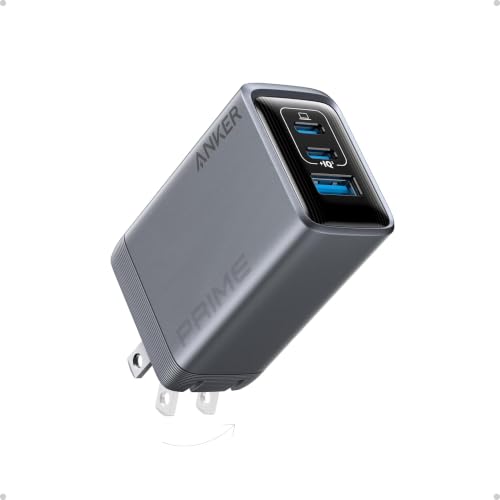
Read this one through the GaN lens, because that is its whole story: 100W used to be the output of the brick bundled with a serious laptop, a lump with a captive cable. The Prime delivers that class of power from a compact foldable body with three ports, which converts a fixed desk accessory into something you unplug and take. The technology is not decoration here — it is the reason the charger exists in this shape at all.
On the road it behaves like a hub for a one-person kit. The laptop takes the lead port at a strong rate, the phone fast-charges beside it, and the third socket keeps a tablet or earbuds case from queuing. Back home the same unit covers a nightstand without a power strip. Anker’s Prime line is its polished tier, and the fit and finish reflect that; what you are buying over the plainer 100W option below is refinement and the Anker ecosystem, not extra watts. For GaN-curious buyers who want one charger to end the conversation, this is the centre of the guide.
Think of it as the reference point against which the rest of this guide is measured. Need more visibility? Its 160W sibling adds the display. Need another socket? The UGREEN trades polish for a fourth port. Need to spend less? The Baseus gives up headroom. Every alternative is defined by what it changes relative to this charger, which is another way of saying the Prime 100W sits at the category’s centre of gravity. Buyers who dislike deliberating can simply buy the centre and move on with their lives.
- Combined ceiling: 100W maximum across three ports
- Shape: compact body with foldable prongs
- Role in the range: the middle path between value and flagship
- Listing’s lead use: fast laptop charging, MacBook included
- Ports: three, all on the charger’s face
Strengths
- GaN shrinkage at its most persuasive — full laptop pace, pouch-sized body.
- Three ports fit the standard travel kit without rationing.
- Prime-tier build suits buyers who keep gear for years.
Trade-offs
- Costs more than the four-port UGREEN of the same wattage class.
- No display, unlike its 160W sibling, so splits stay invisible.
- Over-specified for phone-only charging points around the house.
Best for: one-laptop travellers who want a single premium charger for bag, desk and nightstand. Not suited for: a desk that regularly hosts four devices at once.

UGREEN Nexode 100W GaN (4-Port) — Extra port
Same wattage class as the Anker Prime above, different bet: UGREEN spends the design budget on a fourth port. That socket changes daily behaviour more than spec sheets suggest. Laptop, phone and tablet can charge while a fourth cable waits permanently plugged in for earbuds, a watch or a partner’s phone — no unplugging ritual, no deciding which device matters least tonight.
The Nexode folds flat, carries the compact GaN body the line is known for, and is pitched at MacBook owners who live multi-device lives. Its splits reward the many-small-devices pattern: the laptop’s share shrinks as ports fill, so a user charging one big machine plus three small ones is this charger’s happiest customer, while a user hoping to fast-charge two laptops should step up to the 200W model instead. Between this and the Prime 100W, the decision is honestly about habits — three ports and polish, or four ports and flexibility — and either answer is defensible.
Households with a Nintendo Switch, a camera that charges over USB-C, or a partner whose phone lives at low battery will feel the fourth port’s value within the first week. It converts the charger from personal equipment into shared furniture, the thing guests get pointed to when they ask for a cable. Just set expectations correctly on day one: when the whole pile connects at once, everything charges a little slower, and the laptop’s owner should claim the lead port as a house rule before someone else does.
- Combined ceiling: 100W shared by all connected devices
- Socket count: four ports, the most at this wattage here
- Travel trait: foldable, compact power adapter body
- Listing’s anchor machines: MacBook-class laptops
- Sweet spot: one laptop accompanied by three smaller devices
Strengths
- The fourth port ends nightly unplugging negotiations.
- Compact GaN body travels as well as three-port rivals.
- Strong value for multi-device owners who rarely charge two laptops.
Trade-offs
- The laptop’s slice thins noticeably with all four ports busy.
- Finish and feel sit a notch below Anker’s Prime tier.
- Still a shared pool — the 100W headline is not per-port.
Best for: gadget-heavy users whose earbuds, watch and tablet all compete for a socket every evening. Not suited for: two-laptop charging, which belongs to the 200W pick above.

Belkin 65W Compact USB C Charger — Trusted 65W
Belkin’s pitch is reassurance with modern standards attached: a compact 65W block carrying PD 3.1 and PPS, from the brand whose cables and chargers fill airport shops and office supply orders worldwide. PPS matters for Samsung owners in particular, since it lets the charger track the phone’s requested voltage closely and sustain fast charging with less heat; PD 3.1 keeps the charger current with the latest delivery specification rather than yesterday’s.
Sixty-five watts is the ultrabook figure — MacBook Air, Chromebook and thin Windows machines charge at full pace, and a phone alongside still gets a useful share. Belkin frames it for travel, and the compact body supports that: this is the charger a cautious buyer packs when the trip matters and experimenting with unfamiliar brands feels unwise. It will not run a big gaming laptop at full tilt and it offers no display tricks, but as a standards-current, brand-backed 65W block it is the low-drama choice in a category full of louder claims.
There is a corporate-travel angle worth naming: many employers and airlines’ lounges are full of Belkin gear, spares are easy to find in airport shops on several continents, and a charger from a familiar maker draws no questions from an IT department that issues the laptop it feeds. For a consultant whose kit gets inspected, borrowed and replaced under time pressure, that ecosystem ordinariness is a feature. Hobbyists chasing maximum watts per coin should look elsewhere in this guide; professionals buying calm should look here.
- Output ceiling: 65W from a compact block
- Standards named in the listing: PD 3.1 and PPS
- Positioning: travel charger for laptop, MacBook and Chromebook
- Brand angle: long-established accessories maker
- Device fit: ultrabooks at full speed, larger laptops at a gentler pace
Strengths
- PD 3.1 plus PPS covers modern phones and laptops properly.
- Brand familiarity suits workplaces and gift purchases.
- Compact body genuinely earns the travel label.
Trade-offs
- 65W leaves little for a second hungry device.
- Fewer ports than the multi-socket rivals in this guide.
- Price reflects the badge as much as the hardware.
Best for: ultrabook owners and Samsung phone users who value standards support and a familiar name. Not suited for: a power user hoping one brick will feed a workstation laptop and a phone at full speed together.
How Does Power Splitting Really Work When Ports Fill Up?
Every multi-port charger in this guide is a small power station with one supply and several customers. When a single device connects, it can draw up to the charger’s ceiling, subject to what the device itself requests. Add a second device and the charger negotiates two contracts at once, reserving a share for each. Add a third and the shares shrink again. The negotiation is dynamic: a phone that bursts at high wattage while its battery is low settles down as it fills, quietly handing capacity back to the laptop beside it.
This is why two chargers with identical headline figures can feel different in use. One may protect the lead port’s share aggressively, keeping the laptop fed while the phone waits its turn; another may split evenly and leave both devices merely content. Neither approach is wrong, but they suit different owners. If your laptop is a work machine that must recover during a lunch break, favour chargers and habits that privilege it — laptop on the first port, phone plugged in after, small accessories last. If your pattern is an overnight everything-charge, even splits are painless because time does the rationing for you.
A practical test takes one evening: connect everything you own at once, note each device’s charge state, and check again after thirty minutes. A setup that leaves the laptop barely ahead of where it started is telling you the pool is too shallow for your pile, whatever the box promised. The 160W and 200W models exist precisely for households that fail this test on smaller chargers, while the 65W and 70W picks pass it easily when the pile is one ultrabook and a phone.
GaN Versus Silicon in the Same Bag for a Week
Spend a week travelling with a traditional silicon laptop brick and then a week with a GaN equivalent, and the differences accumulate in small moments rather than dramatic ones. The silicon brick claims the padded compartment of the bag; the GaN charger shares a pouch with cables. The silicon brick’s captive cord dictates where you sit relative to the socket; the GaN charger’s detachable cable lets you swap lengths — short at a desk, long in a hotel room where the only outlet hides behind the bed.
Heat tells the second half of the story. After an hour of charging a depleted laptop, a silicon brick is distinctly hot, and you learn to keep it off papers and bedding. The GaN models here finish the same job warm. That difference is not a safety drama — both are designed for their temperatures — but it changes how casually you can deploy the charger: tossed on a hotel duvet for a quick top-up is a GaN habit, not a silicon one.
Weight is the quietest gain and the one frequent travellers mention most. Shaving a couple of hundred grams from a bag carried through airports daily is a real quality-of-life change, and GaN is currently the only way to buy that saving without giving up output. None of this makes silicon chargers obsolete at a fixed desk, where size and weight stop mattering; it explains why the travel end of this guide is entirely GaN and why the technology earned its own category.
Which Cables Let a GaN Charger Deliver Its Full Output?
A charger can only push what the cable allows, and USB-C cables carry hidden ceilings. Cables rated for lower wattage will quietly cap a 100W charger at a fraction of its ability, and the laptop will report a slow charge with no explanation. For laptop duty, use cables rated for at least 100W; they contain the e-marker chip that tells the charger higher currents are safe. The cables bundled with phones are often rated well below laptop needs, which is why a drawer of lookalike white cords produces such inconsistent results.
Length matters at the margins too. Very long, thin cables lose more energy as heat and can soften charging speeds for demanding laptops; a moderate length from a reputable maker beats a bargain extra-long cord. Keep one short cable in the bag for power-bank and desk use, one longer cable for travel, and label them if your household mixes ratings. When a new charger seems underwhelming, swapping the cable is the first diagnostic step — it resolves the mystery more often than any other change.
Finally, treat cables as consumables. Connectors wear, strain reliefs split, and an intermittent cable can make a healthy charger look faulty for weeks. The picks in this guide deserve cables of similar quality; pairing a premium GaN brick with the cheapest cord in the drawer is the most common self-inflicted wound in home charging setups.
How Should Travellers Pack a High-Wattage GaN Charger?
Pack the charger where your hand lands first. Airport security queues, dim hotel rooms and train tables all reward a kit that opens in one motion: charger, laptop cable, phone cable, earbuds case, nothing else to unpack. The foldable-prong models here were chosen partly for this moment — prongs tucked away cannot scratch the laptop lid they share a compartment with, and the whole kit slides out without snagging.
In the room, scout the socket before unpacking anything else. Hotel outlets cluster near desks and beds, and a charger with detachable cables lets you place the brick at the socket and run the long cable to the bedside, rather than balancing the phone on a windowsill near the only free outlet. On multi-country trips, remember these chargers accept the voltages found worldwide, but the prongs still need a physical adapter for foreign sockets — our international travel guide in Related Guides covers that side of the kit.
One charger per traveller beats one big charger per couple on the road, even when the shared 200W model wins at home. Separate kits survive separate itineraries, early departures and the classic forgotten-charger-in-the-hotel-room loss. Duplicate the modest chargers, centralise the big one at home.
What Changes When the Charger Lives on a Desk Instead?
A desk charger leads a different life: permanently plugged in, feeding the same devices in the same order, valued for tidiness as much as speed. Here the four-port UGREEN models shine, because the fourth port hosts the cable that never moves — the watch puck or earbuds lead that lives on the desk full-time. Desk dwellers should also think about socket orientation; a compact wall charger behind a desk can crowd neighbouring plugs, and a short extension lead or a power strip with wide spacing often completes the setup.
Cable management decides whether a desk setup feels calm. Route the laptop’s cable once, clip it at the desk edge, and let the charger’s other ports serve visitors and phones. The Anker Prime 160W’s display earns its keep in this setting, glancing down to confirm the laptop is drawing properly becomes a habit, and a port silently underperforming gets noticed in a day rather than a month.
Heat habits matter more at a desk because the charger works longest there. Keep it on the desk surface or a hard shelf, not buried under papers or inside a closed drawer while charging. GaN efficiency helps, but a charger delivering 100W for eight hours deserves air.
How Do You Read a GaN Charger Listing Without Being Fooled?
Start with the split diagram, usually buried in the listing images: it shows exactly what each port delivers in each combination, and it is the most honest page the seller publishes. Compare your pile against those combinations rather than the headline. Next, find the standards line — USB PD is the baseline, PPS matters for many Android phones, and PD 3.1, named on the Belkin here, signals a current design. Then check prongs and dimensions against your bag, because a charger that stays home helps nobody.
Be wary of listings that shout GaN while whispering everything else. The material is a means, not a result; the results are size, weight, heat and split behaviour. The six chargers in this guide were picked because their listings state the facts a buyer needs — wattage, ports, standards, folding prongs — in plain terms, which is itself a quality signal in a category crowded with inflated claims.
Which GaN Charger Fits Which Kind of Week?
Match the charger to your recurring week, not your most extreme day. The consultant’s week — three hotel nights, client offices, a laptop and phone that must both be ready by seven each morning — belongs to the Anker Prime 100W or the Baseus Enerfill, depending on budget: small bodies, folding prongs, enough split for a two-device life. The consultant does not need 200W because the pile never grows; reliability and size outrank ceiling.
The home-office week looks different. Two people share a desk across staggered hours, laptops alternate, a tablet lives on the desk for calls, and earbuds charge whenever a socket frees up. That pattern rewards the UGREEN Nexode 200W at home, or its 100W four-port sibling when only one laptop is ever present. The charger’s job in this week is diplomacy: enough ports and watts that nobody’s device becomes the household’s low priority.
The student’s week is a budget with legs — library, lectures, a part-time job, everything carried everywhere. The Enerfill’s price and pocket size fit, and its 70W handles the ultrabooks students actually own. The cautious professional’s week, full of issued hardware and expense receipts, maps to the Belkin 65W: standards current, brand uncontroversial, performance sufficient for the thin laptops employers hand out.
Then there is the enthusiast’s week, which is really about information. If you enjoy knowing what your gear is doing — which port drew what during the render, whether the new cable performs like the old one — the Anker Prime 160W’s display turns charging from a background utility into a small instrument panel. Enthusiasts do not need that data; they want it, and wanting it is a legitimate reason to buy the flagship.
When Should You Replace a Charger That Still Works?
A working charger earns replacement when the life around it changes, not when a new model launches. Three triggers justify the purchase. First, the device pile outgrows the pool: a second laptop joins the household, or a tablet becomes a daily tool, and the nightly split leaves something short. Second, the bag changes: a job goes remote or travel-heavy, and the old desk brick’s size stops being tolerable. Third, standards move: a new phone supports PPS or a laptop expects PD 3.1 behaviour that an ageing charger cannot offer, and charging speeds quietly disappoint.
Retire the old unit to a drawer role rather than a bin. A spare charger in the kitchen, the guest room or the car removes the urgency from the next loss or failure, and yesterday’s brick is usually perfect for a phone-only post. Chargers that are genuinely finished — cracked cases, intermittent output, damaged prongs — should go to electronics recycling rather than household waste, and should stop being used the day those faults appear.
Resist the annual upgrade itch in this category. GaN chargers age slowly because the standards beneath them move slowly; a well-chosen 100W model bought today should still be the right answer when its cable needs replacing years from now. Spend the savings on the good cables discussed earlier — they influence daily speed more than a marginal charger swap ever will.
What Does a Full Evening on One Charger Actually Look Like?
Walk through a realistic night. You arrive home with a laptop at a third charge, a phone lower than that, a tablet you use for reading, and earbuds that died during the commute. Everything plugs into one charger at half past six. In the first hour the pile is hungry: the laptop takes the largest share, the phone bursts at its fast-charge rate, and the tablet and earbuds sip what remains. This is the hour where undersized chargers disappoint — the laptop’s percentage climbs slowly because the phone’s burst is greedy.
By the second hour the picture relaxes. The phone, nearly full, tapers to a trickle by design, since batteries accept power slowly near the top to protect their health. Its share flows back to the laptop, which now climbs briskly. The earbuds finish and drop out of the negotiation entirely. A 100W charger handles this choreography gracefully for a one-laptop household; a 65W charger manages it too, just with a longer first hour; a 200W charger barely notices the pile exists.
Overnight, everything reaches full and the charger idles at a whisper of power, topping up the small losses devices make while they sleep. This is why overnight charging forgives modest wattage: eight hours hides almost any split. The stress test is never the night — it is the forty minutes between arriving home depleted and leaving again, and buyers should size their charger for that window if it occurs in their life regularly.
Weekends add a different cast: a partner’s laptop, a handheld console, a camera battery charging over USB-C, perhaps a friend’s phone on the kitchen counter. Households that host this pattern often end up with a two-charger answer — the big shared unit in the living space and a personal GaN brick per bag — which is precisely the combination several picks in this guide were chosen to form.
Why Do Two Chargers With the Same Wattage Feel So Different?
Owners regularly report that one 100W charger feels faster than another 100W charger, and the sensation is usually real. The causes hide in the split tables: one unit may reserve a generous fixed share for its lead port while another divides evenly; one may renegotiate shares smoothly as devices fill while another clings to its first allocation. Cable quality muddies the comparison further, since the same charger tested with two different cords is effectively two different setups.
Device behaviour plays its part as well. Laptops request power in patterns that vary with workload — a machine rendering video draws harder than the same machine answering email — so a charger can appear to speed up and slow down across a single afternoon while doing exactly its job. Phones are even more theatrical, sprinting when empty and dawdling near full, which is battery protection rather than charger weakness.
The lesson for buyers is to compare chargers in their own pile, on their own cables, during their own busiest hour, rather than trusting any single laboratory figure — including the figures implied by this guide. Our rankings reflect split behaviour, port logic and build for typical piles; your pile is the final referee, and the evening test described earlier is how you consult it.
GaN, Ports and Heat: How Do the Six Chargers Stack Up?
| Charger | Total output | Ports | Defining trait |
|---|---|---|---|
| Anker Prime 160W | 160W | 3 | Smart display with touch control |
| UGREEN Nexode 200W | 200W | 4 | Highest pool for shared desks |
| Baseus Enerfill 70W | 70W | 3 | Value price, folding plug |
| Anker Prime 100W | 100W | 3 | Compact premium all-rounder |
| UGREEN Nexode 100W | 100W | 4 | Fourth port for peripherals |
| Belkin 65W Compact | 65W | Compact block | PD 3.1 and PPS, brand trust |
One column deserves a second look: ports. The two four-port models are not automatically better than the three-port ones, because a port you never use is just a wider face and a thinner split for the devices you do use. Count the cables you genuinely plug in on a heavy night — for most solo users that number is three, which is why three-port chargers dominate this guide’s recommendations despite the four-port options sitting right beside them.
Notice the pattern in the table: output climbs with household size, not with individual need. A solo user gains nothing from the jump between 100W and 200W, while a shared desk feels every missing watt. Port count tells a parallel story — the fourth socket on the UGREEN models serves small devices, and small devices are where charging friction actually lives day to day.
How Should You Set Up a GaN Charger for Daily Use?
Give the laptop the lead port and leave its cable plugged in permanently; chargers split most generously to the first sockets, and a resident cable ends the nightly hunt. Route the phone’s cable to the same side of the desk or nightstand every day so muscle memory replaces thinking. If your charger lives in a bag, coil cables separately from the body — folding prongs protect the laptop, but a cable wrapped tight around any charger strains its own connectors over months.
Heat deserves one habit: charge on a hard surface, not on bedding or a sofa cushion. GaN runs cooler than silicon, not cold, and airflow is the difference between a warm charger and a throttled one. If a charger ever becomes too hot to hold comfortably, unplug it and let it cool; that behaviour is a fault signal, not a personality trait.
Build one small ritual around the setup: when you sit down to work, glance at what is plugged in and ask whether each device needs to be there. Earbuds that finished an hour ago still occupy a port in the split on some chargers, and a tablet at nearly full is quietly taxing the laptop’s share. A ten-second tidy each morning keeps the pool pointed at the devices that matter, and it costs nothing — the cheapest wattage upgrade available is simply unplugging what is already full.
Label the cables if your household owns lookalikes of different ratings. A strip of tape near the connector, marked with the cable’s wattage class, saves the recurring mystery of why the laptop charges quickly on Tuesday and slowly on Thursday. Chargers get blamed for cable sins constantly; a label ends the argument permanently.
What Mistakes Do GaN Charger Buyers Keep Making?
Reading the headline wattage as a per-port promise tops the list — every multi-port charger here shares its pool. Next comes buying for the laptop alone and forgetting the phone, tablet and earbuds that join it every night; the pile, not the flagship device, sets the requirement. Buyers also chase GaN as a label while ignoring prongs and size, ending with a technically GaN brick too bulky for the bag it was bought for.
A quieter mistake is mixing old cables into a new setup. A cable rated below the charger’s output quietly caps the speed, and the charger gets blamed. Finally, some shoppers replace a working 65W unit with a 100W one expecting their phone to charge faster; phones cap their own intake, and the upgrade only helps if a laptop shares the pool.
Shoppers also overlook the socket itself. A bulky charger in a crowded power strip can block the neighbouring outlet, effectively costing the desk a socket to gain a charger — measure the strip, or choose the compact models, before the parcel arrives. And a surprising number of buyers never fold the prongs they paid for, leaving them exposed in the bag to do the very damage folding was invented to prevent; make folding part of the unplugging motion until it becomes automatic.
Last, do not buy a travel charger the night before travel. Live with it at home for a week first: learn its split behaviour with your pile, confirm your cables pass full speed, and discover any quirk while the old brick is still in the drawer as backup. Infrastructure should be boring by the time a trip depends on it.
Final Recommendation
If you have read this far, you already know the shape of your answer, because every section has pointed at the same discipline: inventory the pile, respect the split, mind the cables. The six chargers differ in ceiling, sockets and temperament, but none of them is a trap; the only poor outcome in this category is a mismatch between the charger and the week it must serve. Buy for your actual week and the purchase disappears into your routine, which is the highest compliment charging gear can earn.
Start from your pile, not from the biggest number. Two-laptop homes should take the UGREEN Nexode 200W and stop shopping. Solo laptop travellers land on the Anker Prime 100W for polish or the UGREEN Nexode 100W when a fourth port matches their gadget pile, while the Baseus Enerfill 70W is the honest budget answer for a single ultrabook kit. The Belkin 65W suits cautious buyers who prize its current delivery standards and PPS support, and the Anker Prime 160W is the connoisseur’s pick, display and all. Whichever you choose, a GaN charger bought for the devices you actually charge together will feel like an upgrade every single day — and that daily feeling, not the wattage printed on the box, is what you are really paying for.
Frequently Asked Questions
Does GaN make a charger charge my phone faster?
Not directly. Your phone sets its own maximum intake, and GaN changes the charger’s size and heat, not the phone’s appetite. A GaN and a silicon charger of the same wattage and standards will charge the same phone at the same speed; the GaN one will simply be smaller in your bag.
Can one of these replace the charger that came with my laptop?
Yes, provided its per-port output meets your laptop’s requirement when your other devices are connected. Check the split behaviour: a 100W charger feeding only your laptop behaves very differently from the same charger feeding three devices.
Why does my laptop charge slowly when my phone is plugged in too?
Because the pool is shared. The charger divides its total output among active ports, and some splits favour the phone’s fast-charge burst at the laptop’s expense. Moving the laptop to the lead port, or stepping up a wattage band, resolves it.
Are folding prongs just a cosmetic extra?
No — they protect everything else in the bag. Exposed prongs scratch screens and lids and tear pouch linings, and a prong bent in transit can ruin a charger outright. For any charger that travels weekly, folding prongs are close to essential.
How long should a GaN charger last?
Years of daily use is a reasonable expectation from the brands here, with cables usually failing before the charger itself. Heat and strained connectors shorten life; a charger kept on a hard surface with unstressed cables should outlast the laptop it serves.
Is a higher-wattage charger safe for my phone?
Yes. USB Power Delivery is a negotiation: the phone requests what it can accept and the charger supplies no more than that, whether its ceiling is 65W or 200W. A big charger does not force power into a small device, which is why one high-output brick can safely serve a laptop at lunch and earbuds overnight.
Do I need a special wall socket or adapter for GaN?
No. These chargers plug into ordinary outlets and accept the voltage ranges found in homes and hotels in most of the world. Travelling abroad, you still need a physical prong adapter for foreign socket shapes, but no converter for voltage with chargers of this class — check the input range printed on the body to confirm before a long trip.
Related Guides
Charging is one half of a tidy desk; the other half is choosing the right cables and docks around it. Browse our roundup of best usb c chargers for the port-layout view of several chargers featured here, and our guide to the best chargers for international travel if your GaN brick needs to work on foreign sockets as well.
Related guides
- Best 3D Art Tablets
- Best 3rd Party MacBook Chargers: 96W-Class Alternatives, the 100W Cable Rule, and the Apple Benchmark
- Best Canon Point and Shoot Digital Cameras: PowerShot Picks From Pocket Compacts to Travel Zooms
- Best Balancing Stabilizers for Mirrorless Cameras: Payload, Balancing and Native Vertical Shooting


