What's inside
- Key Takeaways
- Quick Picks
- How Did We Choose the Best CAD Graphics Quadro Cards?
- How Do the Six Cards Compare Side by Side?
- Why Do Workstation Drivers Matter More Than Raw Speed?
- How Should You Match a Card to a CAD Seat?
- How Do Multi-Monitor Engineering Desks Change the Choice?
- What Should Be Checked Before a Fleet Purchase?
- What Mistakes Do CAD Buyers Most Often Make?
- What Does the Upgrade Path Look Like Over a Workstation’s Life?
- Final Recommendation
- Frequently Asked Questions
- Related Guides
As an Amazon Associate I earn from qualifying purchases. This post may contain affiliate links at no extra cost to you.
gizmoverdict.com is reader-supported. When you buy through links on our site, we may earn an affiliate commission.
Where to buy: the six workstation cards below each link to their Amazon listing from the Quick Picks table and from their detailed sections. Professional cards are frequently listed by resellers under shortened names, so match the model code in the listing title against your software vendor’s hardware list before ordering — a single letter separates product families that look identical in a thumbnail.
The best cad graphics quadro cards answer to a different master than gaming cards do. A CAD workstation earns its living inside SolidWorks assemblies, AutoCAD drawing sets, Revit models and CAM toolpath simulations, where the catastrophic failure is not a dropped frame but a crashed session at hour six of a deadline day, a viewport that draws a housing wrong, or a driver that a software vendor declines to support when something breaks. Professional graphics lines — NVIDIA’s Quadro family and its RTX A-series and RTX Ada successors, and AMD’s Radeon Pro range — exist to serve that master: workstation drivers developed alongside the CAD vendors, hardware validated as a platform, and product lifecycles measured in years rather than seasons.
Honesty about the evidence matters more in this category than in any other we cover. Marketplace titles for professional cards are often terse to the point of silence — two of the six listings here give little beyond a model name — and the professional habit is to treat silence as a task, not a gap to paper over. Where a title states a memory figure, we print it. Where it does not, the spec box says so and points you to PNY’s or AMD’s documentation, because a workstation purchase built on an assumed specification is a return shipment waiting to happen. What the titles do establish beyond argument is lineage: every card here belongs to a workstation family, and lineage is the first thing a CAD buyer is actually purchasing.
The six cards divide by era and intent. The RTX A4000 and RTX A2000 represent NVIDIA’s Ampere-generation professional line under PNY’s distribution. The RTX 2000 Ada carries the newest architecture in the list into a compact professional card with a stated 16GB. The T1000 is the entry professional step from the Turing generation. AMD’s Radeon Pro W7600 flies the other flag for buyers standardised on that ecosystem. And the Quadro P1000, the elder statesman, remains the low-cost route into genuine workstation drivers for lighter CAD work. Between them they cover the realistic span of CAD seats, from a two-dimensional drafting desk to a simulation-adjacent modelling station.
Key Takeaways
- Workstation lineage is the product: Quadro, RTX A-series, RTX Ada and Radeon Pro cards are bought for their driver programmes and platform validation as much as for silicon.
- The RTX 2000 Ada states the largest memory figure in this list — 16GB — on a 128-bit bus, in a compact professional format.
- The RTX A2000 states 12GB of GDDR6 in its title; the RTX A4000’s title states no capacity, so confirm it in PNY documentation before purchase.
- The Quadro P1000 is the only card here whose title states a modest 4GB of GDDR5 — an honest fit for 2D drafting and light 3D seats.
- The T1000 and Radeon Pro W7600 listings are name-only, so their specification sheets carry the entire burden of verification.
- No title here names a specific software certification, so check your CAD vendor’s certified-hardware list for the exact model code.
Quick Picks
| Pick | Badge | Why it made the list |
|---|---|---|
| PNY NVIDIA RTX A4000 | Ampere professional anchor | The A-series step aimed at serious single-card modelling seats, from PNY’s workstation line. |
| NVIDIA PNY Quadro Graphics — RTX 2000 Ada Generation 16GB | Newest architecture, stated 16GB | Ada-generation professional silicon with the largest stated memory figure in this roundup. |
| PNY RTX A2000 NVIDIA 12GB GDDR6 | Compact 12GB professional | A stated 12GB of GDDR6 in the A2000’s compact professional format for dense workstations. |
| AMD Radeon Pro W7600 | Radeon Pro alternative | The workstation entry from AMD’s professional line for buyers standardised on that ecosystem. |
| PNY NVIDIA T1000 | Entry professional step | The T-series route into workstation drivers for drafting and light modelling seats. |
| NVIDIA Quadro P1000 Professional 4GB GDDR5 | Budget workstation drivers | A stated 4GB of GDDR5 on a long-serving Quadro, for 2D CAD and modest assemblies. |
How Did We Choose the Best CAD Graphics Quadro Cards?
We chose by seat, not by spec-sheet drama. A CAD office is a population of different desks — the principal modeller wrestling a ten-thousand-part assembly, the drafter producing drawing sets all day, the engineer splitting time between a BIM model and a spreadsheet — and a useful roundup has to place a card at each of those desks rather than crown one winner. So the list was built to span the professional ranges: a flagship-leaning A-series card, the compact A-series card beneath it, the newest Ada-generation entry, the Turing-era entry card, AMD’s professional counterpart, and the older Quadro that still serves light seats honestly.
The second consideration was evidence discipline. Professional listings are terse, and a roundup that invents the missing numbers would be worse than useless to a professional whose software vendor will check the exact model. We therefore let each card’s stated facts carry its case: where memory is printed, it leads; where the title is a bare name, the card’s case rests on its family’s role and on the verification steps a professional buyer should run. The third consideration was ecosystem honesty — NVIDIA’s professional line and AMD’s Radeon Pro line are both represented, because CAD departments standardise, and a roundup that pretends one camp does not exist fails the departments in the other.
Finally, we weighed longevity of support. Professional cards are bought against software contracts that run for years, and the value of a workstation line is partly that its drivers are maintained for the applications long after gaming attention has moved on. Newer architecture buys a longer support runway; older cards buy a lower entry cost against a shorter one. Both trades appear in this list, labelled as what they are.
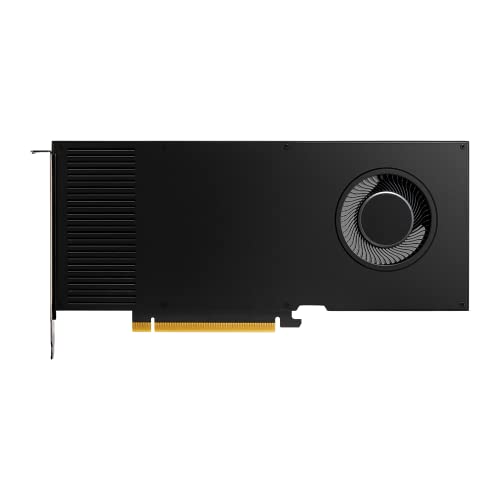
PNY NVIDIA RTX A4000 — Ampere professional anchor
The RTX A4000 is the card in this list aimed at the desk where the serious modelling happens. It comes from NVIDIA’s RTX A-series — the professional line that succeeded the Quadro naming for the Ampere generation — distributed by PNY, whose name recurs across this roundup because PNY is NVIDIA’s workstation channel partner in this market. The A4000’s position in its family is the single-card professional tier: the card a CAD department specifies when a seat runs large assemblies, renders presentation views, and cannot treat a driver crash as an acceptable afternoon. Its title is as terse as professional listings get — a brand, a line, a model — and states no memory figure, no bus width, no outputs.
That terseness defines how this card should be bought. The professional process is to take the model name to PNY’s specification sheet, confirm the memory capacity, the display outputs and the power requirement against your workstation, and then confirm the exact model on your CAD vendor’s certified or supported hardware list. None of that is a criticism of the card; it is the normal procurement path for its class, and a buyer new to professional graphics should read the bare title as an instruction to do the paperwork rather than as missing information. What the name alone does guarantee is the thing that matters most: entry into the workstation driver programme, where releases are developed and validated against professional applications rather than the release calendar of games.
In a department, the A4000 also plays a standardisation role. Seats built around one professional model simplify everything downstream — one driver package to qualify, one spare card on the shelf, one known viewport behaviour across the team. A card bought for a single heroic workstation is a purchase; a card adopted as the department standard is infrastructure, and the A4000’s tier is where that kind of adoption usually lands for modelling-heavy teams.
Picture the seat concretely: a senior engineer with a vehicle sub-assembly open, section views regenerating, a rendered presentation image queued for a client review at four o’clock. The card’s contribution to that afternoon is invisible when it works — no hesitation as the model orbits, no flicker in the section view, no negotiation with the machine about which windows may stay open. Professional hardware is purchased precisely to be invisible under deadline pressure, and invisibility, paradoxically, is what the premium buys.
- Line: NVIDIA RTX A-series professional (Ampere generation), distributed by PNY
- Memory: Not stated in the listing title — verify with PNY documentation
- Memory bus: Not stated in the listing title — verify with PNY documentation
- Outputs: Not stated in the listing title — verify with PNY documentation
- Power requirement: Not stated in the listing title — verify with PNY documentation
- Software certification: Not stated in the listing title — verify with PNY documentation and your CAD vendor’s hardware list
Strengths
- Sits at the professional tier departments choose for primary modelling seats, with the workstation driver programme behind it.
- PNY distribution brings the workstation channel’s documentation and support structure rather than a gaming board partner’s.
- A natural department standard: one model to qualify, stock and support across multiple seats.
Trade-offs
- The bare title states no capacity or outputs, so the entire specification must be confirmed from PNY’s sheet before ordering.
- Professional pricing logic applies — the cost buys drivers and validation, not benchmark headlines.
- Its Ampere generation sits behind the Ada card in this list for architecture and support runway.
Best for: a buyer requiring a primary modelling seat built on NVIDIA’s A-series professional line and PNY’s workstation channel. Not suited for: a buyer seeking a fully specified listing that can be ordered without a documentation check.

NVIDIA PNY Quadro Graphics — RTX 2000 Ada Generation 16GB — Newest architecture, stated 16GB
This listing’s title does something the others mostly decline to do: it states its memory. The card is the RTX 2000 in its Ada generation — NVIDIA’s newer professional architecture — with 16GB of DDR6 memory on a 128-bit bus, sold under PNY’s workstation programme with the model code VCNRTX2000ADA-PB printed in the title. That combination is the interesting one in this roundup: the newest professional architecture in the list, carrying the joint-largest stated memory figure, in the compact professional class that the 2000-series name has always occupied. For a CAD seat, capacity at this tier changes what stays open — the assembly, the drawing set, the PDF viewer, the browser full of vendor catalogues — without the viewport suffering for it.
The 128-bit bus deserves an honest reading. It is narrower than a flagship’s path, and in exchange the card belongs to the compact, modest-power professional format that fits the small workstations CAD departments actually deploy in rows. Modern professional workloads at this tier are rarely bus-bound in the way texture-streaming games are; they are capacity- and driver-bound, and on those two axes this card’s title makes its strongest claims. The Ada generation also buys the longest driver runway in the list, which matters when a software contract and a hardware refresh are planned on the same spreadsheet.
Note the listing’s own framing: it is titled under the Quadro name as a legacy umbrella, while the card itself is an RTX Ada model. That naming overlap confuses buyers into comparing it against older Quadro stock; the model code is the ground truth, and VCNRTX2000ADA-PB is the string to match against PNY’s sheet and your vendor’s hardware list.
There is a forward-looking argument for this card that deserves a sentence of its own. CAD applications accumulate features that lean on newer architectures — real-time visualisation modes, AI-assisted tools arriving inside professional software, denser default models. A card from the newest professional generation meets those features as a contemporary; an older card meets them as a legacy target. For a seat expected to serve through two application upgrade cycles, that difference compounds quietly in the card’s favour.
- Memory: 16GB DDR6 (as stated in the listing title)
- Memory bus: 128-bit (as stated in the listing title)
- Generation: Ada (as stated in the listing title)
- Model code: VCNRTX2000ADA-PB (as stated in the listing title)
- Outputs: Not stated in the listing title — verify with PNY documentation
- Power requirement: Not stated in the listing title — verify with PNY documentation
Strengths
- The largest stated memory figure in this roundup, on the newest professional architecture listed.
- A model code printed in the title makes verification against vendor hardware lists unusually direct.
- The compact professional class suits the small-form workstations that CAD offices deploy at scale.
Trade-offs
- The 128-bit bus is a compact-class figure, narrower than flagship professional cards offer.
- Outputs are not stated, so multi-monitor engineers must confirm the port layout in PNY’s documentation.
- The Quadro umbrella wording in the title can mislead a quick reader about the card’s actual generation.
Best for: a buyer seeking the Ada generation’s driver runway with a stated 16GB for a compact professional workstation. Not suited for: a buyer requiring the widest memory bus in the professional range, which belongs to larger cards.

PNY RTX A2000 NVIDIA 12GB GDDR6 — Compact 12GB professional
The RTX A2000’s title states its essential fact in five words: 12GB of GDDR6. In its generation, that capacity in the compact professional class was the A2000’s whole argument, and it remains a persuasive one. CAD seats are very often small workstations — the half-height, short-depth boxes that fit under desks and in rack-adjacent cabinets — and the professional cards that fit them historically starved the user on memory. Twelve gigabytes ends that starvation: assemblies of realistic size, several drawings, a rendered view or two, all resident at once. The A2000 is the card that lets a compact workstation behave like a full-size one inside the viewport.
Its generation is the same Ampere professional family as the A4000 above it, one tier down, and the family relationship is a practical asset: a department can qualify one driver package and run A4000s at the modelling seats and A2000s everywhere else, knowing the viewport behaviour matches. That mixed-fleet pattern is how professional graphics is actually deployed, and this pair of PNY listings serves it neatly. The title states no outputs and no power figure, so the same documentation discipline applies — PNY’s sheet first, then the vendor hardware list — but the headline capacity, the figure buyers most often get wrong by assumption, is printed where it should be.
For the solo professional — the freelance engineer whose workstation is also the office — the A2000’s appeal is similar: a compact card that does not ask for a case transplant or a power supply ceremony, yet carries enough memory to keep a growing practice’s assemblies comfortable for years.
The A2000 also answers a space problem that rarely makes it into buying guides: the workstation that lives in a rack cabinet, a broadcast-style control room, or a security-conscious office where machines are locked away and only panels and peripherals sit at the desk. Compact professional cards exist for those rooms, and among them a stated 12GB is a generous allowance — the difference between a remote seat that behaves like the real thing and one that apologises for its hardware all day.
- Memory: 12GB GDDR6 (as stated in the listing title)
- Line: NVIDIA RTX A-series professional (Ampere generation), distributed by PNY
- Memory bus: Not stated in the listing title — verify with PNY documentation
- Outputs: Not stated in the listing title — verify with PNY documentation
- Form factor detail: Not stated in the listing title — verify with PNY documentation
- Power requirement: Not stated in the listing title — verify with PNY documentation
Strengths
- A stated 12GB of GDDR6 gives compact professional workstations a capacity usually reserved for larger cards.
- Shares its professional family and driver programme with the A4000, simplifying mixed-fleet departments.
- The honest title leads with the figure that matters most, reducing the verification burden to outputs and power.
Trade-offs
- One tier below the A4000, so the heaviest modelling seats should still look upward in the family.
- Bus width and outputs go unstated in the title and must be confirmed in PNY’s documentation.
- Its Ampere generation’s support runway is shorter than the Ada card’s, all else equal.
Best for: a buyer requiring a stated 12GB of GDDR6 in a compact professional card for a small workstation. Not suited for: a buyer seeking the maximum modelling performance in the A-series, which sits a tier higher.

AMD Radeon Pro W7600 — Radeon Pro alternative
Every professional roundup owes its readers the other flag, and AMD’s Radeon Pro line is a genuine professional programme — workstation drivers, vendor validation work, and a product family built for CAD seats rather than adapted from gaming stock. The W7600 sits in the middle of that family, and its listing title is the briefest here: a name and a part number, 100-300000077. No memory figure, no bus, no outputs. The part number is not filler, though — it is the precise key for AMD’s specification sheet and for the hardware lists that CAD vendors publish, and a professional buyer will run it through both before anything else happens.
The case for choosing this card is usually made one level up, at the department standard. Offices whose workstations are AMD-platform machines, or whose other software is validated on Radeon Pro drivers, gain nothing by mixing camps seat by seat; consistency of viewport behaviour and a single driver qualification process are worth more than any single card’s paper advantages. There is also a multi-monitor tradition in the Radeon Pro line that engineering desks with three and four panels have long appreciated — but note carefully that this title states no output count, so that tradition must be verified for this exact part number rather than inherited by reputation.
Judged as a listing, this is the roundup’s purest exercise in professional buying discipline: the name buys you the programme, the part number buys you the facts, and the purchase proceeds only when both check out. Buyers comfortable with that process will find a legitimate mid-range professional card; readers preferring the specification printed in the title should look at the RTX 2000 Ada above, whose title does that work for them.
It is worth saying plainly what would change this card’s ranking: a title that stated its memory. The hardware’s professional standing is not in doubt, but a roundup can only work with the evidence in front of it, and on evidence this listing asks the most of its reader. Departments already inside the Radeon Pro ecosystem will do the verification as a matter of routine and find the exercise trivial; newcomers should budget the ten minutes it takes and treat it as tuition in how professional hardware is sold.
- Line: AMD Radeon Pro workstation family
- Part number: 100-300000077 (as stated in the listing title)
- Memory: Not stated in the listing title — verify with AMD documentation
- Memory bus: Not stated in the listing title — verify with AMD documentation
- Outputs: Not stated in the listing title — verify with AMD documentation
- Power requirement: Not stated in the listing title — verify with AMD documentation
Strengths
- Represents AMD’s genuine professional programme for departments standardised on Radeon Pro drivers.
- The full part number is printed in the title, giving an exact key for specification and certification checks.
- Keeps a mixed-vendor market honest — its presence disciplines the pricing of the whole category.
Trade-offs
- The title states no specification at all beyond identity, so verification is entirely on the buyer.
- Departments standardised on NVIDIA’s professional drivers gain nothing by mixing this card into the fleet.
- Community knowledge for Radeon Pro in some CAD niches is thinner than for the Quadro lineage.
Best for: a buyer seeking a mid-range professional card inside an AMD-standardised department, verified by part number. Not suited for: a buyer requiring stated specifications in the listing before any documentation work begins.

PNY NVIDIA T1000 — Entry professional step
The T1000 is where professional graphics begins. NVIDIA’s T-series is the entry tier of the workstation line — the cards specified for drafting seats, light modelling, and the second monitors of engineering — and PNY’s listing for it is a bare name, stating nothing else at all. That bareness is almost traditional for this tier: T-series cards are bought by the dozen against a department standard, and the transaction assumes the buyer has the specification sheet open in another tab. For a reader arriving from gaming hardware, the adjustment is the lesson: at this tier you are not buying a specification, you are buying admission to the workstation driver programme at its lowest rung.
What does that admission buy a drafting seat? Viewport behaviour that matches the rest of the department’s professional cards, drivers maintained against the CAD applications the seat actually runs, and a card designed for the small, low-power workstations that drafting pools use. A drafter’s day is two-dimensional lines, hatching, dimensions and PDFs, punctuated by orbiting a model to check a detail — work that does not need a flagship but does need to never glitch, never crash, and never render a line where the model says it is not. The T1000’s tier exists for exactly that reliability brief.
The honest limit is growth. A seat that begins in drafting and drifts toward assembly work will outgrow an entry professional card, and the wise department treats T-series cards as the pool’s foundation, not its ceiling — with A-series cards waiting at the seats where the work has already grown. Bought with that understanding, the T1000 is not a compromise; it is correct sizing, which is the most professional purchasing habit of all.
Consider the training-room variant of the same logic. A classroom of CAD students needs twenty identical seats whose viewports behave exactly as the instructor’s does, on machines modest enough to be replaced in a batch when the room is refreshed. Entry professional cards are the standing answer to that brief, and the T1000’s tier is specified for such rooms constantly — not because the work is trivial, but because consistency across twenty screens is worth more than headroom on one.
- Line: NVIDIA T-series professional (entry tier), distributed by PNY
- Memory: Not stated in the listing title — verify with PNY documentation
- Memory bus: Not stated in the listing title — verify with PNY documentation
- Outputs: Not stated in the listing title — verify with PNY documentation
- Form factor detail: Not stated in the listing title — verify with PNY documentation
- Power requirement: Not stated in the listing title — verify with PNY documentation
Strengths
- The lowest rung of the genuine workstation ladder — professional drivers without flagship expense.
- Correctly sized for drafting pools and light modelling seats, the most numerous desks in a CAD office.
- Matches viewport behaviour with the A-series cards elsewhere in a department’s fleet.
Trade-offs
- The title is a bare name; every figure must come from PNY’s specification sheet.
- Entry-tier headroom is finite, and a seat whose work grows into heavy assemblies will outgrow it.
- Its generation is older than the A-series and Ada cards in this list, shortening the support runway.
Best for: a buyer requiring workstation drivers at an entry tier for drafting and light modelling seats. Not suited for: a buyer seeking a card sized for large-assembly modelling as the seat’s primary work.

NVIDIA Quadro P1000 Professional 4GB GDDR5 — Budget workstation drivers
The Quadro P1000 is the veteran of this list — a Pascal-generation Quadro whose title, unusually for the elders, states its memory plainly: 4GB of GDDR5, with the board code VCQP1000-PB printed for verification. Its era shows in that memory figure, and the right response is neither to sneer nor to oversell. Four gigabytes confines this card to the lighter half of CAD life: two-dimensional drafting, small part modelling, drawing production, and the auxiliary seats that keep a department’s paperwork moving. Within that half, the P1000 offers the thing no gaming card at its level offers — a genuine Quadro driver lineage, from the family that defined professional graphics for a generation.
There is a real installed base logic here. Departments holding fleets of P-series workstations keep P1000-class cards as spares and seat-fillers because the driver package is already qualified and the behaviour is known to the last quirk. A card does not need to be new to be the correct purchase; it needs to match the fleet and the work. For a small practice equipping a drafting desk on a strict budget, or a home engineer whose models are parts rather than assemblies, the P1000’s stated 4GB is not a warning — it is a specification that honestly matches the workload.
The caution is the runway. An older generation’s driver support winds down on the vendor’s schedule, not yours, and a P1000 bought today should be bought as a known-quantity tool for present work, not as a five-year platform. Priced and planned that way — and this card’s whole appeal is its price of entry — it closes the list as the roundup’s reminder that professional graphics is a ladder, and ladders are climbed from the rung that fits.
One more honest use deserves naming: the second machine. Many engineers keep a home or backup workstation that mirrors the office setup for evening work and emergencies, and it needs the same driver behaviour without the same budget. A P1000-class card in that machine keeps the viewport familiar and the files interchangeable, which is worth more at midnight before a submission than any benchmark advantage would be.
- Memory: 4GB GDDR5 (as stated in the listing title)
- Board code: VCQP1000-PB (as stated in the listing title)
- Line: NVIDIA Quadro professional (Pascal generation)
- Memory bus: Not stated in the listing title — verify with PNY documentation
- Outputs: Not stated in the listing title — verify with PNY documentation
- Power requirement: Not stated in the listing title — verify with PNY documentation
Strengths
- A stated memory figure and board code make verification refreshingly simple for a card of its era.
- Genuine Quadro lineage at the lowest cost of entry in this roundup.
- Matches the qualified driver packages of the many departments still running P-series fleets.
Trade-offs
- Four gigabytes limits the card to drafting and light modelling; large assemblies will exceed it.
- The oldest generation here, with the shortest remaining driver runway.
- GDDR5 marks its memory technology as two generations behind the GDDR6 cards above.
Best for: a buyer seeking genuine Quadro drivers for a drafting seat or a P-series fleet spare, with light modelling needs. Not suited for: a buyer requiring capacity for large assemblies or a long support runway.
How Do the Six Cards Compare Side by Side?
| Card | Family and generation | Memory stated in title | Verification key |
|---|---|---|---|
| PNY NVIDIA RTX A4000 | RTX A-series, Ampere | Not stated | Model name via PNY specification sheet |
| NVIDIA RTX 2000 Ada (PNY) | RTX professional, Ada | 16GB DDR6, 128-bit | Model code VCNRTX2000ADA-PB in title |
| PNY RTX A2000 | RTX A-series, Ampere | 12GB GDDR6 | Model name via PNY specification sheet |
| AMD Radeon Pro W7600 | Radeon Pro workstation | Not stated | Part number 100-300000077 in title |
| PNY NVIDIA T1000 | T-series professional, Turing | Not stated | Model name via PNY specification sheet |
| NVIDIA Quadro P1000 | Quadro, Pascal | 4GB GDDR5 | Board code VCQP1000-PB in title |
The table’s most instructive column is the third. Three of six professional listings state no memory at all, and that is not sloppiness unique to these sellers — it is the professional market’s assumption that buyers verify from specification sheets. Read the table as a map of verification work: the RTX 2000 Ada and the P1000 let you confirm the headline figure from the title, the A2000 confirms capacity but not the rest, and the A4000, W7600 and T1000 ask you to run the full documentation process. None of that ranks the cards as hardware; it ranks the effort between reading and ordering, which in professional procurement is a real cost too.
Why Do Workstation Drivers Matter More Than Raw Speed?
A gaming driver is optimised for the games of the season and updated at a sprint. A workstation driver is developed on a different contract: professional application vendors work with NVIDIA and AMD to validate specific driver branches against specific application versions, and CAD departments pin those validated branches because a viewport bug in a deliverable model is a business event, not an annoyance. This is the substance behind phrases like certified and supported — and it is also why this article claims no specific certification for any card here: certifications attach to exact model-and-driver combinations published on vendor lists, not to product families in a roundup. The titles do not state them, so neither do we.
There is a subtler benefit underneath the support arrangement: behavioural consistency. A validated driver branch draws the model the same way on every seat and after every update, which means a dimension checked on one machine is the dimension seen on another, and a rendering oddity reported by one engineer can be reproduced — and therefore fixed — on the support desk’s machine. In collaborative engineering, that reproducibility is a quality system in its own right. Gaming hardware, updated opportunistically and variously across a team, quietly dissolves it, and the cost surfaces as meetings about whose screen was right rather than as a line item anyone approved.
The practical consequence for a buyer is a two-step check that takes minutes. First, find your application’s certified or supported hardware list — every major CAD vendor publishes one — and locate the exact model or part number. Second, note the driver branch named alongside it, because the card and the branch are a pair. A workstation card run on a gaming driver branch, or a gaming card run hopefully in a CAD seat, both step outside the arrangement that makes professional graphics professional. The cards in this list are the ones entitled to enter that arrangement; entering it correctly is the buyer’s half of the bargain.
How Should You Match a Card to a CAD Seat?
Begin with the largest model the seat genuinely opens, not the average one. Viewport memory demand is set by the worst assembly of the year — the client model with every subsystem visible — and a card sized to the average day will fail on the one day that matters. Then count the seat’s monitors and their resolutions, because engineering desks accumulate panels, and the output layout must be confirmed for the exact card rather than assumed from its family. Then read the power and form-factor lines of the specification sheet against the workstation’s supply and chassis, since professional towers vary from full-size to half-height in ways that reject cards silently.
While the seat is being specified, spare a thought for the human geometry around it. Engineers read fine linework for hours; the card’s job includes driving the desk’s panels at their native resolutions without scaling artefacts, and holding a steady image under the fluorescent patience of a long revision session. None of that appears on a specification sheet, yet it is the daily texture of the purchase — a card and panel pairing that stays crisp at the resolutions the team actually uses is worth more than a theoretical tier above it driving a compromised display chain.
Next, run the vendor-list check described above for the seat’s primary application, and treat a near-miss model name as a miss — the difference between two similar professional models is exactly the difference the list exists to record. Finally, think in fleets even if you are buying one card: the model you choose today is the model you will want as a spare in year three, and choosing from a line your supplier stocks steadily is a quiet form of insurance. A seat matched this way — worst model, real monitors, verified list entry, fleet logic — almost never generates a return, a complaint, or a deadline lost to a viewport.
How Do Multi-Monitor Engineering Desks Change the Choice?
The modern CAD desk is rarely a single screen. The model lives on the main panel, the drawing set on a second, and email, PDFs and the parts catalogue colonise a third — and every one of those panels is driven by the same card that must keep the viewport honest. This changes the purchase in two ways. First, the output layout stops being a footnote: the number and type of physical ports, and whether the card drives them simultaneously at the panels’ native resolutions, must be confirmed for the exact model. In this roundup, not one title states an output count, which is why every spec box above routes that question to the manufacturer’s documentation — it is the single most consequential verification on a multi-monitor desk.
Second, memory quietly serves the whole desk, not just the model. Each additional high-resolution panel adds its own framebuffer and compositing load, and a card sized exactly to an assembly’s needs can feel strained once two extra panels of documents and drawings hang off it. That is one more reason the stated 12GB and 16GB cards sit comfortably at busy desks, and why the P1000’s stated 4GB belongs at the lighter, fewer-panel end of the office. When a department reports that a card feels slow, the first diagnostic is often not the model at all — it is the third monitor that arrived last quarter and was never entered into anyone’s sizing calculation.
What Should Be Checked Before a Fleet Purchase?
A fleet purchase multiplies both the savings and the mistakes, so the checks scale up accordingly. Qualify one card first: install it in a representative workstation, run the department’s real models on the vendor-listed driver branch, and let the seat’s actual user work on it for a week that includes a deadline. Viewport feel is a professional judgement, and the time to hear objections is during qualification, not after forty boxes arrive. Record the exact model code, the driver branch and the application versions in the qualification note, because that trio is the configuration your support calls will describe for the next four years.
Then plan the unglamorous logistics. Confirm the supplier can deliver the full quantity from one production run if your process cares about consistency; arrange the spare ratio — one shelf spare per fleet segment is the common professional habit; and file the specification sheets and vendor-list pages with the purchase record, so a successor inheriting the fleet in year three can reconstruct why this card, this driver and this application version belong together. None of this appears in a listing title, and all of it is the difference between buying cards and building infrastructure.
What Mistakes Do CAD Buyers Most Often Make?
A quieter mistake deserves a place on the list: ordering the right card and the wrong workstation around it. A professional card cannot rescue a machine starved of system memory or running a processor generations behind the software, and CAD performance is a chain whose weakest link sets the day’s pace. Before the card is blamed or praised, the whole seat — memory, storage, processor, panels — should be read as one specification, because that is how the engineer at the desk will experience it.
The expensive classic is buying a gaming card for a CAD seat because its benchmark numbers tower over the professional card’s — then discovering that the software vendor’s support stops at the hardware list, and that viewport quirks in large models are treated as your problem. The second mistake is the mirror image: buying a flagship professional card for a drafting seat, where its capacity will never be touched and its cost could have equipped two desks. The third is trusting a marketplace title’s silence — assuming a memory figure or an output count that the listing never stated, and learning otherwise when the card meets the workstation. The fourth is mixing driver branches casually across a department, so that two seats draw the same model two different ways and the team loses an afternoon to a discrepancy that was never in the geometry. The fifth is forgetting the spare: professional work stops when a card stops, and the department that keeps one qualified spare on the shelf treats a failure as a fifteen-minute swap rather than a procurement emergency.
What Does the Upgrade Path Look Like Over a Workstation’s Life?
A professional workstation typically serves five years or more, and its graphics card is the component most likely to be refreshed mid-life — not because it failed, but because the work grew. Planning that path at the first purchase saves money twice. A seat that starts on an entry card, in a chassis with power and space for the tier above, can climb the same family’s ladder when assemblies grow: T-series to A-series within one driver programme, with the old card cascading to a lighter seat rather than to a drawer. That cascade is the fleet logic that makes professional pricing tolerable — every card serves twice, at two desks, before it retires.
The generation question cuts across the path. Buying the newest architecture, as with the RTX 2000 Ada in this list, stretches the interval before the mid-life refresh; buying an older card at a gentler price, as with the P1000, accepts a sooner refresh in exchange for present savings. Neither is wrong — they are different placements of the same money across time. What is wrong is buying blind: a card whose specification was assumed rather than verified can break the path entirely, arriving with the wrong outputs for the desk’s panels or a form factor the chassis rejects. Every verification step this article repeats exists to keep the path intact, because in a working department the upgrade path is not an abstraction — it is next year’s budget, already half spent by this year’s decisions.
Keep the paperwork with the machine. A note inside the asset record — card model, driver branch, application versions, the date the vendor list was checked — turns the mid-life refresh from archaeology into administration. The departments that upgrade smoothly are not the ones with the largest budgets; they are the ones whose records let them act without re-deriving everything they once knew.
Final Recommendation
Match the card to the seat and the seat to the vendor list, and this category becomes simple. Primary modelling seats belong on the RTX A4000’s tier; compact workstations reach their best balance in the RTX A2000’s stated 12GB or the RTX 2000 Ada’s stated 16GB on the newest architecture; AMD-standardised departments should run the W7600’s part number through their checks and proceed with confidence; drafting pools are correctly served by the T1000, and light seats or P-series fleets by the P1000’s honest 4GB. Do the documentation minutes for whichever you choose, because in professional graphics the paperwork is not bureaucracy — it is the mechanism by which the card, the driver and the application agree to be responsible for your deadline together.
Frequently Asked Questions
What is the difference between Quadro and the RTX A-series?
They are successive names for NVIDIA’s professional line, and the overlap in listings — an RTX Ada card sold under a Quadro-flavoured title, as one entry here shows — is a artefact of that transition. When in doubt, trust the model code over the umbrella word, because the code is what the specification sheet and the vendor list are indexed by. Quadro branding covered the Pascal and Turing generations represented here by the P1000 and, in spirit, the T-series; the Ampere generation moved to RTX A-series naming, and the current generation carries RTX with the Ada designation. The driver programme and the professional purpose continue across the names.
Do I need a certified card for my CAD software to run?
Most CAD applications run on a wide range of hardware; certification governs support and validated behaviour, not basic operation. The distinction also matters commercially: a practice whose deliverables are reviewed by clients or regulators benefits from being able to state that its seats run vendor-listed configurations, a sentence that carries weight in quality audits and costs nothing once the hardware is in place. The distinction matters when something goes wrong: a configuration on the vendor’s list gets a supported answer. No title in this roundup states a specific certification, so consult your vendor’s published list for the exact model.
How much memory does a CAD card need?
Size it to the largest assembly the seat opens, with headroom for the drawings and documents open beside it. Watch the trend in your own office as well: model sizes grow with each software generation and each client’s ambition, so a seat that is exactly adequate this year is undersized by the next contract. The stated capacities in this list — 4GB at the light end, 12GB and 16GB at the working end — map to that growth curve, and buying one step along it is the cheapest future-proofing available in this category. Light drafting lives comfortably in the P1000’s stated 4GB class; mainstream modelling seats are the natural home of the stated 12GB and 16GB cards here; simulation-adjacent work should verify requirements against the application vendor’s guidance.
Can a professional card also handle visualisation and rendering?
Yes — the same workstation lines serve viewports and GPU rendering in professional applications, and capacity is again the governing figure, since a scene must fit in memory to render. Seats that split their week between modelling and client visualisation should size for the visualisation scene, which is almost always the larger tenant, and let the viewport inherit the headroom rather than the other way around. Confirm the exact model’s figures in the manufacturer’s documentation, as several titles here leave them unstated.
Why are several listings so short on specifications?
Professional channels assume a specification-sheet workflow: the listing identifies the model, and the manufacturer’s sheet carries the figures. Keep that sheet with the purchase record once you have read it, since it becomes the fastest answer to every future question about the card. It is unfamiliar to buyers arriving from gaming hardware, where titles carry everything. Treat a short title as a prompt to verify, never as a figure to assume.
Should a small practice standardise on one model?
Where seats do similar work, yes — one qualified driver package, known viewport behaviour and a shared spare simplify support enormously. Standardisation also sharpens troubleshooting: when every seat shares a configuration, a problem reported once is understood everywhere, and the fix propagates as a single instruction rather than a per-machine investigation. For a practice of even half a dozen seats, that operational calm repays the discipline of choosing one model and defending the choice against every tempting exception. Where seats genuinely differ, the mixed pattern used in this roundup — a higher tier at modelling seats, an entry tier at drafting seats, one driver family throughout — is the professional norm.
Related Guides
Complete the workstation around your card with our companion reading: our workstation processor roundup pairs CPUs with professional graphics, the guide to calibrated monitors for design work covers the panels your viewports deserve, and our workstation memory and storage guide sizes the rest of the machine to match.


