What's inside
- Key Takeaways
- Quick Picks
- How Were These RTX 3090 Cards Compared Fairly?
- How Do the Six RTX 3090 Cards Compare?
- How Does the RTX 3090 Sit Against Newer Cards a Buyer Might Cross-Shop?
- Who Still Buys an RTX 3090, and for What Work?
- How Should a Machine Be Prepared for a Card of This Size and Appetite?
- Which Mistakes Do Buyers of a Discontinued Flagship Make?
- What Should the First Month of Ownership Look Like?
- Final Recommendation
- Frequently Asked Questions
- Related Guides
As an Amazon Associate I earn from qualifying purchases. This post may contain affiliate links at no extra cost to you.
gizmoverdict.com is reader-supported. When you buy through links on our site, we may earn an affiliate commission.
Where to buy: All six cards below come from this site’s verified pool, sold on Amazon under the NVIDIA, EVGA, MSI, Gigabyte and ZOTAC names. Read the final section of the introduction before ordering anything: this is a discontinued generation, and the terms on which its cards are sold today are part of what is being bought.
Looking for the best geforce rtx 3090 graphics cards in late 2026 means shopping with a clear head about what the RTX 3090 now is. It was NVIDIA’s flagship of the Ampere generation — the card that put 24GB of GDDR6X memory on a gaming product and held the top of the stack until its successor arrived — and it has since been discontinued as a production line, succeeded by two further flagship generations. None of that makes it slow. Its 24GB frame buffer remains larger than what most current cards carry, its rendering pace still drives 4K gaming and heavy creative work, and for a particular kind of buyer — the local AI experimenter, the video editor, the renderer, the 4K gamer who prices memory by the gigabyte — it occupies a niche the newer line-up serves only at far higher cost.
But a discontinued flagship is bought on different terms from a current one, and this guide will not pretend otherwise. Production has ended, so what is sold today is remaining channel stock and marketplace inventory rather than a living product line; this guide makes no claims about any individual listing’s warranty position or stock depth, because those belong to the specific seller and listing in front of the buyer, and they must be read there. What can be compared reliably — and what the six reviews below compare — is the hardware itself: the Founders Edition reference design against five partner interpretations of the same GPU, differing in coolers, clocks, size and character, united by the same 24GB of GDDR6X on a 384-bit interface.
That unity is the guide’s organising fact. Every pick here is the same silicon with the same memory, so the contest is entirely about the card around the GPU: how it is cooled under the 3090’s considerable heat, how large it is, how its maker built and finished it, and which of those answers suits the machine and the work in question. Buyers who understand that will read the six reviews as one decision made six ways, which is exactly what shopping for a 3090 has always been.
Key Takeaways
- Every pick shares the same GPU and the same 24GB of GDDR6X on a 384-bit bus — the choice is cooler, size and maker, not silicon.
- The RTX 3090 line is discontinued; listings today are remaining stock, so each seller’s warranty and condition terms must be read on the listing itself.
- That 24GB buffer is the card’s living argument — local AI work, editing and rendering still prize it above newer, smaller-memory cards.
- These are large, power-hungry cards; case clearance and power supply capacity are gates, not details.
- The Founders Edition is the reference design; the five partner cards trade blows on cooling and dimensions around it.
Quick Picks
| Pick | Badge | Why it earns the slot |
|---|---|---|
| NVIDIA GeForce RTX 3090 Founders Edition | The reference card | NVIDIA’s own design, with its distinctive flow-through cooler and the cleanest statement of the GPU. |
| EVGA GeForce RTX 3090 FTW3 Ultra Gaming 24GB | Best partner flagship | EVGA’s top FTW3 trim with iCX3 cooling and the strongest factory tune of the EVGA line. |
| MSI GeForce RTX 3090 24GB Tri-Frozr 2 with NVLink | Best for NVLink builds | MSI’s Tri-Frozr 2 cooling and NVLink support named in the title, for paired-card workstations. |
| MSI GeForce RTX 3090 24GB 1875 MHz OC | Best stated clock | The one title here that prints its boost figure — 1875 MHz — for buyers who shop by the sheet. |
| Gigabyte AORUS GeForce RTX 3090 Xtreme 24G | Best cooling ambition | AORUS’s flagship Xtreme design with its Max Covered Cooling arrangement. |
| ZOTAC Gaming GeForce RTX 3090 Trinity OC 24GB | Best understated flagship | The same 24GB flagship GPU in ZOTAC’s plainer Trinity dress, with its memory speed stated. |
How Were These RTX 3090 Cards Compared Fairly?
The comparison begins from the equality of the silicon. All six cards carry the RTX 3090 GPU and 24GB of GDDR6X memory across a 384-bit interface — the figures appear in title after title in this pool because they are the product’s definition. No review below pretends one card’s memory is larger or its GPU newer than another’s. What genuinely varies is everything the partner controls: the cooler’s size and design philosophy, the factory clock tune, the card’s length and thickness, the lighting and finish, and the maker’s approach to a GPU that produces heat on a flagship scale.
Heat is the comparison’s centre of gravity, because the 3090 is famous for it in a specific way: its GDDR6X memory runs hot as well as its GPU core, and card designs differ in how seriously they cool the memory side of the board. Sustained workloads — a render that runs overnight, a model that trains for hours, a 4K session that never lets the card idle — are where cooler design stops being a specification and becomes the product. The reviews therefore weigh cooler architecture and physical mass heavily, and treat short-burst clock figures as the secondary evidence they are.
Availability shaped the comparison too, in a way a current-line guide never has to consider. With production ended, the six cards here are the pool’s verified listings — the 3090s a buyer can actually reach — rather than a curator’s ideal six drawn from the generation’s whole catalogue. Some famous trims of this GPU are absent simply because they were not in the verified pool, and the guide regards that as a feature: a recommendation that cannot be bought is a museum label, and this page is a buying guide. Every card below can be acted on today, on the diligence terms the reviews describe.
The third axis is the purchase context unique to a discontinued line: the buyer’s diligence replaces the manufacturer’s living support structure. Each review closes its practical side with the same advice in different words — read the specific listing’s condition and warranty terms as part of the product — because for this generation, the listing is part of the product in a way it never is for a card in current production.
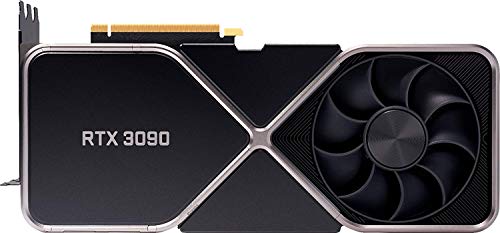
NVIDIA GeForce RTX 3090 Founders Edition — The reference card
The Founders Edition is the RTX 3090 as NVIDIA itself imagined it, and its design remains the most distinctive of the generation: a dual-axial cooler arranged so that one fan draws air through the card’s fin stack and exhausts it in a flow-through path, wrapped in a machined enclosure unlike anything the partners shipped. It is the reference against which the other five cards in this guide defined themselves, and for buyers who value the original artefact — the flagship as its maker built it — no partner card substitutes, whatever its cooler weighs.
As hardware, its virtues are compactness of length relative to the giant partner designs and a cooler that was engineered with genuine originality for the GPU’s heat. Its limitations are the reference design’s limitations: the partners’ largest coolers can hold lower temperatures under sustained load, the card’s power delivery and clocks are the stock specification rather than a flagship trim’s tune, and its through-flow cooling asks the case to cooperate — the air it pushes through itself must have somewhere to go, which crowded cases deny it. In a well-ventilated chassis, it remains a thoroughly capable flagship; in a sealed box, the partner coolers below are the safer engineering.
As a purchase in 2026, it carries the discontinued line’s terms in their purest form. NVIDIA’s own card is the one collectors and purists seek, which can make its listings the least rational in the pool — priced by scarcity and sentiment as much as by hardware. The rational buyer compares its listing against the partner cards’ on the day, weighs the design’s genuine appeal honestly, and lets the specific listing’s condition and terms — read directly, not assumed — settle whether the reference card is the buy or the poster.
One practical virtue deserves emphasis for builders coming from smaller cards: the Founders Edition exhausts a portion of its heat through the case’s rear in a way the pure-recirculation partner designs do not, and in a workstation case with a disciplined front-to-back airflow path that behaviour is worth real degrees. The same design in a case with a solid front and a decorative fan layout is merely unusual. The card has not changed between those two sentences — the case has — which is the most useful thing a review of a reference design can teach.
- Memory: 24GB GDDR6X — the 3090’s defining specification, common to every pick here
- Design: NVIDIA’s own Founders Edition with flow-through dual-axial cooling
- Clocks and power: reference specification — the title names the card plainly, and NVIDIA’s archived specification carries the figures
- Interface: PCIe 4.0 generation, as with the whole 3090 line
- Purchase terms: discontinued production — condition and warranty are the specific listing’s to state, not this guide’s to assume
Strengths
- The original design, and still the most distinctive object of the generation.
- Shorter than the giant partner cards, easing case fit.
- Flow-through cooling is genuinely effective in a ventilated case.
Trade-offs
- Stock clocks and power limits, where partner flagships tune higher.
- Its cooler depends on case airflow more than the brute-force designs do.
- Listings may price its scarcity above its hardware value.
Best for: a well-ventilated flagship build whose owner values NVIDIA’s own design and the 24GB buffer in its original form.
Not suited for: a sealed or airflow-starved case, where the flow-through design cannot breathe and a partner’s exhaust-style cooler is the safer engineering.
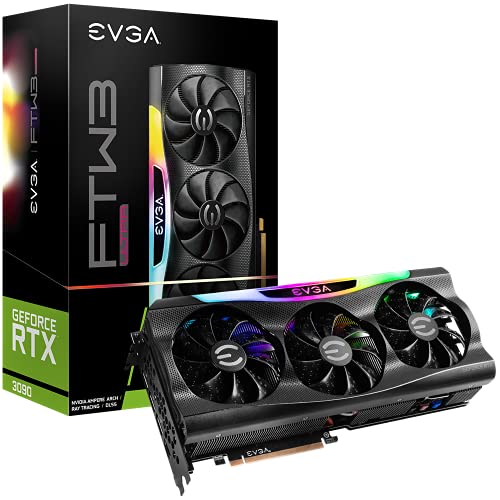
EVGA GeForce RTX 3090 FTW3 Ultra Gaming 24GB — Best partner flagship
The FTW3 Ultra was EVGA’s flagship of flagships — the top trim of its 3090 line, carrying the iCX3 cooling system whose name appears in the title, a metal backplate, ARGB lighting for those who want it, and the highest factory tune EVGA offered on this GPU. iCX3’s premise was sensor-driven cooling: temperature sensors across the board feeding a cooler that responds to the whole card’s heat, memory included, rather than to the GPU core alone. On a card whose memory runs as hot as the 3090’s does, that premise is not marketing garnish; it addresses the generation’s known thermal character directly.
In sustained work the FTW3’s large triple-fan cooler and generous fin mass give it the composure the workload demands, and its factory overclock makes it, on paper and in practice, among the quicker stock 3090s a buyer could choose. The costs are size and appetite: it is a big, thick card that asks a case the same hard questions as every flagship here, and its power requirement sits at the demanding end of a demanding generation. Neither will surprise a 3090 shopper; both belong in the measurements taken before ordering.
EVGA’s story adds a chapter the buyer should know plainly: the company exited the graphics card business after this generation, so the FTW3 is a finished artefact from a closed catalogue — admired, well-documented, and not succeeded by anything. That history does not diminish the hardware in hand, which remains one of the finest partner 3090s built. It does mean the specific listing’s terms carry the whole weight of the purchase’s aftercare, and they should be read with that in mind, as this guide advises for every card in this discontinued line.
There is a collector’s footnote that cuts both ways: because EVGA’s exit made its cards finite in a way even a discontinued line usually is not, FTW3 listings can attract the same scarcity pricing as the Founders Edition. The hardware justifies a strong price; it does not justify an unlimited one. Finding this card listed beside the plainer ZOTAC at a vast premium means paying for the nameplate’s story, and should decide — consciously, not by drift — whether the story is what is being bought.
- Memory: 24GB GDDR6X, stated in the title
- Cooling: iCX3 Technology, named in the title — sensor-informed cooling across the board
- Trim: FTW3 Ultra Gaming, EVGA’s flagship tier for this GPU
- Finish: ARGB LED and metal backplate, both named in the title
- Dimensions and power connectors: the title keeps to the highlights — EVGA’s archived specification carries the measurements and requirements
Strengths
- Among the strongest factory tunes and coolers of the 3090 generation.
- iCX3’s board-wide sensing suits this GPU’s memory heat directly.
- Flagship construction with a metal backplate and finished detailing.
Trade-offs
- Large and power-hungry, at the demanding end of a demanding line.
- EVGA no longer makes graphics cards; the listing’s terms are the aftercare.
- Its lighting and trim are paid for whether the build shows them or not.
Best for: a flagship gaming or creator build with the case volume and power supply to honour it, wanting the finest partner 3090 of its era.
Not suited for: a compact case or a modest power supply — the card’s dimensions and draw are gates that no enthusiasm negotiates.

MSI GeForce RTX 3090 24GB Tri-Frozr 2 with NVLink — Best for NVLink builds
MSI’s title for this card reads like a workstation’s shopping list — 24GB, 384-bit, HDMI and DisplayPort, NVLink, Tri-Frozr 2 cooling, Ampere architecture — and NVLink is the word that separates it in this guide. NVLink is the bridge technology that pairs two compatible cards so their memory and compute can cooperate, a feature the 3090 carried and its gaming successors dropped. For the workstation user running renders, simulations or model work that can use a paired configuration, a 3090 with NVLink support is not a legacy curiosity; it is one of the few consumer-class routes into that architecture, and this MSI card names the support in its title where others leave it to a specification page.
The Tri-Frozr 2 cooler is MSI’s flagship thermal design of the era — a large triple-fan arrangement built to move this GPU’s considerable heat quietly — and it suits the workstation brief in a second way: paired cards sit close together, and a cooler that manages its own heat without drama is worth more in a two-card chassis than in a gaming case with room to spare. As a single card, it is a full flagship 3090 with MSI’s top cooling; the NVLink support is the option value layered on top where the software can spend it.
That buyer should confirm the pairing requirements with the same care as the card itself: NVLink needs its bridge, a motherboard and case that physically host two very large cards, and a power supply sized for a pair of flagships — a serious workstation specification, not an impulse. The single-card buyer loses nothing by this card’s extra support and gains MSI’s flagship cooler; the pair buyer should treat this listing and its twin as a system purchase, and read both listings’ terms with the discontinued line’s diligence.
It is worth pausing on how unusual the NVLink proposition has become. When the 3090 launched, pairing was a rich gamer’s toy that software mostly ignored; since then, the centre of gravity moved to memory-hungry local computation, where a bridged pair presents a combined working space that certain frameworks can exploit directly. The feature did not change — the world’s use for it did — and a card bought in the line’s twilight for that purpose is not nostalgia. It is procurement, aimed at a capability the current catalogue deliberately reserves for far more expensive professional hardware.
- Memory: 24GB GDDR6X across the line’s wide 384-bit bus, as the title gives it
- NVLink support named in the title — the pairing feature this pick is chosen for
- Cooling: Tri-Frozr 2, MSI’s flagship cooler design of the generation
- Outputs: HDMI and DisplayPort named in the title
- Architecture: Ampere, as the title states
Strengths
- NVLink support for paired-card workstation configurations.
- Flagship Tri-Frozr 2 cooling under sustained, hours-long loads.
- Full 24GB buffer for the memory-hungry work this GPU still leads in.
Trade-offs
- Exploiting NVLink doubles every cost — card, power, space, bridge.
- A very large card; a two-card build multiplies the fit problem.
- Gaming gains nothing from the feature this pick is chosen for.
Best for: a workstation running render, simulation or model workloads that can pair two cards over NVLink, or a single-card build wanting MSI’s flagship cooler.
Not suited for: a gaming-only rig, where the NVLink support is inert weight and the same money buys a cooler-first pick without it.

MSI GeForce RTX 3090 24GB 1875 MHz OC — Best stated clock
The second MSI card in this guide distinguishes itself in its title by a number: 1875 MHz, printed where most listings leave the boost clock to a specification page. That figure — a factory overclock above the reference specification — tells the sheet-first buyer exactly what this trim is: MSI’s OC treatment of the same GPU and the same 24GB of GDDR6X, tuned at the factory and sold on that tune. Two MSI 3090s in one guide is not an error; the 3090 market was built from such pairs, and the difference between them is the difference between a workstation-flavoured flagship and a clock-led one.
What does a factory overclock on identical silicon actually buy? A small, real increment of rendering pace, delivered without the owner touching a tuning utility, and a card whose cooler was specified by its maker to hold that tune under load. It does not buy a different class of performance — the GPU, the memory and the interface are the 3090’s own — and a buyer choosing between this card and the Tri-Frozr 2 model above is choosing emphasis: the printed clock and OC trim here, against the NVLink support and flagship cooler language there. Both are legitimate; the workloads decide.
Practically, the same flagship gates apply: measure the case, size the power supply for a 3090’s draw with headroom, and plan airflow for a card that converts a great deal of electricity into heat and frames in roughly equal enthusiasm. The listing’s terms, as throughout this discontinued line, are part of the purchase and should be read as such. For sheet-first shopping, with the number wanted in writing before the box arrives, this is the guide’s most obliging listing.
The OC question deserves one more layer, because 3090 buyers are often tuners themselves. A factory overclock is, in part, a binning promise: the maker has tested this silicon at this tune and sells it at that tune under its own name. An owner who would rather start from a guaranteed point and tune further — or never tune at all — gets value from that promise beyond the megahertz themselves. An owner confident in their own silicon lottery may prefer the cheapest route to the same GPU. Neither is wrong; they are different relationships with the same hardware, and this card exists for the first.
- Memory: the same 24GB GDDR6X configuration, its 384-bit width printed in the title
- Boost clock: 1875 MHz, stated in the title — the only printed clock figure in this guide’s pool
- Edition: OC, factory-tuned, per the title
- Outputs: HDMI and DisplayPort named in the title
- Cooler design: the title leads with the clock rather than the cooler — MSI’s specification for the model carries the thermal details
Strengths
- Factory overclock stated in the title — no specification hunting.
- Same 24GB buffer and interface as every flagship here.
- MSI’s OC trim delivers its tune without owner tuning.
Trade-offs
- An overclock’s increment is small against the same silicon at stock.
- Cooler details require the specification page rather than the title.
- Identical flagship demands for space, power and airflow.
Best for: a sheet-first purchase that wants the factory tune in writing, in a full-size build with power and airflow to match.
Not suited for: a paired-card NVLink plan, where the other MSI pick’s stated support is the specification that matters.

Gigabyte AORUS GeForce RTX 3090 Xtreme 24G — Best cooling ambition
AORUS is Gigabyte’s flagship marque, and the Xtreme is its flagship’s flagship — the 3090 built with the least restraint in this guide. Its title names the design’s centrepiece, Max Covered Cooling, Gigabyte’s arrangement for covering the board with heatsink surface and fan coverage to an extent ordinary coolers do not attempt. On most GPUs that would be ornament; on the 3090, whose core and GDDR6X memory both produce serious heat under sustained load, cooling ambition is the most functional specification a partner can print, and the Xtreme prints it first.
The card that results is among the largest of the generation — a multi-slot, full-length construction that treats the case as a partner in the design. Owners of compact or even ordinary mid-tower cases should measure with unusual care; this is the pick most likely in the guide to meet a drive cage or a front radiator it cannot pass. In a case that can host it, the payoff is thermal headroom that shows in the workloads this GPU is bought for: renders and training runs that hold the card at full load for hours, where a lesser cooler would have begun trading clocks for temperature long before the job finished.
Gigabyte’s AORUS line also loads its flagships with the marque’s presentation — extensive lighting and finish work — which the buyer pays for whether the case has a window or not. That is the Xtreme’s honest bargain: the most cooling, the most presence, the most space demanded, at the flagship end of a discontinued line’s pricing. For the workstation or showcase build that can house it, it is a defensible summit. For a build that merely needs a 3090’s memory and pace, the plainer picks below and above deliver the same silicon with less ceremony.
The Xtreme also illustrates the generation’s design arc better than any other card here. The 3090’s partners began the Ampere era with coolers sized by habit and spent the cycle learning, in public, what GDDR6X heat actually demanded; the Xtreme is a late answer from that education — surface area everywhere, airflow treated as the product. A buyer choosing it is buying the most complete thermal response any partner gave this GPU, and in a discontinued line, where the card must simply work for years without a successor to trade up to, that completeness has a logic beyond showmanship.
- Memory: 24GB, its 384-bit width named in the title
- Cooling: Max Covered Cooling, named in the title — the design’s defining feature
- Marque: AORUS Xtreme, Gigabyte’s flagship tier
- Dimensions: among the largest of the generation — the title does not print them, and Gigabyte’s specification must be measured against the case before ordering
- Power connectors: not enumerated in the title — confirm the requirement in Gigabyte’s documentation and the supply’s capacity together
Strengths
- The most ambitious cooling design in the guide, aimed at sustained load.
- Flagship AORUS construction and finish throughout.
- Full 24GB buffer behind the strongest thermal headroom here.
Trade-offs
- Very large; the likeliest pick to fail a case measurement.
- Presentation features are paid for whether displayed or not.
- Flagship power demands, unchanged by the flagship cooler.
Best for: a large, well-powered workstation or showcase build running sustained full-load work, with the case volume the design requires.
Not suited for: a mid-tower with a front radiator or drive cage in the card’s path — this pick’s dimensions are its first specification, not its last.

ZOTAC Gaming GeForce RTX 3090 Trinity OC 24GB — Best understated flagship
ZOTAC’s Trinity OC is the 3090 that keeps the flagship’s substance with the least flagship theatre. The Trinity line is ZOTAC’s composed, triple-fan design — no extreme marque, no cooling slogan in the title, just the GPU, 24GB of GDDR6X, a stated memory speed of 19.5 Gbps, a PCIe 4.0 interface and a factory OC tune. In a guide where every other partner card arrives wearing its ambitions, the Trinity’s restraint is itself a position, and for workstation buyers especially it is often the winning one: the card is bought to work, and its design spends itself accordingly.
The stated memory speed deserves its moment, because it confirms in print what the whole line shares — this is full-speed GDDR6X, not a trimmed variant — and ZOTAC’s willingness to print it suits a habit of verifying rather than assuming. The Trinity cooler is a substantial triple-fan design in the class the 3090 requires; it does not claim the AORUS card’s extremes or the FTW3’s sensor system, and under sustained load it does the flagship’s work at the flagship’s temperatures, which is the honest standard for the tier.
ZOTAC also brings a maker’s continuity the EVGA pick cannot: the company still builds graphics cards, and the Trinity’s documentation and support trail belong to a living catalogue, even though the 3090 line itself is discontinued everywhere. The specific listing’s terms still govern the individual purchase, as throughout this guide — but a buyer weighing two otherwise equal listings may reasonably count a living maker among the Trinity’s quiet advantages. For the flagship without the fanfare, this is the guide’s closing recommendation and a strong one.
ZOTAC’s restraint extends to how the card behaves in a working machine: no proprietary theatrics, a standard fan arrangement doing a standard excellent job, and a design that disappears into a workstation’s spec sheet as a line item rather than a personality. Render farms, shared lab machines and office workstations are populated by cards like this for a reason. The Trinity is the 3090 as infrastructure — and infrastructure, bought at a discontinued line’s listings, is frequently where the smartest money in this whole guide is spent.
- Memory: 24GB GDDR6X, the title confirming the 384-bit interface
- Memory speed: 19.5 Gbps, stated in the title
- Interface: PCIe 4.0, per the title
- Edition: Trinity OC, factory-tuned, per the title
- Cooler: Trinity triple-fan class design — exact dimensions sit in ZOTAC’s specification for the case check
Strengths
- Full flagship specification, plainly stated, without theatre.
- Memory speed printed in the title for the verifying buyer.
- A maker still active in graphics cards, with a living support trail.
Trade-offs
- No NVLink language in the title, for the pairing-minded buyer.
- Cooler ambition is sound rather than extreme, unlike the AORUS pick.
- Same flagship size and power gates as every card here.
Best for: a workstation or gaming build wanting the full 24GB flagship in its most understated partner form.
Not suited for: a showcase build buying presence as much as performance, where the AORUS Xtreme’s design is the point of the purchase.
How Do the Six RTX 3090 Cards Compare?
| Card | Memory | Defining feature | Cooler character | Choose it for |
|---|---|---|---|---|
| NVIDIA Founders Edition | 24GB GDDR6X | Reference design | Flow-through dual-axial | The original artefact |
| EVGA FTW3 Ultra | 24GB GDDR6X | iCX3 sensing, flagship trim | Large triple-fan | Finest partner flagship |
| MSI Tri-Frozr 2 NVLink | 24GB GDDR6X | NVLink support stated | Flagship triple-fan | Paired-card workstations |
| MSI 1875 MHz OC | 24GB GDDR6X | Clock printed in title | OC trim design | The stated factory tune |
| Gigabyte AORUS Xtreme | 24GB GDDR6X | Max Covered Cooling | Largest cooling ambition | Sustained load, big cases |
| ZOTAC Trinity OC | 24GB GDDR6X | Memory speed stated | Composed triple-fan | Flagship without fanfare |
It is also worth stating what the table cannot show: condition. Two listings of the same card, from this discontinued line, can differ more in their individual history than two different cards differ in design — and no comparison table captures that. The table ranks the designs; the buyer’s diligence, applied listing by listing as this guide keeps advising, ranks the individual cards. Both rankings are necessary, and neither substitutes for the other.
One GPU, one memory configuration, six philosophies of the card around them — the table is the whole guide in six rows. Notice what does not vary, because it is the reason the 3090 remains bought at all: 24GB of fast memory, a figure the current market still rations carefully. Everything else in the table is a preference about heat, space and presentation, and preferences are settled by the machine and the room, not by a ranking.
How Does the RTX 3090 Sit Against Newer Cards a Buyer Might Cross-Shop?
The cross-shop is inevitable, so it should be done on axes rather than on vibes. Against the current midrange, the 3090 wins on memory outright — 24GB against 12GB or 16GB — and holds its own in raw rendering at 4K, while losing on efficiency, on the newest upscaling and frame-generation features, and on the simple fact of a living product line behind it. Against the current flagships, it loses on pace and features and wins, usually decisively, on the price of its memory. Read through a memory-bound workload, that table points one way; read through a chase for the newest features at 1440p, it points the other, and both readings are correct — which is why this guide refuses to declare the card simply good or simply old.
Efficiency deserves its own sentence, because it compounds. A 3090 under sustained load draws flagship power of its era, and a machine that renders or trains for hours daily will feel that in heat, noise and electricity over the card’s life. For the weekend gamer the difference is a footnote; for the small render operation it is a line in the budget, and it belongs in the comparison beside the purchase price rather than discovered after it. The card’s case is strongest where its memory is used in bursts of high value — a model loaded, a timeline scrubbed, a scene rendered — and weakest where it is asked to run at full draw around the clock against newer silicon that does the same work cooler.
Who Still Buys an RTX 3090, and for What Work?
The local AI experimenter is the buyer this card’s second life was made for. Running language models and image models locally is, above all, a memory problem: the model must fit in the frame buffer, and 24GB fits models that 12GB and 16GB cards simply refuse. A discontinued 3090 offers that capacity at a cost per gigabyte the current line-up does not match, and for a machine dedicated to local inference and fine-tuning experiments, its age is irrelevant next to its buffer. The same arithmetic serves the video editor with high-resolution timelines, the 3D artist whose scenes outgrow smaller cards, and the scientific hobbyist whose simulations are memory-bound.
The 4K gamer is the second buyer, and the honest one to describe carefully. The 3090 still renders current games at 4K with settings judgement, and DLSS support extends that life considerably; it is not the equal of the current flagship generation, and this guide does not claim otherwise. What it offers is flagship-class 4K from a previous generation at previous-generation listings — a rational trade for a gamer whose alternative was a midrange current card with half the memory. The newest features, the latest frame-generation technology and a living product line point to the current line, bought at its price with a clear conscience; memory and pace per unit of money point here, to this guide.
There is overlap between these buyers that the tidy categories hide: the same machine often games at night and renders or experiments by day, and the 3090 is unusually suited to the double life precisely because its memory serves both masters. A current card chosen for gaming features may strand the daytime work; a professional card chosen for the work prices the gaming out of reason. The 3090 sits in the seam between those catalogues, as it did at launch — the flagship that was always half workstation — and its second life has simply made the seam wider and the price of standing in it lower.
The third buyer is the workstation builder around NVLink and memory capacity, covered in the MSI review above. What unites all three is that they are buying a specification — 24GB, fast, on a wide bus — that the market has made oddly scarce, and they are buying it with open eyes about the line’s discontinued status. That is a legitimate way to shop, and it is why these six listings still move.
How Should a Machine Be Prepared for a Card of This Size and Appetite?
Power first, because everything else is commentary. An RTX 3090 system wants a high-quality power supply with genuine headroom above the card’s substantial draw — and transient spikes, a known characteristic of this generation under sudden load, are the reason the headroom must be genuine rather than arithmetic. Use the supply’s own PCIe cables, one run per connector where the card asks for several, with no daisy-chained shortcuts and no adapters of uncertain provenance. A flagship card on a tired supply announces itself as random shutdowns under load, and the card will be blamed for the supply’s confession.
Space and air come second. Measure the case’s graphics clearance in length and in slot thickness, and remember that these cards also need their coolers fed: a flagship pressed against a glass side panel or a solid front is a flagship being slowly persuaded to throttle. Plan the airflow path — intake that reaches the card, exhaust that removes what it makes — and consider a support for the heaviest designs, since a long, heavy card in a vertical slot sags on its bracket over years in a way that helps nothing. None of this is exotic; it is the standard of care a card of this class was always owed, owed still.
Cooling maintenance belongs in the preparation for this generation specifically. Before the card goes in, look at its fin stacks and fans as the listing’s photographs could not show them — dust in a flagship’s dense fins is a thermal tax paid on every load — and plan the case’s dust filtration with a card of this appetite in mind. In service, a temperature log kept for the first month, as the ownership section advises, turns cooling from a hope into a measurement, and on hardware of this value the measurement is worth the habit.
Software preparation is the same as for any card swap, with the driver point doubled: remove the previous driver completely if the brand or generation changes, install the current release for this GPU, and then verify the card at its real work — a render, a model load, a 4K session — for a sustained period before the packaging is discarded. A discontinued line makes that verification window more valuable, not less, because the listing’s own terms are the recourse and they should be exercised, if they must be, while they are fresh.
Which Mistakes Do Buyers of a Discontinued Flagship Make?
The first is buying the badge instead of the specification — paying a scarcity premium for a particular nameplate when the same GPU and memory sit in a plainer listing for less. The second is the reverse snobbery: dismissing the whole line as old, and paying more for a current card with half the memory that the actual workload needed. Both errors come from shopping by story rather than by requirement, and the requirement in this market is unusually easy to state: the work either needs 24GB or it does not.
A subtler mistake is neglecting the memory’s thermals in the maintenance plan. This generation’s GDDR6X runs hot by design, and in a card that may already have years of service behind it, the thermal pads and paste are ageing components like any other. An owner comfortable with careful maintenance can plan for their eventual renewal; an owner who is not should at least monitor memory temperatures in the first month and treat a rising trend as information, not ambience. Flagships of this era reward owners who listen to them.
The practical mistakes are the flagship classics, sharpened by the line’s age. Skipping the listing’s condition and warranty terms — the single most important page in a discontinued purchase. Under-sizing the power supply and meeting the transient spike in person. Assuming the card fits because the case once held a large card, when this generation’s flagships are larger than the ones memory supplies. Each is avoidable with an hour’s diligence, and on a purchase of this size the hour is the cheapest component in the build.
What Should the First Month of Ownership Look Like?
A discontinued flagship deserves a deliberate first month, because that is when the listing’s terms are most alive. Begin with a full verification pass in the first days: confirm the card reports its full 24GB, run a memory stress test — this generation’s memory runs hot, and a card with a marginal memory module declares it under exactly that test — and hold the card at sustained full load long enough for temperatures to settle at their working values rather than their first-minute ones. A card that passes a weekend of this has told the buyer most of what there is to know about its health, while the paperwork is still on the desk.
Then put it to its actual work and keep notes for a fortnight: the render times, the model loads, the 4K sessions, the noise at the desk during each. Those notes are the baseline every future question gets answered against, and on a card without a living product line behind it, the owner’s own records are the support history. If the card is destined for a paired NVLink build, test the pair together in that window too — two individually healthy cards are a system only when the bridge, the board and the supply agree, and the time to learn otherwise is while both listings’ terms are fresh.
Final Recommendation
Choose by cooler and context, because the silicon has already chosen itself. The EVGA FTW3 Ultra is the finest all-round partner card of the six for a gaming or creator flagship build; the AORUS Xtreme is the sustained-load specialist for a case that can house it; the MSI Tri-Frozr 2 card is the workstation pick where NVLink might ever matter, and its sibling is the sheet-first buyer’s stated clock. The ZOTAC Trinity OC is the understated flagship for a machine bought to work, and the Founders Edition remains the original — the design the generation is remembered by, bought knowingly. All six carry the same discontinued-line diligence: read the listing’s own terms as part of the product. The RTX 3090’s production story has ended, but the specification it pioneered — a gaming card with a workstation’s memory — has not been replaced at its price, and the buyers who understand that are not shopping in the past; they are shopping precisely.
Frequently Asked Questions
Is the RTX 3090 still worth buying, given it is discontinued?
For the workloads its specification serves, yes — with the purchase made on the right terms. Its 24GB of GDDR6X remains scarce in the current market, and for local AI work, editing, rendering and 4K gaming it delivers that capacity at listings the current flagship line does not approach. Discontinued means production has ended and the individual listing’s condition and warranty terms carry the purchase, so those terms must be read on the listing itself; this guide makes no representation about any single seller’s stock or warranty position.
What is the difference between these six cards if the GPU is the same?
Everything around the GPU: cooler design and mass, factory clock tune, physical size, finish and features such as the MSI card’s stated NVLink support or the EVGA card’s iCX3 sensor system. The GPU and the 24GB memory configuration are identical across the six, which is why the reviews compare cooling, dimensions and character rather than inventing performance gaps the silicon does not contain.
Can an RTX 3090 still play current games at 4K?
Yes, with the settings judgement any previous-generation flagship invites. Its rendering pace and 24GB buffer remain more than sufficient for a large 4K library, and DLSS upscaling — supported across this line — extends that reach in demanding titles. What it does not offer is the newest generation’s feature set, including its latest frame-generation technology, and a buyer for whom those features lead the brief should shop in the current line. The brief centred on memory and strong 4K at a previous generation’s listings is the one this guide serves.
How much power supply does an RTX 3090 system need?
A high-quality supply with real headroom — this generation’s flagship draw is substantial, and its transient spikes under sudden load are a documented characteristic that punishes arithmetic sizing. The exact requirement varies by partner card, so confirm the figure in the chosen model’s documentation, use the supply’s own cables for every connector the card presents, and treat an ageing or budget supply as a component to replace alongside the card rather than a risk to audition.
Why do people buy a 3090 for AI work instead of a newer card?
Because local AI workloads are governed first by memory capacity: a model that does not fit in the frame buffer does not run, whatever the card’s generation. The 3090’s 24GB fits models that smaller-memory current cards refuse, and its listings price that capacity below the current products that match it. For a dedicated local-inference or experimentation machine, that arithmetic outweighs the newer cards’ efficiency and feature advantages.
What should be checked first when a 3090 from a marketplace listing arrives?
Identity and memory, in that order. Confirm the card is the model the listing described — partner, trim and memory configuration — and that it reports its full 24GB to the system, then run the sustained-load and memory tests described in this guide’s ownership section while the listing’s return terms are in front of you. Check the fans spin freely and quietly, the bracket is unbent, and the power connectors are undamaged. None of this implies suspicion of any particular seller; it is the standard of care for any high-value discontinued component, applied while it can still change the outcome.
Does the RTX 3090 support NVLink, and does it matter?
The 3090 is the last gaming-line GPU to carry NVLink support, and one of the MSI picks in this guide states that support in its title. It matters only to workstation workloads that can pair two cards so their resources cooperate — rendering, simulation and certain model work — and it requires the bridge, the board space and a power supply sized for two flagships. For gaming it confers nothing, and gaming buyers should weigh the other picks on their coolers instead.
Related Guides
Readers weighing this generation against newer hardware may also find our guide to graphics cards with 24GB of memory useful, alongside the roundup of cards for local AI workloads and the power supply guide for flagship graphics cards that this guide’s preparation section depends on. Read together, they frame the 3090 purchase as what it is — a specification bought deliberately, installed carefully, and verified promptly — rather than a nostalgia trip. On its memory alone, this card has never needed to trade on the past, and the editors, artists and experimenters who keep its listings moving show no sign of letting it start: their workloads still ask for exactly what it has, in studios, laboratories and gaming rooms alike, and on that evidence it will go on being asked for, and answered by these six cards, for a good while yet to come, in the machines of people who measure a graphics card by the work it makes possible rather than by the year printed on its box or the generation named in its marketing — a measure this card, uniquely among its contemporaries, still passes every single working day it is asked to face.


