What's inside
- Key Takeaways
- Quick Picks
- How Did We Choose the Best Graphics Cards That Support 4 Monitors?
- How Do the Six Cards Compare Side by Side?
- What Should You Plan Before Building a Four-Monitor Desk?
- What About Refresh Rates and Mixed Panel Sizes?
- How Do You Set Up and Arrange Four Displays Cleanly?
- Which Desks Actually Need Four Monitors?
- How Long Do Multi-Monitor Cards Stay in Service?
- What Mistakes Do Four-Monitor Buyers Most Often Make?
- Final Recommendation
- Frequently Asked Questions
- Related Guides
As an Amazon Associate I earn from qualifying purchases. This post may contain affiliate links at no extra cost to you.
gizmoverdict.com is reader-supported. When you buy through links on our site, we may earn an affiliate commission.
Where to buy: all six cards link to their Amazon listings from the Quick Picks table and from their detailed sections. Multi-monitor cards are sold in several port configurations under similar names, so check the connector list in the listing title against the cables already on your desk before ordering — the difference between an HDMI edition and a DisplayPort edition is the whole purchase.
The best graphics cards that support 4 monitors solve a problem that has nothing to do with gaming speed. A trading desk watches four charts because the information will not fit on fewer. A control room keeps a wall of status panels alive around the clock. A developer keeps code, documentation, a terminal and a preview in separate sightlines, and an analyst keeps the model, the data and the presentation open at once. For all of them the graphics card’s job is measured in outputs, not frame rates: four independent displays, driven simultaneously, from one slot, without a daisy-chain of adapters pretending to be a solution.
That framing disciplines everything in this roundup. We cared first about whether a listing actually states four-display capability — in its title, in so many words — and we have held each card to exactly what its title claims. Five of the six state their four-monitor credentials outright, in HDMI or DisplayPort form. The sixth, PNY’s NVS 510, is a professional multi-display card whose title speaks only of DisplayPort accessories; we include it for the buyers whose desks run on that ecosystem, and we flag plainly that its title does not state a monitor count, so its layout must be confirmed in PNY’s documentation before it anchors a four-screen build. No card here is a gaming card in disguise, and none pretends to be: memory figures are modest, memory types are older, and the value lives entirely in the outputs.
The practical divisions are threefold. Connector type splits the list: four cards speak HDMI natively, one speaks DisplayPort, and one leaves the question to its documentation. Physical format splits it again: single-slot and low-power designs dominate, because multi-monitor cards are usually added to machines that were never built for a flagship. And purpose splits it a third time — trading floors and signage ask for reliability across years, while home multi-screen desks ask for an inexpensive end to window-shuffling. Read your own desk in those three divisions and the right card usually names itself.
Key Takeaways
- Four stated outputs is the entry ticket: five of these six titles claim four-monitor support in so many words, and the sixth is included with its silence flagged.
- The two VisionTek RX 550 cards are the same idea in two dialects — one with 4x HDMI, one with 4x DisplayPort — each single-slot and stated as 50W bus powered.
- The ARDIYES GT 730 states four independent displays over 4x HDMI in a single-slot ITX-friendly format, on older GDDR3 memory.
- The RX560 card states support for up to 3840×2160 at 60Hz across its four HDMI outputs, the clearest resolution claim in the list.
- The GTX 750 Ti listing states an unusual 8GB of GDDR5 alongside its four HDMI ports and 4K 60Hz support — read its title literally and verify on arrival.
- The PNY NVS 510’s title states DisplayPort accessories only; its monitor count is not stated and must be confirmed with PNY documentation.
Quick Picks
| Pick | Badge | Why it made the list |
|---|---|---|
| VisionTek AMD Radeon RX 550 4GB GDDR5 4x HDMI | HDMI wall, single slot | Four HDMI outputs on a single-slot, bus-powered card whose title states 4 monitor support outright. |
| VisionTek AMD Radeon RX 550 4GB GDDR5 4x DisplayPort | DisplayPort wall, single slot | The same RX 550 formula speaking DisplayPort, for desks built around DP panels and cables. |
| RX560 4GB GDDR5 4 HDMI Multi Monitor Graphics Card | Stated 4K 60Hz ceiling | Four HDMI outputs with a stated ceiling of 3840×2160 at 60Hz for office multi-screen work. |
| GTX 750 Ti 8GB GDDR5 Graphics Card, 4 HDMI | Largest stated memory | Four HDMI ports and 4K 60Hz support with a stated 8GB frame buffer, the largest in this list. |
| ARDIYES GT 730 4GB GDDR3 GPU 4X HDMI | Independent displays, ITX fit | Four independent displays over HDMI in a single-slot card sized for small cases. |
| PNY NVIDIA NVS 510 with DisplayPort Accessories | Professional multi-display line | PNY’s NVS professional entry, included for DisplayPort desks, with its monitor count to be verified in PNY documentation. |
How Did We Choose the Best Graphics Cards That Support 4 Monitors?
We began with the title test, because this category is infested with listings that imply multi-monitor capability they never state. A card earned detailed consideration only if its title claimed four displays in plain language — four monitors, 4x HDMI, four independent displays — or, in the NVS 510’s case, if it belonged to a professional multi-display family and was included with its evidentiary status made explicit. That rule sounds severe, and it is meant to: a four-monitor build is a cabling and configuration project, and it deserves hardware whose promise is printed rather than inferred.
The second filter was physical practicality. Multi-monitor cards are retrofitted into trading desks, office towers and signage players that offer one free slot and a modest power supply, so single-slot designs and bus-powered operation — power drawn from the slot alone, with no auxiliary connector — were weighed as primary virtues. The VisionTek pair state both virtues in their titles, at a stated 50W. The third filter was connector honesty: a desk’s panels and cables already exist, and a card that matches them natively is worth more than a nominally stronger card plus four adapters. Finally, we kept the performance framing modest on purpose. These cards drive desktops, charts, documents and video walls; judged on that work, memory type and age matter far less than outputs, thermals and driver manners.

VisionTek AMD Radeon RX 550 4GB GDDR5 4x HDMI Graphics Card — HDMI wall, single slot
VisionTek builds cards for exactly this category, and this one’s title reads like a specification for the whole genre: an RX 550 with 4GB of GDDR5, four HDMI outputs, stated 4 monitor support, full height, single slot, and 50W bus powered. Each clause earns its place. Four HDMI ports mean the four televisions or HDMI monitors a trading desk or signage wall already owns connect directly, with no adapter budget and no adapter failures. Single slot means the card fits the one free slot in a crowded tower and leaves its neighbour free. Bus powered at a stated 50W means the card asks nothing of the power supply beyond the slot itself — the retrofit-friendly property that decides whether an upgrade takes ten minutes or a weekend.
The title also names its intended habitats: multi-display productivity, financial trading and digital signage. Those are the three canonical four-screen jobs, and they share a profile — static or slowly changing content, displayed for very long hours, where a failure is measured in embarrassment or money rather than in lost frames. The RX 550’s 4GB of GDDR5, as stated in the title, is sized for that profile honestly: four desktop surfaces at office resolutions are a compositing task, not a texture-streaming one, and the card’s specification matches the work instead of flattering the buyer.
For a home desk, the same card ends the compromises of integrated graphics: the code editor, the browser, the chat window and the video call each get a panel, and the window-shuffling tax on attention disappears. It will not game across four screens and does not claim to; its claim is four honest desktops from one slot on slot power, and the title states every part of that claim in the open.
There is a small operational grace in bus-powered cards that deserves naming: they remove the power supply from the failure conversation entirely. A wall that goes dark is traced to a panel, a cable or the card itself, in minutes, because the auxiliary power cable — the connector that works loose in towers and confuses diagnoses — simply does not exist in the build. For signage in public places, where the person troubleshooting may not be the person who installed, that simplicity is a feature with a cash value.
- Memory: 4GB GDDR5 (as stated in the listing title)
- Outputs: 4x HDMI (as stated in the listing title)
- Monitor support: 4 monitors (as stated in the listing title)
- Form factor: Full height, single slot (as stated in the listing title)
- Power: 50W, bus powered (as stated in the listing title)
- Stated uses: Multi-display productivity, financial trading, digital signage
Strengths
- Every claim a four-monitor buyer needs is printed in the title — outputs, count, slot width and power draw.
- Bus-powered operation at a stated 50W makes it a drop-in for office towers with modest supplies.
- Four native HDMI ports match the panels trading desks and signage walls already own.
Trade-offs
- GDDR5 and the RX 550 tier cap its ambitions at desktop work; this is not a gaming card.
- Full height, despite the single slot, so low-profile small-form cases should look at the ARDIYES card instead.
- Four HDMI cables is a real cable-management project behind a desk.
Best for: a buyer seeking four HDMI displays from a single slot on slot power for trading, signage or a productivity wall. Not suited for: a buyer requiring low-profile fitment or any meaningful gaming performance.
VisionTek AMD Radeon RX 550 4GB GDDR5 4x DisplayPort Graphics Card — DisplayPort wall, single slot
This is the previous card’s twin in the other connector dialect: the same RX 550, the same 4GB of GDDR5, the same stated 4 monitor support, full height, single slot and 50W bus powered — with four DisplayPort outputs where its sibling carries HDMI. The existence of both editions is the lesson of this category in miniature. Multi-monitor hardware is bought to match an installed base of panels and cables, and the correct card is the one whose ports speak the desk’s language natively. Desks built from business monitors — the panels with DisplayPort inputs that offices buy by the pallet — belong to this edition.
DisplayPort brings its own practical graces to a four-screen desk. The connectors latch, which matters when a cable is nudged by a cleaner’s vacuum at a trading desk that cannot afford a dark panel. The standard also carries a long professional tradition in multi-display work, and the title’s stated uses repeat the family brief: multi-display productivity, financial trading and digital signage. Nothing in the proposition changes except the plug, and that is precisely the point — a buyer choosing between these two VisionTek cards is not choosing performance at all, only compatibility, and should choose with a photograph of the back of their monitors in hand.
One planning note applies to both twins: four displays at a desk generate four cables’ worth of heat-adjacent clutter and four panels’ worth of bezel. Measure the desk, plan the arms or stands, and route the cables before the card arrives, because the card itself is the easy part of a four-monitor build — it is the furniture that fights back.
The DisplayPort edition also suits the daisy-chain-adjacent habits of office IT: spare DP cables live in every department’s drawer, panels arrive with DP inputs as standard, and a replacement at short notice is a corridor conversation rather than an order. Standardisation is invisible until the morning something fails, and on that morning this edition’s ordinariness becomes its most professional quality.
- Memory: 4GB GDDR5 (as stated in the listing title)
- Outputs: 4x DisplayPort (as stated in the listing title)
- Monitor support: 4 monitors (as stated in the listing title)
- Form factor: Full height, single slot (as stated in the listing title)
- Power: 50W, bus powered (as stated in the listing title)
- Stated uses: Multi-display productivity, financial trading, digital signage
Strengths
- Four native DisplayPort outputs match business-monitor fleets without a single adapter.
- The same verified formula as its HDMI twin: single slot, stated 50W, slot power only.
- Latching DisplayPort connectors suit desks where a loose cable is a costly event.
Trade-offs
- HDMI-only panels — televisions especially — would need adapters, erasing the native-fit advantage.
- Desktop-class performance only, by design and by title.
- Full-height bracket excludes the smallest low-profile cases.
Best for: a buyer seeking four DisplayPort displays from one slot for an office or trading desk built on DP panels. Not suited for: a buyer requiring native HDMI connections for television-based walls.

RX560 4GB GDDR5 4 HDMI Multi Monitor Graphics Card — Stated 4K 60Hz ceiling
This unbranded RX560 card makes the most specific display claim in the roundup: four HDMI outputs supporting up to 3840×2160 at 60Hz, stated in the title alongside 4GB of GDDR5 and its intended habitats of office multi-screen work and stock trading. That resolution figure deserves careful reading. It describes the card’s output ceiling — what its ports can carry — and it gives a buyer with 4K panels a stated basis for planning that most of this list withholds. Four 4K desktops is a great deal of pixels to composite, and a card that prints the ceiling in its title is at least inviting the right conversation about what its silicon can sustain.
The RX560 chip sits a step above the RX 550 cards in its generation’s order, and in desktop terms the practical difference is composure: more headroom for video playback on one panel while charts update on three others, smoother window motion across a wide wall. The card’s presentation is generic — no board-partner brand adorns the title — which cuts both ways. The price of entry for unbranded multi-monitor cards is typically gentle, and the support path is the marketplace rather than a manufacturer’s workstation channel. For a home multi-screen desk or a small office, that trade is often rational; for a trading floor with uptime obligations, the VisionTek and PNY names carry institutional weight this card does not claim.
Buy it with the verification habit this category teaches: on arrival, connect all four panels, confirm each negotiates its intended resolution, and run the wall through a full working day before the return window closes. A four-output card proves itself only in the plural.
The home-trading context deserves a kind word here, because it is this card’s natural habitat. The spare-room desk with two televisions and two monitors, a market-open routine and a platform spread across all four — that desk does not need a workstation channel, it needs four working HDMI outputs and a stated ceiling it can plan around, at a price that leaves the budget for the panels themselves. On those terms the RX560’s proposition is coherent, and its generic branding is a discount the buyer knowingly accepts.
- Memory: 4GB GDDR5 (as stated in the listing title)
- Outputs: 4 HDMI (as stated in the listing title)
- Stated ceiling: up to 3840×2160 at 60Hz (as stated in the listing title)
- Stated uses: Office multi-screen, stock trading
- Form factor: Not stated in the listing title — verify with the seller’s listing details
- Power draw: Not stated in the listing title — verify with the seller’s listing details
Strengths
- The only card here whose title states a resolution and refresh ceiling for its outputs.
- RX560 silicon gives desktop compositing more headroom than the RX 550 pair.
- Four native HDMI ports suit the television-and-monitor mix of home trading desks.
Trade-offs
- An unbranded listing means support runs through the seller rather than a manufacturer channel.
- Form factor and power draw go unstated in the title and must be checked before fitting.
- The stated ceiling describes the ports’ capability; four 4K desktops remain a heavy composited load.
Best for: a buyer seeking four HDMI outputs with a stated 4K 60Hz ceiling for an office or home trading wall. Not suited for: a buyer requiring a manufacturer-backed support channel for a mission-critical desk.

GTX 750 Ti 8GB GDDR5 Graphics Card, 4 HDMI, 4 Monitor GPU, 4K 60Hz — Largest stated memory
This listing states the largest frame buffer in the roundup — 8GB of GDDR5 — attached to a GTX 750 Ti, with four HDMI ports, four-monitor support and 4K at 60Hz all claimed in the title. That memory figure will raise an eyebrow among readers who remember the 750 Ti’s original era, when the chip carried far less; marketplace listings for mature chips are sometimes assembled in configurations the original launch never offered. Our approach is the one this whole category demands: the title is the claim, we report it as stated, and the buyer’s verification on arrival — checking the reported capacity in the operating system — is part of the purchase. Nothing in this section asserts more than the title does.
Judged on its stated terms, the proposition is legible. Four HDMI outputs for office, trading and multi-monitor setups, a stated 4K capability, and a frame buffer that, if as described, gives four desktops generous room for browser-heavy and document-heavy work. The 750 Ti architecture is old, and its desktop manners are well documented after years in service; nobody is buying it for speed. They are buying outputs and capacity in a mature, inexpensive package, for walls where the content is charts and documents rather than rendered worlds.
The honest caveats are about provenance and expectations. An unbranded listing built on an elderly chip asks the buyer to verify everything on delivery and to keep expectations at desktop level. For a signage loop, a home chart wall or a workshop information screen, that can be a perfectly sensible economy. For a desk whose downtime is billed by the hour, the branded cards above exist precisely to remove this category of doubt.
Verification, in practice, is a five-minute ritual: install, open the operating system’s display or graphics panel, read the reported memory, connect the four displays, and confirm each one’s resolution against the title’s claims. Do it on the day of arrival, keep the listing’s title in the purchase record, and any discrepancy becomes a straightforward conversation with the seller while the return window stands wide open. The ritual is the price of the saving, and it is a fair one.
- Memory: 8GB GDDR5 (as stated in the listing title)
- Outputs: 4 HDMI (as stated in the listing title)
- Monitor support: 4 monitors (as stated in the listing title)
- Stated capability: 4K at 60Hz (as stated in the listing title)
- Form factor: Not stated in the listing title — verify with the seller’s listing details
- Power draw: Not stated in the listing title — verify with the seller’s listing details
Strengths
- The largest stated memory figure in the roundup, paired with four stated HDMI outputs.
- 4K 60Hz support is claimed in the title for compatible systems.
- A mature architecture whose desktop behaviour is thoroughly documented by years of use.
Trade-offs
- The stated 8GB configuration is unusual for its chip and should be verified in the operating system on arrival.
- An elderly architecture means elderly driver horizons; plan it as a desktop card, not a platform.
- Unbranded provenance places the verification burden on the buyer, as with the RX560 above.
Best for: a buyer seeking four HDMI displays with the largest stated frame buffer for a charts-and-documents wall. Not suited for: a buyer requiring branded provenance and a manufacturer support path.

ARDIYES GT 730 4GB GDDR3 GPU 4X HDMI Graphics Card — Independent displays, ITX fit
The ARDIYES card’s title makes the most technically precise claim in the roundup: four independent displays. Independence is the word that separates a true multi-monitor card from a mirroring device — each panel shows its own desktop, its own application, its own corner of the work. Four HDMI ports deliver it, in a single-slot PCI Express card whose title calls out ITX sizing, aimed at the small cases that signage players, reception desks and compact offices actually use. A GT 730 with 4GB of GDDR3 on a 64-bit bus is, by any gaming measure, a humble device; by the measures of this category — outputs, independence, fit — it is aimed exactly at its brief.
GDDR3 deserves its honest sentence: it is two memory generations behind the GDDR5 in most of this list, and it confines the card to static and lightly animated content. Charts, documents, dashboards, a looping presentation, a video that does not ask much — that is the repertoire, and within it the memory type is nearly irrelevant, because compositing four desktops spends bandwidth modestly. The buyers this card serves are the ones whose constraint is physical: a mini PC with one slot and no room, a kiosk enclosure, a media cabinet. For them the ITX-friendly single-slot format is not a compromise at all; it is the entire reason for the card’s existence.
Plan the software side with the same care as the fit. Four independent displays are arranged in the operating system’s display settings — order, orientation, scaling — and a few minutes spent arranging them deliberately, with the primary panel identified and the taskbar where your hand expects it, repays itself every working day the wall is in service.
Kiosk duty shows this card at its most characteristic. A museum label wall, a canteen menu board, a workshop’s job-status screen — small enclosures in public or semi-public places, running one modest application across several panels for years. The card asks for no power connector, occupies one slot in a case the size of a shoebox, and its ambitions end exactly where the job’s do. Hardware that knows its brief this precisely tends to be left alone, and hardware left alone tends to run forever.
- Memory: 4GB GDDR3, 64-bit (as stated in the listing title)
- Outputs: 4X HDMI (as stated in the listing title)
- Display mode: 4 independent displays (as stated in the listing title)
- Form factor: Single slot, ITX-oriented, PCI Express (as stated in the listing title)
- Power draw: Not stated in the listing title — verify with the seller’s listing details
- Resolution ceiling: Not stated in the listing title — verify with the seller’s listing details
Strengths
- The title states independent displays — the defining feature of a true multi-monitor card — in plain words.
- Single-slot, ITX-oriented sizing fits the small enclosures that signage and kiosk work uses.
- Four native HDMI ports match the cheapest and commonest panels.
Trade-offs
- GDDR3 memory confines it to static and light content; video-heavy walls should look up the list.
- No resolution ceiling is stated, so 4K ambitions must be verified before purchase.
- The GT 730 tier offers nothing beyond desktop duty, and asks to be judged only on that.
Best for: a buyer seeking four independent HDMI displays inside a small ITX or single-slot enclosure. Not suited for: a buyer requiring stated 4K output or heavier video workloads across the wall.
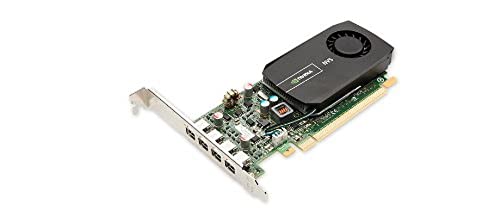
PNY NVIDIA NVS 510 Graphics Card with DisplayPort Accessories — Professional multi-display line
The NVS 510 is this roundup’s exercise in disciplined reading. PNY’s NVS family is NVIDIA’s professional multi-display line — cards built for financial and control-room walls long before this category had a consumer audience — and the listing title states the card’s name and that it arrives with DisplayPort accessories. It does not state a monitor count. It does not state a memory figure. Under the rule this article set itself, we therefore do not claim four-monitor support for it: we present it as the professional-ecosystem option whose exact layout must be confirmed in PNY’s documentation, where the NVS family’s specifications are published in full.
Why include a card on those terms? Because a real population of four-monitor desks is built inside the NVS tradition — institutions whose existing walls, cables and spares are DisplayPort and PNY, and whose purchasing is governed by continuity rather than by listings. For those desks, the relevant question is not whether this card belongs in a roundup but whether the exact model’s documented layout matches the wall being extended, and that question is answered by the specification sheet, not by a title. The accessories noted in the title matter here too: professional multi-display cards often ship with the adapters their port layout expects, and a listing that mentions them is signalling a complete working package rather than a bare board.
For a fresh home or small-office build, the calculus differs: the cards above state their four outputs outright and ask nothing of your faith, and they are the natural starting points. The NVS 510 is for the desk that already speaks its language — and for every reader, it is the standing reminder that in this category the title is the contract, and a silent title is a task, not a promise.
There is also a spares argument familiar to every facilities manager: an institution running NVS walls keeps NVS spares, because a failed card at a control desk is replaced in minutes with the identical model and no reconfiguration. Buying into the same family as the installed wall is not nostalgia — it is the logistics of uptime, and it explains why a card of this vintage remains in active catalogues long after its consumer contemporaries vanished.
- Line: NVIDIA NVS professional multi-display family, from PNY
- Included accessories: DisplayPort accessories (as stated in the listing title)
- Monitor count: Not stated in the listing title — verify with PNY documentation
- Memory: Not stated in the listing title — verify with PNY documentation
- Outputs: Not stated in the listing title — verify with PNY documentation
- Power draw: Not stated in the listing title — verify with PNY documentation
Strengths
- Belongs to a professional multi-display family with a long institutional history in trading and control rooms.
- Ships with DisplayPort accessories noted in the title, suiting DP-based installed walls.
- PNY’s professional channel provides the documentation depth this category’s verification habit requires.
Trade-offs
- Its title states neither a monitor count nor a memory figure, so nothing can be confirmed without PNY’s sheet.
- An older professional generation, bought for continuity rather than for modern features.
- Fresh builds are better served by the cards in this list whose four outputs are stated outright.
Best for: a buyer seeking an NVS-family card to extend an existing DisplayPort professional wall, verified against PNY documentation. Not suited for: a buyer requiring a four-monitor claim stated in the listing itself.
How Do the Six Cards Compare Side by Side?
| Card | Outputs stated in title | Memory stated in title | Form and power stated in title |
|---|---|---|---|
| VisionTek RX 550 4x HDMI | 4x HDMI, 4 monitor support | 4GB GDDR5 | Full height, single slot, 50W bus powered |
| VisionTek RX 550 4x DP | 4x DisplayPort, 4 monitor support | 4GB GDDR5 | Full height, single slot, 50W bus powered |
| RX560 4 HDMI | 4 HDMI, up to 3840×2160 60Hz | 4GB GDDR5 | Not stated in title |
| GTX 750 Ti 4 HDMI | 4 HDMI, 4 monitor GPU, 4K 60Hz | 8GB GDDR5 | Not stated in title |
| ARDIYES GT 730 4X HDMI | 4X HDMI, 4 independent displays | 4GB GDDR3, 64-bit | Single slot, ITX-oriented |
| PNY NVS 510 | Not stated in title | Not stated in title | DisplayPort accessories included |
One further reading of the table is worth making before you buy: the two columns that never appear. No title here states a warranty term or a fan design, because on a desktop wall neither decides anything — the cards run cool by the standards of their modest silicon, and their service lives are set by panels and operating systems rather than by their own thermals. Knowing which specifications do not matter is half of buying well, and this category, refreshingly, has several.
The table’s shape is the category’s shape: a top half where titles behave like specification sheets, and a bottom where they behave like labels. Neither half is dishonest — but they demand different amounts of work from the buyer, and the work is cheapest when it is done before the order rather than after the delivery. Note also how little the memory column matters to the actual job: the wall does not care whether its charts were composited from GDDR5 or GDDR3, and the one large figure in the column belongs to the card whose other credentials are the least documented. Outputs, fit and power — in that order — are the columns to buy by.
What Should You Plan Before Building a Four-Monitor Desk?
Start at the panels, not the card — and start a week early if the wall serves a workplace, because the panels’ delivery, the arms’ delivery and the card’s delivery rarely synchronise, and a wall assembled in the order things arrive teaches patience at the price of a half-finished desk. Sequence the build: furniture and arms first, panels second, card and cables last, software arrangement in the same sitting. Inventory the four displays you actually own or intend to buy, and write down each one’s inputs and native resolution; that inventory, and nothing else, decides whether your card speaks HDMI or DisplayPort. Then measure the physical desk: four panels need width, and the choice between a row of stands and a pair of dual arms changes the room. Decide the arrangement — four across, three across with one above, a two-by-two grid for a wall — before cables are bought, because cable length follows arrangement and short cables are the most common four-monitor frustration in existence.
While the plan is on paper, settle the question of spares and sameness. A wall built from identical panels ages gracefully: colours match, bezels align, and a single spare panel covers any failure. A wall built from bargains works too, but it should be built knowingly, with the primary position reserved for the best panel and the odd ones assigned to dashboards and documents where colour fidelity is a preference rather than a requirement. Either strategy succeeds; drifting between them by accident is what produces the wall that always looks slightly wrong.
Then audit the host machine. Confirm a free slot of the right width, check whether the card you favour is full height or low profile against the case, and note the power story: the bus-powered cards in this list ask nothing extra, while the cards whose titles stay silent on power deserve a documentation check against your supply. Finally, plan the software arrangement with the same deliberateness — which panel is primary, where notifications live, how the trading platform or the development environment tiles across the wall. A four-monitor desk is a small system, and systems reward the hour of planning that components alone cannot provide.
What About Refresh Rates and Mixed Panel Sizes?
A four-monitor wall is usually a miscellany: panels bought in different years, in different sizes, at different native resolutions. The good news is that extended desktops are built for exactly this — each panel runs at its own native resolution, and the card’s job is simply to feed four independent framebuffers. The figures that matter are the per-output ceilings, which is why the stated ceilings in this list — the RX560’s up to 3840×2160 at 60Hz, the 750 Ti listing’s 4K at 60Hz — should be read as per-connection claims to verify against your panels, while the cards without stated ceilings ask for a documentation check before a 4K panel is committed to them.
Refresh rate deserves a calm word. Desktop work — charts, documents, dashboards, video — lives comfortably at the standard desktop refresh, and none of these cards is sold as a high-refresh device. A wall mixing one faster panel among standard ones will run each at its own rate in modern operating systems, but the honest expectation for this category is uniformity: four steady desktops, not four racing displays. Buyers whose primary panel doubles as a gaming screen should treat that as a separate requirement, served by a separate card class, and let the wall’s card do the job it was bought for.
Scaling is the mixed-wall detail that actually bites. Panels of different sizes at the same resolution present text at different physical sizes, and per-panel scaling settings exist precisely to reconcile them. Spend the ten minutes: set each panel’s scaling so a window dragged across the wall keeps its apparent size, and the miscellany stops feeling like a compromise and starts feeling like a desk that grew the way real desks do — one good panel at a time.
How Do You Set Up and Arrange Four Displays Cleanly?
Connect the panels one at a time, confirming each appears at its native resolution before adding the next; a wall built incrementally never leaves you guessing which link in a four-cable chain is misbehaving. In the operating system’s display settings, drag the virtual panels into the physical arrangement — heights included, since a cursor that jumps when crossing between mismatched panels is a daily irritation with a thirty-second cure. Set scaling per panel if sizes differ, and choose the primary display deliberately: it should be the panel your eyes rest on, not the one the system happened to enumerate first.
Power and sleep behaviour need one deliberate pass. Four panels waking from sleep should return in their arranged order with their resolutions intact; if a panel renegotiates slowly, the operating system may shuffle windows in the interim, and the cure is usually to let the slowest panel be the one the machine wakes first, or to keep the wall on a switched strip and power it as a unit. Test the sleep-and-wake cycle on installation day, not on the first morning it matters.
Then give the wall a working day before judging it. Arrange your applications, save the layout with whatever window-management tool your platform offers, and note which panel collects glare at the hour you actually work. Small ergonomic corrections — a panel angled, a stand raised — are the difference between a wall that impresses visitors and a wall that serves its owner. The card’s work ends at the connectors; the desk’s work is everything after, and it deserves the same care.
Which Desks Actually Need Four Monitors?
It is worth interrogating the premise before spending anything, because a four-monitor wall is a commitment in desk space, cables and daily ergonomics. The desks that genuinely need four are the ones where information expires: trading and market-watching, where a chart looked at late is a decision made late; operations and monitoring, where the status board must be visible while the work happens elsewhere; and media production timelines, where the preview, the timeline, the assets and the script refuse to share. In those rooms the fourth panel is not indulgence — it is the difference between the work being watched and the work being remembered to be watched.
The desks that merely want four are a different story, and honesty serves them too. Many two-monitor workers discover that a single ultrawide or a better window manager solves the actual friction, which was never screen count but window shuffling. The test is behavioural: if your panels would each hold a distinct, persistent role all day, four is a system; if they would hold whatever window was last dragged there, four is furniture. The cards in this list are inexpensive enough that the mistake is not financial ruin — but the desk space is real, and so is the neck. Buy the wall your workflow describes, not the wall a photograph of someone else’s desk describes.
How Long Do Multi-Monitor Cards Stay in Service?
Longer than almost any other component, and the reason is that their job barely changes. A desktop’s compositing demands grow slowly; the charts of five years ago and the charts of today ask nearly the same of a card, which is why mature architectures — the GT 730 and GTX 750 Ti in this list are genuinely old silicon — remain in active service on walls around the world. The forces that retire these cards are external: a panel upgrade that outruns a stated resolution ceiling, an operating system whose driver support for an old architecture lapses, a connector transition in the monitor fleet. None of those is a performance failure, and all of them can be planned around by reading the title’s stated ceiling as the card’s horizon.
That longevity cuts the other way for buyers of the unstated cards: a card with no stated ceiling may serve a decade at 1080p and be retired by the first 4K panel, through no fault of its own. The discipline is to match the card’s documented horizon to the desk’s panel roadmap. If new panels are coming, buy the stated ceiling; if the wall is settled for years, the mature cards’ economy is rational. Either way, the card will likely outlast the machine it is first fitted into — which is why the single-slot, bus-powered members of this list, the ones that fit almost any host, hold their value so stubbornly.
What Mistakes Do Four-Monitor Buyers Most Often Make?
One more deserves its own sentence: forgetting the human at the desk. Four panels arranged in a flat row force constant head-turning, and the outer panels’ far edges sit at the limit of comfortable vision; a gentle arc, with the primary panel centred on the chair, is the arrangement that survives a full working week. The card does not care how the panels are angled. The neck does, and the neck is part of the system.
The first is buying ports by hope: ordering a card whose outputs were never counted in the title, then discovering the wall needs adapters that introduce flicker and negotiation failures. The second is the mirror trap — a cheap splitter or a mirroring device bought in the belief that four connectors means four desktops, when independence, the ARDIYES title’s key word, is the actual requirement. The third is ignoring the host: a full-height card ordered for a low-profile case, or a card with an unstated power draw fitted to a supply with nothing to spare. The fourth is cabling by optimism — lengths guessed, runs stretched across a room’s traffic, no slack for the monitor arm’s travel. The fifth is expecting gaming from desktop hardware: these cards exist to hold four desktops steady for years, and asking them to render four game views is a category error that ends in a return. Every one of these mistakes is a planning failure rather than a product failure, which is the good news — planning is free.
Final Recommendation
For most four-monitor desks, the VisionTek pair is the decision already made: choose the HDMI edition for television-and-monitor walls and the DisplayPort edition for business-panel fleets, and enjoy the rare pleasure of a title that states everything — four outputs, single slot, 50W from the slot alone. The RX560 earns its place where a stated 4K 60Hz ceiling matters, the GTX 750 Ti where its stated 8GB is verified on arrival and valued, and the ARDIYES where the case is small and the displays must be independent above all. The NVS 510 serves the professional walls that already run on its family, with its documentation doing the talking its title declines to do. Buy the ports your panels speak, verify what the title leaves silent, and the wall will repay you in the only currency this category trades in — years of mornings where every screen is simply, reliably there.
Frequently Asked Questions
Can these cards run four different displays, or do they mirror?
Independent displays are the point of the category — and the distinction is worth testing on arrival, because it is the one a disappointing purchase gets wrong. Open a different application on each panel, drag a window across all four, and confirm the desktop behaves as one continuous, correctly ordered space. That two-minute test verifies the card, the cables and the arrangement in a single pass, and it is the moment a four-monitor build stops being a pile of hardware and becomes a desk. The ARDIYES title states four independent displays outright, and the VisionTek cards state 4 monitor support for multi-display productivity — the extended-desktop use. Mirroring devices and splitters are a different product class and are not what any card here is sold as.
Do I need a powerful power supply for a four-monitor card?
Usually not, and the VisionTek pair prove the point by stating 50W bus powered operation — the slot alone feeds them. That property has a second dividend in older office machines: their power supplies were sized for integrated graphics and a modest processor, and a bus-powered card respects that budget instead of renegotiating it. Where a card’s draw is unstated, the check takes one visit to the documentation and should happen before the machine is opened, not after the card is in hand and the tower is in pieces on the desk. Cards whose titles do not state a power figure should be checked against the seller’s details or the manufacturer’s documentation before fitting, particularly in small office machines.
HDMI or DisplayPort — which should my wall use?
Whichever your panels already speak — and whichever your spare-cable drawer already holds. In offices, the honest tiebreaker is the fleet standard: the connector the department’s other desks use is the connector whose cables, adapters and spare panels are already in the building. A technically elegant choice that orphans the wall from the building’s spares is a small decision with a long tail, and it is made, thoughtlessly, every week. Televisions and mixed home walls lean HDMI; business monitor fleets lean DisplayPort. The two VisionTek editions exist so the choice costs nothing in capability — match the installed base and avoid adapters wherever the wall’s reliability matters.
Can I game on a four-monitor card?
These are desktop cards. They will drive four desktops, charts, documents and video with composure, and they will hold a video call, a stream of market data and a wall of documents simultaneously without complaint — which is, in the end, the performance test their owners actually run. Judged on the work printed in their own titles, they are not slow cards; they are correctly aimed ones. and light or older games on a single panel are within reason, but multi-screen gaming is a different hardware class entirely. Buy this category for outputs, not for play.
What resolution can four monitors run at?
It depends on the card’s stated ceiling — and on the distinction between driving four panels and driving four panels each at 4K. Most real walls mix resolutions: a large central panel, two flanking panels a step down, a fourth for dashboards. That mixed load is far lighter than four full 4K desktops, and it is the configuration these cards spend their lives in. State your wall’s actual panel list when checking a card’s documentation, rather than its theoretical maximum, and the answer you get will describe the desk you own. The RX560 title states up to 3840×2160 at 60Hz and the GTX 750 Ti title states 4K at 60Hz; the VisionTek and ARDIYES titles do not state a ceiling, so confirm per-panel resolutions in the documentation for the exact model before committing a set of 4K panels to them.
Why is the NVS 510 included if its title states no monitor count?
Because the NVS family is a genuine professional multi-display line and real desks are built on it — but inclusion is not a claim. Leaving it out would have hidden a real option from the desks it serves; including it with a four-monitor claim its title never makes would have been worse. The middle path — present, labelled, and routed to its documentation — is the honest one, and it doubles as the roundup’s worked example of how to read every listing in this category. Its layout must be verified in PNY’s documentation, and buyers starting fresh should begin with the cards whose four outputs are stated in their titles.
Related Guides
Build the rest of the desk around your wall with our companion reading: our monitor-arm and desk-layout guide covers arranging four panels without the neck strain, the trading-desk hardware roundup pairs multi-monitor cards with the machines that host them, and our cable and adapter handbook explains when an adapter is a solution and when it is a postponement.
Related guides
- Best Enterprise SATA SSDs: Endurance Classes, Power-Loss Protection and Fleet Sense
- Best Color Product Label Printers: Six Desktop Machines for Short-Run Product Labels
- Best 1440p 165Hz Monitors: One Native 165Hz Pick, Three 180Hz Upgrades, an Overclock Headline and a 160Hz Ultrawide
- Best 13×19 Professional Printers


