What's inside
- Key Takeaways
- Quick Picks
- How Did We Choose These Automatic Desks?
- What Does “Automatic” Actually Mean on a Standing Desk?
- One Motor, Two Motors, Two Stages, Three Stages: What Changes?
- Which Automatic Desk Fits Your Working Day?
- How Do You Set Up Presets So You Actually Use Them?
- What Should You Check in the First Week of Ownership?
- How Much Load Can an Automatic Desk Really Carry?
- What Does an Automatic Desk Cost You in Power and Attention?
- Automatic Desks for Two: How Couples and Flatmates Share One Surface
- What Separates Owners Who Still Love These Desks in Year Three?
- Comparison Table
- What Mistakes Do Automatic Desk Buyers Make?
- Final Recommendation
- Frequently Asked Questions
- Related Guides
As an Amazon Associate I earn from qualifying purchases. This post may contain affiliate links at no extra cost to you.
gizmoverdict.com is reader-supported. When you buy through links on our site, we may earn an affiliate commission.
Where to buy: Every desk in this guide is a motorised model with memory presets, linked to a listing verified in this site’s product pool. If a desk below lacks a feature the listing title does not claim, the review will not invent it for the sake of a tidier table.
The best automatic standing desks earn the word automatic in a specific, testable way: a motor does the lifting, and a controller remembers where you like the surface to stop. Press one button in the morning and the desk travels to your standing height while you are still holding your coffee. Press another after lunch and it settles back to sitting height without you crouching to watch a display count upward. That is the whole promise, and it is narrower than marketing suggests. Automatic does not mean the desk senses when you have sat too long, it does not mean it assembles itself, and it certainly does not mean every electric desk qualifies, because a basic up-down paddle with no memory forces you to hunt for your height again at every single change.
This guide exists to separate genuine press-and-forget desks from electric desks that merely move. All six picks below pair a motorised frame with stored presets, and the differences that matter are the ones you feel across a working year: how many presets the controller holds, whether the frame has two motors or one, how many lifting stages the columns have, what the desktop is made of, and how much weight the whole assembly is honestly built to carry. A three-stage column generally travels farther and stays steadier at full extension than a two-stage one, and a dual-motor frame lifts from both legs instead of dragging one side along, which is why the heavier and wider desks in this line-up are all dual-motor designs.
One clarification before the picks: this is not a budget round-up. This site already covers affordable standing desks elsewhere, and repeating that argument here would waste your time. Price appears in this guide only as a rough sense of tier — a bamboo-topped flagship and a plain 48-inch commuter desk are different purchases — and the real sorting is by mechanism quality, desktop size and surface material. If your day involves two monitors and a sit-stand rhythm you repeat four times daily, the preset count and motor layout will matter to you far more than a small difference in purchase cost.
Key Takeaways
- Automatic, as used here, means motorised lifting plus memory presets you can recall with one press — a plain up-down electric desk without stored heights does not qualify.
- Every pick in this guide has presets: three on the FEZIBO 48-inch, four on both ErGear models and the ErGear-style controllers, and memory control across the whole FlexiSpot E6 family.
- Dual motors and three-stage columns are the combination to want above 55 inches or with multi-monitor loads; they lift evenly and wobble less at standing height.
- The FlexiSpot E6 MAX is the load carrier of the group at a 352-pound rating, while the standard E6 models are rated at 220 pounds and the ErGear 48 at 176 pounds.
- Desktop material is a real decision, not decoration: bamboo on two E6 variants, black laminate on the standard E6, maple on the FEZIBO and black finishes on the ErGear pair.
- Measure your sitting and standing elbow heights before buying, then save them as presets on day one — a preset you never programme is a feature you paid for and declined.
Quick Picks
| Pick | Badge | Why it is here |
|---|---|---|
| FLEXISPOT E6 55×28 Electric Standing Desk | Best all-round automatic desk | The reference point for the category: dual motors, three stages, memory presets and a one-piece 55-inch top rated at 220 pounds. |
| FlexiSpot E6 Bamboo 55×28 Standing Desk | Best natural-surface automatic desk | The E6 frame and its 220-pound rating under a solid bamboo desktop on a white frame, for rooms where black laminate looks like office furniture that escaped. |
| FLEXISPOT E6 MAX Bamboo 55×28 Standing Desk | Best heavy-duty automatic desk | A 352-pound rating on the E6 formula, built for multi-monitor workstations, desktop towers and anyone who has watched a lesser desk strain. |
| FEZIBO 48×24 Electric Standing Desk, Maple | Best compact automatic desk | A 48-inch automatic desk with three customisable memory presets, in a warm maple finish that suits smaller rooms. |
| ErGear 48×24 Electric Standing Desk | Best four-preset compact desk | Four memory presets on a 48-inch desk with a stable steel frame and a 176-pound rating — the shared-household compact pick. |
| ErGear 55×28 Electric Standing Desk | Best straightforward 55-inch automatic | The mainstream ErGear: 55 by 28 inches, memory controller, black finish, no gimmicks — the automatic desk as a simple appliance. |
How Did We Choose These Automatic Desks?
The first filter was definitional. A candidate had to be a complete electric desk — frame, desktop and controller — whose listing confirms memory presets, because that combination is what the word automatic promises a buyer. Frame-only kits, crank desks, pneumatic desks and converters were all excluded from this particular guide, however good some of them are; they have their own guides on this site, and mixing mechanisms here would blur the one distinction this article exists to make.
The second filter was spread. Within the automatic category there are still meaningfully different desks: a 48-inch single-user desk for a spare room, a 55-inch mainstream desk in laminate or bamboo, and a heavy-duty variant for people whose monitors, arms and desktop PC add up to a serious load. We kept one representative of each job rather than six near-identical mid-size desks, because a reader comparing six clones learns nothing. Where two picks share a frame family, the desktop or the capacity has to differ in a way that changes who should buy it.
Finally, every specification quoted in this guide comes from the verified listing title in our pool: desktop dimensions, load ratings, motor count, stage count and preset counts where the title states them. Where a title is silent — the E6 MAX listing, for example, does not state a preset count in its title — the review describes the desk’s automatic behaviour in terms of its motorised three-stage lift and does not fabricate a number. That restraint is deliberate. A standing desk is a five-to-ten-year piece of furniture, and a buying guide that guesses at its controls is not doing its job.
What Does “Automatic” Actually Mean on a Standing Desk?
The word does real work in this category, so it is worth pinning down. A manual desk — crank or pneumatic — stores energy in your arm or in a gas cylinder. A basic electric desk stores nothing: hold the paddle and it moves, release and it stops wherever it happens to be. An automatic desk, in the sense used by every pick in this guide, adds a memory controller to the motor. You drive the desk to a height once, store that height against a numbered button, and from then on a single press runs the lift to the stored position and stops there on its own. The desk is doing the remembering and the stopping; you are just issuing the order.
That small difference compounds across a day. Behavioural research on sit-stand working keeps landing on the same practical point: people change posture more often when changing costs nothing. A preset desk makes a posture change a one-second, one-finger event you can do mid-sentence on a call. A hold-the-paddle desk makes it a small project — stand up, keep pressure on the switch, watch the readout, overshoot, correct — and small projects get postponed until the moment has passed. If you already know you are the kind of person who abandons mildly inconvenient routines, the preset controller is not a luxury; it is the mechanism that makes the whole purchase work.
Presets also serve more people than the solo user. A desk shared between partners of different heights, or between a parent and a teenager doing homework, can hold a stored height for each person. Three presets cover sit, stand and one guest. Four presets cover two people sitting and standing, or one person’s sitting, standing and perch-stool heights with a spare. When you read the pick reviews below, treat the preset count as a household question, not a spec-sheet trophy.
One Motor, Two Motors, Two Stages, Three Stages: What Changes?
Under the desktop, automatic desks differ in two mechanical ways that you can feel from the chair. The first is motor count. A single-motor frame drives one lifting column and carries the other side through a connecting rod; it works well on narrower desks with modest loads, but under a heavy, unevenly distributed setup — a desktop PC tower parked on the left, monitors centred — it can lift with a faint sense of effort. A dual-motor frame puts a motor in each leg, synchronised by the controller, so both columns extend together and the surface stays level under asymmetric weight. Every pick in this guide at 55 inches is dual-motor, and that is not a coincidence.
The second difference is stage count. A lifting column is telescopic, and each nested section is a stage. Two-stage columns are shorter in travel and, at full extension, have more overlap lost — which translates into a narrower height range and slightly more sway at the top. Three-stage columns, fitted to the FlexiSpot E6 family here, travel farther in both directions: lower for shorter seated users and children, higher for tall standing users, and steadier at the top because more of the column remains engaged. If you are over six feet tall, or under five-foot-three, the three-stage desks in this guide deserve your attention first, because a desk that cannot reach your elbow height is not adjustable in any sense that matters to your shoulders.
Neither upgrade is about speed. Lift speeds across this class are all in the same narrow band of roughly an inch or so per second, and nobody’s working day was saved by a desk that rises a second faster. Judge motors and stages by levelness under load and by stability at your height, and let the stopwatch go.
Which Automatic Desk Fits Your Working Day?
Six desks, six slightly different answers to the same question. Read the badges as job descriptions: each pick is the automatic desk we would hand to a particular kind of user, and the reviews say plainly who should walk past each one.
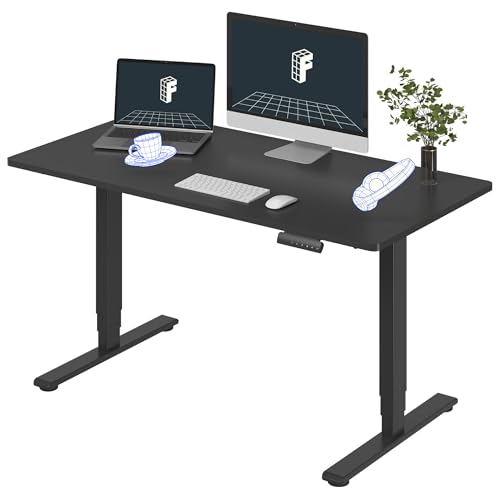
FLEXISPOT E6 55×28 Electric Standing Desk — Best all-round automatic desk
The standard E6 is the desk this category is measured against, and spending time with its specification shows why. The frame is a dual-motor, three-stage design, which is the combination that keeps a 55-inch surface level when it is carrying a pair of monitors on arms and a laptop off to one side. The desktop is a single piece rather than a spliced pair of boards, so there is no seam running under your forearms and no faint step between panels for a mouse cable to snag on. FlexiSpot rates the assembly at 220 pounds, which covers any realistic monitor-based setup with a wide margin, and the memory controller stores your heights so the automatic routine described earlier in this guide — press, wait, work — is exactly what you get.
What distinguishes the E6 from cheaper automatic desks is less any single feature than the absence of a weak point. The three-stage columns give it the height range to serve a short seated user and a tall standing one in the same household. The dual motors keep the lift composed rather than hurried. And the 55-by-28-inch surface is the size most people actually mean when they picture a proper desk: two monitors fit without the stands crowding your keyboard, and there is still depth for a notebook in front of the screens. It ships in two boxes, which matters practically — the frame and desktop arrive separately, and one person can stage the assembly in a way that a single enormous carton would not allow.
Ownership, a season in, is where the E6’s design choices compound. The one-piece top means a monitor arm can clamp anywhere along the rear edge without meeting a joint; the three-stage columns mean a growth spurt of a teenager or a change of chair does not strand anyone outside the desk’s range; and the dual motors mean the lift sounds and feels the same in month twelve as in week one, because neither leg has been doing the other’s work. None of these are brochure points. They are the reasons this model is the category’s reference rather than merely one of its options.
- Desktop: 55 x 28 inches, one-piece, black
- Frame: dual motor, 3-stage columns, black
- Load rating: 220 lbs (per listing title)
- Controls: memory presets
- Ships in 2 boxes
Strengths
- Three-stage dual-motor lift stays level and steady at standing height
- One-piece desktop with no centre seam under your arms
- Height range suits both shorter seated users and tall standing users
Trade-offs
- Black-on-black is the only finish in this configuration
- Ships in two boxes, so assembly waits for both deliveries
- No storage or powered accessories are claimed in the listing — plan your own cable and charging setup
Best for: Most people, honestly: a two-monitor home office worker who wants the canonical automatic desk and intends to keep it for years.
Not suited for: Anyone who needs a surface wider than 55 inches or a load rating beyond 220 pounds — look at the E6 MAX below instead.

FlexiSpot E6 Bamboo 55×28 Standing Desk — Best natural-surface automatic desk
Mechanically, this is the same automatic desk as the standard E6: dual motors, three-stage columns, memory presets and a 220-pound rating across a 55-by-28-inch surface. The difference is the material your hands, eyes and coffee mug live on. The desktop is solid bamboo rather than a laminate board, and bamboo changes the character of a desk in ways that are partly practical and partly about whether you enjoy sitting at it. It is dense and hard-wearing, it takes the daily percussion of keyboards and mug rings without looking tired, and its grain means the desk reads as furniture in a living room or a bedroom rather than as equipment in a spare office.
The white frame matters more than it sounds. A black frame under a pale top can look like two purchases stacked by accident; the white legs here were specified with the bamboo, and the combination sits comfortably in bright rooms, Scandinavian-leaning interiors and anywhere a black slab would dominate. None of this makes the bamboo E6 lift better than its laminate sibling — it does not — and the review would be dishonest if it pretended grain improves ergonomics. What it improves is the room, and since a standing desk is among the largest objects in a home office, the room is a legitimate thing to shop for.
One practical note separates bamboo ownership from laminate ownership: treat the surface like the natural material it is. A coaster under the morning mug, a wipe for the condensation ring, and the top will age the way good wooden furniture ages — deepening rather than deteriorating. Owners who skip those small courtesies are not damaging the desk structurally, but they are spending its beauty early. Given that the entire reason to choose this variant is the surface, the courtesies are worth the habit.
- Desktop: 55 x 28 inches, solid bamboo
- Frame: dual motor, 3-stage columns, white
- Load rating: 220 lbs (per listing title)
- Controls: memory presets
- Ships in 2 boxes
Strengths
- Solid bamboo surface wears well and looks like furniture, not equipment
- Same proven dual-motor three-stage lift as the standard E6
- White frame pairs deliberately with the pale top
Trade-offs
- Bamboo shows water rings if you never use a coaster — it is a natural surface, treat it like one
- Two-box delivery, like its sibling
- You are paying for material and finish, not extra mechanism
Best for: A living-room or bedroom office where the desk is on show all day and a black laminate slab would sour the room.
Not suited for: Anyone indifferent to surface material — the standard E6 gives you the same lift for the same job in black.
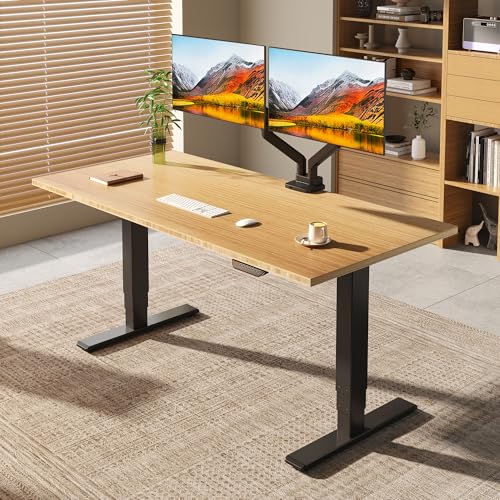
FLEXISPOT E6 MAX Bamboo 55×28 Standing Desk — Best heavy-duty automatic desk
The E6 MAX exists for the setups that make ordinary desks nervous. Its listing leads with a 352-pound heavy-duty rating — half as much again as the standard E6 — on the same 55-by-28-inch footprint, with a solid bamboo desktop over a black frame and the family’s dual-motor, three-stage lift doing the work. That capacity is not really about a single heavy object; it is about accumulation. Three monitors on arms, a desktop PC, a pair of speakers, a printer parked at the back corner and your own forearms leaning on the front edge during a long call add up faster than people expect, and a frame working near its limit lifts slower, sways more and ages faster than one cruising at half its rating.
FlexiSpot aims this model at multi-monitor workstations explicitly, and that is the right frame for the decision. If your desk carries a trading-style monitor array, a creator’s setup with a tower and audio gear, or a shared workstation that two people load differently, the MAX buys mechanical headroom you will feel every time the desk rises fully loaded without complaint. The bamboo top returns here in its harder-wearing role: at these loads, a surface that shrugs off equipment being slid around is worth having. Buyers who run a laptop and one screen should not pay the heavy-duty premium — the standard E6 already carries their world several times over.
There is a subtler benefit to buying capacity you do not yet need: the setup can grow without a second purchase. The workstation that starts as two monitors and a laptop becomes three monitors and a tower across five years of work, and a frame rated at 352 pounds absorbs that biography without ever entering the conversation. Desks are replaced when they are outgrown far more often than when they break, and the MAX is built specifically to postpone being outgrown. That, rather than any single lift, is what the heavy-duty premium actually purchases.
One last calibration for MAX shoppers: the rating is a ceiling for the whole travelling assembly, and the way to honour it is the way you would honour any ceiling — by knowing your height. Weigh the tower, estimate the monitors and arms generously, add the speakers and your own leaning forearms, and if the total still leaves a third of the 352 pounds in reserve, you have bought exactly the headroom this model exists to sell.
- Desktop: 55 x 28 inches, solid bamboo
- Frame: dual motor, 3-stage, black
- Load rating: 352 lbs (per listing title)
- Positioning: multi-monitor workstations
- Desktop and frame finish: bamboo and black
Strengths
- 352-pound rating gives real headroom for monitor arrays and towers
- Dual-motor three-stage lift stays composed under heavy, uneven loads
- Bamboo surface tolerates equipment being moved around on it
Trade-offs
- Heavy-duty capacity is wasted money on a laptop-only setup
- Same 55-inch width as the standard E6 — the upgrade is strength, not space
- The listing title does not state a preset count, so confirm controller details if an exact number matters to you
Best for: Multi-monitor and desktop-tower users whose combined kit would push a 220-pound desk toward its ceiling.
Not suited for: Laptop-and-one-screen workers, who would be buying capacity they will never use.

FEZIBO 48×24 Electric Standing Desk, Maple — Best compact automatic desk
Not every automatic desk needs to be 55 inches wide, and the FEZIBO 48-by-24 makes the case for the smaller format with a straight face. Its controller offers three customisable memory presets — sitting, standing and one spare for a partner, a stool height or a guest — which is the full automatic experience at a size that fits a box room, a rented flat or the corner of a bedroom without rearranging the furniture around it. The maple finish helps at this scale: a small desk in a multi-use room looks less like an intrusion when its surface reads as light wood rather than office black.
The honest compromises are about acreage, not mechanism. A 48-by-24-inch surface holds a laptop and one external monitor comfortably, or two smaller monitors on a stand if you are disciplined, but a sprawling three-screen layout will not fit and no review should pretend otherwise. Depth is the quieter constraint: 24 inches puts your screen closer than the 28 or 30 inches of the larger picks, so monitor arms that pull the display back, or simply placing the screen on a low riser at the rear edge, are worth planning. Within its intended job — one person, one or two screens, a room that also does something else — this is the automatic desk that asks the least of your floor plan.
A compact automatic desk lives or dies by its first placement, so place this one like you mean it: against the wall it will keep, with the socket side chosen before the frame is built, and the chair’s territory measured rather than assumed. The FEZIBO’s reward for that care is disproportionate — in a small room, a desk that travels to three stored heights makes the whole room feel engineered rather than improvised. Guests read it as a tidy corner; you will know it as a full sit-stand workstation that simply refused to be large.
- Desktop: 48 x 24 inches, maple finish
- Controls: 3 customisable memory presets
- Format: compact single-user electric desk
- Use case per listing: home office computer desk
Strengths
- Full preset-driven automatic behaviour in a 48-inch footprint
- Three presets cover sit, stand and a shared or stool height
- Maple finish blends into bedrooms and living spaces
Trade-offs
- 24-inch depth brings screens closer than deeper desks
- Two large monitors plus a tower will crowd it
- Smaller surface means accessories like printers live elsewhere
Best for: One person in a small room who wants real presets without giving the room over to a 55-inch desk.
Not suited for: Multi-monitor sprawlers or anyone who spreads paper documents across the desk while working.

ErGear 48×24 Electric Standing Desk — Best four-preset compact desk
ErGear’s 48-inch desk makes one decision that sets it apart in the compact class: four memory presets where most small desks stop at three. That fourth stored height sounds like spec-sheet padding until the desk is shared. Two people, each with a sitting and a standing height, consume exactly four presets, and this is the only compact pick in the guide that absorbs a two-person household without anyone reprogramming a button or keeping a note of their centimetres on a sticky note. The frame is steel, the rating is 176 pounds, and the listing promises straightforward assembly, which suits a desk that will often be a household’s first automatic purchase.
In black, at 48 by 24 inches, it is otherwise a sensibly plain desk, and that plainness is part of its appeal for a spare room or a teenager’s bedroom that doubles as a study. The capacity deserves a calm reading: 176 pounds is ample for monitors, a laptop and books, and only becomes a consideration if you plan to park a heavy desktop tower on the surface as well as dual screens on arms — in which case the wider, stronger picks in this guide exist for you. For the common loads, the ErGear’s story is presets and footprint, and on those two counts it is the compact desk we would hand to a couple sharing one workspace in shifts.
The shared-desk scenario deserves one more paragraph, because it is where this ErGear quietly outperforms desks with longer feature lists. Two people’s heights live in the controller, so the desk greets each worker correctly without negotiation, sticky notes or a reprogramming ritual at every handover. In households where the desk changes hands twice a day, that frictionlessness is the difference between a genuinely shared workstation and a desk that one person owns and the other borrows at the wrong height. Four presets sound like a number; in a shared home they behave like a courtesy.
- Desktop: 48 x 24 inches, black
- Controls: 4 memory presets
- Frame: stable steel frame
- Load rating: 176 lbs (per listing title)
- Assembly described as easy in the listing
Strengths
- Four presets — enough for two people’s sit and stand heights
- Steel frame and 176-pound rating cover ordinary dual-screen loads
- Compact footprint suits spare rooms and shared corners
Trade-offs
- Black-only finish in this configuration
- 176-pound ceiling is the lowest among the full desks here
- 24-inch depth, like the FEZIBO, keeps screens relatively close
Best for: Two people sharing one compact desk in shifts, each wanting their own stored heights.
Not suited for: A single user with a heavy tower-plus-arms setup, who should take the capacity of the E6 family instead.

ErGear 55×28 Electric Standing Desk — Best straightforward 55-inch automatic
ErGear’s larger desk takes the formula of its 48-inch sibling and stretches it to the mainstream 55-by-28-inch size: a memory-equipped electric desk in black, described by its listing in plain terms as a sit-stand desk for a home office. There is a kind of honesty in that plainness. This is the pick for a buyer who has decided on the automatic category, wants the standard generous footprint, and does not need bamboo, a heavy-duty rating or a feature list with adjectives. The memory controller delivers the essential press-and-go behaviour, and the surface gives two monitors and a keyboard the room the compact desks cannot.
Because the listing keeps its claims modest, this review will too. The title does not publish a load figure for this model, so rather than borrow the smaller ErGear’s number — a guess dressed as a fact — we will say what can be said truthfully: the 55-by-28 format is the size class every maker in this guide builds for ordinary dual-monitor office work, and buyers planning an unusually heavy array should choose the E6 MAX, whose rating is stated outright. Judged as the uncomplicated option, the ErGear 55 succeeds: it is the desk you buy when the decision you care about is automatic-versus-not, and you settled that question pages ago.
Consider this ErGear the control group of the guide: the desk against which the others’ extras can be priced. Bamboo costs more than this. Heavy-duty capacity costs more than this. A fourth preset, a deeper top, a designer finish — each upgrade elsewhere in these pages can be weighed against the plain competence on offer here, and some readers will conclude, correctly for their rooms, that plain competence at 55 inches is the whole requirement. A guide that cannot say “this one is simply enough” is selling something; this one just did.
- Desktop: 55 x 28 inches, black
- Controls: memory controller (per listing title)
- Format: full-size sit-stand desk
- Use case per listing: home office
Strengths
- Mainstream 55-inch surface fits dual monitors without crowding
- Memory controller delivers the core automatic behaviour
- Unfussy specification for buyers who dislike feature theatre
Trade-offs
- Listing title does not state a load rating — heavy-array buyers should pick a rated model
- Black finish only
- Fewer distinguishing extras than the FlexiSpot family offers
Best for: A buyer who wants the standard big automatic desk, plainly specified and plainly finished.
Not suited for: Anyone whose purchase decision hinges on a published heavy load rating.
How Do You Set Up Presets So You Actually Use Them?
Programme the desk on the day it is built, before the first work session, because a preset postponed is usually a preset abandoned. Start with sitting: sit in your chair with feet flat, forearms resting on the surface with elbows at roughly a right angle and shoulders dropped, then store that height as preset one. Standing is the same posture test upright — shoes on, weight even, elbows again at a right angle to the keyboard — stored as preset two. If you use a perch stool or a balance board, give it the third preset; if a partner shares the desk, their two heights take three and four. The ten minutes this takes is the entire difference between an automatic desk and an electric desk you happen to own.
Then arrange the room around the travel, not the other way round. The desk will move through the full range between your presets several times a day, so check the path: monitor cables need slack for the highest position, a PC tower on the floor needs a cable long enough not to be lifted by its own DisplayPort lead, and anything on a shelf above the desk must clear the monitors at full standing height. Most “wobble” complaints about automatic desks are really cable-tug complaints in disguise. A cable tray or a simple spine, plus one deliberate pass with a tape measure at full height, settles the matter permanently.
Finally, build the rhythm the presets exist to serve. A pattern many people sustain is simple: start the day standing for the first work block, sit for focused writing, stand again for calls, sit after lunch, stand for the last hour. You do not need a timer app scolding you; tie the changes to events that already exist — calls, coffee, the end of a playlist — and the desk’s one-press travel does the rest. The technology’s job is to make the change thoughtless. Your job is only to have a next posture in mind.
What Should You Check in the First Week of Ownership?
Run the desk through its full range, loaded as it will actually be used, on the first evening. Listen for a leg that sounds strained or lags its partner, watch whether the surface stays level with your real equipment aboard, and confirm each preset stops where you stored it rather than drifting a centimetre past. Small faults announce themselves early and are far easier to resolve with a seller in week one than in month nine. Do the same check at your own standing height with a mug of water on the desk: ripples are normal, sloshing is information.
Check your body’s report as carefully as the desk’s. New standing-desk owners often stand too long in the first days, out of enthusiasm, and conclude the desk hurts their feet — when the actual fault is a four-hour unbroken stand on a hard floor. Alternate in shorter stretches, wear the shoes you would wear for a long walk or use an anti-fatigue mat, and let the preset rhythm from the previous section carry you. If your shoulders ache, the desk is probably a touch high; if your wrists bend upward to type, it is definitely high. Adjust by small amounts and re-store the preset rather than tolerating a near-enough height.
By the end of the week you should know three things: whether the lift is level under your load, whether your stored heights are truly yours, and whether the desk disappears into your day. A good automatic desk becomes boring remarkably quickly, and boring is the compliment this category should aim for.
How Much Load Can an Automatic Desk Really Carry?
Load ratings in this category are stated as a single number, but the lived reality is a budget with several creditors. Start with the desktop itself if you are comparing frame-only figures — though every pick in this guide is a complete desk whose rating covers what you place on top. Then weigh the regulars honestly: a modern monitor is a modest object, but a monitor arm concentrates its load at a clamp point; a desktop tower is the heavyweight of most setups; speakers, a printer and a stack of reference books each take their quiet share. Finally add the creditor nobody lists: you, leaning on the front edge during a long call, forearms and attention both pressing down.
The point of the arithmetic is not anxiety — it is margin. A desk working at half its rating lifts evenly, stays quiet and ages slowly; a desk working at ninety percent of it will tell you so, in sounds and in sway, every single day. That is why this guide keeps steering heavy arrays toward the E6 MAX’s 352 pounds and ordinary dual-screen setups toward the 220-pound models without apology. The 176-pound ErGear 48, in turn, is honestly matched to its compact brief: at 48 inches there is physically less room to overload it, and its rating and its acreage agree with each other.
One more load truth: distribution matters as much as totals. A dual-motor frame tolerates an asymmetric setup — tower left, monitors centre — because each leg lifts its own share under the controller’s direction. Park the heaviest object near a leg rather than at the centre of a long span, keep the arms’ clamps close to the rear edge’s strong zones, and even a mid-rated desk will feel over-engineered. Load is a placement decision as much as a purchase decision, and it is free to get right.
What Does an Automatic Desk Cost You in Power and Attention?
Very little of either, and it is worth saying precisely because buyers sometimes imagine a motorised desk as a small appliance with an appliance’s demands. The motors draw real power only during the seconds of travel; the controller sips a standby trickle to stay ready for your presets. Across a year of ordinary use the electricity is a rounding error beside the computer the desk carries. If standby draw offends you on principle, a switchable strip solves it — at the cost of the desk forgetting nothing, since the presets live in the controller’s memory, not in the wall’s goodwill.
Attention is the subtler budget. An automatic desk asks for a cable path that respects its travel, an occasional check that the columns run true, and the discipline not to store boxes beneath it where the descending frame or your own feet will meet them. In exchange it removes a daily decision — the desk is simply at the right height, always, the way a good chair is simply at the right height once adjusted. Owners consistently describe the exchange as one of the best trades in their office: a little forethought in week one, purchased back as thoughtlessness for years.
There is also a failure-honesty point to make. Motors and controllers are electronics, and electronics can fail in year six in a way a crank never will. The mitigation is buying from ranges with a track record — one reason established families like the E6 recur throughout this guide — and keeping the desk’s load within its rating, since strained lifts are where failures breed. An automatic desk is not immortal. It is, on the evidence of the category, a reliably long-lived appliance that asks little and returns a posture habit — which is the entire reason it exists.
Automatic Desks for Two: How Couples and Flatmates Share One Surface
The shared automatic desk is a small domestic institution, and it runs on rules nobody writes down until the first argument. The presets are the constitution: with four stored heights, as on the ErGear 48 in this guide, two people’s sitting and standing positions coexist without either partner overwriting the other’s, and the handover takes the time of one button press. With three presets, the household negotiates — usually two heights for the primary user and one for the partner’s standing calls, with the partner’s sitting height set manually. Neither arrangement is a failure; both are simply the arithmetic of the controller made visible, which is why this guide reports preset counts so insistently.
The surface needs its own treaty. A shared desk works when each person’s territory is respected in absentia: the left parish, the right parish, and a demilitarised centre where the shared monitor lives. Chargers are the usual border incident — one cable, two phones, strong feelings — and the cheap peace treaty is a two-port charger that belongs to the desk rather than to either person. What the treaty protects is the desk’s essential gift to a shared home: it is the one workstation that greets each worker at exactly their height, without a word being said, twice a day, for years.
Households that run the institution well report an unexpected dividend: the desk becomes the home’s demonstration that bodies differ and deserve accommodating. Children watch a surface rise to meet their parent and absorb the idea that furniture should fit people, not the reverse. It is a small lesson, delivered silently by a memory controller, and it may outlast the desk itself.
What Separates Owners Who Still Love These Desks in Year Three?
Talk to owners three years in and a pattern emerges that has little to do with which of the six desks they bought. The satisfied ones made three decisions well: they bought the mechanism’s memory rather than merely its motion, they placed the desk where the room wanted it rather than where the delivery was easiest, and they set their presets from their own elbows in the first week. The dissatisfied ones, almost without exception, skipped the third decision and half-made the second — their desks are fine machines standing in the wrong place at approximately the right height, and approximately is where comfort goes to die.
There is also a maintenance of habit, distinct from maintenance of hardware. The third-year owners still change posture at the day’s natural hinges — calls, coffees, the ends of work blocks — because they attached the habit to events instead of to willpower. The desk’s presets made each change cost a second; the calendar’s hinges made each change cost no decision at all. Technology can remove friction, but only routine removes thought, and the owners who understood that are the ones whose desks have travelled ten thousand times while looking brand new.
None of this requires talent or expense. It requires a tape measure, ten minutes with the controller, and the honesty to build the habit around the day you actually have. The six desks in this guide will meet that honesty more than halfway — every one of them remembers your heights faithfully. The remembering you must do is simpler: to keep asking the desk, several times a day, to do the thing it was bought to do.
Comparison Table
The six desks share one mechanism family — motor plus memory — so the table separates them by the things that actually differ: surface size, surface material, stated load rating and the job each one is shaped for.
| Pick | Desktop | Mechanism | Defining trait |
|---|---|---|---|
| FLEXISPOT E6 55×28 Electric Standing Desk | 55 x 28 in | Electric, dual motor, memory presets | One-piece black desktop, 220 lbs rating |
| FlexiSpot E6 Bamboo 55×28 Standing Desk | 55 x 28 in | Electric, dual motor, memory presets | Solid bamboo top, white frame, 220 lbs |
| FLEXISPOT E6 MAX Bamboo 55×28 Standing Desk | 55 x 28 in | Electric, dual motor, 3-stage | Heavy-duty 352 lbs rating, bamboo top |
| FEZIBO 48×24 Electric Standing Desk, Maple | 48 x 24 in | Electric, 3 memory presets | Compact maple automatic desk |
| ErGear 48×24 Electric Standing Desk | 48 x 24 in | Electric, 4 memory presets | Steel frame, 176 lbs rating |
| ErGear 55×28 Electric Standing Desk | 55 x 28 in | Electric, memory controller | Mainstream black 55-inch desk |
What Mistakes Do Automatic Desk Buyers Make?
The most common mistake is buying an electric desk without presets and calling it automatic in your own head. The disappointment arrives slowly: the desk moves, certainly, but every change means standing there holding a paddle and watching a readout, and within a month the desk lives at one height like any fixed desk. If the listing does not mention memory or presets, the desk does not have them, and no firmware update is coming to save it. That single check, made before purchase, is worth more than any other in this guide.
The second mistake is sizing by the room you wish you had. A 55-inch desk needs its width plus chair space plus the honesty to admit the door swing; buyers who force a large desk into a small room end up resenting it daily, while the 48-inch picks here would have served them better. Measure the wall, then measure again with the chair pulled out and a person in it. The third mistake is ignoring load arithmetic: add the monitors, arms, tower, speakers and the lean of your own arms, and compare the total with the rating in the title — the E6 MAX exists precisely because that sum surprises people.
Fourth, people programme presets to the heights a diagram suggested rather than their own elbows, then conclude standing is uncomfortable. The desk should fit the body in the room, not a posture poster. And fifth, buyers forget the cable path at full height, discover the limit when a monitor lead pulls taut mid-lift, and blame the frame. Every one of these mistakes is cheap to avoid and mildly expensive to live with, which is the usual shape of furniture mistakes.
Final Recommendation
If you want one recommendation to act on: the standard FLEXISPOT E6 is the automatic desk most people should buy, because it combines the dual-motor three-stage lift, a one-piece 55-inch surface and a stated 220-pound rating with no weak point to apologise for. Take the bamboo E6 if the desk lives in a room you also relax in, the E6 MAX if your equipment list reads like a workstation inventory, the FEZIBO or the four-preset ErGear if 48 inches is what your room honestly offers, and the ErGear 55 if you want the mainstream size without ceremony.
Whichever of the six lands in your home, programme its presets the day it is built and tie your posture changes to the calls and coffees that already structure your day. The owners who love these desks a year later are never the ones with the most features; they are the ones whose desk quietly rose and settled a thousand times while they were thinking about something else entirely.
Frequently Asked Questions
What makes a standing desk “automatic” rather than just electric?
Memory. An electric desk moves while you hold a control; an automatic desk, as the term is used in this guide, stores your heights as presets and travels to them with a single press, stopping on its own. All six picks here have memory controllers — three presets on the FEZIBO 48, four on the ErGear 48, and memory control across the FlexiSpot E6 family.
How many presets do I actually need?
Two covers one person sitting and standing. Three adds a stool height or a partner’s favourite position. Four covers two people completely. Most owners use two daily and are glad of a third; buy four if the desk is genuinely shared, as with the ErGear 48 in this guide.
Is dual motor worth it over a single motor?
At 55 inches and above, or with a desktop tower aboard, yes: a motor in each leg lifts evenly under uneven loads and keeps the surface level. On a small desk with a laptop, a well-made single-motor frame is adequate — but every 55-inch pick in this guide is dual-motor, which reflects where the value sits.
What is the difference between two-stage and three-stage columns?
Stages are the telescoping sections of each leg. Three-stage columns, like those on the FlexiSpot E6 models, travel farther — lower at the bottom, higher at the top — and stay steadier at full extension. Two-stage desks suit average heights; very short or very tall users should prefer three stages.
Can an automatic desk handle three monitors and a PC tower?
That is the E6 MAX’s stated job: its listing rates it at 352 pounds and positions it for multi-monitor workstations. The standard E6’s 220 pounds covers most dual-monitor setups comfortably. Add up your equipment honestly and keep a margin rather than living at the ceiling.
Do I need to hold the button until the desk reaches a preset?
No — that is the point of a preset. One press starts the movement and the controller stops the desk at the stored height. If a desk requires you to hold the control throughout the travel, it is a basic electric desk, not an automatic one in this guide’s sense.
Related Guides
Keep reading with Best Smart Doorbell Cameras: Battery vs Wired, Local vs Cloud, Alexa vs Google Best Chairs for Gaming Sessions: Six Chairs Judged at Hour Four Best Audio USB Headsets: Clean Signal, Honest Surround, Six Real USB Picks.


