What's inside
- Where to buy
- Key Takeaways
- Quick Picks
- How did we choose these 4G LTE routers?
- What actually makes a router an LTE router?
- How much speed should you honestly expect?
- Which 4G LTE routers deserve your money?
- How do these six routers stack up against each other?
- How do you set up an LTE router properly?
- What should you check before choosing a data plan?
- Can an LTE router also be your backup when the wired line fails?
- What about antennas, boosters and the physics of a weak signal?
- How long will an LTE router remain useful?
- What settings should you change on day one?
- Can you run a whole small business on an LTE router?
- What does a good LTE installation look like after a year?
- What mistakes do people make with LTE routers?
- Final Recommendation
- Frequently Asked Questions
- Related Guides
As an Amazon Associate I earn from qualifying purchases. This post may contain affiliate links at no extra cost to you.
gizmoverdict.com is reader-supported. When you buy through links on our site, we may earn an affiliate commission.
Where to buy
A second home that sits empty for weeks, a farmhouse at the end of a lane no cable crew has ever visited, a rental you cannot drill into — these are the places where the best 4G LTE routers earn their keep, because the wire simply never arrives. A router with a SIM slot turns a mobile data plan into ordinary household WiFi, and everything you own connects to it exactly as it would to a cable-fed box.
One honesty note before the picks, because this category invites confusion. Our verified pool for this batch contains no dedicated LTE router at all, so the four genuine SIM-slot models below are covered as prose-only picks, described from their makers’ published designs without purchase links. The two linked picks are travel routers from GL.iNet that solve a neighbouring problem — sharing a connection on the move — and each is labelled plainly: neither contains a modem, and neither takes a SIM card. If a listing anywhere suggests otherwise, that listing is wrong.
What separates a good cellular router from a frustrating one is rarely the headline speed. It is whether the modem inside supports the LTE bands your carrier actually uses in your area, whether the firmware lets you lock bands or set a data cap, and whether the box keeps working through a summer thunderstorm without a manual reboot. Those are the tests this guide keeps returning to.
Key Takeaways
- Band support matters more than the speed printed on the carton: a router missing your carrier’s main rural band will crawl no matter how strong the signal bars look.
- Dedicated LTE routers split into two families — fixed home units with Ethernet ports and battery-powered hotspots — and buying the wrong family is the most common regret in this category.
- External antenna connectors are the single most valuable feature for weak-signal homes; a modest rooftop antenna routinely outperforms a far more expensive router indoors.
- Every linked pick in this guide is flagged honestly: the two GL.iNet travel routers share connections brilliantly but contain no modem and accept no SIM.
- A data plan is part of the purchase. An unlimited phone plan and a router plan are different products at most carriers, and throttling after a hotspot allowance is the usual trap.
- Failover is the quiet superpower here: several fixed LTE routers can sit behind a wired connection and take over within seconds when the line drops.
Quick Picks
| Pick | Badge | Why it earns its place |
|---|---|---|
| NETGEAR Nighthawk M6 | Hotspot pick with a real Ethernet port | A battery hotspot that can also anchor a desk, with an Ethernet port for wiring in a laptop or switch when the campsite becomes an office. |
| GL.iNet GL-X3000 Spitz AX | Fixed cellular router for serious installs | A dual-SIM fixed router with detachable cellular antennas and deep OpenWrt-based controls, built for cabins, boats and rural homes that stay put. |
| TP-Link TL-MR6400 | Simple SIM router for a first rural setup | A straightforward single-SIM router that turns a data plan into home WiFi with minimal fuss, aimed at households leaving satellite behind. |
| Peplink B One | Dual-WAN failover for home offices | A business-grade dual-WAN router whose cellular sibling models and bonding ecosystem suit home offices that treat downtime as lost income. |
| GL.iNet GL-MT3000 Beryl AX | Linked travel pick — no modem inside | A pocket travel router that shares hotel, tethered-phone or hotspot connections securely — but contains no modem and takes no SIM card. |
| GL.iNet GL-AXT1800 Slate AX | Linked travel pick with more muscle | The Beryl’s bigger sibling: faster VPN throughput and a fuller port selection for working travellers — still, plainly, no modem and no SIM slot. |
How did we choose these 4G LTE routers?
We started from the use cases readers actually describe: a rural home replacing satellite, a backup connection for a home office that cannot afford downtime, a caravan or boat that moves, and a temporary site — a renovation, a market stall, a rental between tenants — where nobody will sign a twelve-month broadband contract. Each use case punishes a different weakness, so the shortlist deliberately spans fixed routers, one hotspot with an Ethernet port, and travel gear.
Carrier band coverage was the first filter. LTE is not one network; it is a patchwork of bands, and a router built for European bands can be nearly deaf on a North American rural tower. Every fixed pick below is sold in regional variants, and we checked that a variant exists whose band list covers the big low-band frequencies that carry signals across farmland and through walls. Low bands travel; high bands are fast but fragile. A router that aggregates both is worth more than one chasing peak numbers.
Antenna options came next. In a strong-signal suburb the stubby antennas in the box are plenty. Twenty miles from the tower they are not, and the difference between a router with TS-9 or SMA connectors and a sealed unit is the difference between a fixable problem and a returned product. We favoured models that let you attach a directional or window-mounted antenna later without replacing the whole router.
Finally we weighed the software: data-usage counters that match the carrier’s own numbers, the ability to pin the router to a chosen band when the automatic choice flaps between towers, scheduled reboots, and a VPN client for people routing a whole property through one tunnel. Raw throughput claims were treated with suspicion throughout — LTE speeds are a property of your tower and your plan far more than of the box on your shelf.
We also made one deliberate omission worth recording: no product appears here merely because it is heavily advertised. The cellular aisle of a marketplace is crowded with imported routers whose band lists belong to other continents and whose firmware will never be updated; they fail the first filter of this guide — can it hear your carrier — before any other virtue can be considered. A short list of honest devices serves a rural reader better than a long list of lottery tickets.
What actually makes a router an LTE router?
An ordinary router assumes the internet arrives through a cable in the wall. An LTE router carries a cellular modem inside the same enclosure, with a slot for a nano-SIM and radios tuned to mobile bands. Your devices never know the difference — they join a normal WiFi network with a normal password — but upstream, the router is negotiating with a tower exactly as a phone does, and it inherits everything that implies: variable speeds by time of day, latency that rises under load, and a data allowance that a cable line never imposes.
That modem is also why two routers with identical WiFi specifications can behave completely differently in the field. The WiFi half of a modern router is a solved problem; the modem half is where engineering budgets show. Category ratings describe the modem’s theoretical ceiling for aggregating channels — a higher category can combine more bands at once, which helps most in congested or fringe coverage — but no category number rescues a router placed in a basement behind foil-backed insulation. Placement and antennas beat specifications, in that order, almost every time.
Most fixed LTE routers also keep a WAN Ethernet port, and that dual identity is underrated. The same box can run on cable today, fail over to cellular during an outage, and move to a cabin next year where cellular is the only option. If you are choosing between a pure hotspot and a fixed unit at similar money, the fixed unit’s second life as a failover router is a genuine argument, not a marketing line.
How much speed should you honestly expect?
Forget the numbers on the box for a moment. In a rural home with a fair signal, a well-placed LTE router commonly delivers enough for two simultaneous video streams, a video call and general browsing — and then, at eight in the evening when the whole valley is streaming, noticeably less. Cellular capacity is shared with every phone in the tower’s sector. A wired line slows down too, but the swing on LTE is wider, and planning around the evening dip matters more than celebrating the midday peak.
Latency deserves equal honesty. LTE round trips are typically higher than cable or fibre, which competitive gamers feel and almost nobody else does. Video calls cope fine. Cloud desktops cope fine. What struggles is a household trying to run large uploads — a photographer pushing galleries, a security system recording to the cloud — on a plan whose upload side is a fraction of its download side. If uploads are your livelihood, read plan terms for the upload allowance before you read router reviews, including this one.
One more expectation to set: your phone is a misleading benchmark. A phone held at a window may show a fine speed while a router on a shelf behind a television does not, and the reverse happens too, because a router’s larger antennas and freedom from a pocket give it the better radio position. Test the actual spot where the router will live, ideally across a full day, before concluding anything about a carrier in your area.
Which 4G LTE routers deserve your money?
Six picks follow — four true SIM-slot routers covered without links because our verified pool holds no dedicated LTE model this batch, then two linked travel routers that handle the neighbouring job of sharing a connection away from home, each labelled with exactly what it cannot do.
NETGEAR Nighthawk M6 — Hotspot pick with a real Ethernet port
The M6 is what happens when a hotspot grows up. It is still a pocketable box with its own battery and a touchscreen you can actually configure from, but NETGEAR gave it the one feature most hotspots omit: a wired Ethernet port. That single socket changes its job description. Plugged into a small switch or straight into a laptop, the M6 stops being an emergency gadget and becomes the front end of a temporary office — a site cabin, a trade-show stand, a rental desk for a month between leases.
As a cellular device it is built around flexibility rather than any single carrier. It is sold unlocked in many markets, accepts a nano-SIM, and its travel manners are good: the battery carries a working day of moderate use, and the screen shows data consumption without opening an app, which matters when a team is sharing one allowance. WiFi 6 radios serve the handful of devices a hotspot realistically feeds; nobody should expect it to run a farmhouse, and NETGEAR’s own fixed routers exist for that job.
The honest limitation is thermal and physical. Sustained heavy downloading in a hot vehicle will slow any sealed hotspot, and the M6’s compact body has nowhere to hide that heat. It also lacks external antenna ports on the base model, so fringe-signal homes should look at the fixed picks below instead. Buy it as the best version of a hotspot, not as a cheap substitute for a home router.
Living with the M6 teaches one habit worth passing on: treat its screen as the household’s fuel gauge. A glance before a trip tells you whether the allowance survives the week, and the discipline of checking it replaces the anxiety of guessing. Owners who pair it with a small travel router from lower in this guide also discover the combination’s rhythm — the M6 finds the signal, the travel router runs the room — and each device ends up doing the half of the job it was actually designed for.
- Form: battery-powered mobile hotspot router
- SIM: nano-SIM, sold unlocked in many regions — confirm local band variant
- Wired: 1x Ethernet port for a laptop or switch
- WiFi: WiFi 6 for a small group of devices
- Display: colour touchscreen with data-use readout
Strengths
- Ethernet port turns a hotspot into a small-office front end
- Touchscreen shows consumption without an app or a phone nearby
- Battery and pocket size make it a genuine travel tool
Trade-offs
- No external antenna connectors for fringe-signal properties
- Sealed body warms up under sustained heavy downloads
- Feeds a desk or a team, not a whole busy household
Best for: mobile teams, site cabins and renters who need wired-plus-wireless from one SIM.
Not suited for: a weak-signal farmhouse that needs a rooftop antenna to hold a connection.
GL.iNet GL-X3000 Spitz AX — Fixed cellular router for serious installs
The Spitz AX is the pick for people who have stopped experimenting. It is a fixed router — wall power, proper Ethernet, no battery — whose cellular side is treated as the main event rather than a backup checkbox. Dual SIM slots let it hold two carriers and fail over between them, which in genuinely rural territory is often the difference between a connection that dips and a connection that disappears: where one network has a dead valley, the other frequently does not.
Its antenna arrangement is the other half of the appeal. The cellular antennas are detachable, so the path from indoor stubs to a window or rooftop antenna is an accessory purchase, not a new router. Underneath, GL.iNet’s firmware is built on OpenWrt, which means unusually deep control for a consumer box: band locking, detailed signal statistics, VPN clients and servers, and logging that helps you prove to a carrier that the problem is at their end. The interface will reward an hour of learning and punish nobody who leaves the defaults alone.
Two cautions belong here. First, regional variants matter enormously with this class of device — buy the variant whose modem matches your continent’s bands, from a seller who states them. Second, the Spitz AX’s newer modem supports 5G as well as LTE in its common variant, which is future-proofing you may or may not be paying for knowingly; if your area is LTE-only for years to come, the feature is harmless but not a reason to stretch a budget.
Owners of the Spitz AX tend to develop a relationship with its signal page that phone users never form with theirs. They learn their tower’s habits — which band carries the mornings, which the evenings, when the sector breathes and when it strains — and the router stops being an appliance and becomes an instrument they read. That literacy is the deepest argument for this class of hardware: not that it is faster on day one, but that on the bad day in month nine, its owner knows exactly what changed and what to do about it.
- Form: fixed desktop router, mains powered
- SIM: dual nano-SIM slots with carrier failover
- Antennas: detachable cellular antennas, upgradeable
- Wired: gigabit Ethernet LAN plus WAN/LAN flexibility
- Software: OpenWrt-based firmware, VPN client and server
Strengths
- Dual-SIM failover keeps fringe homes online across carriers
- Detachable antennas open the rooftop-antenna upgrade path
- OpenWrt depth: band locking, real signal statistics, VPN
Trade-offs
- Regional modem variants must be matched to your bands carefully
- Interface depth is wasted on set-and-forget households
- No battery, so it stays where the power is
Best for: cabins, boats and rural homes that need a permanent, tweakable cellular install.
Not suited for: travellers who want to throw a hotspot in a bag and leave.
TP-Link TL-MR6400 — Simple SIM router for a first rural setup
Not every reader of this guide wants a project. The TL-MR6400 exists for the household whose requirement is a sentence long: put a SIM in, get WiFi out, stop paying for satellite. It is a single-SIM, WiFi 4-era fixed router in its long-running form, and its age is in some ways the point — the model line has been sold for years across many regions, the setup wizard is well worn, and any local computer shop has probably configured one before.
Performance expectations should be set by its generation. The WiFi side is modest, fine for a television, a couple of laptops and phones in a small home, and not the tool for a house full of simultaneous streams. The cellular side, though, does the essential things: it holds a connection unattended for weeks, reboots on a schedule if you ask it to, and its detachable LTE antennas give a weak-signal home the basic upgrade path of better placement or an outdoor antenna on the end of a cable run.
Why include a modest box in a best-of guide? Because for a first cellular installation, simplicity is a feature with real value: fewer settings to get wrong, a price of entry that leaves budget for the antenna and the data plan, and a clear upgrade story later — everything you learn about your signal with this router transfers directly to a faster model. Households who already know they stream heavily in 4K on several screens should start one rung up instead.
There is a particular dignity in hardware that knows its station. The TL-MR6400 will never trend, never be unboxed on camera, never anchor a forum signature — and in thousands of rural kitchens it simply works, month after month, asking for nothing but its scheduled reboot and an occasional glance at the data counter. For the household whose previous internet arrived by satellite dish and prayer, that unremarkable reliability is not a compromise at all. It is the entire wish list, delivered.
- Form: fixed desktop router, mains powered
- SIM: single SIM slot, plug-and-play setup
- Antennas: detachable LTE antennas
- Wired: Ethernet LAN ports for TV or desktop
- WiFi: single-band 2.4GHz, suited to small homes
Strengths
- Genuinely simple setup for a first cellular home
- Detachable antennas keep the outdoor upgrade open
- Leaves budget for antenna and data plan where they matter
Trade-offs
- Older, slower WiFi side limits busy households
- Single SIM means no second-carrier safety net
- Basic firmware, few advanced controls
Best for: a small rural home making its first move from satellite to cellular.
Not suited for: a streaming-heavy household that needs modern WiFi speeds locally.
Peplink B One — Dual-WAN failover for home offices
Peplink occupies a different shelf from the other names here. The company builds routers for yachts, buses and branch offices — places where the connection is the business — and the B One brings that dual-WAN thinking to a home-office price of attention, if not always of money. In its cellular variants and paired configurations, the proposition is bonding and failover: a wired line and a cellular link watched constantly, with traffic moved between them so smoothly that a video call survives the wired line dying mid-sentence.
That smoothness is the product. Plenty of routers list failover on the box; Peplink’s reputation rests on the handover actually being graceful, on health checks that notice a line is technically up but practically dead, and on an interface that shows you both links’ behaviour over days, not just a green light. For a trader, a telehealth worker or anyone whose employer measures their presence in minutes, this class of reliability is the entire purchase.
The trade-offs are equally clear. You pay business money, the interface assumes a reader comfortable with networking vocabulary, and the ecosystem nudges you toward Peplink’s cloud management and bonding services, some of which carry their own costs. A household that simply wants Netflix in a farmhouse is overbuying here. A household whose income stops when the line stops is not.
The moment a Peplink justifies itself rarely announces itself. It is a Tuesday: the wired line drops during a client call, the call does not, and the only evidence anything happened is a line in the router’s event log that evening. Owners describe checking the log the way pilots check weather — routinely, and with respect for what it quietly prevented. If your household’s bad days are measured in money, that log line is the sound of the purchase paying its rent.
- Form: fixed dual-WAN router, business class
- Links: wired WAN plus cellular in cellular variants
- Failover: health-checked, near-seamless handover
- Management: local interface plus optional cloud tools
- Audience: home offices and small sites, not casual streaming
Strengths
- Failover behaviour is the genuine article, not a checkbox
- Link health checks catch dead-but-up connections
- Visibility over both links across days, not minutes
Trade-offs
- Business pricing for a home purchase
- Interface assumes networking confidence
- Ecosystem extras can add ongoing costs
Best for: home offices where an outage is measured in lost earnings.
Not suited for: a farmhouse that only needs evening streaming to work.

GL.iNet GL-MT3000 Beryl AX — Linked travel pick — no modem inside
Read this pick’s label twice, because it is the one most likely to be misunderstood: the Beryl AX is not an LTE router. There is no modem in it and nowhere to put a SIM. What it does — superbly — is stand between your devices and an untrusted connection: a hotel network, a phone tethered by USB, a portable hotspot like the M6 above. Your laptop, phone and tablet join the Beryl’s own network once, and the Beryl handles the captive portal, the VPN tunnel and the rejoining at the next hotel. In a guide about getting online without a wire, that is the other half of many real setups.
Its travel credentials are concrete. It is small enough to vanish into a cable pouch, runs from USB-C power, and carries GL.iNet’s OpenWrt-based firmware with proper VPN client support, so a whole family’s devices ride one encrypted tunnel without installing anything on a smart TV or a child’s tablet. USB tethering from a phone is a first-class input, which makes the Beryl a tidy way to give a phone’s data plan a proper network — Ethernet port included — in a rental or a caravan awning.
Paired with a phone plan or a hotspot, it solves the sharing problem elegantly; standing alone, it solves nothing, because it brings no connection of its own. Buy it as the secure front end for a connection you already have — and if what you actually need is the connection itself, the four prose picks above are your list.
The Beryl’s finest trick is social rather than technical. In a holiday rental, one person performs the captive-portal dance once, on the Beryl, and the whole family’s devices — already trusting its network from the last trip — simply wake up connected, behind the VPN, with the streaming stick and the children’s tablets none the wiser. Anyone who has spent the first evening of a holiday typing a WiFi password into a television with a remote control understands that this is not a convenience. It is a rescue.
- Form: pocket travel router, USB-C powered
- Modem: none — no SIM slot, this is not an LTE router
- Inputs: Ethernet WAN, WiFi repeater, USB phone tethering
- WiFi: WiFi 6 dual band for your own devices
- Software: OpenWrt-based, VPN client built in
Strengths
- Turns one tethered or hotel connection into a private network
- VPN covers every device, including TVs and tablets
- Tiny, USB-C powered, genuinely pocketable
Trade-offs
- Brings no connection of its own — needs a phone or hotspot
- WiFi 6 speeds capped by whatever feeds it
- One more box to charge, pack and configure
Best for: travellers who tether a phone or hotspot and want one secure network for everything.
Not suited for: anyone shopping for a SIM-slot router to be their internet connection.
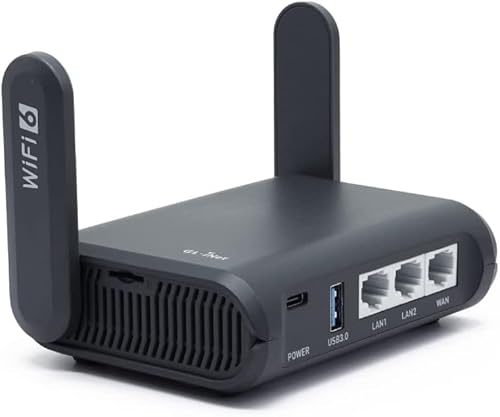
GL.iNet GL-AXT1800 Slate AX — Linked travel pick with more muscle
The Slate AX answers the traveller who tried a pocket router and found the ceiling. It keeps the same basic contract as the Beryl — join its network once, let it handle portals, tethering and VPN duty — but brings a stronger processor, and the place that shows is encrypted throughput. A VPN tunnel is arithmetic, and on the Slate that arithmetic runs fast enough that a working traveller pushing files through a corporate tunnel stops noticing the router is there.
Physically it is still travel gear: flat, light, USB-C powered, with a port selection that assumes a desk at the far end — Ethernet for a wired laptop or a hotel socket, USB for tethering or storage. Like its sibling it can repeat a WiFi network, tether a phone, or sit behind a hotspot, and like its sibling it must be described without blur: there is no cellular modem inside, no SIM tray, and no way to add one. Its cellular story begins and ends with what you plug into it.
Choose between the two GL.iNet picks by workload, not by hope. Occasional trips, a couple of devices, a VPN for safety: the Beryl is enough and smaller. Weekly travel, a tunnel that carries your actual job, a partner’s devices joining too: the Slate’s headroom earns its slightly larger footprint. Either way, pair the purchase with the connection — a hotspot from the top of this guide or a phone plan with a real tethering allowance.
The Slate AX also moonlights well at home between trips. Parked beside a main router, it becomes a tidy way to give a work laptop its own VPN-segmented corner of the network, or to run a guest setup with more control than the household router offers. That second career matters when judging its price against the smaller Beryl: a device that works fifty weeks a year, on the road and off it, is easier to justify than one that waits in a drawer for the other two.
- Form: flat travel router, USB-C powered
- Modem: none — no SIM slot, this is not an LTE router
- Inputs: Ethernet WAN, WiFi repeater, USB tethering
- WiFi: WiFi 6 dual band, stronger VPN throughput than Beryl AX
- Software: OpenWrt-based, VPN client and server
Strengths
- VPN speed suits people who work through a tunnel all day
- Fuller ports make a hotel desk feel like an office
- Same simple one-network-for-everything travel routine
Trade-offs
- Still brings no connection of its own
- Larger than the Beryl in a tight packing cube
- Power users will outgrow its ceiling eventually
Best for: frequent working travellers tethering a phone or hotspot full-time.
Not suited for: a fixed rural home that needs a modem in the box.
How do these six routers stack up against each other?
The table separates the two questions this category keeps tangling: does the box contain a modem, and where does it want to live? Four picks answer yes to the modem and stay in one place; two answer no and travel. Choosing across that line — rather than within it — is where most returns begin.
| Pick | Role in this guide | Watch out for |
|---|---|---|
| NETGEAR Nighthawk M6 | Portable hotspot with Ethernet | No antenna ports; heat under sustained load |
| GL.iNet GL-X3000 Spitz AX | Fixed dual-SIM cellular router | Variant selection is critical; mains only |
| TP-Link TL-MR6400 | Entry fixed SIM router | Dated WiFi; single SIM only |
| Peplink B One | Business failover router | Cost and complexity beyond casual needs |
| GL.iNet GL-MT3000 Beryl AX | Travel sharing router (linked) | No modem, no SIM — needs a feed connection |
| GL.iNet GL-AXT1800 Slate AX | Travel sharing router, faster (linked) | No modem, no SIM — needs a feed connection |
How do you set up an LTE router properly?
Start before the router arrives: walk your property with a phone from your chosen carrier and note where the signal is strongest, ideally testing morning and evening. High, near a window facing the tower, away from metal roofing and foil insulation — that is the shortlist for placement, and it is why a router’s final home should be decided by signal, not by where the television sits. If the best spot has no power socket, a longer power lead is a cheaper fix than a weak signal is.
Insert the SIM before powering on, let the router register, and then check three things in its interface: the band it has chosen, the signal quality figures (RSRP and SINR if shown, which tell you far more than bars), and the APN, which occasionally needs setting by hand for smaller carriers. Run a speed test, then move the router a metre and test again — small moves near windows routinely matter more than any setting in the menus. Only once placement is settled should you change the WiFi name and password, connect the household, and set a data-usage alert below your plan’s cap.
Finish with the boring settings that save future weekends: enable scheduled weekly reboots if the firmware offers them, note the router’s admin password somewhere physical, and if the model supports it, pin the band only when you have evidence the automatic choice is flapping — band locking is a treatment for a diagnosed problem, not a default. Then leave it alone for a week before judging; cellular performance is a weekly average, not a first-evening impression.
What should you check before choosing a data plan?
The router is the smaller half of this purchase. Plans sold for routers differ from phone plans in ways buried in the terms: some carriers prohibit SIM swapping between device types, some throttle router plans after a fixed allowance while the advertising says unlimited, and some offer genuinely generous home-internet-over-5G/LTE products that are the best value in this whole guide if your address qualifies. Read for three numbers — the full-speed allowance, the speed after it, and the tethering or hotspot clause — before comparing any prices.
Also check the boring geography: which carrier’s tower actually serves your valley, your marina, your stretch of motorway. Coverage maps are optimistic documents. Neighbours, a local shop, or a prepaid SIM tested for a weekend in a borrowed phone will tell you more than any map, and that weekend test is the cheapest research in this entire category. Buy the router for the carrier that works, not the carrier with the best advertisement.
Can an LTE router also be your backup when the wired line fails?
Failover is the role that quietly justifies an LTE router in homes that already have broadband. The arrangement is simple to describe: the wired connection carries the house day to day, the cellular router watches it, and when the line dies — a dug-up cable, a provider outage, a storm — traffic shifts to the SIM within moments. Work calls survive, the card machine in a home business keeps approving, and the outage becomes a story rather than a lost day. Several of this guide’s fixed picks are built for exactly this double life, and it is worth deciding before purchase whether yours will live it, because failover quality varies more than any other feature in the category.
The differences hide in the health checks. A crude failover notices only a completely dead line; a good one notices a line that is technically connected but dropping half its packets, and moves the house before the video call does. Peplink built its reputation on that distinction, and dual-SIM models extend it — when the primary carrier’s tower is the thing that failed, a second network is the only honest backup. Households buying failover for income protection should test it deliberately: pull the wired plug on a quiet afternoon and watch what the house experiences, because an untested failover is a hypothesis, not a safeguard.
Data discipline completes the setup. A failover that fires silently can spend a month’s allowance in a weekend of unaware streaming, so set the router’s usage alerts, consider restricting the heaviest devices during cellular operation if the firmware allows, and make sure the household knows the signs — a small notice in a group chat saves more money than any setting. Configured with that much care, the LTE router stops being an alternative connection and becomes the reason outages no longer matter, which for a growing number of home workers is worth more than its rural day job.
What about antennas, boosters and the physics of a weak signal?
Weak-signal country rewards understanding one distinction: an antenna and a booster are different medicines. An external antenna — ideally mounted high, ideally directional and aimed at the tower — gives the router a better ear: it hears the same signal more cleanly, raises the SINR figure this guide mentioned earlier, and costs nothing per month forever. This is the correct first treatment, and it is why the fixed picks above were chosen partly for their detachable antennas and connector options. A window-mounted antenna is the renter’s version; a rooftop directional unit, professionally aimed, is the farmhouse’s.
A cellular booster is a different device entirely: it receives the outdoor signal, amplifies it and rebroadcasts it indoors for phones and routers alike. Boosters help whole buildings of handheld devices, but they are regulated, pricier, and — fed a poor outdoor signal — capable of amplifying noise with enthusiasm. For a single fixed router, a good antenna almost always outperforms a booster at a fraction of the cost; for a house full of phones that also struggle, the booster earns its place. Readers in the deepest fringe should also know about high-gain fixed wireless installations offered by local wireless ISPs, a neighbouring industry that exists precisely where DIY cellular ends.
Whichever route you take, measure before and after with the router’s own status page rather than a phone’s bars. Note the RSRP and SINR at the router’s final position across a day, change one thing at a time — antenna position is a compass exercise, done in small rotations — and keep the configuration that wins the evening, not the one that wins the ladder-top moment at noon. Signal work is patient work, and the households who do it once, properly, tend to forget the subject for years.
How long will an LTE router remain useful?
Longer than the phone industry’s rhythm suggests. Carriers have committed to LTE as the coverage layer of their networks for many years even as 5G takes the capacity headlines — the low bands that reach rural homes are disproportionately LTE, and they are not being switched off in any announced plan that should worry a buyer today. A good fixed LTE router bought now is realistically a five-to-eight-year appliance, outliving several of the phones that will connect through it.
The honest caveat is about appetite rather than survival. If your area gains mid-band 5G, or a fibre crew finally walks your lane, the LTE router’s role changes from primary connection to backup — a demotion this guide has already argued is a valuable second career, especially for the dual-WAN and dual-SIM models. Buying a fixed unit with a WAN port and failover manners is therefore also buying insurance against its own obsolescence: whichever future arrives, the box still has a job.
What does age inside the category is the WiFi half. A router whose modem remains perfect can still become the house’s bottleneck as devices multiply and WiFi generations advance — the same ageing-together problem the modem-combo guide describes from the other side. The mitigation, if it ever matters, is painless: put the LTE router into a bridge or feed role behind a newer router or mesh, and its modem serves on. Plan for that possibility and the purchase has no losing branch.
What settings should you change on day one?
Beyond placement, four settings repay immediate attention on any fixed LTE router. Set the data-usage counter to your plan’s billing date and allowance, with an alert well below the cap — the router’s counter and the carrier’s will never agree perfectly, and the margin is the point. Rename the WiFi network to the same name and password as your old network if you are replacing one, so the household’s devices rejoin without a census. Change the admin password from its printed default and write the new one on paper kept with the household documents. And if the firmware offers automatic or scheduled reboots, enable a weekly one in the small hours; cellular modems, like all computers that negotiate with distant infrastructure, stay healthier for an occasional fresh start.
Leave the advanced radio settings alone until evidence invites you. Band locking, manual APN entries and antenna-port configurations are treatments for diagnosed conditions — a router flapping between towers, a carrier whose settings the box cannot learn automatically. Applied without a diagnosis, they convert a self-managing appliance into a fragile one, and the first symptom is usually a mysterious outage blamed on the carrier. Day one’s job is a working, measured, documented baseline. Every later improvement should be an experiment against that baseline, one change at a time.
Can you run a whole small business on an LTE router?
A growing class of small businesses already does: the food truck, the market stall, the pop-up shop, the site office and the rural café whose card machine, ordering tablet and guest WiFi all ride one SIM. For these readers the requirements sharpen in specific ways. The connection must survive the lunch rush’s worth of guest devices without evicting the till; the router must reboot unattended and recover alone, because nobody on shift is the network department; and the data plan must be a business or router plan whose terms bless the use, since a consumer SIM discovered in a commercial setting can be throttled at the worst imaginable hour.
The hardware answers follow from those requirements rather than from speed charts. A fixed router beats a hotspot for anything with a counter, because Ethernet for the till removes the most failure-prone hop. Dual SIM earns its cost the first Saturday a carrier stumbles. And the placement discipline of the home guide applies double in a shop, where the router’s window may also be the one the customers photograph — solve it with the antenna cable, not by surrendering the signal. Businesses that set this up once, properly, describe the same discovery as the rural households: the connection stops being a topic, and the work becomes the topic again.
What does a good LTE installation look like after a year?
It looks like nothing, which is the point. The router sits on its high shelf with its antennas at the angles the signal survey chose, its counter quietly tracking the plan’s month, its scheduled reboot passing unnoticed at 4 a.m. The household’s knowledge has faded to two facts — where the admin password is written down, and which carrier’s mast the antennas face — and both are written in the same drawer. Once a season, somebody glances at the data counter before a holiday, the way one checks a fuel gauge before a long drive, and that is the entire maintenance regime of a well-bought LTE connection.
The installations that fail to reach that peace share a biography: a router bought for another continent’s bands, a plan whose terms were discovered in month three, a box hidden in a cupboard for tidiness. Every one of those failures was available to be prevented on the first weekend, with the checks this guide has repeated — bands, plan, placement — and none of them required expertise, only sequence. Do the boring things first and in order, and an LTE router becomes the most forgettable appliance in a rural home, which is the highest honour home technology can earn.
What mistakes do people make with LTE routers?
Four errors account for most of the disappointment in this category, and notably, none of them is buying the wrong brand.
Judging coverage from a phone in the garden. The router will live indoors, probably not at the garden-facing window. Test where the box will sit, at the times you will use it, or the first rainy evening becomes the real review.
Buying a router variant built for another continent. LTE bands are regional. A bargain import missing your carrier’s low band is not a bargain; it is a radio that cannot hear your tower. Match the variant to your country before anything else.
Expecting a hotspot to run a house. Battery hotspots are engineered for a desk or a team. A household of streams, consoles and cameras wants a fixed router with Ethernet, antennas and no battery to cook.
Ignoring the plan until the throttle arrives. A router plan’s allowance and post-allowance speed decide your month more than the hardware does. Set the router’s usage alert below the cap on day one, not after the first slow weekend.
Hiding the router for tidiness. Cupboards, basements and the floor behind a metal cabinet are where cellular signals go to die. An untidy shelf by the right window will outperform a hidden router every single evening.
Final Recommendation
For a fixed rural home, the Spitz AX is the most complete answer here: dual SIMs, detachable antennas and firmware that treats cellular as the main connection. The TL-MR6400 remains the right first step for smaller homes, and the Peplink is the specialist to call when downtime costs money. Travellers should pair the M6 hotspot with a GL.iNet travel router — the connection and the sharing are two jobs, and this guide has deliberately kept them separate.
Whichever route you take, spend your first weekend on placement and plan terms rather than settings menus. A metre of shelf height and an honest data allowance will do more for a rural household’s evenings than any specification printed on any carton in this category.
Frequently Asked Questions
Can an LTE router replace home broadband completely?
For many households, yes — browsing, streaming, video calls and smart-home gear all run happily over a good LTE connection. The households that struggle are heavy uploaders, competitive gamers sensitive to latency, and homes whose data use would consume a capped plan by mid-month. The technology is rarely the limit; the plan usually is.
Will any SIM card work in these routers?
Physically, most take a nano-SIM, but the plan attached to that SIM matters. Some carriers restrict phone plans from working in routers or throttle them heavily, while dedicated data or home-internet SIMs are provisioned for exactly this use. Check the plan terms for router or hotspot use before assuming a spare phone SIM is a shortcut.
Do external antennas really make a difference?
In fringe coverage, they are often the difference between unusable and comfortable. An antenna placed high or outdoors hears a cleaner signal than stub antennas beside a television, and a directional model aimed at the tower helps most of all. In strong-signal areas they add little — this is a treatment for weak signal, not a universal upgrade.
Why are the two linked picks in this guide not LTE routers?
Because our verified pool for this batch contains travel routers rather than dedicated LTE models, and honesty beats convenience: the GL.iNet Beryl AX and Slate AX contain no modem and accept no SIM. They are included — clearly labelled — because many readers pair a hotspot or phone with exactly such a router to share and secure the connection.
What do RSRP and SINR mean in the router’s status page?
They are the signal figures worth watching instead of bars. RSRP describes raw signal strength from the tower; SINR describes how clean that signal is compared with noise and interference. A stronger but dirtier signal can perform worse than a weaker clean one, which is why moving a router a short distance sometimes transforms speeds.
Can I take an LTE router abroad?
The hardware usually can travel, but band support and roaming terms decide whether it should. A router variant built for your home continent may miss key bands elsewhere, and roaming data allowances are often small. For long stays, a local prepaid data SIM in a regional-variant router is the arrangement experienced travellers settle on.
Related Guides
Cellular is one way to escape a bad wire; the neighbouring guides cover the rest of the home-network map. best mesh WiFi routers for whole-home coverage best WiFi 6E routers explained best modem router combos for cable homes


