What's inside
- Key Takeaways
- Quick Picks: 256GB-Class SSDs at a Glance
- How Did We Judge a Class We Keep Arguing With?
- Why Is Cost Per Gigabyte So Punishing at This Size?
- Comparison Table: The Floor, Measured Honestly
- The Named Briefs, One by One: Where This Size Is the Specification
- Field Notes From the Floor
- How Do You Live Well on 256GB?
- How Do You Fit and Clone Onto a Drive This Small?
- Which Floor-Class Mistakes Fill the Returns Basket?
- How Do You Choose Among Six Small Drives Without Losing the Plot?
- What Actually Changes When You Step Up to 500GB?
- Final Recommendation
- Frequently Asked Questions
- Related Guides
As an Amazon Associate I earn from qualifying purchases. This post may contain affiliate links at no extra cost to you.
gizmoverdict.com is reader-supported. When you buy through links on our site, we may earn an affiliate commission.
Where to buy: every drive in this short guide links to its Amazon listing, where you can confirm the exact capacity variant — this class is sold in several sizes under one product name, and the small one is the subject here — and then check price on Amazon with the right variant selected, because ordering the wrong size from a shared listing is this category’s most common own goal.
This guide owes you its conclusion in the first breath: for most buyers, the best 256gb ssds are a compromise you should talk yourself out of. A quarter terabyte is the floor capacity class of the modern SSD market — the worst cost per gigabyte on the shelf, the size most quickly outgrown, and the capacity at which a 500GB drive is usually the smarter purchase by almost any arithmetic. We will spend this whole article making that case honestly, because a guide to a floor class that hides the floor’s drawbacks is not a guide but a trap.
And yet the class persists, because real jobs live at this size. The operating-system-only drive in a machine whose data lives elsewhere. The old laptop being revived for a defined, light duty. The clone target that must match a small original disk. The thin client, the point-of-sale terminal, the embedded build, the test bench, the spare machine — a whole economy of narrow, legitimate briefs for which 250 or 256 gigabytes is not a compromise but the correct specification. This guide serves those readers properly: six drives, judged at this size, with their speeds taken from their listings and their limits stated in plain language.
Note the naming wrinkle before the picks: the class wears two numbers. Kingston sells its entry as 250GB while the rest of the field says 256GB, a difference of marketing convention and over-provisioning rather than substance. At this scale the six gigabytes are not nothing, but they are not a reason to choose one drive over another either; choose on interface, maker and the job, and let the label say what it says.
Key Takeaways
- Cost per gigabyte is at its worst in this class; a 500GB drive is the smarter buy for anyone whose needs might grow at all, in any direction, over the machine’s remaining life.
- The legitimate briefs are narrow and real: OS-only drives, defined revivals, clone targets, thin clients, POS terminals and embedded builds with sealed, fanless cases.
- Interface still matters at this size — the two Gen4 picks boot and load noticeably more briskly than the Gen3 field, provided the host slot can actually feed them.
- The Samsung entry is an OEM drive with no retail support channel; buy it knowing exactly what that means, and buy it from a seller whose own terms you have read twice.
- Free-space discipline is not optional at 256GB: keep a fifth of the drive empty at all times or watch it age in fast-forward.
- Windows and its updates are the main tenant; budget the drive’s life around their growth, not around your files alone, and re-check the margin after every major update cycle.
- Buy the variant, not the family: every listing in this class sells several sizes from one page, and the order is only right when the capacity in the basket matches the capacity in this guide.
Quick Picks: 256GB-Class SSDs at a Glance
| Pick | Badge | Why it made the cut |
|---|---|---|
| Kingston NV2 250GB | Gen4 at the floor | The class’s modern interface option, rated up to 3,000 MB/s for boot drives that still want pace. |
| Samsung PM9B1 256GB OEM | OEM pace, OEM terms | Samsung’s client OEM drive with the fastest read rating here — sold without a retail support channel. |
| Silicon Power A60 256GB | The revival staple | A long-running Gen3 value line that has revived more old laptops than almost anything else at this size. |
| ADATA Legend 700 256GB | Named and tidy | ADATA’s Legend line at the floor size, a clean Gen3 option from a maker with a real support desk. |
| ADATA Legend 710 256GB | The honest sibling | The Legend 710 prints both its read and write ratings — up to 2,100 and 1,000 MB/s — and suits the lightest duties. |
| ORICO 256GB NVMe with heatsink | Cooled and ready | A Gen3 drive that arrives wearing its heatsink, aimed at compact machines that run warm. |
How Did We Judge a Class We Keep Arguing With?
By taking its legitimate briefs seriously and refusing to judge it as a shrunken mainstream. A 256GB drive should not be scored on library capacity it was never bought for; it should be scored on whether it boots a defined machine briskly, survives its narrow duty gracefully, and comes from a maker whose listing tells the truth. Interface generation counted, because even floor drives divide into Gen4 and Gen3 citizens. Maker support counted double, because small drives are often bought for other people’s machines — a parent’s laptop, a shop’s terminal — where a support desk matters more than a benchmark.
We also insisted on the honesty tax throughout: every pick’s review states who should not buy it, and the guide’s buying sections argue the 500GB case at full strength before conceding the floor’s territory. Speed figures are the listings’ own — the NV2’s up to 3,000 MB/s, the PM9B1’s up to 3,300 MB/s read, the Legend 710’s printed pair of figures, the ORICO’s up to 1,800 MB/s — presented as maker ratings for drives whose real job is not speed but sufficiency.
One screening note: this class attracts the market’s least careful listings, with sizes, interfaces and brands blurred for search traffic. The six here were chosen partly for the plainness of their own descriptions — a small virtue that, at this end of the market, is not small at all.
We also read the class’s listings the way its buyers must: variant-first. Nearly every product family in this article sells a ladder of capacities from one page, and the floor size is the rung most often mis-ordered in both directions — the buyer who wanted 256GB and received a terabyte’s bill, and the buyer who wanted a terabyte and received this guide’s subject. The reviews below therefore name the exact variant under discussion each time, and the sources file records it, so that what you order is what this guide reviewed.
Finally, a word about what this guide did not do: it did not pad the class’s virtues to make the article feel balanced. The floor’s penalties are real, they are stated at full strength in the second section, and every recommendation that follows survives them rather than denying them. A reader who finishes this guide and buys a 500GB drive has been served by it exactly as well as the reader who buys the Legend 710 for a signage fleet — which is what an honest guide to a floor class owes everyone who opens it.
Why Is Cost Per Gigabyte So Punishing at This Size?
Because an SSD’s costs do not scale with its capacity. The controller, the circuit board, the packaging, the logistics and the retail margin are roughly constant whether the NAND aboard totals 256GB or 1TB, so the smallest drive carries nearly the full fixed cost of being a product, spread across the fewest gigabytes. Double the capacity and you rarely double the price; halve it and you save a fraction while surrendering half the room. That arithmetic is the entire case against this class as a default purchase, and no drive in this guide escapes it — they are simply the best answers available when the brief genuinely fixes the size.
The second penalty is subtler: small drives have less NAND to spread their writing across, so the same workload consumes a larger share of the drive’s life, and less spare area exists for the controller’s housekeeping. A floor-class drive in light, defined duty will still serve for years — the briefs in this guide are exactly that — but a floor drive pressed into heavy general service ages in fast-forward, which is the technical version of the same warning.
Hold both penalties in mind and the class snaps into focus. It is a specialist’s shelf: correct for the named jobs, wrong as a reflex, and priced in a way that punishes the reflex and rewards the specification. The reviews below are written for the specialists.

Kingston NV2 250GB — Gen4 at the floor
The NV2 is the pick for the floor-class buyer who refuses a slow floor. Its listing specifies a PCIe 4.0 Gen4 x4 interface and rates the drive up to 3,000 MB/s — figures that belong to a newer world than the Gen3 field below — in a 250GB M.2 2280 package, model SNV2S/250G. As an operating-system drive in a machine with a Gen4 slot, or as the brisk heart of a small build whose bulk storage lives on another device entirely, it is the class’s most modern citizen.
Kingston’s mainstream line brings mainstream comforts: a maker with a real support organisation, wide retail availability, and a product whose behaviour in ordinary machines is thoroughly documented by its enormous installed base. For a drive destined for someone else’s machine — the classic floor-class scenario — that support story is worth more than the last few hundred megabytes per second of anyone’s rating.
The cautions are the class’s own, sharpened. A Gen4 interface in a Gen3 slot runs at Gen3 pace, so confirm the host before crediting the rating; and 250GB in a growing Windows installation is a tighter squeeze than the same label suggests, because the operating system’s appetite is the one tenant that never moves out. Buy the NV2 for a defined brief on a modern slot and it will feel like a drive from a class above; buy it as a general-purpose home for a growing life and the class’s penalties will introduce themselves within the year.
Against its Gen3 rivals here, the NV2’s argument is simply that the floor need not mean the past. Where the machine and the brief are both modern, it is the guide’s first recommendation at this size.
Small-form-factor gaming builds deserve a specific mention in this pick’s favour: a compact rig whose library lives on a large secondary drive, or whose owner plays a rotating cast of a few titles at a time, can run its system on the NV2 with genuine Gen4 manners and never feel the floor beneath it. The discipline is the library’s address, set once in the platform’s settings, after which the small drive simply does its one job quickly.
- Interface: PCIe 4.0 Gen4 x4 NVMe, M.2 2280
- Maker-rated speed: up to 3,000 MB/s (from the listing)
- Model as printed: SNV2S/250G
- Capacity in this guide: 250GB
- Maker context: Kingston mainstream line with full retail support
Strengths
- The modern interface at the floor size, with pace to match.
- Mainstream maker support behind a small purchase.
- The natural OS drive for a Gen4 machine with storage elsewhere.
Trade-offs
- Gen3 hosts cap it at Gen3 pace.
- 250GB is the tightest version of an already tight class.
- Cost-per-gigabyte penalty applies to it in full.
Best for: OS-only drives in Gen4 machines and modern small builds. Not suited for: any machine whose files must grow on the same drive.

Samsung PM9B1 256GB OEM — OEM pace, OEM terms
Read this pick’s label the way its listing prints it: Samsung PM9B1, 256GB, M.2 2280 PCIe Gen4 x4, M-key — and the two words that govern the whole review, OEM New. The PM9B1 is Samsung’s client drive built for laptop manufacturers, the kind of SSD that ships inside new machines rather than in retail boxes, and its listing offers it to the rest of us on those terms: up to 3,300 MB/s read per the listing, the fastest read rating in this guide, with Samsung’s client-drive engineering underneath.
The OEM terms must be stated as plainly as the pace, because they are the product. An OEM drive carries no retail support channel: no consumer firmware programme to speak of, no Magician software story, no retail warranty desk — support, such as it is, runs through the seller of the unit you bought. For a technically confident buyer fitting a defined machine, that is a fair and often economical trade. For a buyer who will one day want Samsung’s support line to answer the phone, it is a disqualification, and they should buy the NV2 above or step up a class.
Where the PM9B1 earns its place is the fleet of narrow briefs that value exactly what it is: a fast, standard, M-key Gen4 stick at the floor size, of the same family that original manufacturers trust by the million. Thin-client and embedded builders, test benches, clone targets for machines that shipped with this very drive — for those readers, an OEM unit is not a compromise but a correct specification, bought with open eyes.
Verify the listing’s variant and the seller’s terms with unusual care, because OEM channels are where mislabelled units and ambiguous warranty language concentrate. Bought carefully, by the right buyer, this is the class’s performance pick. Bought casually, by the wrong hands, it is the class’s most instructive mistake.
Test benches are this drive’s natural second home, and worth naming for the builders who run them: a bench machine that images, tests and wipes drives all week wants a fast, standard, replaceable boot stick whose loss would be an inconvenience rather than an event. An OEM unit fits that philosophy exactly — which is, of course, the philosophy it was manufactured for in the first place.
- Interface: PCIe Gen4 x4 NVMe, M.2 2280, M-key
- Maker-rated read: up to 3,300 MB/s (from the listing)
- Status printed on the listing: OEM — no retail support channel
- Capacity in this guide: 256GB
- Intended habitat per the listing: laptops, desktops and gaming PCs as an OEM fitment
Strengths
- The fastest read rating in this guide, from Samsung’s client line.
- Exactly the drive class original manufacturers fit at this size.
- Standard M-key Gen4 fitment for modern slots.
Trade-offs
- No retail support channel, firmware programme or consumer warranty desk.
- OEM listings demand careful seller and variant verification.
- Not a drive for buyers who value a support relationship.
Best for: confident builders, embedded and clone-target duties at the floor size. Not suited for: anyone who wants Samsung’s retail support standing behind their boot drive.

Silicon Power A60 256GB — The revival staple
If the floor class has a folk hero, it is the A60. Silicon Power’s long-running Gen3 line — this 256GB version is a PCIe Gen3 x4 M.2 2280 drive, model SP256GBP34A60M28 — has spent years as the default answer to a specific, beloved question: my old laptop is unbearable, what is the least I can spend to make it livable? The answer kept being this drive, in this size, because the brief it serves — a defined machine, a light duty, a few more years — is the floor class’s founding brief.
Gen3 pace is the right pace for that brief, and this guide will not pretend otherwise. The machines the A60 revives mostly carry Gen3 slots or early NVMe support, their processors and memory cap the felt experience long before the drive does, and the transformation from a spinning disk to any NVMe drive dwarfs the difference between this drive and a faster one. Judged inside its habitat, the A60 is not the slow option; it is the correctly sized one.
Silicon Power’s value positioning carries the expected trade: a support ecosystem thinner than Kingston’s or ADATA’s flagship desks, and listings across the market that demand the usual variant care. Against that stands a track record written across an enormous number of revived machines, which in this class is a form of evidence no launch review can offer.
Buy it for the laptop revival, the spare machine, the parent’s browser box — the duties where 256GB is the specification and the machine’s remaining years are the horizon. Do not buy it as the foundation of a new build, where the class’s arithmetic and this guide’s opening argument both point firmly upward in size.
The A60 also quietly serves the workshop drawer: the spare drive a family technician keeps for the inevitable call — a failed disk in a relative’s laptop, a machine that must be made to boot this weekend. At this size and positioning, keeping one on hand is a kindness with a part number, and the A60’s long production life means the spare bought last year matches the listing this year.
- Interface: PCIe Gen3 x4 NVMe, M.2 2280
- Model as printed: SP256GBP34A60M28
- Capacity in this guide: 256GB
- Line character: long-running value line for revivals
- Maker context: Silicon Power value support ecosystem
Strengths
- The proven revival drive at the floor size, with years of evidence.
- Gen3 pace honestly matched to the machines it serves.
- Value positioning that suits defined, finite duties.
Trade-offs
- No Gen4 pace for modern slots that could use it.
- Support depth trails the mainstream makers.
- Wrong foundation for a new, growing build.
Best for: old-laptop revivals and light defined duties on Gen3 machines. Not suited for: new builds, where the guide’s opening argument applies in full.

ADATA Legend 700 256GB — Named and tidy
ADATA’s Legend line is the maker’s tidy, mainstream NVMe family, and the Legend 700 at 256GB — PCIe Gen3 x4, NVMe 1.3 per its listing — is the floor size executed with a grown-up’s neatness. Nothing about it reaches for a headline; everything about it suits the class’s real work: a defined machine, a boot volume, a support desk behind the product that a buyer can actually reach.
That last point is this pick’s quiet argument. Floor-class drives disproportionately end up in machines maintained by someone other than their owner — the family technician, the small shop, the IT volunteer — and a maker with an organised support and warranty operation converts future problems into phone calls rather than mysteries. Between two otherwise similar Gen3 drives at this size, that operational difference is a legitimate reason to choose, and the Legend 700 is where this guide registers it.
The drive’s own manners are the class’s standard ones, stated without inflation: Gen3 pace for Gen3 machines, adequate for every brief in this article’s opening list, and bounded by the same capacity discipline as everything here. ADATA’s software utilities cover the health-check basics an owner should perform twice a year, which is more ceremony than most floor drives ever receive and exactly as much as they need.
Choose the Legend 700 when the brief is a revival or a small build and the tiebreaker is the maker’s tidiness — clear line, clear listing, reachable support. It is the floor class administered properly, which is a rarer compliment than it sounds.
Office fleet buyers should register this pick’s particular fit: a batch of identical light-duty machines — hot-desks, training rooms, reception terminals — provisioned with one image on one drive model from one reachable maker is the small-scale version of the fleet discipline our enterprise guide teaches. The Legend 700’s tidiness is not an aesthetic quality in that context; it is an administrative one, and it compounds with every machine in the batch.
- Interface: PCIe Gen3 x4, NVMe 1.3 (per the listing)
- Line: ADATA Legend series
- Capacity in this guide: 256GB
- Form factor: M.2 solid state drive, as listed
- Maker context: ADATA support and utility software
Strengths
- A mainstream maker’s tidy line at the floor size.
- Reachable support, which matters for machines maintained by proxy.
- Honest Gen3 positioning without headline inflation.
Trade-offs
- Gen3 ceiling in a class where two picks offer Gen4.
- No standout specification to argue with rivals.
- The class’s capacity arithmetic applies undiminished.
Best for: revivals and small builds where the maker’s tidiness breaks the tie. Not suited for: Gen4 machines wanting the modern interface’s pace.

ADATA Legend 710 256GB — The honest sibling
The Legend 710 earns this guide’s affection before its performance is even discussed, because its listing does the rarest thing in this class: it prints both halves of the speed story. Read up to 2,100 MB/s and write up to 1,000 MB/s, says the listing, for a 256GB Gen3 x4 M.2 2280 drive — and that write figure, modest and unhidden, tells you more about the drive’s intended duty than any superlative could. This is a drive for reading-heavy, writing-light lives.
Those lives are real and numerous. The signage player that reads its loop all day. The kiosk and point-of-sale terminal whose writes are a trickle of transactions. The thin client that boots from the same image every morning. The media box that streams from its small local cache. In each, the 710’s asymmetry is not a flaw but a fit, and its positioning — the gentlest in this guide — prices the fit fairly.
What it must not be bought for is equally plain. A general-purpose laptop drive writes constantly — updates, caches, sync folders, the operating system’s own housekeeping — and a drive whose write rating is its honest weak side will feel that life as a headwind. The Legend 700 above, or the Gen4 pair at the guide’s head, serve that duty better. The 710’s listing has told you so itself, in numbers, which is why this guide trusts it for the duties it names.
There is a lesson in this pick that outlives the pick: at the floor of the market, the listings that confess are the listings to buy from. The 710 confesses beautifully, and for read-mostly embedded and appliance duty it is the guide’s most precisely matched recommendation.
Digital signage fleets give this drive its most sympathetic hearing: hundreds of identical players, each reading the same looping content for sixteen hours a day and writing almost nothing but logs, provisioned by buyers who read listings exactly the way this one was written. A drive whose maker publishes its modest write figure is a drive whose maker expects professional readers — and professional readers are precisely who buys at this end of the market.
- Interface: PCIe Gen3 x4 NVMe, M.2 2280
- Maker-rated speeds: read up to 2,100 MB/s, write up to 1,000 MB/s (from the listing)
- Line: ADATA Legend series
- Capacity in this guide: 256GB
- Duty character: read-mostly, write-light briefs
Strengths
- Both speed figures printed plainly — the class’s most honest listing.
- Precisely matched to signage, kiosk and thin-client duty.
- Gentle positioning for genuinely light work.
Trade-offs
- Write pace is the honest weak side; general laptops will feel it.
- Gen3 interface, like its sibling.
- Narrow brief — buy it for its named duties only.
Best for: read-mostly appliance, signage, POS and thin-client builds. Not suited for: a general-purpose laptop or desktop boot drive with a busy write life.
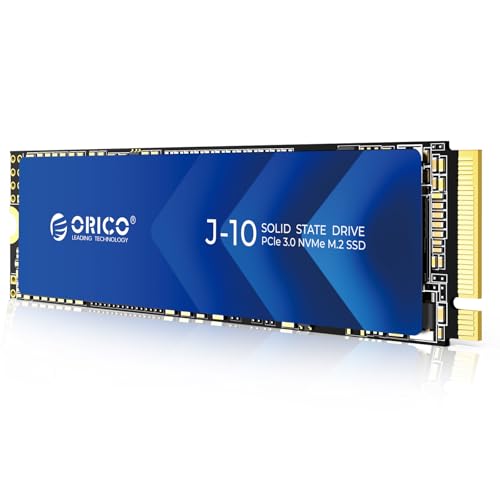
ORICO 256GB NVMe with heatsink — Cooled and ready
ORICO’s entry solves the floor class’s most physical problem first: heat in small boxes. This 256GB Gen3 x4 M.2 2280 drive arrives with a heatsink fitted — the listing leads with it — alongside SLC caching on 3D NAND and a rated ceiling up to 1,800 MB/s, aimed at laptops and PC desktops. In the compact machines this class serves, where a drive lives under a keyboard deck or inside a fanless case with no airflow to call its own, a factory-fitted heatsink is not a garnish but the difference between rated behaviour and a throttled apology.
The rated pace is the gentlest among the NVMe picks here, and the review will not dress it up. What the ORICO offers instead is thermal completeness at the size: buy it, fit it, and the cooling question that haunts small-form-factor builds is already answered, with no third-party heatsink lottery in a chassis where a millimetre is a argument. For mini PCs, embedded boxes and tight laptops whose slots accept the added height, that completeness is the product.
Check the height, though — the heatsink that blesses a desktop or a roomy mini PC can disqualify the drive in a thin laptop, where the bare-stick picks above are the only citizens. And ORICO’s context from our M.2 SATA guide applies: a maker whose pedigree is accessories rather than NAND, whose listings nonetheless speak plainly, which this one does about its cache design and its ceiling alike.
Buy the ORICO when the machine runs warm and the brief is defined — the compact build, the embedded box, the small desktop with a temperamental thermal story. It is the floor class with its sleeves rolled up, solving the problem its habitat actually has.
Home-server tinkerers meet this drive in a specific doorway: the small, always-on box — a router-class PC, a home-automation host, a little server in a cupboard — whose boot drive lives in still, warm air for years. A factory heatsink and a defined light duty are that machine’s whole storage specification, and the ORICO meets it without a shopping list of accessories or a prayer about airflow that does not exist.
- Interface: PCIe Gen3 x4, M.2 2280
- Maker-rated speed: up to 1,800 MB/s (from the listing)
- Cache description on the listing: SLC cache, 3D NAND
- Fitted equipment: heatsink included, per the listing
- Capacity in this guide: 256GB
Strengths
- Factory heatsink answers the small-box thermal question outright.
- Plain listing language about cache and ceiling.
- Suited to fanless and compact machines that run warm.
Trade-offs
- Heatsink height excludes thin laptops.
- Gentlest rated pace among the NVMe picks here.
- Maker’s pedigree is accessories rather than storage.
Best for: compact, warm-running machines with defined light duties. Not suited for: thin laptops, or buyers chasing the class’s pace leaders.
Comparison Table: The Floor, Measured Honestly
| Drive | Interface | Maker-rated pace | Capacity label | The brief it owns |
|---|---|---|---|---|
| Kingston NV2 | Gen4 x4 | Up to 3,000 MB/s | 250GB | The modern OS drive. |
| Samsung PM9B1 | Gen4 x4 | Up to 3,300 MB/s read | 256GB | OEM pace for confident hands. |
| Silicon Power A60 | Gen3 x4 | Gen3 class | 256GB | The revival staple. |
| ADATA Legend 700 | Gen3 x4 | Gen3 class | 256GB | The tidy mainstream option. |
| ADATA Legend 710 | Gen3 x4 | 2,100 read / 1,000 write MB/s | 256GB | Read-mostly appliance duty. |
| ORICO with heatsink | Gen3 x4 | Up to 1,800 MB/s | 256GB | The cooled compact fit. |
Six drives, and the table’s most important column is the last one. At the floor, the brief is the specification; a drive that owns its brief beats a faster drive borrowed from someone else’s.
The table also exposes the class’s internal politics at a glance: two Gen4 drives arguing that the floor can be modern, four Gen3 drives arguing that the floor’s machines mostly are not, and one OEM label reminding everyone that distribution channels are specifications too. A buyer who reads only the pace column will choose the PM9B1 every time; a buyer who reads the whole table will sometimes choose it, sometimes the NV2, and often enough one of the unhurried Gen3 names — and will be right each time, for reasons the pace column cannot see.
Notice, finally, what no row claims: a gaming library, a creator’s working set, a family’s decade of photographs. The absence is the class’s honesty made visible, and it is why this guide can recommend all six drives warmly while recommending the class itself so conditionally.
The Named Briefs, One by One: Where This Size Is the Specification
The OS-only drive is the class’s flagship brief, and it deserves a precise description. In a desktop or workstation whose storage architecture is deliberate — a fast system volume, a large data volume, perhaps an array behind both — the system drive’s job is to hold the operating system, its applications and their working caches, and nothing else, forever. Sized for that job, 256GB is not tight but correct: generous headroom over a Windows installation and a professional application set, with the free-space margin this class demands built into the specification rather than hoped for. The NV2 and the PM9B1 divide this brief between them by support philosophy, retail and OEM respectively.
The clone target is the brief with a stopwatch. When a small original disk — an early SSD, a dying drive in an embedded machine — must be duplicated exactly, the target’s size is dictated by the source, and the floor class is where those sources live. The discipline here is measurement: image the source, confirm its true size, and buy the target that matches or modestly exceeds it, remembering the 250-versus-256 wrinkle that has stranded hasty migrations. A clone target is also, often, a one-mission purchase, after which the drive retires to spare duty — a life for which the value picks in this guide are perfectly cast.
The point-of-sale and kiosk brief is the class’s most professional habitat. These machines run one application, boot one image, write a trickle and read all day, in cabinets and counters where a larger drive would simply be unused silicon. Fleet buyers provisioning dozens of terminals think in matched small batches — the same logic our enterprise guide applies at rack scale — and the Legend 710’s read-mostly honesty and the A60’s track record are the qualities that matter there, far above any interface generation.
The thin client and the embedded build close the list with the same personality: a machine that is an appliance wearing a computer’s clothes. Its storage is a boot medium, not a home; its data lives on a server, a network or nowhere at all. For such machines the floor class is not the cheap option but the designed one, and the ORICO’s factory heatsink speaks directly to their fanless, sealed, warm little worlds. When a brief is this narrow, buying above it is not prudence — it is waste wearing prudence’s coat.
Field Notes From the Floor
Ask technicians who maintain other people’s machines what lives at this size and a pattern emerges: the floor drives that succeed are the ones installed with a speech. The technician fits the drive, migrates the system, and then explains — files on the big disk, downloads pointed over there, this margin left alone — and the machine runs happily for years. The floor drives that fail are installed in silence into a growing life, and the phone call arrives in month nine. The hardware in this guide is adequate to its briefs; the speech is the accessory that decides.
There is a second pattern, about Windows itself. Owners consistently underestimate the operating system’s tenancy: the updates accumulate, the component store grows, the hibernation and paging files claim their estates, and a drive that began at sixty percent full creeps toward the margin without a single personal file being added. Planning the floor drive around the system’s growth — rather than around the day-one snapshot — is the difference between a specification and a surprise.
And a third, gentler pattern: the floor drive as the machine’s last upgrade. A great many of these drives are fitted to computers in their final tour of duty — the laptop seeing a student through one course, the shop terminal running until the refit, the parent’s PC browsing out its years. For a final tour, the arithmetic of cost per gigabyte is the wrong lens entirely; the right one is whether the machine serves its remaining story well, and at that, every drive in this guide is a success waiting for its assignment.
How Do You Live Well on 256GB?
With a system, set up once and then simply kept. First, give the operating system its due and nothing else’s: the drive holds Windows, its applications and their caches, while documents, photos and media live on the machine’s second drive, an external disk or a network share — decided on day one, not negotiated file by file as the warnings appear. Second, point the big quiet writers elsewhere: cloud-sync folders, game libraries and download directories are the tenants that evict small drives, and each has a setting that moves it.
Third, keep the margin sacred. A fifth of this drive is roughly fifty gigabytes, and that headroom is what lets the controller manage wear and cache the way its designers intended; a floor drive run at the brim slows down and ages early, which at this size is a self-inflicted wound. Fourth, use the operating system’s own storage tools on a schedule — the cleanup that removes old update files and temporary mountains is, at 256GB, not housekeeping but survival.
Owners who keep those four habits report the same surprise: the small drive stops feeling small, because the machine’s life was never really measured in gigabytes but in whether the right things are in the fast place. The drive holds the system and the working set; the world lives elsewhere; and the floor class, lived in deliberately, turns out to have a perfectly good view.
How Do You Fit and Clone Onto a Drive This Small?
The physical fitting is the standard M.2 ritual — shallow angle, seat, screw, no force — with one floor-class addition: measure the chassis before assuming a heatsink variant fits, because the small machines this class serves are exactly the ones where a fitted heatsink and a closing cover can disagree. The ORICO’s review carries that warning for its own pick, and it generalises to any accessory a buyer adds later.
Cloning onto a small target rewards preparation out of proportion to the job’s size. First, shrink the source: a source volume whose used space exceeds the target cannot be cloned by any tool’s optimism, so remove or relocate the bulk before imaging — the cleanup you were avoiding becomes the migration’s first step. Second, verify the geometry, remembering that a nominally larger source will not pour into a nominally smaller target even when its used space is tiny, unless the cloning tool can resize partitions and the source’s layout permits it. Third, boot the clone twice and live on it for a day before wiping the source, because a small drive leaves no room for a parallel existence — the old disk is the only undo button, and it should be retired last, not first.
Fresh installs sidestep all of that, and for the class’s appliance briefs — the terminal, the thin client, the signage player — a fresh, identical image deployed from a master is the professional pattern anyway. Whichever road you take, the final step is the speech from our field notes: where the files live, where the downloads point, and which margin is sacred. Five sentences at installation are worth fifty gigabytes at month nine.
Which Floor-Class Mistakes Fill the Returns Basket?
Buying this size for a growing machine is the founding error, and this guide has prosecuted it from its first paragraph: a teenager’s first gaming PC, a creator’s new workstation, a family machine expected to absorb a decade of photos — all will meet the ceiling within a year or two and pay the class’s arithmetic twice. If any growth at all is in the machine’s future, the 500GB step is the cheapest decision in the whole build.
Ordering the wrong variant from a shared listing runs second. These product families sell 256GB beside 2TB under one page, and the basket’s small print is where the mistake lives; the where-to-buy note at this guide’s head exists because the error is so common. Read the capacity in the listing title, read it again in the basket, and let the PM9B1’s buyers add a third reading for the OEM terms.
Third is neglecting the clone target’s geometry. A drive bought to clone a small original must be at least the original’s size, and the 250-versus-256 naming wrinkle in this class has stranded real migrations: a 256GB source does not clone onto a 250GB target without partition surgery. Measure the source, then buy the target with room to spare.
Last is treating the OEM pick as a retail one — discovering the absent support channel on the day something goes wrong. The PM9B1’s review states its terms at full length precisely so that its buyers are the people those terms suit. In a floor class full of fine print, the unforgivable mistake is not reading it.
How Do You Choose Among Six Small Drives Without Losing the Plot?
By letting the machine speak first. Its slot decides the interface shortlist before any preference is consulted: a Gen4 slot admits the NV2 and the PM9B1 to the final round, a Gen3 slot retires them to capped pace and promotes the Gen3 field, and a SATA-only slot retires this entire guide in favour of its M.2 SATA companion. Buyers who skip this step are not choosing a drive; they are choosing a disappointment and scheduling it.
Let the duty speak second. Read-mostly appliance work points at the Legend 710 with an almost audible click. Warm, sealed, fanless habitats point at the ORICO. Revivals point at the A60 or the Legend 700, divided by whether the maker’s support desk matters to whoever will maintain the machine. Clone targets and benches point at the PM9B1 for hands that know what OEM means, and at the NV2 for hands that would rather not learn.
Let the support philosophy speak last, because at this end of the market it is the tiebreaker that survives contact with reality. A drive in your own experimental machine can be as exotic as you like; a drive in a machine you maintain for someone else, in another building, on another person’s patience, should be the one whose maker answers. Rank the six by those three speeches — slot, duty, support — and the floor class, for all its penalties, resolves into a surprisingly peaceful decision.
What Actually Changes When You Step Up to 500GB?
Everything the floor makes you manage. The free-space margin stops being a negotiation, because the same fifth-of-the-drive rule now leaves a hundred gigabytes of headroom instead of fifty. Windows’ growth across years of updates becomes a background fact rather than a countdown. A game or two can live on the fast drive without a committee meeting. The cost per gigabyte roughly halves its penalty, because the fixed costs of being a product are spread across twice the NAND. And the drive’s wear story relaxes, since the same daily writing is shared by twice the cells.
That is why this guide keeps prosecuting the step-up: it is not upselling but arithmetic, and the reader who came here comparison-shopping a general-purpose drive should leave with a 500GB order and our blessing. The floor class’s dignity is that it does not need those readers. Its briefs — named, narrow and real — are waiting in the sections above, and for them the step up buys capacity that will retire unused, which is its own kind of waste.
The deciding question, asked one final time in its sharpest form, is this: can you write down, in one sentence, what this drive will hold on the last day of its service? If the sentence exists — the system and nothing else, the terminal’s image, the clone of that small original — buy from this guide with confidence. If the sentence trails off into “and whatever else accumulates”, the floor is not your floor, and the step up is your answer.
Final Recommendation
Let the brief choose, and let it choose honestly. If your machine’s data lives elsewhere and its slot is modern, the Kingston NV2 gives the floor a Gen4 pulse with a mainstream maker behind it. If you are technically confident and your duty is a clone target, an embedded build or a thin client, the PM9B1’s OEM pace is yours to take on OEM terms. Revivals belong to the A60 and the Legend 700, read-mostly appliances to the candid Legend 710, and warm little boxes to the heatsinked ORICO. But if reading this guide has stirred any doubt — if the machine might grow, might store, might become something more than its brief — then accept the guide’s opening verdict as its closing one, buy the 500GB drive instead, and let this small, honest class serve the narrow jobs it was made for, in other people’s machines.
And to the readers whose brief was named here — the system builders, the terminal provisioners, the revivers of faithful old laptops — a last word of respect: specifying the small drive correctly, against the whole market’s pressure to size up, is not settling. It is engineering, done at the unfashionable end of the catalogue, where the right answer is the one that fits the job exactly and not a gigabyte more.
Frequently Asked Questions
Is 256GB enough for Windows and everyday use?
For a defined, light life — browsing, documents, streaming, an office suite — yes, with the free-space discipline this guide describes. For a growing life of games, photos and projects, no: the operating system and its updates alone will crowd the drive within a couple of years, and the 500GB class exists precisely for that reader.
Why is the Samsung drive here sold as OEM?
Because the PM9B1 is Samsung’s client drive for device manufacturers, offered through OEM channels rather than retail ones. It brings Samsung’s client engineering and the fastest read rating in this guide, but no retail support channel or consumer firmware programme — a fair trade for confident buyers, a disqualification for anyone who wants a support desk.
What is the difference between the 250GB and 256GB drives here?
Mostly convention. Makers label this class both ways depending on how they account for spare area, and the Kingston’s 250GB badge and the field’s 256GB badges describe the same class of product. Do not choose between these drives on those six gigabytes; choose on interface, maker and brief — but do mind the difference when cloning, where a target must be at least the source’s size.
Can I use a 256GB drive for gaming?
As a system drive beside a larger library drive, comfortably. As the only drive in a gaming machine, almost never: a handful of modern titles can consume the entire class, and the resulting delete-and-redownload cycle is the most expensive cheap decision in PC building.
Which of these suits an old laptop revival best?
The A60 is the class’s proven revival staple on Gen3 machines, with the Legend 700 the tidier-maker alternative; if the laptop is new enough to carry a Gen4 slot, the NV2 modernises the same job. Confirm the slot’s protocol and the chassis’s acceptance of a standard 2280 stick before ordering any of them.
How long will a 256GB drive last in light duty?
Years, comfortably, when the duty is the one it was bought for. Light, defined workloads write a modest amount of data, and even the floor class’s smaller wear allowance covers that across a long service life. The drives that die young at this size are almost always the ones pressed into heavy general service — the punishment this guide’s opening sections describe — rather than any that lived inside their brief.
Is a second-hand or larger drive a better use of the same money?
Sometimes, and the honest comparison deserves a sentence. A reputable 500GB drive on a good day can cost close enough to this class’s new prices that the step up is painless, which is this guide’s refrain; the second-hand route, by contrast, asks you to trust an unknown wear history for the sake of capacity, and for a boot drive — the component your machine stands on — this guide ranks a new floor drive above a stranger’s retired one almost every time.
Can a 256GB drive work as an external portable?
Yes, and it is a respectable second career for one retired from boot duty: fitted into a USB enclosure matched to its protocol, a floor drive becomes a fast pocket drive for installers, images and large-file errands. Match the enclosure to NVMe, keep expectations at the class’s level, and a drive that began as a compromise ends as a tool.
Should I just buy 500GB instead?
Unless your brief is one of the narrow, named duties this guide exists to serve — OS-only, clone target, embedded, POS, thin client, a defined revival — yes. That answer is not a dismissal of this class but its whole point: the floor is for specifications, and everyone else is better served one step up.
Related Guides
Readers who take this guide’s advice and step up a size will find the wider field in Best SSDs for PCs and the interface specialists in Best PCIe 4.0 SSDs, while those whose small drive is destined for a mirrored pair should read Best SSDs for RAID before buying two of anything. The other end of the SATA world is mapped in the best enterprise sata ssds.
Related guides
- Best 4K UHD HDR HDMI Extenders: 4K60, Long-Run and 4K120 Kits Compared
- Best 25–35 Inch Monitors With Lowest Display Lag: An Honest Ranking Without Invented Numbers
- Best Color Product Label Printers: Six Desktop Machines for Short-Run Product Labels
- Best Enterprise SATA SSDs: Endurance Classes, Power-Loss Protection and Fleet Sense


