What's inside
- Key Takeaways
- Quick Picks
- How Did We Choose These Picks?
- What Can a Budget Around $50 Honestly Buy?
- Which Routers Live Closest to the Line?
- How Do the Six Compare Side by Side?
- Why Not Just Keep the Router Your Provider Supplied?
- Can a Budget Router Handle Working From Home?
- Do Extra Antennas and Big Numbers Mean Anything Down Here?
- When Is the Cheapest Pick Genuinely Enough?
- How Should a Budget Buyer Time the Purchase?
- Which Specifications Actually Matter at This Price?
- How Long Should a Budget Router Last — and What Kills One Early?
- How Should You Set Up a Budget Router to Get Its Best?
- How Do Smart-Home Gadgets Change the Budget Calculation?
- How Should You Read a Flash-Sale Router Listing?
- Are Renewed and Refurbished Routers a Smart Budget Move?
- What Mistakes Do Budget Router Shoppers Keep Making?
- What About Buying for Someone Else — Parents, Landlords, Students?
- Final Recommendation
- Frequently Asked Questions
- Related Guides
As an Amazon Associate I earn from qualifying purchases. This post may contain affiliate links at no extra cost to you.
gizmoverdict.com is reader-supported. When you buy through links on our site, we may earn an affiliate commission.
Where to buy: The six routers below all link to their Amazon listings from this site’s verified pool. Read the framing before the list: this is a guide about a budget line, and it names plainly which picks genuinely live near that line, which sit a step above it, and what each extra step buys — no product prices are printed, because they move too often to print honestly.
The search for the best routers around $50 begins with a confession this guide will not bury: the fifty-dollar router, as a clean and current product, barely exists anymore. That budget once bought the sensible dual-band default of its day, and shoppers still type the figure into search boxes out of perfectly good memory. What the money buys now depends on the week, the promotion cycle and the retailer’s mood, because router pricing swings harder than almost any other shelf in consumer networking. So this guide works the way an honest shop assistant should: it treats $50 as a centre of gravity rather than a fence, shows you the picks that orbit closest to it, and explains — in capability, not in currency — what stepping one rung up actually purchases.
Two of the six picks are the genuine budget citizens. The TP-Link Archer AX21 is the entry Wi-Fi 6 router that most often lives closest to the line, and the GL.iNet Beryl AX is a travel router whose small size keeps it in the budget’s neighbourhood while doing a job no full-size box does. The other four are here as honest landmarks at increasing distance: the Slate AX for travel-plus, the Archer AX55 for households that have outgrown the entry tier, the Deco X55 kit for homes where one box was never going to reach, and the NETGEAR CAX30, which folds a cable modem into the purchase and changes the arithmetic entirely for cable households. Each pick is labelled with its distance from the budget in plain words, so nobody mistakes a landmark for a bargain.
What should fifty dollars — or its neighbourhood — buy in this decade? The non-negotiables are a current Wi-Fi standard with living firmware support, dual bands, gigabit ports, and WPA3 or a credible path to it. Everything beyond that list is negotiation: mesh expansion, VPN tooling, USB sharing, extra antennas, newer spectrum. The sections below first define what the budget can and cannot promise, then walk the ladder pick by pick, then hand you the decision rules — when the closest pick is genuinely enough, when the step up pays for itself within a year of evenings, and when the honest answer is to wait for a promotion rather than buy the wrong box today.
Key Takeaways
- Around $50 is a centre of gravity, not a fence — two picks live closest to it and the rest are labelled landmarks above it.
- The Archer AX21 is the budget’s true heir: current-standard Wi-Fi 6, gigabit ports and mesh options at the entry rung.
- The Beryl AX proves small can be serious — a travel router with real VPN and OpenWrt credentials near the budget.
- Never let the budget talk you into old stock: ended firmware support costs more than the saving is worth, every single time it is tried.
- Cable households should do the CAX30’s different maths — one box replacing a modem-plus-router pair and its rental logic.
- Promotions move this category weekly; a pick one rung up on offer often beats the budget pick at full fare, so decide your ladder first and let the sales choose your moment.
Quick Picks
| Pick | Badge | Why it earns its place |
|---|---|---|
| TP-Link Archer AX21 | Closest to the budget | The entry Wi-Fi 6 router that most often orbits the $50 line — the default answer for small homes. |
| GL.iNet Beryl AX | Budget traveller | A pocket Wi-Fi 6 router with 2.5G WAN, VPN and OpenWrt, priced by its size near the budget class. |
| GL.iNet Slate AX | Travel step-up | The Beryl’s bigger sibling — same travel brief, more headroom, a step above the line. |
| TP-Link Archer AX55 | One rung up, honestly | AX3000 capacity, router-level VPN and USB sharing for households outgrowing the entry tier. |
| TP-Link Deco X55 (3-pack) | Coverage instead of cheapness | A three-node mesh kit — a different purchase that solves the problem a cheap single box cannot. |
| NETGEAR Nighthawk CAX30 | Cable-household maths | A DOCSIS 3.1 modem and Wi-Fi 6 router in one box, retiring a separate modem from the bill. |
How Did We Choose These Picks?
The first filter was currency of platform: every pick runs a current Wi-Fi standard on a live firmware train, because the cheapest router is the one you do not replace in eighteen months, and abandoned old stock — however deep its discount — fails that test on arrival. The second filter was the wired floor: gigabit ports or better, everywhere, no exceptions for size or price theatre. Then we ordered the survivors by their honest distance from the budget’s centre of gravity and by the distinctness of the job each does, preferring a ladder of genuinely different answers over six near-identical entry boxes pretending to be a comparison.
We also refused two easy inclusions. Provider-rental equipment never appears here, because its cost hides in a monthly line item that quietly exceeds any purchase in this guide. And no pick was admitted merely for being inexpensive at the moment of writing: prices in this category are weather, and a guide that chases this week’s weather is useless next month. What survives that discipline is a set of routers whose value argument does not depend on the day you read it — each earns its place by what it does, at a stated distance from the line you searched for.
What Can a Budget Around $50 Honestly Buy?
Begin with what it buys completely: a modern, dual-band, gigabit-ported router for a small home, from a major maker, with an app-guided setup and years of updates ahead of it. That sentence would have been fantasy at this budget not long ago, and the Archer AX21’s existence is the category’s good news. A household in a flat or a small house, on a plan in the low hundreds of megabits, with a device census in the teens, is fully served at this rung — streaming, calls, browsing and a shelf of smart gadgets included. The budget fails only when the house or the census outgrows it, which is a fact about the house, not a defect in the router.
Now the honest subtractions. At the budget’s centre you do not get a mesh system’s distributed coverage, a multi-gig port, a third band, or a processor that laughs at a forty-device evening. You get one radio position, so placement becomes destiny in a way it never is with nodes. You get a feature list trimmed to the essentials — the VPN clients, USB sharing and deep traffic tools live a rung or two up. And you get a product whose price will wobble around the line with promotions, which is why this guide refuses to print figures: the same router is the budget pick in one month and the step-up pick in another, and its capabilities do not change with its tag.
The last thing the budget buys, if you let it, is a mistake — the old-stock trap. Shelves and marketplaces still offer last-generation routers at tempting discounts, and at the moment of purchase they look like the budget’s champions. But a router is a security appliance that happens to do Wi-Fi, and a model whose updates have ended is a liability wearing a bargain’s clothes. The discipline of this guide — current platform or nothing — will occasionally push a reader one rung up. That is not upselling; it is the difference between a cheap router and an inexpensive one, which are not the same product.
Which Routers Live Closest to the Line?

TP-Link Archer AX21 — Closest to the budget
This is the router the $50 search is actually looking for, whether it knows it or not. The Archer AX21 is an AX1800 Wi-Fi 6 unit — its class sum splits roughly 574 Mbps on 2.4 GHz and 1201 Mbps on 5 GHz, theoretical ceilings as always — with gigabit ports, EasyMesh compatibility and an unglamorous competence that suits its station. It most often sells in the budget’s immediate neighbourhood, drifting a little above or below with the promotion cycle, and it asks for nothing exotic in return: a shelf, a power socket, and a household whose demands match a small home’s.
What elevates it above the old budget generation is airtime manners. Wi-Fi 6’s OFDMA and MU-MIMO mean the AX21 handles the modern evening — a stream, a call, a dozen murmuring gadgets — with a composure its Wi-Fi 5 ancestors at this price never managed, and WPA3 keeps its security current. For a first flat, a small family home, a student house or a spare-property setup, it is not a compromise pick; it is simply the correct size of answer. Buy it without apology, place it centrally, and let the money you did not spend become the mesh node you add later only if a room demands it.
- Class: AX1800 dual-band Wi-Fi 6 (574 + 1201 Mbps theoretical)
- Ports: gigabit WAN and LAN
- Mesh: EasyMesh compatible for later expansion
- Budget position: the closest pick to the $50 line in this guide
Strengths
- Current standard and live firmware at the budget’s own rung
- Evening congestion handled far better than old budget boxes
- EasyMesh leaves a graceful, inexpensive growth path
Trade-offs
- One radio position — placement decides its coverage absolutely
- No USB port or router-level VPN client at this tier
- Large or masonry-heavy homes will outgrow it quickly
Best for: small homes and flats wanting the modern minimum done properly. Not suited for: big households, big floor plans or multi-gig plans.

GL.iNet Beryl AX — Budget traveller
The Beryl AX is the budget’s most interesting citizen: a travel router small enough to vanish into a jacket pocket, priced by its size into the same neighbourhood as the entry boxes, yet carrying credentials none of them can match. Its listing spells out dual-band Wi-Fi 6 — 574 Mbps on 2.4 GHz and 2402 Mbps on 5 GHz in theoretical terms — a 2.5 gigabit WAN port that embarrasses full-size routers at several times its size, gigabit LAN, USB 3.0, and an OpenWrt foundation with VPN tooling built for people who work from other people’s networks.
Its budget logic is different from the AX21’s. Nobody should buy a Beryl to be a farmhouse’s main router; its radios are room-scale by design. But for the traveller, the dorm room, the studio flat, the site cabin or the home office that lives on hotel and client Wi-Fi half the month, it converts untrusted networks into one private, encrypted bubble for every device you carry — and at home it doubles as a perfectly capable single-room router or a dedicated VPN gateway for a streaming stick. Judged as a travel tool that happens to sit near the budget, it is not the cheap option; it is the only option shaped like itself.
- Class: AX3000 dual-band Wi-Fi 6 in a pocket format (theoretical per listing)
- Ports: 2.5G WAN, gigabit LAN, USB 3.0
- Software: OpenWrt-based, VPN client tooling aboard
- Budget position: near the line, priced by its travel format
Strengths
- Turns hotel and café networks into one private encrypted network
- 2.5G WAN port is extraordinary at this size and tier
- OpenWrt base gives it a tinkering ceiling far above its price class
Trade-offs
- Coverage is a room, not a house — by deliberate design
- Whole-home buyers will mistake its spec sheet for a main router
- Travel talents are wasted on a shelf that never travels
Best for: travellers, dorms, studios and anyone who works on borrowed networks. Not suited for: serving as a family home’s only router.
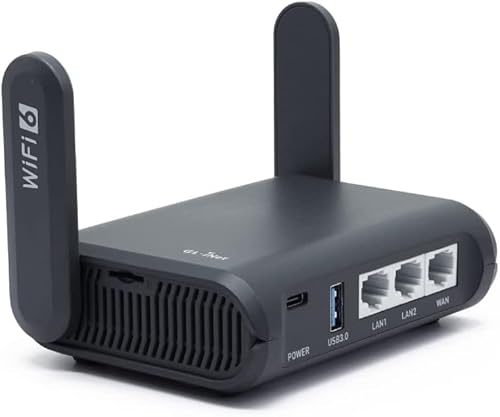
GL.iNet Slate AX — Travel step-up
The Slate AX stands one rung above the line, and its entry in a budget guide needs its justification stated plainly: it is what the Beryl’s admirers graduate to, and budget shoppers deserve to see the graduation price’s worth before deciding. The Slate carries the same travel brief — pocket format, OpenWrt roots, WireGuard and OpenVPN clients — on an AX1800 platform with more processing headroom, and its listing notes capacity for well over a hundred simultaneous device connections, a figure aimed at the conference table and the family gathering rather than the hotel desk.
In budget terms, the Slate is the “buy once” argument in miniature. The traveller who routes a laptop, a phone, a tablet and a partner’s devices through one tunnel, who keeps a home network patched through it during long rentals, or who simply hates replacing kit, will feel the extra headroom as smoothness rather than speed. At home it shares the Beryl’s second careers — single-room router, VPN gateway, spare-network brain — with more room to breathe. It is not the budget pick; it is the pick for the budget shopper whose real requirement is travel networking done without compromise, shown here so the comparison is honest rather than hidden.
- Class: AX1800 dual-band Wi-Fi 6 (theoretical sum)
- Form: pocket-sized travel router
- Software: OpenWrt-based; WireGuard and OpenVPN clients
- Budget position: one step above the line — the graduation option
Strengths
- More headroom for many-device travel and long rentals
- VPN throughput and flexibility lead its format class
- Same pocketable, packable convenience as its sibling
Trade-offs
- Sits above the budget that titles this guide
- Still room-scale coverage — not a house solution
- Solo travellers with two devices may never feel its extra room
Best for: heavy travellers and remote workers living on other networks. Not suited for: buyers whose need is a cheap whole-home router.

TP-Link Archer AX55 — One rung up, honestly
The AX55 is this guide’s controlled experiment in what the next rung buys. Its AX3000 platform — about 574 Mbps on 2.4 GHz and 2402 Mbps on 5 GHz in theoretical terms — roughly doubles the fast band’s room over the budget pick, and its quad-core processor keeps the whole household’s requests moving at the evening peak. Then come the capabilities the budget simply does not contain: a VPN client and server at router level, a USB 3.0 port for shared storage, and a security suite watching the network. Priced a clear step above the line, it is included because budget shoppers deserve the comparison drawn in capability rather than discovered in regret.
The case for stepping up is a census and a calendar. Count the devices that will join the network over the router’s life — the television, the doorbell, the second laptop, the console, the gadgets nobody has bought yet — and if the total marches toward thirty, the AX55’s headroom stops being a luxury and becomes the cheaper purchase, because the budget box it replaces would have been replaced itself in two years. Router-level VPN has the same compounding logic: one configuration covers every device in the house, including the streaming hardware that accepts no apps. If your household’s honest description is “small and stable,” stay at the budget rung with a clear conscience; if it is “growing,” this rung is where the money behaves.
- Class: AX3000 dual-band Wi-Fi 6 (574 + 2402 Mbps theoretical)
- Ports: gigabit WAN/LAN plus USB 3.0
- VPN: client and server built in
- Budget position: one full rung above the line
Strengths
- Headroom that postpones the next replacement by years
- Router-level VPN covers app-less devices like streaming sticks
- USB sharing adds light storage duty to the household
Trade-offs
- Costs meaningfully more than the budget that frames the guide
- Still one radio position — coverage geometry unchanged
- Fuller security features lean on a subscription tier
Best for: growing households whose census will outgrow the entry tier. Not suited for: stable small homes that would never use the headroom.

TP-Link Deco X55 (3-pack) — Coverage instead of cheapness
A three-pack mesh kit in a budget guide is either a mistake or a lesson, and here it is a lesson: some households searching by price are actually suffering from geometry. If the home is long, two-storey or masonry-walled, no single router at any rung of this ladder will cover it, and the cheapest purchase is the one that solves the problem once. The Deco X55 kit — three AX3000 nodes with gigabit ports on every unit, wired backhaul support, and a manufacturer-stated coverage claim of up to 6,500 square feet — is several times the budget as a single purchase, and it is included so that reader can see the real alternative priced in capability: radios on each floor, one network name, and an end to the dead-corner era.
There is even a budget-flavoured way to read the kit: divided by its three nodes, the per-radio cost lands surprisingly close to the territory this guide is about, and a household that would otherwise buy a budget router this year and a budget extender next year and a second budget router the year after is not saving money — it is renting disappointment in instalments. The X55 also starts smaller than it looks: run two nodes now, keep the third for the extension or the next house. None of this makes it a $50 router, and this guide will not pretend otherwise; it makes it the honest terminus of a budget search whose true subject was coverage all along.
- Class: AX3000 dual-band Wi-Fi 6 per node, 3 nodes
- Coverage: up to 6,500 sq. ft. as stated by the manufacturer
- Ports: 3 gigabit Ethernet ports on every unit
- Budget position: several times the line — a different purchase entirely
Strengths
- Solves the coverage problem no single cheap box can touch
- Ends the router-then-extender-then-router spending cycle
- Identical nodes redeploy gracefully in the next home
Trade-offs
- Total outlay is far beyond the budget framing this guide
- App-based management offers less granular control
- Small flats gain nothing from its distribution
Best for: larger or awkward homes whose real problem is coverage, not price. Not suited for: small spaces where one budget router already reaches everywhere.

NETGEAR Nighthawk CAX30 — Cable-household maths
The CAX30 changes the question. It is a modem-router combination — a DOCSIS 3.1 cable modem and a Wi-Fi 6 router sharing one chassis, one power supply and one purchase — and it belongs in a budget guide because of the line item it deletes. Cable households commonly rent their modem from the provider for a monthly fee that feels trivial and compounds relentlessly; over a typical router’s lifespan, that rental stream can exceed the entire budget this guide is named after, several times over. The CAX30’s listing notes compatibility with major cable providers including Xfinity, Spectrum and Cox, and its combined Wi-Fi class is rated at 2.7 Gbps in the manufacturer’s theoretical terms, with four gigabit ports for the wired side.
The caveats are structural and stated plainly. This is a cable-only device: fibre and DSL households cannot use its modem half at all, and anyone planning to switch access technologies should not weld their router to the old one. Provider compatibility should be confirmed against your own plan before purchase, and the combined format means a future Wi-Fi upgrade retires the modem too. Within its parish, though, the arithmetic is genuinely compelling — one box, no rental, a current Wi-Fi 6 network, and a support conversation with exactly one manufacturer. For the cable household doing honest budget maths, the most frugal router in this guide might be the one that also eats the modem bill.
- Type: DOCSIS 3.1 cable modem plus Wi-Fi 6 router combo
- Wi-Fi: dual-band, 2.7 Gbps combined class (manufacturer figure)
- Ports: 4 gigabit Ethernet ports
- Budget position: above the line, offset by deleted modem rental
Strengths
- Retires the provider’s monthly modem rental entirely
- One box and one setup for cable households
- DOCSIS 3.1 keeps it valid for faster cable tiers
Trade-offs
- Cable only — useless to fibre and DSL households
- Combined format retires both halves together at upgrade time
- Compatibility must be confirmed with your specific provider plan
Best for: cable households paying a modem rental they have never questioned. Not suited for: fibre or DSL homes, or anyone planning to change access technology soon.
How Do the Six Compare Side by Side?
| Router | Class | Distance from the budget | Defining trait |
|---|---|---|---|
| Archer AX21 | AX1800 Wi-Fi 6 | Closest to the line | The modern entry default |
| Beryl AX | AX3000 Wi-Fi 6 travel | Near the line | Pocket privacy with 2.5G WAN |
| Slate AX | AX1800 Wi-Fi 6 travel | One step above | Travel headroom, OpenWrt roots |
| Archer AX55 | AX3000 Wi-Fi 6 | One rung above | VPN and headroom for growers |
| Deco X55 (3-pack) | AX3000 mesh | A different purchase | Coverage by distribution |
| Nighthawk CAX30 | Wi-Fi 6 + DOCSIS 3.1 | Offset by rental savings | Modem and router in one |
The distance column is the table’s honest core. Two picks respect the budget’s spirit outright; two sit a deliberate step beyond it with their reasons attached; two reframe the purchase entirely. A reader who knows which row describes their household already knows their answer, and a reader who does not should answer the census question first — how many devices, how many rooms, how many years — because in this category the wrong cheap router is the most expensive one on the page.
Why Not Just Keep the Router Your Provider Supplied?
Because “free” provider equipment is usually a rental wearing a smile, a compromise wearing a logo, or both. Where a monthly equipment charge exists, the arithmetic is brutal: the household pays an entry router’s purchase price roughly every year or two, forever, for hardware chosen by the provider’s procurement department. Where no explicit charge exists, the compromise shows elsewhere — radios a generation behind, firmware updated on the provider’s schedule, features like router-level VPN or proper guest networks trimmed away, and a support script whose answer to every fault is a replacement of the same box. Owning your router, even at this guide’s humblest rung, buys current standards, your own settings, and a network that moves house with you instead of being re-issued by each provider.
The fair exceptions deserve naming. Some fibre providers supply genuinely modern gateways with no rental and decent radios; in a small flat, that box plus nothing can be the correct budget answer, with a personal router added only when a specific feature — a VPN client, better controls — is wanted. Some services, particularly certain fibre and fixed-wireless offerings, effectively require their gateway for full function, in which case the budget move is to run your router behind it in the cleanest configuration the gateway allows. The rule survives the exceptions: audit what the provider’s box costs and what it cannot do, and buy your own the moment either answer annoys you — at this budget, annoyance is usually overpriced.
Can a Budget Router Handle Working From Home?
Yes, with placement and one wired favour. The home worker’s enemies are a degrading uplink during calls and a housemate’s download arriving mid-sentence, and both are softened more by position and cable than by class. Put the router in the same room as the desk if the home allows it, or wire the work machine to it across whatever distance a cable can politely travel; a wired worker on a budget router will out-call a wireless worker on a flagship almost every time. Enable the router’s quality-of-service basics if it offers them, favouring the work device during office hours — even the entry platforms in this guide carry some form of this, and it costs an evening’s experiment to find.
Where the budget genuinely pinches the worker is simultaneity at scale: two adults on calls, a child streaming lessons, a cloud drive syncing a folder of video — the census problem wearing a diary. That household should read its own description in the AX55’s section and step up without guilt, because the router is now business equipment. The solo worker in a flat, though, can take the budget pick, spend the difference on a decent chair, and be better equipped for the year than the colleague who bought a gaming router and kept the kitchen stool.
Do Extra Antennas and Big Numbers Mean Anything Down Here?
Antennas are the budget shelf’s favourite theatre. A forest of external aerials photographs like seriousness, and adjustable antennas do help at the margins — orienting them, one vertical and one angled, can tidy a stubborn room’s reception. But antenna count is not a unit of coverage, and at this tier the differences between four and six aerials are dwarfed by the difference between a shelf and a cupboard. Buyers should treat the antenna forest as furniture styling and interrogate the platform instead: standard, updates, ports, mesh options. The routers in this guide were chosen on those bones; their silhouettes range from the AX73-style thicket — not present here, notably — to the Beryl’s near-invisible nub, and the nub’s owner sleeps fine.
The same scepticism, doubled, applies to range claims printed for single budget units. A claim of coverage for thousands of square feet from one entry-level radio describes a warehouse with no walls, a scenario no reader inhabits. In a real flat the budget pick covers everything; in a real house it covers its neighbourhood; the honest specification is the one this guide keeps repeating — your rooms, your walls, your census — and any box that promises to abolish them is selling the abolition, not the coverage.
When Is the Cheapest Pick Genuinely Enough?
More often than the industry admits. The budget pick is enough when the home is small enough for one central radio position to see every room, when the internet plan sits in the low hundreds of megabits, when the device census stays in the teens, and when nobody’s income depends on the network’s behaviour at 8 p.m. Flats, small houses, student shares, guest properties, a parent’s bungalow — an enormous share of the world’s homes match that description, and for them the extra rungs buy capabilities that would sit unused until the router is replaced anyway. Spending to the size of the problem is not settling; it is the entire skill this guide exists to teach.
The tell that you have left that territory is rarely speed — it is friction. The call that degrades when the television wakes. The doorbell that drops offline weekly. The new console’s download that ruins a housemate’s stream. Friction of that kind is a capacity and airtime story, and it is answered by headroom (the AX55), distribution (the Deco kit) or a wire, not by a faster headline class. Diagnose by symptom: if the complaint is a place, buy geometry; if it is a time of day, buy headroom; if it is a device count, buy both in that order.
How Should a Budget Buyer Time the Purchase?
Router pricing breathes. The same model drifts with seasonal promotions, new-model launches and retailer events, and in this category the swing can carry a pick across the budget line in either direction within a single month. The practical habits are unglamorous: decide your pick by capability first, using this guide’s ladder, then watch its listing across a couple of weeks if your current network still functions; set the step-up pick as your opportunistic target, because the AX55 on promotion is a better purchase than the AX21 at full fare for any growing household; and treat launch season — when a maker refreshes its entry line — as the moment the outgoing current model, still fully supported, becomes the budget’s best friend.
What never pays is panic. A dead router on a workday tempts households into whatever the nearest shelf holds, which is how unsupported old stock finds its victims. If disaster strikes, the travel routers in this guide are the connoisseur’s stopgap: a Beryl or Slate will run a small home’s essentials for a week, then retire to the travel bag when the deliberate purchase arrives — two jobs for one emergency spend, and no e-waste. Budget buying is mostly patience wearing a disguise, and networking rewards it more than most categories because the products themselves change slowly even while their prices dance.
Which Specifications Actually Matter at This Price?
At the budget end, spec sheets are mostly fog, but four items cut through it. The first is the Wi-Fi standard itself — 6 rather than 5 — because it decides airtime manners and the update lifespan in a single word. The second is the port bank: gigabit WAN and LAN, verified in the listing, because a 100 Mbps port anywhere in the chain quietly caps a modern plan. The third is WPA3 support, the visible sign of a platform the maker still tends. The fourth is mesh compatibility — EasyMesh, OneMesh, AiMesh or a matched kit — because it converts a future coverage problem from a replacement into an addition, which at this budget is the difference between a system and a stopgap.
Everything else on the box deserves a discount. Antenna counts impress in photographs and matter less than placement. Class sums, as this site’s guides repeat until hoarse, add two bands’ theoretical ceilings into a number no device experiences. Processor cores and memory figures are real but second-order at this tier — they show up in the AX55’s smoothness, not in a spec war the budget buyer can adjudicate from a listing. Learn to read a budget router listing the way a mechanic reads a used-car advert: year, mileage and service history first — standard, updates, ports — and the chrome afterwards.
How Long Should a Budget Router Last — and What Kills One Early?
A current-platform budget router should serve four to six years, and its death, when it comes, will almost certainly be administrative rather than electronic: the maker ends its firmware train, and a box that still routes perfectly becomes a box that should no longer be trusted at the network’s edge. Heat is the physical accelerant — budget units are passively cooled, and a router entombed in a cabinet atop a warm modem ages its capacitors years ahead of schedule. Give it air, keep it out of the sun’s daily path, and the hardware will usually outlive its software welcome.
The household can also kill a budget router socially, by outgrowing it: a census that doubles, a plan that triples, a job that moves home. None of those are the router’s failure, and recognising them as growth rather than breakage changes the replacement from an emergency into a plan — the old unit retires to a relative’s flat, a spare room access point or the travel bag, and the household steps up a rung with its eyes open. The budget pick bought on a current platform keeps that resale of usefulness; the abandoned bargain bought against this guide’s advice has nowhere to retire to.
How Should You Set Up a Budget Router to Get Its Best?
Setup is where a budget router earns or loses its reputation, because a single radio position forgives nothing. Place it centrally, raised, in the open — the middle of the home’s life, not the corner where the line happens to enter. Update its firmware before configuring anything, set a long unique passphrase, enable WPA3 or its transition mode, and give the network one name across both bands so the router’s steering can work. Then wire the stationary heavyweights — television, console, desktop — into its gigabit ports; every device on a cable is airtime handed back to the phones and laptops that have no choice.
Two smaller habits repay themselves for years. Turn on automatic updates if the platform offers them, so the security story this guide keeps telling stays true without your attention. And keep a note — paper, in the router’s box — of the admin password, the network name and the date of purchase; the household that can find its credentials troubleshoots in minutes, while the household that cannot ends up factory-resetting on a Sunday night. A budget router set up with this much care routinely outperforms a premium router stuffed in a cupboard, which is the closest thing networking has to a moral.
How Do Smart-Home Gadgets Change the Budget Calculation?
They raise the census without raising the traffic, and that combination is exactly what modern entry routers handle well and old ones handled badly. A shelf of bulbs, plugs, sensors and speakers exchanges tiny, frequent whispers rather than streams; Wi-Fi 6’s OFDMA was designed for precisely that crowd, which is why the AX21 can host a gadget population that would have made its Wi-Fi 5 predecessor wheeze at the same headline class. The budget buyer with smart-home ambitions should therefore fear device count less than folklore suggests — and fear the 2.4 GHz band’s congestion more, since most gadgets speak nothing else and every neighbour’s gadgets are whispering there too.
Two practices keep a gadget-heavy budget network calm. Give the gadgets the guest network or a dedicated 2.4 GHz name if the platform prefers it, fencing the least-updated devices away from your computers and giving their quirks a neighbourhood of their own. And resist scattering gadgets at the network’s extreme edges, where a plug at the garden’s end retries its whisper all night at the router’s expense; a mesh node or a repositioned router is the cure, and at the budget’s scale the repositioning should always be tried first. The smart home, done this way, is a budget router’s friend — it is the four simultaneous 4K streams that were never its parish.
How Should You Read a Flash-Sale Router Listing?
Promotions are this category’s weather, and the listing page during a sale is designed to hurry you past the questions that matter. Slow it down with a checklist that fits on a sticky note. Confirm the exact model and hardware version — makers reuse names across revisions, and support can differ between them. Confirm the standard and the port speeds in the specification table, not the headline. Open the manufacturer’s support page in another tab and look at the newest firmware date; a current model shows a recent one, and that single glance defeats most old-stock traps. Check what the box does not include — a modem, notably, since every pick here except the CAX30 assumes you have one.
Then interrogate the discount itself. A dramatic percentage off a price the product never actually sold at is theatre; compare the sale figure against the pick’s usual neighbourhood and against the rung above it, because sales compress ladders — the step-up model at its promotional moment is frequently the true bargain of the week, as this guide’s timing section argues. Finally, keep the return window in your diary. A budget router’s real review is your own worst room at your own worst hour, and the window is your right to conduct it. Buyers who run that test buy once; buyers who skip it buy the ladder one rung at a time, at retail, forever.
Are Renewed and Refurbished Routers a Smart Budget Move?
Sometimes, with conditions. A manufacturer-renewed unit of a current model — returned, inspected, reboxed, sold with a defined warranty — can pull a step-up pick like this guide’s ASUS-class hardware down toward the budget’s orbit, and the platform’s firmware train is identical to a new unit’s. The conditions are the seller and the paperwork: buy renewed only where the condition is described, the return window is real, and the maker’s support page confirms the model is still updated. Update the firmware the day it arrives, factory-reset it before trusting it, and change every credential it carries.
Marketplace roulette is the other thing entirely. A used router of unknown history may arrive with a stranger’s configuration, a dying power supply, or a model revision whose support quietly ended — and at the budget’s scale, the saving over a promoted new entry model is often small enough to be imaginary. The budget buyer’s hierarchy runs: current model on promotion first, manufacturer-renewed current model second, the honest entry pick at full fare third — and the anonymous used bargain nowhere, because a router is the one device whose past life you cannot inspect and whose position in your home is total.
What Mistakes Do Budget Router Shoppers Keep Making?
The deepest mistake is pricing the router and not the ownership. A cheap unit replaced in eighteen months, plus the extender bought to forgive it, plus the evenings spent restarting it, costs more in every currency than the honest rung bought once. Second comes the old-stock bargain: last-generation hardware at a seductive discount, its firmware already abandoned, its security frozen at the year it was boxed — a saving that bills you in risk. Third, shoppers let a single headline number arbitrate, comparing class sums as if they were speeds, when the budget tier’s real differences are airtime manners, update lifespans and ports.
Fourth, cable households forget to audit the rental line on their provider bill, sometimes paying a modem’s purchase price every year or two for the privilege of not owning it. Fifth, buyers of genuinely small homes overspend upward — mesh kits for studios, flagship radios for flats — persuaded by coverage claims meant for houses four times their size. The budget, honoured properly, cuts both ways: it forbids the false economy below the line and the theatre above it. Know your rooms, count your devices, and let the ladder do the rest.
What About Buying for Someone Else — Parents, Landlords, Students?
Budget routers are disproportionately bought for other people’s homes, and the criteria shift in ways worth stating. For a parent’s house, the supreme feature is not speed but silence: a router that never needs a visit, an app that a family admin can check remotely where the platform allows, and a setup simple enough to survive a power cut without a phone call. The AX21’s temperament suits this exactly, and the money saved against a grander box is better spent on the admin’s time placing it well during one visit. Write the credentials on a card that lives with the router; future-you, on the phone at Christmas, will be grateful.
For a rental property, the landlord’s calculus is durability and deniability: a current-platform budget router, configured once, with the network name and passphrase printed in the tenancy pack, ends the “the Wi-Fi is broken” message thread more reliably than any premium hardware whose app the tenants will inevitably reset. For a student house, expect the census to be savage and the placement to be a hallway floor; the budget pick will cope, the step-up will cope more gracefully, and either will be treated with a disrespect no guide can legislate against. In all three cases the principle from this guide’s opening holds: buy the current platform at the honest rung, and the network becomes the one utility nobody mentions — which is the highest praise infrastructure ever receives.
Final Recommendation
Start where the budget is real: the Archer AX21 for the small, stable home, bought without a flicker of embarrassment, and the Beryl AX for the life lived partly on borrowed networks. Step to the AX55 the moment your census or your ambitions start growing, let the Deco kit answer honestly if your true problem is rooms rather than money, and let cable households run the CAX30’s rental maths before dismissing its price. The fifty-dollar figure you arrived with was never really a fence — it was a question about how much router your household honestly needs, and the right answer, whichever rung it lands on, is the one you will not be re-buying next year. Set it up carefully, give it air and a central shelf, write the credentials down where the household can find them, and then enjoy the budget router’s finest quality — the years in which it asks for nothing, announces nothing, and simply holds the house’s conversations together while your attention goes to better things.
Frequently Asked Questions
Can a router around $50 handle a family of streamers?
In a small home, yes — the Archer AX21’s Wi-Fi 6 airtime handling covers a couple of simultaneous streams plus browsing comfortably. The strain appears with many simultaneous heavy users or a large floor plan, which are headroom and geometry problems, not budget verdicts.
Why does this guide avoid printing exact prices?
Because this category’s prices move weekly with promotions, and a printed figure would be wrong — in one direction or the other — for most readers within a month. The guide instead states each pick’s distance from the budget in words that stay true.
Is a travel router a sensible main router for a studio?
Entirely. In a single-room home, the Beryl AX or Slate AX covers the space, and their VPN tooling adds privacy a conventional budget router lacks. The mismatch only begins when walls and floors multiply.
Should I buy a discounted last-generation router instead?
Only if its firmware is still actively supported — check the manufacturer’s update page for the model before buying. A supported previous model on promotion is a smart buy; an abandoned one is a liability at any discount.
Does the modem-router combo really save money?
For cable households paying a monthly equipment rental, generally yes over the unit’s life, because the rental stream compounds quietly. Confirm your provider supports the CAX30 on your plan first, and remember the combo only suits cable service.
I only need Wi-Fi for one room. Am I overspending even at this budget?
Possibly not spending at all is an option — if a provider gateway already covers the room adequately, a separate router buys you features rather than coverage. But the moment you want current security, your own settings, or a VPN at router level, the budget picks here are the honest minimum, and the travel routers in particular were born for exactly one room.
My budget is firm and the pick I want sits above it this month. What then?
Hold the decision, not the money hostage: this category’s promotions rotate constantly, and a few weeks of patience routinely pull a step-up pick down to the line. If the need is urgent, buy the closest current-platform pick rather than a discounted abandoned one — the supported router at full fare is cheaper over its life than the unsupported bargain replaced twice.
When is waiting for a promotion the right call?
When your current router still works and your target pick sits just above the budget — this category’s promotions regularly pull the step-up pick down to the line. When the network has failed outright, buy the honest rung now; uptime is worth more than the swing.
Related Guides
Budget decisions sharpen with a little context. Read our explainer on what Wi-Fi class numbers actually promise, a walkthrough of router placement for small homes, and our guide to deciding when a mesh system is worth its premium before the promotion cycle decides for you. A budget chosen with open eyes, a platform chosen for its lifespan, and a placement chosen with a tape measure will together outperform any amount of money thrown at the wrong shelf — that is the whole secret, and it was never really about the fifty dollars at all, in the end, for anyone.



[…] connects to several neighbouring questions. Start with the architecture, then read deeper. See our guide to mesh systems and how node counts are decided, an explainer on Ethernet backhaul and MoCA for homes without network cabling, and our router […]