What's inside
- Key Takeaways
- Quick Picks: Best 8K Video Cameras
- How We Chose These Picks
- Comparison Table
- What Does 8K Actually Demand From You?
- How Does 8K Change the Way a Shoot Feels?
- Who Actually Needs 8K — and Who Is Renting a Number?
- What Mistakes Do Buyers Keep Making Here?
- Final Recommendation
- Frequently Asked Questions
- Related Guides
As an Amazon Associate I earn from qualifying purchases. This post may contain affiliate links at no extra cost to you.
gizmoverdict.com is reader-supported. When you buy through links on our site, we may earn an affiliate commission.
Where to buy: four picks below carry verified links to their Amazon listings; two further flagships are covered in prose only, without links, because no verified listing for them sits in this guide’s pool — they are included because an 8K guide without them would be a lie of omission.
The best 8k video cameras divide into two species that share a number and almost nothing else, and this guide’s first duty is to keep them separate. The mirrorless flagships — Canon’s EOS R5 Mark II and Nikon’s Z 8 — record true 8K frames: enormous, detailed, suitable for cropping, stabilising and delivering in 4K with room to spare. The 360-degree cameras — Insta360’s X4 and GoPro’s MAX2 — record an 8K sphere, from which the flat video you actually publish is a reframed window far smaller than 8K. Both species are legitimate. Confusing them is how buyers end up disappointed with a purchase that did exactly what it promised.
The second duty is honesty about need. 8K files are vast, 8K workflows are demanding, and almost nobody’s audience watches in 8K. The genuine reasons to buy it are cropping freedom, downsampled 4K quality, future-proofing masters and the occasional enormous screen — not a vague sense that more must be better. Six cameras are covered here: the four linked flagships and action cameras you can buy through this guide, plus Sony’s a1 line and Nikon’s Z 9 in prose, because they define the class even where this page cannot link them. Rolling shutter, heat, card costs and editing pain are treated as first-class specifications throughout.
Key Takeaways
- Mirrorless 8K and 360-degree 8K are different products: one records an 8K frame, the other an 8K sphere whose reframed flat exports are much smaller — judge each against its own promise.
- The strongest everyday reason to shoot 8K is the 4K delivery: downsampled footage is cleaner, and the crop freedom rescues framing, stabilisation and vertical edits.
- Storage and editing costs scale brutally with 8K — cards, drives and computer power belong in the purchase budget from the first day, not the first crisis.
- Rolling shutter and heat, not resolution, are the practical limits on flagship 8K; both are described per camera below rather than waved away.
- Most creators should not buy 8K yet, and this guide’s final section says exactly who should — and who is paying flagship money for a number their audience will never see.
Quick Picks: Best 8K Video Cameras
| Pick | Badge | Why it earns its place |
|---|---|---|
| Canon EOS R5 Mark II | Best 8K flagship for Canon shooters | 8K RAW internal recording, a stacked full-frame sensor and Canon’s colour — the hybrid flagship with the deepest video headroom here. |
| Nikon Z 8 | Best 8K flagship for Nikon shooters | The Z 9’s stacked-sensor video pedigree in a smaller body: internal raw, deep frame-rate options and production-grade endurance. |
| Insta360 X4 | Best 360 camera for reframed action | An 8K sphere you reframe later, an invisible selfie stick, and single-lens 4K when you want a normal action camera. |
| GoPro MAX2 | Best GoPro-route 360 and action hybrid | Spherical 8K video, 29MP 360 photos and GoPro’s mounting ecosystem — the 360 camera for riders already in that world. |
| Sony a1 Series (a1 and a1 II) | Prose-only reference — the hybrid elder statesman | Sony’s flagship hybrid line pairs 8K video with class-defining stills speed; covered in prose, without a link, as the class reference. |
| Nikon Z 9 | Prose-only reference — the production flagship | Nikon’s full-size flagship with internal raw and 8K endurance for professional productions; described in prose, without a link. |
How We Chose These Picks
Judging 8K cameras required judging the whole pipeline, not the sensor alone. Each pick was assessed on what its 8K actually is — full-frame readout or sphere, raw or compressed, which frame rates and for how long before heat intervenes — and on what happens afterwards: the card formats and capacities the data rates demand, the codec’s friendliness to ordinary editing machines, and the colour and log options that decide whether the footage grades gracefully. A camera whose 8K cannot survive its owner’s computer is a specification, not a tool. A note on method belongs here: frame rates, recording times and thermal behaviour were compared in the modes a production would actually use, at the ambient temperatures of real rooms and real summers, because a flagship that performs only in an air-conditioned laboratory is a rumour rather than a tool.
Two prose-only flagships are included deliberately. Sony’s a1 series and Nikon’s Z 9 are reference points any informed buyer will cross-shop, and pretending they do not exist would make the linked picks’ victories look cheaper than they are. They carry no links and no image markers beyond the prose-only placeholder, in line with this guide’s rule that only verified listings get purchase paths. Everything else here — the Canon and Nikon mirrorless bodies and the two 360 cameras — links to a checked listing, and each review states what its 8K mode genuinely delivers before praising anything else.

Canon EOS R5 Mark II — Best 8K flagship for Canon shooters
The R5 Mark II is Canon’s answer to the question its predecessor raised: what if the hybrid flagship took video as seriously as stills? Its stacked full-frame sensor records 8K RAW internally — the format’s most flexible form, with grading latitude that compressed codecs cannot offer — alongside S-RAW and high-quality compressed options for shooters who prefer their files survivable. For the filmmaker who wants one body to shoot a wedding’s stills in the morning and a commercial’s 8K masters in the afternoon, nothing linked in this guide argues harder.
Canon surrounds that headline with the working details: fast sensor readout that keeps rolling shutter on a shorter leash than the class average, in-body stabilisation that steadies handheld 8K into usability, and colour science that clients recognise on sight. The RF mount behind it holds Canon’s full modern lens range, including the fast primes and zooms that low-light 8K work quietly demands. Heat is managed more gracefully than the first generation’s reputation suggests, though long 8K RAW takes in hot venues still deserve the respect this guide gives heat everywhere.
Buy it as a production tool with production running costs: CFexpress cards in quantity, storage that grows by the shoot, and an edit pipeline you have tested with its raw files before a client does. Shooters who meet it on those terms get the most complete hybrid instrument Canon has made. Shooters who wanted a casual camera with an 8K badge should keep reading — cheaper happiness exists below.
A word on the R5 Mark II’s stills, since hybrid buyers will live there too: the same stacked sensor that feeds its 8K delivers action-stills performance that sports and wildlife photographers adopted without a video thought in their heads. That dual citizenship is the body’s deepest value — it does not ask a working photographer to choose a speciality. Owners report the camera reorganising their bag around itself, with older bodies demoted to backup duty within a single season of shoots.
- Full-frame stacked CMOS sensor
- 8K RAW and S-RAW internal recording
- In-body image stabilisation
- RF mount lens system
- Dual card slots including CFexpress
Strengths
- Raw 8K with genuine grading latitude
- Hybrid stills quality matches the video ambition
- Rolling shutter well controlled for the class
Trade-offs
- Raw workflow demands serious computing
- Cards and storage costs escalate quickly
- Long hot-venue 8K takes need planning
Best for: Canon-system professionals shooting hybrid stills and 8K video for clients.
Not suited for: casual creators or anyone editing on an ageing laptop.

Nikon Z 8 — Best 8K flagship for Nikon shooters
The Z 8 carries the DNA of Nikon’s flagship Z 9 into a body working photographers can carry all day, and its video specification reads like a production department wrote it: internal raw recording in Nikon’s own format, 8K at practical frame rates, and a stacked sensor whose readout speed keeps fast movement honest. For Nikon shooters, this is the camera that ended the era of apologising for the system’s video — the Z 8 does not merely include 8K, it is organised around delivering it reliably.
Reliability is the theme throughout. The body is sealed and built for professional punishment, the recording options span from efficient compressed codecs for long events to raw for hero work, and the thermal behaviour across long takes is among the class’s most composed. Nikon’s Z-mount lens range — including its video-friendly zooms and the adapted F-mount heritage glass many Nikon shooters already own — completes a package aimed at people whose cameras earn money weekly.
Choose it over the Canon on mount, handling and ecosystem rather than on any single specification, because at this altitude the cameras are closer than their fans admit. What the Z 8 asks in return is the flagship tariff: serious cards, serious storage, and a shooter who will actually use the depth on offer. Given those, it is as complete a hybrid production camera as this guide can link.
Z 8 ownership has a particular pleasure its specification understates: the camera disappears into Nikon’s existing professional habits. Controls, menus and colour feel native to anyone raised on the system, so the flagship’s depth arrives without a re-education tax. Its video options reward an afternoon of deliberate customisation — assign the modes you actually shoot, bury the ones you do not — after which the body operates at the speed of thought on sets where thought is the scarcest resource available.
- Full-frame stacked CMOS sensor
- Internal raw video recording, 8K options
- Professional sealed body, smaller than Z 9
- Z-mount with F-mount adaptation support
- Dual card slots for production workflows
Strengths
- Production-grade raw and compressed choices
- Composed thermal behaviour on long takes
- Smaller body, flagship sensor pedigree
Trade-offs
- Dense menus reward setup time
- Ecosystem costs match the Canon’s
- Heavier than enthusiast bodies by design
Best for: Nikon-system professionals and serious hybrid shooters wanting flagship video without the flagship bulk.
Not suited for: beginners, minimalists or 4K-only workflows on a budget.

Insta360 X4 — Best 360 camera for reframed action
Read the X4’s headline with this guide’s arithmetic firmly in mind: its 8K describes the full sphere captured by its two lenses, and the flat video you export after reframing draws on a portion of that sphere — impressive, genuinely useful, and nowhere near mirrorless 8K for fine detail. Judged on its actual promise, the X4 is superb: a waterproof pebble that records everything around it, erases its own selfie stick from the footage, and lets you direct the shot days later in the edit, panning across a scene you were too busy living to frame.
That reframing workflow is the product. Missed the moment the whale breached left while you faced right? It is in the file. Want the same descent as a forward ride, a following shot and a vertical clip for a phone audience? One recording yields all three. The X4 also moonlights as a conventional action camera in its single-lens 4K mode, which is how many owners use it on ordinary days, keeping the sphere for the extraordinary ones. Removable lens guards acknowledge the obvious: cameras that go everywhere get knocked, and this one is designed to be knocked repairably.
Buy it for sports, travel, motorcycling, skiing and every genre where the action refuses to stay in front of a lens. Do not buy it as a cheap route to flagship image quality — its creators would not claim that trade, and neither does this review. Within its true genre, it is the most capable instrument linked in this guide.
The X4’s software deserves billing alongside its hardware, because reframing lives or dies on editing ergonomics. Its keyframing tools — mark the moments, steer the virtual camera, let the software smooth the moves — turn the sphere’s chaos into directed footage at a speed that keeps the workflow fun rather than archival. Owners who master subject-tracking shortcuts produce clips that look crewed. Budget an evening to learn the editor properly; it is the second half of the camera you bought, and the half your audience actually watches.
- 8K 360-degree capture, dual lenses
- Reframing workflow in app and desktop software
- Single-lens 4K action camera mode
- Waterproof body, removable lens guards
- Invisible selfie stick effect
Strengths
- Captures every direction — nothing is missed
- Reframing creates several edits from one take
- Tiny, waterproof and genuinely mountable anywhere
Trade-offs
- Reframed exports are far below 8K in detail
- Low light is not its natural habitat
- Editing adds a reframing stage to every clip
Best for: action, travel and immersive creators who value never missing the moment over pixel detail.
Not suited for: filmmakers needing flagship detail, depth or low-light quality.
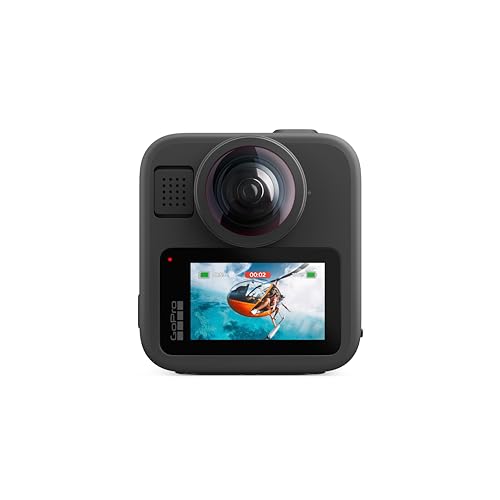
GoPro MAX2 — Best GoPro-route 360 and action hybrid
The MAX2 is GoPro’s full commitment to the idea that an action camera should see in every direction, wrapped in the ecosystem its loyalists already own: the mounts, the handling, the app habits. Its spherical 8K video carries the same honest asterisk as the X4’s — the sphere is 8K, your reframed flat export is a window within it — and within that truth it delivers the GoPro virtues in 360 form: ruggedness, waterproofing, stabilisation polish and a touchscreen interface that works with cold, wet fingers at the top of a lift.
For creators embedded in action sports, the MAX2’s argument is continuity. Footage reframes through familiar software, mounts swap between it and traditional GoPro bodies without a new hardware language, and its dual personality — full 360 capture or conventional action framing — covers a whole trip in one small unit. The 29MP 360 stills are a genuine bonus for creators who pull photographs from the same adventures, capturing scenes rather than viewpoints.
Choose between it and the X4 on ecosystem and editing taste rather than headline numbers, because their spheres are peers and their workflows are the real difference. Riders starting fresh should try both apps before deciding; riders already fluent in GoPro’s world will find the MAX2 the path of least resistance to reframed, everywhere-at-once footage — bought, as with its rival, for the reframing and not for the resolution figure.
MAX2 footage rewards one field habit above all: clean lenses, checked obsessively. Two exposed hemispheres gather fingerprints, spray and dust at twice the rate of a normal action camera, and a smudge on either lens smears across the stitched world in a way no reframing can crop out. Riders who build the wipe into every stop — microfibre in the chest pocket, ten seconds, both domes — produce footage that looks a generation cleaner than riders who do not. The camera’s ruggedness handles the crashes; only you can handle the fingerprints.
- Spherical 8K 360 video recording
- 29MP 360 still photographs
- Traditional action camera mode included
- Waterproof, touchscreen-equipped body
- GoPro mount and app ecosystem
Strengths
- Seamless fit with existing GoPro kit
- Excellent stabilisation heritage in 360 form
- Strong 360 stills as well as video
Trade-offs
- Reframed footage shares the class’s detail ceiling
- Two-lens stitching needs care at close range
- Best experienced inside GoPro’s software world
Best for: GoPro-loyal action creators adding true 360 capture to an existing mount collection.
Not suited for: detail-first filmmakers or low-light specialists.
Sony a1 Series (a1 and a1 II) — Prose-only reference — the hybrid elder statesman
Any honest map of the 8K landscape includes Sony’s a1 line, and this guide includes it the way its rules allow: in prose, without a purchase link, because no verified listing for it sits in the pool. The original a1 rewrote hybrid expectations by pairing a high-resolution stacked sensor with 8K recording and stills speed that sports photographers adopted immediately; its successor refined the formula with modern processing and subject recognition. For Sony E-mount shooters, the a1 series remains the single-body answer to briefs that would otherwise need two cameras.
Its 8K is the genuine frame-based article — full-width, detailed, and paired with Sony’s deep log and colour toolkit — while its stills side is arguably the strongest in this entire guide, which is precisely its market: photographers who film seriously rather than filmmakers who photograph occasionally. Rolling shutter behaviour, heat on long takes and the flagship tariff all apply as they do to its Canon and Nikon peers; the differences are mount, menus and the feel of the thing in the hand.
Cross-shop it wherever you buy your Sony gear, with the usual verification discipline. It appears here so that the linked flagships’ claims are measured against the full class — and on that full-class measure, the a1 line’s combination of resolution, speed and video depth still sets a bar the others must clear rather than merely match.
The a1 line’s resale and rental presence tells its own story about professional trust: bodies circulate through rental houses and second careers because the specification refused to date. For a buyer weighing it against the linked flagships, that longevity is a financial feature — flagship money spent on a camera the market respects for years returns more of itself than the same money spent on a fashionable specification. Judge it, as ever, on the mount you own and the stills-to-video ratio of your actual diary.
- High-resolution full-frame stacked sensor
- 8K video recording with Sony log profiles
- Flagship stills burst and autofocus performance
- E-mount lens system
- Covered in prose only in this guide — no link
Strengths
- Stills and video excellence in one body
- Deep Sony lens and accessory ecosystem
- Class-reference hybrid performance
Trade-offs
- No verified listing linked from this guide
- Flagship pricing across body and lenses
- 8K endurance demands the usual planning
Best for: Sony-system professionals whose work is stills-led with serious video obligations.
Not suited for: buyers who need a purchase link from this page, or video-only shooters paying for stills speed they will not use.
Nikon Z 9 — Prose-only reference — the production flagship
The Z 9 is the camera the Z 8 distilled, and it earns its prose-only place here as the production end of the 8K spectrum: a full-size, gripped flagship built for professionals whose shoots are long, whose environments are hostile and whose clients do not accept technical excuses. Its internal raw recording, 8K options and stacked-sensor speed arrived as a statement that Nikon intended to lead hybrid production, and the body has spent the years since making good on it across sports, wildlife and commercial sets.
Where the Z 9 separates itself from its smaller sibling is endurance and integration: the built-in grip’s battery capacity, the thermal headroom of the larger body, and handling designed for gloved, hurried, professional use. Filmmakers mounting it in rigs and photographers shooting it bare both get a tool that treats a twelve-hour day as a normal shift. Its 8K shares the family’s honest characteristics — real frames, real data rates, real storage bills — at the scale its owners budget for as a matter of routine.
Like the Sony above, it is covered without a link because this guide’s pool holds no verified listing for it; buy it through your usual professional retailer if its profile matches your work. Its role here is calibration. When the linked Z 8 is described as carrying flagship DNA, the Z 9 is the genome — and professionals choosing between them are really choosing how much endurance their shooting days demand.
Productions choose the Z 9 for a reason that reads as dull and decides everything: it finishes the day. Long interviews, summer exteriors, multi-camera sets where one body cannot be the one that stopped — the flagship’s endurance converts 8K from a specification into a schedule. If your work has ever lost a take to a camera’s limits, the Z 9’s premium is not buying resolution at all. It is buying the absence of that sentence from your production reports, which professionals price correctly as the most valuable feature in this guide.
- Full-frame stacked sensor, integrated grip body
- Internal raw and 8K video recording
- Extended battery and thermal endurance
- Z-mount professional ecosystem
- Covered in prose only in this guide — no link
Strengths
- Endurance built for professional production days
- The Z system’s fullest video specification
- Handling designed for working professionals
Trade-offs
- No verified listing linked from this guide
- Size and weight are commitments, not details
- Total system cost is the class’s highest here
Best for: full-time professionals whose 8K work is long-form, client-critical and rig-based.
Not suited for: travellers, hobbyists or anyone counting grams.
Comparison Table
| Pick | Defining traits |
|---|---|
| Canon EOS R5 Mark II | 8K RAW flagship — the Canon system’s video summit. |
| Nikon Z 8 | Stacked-sensor Nikon flagship — the production shooter’s 8K. |
| Insta360 X4 | 8K sphere, reframed later — the action creator’s insurance policy. |
| GoPro MAX2 | GoPro’s spherical flagship — 360 capture with action-camera manners. |
| Sony a1 Series (a1 and a1 II) | Prose-only: the E-mount hybrid reference point. |
| Nikon Z 9 | Prose-only: Nikon’s full-size production flagship. |
What Does 8K Actually Demand From You?
Before the cameras, the costs — because 8K’s price is paid in five currencies, and the purchase price is the smallest of them.
Data rates turn storage into a line item
An hour of high-quality 8K footage occupies storage on a scale that surprises even experienced 4K shooters — hundreds of gigabytes, varying by codec, with raw formats at the punishing end. That arithmetic cascades: cards fast and large enough to sustain the recording, a card reader that does not waste the evening, working drives with genuine speed, and an archive strategy that does not quietly become a shoebox of unlabelled SSDs. Budget the pipeline alongside the camera. Creators who skip this step discover it during their first wedding, product launch or travel day, when the cards fill before the story does.
Your editing machine is part of the camera
8K timelines punish computers that cruise through 4K. Some codecs decode gracefully with modern hardware acceleration; raw and lightly compressed formats demand proxies, patience or a workstation. Before buying any camera here, download sample footage in the exact format you intend to shoot and cut a five-minute timeline on your actual machine — add transitions, colour, a title — and watch whether the experience is editing or waiting. That single test, done before purchase, is worth more than any benchmark, because a camera whose footage you dread opening is a camera you will stop carrying.
Rolling shutter: the flagship flaw to check per camera
Electronic shutters read the sensor line by line, and on fast pans or vibrating mounts the world briefly turns to jelly. 8K modes differ widely here: some read out fast enough that the effect hides in normal shooting, others demand disciplined, tripod-minded camera movement. The reviews below flag each camera’s behaviour in the shooting styles that provoke it — whip pans, vehicle mounts, walking footage. If your work involves fast lateral motion, rolling shutter behaviour should outrank resolution in your decision, because no delivery format rescues a wobbling frame.
Heat scales with ambition
Reading a full sensor at 8K and compressing the result generates heat that small bodies struggle to shed, and every mirrorless flagship manages it differently — fans, body mass, recording limits, graceful warnings. The honest question is never whether a camera can record 8K, but for how long, at your frame rate, in your climate, with what recovery time between takes. Event shooters and interviewers should weight this as heavily as image quality; clip shooters in cool studios may never meet the limit at all. Each review states its camera’s practical endurance in plain terms.
Deliver in 4K, master in 8K: the workflow that justifies it all
The mature 8K workflow treats the big frame as raw material. Shoot wide enough to reframe, stabilise in post with the spare pixels, punch in for a second angle from the same take, export vertical and horizontal versions from one master, then deliver a 4K file whose downsampled cleanliness viewers genuinely can see. Archived at 8K, the same footage remains re-editable when delivery standards move. This is the workflow the mirrorless picks below are built for — and if none of it describes your plans, the honest conclusion is that you are shopping a tier above your needs.
Test with sample footage before any flagship purchase
This guide repeats the advice because it is the highest-value hour in the whole buying process: obtain sample files in each candidate’s exact recording formats, load them into your editing software on your computer, and perform your real operations — multicam sync, colour, stabilisation, export. Cameras that tie on specifications separate immediately under this test, usually on codec friendliness, and the winner is the one whose footage your pipeline welcomes. No review, including this one, can run that test for you, because the variable being measured is your machine.
Audio and support kit scale with the sensor
A flagship recording quietly exposes every weakness around it: the tripod head that trembles at 8K scrutiny, the microphone that sounded acceptable under 4K softness, the follow focus that was always slightly vague. Budget a support pass alongside the body — sticks that lock without drift, audio that deserves the image, monitoring you trust. Shooters who skip this discover that upgrading the camera downgraded their footage’s perceived quality, because the new clarity is an auditor that reports every corner cut around it.
How Does 8K Change the Way a Shoot Feels?
Beyond pipelines and pixels, the format changes behaviour on set — mostly for the better, occasionally as a discipline problem. Six observations from the flagship class as a whole.
Framing becomes a decision you can postpone — carefully
The crop freedom of an 8K master tempts shooters to frame loosely and decide later, and used deliberately it is liberation: one operator covers the wide and the close-up, interviews gain a second angle, and horizon corrections stop costing resolution. Used lazily it is a tax: every frame composed in post is a frame not composed at all, and editors drown in options. The professionals who thrive with 8K compose as if delivering the frame they see, then treat the spare pixels as insurance. Insurance you hope not to claim is the correct mental model for the entire format.
Monitoring lies to you more politely
No field monitor shows you 8K; you judge focus and exposure through downsampled previews and focus aids, trusting the master to hold more than you can see. That trust must be earned per camera — learn its peaking honesty, its exposure tools, the point where its high-ISO image stops grading gracefully. Flagship buyers who spend a weekend deliberately breaking their camera’s image in test shoots make calm decisions on real ones. The format’s forgiveness for exposure and focus errors is real but finite, and its limits are found in private or in public, at your choice.
Sound stays stubbornly analogue
A quiet irony of the 8K era: the cameras here record sound no better than cameras a fifth of their price, and the films that justify the format are usually betrayed or crowned by audio recorded on entirely separate equipment. Budget the recorder, the microphones and the sync discipline alongside the body. An 8K image with location sound from a camera’s built-in microphones impresses for exactly one viewing. The flagship purchase that includes an audio plan is the one audiences describe as cinematic, usually without knowing why.
Clients cannot see 8K and can absolutely see its absence of mistakes
The commercial case for the format is not a resolution reveal at delivery; it is the accumulation of rescues — the reframed group shot, the stabilised tracking move, the punched-in reaction — that clients experience as a production that never missed. Filmmakers who sell 8K sell that reliability, and deliver in pristine 4K. Understanding this protects you from the format’s silliest disappointment: waiting for a client to gasp at pixels, when the gasp was always meant for the save in scene three.
The format rewards crews and punishes improvisation
8K’s costs concentrate where improvisation lives: the spontaneous extra hour, the unplanned second location, the card that should have been enough. Planned shoots absorb the format gracefully — media managed, power scheduled, takes selected. Run-and-gun shooters can still thrive, but their version of planning is ruthless selectivity about what earns the big format. Either way, the camera quietly trains its owner toward intentionality, which may be the most transferable skill in this entire guide.
Codecs are a personality test
Every flagship here offers a spectrum from efficient compressed recording to raw, and where a shooter lives on that spectrum reveals their real priorities. Raw devotees are buying grading freedom and archival purity at the price of storage and time; compressed shooters are buying speed of turnaround and sanity. Neither is more professional — news and wedding workflows would collapse under all-raw discipline, while commercial colour work starves without it. The mature move is per-project honesty: decide the codec when you decide the delivery, not from a forum’s hierarchy of virtue.
The vertical dividend nobody budgeted for
An unplanned benefit has become a genuine selling point of the big frame: vertical crops for phone platforms that retain real quality. A generation of creators discovered their 8K masters could supply both the widescreen film and the vertical cutdowns without a second shoot, and for commercial work that doubling of deliverables is billable value. It also disciplines framing — centre-weighted compositions that survive both crops are becoming the house style of flagship shooters, a quiet aesthetic consequence of a technical feature.
When 4K from an 8K camera beats native 4K cameras
A pattern worth knowing if you are cross-shopping tiers: the flagships’ oversampled 4K modes frequently out-resolve and out-grade dedicated 4K cameras, because the whole pipeline — sensor, processing, codecs — operates with headroom. Some buyers in this guide’s audience should therefore buy a flagship and shoot it mostly in 4K, treating 8K as the reserve for hero material. That is not the waste it sounds like; it is buying the best 4K camera available and receiving an 8K option in the same body.
Insurance and resale: the flagship’s quiet economics
Flagship bodies hold value with a stubbornness that mid-tier cameras never match, because professional demand for known tools persists across model cycles. Rental value, resale value and the simple fact of a body that remains supportable and repairable for years all soften the purchase’s true cost. This does not make an 8K flagship cheap; it makes it a capital purchase rather than a consumable one, and it belongs in the decision for any buyer whose camera work earns money. Enthusiasts should still buy for love or not at all — but they can love it knowing the market will, too.
Who Actually Needs 8K — and Who Is Renting a Number?
Four working profiles, matched honestly against the format’s real benefits and its real bills.
The commercial and wedding filmmaker
Your clients pay for polish and insurance. 8K earns its fee here: a ceremony captured on one wide camera becomes two framings in the edit, a product shot stabilises into silk, and the master archive stays sellable when a client returns in three years asking for a re-cut. The Canon R5 Mark II and Nikon Z 8 split this vote by lens mount and handling taste. Budget the cards and drives as production costs, charge accordingly, and the format pays for itself in rescued takes within the first season.
The solo creator with cinematic ambitions
Your case is real but narrower. Downsampled 4K will lift your image quality visibly, and reframing freedom suits one-person crews who cannot be behind the camera and in front of it simultaneously. The danger is workflow drag: if 8K doubles your edit time, you will publish less, and publishing less is the one cost a growing channel cannot afford. Buy the flagship only with a machine that edits its footage happily — or shoot the same camera in its excellent 4K modes and treat 8K as the special-occasion setting it honestly is.
The action and travel shooter
Your 8K question is really a 360 question. The X4 and MAX2 record everything around you and let you choose the frame later — a superpower for sports, travel and any moment that cannot be re-run. Understand the exchange precisely: the reframed flat footage you publish is far below 8K in resolution, and looks it beside mirrorless footage. What you gain — impossible angles, after-the-fact framing, one tiny waterproof camera — is worth more than pixels for your genre. Just buy it for the reframing, not for the number on the box.
The enthusiast tempted by the flagship halo
Be honest with this guide, because it will be honest with you: if your films are family archives and hobby projects delivered to a television, a superb 4K camera and the lenses, light and audio the savings buy will produce visibly better films than an 8K flagship starved of accessories. The flagships below are magnificent and, for your work, mostly surplus. The exception is the enthusiast who simply delights in owning the summit — a legitimate reason, provided it is admitted and the storage pipeline is funded alongside the body.
The property, architecture and landscape filmmaker
Your subjects hold still and reward detail with interest. Slow pans across a facade, a dawn skyline rendered for a lobby screen, a landscape master that will be cropped for a decade of uses — this is 8K’s home turf, where rolling shutter stays tame, heat is managed in cool morning air, and the downsampled delivery looks like money. Either linked flagship serves; choose by the lenses you already love, light like a photographer, and let the format do the one thing it does better than any other in this guide: preserve a scene at a fidelity that outlives the project.
What Mistakes Do Buyers Keep Making Here?
Comparing 360-degree 8K with mirrorless 8K as if they were rivals
The numbers invite the error and the marketing does nothing to prevent it. An 8K sphere spreads its pixels across every direction at once; the window you reframe from it uses a fraction of them. A mirrorless 8K frame spends all its pixels on the scene in front of the lens. Neither is cheating — they are different instruments — but a buyer who expects X4 footage to match R5 Mark II footage for detail will feel cheated by arithmetic they were never shown. This guide shows the arithmetic in both reviews; carry it into every comparison you read elsewhere.
Budgeting for the body and discovering the ecosystem
The flagship body is the cover charge. Cards that sustain 8K data rates, in multiples; drives that hold a season of masters; a computer that edits without proxies or a proxy workflow with the discipline to match; batteries that feed the hungriest modes — the ecosystem routinely rivals the body’s cost within a year. Buyers who plan for it thrive. Buyers who do not end up shooting their 8K camera in 4K to save cards, which is the most expensive way imaginable to own a 4K camera.
Shooting everything in 8K because the camera can
Resolution discipline is a production skill. Interviews that will never be reframed, b-roll destined for a vertical crop, behind-the-scenes footage — much of a normal shoot gains nothing from 8K and pays its full storage and editing tax anyway. The professionals who love the format are selective with it: 8K for the hero takes, the wide masters, the shots whose framing cannot be finalised on set; excellent 4K for everything else. Cameras here all shoot superb 4K. Using it is not a confession of failure.
Ignoring rolling shutter until the vehicle mount
The jelly effect ambushes specific shots: pans across architecture, footage from vibrating vehicles and drones, fast action tracked laterally. Shooters discover it in the edit, where it is permanent. Test any 8K camera in your most movement-heavy scenario before the work depends on it, prefer the faster-readout modes your camera offers for action, and learn the old cinematographer’s discipline of panning at a pace the sensor can honour. The format rewards smooth operators in every sense.
Archiving masters with no plan and calling it future-proofing
An 8K master on a single ageing drive, in a proprietary raw format, with no catalogue, is not an archive; it is a countdown. Future-proofing is a system: redundant copies, mainstream formats or documented conversion, project files kept with media, and a naming scheme your future self can parse. Creators who build that system genuinely own their back catalogue. Creators who skip it own a pile of expensive files they will one day pay to recover — or quietly stop opening.
Assuming the audience will notice, and sulking when they do not
A predictable heartbreak awaits creators who buy 8K as a growth strategy: the audience praises nothing, because the audience was never watching pixels — they were watching story, light and sound, delivered at whatever resolution their phone chose. The format’s dividends are real but they arrive disguised as production quality, not as compliments. Buy it for the workflow freedoms catalogued in this guide and your satisfaction is guaranteed by arithmetic; buy it for applause and no camera at any resolution can save the investment from disappointment.
Final Recommendation
Between the linked flagships, the choice is mount and temperament: the Canon EOS R5 Mark II for Canon shooters and hybrid creators who want raw 8K headroom, the Nikon Z 8 for Nikon glass owners and production shooters who value its video depth in a slightly denser body. The 360 pair answer a different calling entirely — buy the Insta360 X4 or GoPro MAX2 for reframing freedom in action and travel, with eyes open about what their 8K becomes on export. The prose-only Sony a1 line and Nikon Z 9 remain the class’s elder statesmen, worth cross-shopping wherever you buy. And if your honest workflow is 4K, every camera here will serve it beautifully — the format was never the film. The productions that thrive at this level share one habit worth copying whatever you buy: they decide the delivery first, the master format second, and the camera itself last of all, in precisely that order, every single time, without exception, on every production, large or small.
Buy 8K for the shots only 8K can save — the reframe, the rescue, the master that outlives its delivery — and it will earn its storage a hundred times over; buy it for the number alone, and the number is all you will ever get.
Frequently Asked Questions
Is 8K video actually visible to viewers?
On the screens audiences own today, almost never as resolution — and that is the wrong test. What viewers do see is the consequence of 8K capture: cleaner downsampled 4K, steadier stabilised shots, tighter crops that still hold detail, and vertical edits that do not dissolve into softness. Judge the format by those visible dividends rather than by the fantasy of an audience in 8K televisions. If your delivery is casual and your framing is careful, the dividends shrink — which is why this guide keeps asking about workflow before recommending the format to anyone.
How big are 8K files in practice?
Large enough to plan around, small enough to manage with discipline. Depending on codec and frame rate, an hour of 8K can range from the low hundreds of gigabytes in efficient compression to well beyond a terabyte in raw. A working day on a flagship can therefore fill cards that a 4K shooter would consider a month’s supply. The practical responses are boring and effective: shoot selectively, offload nightly to fast drives, keep two copies before formatting anything, and let the archive budget grow with the channel rather than ambushing it.
What is rolling shutter and should it worry me?
It is the skew that appears when a sensor reads a scene progressively while the camera or subject moves fast — vertical lines lean, pans wobble, vibrations turn to jelly. It should worry you in proportion to your movement: tripod interviews will never meet it, vehicle-mounted and whip-panned action lives inside it. Flagships differ meaningfully here, with faster sensor readouts taming the effect, and the effect also softens in many cameras’ lower-resolution modes. Know your most violent shot, test for it, and the issue becomes a managed variable rather than a surprise.
Can my computer edit 8K footage?
Possibly — the only honest test is your machine, your software and sample files in your intended format, which manufacturers and reviewers make available. Modern hardware acceleration handles some 8K codecs startlingly well; raw formats remain heavy for almost everyone and are routinely edited through proxies, a normal professional workflow rather than an admission of defeat. Factor a storage and possibly a hardware upgrade into the flagship budget, and the question answers itself in the only place it matters: your edit bay, before the money moves.
Why are two cameras in this guide not linked?
Because this guide links only listings it has verified, and no verified listing for Sony’s a1 series or Nikon’s Z 9 sits in its pool. They are covered in prose — fairly, with their strengths stated — because excluding the class’s reference points would mislead you more than including them without a purchase path. If you buy either, you will do so through your usual retailer with the same checks this guide applies everywhere: confirm the exact model, the bundle contents and the return terms before the card comes out.
Is a 360 camera a substitute for a mirrorless flagship?
No — it is a substitute for a camera crew’s worth of angles in situations where a flagship cannot go. The 360 cameras here are waterproof, mountable anywhere and capture everything, which makes them irreplaceable for action, travel and immersive work. Their reframed flat footage cannot match a flagship’s detail, colour depth or low-light grace, and was never meant to. Most serious action filmmakers eventually own both kinds and choose per shot. Buy the one that matches the film you are actually making this season.
Do I need special cards for 8K recording?
Yes, and the requirement is about sustained write speed rather than headline capacity. 8K data rates — especially raw — demand the fast card formats these flagships specify, written continuously for minutes at a time, which is a harsher test than stills bursts. Buy the card class the camera’s manual names for your intended format, in multiples, from reputable sources; counterfeit and under-specified cards fail mid-take, which at 8K prices is an expensive education. Treat cards as consumable production stock, not accessories.
Should I shoot 8K or oversampled 4K on a flagship?
Shoot 8K when the take needs its freedoms: uncertain framing, planned stabilisation, dual-orientation delivery, or a master you intend to keep. Shoot the camera’s oversampled 4K for everything routine — it inherits the sensor’s quality, halves your storage pain, and edits like a dream. Professionals treat the choice as per-shot production design rather than a camera setting to set once and defend. The only wrong answer is the unexamined default, in either direction, applied to footage whose purpose you have not considered.
Will my current computer handle editing 8K footage?
Probably, provided you let the editing software work with proxies rather than the original files. Every mainstream editor can generate low-resolution stand-ins automatically, edit against those at full speed, and reconnect to the 8K originals only for the final export, so the machine that edits your 4K projects today will usually manage an 8K timeline with patience at render time rather than new hardware. What 8K does punish is storage and card discipline: the files are several times larger than equivalent 4K, archives fill quickly, and a slow card reader becomes the bottleneck of every ingest. Budget your workflow around fast media, a reader that matches it, and an archive drive with genuine headroom, and the resolution itself stops being the obstacle.
Related Guides
Set up the rest of the flagship workflow with our companion guides: best CFexpress cards for 8K video, best computers and monitors for video editing and best full-frame lenses for video production.
Related guides
- Best Canon Point and Shoot Digital Cameras: PowerShot Picks From Pocket Compacts to Travel Zooms
- Best Balancing Stabilizers for Mirrorless Cameras: Payload, Balancing and Native Vertical Shooting
- Best Sony Full Frame Cameras for Astrophotography: Sensitivity vs Resolution
- Best Basic Phones Camera Buyers Can Trust: Flip Phones and Simple Handsets That Still Take a Photograph


