What's inside
- Where to buy
- Key Takeaways
- Quick Picks
- How Did We Judge Tablets at the Bottom of the Price Ladder?
- Which Budget Eight-Inch Tablets Are Worth Their Compromises?
- Where Does Each Budget Pick’s Risk Sit?
- What Quality Should You Honestly Expect Inside This Frame?
- Why Does the App Store Matter More Than the Processor Here?
- How Do You Set Up a Budget Tablet So It Feels Faster?
- What Should Parents Know Before Buying at This Level?
- How Do You Make a Budget Tablet Last as Long as Possible?
- What Is the Real Cost of the Cheapest Tablet You Can Find?
- How Should You Download for Travel on a Small Budget Tablet?
- When Should You Skip This Budget Entirely?
- How Do You Choose Between the Fire and a Budget Android Tablet?
- What Happens to a Budget Tablet’s Value After Two Years?
- How Should Grandparents and First-Time Users Approach This Shelf?
- Why Do Budget Tablets Make Such Good Travel and Kitchen Screens?
- Which Budget-Tablet Mistakes Waste the Most Money?
- Final Recommendation
- Frequently Asked Questions
- Related Guides
As an Amazon Associate I earn from qualifying purchases. This post may contain affiliate links at no extra cost to you.
**gizmoverdict.com is reader-supported. When you buy through links on our site, we may earn an affiliate commission.**
Where to buy
Four of the six tablets below carry verified listings and are linked in the Quick Picks table and again where they are reviewed; two are described in prose because no listing we could verify belongs in a buying guide. A note on language before anything else: this guide follows the keyword’s budget frame in words, not figures — tablet prices move weekly, a printed number would be wrong by the time you read it, and the honest test is which side of the frame each model sits on when you check it yourself.
The best 8 tablets under 100 — read that phrase the way this guide does, as eight-inch tablets inside a strict budget frame — is a category that rewards honesty more than enthusiasm. At this level of spending, a tablet is a bundle of compromises wearing a screen, and the reviewer’s job is to name them in the right order: what is slow, what is dim, what will stop being updated, and what, despite all of that, still does its intended job well enough to be worth owning.
Here is the quality picture without decoration. Screens at this level are HD rather than sharp, processors pause before they obey, memory is sized for one app at a time, and cameras exist because the spec sheet has a box for them. None of that prevents a good purchase. A tablet that streams a film smoothly, reads a book comfortably and survives being dropped by a child has delivered everything its price promised — the failures in this category are the tablets that cannot do even those things reliably, and the listings that pretend otherwise.
The six below divide into three honest groups. There is the 2020 Amazon model, cheap because it is old, running Amazon’s closed but simple system. There are the current budget Android tablets from Lenovo and Samsung, which cost more of the frame and return more tablet. And there are two prose-only warnings: a discontinued seven-inch Amazon line that now survives only in murky listings, and the anonymous no-name tablets that flood marketplaces at prices that should provoke suspicion rather than clicks.
Key Takeaways
- This guide’s frame is the keyword’s budget in words: no printed prices, because they expire faster than articles do.
- The Fire HD 8 listed here is the 2020 generation — the discount is its age, and its remaining support is short.
- Lenovo’s Tab One and Tab M9 are the straightforward Android buys: Google Play, modest memory, light duties only.
- Samsung’s A9 8.7 inch sits at or beyond the top of the frame in most listings; it is here as the ‘stretch’ option, labelled as such.
- Discontinued and no-name tablets fill the cheapest listings; both are covered in prose, with no links, deliberately.
- At this budget, buy the job — streaming, reading, calls — not the specification sheet.
Quick Picks
| Pick | Badge | Why it earns a place |
|---|---|---|
| Amazon Fire HD 8 (2020) | Cheapest verified route | The 2020 generation at 8.0 inches and 32GB: a streamer and reader whose price reflects its age — buy it knowingly. |
| Lenovo Tab One 8.7″ | Straightforward Android pick | An 8.7 inch HD Android tablet with 4GB of memory and full Google Play — the simple, standard answer in this frame. |
| Lenovo Tab M9 9″ | Slightly larger, still in frame | A 9.0 inch HD Lenovo with modest memory — the extra inch of screen is its argument, the 3GB-class hardware its limit. |
| Samsung Galaxy Tab A9 8.7″ | The stretch option — at/above the frame | Listed honestly as sitting at or beyond the top of this budget frame: the quality step-up for buyers who can stretch, international Wi-Fi version. |
| Amazon Fire 7 (discontinued generations) | Prose-only — discontinued | No link and no recommendation to hunt one down: Amazon’s 7 inch line has ended, and its remaining listings are old stock at confused prices. |
| Unbranded marketplace tablets (the no-name shelf) | Prose-only — the category warning | The tablets with invented specifications and too-good prices, described without a link because linking one would be the opposite of guidance. |
How Did We Judge Tablets at the Bottom of the Price Ladder?
First, verifiability. Every linked pick had a clean, checkable listing from a recognisable brand when this guide was assembled. That single rule removes most of the category’s danger, because the budget shelf is where listings lie most freely — inflated memory figures, invented Android versions, screens described by adjectives instead of resolutions. If a claim could not be checked against the manufacturer’s own specifications, the tablet did not get a link.
Second, we ranked by the jobs budget tablets are actually bought for: streaming video, reading, web browsing, video calls, children’s apps, and service as a household spare screen. A tablet that does those steadily beat a tablet with a bigger number in one specification and stumbles in daily use. Gaming beyond the casual, document work beyond the light, and anything resembling photo editing were treated as out of scope — not as failures, but as questions this budget cannot answer.
Third, support and store access were weighed as quality, because at this level they are. A tablet locked to a thin app store, or one whose security updates have ended, costs its owner in friction and risk that never appears in the listing. Amazon’s Fire OS, standard Android and Samsung’s longer update commitment are three different answers, and the sections below keep returning to them because they shape ownership more than any processor does.
Which Budget Eight-Inch Tablets Are Worth Their Compromises?
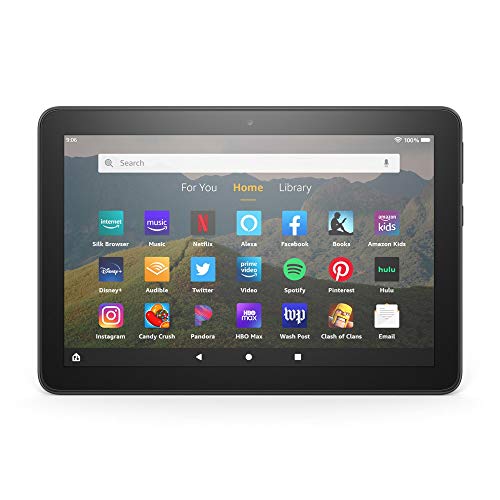
Amazon Fire HD 8 (2020) — Cheapest verified route
Start with the year, because the year is the product. This Fire HD 8 is the 2020 generation, and everything about it — the low cost, the modest speed, the short remaining update runway — follows from that date. Amazon’s Fire tablets are built to a price even when new; a six-year-old one is a simple appliance, and judged as an appliance it still works: the major streaming apps run, Kindle books read comfortably on the 8.0 inch HD screen, and the body tolerates household life without a case budget doubling the purchase.
Fire OS defines the ownership experience. It is Amazon’s version of Android with Amazon’s store instead of Google Play, a home screen that promotes Amazon content, and deep integration with Prime Video, Kindle and Alexa. For a household already inside those services, the integration is a convenience. For anyone who needs a specific Google app — a school platform, a particular banking app — the absence is a wall, and no sideloading workaround belongs in a recommendation to a general reader.
Set the job before you buy: bedside streaming, a kitchen screen for timers and video, a child’s story and film player under Amazon’s strong parental controls. Within those jobs the 2020 Fire HD 8 is a rational, inexpensive tool. As a main tablet it is already out of its depth — apps open slowly, multitasking punishes, and its software future is behind it. Cheap and honest beats cheap and pretending, and this pick is included on exactly those terms.
- Screen: 8.0 inches, HD
- Generation: 2020 — stated everywhere in this guide
- Storage listed: 32GB plus microSD expansion
- System: Fire OS; Amazon Appstore, no Google Play by default
- Controls: Amazon parental controls built in
Strengths
- Lowest-cost verified branded route to this size
- Streaming and Kindle reading still work steadily
- Strong parental controls for a child’s first screen
Trade-offs
- 2020 hardware: slow, and near the end of updates
- Fire OS store lacks many Google-ecosystem apps
- 32GB needs a memory card almost immediately
Best for: households wanting an inexpensive streamer and reader for a defined, light job.
Not suited for: anyone needing Google Play, school apps, or a tablet to keep for years.

Lenovo Tab One 8.7″ — Straightforward Android pick
The Tab One’s virtue is normality. It runs standard Android with the full Google Play store, carries 4GB of memory and 64GB of storage behind an 8.7 inch HD screen, and asks its owner to learn nothing unusual. In a category full of forks, clones and creative specification writing, a tablet that is exactly what it appears to be is worth pausing on — setup is Google’s familiar flow, apps are the apps your phone runs, and a relative’s advice actually applies to it.
Performance matches the frame honestly. Streaming is smooth, browsing is fine with a sensible number of tabs, video calls are clear in decent light, and casual games behave. Ask for two demanding apps at once, or a heavy 3D game, and the 4GB of memory answers with reloads and reduced settings. The HD screen is the other visible compromise: perfectly watchable for video, noticeably soft on small text, which makes the Tab One a better film and call screen than a long-form reading machine.
Against the Fire it trades Amazon’s polish and price for freedom of apps; against the Samsung A9 it trades build and support length for a lower position in the frame. That middle position is where most budget buyers actually live, and the Tab One occupies it without tricks. Buy it as the household’s second screen or a traveller’s spare, and its limits will rarely be the ones your day touches.
- Screen: 8.7 inches, HD
- Memory listed: 4GB RAM, 64GB storage
- System: Android with Google Play
- Expansion: microSD — verify configuration on listing
- Cameras: basic front and rear, call-quality front
Strengths
- Full Google Play with no store workarounds
- Simple, standard Android that any phone user understands
- Well matched to streaming, calls and browsing
Trade-offs
- HD screen is soft for dense reading
- 4GB of memory reloads apps when multitasking
- Lenovo support horizon is modest
Best for: households after a normal Android tablet for light jobs at a budget position.
Not suited for: heavy multitaskers or readers of dense documents.

Lenovo Tab M9 9″ — Slightly larger, still in frame
The Tab M9 stretches this guide’s size to 9.0 inches, and that extra fraction is the whole pitch: video gets a little more presence, web pages breathe a little easier, and the tablet still handles like a small one. Lenovo positions the M9 as a portable entertainment screen, and in that role — streaming, catch-up television, a film in bed — its HD panel and stereo speakers do honest work at a budget position in the frame.
The hardware underneath is the frame’s floor and should be read carefully on the listing: memory in this class is minimal, storage is small, and both facts shape daily life. Keep one app in front of you and the M9 is pleasant; treat it like a phone with six apps in rotation and it will spend its time reloading them. A microSD card for downloaded media is close to mandatory for travellers, and streamed rather than stored content is the pattern this tablet was built around.
Why choose it over the Tab One? The screen, and a slightly more media-focused build. Why choose the Tab One instead? Its more comfortable memory for everyday app switching. The two Lenovos in this guide are a useful lesson in budget shopping: within one brand and one frame, the differences are small, specific and worth reading rather than assuming the higher model number or the bigger screen wins automatically.
- Screen: 9.0 inches, HD
- Memory: modest — read the exact listing configuration
- Storage: small internal, microSD expansion for media
- System: Android with Google Play
- Audio: stereo speakers, media-focused tuning
Strengths
- Extra screen size helps video and web pages
- Stereo speakers suit its entertainment brief
- Recognisable brand with verifiable specifications
Trade-offs
- Minimal memory punishes multitasking
- Small storage fills without a memory card
- HD resolution spreads thinner over 9 inches
Best for: streamers who want the biggest watchable screen the frame allows from a real brand.
Not suited for: app-switchers, gamers, or anyone storing a large media library onboard.
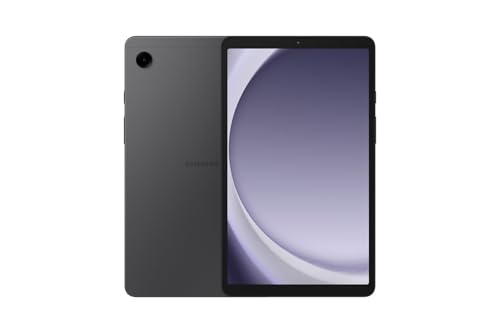
Samsung Galaxy Tab A9 8.7″ — The stretch option — at/above the frame
This pick requires the guide’s clearest label: in most listings the Galaxy Tab A9 sits at the top of this budget frame or beyond it, and it is included because budget guides that hide the stretch option fail their readers. Sometimes the correct advice inside a strict frame is that the frame is one step too low for the job — and the A9 is that step, priced in a different position because it is built and supported like a tablet meant to be kept.
What the stretch buys is tangible. A metal body instead of flexing plastic. Samsung’s split-screen software, which makes even an 8.7 inch screen useful for paired tasks. Performance headroom that keeps the interface smooth when the true budget picks begin to hesitate. And an update commitment from Samsung that runs years beyond the support a no-name or ageing tablet offers — the single largest quality difference in this entire guide, and the one no listing photographs.
The listed model is the international Wi-Fi version with 64GB of storage, so verify warranty and charger details for your region before ordering. There is no active pen support, and the screen, while bright and pleasant, is not in the iPad class. None of that changes the calculus: if your budget can stretch to the A9’s position, it is the only pick here we would happily hand someone as their only tablet. If it cannot, the Lenovos above are honest tools — buy them with their limits understood rather than resenting them later.
- Screen: 8.7 inches
- Position: at or above this guide’s budget frame in most listings
- Storage listed: 64GB Wi-Fi, international version — check warranty details
- System: Android with Samsung One UI, split-screen multitasking
- Body: metal back
Strengths
- Build and software a clear class above the frame
- Longer Samsung update support than budget rivals
- Smooth enough to serve as an only tablet
Trade-offs
- Usually priced beyond the frame this guide is named for
- International listing — verify regional warranty and charger
- No active pen support
Best for: buyers who can stretch once to own a budget tablet for years instead of twice in two years.
Not suited for: strict-frame shoppers — the Lenovos respect the limit better.
Amazon Fire 7 (discontinued generations) — Prose-only — discontinued
The Fire 7 is included in prose to close a door properly. Amazon’s smallest tablet line has been discontinued, no clean current listing could be verified for this guide, and what remains on marketplaces is a mixture of ageing generations, refurbished units of unclear history and prices that drift upward precisely because supply has ended. A discontinued tablet is not automatically a bad tablet — but it is a bad purchase at a scarcity price, which is what these listings tend to become.
Owners of a Fire 7 should keep using it happily for reading and streaming; this entry is about buying, not owning. The 7 inch screen was always the most compromised of the Fire family — dim by modern standards, slow even in its day — and its software support has ended or is ending depending on generation. As a child’s hand-me-down already in the house, it is fine. As a product to seek out and pay for today, it fails this guide’s first test: there is a better use for the same money in the Fire HD 8 or Tab One sections above.
If you meet a Fire 7 listing while shopping, apply the discontinued-product checklist: exact generation and year, battery condition, account lock status, and a price compared against the current budget picks rather than against the seller’s nostalgia. Scarcity is not value in consumer electronics; it is usually just scarcity. The line served millions of readers well, and the respectful thing is to let it retire.
- Screen: 7 inches — smaller than this guide’s class
- Status: discontinued; no verified clean listing
- System: Fire OS, generation-dependent
- Support: ended or ending by generation
- Guide status: prose-only, no purchase link
Strengths
- Existing owners can keep reading and streaming on it
- Tiny size suits small hands and pockets
- Amazon parental controls on later generations
Trade-offs
- No clean new supply — listings are old stock
- Support has ended or is ending
- Prices drift up on scarcity, not quality
Best for: nobody shopping today — included so readers can close the question and move on.
Not suited for: any buyer; choose a current pick above instead.
Unbranded marketplace tablets (the no-name shelf) — Prose-only — the category warning
Every budget search eventually surfaces them: tablets with unfamiliar brand names, enormous claimed memory, recent Android versions at prices below the branded floor, and review sections that read like they were written by the packaging. This entry exists because a guide to this budget that ignored them would be ignoring what many readers are actually about to buy. We link none of them, name none of them, and describe the pattern so you can recognise it under any name it wears next month.
The pattern has tells. Memory figures that combine storage and RAM into one heroic number. Processor descriptions that name a core count instead of a chip. Screens specified in adjectives. Android versions that the claimed hardware cannot be running. And the deepest tell: no manufacturer specification page exists anywhere to check the listing against. A branded budget tablet is compromised in known ways; a no-name tablet is compromised in unknown ways, and unknown is the expensive kind — in returns, in dead updates, in a charger you do not quite trust.
There are narrow exceptions — a technically confident buyer using one as a dedicated single-purpose screen, a photo frame, a smart-home panel, with no accounts that matter on it. For a child’s main tablet, a parent’s only screen, or anything touching email and banking, the answer is the branded floor: the Fire, the Lenovos, or the Samsung stretch. The cheapest tablet is the one you buy once; the no-name shelf’s real price is usually the second tablet you buy after it.
- Screen: varies; claims often unverifiable
- Memory: figures frequently combine RAM and storage misleadingly
- System: Android versions as claimed, rarely as delivered
- Support: effectively none in most cases
- Guide status: prose-only warning, no purchase link
Strengths
- Lowest sticker prices in any search result
- Can serve as a single-purpose display for experts
- Wide availability when branded stock runs out
Trade-offs
- Specifications routinely cannot be verified
- No meaningful update or warranty support
- Build and charger quality are unknown quantities
Best for: expert tinkerers needing a disposable single-purpose screen, with no important accounts on it.
Not suited for: children’s main tablets, parents’ only screens, or any use involving email and banking.
Where Does Each Budget Pick’s Risk Sit?
Read this table as a risk map rather than a race. The columns that matter at this budget are the system — which decides your apps — and the warning column, which at this end of the market is where the truth lives.
| Pick | Screen | System | Pen / notes | Watch out for |
|---|---|---|---|---|
| Amazon Fire HD 8 (2020) | 8.0 in | Fire OS | Capacitive touch only | 2020 generation; short support left |
| Lenovo Tab One 8.7″ | 8.7 in | Android | Capacitive touch only | Light-duty memory; one app at a time |
| Lenovo Tab M9 9″ | 9.0 in | Android | Capacitive touch only | Minimal memory; stream, don’t store |
| Samsung Galaxy Tab A9 8.7″ | 8.7 in | Android | No active pen | Stretch pricing; international version |
| Amazon Fire 7 (discontinued generations) | 7.0 in | Fire OS | Capacitive touch only | Discontinued; do not hunt listings |
| Unbranded marketplace tablets (the no-name shelf) | varies | Android (claimed) | Capacitive touch only | Unverifiable specs; no support |
Two entries in the table carry no link, and that absence is the guide working as intended. The Fire 7’s risk is time: ended support and scarcity pricing. The no-name shelf’s risk is knowledge: you cannot verify what you are buying. Against those, the linked picks’ compromises — an old generation, a soft screen, modest memory — are at least known quantities, priced into listings you can check.
The A9’s row deserves a second look from anyone hesitating. Its warning column is about price position and listing region, not about the tablet, and that is the difference between a compromise and a concern. If the table leaves you torn between the Tab One and the M9, choose by your dominant hour: reading and apps favour the One’s memory, video favours the M9’s screen, and neither choice is wrong enough to lose sleep over.
What Quality Should You Honestly Expect Inside This Frame?
Expect a tablet that is good at being a screen and modest at being a computer. Video will stream in HD and look fine at arm’s length. Books will read comfortably in large print. The web will load, with pauses on heavy pages. Video calls will work in a lit room. Those are not small things — they are the majority of what most households ask of any tablet — and a budget pick that does them steadily has earned its place in the home.
Expect, equally, the edges to show. Small text will soften on HD panels. A game with ambitions will stutter or refuse its best settings. Two apps will share the memory by evicting each other. The camera will document a moment rather than honour it. None of these are defects to return the tablet over; they are the frame’s physics. The buyer’s skill at this level is not finding a tablet without compromises — there is none — but choosing compromises that land on the hours you do not care about.
Battery life is the pleasant surprise of the class. Modest processors and HD screens sip power, and most budget tablets comfortably outlast a day of mixed use or a long flight of films. If your intended use is travel entertainment, the budget shelf serves you better than its reputation suggests — download before you fly, carry a small power bank for the longest days, and the cheap tablet becomes the one you are least afraid to lose.
Why Does the App Store Matter More Than the Processor Here?
New budget buyers compare chips; experienced ones compare stores, because the store decides what the tablet can become. A Fire tablet lives inside Amazon’s catalogue: excellent for Prime Video, Kindle and the big streaming names, thinner for everything else, and closed to Google’s services by default. For a streaming appliance, that is a fair trade. For a school tablet, where the required app may exist only on Google Play, it can end the discussion before the processor is even mentioned.
Standard Android on the Lenovo picks opens the full Play store, including school, banking and niche apps, at the cost of a less curated experience. Samsung adds its own layer of polish and longer support on top of the same store. The practical exercise is unglamorous and decisive: write down the five apps this tablet must run, then check each candidate’s store for all five. Five minutes of checking prevents the commonest budget-tablet return, which is not a broken tablet but an absent app.
Support is the store’s quiet twin. An app that exists today may raise its system requirements next year, and the tablet whose updates ended first loses apps first. This is the 2020 Fire’s real countdown and the A9’s real advantage. At this budget you are not only buying hardware; you are buying a number of years inside an ecosystem, and the cheapest year-count is rarely the cheapest purchase.
How Do You Set Up a Budget Tablet So It Feels Faster?
Budget hardware rewards a tidy owner. Begin by removing or disabling every pre-installed app you will not use — the frame’s tablets ship with promotional clutter that consumes the scarcest resource they have, memory. Turn off auto-playing feeds and animated extras in the launcher, keep the home screen to the apps the tablet exists for, and let everything else live one tap away in the drawer. The tablet will feel noticeably more willing within ten minutes.
Manage storage before it manages you. Keep a healthy margin of free space, because nearly full storage slows these devices more than any other single factor; put downloads and media on a microSD card where the model allows it, and set streaming apps to a sensible download quality rather than their maximum. Clear a misbehaving app’s cache before blaming the hardware, and restart the tablet weekly — budget devices accumulate small stalls that a restart dissolves.
Finally, lower the right settings rather than all settings. Reduce animation scales if the system allows it, keep brightness automatic instead of maximum, and close games properly instead of leaving them resident. None of this turns a budget tablet into a flagship; all of it together turns a frustrating one into a steady one, which at this price is the entire game.
What Should Parents Know Before Buying at This Level?
A budget tablet is often a child’s tablet, and the parental questions differ from the specification questions. Controls come first: Amazon’s parental system is the most complete here, with age filters, time limits and a curated kids’ catalogue; Android’s family tools on the Lenovo and Samsung picks are capable but require more deliberate setup. Whichever you choose, configure the controls before the tablet’s first handover, because retrofitting rules onto a device a child already owns freely is a negotiation nobody wins.
Durability is the second question, and at this level the answer is a case, not a rugged tablet. A thick bumper case costs a fraction of the A9 stretch and saves any of these picks from the standard childhood drops. Buy the case in the same order as the tablet; the most dangerous day of a child’s tablet’s life is the first one, before the case arrives. Screen protectors are cheap insurance of the same kind.
Content is the third question, and the budget answer is curation over volume. A small library of good apps, books and downloaded programmes serves a child better than an open store, and downloading ahead also solves the car-journey problem. Set the tablet to aeroplane-friendly defaults, keep the charger in the child’s space, and let the device be boringly reliable — at this age the tablet is a bookshelf and a cinema, and it should behave like furniture, not like a slot machine.
How Do You Make a Budget Tablet Last as Long as Possible?
Longevity at this level is mostly housekeeping. Keep storage below roughly three-quarters full, because these devices slow sharply as they fill. Uninstall the games and apps that had their month. Restart weekly. Keep the tablet out of hot cars and sunny windowsills, where budget batteries age fastest, and charge it with the cable it came with or a reputable replacement rather than the thinnest lead in the drawer.
Software care matters as much. Run updates while they exist — on the Fire and the Lenovos they are the difference between apps working and apps quietly retiring themselves. When updates end, adapt the tablet’s role rather than its owner: move banking and email to a supported device, and let the old tablet live on as a streamer, reader or kitchen screen on a household account. A budget tablet retired gracefully into a second job has delivered its full value.
Physical care is the case, the protector and the charging port. Budget ports loosen; insert cables straight and never carry the tablet by its lead. Teach children the two-handed carry as a household rule rather than a hope. None of this is glamorous, and all of it is why some families get four years from a frame-priced tablet while others get eleven months — the hardware was the same, the housekeeping was not.
What Is the Real Cost of the Cheapest Tablet You Can Find?
Total cost hides in the accessories and the sequel. The bare tablet needs a case, probably a memory card, possibly a second charger for the room it lives in — add those to every candidate before comparing, because they are a larger share of a budget purchase than of a premium one. A pick that includes a card slot may be cheaper to own than a pick with more internal storage and no slot, once the year of downloads is priced in.
The sequel cost is the replacement. A tablet that frustrates its owner into an upgrade within a year was the expensive option wearing a cheap label, which is the entire argument for the A9’s stretch position in this guide. Judge each pick by cost per year of willing service: the Fire’s low price divided by its short remaining runway, the Lenovos’ moderate price over a moderate life, the Samsung’s higher price over the longest support here. The arithmetic usually crowns a different winner than the sticker does.
There is also an attention cost, real though unpriced. A tablet that needs constant clearing, coaxing and troubleshooting consumes its owner’s patience, and for a parent handing it to a child or a relative across a video call, patience is the actual currency. The straightforward picks in this guide — standard Android, familiar stores — are cheap in attention. Spend a little money to save a lot of that, whenever the frame allows.
How Should You Download for Travel on a Small Budget Tablet?
Travel exposes budget tablets kindly: their screens are big enough for film, their batteries sip, and their loss would sting least. Prepare them properly and they outperform their price for a whole journey. Download in the days before, not the airport hour — home Wi-Fi, highest sensible quality the storage allows, and a mixture of films, programmes and one comfort rewatch, because travel moods are conservative.
Mind the storage maths. HD downloads are the right size for these screens; the maximum quality settings of streaming apps waste gigabytes the tablet does not have and pixels it cannot show. Put downloads on the memory card where the model supports it, keep the internal storage breathing room intact, and test one episode in aeroplane mode before departure day — the time to discover a licence needs refreshing is at the kitchen table, not at the gate.
Pack the tablet like the budget device it proudly is: in the case, with its own cable, in hand luggage, charged the night before. Add headphones the traveller actually likes, because aircraft audio through budget speakers is nobody’s plan. Do these small things and the cheapest screen on the plane delivers the same film as the most expensive one — which is, in the end, the whole philosophy of this guide in a single image.
When Should You Skip This Budget Entirely?
An honest budget guide names its own ceiling. Skip this frame if the tablet will be someone’s only computer — homework, documents, video calls and a browser in daily rotation will grind against 4GB of memory and HD screens until the owner hates the device. Skip it for handwriting, for demanding games, for a grandparent whose support calls will cost more family patience than a better tablet costs money, and for any tablet that must hold banking and health apps for years, where support length is a safety feature.
In each of those cases the answer is not a cleverer budget pick but a different budget — the A9’s stretch is the first step, and our wider guides cover the next ones. Money spent matching a tool to a life is never the waste; the waste is the mismatch, bought cheaply and paid for daily. This frame serves light jobs well and proudly. Let it, and do not ask it to be the family’s computer in disguise.
How Do You Choose Between the Fire and a Budget Android Tablet?
This is the fork most readers of this guide actually face, and it is decided by services, not specifications. List the household’s streaming and reading habits. A Prime-centred home that reads Kindle books and watches Amazon’s catalogue will find the Fire’s integration genuinely pleasant — the shop, the library and the video shelf are one account, one password, one home screen. The Fire is the budget tablet as appliance, and appliances should be simple.
A household spread across Google services, school platforms and varied apps belongs on the Android side, where the Play store removes the recurring question of whether an app exists for the device. The Lenovos in this guide are the appliances of that world — less curated, more capable, equally honest about their hardware limits. Neither fork is the clever one; each is correct for a different home’s subscriptions.
One practical test settles doubtful cases: borrow the moment of need. Imagine the tablet’s most important Tuesday — the school app at breakfast, the relative’s video call, the film on the train — and walk each candidate through it. The tablet that completes that Tuesday without a workaround is your answer, and the one that needs a sideload, a second device or an apology is not, whatever its sticker says.
What Happens to a Budget Tablet’s Value After Two Years?
Budget tablets depreciate to nearly nothing on resale markets, and that fact should shape the purchase rather than disappoint it later. You are buying a service — two to four years of streaming, reading and calls — not an asset. Priced as a service, the linked picks here are inexpensive; priced as possessions to be resold, they will all look like losses. The A9 holds a little more value by brand and support, but even it is a tool, not an investment.
The second life is where the value hides. A retired budget tablet becomes a kitchen screen, a child’s hand-me-down, a photo frame, a smart-home panel, a travel-only device with nothing important on it. Households that plan the second life at purchase time — buying the case that suits the kitchen stand, keeping the box and charger together — extract the full worth of the frame. The tablet that goes straight to a drawer when its replacement arrives was the only true waste in this category.
How Should Grandparents and First-Time Users Approach This Shelf?
A budget tablet is often bought for a relative who has never owned one, and the kindest choice is the most familiar system their family can support at a distance. If the family helping by phone uses Android, buy Android; if the household runs on Amazon accounts, the Fire’s simplicity wins. The helper’s familiarity is a feature of the tablet, because every question the owner asks will be answered from the helper’s memory of a screen they may not be looking at.
Set the device up before handing it over: the owner’s accounts signed in, the home screen reduced to the handful of apps they will use, text size raised, auto-brightness on, updates enabled, and a video-call test completed from the family’s own phones. Write the unlock code in the card that accompanies the gift. A budget tablet configured with love outperforms a premium tablet handed over in its factory state, and the configuration costs an afternoon rather than money.
Why Do Budget Tablets Make Such Good Travel and Kitchen Screens?
There is a freedom in a device you are not afraid for. The budget tablet goes to the beach rental, the campsite, the kitchen counter beside the flour, the child’s den under the stairs — places a premium tablet’s owner instinctively protects it from. That freedom is a genuine feature, purchased precisely by the low price, and it means the budget tablet often accumulates more actual use than the expensive device it shares a home with.
Lean into the role. Load the kitchen tablet with recipes and timers and leave it there; let the travel tablet keep its downloads and its cable in the travel bag permanently. A device with a place and a job is a device that gets used, and use is the only honest measure of value at this end of the market. The frame’s tablets will never win a specification contest — they win the Tuesday afternoons.
Which Budget-Tablet Mistakes Waste the Most Money?
The first is buying specifications instead of a store. A tablet with an impressive memory figure that cannot run the school app, the banking app or the family’s streaming service is not a bargain at any price; it is a return waiting for its box. Check the five must-have apps first, the processor second, and treat any listing that hides the store behind adjectives as answered.
The second is ignoring the generation. Budget listings are full of old stock in new-looking boxes, and the difference between a current Lenovo and a three-year-old one is measured in remaining updates. The 2020 Fire in this guide is labelled with its year because every old tablet should be; when a listing hides the year, assume the reason is not modesty.
The third is stretching for the wrong thing. Buyers stretch for storage they could have added with a card, or for a bigger screen that makes a child’s tablet unwieldy, while refusing to stretch for the support and build of the A9 — the one upgrade that changes how long the tablet serves. Stretch for years, not for numbers. And the fourth is forgetting the case and card in the budget: the true cost of any pick here is the tablet plus its armour plus its memory card, and comparing bare prices alone rigs the result.
Final Recommendation
Inside the frame, the honest ranking is by job. For streaming and reading inside Amazon’s world, the 2020 Fire HD 8 remains the cheapest branded tool that works, bought with its age in plain sight. For a normal Android tablet with the whole Play store, the Lenovo Tab One is the straightforward buy, with the Tab M9 beside it for video-first households that value its extra screen. Those three respect the budget this keyword names.
The A9 stands slightly outside the frame as the guide’s considered advice to anyone who can manage one stretch: it is the pick that turns a budget purchase into a long one. And the two prose entries mark the frame’s floor — below the branded line, in discontinued stock and unverifiable listings, the savings stop being savings. A budget tablet should be cheap to buy and cheap to own; only the linked four manage both.
Frequently Asked Questions
Are tablets in this budget frame good enough for streaming?
Yes — streaming is their best job. All four linked picks run the major video services in HD, and their modest screens and processors sip battery while doing it. Download over Wi-Fi before travelling and the experience is close to a far pricier tablet’s for this one task.
Why are there no printed prices in a budget guide?
Because prices at this level change weekly with promotions, bundles and stock clearance, and a printed figure would mislead within days. The guide instead places each pick in words — comfortably inside the frame, at its top, or beyond it as a stretch — and asks you to confirm the live position when you check the listing.
Is the 2020 Fire HD 8 too old to buy?
It is too old to buy as a main tablet, and fairly priced as a simple streamer or child’s screen. Its hardware still handles Amazon’s core services, but its remaining update life is short. Buy it for the job it can still do, at a price that reflects its year — which this guide labels on every mention.
Can a budget tablet run school and homework apps?
The Android picks can, through Google Play — check your school’s specific apps before buying, since a few platforms are demanding. The Fire HD 8 is the risky choice here because its store lacks Google services. For handwriting homework, none of these has a real pen; they are typing-and-tapping devices.
How long will a budget tablet last a child?
Physically, years, in a bumper case. Usefully, until its support ends or its memory can no longer juggle the apps a growing child adopts — typically a shorter span for the 2020 Fire than for the Samsung. Plan the purchase as a two-to-four-year tool and the budget arithmetic stays honest.
Should I buy the no-name tablet with more memory for less money?
Treat the memory claim itself as the warning: unverifiable figures that combine storage and memory are the shelf’s signature. If the price gap tempts you, compare what the branded floor offers — a checkable specification, a real store, a returns path — and price the risk, not the claim.
Can I use a budget tablet as an e-reader instead of buying one?
For mixed reading — books plus articles, comics and PDFs — yes, and the A9 or Tab One will serve. For novels alone, a dedicated e-ink reader still wins on battery, glare and weight, and costs a similar amount. Choose by what else the device must do: if the answer is video and apps, the tablet; if it is only books, the reader.
Do budget tablets support multiple user profiles for a family?
The Android picks support separate profiles, which suits a shared household tablet — a parent’s apps apart from a child’s home screen. Fire tablets handle this through Amazon’s household and child profiles instead. Set profiles up at the start; splitting a single shared account later means rebuilding everyone’s libraries.
Is a refurbished premium tablet better than a new budget one?
Sometimes — a refurbished tablet from a supported line, bought with a warranty, can outclass a new budget pick in screen and speed. The risks are battery age and remaining support, so check the generation and update status exactly as you would for the Fire 7 warning in this guide. With a returns path, it is a legitimate route; without one, the new budget pick is safer.
What accessories should be in the same order as a budget tablet?
A bumper or folio case and a microSD card where the model has a slot — both are cheaper bought with the tablet than after the first drop or the first full-storage warning. A second charging cable for the room the tablet lives in completes the kit. Everything else can wait until a real need appears.
Can a budget tablet handle video calls for remote family chats?
Comfortably, in decent light. The front cameras here are modest and the microphones ordinary, which family calls forgive. Prop the tablet at eye level on its case rather than holding it low, sit facing a window or lamp, and even the oldest pick in this guide will carry a conversation that feels present rather than endured.
Should I buy last year’s budget model on clearance?
If the brand is real, the generation is identifiable and the discount is genuine, clearance stock is this category’s sweet spot — budget hardware ages slowly in capability. Just count the support runway from the model’s release year, not from your purchase date, and let a short runway argue for a deeper discount.
What is the first setting to change on a new budget tablet?
Storage and home screen, together: move downloads to the card, clear the promotional apps off the home screen, and pin the five apps the tablet exists for. Ten minutes of tidying on day one is worth more than any specification difference between the picks in this guide.
Related Guides
Browse the neighbouring shelves before deciding: our guide to the best 8 inch tablets lifts the budget and shows what more money buys, the best tablets for kids focuses on controls and durability, and our roundup of the best budget tablets widens the frame to every size.
Related guides
- Best 3D Art Tablets
- Best Canon Point and Shoot Digital Cameras: PowerShot Picks From Pocket Compacts to Travel Zooms
- Best Balancing Stabilizers for Mirrorless Cameras: Payload, Balancing and Native Vertical Shooting
- Best Basic Phones Camera Buyers Can Trust: Flip Phones and Simple Handsets That Still Take a Photograph


