What's inside
- Where to buy
- Key Takeaways
- Quick Picks
- How Did We Build a Guide Around One True Nine-Inch Tablet?
- Which Tablets Live In and Around the Nine-Inch Space?
- Which Differences in This Line-Up Actually Matter?
- Why Does Nine Inches Suit Books and Films at Once?
- What Should You Check Before Trusting a ‘9 Inch’ Listing?
- How Much Performance Does the In-Between Size Need?
- How Do You Read Comfortably on a Nine-Inch Screen for Hours?
- How Do the In-Between Tablets Handle Video Calls and Classes?
- What Battery Life Should You Expect Across This Class?
- How Should You Choose a Case for a Tablet This Portable?
- When Should a Nine-Inch Shopper Look at E-Readers or Phones Instead?
- What Does the Nine-Inch Gap Say About the Tablet Market?
- How Do You Set Up a Small-Mid Tablet for an Older Relative?
- Why Do Owners of This Size Rarely Upgrade to Bigger Tablets?
- Which Nine-Inch Shopping Mistakes Recur Most?
- Final Recommendation
- Frequently Asked Questions
- Related Guides
As an Amazon Associate I earn from qualifying purchases. This post may contain affiliate links at no extra cost to you.
**gizmoverdict.com is reader-supported. When you buy through links on our site, we may earn an affiliate commission.**
Where to buy
All six tablets below carry verified listings, linked in the Quick Picks table and again inside their detailed sections, so you can check any of them the moment its argument persuades you. One disclosure belongs at the top rather than in a footnote: only one pick measures exactly 9.0 inches. The rest are its nearest neighbours at 8.7, 10.4 and 11 inches, included because a guide that listed a single tablet would be a directory entry, not guidance.
The best 9 inch android tablets occupy the most interesting gap in the tablet market: the space between a book and a television. An eight-inch tablet is a reading device that can play video; an eleven-inch tablet is a video device that can be read. Nine inches is where the two identities meet — large enough that a film stops feeling like a phone call, small enough that a novel still reads one-handed in bed, light enough that the tablet gets carried into the rooms where both happen. That in-between quality is the whole subject of this guide.
It is also why so few tablets are built at exactly this size. Panel makers standardised around other diagonals, brands chased either pocketable or laptop-adjacent, and the nine-inch point became a place products pass through rather than settle. Lenovo’s Tab M9 is the rare genuine article at 9.0 inches. Around it, this guide gathers the neighbours a nine-inch shopper is actually choosing among: Samsung and Lenovo at 8.7 inches from below, Samsung’s pen-equipped 10.4 from above, Lenovo’s 11 inch all-rounder, and Samsung’s rugged 8.0 inch worker as the size’s tough outlier.
Read the guide by your dominant hour. If your tablet life is a book at midnight and a programme at breakfast, the true nine-inch pick was designed for you. If it is notes, homework or a shared family screen, the neighbours earn their place by doing those jobs better at a size your bag will barely distinguish. Every section states its pick’s real diagonal before its virtues, because at this end of the market a half-inch is a personality trait, not a rounding error.
Key Takeaways
- Only the Lenovo Tab M9 measures exactly 9.0 inches; it is a media-first tablet with modest memory and an HD screen.
- Nine inches sits between reading and video: bigger presence than 8 inches, one-handed in a way 11 inches is not.
- The Samsung A9 and Lenovo Tab One at 8.7 inches are the nearest neighbours below — the A9 is the stronger everyday tablet.
- Samsung’s Tab S6 Lite at 10.4 inches is the step up for handwriting, with its S Pen in the box.
- Lenovo’s Tab M11 at 11 inches serves households that discover their ‘nine-inch’ use is really shared family viewing.
- The Tab Active5 at 8.0 inches is the outlier for work sites, not sofas — rugged, pen-capable, replaceable battery.
Quick Picks
| Pick | Badge | Why it earns a place |
|---|---|---|
| Lenovo Tab M9 9″ | The true 9 inch pick | The genuine article at 9.0 inches: an HD media tablet with stereo speakers, modest memory and a traveller’s build. |
| Samsung Galaxy Tab A9 8.7″ | Strongest neighbour below | At 8.7 inches the A9 is three-tenths under the mark and a full class up in build, software and support; international Wi-Fi listing. |
| Lenovo Tab One 8.7″ | Simple neighbour below | Also 8.7 inches, with 4GB of memory and standard Android — the uncomplicated household screen of the pair below the mark. |
| Samsung Galaxy Tab S6 Lite (2024) 10.4″ | Step up for handwriting | At 10.4 inches this is the size above the brief — and the one with an S Pen in the box, for readers whose nine-inch search was really about notes. |
| Lenovo Tab M11 11″ | Step up for shared viewing | At 11 inches the M11 is the family-screen direction: 128GB listed, clean Android, and a canvas that ends the squinting. |
| Samsung Galaxy Tab Active5 8″ | The rugged outlier | At 8.0 inches the smallest pick here and the toughest by far: a work tablet with S Pen support and a replaceable battery. |
How Did We Build a Guide Around One True Nine-Inch Tablet?
Availability and verifiability came first, as they do in every guide in this series: a linked pick needs a clean current listing and a manufacturer’s specification to check it against. That rule is what makes the M9’s position here so stark — it is not that rivals were rejected, it is that the size itself is nearly unpopulated. Several historical nine-inch-class Android tablets survive only as refurbished or old-stock listings, and a buying guide does its readers no favours by sending them into that fog with a link and good wishes.
The neighbours were chosen by distance and by job. From below, the 8.7 inch pair represent the two ways to spend a little less: Samsung’s polish and support, Lenovo’s simplicity and price position. From above, the 10.4 inch S6 Lite represents the pen-and-productivity direction and the 11 inch M11 the shared-screen direction. The Active5 represents the orthogonal direction entirely — durability over dimensions — because nine-inch searches regularly come from buyers who actually need a tablet that survives a workplace.
Every pick was then judged on the in-between brief itself: can it be read one-handed, can it show a film respectably, can it be carried daily without negotiation? A pick that failed the brief entirely was excluded however good a tablet it might be elsewhere. What remains is a small, honest map of a size the market mostly skipped — with the one true resident given the prominence it has earned by existing.
Which Tablets Live In and Around the Nine-Inch Space?

Lenovo Tab M9 9″ — The true 9 inch pick
Here it is: 9.0 inches, measured honestly, in a tablet built for exactly the in-between brief. The Tab M9 pairs its HD screen with stereo speakers and a light, tidy body, and the combination is aimed at the two jobs this size exists for — watching and reading on the move. A film on the M9 has presence a phone cannot offer; a book on it still turns pages one-handed on a train. Lenovo understood the assignment, and the M9 is the answer this entire search is looking for, provided the rest of the specification fits your life.
That specification is the budget shelf’s, and the guide will not inflate it. The listed configuration’s memory is minimal and its storage small: one app in front of you runs pleasantly, a rotation of demanding apps reloads, and downloaded media belongs on a microSD card. The HD resolution across nine inches is kind to video and large print, unkind to dense documents and small spreadsheet text. These are the terms of the size’s only resident, and they suit the media-and-reading brief far better than they suit a homework-and-documents brief.
Buy the M9 as the portable entertainment and reading tablet it declares itself to be, and it will satisfy daily. Its Android is standard, Google Play is complete, and Lenovo’s interface stays out of the way. Ask it to be a family’s only tablet or a student’s work machine and the memory ceiling will introduce itself within the week — the neighbours below exist precisely for those readers, at sizes close enough that the bag will not notice the difference.
- Screen: 9.0 inches, HD — the true diagonal of this guide
- Memory: minimal listed configuration — verify exact figures
- Storage: small internal, microSD expansion
- System: Android with Google Play
- Audio: stereo speakers
Strengths
- The only genuine 9.0 inch option with a verifiable listing
- Light and handy for daily carrying and one-handed reading
- Stereo speakers flatter its film and programme brief
Trade-offs
- Minimal memory forbids serious multitasking
- HD screen softens dense text and documents
- Small storage depends on a memory card
Best for: readers and travellers whose tablet life is books, programmes and browsing between places.
Not suited for: students or families needing one tablet for work, homework and everything else.
Samsung Galaxy Tab A9 8.7″ — Strongest neighbour below
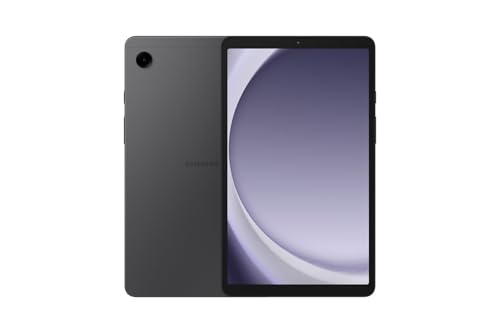
Three-tenths of an inch is the distance between the A9 and this guide’s title, and in the hand it is no distance at all. What the A9 adds over the true nine-inch pick is everything except diagonal: a metal body that feels made rather than assembled, Samsung’s split-screen software that lets a recipe share the screen with a shopping list or a lecture with notes, and an update commitment that will outlast the budget shelf’s by years. For most everyday buyers, this is the better tablet of the two, and the size purist’s loss is measured in millimetres.
Performance sits in the capable middle — streaming, browsing, social apps, casual games and calls all run smoothly, with heavy 3D games politely reducing their settings. The listed model is the international Wi-Fi version with 64GB of storage and microSD expansion; check the listing for your region’s warranty and charger arrangements, because international versions differ from domestic ones in exactly those details. There is no active pen support, a fact this guide states in every A9 appearance because bundle photography elsewhere works hard to imply otherwise.
Choose the A9 over the M9 when the tablet’s life will be varied — apps in rotation, tasks in pairs, years in service. Choose the M9 when the life is simpler and the true size and price position lead. Either way you are inside the in-between class this guide describes; the A9 is its polished citizen, three-tenths of an inch from the throne and entirely unbothered by it.
- Screen: 8.7 inches
- Body: metal back
- Storage listed: 64GB Wi-Fi (international version — verify warranty and charger)
- System: Android with Samsung One UI, split-screen multitasking
- Pen: no active pen support
Strengths
- Build and software a class above the budget shelf
- Split-screen makes the small canvas genuinely productive
- Samsung support runs for years beyond budget rivals
Trade-offs
- International listing — check regional warranty details
- No active pen for handwriting
- 64GB wants a microSD card for media libraries
Best for: everyday users who want the in-between size with grown-up software and support.
Not suited for: handwriters, or buyers who need a domestic warranty without checking.

Lenovo Tab One 8.7″ — Simple neighbour below
The Tab One shares the A9’s 8.7 inch diagonal and almost nothing else, which makes the pair a clean lesson in what money buys at this size. Lenovo’s tablet is the simpler object: an HD screen, 4GB of memory, 64GB of storage, and Android close to its stock form with the full Google Play store. It is the household second screen by design — the video call on the worktop, the child’s app at the table, the browser that lives beside the sofa — and it performs those duties without demanding anything be learned.
Its advantages over the A9 are price position and simplicity; its disadvantages are the HD screen’s softness on text, memory that reloads the third app, and a support horizon that is merely adequate. Against the M9 it trades the true nine inches and stereo media tuning for a more comfortable everyday memory figure. None of these comparisons produce a loser; they produce a map, and the Tab One’s territory is the light-duty, many-hands household where the tablet is furniture rather than instrument.
Buy it for the defined light job and it will be the least dramatic purchase in this guide. Families often discover that the second screen gets more total use than the flagship it supplements, precisely because nobody is precious about it — and a tablet that can be handed to anyone, dropped by anyone and replaced without a family meeting has a value that specifications do not capture.
- Screen: 8.7 inches, HD
- Memory listed: 4GB RAM, 64GB storage
- System: Android with Google Play, near-stock interface
- Expansion: microSD — verify configuration on listing
- Use: calls, streaming, reading, light apps
Strengths
- Standard Android anyone in the house can use
- Comfortable memory for light everyday rotation
- Priced and built to be shared without anxiety
Trade-offs
- HD screen is soft for long reading sessions
- Not built for demanding games or heavy multitasking
- Support horizon is adequate rather than long
Best for: households wanting a shared, simple screen in the in-between size.
Not suited for: buyers shopping for a primary tablet to keep for many years.

Samsung Galaxy Tab S6 Lite (2024) 10.4″ — Step up for handwriting
Some nine-inch searches are secretly handwriting searches: the buyer wants a tablet small enough to carry like a notebook, and the notebook they are picturing has a pen. The S6 Lite at 10.4 inches is where that search should land. Its screen overshoots the brief by an inch and a half of diagonal, its body remains class-portable, and the S Pen in its box is the genuine platform article — pressure-sensitive, palm-rejecting, battery-free — backed by Samsung’s mature notes software.
The rest of the tablet supports the role honestly. The screen is sharper than the budget picks’, the performance handles study and office apps without drama, split-screen pairs a source with a draft, and Samsung’s update commitment spans the years of a course or a project’s life. The listed 64GB storage wants a card; heavy gaming is not its department; the cameras are for documents and calls. A student or professional will forgive all of that by the end of the first week of lectures, because the hours go where the pen is.
Measure the step up before taking it: the S6 Lite is a two-handed tablet in a way the M9 is not, and if your dominant hour is one-handed reading in bed, the extra canvas is a cost, not a gift. But if the nine-inch idea in your head included a margin full of your own handwriting, this is the pick that honours the idea — the size was always a proxy for the notebook, and the notebook is here.
- Screen: 10.4 inches — a deliberate step above the brief
- Pen: S Pen included, battery-free, pressure-sensitive
- Storage listed: 64GB (2024 model), microSD expansion
- System: Android with Samsung One UI
- Use: notes, study, reading, light work
Strengths
- Real pen platform included in the box
- Notes software and split-screen suit study and work
- Long Samsung support for a device bought to keep
Trade-offs
- Two-handed size; less bed-friendly than the true 9 inch
- Mid-range gaming performance
- 64GB fills without a memory card
Best for: students and professionals whose portable tablet must take handwritten notes.
Not suited for: one-handed readers, or gamers.

Lenovo Tab M11 11″ — Step up for shared viewing
The other direction from nine inches leads to the family sofa, and the M11 at 11 inches is its representative. Households often begin shopping small — one person, one bag — and discover in the comparing that the tablet’s real life will be shared: films watched by two, homework supervised across a table, video calls with grandparents who appreciate a larger face. For that life, the M11’s extra screen is not a deviation from the brief; it is the brief, corrected by honesty.
Lenovo’s execution is steady and unshowy: a large screen, the listed configuration’s 128GB of storage for downloads, near-stock Android with full Google Play, and performance that covers the classic tablet workload without strain. Pen support varies by configuration and bundle on this line, so verify any stylus claim against the exact listing rather than assuming a platform; the guaranteed pen in this guide is the S6 Lite’s. Lenovo’s update runway trails Samsung’s, the honest counterweight to its friendly position and clean interface.
Choose the M11 when the nine-inch search ends in a shared screen; choose the M9 when it ends in a personal one. The two Lenovos in this guide bookend the in-between class deliberately — one is the size itself, the other is what the size grows into when a household gets involved — and knowing which life your tablet will live is worth more than any single specification on either page.
- Screen: 11 inches — the shared-viewing step up
- Storage listed: 128GB configuration
- System: Android with Google Play, Lenovo interface
- Pen: varies by configuration — verify on the listing
- Use: family streaming, homework, calls, reading
Strengths
- Large screen ends squinting for shared viewing
- Generous listed storage for family downloads
- Clean Android with the complete Play store
Trade-offs
- Too big for one-handed reading comfort
- Support runway trails Samsung’s picks
- Pen claims depend on the exact bundle
Best for: households whose small-tablet search is really a shared-screen search.
Not suited for: solo readers who prize one-handed carry above all.

Samsung Galaxy Tab Active5 8″ — The rugged outlier
The Active5 enters a size guide as a reminder that some searches by dimension are really searches by durability wearing a dimension’s clothes. At 8.0 inches it is the smallest tablet in this article and the only one built for a workplace: a ruggedised body tested against drops and water, a screen that accepts gloved and wet touch, a programmable physical key, and a battery the user can swap — a feature that turns a flat battery from a day’s disaster into a minute’s errand.
Its S Pen support is genuine, aimed at signatures, checklists and site annotation rather than sketching, with the practical caveat repeated wherever this guide mentions it: pen inclusion varies by bundle, so read the listing’s contents before ordering. Performance is mid-range and chosen for endurance; the screen prioritises outdoor legibility over colour beauty; the body is thick in the hand in a way that makes perfect sense on a scaffold and none on a sofa.
Include it in a nine-inch guide? Deliberately, as the outlier that tests the reader’s brief. If your tablet will live in a van, a warehouse, a boat or a site cabin, the inch you lose to the Active5 buys survival the other five cannot offer at any size. If it will live on a nightstand, the armour is a tax. The size class is a starting question, not an answer — and this pick is the guide’s way of asking the second question out loud.
- Screen: 8.0 inches, glove and wet touch
- Build: ruggedised, water and drop resistant
- Battery: user-replaceable
- Storage listed: 128GB Wi-Fi
- Pen: S Pen supported; bundle contents vary — verify
Strengths
- Survives workplaces that would retire the other picks
- Replaceable battery suits shifts and long ownership
- Real S Pen support for forms and signatures
Trade-offs
- Thick and heavy beside the consumer picks
- Mid-range speed; screen tuned for durability
- Rugged premium is wasted on home use
Best for: field, warehouse, marine and site workers who need a small tablet that endures.
Not suited for: home readers paying for armour they will never test.
Which Differences in This Line-Up Actually Matter?
The diagonals tell the guide’s story in one column — 8.0, 8.7, 8.7, 9.0, 10.4, 11 — a size class with one resident and five neighbours. The pen and purpose columns matter more than the half-inches between them.
| Pick | Screen | System | Pen / notes | Watch out for |
|---|---|---|---|---|
| Lenovo Tab M9 9″ | 9.0 in | Android | Capacitive touch only | Minimal memory; media-first design |
| Samsung Galaxy Tab A9 8.7″ | 8.7 in | Android | No active pen | International version; verify warranty |
| Lenovo Tab One 8.7″ | 8.7 in | Android | Capacitive touch only | Light-duty hardware; keep it simple |
| Samsung Galaxy Tab S6 Lite (2024) 10.4″ | 10.4 in | Android | S Pen included | Bigger than the brief; notebook role |
| Lenovo Tab M11 11″ | 11 in | Android | Pen varies — verify bundle | Family size; two-handed |
| Samsung Galaxy Tab Active5 8″ | 8.0 in | Android | S Pen supported; verify bundle | Work tool; rugged premium |
Two divides organise the table. The first is memory and support: the budget picks ask for one-app patience and offer shorter runways, while the Samsung pair — A9 and S6 Lite — buy smoother days and longer service. The second is purpose: media, notes, family sharing and field work each crown a different row, and no row wins two crowns outright. That is the signature of a healthy shortlist at an in-between size.
If the table leaves you between the M9 and the A9, the decision is a sentence long: choose the M9 for the size itself and simple media days; choose the A9 for everything else a tablet does, at three-tenths of an inch’s difference you will forget by Friday. If it leaves you between the M9 and the M11, ask who else will watch — a tablet’s audience is a specification too.
Why Does Nine Inches Suit Books and Films at Once?
The geometry is a compromise in the best sense. Held at reading distance, a nine-inch screen shows a page at close to paperback-plus size — large enough for comfortable type at arm’s length, small enough that the eye’s journey across a line stays short and the wrist holding the tablet forgets its job. That is the reading half of the brief, and it is why the class’s fans describe these tablets as ‘book-sized’ with unusual precision: they are, almost exactly, the size of the object they replace.
Rotate the same screen and the film half appears. Nine inches in landscape is dramatically larger than any phone — the picture stops being a thumbnail of the film and becomes the film — while remaining small enough for a train tray, a kitchen stand or a lap without the sail-like presence of an eleven-inch slate. Stereo speakers, as on the M9, complete the effect more than another increment of resolution would; at this size, sound is half the cinema.
The compromise shows at the extremes, as compromises do. Dense documents want the S6 Lite’s sharper, larger page; shared viewing wants the M11’s canvas; long novels in bed want the M9’s weight rather than either. But for the mixed, mobile hours that fill most tablet lives — a chapter here, an episode there, a browser everywhere — nine inches is not the middle of the range. It is the point of balance the range is arranged around.
What Should You Check Before Trusting a ‘9 Inch’ Listing?
Start with the manufacturer’s specification page, because the marketplace title is marketing and the spec page is the contract. Confirm the diagonal, then the resolution, then the memory and storage as separate figures — budget listings love to merge the last two into one impressive number. Confirm the Android version the device ships with and the maker’s update policy in the same visit; a nine-inch tablet with a short runway is a shorter purchase than its price suggests.
Then check the physical dimensions and weight, which decide whether the tablet lives in your coat, your bag’s small pocket, or only ever on the coffee table. Compare them against a device you own. A half-inch of diagonal can hide a centimetre of width, and width is what hands and pockets actually measure. The picks in this guide all publish these figures through their makers; a listing that cannot produce them is telling you something about the seller.
Finally, check what is in the box and what the warranty covers in your region — the A9’s international listing in this guide is the standing example of why. Chargers, cables and warranty terms vary by market in ways that never appear in the headline, and at budget-to-midrange prices a missing charger is a real percentage of the purchase. Two minutes of fine print is the cheapest diligence in the whole transaction.
How Much Performance Does the In-Between Size Need?
Less than the marketing implies, allocated carefully. Reading, streaming, browsing and calls — the class’s core hours — run happily on mid-range processors, and the picks above divide not by raw speed but by memory behaviour. The M9’s minimal memory is its defining limit: it makes the tablet a one-app device, pleasant within that discipline and frustrating outside it. The A9 and Tab One hold a working set of apps; the S6 Lite and M11 hold more, more smoothly.
Games redraw the map. Casual titles run everywhere here; demanding 3D games want the strongest hardware in the guide and still moderate their settings, because none of these is a gaming tablet — the class’s gaming specialist lives in our eight-inch roundup, at 8.8 inches with a flagship chip. A buyer whose nine-inch search is really a gaming search should follow that signpost rather than ask a media tablet to be a console.
Storage follows the same honest pattern. Streamers need little; travellers downloading a season need the card slot or the 128GB configuration; families sharing one device need the most of all, because three people’s downloads share one shelf. Buy the memory and storage for your rotation of apps and downloads as they actually are — the in-between size rewards owners who know their own habits, and gently taxes those who buy for imaginary ones.
How Do You Read Comfortably on a Nine-Inch Screen for Hours?
Set the type larger than pride suggests. A nine-inch screen is held closer than a television and farther than a phone, and the comfortable text size at that distance is bigger than most readers initially choose — the headache at hour two is usually a font decision from minute one. Use the reading app’s warm or sepia page in the evening, let automatic brightness work, and take the tablet out of its glossy reflections by angling it or adding a matte protector if your rooms are bright.
Alternate the holding before the wrist complains: propped on the case for desk and table reading, two-handed for chapters, one-handed for short sessions only. The M9’s lightness extends every one of those modes; the larger neighbours trade that endurance for their canvases. A reading stand by the bed and another by the kitchen counter — cheap, unglamorous — will do more for a reading habit than any screen specification in this guide.
Protect the habit from the device itself. A nine-inch tablet is a portal to everything, and the book competes with the entire internet at one tap’s distance. Use the focus or reading modes, keep the reader on the home screen, and let downloads, not streams, stock your library so a weak connection never interrupts a chapter. The size was made for readers; the setup decides whether it gets to be one.
How Do the In-Between Tablets Handle Video Calls and Classes?
A nine-inch-class screen is a natural video-call size: large enough to read a grandparent’s expression or a teacher’s diagram, small enough to prop on a book stack at eye level without furniture rearrangement. The A9 and Tab One handle mainstream call apps comfortably, the M11 gives group calls a warmer presence, and the M9 works well for one-to-one chats while its memory asks you to close the game first. Front cameras across this class are modest; light, not megapixels, decides how you look — face a window and every pick improves.
For remote classes, the dividing line is the second window. A student who watches a lecture and nothing else is served by any pick here. A student who watches and notes simultaneously needs the S6 Lite’s pen or the A9’s split-screen with a keyboard, and a student whose platform lives on Google Play needs any pick except a Fire — which is why no Fire tablet appears in this particular guide’s six, a quiet editorial decision the reader deserves to have surfaced.
Households sharing one tablet for calls should set up profiles or at least separate app folders per person, and keep the call apps on the home screen where a grandparent can find them without a tour. The in-between size’s gift is approachability; the setup should protect it. A tablet that rings, opens and connects in two taps will be used for the calls that keep families close — the ones that need a settings expedition will quietly stop happening.
What Battery Life Should You Expect Across This Class?
Modest processors and mid-sized screens make this class kind to batteries. A day of mixed reading, browsing and an evening’s viewing is a fair expectation from the mainstream picks; the M9’s light hardware sips similarly despite its budget nature, while the Active5 is engineered around shifts and offers the swap-out answer when even that is not enough. Games and maximum brightness are the universal taxes, halving any figure a listing implies.
Charging is overnight-shaped across the class: none of these is a fast-charge showcase, and none needs to be, because their lives are lived between a nightstand and a day out. The traveller’s version of the same truth is a small power bank in the bag for the longest days, shared between phone and tablet over one USB-C cable — the in-between tablet’s efficiency makes it the device most likely to reach the hotel still awake.
Age the battery gently and the class rewards you: avoid hot cars, avoid months at full charge in a drawer, and let the tablet that serves as a kitchen screen live plugged into its stand if its software offers a charge-limit setting. These are five-year devices for light jobs when their owners are kind, and two-year devices when they are not — the hardware gap between those outcomes is mostly habit.
How Should You Choose a Case for a Tablet This Portable?
The case decision is unusually consequential in this class because the tablet’s portability is the product. A slim folio preserves it — grip, a reading angle, screen cover, a few grams — while a rugged shell can quietly promote the tablet into the next size class of bag and hand. Buy the folio first for the consumer picks; reserve serious armour for the genuinely accident-prone household, and for the Active5, whose own body is the armour and whose case needs are mostly about mounting and carrying.
Stand angles deserve a test in the shop or the return window: the recipe angle, the video-call angle and the bed-reading angle are three different tilts, and a case that does two of them well beats a case that does one perfectly. A hand strap on the back transforms one-handed reading for the larger neighbours and is the accessory M11 owners most often wish they had bought first.
Finally, match the case to the tablet’s actual station in the house. A kitchen tablet wants a washable cover and a stand that survives flour; a travel tablet wants the thinnest folio that protects the screen in a bag; a child’s shared tablet wants the bumper, bought in the same order, before the first unsupervised afternoon. The case is where the in-between size either keeps its promise or loses it, one gram at a time.
When Should a Nine-Inch Shopper Look at E-Readers or Phones Instead?
If the honest job list is novels and nothing else, a dedicated e-ink reader beats every pick in this guide at it — lighter, glare-free, charged monthly — and costs no more than the budget end here. The tablet wins the moment the list grows a second item: a programme, a browser, a call, a comic in colour. Shoppers should write the list before the search, because the two devices look interchangeable in a listing and are opposites in a life.
At the other border, the largest phones now approach the small end of this class, and a phone you already own is the tablet you do not have to buy. The in-between tablet earns its separate existence on session length: the two-hour read, the film, the long call, the homework hour — sessions where a phone’s screen taxes the eyes and its battery taxes the day. If your tablet-shaped sessions are all under twenty minutes, the phone has already answered this guide’s question.
Between those borders stands the class itself, for the mixed and mobile hours. That is a narrower territory than the marketing suggests and a more valuable one than the market’s neglect implies — which is a fair summary of nine inches, and the reason a guide to it was worth writing carefully.
What Does the Nine-Inch Gap Say About the Tablet Market?
The near-absence of exactly-nine-inch tablets is a lesson in how products actually get made. Shoppers experience sizes as a smooth ladder; factories experience them as a small set of glass panels cut at profitable yields, around which brands arrange their ranges. When the profitable cuts settled at 8.7, 10.4 and 11, the ladder’s nine-inch rung simply stopped being manufactured — not because nobody wanted it, but because wanting is measured in orders of panels, not in search queries.
Lenovo’s M9 exists because Lenovo judged a media-focused niche worth a panel run, and its survival in this guide as the size’s sole resident shows both the opportunity and the risk of the gap: the opportunity of owning a size outright, the risk that a discontinued niche leaves its owners with scarce cases and a short accessory tail. Buyers of the true nine-inch pick should buy its case and a spare in the first order, a small insurance unique to this guide’s headline pick.
For the shopper, the market’s lesson is to hold size loosely and jobs tightly. The neighbours at 8.7 and 10.4 inches are not failed nine-inch tablets; they are the same idea at the sizes the factories kept. A buyer who understands that stops hunting a ghost dimension and starts comparing real devices — which is, not coincidentally, the exact moment tablet shopping becomes satisfying.
How Do You Set Up a Small-Mid Tablet for an Older Relative?
This class is the one most often bought for a parent or grandparent, because its screens are kind to eyes and its prices are kind to givers. The setup is the gift, more than the device. Choose between the A9’s polish and the Tab One’s simplicity by the relative’s confidence, then spend an hour configuring: accounts signed in, text enlarged, home screen reduced to calls, photos, news and the one streaming service they actually watch, everything else tucked into a folder labelled with a word they would use.
Test the video call from your own phone before you leave, and write the unlock code and your number inside the case. Enable updates, disable purchases, and set the tablet to wake with a tap rather than a button hunt. Then resist adding features on later visits; stability is the feature an older user values, and every well-meant new app rearranges a world they had just learned.
The in-between size serves this role better than any other in the catalogue — big enough for faces and headlines, light enough for a lap and a handbag. A relative equipped this way calls more, reads more and asks for help less, which is the entire point of the purchase, and worth more than the difference between any two picks in this guide.
Why Do Owners of This Size Rarely Upgrade to Bigger Tablets?
Talk to long-term owners of nine-inch-class tablets and a pattern emerges: they replace like with like, or with the nearest neighbour, because the size has fused with their routines — the coat it fits, the stand on the counter, the chapter in bed. Bigger tablets promise more screen and deliver a different life, one lived at tables. The in-between owner’s hours are mobile hours, and mobility is the specification that never appears in a comparison table.
That loyalty has a practical consequence for buyers in this guide: choose the pick whose support and build will last, because you will likely keep it past the point where its specifications look current. The A9 and S6 Lite are the longevity buys; the M9 and Tab One are the honest shorter-term tools. Either strategy succeeds when it is chosen deliberately — the failures are the accidental ones, where a two-year tablet was bought for a five-year life.
Which Nine-Inch Shopping Mistakes Recur Most?
The first is assuming the size is common and comparison-shopping it like one. Buyers bounce between listings labelled nine inches that measure 8.7, 9.0, 9.7 and 10.1, comparing prices across different devices wearing one label. This guide’s discipline — true diagonal in every heading — is the defence: compare the M9 against the A9 knowingly, as neighbours, not as identical items with different prices.
Second is buying the M9 for a multitasker’s life. Its memory figure is not a detail; it is the product’s character. A student planning split-screen research or a parent planning a shared app rotation should step to the A9 or S6 Lite now rather than discover the ceiling in the first school week. Third is the reverse error: buying the 11 inch M11 for a one-handed reading life, then quietly reading on a phone instead while the big tablet guards the sofa.
Fourth is trusting bundle photography on pen support, which this guide flags on the A9 and M11 alike. The S6 Lite’s pen is a platform, in the box, in the specification; everything else is a capacitive stick until proven otherwise. And fifth is forgetting the case in the size calculation — a rugged folio can add the half-inch and the hundred grams that move a tablet from the coat pocket to the bag, which for this class is the whole ballgame.
Final Recommendation
The nine-inch class has one true resident, and the Tab M9 earns this guide’s headline by being it: a light, honest media and reading tablet for the hours between a book and a television. Around it, the neighbours cover the lives the size attracts — the A9 for everyday polish at 8.7 inches, the Tab One for simple shared use, the S6 Lite for the notebook life at 10.4, the M11 for the family screen at 11, and the Active5 for the workplace that laughs at diagonals.
Choose by your dominant hour and the half-inches will take care of themselves. A size this deliberately in-between was never about the number; it is about a tablet that is read as easily as it is watched, carried as easily as it is used — and whichever pick matches your hours, that balance, not the measurement, is what will still please you in year two.
Frequently Asked Questions
Is there really only one true 9 inch Android tablet?
Among current models with verifiable listings, the Lenovo Tab M9 at 9.0 inches is the standout resident of the exact size. Other brands cluster at 8.7 and 10.4–11 inches, which is why this guide treats those as neighbours rather than pretending they measure nine. Older nine-inch-class models survive in refurbished channels with the usual cautions.
Is 9 inches big enough for split-screen multitasking?
On the A9 at 8.7 inches, split-screen is genuinely useful for paired light apps. On the M9, the limiting factor is memory rather than inches — it is a one-app-at-a-time tablet. For sustained two-app work, the S6 Lite’s larger screen and Samsung’s software are the comfortable answer in this guide.
Which pick is best for reading novels?
The Tab M9, for its true size, lightness and book-like balance — with the text size set generously, since its HD screen prefers larger print. Dense PDFs and study texts belong on the S6 Lite’s sharper display. The M11 reads well propped, but it is a two-handed commitment in bed.
Can a 9 inch tablet replace a TV for one person?
For solo viewing, largely yes: the M9’s screen and stereo speakers, or the M11’s larger canvas, cover programmes and films happily, especially with downloads for travel. Shared viewing is where the class hands over to the 11 inch pick or a real television — nine inches is a personal cinema, and a good one.
Why is a rugged 8 inch tablet in a 9 inch guide?
Because many size searches are durability searches in disguise. The Active5 is labelled an outlier, at its true 8.0 inches, for readers whose tablet must survive work rather than fit a diagonal. If your brief is a sofa, ignore it in good conscience; if it is a site cabin, it may be the only pick that matters.
Do any of these tablets support a real pen?
Two do: the S6 Lite, with its S Pen included, and the Active5, with S Pen support whose bundle contents you should verify. The M9, Tab One and A9 are touch-only, and the M11’s pen story depends on configuration — check the exact listing rather than the photographs.
Is the Tab M9’s HD screen a problem for films?
At nine inches and normal viewing distance, HD video looks clean for programmes and films; the softness appears in small text and dense pages rather than in moving pictures. If your use is mostly video, the M9’s screen is honestly matched to it. If your use is mostly documents, step up to the S6 Lite’s sharper panel.
Which of these is best for a child’s first tablet?
The Tab One, in a bumper case, for its simplicity, standard Android and painless replacement cost — with family controls configured before handover. The A9 is the upgrade when the child is older and the tablet must also carry homework apps for years. The M9 suits a child whose use is supervised video and reading.
Can these tablets handle light office work on the go?
The A9 and S6 Lite can, especially with a Bluetooth keyboard — email, documents and web tools run well, and split-screen helps. The M9 and Tab One are better kept to reading, browsing and calls. For sustained office work, treat this whole class as a companion to a computer rather than a replacement for one.
How important is the microSD slot in this class?
Very, for travellers and families. Several picks ship with modest internal storage, and downloaded video is what fills a tablet. A card turns the M9, A9 or S6 Lite into a proper travel library at small cost. If you stream everything at home, you may never need one — know which household you are.
Should I buy a spare case for the Tab M9 when I order it?
It is the one pick here where the advice is yes. Niche sizes have thinner accessory shelves, and a case bought with the tablet — plus a spare while they are plentiful — insures the M9’s whole working life. The mainstream neighbours’ cases will be available for years; the true nine-inch pick deserves the small precaution.
What is the best way to carry a tablet of this size daily?
In the case, in the bag’s padded or smallest pocket, screen inward — or in the coat it was sized for, on the days the weather allows. The class’s whole appeal is that carrying it requires no special bag and no decision; if you find yourself planning around it, a smaller pick from this guide may be your truer size.
Do these tablets receive security updates for long?
Samsung’s picks carry the longest commitments in this line-up; Lenovo’s are shorter, and the exact span depends on the model and region, so check the maker’s policy page for the specific pick. Whatever the span, plan the tablet’s later years — after support ends, retire it from banking and email into reading and streaming duty.
Is 4GB of memory enough in 2026 for a tablet this size?
For the light rotation this class is bought for — one main app, a browser, a call — yes, as the Tab One shows. It is not enough for a power user’s juggling, and the M9’s smaller figure is tighter still. Memory, more than processor, is the figure to read twice on any listing in this guide.
Related Guides
Widen or narrow the search from here: our guide to the best 8 inch tablets goes one size down, the best 9.7 android tablets explains the ghost size above this one, and our roundup of the best tablets for reading follows the book half of this size’s personality.


