What's inside
- Key Takeaways
- Quick Picks
- How Did We Choose These Picks?
- What Actually Decides the Best 15 Inch Laptops With Great Battery Life?
- Detailed Reviews: Six Routes to a Longer Day
- Comparison Table
- How Can You Make Any of These Laptops Last Longer Each Day?
- Common Mistakes When Buying for Battery Life
- How Much Endurance Do Different Days Actually Need?
- What Happens to Battery Life as a Laptop Ages?
- How Should You Read an Endurance Claim on a Listing?
- How Do Travel and Charging Access Change the Calculation?
- Final Recommendation
- Frequently Asked Questions
- Why Does Weight Belong in a Battery Guide at All?
- How Should You Verify an Endurance Listing Before Ordering?
- How Should You Verify an Endurance Claim Against Your Own Routine?
- How Should You Choose Between Endurance and Everything Else?
- How Should You Pack for a Long Day Away From Power?
- Related Guides
As an Amazon Associate I earn from qualifying purchases. This post may contain affiliate links at no extra cost to you.
gizmoverdict.com is reader-supported. When you buy through links on our site, we may earn an affiliate commission.
Where to buy: Each laptop reviewed here connects to its live Amazon listing. Battery figures in listings come from laboratory testing, so treat them as comparisons between machines rather than promises about your day, and confirm the exact configuration before you order.
Shopping for the best 15 inch laptops with great battery life requires learning one uncomfortable fact before anything else: the hours printed beside a laptop are laboratory hours. Manufacturers measure endurance under gentle, controlled conditions — modest brightness, light workloads, often offline video playback — that no working day actually resembles. A machine advertised with a long figure will outlast a machine advertised with a short one, and that comparative value is real, but the absolute number belongs to the lab rather than to your commute, your lectures or your shift. This guide therefore talks about endurance the way owners experience it: qualitatively, by design, by processor behaviour and by the weight of the charger you may or may not need to carry.
That framing turns out to be liberating, because real endurance at fifteen inches is decided by visible engineering rather than by marketing. Efficient processors that sip power during light work matter more than enormous batteries dragged behind hungry chips. Screen choices matter: a panel driven at sensible brightness, at a resolution the graphics can handle without strain, extends the day quietly. Weight matters most of all in practice, because the lightest endurance strategy ever devised is a laptop so easy to carry that its owner brings it everywhere and charges it opportunistically, while a heavy machine with a big battery and a heavier brick gets left behind on exactly the days it was bought for.
The six picks below map the honest routes to a long day at this size. The LG gram leads as the class’s specialist: a genuinely light 15.6-inch machine whose whole design brief is endurance through efficiency. Two small-processor value machines, from ASUS and Acer, show how far modest silicon and modest screens stretch a charge for light work. The Lenovo and Dell entries demonstrate the mainstream route — capable everyday laptops whose efficient processors make them natural all-day companions — and an HP with a lower-resolution screen closes the list by trading pixel density for the endurance that fewer pixels to drive can bring. That last trade is stated openly in its review, because a battery guide that hides a screen compromise has failed at its only job.
One reference point stands outside the linked list. The MacBook Air 15 remains the endurance benchmark against which this entire class is quietly measured, running a different operating system at a different price tier; it appears below as a prose-only reference so that Windows shoppers know exactly what the summit looks like. At the opposite pole, 15-inch gaming laptops anchor the other end of the scale, and their absence from this guide is itself information: discrete graphics and high-refresh screens are bought with hours, and anyone whose work needs them should not shop in a battery guide at all.
Key Takeaways
- Manufacturer battery hours are laboratory figures; use them to compare machines, never as a promise about a real working day.
- Efficiency beats capacity: a modest processor sipping power outlasts a hungry one behind a larger battery in most real use.
- The LG gram 15.6 is the class specialist, pairing genuine lightness with an efficiency-led design for long untethered days.
- Screen choices trade against endurance — the HP pick’s HD panel stretches its charge partly because it drives fewer pixels, and that compromise is stated openly.
- Weight is a battery feature: the machine you carry everywhere and charge opportunistically beats the specification you leave at home.
- Gaming laptops sit at the opposite pole of this class and are excluded deliberately; discrete graphics are paid for in hours.
Quick Picks
- Best endurance specialist: LG gram 15.6″ FHD Business 16GB (B0H2L5L51Q) — a 3.64 lb design built around efficiency, with 16GB of memory for real work.
- Best for the lightest workloads: ASUS Vivobook Go 15 Athlon Silver (B0HBFL1Z8P) — a modest processor and specification tuned for simple tasks that sip power.
- Best value endurance: Acer Aspire Go 15 Ryzen 3 7320U (B0FN9JLD28) — an efficient Ryzen 3 in a mainstream shell for browsing, documents and streaming days.
- Best endurance with performance in reserve: Lenovo IdeaPad Slim 3 15.6 FHD Touch Ryzen 7 5825U (B0F2MLQPL3) — eight cores that idle efficiently and work hard only when asked.
- Best endurance through fewer pixels: HP 15.6 HD Touch Ryzen 5 7520U 8GB (B0DWPKQ3LH) — an HD touchscreen machine whose lower resolution helps its stamina; read the screen note carefully.
- Best mainstream all-day option: Dell 15.6 FHD Core 3 100U 8GB (B0H5X2GC1Y) — an efficiency-first processor, a bright anti-glare full HD screen and 512GB of storage.
How Did We Choose These Picks?
The first filter was processor behaviour at light load, because most of a laptop’s day is spent far below its maximum effort. Writing, reading, browsing and video playback dominate real usage, and the processors favoured here — Intel’s efficiency-led Core 3 and Core i5 U-series chips, AMD’s Ryzen 3, Ryzen 5 and Ryzen 7 U-class parts, and at the floor an Athlon Silver — are designed to complete those tasks while drawing very little. A machine that is frugal at idle and brisk at need will outlast a nominally larger battery paired with a thirstier design across almost any realistic day.
The second filter was the total carrying picture. Advertised weight was read alongside the design’s intent: machines like the gram, engineered to be carried constantly, scored ahead of heavier designs whose endurance figures looked similar on paper. Screen resolution and brightness were weighed as endurance variables rather than pure quality metrics, which is why this guide can recommend an HD-panel machine with its compromise disclosed, in a class where other guides would simply exclude it or, worse, fail to mention it.
The third filter was credibility. Listings were read for what they actually claim, manufacturer hours were treated as laboratory comparisons throughout, and no pick in this guide is described with an endurance figure presented as a real-world guarantee. Each linked machine was verified against its current Amazon listing, and the full listing title is preserved in the sources file that accompanies this guide, so readers can repeat the same checks before ordering.
What Actually Decides the Best 15 Inch Laptops With Great Battery Life?
The display is usually the largest single consumer of power in light use, which is why brightness discipline is the owner’s most powerful endurance tool and why panel choices echo through this guide. A full HD screen at moderate brightness is a reasonable citizen; the same screen at maximum brightness under office lighting spends the battery noticeably faster. The HP pick’s HD panel sits at the frugal end of this trade by design, driving fewer pixels for every frame, while the gram’s full HD panel compensates with an efficiency-led platform around it. Neither approach is cheating — they are different allocations of the same physical budget, and the reviews price each one openly.
The processor’s behaviour is the second factor, and its subtlety is that peak performance barely matters here. What matters is how little the chip needs while doing ordinary things and how completely it can rest between them. Modern efficiency cores and aggressive sleep states mean the machines in this guide spend most of a writing day sipping, then complete heavier tasks in short, efficient bursts. This is also why the Ryzen 7 Lenovo can appear in a battery guide without apology: a strong processor that finishes work quickly and returns to rest can be a frugal machine in practice, provided the workload itself is bursty rather than continuous.
The third factor is the owner’s software reality. Video calls with cameras running, browsers carrying dozens of active tabs, cloud drives syncing large folders and screens held at full brightness can halve any machine’s day regardless of its design. The honest promise of this class is therefore conditional: these are the 15-inch laptops whose hardware wastes the least, and paired with ordinary habits — sensible brightness, closed lids between uses, chargers taken on genuinely long days — they deliver the longest untethered working time this size offers without stepping into a different operating system or a gaming machine’s compromises.
Detailed Reviews: Six Routes to a Longer Day

LG gram 15.6″ FHD Business 16GB — Best Endurance Specialist
Badge: Best endurance pick
The LG gram is the machine this category exists to describe. Its listing — LG Gram 15.6″ FHD Laptop for Business, 16GB RAM, 1.5TB Storage(512GB SSD+1TB Dock), 3.64 lbs Ultra Light for College Students, Intel Core i5-1334U, Numeric Keypad, Wi-Fi 6, Windows 11 — leads with the number that defines the gram idea: 3.64 pounds for a full 15.6-inch laptop. That lightness is not a party trick; it is an endurance strategy. A machine this easy to carry goes everywhere, and a machine that goes everywhere gets charged in the ordinary course of life — at desks, in libraries, beside café sockets — so its battery is rarely asked to perform heroics. LG built the gram line around exactly that insight, pairing large batteries for the weight class with efficient components.
The specification around the lightness is a working specification rather than a featherweight’s apology. The Core i5-1334U is the balanced tier’s processor, fully capable of a professional day’s multitasking, and its U-series efficiency is the platform’s frugal heart. Sixteen gigabytes of memory means the machine rarely wastes energy swapping work to disk. The storage arrangement in the listing combines a 512GB internal SSD with additional dock storage, which suits an owner who archives at a desk and travels light. The full HD panel keeps text crisp for long reading, and the numeric keypad serves the spreadsheet workers the business positioning aims at.
Set against the rest of this guide, the gram asks its premium for the combination rather than for any single figure: no other pick here is simultaneously this light, this capable and this endurance-focused. Owners who carry a laptop all day, every day — field staff, students crossing large campuses, consultants moving between client sites — will feel that combination in their shoulders before they ever feel it in a specification table, and for them this is the guide’s clear first choice.
Strengths
- 3.64 lb weight for a 15.6-inch machine makes constant carrying realistic rather than aspirational.
- Efficient Core i5 platform with 16GB of memory handles full working days without strain.
- Business-oriented design with numeric keypad suits professional and student workloads alike.
Trade-offs
- The gram’s lightness and endurance focus command a premium over mainstream configurations.
- Storage relies partly on bundled dock capacity rather than internal space alone.
- Integrated graphics keep gaming and heavy media work outside its brief.
Key specs: Intel Core i5-1334U · 16GB RAM · 512GB SSD plus 1TB dock storage per listing · 15.6-inch FHD display · 3.64 lbs · Numeric keypad · Wi-Fi 6 · Windows 11
Best for: All-day carriers who want the lightest credible route to long untethered working time. Not suited for: Buyers seeking discrete graphics or the lowest possible price for the size.

ASUS Vivobook Go 15 Athlon Silver — Best for the Lightest Workloads
Badge: Best light-duty endurance
At the floor of the class sits a machine whose endurance comes from asking very little of itself. The listing — ASUS Vivobook Go 15 Laptop, 15.6” FHD 16:9 Display, AMD Athlon ™ Silver 10 Processor, AMD Radeon™ Graphics, 4GB RAM, 128GB SSD, Windows 11 Home — describes a specification that many guides would apologise for, and in a battery guide it deserves a fairer reading. An Athlon Silver processor performing light tasks draws very modest power, and a workload of writing, browsing, email and streamed video can stretch a charge across a long day precisely because the machine never attempts anything expensive. For the right owner, this is not a compromise at all; it is the correct tool at the correct size.
The boundaries must be drawn as firmly as the virtues. Four gigabytes of memory is the tightest allowance in this guide, and it disciplines the owner to a handful of open applications; the 128GB SSD similarly assumes cloud storage carries the archive. The full HD display is the specification’s pleasant surprise, keeping reading and video crisp where many floor-tier machines cut the screen first. This Vivobook Go suits the writer, the student with a browser-based course, the household’s second computer and the traveller who needs a large, light screen for simple work far from sockets.
What it cannot do is grow. A workload that expands into many simultaneous applications, local media libraries or heavier software will meet this machine’s ceilings quickly, and no endurance advantage compensates for a computer that cannot run the work. Buy it as a deliberately light instrument for light duties and it will feel admirably fit for purpose; buy it as a bargain substitute for a mainstream laptop and its limits, rather than its stamina, will define the ownership experience.
Strengths
- Modest Athlon Silver processor sips power through light workloads across long days.
- Full HD screen preserves reading and video quality at the floor of the class.
- Simple, focused specification suits writers, browsers and browser-based coursework.
Trade-offs
- 4GB of memory is the guide’s tightest allowance and caps multitasking firmly.
- 128GB of storage assumes the owner’s archive lives in the cloud.
- No headroom for heavier software or a growing workload in future years.
Key specs: AMD Athlon Silver · 4GB RAM · 128GB SSD · 15.6-inch FHD display · AMD Radeon Graphics · Windows 11 Home
Best for: Light-duty users whose days are writing, browsing and streaming far from a socket. Not suited for: Multitaskers, local-media collectors or anyone whose workload may grow heavier.
Acer Aspire Go 15 Ryzen 3 7320U — Best Value Endurance
Badge: Best value endurance
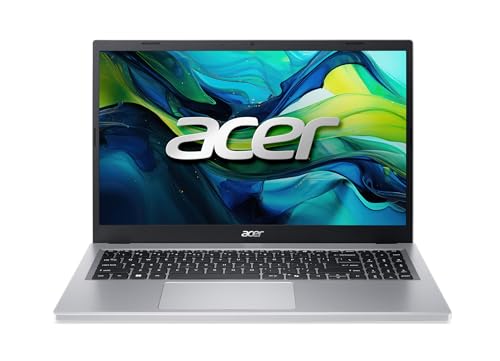
The Acer Aspire Go 15 with Ryzen 3 is the value expression of the same idea the gram sells at a premium: efficiency as a design centre. Its listing — Acer Aspire Go 15 AI Ready Laptop | 15.6″ FHD IPS Display | AMD Ryzen 3 7320U | AMD Radeon 610M Graphics | 8GB LPDDR5 | 128GB PCIe SSD | Wi-Fi 6 | Windows 11 Home in S Mode — pairs an entry Ryzen processor built on an efficient architecture with low-power LPDDR5 memory and a full HD IPS panel. In the daily pattern of classes, shifts or household use, that combination delivers long untethered stretches for the work most people actually do on a laptop, at a position in the range that leaves money for the bag, the mouse and the external drive the setup may want.
Eight gigabytes of memory places this Acer a clear step above the Athlon machine for multitasking comfort, and the Ryzen 3 7320U handles the browser-and-documents workload with a responsiveness the floor tier cannot match. The constraints echo its sibling rather than repeat them exactly: 128GB of storage is the specification to plan around, rewarding owners whose files live in cloud accounts, and Windows S Mode as listed suits owners content with store applications or willing to follow Microsoft’s route out of it. The IPS panel’s viewing angles suit shared screens — a video watched by two people on a train table looks as it should from both seats.
For a buyer whose question is simply how much untethered day a modest budget buys at fifteen inches, this is the guide’s most persuasive answer. It lacks the gram’s lightness and finish, and it lacks the performance reserves of the picks below, but as an endurance-per-budget proposition for ordinary work it is very difficult to argue with.
Strengths
- Efficient Ryzen 3 and LPDDR5 memory deliver long light-work endurance at a value position.
- 8GB of memory gives comfortable multitasking headroom over the class floor.
- Full HD IPS panel keeps shared viewing and long reading sessions pleasant.
Trade-offs
- 128GB of storage requires cloud habits or an external drive for media collections.
- Ships in S Mode as listed, which store-app-only owners should note before ordering.
- Entry processor reserves nothing for demanding software in later years.
Key specs: AMD Ryzen 3 7320U · 8GB LPDDR5 RAM · 128GB PCIe SSD · 15.6-inch FHD IPS display · AMD Radeon 610M Graphics · Wi-Fi 6 · Windows 11 Home in S Mode
Best for: Budget-conscious users wanting the longest ordinary working day at this size. Not suited for: Owners with large local libraries or demanding professional software.

Lenovo IdeaPad Slim 3 15.6 FHD Touch Ryzen 7 5825U — Best Endurance With Performance in Reserve
Badge: Best performance-endurance balance
A battery guide that only recommends small processors would be lying about how endurance works, and this Lenovo is the evidence. Its listing leads with the configuration itself — AMD Ryzen 7 5825U, 8-core, AMD Radeon Graphics, 16GB DDR4, 512GB SSD — the strongest in this guide, yet its place here is earned rather than honorary. The Ryzen 7 5825U is a U-class processor: designed for slim machines, efficient at the light loads that fill most days, and capable of finishing heavier tasks quickly when they arrive. A machine that completes a demanding job briskly and returns to rest can spend less total energy across a day than a weaker machine labouring at the same task for longer.
The supporting configuration suits the dual role. Sixteen gigabytes of memory keeps the multitasking day smooth without wasteful swapping, the 512GB SSD holds a real working library, and the full HD touchscreen serves the reading-and-annotation pattern of mobile work. In the companion college guide this same machine is reviewed as a performance pick for technical students; here the axis is different — it is the choice for the owner who refuses to choose between a long day and a capable machine, accepting that continuous heavy work will always shorten any laptop’s untethered run.
That acceptance is the review’s honest boundary. Run this Lenovo at full effort — rendering, compiling, sustained analysis — and its day shortens like every machine’s, because physics collects its fee from strong processors too. Use it the way mobile professionals actually work, in bursts of effort separated by reading, writing and calls, and its efficiency architecture carries it through long days that would strand a gaming machine by lunch.
Strengths
- Eight-core U-class processor finishes heavy tasks quickly and returns to efficient rest.
- 16GB of memory and 512GB of storage support a full professional workload.
- Touchscreen full HD panel suits the mobile reading and annotation pattern.
Trade-offs
- Sustained heavy workloads shorten its day like any strong machine’s.
- Heavier and less specialised for carrying than the gram’s purpose-built design.
- Integrated graphics keep discrete-GPU workloads outside its endurance brief.
Key specs: 15.6-inch FHD touchscreen · AMD Ryzen 7 5825U (8 cores) · 16GB DDR4 RAM · 512GB SSD · Radeon Graphics · Wi-Fi 6 · Windows 11 Home
Best for: Professionals and students who need real performance inside a genuinely long mobile day. Not suited for: Owners running continuous full-load work away from power for hours.

HP 15.6 HD Touch Ryzen 5 7520U — Best Endurance Through Fewer Pixels
Badge: Best screen-trade endurance
This HP requires the most careful reading in the guide, and its review will not bury the reason: the screen is an HD touchscreen, not a full HD one. The listing states it plainly — HP 15.6 inch Laptop, HD Touchscreen Display, AMD Ryzen 5 7520U, 8 GB RAM, 512 GB SSD, AMD Radeon Graphics, Windows 11 Home — and the trade it represents is a legitimate endurance strategy. A lower-resolution panel asks less of the graphics and less of the backlight for everyday brightness, and across a long day of documents and browsing that frugality accumulates into meaningful extra working time. Owners who read large text, work in single applications and prize stamina over sharpness are this machine’s intended audience, and for them the exchange can be the right one.
The rest of the configuration supports that audience well. The Ryzen 5 7520U is an efficient mainstream processor with more responsiveness than the entry picks, 8GB of memory covers ordinary multitasking, and the 512GB SSD is generous for the tier — documents, photos and downloaded media accumulate without the cloud juggling the smaller drives in this guide demand. Touch input on a large screen suits the casual, lean-back pattern of home and shared use: scrolling articles, browsing photos, tapping through presentations at a kitchen table.
The boundary is equally plain. Text on an HD panel at 15.6 inches is visibly softer than on the full HD screens elsewhere in this guide, small fonts in dense spreadsheets lose their crispness, and two documents side by side feel the resolution limit quickly. A buyer whose work is reading-dense or detail-led should take the Dell or Acer above and accept their charging habits instead. A buyer whose work is stamina-dense has found the honest version of that trade, clearly labelled.
Strengths
- HD panel’s lower pixel count contributes real endurance across long light-use days.
- Ryzen 5 processor and 512GB SSD give the mainstream parts of the spec genuine room.
- Touchscreen suits relaxed home, shared and presentation use at the kitchen-table end of work.
Trade-offs
- HD resolution is visibly softer for dense text and side-by-side documents.
- 8GB of memory matches ordinary multitasking but not heavy simultaneous workloads.
- Buyers who read small text all day should choose a full HD pick instead.
Key specs: AMD Ryzen 5 7520U · 8GB RAM · 512GB SSD · 15.6-inch HD touchscreen · AMD Radeon Graphics · Windows 11 Home · Natural Silver
Best for: Stamina-first users with single-application, large-text workloads at home or on the move. Not suited for: Reading-dense professionals or anyone splitting the screen between documents daily.

Dell 15.6 FHD Core 3 100U — Best Mainstream All-Day Option
Badge: Best mainstream endurance
The Dell closes the list as the mainstream interpretation of the endurance idea: no specialist lightness, no floor-tier specification, just an efficiency-first processor in a sensible businesslike shell. The listing — Dell 15.6 Laptop, FHD, Intel Core 3 100U, 8GB RAM, Windows 11 Home, with a 300 nits Anti-Glare WVA panel, DDR5 memory and a 512GB SSD — describes a machine designed to be bought in quantity and used all day by people who never think about it. The Core 3 100U is Intel’s entry modern processor, and its virtue here is exactly its modesty: light workloads, which are most workloads, are completed at a sip.
Dell publishes the battery in the listing as a 3-cell 41Wh unit, and this guide respects the honesty of that figure by framing expectations accordingly. This is not a marathon cell; it is a modest battery behind a frugal platform, and the combination delivers a solid working day of light use while asking the charger to travel on the longest days. The bright anti-glare panel helps in an underappreciated way — a screen that stays readable at moderate brightness under office lighting spends less power than a dimmer screen pushed to maximum to fight glare — and the 512GB SSD removes the storage anxiety that shadows the smaller drives above.
In the companion college guide this machine appears as an entry pick with roomy storage; on the endurance axis its identity is the dependable fleet laptop, the one an organisation or a family buys when the requirement is a full-size screen, a full working day and a support network behind it. Buyers wanting the longest possible untethered stretch should look to the gram; buyers wanting the most uneventful ownership should look here.
Strengths
- Efficiency-first Core 3 platform sips power through the light workloads that fill most days.
- 300-nit anti-glare full HD panel stays readable at moderate, battery-friendly brightness.
- 512GB of storage and Dell’s support network make for uneventful long-term ownership.
Trade-offs
- The 41Wh battery is modest, so the longest days still include the charger.
- 8GB of memory suits ordinary multitasking rather than heavy simultaneous work.
- Entry processor reserves little for demanding software in later years.
Key specs: Intel Core 3 100U · 8GB RAM · 512GB SSD · 15.6-inch FHD 300-nit anti-glare WVA · DDR5 · 3-cell 41Wh battery · Wi-Fi 6 · Windows 11 Home
Best for: Mainstream users and organisations wanting a full-size screen and a dependable working day. Not suited for: Marathon untethered use or performance-led workloads.
Comparison Table
| Pick | Processor | Memory | Storage | Screen | Endurance route |
|---|---|---|---|---|---|
| LG gram 15.6 (B0H2L5L51Q) | Core i5-1334U | 16GB | 512GB SSD + dock | 15.6″ FHD | Lightness plus efficiency |
| ASUS Vivobook Go 15 (B0HBFL1Z8P) | Athlon Silver | 4GB | 128GB SSD | 15.6″ FHD | Minimal power draw |
| Acer Aspire Go 15 (B0FN9JLD28) | Ryzen 3 7320U | 8GB | 128GB SSD | 15.6″ FHD IPS | Efficient value platform |
| Lenovo IdeaPad Slim 3 (B0F2MLQPL3) | Ryzen 7 5825U | 16GB | 512GB SSD | 15.6″ FHD touch | Fast work, efficient rest |
| HP 15.6 (B0DWPKQ3LH) | Ryzen 5 7520U | 8GB | 512GB SSD | 15.6″ HD touch | Fewer pixels to drive |
| Dell 15.6 (B0H5X2GC1Y) | Core 3 100U | 8GB | 512GB SSD | 15.6″ FHD anti-glare | Frugal mainstream platform |
How Can You Make Any of These Laptops Last Longer Each Day?
The owner’s habits are worth as much as the hardware’s design, and three habits dominate. Brightness is the first: lowering the screen from maximum to a comfortable indoor level is the single largest saving available, and on the anti-glare Dell and the IPS Acer it costs nothing in readability. The second is background discipline — cloud synchronisation, indexing and a browser carrying dozens of live tabs all spend the battery on work the owner is not watching, and pausing or pruning them on battery days returns time immediately. The third is the lid: closing it between uses, rather than letting the machine idle open through every break, converts the gaps in a day from drain into rest.
Charging habits shape the longer story. Batteries age fastest at the extremes of heat and constant full charge, so a machine that lives on a desk benefits from any manufacturer setting that caps its charge, while a machine that travels benefits from being charged when convenient rather than nursed by ritual. None of this requires expertise; it requires only the recognition that endurance is a collaboration between the design in this guide and the person carrying it.
Common Mistakes When Buying for Battery Life
The first mistake is believing the headline hours. Laboratory figures rank machines against each other; they do not schedule your day, and a buyer who plans around them will spend the year surprised. The second mistake is choosing a gaming or high-refresh machine and hoping settings will rescue its endurance — the hardware’s appetite is structural, and this guide’s exclusion of that class is deliberate. The third mistake is ignoring the charger: a laptop whose brick is heavy will be carried without it on exactly the days it is needed, so the travelling weight of the whole kit belongs in the decision.
The fourth mistake is buying endurance and starving the workload — the Athlon pick is admirable for light duties and miserable as a multitasker’s only machine, whatever its stamina. The fifth is overlooking the screen trade in either direction: paying for pixels you never benefit from, or, like the HP’s HD panel read carelessly, accepting softness you will resent daily. The sixth is forgetting that batteries age, so a machine that barely makes your day when new will not make it in year three; buy headroom, not sufficiency.
How Much Endurance Do Different Days Actually Need?
The student day is the class’s defining test, because it is long, mobile and socket-poor. Lectures and seminars run back to back, library sessions stretch into the evening, and the outlets in older buildings are contested territory. A student needs a machine that treats a morning of note-taking as a light snack and still has something left for the evening’s writing, which is precisely the pattern the gram and the Lenovo serve at two different capability levels, and which the Acer serves for the student whose budget speaks first. What a student does not need is a machine whose endurance only exists at brightness levels too dim for a sunlit lecture hall.
The professional day splits into two species. The desk-anchored professional, moving between meeting rooms inside one building, needs reliability more than range: the Dell’s pattern of a frugal platform and a charger that lives in the office answers it completely. The travelling professional — trains, client sites, site inspections, conferences — lives the student’s day with higher stakes, and should shop the top of this guide, where lightness and efficiency combine, because a battery failure in front of a client costs more than any specification difference in this article.
The home day is the most forgiving and the most misunderstood. A household laptop moves between rooms rather than buildings, sockets are everywhere, and endurance matters mainly as freedom from trailing cables across the living room. For that pattern the HP’s stamina-through-simplicity and the little ASUS’s light-duty frugality are entirely rational, and the money saved against the specialist picks buys the peripherals a home setup actually uses. Matching the machine to the species of day, rather than to the largest number in a listing, is the whole skill this guide exists to teach.
What Happens to Battery Life as a Laptop Ages?
Every battery in this guide will hold less charge in its third year than in its first, because the chemistry of rechargeable cells trades capacity for cycles in a way no manufacturer has repealed. The practical consequence is a planning rule rather than a lament: buy a machine whose new endurance exceeds your day by a comfortable margin, and the aged machine will still meet the day; buy one that merely suffices when new, and its third year will be spent negotiating with sockets. This is the deepest reason the guide favours efficiency-led designs — their headroom is not vanity, it is the third year’s working day purchased in advance.
Owners can slow the decline without superstition. Heat is the accelerant, so a machine that works on hard surfaces with its vents clear ages more gracefully than one suffocated on bedding through long sessions. Desk-bound machines benefit from manufacturer charge-limiting settings where offered, since a cell held away from its extremes lives longer. And when a battery does eventually fade, the mainstream families represented here — LG, ASUS, Acer, Lenovo, HP and Dell designs sold in volume — are the machines for which replacement batteries and the documentation to fit them actually exist, which is an endurance feature measured in years rather than hours.
How Should You Read an Endurance Claim on a Listing?
Listings express battery life in the dialect of marketing, and a reader who learns the dialect stops being misled by it. The phrase “up to” is the most important word in any endurance sentence: it marks the figure as a ceiling achieved under the gentlest conditions the test allows, and your day will live somewhere beneath it. The test behind the figure matters as much as the figure — a video-playback loop at modest brightness describes a machine’s behaviour during films, not during a working day of calls and documents, and two machines tested differently cannot be compared by their numbers alone.
The specification that resists marketing is the battery’s capacity in watt-hours, where a listing or manufacturer page states it, because it measures the fuel tank rather than the journey. Read alongside the processor’s class it tells a coherent story: a frugal U-class platform behind a healthy capacity is a genuinely long-day design, while a powerful processor behind a small capacity is a machine making its peace with the charger. The Dell review in this guide models the habit, naming its modest 41Wh cell openly and framing the machine’s day accordingly; apply the same reading everywhere and the class becomes legible.
Finally, check the condition of the machine being sold. Endurance is the specification that refurbished units surrender first, since an aged battery is the most common difference between a new laptop and a renewed one, and a listing that blurs that distinction can turn an endurance purchase into its opposite. Every pick in this guide was verified as a current listing on the date in the accompanying sources file, and the same check, repeated at your own order, is the last step of buying battery life honestly.
How Do Travel and Charging Access Change the Calculation?
Endurance is really a question about the distance between sockets in your life, and travel stretches that distance in specific ways. A long flight is the gentlest test in this guide despite its length, because the work done at altitude is usually reading, writing and watching — the light pattern every pick here handles frugally, at brightness levels a cabin makes comfortable. The harder tests are the fragmented days: a conference with sessions in socketless halls, a site visit measured in hours of standing use, a train journey where the seat’s power point is shared, broken or absent. Fragmented days reward the machines that sip steadily and punish the ones that feast, which is the gram’s and the Dell’s home territory respectively at opposite ends of the budget.
The charger itself belongs in the travel calculation. A compact adapter that lives permanently in the travel bag converts every opportunistic half hour — the airport seat near a pillar socket, the client’s meeting room before the presentation — into range, and owners of endurance machines paradoxically benefit most from carrying one, because their machines need so little topping up that brief chances suffice. The discipline is simply to make charging a background habit of travel rather than an emergency response to a warning icon, and to arrive at the day’s critical hour — the presentation, the exam, the deadline — with the battery treated as a reserve rather than a plan.
For owners whose travel is international, one more unglamorous check matters: the adapter’s plug and voltage range, and the rules of the airlines they fly, which govern spare batteries rather than the laptop itself. None of this appears in an endurance headline, and all of it decides whether the hours a machine offers are hours its owner can actually spend where they are needed.
Final Recommendation
Take the LG gram if your laptop truly lives in your bag, because its combination of lightness, capability and efficiency is the most complete answer this class gives. Take the Lenovo if your day mixes long untethered stretches with genuinely heavy moments and you refuse to compromise either. Take the Dell for the most uneventful mainstream ownership, the Acer for the best endurance a modest budget buys, the HP when stamina outranks screen sharpness in your own honest ranking, and the little ASUS when the work itself is light and every gram and hour counts double. Whatever you choose, plan your day around the machine’s real behaviour rather than its laboratory portrait — the owners who love their battery life are the ones who bought the design that matched their habits, not the number that flattered their hopes.
Frequently Asked Questions
Why do real battery results never match the advertised hours?
Advertised figures come from controlled laboratory loops with gentle workloads and modest brightness, run to compare machines consistently. Real days add video calls, bright screens, background synchronisation and dozens of active tabs, all of which spend power faster, so treat the printed figure as a ranking rather than a schedule.
Does a lower-resolution screen really extend battery life?
Yes, modestly and genuinely: fewer pixels mean less work for the graphics and often less backlight demand at comfortable brightness. The HP pick in this guide makes exactly that trade, gaining stamina while giving up the text sharpness the full HD picks provide, which is why its review states the compromise openly.
Can a powerful processor belong in a battery-life guide?
It can when the processor is an efficiency-class design, like the Ryzen 7 in the Lenovo pick. Strong U-class chips finish demanding tasks quickly and return to low-power rest, so across a bursty working day they can be frugal — although continuous full-load work will shorten any machine’s untethered run.
Does keeping a laptop plugged in all day damage the battery?
Constant full charge combined with heat ages a cell faster than varied use does, which is why desk-bound owners should enable any charge-limiting setting the manufacturer provides. Travelling owners need not worry about the opposite ritual: charging whenever a socket is convenient is a healthy pattern, not a harmful one, for modern batteries.
How does the MacBook Air 15 compare on endurance?
It is the benchmark this class is measured against, combining an efficient platform with a 15.3-inch screen in a higher price tier and a different operating system. It is discussed here as a prose-only reference because buyers committed to Windows software or to this guide’s price territory need the comparison, not the detour.
What habits extend a laptop’s day the most?
Sensible screen brightness is the largest single lever, followed by closing the lid between uses and pruning background work — sync jobs and sprawling browser sessions — on days when the charger stays home. Together they routinely matter as much as the difference between neighbouring models.
Will these laptops still last all day in three years?
Batteries gradually hold less charge with age, so a machine that comfortably outlasts your day when new is the right purchase, while one that barely suffices will fall short later. The efficiency-led designs in this guide start with the most headroom, which is the honest form of future-proofing in this class.
Does fast charging matter as much as the total hours a laptop can run?
For many people it matters almost as much, because real days are rarely spent in one place with no socket in sight from morning until night. A laptop that runs for a long stretch and then recovers a useful amount of charge during a lunch break or a short stop at home can feel endless in practice, even if another machine lasts a little longer in a single uninterrupted run. The opposite is also true. A laptop with an impressive headline figure that charges slowly can still leave its owner stranded in the evening if the morning was busy and the only break in the day was brief. Buyers should therefore think about the shape of their own day rather than chasing one number. Someone who leaves early and returns late with no pause in between needs pure endurance above all else. Someone whose day naturally breaks into pieces may be served just as well by a slightly shorter run paired with charging that makes those pauses count.
Why does a day of video calls drain a battery so much faster than a day of writing?
A video call asks almost every part of a laptop to work at the same time and to keep working without rest. The camera is awake, the microphone is listening, the screen stays bright so faces can be seen clearly, the speakers or headphones are active, and the machine is constantly sending and receiving a live picture while also tidying that picture up for the other people on the call. Writing, by contrast, lets much of the machine idle between sentences, and even reading or research gives the processor regular moments of quiet. This is why two owners of the same laptop can report completely different experiences and both be telling the truth. A student moving between lectures and documents may finish the day with charge to spare, while a remote worker in back to back calls may need a socket by mid afternoon. Anyone whose day is built around calls should judge the picks in this guide by the more demanding pattern, and should leave a comfortable margin rather than trusting the gentlest possible estimate.
Why Does Weight Belong in a Battery Guide at All?
Because the two specifications solve the same problem from opposite ends. A large battery extends the hours a machine can work away from a socket; low weight extends the places its owner is willing to take it, and a laptop left in a dorm room or a car has an effective endurance of zero wherever its owner actually is. The gram’s design understands this so completely that its lightness functions as its second battery — owners carry it into the library, the café and the meeting where a heavier machine would have been left behind, and its charge is spent on work rather than saved by absence.
The corollary matters at the budget end of the guide. A value machine that is slightly heavier but dramatically cheaper, like the Acer, serves an owner whose laptop travels between two rooms and a garden far better than a specialist they cannot afford serves anyone. Weight, like endurance itself, is a property of the owner’s day rather than of the machine in isolation, and the correct question is never which laptop is lightest or longest-lasting in the abstract, but which one’s combination of the two survives contact with your actual routine for the next several years.
How Should You Verify an Endurance Listing Before Ordering?
Close the purchase the way this guide opened it: by reading the listing as a contract rather than an advertisement. Confirm the processor’s full model name, because endurance lives in the chip’s class and a familiar family name can hide a hungrier variant. Confirm the battery’s stated capacity where the manufacturer publishes it, and treat any endurance hour printed without a test description as a ranking hint rather than a fact. Confirm the screen’s resolution in the specification table — this guide contains one deliberate HD machine among full HD picks, and the wider market contains many more that are labelled far less clearly.
Confirm, finally, that the unit is new. Battery condition is the first casualty of prior ownership, and an endurance purchase made on a worn cell is a contradiction that no efficiency architecture can rescue. The six picks here were verified against their current listings on the date recorded in the sources file beside this guide; repeating that verification at your own checkout takes minutes and protects the one specification this entire article exists to defend.
How Should You Verify an Endurance Claim Against Your Own Routine?
The final test of any endurance claim is a rehearsal rather than a review: spend one ordinary day with the machine used exactly as you intend to use it — your brightness, your applications, your calls — and note the hour at which the battery asks for help. Owners who perform that rehearsal in the first week learn their machine’s true dialect, the one no laboratory figure speaks, and can adjust habits while adjustment is easy: a charger placed where the long meeting happens, a brightness level agreed with the room’s light, a background application retired from the travelling set. The picks in this guide were chosen so that rehearsal ends well for the routines they were matched to, which is all that honest endurance advice can ever promise.
How Should You Choose Between Endurance and Everything Else?
Every pick in this guide spent something to buy its stamina — specification headroom in the value machines, a premium in the gram, screen pixels in the HP, a modest cell in the Dell — and the buyer’s final task is to confirm that endurance is the currency their own life is short of. The commuter whose bag crosses a city daily, the student whose buildings ration sockets, the field worker whose office is a vehicle: these owners spend battery the way others spend money, and for them this guide’s trades are bargains. The desk-bound owner whose laptop moves between two rooms of one house is rich in sockets and should spend the same budget on screen, memory or speed instead — a truth this guide states against its own title, because an endurance machine bought by someone who never tests its endurance is simply a smaller specification wearing a virtue’s name.
How Should You Pack for a Long Day Away From Power?
The owners who never fear a low battery treat the long day as a packing problem solved the night before. The machine leaves fully charged, because a day that begins at eighty percent has already spent its margin on nothing. The charger travels anyway on genuinely long days — endurance is a plan, not a dare — and it lives in the same pocket every time, so its presence is verified by habit rather than by hope at the station. A short cable or adapter for the unexpected socket, the aeroplane’s, the borrowed desk’s, weighs almost nothing and converts luck into range. What does not travel is the background workload: the sync jobs paused, the tabs pruned, the brightness agreed with the morning’s light. Packed that way, the machines in this guide stop being specifications and become what their owners actually bought — a working day that ends when the work does, not when the battery says so.
Related Guides
Readers balancing endurance against other priorities should compare the best 15 inch college laptops for the student version of this trade-off, the best 17 inch laptops for larger screens that carry their own battery compromises, and the best 200 and under laptops for the floor of the market where endurance claims need the most care. Shoppers balancing price against endurance should also compare the best 15.6 inch laptops under 1000.


