What's inside
- Key Takeaways
- Quick Picks
- How Did We Choose These Picks?
- Why Does Upload Matter More Than Download for Calls?
- What Do Jitter, Latency and Packet Loss Feel Like on a Call?
- How Should a Small Business Arrange Its Lines?
- How Do You Test Call Quality Without Fooling Yourself?
- Why Do Headsets and Handsets Deserve a Budget Line?
- How Do the Six Entries Divide the VoIP Problem?
- How Should You Configure a Router for Calls, Step by Step?
- What Mistakes Ruin VoIP Calls in Otherwise Good Homes?
- What Changes When the Whole Street Works From Home?
- Final Recommendation
- Frequently Asked Questions
- Related Guides
As an Amazon Associate I earn from qualifying purchases. This post may contain affiliate links at no extra cost to you.
gizmoverdict.com is reader-supported. When you buy through links on our site, we may earn an affiliate commission.
Where to buy: All six entries below carry verified pool links, but they are not all the same species of device, and this guide labels them honestly: four are routers judged on call-handling manners, one is a cable modem-router with telephone ports for a cable provider’s voice service, and one is a small adapter that turns an ordinary telephone into a VoIP phone. Read the role before the verdict.
The best internet routers to use with VoIP phones are not necessarily the fastest routers in the shop, because a voice call is a peculiarly modest and peculiarly demanding passenger. Modest, because a call uses a trickle of bandwidth compared with a video stream. Demanding, because that trickle must arrive evenly, in order, without pauses, while the household around it behaves like a household: uploads syncing, consoles downloading, somebody starting a video call in the next room. When a VoIP call breaks into robot fragments, the cause is rarely the size of the pipe. It is the fairness of the queue at the moment the pipe filled, and above all it is the upload direction, the narrow lane most home connections forget to manage.
Three ideas organise everything in this guide. Quality of Service, QoS, is the router’s ability to let voice packets jump the queue. SIP ALG, the helper some routers enable by default, is a well-meaning feature that rewrites voice signalling and breaks as many calls as it fixes, so the ability to switch it off matters. And upload bandwidth is the budget: a call needs little, but it needs it guaranteed at the busiest second, not averaged across a quiet hour. Routers were graded here on how seriously they treat those three ideas, on the evidence their listings and platforms provide.
Two entries need their framing stated before the reviews begin. The Motorola MT7711 is a DOCSIS 3.0 cable modem combined with an AC1900 router, and its two telephone ports serve a cable provider’s voice service; it is a pick for cable households whose phone line comes from the cable company, not a general VoIP router for an independent provider. The FLYINGVOICE FTA1101 is not a router at all in the household sense: it is an analog telephone adapter, an ATA, which converts an ordinary phone into a VoIP endpoint, with a travel-router trick of its own. Both earn their places by solving real VoIP problems, provided their roles are understood.
Key Takeaways
- Call quality is decided by queue fairness at the busiest second, not by headline speed.
- Upload is the scarce direction; protect a small, guaranteed lane for voice.
- SIP ALG breaks calls on many routers, so a setting to disable it is a feature.
- Wiring the phone or its adapter beats Wi-Fi for stability every time.
- The Motorola pick serves cable-provider voice specifically, through its phone ports.
- The FLYINGVOICE pick is an adapter for an analog phone, not a home router.
Quick Picks
| Pick | Badge | Why it earns its place |
|---|---|---|
| Synology RT6600ax | Traffic conductor | Tri-band router with bandwidth management depth and VLANs to give voice its own lane. |
| Synology RT2600ac | Proven call keeper | The listing itself names bandwidth management among its headline features. |
| ASUS RT-AX86U | Gaming-grade QoS | Adaptive traffic prioritisation habits borrowed from gaming, plus a 2.5G port. |
| TP-Link Archer AX73 | Mainstream muscle | AX5400 Wi-Fi 6 router with the processing headroom busy households need at peak hour. |
| Motorola MT7711 | Cable voice combo | Modem-router with two phone ports built for a cable provider’s voice service. |
| FLYINGVOICE FTA1101 | The adapter | ATA that converts an analog phone to VoIP and doubles as a travel companion. |
How Did We Choose These Picks?
Evidence for VoIP suitability rarely appears on a box, so the grading leaned on platform character: routers whose software is known for granular traffic control ranked above routers whose listings promise only speed. Synology’s pair lead because bandwidth management is part of their stated identity, in the RT2600ac’s case printed in the listing title itself. ASUS earns its place through a traffic-prioritisation culture developed for gaming, where the same low-latency discipline serves a phone call as faithfully as a match. The TP-Link represents the strong mainstream: enough processor and radio to keep queues short when the house is busy.
The final two picks were chosen for role clarity rather than routing power. A cable household with provider voice needs the Motorola’s specific combination or none of this matters, and a household with a beloved analog phone and a VoIP account needs an adapter, full stop. Including them, labelled, serves more real readers than pretending every VoIP question is a router question.
Why Does Upload Matter More Than Download for Calls?
Home internet is sold by its download figure, yet a conversation is symmetrical: your voice travels up exactly as much as the other voice travels down. On many connections the upload lane is a fraction of the download lane, and it is shared with every photograph backup, cloud sync and doorbell upload in the house. When that lane saturates, voice packets wait behind a memory card’s worth of holiday pictures, and the person you are speaking to hears the wait as chopped syllables and metallic echoes. The cure is not more download. It is a router that reserves a small priority lane upward and enforces it at the worst second of the day.
This is also why speed tests mislead VoIP shoppers. A test on an idle connection reports a healthy upload figure and tells you nothing about the same connection while a console downloads. Judge a router for phones by its behaviour under load: does it know the call exists, does it protect the call’s trickle, and can you see and shape those rules? The picks below answer those questions with varying depth, and the per-pick sections grade them on exactly that evidence.

Synology RT6600ax — Traffic conductor
Synology’s flagship appears across this batch of guides, and for VoIP its claim rests on control. On paper it is a tri-band Wi-Fi 6 machine with a 2.5Gbps port and support for VLANs and several SSIDs; in the hand it is Synology’s Router Manager that matters, an interface treating traffic as something to be inspected and assigned rather than merely passed. For a phone household, that means the desk phone or the office computer can live on its own network segment with its own guarantees, while the family’s entertainment traffic negotiates separately.
The working pattern is easy to picture. A home office runs two lines through a VoIP service; the router knows those devices, reserves their modest lane in both directions, and shows their consumption in the same charts that expose a console’s midnight download. When a call degrades, the administrator has evidence instead of folklore. That diagnostic clarity is Synology’s signature gift across categories, and on voice, where faults are intermittent and emotional, evidence is half the cure.
Complexity is the toll. Router Manager rewards an owner willing to spend an evening defining devices and rules, and households wanting a router that needs no opinions should look at the simpler picks below. But for a house where the phone line carries a business, a clinic’s bookings or a family’s only number, the RT6600ax is the most deliberate instrument in this set, and its price buys exactly that deliberateness.
- Format: tri-band Wi-Fi 6 router, 4×4, 160MHz
- Uplink: 2.5Gbps Ethernet port
- Voice tools: VLANs, multiple SSIDs, traffic visibility
- Extras per listing: Threat Prevention, parental controls, VPN
- Management: Synology Router Manager
Strengths
- Segmentation gives voice a protected neighbourhood.
- Per-device charts make call faults diagnosable.
- Tri-band radios keep the office apart from the lounge.
Trade-offs
- Setup depth exceeds casual households’ patience.
- Premium positioning for what is, in bandwidth, a small job.
- Benefits arrive only after rules are actually configured.
There is also a growth story worth noting. A small business rarely stays small in its communications: a second line appears, a colleague joins from another town, a call-recording habit forms. A router that already segments and charts the network absorbs that growth as configuration rather than as replacement. The RT6600ax is bought once and re-interviewed for each new job, which is the most economical kind of premium.
Best for: home offices whose phone line carries the business. Not suited for: anyone wanting call quality with zero configuration.

Synology RT2600ac — Proven call keeper
The RT2600ac makes this guide’s most literal claim: its listing title names bandwidth management outright, alongside MU-MIMO, parental controls, Threat Prevention, VPN and expandable mesh coverage. In a category where VoIP virtues usually hide between the lines, a router that prints traffic management on its own tin deserves attention. This is the previous-generation Synology flagship, a 4×4 dual-band gigabit design whose software maturity is its argument: years of refinement in the same Router Manager environment its successor inherited.
For voice, maturity translates into predictable behaviour. The QoS machinery has been exercised by a decade of home offices, the interface explains itself in the same language as the RT6600ax, and the router can later retire into mesh duty alongside newer Synology hardware rather than into a drawer. A household buying for phones first and wireless novelty second will find the trade congenial: Wi-Fi 5 radios in exchange for a traffic brain that has finished its education.
The cautions mirror its sibling’s, softened. The interface still asks an evening of its owner, the radios will not thrill a house full of Wi-Fi 6 laptops, and buyers should confirm the unit’s condition and support status at purchase, as with any design of its vintage. None of that touches the central proposition. If your complaint is calls dissolving at peak hour, this router was quite literally advertised for your problem.
- Format: dual-band Wi-Fi 5 router, 4×4
- Headline per listing: bandwidth management
- Extras: Threat Prevention, VPN, parental controls
- Growth: expandable coverage with mesh Wi-Fi
- Management: Synology Router Manager
Strengths
- Traffic management is a stated headline feature.
- Mature software with a long home-office history.
- Mesh expansion softens the upgrade path.
Trade-offs
- Older wireless generation than its sibling.
- Configuration still demands an engaged owner.
- Vintage design means checking support before buying.
Owners of the RT2600ac often describe a particular satisfaction: the problem they bought it for simply stops occurring, and stays stopped. Voice equipment earns that kind of loyalty because its successes are invisible. Nobody compliments a clear call; they compliment the conversation. A router that disappears into clear conversations for years has done the finest work networking equipment can do.
Best for: call-first households content with proven radios. Not suited for: shoppers chasing the newest wireless standard.

ASUS RT-AX86U — Gaming-grade QoS
Gaming routers and VoIP phones turn out to want the same thing: packets that refuse to queue. The RT-AX86U listing describes an AX5700 dual-band Wi-Fi 6 router with a 2.5G port, a dedicated gaming port, mobile game mode, port forwarding, subscription-free security, Instant Guard VPN and AiMesh compatibility. Strip the theatre away and the substance is a traffic-prioritisation culture with a fast processor underneath, exactly the machinery a voice call needs when the house is busy. ASUS’s adaptive QoS lets an owner declare that calls, or the devices making them, go first, and the router’s gaming heritage means that declaration is enforced with unusual seriousness.
The 2.5G port adds a practical VoIP footnote: wired backbones stay unstrained, so a desk phone adapter or office switch hanging off the router never competes with a saturated gigabit link. AiMesh compatibility means the system can grow a node into a distant office rather than forcing the phone to survive on a whisper of wireless. And the included security, free of subscription, keeps the household’s protection from lapsing in a forgotten renewal month.
Presentation is the tax. The gaming aesthetic and vocabulary may grate in a sober home office, and the feature depth, while friendlier than Synology’s, still rewards exploration. Buyers who want their prioritisation in plain telephone language may prefer the RT2600ac’s explicit bandwidth management. Buyers who already speak fluent QoS, or whose house games as hard as it talks, will find the AX86U the most athletic all-rounder here.
- Format: dual-band Wi-Fi 6 router, AX5700
- Ports: 2.5G port plus a dedicated gaming port
- Traffic culture: adaptive prioritisation from gaming line
- Security: subscription-free per listing
- Growth: AiMesh compatible
Strengths
- Prioritisation machinery treats voice like a final match.
- Strong processor keeps queues short under load.
- Mesh growth reaches a distant office properly.
Trade-offs
- Gaming styling will not suit every desk.
- VoIP benefits require visiting the QoS settings.
- Dual-band only, where the Synology flagship offers three.
Consider the household timetable this router was born for: a parent on a work call in the study, a teenager in a ranked match upstairs, a partner streaming in the lounge, all at six in the evening. Each of those activities believes itself the most important, and the AX86U’s prioritisation culture is essentially diplomacy among them, with the owner’s rules as constitution. Set the call devices at the top once, and the diplomacy repeats itself every evening without a summit.
Best for: busy houses that game and talk on the same connection. Not suited for: minimalists who dislike feature-rich interfaces.

TP-Link Archer AX73 — Mainstream muscle
The Archer AX73 is the sensible suit in this line-up: an AX5400 Wi-Fi 6 router whose listing leads with streaming and long-range coverage, built around the kind of processing headroom that keeps a household’s queues short without drama. Its VoIP argument is not a exotic feature but capacity and calm. When the router is nowhere near its limits, voice packets slip through a network that is not congested in the first place, and for many homes, particularly those upgrading from an ageing provider box, that headroom alone ends the era of choppy evening calls.
TP-Link’s interface keeps the relevant levers reachable for a non-specialist: device lists, basic prioritisation, and the housekeeping settings a family actually touches. The AX73 also plays well as the centre of a normal house, with radios strong enough that the office phone’s adapter, wired as this guide keeps recommending, sits on a network with room to breathe in every direction.
Honesty requires the boundary. Where the Synology pair offer a ministry of traffic and ASUS offers a gaming-bred QoS culture, the AX73 offers competence rather than specialisation. A household running several simultaneous calls for a business should buy the specialisation. A household with one or two VoIP lines, a streaming habit and a desire for a router that simply feels fast everywhere will find this the most proportionate spend in the guide, and proportion is a genuine virtue in networking.
- Format: dual-band Wi-Fi 6 router, AX5400
- Positioning per listing: streaming, long-range coverage
- Voice angle: processing headroom, short queues
- Management: consumer interface with device controls
- Role: strong mainstream centre of the home
Strengths
- Headroom solves many call problems without configuration.
- Approachable controls suit a non-technical administrator.
- Radios serve the whole house, not just the office.
Trade-offs
- QoS depth trails the Synology and ASUS picks.
- No multi-gig port for a growing wired backbone.
- Serious multi-line offices should buy up the list.
The AX73 also suits the staged upgrade. A family can install it, wire the desk phone, and discover whether headroom alone cured the calls before learning any QoS vocabulary at all. If a residue of peak-hour trouble remains, the basic controls are there for a second evening’s work. Equipment that lets a household solve a problem in stages, stopping at the first stage that works, respects both money and attention.
Best for: ordinary households adding VoIP to a busy network. Not suited for: businesses running several concurrent lines.
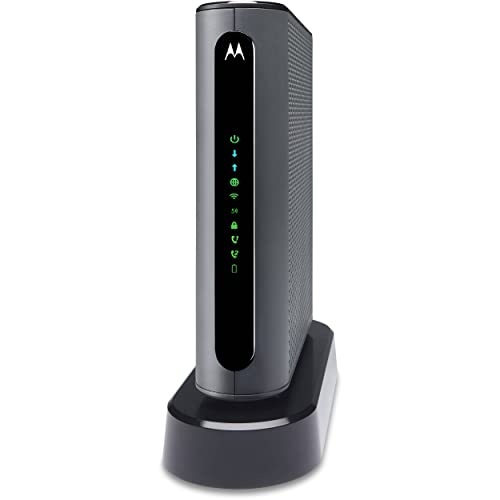
Motorola MT7711 — Cable voice combo
Now for the pick that is only a pick if your telephone arrives by coaxial cable. The MT7711 listing describes a 24×8 DOCSIS 3.0 cable modem with AC1900 dual-band Wi-Fi and a gigabit router, built for Comcast’s service, with two phone ports in its very name. Those ports are the entire story: they connect ordinary telephones to the cable provider’s voice service, the arrangement many households receive when their bundle includes a landline. For that household, this single box replaces the rented modem, the separate router and the provider’s voice hardware in one purchase, and the rental saving is the arithmetic that usually justifies it.
Position it precisely. The phone ports serve the cable company’s voice product; they are not a gateway for an independent VoIP provider you chose yourself, and readers with a separate VoIP account should be shopping the routers above plus, if needed, the adapter below. Within its intended world, though, the MT7711 is coherent: one device, one power supply, one support conversation, and Wi-Fi adequate for a typical home layered on top.
Two cautions belong in bold mental type. First, provider compatibility is specific; the listing names its intended cable service, and a modem bought for the wrong network is a sculpture. Confirm your provider and plan before ordering, and keep the receipt until activation succeeds. Second, a combo concentrates risk: when one box is modem, router and phone service together, its failure silences all three, and its replacement must satisfy the provider again. Households comfortable with that trade gain simplicity that separate boxes cannot match.
- Format: cable modem plus AC1900 router combo
- Modem: DOCSIS 3.0, 24×8 per listing
- Phone: two ports for cable-provider voice
- Compatibility: listing names its intended cable service
- Role: replaces rented modem, router and voice box
Strengths
- One box ends modem rental for compatible households.
- Phone ports serve provider voice without extra adapters.
- Simplifies support to a single device conversation.
Trade-offs
- Useless for the wrong cable provider.
- Phone ports do not serve independent VoIP accounts.
- Combo design concentrates failure in one unit.
Renters of cable equipment often underestimate the rental arithmetic until they multiply it across years, at which point the MT7711’s proposition explains itself. Ownership also means the household keeps its network settings when a rented box would have been swapped by a technician’s schedule. Keep the provider’s activation instructions and your account details together, and the one support relationship this box requires stays a short conversation.
Best for: cable households whose voice line comes with the bundle. Not suited for: anyone with an independent VoIP provider or non-cable internet.

FLYINGVOICE FTA1101 — The adapter
The smallest object in this guide solves the problem the largest routers cannot: the telephone itself. The FTA1101 listing describes an analog telephone adapter with a built-in US plug that converts an analog phone to VoIP, and mentions an AP mode for travel router duty, positioning it for home office and hotel use. Plug a cherished corded phone, a big-button handset a parent trusts, or the house’s existing telephone wiring plan into this little box, register it with a VoIP provider, and the analog world joins the internet without a funeral for familiar hardware.
Its travel personality is more than a gimmick. A worker who lives in hotels can carry the adapter, connect it to the room’s network, and have the home or office number ring on a real handset rather than on a laptop application, with the AP mode letting it share that connection onward. In a fixed home office it plays the quieter role: the bridge between the router’s Ethernet and the phone on the desk, small enough to disappear behind the handset it serves.
Judge it by adapter standards. It routes nothing for the household, broadcasts nothing, and its call quality will be exactly as good as the router and connection feeding it, which is why it sits last in a router guide while still earning its place. Configuration means entering a VoIP provider’s details, a ten-minute task with the provider’s instructions open. For the reader whose actual question was how do I keep my phone, this is the answer, and the routers above exist to feed it well.
- Format: analog telephone adapter, built-in US plug
- Job: converts an analog phone to VoIP
- Extra: AP mode for travel router use per listing
- Feeds from: any router’s Ethernet or travel network
- Role: endpoint hardware, not household routing
Strengths
- Keeps trusted analog phones in service on VoIP.
- Travel mode gives hotel stays a real handset.
- Tiny, simple and cheap in spirit beside router hardware.
Trade-offs
- Does nothing to improve the underlying connection.
- Needs a VoIP provider account configured manually.
- One phone per adapter; larger plans need more hardware.
The adapter’s deepest virtue is social. Technology upgrades fail in families when they demand new habits from the person least interested in forming them: the parent who wants the hallway phone to work as it always has, the grandparent whose number is printed in every directory that matters. An ATA lets the network modernise behind that person’s back while their handset, their buttons and their habits remain untouched. Diplomacy of that quality is rare in electronics at any price.
Best for: households keeping a favourite analog phone on VoIP. Not suited for: anyone expecting it to route the home network.
What Do Jitter, Latency and Packet Loss Feel Like on a Call?
Three technical words govern every conversation in this guide, and each has a sound. Latency is delay: the pause between your sentence and its arrival, tolerable in moderation, corrosive when two speakers keep apologising over each other. Jitter is unevenness: packets arriving in bursts after droughts, heard as a voice that speeds, stalls and smears at the edges. Packet loss is absence: syllables that never arrive, reconstructed by the listener’s brain until the reconstruction fails and a word simply goes missing. A speed test reports none of these directly, which is why households can own a fast connection and a miserable phone line simultaneously.
The router’s influence differs by villain. Latency within the home is mostly queueing, and QoS attacks it directly. Jitter shrinks when the network stops alternating between idle and saturated, another queue discipline effect, helped by wiring the phone so wireless retransmissions stop adding their own irregular rhythm. Loss inside the home usually means a struggling wireless link or failing cable, which is why this guide keeps returning to the humble Ethernet lead. Diagnose by symptom and the settings stop being superstition; each lever exists because a specific villain answers to it.
How Should a Small Business Arrange Its Lines?
A business household should think in lines and roles rather than in devices. The published number deserves the most protected path: wired, prioritised, and ideally on a network segment separated from the family’s entertainment, which the Synology pair arrange most naturally. A second line for outgoing calls can tolerate slightly rougher treatment. Fax, where it survives, is the diva of VoIP, sensitive to compression and jitter alike, and deserves a provider conversation of its own rather than optimistic experimentation.
Redundancy deserves one honest paragraph. If the phone line carries bookings or emergencies, the connection beneath it is a business dependency, and the failover thinking in this batch’s satellite guide applies in miniature: a second path, even a modest cellular one, converts an outage from a closure into an inconvenience. The router cannot create that path, but the better picks here can use it gracefully when it exists. Businesses buy continuity; households buy clarity. Know which purchase you are making.
How Do You Test Call Quality Without Fooling Yourself?
Build a small ritual and repeat it after every change. Call a patient friend or a test number at three moments: a quiet morning, the household’s busiest evening hour, and during a deliberately started large download. Speak in long sentences, because short exchanges hide delay, and ask your listener to report three separate judgements: could they hear every word, did replies feel timely, and did your voice stay human rather than metallic. Write the answers down with the hour and the conditions. A week of such notes will tell you more than any single diagnostic screen, because voice quality is ultimately a human measurement performed by human ears.
Change one variable between rituals. If you enable QoS and move the phone to a cable in the same afternoon, the improvement has two authors and you will never know which to thank, or which to blame when a later change revives the problem. Networking folklore is full of rituals nobody can explain; households that change one thing at a time end up with knowledge instead. That knowledge compounds across every later purchase in this batch of guides, from mesh systems to access points, because the method travels even when the hardware changes.
Why Do Headsets and Handsets Deserve a Budget Line?
An unglamorous truth: many calls blamed on routers are lost at the last six inches. A tired cordless handset with a battery from another decade, a headset with a fraying lead, a speakerphone echoing in a tiled kitchen — each can make a well-prioritised network sound broken. Before upgrading a router for a business line, spend a small sum on the endpoint: a decent wired headset for the desk, fresh batteries for the cordless fleet, a handset placed away from the router’s own electrical noise. Then judge the network again with honest endpoints.
The FTA1101’s presence in this guide is partly a monument to that truth. Households keep analog phones because those phones are good: comfortable, legible, repairable in the ways that matter. VoIP modernisation that respects the endpoint succeeds; modernisation that begins by discarding every familiar object meets resistance that gets misreported as technical difficulty. Keep the handset, fix the path behind it, and the household will call the project a success.
How Do the Six Entries Divide the VoIP Problem?
| Pick | Species | Voice mechanism | Watch out for |
|---|---|---|---|
| Synology RT6600ax | Router | Segmentation and traffic rules | Configuration depth |
| Synology RT2600ac | Router | Bandwidth management by name | Older radios |
| ASUS RT-AX86U | Router | Gaming-bred prioritisation | Feature-rich interface |
| TP-Link Archer AX73 | Router | Headroom and short queues | Basic QoS depth |
| Motorola MT7711 | Modem-router combo | Phone ports for cable voice | Provider specificity |
| FLYINGVOICE FTA1101 | Adapter | Converts analog phone to VoIP | Needs a router and account |
Read the species column first. Most VoIP disappointments are category errors: an adapter expected to route, a combo expected to serve the wrong provider, a fast router expected to prioritise. Match the species to the problem and the rest of the table becomes refinement.
How Should You Configure a Router for Calls, Step by Step?
Begin with wire. Connect the phone, its adapter or the office computer by Ethernet wherever the desk allows it, because every call removed from Wi-Fi is a call immune to the house’s wireless weather. Next, find the QoS or traffic control page and tell the router which devices speak for you; prioritise them in both directions, and if the interface asks for your connection’s real upload figure, enter a value slightly below the measured one, since a queue managed against an honest number behaves better than one managed against a brochure. Then hunt the SIP ALG setting, usually hiding in advanced or NAT menus, and switch it off unless your provider explicitly instructs otherwise; this single toggle resolves a folklore’s worth of one-way audio and phones that ring without connecting.
Finish with a rehearsal, not a hope. Make a test call while a large download runs, while a video stream plays, and during the household’s busiest hour. Listen for the specific failures: chopping means queues, delay means distance or congestion, silence in one direction means signalling trouble, often the ALG or a firewall rule. Each symptom has its own address, and a router from the top half of this guide gives you the keys to all of them. Save the working configuration as a backup before you touch anything else, because a known-good voice setup is worth preserving like a document.
What Mistakes Ruin VoIP Calls in Otherwise Good Homes?
The champion mistake is judging the connection by its download speed and ignoring the upload lane where your own voice travels. Close behind comes leaving SIP ALG enabled because it sounds helpful, then blaming the VoIP provider for signalling faults the router introduced. A third is running the desk phone over strained Wi-Fi from a distant room when a cable, or a mesh node with a wired socket, would have ended the problem in an afternoon. And a fourth is buying by category error, the adapter expected to fix congestion, the combo expected to serve an unrelated provider, the gaming router whose QoS nobody ever opened.
A quieter mistake is forgetting the rest of the chain. A failing modem, a tired cable, a phone battery from another decade, a provider outage two towns away: each can impersonate a router fault. Diagnose in order from the wall outward, changing one thing at a time, and keep notes. Voice faults are intermittent by nature, and notes are how intermittence gets caught.
Emergency calling deserves a sober paragraph in any VoIP guide, because it behaves differently from the landline it replaces. A VoIP service depends on power and on the internet connection; when either fails, the phone fails, unless the household has arranged battery backup for the modem, router and adapter, and a mobile within reach. Providers also rely on the address you register for locating emergency calls, so a number that travels, on the FTA1101 in a suitcase or a service registered to a former home, must have its registered address kept current. None of this is an argument against VoIP. It is an argument for treating the migration as a household safety project with a checklist, not merely as a cheaper bill.
Power planning is simpler than it sounds. A modest battery backup carrying the modem, router and phone adapter can keep a line alive through the short interruptions that make up most outages, and it protects the equipment from the surges that accompany power’s return. Test the arrangement once by pulling the plug on a quiet afternoon, and make the test call. A backup that has never been tested is a hope wearing a battery costume.
What Changes When the Whole Street Works From Home?
Your connection’s last stretch is shared with neighbours, and voice faults that arrive with the working day and leave with it may live in that shared stretch rather than in your house. The router’s defence is the same prioritisation, because it governs the queue at your own threshold, the one place where your packets and your neighbours’ habits meet your upload lane. But expectations should adjust: a router can guarantee that your call leaves the house first; it cannot guarantee the street beyond. Households that understand that border stop replacing equipment for faults that were never domestic, and start keeping the notes that make a provider conversation productive.
There is a scheduling mercy available too. The heaviest household uploads, photo backups and cloud syncs, can be taught to run overnight, when the street is quiet and the calls are few. Routers cannot set those switches inside other devices, but the traffic charts in the Synology pair will show you exactly which devices to teach. Voice quality, pursued honestly, becomes a household timetable as much as a router setting, and timetables are free.
Number portability and provider choice form the commercial backdrop to all this hardware. Most households can keep their number when moving to VoIP, and the freedom to choose a provider independent of the wires entering the house is the entire reason adapters and prioritising routers exist as a category. Exercise that freedom slowly. Register the new service, run it in parallel with the old line for a fortnight of real calls, and only then let the number move. A phone line is identity infrastructure for a family or a business; it deserves the same probation period this batch’s satellite guide recommends for a new connection.
Call recording and voicemail-to-email, the features that seduce many households into VoIP, live at the provider rather than in the router, yet they change the network’s duties in one respect: recordings and messages arrive as data among data, and a household that comes to depend on them should treat the connection’s reliability with new seriousness. The line between a telephone and an information system dissolved years ago. The routers in this guide are simply the equipment of that dissolution, keeping a conversation’s packets as carefully as a filing cabinet once kept its transcripts.
One more diagnostic belongs in every VoIP household’s pocket: the wired laptop test. When calls degrade, plug a computer directly into the router, disable its wireless, and call from a softphone or the provider’s web tool. If the call clears, the fault lives in your wireless geography. If it persists, move the same test to the modem’s side of the router where your setup allows, and learn whether the router is even a suspect. Ten minutes of this logic can save a season of replacing innocent hardware, and it works identically in every house in this guide’s audience.
Voicemail, hold music and the psychology of waiting deserve a mention that pure engineering guides omit. A caller who hears clean audio forgives a great deal; a caller greeted by chopping and echo assumes the business itself is fraying. For a home enterprise, call quality is therefore partly reputation, purchased in router settings and cable runs. That is why this guide grades consumer hardware with unusual sternness about queues: the person on the other end cannot see your invoice for broadband, only hear your priorities.
Children and grandparents test a VoIP system in opposite directions. Children discover every way to be on three calls at once through games and applications that treat voice as a feature rather than a service, loading the network with chatter the router must file correctly. Grandparents use the one handset that matters and judge the entire migration by whether it rings, connects and sounds like a telephone. A household system that satisfies both, prioritising the handset absolutely while letting the chatter fight fairly behind it, has understood the assignment. Configure for the handset first; the chatter is resilient.
Finally, keep the provider’s own status page and support number somewhere other than inside the system they support: printed, or on a mobile that does not depend on the home connection. When voice fails completely, the household’s first need is information from outside the failure. It is a small, almost comic preparation, and like most preparations in this guide it separates a ten-minute incident from an evening of theatre.
There is a temptation, after the first successful QoS configuration, to keep tuning forever, chasing a perfection that human conversation does not require. Resist it. Voice needs to be clear, timely and reliable, not laboratory-grade, and a household that declares victory at the first fortnight of clean calls and then stops adjusting owns a telephone again rather than a project. Save the configuration, write down what you changed and why, and let the system recede into the background where telephones belong. The finest compliment a VoIP setup can earn is that nobody in the house mentions it for a year.
Travel changes the VoIP equation in a way worth planning for. A number that lives with a provider rather than with a house can follow its owner through applications and adapters anywhere a connection exists, which is liberation for the worker and a small hazard for the household left behind, whose registered emergency address no longer matches the voice’s location. The FTA1101’s travel mode makes the liberation tangible. Use it knowingly: update the provider’s location details when the stay is long, and keep a local mobile as the emergency instrument wherever you land.
Bandwidth honesty also applies to the provider’s side of the conversation. When a VoIP service itself falters, its status will not appear in your router’s charts, and households burn evenings re-configuring healthy equipment for a fault occurring in a data centre they will never see. Learn the provider’s status page and community channels before you need them, and add their check to the diagnostic order, right after the wired laptop test. Restraint, in troubleshooting, is a technical skill.
One last piece of housekeeping separates durable VoIP households from fragile ones: a labelled diagram. Sketch the chain from wall socket to handset, modem, router, switch, adapter, phone, with the two or three settings that matter written beside the router’s name. Tape it inside the cupboard door. When a fault arrives during your holiday, the person at home becomes capable, and when equipment is replaced years later, the diagram tells the new box what its predecessor believed. Networks forget nothing except what their owners failed to write down.
And spare a thought for the humble telephone number’s social weight before migrating it anywhere. It is printed on school forms, held by elderly relatives, attached to accounts that use it as proof of identity. A VoIP move touches all of that, which is why the parallel-running fortnight recommended earlier is not caution for its own sake. The routers in this guide can be swapped in an evening; a number’s reputation in the world takes longer to transfer, and it deserves the slower schedule.
Consider, too, the second phone most households forget they own: the one implied by every intercom, entry system and care alarm that dials out through the line. Before any migration, walk the house and list everything that speaks through the telephone, including the devices installed by other trades in other decades. Each needs a decision, keep, convert or retire, and the adapter pick in this guide exists partly for their sake. A migration that remembers the quiet devices is a migration without a midnight surprise.
When the work is finished, make one final ceremonial call: the longest, most ordinary conversation you can arrange, at the busiest hour, on the handset that matters most. If it passes without a single comment about the sound, the project is done, and the telephone has become a telephone again, which was the ambition all along.
That ceremony generalises into the buying rule this whole guide has been circling: judge voice equipment by conversations, not by specifications. A router’s page can promise radios and ports, and those matter, but the product being purchased is an unremarkable phone call on a difficult evening. Every pick above was chosen because its platform, its ports or its peculiar hardware makes that unremarkable call more likely, and every configuration step recommended here exists to protect the same modest miracle. Buy for the conversation you need to have in November, not for the benchmark you can run in June.
Keep the old landline’s final bill, when it comes, as a receipt for a completed migration rather than a relic. The household that planned its adapter, its battery, its registered address and its router’s priorities has not merely changed telephone companies. It has taken quiet ownership of a utility it used to rent blindly, and the clarity of its calls from that month onward is the sound of that ownership working.
And if the migration is for a business, tell the customers nothing at all. The best announcement a new phone system can make is silence: the same number, the same greeting, a clearer voice answering. Save the announcements for improvements customers can celebrate, and let the infrastructure take its bow in private, the way good infrastructure always has.
Infrastructure that bows in private still needs its maintenance, so set two calendar habits before you forget: a quarterly glance at the router’s device list, and an annual review of the provider account, the registered address and the battery backup’s health. Twenty minutes a year is the entire ongoing price of a well-run VoIP household, once the setup dust has settled and the household has stopped thinking of its telephone as an experiment and started treating it, again, as furniture that happens to speak.
A gentle nudge before you spend anything: begin with the free steps, the cable, the ALG switch, the honest upload figure, before spending on any pick above. Half the households who rehearse those steps discover their current router was innocent, and the other half shop with proof.
Final Recommendation
For a home office that lives on its line, the RT6600ax is the conductor this guide would hire first, with the RT2600ac as its proven, thriftier understudy. The AX86U suits the house that games and talks in equal measure, the AX73 covers the mainstream household whose calls simply need a calmer network, and the two specialists close the set: the MT7711 strictly for cable-voice households on its named service, the FTA1101 for the beloved analog phone that refuses to retire. Wire the desk, protect the upload, silence the ALG, and your voice will arrive the way you sent it.
Frequently Asked Questions
How much bandwidth does a VoIP call actually need?
Surprisingly little, a small fraction of what a video stream consumes, but it needs that fraction continuously and evenly in both directions. That is why prioritisation beats raw capacity for voice, and why a busy upload lane hurts calls out of all proportion to the call’s size.
What is SIP ALG and why do guides dislike it?
It is a router helper that rewrites the signalling inside VoIP calls to assist with address translation. In practice it frequently corrupts that signalling on modern services, causing one-way audio or failed registrations. Most providers advise disabling it, and every router here was judged partly on letting you reach that switch.
Can I use VoIP over Wi-Fi reliably?
Yes, when the signal is strong and the network is calm, but a wired connection removes an entire category of doubt. If the phone must be wireless, place it within confident range of the router or a mesh node and prioritise it like any other voice device.
Do I need a special router for a cable phone line?
If your voice service comes from your cable provider, the hardware must speak to that service, which is the MT7711’s specific job through its phone ports. If your VoIP provider is independent of your internet provider, an ordinary router plus an adapter for each analog phone is the usual architecture.
Why do calls break up mainly in the evening?
Evenings load both your household’s upload lane and your provider’s local network. A router with real prioritisation defends the first; nothing at home fully repeals the second, though a call that survives your own peak is most of the battle won.
Should I enable QoS for the whole network or per device?
Per device is the sharper tool where the router offers it: name the phone, the adapter or the office computer, and protect those specifically. Whole-network traffic shaping helps as a background discipline, particularly on the upload side, but voice wants a named guarantee, not a general atmosphere of fairness.
Does VoIP work well over satellite or cellular connections?
It works within each connection’s physics. Cellular usually carries calls comfortably when signal is strong. Geostationary satellite adds a fixed delay that speakers adapt to within minutes, though rapid conversation suffers. The routers in this guide can prioritise voice on either, and the satellite guide in this batch covers that pairing in depth.
What if my calls echo?
Echo usually begins at an endpoint: a speakerphone in a hard-surfaced room, a headset volume high enough for its own microphone to hear, or a handset pressed into double duty. Lower the volume, move the conversation to a softer room, or switch to a handset before blaming the network. When echo appears only on long-distance or satellite-fed calls, delay makes a faint echo more noticeable, and a headset remains the cheapest cure in this entire guide.
Related Guides
Voice sits inside a wider network, so see also the guest access and easy management roundup for household controls, the satellite internet router guide for calls over difficult connections, and the SIM card mobile router guide for phone service that travels.


