What's inside
- Where to buy
- Key Takeaways
- Quick Picks: Best 16:10 Monitors
- Why did 16:10 shrink — and why does it survive at all?
- What is the extra vertical space actually worth, in a working day?
- How do you live with 16:10 in a 16:9 world?
- Who, exactly, should still buy 16:10 in 2026?
- How do you set up a 16:10 workstation properly?
- How did we build a guide around a class this hard to verify?
- What should you check when buying through professional channels?
- Does the laptop world’s return to taller screens help this class?
- Two 16:10 screens, or one ultrawide?
- Why is almost every surviving 16:10 monitor colour-serious?
- What do you give up versus a modern gaming monitor?
- How long will a 16:10 purchase serve, and what happens when it ages?
- Is 16:10 worth it for students and home study desks?
- How do you decide, in five questions?
- Comparison Table
- Which mistakes do 16:10 shoppers make?
- Final Recommendation
- Frequently Asked Questions
- Related Guides
As an Amazon Associate I earn from qualifying purchases. This post may contain affiliate links at no extra cost to you.
gizmoverdict.com is reader-supported. When you buy through links on our site, we may earn an affiliate commission.
Where to buy
This guide begins with the admission most buying guides would bury: the best 16:10 monitors are a shrinking class, and anyone who tells you otherwise is selling something. Sixteen-ten — the aspect ratio that gives a 24-inch screen 1920 × 1200 pixels instead of 1920 × 1080 — was once the default shape of serious desktop monitors. Then television economics took over the panel industry, 16:9 became the universal cut of glass, and the taller ratio retreated to the professional lines where it survives today: colour-critical ProArt and UltraSharp models, a few business displays, and a loyal constituency of writers, coders and spreadsheet workers who measure a screen not in inches but in lines of text visible without scrolling. This guide is for that constituency. It verifies the one current model our pool could confirm end-to-end, presents the class’s other respected members honestly as prose-only entries, and explains exactly what the extra vertical space is worth — and to whom.
The arithmetic of the ratio deserves its sentence. Against a 1080p screen of the same width, a 1920 × 1200 panel adds 120 rows of pixels — roughly eleven percent more vertical room. That is six to eight more lines of a document, a code editor’s extra function kept in view, a spreadsheet’s additional rows above the fold, an image editor’s canvas with its toolbars unfurled. It sounds modest and compounds hourly, which is why the ratio’s devotees describe it the way mechanical-keyboard owners describe their switches: a small thing, felt constantly. One pick below is linked from a verified listing — ASUS’s ProArt PA248QV, the class’s current standard-bearer. The other five are named, profiled and left unlinked, because our pool verified no listings for them to the standard this series requires, and a shrinking class is exactly where unverified links do the most harm.
One thing should be clear before any names are named: this is not a nostalgia exercise. Each model discussed in the pages that follow is, or recently was, a working professional product bought by institutions that measure their purchases — and the ratio they share survives because those measurements keep coming out in its favour for a defined kind of work. If your work is that kind, what follows is a shopping list. If it is not, it is something almost as useful: an explanation of a preference you have seen in the wild, held by people whose desks you may have envied without knowing why.
Key Takeaways
- A 16:10 monitor at 1920 × 1200 shows roughly eleven percent more vertical content than a 1080p screen — extra lines of text, code and spreadsheet rows that compound across every working day.
- The class is genuinely shrinking: panel production follows 16:9 television economics, so 16:10 survives mainly in professional lines (ProArt, UltraSharp and their peers) rather than in gaming or budget ranges.
- Only one pick in this guide carries a verified link — the ASUS ProArt PA248QV; the other five are prose-only entries, named precisely so you can verify any listing you find.
- Video and games assume 16:9, so a 16:10 screen letterboxes films slightly and needs a moment’s thought in game settings; the ratio is a work-first choice.
- If your work is vertical — documents, code, data, design canvases — 16:10 remains worth hunting down through the professional lines; if your screen is mainly entertainment, 16:9 serves you better, cheaper and with far less searching involved.
Quick Picks: Best 16:10 Monitors
| Pick | Badge | Why it is here |
|---|---|---|
| ASUS ProArt PA248QV | The verified standard-bearer | 1920 × 1200, Calman Verified colour and a full ergonomic stand — the one current 16:10 monitor we could verify end-to-end. |
| Dell UltraSharp U2415 class | Prose-only: the classic of the class | The 24-inch 16:10 monitor a generation of professionals standardised on, discussed without a link. |
| Dell P2421 class | Prose-only: the business fleet choice | Dell’s mainstream 1920 × 1200 office line, for desks equipped in number rather than singly. |
| HP Z24n G3 class | Prose-only: the design-studio route | HP’s Z-series take on 16:10, aimed at creative workstations and tidy multi-screen desks. |
| EIZO FlexScan EV2485 class | Prose-only: the connoisseur’s panel | EIZO’s 1920 × 1200 office flagship class, for buyers who grade monitors by uniformity and warranty. |
| Dell UltraSharp U3023E class | Prose-only: 16:10 at 30 inches | 2560 × 1600 on a 30-inch canvas — the ratio scaled up, for those who want its height in a larger room. |
Why did 16:10 shrink — and why does it survive at all?
The short history is a story about glass. LCD panels are cut from large sheets, and the television market — which buys in volumes the monitor market cannot approach — standardised on 16:9. Every panel maker optimising a production line for television sizes made 16:9 monitor panels cheaper as a by-product, and 16:10, which fits no television, became a special order. Gaming then cemented the outcome: games, consoles and streaming video all assume 16:9, so the entertainment market had no reason to resist. Within a decade, the taller ratio went from default to niche without anyone ever proving it worse — for work, it is arguably better, and the market simply was not asked.
It survives because a specific kind of buyer kept paying for it. Professional lines persist where customers measure productivity in lines and columns: Dell’s UltraSharp range, ASUS’s ProArt range, HP’s Z displays and EIZO’s FlexScan line all kept 1920 × 1200 models in production for design studios, offices and institutions whose purchasing departments specify them by the hundred. Colour accuracy became the class’s companion virtue — a 16:10 panel today is almost always a colour-serious panel, factory-checked and paired with a proper stand — because the buyers who insist on the ratio are the same buyers who insist on everything else. The result is a strange and happy market position: the class is small, but nearly everything left in it is good.
The honest consequence for today’s shopper is scarcity behaviour. Models appear, sell through and are not always replaced promptly; prices hold firmer than in the 16:9 world; and the second-hand market for the classics is unusually active. None of that should deter the reader whose work is vertical — it should simply set expectations: you are shopping a specialist shelf, with a specialist’s prices and a specialist’s rewards, and this guide’s structure (one verified link, five carefully named alternatives) reflects that shelf exactly as it is.
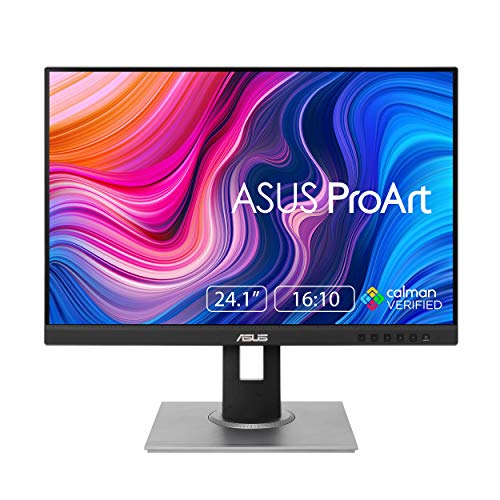
ASUS ProArt PA248QV — The verified standard-bearer
The PA248QV is the monitor this entire guide pivots on, because it is the one member of the class our verification could stand behind completely: a 24.1-inch IPS panel at 1920 × 1200, Calman Verified with a Delta E under 2 per its listing, covering the full sRGB space, on a properly ergonomic stand, with HDMI and DisplayPort among its connections. Read that specification slowly and you will notice it describes not a compromise product but a complete one — the ratio, the colour discipline, the ergonomics and the connectivity all present at once. In a class defined by scarcity, the PA248QV is what availability looks like when it is done properly.
ProArt is ASUS’s creator line, and the panel’s behaviour reflects the brief: colour that can be trusted for photo and design work, uniformity treated as a specification rather than a hope, and an anti-glare finish tuned for long lit-room sessions. The extra 120 lines over 1080p serve the creator’s canvas and the writer’s page with the same indifference — this is a ratio that does not care what you make, only that you make it vertically. The stand adjusts in height, tilt, swivel and pivot, which matters more than usual here because 16:10 buyers keep monitors for a long time and mount them in pairs; two PA248QVs side by side remain one of the great unheralded desk setups for document-and-reference work.
Its limits are the class’s limits, stated once here for all six picks: films letterbox slightly, games need their resolution set thoughtfully, and the refresh rate is a professional’s 75Hz class rather than a gamer’s number — this is a work instrument. Within that understanding, the PA248QV is the easiest recommendation in this guide and the only one we can attach a link to with a clear conscience. If you want 16:10 today, verified and warrantied, this is the door.
One more virtue deserves naming, because owners mention it and reviewers rarely do: the PA248QV’s generation of ProArt panels handles the mixed desk gracefully. Its colour modes include a proper sRGB setting for web and print work alongside the wider behaviours creative software wants, its low-blue-light tuning is graduated for evening writing sessions, and its wake-from-sleep conduct with both Windows and Mac machines is the boring, reliable kind. A monitor can be a ratio manifesto or it can be a tool; the ProArt manages to be the manifesto by being the tool first, which is why it, and not a rarer name, carries this guide’s only link.
- Panel: 24.1-inch IPS, 1920 × 1200 (16:10)
- Colour: 100% sRGB class, Calman Verified, Delta E < 2 per listing
- Stand: height, tilt, swivel and pivot
- Inputs: HDMI and DisplayPort
Strengths
- The complete package: ratio, verified colour and full ergonomics together.
- The one pick in this guide with an end-to-end verified listing.
- A natural matched pair for dual-screen document work.
Trade-offs
- Work-first refresh behaviour; not a gaming panel.
- 16:9 video letterboxes, as the ratio dictates.
- Professional pricing against ordinary 1080p screens.
Best for: writers, coders, designers and analysts who want 16:10 now, verified. Not suited for: gamers or film-first desks.
Dell UltraSharp U2415 class — Prose-only: the classic of the class
No link attaches to this entry, in line with this guide’s verification rule — but no account of 16:10 is complete without the U2415, the 24-inch 1920 × 1200 UltraSharp that became the default professional monitor of its era. Its formula explains the class’s loyalty: a colour-checked IPS panel with thin bezels designed for multi-monitor arrays, a full ergonomic stand, and the kind of uniformity that let studios buy them by the dozen and match them by eye. Thousands are still in service, and the second-hand market treats good examples with unusual respect.
As a purchase today, the U2415 class is a stock hunt rather than a click: new availability has thinned as Dell’s line evolved, and the buyer should verify the individual unit’s panel hours and condition wherever it surfaces, as with any established professional model. What you are hunting is not a specification — 1920 × 1200 IPS is well understood — but a condition and a price that respect the model’s age. Found well, it remains the purest expression of what this ratio was for: a working screen, bought by people who read for a living, that made the reading easier in a way its owners can still articulate a decade later.
The U2415’s afterlife says something about the class as a whole. Monitors bought for entertainment are replaced when entertainment moves on; monitors bought for reading are replaced when they fail, and the U2415 generation has been notably slow to fail. If you inherit, borrow or buy one, expect the experience its reputation promises — and expect to understand, within a week, why its owners answer ratio surveys the way they do. It is the used purchase this guide would make first, with the condition checks in the FAQ applied without sentimentality.
- Panel class: 24-inch IPS, 1920 × 1200 (16:10)
- Stand class: full ergonomic adjustment, thin bezels for arrays
- Guide status: discussed in prose; hunt it through professional channels
- Colour class: factory-checked UltraSharp standard
Strengths
- The reference design that defined professional 16:10.
- Array-friendly bezels and a proper stand.
- A deep owner record and an active second-hand market.
Trade-offs
- New stock is scarce; condition varies by seller.
- An older design beside the current ProArt.
- No verified purchase route in this guide.
Best for: traditionalists and array builders who find a good unit. Not suited for: buyers who want new, warrantied and one-click.
Dell P2421 class — Prose-only: the business fleet choice
Where the UltraSharp is the class’s flagship memory, Dell’s P-series 16:10 models — the P2421 class — are its working fleet: 24.1-inch 1920 × 1200 panels specified by IT departments for offices that run on documents. The P-series formula trades the UltraSharp’s colour ceremony for fleet virtues: consistent panels, sensible stands, connectivity that covers the machines an office actually owns, and pricing that survives a purchasing committee. Presented without a link under this guide’s rule, it is the entry to discuss with your supplier or to hunt through business channels, where this class circulates in volume.
For the home buyer, the P2421 class’s appeal is its honesty. Nothing about it performs for a spec sheet; everything about it assumes an eight-hour day of text, mail and data, at a height-adjustable station, for years. If the ProArt is the 16:10 monitor as a creator’s instrument, the P-class is the ratio as office infrastructure — and infrastructure, bought well, is the purchase nobody regrets. Verify the exact model’s resolution when you shop the family, because the P-series spans several ratios and sizes under similar names; the 16:10 members are the 1920 × 1200 ones, and the distinction is the entire point.
There is an institutional memory embedded in models like this that individual buyers benefit from without seeing. Fleet monitors are the ones whose failure modes get reported by the thousand and engineered out across revisions, so a mature P-series design arrives with its quirks already known and mostly solved. For a small business equipping a room of desks — the natural habitat of this class — that maturity is worth more than any single feature, because the cost of a monitor in an office is dominated by the day it misbehaves, not the day it is bought.
- Panel class: 24.1-inch IPS, 1920 × 1200 (16:10)
- Stand class: ergonomic business stand
- Guide status: named here without a link — verify any listing you find
- Audience: office fleets and document-first desks
Strengths
- Fleet-proven consistency for document work at scale.
- Sensible ergonomics and office connectivity.
- The ratio without the creator-line premium.
Trade-offs
- Colour discipline a step below UltraSharp and ProArt.
- Family naming spans other ratios — verify the exact model.
- Retail availability is channel-dependent.
Best for: offices equipping several desks, and home document workers. Not suited for: colour-critical creative work.
HP Z24n G3 class — Prose-only: the design-studio route
HP’s Z-series is the company’s design-and-engineering display line, and its 16:10 member class — the Z24n G3 and its kin — brings the ratio into the studio with HP’s particular emphases: colour-managed panels, an industrial design that assumes the monitor will be seen by clients, and multi-screen manners for the paired and tripled setups that CAD, video and design workstations favour. It stands in this guide, unlinked under our verification rule, as the third manufacturer’s testimony that the ratio survives because professionals keep specifying it.
The Z-class ownership story is about integration: these panels are designed to live in managed environments, match each other across a wall of screens, and hold their calibration behaviour across a fleet’s life. For the individual buyer, that translates into a monitor that feels engineered rather than assembled, with the 1920 × 1200 canvas giving design tools their vertical room — layers panels, timelines and property sheets all breathe easier with the extra lines. As with the Dell entries, the hunt is the task: verify the specific model’s resolution and condition through your channel, because the Z family’s naming covers several shapes and the 16:10 members are the ones this guide means.
HP’s Z line also carries a sustainability and serviceability posture that studios with procurement policies increasingly require — another unglamorous reason the professional classes persist while consumer lines churn. For the individual reader, the translation is simpler: parts, stands and support for these models exist through channels that outlast retail cycles. In a category where the purchase is deliberately long-term, the manufacturer’s intention to support the product long-term is not a footnote. It is close to the whole argument.
- Panel class: 24-inch IPS, 1920 × 1200 (16:10)
- Stand class: full ergonomic, studio-oriented design
- Guide status: prose entry; no pool-verified listing for this batch
- Audience: design, CAD and video workstations
Strengths
- Studio-grade integration and multi-screen manners.
- Colour-managed panel for creative work.
- Design that suits client-facing spaces.
Trade-offs
- Channel availability rather than simple retail.
- Family naming requires the same verification care as Dell’s.
- No verified link in this guide.
Best for: creative workstations and studios standardising on HP. Not suited for: casual or gaming desks.
EIZO FlexScan EV2485 class — Prose-only: the connoisseur’s panel
EIZO occupies a peculiar and honourable position in the monitor world: a Japanese maker whose office panels are bought by hospitals, control rooms and trading floors precisely because they are unexciting in every way that matters — uniformity, stability, warranty and the absence of surprises across a decade. Its FlexScan line’s 16:10 class, represented by the EV2485 generation at 1920 × 1200, applies that philosophy to this guide’s ratio: an IPS panel with the line’s characteristic attention to even brightness, eye-comfort features for extreme working hours, and build quality that assumes the monitor will outlive the furniture.
Unlinked here under the same verification rule as the other prose entries, the EIZO class is the recommendation for the buyer who grades monitors the way EIZO builds them. Its colour is honest rather than theatrical, its ergonomics are complete, and its warranty culture is the industry’s benchmark. The price of that culture is real, and for a single home desk the ProArt above will usually be the rational purchase; but for the reader who has been burned by panel lottery before and intends never to play it again, this class exists, and its name is worth the hunt through specialist channels.
EIZO’s presence in this guide also serves as the class’s quality ceiling, against which the others can be honestly measured. The ProArt gets you verified colour and the ratio at a rational price; the EIZO gets you the ratio with every tolerance tightened and every behaviour documented, at a price that announces its priorities. Most readers should buy the former. But a guide that omitted the ceiling would misdescribe the room — and readers who have priced colour-critical work will recognise the EIZO premium as the familiar cost of certainty, charged by the same logic in every tool category they own.
- Panel class: 24.1-inch IPS, 1920 × 1200 (16:10)
- Stand class: full ergonomic FlexScan stand
- Guide status: covered in prose only, per this guide’s verification rule
- Audience: uniformity purists and extreme-hour workstations
Strengths
- Uniformity and stability treated as the product itself.
- Warranty and longevity culture without peer in this list.
- Eye-comfort engineering for the longest working days.
Trade-offs
- The class’s premium pricing, without exception.
- Specialist-channel availability.
- Over-engineered for a casual desk.
Best for: buyers who prioritise panel perfection and decade-long service. Not suited for: budgets, or anyone who finds the ProArt sufficient — most people.
Dell UltraSharp U3023E class — Prose-only: 16:10 at 30 inches
The final entry scales the argument up. The U3023E class takes the ratio to a 30-inch panel at 2560 × 1600 — the same proportions, a larger canvas, and a pixel count that serves the ratio’s devotees who found 24 inches small: the analyst with four data windows, the editor with a full page and its apparatus, the developer whose IDE is a city. At this size the extra vertical space stops being a refinement and becomes a workspace philosophy, and Dell’s UltraSharp execution adds the line’s hub connectivity and colour discipline to carry it.
Presented without a link like its prose companions, the big Dell asks the buyer to accept the class’s terms at their largest: a specialist price, a desk deep enough for 30 inches at a comfortable distance, and content that is mostly work, since 16:9 entertainment letterboxes here as everywhere in this guide. What it returns is the fullest expression of the idea this article exists to document — that for a certain kind of work, height is the dimension that matters, and no width of 16:9 screen substitutes for it. If the 24-inch picks are the ratio’s present, this is its monument: proof that at the professional end of the market, 16:10 never actually left.
Consider the working postures this size enables, because they are the real product. A full A4 or letter page at readable size, beside the notes it came from. A dataset with its chart beneath it, both live. A design canvas at working zoom with the layers stack and the properties panel both open, neither stealing the other’s room. Each of those arrangements is possible on smaller or wider screens with enough window management; on a 30-inch 16:10 panel they are simply the default, and defaults are what a working day is actually made of. That is the case for the big Dell, stated in the only terms that ever mattered for this ratio.
- Panel class: 30-inch IPS, 2560 × 1600 (16:10)
- Stand class: full ergonomic UltraSharp stand with hub connectivity
- Guide status: unlinked entry — the model name is your search term
- Audience: multi-window professionals wanting the ratio at scale
Strengths
- The ratio’s vertical advantage at a genuinely spacious size.
- UltraSharp colour and hub execution.
- A four-window workspace on a single panel.
Trade-offs
- The largest desk footprint and price in this guide.
- Letterboxing for entertainment, as with all 16:10.
- No verified link; a deliberate, channel-based purchase.
Best for: professionals whose work is wide and tall at once. Not suited for: small desks or entertainment-led use.
What is the extra vertical space actually worth, in a working day?
Translate the 120 extra lines into the units of real work. In a word processor at ordinary zoom, they are most of a paragraph more per screen — which means the sentence you are revising keeps its context above and below it. In a code editor, they are a function that no longer needs scrolling to read whole, multiplied by every function, every day. In a spreadsheet, they are seven or eight rows — the subtotal stays visible while you edit the entries, the chart and its data share a screen more often. In photo and design tools, they are the canvas keeping its full height while the panels stay open. None of these is dramatic. All of them repeat hundreds of times a week, and that repetition is the ratio’s entire case: 16:10 does not do anything a 16:9 screen cannot do; it does the same things with slightly less friction, forever. People who work in text feel that friction keenly, which is why they write guides like this one into existence by refusing, decade after decade, to stop asking for the taller screen.
How do you live with 16:10 in a 16:9 world?
Practically, and with fewer compromises than folklore suggests. Video is the visible one: films and streams are 16:9 or wider, so a 16:10 screen shows them with slim black bars top and bottom — the same letterboxing a cinema screen applies, and no more distracting. Games need one settings visit: most support 1920 × 1200 natively and simply show you slightly more vertical world; a minority scale or bar the image, and the community around this ratio has documented the behaviour of popular titles for years. Consoles assume 16:9 and will letterbox accordingly, which is why this guide never recommends the ratio for a console-led desk. The operating system needs nothing at all — the desktop simply becomes taller. The real adjustment is psychological and runs in the owner’s favour: after a month at 16:10, returning to a 1080p screen feels like working through a letterbox in reverse, and that feeling, more than any specification, is why this class refuses to die.
Who, exactly, should still buy 16:10 in 2026?
Name the tribes honestly, because the ratio is a tribe purchase. The writer and editor, whose material is the page and whose scroll is an interruption of thought. The programmer, whose editor, terminal and documentation stack vertically and whose context is measured in lines retained. The analyst and accountant, for whom eight more spreadsheet rows is not a statistic but the difference between seeing the subtotal and hunting for it. The designer and photographer working in tools whose panels colonise the vertical edges. The academic with a PDF and a notes window in permanent negotiation. What unites them is that their content is taller than it is wide and their hours are long — the two conditions under which eleven percent more height stops being a specification and becomes a working condition. Everyone else — the gamer, the film watcher, the casual browser, the console desk — is better served by the mainstream this class seceded from, and this guide loses nothing by saying so. A niche that knows its members serves them better than a mass market that flatters everyone.
How do you set up a 16:10 workstation properly?
The setup ritual is short and mostly borrowed from good practice anywhere, with two ratio-specific notes. Height first, as always: the professional stands on every pick in this guide adjust fully, so use them — top of the panel near eye level, the extra height of the taller screen accounted for, because a 16:10 panel is physically taller than the 16:9 screen it replaces and deserves a fresh measurement rather than the old mark on the wall. Scaling second: at 1920 × 1200 on 24 inches, most users can work at native size comfortably, which is part of the class’s charm — no scaling compromises, no blurry legacy applications. The ratio-specific items are these. Set your games individually, since support varies by title, and save the settings per game rather than fighting them monthly. And if you run a second screen, match its height physically to the 16:10 panel’s — the taller screen beside a shorter one invites a shelf or an arm adjustment, and a level top edge across both displays is the difference between a workstation and a pile of equipment.
How did we build a guide around a class this hard to verify?
The method deserves a paragraph, because it differs from a normal roundup and the difference is the point. We began from the pool: every listing our verification could confirm end-to-end, with its title recorded. Exactly one current 16:10 model cleared that bar — the ASUS ProArt — and rather than pad the guide with unverified links to fill a quota, we built the honest structure you are reading: the verified pick linked and reviewed in full, and the class’s other genuine members presented as named prose entries, each with the checks a buyer should run on any listing they find. The alternative — six links, some of them to whatever a marketplace search surfaced that morning — is how bad purchases happen in specialist categories, where a wrong-ratio sibling or a mislabelled panel hides behind a familiar model name. In a shrinking class, the most valuable thing a guide can give you is not a link. It is the exact model names, the exact resolutions, and the confidence to verify the rest yourself. That is what the five prose entries are for, and why they carry no less of this guide’s recommendation than the one linked pick — only a different kind of it.
What should you check when buying through professional channels?
Since five of these six picks will likely be bought through business suppliers, specialist retailers or the second-hand market, the checklist matters more here than in any other guide in this series. Confirm the resolution in writing — 1920 × 1200 or 2560 × 1600 — because family naming is the class’s one true trap. Confirm the panel is the IPS generation the line is known for, not a lesser sibling fitted to a fleet contract. Ask about the stand in the box, since professional models are sometimes sold panel-only to volume buyers. Establish the warranty’s start and terms, which on channel stock can differ from retail assumptions. And on used units, run the physical checks from the FAQ: a white screen, a dark room, a pixel hunt at reading distance, the stand’s joints under load. None of this is burdensome — it is fifteen minutes of questions — but in a class where the wrong box can contain the right name and the wrong ratio, it is the difference between joining the constituency and funding a return.
Does the laptop world’s return to taller screens help this class?
There is a hopeful sign worth reporting accurately. In recent years, premium laptops have quietly moved back to taller displays — 16:10 and even taller ratios have returned to flagship ultraportables, driven by exactly the productivity logic this guide describes: knowledge work is vertical, and laptop buyers with choices chose height. Whether that revival reaches desktop monitors is an open question, and this guide will not promise it. Panel production for monitors follows its own economics, and a laptop trend is not a monitor production line. But the direction of travel matters for a buyer deciding whether a 16:10 purchase is a dead end: the ratio’s logic is being revalidated in the industry’s most competitive category, the professional lines in this guide continue to be stocked and refreshed, and the constituency shows no sign of shrinking even as the catalogue does. Buy the screen for the decade you will use it, not for the trend either way — the professionals in these pages always did.
Two 16:10 screens, or one ultrawide?
The standing alternative for the vertical worker deserves its hearing. A 34-inch ultrawide offers a seamless canvas and, in its 1440p form, more total pixels than a single 16:10 panel — but its height is a 27-inch 16:9 screen’s height, which is to say the letterbox this guide’s readers are trying to escape, stretched wide. Two 24-inch 1920 × 1200 panels, by contrast, give the full height twice, with a bezel seam that suits the document-and-reference pattern most vertical work actually follows, and a combined cost that historically undercuts the ultrawide’s premium. The ultrawide wins for timelines, panoramas and any single-canvas craft; the pair wins for the page-based tribes this guide serves, and it wins on the ratio’s own terms — height, everywhere, all day. It is also the arrangement the class’s own design anticipates: those thin bezels and full stands on the Dell and ASUS entries exist because their makers knew the second screen was coming.
Why is almost every surviving 16:10 monitor colour-serious?
It is not a coincidence, and understanding it helps you shop the class. When the ratio retreated from the mainstream, the buyers who remained were disproportionately the ones with professional requirements — and colour accuracy is the professional requirement that cannot be faked in a specification’s small print, because studios verify it on arrival. So the surviving lines competed on the things their buyers measured: factory calibration reports, tight Delta E tolerances, uniformity compensation, panels binned for consistency. The side effect for today’s shopper is a gift: there is effectively no bad 16:10 monitor in current professional production, because the market that would have tolerated one left years ago. Your decision among this guide’s six is therefore not good versus bad but character versus character — creator polish, fleet discipline, studio integration, connoisseur tolerances, or the ratio at scale. Classes with a quality floor this high are rare in any technology category, and it is the strongest argument that the niche, however small, is healthy where it counts.
What do you give up versus a modern gaming monitor?
State it plainly, so the trade is chosen rather than discovered. You give up high refresh: this class lives at professional rates, and fast games will feel ordinary on it. You give up the gaming feature layer — strobing modes, crosshair overlays, esports tuning — and the aggressive pricing that gaming volume creates. You give up native-shape entertainment, as the letterboxing sections have covered. And you give up the easy retail experience: one-click stock, endless reviews, a replacement on every shelf. What you receive in exchange is the subject of this entire article — height, colour discipline, stands built for a decade, and panels made for the hours you actually spend working. Readers for whom that exchange sounds like a bargain are this class’s constituency, and they have never needed convincing twice. Readers for whom it sounds like a loss should close this guide with our blessing and buy the excellent 16:9 screens our other roundups exist to compare.
How long will a 16:10 purchase serve, and what happens when it ages?
Longer than most technology in the room, if this class’s history is any guide — and it is the only guide available. The professional lines represented here were engineered for institutional service lives, and their first owners routinely report a decade of daily use; the ratio’s buyers then keep them longer still, because the replacement market offers nothing taller to move to. The ageing questions are practical rather than existential. Backlights dim slowly and evenly on quality IPS panels, so a ten-year-old screen is usually a slightly dimmer good screen rather than a failed one. Stands and mounts use the universal VESA pattern, so arms and parts interchange across generations. And when a 16:10 panel finally retires from the main desk, its afterlife is unusually useful — a portrait-rotated reference screen, a workshop or studio auxiliary, a hand-me-down that still reads better than most new budget panels. Buy this class expecting the long service its makers built for, maintain the simple habit of reasonable brightness, and the purchase divides into a cost per year that the flashier categories cannot match.
Is 16:10 worth it for students and home study desks?
For the student whose work is essays, research and code — which is to say most students, most of the time — the case is quietly strong. Study is vertical work: papers read in full, sources beside drafts, problem sets with their working visible. A 16:10 screen serves those hours exactly as it serves a professional’s, and the class’s used market makes the entry price student-shaped in a way the new professional lines are not; a well-checked UltraSharp classic costs less than many new budget panels and will outlast the degree. The cautions are the honest ones from the rest of this guide: if the same desk is the household’s film and games screen, the mainstream shape serves the household better, and a new 16:10 purchase at professional prices is hard to justify against tuition. But as a deliberate, second-hand or hand-me-down study instrument, the ratio may be the best-value upgrade a student desk can get — which is a fittingly unglamorous conclusion for the least glamorous, most useful shape in the monitor world.
How do you decide, in five questions?
Compress the guide into the order a buyer should actually ask. First: is your screen time mostly vertical work — pages, code, data, canvases? If not, this class is not for you, and the mainstream guides will serve you better. Second: do you want it new, warrantied and simple? Then the verified ProArt is your answer and the remaining questions are formalities. Third: are you equipping several desks or a studio standard? Then the Dell and HP classes, through their channels, are where fleets are bought, with the resolution check run on every unit. Fourth: is panel perfection itself the priority, above price and convenience? The EIZO class exists for you. Fifth: has your work outgrown 24 inches in all directions at once? Then the 30-inch UltraSharp class is the ratio at full size. Notice what the five questions never ask: which is fastest, which is cheapest, which is newest. In a class this settled, those are the wrong instruments — the right ones are fit, channel and time, and a buyer who decides on those will still be satisfied when the monitor is the oldest object on the desk.
Comparison Table
| Monitor | Size / Resolution | Character | Stand | Link status |
|---|---|---|---|---|
| ASUS ProArt PA248QV | 24.1in, 1920 × 1200 | Creator colour, verified | Full ergonomic | Linked |
| Dell UltraSharp U2415 class | 24in, 1920 × 1200 | The classic professional | Full ergonomic | Prose-only |
| Dell P2421 class | 24.1in, 1920 × 1200 | Office fleet standard | Ergonomic | Prose-only |
| HP Z24n G3 class | 24in, 1920 × 1200 | Studio integration | Full ergonomic | Prose-only |
| EIZO FlexScan EV2485 class | 24.1in, 1920 × 1200 | Uniformity connoisseurship | Full ergonomic | Prose-only |
| Dell UltraSharp U3023E class | 30in, 2560 × 1600 | The ratio at scale | Full ergonomic, hub | Prose-only |
Which mistakes do 16:10 shoppers make?
The first is buying the ratio for the wrong life: a film-and-games desk gains nothing from height it letterboxes against, and the money would serve better in a fast 16:9 panel. The second is model-name roulette — the professional families in this guide all sell several ratios under similar names, so the single most important check in any listing, linked or not, is that the resolution reads 1920 × 1200 or 2560 × 1600; a 16:9 sibling bought by mistake is the class’s classic own goal. Third, shoppers assume the class is dead and overpay the first listing they find, when the reality — thin but real availability across the professional lines — rewards a week’s patience and a few channel checks. Fourth, the opposite error: waiting indefinitely for a revival that television economics will never schedule. The class is stable at its niche size; buy the screen that exists, from the lines that still make it, and let the revival take care of itself.
Final Recommendation
For the reader who wants this ratio today, with a warranty and a verified listing, the answer is the ASUS ProArt PA248QV, and it is not close: it is the complete 16:10 monitor — the resolution, the colour discipline, the stand — from a line committed to the format. Hunt the Dell UltraSharp and P-series classes if you are equipping several desks or prefer Dell’s ecosystem, the HP Z class if your studio runs on HP, the EIZO if uniformity is your religion, and the big U3023E class if your work has outgrown 24 inches in every direction. But buy with the guide’s opening admission in mind: this is a specialist shelf, maintained by professional demand, and its prices and availability behave accordingly. For the writer watching one more paragraph stay on screen, the coder reading a function whole, the analyst whose subtotal never scrolls away — the extra lines are not nostalgia. They are the tool, still made by serious companies for serious work, still worth the small hunt it takes to find them — and still, line for line, the most honest upgrade a reading desk can buy.
Frequently Asked Questions
Is 16:10 really better than 16:9 for work?
For vertical work, measurably: at the same width you see about eleven percent more content — more lines of text, code or data on every single screenful — and that difference repeats with every scroll you do not have to make, every hour of every working day. For video-led and gaming-led use, 16:9 is the native shape of the content and serves better. The ratio question is really a content question, and this guide’s picks assume your content is documents, code, data and design canvases.
Why are there so few 16:10 monitors now?
Panel economics. The television industry standardised glass production on 16:9, making those panels cheap and plentiful, while 16:10 became a low-volume speciality sustained by professional demand. Once gaming and streaming aligned behind 16:9 as well, no mass-market force remained to carry the taller ratio, and it settled into the professional niche where its buyers were concentrated all along — smaller, more expensive per unit, and, as this guide has argued, unusually good as a result. The class did not shrink because it was beaten on merit for work — it shrank because it was beaten on manufacturing volume, which is why what remains is concentrated in the professional lines represented in this guide.
Will games and films look wrong on a 16:10 monitor?
Films will letterbox slightly, with slim bars above and below, exactly as cinemas present wider formats — a cosmetic matter that owners report forgetting about within the first week of use. Most PC games support 1920 × 1200 directly and show a little more vertical view; some scale or add bars, and the behaviour of popular titles is well documented by the ratio’s community. Consoles assume 16:9 throughout, so a console-led desk should not choose this ratio.
Why does this guide link only one monitor?
Because links in this series are reserved for listings verified against our pool to a fixed standard, and only the ASUS ProArt PA248QV met it for this batch. The other five entries are genuine, respected members of the class presented honestly without links — with the model names given in full, so any listing you find can be checked against the resolution and specification tests this guide describes.
Is a used 16:10 professional monitor a sensible buy?
It can be, because the class’s classics were built for decade-long institutional service, were bought by organisations that maintained them properly, and now circulate in a second-hand market active enough to offer real choice. Judge condition as you would any professional tool: panel hours where disclosed, uniformity on a white screen, dead pixels at reading distance, and the stand’s joints. Bought with those checks, a used UltraSharp-class panel is one of the better value routes into this ratio.
What if I cannot find any 16:10 stock at all?
Then the pragmatic heir is a 1440p 16:9 monitor, whose extra vertical pixels over 1080p recover much of the working height this guide celebrates, in the format the industry fully supports — or a 24-inch 1080p screen rotated to portrait as a second display, which is how many former 16:10 owners scratch the vertical itch today. Neither is the real thing, but both are honest substitutes while the professional lines restock.
Can I use a 16:10 monitor in portrait orientation?
Yes, and the class is secretly excellent at it: every pick here sits on a stand that pivots, or accepts a VESA arm that does, and a 1920 × 1200 panel rotated becomes a 1200 × 1920 column that shows a full document page with room to spare. Many owners of a pair run one landscape and one portrait — the arrangement this guide’s dual-screen section gestures at — which may be the single most productive desk layout this ratio enables — and one that costs nothing beyond the second panel its owners were probably going to buy eventually in any case.
Are 16:10 monitors good for photo editing?
The class’s colour discipline makes them natural editing screens, and the extra vertical room suits portrait-format images and the tool panels around them. The verified pick’s Calman-checked colour is representative of the professional lines here. Photographers whose work is print-critical should still verify the individual model’s gamut coverage against their workflow, as with any monitor — but they will be verifying from a position of strength, because this class starts where consumer panels finish.
Why do manufacturers keep abandoning 16:10 if people still want it?
Because panels are cut from shared mother glass, and the television-led 16:9 format wins that arithmetic every time. A factory slicing sheets for the enormous 16:9 market gets more sellable panels per sheet, so 16:10 survives only where a maker deliberately serves offices and professionals willing to sustain a smaller line. That is also why the surviving models cluster in business ranges with ergonomic stands and three-year warranties rather than in gaming ranges: the ratio became a professional feature, priced and supported like one, and this guide reads the class on those terms.
Related Guides
Set this class in context with our guide to the best monitors for productivity and office work, our roundup of the best 1440p monitors as the mainstream alternative, and our explainer on monitor aspect ratios and resolutions for the full map of shapes.
Related guides
- Best 1440p 165Hz Monitors: One Native 165Hz Pick, Three 180Hz Upgrades, an Overclock Headline and a 160Hz Ultrawide
- Best 144 Hz 27in Monitors: Six 27-Inch Screens That Go Beyond the Label
- Best 1440p IPS Monitors
- Best 1080p Monitors 120Hz: Two Native 120Hz Picks, a Labelled 100Hz Comfort Option and Honest Headroom Above the Rate


[…] with our guide to the best 1080p high-refresh gaming monitors for the wider class, our explainer on DisplayPort and HDMI versions explained for the full […]