What's inside
- Where to buy
- Key Takeaways
- Quick Picks
- How did we choose these picks?
- Where does the rear camera go, and what should it see?
- How do the six compare as evidence machines?
- What makes night footage usable as evidence?
- How does parking mode really work, and what does it need?
- How do you choose between these six in ten minutes?
- Which installation mistakes do owners make?
- What do the Wi-Fi speeds actually change in daily life?
- What will ownership feel like after the first year?
- Final Recommendation
- Frequently Asked Questions
- How should you handle footage after an incident?
- A brief word on privacy and other people’s plates
- Related Guides
As an Amazon Associate I earn from qualifying purchases. This post may contain affiliate links at no extra cost to you.
gizmoverdict.com is reader-supported. When you buy through links on our site, we may earn an affiliate commission.
Where to buy
Every dash camera in this guide is sold on Amazon’s US store at the listings linked below. Several include a memory card in the box — a detail that matters more than it sounds, and each review states it — while hardwire kits for parking mode are typically separate purchases, a fact this guide repeats wherever it applies so nobody discovers it in a car park at midnight, torch in hand, wondering why the camera sleeps.
The best 2 channel dash cameras exist because of a sentence every driver eventually says: “he came out of nowhere — from behind me.” A front-only camera records the half of the story you were already looking at. The rear channel records the tailgater who became a collision, the hit-and-run that only ever shows its departure, the parking knock in the supermarket row. Two channels turn a dash camera from a witness to your innocence in one direction into a record of the whole event, and the six systems in this guide are the ones we would trust with that job — front and rear, day and night, driving and parked, in summer heat and winter dark, on the commute you have made a thousand times and the road trip you will remember for years to come.
The specification that decides most of their real-world worth is not the resolution printed largest on the box, nor the one shouted in the listing’s title. It is the sensor — and this is a STARVIS guide, because Sony’s STARVIS and STARVIS 2 sensors appear across these picks for a very good reason: they are built for exactly the low-light, high-contrast misery of night roads, where a plate under streetlights is the whole case. Around that sensor, the buying questions are practical ones. Does the kit include a card, and a big enough one? Is the GPS built in, logging speed and location into the evidence? And does the parking mode you are imagining require a hardwire kit that is not in the box? This guide answers those questions for each pick, in plain sight, before the verdicts.
Key Takeaways
- The VIOFO A229 Plus is the enthusiast’s pick: STARVIS 2 sensors on both channels, 1440p front and rear, HDR, and a supercapacitor built for hot climates.
- The ROVE R2 Dual is the easiest recommendation for most drivers — STARVIS 2, a free 128GB card in the box, GPS and friendly 5.8GHz Wi-Fi transfers.
- REDTIGER’s F7NP pairs a 4K front channel with fast Wi-Fi downloads and an included card, at a price that undercuts the premium names.
- The BOTSLAB G300H Plus brings a 4K STARVIS 2 front channel and HDR night vision to the newest generation of value rivals.
- The 70mai kit adds a third, cabin-facing camera to the front-and-rear brief — rideshare and family drivers should read its section closely.
- Parking mode on every camera here needs a hardwire kit for true parked surveillance; budget for it and its installation from the start.
Quick Picks
| Pick | Badge | Why it is here |
|---|---|---|
| ROVE R2 Dual | Best for most drivers | STARVIS 2 front and rear recording, GPS, and a 128GB card included — the complete box, ready to install. |
| REDTIGER F7NP | Best value 4K | A 4K front channel, STARVIS-class night performance and fast Wi-Fi, with a card in the box. |
| VIOFO A229 Plus | Best image quality | Dual STARVIS 2 sensors recording 1440p on both channels with HDR — the connoisseur’s two-channel camera. |
| BOTSLAB G300H Plus | Best new-generation value | 4K dual recording, STARVIS 2, HDR night vision and a 64GB card included. |
| 70mai 4K Dash Cam, 3 Channel | Best for rideshare and families | Front, rear and cabin channels with GPS and Wi-Fi 6 — one channel more than the brief, for drivers who carry passengers. |
| 4K Dual Dash Cam Front and Rear | Best budget dual | Starlight night vision, dual-channel recording and a free 64GB card at the lowest price here. |
Check price on Amazon from the links above; hardwire kits, where you want parking surveillance, are listed alongside each camera and are rarely in the box. While you are there, glance at the card situation for the model you favour — included, and at what capacity — because the table below scores it as a headline feature, and a camera that arrives without the card it needs is a camera that starts its life a purchase behind the one that arrives complete.
How did we choose these picks?
We scored the rear channel as a first-class citizen, because a two-channel camera whose rear view is an afterthought is a one-channel camera with a souvenir. Rear resolution, rear night performance and the length and quality of the cable connecting the two — a run that must cross a whole car, through headliners and weather seals — all counted. So did the front channel’s sensor: every pick here uses a STARVIS-class sensor up front, because the decisive moments in dash camera ownership happen at night, in rain, under sodium lights, at exactly the dynamic range where lesser sensors turn plates into rumours.
Evidence features came next. Built-in GPS that stamps speed and location into the footage is not a gadget; it is the difference between a video and a record, and it features across this guide. G-sensor event locking — the camera protecting the clip around an impact from loop overwrite — was treated as mandatory, and the ease of retrieving footage mattered as much as recording it: 5GHz-class Wi-Fi that moves a clip to your phone at the roadside beats a card reader in a glovebox every time an officer or an insurer is waiting.
Finally, we scored honesty about the parked car. Every manufacturer advertises parking mode; the useful question is what powers it. True parked surveillance — motion and impact detection while the engine is off — requires a hardwire kit that draws from the car’s battery with a voltage cut-off to protect it, and that kit is almost always a separate purchase. Picks whose listings state this clearly scored better than picks that let buyers discover it later, and each review below repeats the point where it belongs: next to the camera it applies to.
We also considered the unglamorous physics of the windscreen. A dash camera lives in heat, vibration and ultraviolet light, mounted by adhesive, powered by a cable that must cross the cabin without offending anyone’s eye or interfering with an airbag. Designs that respect that reality — compact bodies, thoughtful mounts, capacitors where heat demands them, cables long enough for a large car — scored as engineering, because in this category the installation is not a preliminary to the product. The installation is half the product, and a camera that fights its owner during fitting will be fitted badly, aimed approximately and resented quietly until the day it was needed, which is the worst biography a safety device can have.
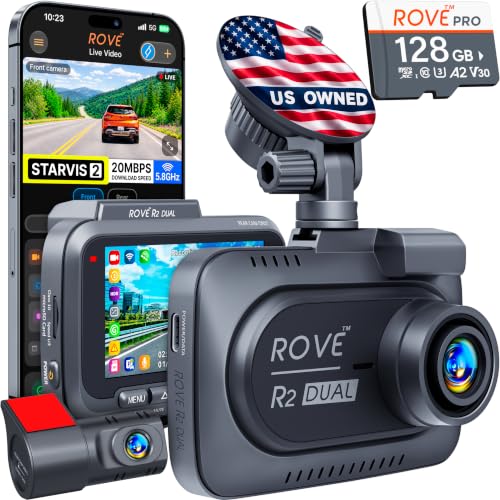
ROVE R2 Dual — Best for most drivers
The ROVE R2 Dual is the camera this guide hands to a friend without a follow-up lecture. Its front channel records 2.5K QHD through a STARVIS 2 sensor and the rear channel records in Full HD, which is the sensible allocation — the front view carries the plates and the road ahead at the highest fidelity, while the rear view establishes what happened behind you with complete adequacy. Built-in GPS logs the journey into the evidence, the 5.8GHz Wi-Fi moves clips to the ROVE app at speeds that make roadside retrieval realistic rather than theoretical, and the box includes a 128GB card, which means the camera is genuinely complete: mount it, route the rear cable, drive.
ROVE’s software polish is the understated strength here — menus that read like they were written by drivers, an app that connects without a ritual, and firmware support that has kept this model current. The parking mode follows the industry pattern this guide keeps flagging: motion and impact monitoring while parked requires the hardwire kit, sold separately, which also protects the car battery with a cut-off. Without it, the camera still locks impact clips while driving via its G-sensor and loop-records over the oldest uneventful footage. The debits are modest and honest: the rear channel is 1080p rather than a match for the front, the body is a screen-forward design some minimalists find bulky, and supercapacitor devotees should note this class of ROVE uses conventional battery design — check the listing’s current specification if your car bakes in a hot climate. For the great majority of drivers, this is the two-channel answer.
- Channels: 2.5K QHD front + Full HD rear
- Sensor: STARVIS 2 front sensor
- GPS: built in, with speed and location logging
- In the box: 128GB memory card included
- Connectivity: 5.8GHz Wi-Fi with app viewing and download
Strengths
- The most complete box here — card included, GPS built in, nothing essential missing.
- App and menus are the friendliest in the guide for non-technical owners.
- Fast Wi-Fi makes clip retrieval at the roadside genuinely practical.
Trade-offs
- Rear channel records at 1080p while the front enjoys QHD.
- Parking surveillance needs the separate hardwire kit.
- The screened body is larger than minimalist stick-on designs.
Best for: everyday drivers who want a complete, friendly two-channel system in one box. Not suited for: drivers wanting matched resolution on both channels, or extreme-heat parking without checking the power design.
Check price on Amazon.

REDTIGER F7NP — Best value 4K
REDTIGER built its name by selling the specification of premium dash cameras at a price that makes drivers check the listing twice, and the F7NP is that strategy in two channels. The front camera records in 4K through a STARVIS-class sensor with WDR for the tunnel exits and backlit evenings that defeat lesser cameras, the rear camera records in HD behind you, and the 5.8GHz Wi-Fi downloads clips at speeds the listing quantifies because they are genuinely quick. A card is included in the box, GPS is built in, and the camera’s night footage is the reason it appears in this guide at all — plates and faces at night are the product, and the F7NP’s low-light processing delivers them at a price point where rivals go soft.
The value engineering shows in the expected places. The rear channel is the junior partner in resolution, the app is functional rather than beloved, and the parking mode — 24-hour monitoring in the marketing — requires the hardwire kit, as it does across this guide, with the same advice applying: buy it with the camera, and have it fitted properly if the fuse box intimidates you. Build and mount quality are good rather than luxurious. None of this disturbs the F7NP’s proposition, which is the strongest price-to-picture ratio here: a driver who wants 4K evidence and honest night performance, and would rather spend the savings on the hardwire kit and a professional install, has found their camera.
- Channels: 4K front + HD rear
- Sensor: STARVIS-class front sensor with WDR
- GPS: built in
- In the box: memory card included
- Connectivity: 5.8GHz Wi-Fi, fast app downloads
Strengths
- 4K front footage and strong night performance at a mid-range price.
- Card and GPS included keep the box complete.
- Wi-Fi download speed is a genuine roadside virtue.
Trade-offs
- Rear channel resolution trails the front by a wide margin.
- Parking mode requires the separate hardwire kit.
- App experience is serviceable rather than polished.
Best for: value-focused drivers who prioritise front-channel clarity and night plates. Not suited for: buyers wanting flagship app polish or equal channels.
Check price on Amazon.

VIOFO A229 Plus — Best image quality
VIOFO is the brand dash camera forums argue about least, because its cameras keep winning the argument that matters: the footage. The A229 Plus mounts STARVIS 2 sensors on both channels — a rarity in this guide — and records 1440p at the front and 1440p at the rear, so the camera behind you is not a junior witness but a second professional. HDR on the channels tames the headlight-glare and shadow contrast of night driving, voice control keeps your hands on the wheel for commands like locking a clip, and the whole system is built on a supercapacitor rather than a lithium battery, which is the correct engineering for a device that lives on a windscreen in summer: capacitors shrug off heat that swells and kills batteries.
The A229 Plus asks more of its owner than the ROVE does. There is no card in the box at this level of the market — budget for a high-endurance card, because dash cameras write constantly and consume lesser cards — and the app, while capable, serves the footage rather than delighting the user. Parking mode is the most sophisticated here, with buffered recording options that capture the seconds before an impact, and it requires VIOFO’s hardwire kit to do it. GPS is integrated in the mount. These are the terms of the enthusiast class: more setup, more supporting purchases, and in exchange the best two-channel footage in this guide and hardware designed to survive the environment it monitors. Drivers who read reviews to the last paragraph are this camera’s people.
- Channels: 1440p front + 1440p rear
- Sensors: STARVIS 2 on both channels, with HDR
- Power design: supercapacitor for heat resistance
- Controls: voice control, 5GHz Wi-Fi, GPS mount
- Parking: advanced modes with hardwire kit (separate)
Strengths
- Matched STARVIS 2 quality front and rear — the best footage here.
- Supercapacitor design is built for hot windscreens and long life.
- Buffered parking recording captures the moments before an impact.
Trade-offs
- No memory card included; a high-endurance card is a required extra.
- Setup and app reward patience more than the ROVE’s do.
- Premium price once card and hardwire kit join the basket.
Best for: enthusiasts, hot-climate drivers, and anyone who wants the rear channel to be evidence-grade. Not suited for: buyers wanting everything in one box at one price.
Check price on Amazon.

BOTSLAB G300H Plus — Best new-generation value
BOTSLAB is the newer name in this guide, and the G300H Plus reads like a camera designed by reading the incumbents’ reviews: 4K recording on the front channel through a STARVIS 2 sensor, a rear channel behind, HDR night vision, 5.8GHz Wi-Fi for fast transfers, and a 64GB card included so the box is honest. Where the F7NP competes on established value, the G300H Plus competes on currency — the newest sensor generation and connection speeds at an aggressive price, aimed at drivers who comparison-shop specifications line by line.
The newer name carries the newer name’s caveats, and this guide will state them as plainly as the specifications. Long-term reliability data is thinner than for VIOFO or ROVE, the app ecosystem is younger, and accessory and support depth is still being built. The hardware in hand argues well: night footage with HDR discipline, a complete box, and parking monitoring that — in the pattern of this entire category — reaches its full form with a hardwire kit. For a driver comfortable being an early adopter in exchange for the newest silicon at the price, the G300H Plus is the interesting buy in this guide; for a driver who values a decade of forum knowledge behind their camera, the names above it are the safer road.
- Channels: 4K front + rear channel
- Sensor: STARVIS 2 with HDR night vision
- In the box: 64GB memory card included
- Connectivity: 5.8GHz Wi-Fi
- Parking: monitoring modes with hardwire kit (separate)
Strengths
- Newest-generation sensor and fast Wi-Fi at an aggressive price.
- Complete box with card included.
- HDR night footage is genuinely competitive with the established names.
Trade-offs
- Shorter track record than the incumbent brands.
- App and support ecosystem still maturing.
- Parking surveillance needs the separate hardwire kit, as throughout.
Best for: specification-driven buyers happy to adopt a rising brand early. Not suited for: buyers who prioritise long-proven support networks.
Check price on Amazon.

70mai 4K Dash Cam, Front and Rear Inside (3 Channel) — Best for rideshare and families
One pick in this guide respectfully exceeds the brief, and it does so for a defined driver. The 70mai kit records the front in 4K and the road behind — the two channels of the title — and adds a third camera facing the cabin. For most private drivers that cabin view is a novelty. For rideshare and taxi drivers it is the channel that matters most after the front: it documents passenger interactions, deters the disputes that end shifts, and provides the record that protects a driver whose workplace is other people’s evenings. Parents of new teen drivers make a similar calculation, and delivery drivers carrying valuable loads make it too.
The rest of the specification is thoroughly modern: built-in GPS, Wi-Fi 6 for the fastest transfers in this guide, voice control for hands-free clip locking, and 70mai’s app, which is among the more polished here. The honest debits: three channels mean three streams dividing the recording and processing budget, the rear channel is the modest member of the set, and a cabin camera raises privacy considerations for your own passengers that deserve a moment’s thought — many rideshare drivers post a small notice, which is both courteous and, in some places, expected. Parking mode follows the universal rule and needs a hardwire kit. Judged as a two-channel camera it is competitive; judged as the three-channel tool its buyers actually need, it stands alone in this guide.
- Channels: 4K front + rear + cabin (3 channels total)
- GPS: built in
- Connectivity: Wi-Fi 6, app control, voice control
- Audience: rideshare, taxi, delivery and family drivers
- Parking: monitoring with hardwire kit (separate)
Strengths
- The cabin channel is unique here and decisive for passenger-carrying drivers.
- Wi-Fi 6 transfers are the fastest in the guide.
- Polished app and voice control suit working drivers’ routines.
Trade-offs
- Rear channel is the junior member of the three.
- Cabin recording asks for a passenger notice and a privacy decision.
- More channels mean more cabling to install neatly.
Best for: rideshare and delivery drivers, and parents supervising new drivers. Not suited for: private drivers with no use for a cabin view.
Check price on Amazon.

4K Dual Dash Cam Front and Rear — Best budget dual
The final pick is the category’s floor, priced like it and — within its limits — specified honestly: dual-channel recording with a 4K-labelled front camera, starlight night vision, 5.8GHz Wi-Fi, a G-sensor to lock incident clips, and a 64GB card included in the box. For a second car, a young driver’s first car, or a driver who has postponed buying any camera because the premium names cost real money, this is the kit that ends the postponement, and a modest camera installed beats an excellent camera imagined, every single day of the week.
The budget ledger must be read as carefully as anywhere in this guide. Starlight night vision in this class means a sensitive sensor and earnest processing, not STARVIS 2 performance; plates at night will be a sometimes thing rather than a guarantee. The 4K front figure should be treated the way this guide treats all such labels at this price — record and judge by the footage, expecting strong HD-class results rather than flagship 4K. GPS is not the headline here that it is on the ROVE, the app is generic, and parking mode needs the same hardwire arrangement as its expensive rivals. What the kit gets right is the essentials: two channels, a card, loop recording, impact locking, and a price that makes the decision easy for the cars that need it most.
- Channels: dual — front and rear
- Night: starlight night vision
- In the box: 64GB memory card included
- Connectivity: 5.8GHz Wi-Fi, G-sensor event locking
- Parking: monitoring with hardwire kit (separate)
Strengths
- Lowest price in the guide with a card included.
- Covers the two-channel essentials without complexity.
- An ideal first camera for a second or young driver’s car.
Trade-offs
- Night plate capture is inconsistent beside the STARVIS 2 picks.
- App and support are generic-class.
- Headline resolution exceeds the footage’s honest detail.
Best for: budget buyers, second cars and first-time dash camera owners. Not suited for: drivers whose case will depend on night-time plate evidence.
Check price on Amazon.
Where does the rear camera go, and what should it see?
The rear channel’s mounting decision is a small exercise in applied optics. Most rear cameras mount at the top centre of the rear window, inside the car, looking out through the glass — which means the glass is part of the lens, and its condition is part of the footage. A rear window with a heavy tint will tax the camera’s night sensitivity; a rear wiper, where fitted, is suddenly a feature worth having, and the camera should sit inside its sweep. Defroster lines crossing the frame are a fact of life on many cars; angle the camera so the lines sit where they cross the fewest plates, and accept the rest with the serenity of every dash camera owner before you.
What the rear camera should see is a different question from what it can see. The temptation is the widest possible view, but the evidentiary target is the following car’s front — its plate, its driver, its distance — so a framing that keeps the road behind centred and the horizon level serves better than a fisheye panorama of your own boot lid and the sky. Check the rear view in the app after mounting, at night as well as by day, because the rear camera’s exposure is judged on a scene your headlights do not help: it lives on the following car’s lights, and its HDR or WDR behaviour there is the real specification.
Some drivers ask about exterior rear cameras, mounted at the plate or the bumper. They exist in the wider market and suit trucks and vans whose rear windows are absent or useless, but every pick in this guide uses the interior window-mount pattern, which keeps the camera dry, powered and aligned with the car’s own glass care. If your vehicle is a pickup with a canopy or a van with solid rear doors, shop that specific subcategory deliberately rather than improvising with a window camera against steel.
How do the six compare as evidence machines?
| Camera | Front / rear | Sensor story | GPS | Card in box |
|---|---|---|---|---|
| ROVE R2 Dual | 2.5K / 1080p | STARVIS 2 front | Built in | 128GB included |
| REDTIGER F7NP | 4K / HD | STARVIS-class front, WDR | Built in | Included |
| VIOFO A229 Plus | 1440p / 1440p | STARVIS 2 both, HDR | GPS mount | Not included |
| BOTSLAB G300H Plus | 4K / rear | STARVIS 2, HDR | Check listing | 64GB included |
| 70mai 3 Channel | 4K / rear / cabin | Modern sensor set | Built in | Check listing |
| 4K Dual (budget) | 4K-labelled / rear | Starlight night vision | Check listing | 64GB included |
The pattern across the table is the guide in miniature: resolution is distributed unevenly on purpose, sensors decide the night, and the humble “card in box” column predicts how complete the purchase feels on installation day. Buy the row whose strengths sit where your driving risk lives.
What makes night footage usable as evidence?
A number plate at night is the hardest photograph in consumer electronics: a small, reflective, fast-moving target lit by your headlights, surrounded by darkness, often in rain. The STARVIS sensor family’s advantage is sensitivity with discipline — it gathers the plate’s reflection without blooming the headlights into fog, and its processing holds the contrast that makes characters legible. HDR, on the VIOFO and BOTSLAB, attacks the same problem from the exposure side, blending to keep both the lit plate and the shadowed roadside readable in one frame. This is why this guide weights sensors over resolution: a 4K frame of a bloomed, unreadable plate is four thousand pixels of no evidence, while a clean 1440p frame that reads the registration is a case closed.
Rain deserves its own sentence in the night story, because wet roads are where dash cameras earn their keep and where their weaknesses compound: reflections double, spray veils the following car’s plate, and every light source grows a halo in the wet glass. The STARVIS-class picks hold their discipline noticeably better here, and the practical defences are the driver’s — following distances that keep you out of the worst spray, wipers in honest condition, and a windscreen treated so water sheets rather than beads in the camera’s field of view. Night rain is the examination every claim in this category eventually sits; buy the sensor that passes it.
Your own habits help the sensor more than any setting. A clean windscreen — inside as well as out, because the camera sees through the film of interior haze you have stopped noticing — is worth a sensor generation. Aim the camera so the horizon sits in the upper portion of the frame and the exposure is judged on the road rather than the sky. Keep the lens itself clean; a fingerprint smear blooms every light in the frame. And in the specific matter of plates, remember that your headlights are the camera’s flash: the clearest plate captures happen at following distances where the plate is lit but not blasted, which is one more reason the rear channel matters — it photographs the other car’s front plate in their headlights’ spill, not yours.
Frame rate plays a quiet role too. Higher frame rates shorten each frame’s exposure and can sharpen a moving plate, at the cost of light per frame; the standard rates on these cameras are the manufacturers’ negotiated settlement between the two, and overriding them experimentally is a rabbit hole with modest cheese. Trust the defaults, keep the glass clean, and let the sensor class you paid for do its work.
How does parking mode really work, and what does it need?
Parking mode is two different products wearing one name, and separating them will save you a disappointed weekend. The first product is impact and motion wake-up: the camera sleeps at very low power, and a G-sensor jolt or detected movement wakes it to record what follows. This catches the aftermath and often the culprit’s departure, and it is what most cameras can do with a modest power draw. The second product is true buffered surveillance — the VIOFO’s speciality — where the camera continuously holds a rolling buffer so the recording includes the seconds before the impact: the approach, the contact, the story whole. Buffering costs continuous power, which is why it lives behind a hardwire kit and a healthy battery.
The hardwire kit is the enabling purchase, and it deserves respect rather than resentment. A proper kit connects to the fuse box, draws parking power, and — critically — monitors the car battery’s voltage, cutting the camera off before the battery is too flat to start the engine. That cut-off is the difference between a security feature and a Monday-morning breakdown. Fitting is a tidy hour for a confident owner and a modest fee for a professional, and it should be budgeted as part of the camera’s price from the beginning, which is why this guide mentions it in nearly every review rather than in a footnote.
There is also a middle path worth knowing about: several of these cameras can run parking mode for a limited time from a dedicated dash camera battery pack, charged while driving and independent of the car’s own battery. It is the elegant solution for leased cars and for owners who will not touch a fuse box, at a price that exceeds the hardwire kit’s by a wide margin. For most readers the hardwire kit remains the sensible spend; the battery pack is the connoisseur’s answer to the same problem, and its existence is worth knowing before you decide the fuse box is unavoidable.
Set expectations by your parking reality. A car garaged nightly needs parking mode least; a car street-parked in a busy area needs it most and should pair it with the camera’s most sensitive wake settings and a card large enough to hold a weekend of events. Time-lapse parking modes, offered on several picks, sip power while keeping a visual diary of the parked hours — often the pragmatic middle choice. What no parking mode survives is a tired car battery: if yours is elderly, replace it before blaming the camera for the cut-off doing its job.
How do you choose between these six in ten minutes?
Answer three questions and the shortlist builds itself. First: where does your car sleep? Street-parked cars should weight parking mode and its hardwire budget heavily, which favours the VIOFO’s buffered recording or the ROVE’s straightforward setup; garaged cars can treat parking features as a bonus and spend on footage quality instead. Second: what is your climate? Winds that bake windscreens argue for the supercapacitor design of the A229 Plus as a longevity decision, while temperate garages forgive battery-based designs entirely. Third: who rides with you? Passengers as a profession make the 70mai’s cabin channel a business tool; passengers as a family make the same channel a decision to discuss at home.
Then apply the completeness test to whatever survives. Add the camera, the card it needs, the hardwire kit if your parking answer demands it, and fitting if you will not do it yourself — and compare those totals, not the headline prices. By that honest arithmetic the ROVE’s included 128GB card and the value kits’ bundled cards close much of their gap to the premium names, and the VIOFO’s premium resolves into the card and kit it always intended you to buy. The cheapest camera in this guide is the one whose total you can state without checking three more listings.
Finally, buy for the incident you actually fear. The commuter fearing the motorway rear-ender needs the rear channel and GPS above all. The night driver needs the sensor class. The new-parent lending a car to a teenager needs the cabin view and the app. Specifications are fears, itemised — and the camera that answers yours is the right one even when a reviewer’s favourite answers a different fear better.
Which installation mistakes do owners make?
The first is mounting the camera in the wiper’s blind spot or behind the rear-view mirror’s dotted frit, producing footage with a permanent foreground. Sit in the driver’s seat, hold the camera, and check both the view and the wiper sweep before anything sticks. The second is the rear cable routed with optimistic slack — too short at the boot hinge, too loose at the headliner — when the rear camera’s cable run is the one part of the installation that rewards patience above all: route it along the headliner’s edge, keep it clear of airbag paths in the pillars, and leave the hinge loop generous.
The third mistake is the wrong card, or an old card, in a camera that writes constantly. Dash cameras are the hardest life a memory card can have; use the high-endurance cards the manufacturers specify, format the card in the camera monthly, and replace it at the first sign of recording errors rather than after the incident it failed to keep. The fourth is leaving the factory time zone and daylight settings wrong, so the footage’s timestamps — part of its evidentiary value — disagree with the world. And the fifth is never checking the footage until it is needed: pull one clip a month, watch thirty seconds, and know the system works, because a dash camera’s entire value is concentrated in a moment you cannot schedule.
What do the Wi-Fi speeds actually change in daily life?
Wi-Fi specifications look like the dullest line in the table until the first time you stand at a roadside with an officer, a tow driver or a very patient insurer’s form waiting on a clip. The older 2.4GHz transfers move a three-minute two-channel clip slowly enough to become a conversation topic; the 5GHz and 5.8GHz connections across this guide move it in the time a signature takes, and the 70mai’s Wi-Fi 6 is faster again. That difference decides whether the footage participates in the incident’s resolution or in a claim filed days later from memory and stills. It also decides something subtler: whether the camera becomes part of how you drive at all. A camera whose clips you can pull in seconds gets consulted — after the near miss, after the strange noise, after the journey you want to show someone — and a consulted camera is a maintained camera, its card healthy, its clock right, its lens clean. The specification sheets call this connectivity. Owners experience it as the difference between a witness and a passenger.
Daily life uses the connection more quietly. Checking the rear camera’s aim after a car wash, pulling a scenic clip from a road trip without removing the card, confirming the parking mode caught the delivery van’s visit — these are thirty-second tasks on a fast connection and abandoned intentions on a slow one. When you compare the picks, treat the Wi-Fi generation as a quality-of-life specification on par with the sensor: the sensor decides what the footage proves, and the connection decides whether you will ever bother to look at it. Cameras whose footage is easy to reach are cameras whose footage gets checked, and checked cameras, as this guide keeps insisting, are the ones still working when it matters.
What will ownership feel like after the first year?
A dash camera is the rare gadget that should disappear, and the good ones do: the start-up chime becomes part of the car’s sounds, the monthly clip check becomes a habit like tyre pressures, and the camera’s presence changes nothing about driving except, perhaps, the driver’s own patience — people drive measurably more calmly with a witness aboard, a benefit no insurer discounts and every owner notices. The year’s maintenance is small and specific. Cards are consumables: expect to replace a hard-working card on a horizon of a year or two, sooner at the first recording error. Adhesive mounts can surrender in a hot summer; the fix is a fresh pad and a cleaned windscreen, and owners in hot climates learn to keep a spare pad in the glovebox the way they keep a phone cable.
Firmware is the other quiet ownership story. The established names in this guide update their cameras — sensor tuning, app compatibility, the occasional new feature — and an annual check for updates keeps a two-channel system current in a way its hardware cannot date. The budget pick asks less and offers less here, which is part of its price. None of this is burdensome; it is the ordinary care of a device that works in the harshest environment consumer electronics inhabits, bolted to glass through summers, winters and ten thousand door slams, waiting faithfully for the worst thirty seconds of your year.
Final Recommendation
For most drivers the ROVE R2 Dual is the answer — complete in the box, friendly in daily use, with a STARVIS 2 front channel and GPS doing quiet, competent work. For the best footage money buys here, the VIOFO A229 Plus, plus its card and hardwire kit, is the connoisseur’s two-channel system. The F7NP and G300H Plus split the value vote between established bargain and newest silicon; the 70mai serves the drivers whose passengers are part of the record; and the budget dual covers the second car tonight rather than someday. Whichever you mount, add the hardwire kit if your car parks anywhere the world can reach it — the front and rear channels guard the driving hours, and a two-channel camera that also watches the parked ones is the whole argument of this guide, completed.
And if you take one sentence from this guide into the installation, let it be the monthly check. Cameras fail silently, cards fail silently, cables work loose silently — and every one of those failures announces itself in a thirty-second playback long before it can announce itself at an inquest. The drivers who benefit from these devices are not the ones who bought the most expensive sensor; they are the ones who verified, twelve times a year, that the witness was still awake. Buy the camera your risk points to, fit it patiently, and then keep that small appointment with it. The road will do the rest, in both directions at once.
Frequently Asked Questions
Do I really need the rear camera, or is front-only enough?
Front-only covers the incidents you face; rear covers the ones that face you. Rear-end collisions are among the commonest claims, and fault in them is usually decided by exactly what a rear channel records. Given that two-channel kits now start at the prices in this guide, the second channel is the cheapest insurance upgrade in the car.
Will a dash camera drain my car battery?
While driving, no — it runs from the car’s power like any accessory. Parked surveillance is the draw that matters, which is why hardwire kits include a voltage cut-off that disconnects the camera before the battery reaches a level that risks starting. Set the cut-off conservatively on an older battery.
What size memory card should I use?
Enough for your peace of mind: two channels recording at these resolutions consume several gigabytes per driving hour, so the 128GB class is the comfortable minimum for a week of commuting before loop overwrite reaches uneventful footage, and event clips are locked against overwriting regardless. Buy high-endurance cards; dash cameras destroy ordinary ones.
Is the footage admissible and useful for insurance?
Insurers welcome dash camera footage and routinely use it to settle fault; police may request it after incidents. GPS-stamped footage with correct timestamps carries the most weight, which is why this guide scores built-in GPS and why setting the clock correctly is an installation step, not a detail. Keep the original files unedited for any formal use.
Can I install a two-channel camera myself?
The camera itself, yes — mounting and routing the rear cable is a patient person’s hour or two with trim tools. The hardwire kit is the step where confidence should decide: it is a documented, common DIY job, but it touches the fuse box, and a professional fitting is inexpensive insurance for anyone unsure. Nothing about the cameras requires a dealer.
Does the rear camera record when the car is parked?
With a hardwire kit fitted and parking mode enabled, yes — the systems here can watch both directions while parked, waking on motion or impact according to their settings. Without the hardwire kit, a parked camera is an off camera. The rear channel’s parked view is often the valuable one, since parking knocks arrive from behind as often as from the front.
Do I need to tell my insurer I have a dash camera?
There is no general obligation to declare one, and many insurers view them favourably; a few offer encouragement for declared cameras. What matters practically is that the footage exists, is timestamped correctly and can be produced unedited when a claim turns on it. If your policy documents mention telematics or recording devices, a two-minute read of that section is worth more than any assumption — the camera’s job is removing doubt, and it should start with your own paperwork.
Will the footage overwrite something important?
Loop recording overwrites the oldest normal footage first, and clips locked by the G-sensor, by parking events or by your own button press are protected from that cycle. The failure mode to guard against is time: a locked clip is safe, but an unlocked clip from three days ago on a small card may already be gone — which is why the guide recommends generous cards and prompt downloads after anything unusual.
Why do some cameras use a supercapacitor instead of a battery?
Heat. A windscreen in summer is one of the hottest places in a car, and lithium batteries degrade, swell and die in it. Supercapacitors tolerate the temperature, last for years, and hold just enough charge to save the final file when power cuts. For hot climates and long ownership, the VIOFO’s capacitor design is a genuine engineering advantage.
How should you handle footage after an incident?
The hour after an incident is when footage is saved or lost, so the protocol belongs in the guide. First, lock the clip: every camera here lets you protect the current file with a button press or voice command, and the G-sensor will already have locked the impact segment on most settings — verify it on the camera’s screen or app before you drive on, because loop recording is patient and memory is not. Second, back it up at the first opportunity: download the front and rear clips to your phone over Wi-Fi while the details are fresh, and let the phone’s own backup carry them onward. The original card files remain the masters; keep the card untouched until the matter is closed.
Third, write down what the camera cannot see: the weather beyond the frame, what was said, the direction you were travelling and why, in the plainest sentences you can manage, dated and signed if it may matter. Memory edits itself within days; contemporaneous notes do not. Fourth, share deliberately. Insurers get the unedited files and your notes; social media, if it gets anything, gets it after the claim is settled — a lesson the internet teaches strangers weekly at their own expense. The cameras in this guide make the first two steps easy, which is precisely why this guide scored retrieval speed alongside recording quality: evidence you cannot reach is a rumour with a lens.
And keep the routine boring in the months between incidents. A monthly thirty-second check — one clip, played back, from each channel — confirms the cameras, the card and the clock in a single habit. Systems fail silently; the rear camera unplugged by a valet, the card that stopped writing in March, the clock that drifted an hour. Thirty seconds a month is the entire premium on the only insurance policy in this guide that pays out in truth.
A brief word on privacy and other people’s plates
A two-channel camera records the public road, which is broadly its legal home in most places, but two courtesies and one caution belong in an honest guide. The courtesies: tell your passengers the cabin camera exists if you run the 70mai’s third channel — in some jurisdictions and employment arrangements you must — and think before publishing footage in which strangers are identifiable and embarrassed rather than merely present. The caution concerns audio: several of these cameras record cabin sound by default, and audio recording rules are stricter than video rules in a number of regions. Many owners mute the microphone permanently; the evidence value of dash footage is overwhelmingly visual, and a silent camera asks no one’s permission. Local rules vary, so treat this as the prompt to check yours rather than as a ruling — the settings to comply are in every camera here, waiting to be used.
Related Guides
Keep researching the drive: best 1080p video cameras for the camcorder side of filming, alongside best 1080p cameras for general-purpose filming and best 16 channel dvr with 8 cameras for the same two-eyes logic applied to a whole property — the driveway your rear channel watches, covered from the house’s side as well, so the record of an incident survives from two angles and two recorders at once.



[…] building the system: best 1080p wireless surveillance cameras for cable-free additions, best 10 security cameras for a wider field of options, and best 180 […]