What's inside
- Key Takeaways
- Quick Picks
- How Did We Choose These Picks?
- What Is DD-WRT, and What Is It For Now?
- OpenWrt Is Not DD-WRT — and Why the Cousin Matters
- Which Routers Belong on a DD-WRT Shopper’s Shortlist?
- How Do the Six Compare Side by Side?
- Which Classic Routers Made DD-WRT Famous — and Are They Still Worth Buying?
- What Do People Actually Do With Custom Firmware?
- Does Custom Firmware Make a Network Safer?
- What Makes a Router a Good Flashing Candidate?
- Where Does DD-WRT Still Earn Its Keep Professionally?
- How Do You Verify DD-WRT Support Before Buying Anything?
- What About Tomato, Merlin and the Other Names in the Forums?
- What Does a Careful Flashing Day Actually Look Like?
- How Fast Is a VPN on Custom Firmware, Honestly?
- What Should You Know Before Flashing Anything?
- What Mistakes Do Custom-Firmware Shoppers Keep Making?
- Why Do Listings Say “Supports” When They Should Say “Might”?
- Final Recommendation
- Frequently Asked Questions
- Related Guides
As an Amazon Associate I earn from qualifying purchases. This post may contain affiliate links at no extra cost to you.
gizmoverdict.com is reader-supported. When you buy through links on our site, we may earn an affiliate commission.
Where to buy: Each router below links to its Amazon listing from this site’s verified pool. This guide makes one promise the others in its genre often dodge: it will not tell you a router “supports DD-WRT” unless that claim can be pinned to an exact hardware revision — because in the custom-firmware world, the revision is the claim.
The hunt for the best DD-WRT routers starts in a place most roundups refuse to visit: the fine print of hardware revisions. DD-WRT, the venerable aftermarket firmware that has unlocked routers for two decades, does not support models — it supports specific revisions of models, identified by the version string on the underside label, because manufacturers quietly swap chipsets mid-production while keeping the retail name identical. Two boxes with the same name, bought in the same month from different shelves, can be entirely different computers inside: one flashable, one a paperweight-in-waiting. Any guide that prints a model name beside the words “DD-WRT compatible” without demanding your revision label is selling you a lottery ticket and calling it a specification.
So this guide is built differently. It leads with the two picks whose open firmware is not a gamble at all — GL.iNet’s travel routers, which ship running OpenWrt, DD-WRT’s close cousin, from the factory, with the manufacturer’s blessing and a warranty that survives your curiosity. It then presents the full-size routers that custom-firmware shoppers cross-shop most, with their firmware situations described exactly: what runs on them today, what the community landscape around them looks like, and what you must verify in DD-WRT’s own router database — by exact model and revision — before any flashing is even contemplated. Along the way it explains what DD-WRT is for in this decade, where its heartland now lies, and why the newest Wi-Fi generations have changed the question itself.
The short version, for readers in a hurry: DD-WRT’s golden territory is the vast installed base of Wi-Fi 4 and Wi-Fi 5 hardware, especially Broadcom-based models, where its builds are mature and its feature set — VLANs, VPN clients and servers, advanced QoS, captive portals, per-device rules — turns retired consumer boxes into small-business instruments. On current Wi-Fi 6 and later hardware, driver licensing and chipset support mean aftermarket firmware is scarce, and the honest modern equivalents are routers that ship open (OpenWrt from GL.iNet) or ship deep (ASUS’s stock firmware). The six picks below are ordered along exactly that spectrum, from factory-open to factory-deep, with the verification homework spelled out for anyone determined to flash.
Key Takeaways
- DD-WRT supports hardware revisions, not model names — the label under the router decides, and the project’s router database is the only authority worth trusting on the question.
- The GL.iNet picks run OpenWrt from the factory: a different firmware from DD-WRT, but the same open philosophy without the flashing gamble.
- DD-WRT’s mature heartland is older Wi-Fi 4/5 hardware; current Wi-Fi 6/6E/7 models rarely have builds, whatever a listing implies.
- No pick below is claimed flashable — each full-size router’s firmware position is stated as it stands, with verification steps.
- Flashing always carries bricking risk and usually ends the manufacturer’s warranty; the factory-open route avoids both.
- Most households chasing DD-WRT features — VPN, VLANs, QoS — can now get them from deep stock firmware or OpenWrt natives, which is why this guide maps all three roads instead of pretending the oldest one is the only one.
Quick Picks
| Pick | Badge | Why it earns its place |
|---|---|---|
| GL.iNet Beryl AX | Factory-open, full-featured | Ships on OpenWrt with a 2.5G WAN port and VPN tooling — the open-firmware brief without a flashing session. |
| GL.iNet Slate AX | Factory-open, more headroom | The same OpenWrt foundation with more processing room for many-device travel and tinkering. |
| ASUS RT-AX86U Pro | Deepest stock firmware | ASUS’s own firmware plus a strong community ecosystem — the cross-shop for buyers who wanted to flash for control. |
| TP-Link Archer AX73 | Mainstream cross-shop | A powerful stock-firmware router; its aftermarket position must be checked by revision, and this guide says how. |
| TP-Link Archer AXE75 | New-spectrum cross-shop | Wi-Fi 6E hardware, where aftermarket firmware is essentially absent — bought for its stock talents or not at all. |
| NETGEAR Nighthawk WiFi 7 | Newest-platform cross-shop | Wi-Fi 7’s frontier, where the custom-firmware question answers itself: the stock firmware is the firmware. |
How Did We Choose These Picks?
Selection began with a rule the category usually skips: verifiability. A pick could enter this guide only if its firmware story could be stated truthfully in one paragraph — what it runs, what its open-firmware options genuinely are, and what a buyer must check before assuming more. That rule admitted the GL.iNet pair on the strongest possible evidence (the firmware is installed, supported and warranted by the maker), admitted the ASUS on the depth of its stock offering and community, and admitted the remaining three as honestly-labelled cross-shops: routers a DD-WRT shopper will inevitably compare, whose aftermarket status is “verify by revision, expect little on new platforms” rather than a promise.
Every pick also had to justify itself as a router in the ordinary sense — current Wi-Fi standard, gigabit or better ports, a household it genuinely suits — because a flashable box that routes badly is a hobby, not a recommendation. Where a listing describes renewed stock, the article says so at the pick. The result is less a league table than a map of the territory as it actually lies in this decade: open by factory, deep by factory, or closed by physics and licensing — with DD-WRT itself honoured in the sections below as the movement that created the demand all six are answering.
What Is DD-WRT, and What Is It For Now?
DD-WRT began in the mid-2000s as a liberation of a single beloved router — the Linksys WRT54G, whose initials echo in the name — and grew into a Linux-based aftermarket firmware supporting hundreds of models. Flashing it replaced a maker’s trimmed interface with an administrator’s instrument panel: VLANs to segment networks, OpenVPN and later WireGuard clients and servers, scriptable firewall rules, per-client bandwidth controls, wireless repeater and client-bridge modes, captive portals, Wake-on-LAN, dynamic DNS, and logging thorough enough to run a small business or a paranoid household. For years it was the standard answer to “my router’s firmware won’t let me” — the features existed in the hardware all along, locked behind a consumer interface.
Its modern role is narrower and more specific, and honesty about that is this guide’s spine. DD-WRT’s deepest support lives on Broadcom-based Wi-Fi 4 and Wi-Fi 5 hardware, where drivers are available and builds have been refined for a decade; owners of such routers — and buyers of inexpensive used units specifically to flash — remain its heartland, and for them it is still superb. The friction arrives with newer silicon: Wi-Fi 6 and later chipsets often lack the open driver situation aftermarket projects need, so builds for current models are rare, partial or nonexistent. That is not a failure of the project’s will; it is the licensing weather of the industry, and no amount of forum enthusiasm changes the forecast for hardware whose drivers were never opened. The buyer’s translation: shop for DD-WRT on the used classics market with the database open in another tab, and shop for its philosophy — openness, control, no locked doors — in the factory-open and factory-deep picks below.
OpenWrt Is Not DD-WRT — and Why the Cousin Matters
Because the GL.iNet picks run OpenWrt, the distinction must be drawn cleanly rather than blurred for convenience. DD-WRT and OpenWrt are separate projects with separate codebases, interfaces and philosophies. DD-WRT aims to be a complete, self-contained firmware — one image, one web interface, features curated in. OpenWrt is closer to a small Linux distribution for routers: a lean base with a package manager, thousands of installable components, the LuCI web interface, and a command line that treats the router as the general-purpose computer it secretly is. Skills transfer between them; images absolutely do not — flashing one project’s build onto hardware expecting the other’s is a bricking recipe, and the forums are paved with the results of that single misunderstanding.
For the buyer, the practical differences are these. OpenWrt’s package system makes it the more extensible platform — if a capability exists in open-source networking, it is probably an installable package away — and its community develops at a distribution’s pace. DD-WRT’s curated completeness makes it the more predictable one on the hardware it supports well, with its features tested as a set. GL.iNet builds its travel routers on OpenWrt with its own friendlier interface layered over the top and LuCI available beneath, which is why this guide treats the pair as the DD-WRT shopper’s safest modern harbour: the open philosophy, the VPN and segmentation tooling, the scriptable depths — with a factory warranty standing behind the whole arrangement instead of a forum thread.
Which Routers Belong on a DD-WRT Shopper’s Shortlist?

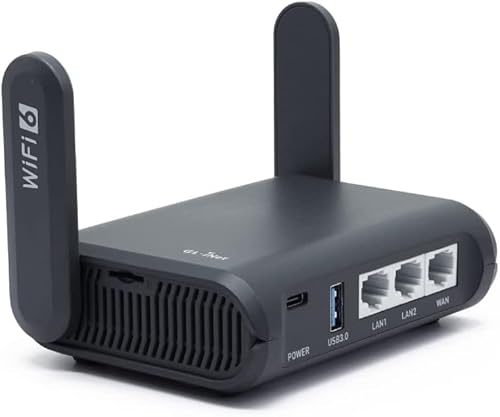
GL.iNet Beryl AX — Factory-open, full-featured
The Beryl AX is the pick for the reader who wants the custom-firmware life without its initiation rite. It arrives running GL.iNet’s OpenWrt-based system — the open platform installed at the factory, updated by the manufacturer, and fully warranted — with VPN client tooling, repeater modes and the LuCI interface waiting beneath the friendly surface for anyone who wants the machinery room. Its listing details a dual-band Wi-Fi 6 radio set (574 Mbps on 2.4 GHz and 2402 Mbps on 5 GHz in theoretical terms), a 2.5 gigabit WAN port that would flatter a router five times its size, gigabit LAN and USB 3.0, all in a pocketable travel chassis.
Map the classic DD-WRT desires onto it and they land one by one: route the whole network or chosen devices through a VPN — yes, at router level; segment traffic — the OpenWrt base handles VLAN thinking natively; script, log, tinker — the package manager is open. What it will not do is cover a house; its radios are room-scale, and its honest parish is the traveller, the renter, the small flat, the site office and the home lab’s front door. For the DD-WRT-curious who have read the bricking threads and felt their enthusiasm cool, the Beryl is the same hobby with the risk engineered out — and for many readers, that trade is the entire point of this guide.
- Firmware: OpenWrt-based, factory-installed and manufacturer-supported
- Class: AX3000 dual-band Wi-Fi 6 (per listing, theoretical)
- Ports: 2.5G WAN, gigabit LAN, USB 3.0
- DD-WRT status: not a DD-WRT device — an OpenWrt native, stated plainly
Strengths
- Open platform with a warranty — no flashing, no bricking lottery
- VPN and segmentation tooling that answers most DD-WRT use cases
- Travel format makes it a second network anywhere on earth
Trade-offs
- Room-scale coverage; not a whole-house main router
- OpenWrt skills transfer from DD-WRT, but its interface differs
- Power users may still prefer a full-size OpenWrt build at home
Best for: travellers, renters and tinkerers who want openness without flashing risk. Not suited for: covering a family house as its only router.
GL.iNet Slate AX — Factory-open, more headroom
The Slate AX is the Beryl’s argument with more muscle behind it. Same factory OpenWrt foundation, same VPN clients — WireGuard and OpenVPN — same repeater talents for life on borrowed networks, but an AX1800 platform with the processing headroom to run the open-firmware lifestyle harder: more simultaneous devices (the listing cites well over a hundred connections), heavier VPN duty, and the package experiments that make a travel router into a pocket laboratory. For the reader whose DD-WRT interest was never really about one feature but about the router being theirs — configurable, scriptable, unbothered by a maker’s idea of enough — the Slate is the fuller expression.
Its parish overlaps the Beryl’s and extends it: the consultant living in rentals by the month, the family whose holiday home network runs through one tunnel, the enthusiast who wants an OpenWrt node to develop on before touching the home’s main router. That last role deserves emphasis, because it is how many careful people enter this world — learn on the travel box, where a mistake costs an evening, rather than on the household’s sole gateway, where it costs everyone’s. Between the two GL.iNet picks, choose the Beryl for pure travel lightness and the Slate when the tinkering itself is part of the itinerary.
- Firmware: OpenWrt-based, factory-installed, LuCI available
- Class: AX1800 dual-band Wi-Fi 6 (theoretical sum)
- VPN: WireGuard and OpenVPN clients aboard
- DD-WRT status: not a DD-WRT device — OpenWrt native, like its sibling
Strengths
- Headroom for heavy VPN use and package experimentation
- The safest possible classroom for learning open firmware
- Manufacturer updates keep the open platform current
Trade-offs
- Costs more than its sibling for power some travellers won’t tap
- Coverage remains travel-scale by design
- Not a route to DD-WRT itself, for purists set on that project
Best for: serious travellers, remote workers and open-firmware students. Not suited for: whole-house coverage or DD-WRT absolutists.

ASUS RT-AX86U Pro — Deepest stock firmware
Most people who flash DD-WRT are not in love with flashing; they are in love with what the stock firmware withheld. The RT-AX86U Pro is the pick for that reader, because ASUS’s stock firmware withholds unusually little: granular traffic visibility, a serious VPN toolkit, port forwarding done properly, subscription-free security, AiMesh expansion, and a 2.5 gigabit port on an AX5700 platform (roughly 861 Mbps on 2.4 GHz and 4804 Mbps on 5 GHz in theoretical terms). Around this stock offering sits one of the liveliest manufacturer-adjacent communities in consumer networking, with alternative community firmware historically flowing toward popular ASUS models — though availability varies by exact model and era, and any buyer counting on a specific community build must verify it for this precise unit rather than assume the family reputation transfers automatically. The listing describes a renewed unit, so inspect its condition terms.
The honest DD-WRT note for this pick is short: do not buy it as a DD-WRT candidate. Buy it because its factory firmware already answers most of the feature list that sends people flashing — control, visibility, VPN, segmentation basics — with updates, support and a warranty intact. The reader who still wants the full aftermarket adventure after living with this depth of stock control is a rarer and more committed creature, and the classics market, checked against the database, is where their adventure properly lives. As a cross-shop for the DD-WRT shopper who has a household to keep online, though, this is the most persuasive full-size answer in the guide.
- Firmware: ASUS stock, deep feature set; community builds vary — verify per unit
- Class: AX5700 dual-band Wi-Fi 6 (861 + 4804 Mbps theoretical)
- Ports: 2.5G multi-role plus gigabit LAN
- Note: listing describes a renewed unit — verify condition at purchase
Strengths
- Stock depth covers most reasons people flash, safely
- AiMesh growth path and a multi-gig port included
- Security features without a subscription
Trade-offs
- Not a DD-WRT device — the aftermarket route is not its story
- Renewed stock means condition varies
- Interface depth is wasted on set-and-forget households
Best for: control-seekers who want DD-WRT’s spirit with a warranty’s safety. Not suited for: buyers determined to run DD-WRT itself.

TP-Link Archer AX73 — Mainstream cross-shop
The Archer AX73 enters this guide as a study in doing the homework. It is a strong mainstream router — AX5400 class, six antennas, gigabit ports, a USB port, VPN server support in its stock firmware — and TP-Link’s range is exactly where revision discipline matters most, because the brand’s models have historically shipped in many hardware versions under one name, with aftermarket fortunes differing sharply between them. This guide therefore makes no DD-WRT claim for the AX73 at all. What it claims is the method: if aftermarket firmware matters to you, find the exact version string of the specific unit you would receive, search DD-WRT’s router database for that precise model-and-revision, and treat anything short of an exact match as a no.
Bought on its stock merits, the AX73 is a fine long-range single router for a larger home, and that is the basis on which most readers should buy it — with its VPN server, airtime fairness and beamforming doing respectable work inside the maker’s own firmware. The DD-WRT shopper’s realistic reading is that current Wi-Fi 6 models from any major brand are poor flashing candidates, and a mainstream powerhouse like this one should be purchased as a closed-but-capable appliance or not purchased at all. Holding both truths at once — excellent router, unverified and unlikely aftermarket candidate — is the entire skill this guide is trying to teach, and the AX73 is its clearest teaching example.
- Firmware: TP-Link stock; aftermarket status strictly by hardware revision
- Class: AX5400 dual-band Wi-Fi 6 (574 + 4804 Mbps theoretical)
- Ports: gigabit WAN/LAN plus USB
- DD-WRT status: no claim made — verify exact revision in the project database
Strengths
- Powerful single-box coverage for larger homes
- Stock VPN server and mature mainstream firmware
- A clear case study in why revision checking matters
Trade-offs
- Anyone buying it to flash is buying a research project
- Closed stock firmware limits deep customisation
- Large physical footprint with six antennas
Best for: buyers who want mainstream power and accept stock firmware’s terms. Not suited for: anyone whose purchase depends on aftermarket firmware existing.

TP-Link Archer AXE75 — New-spectrum cross-shop
The AXE75 represents the frontier where the DD-WRT question quietly dissolves. It is a tri-band Wi-Fi 6E router — AXE5400 across 2.4, 5 and the new 6 GHz band — with a 2.5 gigabit WAN port, OneMesh expansion and a listing that cites a 2025 PCMag Editors’ Choice commendation. The 6 GHz band exists because of new spectrum decisions, and its drivers and chipset situation place it, like essentially all 6E hardware, outside the aftermarket firmware world for the foreseeable future. Nobody flashes an AXE75; the honest sentence is that simple, and this guide prints it so that no reader buys one on a forum rumour.
What the AXE75 offers the DD-WRT-minded reader instead is a view of where the control they crave is migrating: into stock firmware features — VPN support, WPA3, mesh expansion, per-device management — delivered on hardware whose radios no community project can currently drive. If your custom-firmware desire was instrumental (features) rather than ideological (openness itself), the AXE75’s stock depth plus its empty new band may close the question for years. If your desire was ideological, this pick is your evidence that the frontier has moved to factory-open hardware like the GL.iNet pair — and the used classics — rather than to the newest shelves.
- Firmware: TP-Link stock; no aftermarket builds for 6E hardware
- Class: AXE5400 tri-band Wi-Fi 6E
- Ports: 2.5G WAN plus gigabit LAN
- DD-WRT status: not applicable to this platform — stated openly
Strengths
- 6 GHz band delivers the uncongested future today
- Stock feature set covers the practical custom-firmware list
- 2.5G WAN and OneMesh give it a long service life
Trade-offs
- Closed platform, permanently, by chipset reality
- Only newer clients can use its signature band
- Open-firmware purists should look at the guide’s first two picks
Best for: feature-seekers ready to trade openness for new spectrum. Not suited for: shoppers set on running community firmware.

NETGEAR Nighthawk WiFi 7 — Newest-platform cross-shop
The ladder ends at the newest platform of all: a tri-band Wi-Fi 7 Nighthawk whose listing cites up to 9.3 Gbps of combined theoretical throughput, coverage up to 2,500 square feet as the manufacturer states it, two 2.5G ports beside two gigabit ports, and capacity for around a hundred devices. If the AXE75 is where aftermarket firmware fades, Wi-Fi 7 is where it is simply not part of the landscape — the standard is young, its multi-link machinery is intricate, and community projects will need years and driver access that may never arrive. This pick closes the guide’s spectrum deliberately: from factory-open travel boxes to the most closed, most capable consumer hardware shipping today.
Its presence teaches the final lesson. The DD-WRT shopper standing in front of a Wi-Fi 7 box is not choosing between stock and custom firmware; they are choosing between eras. One era says the router is a computer you own outright, flashable and scriptable, at the cost of yesterday’s radios. The other says the router is an appliance of remarkable power — multi-link operation, enormous channels, wired ports to match — whose software is the maker’s and whose openness ends at the settings page. Neither era is a scam. This guide’s six picks exist so the choice is made with both eras honestly described, and the Nighthawk is the newest era at its most persuasive: buy it for what it verifiably does today, and let the flashing hobby live where it thrives.
- Firmware: NETGEAR stock; aftermarket firmware not a prospect on Wi-Fi 7
- Class: Wi-Fi 7 tri-band, up to 9.3 Gbps combined (manufacturer figure)
- Ports: 2 × 2.5G plus 2 × gigabit
- DD-WRT status: not applicable — newest-platform hardware
Strengths
- The most future-proof radio platform in this guide
- Multi-gig ports on both WAN and LAN sides
- Stock firmware carries the modern feature essentials
Trade-offs
- Closed by era — openness seekers must look elsewhere
- Wi-Fi 7 clients are still arriving in households
- Premium hardware bought purely on stock merits
Best for: longevity buyers who accept the appliance model of networking. Not suited for: custom-firmware enthusiasts of any stripe.
How Do the Six Compare Side by Side?
| Router | Firmware reality | Openness verdict | Defining trait |
|---|---|---|---|
| Beryl AX | OpenWrt, factory-installed | Open by factory | Pocketable, warranted openness |
| Slate AX | OpenWrt, factory-installed | Open by factory | Headroom for heavier tinkering |
| RT-AX86U Pro | Deep ASUS stock | Deep by factory | Control without flashing |
| Archer AX73 | TP-Link stock | Verify by revision — no claim | Mainstream power, closed terms |
| Archer AXE75 | TP-Link stock | Closed by chipset reality | 6 GHz spectrum instead |
| Nighthawk WiFi 7 | NETGEAR stock | Closed by era | Newest radios, appliance model |
Read the openness column as the guide’s thesis in miniature. Genuine openness in a new purchase now comes factory-installed on OpenWrt hardware; genuine depth comes from the best stock firmware; and the classic flashing path runs through older hardware verified revision by revision — a path this guide respects and describes, but does not dress up as a property of new Wi-Fi 6E or Wi-Fi 7 boxes. Any table elsewhere that prints a simple green tick beside a new model’s name and the words “DD-WRT” is a table you now know how to read.
Which Classic Routers Made DD-WRT Famous — and Are They Still Worth Buying?
The project’s mythology rests on a few chassis. The Linksys WRT54G line started everything, its blue-and-black stackable box becoming the most reflashed object in networking history. The torch passed to models like the ASUS RT-N16, beloved for its generous memory at a modest price, then to the Broadcom-based flagships of the Wi-Fi 5 era — NETGEAR’s R7000 generation and ASUS’s AC68U family among them — which combined strong radios with the flashable chipsets and ample flash storage that DD-WRT builds reward. These names appear in this guide as history and shopping context for the used market, deliberately without links or ASINs: the used-classics trade lives on marketplaces and in revision lotteries that no product link can honestly summarise.
Are they still worth buying? For the hobby’s true purposes, yes — a verified-revision classic, bought cheaply, is the finest classroom and the finest spare-parts drawer in networking, and a flashed AC-era unit still serves a small household or a bridge/repeater role with dignity. For a main household router in a streaming-and-calling era, the honest answer tilts: their radios predate Wi-Fi 6’s airtime discipline, their processors strain under modern VPN loads, and the household will feel both. The mature pattern this guide endorses is a modern main router — open by factory or deep by factory, from the picks above — with a flashed classic beside it as the laboratory, the spare and the bridge. That arrangement gives the enthusiast both eras at once, which is more than either era gives alone.
What Do People Actually Do With Custom Firmware?
The feature lists blur together; the lived use cases are clearer. The largest tribe runs a VPN at the router so that every device — including the television and the doorbell that accept no apps — inherits the tunnel, with a kill switch that halts traffic if the tunnel drops. The second tribe segments: a main network for computers, a fenced network for smart gadgets, a guest network with client isolation, each with its own rules, built from VLANs and firewall policies that consumer firmware rarely exposes. A third tribe resurrects hardware — a retired router becomes a wireless bridge to an outbuilding, a repeater for a workshop, a dedicated access point — roles the stock firmware often forbids and DD-WRT treats as home turf.
Beyond those, the long tail is gloriously specific: per-device bandwidth ceilings so one console cannot ruin a call; scripted schedules that retire the children’s network at bedtime without a daily argument; a captive portal for a café or a rental; Wake-on-LAN so a home server sleeps until summoned; logging detailed enough to catch the gadget phoning somewhere it shouldn’t. Read that list against the picks above and the modern map draws itself — the GL.iNet pair covers the VPN and resurrection cases from the factory, the ASUS covers segmentation basics and control, and the full DD-WRT depth remains for the households whose list runs to portals and scripts. Knowing which tribe you belong to is worth more than any single product choice in this guide.
Does Custom Firmware Make a Network Safer?
It can, and it can do the opposite, and the difference is maintenance. The safety case for aftermarket firmware is real: it resurrects routers whose makers stopped patching them, restoring a living update path to hardware that would otherwise guard a network with frozen, known-vulnerable software; it exposes firewall and segmentation controls that genuinely reduce risk; and its transparency lets the community audit what the box is doing. A flashed router that is kept updated is, on an abandoned platform, unambiguously safer than the stock firmware it replaced.
The opposite case is equally real. A flashed router that is never updated — flashed once in a burst of enthusiasm and forgotten — decays exactly like abandoned stock, with the added risks of a misconfigured firewall rule its owner wrote at midnight and a warranty no longer standing behind the hardware. Custom firmware transfers responsibility; it does not abolish it. This is why the factory-supported open platforms have changed the safety conversation: the GL.iNet picks deliver the open controls with a manufacturer’s update cadence behind them, and the ASUS delivers its depth on a stock train. Safety, in the end, is a subscription to vigilance — the only question this guide can answer is which picks make that vigilance easiest to sustain.
What Makes a Router a Good Flashing Candidate?
Four traits, all checkable before money moves. The chipset comes first: aftermarket projects build where drivers exist, and historically that has meant Broadcom silicon for DD-WRT’s deepest catalogue, with certain Qualcomm and MediaTek families better served by OpenWrt — one more reason the two projects are complements rather than rivals. Flash storage and RAM come next, because a full-featured build with VPN, logging and services needs room to live; the classic enthusiast favourites earned their reputations partly on generous memory at honest prices. The third trait is a documented recovery path — a bootloader that accepts a rescue image turns the hobby’s worst day into an anecdote. The fourth is community mass: a model thousands of owners have flashed has forum threads for every symptom, while an obscure supported model leaves you alone with the wiki.
Notice what is absent from that list: radio speed. The best flashing candidates are rarely the fastest routers of their year, because the traits that make silicon flashable — documented, driver-available chipsets — correlate with maturity rather than novelty. This is the deep reason the guide’s spectrum runs from old classics to new appliances without contradiction: the frontier of radio performance and the frontier of openness have been walking apart for a decade, and the buyer who understands that stops asking any single box to win both races.
Where Does DD-WRT Still Earn Its Keep Professionally?
In the world’s small, practical networks. The café that needs a captive portal and a fenced point-of-sale network; the landlord who segments a building’s tenants on one connection; the workshop whose retired router became a bridge to the far bench; the holiday-let owner who wants the guests’ gadgets nowhere near the office machine — these are DD-WRT’s working parish, and they explain the project’s longevity better than any enthusiast benchmark. The hardware is cheap, the features are precisely the ones small operations need, and the administrator is usually the owner, for whom a Saturday of configuration is a business expense gladly paid once.
The modern picks in this guide court the same parish from the other direction: the GL.iNet pair, with their portable, warranted openness, are increasingly the professional’s travel and pop-up answer — a site network in a pocket, a tunnel back to base, a guest portal without a flashing session the night before an opening. The professional lesson and the household lesson converge, as they usually do in networking: match the tool to the tolerance for maintenance, and never let the network’s only guardian be a box nobody on site understands.
How Do You Verify DD-WRT Support Before Buying Anything?
The procedure is short, free and non-negotiable. First, identify the exact hardware: the model number and the version or revision string, which live on the label on the unit’s underside and usually in the listing’s fine print — a seller who cannot state the revision is a seller to walk away from when flashing is the purpose. Second, open DD-WRT’s official router database and search that precise combination; a supported listing names the build and the initial-flash instructions for that revision specifically. Third, read the project’s wiki page and the recent forum threads for that exact build, because the database tells you a build exists while the community tells you whether its radios, ports and buttons all behave in the current release.
Fourth — the step the impatient skip — confirm the recovery path before you need it: whether the unit accepts a factory-firmware restore, whether a TFTP or serial rescue exists, and what a failed flash looks like for that model. A router with a known, forgiving recovery route is a reasonable hobby risk; a router whose only rescue involves a soldering iron is a commitment. Do all four steps and the flashing hobby is what it should be — deliberate, informed, reversible where possible. Skip them and you are not flashing firmware; you are gambling with the household’s internet connection as the stake.
What About Tomato, Merlin and the Other Names in the Forums?
A shopper researching DD-WRT will meet its extended family within the hour, and a map prevents confusion. Tomato — and its maintained descendants such as FreshTomato — is another aftermarket firmware with a devoted following, historically strong on certain Broadcom-based models, prized for a clean interface and excellent bandwidth monitoring; its hardware parish overlaps DD-WRT’s heartland without matching its breadth. Asuswrt-Merlin is a different species altogether: not a replacement firmware but an enhanced continuation of ASUS’s own stock firmware for specific ASUS models, keeping the maker’s interface and drivers while adding features and fixes — which is why it is mentioned, carefully and without promises, near this guide’s ASUS pick, since its availability is model-specific and must be confirmed for any exact unit.
Beyond those sit the infrastructure-grade open platforms — OpenWrt on dedicated hardware, and router distributions built for small x86 boxes — which is where the truly committed graduate when a consumer chassis becomes the limit. The family’s common thread is the refusal to accept the settings page as the boundary of ownership. Its practical lesson for the buyer is simpler: names are not interchangeable, builds are not portable between projects, and every branch of the family demands the same revision-level verification as DD-WRT itself. Choose the project whose philosophy and hardware list match your unit and your temperament, then verify as if the other projects did not exist — because for your router’s flash chip, they don’t.
What Does a Careful Flashing Day Actually Look Like?
It begins the night before, with reading: the database entry, the wiki’s initial-flash procedure for your exact revision, and the forum’s most recent pages, where the current build’s quirks are confessed. You download everything first — the correct initial image, the full build, the factory firmware for retreat — because the middle of a flash is no time to discover a dead link. You photograph the label, save the stock configuration, and write down the provider’s connection details by hand. The router gets a wired connection to one computer, a stable power supply, and a household that has been told the internet will be away — which is why the careful flash never happens to the family’s only router on a school night.
The flash itself follows the written procedure with a monk’s patience: the hard reset in the prescribed pattern, the initial image, the waiting — always longer than feels reasonable, because interrupting power during a write is how bricks are made — then the full build, another reset, and a fresh configuration built by hand rather than restored from the stock backup. Afterwards comes the probation: a day of ordinary use before the exotic features are enabled one at a time, so that when something misbehaves, the suspect list has one name on it. Described this way the process sounds solemn, and it should — but it is also, for the right temperament, deeply satisfying, and the community’s two decades of documentation exist to make it a craft rather than a gamble.
How Fast Is a VPN on Custom Firmware, Honestly?
Slower than the line, and the CPU is the reason. A VPN encrypts every packet, and on a router that work falls on a modest processor designed for routing, not cryptography. The classic DD-WRT heartland hardware — the Wi-Fi 5 flagships of a decade ago — will typically sustain VPN throughput in the tens of megabits rather than the hundreds, varying with protocol, provider and the chip’s acceleration situation; WireGuard, being leaner than OpenVPN, generally fares better than its older rival on the same silicon. For browsing, streaming through a tunnel and general privacy, that is serviceable; for a household trying to push a gigabit fibre line through a router-level tunnel, it is a wall, and no firmware — stock, DD-WRT or otherwise — repeals it on that hardware.
The modern picks bend the wall rather than break it. The GL.iNet pair’s processors are specified with VPN duty in mind, and their listings speak the language of tunnel performance because their buyers ask; the ASUS’s stronger silicon lifts its stock VPN throughput above the classics’; and the newest platforms carry processors that would have embarrassed a desktop of the WRT54G era. The honest hierarchy for the VPN-first buyer runs: choose the protocol (WireGuard where possible), choose silicon with headroom, and only then choose the firmware flavour — because encryption is arithmetic, and arithmetic always collects its fee.
What Should You Know Before Flashing Anything?
Three truths, none of them fine print. Flashing third-party firmware typically voids the manufacturer’s warranty, full stop — the factory-open picks in this guide exist precisely because some buyers want the openness without that sentence. A failed flash can brick the unit, and while many models have recovery paths, some failures are permanent; never flash the household’s only router on a work night, and never flash at all without the stock firmware file downloaded and the reset procedure read. And after a successful flash, you become your own support department: updates are manual, changelogs are your reading, and a configuration mistake is yours to debug at midnight.
None of that is written to frighten — the DD-WRT community is full of people who have run flashed routers happily for a decade, and the project’s documentation is deep. It is written to price the hobby honestly against its modern alternatives. When a factory-warranted OpenWrt box delivers the VPN, the segmentation and the scripting with none of the three truths applying, the flashing route’s remaining territory is specific: reviving hardware you already own, learning on a cheap used classic, or needing a DD-WRT-specific behaviour the alternatives genuinely lack. Outside that territory, the bravest sentence in networking is not “I flashed it” but “I read the database first, twice, and checked the label a third time before touching anything at all.”
What Mistakes Do Custom-Firmware Shoppers Keep Making?
The founding mistake is buying by model name — ordering the router a forum praised, receiving a different hardware revision under the same name, and discovering the difference at the flashing screen. The second is trusting marketplace listings and roundup tables that print “DD-WRT compatible” as a vibe rather than a revision-specific fact; this guide’s refusal to make that claim for any full-size pick is the corrective. Third, shoppers flash the household’s only router, converting a hobby’s learning curve into a family’s outage, when a cheap used classic or a travel box would have absorbed the lessons harmlessly.
Fourth, they chase the newest hardware with the oldest expectations, assuming Wi-Fi 6E and Wi-Fi 7 boxes must have community builds because their predecessors did — the driver landscape changed, and the assumption now ends in either disappointment or a brick. Fifth, they skip the backup: no saved stock configuration, no downloaded factory firmware, no note of the provider’s connection settings, so the first wobble becomes a full re-provisioning saga. The custom-firmware world rewards the methodical and taxes the hurried, and every one of these mistakes is a hurry wearing a different coat.
Why Do Listings Say “Supports” When They Should Say “Might”?
Because “supports” sells and “might, depending on a label you cannot see until the box arrives” does not. The word collapses three different realities into one green tick: the maker officially supports the firmware (true of the GL.iNet pair with OpenWrt, and of almost nothing with DD-WRT); a community build exists for some revision of the model (true across the classics, treacherous in the present tense); or the chipset family is theoretically related to supported hardware (true of half the catalogue and useful to no one). A careful reader learns to ask which of the three realities any given claim is standing on, and to notice that the listings in this guide’s pool — checked against the project’s own materials — do not make the claim at all for the full-size picks, which is precisely why this guide’s language stays as hedged as the truth.
There is a kinder way to see the whole topic, and it is the note this section ends on: the confusion exists because the desire is honourable. People reach for DD-WRT because they believe a thing they bought should be theirs — its features unlocked, its lifespan extended, its behaviour inspectable. The industry has spent twenty years alternately feeding and fencing that belief. The picks above are simply the current map of where the belief can still be acted on safely: in the factory-open corner, in the deep-stock middle, and in the classics market, where the map’s oldest roads remain its most welcoming.
Final Recommendation
Decide which of the three honest roads is yours. If you want openness without the lottery, buy it factory-installed: the Slate AX for headroom, the Beryl AX for travel lightness, both running OpenWrt under a real warranty. If you want control with a safety net, the ASUS’s deep stock firmware answers most of the flashing urge while keeping support intact. And if you want DD-WRT itself — the project, the builds, the craft — honour it properly: shop the classics it supports brilliantly, verify every revision in its own database, keep a spare router between the hobby and the household, and let the new Wi-Fi 6E and Wi-Fi 7 boxes in this guide serve as what they are, excellent appliances from a different era of openness. Whichever road you take, take it with the label read, the database checked and the stock firmware saved — the three habits that separate the custom-firmware community’s craftsmen from its cautionary tales, and the difference between a router you own and a router that owns your weekend.
Frequently Asked Questions
Is OpenWrt the same thing as DD-WRT?
No. They are separate projects: DD-WRT is a curated, self-contained firmware; OpenWrt is a package-based Linux distribution for routers. They share a philosophy and many features, but their images are not interchangeable, and flashing one where the other belongs can brick a router.
How can I tell if my exact router can run DD-WRT?
Read the model and hardware revision on the underside label, then search DD-WRT’s official router database for that precise combination and read the linked wiki and forum notes. Anything less specific than a revision-level match should be treated as unsupported.
Does flashing DD-WRT void the warranty?
Typically yes — manufacturers generally treat third-party firmware as outside warranty terms. That is the core appeal of factory-open routers like the GL.iNet picks: the open platform is the stock platform, installed and supported by the maker.
Why are there no DD-WRT builds for most Wi-Fi 6E and Wi-Fi 7 routers?
Aftermarket projects depend on chipset drivers they can legally and practically build upon, and newer chipsets often do not offer that path. Support is therefore concentrated on older Wi-Fi 4 and Wi-Fi 5 hardware, where the driver situation is settled.
Can a flashed router be restored to stock firmware?
Often, yes — many models accept a factory image again, and some have dedicated recovery modes — but the method varies by model and a minority of failures are permanent. Confirm the recovery route for your exact unit before flashing, and keep the stock firmware file ready.
I only want a router-level VPN. Do I need custom firmware at all?
Almost certainly not, in this decade. The GL.iNet pair run VPN clients from the factory on OpenWrt, the Archer AX55 elsewhere in this site’s coverage builds a client into stock firmware, and the ASUS pick carries a full VPN toolkit — the feature that historically justified most flashes is now a stock checkbox on the right hardware. Flash for the deeper crafts — scripting, portals, exotic segmentation — or for the love of the project itself.
What features send people to DD-WRT most often?
Router-level VPN clients and servers, VLAN segmentation, advanced QoS and per-device rules, repeater and bridge modes, and thorough logging. Notably, every one of those is now available on factory-open OpenWrt hardware or deep stock firmware like ASUS’s — which is why this guide maps all three roads.
Related Guides
The open-firmware world rewards background reading. Continue with our explainer on OpenWrt and what its package system makes possible, a guide to running a VPN at router level for the whole household, and our walkthrough of segmenting a home network with VLANs. Read the database before the marketing, keep a spare between the hobby and the household, and the open-router world will reward you the way it has rewarded two decades of careful readers before you.
Related guides
- Best 4K UHD HDR HDMI Extenders: 4K60, Long-Run and 4K120 Kits Compared
- Best 25–35 Inch Monitors With Lowest Display Lag: An Honest Ranking Without Invented Numbers
- Best Enterprise SATA SSDs: Endurance Classes, Power-Loss Protection and Fleet Sense
- Best Color Product Label Printers: Six Desktop Machines for Short-Run Product Labels



[…] decisions sharpen with a little context. Read our explainer on what Wi-Fi class numbers actually promise, a walkthrough of router placement for small homes, and our guide to deciding when a mesh system is […]