Our Top Picks
 SanDisk 128GB Ultra SDXC UHS-I Memory Card128GB (1-Pack)1.26 x 0.94 x 0.1 inches0 poundsCheck on Amazon


What's inside
- How to choose an SD card for 1080p
- The six picks at a glance
- 1. SanDisk 128GB Ultra SDXC UHS-I — the roomy everyday choice
- 2. SanDisk 64GB Extreme PRO SD UHS-I — the higher-headroom choice
- 3. Gigastone 32GB SD Card 2-Pack, Camera Plus — the main card plus a spare
- 4. Kodak SDXC Card 64GB UHS-I U1 V10 Premium — the balanced middle card
- 5. Samsung PRO Plus Full Size 128GB SDXC plus Reader — large capacity with offloading sorted
- 6. Gigastone 32GB SD Card 10-Pack — the fleet and spares choice
- Care, formatting, and backup habits that protect 1080p footage
- Frequently asked questions
- Check prices on Amazon
- Conclusion: match the card to the way you record
As an Amazon Associate I earn from qualifying purchases. This post may contain affiliate links at no extra cost to you.
Recording clean Full HD video is less demanding than recording 4K, and that simple fact should shape how you buy a memory card. A compact camera, a camcorder, or a dash camera that records in the full-size SD format does not need the fastest card on the shelf to capture 1080p well. It needs a card that can sustain a steady write pace without dropping frames, that holds enough footage for the way you actually shoot, and that your camera recognises without fuss. The six cards in this guide were chosen around that idea. Every one is a full-size SD card, every one is UHS-I, and every one is described by its maker for Full HD use. They differ in capacity, in pack size, in stated read speed, and in speed class, and those differences matter more than brand loyalty or a long list of headline numbers.
Full HD and 1080p mean the same picture size in everyday camera language: a frame that is 1,920 pixels wide and 1,080 pixels tall. When a product title says Full HD, it is pointing to that resolution. That matters because shoppers sometimes assume they need to step up to a card marketed for much higher resolutions in order to be safe at 1080p. In practice, a correctly rated UHS-I card with a Class 10 marking and a suitable U or V rating is the normal starting point for Full HD recording, and several cards here carry exactly those markings. Others carry higher U3 and V30 markings as well. A higher marking does not make a 1080p picture sharper, and it does not change the resolution your camera records. It can give you more headroom for burst stills, for higher-bitrate modes, or for moving files to a computer a little faster where the stated read speed supports it, but the picture itself still comes from the camera, its lens, and its settings.
The short version is straightforward. For a single generous card for everyday 1080p work, the SanDisk 128GB Ultra and the Samsung PRO Plus 128GB are the two large-capacity anchors in this list, with different stated read speeds and different extras. For a higher speed class in a mid-size capacity, the SanDisk 64GB Extreme PRO brings U3 and V30 markings. For smaller, simpler needs, the Kodak 64GB card carries a V10 marking and a stated read speed that suits Full HD and stills. For value in multiples, the two Gigastone 32GB packs solve a different problem: keeping several cameras supplied, or keeping spares ready, without buying large cards you may never fill.
How to choose an SD card for 1080p
Start with the slot, not the headline speed
The first check is physical and electrical compatibility. A full-size SD card fits a full-size SD slot. That sounds obvious, yet many buying mistakes begin with a card that is the wrong physical format for the device. Compact cameras, many camcorders, and many dash cameras that take a full-size card expect exactly that shape. Check the manual or the marking beside the slot for SD, SDHC, or SDXC, and check whether the device has a stated maximum capacity. A camera that only accepts SDHC, for example, should not be paired blindly with an SDXC card. A newer camera that accepts SDXC can usually use the larger cards in this guide, but the manual remains the deciding source for your specific model.
All six cards here use the UHS-I interface as stated in their titles. UHS-I is the bus interface found on a very wide range of consumer cameras. It is a sensible match for 1080p because Full HD recording, even at the higher bitrates used by capable compact cameras and camcorders, sits well within what a properly rated UHS-I card is built to handle in normal use. You do not need to chase a different bus standard for 1080p alone. What you do need is a card whose minimum sustained performance markings match video work, which is where the class letters and numbers come in.
What C10, U1, U3, V10, and V30 actually mean
Speed markings look like alphabet soup, but they answer a practical question: what minimum sequential write performance is the card rated to sustain? That sustained floor matters for video far more than a peak number printed in large type, because video is a continuous stream. A camera writing a long clip needs the card to keep accepting data second after second. If the card cannot keep up, the symptom is not a slightly slower menu. It can be a recording that stops, a clip that is cut short, or a camera that warns you mid-session.
- Class 10, shown as C10: the long-standing Speed Class marking for a minimum sustained write performance suited to Full HD recording in ordinary consumer use. Every card in this guide carries C10 or is described as Class 10.
- U1: the UHS Speed Class 1 marking. It sits alongside Class 10 in practical minimum terms and appears on the SanDisk Ultra, both Gigastone packs, and, through its U1 description, the Kodak card in this guide.
- U3: the UHS Speed Class 3 marking, a higher minimum than U1. It appears on the SanDisk Extreme PRO and the Samsung PRO Plus in this list. U3 is commonly paired with 4K-capable cards, and it also gives comfortable headroom at 1080p.
- V10: the Video Speed Class 10 marking on the Kodak card. The V scale was created specifically for video recording, so a V marking speaks directly to sustained video capture.
- V30: the Video Speed Class 30 marking on the SanDisk Extreme PRO. Again, the number signals a higher sustained minimum than V10. For pure 1080p it is more than the job strictly requires, which some buyers prefer as headroom and others see as paying for capacity they will not use.
Read those markings as floors, not as promises about every task. A card can carry a strong minimum rating and still have a modest stated read speed, because reading files back to a computer and sustaining writes during recording are different jobs. Likewise, an up-to read speed in a title, such as 100MB/s, 180MB/s, or 200MB/s, describes reading under the maker stated conditions. It helps you judge offload pace in broad terms. It does not, on its own, tell you the sustained write floor. That is why this guide always pairs the headline speed with the class markings stated in the same title, and why it does not convert a read speed into a guessed write speed.
Why a 4K card can be overkill for pure 1080p
SDHC versus SDXC, in plain terms
SDHC and SDXC describe capacity families. SDHC cards in this guide are the 32GB Gigastone cards. SDXC cards in this guide are the 64GB and 128GB models from SanDisk, Kodak, and Samsung. The distinction matters mainly for compatibility and for how a device formats and handles the card. Older devices can have limits that stop at the SDHC range. Newer devices that accept SDXC are built for the larger capacities. Always confirm the family your camera accepts before you choose capacity, especially with older camcorders and older compact cameras that are still perfectly good at 1080p.
Capacity and how much 1080p you can hold
How long a card lasts depends on bitrate, and bitrate depends on the camera and the settings you choose. A camcorder recording at a conservative bitrate will stretch a 32GB card far longer than a camera recording 1080p at a high bitrate with high frame rates. Because of that, any single hours figure would be misleading without knowing your device. Think in relative terms instead. A 128GB card holds roughly twice what a 64GB card holds at the same settings, and roughly four times what a 32GB card holds at the same settings. That simple ratio is the most reliable planning tool you have.
- 32GB: a sensible size for shorter sessions, for a dash camera that overwrites older footage in a loop where supported, for a backup card, and for keeping one card per device in a multi-camera household. The two Gigastone packs in this guide live here.
- 64GB: a middle ground for a full day of casual 1080p recording, a school event, a trip where you will offload in the evening, or a mix of video and stills without constant swapping. The SanDisk Extreme PRO and the Kodak card live here.
- 128GB: room for long events, travel days without offloading, and users who would rather swap less often and archive in batches. The SanDisk Ultra and the Samsung PRO Plus live here.
Read speed, offloading, and everyday handling
Stated read speeds in this guide range from up to 80MB/s on the Gigastone 10-pack to up to 200MB/s on the SanDisk Extreme PRO, with the other cards at points in between. Treat those figures as maker-stated maximums for reading, useful for comparing offload potential within this list. Your actual transfer time will also depend on your card reader, your computer port, and the size and number of files. A bundled reader, included with the Samsung PRO Plus in this guide, removes one variable for buyers who do not already own a good reader.
The six picks at a glance
Before the detailed notes, here is the shape of the shortlist. The table uses only the capacity, pack size, stated speed, and markings given in each product title. Where a title does not state a particular marking, the table says so rather than filling the gap with an assumption.
| Card | Capacity and pack | Stated speed in title | Markings in title | Best fit |
|---|---|---|---|---|
| SanDisk Ultra | 128GB, single card | 100MB/s | C10, U1, Full HD | Everyday 1080p with generous room |
| SanDisk Extreme PRO | 64GB, single card | Up to 200MB/s read | V30, U3, C10, 4K UHD, Full HD | Higher headroom and faster stated reading |
| Gigastone Camera Plus | 32GB, 2-pack with 2 mini cases | Up to 100MB/s | UHS-I U1, Class 10, Full HD | Two cameras or a main card plus a spare |
| Kodak Premium | 64GB, single card | Up to 85MB/s read | UHS-I U1, V10, Full HD | Balanced video and stills use |
| Samsung PRO Plus | 128GB, single card plus reader | Up to 180MB/s | C10, U3, Full HD and 4K UHD | Large capacity with a reader in the box |
| Gigastone 10-Pack | 32GB, 10-pack | Up to 80MB/s | UHS-I U1, Class 10, Full HD | Many devices, spares, and rotation |
1. SanDisk 128GB Ultra SDXC UHS-I — the roomy everyday choice
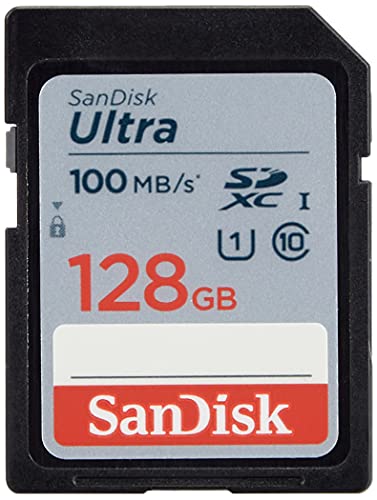
The SanDisk Ultra in this guide is a 128GB SDXC UHS-I card, described in its title with 100MB/s, C10, U1, and Full HD. That combination tells a clear story. It is positioned for ordinary Full HD recording with a lot of room on a single card, rather than for buyers chasing the highest video class. For a compact camera that records birthdays, travel, school performances, and family events at 1080p, that positioning makes sense. You get the markings that match the job and a capacity that lets you record without watching the remaining space after every few clips.
Capacity is the main reason to choose this card over the 64GB and 32GB options. At the same camera settings, 128GB holds about double the footage of a 64GB card. If you record long, unbroken sessions — a ceremony, a lecture, a stage show, a day on a tripod — fewer swaps means fewer chances to miss a moment while changing cards. It also suits camcorder owners who prefer to offload at the end of a trip rather than every evening. The trade-off is concentration: a lot of footage sits on one small piece of plastic until you copy it, so prompt backup is part of owning a card this size responsibly.
The C10 and U1 markings place it squarely in the expected range for Full HD. We did not find a V-class marking or a U3 marking in its title, and this guide does not assign it one. That absence is not a problem for pure 1080p in a typical compact camera or camcorder, provided your device does not specifically require a higher class for a particular mode. Check your manual if you use an unusually high-bitrate 1080p setting or a special high-frame-rate mode, because device requirements always outrank general guidance. For standard Full HD recording, the stated markings are the relevant ones, and they align with how the card itself is described.
The 100MB/s figure in the title is presented without the read qualifier used by some other titles in this list, so we report it exactly as the title presents it and do not recast it as a write figure. In everyday terms, a card in this range should feel unremarkable during offloading for typical 1080p file sizes, which is what most owners want: insert the card or reader, copy the clips, verify them, and move on. If offloading speed is your top priority above all else, compare the stated figures on the Extreme PRO and the Samsung PRO Plus in this guide, both of which state higher numbers.
Good fits and limits for the SanDisk Ultra
- Good fit: long 1080p sessions on one card, travel without nightly offloading, and camcorders used for events.
- Good fit: stills plus video on the same card where 128GB prevents frequent swapping.
- Limit: no U3 or V30 marking is stated in the title, so do not choose it for a mode that explicitly requires those markings.
- Limit: a single card means no built-in spare; consider a second card if a missed recording would be costly.
2. SanDisk 64GB Extreme PRO SD UHS-I — the higher-headroom choice
The SanDisk Extreme PRO in this guide is a 64GB card described with up to 200MB/s read speeds, UHS-I, V30, U3, C10, 4K UHD, and Full HD. It carries the strongest set of video and UHS markings in this shortlist, and the highest stated read speed. That does not make its 1080p footage look different from footage recorded to any other suitable card in the same camera. It does make it the natural pick for buyers who want headroom: those who also shoot bursts of stills, who may move the card into a more demanding camera later, or who simply prefer to buy above the minimum for the job.
The V30 and U3 markings are the core of that headroom. Both signal a higher sustained minimum than the U1 and V10 markings found elsewhere in this list. For standard 1080p, that is more than the task requires. For 1080p at higher bitrates, for mixed stills and video days, and for owners who dislike thinking about whether a mode might push a lesser card, the extra margin can be worth having. The title also describes the card for 4K UHD, which confirms its positioning above a pure 1080p minimum, even though this guide is judging it for a 1080p buyer.
Capacity is the counterweight. At 64GB, it holds about half what the two 128GB cards hold at the same settings. If your priority is a full weekend of recording without offloading, the larger cards may serve you better despite their lower stated class or read figures. If your priority is pace and margin within a day that ends with an offload, 64GB is a comfortable size for many users. Think about your longest single day of recording, not your average day, and leave room above it.
Good fits and limits for the SanDisk Extreme PRO
- Good fit: mixed 1080p video and burst stills, higher-bitrate modes, and future-proofing for a more demanding camera.
- Good fit: buyers who offload large batches and can use a fast reader.
- Limit: 64GB fills sooner than the 128GB options during long events or travel.
- Limit: its higher markings are headroom for pure 1080p, not a picture-quality upgrade.
3. Gigastone 32GB SD Card 2-Pack, Camera Plus — the main card plus a spare
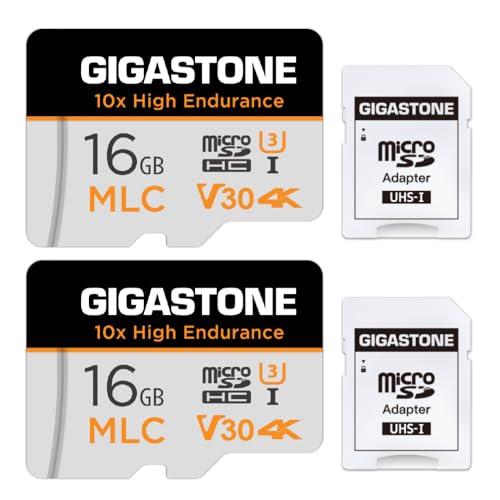
The Gigastone Camera Plus option here is a 2-pack of 32GB SDHC cards, described as UHS-I U1 Class 10 for Full HD video for a digital camera, with speed up to 100MB/s, and supplied with two mini cases. Its appeal is not a single large pool of space. Its appeal is having two separate cards. One can live in the camera while the other waits in a case as a formatted, ready spare. When the first fills or when you want to keep one session separate from the next, you swap and keep recording.
That two-card rhythm suits a lot of real 1080p use. A parent recording a tournament can keep Saturday and Sunday on different cards. A traveller can rotate cards by day, which also limits how much footage is at risk on any one card. A household with two compatible cameras can give each camera its own card instead of passing one card back and forth. The included mini cases support that rhythm, because a spare that rattles loose in a bag pocket is a spare that gets lost, dusty, or damaged.
The stated markings match the 1080p job: U1 and Class 10, with Full HD named in the title. The up-to 100MB/s figure matches the number stated for the SanDisk Ultra, though the cards differ in capacity family, pack, and brand line. As with the other up-to figures in this guide, we report it as stated and do not treat it as a sustained write figure. For standard Full HD recording in a compatible digital camera, the class markings are the part to lean on, and they are present and clear.
Because these are 32GB SDHC cards, compatibility is worth a deliberate check on newer devices that expect SDXC for larger sizes, and capacity planning is worth a moment. Each card holds about a quarter of what a 128GB card holds at the same settings. For short to medium sessions that is ample. For a single long event recorded continuously, you may need to swap at a natural break, so plan the swap point rather than discovering it during a key moment. Many owners find that trade perfectly acceptable in exchange for the lower commitment of smaller cards and the resilience of a spare.
Good fits and limits for the Gigastone Camera Plus 2-pack
- Good fit: a ready spare in the bag, two-camera households, and day-by-day rotation on trips.
- Good fit: buyers who appreciate the two included mini cases for carrying spares.
- Limit: each card is 32GB, so long continuous sessions may need a planned swap.
- Limit: SDHC family, so confirm your device accepts SDHC at this capacity.
4. Kodak SDXC Card 64GB UHS-I U1 V10 Premium — the balanced middle card
The Kodak card in this guide is a 64GB SDXC model described as UHS-I U1 V10 Premium, with up to 85MB/s read speed, for Full HD video and high-resolution pictures. That last phrase matters. It positions the card explicitly for the mixed use that defines many compact cameras: video clips and still photographs sharing one card across a day. If that sounds like your camera bag, this is the pick written in your language.
Its V10 marking deserves attention because the V scale addresses video directly. V10 sits at the entry point of the Video Speed Class scale and aligns with Full HD recording needs. Combined with the U1 description in the title, it gives a 1080p buyer two related signals that the card is rated for sustained video work at this level. It does not carry the higher V30 or U3 markings of the Extreme PRO or the Samsung card, and this guide does not suggest otherwise. For standard 1080p, that distinction is about headroom, not about whether the card belongs on the list.
At 64GB, capacity lands in the middle of this shortlist. It is double a single Gigastone card and half of the 128GB cards. For a day trip, a family gathering, a day of sightseeing with clips and photographs interleaved, or a camcorder session with an evening offload, that middle size is often the least frustrating: large enough that you are not swapping constantly, small enough that you are encouraged to copy and clear it regularly. Good offloading habits are a feature of a workflow, and a mid-size card tends to encourage them.
Good fits and limits for the Kodak Premium 64GB
- Good fit: mixed Full HD clips and high-resolution stills on one 64GB card.
- Good fit: buyers who value a video-specific V10 marking at a mid capacity.
- Limit: no U3 or V30 marking is stated in the title.
- Limit: the stated read speed is modest compared with the fastest cards in this guide.
5. Samsung PRO Plus Full Size 128GB SDXC plus Reader — large capacity with offloading sorted
The Samsung PRO Plus in this guide is a full-size 128GB SDXC card supplied with a reader, described with up to 180MB/s, Full HD and 4K UHD, UHS-I, C10, and U3. Two things set it apart at once: it ties for the largest capacity in this list, and it is the only pick whose title includes a reader in the box. For a buyer setting up a 1080p workflow from scratch, or replacing an ageing reader along with the card, that bundle solves two purchases in one.
The U3 marking gives it a higher UHS speed class than the U1 cards in this guide, alongside its C10 marking. Its title does not state a V-class marking, so we do not assign it one, even though it is described for Full HD and 4K UHD. That careful distinction is how this guide treats every card: credit what the title states, and do not fill gaps. For a 1080p buyer, the stated combination of C10 and U3, plus the explicit Full HD description, places it comfortably above the minimum for the job, with headroom for more demanding use as described by its maker.
Capacity planning mirrors the SanDisk Ultra discussion. At 128GB, this card suits long events, multi-day travel without offloading, and owners who archive in large batches. The included reader becomes more valuable as capacity grows, because larger batches are exactly where a reliable reader and a higher stated read speed save noticeable time. The stated figure here is up to 180MB/s, second only to the Extreme PRO in this list. As always, your computer, port, and reader connection shape the real result, and the included reader helps keep that chain consistent.
Choose the Samsung PRO Plus if you want 128GB, a higher U3 marking, a strong stated read speed, and a reader included. Skip it if you already own a reader you like and would rather put the choice toward a multi-pack, or if 64GB already covers your longest day with room to spare. Compared directly with the SanDisk Ultra at the same capacity, the decision comes down to the markings, the stated speed, and the reader: this card states U3 and up to 180MB/s and includes the reader, while the Ultra states U1 and 100MB/s as a single card.
Good fits and limits for the Samsung PRO Plus
- Good fit: large 1080p archives, long events, and buyers who need a reader as well as a card.
- Good fit: buyers who want a U3 marking at 128GB capacity.
- Limit: no V-class marking is stated in the title, so check device requirements that specifically name a V class.
- Limit: a single large card still needs a backup habit; the reader helps you offload, but you still need to do it.
6. Gigastone 32GB SD Card 10-Pack — the fleet and spares choice
The second Gigastone option in this guide is a 10-pack of 32GB SDHC cards, described as UHS-I U1 Class 10, high-speed up to 80MB/s, for Full HD video, and noted as compatible in its title. It is from the same maker as the Camera Plus 2-pack, but it is a different offer in two clear ways stated in the titles: the stated speed here is up to 80MB/s rather than up to 100MB/s, and the pack contains ten cards rather than two with mini cases. Presenting them as the same product in different quantities would be wrong. They serve overlapping needs at different scales.
Ten cards change the question from which card to how you organise recording across many devices or many sessions. Think of a small school, a sports club, a place of worship, a training provider, or a family with several compatible cameras and camcorders. Think of a dash camera setup where cards are rotated, or a project where each card holds one job, one week, or one location, labelled and filed. In those settings, having a card for every device and several spares is worth more than having one very large card that must be shared, erased, and passed around.
The markings remain appropriate for the 1080p purpose: U1 and Class 10, with Full HD video named in the title. The up-to 80MB/s figure is the lowest stated speed in this guide, and for the fleet use case that is usually an acceptable trade. Cards in a rotation are often offloaded one at a time in modest batches, or in a dash camera context they may simply be swapped and reviewed when needed. If your workflow instead centres on moving huge batches quickly from a single card, the higher stated figures elsewhere in this list fit you better.
Choose the 10-pack if you supply multiple devices, run a rotation, or want deep spares for 1080p recording across a household or a small organisation. Skip it if you own one camera, record long continuous sessions, and would simply leave nine cards unused. Compared with its Gigastone sibling, choose the 2-pack for personal use with included cases and the higher stated speed, and choose the 10-pack when scale is the whole point.
Good fits and limits for the Gigastone 10-pack
- Good fit: multiple cameras or camcorders, labelled rotations, and organisations that issue one card per device.
- Good fit: dash camera card rotation where the device accepts a full-size SD card.
- Limit: the stated speed is up to 80MB/s, the lowest in this guide.
- Limit: ten 32GB cards need labelling and a storage system to stay useful.
Care, formatting, and backup habits that protect 1080p footage
Good cards fail less often when they are treated well, and good habits rescue you when any storage eventually fails. Format in the camera, not as an afterthought. Do not fill a card completely before offloading if you can avoid it. Eject readers properly from the computer instead of pulling them mid-transfer. Keep cards in cases, label them, and store them away from extreme heat. When you copy footage, verify that the copies open and play before you format the card for reuse. For important recordings, keep two copies in different places, such as a computer and a separate drive, until you are confident the material is archived.
Frequently asked questions
Is Class 10 enough for 1080p video?
For standard Full HD recording in typical compact cameras, camcorders, and compatible dash cameras, a genuine Class 10 card with the U1 or V10 markings seen in this guide is the normal baseline. Every card here carries Class 10 or C10 as stated in its title. If your device manual requires a higher class for a specific high-bitrate or high-frame-rate mode, follow the manual for that mode, because device requirements are specific in a way general guidance cannot be.
Do I need V30 for 1080p?
No, not for standard 1080p alone. V30, found here on the SanDisk Extreme PRO, signals a higher sustained video minimum and gives headroom for more demanding recording. It is a reasonable choice if you also record in higher resolutions, shoot demanding stills bursts, or want margin for a future camera. It does not improve the look of a 1080p clip recorded in the same camera at the same settings.
What is the difference between the two Gigastone packs?
Both are Gigastone 32GB UHS-I U1 Class 10 SDHC options for Full HD video, but their titles state different offers. The Camera Plus option is a 2-pack with speed up to 100MB/s and two mini cases included. The other option is a 10-pack with high-speed up to 80MB/s. Choose the 2-pack for personal use and carrying spares, and the 10-pack for supplying many devices or running a labelled rotation.
Should I choose 32GB, 64GB, or 128GB?
Match capacity to your longest session before an offload, not to your average session. Choose 32GB for shorter sessions, spares, and multi-device setups. Choose 64GB for a full day of casual recording with an evening offload. Choose 128GB for long events and travel without regular offloading. At the same settings, each step up roughly doubles what the previous size holds.
Does a higher read speed make recording better?
No. A stated read speed, such as up to 200MB/s on the Extreme PRO or up to 180MB/s on the Samsung PRO Plus, concerns how fast files can be read from the card under maker conditions, which mainly affects offloading to a computer. Recording depends on sustained write performance, which is what the C, U, and V markings describe. That is why this guide reports read figures and class markings separately and never treats one as the other.
Can I use these cards for still photographs as well?
Yes. These are general camera memory cards, and the Kodak title explicitly mentions high-resolution pictures alongside Full HD video. For ordinary stills, any card in this guide has room depending on capacity and file size. For long, fast bursts, the higher-marked cards give more headroom, but resolution and image quality still come from the camera and lens, not from the card.
Why does this guide not list a write speed for each card?
Because the product titles in our source list do not state a separate write speed for these cards, and inventing one would mislead you. Instead, the guide uses the sustained-performance markings that the titles do state — C10, U1, U3, V10, and V30 — which are the standardised signals designed for judging video recording suitability.
Check prices on Amazon
Live listings for the shortlist in this guide are pulled from Amazon below, so prices and availability are always current at the moment you look.
Conclusion: match the card to the way you record
For pure 1080p, the winning card is rarely the one with the largest number on the front. It is the one whose format your camera accepts, whose class markings suit Full HD, and whose capacity or pack size matches your longest day and your backup habits. On that basis, the SanDisk 128GB Ultra is the roomy everyday default for a single card, and the Samsung PRO Plus 128GB is the step up at the same capacity when you want a U3 marking, a higher stated read speed, and a reader included. The SanDisk 64GB Extreme PRO is the headroom pick, with V30 and U3 markings and the highest stated read speed in the list, for buyers whose work reaches beyond standard 1080p or soon will.
In the middle, the Kodak 64GB Premium is the balanced choice for clips and high-resolution pictures on one card, with a video-specific V10 marking. For spares and scale, the Gigastone packs answer a different and equally valid question: the Camera Plus 2-pack keeps a main card and a cased spare ready at up to 100MB/s as stated, while the 10-pack at up to 80MB/s as stated equips a whole set of devices and a proper rotation. None of these choices requires you to overbuy a 4K-focused card for a 1080p job, and none of them asks you to accept less than the markings Full HD recording calls for.
Whichever you choose, format it in your camera, check a first clip plays back, label the card, and offload important footage promptly. Those small steps, repeated every time, do more for the safety of your recordings than any single specification. Pick the shape that fits your shooting first, then let the markings confirm it, and your 1080p camera will have exactly the card it needs.
Disclosure: This guide was prepared from our research into the product titles and stated markings for the cards listed above, and it contains affiliate links. As an Amazon Associate we earn from qualifying purchases. That relationship helps support our research work at no additional cost to you, and it does not change which capacity, pack size, or speed class we describe as the right fit for a given 1080p use. Always confirm format and class requirements in your own camera manual before you buy, because that manual is the final word for your device.