What's inside
- Key Takeaways
- Quick Picks
- How We Chose These Picks
- What Does the LX10 Ask of a Card When It Is Working Hardest?
- How Much Card Does a Pocket Camera Really Need?
- What Does Each Card Offer an LX10 Owner, One Card at a Time?
- How Do the Six Cards Divide by Evidence and by Size?
- How Should a New LX10 Card Be Set Up on Its First Day?
- Which LX10 Card Mistakes Do Owners Keep Making?
- Why Does Buffer Clearing Decide How the Camera Feels?
- What Does Travel Do to Cards, and What Actually Protects Them?
- How Do SDHC, SDXC and File Systems Touch This Camera?
- When Should an LX10 Owner Replace or Upgrade a Card?
- How Should Stills and Video Share a Single Card on a Trip?
- Final Recommendation
- Frequently Asked Questions
- Related Guides
As an Amazon Associate I earn from qualifying purchases. This post may contain affiliate links at no extra cost to you.
gizmoverdict.com is reader-supported. When you buy through links on our site, we may earn an affiliate commission.
Where to buy: To check a listing, use the Quick Picks table or jump to the heading of that card’s full review — both routes carry the link. Every pick is a full-size SD card, because the LX10’s slot is a full-size SD slot — microSD cards, however fast, are not candidates for this camera and appear nowhere in this guide.
The best sd cards for lumix lx10 are chosen for a camera with a split personality. The LX10 is a pocketable compact with a fast lens and a one-inch sensor, bought by travellers and everyday-carry photographers precisely because it disappears into a jacket — and inside that small body sits a 4K video mode recording at up to 100 megabits per second and a 4K Photo mode that pulls stills from a video-rate stream. The card in its slot must serve both personalities: invisible and undemanding on a walk, and genuinely quick when the camera starts writing at full rate.
One interface fact governs the whole list, and it is stated here rather than discovered later. The LX10’s slot is UHS-I. A UHS-II card inserted into it will work — the standard is backward compatible — but it will run at UHS-I speeds, because the camera has no second row of contacts to speak to the card’s faster mode. Owners arriving with UHS-II cards bought for a newer camera can use them in the LX10 without fear and without benefit. None of the six picks below is a UHS-II card; all six are UHS-I cards priced and specified for exactly the interface the camera offers, which is the honest way to equip it.
The six titles state their evidence unevenly, and this guide spends only what is printed. Three SanDisk Extreme PRO cards anchor the list, two of them with read ceilings stated at 250MB/s and 100MB/s. Two Gigastone cards follow, one printing a V30 video class and an A1 application class at 256GB, the other a 160MB/s figure at 64GB. A SanDisk Ultra at 128GB closes the set as the calm, general-purpose option. Where a title is silent — most often on the write side — the spec boxes say so and name the documentation that settles it.
Key Takeaways
- The LX10 takes full-size SD cards only, on a UHS-I interface; UHS-II cards work in it but run at UHS-I speeds, returning nothing for their premium.
- Its 4K video records at up to 100 megabits per second, a sustained write that a V30-class card covers with margin.
- Only one title in the set prints a video class: the Gigastone 256GB, stating UHS-I, A1 and V30 together.
- The SanDisk Extreme PRO 128GB states the fastest read ceiling here, 250MB/s, which governs offload pace rather than recording.
- Capacities span 32GB to 256GB; at the 4K bitrate, an hour of video occupies roughly forty-five gigabytes.
- Format every new card in the camera, and treat the 4K Photo mode’s frame grabs as the burst workload they are when judging a card.
- Buy cards in matched pairs where the budget allows; a tested twin in the bag converts any card emergency on a trip into a thirty-second swap.
- Retire a card at its second strange behaviour in a season, and demote it to reader duty rather than trusting it with another departure.
Quick Picks
| Pick | Badge | Why it earns its place |
|---|---|---|
| SANDISK 128GB Extreme PRO SD Memory Card, Up to 250MB/s Read Speeds, UHS-I | Fastest stated offload | The highest read ceiling printed in the set, on the Extreme PRO line, at the travel-friendly 128GB size. |
| SANDISK 32GB Extreme PRO SD Memory Card, Up to 100MB/s Read Speeds, UHS-I | The small purist card | A 32GB Extreme PRO stating 100MB/s reads — the short-trip, stills-first card in the family. |
| SANDISK 64GB Extreme PRO SDXC UHS-I Memory Card | The middle Extreme PRO | 64GB of Extreme PRO with the interface stated and the figures left to SanDisk documentation. |
| GIGASTONE 256GB SD Card, 4K Camera Pro, UHS-I A1 V30 SDXC, 5-Year Free Data Recovery | Only printed V30 | The largest card here and the only one printing a video class, with a recovery offer in the same title. |
| GIGASTONE 64GB SD Card, 4K Camera Extreme, Speed Up to 160MB/s, 5-Year Free Data Recovery | Stated speed, mid size | A 64GB card stating a 160MB/s figure and 4K camera positioning, recovery cover included. |
| SanDisk 128GB Ultra SDXC UHS-I Memory Card | The calm generalist | The Ultra line at 128GB — the everyday card for stills-led shooting, figures resting in documentation. |
How We Chose These Picks
The first filter was physical and absolute: full-size SD only. The LX10’s slot accepts nothing else, and while a microSD card in an adapter can physically enter a full-size slot, adapters add a contact layer and a failure mode that no careful photographer should accept inside a camera — so no adapted microSD appears here, and every pick is a native full-size card.
The second filter was the interface, applied as an honesty rule. UHS-II cards were set aside not because they fail in this camera but because they cannot succeed at their price: the LX10 will run them at UHS-I speeds, and a guide that recommended one would be selling a capability the camera cannot unlock. The six picks are all UHS-I cards, specified and priced for the slot they will actually work in.
The third filter was evidence. Titles were credited with exactly their printed claims — read ceilings where printed, the V30 class where printed, and silence where the title is silent. The SanDisk Ultra and the 64GB Extreme PRO print no figures at all; their reviews say so plainly and route the numbers to SanDisk’s documentation, because a card line’s general reputation is not a specification and this guide does not spend it as one.
A fifth consideration ran underneath the others: continuity of supply. A card that will serve in a rotation should be a card that can be bought again, identically, next season — because a matched fleet behaves predictably and a mongrel fleet must be re-auditioned one card at a time. All six makers and lines here are established catalogue items rather than fleeting listings, which is a quiet virtue that only becomes visible the day a replacement is needed in a hurry.
The fourth filter was the camera’s double life. A card for the LX10 must be judged against the 4K ceiling and against the stills burst, against a fortnight’s travel and against an afternoon’s walk. Capacities from 32GB to 256GB are therefore all represented, because the right size for a pocket camera depends on which of its personalities does most of the travelling.
What Does the LX10 Ask of a Card When It Is Working Hardest?
The 4K video mode makes the headline demand: up to 100 megabits per second, sustained, which translates to twelve and a half megabytes arriving every second without pause. The V30 class exists for exactly this shape of work, guaranteeing a thirty-megabyte floor — more than double the camera’s requirement — and it is notable that only one title in this set prints that class. The others are not thereby disqualified; the Extreme PRO line’s standing in cameras is long, and its documentation publishes the figures its titles omit. But the distinction between a printed guarantee and a documented one is real, and the reviews keep it visible.
The 4K Photo mode makes a sneakier demand. It records a video-rate stream and lets the photographer extract stills afterwards, which means a burst of frames written at video pace, repeatedly, whenever the moment calls for it. Ordinary stills bursts add their own spikes: the LX10’s raw files are substantial, and a burst fills the camera’s buffer and then waits on the card. A card with a healthy sustained write clears the buffer briskly and is ready for the next moment; a card without one turns a fast camera into a patient one at exactly the wrong times.
There is also a demand the camera makes silently, through its file sizes. The LX10’s raw files carry the full output of its one-inch sensor, and a photographer shooting raw-plus-JPEG — the setting this camera’s audience disproportionately chooses, because the JPEGs are for sharing and the raws are for keeping — writes both files for every frame. A walk that feels like two hundred photographs is four hundred files, and a burst is a small flood. Cards sized by counting frames will be surprised; cards sized by counting gigabytes will not, and the capacity section below does its arithmetic in gigabytes for exactly that reason.
The third demand is the offload, and it is where the stated read ceilings earn their keep. A traveller landing home with two full cards and a evening of sorting ahead feels the difference between a 250MB/s ceiling and an unstated one as real time. Read figures say nothing about recording — the guide has said so in every section — but the LX10’s owners are disproportionately travellers, and travellers live on offload evenings, so the figures are weighed here as the legitimate comfort they are.
How Much Card Does a Pocket Camera Really Need?
Capacity arithmetic for the LX10 splits by personality. At the 4K ceiling, an hour of video consumes roughly forty-five gigabytes, so the 32GB card is a stills card that can visit video, the 64GB cards hold an hour and a half of ceiling-rate footage among their stills, the 128GB cards hold a committed video day, and the 256GB Gigastone holds a trip’s worth of everything without an evening offload. Stills-led shooting stretches every figure dramatically: a 32GB card carries well over a thousand frames even with raw files in the mix.
The travel pattern argues for multiples over magnitude. Two 64GB cards, one in the camera and one in the luggage, protect a trip better than a single 128GB card, because the failure modes of travel are loss and damage as much as electronics. The everyday pattern argues the opposite: one card that lives in the camera, emptied weekly, beats a rotation that invites the wrong card to be in the wrong pocket. Both patterns are served by this list, and the reviews name which pattern each capacity serves best.
One habit binds both patterns: the card is copied before it is formatted, and it is formatted in the LX10, whose menu gives the card the exact structure the camera prefers. The thirty seconds that costs at the start of a day is the cheapest reliability available in the whole system.
What Does Each Card Offer an LX10 Owner, One Card at a Time?

SANDISK 128GB Extreme PRO SD Memory Card, Up to 250MB/s Read Speeds, UHS-I — The fast-emptying travel card
This is the flagship of the set on printed evidence: an Extreme PRO at 128GB whose title states a read ceiling of 250MB/s, the highest figure anywhere in this guide. That figure describes the card emptying into a fast reader — the traveller’s evening ritual — and at that errand this card has no rival here. A fortnight’s shooting lands on the laptop at a pace that turns the offload from a chore scheduled around dinner into a task finished during it.
The title’s other statement is the interface: UHS-I, printed plainly, which is the camera’s own language and therefore the correct ambition. What the title does not print is a video class or a write figure, and the review follows the guide’s standing discipline: the Extreme PRO line’s camera pedigree is context, the class for this exact card is a SanDisk documentation check, and the LX10’s 100-megabit ceiling is gentle enough that any honestly documented card in this line will cover it. The check is five minutes; the confidence it buys lasts the card’s life.
At 128GB the capacity matches the camera’s serious personality — a full day of 4K with stills throughout, or a week of stills-led travel without an offload. Its natural owner shoots the LX10 as a main camera rather than as a backup, and values the evening hours the read ceiling returns across a long trip.
- Capacity: 128GB
- Format: SD, UHS-I
- Read speed: Up to 250MB/s, as stated in the listing title
- Video speed class: Not stated in the listing title — verify with SanDisk documentation
- Write speed: Not stated in the listing title — verify with SanDisk documentation
Strengths
- The fastest stated read ceiling in the set, transforming the travel offload.
- 128GB covers a committed 4K day or a stills-led week.
- The Extreme PRO line’s camera record is the longest in this list.
Trade-offs
- The recording class is a documentation check rather than a printed fact.
- Its read advantage only appears with a fast reader at the computer end.
- Stills-only owners may never use its capacity or its offload pace.
Best for: a traveller seeking the quickest stated offload from a 128GB camera card. Not suited for: a stills-only shooter with no full-card evenings or deadlines to speak of.

SANDISK 32GB Extreme PRO SD Memory Card, Up to 100MB/s Read Speeds, UHS-I — The small purist card
Thirty-two gigabytes is a deliberate choice in a market that sells capacity by the hundreds, and this Extreme PRO makes the case for deliberation. Its title states a 100MB/s read ceiling and the UHS-I interface, and its size suits the LX10’s everyday personality exactly: a day of stills with room to spare, short video clips as they come, and a card that is emptied often because it fills at a civilised pace. Owners who shoot the way this camera was designed to be carried — daily, lightly, constantly — will find the small card’s rhythm matches their own.
The small capacity also enforces the healthiest habit in this guide. A 32GB card cannot accumulate a month of un-copied shooting, so its owner develops the copy-and-format routine by necessity, and the archive on the computer grows in tidy, dated increments. There is a real argument that the small card is the professional choice for stills: nothing irreplaceable ever sits on it for long.
The limits are stated as plainly as the virtues. At the 4K ceiling this card holds roughly forty minutes of video, so a video-led day outgrows it before lunch, and its read ceiling — while stated, which is more than half the list manages — is the most modest of the SanDisk trio. It is a specialist in the stills-first life, and its review recommends it exactly that far and no further.
- Capacity: 32GB
- Format: SD, UHS-I
- Read speed: Up to 100MB/s, as stated in the listing title
- Video speed class: Not stated in the listing title — verify with SanDisk documentation
- Write speed: Not stated in the listing title — verify with SanDisk documentation
Strengths
- A stated read figure and the Extreme PRO pedigree at the everyday size.
- Small capacity builds the copy-often habit that protects archives.
- Ideal rhythm for the pocket-camera life the LX10 was designed for.
Trade-offs
- Roughly forty minutes of ceiling-rate 4K is its whole video budget.
- The stated read ceiling is the SanDisk trio’s most modest.
- Video-led travellers will outgrow it immediately and should buy its siblings.
Best for: a stills-led owner seeking an Extreme PRO sized to daily carry and frequent offloads. Not suited for: a video-led traveller recording long 4K days away from a laptop.

SANDISK 64GB Extreme PRO SDXC UHS-I Memory Card — The middle card with a quiet title
The middle Extreme PRO is the set’s study in how much a title can leave unsaid. It states the line, the 64GB capacity, the SDXC format and the UHS-I interface — and no figure of any kind. Everything numerical about this card lives in SanDisk’s documentation, and the review neither invents numbers nor holds the silence against the card beyond noting it: within a line as established as Extreme PRO, a quiet title usually means a listing written for buyers already knowing the family.
Sixty-four gigabytes is, for this camera, a genuinely well-judged size. It holds an hour and a half of ceiling-rate 4K among a day’s stills, or several days of stills alone, and it sits at the capacity where a two-card travel system becomes affordable without compromise — one in the camera, one in reserve, both from the same line. Owners building that system will find this card its natural building block.
The documentation errand is the whole reservation, and it is the same errand its 128GB sibling requires: confirm the class and the write figure for this exact capacity on SanDisk’s pages before the first serious outing. Capacities within a line can differ in their ratings, and the five minutes spent confirming this one converts a quiet title into a known quantity.
- Capacity: 64GB
- Format: SDXC, UHS-I
- Read speed: Not stated in the listing title — verify with SanDisk documentation
- Video speed class: Not stated in the listing title — verify with SanDisk documentation
- Write speed: Not stated in the listing title — verify with SanDisk documentation
Strengths
- The well-judged middle capacity for this camera’s mixed stills and video life.
- Extreme PRO pedigree at the size that suits two-card travel systems.
- Interface and format are stated plainly in the title.
Trade-offs
- No figure of any kind is printed; every number requires documentation.
- Its 128GB sibling states a read ceiling that this listing withholds.
- Heavy 4K days will fill it and ask for the reserve card by afternoon.
Best for: an owner seeking the Extreme PRO line at 64GB, especially as a matched travel pair. Not suited for: a buyer seeking stated figures to compare without opening documentation.

GIGASTONE 256GB SD Card, 4K Camera Pro, UHS-I A1 V30 SDXC, 5-Year Free Data Recovery — The card that prints its class
This Gigastone card holds two distinctions in the set, and they pull in the same direction. It is the largest card here at 256GB, and it is the only title that prints a video speed class: V30, stated alongside UHS-I and an A1 application class, under a 4K Camera Pro positioning. For the LX10’s 100-megabit recording, a printed V30 is the cleanest qualification in the entire guide — a guaranteed sustained-write floor at more than double the camera’s demand, visible on the listing itself, no documentation errand required for the figure that matters most.
The A1 mark deserves a sentence of honest placement: it rates application-style random access, which a camera barely uses, so it neither helps nor harms this card’s case for the LX10. Its presence simply completes the title’s portrait of a card specified for several device families at once. The five-year free data recovery offer, also printed, addresses the other failure mode — the card that stops reading at all — and gives this pick the same insurance character as its Gigastone sibling in the drone guide’s family, here attached to a far larger capacity.
At 256GB, the card is the expedition choice: a long trip’s stills and 4K without an offload, or a season of everyday shooting on one volume. Owners who prefer rotation will find that much capacity in one card works against their system; owners who travel far from laptops will find it the only pick that never asks them to think about space at all.
- Capacity: 256GB
- Format: SDXC, UHS-I
- Video speed class: V30, as stated in the listing title
- Application class: A1, as stated in the listing title
- Data recovery: 5 years free, as stated in the listing title
- Read speed: Not stated in the listing title — verify with Gigastone documentation
Strengths
- The only printed V30 in the set — the recording guarantee, stated on the listing.
- 256GB holds a long trip’s mixed shooting without an offload.
- A printed data recovery term covers the corruption failure mode.
Trade-offs
- No read figure is printed, so offload pace rests on documentation.
- One large card concentrates a whole trip in a single failure point.
- The A1 class it prints is irrelevant to camera work.
Best for: a traveller seeking the largest capacity with its video class printed on the listing. Not suited for: a rotation-discipline shooter who caps each day’s images on a separate small card.

GIGASTONE 64GB SD Card, 4K Camera Extreme, Speed Up to 160MB/s, 5-Year Free Data Recovery — The stated-speed Gigastone
The second Gigastone takes the opposite route to credibility from its sibling: instead of printing a class, it prints a speed — up to 160MB/s — under a 4K Camera Extreme positioning, at 64GB, with the same five-year free data recovery offer in the title. Read with this guide’s discipline, the 160MB/s is a read-side figure describing offload pace, and a brisk one: only the flagship SanDisk states a higher ceiling. The recording qualification, by contrast, is not printed, and the spec box routes the class to Gigastone’s documentation accordingly.
That split personality makes the card’s buyer easy to picture. It is the owner who offloads constantly — the card will rarely hold more than a day or two — and who therefore feels read speed weekly while relying on documentation, verified once, for the write side. At 64GB the capacity supports exactly that rhythm: a heavy day fits, the evening copy is fast, and the card returns to the camera empty.
The recovery offer repeats its sibling’s insurance logic at the smaller size, and for some owners it will be the deciding trait: a card whose maker promises retrieval attempts is a card bought against the disaster rather than against the benchmark. Combined with the stated offload figure, this is the most comfort-oriented pick in the set — speed where the owner feels it daily, insurance where the owner fears it most.
- Capacity: 64GB
- Format: SDXC, UHS-I
- Read speed: Up to 160MB/s, as stated in the listing title
- Positioning stated in title: 4K Camera Extreme
- Data recovery: 5 years free, as stated in the listing title
- Video speed class: Not stated in the listing title — verify with Gigastone documentation
Strengths
- A stated 160MB/s figure, second only to the flagship SanDisk’s ceiling here.
- The recovery offer is printed at this size as well as at 256GB.
- 64GB suits the shoot-and-offload rhythm of a camera in daily use.
Trade-offs
- The video class is not printed; recording assurance needs the documentation check.
- Its stated figure is a read ceiling and says nothing about sustained writing.
- Long trips without a laptop will outgrow its capacity quickly.
Best for: an owner seeking brisk stated offload speed with recovery cover at 64GB. Not suited for: a buyer seeking the video class itself printed before purchasing.
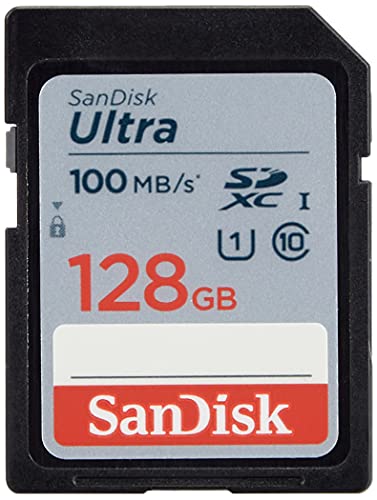
SanDisk 128GB Ultra SDXC UHS-I Memory Card — The calm generalist
The Ultra closes the list in its customary role: the general-purpose card for the shooting most LX10s actually do. Its title states capacity, line, format and interface, and no figures — the Ultra family’s numbers live in SanDisk’s documentation, and this review records them as documentation items rather than borrowing the Extreme PRO figures that share the page above. The distinction between the two SanDisk lines is the whole point of both existing, and a guide that blurred it would serve nobody.
For stills-led photography, the Ultra’s proposition is complete. The LX10’s everyday work — street frames, family days, travel stills with occasional short clips — makes no demand the Ultra tier was not built for, and 128GB at that workload is effectively bottomless: months of frames between offloads if the owner is casual, weeks if the owner is devoted. The camera’s buffer, not the card, sets the pace of ordinary bursts at this level of use.
The reservation is the ceiling. An owner who grows into the camera’s 4K modes — and the LX10 has a way of converting stills shooters, because its video is genuinely good — will eventually want the printed guarantee of the V30 Gigastone or the documented figures of the Extreme PRO line. The Ultra is the right card for the camera’s gentle personality and a stepping stone for its ambitious one, and the review recommends it in exactly those terms.
- Capacity: 128GB
- Format: SDXC, UHS-I
- Read speed: Not stated in the listing title — verify with SanDisk documentation
- Video speed class: Not stated in the listing title — verify with SanDisk documentation
- Write speed: Not stated in the listing title — verify with SanDisk documentation
Strengths
- 128GB is effectively bottomless for the stills-led life most LX10s lead.
- The Ultra line’s general-purpose record across cameras is long and calm.
- A gentle price tier within this set, reflecting its generalist brief.
Trade-offs
- No figure is printed in the title; all performance facts need documentation.
- Sustained 4K work is better guaranteed by the printed V30 pick.
- Owners who grow into video will likely upgrade past it.
Best for: a stills-led owner seeking a roomy, calm general-purpose card for daily shooting. Not suited for: a committed 4K shooter seeking the recording class settled by the listing itself.
How Do the Six Cards Divide by Evidence and by Size?
Two orderings run through this set, and a good purchase consults both. By printed evidence, the Gigastone 256GB leads on the recording side with the only V30, the flagship SanDisk leads on the offload side with its 250MB/s ceiling, the Gigastone 64GB and the small SanDisk state one figure each, and the 64GB Extreme PRO and the Ultra state none. By size, the set climbs from a stills-purist 32GB through the versatile 64GB pair and the travel-standard 128GB pair to the expedition 256GB. The right card is the intersection of an owner’s evidence standard and an owner’s itinerary, and the table exists to make that intersection visible at a glance.
| Pick | Capacity | Class in title | Read figure in title | Defining trait |
|---|---|---|---|---|
| SanDisk Extreme PRO 250MB/s | 128GB | Not stated | 250MB/s | Fastest stated offload |
| SanDisk Extreme PRO 32GB | 32GB | Not stated | 100MB/s | Stills-purist size |
| SanDisk Extreme PRO 64GB | 64GB | Not stated | Not stated | Quiet middle card |
| Gigastone 256GB | 256GB | V30 | Not stated | Only printed video class |
| Gigastone 64GB | 64GB | Not stated | 160MB/s | Stated speed plus recovery |
| SanDisk Ultra | 128GB | Not stated | Not stated | Calm generalist |
The empty cells are not an embarrassment to be hidden; they are the market’s habit of selling camera media on line names, printed plainly so that the one card that breaks the habit — the V30 Gigastone — can be seen doing so. An owner who values printed guarantees above all else has exactly one choice in this set, and the table makes that choice obvious in a way six paragraphs of prose could not.
How Should a New LX10 Card Be Set Up on Its First Day?
Start in the camera, not the computer. Insert the card, open the LX10’s menu, and format the card in the camera before a single frame is shot. The camera writes the structure it prefers, confirms it can see the card’s full capacity, and establishes the habit that every future format will follow the same path. A card that reports an unexpected capacity at this point has confessed early, while returning it is still easy.
Then shoot the audition. Record a minute of 4K at the camera’s highest setting, fire a raw burst until the buffer fills, and run a 4K Photo sequence. Play everything back in the camera, zooming into frames and scrubbing the video for stutters. The audition exercises the three workloads the card will actually meet — sustained video writing, burst spikes, and the video-rate stills stream — in five minutes, on the ground, where a failure costs nothing.
Copy the audition to the computer and open the files there as the final check, then label the card with its number and date. A simple log — card, capacity, where its class was verified, audition date — turns a wallet of identical black rectangles into a managed fleet, and it is the difference between reaching for a known card on a departure morning and gambling on an anonymous one.
Which LX10 Card Mistakes Do Owners Keep Making?
The adapter mistake comes first because it is physical: running microSD cards in adapters inside the camera to save money across devices. The adapter adds contacts, flex and a failure layer between the camera and the media, and it voids the careful logic of buying a native card. The LX10’s slot is full-size; feed it full-size cards.
The UHS-II mistake is financial. An owner reads that UHS-II is faster, buys it for this camera, and receives UHS-I behaviour at a UHS-II price, because the LX10 has no second contact row. The same money in a UHS-I card buys more capacity or a second card — both of which the camera can actually use.
The read-speed mistake is conceptual: judging a recording card by its offload number. The 250MB/s ceiling on the flagship SanDisk describes evenings at the laptop, and it is a fine reason to buy that card — but the 4K qualification lives in the write class, printed only by the Gigastone here and documented for the rest.
The one-card-trip mistake is the traveller’s version of concentration risk: a fortnight of photography on a single large volume, copied at the end, with the whole story riding on one small rectangle of plastic surviving the journey home. The distribution habit described in the travel section — several mid-size cards, nightly copies, images spread across bags — exists because this mistake is so easy to make and so total in its consequences when it meets bad luck.
The never-format mistake closes the list. A card formatted once by a computer, then topped up and deleted in fragments for a year, accumulates a structure no camera loves. Copy everything off, format in the camera, and begin each serious outing on a clean, camera-made structure; the ritual takes a minute and quietly prevents the strangest class of card errors there is.
Why Does Buffer Clearing Decide How the Camera Feels?
Specifications describe a card; the buffer describes the experience. When the LX10 fires a burst, the frames land first in the camera’s internal buffer, which is fast and small, and then drain onto the card at whatever pace the card’s sustained write allows. While the buffer is draining, the camera’s responsiveness is borrowed against that drain: another burst queues, a setting change waits, and the photographer feels the card’s write behaviour as the camera’s personality. This is why two cards with identical read ceilings can make the same camera feel alert or sluggish, and why the write side — the side most titles here decline to print — is the side that shapes a shooting day.
The LX10 sharpens this effect because its best features are burst-shaped. The 4K Photo modes are deliberate buffer events. The high-speed stills bursts are buffer events. Even the panorama and focus-stacking style features write in clusters. A pocket camera bought for spontaneity lives or dies by how quickly it is ready again after each of these, which is another way of saying it lives or dies by a figure its card’s title probably did not state. The documentation check this guide keeps prescribing is, in experiential terms, a check on how the camera will feel in the hand at the decisive second burst.
There is a practical audition hidden in that analysis, and the setup section already contains it: the raw burst fired until the buffer fills. Counting the seconds until the camera is fully responsive again gives an owner a personal, comparable measure of a card — cruder than a benchmark, and more useful, because it measures the exact camera, the exact card and the exact file types that owner actually shoots. Cards can be ranked by that kitchen-table test with more confidence than by any figure printed on a packet.
What Does Travel Do to Cards, and What Actually Protects Them?
Travel subjects cards to a curriculum of small hazards: heat in a parked car, cold on a mountain morning, humidity at a coast, drops onto stone floors, and the slow abrasion of being carried loose among keys and coins. Against that list, the protections that work are embarrassingly physical. A hard case with individual slots. Cards kept in the luggage that stays with the owner, never in checked bags where temperatures swing and bags wander. A strict convention — full cards in one row, empty in another — that survives tired evenings in dim hotel rooms.
Two popular anxieties can be retired. Airport X-ray scanners of the ordinary kind do not harm flash memory, and a card can cross a hundred checkpoints without consequence; the genuine airport risk is leaving the case in the seat pocket, which the convention of a single case, always returned to the same bag pocket, quietly prevents. Magnets of the household kind are likewise a myth carried over from the floppy era. The realistic enemies are water, force and loss, and all three are answered by the case and the convention rather than by any feature printed on a listing.
The traveller’s final protection is distribution. A trip’s images spread across three cards in two bags and a laptop, copied nightly, cannot be ended by any single accident — and that, more than capacity or class, is what separates the photographer who loses a day from the photographer who loses a story. The picks in this guide were sized with that distribution in mind, which is why the middle capacities, bought in pairs, keep reappearing in the recommendations.
How Do SDHC, SDXC and File Systems Touch This Camera?
The letters after a card’s capacity describe its family and its file system, and the LX10 reads the whole modern family without distinction. SDHC covers capacities up to 32GB and arrives formatted with the older FAT32 system; SDXC covers everything above and uses exFAT, which removes the old four-gigabyte file ceiling that used to chop long videos into segments. Five of the six picks are SDXC; the 32GB Extreme PRO sits exactly on the boundary as an SDHC-era size. Inside this camera the practical difference is nil — the LX10 handles both, and its in-camera format gives each card the structure it expects.
Where the distinction does surface is at the computer end of an old workflow. A very old reader or an elderly operating system can stumble over exFAT where it would have read FAT32 happily, and an owner reviving a decade-old laptop for travel duty should test the chain before departure rather than at a hotel desk. Modern systems read both families without comment, so for most owners this section is reassurance rather than warning: buy the capacity the trip needs, format in the camera, and let the letters look after themselves.
When Should an LX10 Owner Replace or Upgrade a Card?
Cards rarely announce their retirement in advance, but they do send signals, and a camera card’s signals are worth learning because the cost of ignoring them is measured in unrepeatable frames. The first signal is behavioural: a format that takes noticeably longer than it used to, a burst that clears more slowly month by month, a file that appears corrupted in an otherwise healthy shoot. Any one of these can have an innocent explanation; two in a season is a pattern, and the correct response to the pattern is to copy everything off, verify the copy, and move the card to ground duty — a reader spare, a firmware card — with its number marked in the log as retired from camera service.
Upgrading is a different decision, driven by the camera’s growing ambitions rather than by failure. The common path runs from the Ultra tier to a documented Extreme PRO or the printed V30 card, and it is usually triggered by video: the first long 4K project, the first trip where 4K Photo becomes the main tool. Owners can time that upgrade calmly because the LX10’s demands do not change — what changes is how much of the menu gets used. Buying the stronger card when the new habit forms, and demoting the gentle card to second-slot duty, is a fleet growing in the right order.
What should never drive the decision is a read-speed headline alone. A new card advertising a higher offload ceiling improves evenings, not photographs, and an owner with a current card recording flawlessly gains nothing photographic from replacing it. The honest triggers are a pattern of strange behaviour, a new workload the old card’s documentation cannot cover, or a trip whose length outgrows the fleet’s capacity. Outside those triggers, the best card is very often the verified one already in the camera.
How Should Stills and Video Share a Single Card on a Trip?
Most LX10 trips are mixed, and the mixed card has its own arithmetic and its own etiquette. The arithmetic is that video eats first and eats fast: a single enthusiastic hour at the 4K ceiling consumes more space than a week of stills, so a mixed shooter should budget the card from the video side and treat the stills as nearly free. Owners who reverse that budgeting — counting frames, forgetting the clips — are the ones watching a card fill on the second morning of a four-day trip.
The etiquette concerns the evening review. Deleting rejects in the camera, a frame at a time, feels productive and is quietly unhelpful: it fragments the evening, risks the accidental deletion that every photographer has committed exactly once, and returns almost no usable space compared with a proper offload. The healthier rhythm is to protect nothing, delete nothing in the field, copy everything at night, and let the computer — with its big screen and its backups — host the editing decisions. The card’s job is to hold the day whole until the archive has it.
One structural choice helps mixed shooters disproportionately: dedicate cards by leg of the journey rather than by subject. A card per city, per week or per event keeps the archive self-sorting, means a lost card costs a leg rather than a trip, and gives the offload evenings a natural boundary. The middle capacities in this guide — the 64GB pair and the 128GB pair — exist at exactly the sizes where that dedication is affordable, and the rotation they enable is the closest thing travel photography has to a free insurance policy.
Final Recommendation
Match the card to the personality of the camera that will dominate your year. The video-led owner should take the Gigastone 256GB, whose printed V30 settles the recording question on the listing itself and whose capacity swallows expeditions whole. The travel-led owner should take the flagship SanDisk Extreme PRO 128GB, whose stated 250MB/s ceiling returns evening after evening across a long trip, after the five-minute documentation check on its class. The stills-led owner is served by the small Extreme PRO for daily carry, the 64GB pair for balanced systems, and the Ultra for a roomy, unhurried generalist life.
Every route through this list shares the same two disciplines: buy native full-size UHS-I media, because that is the slot Panasonic built, and verify in documentation whatever a title leaves unstated, because the one figure that protects 4K footage is the one most titles decline to print. Cards chosen and checked that way stop being a gamble and become what they should be in a camera this good — invisible.
A final word on pairs. Whichever card earns the first slot in the camera, buy its twin when the budget allows and audition both on the same afternoon. A matched pair converts every future card question — the full card, the suspect card, the card left in the other jacket — into a swap rather than a crisis, and for a camera whose entire purpose is to be present for unrepeatable moments, that conversion is worth more than any single specification in this guide.
Equip the LX10 with a card as honest as its lens, verify the one figure its title may leave open, keep its twin tested in the bag, and the little camera will keep its side of the bargain every single time it leaves the house riding in a coat pocket, ready for whatever the day, the street or the journey shows it.
Frequently Asked Questions
Can the LX10 use microSD cards in an adapter?
Physically an adapted microSD can enter the slot, but it should not be used there. The adapter adds a contact layer and a failure mode between the camera and its media, and every pick in this guide is a native full-size SD card for exactly that reason.
Does a UHS-II card make the LX10 faster?
No. The LX10’s slot is UHS-I, so a UHS-II card runs at UHS-I speeds in this camera. It will work without any problem, but its faster mode has no contacts to speak to, and the premium it commands buys nothing here.
What class does the LX10’s 4K video need?
The camera records 4K at up to 100 megabits per second — twelve and a half megabytes per second sustained. A V30 card guarantees thirty, covering the demand with margin. One pick prints V30 in its title; for the others, the class is published in the maker’s documentation and should be confirmed there.
How much 4K video fits on these cards?
At the top bitrate, roughly forty-five gigabytes per hour. The 32GB card is therefore a stills card that can visit video, 64GB holds about an hour and a half, 128GB holds a committed video day, and the 256GB card holds a trip’s worth of mixed shooting.
Should the card be formatted in the camera or the computer?
In the camera. Formatting in the LX10 gives the card the structure the camera prefers and confirms the full capacity is recognised. Always copy and verify the previous contents on a computer first; formatting is the last step of an offload, never the first step of making room.
How can buffer clearing be tested at home?
Fire a raw burst until the buffer fills, then time how long the camera takes to become fully responsive again. That kitchen-table figure — your camera, your card, your file types — ranks cards for burst work more usefully than any packet figure, and repeating it when a new card arrives settles its place in the fleet immediately.
Do airport scanners damage SD cards?
Ordinary airport X-ray scanners do not harm flash memory, and neither do household magnets. The realistic travel risks are water, physical force and simple loss, which is why the working protections are a hard slotted case, a full-versus-empty convention, and copies spread across more than one bag.
When should an LX10 card be replaced?
At the second strange behaviour in a season — a slow format followed by a corrupted file, or bursts clearing noticeably more slowly than they used to. Copy everything off, verify the copy, mark the card in your log and demote it to reader or firmware duty. Cards are the cheapest part of the system and the only part whose failure is priced in photographs.
What does the A1 marking on the Gigastone 256GB mean for this camera?
Very little, honestly. A1 rates application-style random access, which matters to phones running apps from a card and barely registers in camera work. The marking that serves the LX10 in that same title is V30, the video class that guarantees the sustained write the 4K mode needs.
Related Guides
Compact-camera media touches a few neighbouring subjects on this site. Photographers equipping a larger Panasonic body should compare the best SD cards for Lumix mirrorless cameras, travellers building a complete pocket kit can work through our guide to compact camera accessories, and anyone deciding between card generations will find the framework in our explainer on UHS-I and UHS-II in real cameras.


