What's inside
- Key Takeaways
- Quick Picks
- How did we choose these picks?
- How do the six Fire cards compare in one view?
- What is the real difference between FAT32 and exFAT on a Fire tablet?
- Should Fire storage be portable or adopted as internal storage?
- How large a card does each kind of Fire household need?
- Which card mistakes do Fire owners repeat?
- Final Recommendation
- How do you set up a new card in a Fire tablet, step by step?
- What should live on the card, and what should stay on the tablet?
- How do you troubleshoot a Fire card that misbehaves?
- What does a year of Fire ownership do to a card, month by month?
- How do children’s Fires change the card calculation?
- When is it time to replace or upgrade a Fire tablet’s card?
- How do Fire tablets handle cards across updates, resets and replacements?
- What is the best way to move a growing library between cards?
- What belongs on the Fire card checklist at home?
- How does a Fire card fit into a household’s wider backup habits?
- A final word on buying for the tablet you will own next
- Frequently Asked Questions
- Related Guides
As an Amazon Associate I earn from qualifying purchases. This post may contain affiliate links at no extra cost to you.
gizmoverdict.com is reader-supported. When you buy through links on our site, we may earn an affiliate commission.
Where to buy: The six picks below are microSD models taken from this site’s verified pool, most arriving with an SD adapter for computer use, and spread across the capacity ladder that Fire tablets genuinely need.
Shopping for the best sd cards for fire tablet comes with a format correction that saves a return trip: no Fire tablet has an SD slot. Every Fire model that expands its storage does so through a microSD slot, usually hiding under a small flap on the tablet’s edge, and the full-size SD shape appears only as the adapter some cards include for use in a computer. All six picks in this guide are therefore microSD cards, chosen for the unglamorous but demanding job of living inside a tablet that streams, downloads, games and updates itself every single day.
The second honesty concerns file systems, and it depends on your tablet’s age. Older Fire OS generations format cards as FAT32, which carries a hard limit of four gigabytes for any single file — a ceiling that full-length high-quality movie downloads and large game files can genuinely hit. Newer Fire tablets support exFAT formatting, lifting that ceiling and letting the card hold the large files modern streaming downloads produce. The same card behaves differently in different generations, so this guide writes by generation wherever the advice changes, and your first task is simply knowing which Fire you own.
Within those truths, the Fire use case is kinder than a camera’s. Tablets read far more than they write, they prize capacity for downloaded films, children’s shows, books, games and offline maps, and they benefit from the A1 and A2 application ratings when apps themselves live on the card. The six cards below climb from a modest 32GB starter to a pair of half-terabyte libraries, all from the microSD mainstream, so the decision becomes a calm matter of matching size and rating to the tablet’s generation and its owner’s downloading habits.
Key Takeaways
- Fire tablets take microSD cards only; the SD shape is an adapter for computers.
- Older Fire OS formats cards as FAT32, capping any single file at four gigabytes.
- Newer Fire generations support exFAT and accept much larger single files.
- Capacity is the headline decision: downloads and children’s libraries grow relentlessly.
- A1 and A2 ratings matter when apps run from the card, not for simple media storage.
- Format the card in the tablet itself and choose portable or internal storage deliberately.
Quick Picks
| Pick | Badge | Why it fits a Fire tablet |
|---|---|---|
| Lexar High-Performance 633x 32GB microSDHC UHS-I Card w/ SD Adapter, Up To 100MB/s Read, f | The starter card | Lexar’s 32GB 633x for light tablets and first expansions. |
| Lexar High Performance 633x 128GB microSD/microSDXC UHS-I Card [Eco-Friendly Packaging] | The classic 128GB upgrade | The 633x at the size most Fire owners should start from. |
| Lexar 128GB Blue Micro SD Card Up to 160MB/s microSDXC UHS-I Memory Card | The faster 128GB option | Lexar’s Blue line brings A2 and V30 ratings to the same size. |
| Lexar 512GB Silver Plus Micro SD Card, 205MB/s Read, 4K, V30, UHS-I | The half-terabyte library | Lexar’s Silver Plus at 512GB for serious download collections. |
| 【5-Yrs Free Data Recovery】 GIGASTONE 512GB Micro SD Card, 4K Camera Pro, A2 V30 for Smartp | The recovery-bundled giant | Gigastone’s 512GB pairs A2 speed with a data recovery offer. |
| SanDisk 512GB Extreme microSDXC UHS-I Memory Card with Adapter | The trusted-name giant | SanDisk’s Extreme at 512GB for the heaviest Fire libraries. |
How did we choose these picks?
The opening filter was the slot itself, which eliminated every full-size card instantly, and continued with the two questions Fire owners actually live with: how much will this tablet download, and which file system will its generation of Fire OS apply to the card? Cards were then spread across the honest capacity ladder, from a small starter for a lightly used tablet to the half-terabyte tier for households that treat the Fire as a portable cinema and game library.
Ratings were read with tablet eyes rather than camera eyes. Sustained video-write classes matter little here, because a Fire records almost nothing; read pace shapes how quickly galleries and game worlds load, and the A ratings shape how apps behave when they live on the card. Every pick comes from a current, verified microSD listing, and several include the SD adapter that makes moving files through a family computer painless, which for many Fire households is a genuinely used feature rather than box filler.

Lexar High-Performance 633x 32GB microSDHC UHS-I Card w/ SD Adapter, Up To 100MB/s Read, f — The starter card
Begin at the shallow end: Lexar’s 32GB High-Performance 633x, a microSDHC card with an SD adapter in the package and a read headline of up to 100MB/s. Thirty-two gigabytes sounds small in a guide that ends at half a terabyte, yet for a lightly used Fire — a kitchen tablet for recipes and radio, a grandparent’s reader for books and photographs, a travel spare — it doubles or triples the usable room of the cheapest Fire models and costs very little to do it. Books are tiny, audiobooks are modest, and a handful of downloaded programmes fit without negotiation.
The generation warning matters most at this tier. On an older Fire OS that formats to FAT32, the card’s 32GB is also the largest size that file system handles natively and gracefully, which makes this little card the natural citizen of the oldest tablets still in service. Its limits are equally clear: a child’s film library or a game collection will evict it within a season. Buy it for the tablet whose ambitions are genuinely small, and it will serve for years without ever being asked a question it cannot answer.
- Format: microSDHC, UHS-I bus, SD adapter included
- Rating: 633x family, UHS-I class
- Size of this card: 32GB
- Read figure on the listing: up to 100MB/s as stated on the listing
- Role: starter expansion for lightly used and older Fire tablets
Strengths
- The gentlest price into more Fire storage in this guide
- Natural fit for older FAT32-era tablets
- Adapter included for easy file moves through a computer
Trade-offs
- Fills quickly once films and games arrive
- Smallest capacity here by a wide margin
- No A rating headline for app-heavy use
Best for: a lightly used Fire needing room for books, audio and a few downloads
Not suited for: a child’s Fire destined to become a film and game library, which will outgrow it fast

Lexar High Performance 633x 128GB microSD/microSDXC UHS-I Card [Eco-Friendly Packaging] — The classic 128GB upgrade
The 128GB version of the same 633x family is where most Fire owners should start their thinking. At this size the arithmetic of tablet life changes completely: dozens of downloaded films in sensible quality, a season of children’s programmes, a shelf of games and a photo library all coexist without the weekly eviction meeting that small cards impose. The card itself remains the familiar UHS-I design with reads up to the family’s headline pace, and this listing’s eco-friendlier packaging is a small, pleasant footnote.
Generation awareness still applies. On a newer Fire that formats exFAT, this card swallows large single files happily, including the chunky downloads that modern apps and high-quality video produce. On an older FAT32 tablet, the card works just as well for capacity, but any single file must stay under the four-gigabyte ceiling, which mostly means choosing standard rather than maximum download quality for the longest films. Neither behaviour is a flaw in the card; they are the personalities of the two Fire eras, and at 128GB both personalities remain easy to live with.
- Format: microSDXC, UHS-I bus
- Rating: 633x family, UHS-I class
- Size of this card: 128GB
- Packaging note: eco-friendly packaging in this listing
- Role: the default upgrade size for most Fire tablets
Strengths
- The capacity where Fire storage stops needing management
- Works gracefully across old and new Fire generations
- Familiar line with a long tablet track record
Trade-offs
- No A2 rating for demanding app-from-card use
- FAT32-era tablets still cap single files by the system, not the card
- Heavy downloaders will eventually eye the 512GB tier
Best for: a typical Fire owner downloading films, shows and games in normal family quantities
Not suited for: a household archiving a whole travelling cinema, who should start at half a terabyte
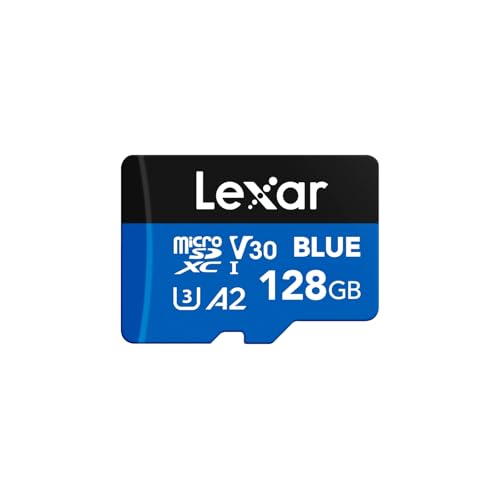
Lexar 128GB Blue Micro SD Card Up to 160MB/s microSDXC UHS-I Memory Card — The faster 128GB option
Lexar’s Blue line at 128GB is the thinking owner’s alternative at the same capacity, and its listing explains why: the ratings climb to U3, A2 and V30, with reads quoted up to 160MB/s. Translated into tablet life, the A2 rating is the one that matters most, because it describes how briskly small files and application data move, which is exactly the traffic a Fire generates when apps and games live on the card. Menus feel snappier, game worlds load with less waiting, and a card full of apps behaves less like a compromise.
The V30 rating, by contrast, is mostly surplus in a tablet, since Fires do not record demanding video; treat it as evidence of a strong card rather than as a feature you will spend. What you are buying here over the 633x is responsiveness, and whether that is worth the difference depends on how the tablet is used. A media-only card that stores films and books gains little. A Fire that runs its games and apps from the card, especially a child’s Fire where patience is the scarcest resource in the house, gains something its owner will notice every day.
- Format: microSDXC, UHS-I bus, adapter in listing family
- Rating: U3, A2, V30 as listed
- Size of this card: 128GB
- Read figure on the listing: up to 160MB/s as stated on the listing
- Role: responsive 128GB card for app-and-game-heavy Fires
Strengths
- A2 rating suits apps and games living on the card
- Faster reads quicken galleries and loading screens
- Same sensible capacity as the classic upgrade
Trade-offs
- Costs more than the 633x for benefits media-only use skips
- V30 rating is largely surplus inside a tablet
- Still the same 128GB ceiling for growing libraries
Best for: a Fire whose games and apps run from the card, especially a child’s everyday tablet
Not suited for: a download-and-watch Fire, where the calmer 633x stores the same films for less

Lexar 512GB Silver Plus Micro SD Card, 205MB/s Read, 4K, V30, UHS-I — The half-terabyte library
Crossing to 512GB changes a Fire’s character, and Lexar’s Silver Plus is built for the crossing. Its listing quotes reads up to 205MB/s with V30 and UHS-I ratings, a specification aimed originally at cameras and consoles, but inside a Fire the capacity is the transformation: an entire travelling cinema, months of children’s downloads, a games library that stops asking what to delete, and offline maps and music for journeys where the signal gives up long before the road does.
The generation rule becomes decisive at this size. A newer Fire formatting exFAT will use the whole half terabyte as one happy volume. An older FAT32-era tablet is the wrong home for this card, not because the card fails, but because the file system’s single-file ceiling and the era’s expectations were built for a smaller world. Pair the big card with a tablet from the exFAT generations and it becomes the closest thing a Fire has to unlimited storage; the remaining discipline is organisational, since a library this large deserves the occasional tidy and a backup of anything irreplaceable, like the family photographs that migrate onto tablets and exist nowhere else.
- Format: microSDXC, UHS-I bus, adapter in listing
- Rating: V30, UHS-I class
- Size of this card: 512GB
- Read figure on the listing: up to 205MB/s as stated on the listing
- Role: maximum library card for newer Fire generations
Strengths
- Half a terabyte ends download eviction arguments
- Fast reads keep a huge library feeling responsive
- Ideal partner for travel without connectivity
- Generation fit matters: built for exFAT-era tablets
Trade-offs
- Wasted on an older FAT32-era tablet whose narrower world cannot use it
- Price buys capacity a light user will never meet
- A library this size needs its own backup thinking
Best for: a newer Fire serving as a travelling cinema and games library for a whole family
Not suited for: an older Fire from the FAT32 generations, where this capacity cannot show its point

【5-Yrs Free Data Recovery】 GIGASTONE 512GB Micro SD Card, 4K Camera Pro, A2 V30 for Smartp — The recovery-bundled giant
Gigastone’s 512GB entry competes at the same half-terabyte tier with a different personality: its listing leads with a five-year free data recovery offer, pairs A2 and V30 ratings with read and write headlines up to 170 and 150MB/s, and names the smartphone and action-camera crowd in its pitch. Inside a Fire, the A2 rating is the useful headline, supporting apps and games stored on the card, while the recovery offer speaks to a particular kind of owner: the one whose tablet holds the only copies of things.
That owner is more common than the industry admits. Children’s artwork photographed and stored, downloaded media collected over years, game progress that represents a family’s collective evenings — a Fire quietly becomes an archive. A bundled recovery promise does not replace backing up, and it cannot help a card that is physically lost, but as a differentiator between two half-terabyte cards it is a thoughtful one. Choose the Gigastone when the tablet’s contents carry sentimental weight; choose on price and pace when they do not, because at this tier every card here will store the same films at the same sizes.
- Format: microSDXC, UHS-I bus, adapter in listing
- Rating: A2, V30, U3, Class 10 as listed
- Size of this card: 512GB
- Headline figures: up to 170MB/s read and 150MB/s write as printed
- Role: archive-minded half-terabyte Fire expansion
Strengths
- Bundled multi-year data recovery offer leads its pitch
- A2 rating supports apps and games on the card
- Capacity matches the largest tier in this guide
Trade-offs
- A less familiar name beside Lexar and SanDisk here
- Recovery offers help failures, not lost tablets
- Same exFAT-generation preference as any giant card
Best for: a family whose Fire holds irreplaceable photos, artwork and game progress
Not suited for: a purely streaming tablet whose contents can all be downloaded again tomorrow

SanDisk 512GB Extreme microSDXC UHS-I Memory Card with Adapter — The trusted-name giant
SanDisk’s Extreme at 512GB closes the guide as the name-brand summit of Fire expansion. Its listing quotes reads up to 160MB/s with A2, V30 and U3 ratings, the full modern alphabet, and the Extreme family’s long reputation across cameras and consoles rides along into the tablet. In a Fire, that reputation translates into a card you install and then forget for years, while half a terabyte of downloads, games and media accumulate and behave themselves underneath.
It is, honestly, more card than a tablet can challenge: the Fire will never ask for its sustained-write pedigree, and its read pace exceeds what the tablet’s interface typically requests. What the premium actually buys is the quietest possible ownership experience at the largest capacity, from the maker most Fire owners already trust from their phones. For a flagship Fire HD or Fire Max tablet bought to serve for many years, that pairing of the biggest card and the safest name has its own logic. Lighter tablets and lighter budgets are served perfectly well higher up this guide, and SanDisk would be the first to sell you those instead.
- Format: microSDXC, UHS-I bus, adapter included
- Rating: A2, V30, U3, Class 10 as listed
- Size of this card: 512GB
- Read figure on the listing: up to 160MB/s as stated on the listing
- Role: trusted-name maximum expansion for long-service Fires
Strengths
- The most trusted card name in the guide at full capacity
- A2 rating keeps apps and games feeling native
- Install-and-forget reputation across many devices
Trade-offs
- Pays for camera-grade talents a tablet never uses
- Premium pricing at a tier where rivals match capacity
- Still bound by the same file-system rules as every card
Best for: a long-service flagship Fire whose owner wants the safest name at the largest size
Not suited for: a budget Fire tablet, where the card would cost a striking share of the whole device
How do the six Fire cards compare in one view?
For Fire duty the table reads differently from a camera guide: capacity and the A rating do the real work, the V ratings are background reassurance, and your tablet’s generation decides which rows can show their full size.
| Card | Card and capacity | Ratings carried | Best Fire job |
|---|---|---|---|
| Lexar 633x 32GB | 32GB microSDHC, UHS-I, adapter | 633x family | Light and older Fire tablets |
| Lexar 633x 128GB | 128GB microSDXC, UHS-I | 633x family | The default family upgrade |
| Lexar Blue 128GB | 128GB microSDXC, UHS-I | A2, V30, U3 | App-and-game-heavy Fires |
| Lexar Silver Plus 512GB | 512GB microSDXC, UHS-I | V30 | Newer-generation travelling libraries |
| Gigastone 512GB | 512GB microSDXC, UHS-I | A2, V30, U3 | Archive-minded family tablets |
| SanDisk Extreme 512GB | 512GB microSDXC, UHS-I | A2, V30, U3 | Trusted-name maximum expansion |
What is the real difference between FAT32 and exFAT on a Fire tablet?
A file system is the rulebook a tablet uses to organise a card, and the two rulebooks in Fire history differ in one rule that owners actually meet. FAT32, the older standard, cannot hold any single file larger than four gigabytes, no matter how empty the card is. In the era when downloads were smaller, that rule slept quietly. Modern life wakes it up: a long film downloaded at the highest quality, a large game with its data bundle, or a personal video moved from a computer can each arrive as one file over that line, and a FAT32 card must refuse or split what it cannot store whole.
Newer Fire generations format cards as exFAT, whose single-file ceiling is so high that no real download will ever find it, and the same physical card becomes a simpler citizen. This is why the guide keeps tying advice to generations rather than to cards. If your Fire is older, favour modest download quality for the longest films, expect the four-gigabyte rule on large transfers from a computer, and know the 32GB and 128GB picks are sized for your world. If your Fire is newer, the large cards in this guide can be bought without a second thought about file sizes at all.
Should Fire storage be portable or adopted as internal storage?
When a Fire formats a new card it may offer a choice that deserves a slow decision. Portable storage treats the card as a removable volume for media files: films, music, books and photographs move on and off it freely, the card can visit a computer with its adapter, and removing it costs you only what was stored there. This is the mode that suits the way most households actually use expandable storage, as a library shelf attached to the tablet.
Adopted or internal-style storage, where offered, folds the card into the tablet’s own system space so apps can live there as if the tablet simply had a bigger drive. The gain is real for app-heavy tablets, and the A2-rated cards in this guide serve it best. The costs are commitment and fragility: the card becomes married to that one tablet, unreadable elsewhere, and its failure disturbs the system rather than just the library. Households should choose portable storage by default, and reserve the adopted route for a tablet whose internal drive is genuinely strangling its app collection, with a good card fitted and a backup habit already in place.
How large a card does each kind of Fire household need?
Work backwards from what the tablet hoards. A reading-and-streaming Fire, connected to home Wi-Fi and used for books, browsing and watched-then-deleted downloads, lives happily at 32GB to 128GB for its entire service. The card there is a cushion, not a warehouse. A child’s Fire is a different economy entirely: downloaded programmes for car journeys, games that each carry hefty data, and a parent’s wise insistence on offline everything push that tablet to 128GB quickly and reward the A2-rated Blue card for the app load it carries.
The travelling and archiving households sit at the top of the ladder. Families who download a season before a trip, commuters who carry films for a month of trains, and anyone whose Fire doubles as the photo and media vault should start at 512GB and choose among the three giants by temperament: Lexar for pace, Gigastone for its recovery bundle, SanDisk for the name. In every tier, remember that the card outlives the impulse that bought it, so sizing one step above today’s need is usually the purchase that ages best.
Which card mistakes do Fire owners repeat?
The format mix-up opens this category too: a full-size SD card bought for a Fire simply has nowhere to go. The slot is microSD, the adapter in some packages is for computers, and the correct purchase is always the little card, however the listing photographs arrange the two pieces.
A second mistake is ignoring the tablet’s generation. A half-terabyte card in an old FAT32-era Fire, or a library of maximum-quality downloads aimed at a four-gigabyte file ceiling, produces confusion that looks like a faulty card and is actually a mismatched era. Match the card’s ambitions to the Fire OS that will format it.
Third, owners yank cards out mid-write or swap them casually between devices, then meet corrupted libraries. Use the tablet’s own eject or power-down routine before removing a card, format a card in the device that will own it, and let one card belong to one tablet rather than touring the household.
Finally, the single-copy trap: a Fire stuffed with the only copies of family photographs and a child’s creative history is an archive pretending to be a toy. Whatever card you choose, copy the irreplaceable things somewhere else on a rhythm, because cards are consumables and tablets get dropped in baths, left on trains and sat on by exactly the people who love them most.
Final Recommendation
Most Fire owners can decide in one step: the 128GB Lexar 633x is the default upgrade, the Blue 128GB is its livelier sibling for app-heavy tablets, and the 32GB card remains the right answer for the oldest and lightest Fires still earning their keep. Households building a travelling library should climb straight to the half-terabyte tier and choose among Lexar, Gigastone and SanDisk by the temperament that matches their archive.
Whichever rung you land on, fit the card, let the tablet format it in its own way, and make the portable-versus-internal choice slowly and once. A Fire with the right microSD card inside stops being a device that nags about storage and becomes what it was always meant to be: the household’s easygoing screen, loaded and ready long after the Wi-Fi has given up.
How do you set up a new card in a Fire tablet, step by step?
Begin with the tablet awake and charged, because a card installation interrupted by a dying battery is a small mess nobody needs. Power the tablet down if its slot design asks for it, or follow the model’s own guidance, then open the little flap or tray at the tablet’s edge and seat the microSD card with its contacts facing as the moulded diagram beside the slot shows, pressing until it clicks or sits flush. The card is tiny and spring-loaded in many models, so work over a table rather than a lap, and let a fingernail rather than a tool do the pressing.
When the tablet wakes, it will notice the card and offer its choices. This is the moment to go slowly. If it proposes formatting, accept, because a card formatted by the tablet that owns it is a card whose file system matches that tablet’s generation exactly, FAT32-era rules or exFAT freedom included. If it offers the portable-versus-internal decision, choose with the guidance from earlier in this guide: portable for libraries and for any card you may ever want to move, internal only for an app-strangled tablet whose card will live and die in that one slot.
Finish by proving the installation before trusting it. Download one programme, move one photograph, and restart the tablet once to watch everything reappear where it belongs. Then set the tablet’s download preferences to favour the card for video and large apps, so the new room is actually used rather than admired. A card installed in five careful minutes and verified in two more will serve silently for years, while a card jammed in and assumed working tends to introduce itself later, usually the night before a journey, when its contents were supposed to be the entertainment.
What should live on the card, and what should stay on the tablet?
Divide the tablet’s world by how each kind of content behaves. Downloads for watching and listening — films, programmes, music, podcasts and audiobooks — belong on the card without argument, because they are large, replaceable and read sequentially, which is the easiest work storage ever does. Books and magazines are tiny either way, but the card welcomes them too, and a library that lives on the card can even travel to a replacement tablet if the original meets an accident, provided the card was kept as portable storage.
Apps deserve a more thoughtful split. The tablet’s internal storage is its fastest and most reliable home, so the apps used daily, and especially the system-adjacent ones, should stay there whenever room allows. The card, ideally an A2-rated one from this guide, takes the overflow: the games played on journeys, the children’s app collection, the seasonal apps that swell a tablet’s census without earning daily attention. Owners who reverse that split, exiling the everyday apps to the card while internal storage idles, usually meet the difference as a faint lag they blame on the tablet’s age.
Photographs and personal creations need a rule stricter than placement: wherever they live, they must also live somewhere else. A Fire used as the family camera or the children’s art vault should treat its card as a working copy, with a computer folder, a cloud album or a second card holding the archive. Storage is cheap and childhoods are not, and the entire half-terabyte tier of this guide costs less than the regret of a single lost year of pictures.
How do you troubleshoot a Fire card that misbehaves?
Start with the symptom that solves half of all cases: the tablet has stopped seeing the card, or sees it intermittently. Power the tablet fully down, reseat the card carefully in its slot, and restart; more card mysteries end at that reseating than at any other step, because a card carried daily in bags and cars can creep a fraction out of perfect contact. If the card appears, copy anything precious off it before further experiments, because a card that has lost contact once has earned supervision.
If the card is seen but content misbehaves — downloads failing, apps on the card crashing, photographs appearing broken — suspect the file system next. A card formatted in another device, removed mid-write, or filled beyond its comfortable limit can carry quiet damage that a tablet tolerates until it does not. The remedy is unglamorous and effective: copy everything salvageable to a computer through the adapter, let the Fire format the card afresh in its own slot, and restore only the content that verified cleanly, re-downloading the rest rather than resurrecting suspect files.
Accept the terminal diagnosis when it arrives. A card that repeatedly vanishes, fails formats, or corrupts fresh content in a healthy tablet has finished its service, and no setting will resurrect it. Replace it from the reputable end of this guide, restore from your copies, and reflect that the troubleshooting habit that caught the decline early — noticing, copying, testing — is the entire difference between a card failure as an anecdote and a card failure as a loss. Tablets are patient teachers of this lesson, and they charge the tuition only once if you let them.
What does a year of Fire ownership do to a card, month by month?
A Fire card’s life is measured in accumulations rather than in events. The first month is all headroom and good intentions: the card swallows the initial download spree, the children’s first game collection, the holiday films loaded for a journey, and still reports a emptiness that feels permanent. Owners who stop planning here are forgiven, because nothing in the first month predicts the third, when the streaming services’ offline libraries have quietly renewed themselves at higher qualities, the games have each grown by updates, and the tablet has become the household’s default camera for everything nobody bothered to fetch a phone for.
By the middle of the year the card’s character depends on the household’s habits. Streaming households plateau, because watched downloads are deleted and the library breathes. Downloading households climb steadily, because a child’s favourites are never deleted, a traveller’s films accumulate against future journeys, and the card becomes an archive by accretion rather than by decision. This is the season when the 128GB owners begin their quiet arithmetic and the 512GB owners feel vindicated, and both are right, because they bought, or failed to buy, for the household they actually were.
The year’s end adds the two stresses nobody schedules: the holiday download surge, when every service is loaded for travel at once, and the arrival of a second Fire in the house, which begins competing for the household’s patience if not for the same card. A card sized with one honest step of headroom absorbs both without drama. The lesson the year teaches is that Fire storage is not bought for the tablet’s first month or its average month, but for its fullest month, and the owners who size for December never spend June negotiating with a storage warning.
How do children’s Fires change the card calculation?
A child’s Fire is the most demanding tablet in most houses, and its card should be chosen with a respect the device’s price never suggests. The usage pattern is a perfect storm for storage: programmes are downloaded rather than streamed because children’s viewing happens in cars, planes and grandparents’ houses where Wi-Fi is a rumour; favourites are rewatched dozens of times and therefore never deleted; games arrive in procession, each carrying its data; and the tablet doubles as a camera and art studio whose output is, to its creators, utterly irreplaceable.
Capacity planning follows from that storm. The 128GB tier is the true starting point for a child’s tablet expected to serve for years, and the A2-rated Blue card earns its premium in this exact house, because a child’s patience for loading screens is the scarcest resource in family technology and the apps live on the card. Households that begin at 32GB for a child are not economising; they are scheduling a second purchase and a small domestic negotiation about which beloved programme must be sacrificed before the holiday journey, a negotiation no parent has ever won gracefully.
The safety conversation matters most here of all. A child’s Fire accumulates drawings, photographs, recordings and game worlds that exist nowhere else, on a device that will be dropped, soaked, lost and sat upon with statistical certainty. Choose portable storage so the card can be read by a computer, copy the irreplaceable folders on a rhythm tied to something you already do monthly, and the inevitable hardware accident becomes a story about a broken tablet rather than a story about a lost year. The card is the cheapest part of a child’s digital childhood; the copies are the priceless part.
When is it time to replace or upgrade a Fire tablet’s card?
Cards announce their retirement in small type. The first notices are behavioural: a download that fails and then succeeds, an app on the card that needs a second tap to wake, a photograph that appears in the gallery a moment after its neighbours. Any one of these is weather; a pattern of them, across a week, is climate, and the correct response is to copy everything precious off the card while copying is still easy, then test the card by letting the tablet format it fresh and watching whether the small behaviours return. A card that misbehaves after a clean format has given its evidence and should be replaced without a second hearing.
Upgrades follow a different signal, which is arithmetic rather than behaviour. When the household’s deletions become a ritual performed before every journey, when a child’s new game requires an eviction hearing, or when download quality is being chosen by storage rather than by the screen’s capability, the card has been outgrown however healthy it remains. The outgrown card is not waste: demoted to a lighter tablet, a camera’s spare duty or the family computer’s transfer mule, it serves for years in a smaller world, and the Fire climbs a rung on this guide’s ladder with its library transferred in an afternoon.
Both decisions share one discipline, which is to make them at a table rather than at a departure gate. Keep a household note of each card’s device, capacity and purchase season, glance at it when a tablet is replaced or a journey is planned, and the replacement or upgrade happens during a calm week with a computer available. Fire tablets are bought to remove friction from family life, and their cards achieve that only when their own maintenance is scheduled by the owners, in advance, instead of being announced by the tablet at the least convenient moment the year can offer.
How do Fire tablets handle cards across updates, resets and replacements?
A Fire’s card outlives many of the tablet’s own chapters, and knowing how it behaves at each transition prevents the small losses that accumulate into family legend. Across ordinary system updates, a portable-storage card simply carries on: its library remains, its downloads persist, and the tablet’s relationship with it survives the restart unchanged. This stability is one of portable storage’s quiet virtues, and it is why this guide steers households toward that mode unless app space genuinely forces the other door.
A factory reset is a sterner chapter. The tablet’s internal world is wiped back to its first morning, while a portable card’s contents physically survive — yet the rebuilt tablet may treat returning downloads, app data and library links as strangers until they are re-established, and some content tied to the old installation must simply be downloaded again. The card adopted as internal storage faces the hardest version of this story, because its contents were encrypted into the old installation’s identity and do not transfer their meaning to the new one. Households contemplating a reset should copy the irreplaceable folders off the card first, whatever mode it lives in, and treat everything else as re-downloadable.
Replacement tablets write the happiest chapter when the groundwork was laid early. A portable card lifts out of the old Fire and into the new one carrying its films, books and photographs like a suitcase, and a family that kept the children’s irreplaceable creations in ordinary folders can restore a familiar world within the hour. That portability is earned entirely by decisions made on the card’s first day — its mode, its organisation, its backup rhythm — which is why this guide returns so often to beginnings. The card is a small thing, but across a tablet’s replacements it becomes the household’s continuity, the one object that remembers every previous screen.
What is the best way to move a growing library between cards?
Eventually a good card is outgrown by a good library, and the migration deserves the same care as the original purchase. Begin by choosing the destination from this guide’s ladder with one rung of headroom beyond the present library, because migrating twice in a year is a chore that teaches nobody anything. Then copy through a computer rather than tablet-to-tablet improvisation: the old card in its adapter, the new card in a second slot or a second pass, and the library moved as complete folders so its internal organisation survives the journey intact.
Verify before you celebrate. Spot-check the largest films by playing their middles, open a sample of photographs at full size, and confirm the destination card reports the capacity its label promises, because a migration is also the perfect occasion to discover a counterfeit while the original library still exists untouched. Keep the old card, unformatted, in a drawer for a full month after the migration, as the cheapest insurance policy in this entire guide; libraries reveal their missing corners slowly, usually at the moment a particular film or photograph is wanted again.
Only when the month has passed quietly should the old card be formatted and demoted to its next duty — a lighter tablet, a camera’s spare, the computer’s transfer mule — beginning its second career with a clean file system and a new label. Managed this way, a household’s cards form a cascade exactly like the one this guide described for cameras: nothing wasted, everything verified, and the library itself, which is the only part that was ever priceless, carried across the years untouched by the mortality of the plastic that holds it.
What belongs on the Fire card checklist at home?
The household version of this guide’s routine fits on the refrigerator door. On the card’s first day: seat it carefully, let the tablet format it in its own way, choose portable storage unless app space forces the other door, and verify the installation with one download and one restart before trusting it. In ordinary life: let downloads and media live on the card, keep everyday apps on internal storage where room allows, favour A2 media when apps must move, and copy the irreplaceable folders — the photographs, the children’s creations — somewhere else on a monthly rhythm tied to a day you already remember. Once a season: glance at the remaining space before a journey rather than during one, and notice any small misbehaviour while it is still small.
That modest routine is the entire difference between the households whose Fire tablets simply work for years and the households whose tablets generate an annual storage crisis. The card itself, whichever rung of this guide’s ladder it came from, asks only to be genuine, correctly formatted, sensibly filled and occasionally copied. Meet those four requests and the Fire becomes what its designers intended and its owners hoped: the easiest screen in the house, loaded with the family’s films, books and games, ready on the train, the ward, the holiday cottage and the long Sunday afternoon alike.
How does a Fire card fit into a household’s wider backup habits?
A tablet card should be the most relaxed citizen of a household’s backup system, because almost everything on it can be downloaded again — and the exceptions are exactly why it still belongs in the system. Films, programmes, books and apps are the cloud’s problem, restorable on any future tablet with a sign-in and an evening. Photographs taken on the tablet, children’s drawings and recordings, and game progress built across a year are the household’s problem alone, existing on that one small card until somebody deliberately gives them a second home.
The habit that covers them asks for ten minutes on a rhythm the house already keeps: a monthly evening when the tablet visits the family computer, its card readable through the included adapter, and the irreplaceable folders are copied into the same archive that holds the household’s other photographs. Tie the ritual to an existing anchor — the first Sunday, the rent day, the photo-backup session for the phones — and it survives because it borrows a habit rather than inventing one. Households that keep it can lose the tablet itself with nothing worse than inconvenience. Households that skip it are one bath, one train seat or one toddler’s experiment away from learning which folders were priceless, at the traditional tuition rate for that lesson.
A final word on buying for the tablet you will own next
Fire tablets are replaced more often than they are repaired, dropped by children, superseded by brighter screens, and handed down through families in a way cameras rarely are, and a well-chosen portable card is the thread that runs through those successions. The films can be downloaded again, but the organised library, the photographs and the children’s creations move with the card when the groundwork was portable, verified and copied. Buy the card one rung above the present tablet’s appetite, keep it in portable mode, and the next Fire in the house will inherit a ready-made world on its first evening, which is the closest consumer technology comes to a family heirloom. That is a remarkable return on a component smaller than a postage stamp, and it is available to any household willing to make three calm decisions on the day the card first slides into its slot: format it in the tablet, organise it deliberately, and copy the priceless parts somewhere else before life asks why you did not.
Frequently Asked Questions
Will any microSD card work in a Fire tablet?
Essentially yes, provided it is a genuine card from a reputable maker, because the slot and standards are universal. The meaningful choices are capacity, the A rating if apps will live on the card, and whether your Fire’s generation formats with the older FAT32 rules or the newer exFAT ones.
Why did a large film download fail on my older Fire?
The likeliest cause is the FAT32 single-file ceiling of four gigabytes on older Fire OS generations. Downloading that title at a lower quality setting usually brings the file under the line, while newer Fire tablets formatting exFAT do not impose the limit at all.
Should I choose the A2 cards if I only store films?
Films and books do not benefit from A ratings, which describe application performance, so a media-only Fire is served perfectly by the calmer cards in this guide. A2 earns its difference when games and apps themselves run from the card and their small-file traffic sets the pace.
Can I move the card to a new Fire later?
A card used as portable storage moves easily, carrying its media library with it, though apps tied to the old tablet will not travel meaningfully. A card adopted as internal storage belongs to its original tablet and should be treated as part of that device, not as luggage.
How do I know which generation of Fire I own?
The tablet’s settings describe its model and software version, and Amazon’s device pages map models to their storage behaviour. When in doubt, insert the card and let the tablet format it; the resulting behaviour with a large test file will tell you which file-system era you are living in.
Can one card be shared between a Fire tablet and a phone?
It can physically move, but it should not live a double life. Each device prefers to format and organise storage in its own way, and a card passed back and forth accumulates exactly the file-system confusion that causes vanished libraries. Give the Fire its own card from this guide and let it stay home.
Why does my Fire say the card is full when it looks half empty?
Check whether the tablet’s internal storage, rather than the card, is the full volume, because downloads and apps may still be aimed at the internal drive. Point the download and app preferences at the card, restart the tablet, and the two storages will report their separate truths clearly.
Related Guides
Best microSD cards for tablets and handheld consoles Portable versus internal storage on Android tablets How to free space on a Fire tablet without deleting downloads


