What's inside
- Key Takeaways
- Quick Picks
- How Did We Choose the Best Graphics Cards That Work With a 240W PSU?
- How Do the Six Cards Compare Side by Side?
- Why Does the 75W Slot Limit Rule This Category?
- How Do You Install a Card in a Slim Office Machine?
- What Can a Slot-Powered Machine Actually Do All Day?
- How Should You Check a Second-Hand or Ageing 240W Supply?
- What Mistakes Do 240W PSU Buyers Most Often Make?
- Final Recommendation
- Frequently Asked Questions
- Related Guides
As an Amazon Associate I earn from qualifying purchases. This post may contain affiliate links at no extra cost to you.
gizmoverdict.com is reader-supported. When you buy through links on our site, we may earn an affiliate commission.
Where to buy: each card below links to its Amazon listing from the Quick Picks table and from its detailed section. With small power supplies, the exact model matters more than the family name — a low-profile variant and a full-size variant of the same chip can have entirely different power arrangements — so order by the model code in the title, not by the chip alone.
The best graphics cards that work with a 240w psu begin with an honest piece of arithmetic. A 240W power supply is the kind fitted to small-form-factor office machines — the slim Dells, HPs and Lenovos that populate desks and get retired into home service — and after the processor, drives and board have taken their share, what remains for a graphics card is roughly what the PCIe slot itself can give. A standard PCIe slot supplies up to 75W through the connector, and a card that lives entirely on slot power, with no auxiliary power cable, is therefore the only kind a 240W machine should host. That single fact writes this entire roundup: every card here was chosen because its class is slot-powered and, in most cases, low-profile enough for the slim cases these supplies live in.
Two cautions belong at the front. First, almost none of these listings state a wattage in the title — the RTX 3050s state clocks and memory, the GT 1030 states its bracket, but the power figure that decides this purchase lives in the manufacturer’s documentation. Treat every spec box below as a verification route: the card’s class makes it a candidate, and the maker’s stated power requirement makes it a purchase. Second, a 240W supply in an ageing machine may deliver less than its label promises, and a machine that also carries several drives or a hungry older processor has less to spare. The margin matters more than the model.
Within those rules, the six cards form a clear ladder. Two low-profile RTX 3050s — from Gigabyte and MSI — bring modern architecture and 6GB of memory to the top of what slot power can feed. XFX’s RX 6400 and Sparkle’s Intel Arc A380 occupy the middle, one from AMD’s RDNA 2 family and one from Intel’s Arc line. GIGABYTE’s low-profile GTX 1050 Ti represents the previous generation’s answer, still widely understood and documented. And ASUS’s GT 1030 closes the list as the minimal, bracket-included card for machines whose need is displays and desktop composure rather than play. None of them will turn a slim office box into a flagship gaming rig; all of them respect the arithmetic that defines the brief.
Key Takeaways
- The governing rule is slot power: a card for a 240W machine must live on the PCIe slot’s supply with no auxiliary power connector, and low-profile fitment decides most slim cases.
- The two RTX 3050 low-profile cards state 6GB of GDDR6 on a 96-bit bus, with stated clocks of 1477 MHz (Gigabyte core clock) and 1492 MHz (MSI boost).
- The Gigabyte RTX 3050 states the richest output set here — 2x DisplayPort 1.4 and 2x HDMI 2.1 — enough for a serious multi-monitor desk.
- XFX’s RX 6400 states 4GB of GDDR6 and RDNA 2; Sparkle’s Arc A380 states 6GB of GDDR6 and a single fan; neither title states a power figure or form factor.
- The GTX 1050 Ti low-profile card states its fitment in its name; the ASUS GT 1030 states a low-profile bracket included in the box.
- No title here states a wattage, so the manufacturer’s stated power requirement is the document that approves the purchase.
Quick Picks
| Pick | Badge | Why it made the list |
|---|---|---|
| Gigabyte GeForce RTX 3050 OC Low Profile 6G | Low-profile flagship of the brief | A stated low-profile RTX 3050 with 6GB of GDDR6 and four stated outputs, two DisplayPort and two HDMI. |
| MSI Gaming RTX 3050 LP 6G OC | Stated boost clock, LP format | MSI’s low-profile 3050 with a stated 1492 MHz boost and 6GB of GDDR6 at a stated 14 Gbps. |
| XFX Speedster SWFT105 Radeon RX 6400 | RDNA 2 slot-power class | AMD’s compact RDNA 2 entry with a stated 4GB of GDDR6, for machines standardised on Radeon drivers. |
| Sparkle Intel Arc A380 ELF | Intel’s single-fan option | A single-fan Arc A380 with a stated 6GB of GDDR6, the Intel route into this power class. |
| GIGABYTE GTX 1050 Ti OC Low Profile 4GB | Previous-generation LP staple | The low-profile 1050 Ti whose behaviour in slim office machines is documented by years of service. |
| ASUS GeForce GT 1030 2GB GDDR5 | Minimal card, bracket included | A compact single-fan GT 1030 with the low-profile bracket in the box, for display and desktop duties. |
How Did We Choose the Best Graphics Cards That Work With a 240W PSU?
A note on what we excluded, because it defines the list as much as the inclusions do. Full-size cards that happen to sip power were left out where their format betrays the slim cases this keyword serves; workstation cards with small appetites were left out where their pricing answers a different question; and older slot-powered curiosities were left out where their driver support has effectively ended. What remains is the live market for the brief — cards a reader can buy today, fit this afternoon, and feed from a healthy 240W supply with a clear conscience.
The first filter was the power class itself. Cards were admitted only if their model family is built for slot-powered operation — the low-profile and compact lines that manufacturers design for exactly the small supplies this keyword names. That is a class judgement, and we flag its limits honestly: because the titles rarely state wattage, class membership makes a card a candidate here, and the manufacturer’s stated requirement remains the final check before money moves. A roundup that printed invented wattages would be more convenient to read and less safe to act on.
The second filter was fit. A 240W supply lives almost exclusively in slim or small-form cases, so low-profile design — stated in the title or in the model’s name — was weighed heavily, along with the bracket question: a low-profile card shipped without its short bracket is a card that does not fit, which is why the ASUS GT 1030’s stated included bracket earns its mention. The third filter was usefulness per watt: within a fixed power envelope, memory capacity, output count and architecture decide what the machine becomes, and the list is ordered roughly by that yield — the 3050s first because 6GB and modern silicon is the most a slot can currently be asked to feed, the GT 1030 last because its brief is displays rather than demand.

Gigabyte GeForce RTX 3050 OC Low Profile 6G — Low-profile flagship of the brief
Gigabyte’s low-profile RTX 3050 is the strongest answer this power class currently offers, and its title is admirably complete: 6GB of GDDR6 on a 96-bit bus, PCIe 4.0, a stated core clock of 1477 MHz, and an output set of 2x DisplayPort 1.4 plus 2x HDMI 2.1, under the model code GV-N3050OC-6GL. Read that output list again — four modern outputs on a low-profile card is a genuinely unusual generosity, and it transforms what a slim machine can be: a four-panel desk driven from a box the size of a hardback book, with two of the connections at HDMI 2.1 standard. For the retired-office-PC-into-home-server-and-desk-machine conversion that motivates most 240W purchases, this is the card that removes the most ceilings at once.
The low-profile format is the other half of the proposition. Slim office towers reject full-height cards outright, and they reject long ones nearly as often; a card designed from the outset for the half-height, short-depth envelope — rather than a full-size card with a bracket swapped — arrives with its cooling arranged for the space it will actually breathe in. The RTX 3050 silicon brings the modern NVIDIA feature set of its generation to that envelope, including the ray-tracing and DLSS capabilities of its class, at settings the power budget can honour. Nobody should expect flagship frame rates; what they should expect is a slim machine that plays contemporary games respectably at mainstream resolutions and handles every desktop duty without a murmur.
The verification duty remains: the title states no wattage and no explicit power-connector arrangement, so Gigabyte’s page for GV-N3050OC-6GL is the document to read before ordering, confirming both the card’s power design and its recommended supply against your machine’s actual unit — its age and its other tenants included.
One scenario deserves a direct answer: the slim machine bought deliberately, second-hand, as a project. Enthusiasts harvest retired office towers precisely because cards like this one exist, and the Gigabyte is the build’s centrepiece — the single component that decides whether the finished machine is a curiosity or a genuinely useful desk PC. In that build, measure the case’s card length twice, because low-profile describes height, and slim cases ration depth just as strictly.
- Memory: 6GB GDDR6, 96-bit (as stated in the listing title)
- Core clock: 1477 MHz (as stated in the listing title)
- Interface: PCI-E 4.0 (as stated in the listing title)
- Outputs: 2x DP 1.4, 2x HDMI 2.1 (as stated in the listing title)
- Model code: GV-N3050OC-6GL (as stated in the listing title)
- Power requirement: Not stated in the listing title — verify with GIGABYTE documentation
Strengths
- The richest stated output set in this power class — four ports, split between DisplayPort 1.4 and HDMI 2.1.
- Low-profile by design, with 6GB of GDDR6 that gives the slim machine real headroom.
- A model code printed in the title makes the pre-purchase power verification direct.
Trade-offs
- The 96-bit bus is the narrow path of the RTX 3050 design, felt in memory-hungry scenes.
- Its wattage is not stated in the title, so the purchase still runs through Gigabyte’s documentation.
- It is the premium spend of this list, and a displays-only machine will never use its silicon.
Best for: a buyer seeking the most capable low-profile card a slot-powered slim machine can host, with four modern outputs. Not suited for: a buyer requiring a stated wattage in the listing before any documentation check.

MSI Gaming RTX 3050 LP 6G OC — Stated boost clock, LP format
MSI’s entry is the same essential proposition in a different accent: an RTX 3050 in LP — low-profile — form, with 6GB of GDDR6 at a stated 14 Gbps on a 96-bit bus, a stated boost clock of 1492 MHz, HDMI and DisplayPort outputs, and the Ampere architecture named in the title. The stated boost figure is a small honesty to appreciate: where its Gigabyte rival states a core clock, MSI states a boost clock, and the two numbers describe different moments in a card’s working life. Neither is a promise of a frame rate; both are the kind of figure that lets a careful buyer compare like with like once the documentation for both is open.
Between the two 3050s, the practical choice is made on outputs and allegiance. The Gigabyte card states four ports in two standards; MSI’s title names HDMI and DisplayPort without counts, so a multi-monitor plan must be confirmed in MSI’s documentation before this card is chosen for a wall. For a single or dual display slim machine, the question evaporates, and the choice becomes the ordinary one between two reputable board partners’ cooling and pricing on the day. MSI’s Gaming line brings its established cooler design discipline to the small format, and in a slim case with modest airflow, cooler discipline is not a luxury — the card will breathe recycled air, and a design that copes gracefully earns its place.
As with its rival, the power arrangement is a documentation matter: the title’s LP designation and the model’s class place it in the slot-powered family this roundup is built on, and MSI’s stated requirement for the exact model is the figure to set against your 240W unit’s real condition.
There is a household pattern this card fits particularly well: the family machine that must game a little and behave a lot. It sits in a slim case in a shared room, runs homework and video calls all day, and plays in the evening at settings its envelope allows. Cards in this class are chosen by the person who maintains the machine as much as by the person who plays on it, and MSI’s combination of a stated boost figure and a mainstream maker’s support is the maintainer’s kind of reassurance.
- Memory: 6GB GDDR6, 14 Gbps (as stated in the listing title)
- Memory bus: 96-bit (as stated in the listing title)
- Boost clock: 1492 MHz (as stated in the listing title)
- Architecture: Ampere (as stated in the listing title)
- Outputs: HDMI and DisplayPort (counts not stated in the listing title)
- Power requirement: Not stated in the listing title — verify with MSI documentation
Strengths
- A stated boost clock and memory speed give this title more hard figures than most in the list.
- Low-profile format with the same 6GB capacity as its Gigabyte rival.
- MSI’s cooler design experience applied to the small-format envelope.
Trade-offs
- Output counts are not stated, so multi-monitor plans need MSI’s documentation first.
- The shared 96-bit bus of the 3050 class applies here as it does to its rival.
- Power figures are absent from the title, as they are across this roundup.
Best for: a buyer seeking a low-profile RTX 3050 with stated clock and memory-speed figures for a slim single- or dual-display machine. Not suited for: a buyer requiring a four-output plan confirmed from the title alone.
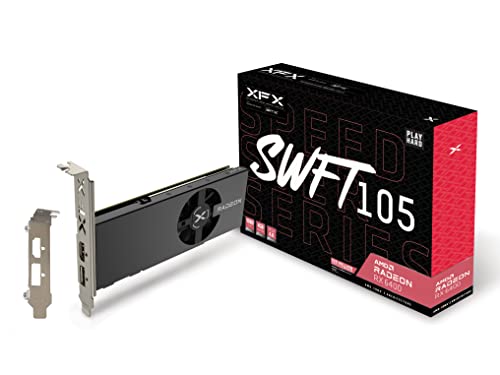
XFX Speedster SWFT105 Radeon RX 6400 — RDNA 2 slot-power class
XFX’s Speedster SWFT105 brings AMD’s RDNA 2 architecture into the slot-powered class with a stated 4GB of GDDR6. The RX 6400 was designed by AMD as the compact, slot-fed end of its generation — a card whose entire reason for existing is machines like the ones this keyword describes — and XFX, a board partner devoted to Radeon cards, dresses it in its Speedster line. The title is brief: the model, the memory, the architecture family in the part code RX-64XL4SFG2. It does not state a form factor, an output list or a power figure, and this section claims none of them.
The card’s natural buyer is the AMD-standardised household or the Linux-leaning tinkerer, communities where Radeon driver behaviour is the known quantity and the card’s modest appetite is the attraction. In desktop and light-gaming duty at mainstream resolutions, the 6400 class is a composed performer, and 4GB is its honest ceiling: fine for the esports and back-catalogue titles that slim machines usually run, tight for the newest releases at high settings. Buy it as what it is — the current-generation Radeon answer to a small power budget — rather than as a promise the title never makes.
Because the title is silent on fit, the pre-purchase checks matter doubly here: XFX’s page for the SWFT105 will state the card’s dimensions, its power design and its outputs, and all three must be read against a slim case before ordering. A full-height card in this class is a fine card in the wrong box.
The Linux angle is worth its sentence, because slim ex-office machines disproportionately end their days running it. Radeon hardware’s open-driver story is the path of least resistance in that world, and a current-generation RDNA 2 card at this appetite is a tidy way to give an old tower a modern graphics stack without touching its supply. Buyers on that path should still do the same dimensional homework — the kernel cannot fix a card that does not fit.
- Memory: 4GB GDDR6 (as stated in the listing title)
- Architecture: AMD RDNA 2 (as stated in the listing title)
- Model code: RX-64XL4SFG2 (as stated in the listing title)
- Form factor: Not stated in the listing title — verify with XFX documentation
- Outputs: Not stated in the listing title — verify with XFX documentation
- Power requirement: Not stated in the listing title — verify with XFX documentation
Strengths
- RDNA 2 silicon from a Radeon-specialist board partner, in the slot-powered class this brief demands.
- A stated 4GB of GDDR6 keeps desktop and light-gaming duty honest and adequate.
- The model code is printed in full, making XFX’s specification sheet easy to reach.
Trade-offs
- Form factor goes unstated in the title — slim-case buyers must verify dimensions before anything else.
- Four gigabytes is the tightest working capacity among the modern cards here.
- Outputs are unstated, so display plans wait on documentation.
Best for: a buyer seeking an RDNA 2 card in the slot-powered class for an AMD-standardised slim machine, verified against XFX’s sheet. Not suited for: a buyer requiring low-profile fitment confirmed from the title itself.
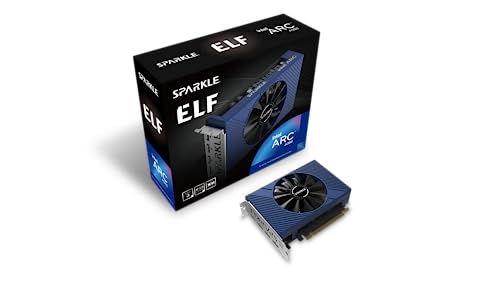
Sparkle Intel Arc A380 ELF — Intel’s single-fan option
Sparkle’s Arc A380 ELF is the third silicon camp’s representative in this power class: an Intel Arc card with a stated 6GB of GDDR6 and a single fan, under the model code SA380E-6G. The single-fan detail is the title’s quiet headline for this brief — compact, short cooling is what slim and small-form machines can house, and a one-fan card announces its dimensions in its description. Six gigabytes matches the RTX 3050 pair’s capacity, which gives the A380 a memory story stronger than its price-class position might suggest, and Intel’s Arc line has built its reputation in this segment on media capabilities — its video encode and decode hardware is the family’s talking point for creator-leaning small machines, though this title states no specifics and we claim none beyond the capacity and the fan.
The honest context is ecosystem maturity. Intel is the newest entrant to discrete graphics, and its driver story has been one of rapid improvement from an uneven start; a buyer choosing Arc today is choosing a platform still being polished, with the enthusiasm of its community as part of the package. For a media-centred slim machine — a living-room box, a small streaming or transcoding helper, a desktop that occasionally plays — that trade can be attractive. For a machine that must simply work under a relative’s desk for five years, the older camps’ dullness is a feature, and the cards around this one in the list supply it.
Fit and power, as ever in this roundup, are documentation errands: the title states neither a form factor in so many words nor a wattage, so Sparkle’s sheet for SA380E-6G settles both before the slim case is opened.
The living-room scenario is this card’s home ground. A small machine under a television has three jobs — play video smoothly, stay quiet, and sip power in a cabinet with indifferent airflow — and a single-fan compact card with 6GB is shaped by exactly those priorities. Owners building that box should treat the fan’s air path as part of the installation: a cabinet door left ajar during films is worth more than any setting in any menu.
- Memory: 6GB GDDR6 (as stated in the listing title)
- Cooling: Single fan (as stated in the listing title)
- Model code: SA380E-6G (as stated in the listing title)
- Form factor: Not stated in the listing title — verify with Sparkle documentation
- Outputs: Not stated in the listing title — verify with Sparkle documentation
- Power requirement: Not stated in the listing title — verify with Sparkle documentation
Strengths
- Six gigabytes of GDDR6 matches the capacity of the RTX 3050 pair at this list’s middle tier.
- A single-fan design signals the compact dimensions slim machines require.
- Represents Intel’s Arc platform for buyers curious about the third camp’s media strengths.
Trade-offs
- The newest driver ecosystem here, still maturing — a consideration for set-and-forget machines.
- Neither form factor nor outputs are stated in the title, so verification carries the purchase.
- Sparkle’s retail presence is thinner than the larger board partners’, which some buyers weigh.
Best for: a buyer seeking a compact single-fan card with 6GB for a media-leaning slim machine on Intel’s Arc platform. Not suited for: a buyer requiring the most mature driver ecosystem for a machine that must run unattended for years.

GIGABYTE GTX 1050 Ti OC Low Profile 4GB — Previous-generation LP staple
If the low-profile RTX 3050s are this brief’s present, GIGABYTE’s GTX 1050 Ti OC Low Profile is its well-documented past — the card that taught a generation of slim office machines to play games. The title states the essentials: a GTX 1050 Ti in OC trim, low profile, 4GB. Around those words sits an enormous body of accumulated knowledge: years of forum threads fitting this exact card into exactly the slim towers this keyword is about, with the power supplies those towers actually shipped with. A buyer choosing it inherits that library, and in the 240W world — where the margin questions are practical rather than theoretical — a documented answer is worth real money.
Performance expectations should be set by its generation. The 1050 Ti class plays the back catalogue and the esports shelf at mainstream resolutions with composure, drives multiple desktop displays, and asks very little of any machine it enters. It predates the modern feature conversation — no ray tracing of consequence, no current upscaling generation — and its 4GB is the working ceiling for newer titles at modest settings. None of that diminishes its actual role: it is the known-quantity upgrade for a slim machine whose owner values certainty over novelty, and whose games were chosen before the card was.
Its title leaves outputs and wattage unstated, as most of its era’s listings do, so GIGABYTE’s sheet for GV-N105TOC-4GL remains the pre-purchase stop — a familiar errand for the card that defined the errand.
There is a gift economy around this card that newcomers discover quickly: because so many were fitted to so many slim towers, a question about it — any question, about any specific office model — has usually been asked and answered in public, with photographs. That accumulated record shortens every project it touches, and it is a genuine, if unglamorous, specification: the card with the largest owner’s manual written by its owners.
- Memory: 4GB (capacity as stated in the listing title; memory type not stated there)
- Form factor: Low profile (as stated in the listing title)
- Model code: GV-N105TOC-4GL (as stated in the listing title)
- Outputs: Not stated in the listing title — verify with GIGABYTE documentation
- Power requirement: Not stated in the listing title — verify with GIGABYTE documentation
- Clock speed: Not stated in the listing title — verify with GIGABYTE documentation
Strengths
- The most thoroughly documented card in this list for slim-tower fitting, with years of owner experience to consult.
- Low-profile design stated in the name, from a major board partner.
- Modest demands that suit ageing 240W machines with the least remaining margin.
Trade-offs
- A previous generation’s silicon, without the modern feature set of the 3050 pair.
- Four gigabytes limits newer games to modest settings at mainstream resolutions.
- Its driver runway, while still active, is the shortest among the modern-name cards here.
Best for: a buyer seeking a known-quantity low-profile upgrade for a slim machine, valuing documented fit over modern features. Not suited for: a buyer requiring current-generation upscaling or ray-tracing features.

ASUS GeForce GT 1030 2GB GDDR5 — Minimal card, bracket included
The ASUS GT 1030 closes the list at the brief’s floor, and its title is a small masterpiece of relevance: 2GB of GDDR5, PCIe 3.0, HDMI and DVI-D outputs, a low-profile bracket included, single-fan cooling and a compact design. Every clause answers a question a 240W machine’s owner actually asks. The bracket is the clause to savour — slim cases need the short bracket, cards that omit it generate a second purchase and a week of waiting, and ASUS puts it in the box and in the title. The DVI-D output is the other era-aware touch: the monitors that accompany retired office machines very often speak DVI, and a card that meets them natively saves an adapter and a negotiation.
What this card is for should be said without apology: displays and desktop life. It gives a slim machine modern outputs, smooth desktop compositing, video playback and a second or third panel — the upgrades that make an old office box feel current at the desk — and it does so with the smallest appetite in this roundup’s company. It is not a gaming card in any contemporary sense, and its 2GB states that plainly. The machines it serves were never going to game; they were going to be discarded for want of an HDMI port, and this card is the inexpensive reprieve.
For the household resurrecting a slim PC as a study machine, a kitchen display driver or a grandparent’s email-and-photos box, the GT 1030’s proposition is complete in its title, which is more than most of this list can say. Verify the machine’s slot and the supply’s health out of habit, and the installation is an afternoon’s smallest project.
Its finest hour is unglamorous and worth honouring: the relative’s PC that could not drive the new monitor, the charity-shop tower that needed an HDMI port to be useful again, the reception desk whose second screen waited two years for want of an output. Cards like this one quietly prevent e-waste one bracket at a time, and the bracket — included, stated, unremarkable — is the moral of the whole roundup in miniature: the right small thing, in the box, matters more than the big thing left out.
- Memory: 2GB GDDR5 (as stated in the listing title)
- Interface: PCIe 3.0 (as stated in the listing title)
- Outputs: HDMI, DVI-D (as stated in the listing title)
- Bracket: Low-profile bracket included (as stated in the listing title)
- Cooling: Single-fan, compact design (as stated in the listing title)
- Power requirement: Not stated in the listing title — verify with ASUS documentation
Strengths
- The low-profile bracket is in the box and in the title — the slim-case detail other listings forget.
- HDMI plus DVI-D meets both modern panels and the older monitors retired office machines bring with them.
- The smallest appetite in the list, suited to the frailest 240W supplies still in service.
Trade-offs
- Two gigabytes and GT-tier silicon exclude gaming beyond the lightest legacy titles.
- DVI-D dates the output set; a DisplayPort desk will find nothing here.
- It is a desktop card by design, and asks to be judged only as one.
Best for: a buyer seeking displays and desktop composure for a slim machine, with the low-profile bracket included. Not suited for: a buyer requiring gaming performance or DisplayPort outputs.
How Do the Six Cards Compare Side by Side?
| Card | Memory stated in title | Fitment stated in title | Outputs stated in title |
|---|---|---|---|
| Gigabyte RTX 3050 OC LP 6G | 6GB GDDR6, 96-bit | Low profile | 2x DP 1.4, 2x HDMI 2.1 |
| MSI RTX 3050 LP 6G OC | 6GB GDDR6, 96-bit | LP (low profile) | HDMI/DP, counts not stated |
| XFX RX 6400 SWFT105 | 4GB GDDR6 | Not stated | Not stated |
| Sparkle Arc A380 ELF | 6GB GDDR6 | Single fan; form not stated | Not stated |
| GIGABYTE GTX 1050 Ti OC LP | 4GB | Low profile | Not stated |
| ASUS GT 1030 | 2GB GDDR5 | Low-profile bracket included | HDMI, DVI-D |
Notice, too, what the table cannot show: noise and heat behaviour inside a case the size of a shoebox. Two cards with identical stated figures can behave differently in a slim tower’s recycled air, and the maker’s cooler design — shrouded or open, single fan or two — is the variable the documentation describes and the title omits. In a full-size case that omission would be trivia; in this category it is a first-order concern, and one more reason the maker’s page earns its visit.
Read this table as a map of certainty. The top two rows state nearly everything a slim-machine buyer needs except the wattage nobody states; the bottom row states the humblest specification most completely of all. The middle rows ask for documentation work in proportion to their ambition. What unites all six is class: each belongs to the slot-powered, compact tradition that the 240W brief defines, and the differences among them are differences of yield and evidence, not of kind.
Why Does the 75W Slot Limit Rule This Category?
The PCIe slot’s power delivery is the physical fact underneath the whole keyword — and it is a reassuringly old, stable fact, unchanged across the generations of machines this brief spans, which is why a card class designed around it ages so gracefully. A graphics card draws from two possible sources: the slot itself, which supplies up to 75W by the standard’s design, and auxiliary connectors fed directly by the power supply, which add capacity in large increments. A 240W supply’s budget — after the processor’s share, the board, the drives and the fans — rarely leaves room for a card that expects auxiliary power, and many slim machines’ supplies lack the connector entirely. A slot-powered card sidesteps both problems at once: it cannot ask for more than the slot gives, and it needs no cable the machine does not have.
A worked example makes the budget concrete. Take the typical slim tower this keyword describes: a modest desktop processor that draws a few tens of watts in ordinary work, a board and memory set drawing a little more, one or two drives, a pair of fans. Even summing generously, the standing load leaves the slot’s 75W envelope as the binding constraint — which is precisely why manufacturers design this card class to live inside it, and why a card that respects the slot will run in a healthy example of almost any of these machines. The budget fails not in the arithmetic but in the exceptions: the workstation-grade processor hiding in a slim case, the stack of ageing drives, the supply whose capacitors have quietly retired. Those are inspection findings, not reasons to abandon the class.
This is also why the verification habit in this category focuses on the power design rather than a headline wattage. The manufacturer’s documentation states whether a given model uses an auxiliary connector and what supply it recommends; a card with no auxiliary connector, in a healthy machine, is operating inside the envelope the slot defines. Age is the wildcard — a decade-old 240W unit may sag under loads it once held — and the honest mitigation is margin: choose from the lighter end of this list for the oldest machines, and treat a supply that has begun to smell of warm dust as a replacement candidate before it is a graphics budget.
How Do You Install a Card in a Slim Office Machine?
Begin with the machine off, unplugged and opened on a table with room to work — slim cases are dense, and patience is the main tool. Photograph the interior before touching anything; the photograph is your reassembly diagram and your evidence of the machine’s original state. Remove the slot cover corresponding to the long PCIe slot, and if the card is low-profile, swap its bracket for the short one before installation if it arrives with the tall bracket fitted — the ASUS card in this list includes its bracket, and others’ boxes should be checked for the same courtesy.
Before the card goes in, one slim-case ritual saves more projects than any other: test-fit the bracket. Hold the card against the case’s rear slots with the machine still empty of commitment, confirm the bracket’s height matches the case’s slots and the card’s length clears the drive cage, and only then remove covers and commit. Slim cases vary by millimetres between model years of the same product line, and a two-minute dry fit is the difference between an upgrade and a correspondence with a returns department.
Seat the card with even pressure until the latch engages, confirm no cable has been trapped beneath it, and check the one clearance slim cases love to deny: the card’s fan against the drive cage or the case wall. A fan starved of air gap will spin bravely and cool nothing. Close the case, connect the display to the new card’s outputs rather than the motherboard’s — the classic first-boot confusion — and install the current driver from the chip maker’s site. Then run the machine at its real work for an hour: the game, the video, the desktop full of windows. A slot-powered card in a healthy 240W machine should simply disappear into the work, which is the entire point of the class — and the sound of a successful upgrade in this category is, fittingly, no sound at all.
What Can a Slot-Powered Machine Actually Do All Day?
There is also the question of what happens to the machine’s original job. Many of these towers were bought for a purpose — a till, a reception desk, a relative’s bookkeeping — and the card extends rather than replaces that purpose. The wisest upgrades in this category are the ones planned around the machine’s continuing duties: the display outputs its desk actually uses, the quietness its room requires, the reliability its owner depends on. A card chosen against that list succeeds even if a benchmark would rank it last, because the benchmark was never the job. The slim machine with one of these cards fitted is a study computer that handles a wall of documents and a video call without breaking stride; a living-room box that plays films, streams and serves a television its picture; a light gaming machine for the esports shelf and the back catalogue at mainstream resolutions; a home-office desk driving two or three panels from a case that fits in a drawer. That is a full working life, and it is achieved inside an electrical envelope smaller than a bright light bulb’s. The owners of these machines are rarely disappointed, because the brief was never flagship performance — it was a second life for hardware the world was ready to discard.
The environmental footnote is worth a sentence. Every slim office machine kept in service by a card from this list is a machine not manufactured anew, and the slot-powered class is, in effect, the upgrade path with the smallest footprint in all of PC hardware: one small card, no new supply, no new case, no new machine. Frugality and sustainability rarely coincide this neatly, and the 240W brief is where they do.
How Should You Check a Second-Hand or Ageing 240W Supply?
Since the supply is half the purchase, it deserves its own inspection. Start with the label: photograph it, note the maker and the wattage distribution if it is printed, and search the machine’s service documentation for the supply’s specification. Then observe the machine under its current load — a supply that already causes reboots, coil whine that changes with load, or a fan that rattles at startup is telling you its remaining margin is spoken for. Dust is the silent tax: a decade of office air leaves the supply’s internals insulated, and a careful clean with the machine unplugged restores some of the headroom the years took.
While the case is open for inspection, note the slot itself and the space around it: a slim tower’s long slot sometimes sits close under the supply or beside a drive bracket, and the card’s cooler needs its air gap there as much as anywhere. Measuring the available length and height at inspection time — and writing the figures on the machine’s service note — turns the eventual installation into a formality and the card choice into a simple comparison against numbers you already trust.
If the machine passes those checks, the slot-powered class will respect what margin remains. If it fails them, the honest order of operations is supply first — where the machine’s proprietary format allows a replacement — or the gentlest card in this list, the GT 1030, whose appetite is the smallest here. What no inspection licenses is optimism: a marginal supply plus a hopeful card produces the shutdown-under-load fault that fills forums, and it is always the supply, wearing the card as its disguise.
What Mistakes Do 240W PSU Buyers Most Often Make?
A sixth mistake belongs to the optimistic: stacking upgrades. The card arrives, works beautifully, and emboldens a second drive, a capture device, a row of USB peripherals — each small, together enough to spend the margin the card was budgeted against. A 240W machine rewards the owner who treats the power budget as a single ledger for the whole build, reviewed at every addition, rather than as a hurdle cleared once by the graphics card alone.
The defining mistake is buying a card with an auxiliary power connector for a supply that has none to give — or worse, adapting one from a drive cable, a practice that belongs in no machine. The second is ignoring fit: a full-height card ordered for a half-height case, discovered with the side panel off and the return window ticking. The third is trusting the label on an elderly supply; a 240W unit from a hard-worked office machine may deliver materially less, and the symptom — shutdowns under load — gets blamed on the innocent card. The fourth is forgetting the rest of the budget: several spinning drives, a hungry older processor and a new card together can exceed what the same supply fed happily before. The fifth is expecting the card to repeal arithmetic — a slot-powered card in a slim machine is a good card inside a small envelope, and settings should be chosen inside that envelope rather than in defiance of it.
Final Recommendation
Start at the top unless your brief says otherwise. The Gigabyte RTX 3050 low-profile card is the fullest answer a 240W machine can host — 6GB, four stated outputs, a stated clock, a model code to verify — and the MSI LP matches its capacity for buyers who prefer its stated boost figure and its maker’s cooling. The RX 6400 serves the Radeon-standardised slim machine, the Arc A380 the media-leaning one, and the GTX 1050 Ti the buyer who values a decade of documented fits over new features. The GT 1030 is the floor, honestly drawn: displays, composure, a bracket in the box. Whichever you choose, read its power page before you pay, because in this category the purchase is not really a graphics card — it is an agreement between a small power supply and a card that promises to live within it, and agreements should always be read before they are signed.
Frequently Asked Questions
Can a 240W power supply really run a dedicated graphics card?
Yes — the right kind. A slot-powered card draws its supply through the PCIe connector, up to the slot’s 75W design limit, with no auxiliary cable. The proof of the class is in the installed base: slim office towers have run slot-powered cards for well over a decade, through several generations of the models in this list, and the arrangement’s reliability is a matter of record rather than of theory. What the record also shows is that failures cluster around ageing supplies and auxiliary-connector improvisations — the two things this article keeps warning about, because they are the two things that actually go wrong. That is the class every card in this roundup belongs to, and it is a class with a long, well-kept service record behind it. The conditions are a healthy supply and a machine whose other components leave the slot’s share intact, which is why the manufacturer’s stated requirement should still be checked for the exact model.
How do I know if a card needs an extra power connector?
The manufacturer’s specification for the exact model states its power design — and while you are on that page, note the recommended supply figure as well, because it is the maker’s own reading of the whole-machine budget, made with knowledge of the card’s worst-case draw rather than its average. Compare it with your unit’s label honestly: a recommendation modestly above 240W for a slot-powered card usually reflects the maker’s caution about weak supplies generally, while a card with an auxiliary connector is disqualified outright regardless of the number printed beside it. The connector question is binary; the wattage question is judgement, and judgement is what the inspection section above is for. and the product photographs show the card’s top edge, where an auxiliary connector would sit. Titles rarely state it — none here do — so treat the maker’s page as the authority and never adapt a connector from drive cabling.
Will a low-profile card fit my slim PC?
Low-profile cards are built for the half-height slots of slim towers, but two checks remain — and a third that experience adds: the card’s cooler overhang. Some low-profile cards carry a heatsink or shroud that bulges toward the neighbouring slot or the case wall, and in the densest slim towers that bulge, not the bracket, is what refuses to fit. The makers’ dimension drawings show the full envelope including the cooler, which is why this article keeps sending readers to them: a card’s true size is its largest measurement in each direction, not its friendliest one. the card’s length against your case’s depth, and whether the short bracket is included or must be sourced. The ASUS GT 1030 states its bracket is included; for the others, confirm bracket contents in the listing details before ordering.
Which of these cards is best for light gaming in a slim machine?
The RTX 3050 pair leads the class — 6GB of GDDR6 and current-generation architecture within the slot-powered envelope — and the distance between them and the rest of the list is the honest measure of how far slot-powered design has come: a card that asks for nothing but the slot now carries the memory and features that once demanded a cable and a bigger supply. Set expectations by resolution and vintage rather than by hope — mainstream resolutions, settings chosen with the envelope in mind — and the slim machine’s owner gets the most surprising upgrade in this entire category. with the Gigabyte card adding the richest stated outputs. The GTX 1050 Ti serves older and lighter titles with the deepest base of owner documentation, and the GT 1030 should not be bought for gaming at all.
Does PCIe 4.0 versus 3.0 matter in an old office machine?
The interface generations are cross-compatible: a PCIe 4.0 card works in a 3.0 slot and vice versa, at the slot’s speed. One related check does matter in the oldest slim towers: confirm the long slot is electrically wired for graphics at all, since a small number of office boards carry a mechanically long slot intended for lesser cards. The machine’s service manual answers it in one line, and it is a cheaper discovery on paper than on the desk with the case open. In this power class the difference is rarely the deciding factor — capacity, fit and power design all outrank it — but the stated interface in a title is still worth noting for the record.
Should I replace the 240W supply instead of limiting the card?
Sometimes — but slim office machines often use proprietary supply shapes and connectors that resist standard replacements, which is precisely why this card class exists. Check the machine’s service manual before assuming either way: some slim towers do accept a standard small-format supply, and for those, a supply upgrade plus a wider card choice can be the better project. For the rest — the majority, in our reading of the installed base — the proprietary supply is a fact of the machine’s design, and the slot-powered class is not a workaround but the manufacturer’s own intended upgrade path, preserved in the machine’s documentation from the day it shipped. If your machine accepts a standard supply, a modest upgrade widens the card market; if it does not, the slot-powered cards here are not a compromise but the intended solution.
Related Guides
Continue the slim-machine project with our companion reading: our guide to upgrading retired office PCs covers memory and storage to match your new card, the low-profile graphics card roundup widens the field beyond the 240W brief, and our power-supply sizing handbook explains the arithmetic behind every watt in this article.


