What's inside
- Key Takeaways
- Quick Picks
- How Did We Shortlist Cards for Slim Cases?
- The Six Cards in Detail
- Do Upscaling and Modern Features Matter More, or Less, in This Format?
- Which Slim Machines Can Actually Power These Cards?
- Installing a Half-Height Card Without the Usual Drama
- How the Six Options Stack Up for Slim Builds
- Living-Room Duty: What a Slim Gaming Card Owes the Television
- What Goes Wrong Most Often With Low-Profile Upgrades?
- How Long Will a Half-Height Card Stay Useful, and What Comes After?
- Final Recommendation
- Frequently Asked Questions
- Related Guides
As an Amazon Associate I earn from qualifying purchases. This post may contain affiliate links at no extra cost to you.
gizmoverdict.com is reader-supported. When you buy through links on our site, we may earn an affiliate commission.
Where to buy: The four linked cards in this guide were matched, listing by listing, against this site’s verified product pool on 26 November 2026, and each one is a genuine low-profile design rather than a standard card photographed at a flattering angle. Two further picks are covered in prose only, without purchase links, for reasons stated plainly in their reviews — in one case because the listing that search returned for it was a full-height card, which has no business being recommended in a low-profile guide.
The best low profile graphics cards for gaming exist because of a physical fact: a low-profile card is roughly half the height of a standard one, built to slide into slim desktop cases, home-theatre PCs and ex-office machines whose expansion slots sit under a low ceiling. That constraint shapes everything about the category. Power comes mostly from the PCIe slot itself or from modest cabling, coolers are single-fan or compact dual-fan affairs working in cramped air, and the GPUs chosen are the ones whose performance survives being shrunk. Nobody buys a low-profile card because it tops a benchmark chart; they buy it because it is the strongest card that fits the machine they already own and love.
That framing matters for how this guide judges its picks. A low-profile card should be measured against the slot it rescues, not against a full-size card that was never a candidate. The current generation has genuinely moved this category forward — the two Gigabyte cards at the top of this list bring GDDR7 and GDDR6 memory on PCIe 5.0 interfaces into the half-height format — while the older designs below them remain relevant because slim ex-corporate desktops, the most common low-profile hosts, often pair these cards with modest power supplies and 1080p monitors where yesterday’s GPU is still today’s adequate one.
One discipline runs through every review below: fit is verified, not assumed. Low-profile brackets, slot power limits and case depth are treated as first-order specifications alongside memory and clocks, because in this category a card that does not fit or cannot be powered is not a slower recommendation — it is no recommendation at all. Where a listing’s own words confirm a dimension or a display count, the review says so; where the category’s general facts are all that can be claimed, the review stays at that level and says that instead.
Key Takeaways
- GIGABYTE’s RTX 5060 OC Low Profile is the strongest true half-height gaming card in this guide, with 8GB of GDDR7 on a PCIe 5.0 interface.
- The RTX 5050 Low Profile shares the 8GB capacity with GDDR6 memory, giving slim builds a newer-generation alternative at a lower tier.
- MSI’s RTX 3050 LP runs from slot power, which makes it the safest drop-in for ex-office desktops with sealed, modest power supplies.
- Sapphire’s RX 6400 is the AMD route into the format, with 4GB of memory suited to lighter 1080p and esports play.
- The RTX 4060 Low Profile is covered without a link because the listing returned for it was the full-height Gaming OC card — check any listing’s bracket before believing a low-profile claim.
- In this category, bracket height, slot power and case depth decide the shortlist before any performance figure does.
Quick Picks
| Pick | Badge | Why it earns its place |
|---|---|---|
| GIGABYTE GeForce RTX 5060 OC Low Profile 8G | Strongest half-height card | Current-generation RTX 5060 silicon with 8GB of GDDR7, shrunk honestly into a low-profile design. |
| MSI GeForce RTX 3050 LP 6G OC | Slot-powered drop-in | 6GB of GDDR6 and no power-cable drama, made for slim desktops whose supplies cannot be upgraded. |
| Sapphire Pulse Radeon RX 6400 Low Profile | AMD slim option | A compact RDNA 2 card with 4GB of memory for light gaming in the tightest cases. |
| GIGABYTE GeForce RTX 5050 OC Low Profile 8G | New-generation value LP | 8GB of GDDR6 and support for up to four displays in the same half-height format. |
| GIGABYTE GeForce RTX 4060 Low Profile (prose only) | Previous-gen favourite, unlinked | A well-regarded low-profile design that we discuss but do not link, because the listing returned was a different, full-height card. |
| GeForce GTX 1650 Low Profile (prose only) | Legacy budget route | The older half-height staple for very modest slim builds, covered for context without a verified listing. |
How Did We Shortlist Cards for Slim Cases?
Verification in this category has two layers. The first is the usual one for this site: each linked card was matched to a live listing through the verified pool, and the specifications in its review — memory size and type, bus width, boost clock, interface — are the ones that listing states. The second layer is unique to low-profile hardware: the listing must actually describe the low-profile version of the card. Search results routinely surface a full-height sibling under a low-profile query, and one pick in this guide is prose-only for exactly that reason. A guide that linked a standard-height card into a slim case would fail its reader at the moment the side panel refused to close, which is the one failure this category cannot afford.
Selection then weighed three things in order: whether the card’s power demands respect what slim power supplies deliver, whether its memory gives it a plausible life at 1080p, and whether its generation brings current driver support and features. The result spans four linked cards across three GPU generations and two prose-only discussions, arranged from the strongest genuine option downward, because in a constrained format the honest question is never which card is fastest in the abstract but which is fastest inside your particular box.
Finally, a note on brackets. Most low-profile cards ship with both a standard and a low-profile bracket in the box or use a fixed half-height bracket; the practical advice is to confirm bracket inclusion on the listing page before ordering, because a correct card with the wrong bracket is a return waiting to happen, and slim-case owners are disproportionately likely to need the bracket that full-size buyers discard without thinking.
A word, too, about what this guide deliberately left out. Full-height cards marketed with low-profile-sounding names, workstation cards priced for professionals rather than players, and no-name designs whose listings could not confirm even their memory configuration were all excluded, however aggressively they are priced in search results. The low-profile shelf attracts a particular species of optimistic listing, in which a generic card borrows a famous GPU’s name and hopes the buyer never checks; the pool-verification process exists largely to keep that species out of guides like this one. If a card you are considering elsewhere cannot state its memory, bus and bracket plainly, treat the omission itself as the review.
Readers should also understand how the ordering here differs from a performance chart. The list descends from the strongest verified card, but the right purchase for a given machine frequently sits lower down it, because power and purpose filter harder than preference in this category. Treat the order as a map of capability, then apply your own machine’s facts as the route across it; the reviews are written to make that application easy, with the limiting fact of each card stated early rather than buried in its final bullet.
The Six Cards in Detail

GIGABYTE GeForce RTX 5060 OC Low Profile 8G — Strongest half-height card
For years, choosing low profile meant choosing old. GIGABYTE’s RTX 5060 OC Low Profile breaks that pattern more completely than any card previously in this format: its listing confirms an RTX 5060 GPU with 8GB of 128-bit GDDR7 memory on a PCIe 5.0 interface, supporting up to four displays, in a half-height design. That is the current generation’s entry gaming silicon with its current memory technology, not a warmed-over predecessor, and it resets what a slim build can reasonably attempt — mainstream 1080p gaming at high settings, esports at high refresh, and DLSS support in the titles that offer it.
The 128-bit bus and 8GB capacity define the card’s honest envelope, and within a low-profile context both are respectable rather than restrictive. Slim builds overwhelmingly drive 1080p panels, often the television in a living-room setup or the monitor paired with a compact desk machine, and at that resolution this configuration is at home. GDDR7’s efficiency also matters in a chassis with little spare air: memory that does more work per watt is a thermal feature as much as a performance one, and in a case where the card shares a small volume with a working CPU, efficiency is cooling headroom by another name.
Cooling a current GPU in half height is an exercise in compromise, and buyers should set expectations accordingly. The card will run warmer and its fan will work harder than the full-size 5060 designs in our main graphics guide, and case ventilation — even one modest intake fan — repays its cost immediately in noise. None of that diminishes the achievement; it simply means the owner of a slim build should treat airflow as part of this purchase, the way small-case owners in every category learn to.
Display flexibility is the quiet bonus in the listing: support for up to four displays from a half-height card turns a slim machine into a plausible multi-monitor workstation that games after hours. Home-theatre builders should note the fit for a living-room PC that drives a television plus a small control screen, and office-rescue builders get a card that modernises an ex-corporate desktop beyond its original ambitions. If your case is slim and your intent is gaming first, this is where the guide’s money goes.
One more consideration separates this card from the rest of the list: it changes what a slim build can be planned around. Previous low-profile generations forced the whole machine’s ambitions down to the card’s level, so builders specced modest monitors and accepted a light library as the price of the format. A current-generation card with modern memory lets the rest of the plan breathe — a better compact case, a faster NVMe drive, a 1080p high-refresh monitor all become rational companions rather than ornaments on a bottleneck. If you are building a small machine from scratch rather than rescuing one, this is the card around which the interesting version of that build is designed.
- Memory fitted: 8GB GDDR7 on a 128-bit bus
- Host interface: PCIe 5.0
- Display support: up to four displays per the listing
- Format: low-profile half-height design
- Edition: factory overclocked OC model
Strengths
- Current-generation GPU and GDDR7 memory in a format that historically got neither.
- Four-display support gives slim builds workstation range beyond gaming.
- PCIe 5.0 interface keeps it current with new compact motherboards.
Trade-offs
- 8GB remains the ceiling for texture-heavy gaming, as on every 5060.
- Half-height cooling works harder and louder than full-size designs under sustained load.
- It asks more of a slim power supply than the slot-powered picks below.
Best for: slim-case owners who game at 1080p and want the current generation without replacing the case. Not suited for: sealed ex-office desktops whose power supplies cannot feed anything beyond slot power — the MSI below is the safer rescue.

MSI GeForce RTX 3050 LP 6G OC — Slot-powered drop-in
The MSI RTX 3050 LP answers the most common low-profile scenario in the real world: a slim desktop bought for office work — often a corporate machine bought second-hand — whose owner wants it to play games without opening the power question at all. Its listing specifies an RTX 3050 with 6GB of GDDR6 memory at 14 Gbps on a 96-bit bus and a boost clock of 1492 MHz, and its role in this guide is defined by how it is powered: from the PCIe slot, with no supplementary cable. In a machine with a sealed, proprietary power supply, that single fact is the difference between an upgrade and a research project.
Performance expectations should be set at 1080p with settings chosen sensibly. The RTX 3050 generation brings DLSS support, which extends this card considerably in titles that implement it, and 6GB of memory is workable at that resolution for mainstream and older catalogues. Esports titles run well; demanding recent releases ask for medium settings and DLSS, and reward the owner who obliges with smooth play. What the card will not do is pretend to be a 1440p option, and this guide will not pretend it on the card’s behalf.
The narrow 96-bit bus is the specification sceptics quote, and the fair response is contextual: in a half-height, slot-powered envelope, memory bandwidth is spent where the target resolution needs it, and at 1080p this configuration holds together better than its paper specification suggests. Buyers cross-shopping it against the RX 6400 below should note the extra 2GB of memory and the DLSS ecosystem on this side of the comparison, weighed against the AMD card’s own compactness virtues.
Installation is the pick’s second virtue. A slot-powered, half-height card is close to the ideal first upgrade: open the case, seat the card, swap the bracket if your chassis needs the low-profile one, install drivers, play. For the large population of slim desktops whose owners have never modified a PC, that simplicity is not a minor convenience — it is the feature that makes the upgrade happen at all, and MSI’s execution of the formula is the guide’s recommendation for it.
There is also a longevity argument that favours this card over the cheaper legacy options beneath it. Driver support follows generation, and the RTX 30-series sits comfortably inside NVIDIA’s current support window, receiving the game-ready updates that keep new releases behaving. An owner rescuing a desktop for a teenager’s first gaming PC is buying several years of that support along with the hardware, and the DLSS compatibility list grows rather than shrinks over the same period. Cheap cards that fall out of driver support become e-waste on a schedule; this one has runway, and in a rescue build — where the whole point is extending a machine’s life — runway is the specification that quietly matters most.
- Memory fitted: 6GB GDDR6 at 14 Gbps
- Memory bus: 96-bit
- Stated boost clock: 1492 MHz
- Power arrangement: slot-powered design
- Format: low-profile LP design
Strengths
- No supplementary power cable, so sealed slim power supplies stop being an obstacle.
- 6GB of memory and DLSS support give it real 1080p range for its class.
- About as simple an installation as a graphics upgrade can be.
Trade-offs
- A previous-generation GPU, with performance a clear step below the two Gigabyte cards.
- The 96-bit bus limits memory bandwidth in the most demanding scenes.
- Ray tracing is present in name more than in practical use at this level.
Best for: owners of slim ex-office desktops who want a no-fuss 1080p upgrade without touching the power supply. Not suited for: players targeting high settings in the newest releases, who should find the budget and the power headroom for the RTX 5060 LP.
Sapphire Pulse Radeon RX 6400 Low Profile — AMD slim option
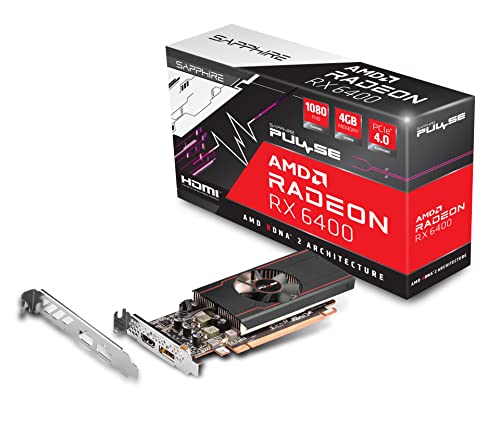
Sapphire’s Pulse RX 6400 is the AMD entry in this guide, and its listing describes a low-profile gaming card with 4GB of GDDR6 memory on AMD’s RDNA 2 architecture. Sapphire’s Pulse line is the company’s value tier, built without decorative excess, and in the low-profile format that restraint is exactly right: the card is small, undemanding and aimed at machines where every millimetre and watt is already spoken for. Slot-powered designs like this one are the natural inhabitants of slim prebuilt desktops, and the RX 6400’s modest appetite is its chief qualification.
Its gaming envelope is the narrowest among the linked picks, and honesty requires saying so at the top of the review rather than the bottom. Four gigabytes of memory suits esports titles, older catalogues, indie games and 1080p play at moderate settings; it does not suit texture-heavy modern releases, which will press the buffer immediately. Owners of slim machines built around media and light gaming — a living-room PC that plays strategy games and racers rather than flagship shooters — will find the card matched to their actual library, and that match, not a benchmark rank, is what a good recommendation is made of.
The AMD route also carries a software consideration that cuts in this card’s favour for some buyers and against it for others. Radeon drivers and features have their own strengths, including strong performance in many rasterised titles at this level, but there is no DLSS on an AMD card; upscaling runs through FSR instead, which is widely supported though implemented unevenly across games. Buyers whose favourite titles lean on DLSS should weight the NVIDIA picks above; buyers indifferent to the upscaling brand question get a compact, honest card here.
Sapphire’s build quality at the Pulse tier is a quiet reason this specific RX 6400 earned the slot over generic alternatives. In a card this small, cooler mounting and fan quality decide whether it whines under load in a quiet room, and a living-room machine is judged by exactly that standard. For the slim build whose ambitions are modest and whose owner values silence and simplicity, the Pulse is the proportionate answer — and proportionality, in this category, is praise.
Placement matters for this card’s happiness. In a living-room PC it will sit near other warm equipment, often in a media cabinet with indifferent ventilation, and its modest heat output is a genuine qualification for that furniture in a way a stronger card’s would not be. Owners should still leave the cabinet door’s airflow path unblocked and resist stacking the machine under a games console, because even a cool-running card suffocates in a sealed shelf. Given air, the Pulse asks nothing else: no cables, no settings rituals, no fanfare — which, for the machine whose job is to disappear behind a television, is the entire brief fulfilled.
- Memory fitted: 4GB GDDR6
- Architecture: AMD RDNA 2
- Line: Sapphire Pulse value series
- Format: low-profile gaming design
- Power profile: slot-powered class
Strengths
- Very modest power demands suit the weakest slim power supplies.
- Sapphire’s Pulse execution is a known quantity for build quality at this tier.
- Genuinely compact, fitting the tightest half-height slots.
Trade-offs
- 4GB of memory is the tightest buffer in this guide and binds quickly in modern titles.
- No DLSS; upscaling depends on each game’s FSR implementation.
- Performance ceiling is light gaming, and buyers should not stretch it further.
Best for: slim media-and-gaming machines playing esports, strategy and older titles at 1080p. Not suited for: current flagship releases at high settings, where its memory runs out before its GPU does.
GIGABYTE GeForce RTX 5050 OC Low Profile 8G — New-generation value LP
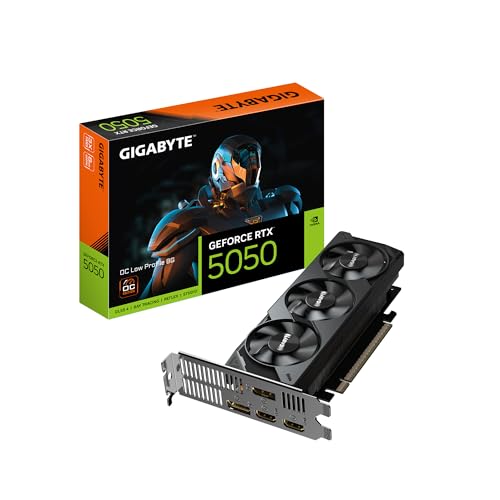
GIGABYTE’s second low-profile card in this guide sits one tier below its sibling, and the comparison between them is the most instructive in the list. The RTX 5050 OC Low Profile carries 8GB of memory on a 128-bit bus — GDDR6 here rather than the 5060’s GDDR7 — on a PCIe 5.0 interface, with support for up to four displays. Same capacity, same bus width, same format, newer-generation silicon than the 3050 and 6400 below it: the differences are memory technology and GPU tier, and a buyer choosing between the two Gigabytes is really deciding how much GPU muscle their games need once memory adequacy is equal.
That framing flatters the 5050 more than a raw ranking would. For the slim-build mainstream — 1080p panels, a library mixing esports, back-catalogue and current releases at sensible settings — the 5050’s tier is sufficient, and its 8GB buffer gives it the same texture headroom as the stronger card. Where the 5060 LP pulls ahead is in demanding scenes and heavier effects, not in the everyday adequacy that decides most evenings of play. Buyers whose slim machine is a second PC, a living-room box or a child’s first gaming desktop will recognise this card as the proportionate spend.
The four-display support, shared with its sibling, deserves emphasis because it is unusual generosity at this tier and format. A half-height card that can run a television and three monitors turns a compact desktop into the household’s flexible machine: media centre, homework station, trading desk, games box. Low-profile buyers are disproportionately people making one small machine do several jobs, and display count is the specification that decides how many jobs it can do at once.
Power and cooling expectations mirror the tier: undemanding by current standards, still deserving of a case with some air movement, and still a card whose fan will be audible in a silent room under full load. None of that is a criticism within this format. Judged as the value expression of the new generation in half height — current interface, current features, adequate memory, honest tier — the 5050 LP is easy to recommend, and it is the pick this guide expects to satisfy the largest number of slim-case owners per unit of money spent.
Buyers hesitating between the two Gigabyte cards should run a simple test against their own library. List the three games you play most, and ask whether any of them is a current, graphically ambitious release you intend to run at high settings. If the answer is no — if your evenings are esports, strategy, back-catalogue and the occasional mainstream title at sensible settings — the 5050 LP covers your actual life, and the saving against its sibling is real money kept. If one of those three games is exactly the demanding kind, the 5060 LP’s extra tier is not a luxury but the difference between the settings you want and the settings you settle for. Cards should be bought against libraries, not against charts.
- Memory fitted: 8GB GDDR6 on a 128-bit bus
- Host interface: PCIe 5.0
- Display support: up to four displays per the listing
- Format: low-profile half-height design
- Edition: factory overclocked OC model
Strengths
- 8GB of memory matches the stronger sibling’s capacity at a lower tier and price.
- Current-generation interface and features in the half-height format.
- Four-display support is generous for a value card and suits multi-job machines.
Trade-offs
- GDDR6 rather than GDDR7, with the bandwidth difference that implies.
- A tier below the 5060 LP in demanding scenes and heavy effects.
- Still a half-height cooler, with the noise-under-load character of the format.
Best for: slim builds at 1080p whose libraries mix light and mainstream gaming, and multi-purpose compact desktops. Not suited for: players who want the strongest half-height performance available, which is the RTX 5060 LP’s entire reason for existing.
GIGABYTE GeForce RTX 4060 Low Profile (prose only) — Previous-gen favourite, unlinked
This pick carries no purchase link, and the reason is a small case study in why this guide verifies listings instead of trusting search results. The RTX 4060 Low Profile is a real and well-regarded design — the previous generation’s strongest half-height card, with 8GB of memory and an efficiency profile that made it the default recommendation for slim gaming builds during its generation. When this guide’s pool was assembled, however, the listing that search returned under its name was GIGABYTE’s full-height Gaming OC card: a different product that would not fit the cases this guide is written for. Linking it would have been easy, popular and wrong, so the card is discussed here in prose and linked nowhere.
On its merits, a genuine RTX 4060 Low Profile remains an excellent slim-build card where it can be found through a listing you have personally verified as the half-height model. Its generation brings DLSS 3-era features and strong efficiency, and its 8GB buffer matches the current Gigabyte pair. Buyers who locate the true low-profile version from a seller whose listing shows the half-height bracket and correct dimensions are buying a card this guide would happily have linked; the prose-only status reflects the listing we could verify, not a judgement on the hardware.
The practical lesson generalises beyond this one card, and it is worth stating for every reader of this guide: in the low-profile category, always confirm the bracket and the card’s height on the listing itself, ideally in the manufacturer’s own specification, before ordering. Sellers’ titles compress, search indexes confuse siblings, and the cost of the confusion is borne by the person holding a card that will not fit. Two minutes of verification is the cheapest insurance in this entire category.
It is worth adding that the 4060 generation’s efficiency made its low-profile version a favourite of the home-theatre community specifically, because a card that sips power also whispers, and a whispering card can live in the same room as a film. Owners building around media first and gaming second often rate that acoustic quality above a tier of performance, and on that scale the genuine 4060 LP still competes with the newer cards in this guide rather than merely preceding them. Should a verified listing appear in a future pool refresh, this is the pick whose link status would change first — the prose is written to be read alongside the linked reviews, not beneath them.
- Memory fitted: 8GB (model specification)
- Generation: previous-generation RTX 40-series
- Format: low-profile design — verify bracket on any listing
- Link status: prose only; returned listing was the full-height Gaming OC card
- Feature set: DLSS 3-era support
Strengths
- Proven half-height performance with an efficiency profile slim builds love.
- 8GB of memory keeps it adequate at 1080p today.
- Strong previous-generation feature support, including its DLSS generation.
Trade-offs
- No verified low-profile listing in this guide’s pool, so no link is offered.
- Being previous-generation, stock of the genuine model is inconsistent.
- Buyers must verify the bracket themselves; the name alone does not guarantee the format.
Best for: informed buyers who can verify a genuine half-height listing from a seller they trust. Not suited for: anyone ordering in a hurry, who should take the linked RTX 5060 LP and its certainty instead.
GeForce GTX 1650 Low Profile (prose only) — Legacy budget route
The sixth slot in this guide goes to a class of card rather than a single verified listing: the low-profile GeForce GTX 1650 designs that served as the default slim-gaming upgrade for years. They are included, unlinked, because they still populate the second-hand market and the shelves of small PC shops, and a reader researching this category will meet them constantly. Context helps that reader judge them: the GTX 1650 generation predates the RTX feature set entirely — no hardware ray tracing worth the name, no DLSS — and its typical 4GB of memory marks it as a card for light 1080p and older libraries.
Why would anyone choose one today? The honest answers are price and power. As a used purchase, a low-profile GTX 1650 can cost very little, draw its power from the slot, and transform a slim office machine into something that plays a decade of games respectably. For a child’s first PC assembled from a donated desktop, or a retro-focused living-room box, that arithmetic is sound. The card’s simplicity is also its reliability: no power cables, no driver drama, no heat problem a small case cannot solve.
The boundary is equally clear. Against the linked MSI RTX 3050 LP — also slot-powered, also simple — the GTX 1650 class gives up DLSS, memory and several years of driver runway, and new listings for it, where they exist, are rarely priced with the humility its age deserves. This guide’s advice is to treat it as a used-market instrument only: buy it cheap, from a seller you can return it to, for a machine whose ambitions you have honestly capped. At anything approaching the price of the linked picks, the comparison is not close.
A final word on where these cards hide, for the bargain hunter this section addresses. Ex-lease slim desktops are sold in volume by refurbishers, and low-profile GTX 1650 cards surface in the same channels — pulled from upgraded machines, bundled with brackets of uncertain provenance, priced by sellers who know exactly what they have. Check that the low-profile bracket is included or available, confirm the card’s outputs match your monitor’s inputs, since designs vary, and prefer listings with a returns window over the absolute lowest price. The difference of a small sum buys the right to hand back a card that turns out to be a different variant than its photograph promised.
- Memory typically fitted: 4GB (varies by design)
- Generation: GTX 16-series, pre-RTX features
- Format: low-profile designs from several partners
- Link status: prose only; no single verified listing in the pool
- Power profile: slot-powered class
Strengths
- Very cheap on the used market and completely undemanding to install.
- Slot power suits the weakest slim power supplies.
- Covers a decade of lighter games at 1080p respectably.
Trade-offs
- No DLSS and no meaningful ray tracing; the feature set is two generations old.
- 4GB-class memory limits modern titles immediately.
- New listings, where found, are often priced beyond its worth.
Best for: ultra-budget slim builds assembled from used parts for light and retro gaming. Not suited for: anyone buying new at retail prices, where the RTX 3050 LP and RTX 5050 LP are better money in every direction.
Do Upscaling and Modern Features Matter More, or Less, in This Format?
More — and the reason is arithmetic. A full-size card can brute-force its way past an inefficient setting; a half-height card lives close enough to its limits that recovered performance changes what is playable rather than merely polishing what already was. DLSS on the NVIDIA picks in this guide is therefore not a bullet-point feature but a structural part of their value: the MSI 3050 LP with DLSS enabled in a supported title behaves like a card a class above its silicon, and the Gigabyte pair gain the same multiplier at their higher tiers. When you compare a low-profile card against a cheaper legacy alternative, the upscaling ecosystem is a large part of what the money buys, and it should be priced into the comparison rather than treated as garnish.
The AMD side of the guide answers with FSR, which is implemented per-game and varies in quality accordingly, and the GTX 1650 class answers with nothing at all — native rendering or lowered settings are its only tools. That gradient maps neatly onto this guide’s ordering and explains much of it: each step down the list surrenders not just raw performance but a layer of software assistance that small cards lean on hardest. A buyer choosing between the RX 6400 and the RTX 3050 LP is, in large part, choosing between those software futures, and should do so with their favourite titles’ feature support open in another tab.
Video output deserves a mention in the same breath, because slim machines so often serve screens that are not monitors. Modern outputs on the current cards handle high-refresh 1080p and 4K television duties cleanly, including the handshake quirks that older cards sometimes fumble with newer TVs. A living-room build that sleeps, wakes and switches inputs without drama is worth more than a nominally faster card that needs its cable reseated weekly, and the current-generation picks in this guide are the safest hands for that domestic duty.
Which Slim Machines Can Actually Power These Cards?
Power is the low-profile category’s hidden specification, so it deserves direct treatment. A PCIe slot supplies up to 75 watts, and cards designed to live within that budget — the MSI 3050 LP, the RX 6400 and the GTX 1650 class in this guide — can be installed in almost any slim desktop ever sold, including machines with proprietary supplies that cannot be replaced. Cards that exceed slot power need a supplementary connector and a supply with headroom to feed it, which is common in custom small-form-factor builds and rare in ex-corporate slim towers. Identify which world your machine lives in before falling for a card: open the case or find its service manual, read the supply’s label, and note whether a spare power connector exists at all.
Cooling follows the same logic of small volumes. A half-height card exhausts into a case with little spare air, so intake and exhaust paths matter more, not less, than in a tower. Many slim desktops benefit from nothing more exotic than cleaning their vents and confirming their single fan still spins freely; a card installed into a dust-insulated case will run hot regardless of its cooler design. Treat the five minutes of housekeeping as part of the upgrade, and the card you chose will perform like the card you researched.
Installing a Half-Height Card Without the Usual Drama
The physical installation follows a sequence worth respecting, because slim cases punish improvisation. Power the machine down completely and unplug it; proprietary slim supplies hold charge and their connectors are unforgiving. Photograph the interior before touching anything — in a crowded small case, that photograph is your reassembly map. Remove the slot cover or the existing card, noting that many slim desktops use a retaining bar or a tool-less latch rather than a screw, and keep whatever you remove in a dish rather than on the carpet. If your card ships with the full-height bracket fitted, swap to the low-profile bracket now, on the bench, where the tiny screws can be seen and caught; doing it after the card is seated invites a dropped screw into the power supply, which converts a ten-minute job into an afternoon.
Seat the card with even pressure until the slot latch engages, connect a power cable only if your card requires one and your supply provides it, and close nothing yet. Boot once with the case open, confirm the fan spins and the display wakes on the card’s output rather than the motherboard’s, then install the current driver for your card’s maker before any game is launched. Only then refit the cover, checking as it slides home that no cable has wandered into the fan’s path — the signature sound of a slim build finished in a hurry is a wire brushing a spinning blade, and it is always easier to prevent than to diagnose through a closed case at midnight.
How the Six Options Stack Up for Slim Builds
| Card | Memory | Power route | Best slim use |
|---|---|---|---|
| GIGABYTE RTX 5060 LP | 8GB GDDR7 | Check supply headroom | Strongest slim gaming |
| MSI RTX 3050 LP | 6GB GDDR6 | Slot power | Ex-office desktop rescue |
| Sapphire RX 6400 LP | 4GB GDDR6 | Slot power | Light gaming, tightest cases |
| GIGABYTE RTX 5050 LP | 8GB GDDR6 | Check supply headroom | Value new-generation slim build |
| RTX 4060 LP (prose only) | 8GB | Model-dependent | Verified-listing bargain hunting |
| GTX 1650 LP class (prose only) | 4GB class | Slot power | Used-market budget builds |
Living-Room Duty: What a Slim Gaming Card Owes the Television
A large share of low-profile cards end their journey under a television, and that destination imposes its own specification sheet. The machine must wake reliably from sleep when the TV input changes, hold its display handshake through receiver and soundbar chains, and run quietly enough that a film’s quiet scenes are not scored by a fan. Every card in this guide can serve that room, but they serve it differently: the current Gigabyte cards bring the newest output standards and the strongest gaming ceiling, the MSI brings slot-powered simplicity, and the Sapphire brings the coolest, quietest light-duty profile. Choosing among them for a living room is mostly choosing which of those virtues your evenings use most.
Controller distance and wireless peripherals matter more than any card specification once the machine is in place, yet the card decides one living-room essential: whether the same box can stream, record and play at once. Hardware video encoding on the RTX cards lets a slim PC capture gameplay or transcode media for the household while a game runs, duties that push a purely CPU-bound slim machine past its comfort. Households consolidating several boxes into one small machine should weigh that versatility heavily, because it is the difference between a games card in a PC and the household’s media engine that also plays games.
Finally, plan the television’s resolution honestly. A 4K television does not oblige 4K gaming: every card here can output a 4K desktop and video signal while games render at 1080p and upscale through the TV or the card’s own features, a combination most viewers find indistinguishable from the sofa at normal distances. Owners who accept that arrangement get the full benefit of their panel for film and the full benefit of their card for games, without paying for a tier of hardware the viewing distance would forgive them for skipping.
What Goes Wrong Most Often With Low-Profile Upgrades?
The most frequent failure is the one this guide’s prose-only pick illustrates: ordering a card whose name promised low profile and receiving its full-height sibling. Verify the bracket and dimensions on the manufacturer’s specification, not the marketplace title. The second failure is power optimism — assuming a slim supply has a spare connector it does not, or headroom its label never promised. The third is depth: some slim cases accept half-height cards only at reduced length, and a tape measure across the slot, past the drive cage, settles the question in seconds.
A subtler mistake is buying for the wrong monitor. Slim machines often drive televisions, and a card chosen for 1080p gaming is a fine match for a 1080p or 4K television used at 1080p, but a poor one for a 4K panel the owner intends to game on natively. Match the card to the screen’s actual gaming resolution, and the modest tiers in this guide will feel stronger than their specifications suggest; mismatch them, and even the RTX 5060 LP will feel like a disappointment it did not earn.
How Long Will a Half-Height Card Stay Useful, and What Comes After?
Longevity in this format is governed less by the card than by the stability of its job. A slim machine with a fixed role — the living-room box, the rescued office desktop, the compact second PC — tends to keep that role for years, and a card matched honestly to the role ages at the role’s pace rather than the industry’s. The RTX 5060 LP and 5050 LP have the longest runways here because they start from the current generation’s features and memory; the 3050 LP follows on driver support and DLSS; the RX 6400 and GTX 1650 class serve libraries that barely change, which is its own kind of longevity. The cards that disappoint are never the modest ones bought for modest jobs — they are the ones bought for jobs they were never sized to do.
When replacement day eventually comes, the format’s constraints make the decision refreshingly narrow: the same three checks — bracket, power, depth — produce a shortlist of whatever the then-current half-height generation offers, and the machine’s other components usually soldier on. That continuity is an underappreciated virtue of building small. The slim desktop rescued in this guide’s scenarios is rarely at the end of its life when its card is; it is a platform with a replaceable heart, and owners who understand that stop fearing the upgrade cycle and start scheduling it.
One practical habit extends every card in this list: keep the machine’s intake paths clean and its drivers current, and revisit game settings once a year rather than assuming the configuration from installation day still fits the library you now play. Small cards live close to their margins, and small acts of maintenance are worth more, proportionally, than they are in a tower with air to spare. Treat the little machine well and it will repay you in the currency this whole category trades in — years of service from hardware the size of a paperback.
Final Recommendation
If your slim case and power supply can support it, GIGABYTE’s RTX 5060 OC Low Profile is the recommendation this guide leads with: it is the first half-height card in several generations that asks its owner to compromise on format alone, not on era. Where the power supply is sealed and modest — the classic ex-office rescue — MSI’s RTX 3050 LP is the card that will actually install, and an installed card beats a returned flagship every time. The RTX 5050 LP splits the difference for value-minded new builds, the RX 6400 serves the lightest duties with the least fuss, and the two prose-only picks reward careful second-hand shoppers. Measure your slot, read your power supply’s label, and then buy the strongest card those two facts allow — in a slim case, honesty about the box is what performance is made of. And take quiet satisfaction in the result when it comes together: a machine the size of a shoebox, rescued or purpose-built, playing modern games from under a television or inside a desk nook, is one of the most satisfying sights in PC hardware — proof that the format everyone overlooks was never short of capability, only short of cards worthy of it, and that shortage, on the evidence of the two Gigabytes at the top of this list, is finally over.
Frequently Asked Questions
Will a low-profile card fit a standard ATX case?
Yes, physically, using the full-height bracket most designs include or accept, but there is rarely a reason to choose one for a standard case: you would pay the format’s performance and cooling compromises without needing its one virtue. Low-profile cards earn their place where height is the constraint. In a tower with room, the full-size equivalents in our main graphics guide are the better buy.
Can a slim ex-office desktop really game with one of these?
It is the most common success story in this category. A slot-powered card like the MSI RTX 3050 LP, a memory upgrade if the machine is short, and an SSD if it still spins a hard drive turn a retired office slimline into a competent 1080p games machine. The checks that matter are slot availability, supply wattage and case depth, all verifiable from the machine’s service documentation before any money moves.
Why is one pick in this guide not linked?
Because verification failed honestly: the listing returned for the RTX 4060 Low Profile was its full-height sibling, and this guide does not link a card that would not fit the cases it is written for. The hardware discussion remains because the genuine model is worth knowing about; the link waits for a listing that can be verified as the real half-height card.
Does the RX 6400 make sense beside the RTX 3050 LP?
For the tightest power budgets and the lightest libraries, yes. It asks less of the machine and gives less back, and for a media-centre PC that plays undemanding games it is proportionate. Where the budget reaches the MSI, the extra memory and DLSS support make the 3050 LP the stronger long-term card for most slim builds.
Should a slim build’s owner consider an external GPU instead?
Occasionally, and the honest answer requires naming the trade. An external GPU enclosure frees a machine from half-height limits entirely, but it demands a suitable high-speed port that most slim desktops — especially the ex-office machines at the heart of this guide — simply do not have, and it costs more than several of the cards listed here before a GPU is even added. For the custom small-form-factor builds with modern ports, it is a legitimate alternative worth researching; for the rescued slimline that this guide mostly serves, the internal low-profile card remains the practical, proportionate answer, and the enclosure is a solution shopping for a problem the bracket already solved.
What should you check on the listing before ordering any low-profile card?
Three things: the bracket height or an explicit low-profile designation in the manufacturer’s specification, the card’s length against your case’s clearance past the slot, and the power requirement against your supply’s label and available connectors. Those checks take minutes and prevent every common failure this category produces.
Related Guides
One closing encouragement for the reader mid-rescue, parts on the desk and a slim case open like a book: this category rewards patience more than money. Seat the card, mind the bracket, let the drivers settle, and the modest little machine in front of you is about to have a second career more entertaining than its first. That transformation — an office castoff becoming the household’s games machine — is the best story in PC hardware, and every card in this guide exists to help a version of it happen.
Slim-build owners planning the rest of the machine may also want our guide to the best NVIDIA gaming graphics cards for the full-size alternatives, our roundup of the best M.2 NVMe SSDs for the storage upgrade slim desktops usually need next, and our picks for the best external SSDs when a sealed case leaves expansion to the outside.
Related guides
- Best 4K UHD HDR HDMI Extenders: 4K60, Long-Run and 4K120 Kits Compared
- Best 25–35 Inch Monitors With Lowest Display Lag: An Honest Ranking Without Invented Numbers
- Best Enterprise SATA SSDs: Endurance Classes, Power-Loss Protection and Fleet Sense
- Best Color Product Label Printers: Six Desktop Machines for Short-Run Product Labels



[…] weighing the wider build around these cards may also want our guide to the best low profile graphics cards for gaming for compact cases, our graphics card picks for photo and video editing if the same machine earns […]